Ed Nisley's Blog: Shop notes, electronics, firmware, machinery, 3D printing, laser cuttery, and curiosities. Contents: 100% human thinking, 0% AI slop.
Tag: Improvements
Making the world a better place, one piece at a time
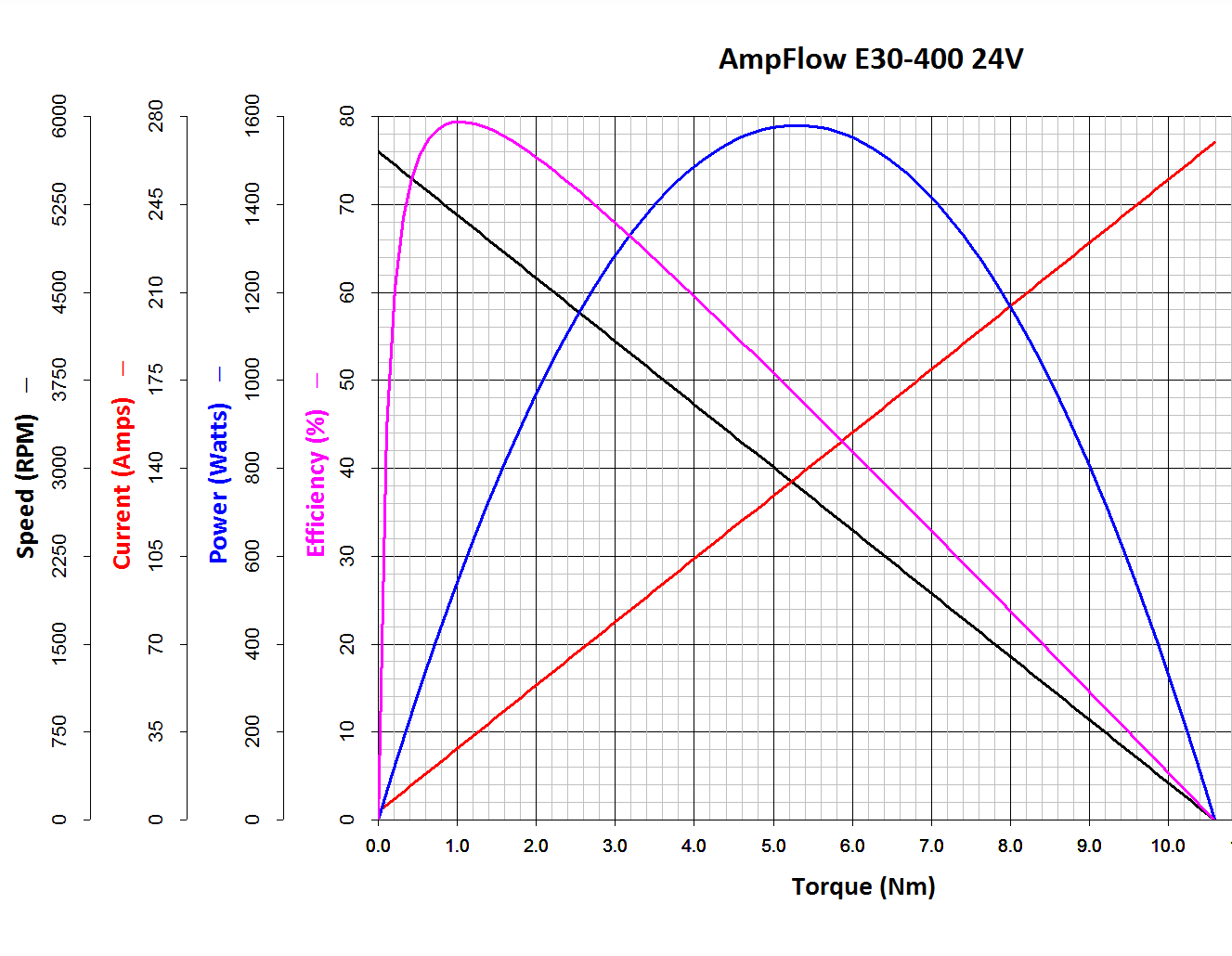
The Power Wheels Racer rules limit the motor to 1440 W, a tidy 60 A at 24 V. Let’s call it 70 A, which lines up neatly with the second major division up from the bottom: the orange current line hits 70 A with torque = 2.6 N·m.
Draw a vertical line at that point and read off all the other parameters from the scales on the left.
The motor will produce 2.6 N·m at just shy of 4500 RPM; call it 4400 RPM.
The SqWr Racer has 9:40 chain-drive gearing, so the rear wheels turn at:
990 RPM = 4400 RPM x (9/40)
With 13 inch diameter wheels, the racer moves at:
38 mph = 990 RPM x (π x 13 inch) x (60 min/hr) x (1 mile / 63.36x103 inch)
Which is scary fast if you ask me. A higher ratio may be in order.
At that speed the motor delivers: 1.6 HP = 1180 W = 2.6 N·m x 4400 RPM x 2π rad/rev / (60 s/min)
… to the shaft and, minus mechanical losses, to the tires.
If the racer doesn’t require that much power to roll at breakneck speed, it’ll go even faster, until the motor’s (falling) power output matches the (rising) mechanical load at some higher speed with correspondingly lower current.
With a current of 70 A and a winding resistance of 0.089 Ω (let’s say 0.10 Ω), the motor dissipates 490 W. That’s probably too much for long-term running, even with a 70% (= 1150 / (1150 + 490)) efficiency.
The mandated Littelfuse 60 A fuse has a bit under 1 mΩ of cold resistance and will dissipate 3.6 W at 60 A. The specs say it will blow within 6 minutes at rated current.
The resistance of the wiring / connectors / switches / whatever should be on that same order. Figuring the racer needs 2 m of stranded copper wire, that calls for 2 AWG or larger (0.5 mΩ/m). Right now, the racer uses 8 AWG (2 mΩ/m) and might have 4 mΩ total resistance, although I think it has less than 2 m of wire. Empirically, the motor conductors get really hot at 40 A for about ten seconds, but that’s with a severely defunct motor.
If the conductors + connectors between the battery and the motor introduce, say, 10 mΩ of resistance, they’ll dissipate 36 W at 60 A. That scales linearly with resistance, so a high-resistance connection will incinerate itself.
Using a PWM controller to reduce the speed will reduce the available horsepower, so the racer will accelerate slowly. With the torque limited to 2.6 N·m, the horsepower will vary linearly with the PWM duty cycle: nearly zero for small PWM, up to 1.5 HP for large PWM at 60 A, then upward as the RPM increases with decreasing load. Yeah, you get more torque when you need it least.
I could make a case for a three-speed transmission in addition to higher gear ratio, although that seems overly complex.
A less beefy motor will be in order and The Mighty Thor suggests a torque converter as a low-budget transmission. Sounds good to me; I should learn more about electric traction motors…
Mary started doing “ruler quilting” that involves sewing seams aligned with templates, only to find that the thumbscrew holding the (modified) presser foot obscures the view to the left of the needle:
Kenmore Model 158 – OEM Presser Foot Screw
The screw looked to be 6-32 and I wanted to use a socket head cap screw, but thread turns out to be 6-40. Having previously bought the Brownell’s Fillister Head Screw Assortment specifically to solve that problem, all I had to do was cut the screw to length:
Kenmore Model 158 – Small Presser Foot Screw
The washer epoxied to the screw provides a bit more bearing surface.
Rather than putz with a screwdriver, this handle locates itself around the screw head; turn until the blade clicks into the screw slot, then tighten or loosen as needed:
Kenmore Model 158 – Presser Foot – Driver and Screw
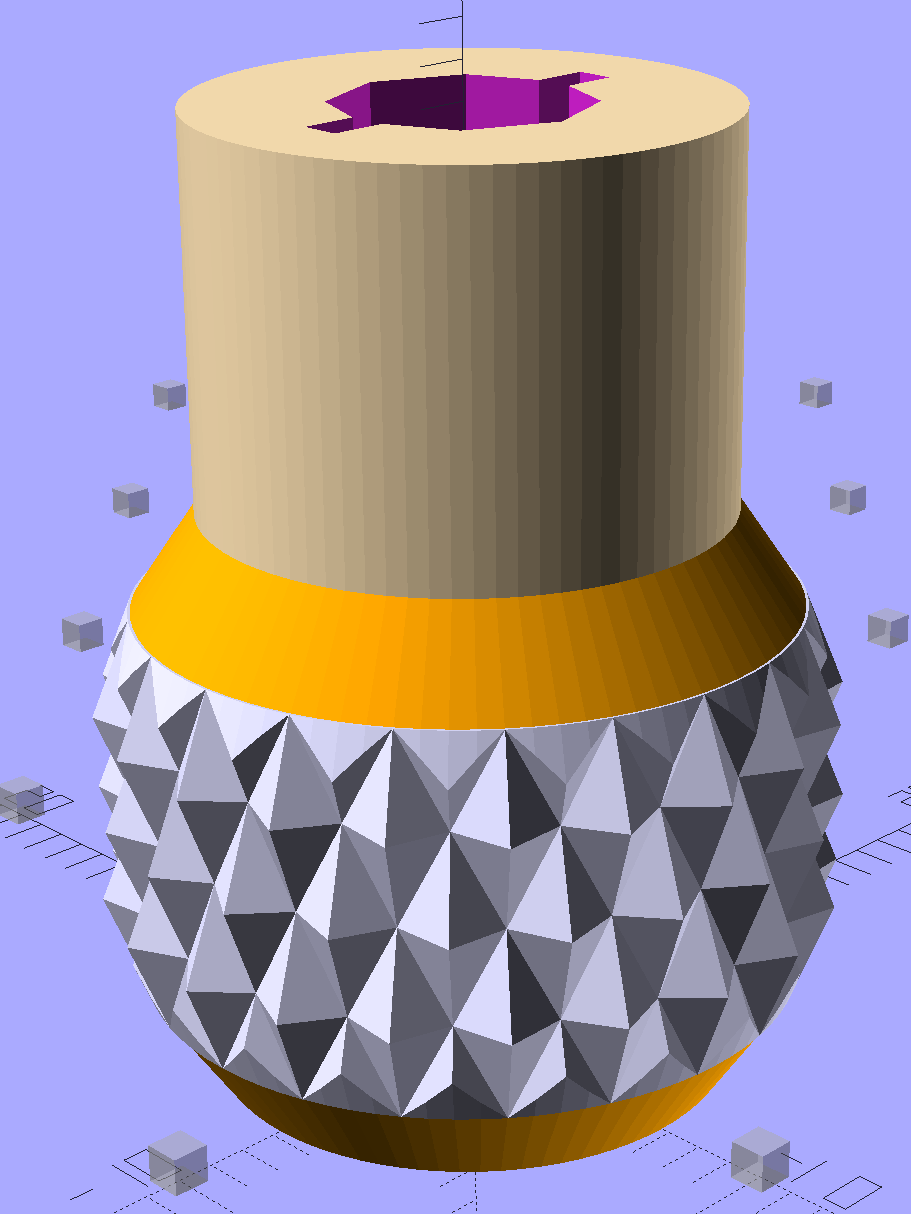
The slot holds a chunk of spring steel (barely visible in the driver’s snout in group photo above) that accounts for the fat shaft around the screw head:
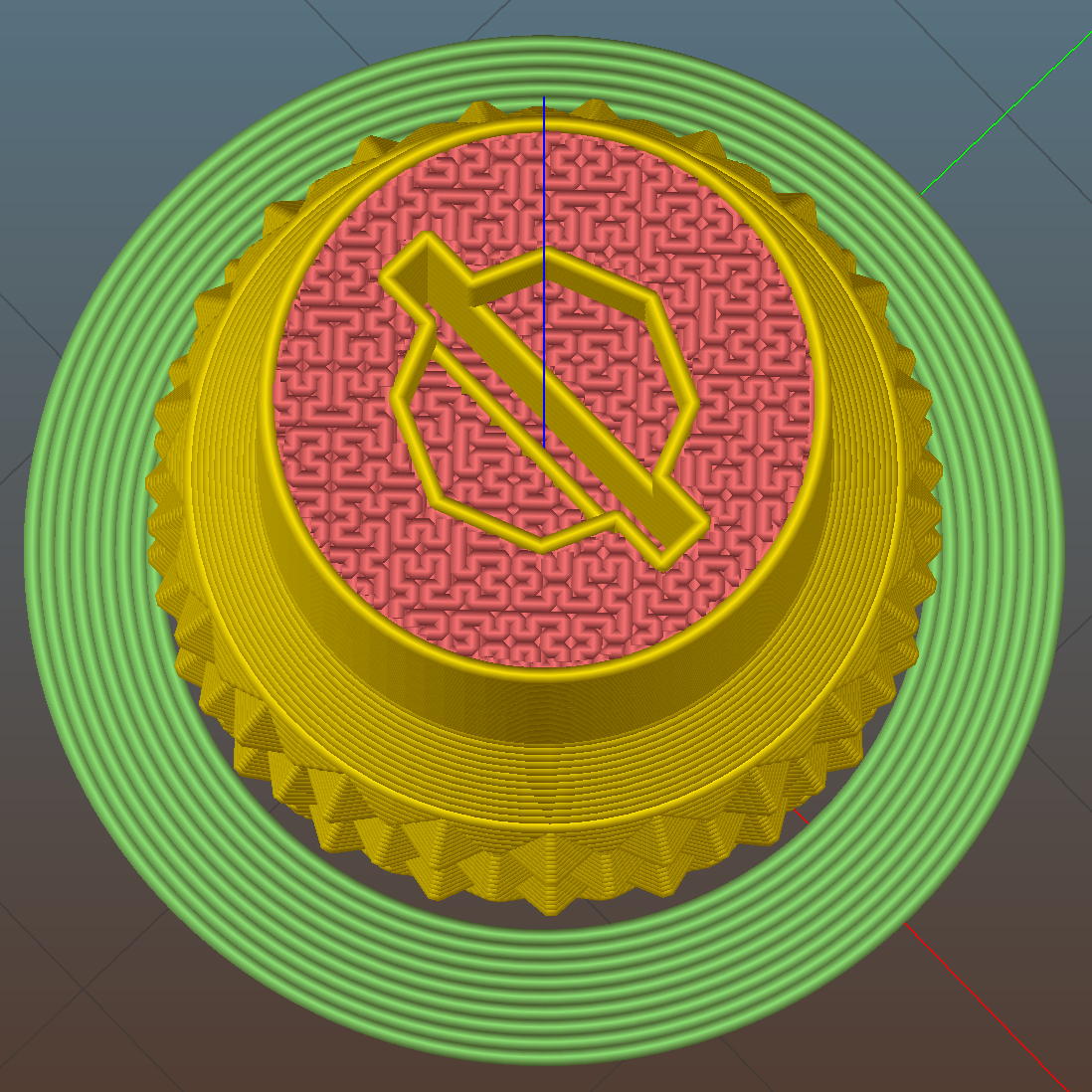
Presser Foot Screw Driver – top – Slic3r
I think the shaft could be a few millimeters narrower, but a bit of meat around the ends of the blade will support it against the torque.
The screw head slot is about 1 mm and the blade is 0.75 mm. I chopped the blade to fit by whacking the spring with a poorly tempered cold chisel, then flexing across the impact line until it broke. That chisel needed sharpening anyhow.
A dab of epoxy along the slot edges holds the blade in place. I inserted it flush with the top of the socket, then lined up the screw and pushed, with the steel bottomed out in the screw head and riding down for a perfect fit.
Then it’s all good!
The OpenSCAD source code:
// Presser Foot Screw Driver for Kenmore Model 158
// Ed Nisley - KE4ZNU - December 2015

use <knurledFinishLib_v2.scad>

//- Extrusion parameters must match reality!
//  Print with 2 shells and 3 solid layers

ThreadThick = 0.20;
ThreadWidth = 0.40;

HoleWindage = 0.3;			// extra clearance to improve hex socket fit

Protrusion = 0.1;			// make holes end cleanly

inch = 25.4;

//----------------------
// Dimensions

SocketDia = 5.75;				// generous fit on 6-40 fillister screw head
SocketDepth = 3.2;

Blade = [9.0,1.0,ceil(SocketDepth + 5)];		// inserted metal driver blade
echo(str("Blade: ",Blade));

ShaftDia = 1.5*Blade[0];		// un-knurled section diameter
ShaftLength = 10.0;				//  ... length

KnurlLen = 10.0;				// length of knurled section
KnurlDia = 18.0;				//   ... diameter at midline of knurl diamonds
KnurlDPNom = 30;				// Nominal diametral pitch = (# diamonds) / (OD inches)

DiamondDepth = 1.0;				//   ... depth of diamonds
DiamondAspect = 2;				// length to width ratio

KnurlID = KnurlDia - DiamondDepth;		// dia at bottom of knurl

NumDiamonds = ceil(KnurlDPNom * KnurlID / inch);
echo(str("Num diamonds: ",NumDiamonds));

NumSides = 4*NumDiamonds;		// 4 facets per diamond

KnurlDP = NumDiamonds / (KnurlID / inch);				// actual DP
echo(str("DP Nom: ",KnurlDPNom," actual: ",KnurlDP));

DiamondWidth = (KnurlID * PI) / NumDiamonds;

DiamondLenNom = DiamondAspect * DiamondWidth;					// nominal diamond length
DiamondLength = KnurlLen / round(KnurlLen/DiamondLenNom);		//  ... actual

TaperLength = 0.50*DiamondLength;

KnobOAL = 2*TaperLength + KnurlLen + ShaftLength;

//----------------------
// Useful routines

module PolyCyl(Dia,Height,ForceSides=0) {			// based on nophead's polyholes

  Sides = (ForceSides != 0) ? ForceSides : (ceil(Dia) + 2);

  FixDia = Dia / cos(180/Sides);

  cylinder(r=(FixDia + HoleWindage)/2,
           h=Height,
	   $fn=Sides);
}

module ShowPegGrid(Space = 10.0,Size = 1.0) {

  Range = floor(50 / Space);

	for (x=[-Range:Range])
	  for (y=[-Range:Range])
		translate([x*Space,y*Space,Size/2])
		  %cube(Size,center=true);
}


//- Build it

ShowPegGrid();

difference() {
	union() {
		render(convexity=10)
		translate([0,0,TaperLength])			// knurled cylinder
			knurl(k_cyl_hg=KnurlLen,
				  k_cyl_od=KnurlDia,
				  knurl_wd=DiamondWidth,
				  knurl_hg=DiamondLength,
				  knurl_dp=DiamondDepth,
				  e_smooth=DiamondLength/2);
		color("Orange")							// lower tapered cap
		cylinder(r1=ShaftDia/2,
					r2=(KnurlDia - DiamondDepth)/2,
					h=(TaperLength + Protrusion),
					$fn=NumSides);
		color("Orange")							// upper tapered cap
		translate([0,0,(TaperLength + KnurlLen - Protrusion)])
			cylinder(r2=ShaftDia/2,
					r1=(KnurlDia - DiamondDepth)/2,
					h=(TaperLength + Protrusion),
					$fn=NumSides);
		color("Moccasin")						// cylindrical extension
		translate([0,0,(2*TaperLength + KnurlLen - Protrusion)])
			cylinder(r=ShaftDia/2,h=(ShaftLength + Protrusion),$fn=NumSides);

	}

	translate([0,0,(KnobOAL - SocketDepth + Protrusion)])
		PolyCyl(SocketDia,(SocketDepth + Protrusion),8);	// screw head socket

	translate([0,0,KnobOAL - (Blade[2] - Protrusion)/2])
		cube(Blade + [0,0,Protrusion],center=true);
}
The original Mood Light firmware used the current time in milliseconds as a factor in the sin() argument, assuming that the Arduino runtime would Do The Right Thing. Having been gently disabused of that notion, here’s another pass that resets the argument after every full cycle to keep the trig from going crazy. Thanks to all of you for helping out… [grin]
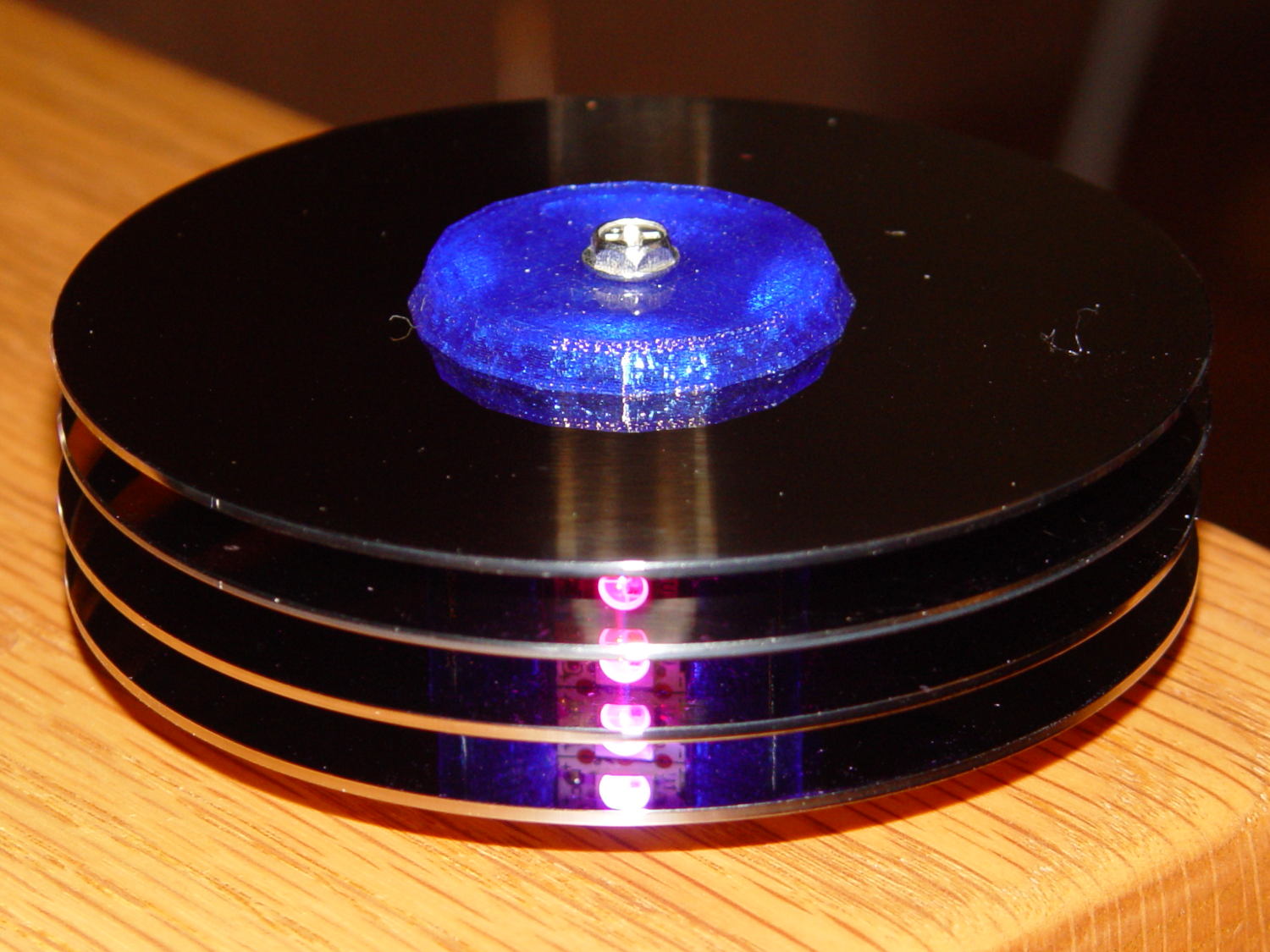
The hardware still looks like this, though:
Hard Drive Mood Light – high angle
Define a structure to hold everything needed to calculate each color, then make an array holding one structure per color:
The general idea is to increment the integer Step from 0 through NumSteps - 1 to create the sine wave, with the total number of steps per cycle being Prime times the RESOLUTION.
The angular argument is Step * StepSize, with the size of each step equal to 2π / NumSteps. Because Step gets reset to zero after reaching NumSteps - 1, the argument never exceeds 2π and the trig never falls off the rails.
Soooo, calculating the PWM value for each color goes like this:
The MaxPWM parameter limits the perceived brightness, although not the peak current. Each Neopixel dissipates 300-ish mW at full throttle, they’re mounted on a plastic structure, and there’s not a lot of air flowing between those platters; running at half power makes a lot of sense.
Initializing the structure values happens in the setup() function, because it’s easier than filling in all the array structure entries by hand:
The Phase value has Gone Away, because it really didn’t add anything to the proceedings. Instead, I randomize the starting Step, although there’s not a lot of randomness to be had early on in an Arduino program; that needs a bit more work. Adding a little PCB with a random noise source doesn’t seem cost-effective, although a photodetector peering out the side and adjusting the MaxPWM values might be a Good Thing.
Come to think of it, limiting the sum of the PWM values might be more useful than limiting their individual maximum values. That’s a simple matter of software…
The main() loop doesn’t have a lot to do. Every 25 ms it updates the three color PWM values, sets the new values into all 12 LED buffer locations, and sends the whole mess to the Neopixels. The RESOLUTION value acts as a gearshift between the 25 ms update rate and the speed at which complete cycles zip past. Absent the Prime factor, each cycle would require 25 ms * RESOLUTION ms to complete: call it 25 seconds.
The Prime factors slow that down proportionally and push the repetition interval out to the product of all the factors. For the (5, 7, 11) factors shown below, that’s 5x7x11x253 s = 6×10⁶ s = 70 days,
Now it doesn’t matter how often the millis() value wraps. Every now & again, MillisThen will be just under 232 and MillisNow will be just over 0, but their (unsigned) difference will be some huge number, the conditional will trip, and nobody will notice the timing glitch…
The Arduino source code:
// Neopixel mood lighting for hard drive platter sculpture
// Ed Nisley - KE4ANU - November 2015
#include <Adafruit_NeoPixel.h>
//----------
// Pin assignments
const byte PIN_NEO = 6; // DO - data out to first Neopixel
const byte PIN_HEARTBEAT = 13; // DO - Arduino LED
//----------
// Constants
const unsigned long UpdateMS = 25ul - 4ul; // update LEDs only this many ms apart minus loop() overhead
//----------
// Globals
unsigned long MillisNow;
unsigned long MillisThen;
Adafruit_NeoPixel strip = Adafruit_NeoPixel(12, PIN_NEO, NEO_GRB + NEO_KHZ800);
uint32_t FullWhite = strip.Color(255,255,255);
uint32_t FullOff = strip.Color(0,0,0);
struct pixcolor_t {
	byte Prime;
	unsigned int NumSteps;
	unsigned int Step;
	float StepSize;
	byte MaxPWM;
	byte Value;
};

enum pixcolors {RED, GREEN, BLUE, PIXELSIZE};

#define RESOLUTION 1000

struct pixcolor_t Pixels[PIXELSIZE]; // everything that calculates the pixel colors
byte Map[] = {0,5,6,11, 1,4,7,10, 2,3,8,9}; // pixel numbers around platter, bottom to top.
//-- Figure PWM based on current state
byte StepColor(byte Color) {
Pixels[Color].Value = (Pixels[Color].MaxPWM / 2.0) * (1.0 + sin(Pixels[Color].Step * Pixels[Color].StepSize));
Pixels[Color].Step = (Pixels[Color].Step >= Pixels[Color].NumSteps) ? 0 : Pixels[Color].Step + 1;
if (0 == Pixels[Color].Step) {
printf("Color %d cycle end at %d\r\n",Color,Pixels[Color].NumSteps);
}
// printf("Step: %d Color: %d Value: %d\r\n",Pixels[Color].Step,(word)Color,(word)Pixels[Color].Value);
return Pixels[Color].Value;
}
//-- Helper routine for printf()
int s_putc(char c, FILE *t) {
Serial.write(c);
}
//------------------
// Set the mood
void setup() {
pinMode(PIN_HEARTBEAT,OUTPUT);
digitalWrite(PIN_HEARTBEAT,LOW); // show we arrived
Serial.begin(57600);
fdevopen(&s_putc,0); // set up serial output for printf()
printf("Mood Light with Neopixels\r\nEd Nisley - KE4ZNU - November 2015\r\n");
/// set up Neopixels
strip.begin();
strip.show();
// lamp test: run a brilliant white dot along the length of the strip
printf("Lamp test: walking white\r\n");
strip.setPixelColor(0,FullWhite);
strip.show();
delay(500);
for (int i=1; i<strip.numPixels(); i++) {
digitalWrite(PIN_HEARTBEAT,HIGH);
strip.setPixelColor(i-1,FullOff);
strip.setPixelColor(i,FullWhite);
strip.show();
digitalWrite(PIN_HEARTBEAT,LOW);
delay(500);
}
strip.setPixelColor(strip.numPixels() - 1,FullOff);
strip.show();
delay(500);
// and around the disks
printf(" ... using Map array\r\n");
strip.setPixelColor(Map[0],FullWhite);
strip.show();
delay(250);
for (int i=1; i<strip.numPixels(); i++) {
digitalWrite(PIN_HEARTBEAT,HIGH);
strip.setPixelColor(Map[i-1],FullOff);
strip.setPixelColor(Map[i],FullWhite);
strip.show();
digitalWrite(PIN_HEARTBEAT,LOW);
delay(250);
}
strip.setPixelColor(Map[strip.numPixels() - 1],FullOff);
strip.show();
delay(250);
MillisNow = MillisThen = millis();
randomSeed(MillisNow + analogRead(7));
printf("First random number: %ld\r\n",random(10));
	Pixels[RED].Prime = 5;
	Pixels[GREEN].Prime = 7;
	Pixels[BLUE].Prime = 11;

	for (byte c=0; c < PIXELSIZE; c++) {
		Pixels[c].NumSteps = RESOLUTION * Pixels[c].Prime;
		Pixels[c].Step = random(Pixels[c].NumSteps);
		Pixels[c].StepSize = TWO_PI / Pixels[c].NumSteps;
		Pixels[c].MaxPWM = 128;
		StepColor(c);
	}
printf("Prime scales: (%d,%d,%d)\r\n",Pixels[RED].Prime,Pixels[GREEN].Prime,Pixels[BLUE].Prime);
printf("Initial step: (%d,%d,%d)\r\n",Pixels[RED].Step,Pixels[GREEN].Step,Pixels[BLUE].Step);
printf(" ... color: (%d,%d,%d)\r\n",Pixels[RED].Value,Pixels[GREEN].Value,Pixels[BLUE].Value);
for (int i=0; i<strip.numPixels(); i++) { strip.setPixelColor(Map[i],strip.Color(Pixels[RED].Value,Pixels[GREEN].Value,Pixels[BLUE].Value)); } strip.show(); } //------------------ // Run the mood void loop() { // printf("Loop! %ld %ld\r\n",MillisNow,MillisThen); MillisNow = millis(); if ((MillisNow - MillisThen) > UpdateMS) {
digitalWrite(PIN_HEARTBEAT,HIGH);
for (byte c=0; c < PIXELSIZE; c++) {
StepColor(c);
}
for (int i=0; i < strip.numPixels(); i++) {
strip.setPixelColor(i,strip.Color(Pixels[RED].Value,Pixels[GREEN].Value,Pixels[BLUE].Value));
}
strip.show();
MillisThen = MillisNow;
digitalWrite(PIN_HEARTBEAT,LOW);
}
}
After donating the never–sufficiently-to-be-damnedSamsungvacuumcleaner (and all its remaining bags & doodads) to a nonprofit’s tag sale, we picked up a Sears Kenmore Progressive vacuum cleaner that seemed to be the least awful of the current offerings. Unlike all previous vacuum cleaners, its tools & doodads have complex plastic fittings with latches and keyways and all manner of gimcrackery. The designers seem to have hands and legs of far-above-average size, but that’s another rant.
All this came to a head when I attempted to vacuum the fuzz out of the refrigerator’s evaporator coils, because the long snout that reaches the back of the refrigerator doesn’t fit the aperture in the giant handle.
Well, at least I can fix that…
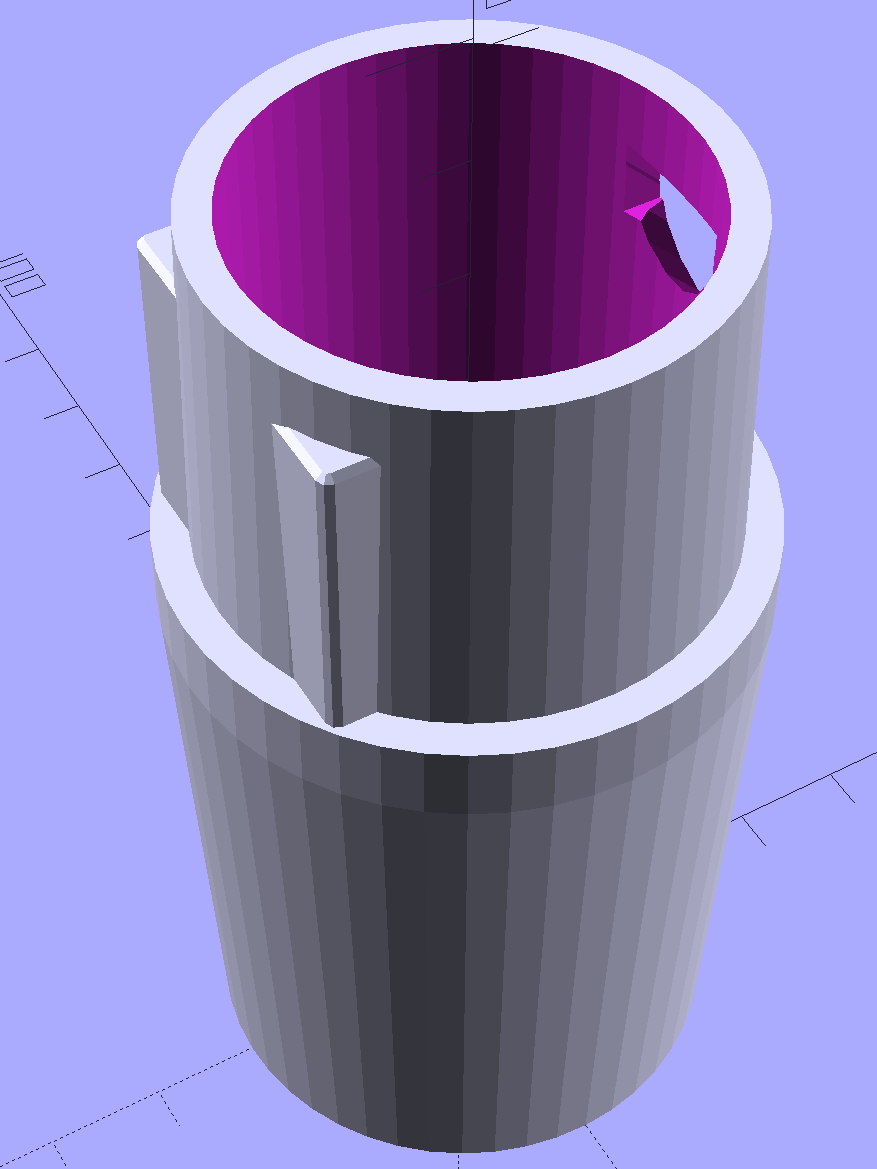
The first step involved modeling the plastic fitting that snaps into the handle:
Which spits out two suitable shapes with the proper positions and alignments:
Kenmore Male Fitting – Latch detail – Solid model
The magic wand for the refrigerator originally slid into the Samsung’s metal pipe, so I put a slightly tapered cylinder inside a somewhat more tapered exterior (which seems chunky enough to withstand my flailing around under the refrigerator), then topped it off with the male fitting:
Refrigerator Coil Wand Adapter
The Kenmore crevice tool snaps under the gargantuan plastic handle, which limits it to being 6.5 inches long, totally unable to reach into any of the nontrivial crevices around here, and in the way when it’s not being used. Some rummaging turned up a longer crevice tool from the Electrolux That Came With The House™, an old-school tool that slipped over its pipe. Modeling a straight cylinder inside a tapered cylinder that fits the tool didn’t take long:
Crevice Tool Adapter
Flushed with success, I found a smaller floor brush than the new Kenmore, with dimensions similar to the Electrolux snout, so another module appeared:
Floor Brush Adapter
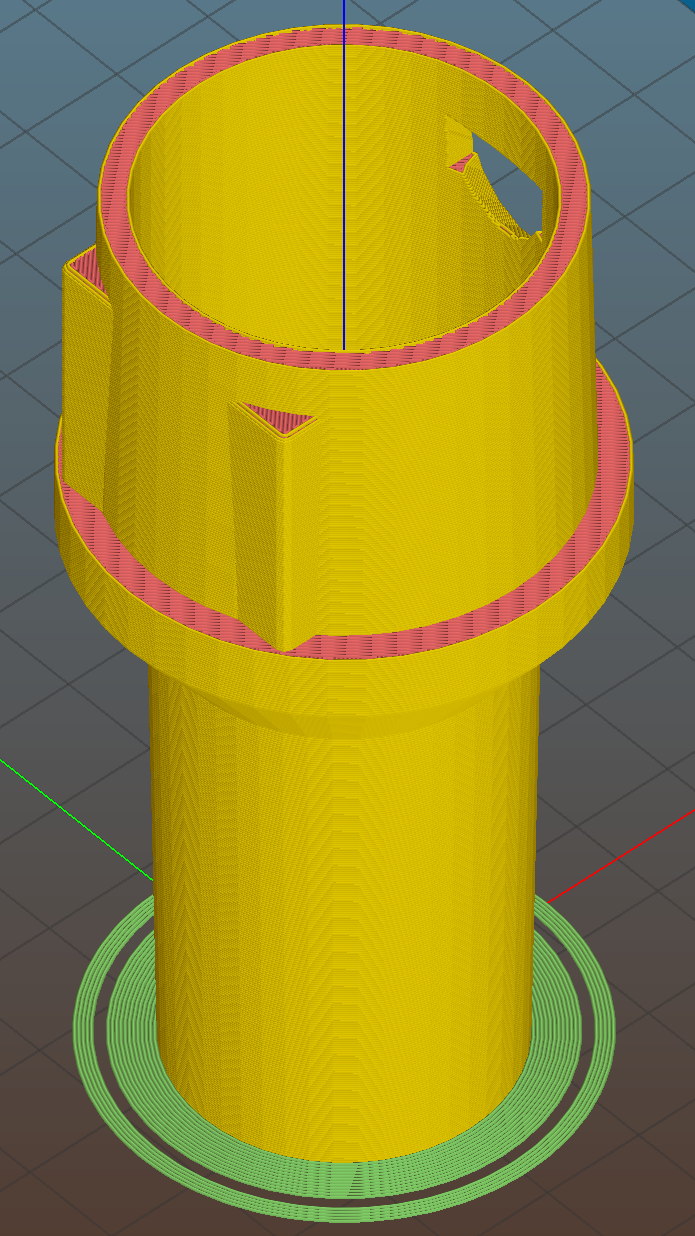
All of them build with the latch end upward to avoid needing support structure, with a 5 mm brim for good platform adhesion:
Floor Brush Adapter – Slic3r preview
I printed them during the PDS Mini Maker Faire as examples of Useful Things You Can Do With a 3D Printer:
Kenmore Vacuum Cleaner – Tool Adapters
As I pointed out to nearly everybody, the Big Lie about 3D printing is that you’ll just download somebody else’s model to solve your problem. In general, that won’t work, because nobody else has your problem; if you can’t do solid modeling, there’s no point in you having a 3D printer. There’s also no point in going to Kinko’s to get a standardized 3D printed doodad, because you can just order a better-looking injection-molded part directly from Sears (or an aftermarket source) and be done with it.
I loves me some good OpenSCAD action on my Makergear M2, though…
The OpenSCAD source code:
// Kenmore vacuum cleaner nozzle adapters
// Ed Nisley KE4ZNU November 2015
// Layout options
Layout = "CreviceTool"; // MaleFitting CoilWand FloorBrush CreviceTool
//- Extrusion parameters must match reality!
// Print with +1 shells and 3 solid layers
ThreadThick = 0.25;
ThreadWidth = 0.40;
HoleWindage = 0.2;
function IntegerMultiple(Size,Unit) = Unit * ceil(Size / Unit);
Protrusion = 0.1; // make holes end cleanly
//----------------------
// Dimensions
ID1 = 0; // for tapered tubes
ID2 = 1;
OD1 = 2;
OD2 = 3;
LENGTH = 4;
OEMTube = [35.0,35.0,41.7,40.5,30.0]; // main fitting tube
EndStop = [OEMTube[ID1],OEMTube[ID2],47.5,47.5,6.5]; // flange at end of main tube
FittingOAL = OEMTube[LENGTH] + EndStop[LENGTH];
$fn = 12*4;
//----------------------
// Useful routines
module PolyCyl(Dia,Height,ForceSides=0) { // based on nophead's polyholes
Sides = (ForceSides != 0) ? ForceSides : (ceil(Dia) + 2);
FixDia = Dia / cos(180/Sides);
cylinder(r=(FixDia + HoleWindage)/2,
h=Height,
$fn=Sides);
}
//-------------------
// Male fitting on end of Kenmore tools
// This slides into the end of the handle or wand and latches firmly in place
module MaleFitting() {
Latch = [40,11.5,5.0]; // rectangle latch opening
EntryAngle = 45; // latch entry ramp
EntrySides = 16;
EntryHeight = 15.0; // lower edge on *inside* of fitting
KeyRadius = 1.0;
translate([0,0,6.5])
difference() {
union() {
cylinder(d1=OEMTube[OD1],d2=OEMTube[OD2],h=OEMTube[LENGTH]); // main tube
hull() // insertion guide
for (i=[-(6.0/2 - KeyRadius),(6.0/2 - KeyRadius)],
j=[-(28.0/2 - KeyRadius),(28.0/2 - KeyRadius)],
k=[-(26.0/2 - KeyRadius),(26.0/2 - KeyRadius)])
translate([(i - (OEMTube[ID1]/2 + OEMTube[OD1]/2)/2 + 6.0/2),j,(k + 26.0/2 - 1.0)])
sphere(r=KeyRadius,$fn=8);
translate([0,0,-EndStop[LENGTH]]) // wand tube butts against this
cylinder(d=EndStop[OD1],h=EndStop[LENGTH] + Protrusion);
}
translate([0,0,-OEMTube[LENGTH]]) // main bore
cylinder(d=OEMTube[ID1],h=2*OEMTube[LENGTH] + 2*Protrusion);
            translate([0,-11.5/2,23.0 - 5.0])                                    // latch opening
                cube(Latch);

            translate([OEMTube[ID1]/2 + EntryHeight/tan(90-EntryAngle),0,0])    // latch ramp
                translate([(Latch[1]/cos(180/EntrySides))*cos(EntryAngle)/2,0,(Latch[1]/cos(180/EntrySides))*sin(EntryAngle)/2])
                    rotate([0,-EntryAngle,0])
                        intersection() {
                            rotate(180/EntrySides)
                                PolyCyl(Latch[1],Latch[0],EntrySides);
                            translate([-(2*Latch[0])/2,0,-Protrusion])
                                cube(2*Latch[0],center=true);
                        }
}
}
//-------------------
// Refrigerator evaporator coil wand
module CoilWand() {
union() {
translate([0,0,50.0])
rotate([180,0,0])
difference() {
cylinder(d1=EndStop[OD1],d2=42.0,h=50.0);
translate([0,0,-Protrusion])
cylinder(d1=35.0,d2=35.8,h=100);
}
translate([0,0,50.0 - Protrusion])
MaleFitting();
}
}
//-------------------
// Refrigerator evaporator coil wand
module FloorBrush() {
union() {
translate([0,0,60.0])
rotate([180,0,0])
difference() {
union() {
cylinder(d1=EndStop[OD1],d2=32.4,h=10.0);
translate([0,0,10.0 - Protrusion])
cylinder(d1=32.4,d2=30.7,h=50.0 + Protrusion);
}
translate([0,0,-Protrusion])
cylinder(d1=28.0,d2=24.0,h=100);
}
translate([0,0,60.0 - Protrusion])
MaleFitting();
}
}
//-------------------
// Crevice tool
module CreviceTool() {
union() {
translate([0,0,60.0])
rotate([180,0,0])
difference() {
union() {
cylinder(d1=EndStop[OD1],d2=32.0,h=10.0);
translate([0,0,10.0 - Protrusion])
cylinder(d1=32.0,d2=30.4,h=50.0 + Protrusion);
}
translate([0,0,-Protrusion])
cylinder(d1=28.0,d2=24.0,h=100);
}
translate([0,0,60.0 - Protrusion])
MaleFitting();
}
}
//----------------------
// Build it!
if (Layout == "MaleFitting")
MaleFitting();
if (Layout == "CoilWand")
CoilWand();
if (Layout == "FloorBrush")
FloorBrush();
if (Layout == "CreviceTool")
CreviceTool();
20 oz Starbucks City Mug (got ’em cheap at a tag sale)
Preparation
Microwave the generous cup o’ milk for 1 minute
Mix dry ingredients in the giant mug
Stir in just enough cold milk to make a thick mud (*)
Add peppermint drops using 1/4 tsp measure
Rinse 1/4 tsp measure with vanilla
Blend the extracts into the mud (*)
Stir in warm milk, scraping mud off the mug
Microwave for another 45 s or so
Stir to blend
What’s going on:
More cocoa = more flavor, pure & simple
Less sugar = more cocoa bite
Vietnamese cinnamon adds the aroma & zip of those old Atomic Fireballs
Vanilla smooths the taste
Peppermint reminds you it’s winter
Sipping a cup in the afternoon banishes the urge to power-nosh anything else until suppertime…
* Update: non-alkalized / non-Dutch-process cocoa doesn’t blend well. Mix up the mud, let it set for 15 minutes, blend again, pause for 5 minutes, then proceed. Wonderfully smooth with no powder bombs.
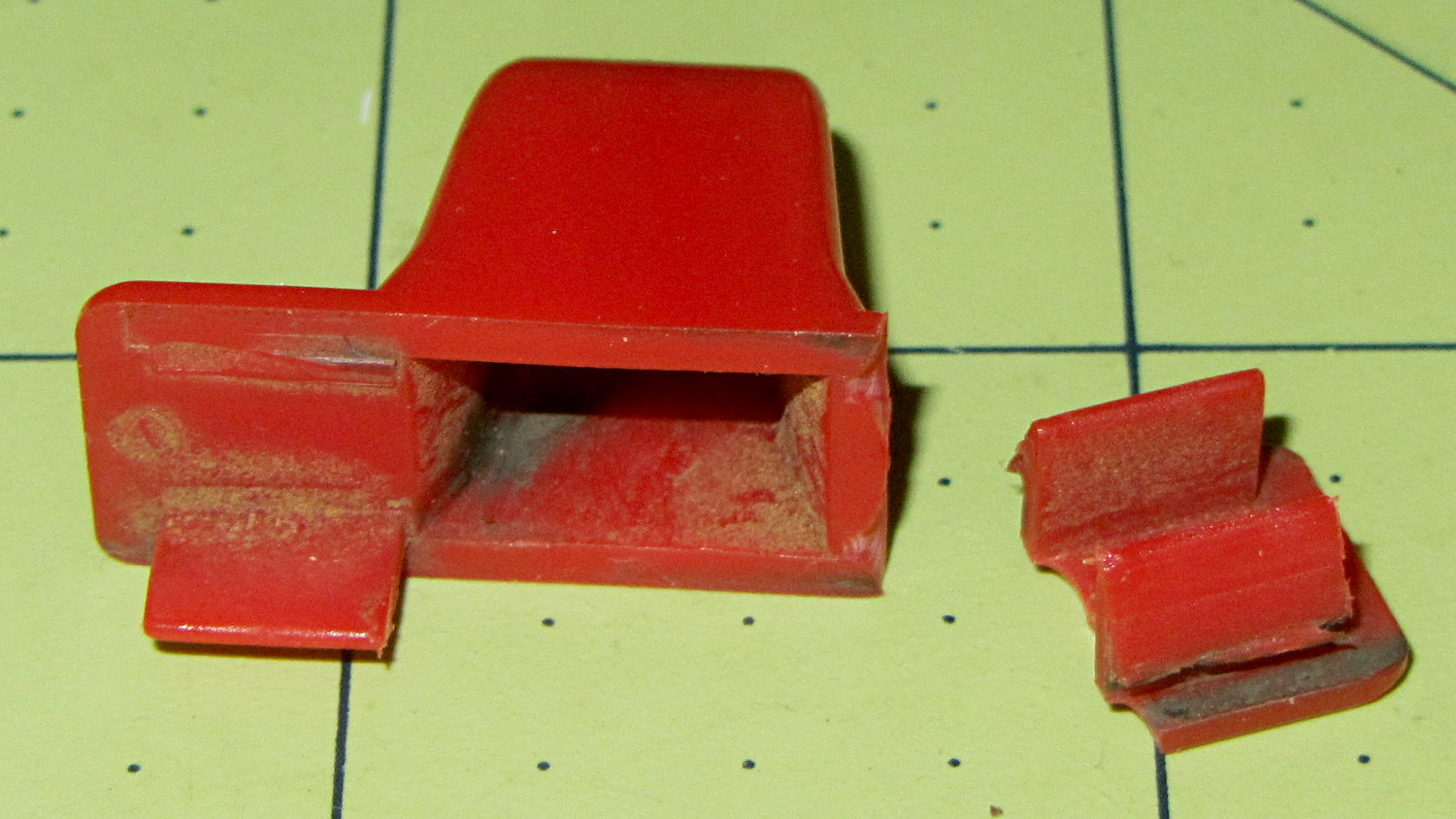
The upper-left tab broke off this “knob” shortly after we got the leaf shredder:
Throttle knob – broken original
But it worked well enough that, following my usual course of action, I could ignore the problem. Until a few days ago, that is, when the remaining tab on that end pulled out of the slot on the engine and the whole affair bent into uselessness.
It’s a $10 item from eBay (with free shipping), $8 from Amazon ($4, not eligible for Prime, so plus $4 shipping), out of stock at my usual online small engine source, and not worth biking a few dozen miles here & there to see if anybody has one. I know better than to look for repair parts at Lowe’s / Home Depot. It’s Tecumseh Part 36638, which may come in handy some day.
So, we begin…
It’s one of those pesky injection-molded miracle plastic doodads that can’t be printed in one piece, so I designed the tabs as separate parts and glued them in place. The solid model shows the intended assembly, with a bit of clearance around the tabs for tolerance and glue slop:
Tecumseh Throttle Knob – solid model – show view
External clearances aren’t an issue, so I made the base plate longer, wider, and thicker, which gave the tabs something to grab onto. The half-round knob is bigger, more angular, and uglier than the OEM knob, because I had trouble holding onto the original while wearing work gloves.
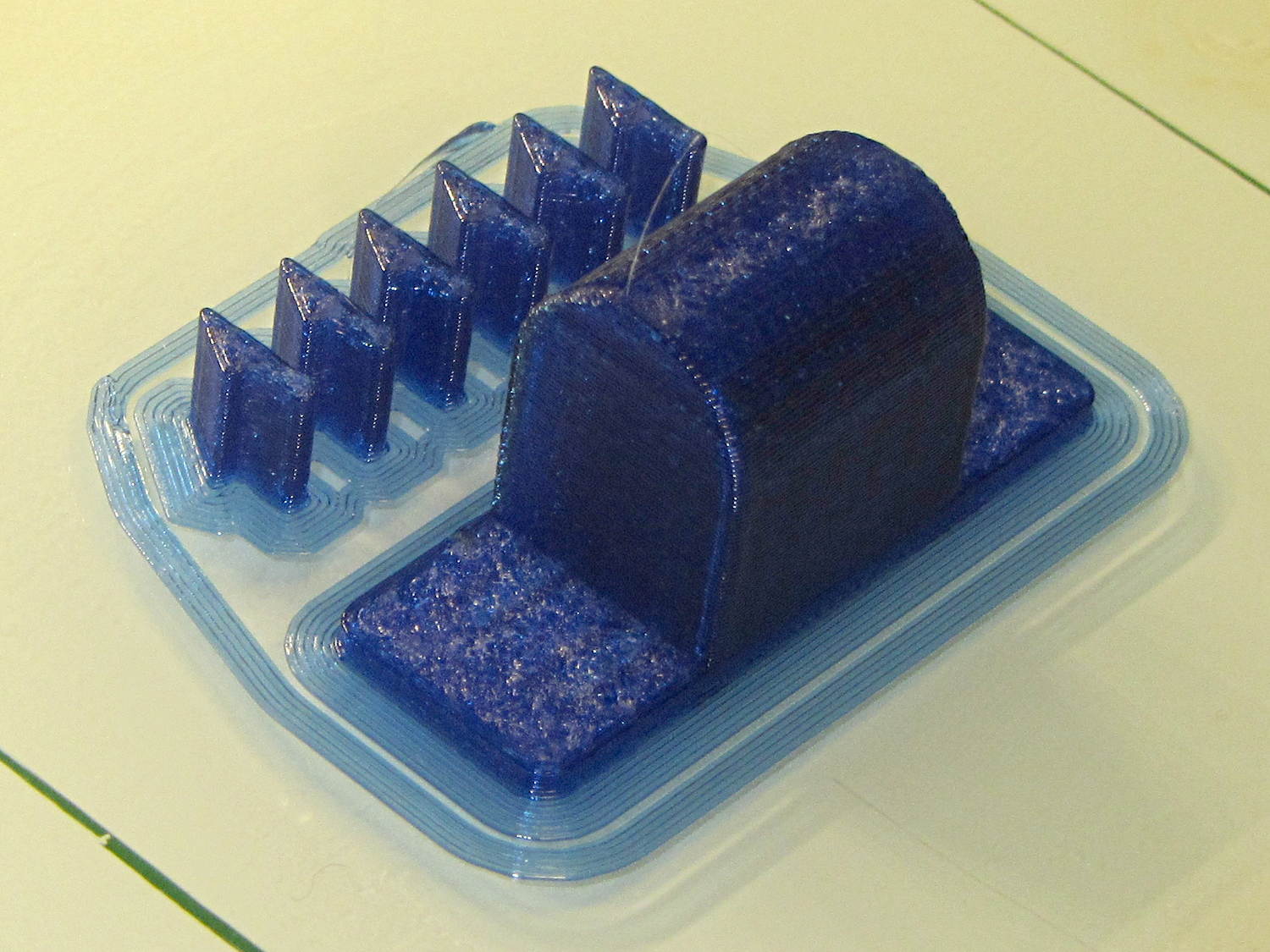
Printing a few extra tabs allows the inevitable finger fumble:
Throttle knob – on platform
The tabs stand on edge to properly orient the printed threads around the perimeter: a great force will try to rip that triangular feature right off the tab, so wrapping the thread as shown maximizes the strength. Laying them flat on their backs would put the force in shear, exactly parallel to thread-to-thread bonds; I wouldn’t bet on the strength of those layers.
The brim provides enough platform footprint around the tabs to keep them upright, but obviously isn’t needed around the knob. Although you could wrap a modifier mesh around one or the other, trimming the brim off the knob with a precision scissors seemed more straightforward.
Slobbering generous drops of of IPS #4 solvent adhesive into the slots and over the tabs softened the PETG enough that I could ram the tabs into place, using a big pliers to overcome their feeble resistance:
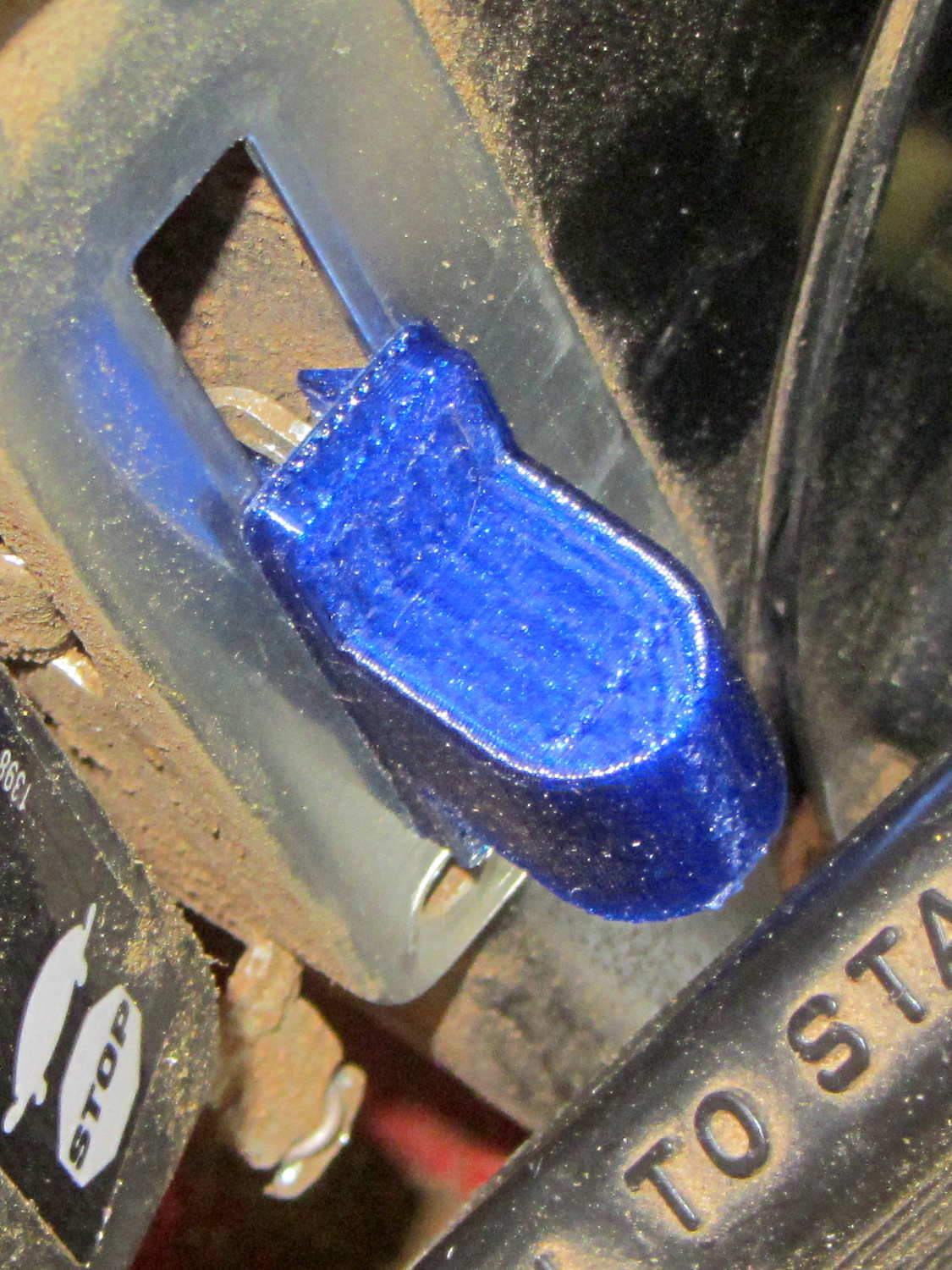
Throttle knob – glued latches
With the plastic still dazed from the fumes, I force-fit the knob into the slot on the engine:
Throttle knob – installed
The tabs eased back into position and seem to be holding the knob in place. Worst case: make a new knob, butter up the tabs with slow epoxy, ram knob into slot, then poke a screwdriver inside to realign the tabs against the slot edges.
The solvent had a few cloudy days to evaporate before the next shredding session, whereupon the throttle once again worked exactly the way it should.
The OpenSCAD source code:
// Tecumseh 36638 Throttle Knob
// Ed Nisley KE4ZNU November 2015

Layout = "Build";					// Build Show Tab Base

//- Extrusion parameters must match reality!

ThreadThick = 0.25;
ThreadWidth = 0.40;

HoleWindage = 0.2;

Protrusion = 0.1;			// make holes end cleanly

inch = 25.4;

function IntegerMultiple(Size,Unit) = Unit * ceil(Size / Unit);

//----------------------
// Dimensions

BaseSize = [40,14,3.0];							// overall base plate outside engine controller slot

Knob = [18,BaseSize[1],17];

TabSize = [7.5,1.6,6.0];						// ovarall length, minimum width, overall height
TabSocket = [8.0,2.0,BaseSize[2] - 2*ThreadThick];				// recess in base plate for tab

TabOuterSpace = 30.0;							// end-to-end length over tabs - sets travel distance
SlotWidth = 7.75;								// engine controller slot width
SlotThick = 1.5;								// engine controller slot thickness

TabShape = [
	[0,0],
	[BaseSize[2] + TabSize[2],0],
	[BaseSize[2] + TabSize[2],ThreadWidth],
	[BaseSize[2] + SlotThick,2*TabSize[1]],
	[BaseSize[2] + SlotThick,TabSize[1]],
	[0,TabSize[1]]
];

CapBaseOpening = [11,7.5,15];			// opening in base plate, Z = clearance from controller plate

//----------------------
// Useful routines

module PolyCyl(Dia,Height,ForceSides=0) {			// based on nophead's polyholes

  Sides = (ForceSides != 0) ? ForceSides : (ceil(Dia) + 2);

  FixDia = Dia / cos(180/Sides);

  cylinder(r=(FixDia + HoleWindage)/2,
		h=Height,
	$fn=Sides);
}

//----------------------
// Pieces

module Tab() {

	linear_extrude(height=TabSize[0]) {
		polygon(points=TabShape);
	}
}


module Base() {

	CornerRad = BaseSize[1]/8;

	difference() {
		union() {
			linear_extrude(height=BaseSize[2])
				hull()
					for (i=[-1,1], j=[-1,1])
						translate([i*(BaseSize[0]/2- CornerRad),j*(BaseSize[1]/2 - CornerRad)])
							circle(r=CornerRad,$fn=4*4);
			translate([Knob[0]/2,0,BaseSize[2] - Protrusion])
				rotate([0,-90,0])
					linear_extrude(height=Knob[0])
						hull() {
							translate([Knob[2] - Knob[1]/2,0])
								circle(d=Knob[1],$fn=8*4);
							translate([0,-Knob[1]/2,0])
								square([Protrusion,Knob[1]]);
						}
		}

		translate([-CapBaseOpening[0]/2,-CapBaseOpening[1]/2,-Protrusion])
			cube(CapBaseOpening + [0,0,-CapBaseOpening[1]/2 + Protrusion],center=false);

		translate([0,0,CapBaseOpening[2] - CapBaseOpening[1]/2])
			rotate([0,90,0]) rotate(180/8)
				cylinder(d=CapBaseOpening[1]/cos(180/8),h=CapBaseOpening[0],center=true,$fn=8);

		for (i=[-1,1], j=[-1,1])
			translate([i*(TabOuterSpace/2 - TabSocket[0]/2),j*(SlotWidth/2 - TabSocket[1]/2),TabSocket[2]/2 - Protrusion])
				cube(TabSocket + [0,0,Protrusion],center=true);
	}
}


//----------------------
// Build it

if (Layout == "Base")
	Base();

if (Layout == "Tab")
	Tab();

if (Layout == "Show") {
	Base();

		for (i=[-1,1], j=[-1,1])
			translate([i*(TabOuterSpace/2 - TabSocket[0]/2),j*(SlotWidth/2 - TabSocket[1]/2),0])
				translate([j < 0 ? TabSize[0]/2 : -TabSize[0]/2,j < 0 ? TabSize[1]/2 : -TabSize[1]/2,BaseSize[2] - 2*ThreadThick])
					rotate([0,90,j < 0 ? -180 : 0])
					Tab();
}

if (Layout == "Build") {
	Base();

	for (i=[0:5])					// build a few spares
		translate([-7*TabSocket[1] + i*3*TabSocket[1],BaseSize[1],0])
			rotate(90)
				Tab();
}
The original doodle showing the OEM knob dimensions and some failed attempts at fancy features:
Back in the day, you could install a Genuine HP 09872-60066 Digitizing Sight in your Genuine HP 7475A plotter, maneuver the sight to an interesting point on the paper, press the Enter button, send the point’s coordinates through the serial port to the computer, then do whatever you like with the numbers.
Here in the future, I twiddled the demo code that draws Superformula patterns to send a digitization command and await the response at the end of each plot. I can then change the paper, press the Enter button, and get the next plot: exactly what I need for the upcoming Poughkeepsie Mini Maker Faire.
The only gotcha turns out to be that, having hacked the Chiplotle interface to use hardware handshaking, there’s no way to tell when the outgoing buffer has drained. Until that happens, the plotter can’t respond to the digitizing command and, eventually, Chiplotle kvetches about not hearing anything.
The least awful solution seems to be sleeping for 40 seconds (!) while the plotter trudges through the last line of the legend (!!), then continuing apace:
        print "Waiting for plotter... ignore timeout errors!"
        sleep(40)
        while NoneType is type(plt.status):
            sleep(5)

        print "Load more paper, then ..."
        print "  ... Press ENTER on the plotter to continue"
        plt.clear_digitizer()
        plt.digitize_point()

        plotstatus = plt.status
        while (NoneType is type(plotstatus)) or (0 == int(plotstatus) & 0x04):
            plotstatus = plt.status

        print "Digitized: " + str(plt.digitized_point)
When the interface times out, Chiplotle doesn’t set the status code to anything in particular (which makes sense), so you can’t do anything useful with it. Therefore, the operand order in the last while statement matters: you can’t convert a value of type NoneType into anything else.
The other change wraps the entire plotting loop with an always-and-forever loop: hit Ctrl-C to break out at the end of the day.
You can’t change the new plot’s paper size, because the digitizing command preempts the Enter button that’s part of the Enter+Size combination. That makes perfect sense, even in retrospect.
Testing that gave me the opportunity to run all the pens, refilled and OEM, through their paces: