Ed Nisley's Blog: Shop notes, electronics, firmware, machinery, 3D printing, laser cuttery, and curiosities. Contents: 100% human thinking, 0% AI slop.
The two knockoff Neopixeltestfixtures went dark while their USB charger accompanied me on a trip, so they spent a few days at ambient basement conditions. When I plugged them back into the charger, pretty much the entire array lit up in pinball panic mode:
WS2812 LED – test fixture multiple failures
Turns out three more WS2812 chips failed in quick succession. I’ve hotwired around the deaders (output disconnected, next chip input in parallel) and, as with the other zombies, they sometimes work and sometimes flicker. That’s five failures in 28 LEDs over four months, a bit under 3000 operating hours.
For lack of a better explanation: the cool chips pulled relatively moist air through their failed silicone encapsulation, quietly rotted out in the dark, then failed when reheated. After they spend enough time flailing around, the more-or-less normal operating temperatures drives out the moisture and they (sometimes) resume working.
Remember, all of them passed the Josh Sharpie Test, so you can’t identify weak ones ahead of time.
I wired a resistive joystick to the knockoff Nano controlling the crystal tester and connected the button to an analog input because I have a lot of those left over and why not. Unfortunately, the ADC returned a sequence of random-ish numbers indicating the button didn’t have a pullup to +5 V.
One might be forgiven for assuming the pads marked R5 would hold such a pullup resistor, had the joystick not been relentlessly cost-reduced:
Keyes resistive joystick – R5 location
One would, of course, be completely wrong.
Having been around this blockseveral times, I measured the pad-to-pin resistances and found R5 firmly affixed to the GND and +5V pins, with the SW (a.k.a. button) pin floating free. Pressing the joystick hat closes the switch next to R5, thereby connecting the SW pin to GND.
Baffles me. Maybe a fresh intern did the PCB layout and just misplaced the resistor?
So I soldered an ordinary resistor (*) between the +5 V and SW pins:
Keyes resistive joystick – button pullup
Now it works just as it should.
(*) For long-lost reasons, I have a zillion 12.4 kΩ 1% resistors appearing in place of simple 10 kΩ resistors.
After hairballing an LM75A I²C temperature sensor to verify at least one of the eBay lot worked, a bag of SOIC-to-DIP space transformers arrived, so I soldered up another LM75A:
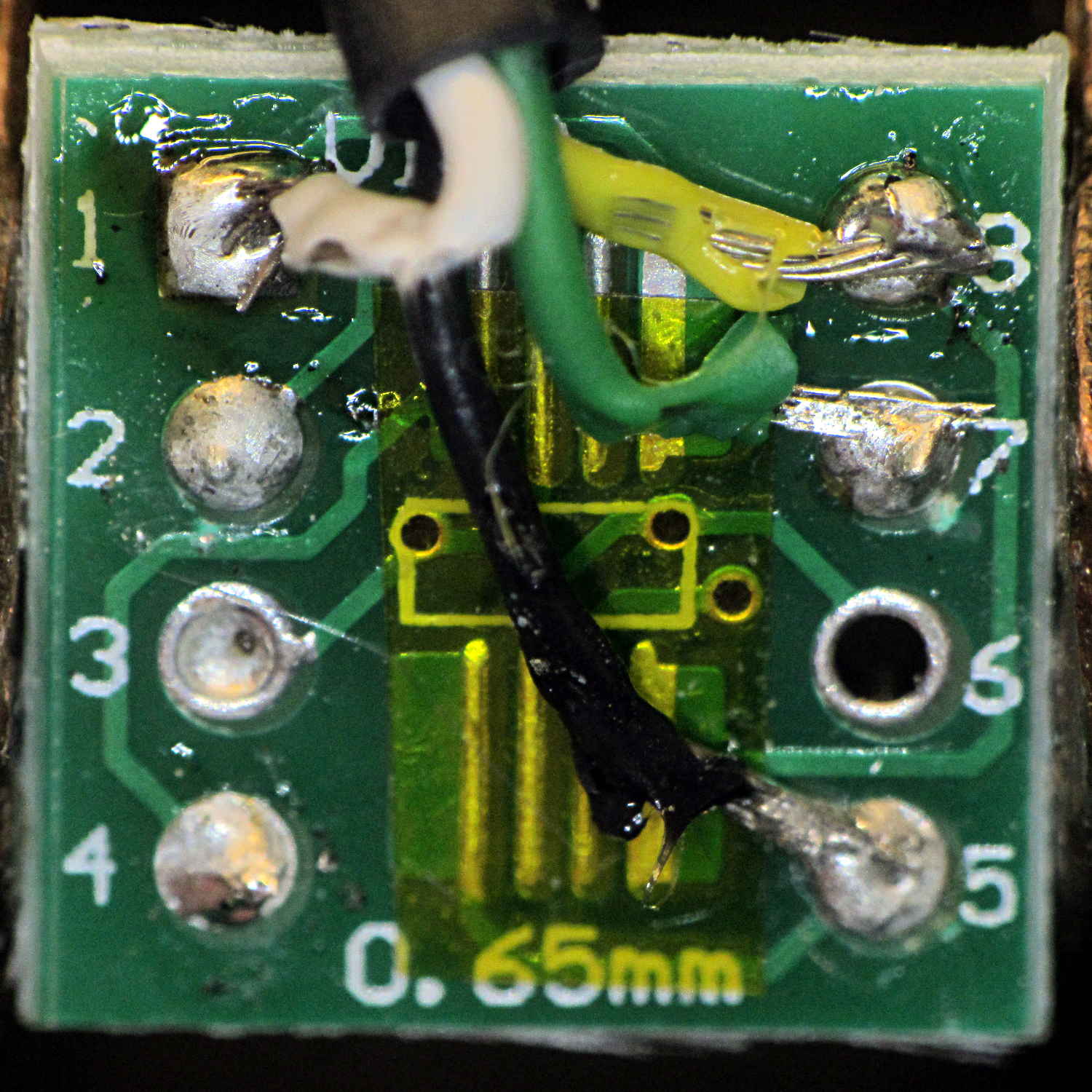
LM75A on DIP8 adapter – top
The SOIC chip pattern sits at right angles to the DIP pins, which took some getting used to.
The slightly defocused wire connecting pin 4 (on the IC) to pins 5, 6, and 7 (on the PCB) selects address 0x48.
So I flipped it over, soldered four wires (+5 V, GND, SDA, SCL) to the numbered pins on bottom of the board, made up a little header for the other end, wired a socket strip on the crystal tester board, plugged it in, and … nothing worked.
Turns out that the other side of the board carries a TSSOP pattern, which I’d neatly masked off with a snippet of Kapton tape, surrounded by eight numbered pins. Of course, those pin numbers correspond to the TSSOP pattern facing you, so they’re mirror-imaged for the SOIC pattern on the other side.
Soooo, the proper wiring for the SOIC pattern as seen from the TSSOP side has the pin numbers exactly bass-ackwards:
LM75A on DIP8 adapter – bottom
The insulation looked a lot better the first time I soldered the wires to the PCB. Honest.
Anyhow, when correctly wired, the LM75A worked as it should:
LM75A Temperature Sensor – installed
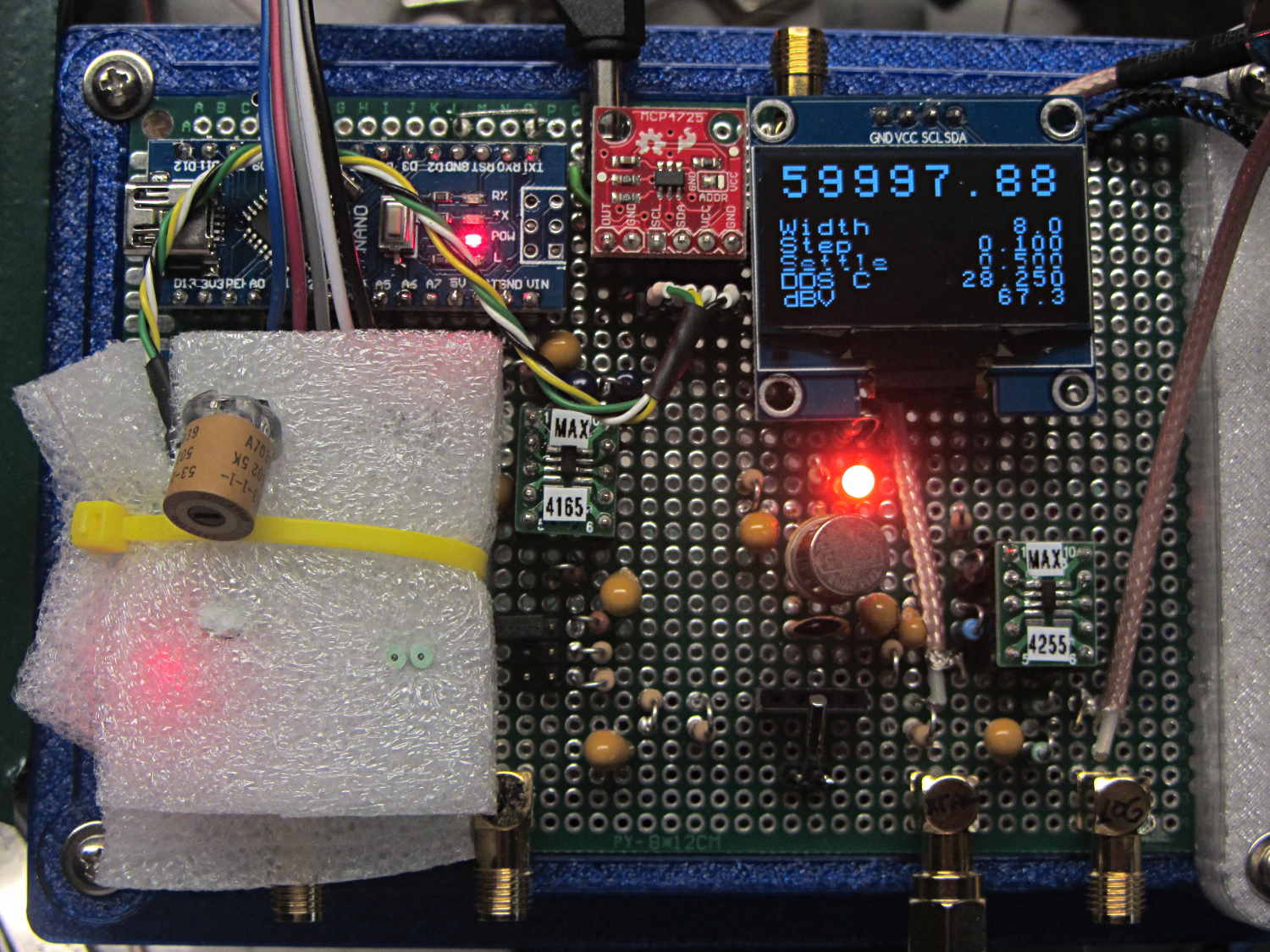
It’s snuggled chip-down against the top of the 125 MHz oscillator can, with a dab of heatsink compound improving their thermal bond and a yellow cable tie around the foam holding them together. The socket header is wired pin-for-pin to the DAC I²C socket directly above it.
The OLED temperature display shows 28.250 °C, because the oscillator just started up in a cool basement. It’ll eventually settle around 39-ish °C, where its output should be pretty close to the 125 MHz – 344 Hz value hardcoded into the source.
Oh, that’s a 3 mm amber LED next to the relay can: much less glaring than the white LED, no matter what it looks like here.
Disabling the display by activating its powersave option reveals 60 Hz pulses from the USB port on the Arduino Nano:
OLED Powersave – 60 Hz USB Ground Loop
Unplugging the USB cable, leaving just the +5 VDC power supply and coax cable to the oscilloscope, solves most of the problem:
OLED Powersave – USB unplugged
A closer look shows some (relatively) low frequency noise remains in full effect:
OLED Powersave – USB unplugged – detail
Disabling the display while measuring the crystal seems sensible, although, to avoid surprises, a pushbutton should start the process. Unplugging the USB port puts a real crimp in the data collection, although that’s probably survivable with a USB isolator, one of which is on the way around the planet.
The remaining low-level chop requires more thought. Somewhat to my surprise, holding the Arduino Reset button down doesn’t change much of anything, so it’s not a firmware thing.
Those 10 µF coupling caps gotta go.
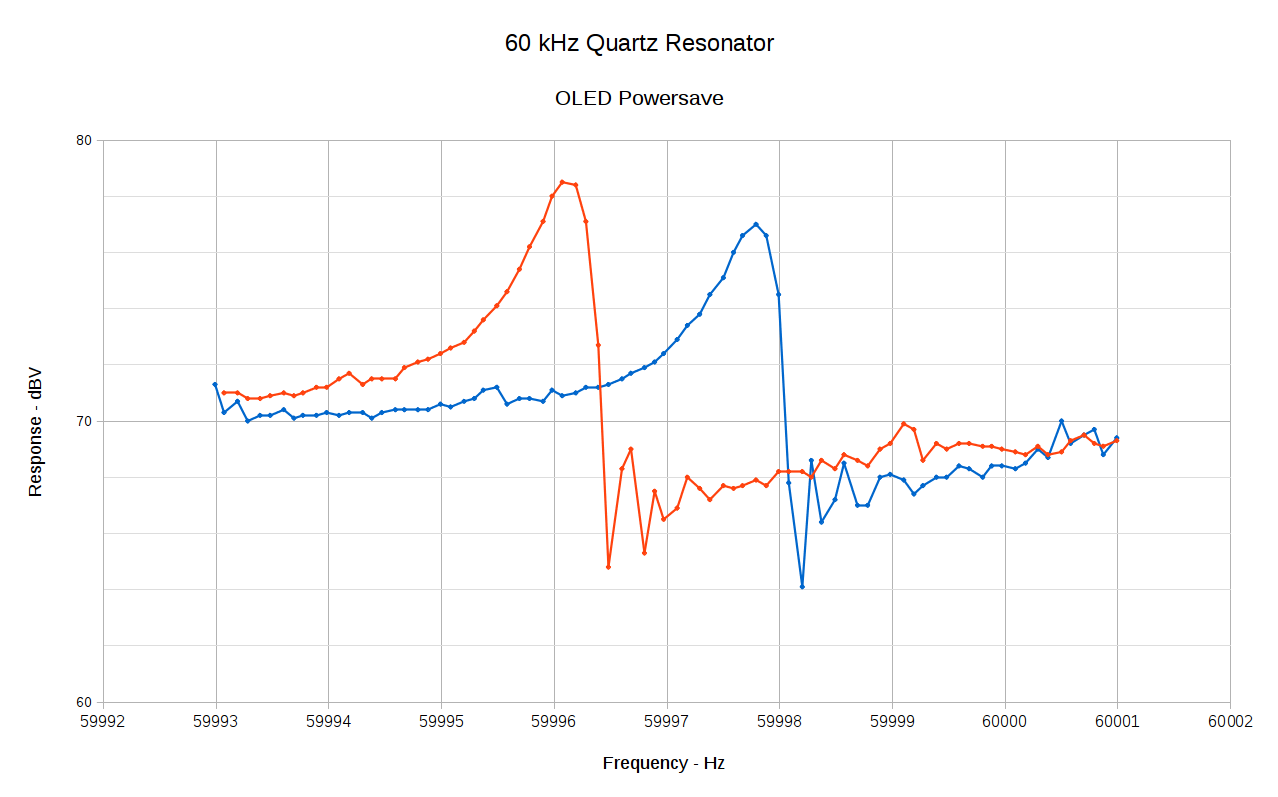
With the OLED dark and the USB carrying data:
Spectrum – OLED Powersave – USB in
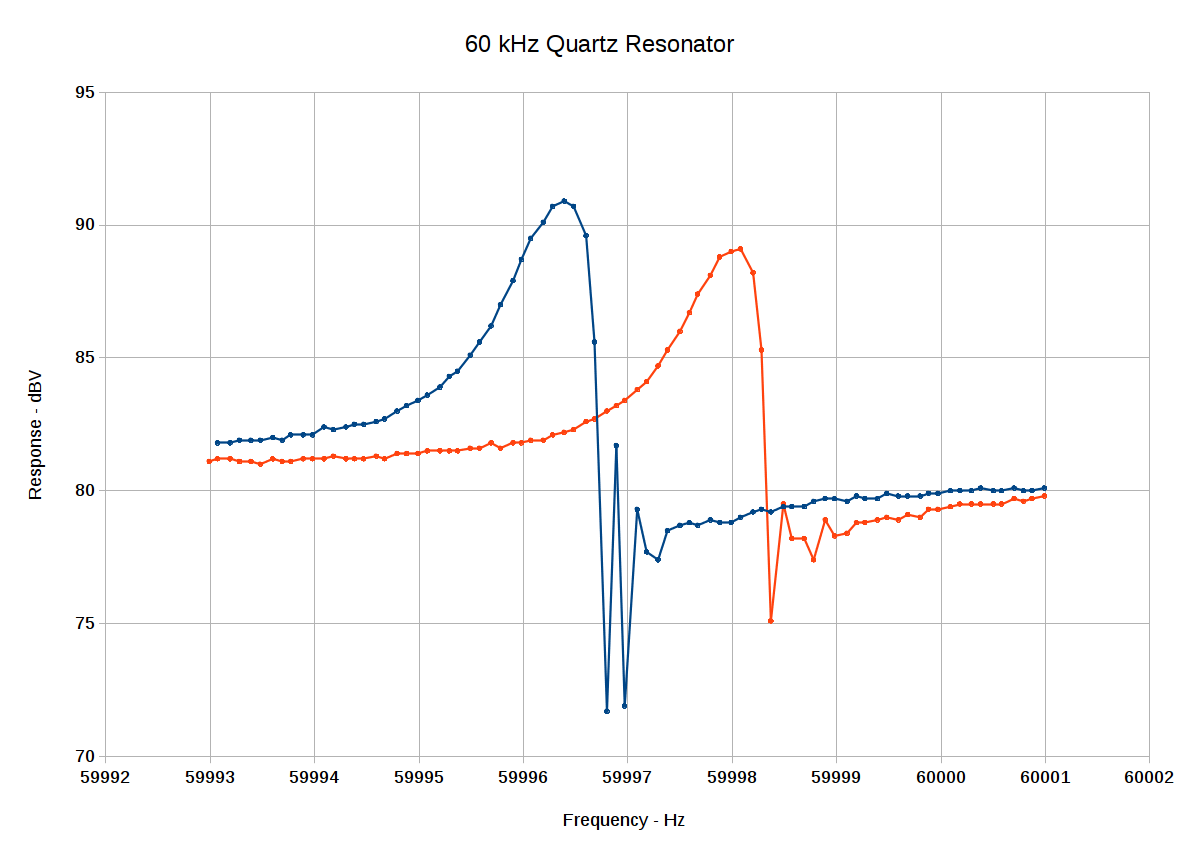
Compare that to the first pass:
Spectrum-60
Tamping down the noise seems to reduce the overall amplitude variation, but it also makes the capacitor-in and capacitor-out curves more consistent. There may be other things going on that I haven’t accounted for.
The peak frequencies differ by 0.2 Hz, which is probably due to a few degrees of temperature difference. Obviously, it’s badly in need of a temperature calibration & correction.
A strip of NXP (née Philips plus Freescale, including the part of Motorola that didn’t become ON) LM75A I²C temperature sensors arrived from beyond the horizon. To see if they worked, I soldered thin wires directly to the SO-8 pins, entombed it in Kapton tape to prevent spitzensparken, and jammed it under the foam insulation atop the AD9850 DDS module:
AD9850 DDS module with LM75A Temperature Sensor
This turns out to be easier than screwing around with thermistors, because the chip reports the temperature directly in Celcius with ⅛ °C resolution. Classic LM75 chips from National (now absorbed by TI) had ½ °C resolution, but the datasheet shows the bits have an easily extensible format:
LM75A Temperature Data Format
Huh. Fixed-point data, split neatly on a byte boundary. Who’d’a thunk it?
There’s a standard Arduino library using, naturally enough, floating point numbers, but I already have big fixed point numbers lying around and, with the I²C hardware up & running from the X axis DAC and OLED display, this was straightforward:
The next-to-last line squirts the temperature through the serial port to make those nice plots.
Casually ignoring all I²C bus error conditions will eventually lead to heartache and confusion. In particular, the Basement Laboratory temperature must never fall below 0 °C, because I just plunk the two’s-complement temperature data into an unsigned fixed point number.
Which produces the next-to-bottom line:
DDS OLED with LM75 temperature
Alas, the u8x8 font doesn’t include a degree symbol.
Given sufficient motivation, I can now calibrate the DDS output against the GPS-locked 10 MHz standard to get a (most likely) linear equation for the oscillator frequency offset as a function of temperature. The DDS module includes a comparator to square up its sine wave, so an XOR phase detector or something based on filtering the output of an analog switch might be feasible.
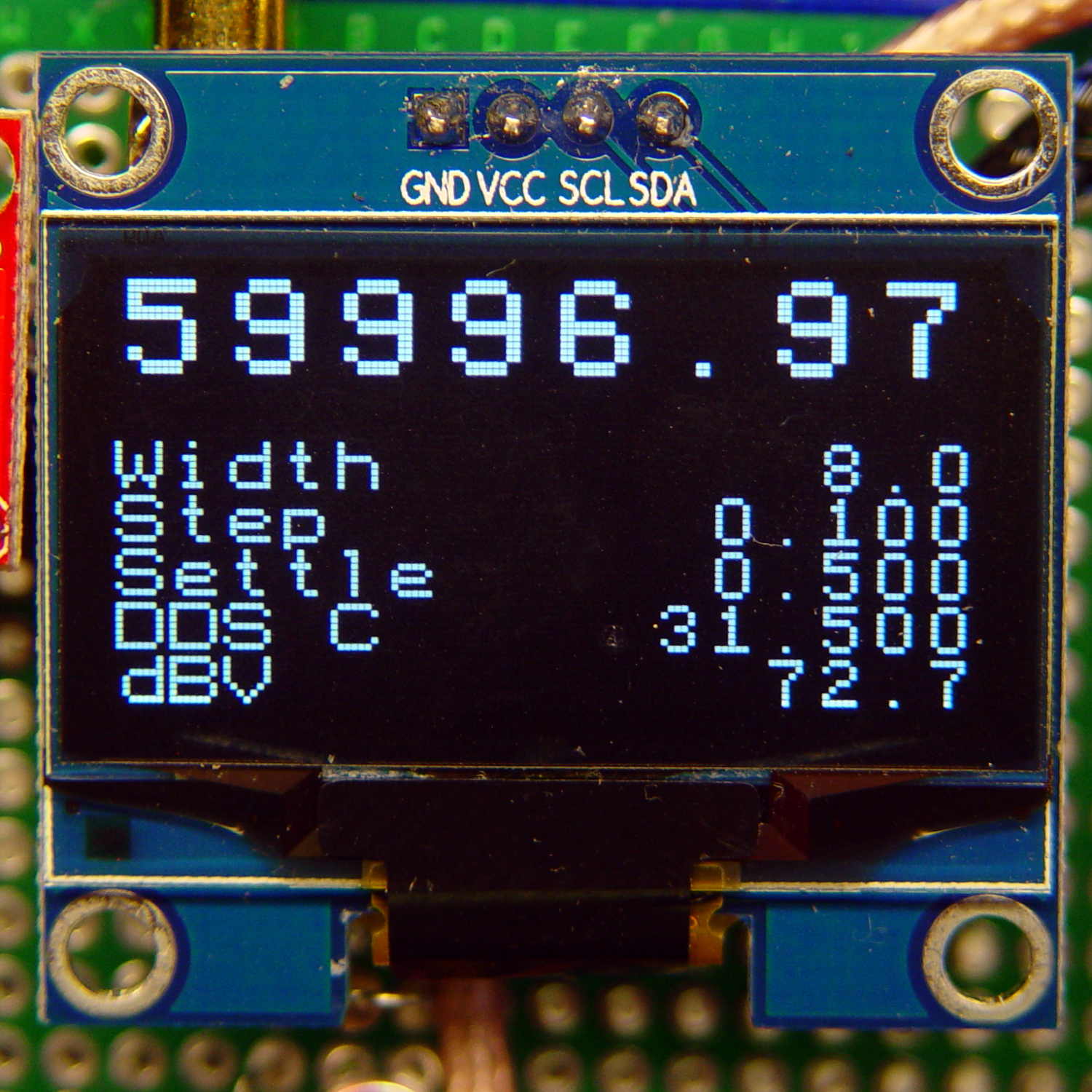
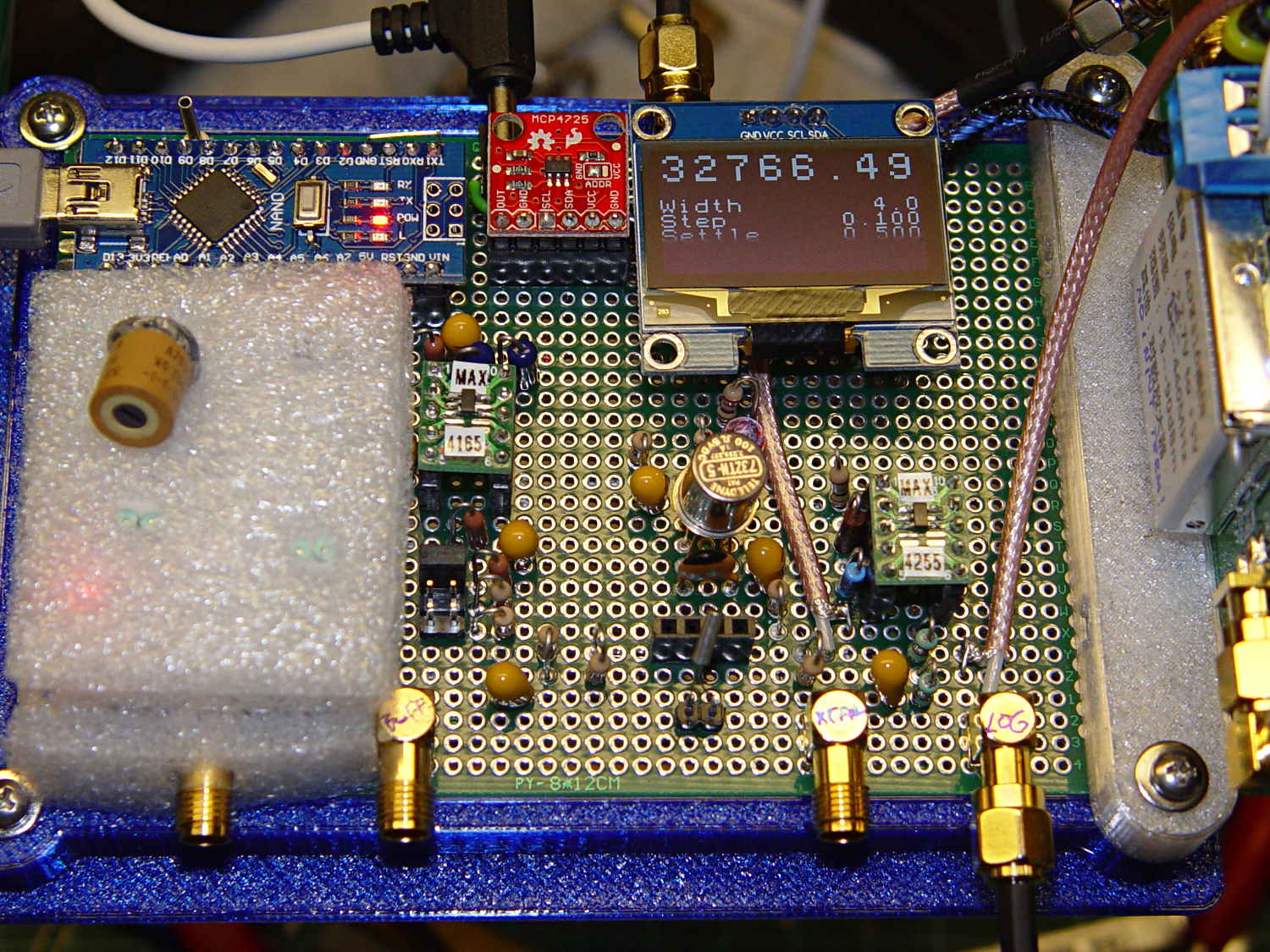
The crystal test fixture and amp huddle in front of the OLED display:
Crystal Tester – First Light
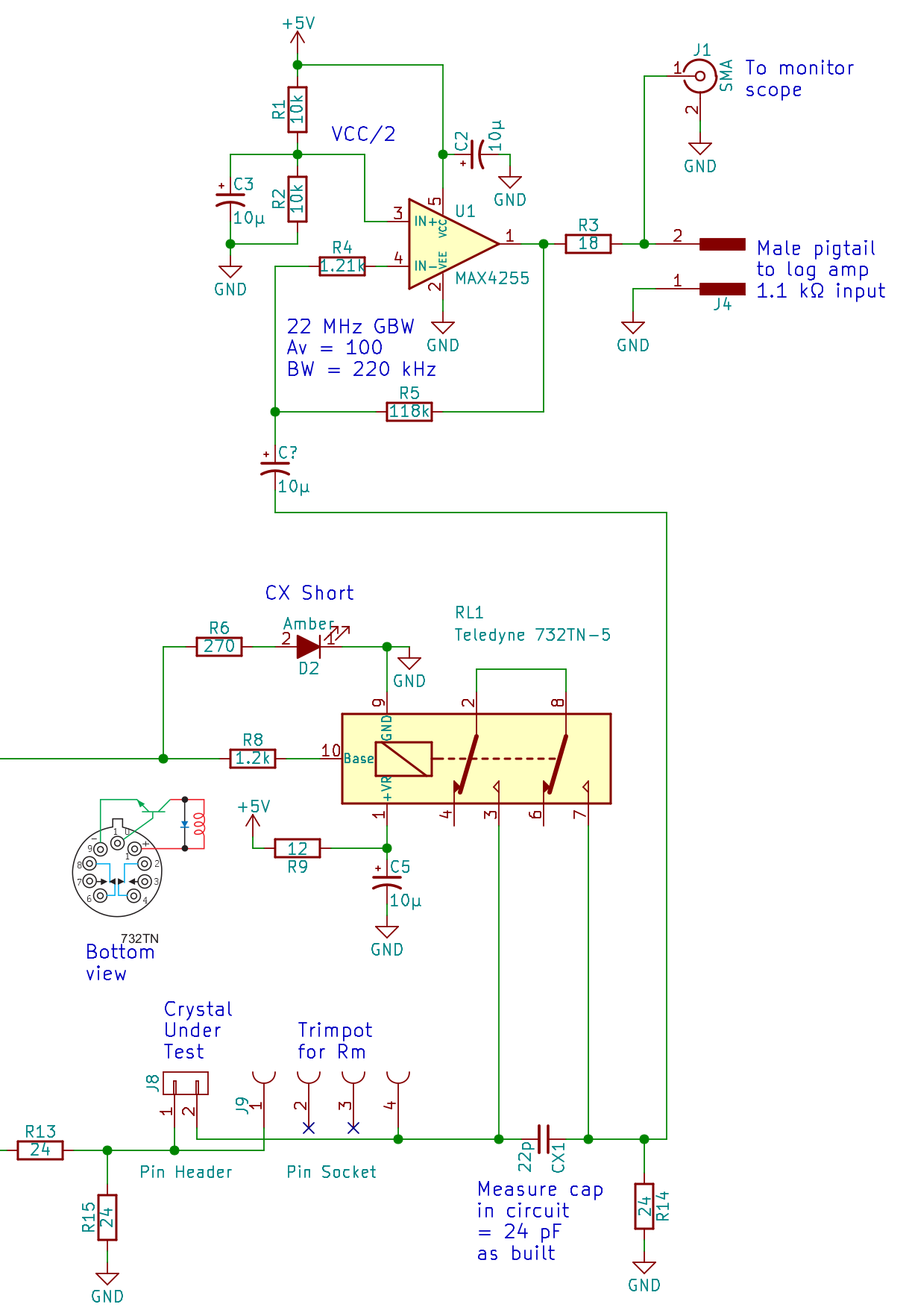
The schematic:
Test fixture – Relay – MAX4255 amp – schematic
The 22 pF cap now sits across the relay’s NO contacts, so as to simplify measuring the total in-circuit capacitance. The LED turns on when the relay shorts out the capacitor, which has a 50% probability of making more sense.
The quartz tuning fork resonators have an ESR around 20 or 30 kΩ, so the off-resonance output should be down something like -60 dB = 20 log (24 / 24×10³) from the 150 mV input: 200 µV (-ish). It’s actually around 1 mV, suggesting plenty of blowby through the baling-wire connections hidden under that neat top surface. I think that’s why the whole setup shows only about 8 dB of dynamic range; more attention to detail may be in order, although the peaks probably won’t move all that much.
Anyhow, even though the AD8310 log amp module should be able to handle such a tiny signal, the MAX4255 amp provides 40 dB of gain (OK, just 39.8 dB) and rolls off the high end at 220 kHz as a side benefit of its 22 MHz GBW.
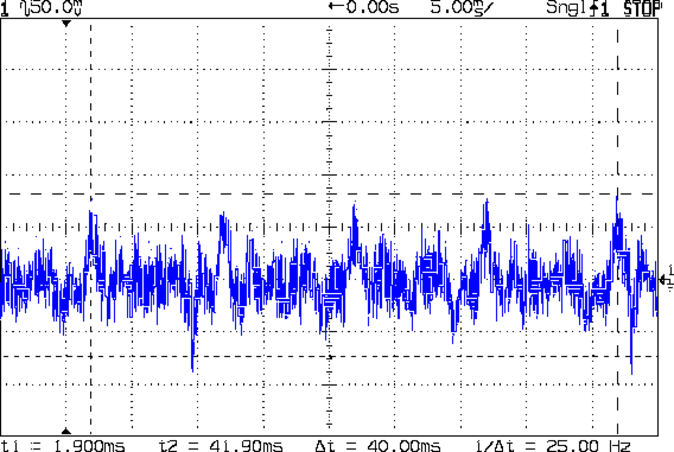
There’s way too much low frequency rumble at the amp output:
100 Hz noise at MA4255 output
What look like grass is actually the 60 kHz resonator output: those big lumps & bumps are noise from this-and-that. The repetitive peaks and dents exactly 10 ms apart (the cursors span four of ’em) felt a lot like OLED refresh cycles and, indeed, went away when I yanked the display out. Pulling the USB connection eliminates another tremendous heap o’ noise, so there’s likely a ground loop (-ish) thing going on, too. This may call for a USB optical isolator, its commercial equivalent, or more eBay offerings. Getting rid of that junk may improve the dynamic range enough to keep me from doing anything drastic.
The AD8310 log amp input now has decent coupling caps, so it’s not seeing the VCC/2 bias, and I removed that kludged-in 50 Ω terminating resistor to present its full 1.1 kΩ input resistance to the op amp.
The Big Ideas: the DDS output, being more-or-less constant, needs a variable-gain amp to set the crystal drive level. The amp also fixes the impedance mismatch between the DDS output and the crystal, which may not be much of a problem for the (very) high ESR quartz tuning fork resonators in play.
The AD9850 DDS output feeds a 70 MHz (-ish) elliptical reconstruction filter chopping off image frequencies descending from the 125 MHz sampling clock, with a 100 Ω (-ish) output impedance that’s just about purely resistive at 60 kHz. An on-board 3.9 kΩ resistor (labeled with 392 on their schematic) sets the full-scale output current to 10 mA for a peak voltage of 1 V. The module uses only the + output of the differential pair, which means the sine wave runs from 0 V to 1 V: 1 Vpp = 500 mVpeak = 353 mVrms (ignoring the 500 mV offset).
Pin header J3 normally sports a jumper to connect the 3.9 kΩ RSET resistor, but you can insert an external resistor to increase the resistance and decrease the output current:
IOUT = 32 × 1.248 V / RSET
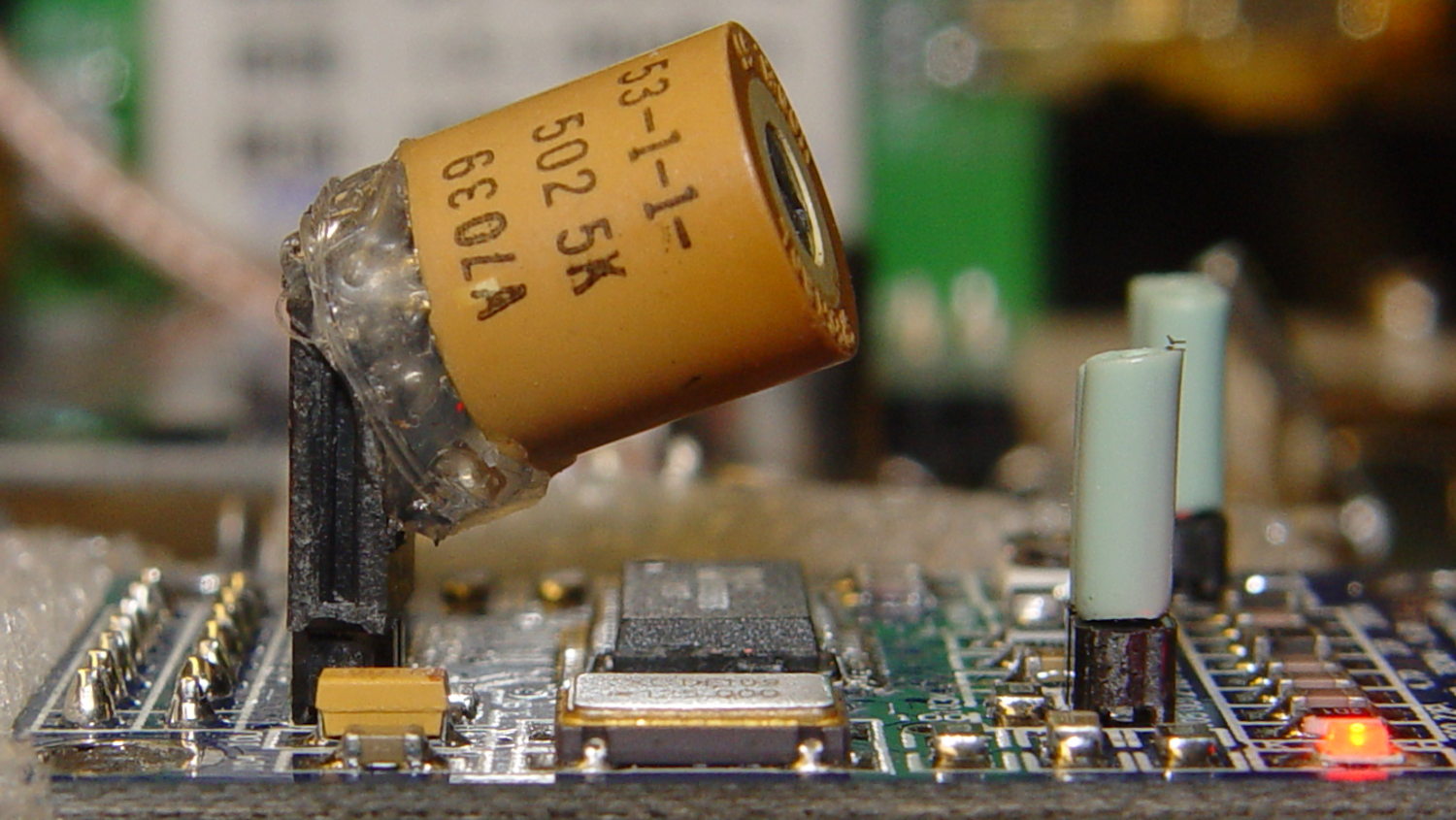
A little hot-melt glue action produced a suitable lashup from a 5 kΩ trimpot:
AD9850 DDS Module – 5 k external RSET trimpot
The pillars of green wire insulation forestall screwdriver shorts to the bare pin headers, although that’s less of risk with the upper insulating foam sheet in place:
Crystal Tester – First Light
A 5 kΩ trimpot can vary the output voltage downward by a factor of 2 = -6 dB, more or less.
All the quartz tuning fork resonator specs I’ve found, none of which may apply to the units on hand, seem to require no more than 1 µW drive. Given a resonator’s equivalent series resistance of around 20 kΩ (for real!), the drive voltage will be 150 mV (-ish):
1 µW = V² / 20 kΩ, so V = sqrt(20×10³) = 141 mV
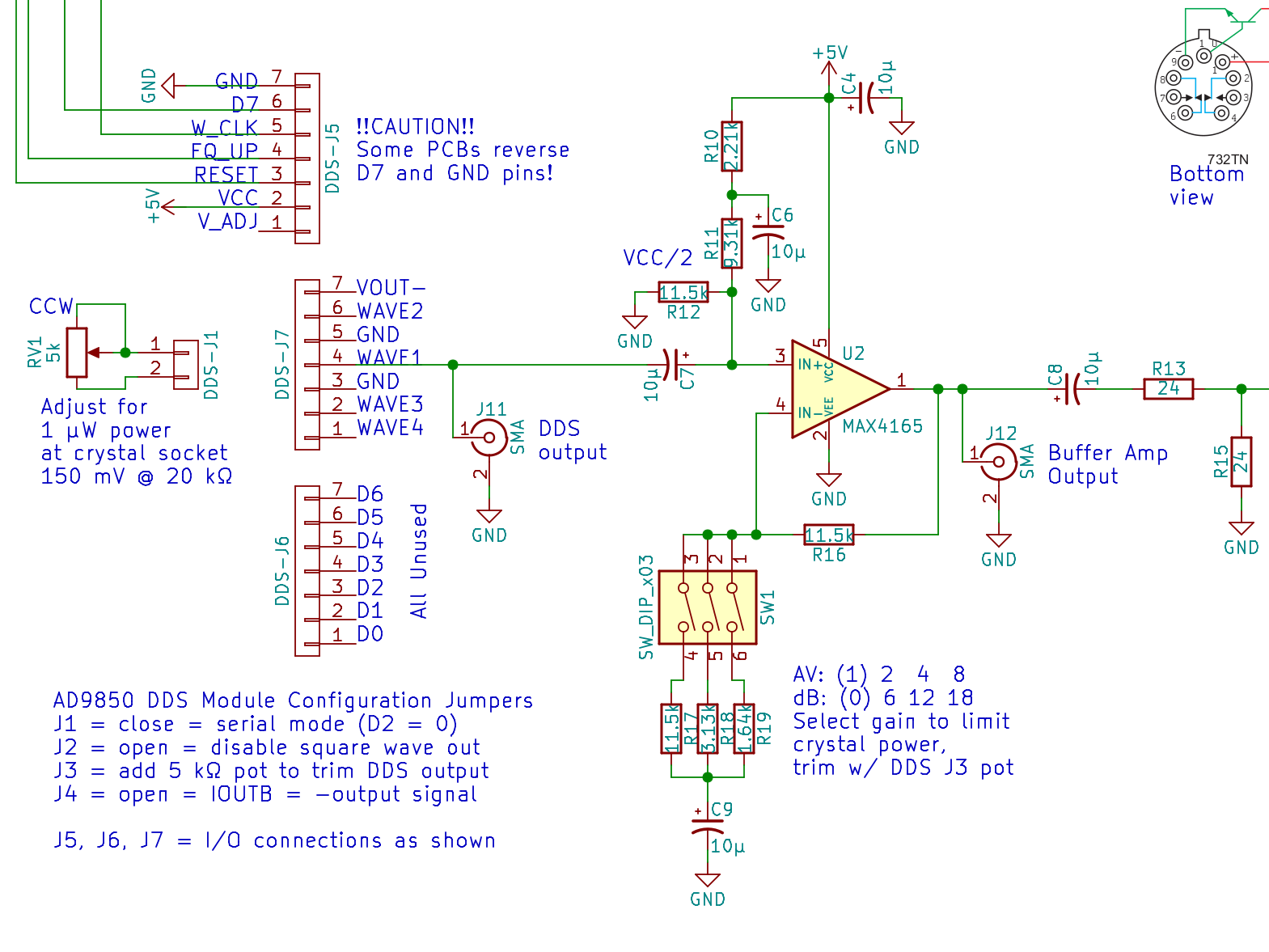
The nominal version of the crystal tester had a 50 Ω input impedance, so I picked a MAX4165 op amp with mojo sufficient for anything over 25 Ω; in retrospect, a lighter load than 48 Ω would be fine.
In any event, the amp looks like this:
MAX4165 Buffer Amp
What looks like a DIP switch is really the 3×2 jumper header just to the right of the foam insulation, in front of the SOT23 space transformer PCB carrying the MAX4165. No jumper = 0 dB gain, then 6 dB steps upward from there. The -6 dB trimpot range gives more-or-less continuous output tweakage across 24 dB, -6 dB to +18 dB, which is certainly excessive. The 24 Ω terminating resistors provide 6 dB loss into the crystal, so the effective range is -12 to +12 dB, with 0 dB = 350 mVrms and -6 dB = 150 mVrms (-ish) at the crystal.
It’s a non-inverting amplifier, which (also in retrospect) probably isn’t a win:
Yet Another Bypass Cap on the cold end of the gain-setting resistors
Overly elaborate VCC/2 biasing to maintain sufficiently high input impedance
I’m reasonably sure all those big caps contribute to some low-level motorboating, but haven’t tracked it down.






 The Smell of Molten Projects in the Morning