
Updating the Sherline’s LinuxCNC from 2.7.ancient to 2.8.1, which I did by the simple expedient of replacing the hard drive with an SSD from the heap and doing a clean installation, provided the opportunity of switching from the parallel port to a Mesa 5I25 FPGA card to put timing-critical step generation under hardware control.
I has flashed the card with Mesa’s Probotix PBX-RF BIT file, then invoked it with a configuration string turning off everything except the stepgen modules:
loadrt hm2_pci config="num_encoders=0 num_pwmgens=0 num_stepgens=4"
Which produces a simple pinout on the back panel DB-25 connector:
hm2_pci: loading Mesa AnyIO HostMot2 driver version 0.7
hm2_pci: discovered 5i25 at 0000:04:02.0
hm2/hm2_5i25.0: Low Level init 0.15
hm2/hm2_5i25.0: 34 I/O Pins used:
hm2/hm2_5i25.0:     IO Pin 000 (P3-01): IOPort
hm2/hm2_5i25.0:     IO Pin 001 (P3-14): IOPort
hm2/hm2_5i25.0:     IO Pin 002 (P3-02): StepGen #0, pin Step (Output)
hm2/hm2_5i25.0:     IO Pin 003 (P3-15): IOPort
hm2/hm2_5i25.0:     IO Pin 004 (P3-03): StepGen #0, pin Direction (Output)
hm2/hm2_5i25.0:     IO Pin 005 (P3-16): IOPort
hm2/hm2_5i25.0:     IO Pin 006 (P3-04): StepGen #1, pin Step (Output)
hm2/hm2_5i25.0:     IO Pin 007 (P3-17): IOPort
hm2/hm2_5i25.0:     IO Pin 008 (P3-05): StepGen #1, pin Direction (Output)
hm2/hm2_5i25.0:     IO Pin 009 (P3-06): StepGen #2, pin Step (Output)
hm2/hm2_5i25.0:     IO Pin 010 (P3-07): StepGen #2, pin Direction (Output)
hm2/hm2_5i25.0:     IO Pin 011 (P3-08): StepGen #3, pin Step (Output)
hm2/hm2_5i25.0:     IO Pin 012 (P3-09): StepGen #3, pin Direction (Output)
hm2/hm2_5i25.0:     IO Pin 013 (P3-10): IOPort
hm2/hm2_5i25.0:     IO Pin 014 (P3-11): IOPort
hm2/hm2_5i25.0:     IO Pin 015 (P3-12): IOPort
hm2/hm2_5i25.0:     IO Pin 016 (P3-13): IOPort
The Sherline CNC driver requires an adapter to swap the Step and Direction signals on the output connector.
The Sherline controller expects active-low Step signals:
# invert step output bits
setp   [HMOT](FPGA0).gpio.002.invert_output     1
setp   [HMOT](FPGA0).gpio.006.invert_output     1
setp   [HMOT](FPGA0).gpio.009.invert_output     1
setp   [HMOT](FPGA0).gpio.011.invert_output     1
The Y and Z drivers needed the same Direction swap as before:
# invert direction output bits
setp   [HMOT](FPGA0).gpio.008.invert_output     1
setp   [HMOT](FPGA0).gpio.010.invert_output     1
Because the 5I25 uses 3.3 V logic with interface drivers to match the “parallel port” 5 V levels, it has different electrical characteristics than the parallel port built into the Dell Optiplex 760. Putting a 100 nF cap across the Probe input reduced, but did not eliminate, what looked like a nice 60 Hz signal on that long wire, so I added a firmware debouncer:
loadrt debounce cfg=2
addf debounce.0               servo-thread
setp debounce.0.delay 3

net probe-raw debounce.0.1.in [HMOT](FPGA0).gpio.003.in_not
net probe-in debounce.0.1.out
The additional 3 ms delay doesn’t amount to much distance, even were I to probe at the machine’s top 10 mm/s speed.
Although the seemingly identical Home switch input seemed stable, it got the same treatment:
net home-raw debounce.0.0.in [HMOT](FPGA0).gpio.013.in_not
net all-home debounce.0.0.out
The PID loops have a very simple setup, with P = 1000 and FF1 = 1, which seems entirely adequate without any attempt at tuning. The following errors seems to stay under 20 ppm, in the machine’s native inches, while cutting the standard Axis “splash G-Code” file with all the speeds cranked up to 24 in/min = 610 mm/min:
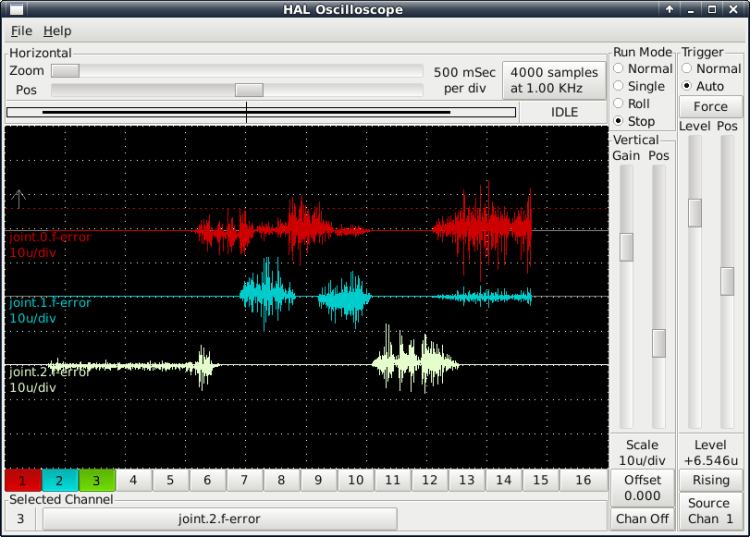
Claiming a 20 µinch error for a Sherline is certainly aspirational.
The INI and HAL files as a GitHub Gist:
| # DO NOT RUN PNCCONF EVER AGAIN | |
| loadrt [KINS]KINEMATICS | |
| loadrt [EMCMOT]EMCMOT servo_period_nsec=[EMCMOT]SERVO_PERIOD num_joints=[KINS]JOINTS | |
| loadrt hostmot2 | |
| loadrt hm2_pci config="num_encoders=0 num_pwmgens=0 num_stepgens=4" | |
| loadrt debounce cfg=2 | |
| addf debounce.0 servo-thread | |
| setp debounce.0.delay 3 | |
| setp [HMOT](FPGA0).watchdog.timeout_ns 5000000 | |
| loadrt pid names=pid.x,pid.y,pid.z,pid.a | |
| addf [HMOT](FPGA0).read servo-thread | |
| addf motion-command-handler servo-thread | |
| addf motion-controller servo-thread | |
| addf pid.x.do-pid-calcs servo-thread | |
| addf pid.y.do-pid-calcs servo-thread | |
| addf pid.z.do-pid-calcs servo-thread | |
| addf pid.a.do-pid-calcs servo-thread | |
| addf [HMOT](FPGA0).write servo-thread | |
| # external output signals | |
| #setp [HMOT](FPGA0).gpio.000.out 1 | |
| net estop-out [HMOT](FPGA0).gpio.000.out | |
| #net all-amps-enabled logic.0.and [HMOT](FPGA0).gpio.007.out | |
| # Home switch | |
| net home-raw debounce.0.0.in [HMOT](FPGA0).gpio.013.in_not | |
| net all-home debounce.0.0.out | |
| # Probe switch | |
| net probe-raw debounce.0.1.in [HMOT](FPGA0).gpio.003.in_not | |
| net probe-in debounce.0.1.out | |
| #******************* | |
| # AXIS X JOINT 0 | |
| #******************* | |
| setp pid.x.Pgain [JOINT_0]P | |
| setp pid.x.Igain [JOINT_0]I | |
| setp pid.x.Dgain [JOINT_0]D | |
| setp pid.x.bias [JOINT_0]BIAS | |
| setp pid.x.FF0 [JOINT_0]FF0 | |
| setp pid.x.FF1 [JOINT_0]FF1 | |
| setp pid.x.FF2 [JOINT_0]FF2 | |
| setp pid.x.deadband [JOINT_0]DEADBAND | |
| setp pid.x.maxoutput [JOINT_0]MAX_OUTPUT | |
| setp pid.x.error-previous-target true | |
| # This setting is to limit bogus stepgen | |
| # velocity corrections caused by position | |
| # feedback sample time jitter. | |
| setp pid.x.maxerror 0.000500 | |
| net x-index-enable <=> pid.x.index-enable | |
| net x-amp-enable => pid.x.enable | |
| net x-pos-cmd => pid.x.command | |
| net x-pos-fb => pid.x.feedback | |
| net x-output <= pid.x.output | |
| # Step Gen signals/setup | |
| setp [HMOT](FPGA0).stepgen.00.dirsetup [JOINT_0]DIRSETUP | |
| setp [HMOT](FPGA0).stepgen.00.dirhold [JOINT_0]DIRHOLD | |
| setp [HMOT](FPGA0).stepgen.00.steplen [JOINT_0]STEPLEN | |
| setp [HMOT](FPGA0).stepgen.00.stepspace [JOINT_0]STEPSPACE | |
| setp [HMOT](FPGA0).stepgen.00.position-scale [JOINT_0]STEP_SCALE | |
| setp [HMOT](FPGA0).stepgen.00.step_type 0 | |
| setp [HMOT](FPGA0).stepgen.00.control-type 1 | |
| setp [HMOT](FPGA0).stepgen.00.maxaccel [JOINT_0]STEPGEN_MAXACCEL | |
| setp [HMOT](FPGA0).stepgen.00.maxvel [JOINT_0]STEPGEN_MAXVEL | |
| # invert step output bit | |
| setp [HMOT](FPGA0).gpio.002.invert_output 1 | |
| # —closedloop stepper signals— | |
| net x-pos-cmd <= joint.0.motor-pos-cmd | |
| net x-vel-cmd <= joint.0.vel-cmd | |
| net x-output <= [HMOT](FPGA0).stepgen.00.velocity-cmd | |
| net x-pos-fb <= [HMOT](FPGA0).stepgen.00.position-fb | |
| net x-pos-fb => joint.0.motor-pos-fb | |
| net x-amp-enable <= joint.0.amp-enable-out | |
| net x-amp-enable => [HMOT](FPGA0).stepgen.00.enable | |
| # —setup home / limit switch signals— | |
| net all-home => joint.0.home-sw-in | |
| net x-neg-limit => joint.0.neg-lim-sw-in | |
| net x-pos-limit => joint.0.pos-lim-sw-in | |
| #******************* | |
| # AXIS Y JOINT 1 | |
| #******************* | |
| setp pid.y.Pgain [JOINT_1]P | |
| setp pid.y.Igain [JOINT_1]I | |
| setp pid.y.Dgain [JOINT_1]D | |
| setp pid.y.bias [JOINT_1]BIAS | |
| setp pid.y.FF0 [JOINT_1]FF0 | |
| setp pid.y.FF1 [JOINT_1]FF1 | |
| setp pid.y.FF2 [JOINT_1]FF2 | |
| setp pid.y.deadband [JOINT_1]DEADBAND | |
| setp pid.y.maxoutput [JOINT_1]MAX_OUTPUT | |
| setp pid.y.error-previous-target true | |
| # This setting is to limit bogus stepgen | |
| # velocity corrections caused by position | |
| # feedback sample time jitter. | |
| setp pid.y.maxerror 0.000500 | |
| net y-index-enable <=> pid.y.index-enable | |
| net y-amp-enable => pid.y.enable | |
| net y-pos-cmd => pid.y.command | |
| net y-pos-fb => pid.y.feedback | |
| net y-output <= pid.y.output | |
| # Step Gen signals/setup | |
| setp [HMOT](FPGA0).stepgen.01.dirsetup [JOINT_1]DIRSETUP | |
| setp [HMOT](FPGA0).stepgen.01.dirhold [JOINT_1]DIRHOLD | |
| setp [HMOT](FPGA0).stepgen.01.steplen [JOINT_1]STEPLEN | |
| setp [HMOT](FPGA0).stepgen.01.stepspace [JOINT_1]STEPSPACE | |
| setp [HMOT](FPGA0).stepgen.01.position-scale [JOINT_1]STEP_SCALE | |
| setp [HMOT](FPGA0).stepgen.01.step_type 0 | |
| setp [HMOT](FPGA0).stepgen.01.control-type 1 | |
| setp [HMOT](FPGA0).stepgen.01.maxaccel [JOINT_1]STEPGEN_MAXACCEL | |
| setp [HMOT](FPGA0).stepgen.01.maxvel [JOINT_1]STEPGEN_MAXVEL | |
| # invert step output bit | |
| setp [HMOT](FPGA0).gpio.006.invert_output 1 | |
| # invert direction output bit | |
| setp [HMOT](FPGA0).gpio.008.invert_output 1 | |
| # —closedloop stepper signals— | |
| net y-pos-cmd <= joint.1.motor-pos-cmd | |
| net y-vel-cmd <= joint.1.vel-cmd | |
| net y-output <= [HMOT](FPGA0).stepgen.01.velocity-cmd | |
| net y-pos-fb <= [HMOT](FPGA0).stepgen.01.position-fb | |
| net y-pos-fb => joint.1.motor-pos-fb | |
| net y-amp-enable <= joint.1.amp-enable-out | |
| net y-amp-enable => [HMOT](FPGA0).stepgen.01.enable | |
| # —setup home / limit switch signals— | |
| net all-home => joint.1.home-sw-in | |
| net y-neg-limit => joint.1.neg-lim-sw-in | |
| net y-pos-limit => joint.1.pos-lim-sw-in | |
| #******************* | |
| # AXIS Z JOINT 2 | |
| #******************* | |
| setp pid.z.Pgain [JOINT_2]P | |
| setp pid.z.Igain [JOINT_2]I | |
| setp pid.z.Dgain [JOINT_2]D | |
| setp pid.z.bias [JOINT_2]BIAS | |
| setp pid.z.FF0 [JOINT_2]FF0 | |
| setp pid.z.FF1 [JOINT_2]FF1 | |
| setp pid.z.FF2 [JOINT_2]FF2 | |
| setp pid.z.deadband [JOINT_2]DEADBAND | |
| setp pid.z.maxoutput [JOINT_2]MAX_OUTPUT | |
| setp pid.z.error-previous-target true | |
| # This setting is to limit bogus stepgen | |
| # velocity corrections caused by position | |
| # feedback sample time jitter. | |
| setp pid.z.maxerror 0.000500 | |
| net z-index-enable <=> pid.z.index-enable | |
| net z-amp-enable => pid.z.enable | |
| net z-pos-cmd => pid.z.command | |
| net z-pos-fb => pid.z.feedback | |
| net z-output <= pid.z.output | |
| # Step Gen signals/setup | |
| setp [HMOT](FPGA0).stepgen.02.dirsetup [JOINT_2]DIRSETUP | |
| setp [HMOT](FPGA0).stepgen.02.dirhold [JOINT_2]DIRHOLD | |
| setp [HMOT](FPGA0).stepgen.02.steplen [JOINT_2]STEPLEN | |
| setp [HMOT](FPGA0).stepgen.02.stepspace [JOINT_2]STEPSPACE | |
| setp [HMOT](FPGA0).stepgen.02.position-scale [JOINT_2]STEP_SCALE | |
| setp [HMOT](FPGA0).stepgen.02.step_type 0 | |
| setp [HMOT](FPGA0).stepgen.02.control-type 1 | |
| setp [HMOT](FPGA0).stepgen.02.maxaccel [JOINT_2]STEPGEN_MAXACCEL | |
| setp [HMOT](FPGA0).stepgen.02.maxvel [JOINT_2]STEPGEN_MAXVEL | |
| # invert step output bit | |
| setp [HMOT](FPGA0).gpio.009.invert_output 1 | |
| # invert direction output bit | |
| setp [HMOT](FPGA0).gpio.010.invert_output 1 | |
| # —closedloop stepper signals— | |
| net z-pos-cmd <= joint.2.motor-pos-cmd | |
| net z-vel-cmd <= joint.2.vel-cmd | |
| net z-output <= [HMOT](FPGA0).stepgen.02.velocity-cmd | |
| net z-pos-fb <= [HMOT](FPGA0).stepgen.02.position-fb | |
| net z-pos-fb => joint.2.motor-pos-fb | |
| net z-amp-enable <= joint.2.amp-enable-out | |
| net z-amp-enable => [HMOT](FPGA0).stepgen.02.enable | |
| # —setup home / limit switch signals— | |
| net all-home => joint.2.home-sw-in | |
| net z-neg-limit => joint.2.neg-lim-sw-in | |
| net z-pos-limit => joint.2.pos-lim-sw-in | |
| #******************* | |
| # AXIS A JOINT 3 | |
| #******************* | |
| setp pid.a.Pgain [JOINT_3]P | |
| setp pid.a.Igain [JOINT_3]I | |
| setp pid.a.Dgain [JOINT_3]D | |
| setp pid.a.bias [JOINT_3]BIAS | |
| setp pid.a.FF0 [JOINT_3]FF0 | |
| setp pid.a.FF1 [JOINT_3]FF1 | |
| setp pid.a.FF2 [JOINT_3]FF2 | |
| setp pid.a.deadband [JOINT_3]DEADBAND | |
| setp pid.a.maxoutput [JOINT_3]MAX_OUTPUT | |
| setp pid.a.error-previous-target true | |
| # This setting is to limit bogus stepgen | |
| # velocity corrections caused by position | |
| # feedback sample time jitter. | |
| setp pid.a.maxerror 0.000500 | |
| net a-index-enable <=> pid.a.index-enable | |
| net a-amp-enable => pid.a.enable | |
| net a-pos-cmd => pid.a.command | |
| net a-pos-fb => pid.a.feedback | |
| net a-output <= pid.a.output | |
| # Step Gen signals/setup | |
| setp [HMOT](FPGA0).stepgen.03.dirsetup [JOINT_3]DIRSETUP | |
| setp [HMOT](FPGA0).stepgen.03.dirhold [JOINT_3]DIRHOLD | |
| setp [HMOT](FPGA0).stepgen.03.steplen [JOINT_3]STEPLEN | |
| setp [HMOT](FPGA0).stepgen.03.stepspace [JOINT_3]STEPSPACE | |
| setp [HMOT](FPGA0).stepgen.03.position-scale [JOINT_3]STEP_SCALE | |
| setp [HMOT](FPGA0).stepgen.03.step_type 0 | |
| setp [HMOT](FPGA0).stepgen.03.control-type 1 | |
| setp [HMOT](FPGA0).stepgen.03.maxaccel [JOINT_3]STEPGEN_MAXACCEL | |
| setp [HMOT](FPGA0).stepgen.03.maxvel [JOINT_3]STEPGEN_MAXVEL | |
| # invert step output bit | |
| setp [HMOT](FPGA0).gpio.011.invert_output 1 | |
| # —closedloop stepper signals— | |
| net a-pos-cmd <= joint.3.motor-pos-cmd | |
| net a-vel-cmd <= joint.3.vel-cmd | |
| net a-output <= [HMOT](FPGA0).stepgen.03.velocity-cmd | |
| net a-pos-fb <= [HMOT](FPGA0).stepgen.03.position-fb | |
| net a-pos-fb => joint.3.motor-pos-fb | |
| net a-amp-enable <= joint.3.amp-enable-out | |
| net a-amp-enable => [HMOT](FPGA0).stepgen.03.enable | |
| # —setup home / limit switch signals— | |
| net all-home => joint.3.home-sw-in | |
| net a-neg-limit => joint.3.neg-lim-sw-in | |
| net a-pos-limit => joint.3.pos-lim-sw-in | |
| #****************************** | |
| # connect miscellaneous signals | |
| #****************************** | |
| # —HALUI signals— | |
| net axis-select-x halui.axis.x.select | |
| net x-is-homed halui.joint.0.is-homed | |
| net axis-select-y halui.axis.y.select | |
| net y-is-homed halui.joint.1.is-homed | |
| net axis-select-z halui.axis.z.select | |
| net z-is-homed halui.joint.2.is-homed | |
| net axis-select-a halui.axis.a.select | |
| net a-is-homed halui.joint.3.is-homed | |
| net jog-selected-pos halui.axis.selected.plus | |
| net jog-selected-neg halui.axis.selected.minus | |
| net spindle-manual-cw halui.spindle.0.forward | |
| net spindle-manual-ccw halui.spindle.0.reverse | |
| net spindle-manual-stop halui.spindle.0.stop | |
| net MDI-mode halui.mode.is-mdi | |
| # —coolant signals— | |
| net coolant-mist <= iocontrol.0.coolant-mist | |
| net coolant-flood <= iocontrol.0.coolant-flood | |
| # —probe signal— | |
| net probe-in => motion.probe-input | |
| # —motion control signals— | |
| net in-position <= motion.in-position | |
| net machine-is-enabled <= motion.motion-enabled | |
| # —digital in / out signals— | |
| # —estop signals— | |
| net estop-out <= iocontrol.0.user-enable-out | |
| net estop-out => iocontrol.0.emc-enable-in | |
| # —manual tool change signals— | |
| loadusr -W hal_manualtoolchange | |
| net tool-change-request iocontrol.0.tool-change => hal_manualtoolchange.change | |
| net tool-change-confirmed iocontrol.0.tool-changed <= hal_manualtoolchange.changed | |
| net tool-number iocontrol.0.tool-prep-number => hal_manualtoolchange.number | |
| net tool-prepare-loopback iocontrol.0.tool-prepare => iocontrol.0.tool-prepared | |
| # DO NOT RUN PNCCONF EVER AGAIN | |
| [EMC] | |
| MACHINE = Razor-5i25 | |
| DEBUG = 0 | |
| VERSION = 1.1 | |
| [DISPLAY] | |
| DISPLAY = axis | |
| POSITION_OFFSET = RELATIVE | |
| POSITION_FEEDBACK = ACTUAL | |
| MAX_FEED_OVERRIDE = 2.000000 | |
| MAX_SPINDLE_OVERRIDE = 1.000000 | |
| MIN_SPINDLE_OVERRIDE = 0.500000 | |
| INTRO_GRAPHIC = /home/ed/linuxcnc/configs/razor-5i25/Sherline.gif | |
| INTRO_TIME = 3 | |
| PROGRAM_PREFIX = /mnt/bulkdata/ | |
| INCREMENTS = 50mm 10mm 1mm 0.1mm 90 45 10 5 1 | |
| GRIDS = 100mm 50mm 25mm 10mm 5mm | |
| POSITION_FEEDBACK = ACTUAL | |
| DEFAULT_LINEAR_VELOCITY = 0.200000 | |
| MAX_LINEAR_VELOCITY = 0.400000 | |
| MIN_LINEAR_VELOCITY = 0.016670 | |
| DEFAULT_ANGULAR_VELOCITY = 12.000000 | |
| MAX_ANGULAR_VELOCITY = 180.000000 | |
| MIN_ANGULAR_VELOCITY = 1.666667 | |
| EDITOR = gedit | |
| GEOMETRY = axyz | |
| [FILTER] | |
| PROGRAM_EXTENSION = .png,.gif,.jpg Greyscale Depth Image | |
| PROGRAM_EXTENSION = .py Python Script | |
| png = image-to-gcode | |
| gif = image-to-gcode | |
| jpg = image-to-gcode | |
| py = python | |
| [TASK] | |
| TASK = milltask | |
| CYCLE_TIME = 0.010 | |
| [RS274NGC] | |
| PARAMETER_FILE = linuxcnc.var | |
| RS274NGC_STARTUP_CODE = G21 G40 G49 G54 G80 G90 G92.1 G94 G97 G98 | |
| [EMCMOT] | |
| EMCMOT = motmod | |
| COMM_TIMEOUT = 1.0 | |
| SERVO_PERIOD = 1000000 | |
| [HMOT] | |
| FPGA0 = hm2_5i25.0 | |
| [HAL] | |
| TWOPASS = on | |
| HALUI = halui | |
| HALFILE = razor-5i25.hal | |
| #HALFILE = joggy.hal | |
| HALFILE = custom.hal | |
| POSTGUI_HALFILE = postgui_call_list.hal | |
| SHUTDOWN = shutdown.hal | |
| #HALFILE = LIB:halcheck.tcl | |
| [HALUI] | |
| [KINS] | |
| JOINTS = 4 | |
| KINEMATICS = trivkins coordinates=XYZA | |
| [TRAJ] | |
| COORDINATES = XYZA | |
| LINEAR_UNITS = inch | |
| ANGULAR_UNITS = degree | |
| DEFAULT_LINEAR_VELOCITY = 0.10 | |
| MAX_LINEAR_VELOCITY = 0.4 | |
| MAX_ANGULAR_VELOCITY = 45 | |
| DEFAULT_ANGULAR_VELOCITY = 25.00 | |
| NO_FORCE_HOMING = 1 | |
| POSITION_FILE = lastposition.txt | |
| [EMCIO] | |
| EMCIO = io | |
| CYCLE_TIME = 0.100 | |
| TOOL_TABLE = tool.tbl | |
| #****************************************** | |
| [AXIS_X] | |
| MIN_LIMIT = -1.0 | |
| MAX_LIMIT = 9.5 | |
| MAX_VELOCITY = 0.4 | |
| MAX_ACCELERATION = 5.0 | |
| [JOINT_0] | |
| TYPE = LINEAR | |
| FERROR = 0.01 | |
| MIN_FERROR = 0.001 | |
| MAX_VELOCITY = 0.4 | |
| MAX_ACCELERATION = 5.0 | |
| BACKLASH = 0.003 | |
| # The values below should be 25% larger than MAX_VELOCITY and MAX_ACCELERATION | |
| # If using BACKLASH compensation STEPGEN_MAXACCEL should be 100% larger. | |
| STEPGEN_MAXVEL = 0.6 | |
| STEPGEN_MAXACCEL = 20 | |
| P = 1000.0 | |
| I = 0.0 | |
| D = 0.0 | |
| FF0 = 0.0 | |
| FF1 = 1.0 | |
| FF2 = 0.0 | |
| BIAS = 0.0 | |
| DEADBAND = 0.0 | |
| MAX_OUTPUT = 0.0 | |
| # these are in nanoseconds | |
| DIRSETUP = 25000 | |
| DIRHOLD = 25000 | |
| STEPLEN = 25000 | |
| STEPSPACE = 25000 | |
| STEP_SCALE = 16000 | |
| MIN_LIMIT = -1.0 | |
| MAX_LIMIT = 9.5 | |
| HOME = 5.25 | |
| HOME_OFFSET = 9.1 | |
| HOME_SEARCH_VEL = 0.3 | |
| HOME_LATCH_VEL = 0.03 | |
| HOME_FINAL_VEL = 0.4 | |
| HOME_USE_INDEX = NO | |
| HOME_IS_SHARED = 1 | |
| HOME_SEQUENCE = 1 | |
| #****************************************** | |
| #****************************************** | |
| [AXIS_Y] | |
| MIN_LIMIT = 0.00 | |
| MAX_LIMIT = 5.10 | |
| MAX_VELOCITY = 0.4 | |
| MAX_ACCELERATION = 5.0 | |
| [JOINT_1] | |
| TYPE = LINEAR | |
| FERROR = 0.01 | |
| MIN_FERROR = 0.001 | |
| MAX_VELOCITY = 0.4 | |
| MAX_ACCELERATION = 5.0 | |
| BACKLASH = 0.003 | |
| # The values below should be 25% larger than MAX_VELOCITY and MAX_ACCELERATION | |
| # If using BACKLASH compensation STEPGEN_MAXACCEL should be 100% larger. | |
| STEPGEN_MAXVEL = 0.6 | |
| STEPGEN_MAXACCEL = 10.0 | |
| P = 1000.0 | |
| I = 0.0 | |
| D = 0.0 | |
| FF0 = 0.0 | |
| FF1 = 1.0 | |
| FF2 = 0.0 | |
| BIAS = 0.0 | |
| DEADBAND = 0.0 | |
| MAX_OUTPUT = 0.0 | |
| # these are in nanoseconds | |
| DIRSETUP = 25000 | |
| DIRHOLD = 25000 | |
| STEPLEN = 25000 | |
| STEPSPACE = 25000 | |
| STEP_SCALE = 16000 | |
| MIN_LIMIT = 0.0 | |
| MAX_LIMIT = 5.1 | |
| HOME = 4.5 | |
| HOME_OFFSET = 5.1 | |
| HOME_SEARCH_VEL = 0.3 | |
| HOME_LATCH_VEL = 0.03 | |
| HOME_FINAL_VEL = 0.4 | |
| HOME_USE_INDEX = NO | |
| HOME_IS_SHARED = 1 | |
| HOME_SEQUENCE = 2 | |
| #****************************************** | |
| #****************************************** | |
| [AXIS_Z] | |
| MIN_LIMIT = 0.0 | |
| MAX_LIMIT = 6.680 | |
| MAX_VELOCITY = 0.333 | |
| MAX_ACCELERATION = 3.0 | |
| [JOINT_2] | |
| TYPE = LINEAR | |
| FERROR = 0.01 | |
| MIN_FERROR = 0.001 | |
| MAX_VELOCITY = 0.333 | |
| MAX_ACCELERATION = 3.0 | |
| BACKLASH = 0.005 | |
| # The values below should be 25% larger than MAX_VELOCITY and MAX_ACCELERATION | |
| # If using BACKLASH compensation STEPGEN_MAXACCEL should be 100% larger. | |
| STEPGEN_MAXVEL = 0.6 | |
| STEPGEN_MAXACCEL = 6 | |
| P = 1000.0 | |
| I = 0.0 | |
| D = 0.0 | |
| FF0 = 0.0 | |
| FF1 = 1.0 | |
| FF2 = 0.0 | |
| BIAS = 0.0 | |
| DEADBAND = 0.0 | |
| MAX_OUTPUT = 0.0 | |
| # these are in nanoseconds | |
| DIRSETUP = 25000 | |
| DIRHOLD = 25000 | |
| STEPLEN = 25000 | |
| STEPSPACE = 25000 | |
| STEP_SCALE = 16000 | |
| MIN_LIMIT = 0.0 | |
| MAX_LIMIT = 6.68 | |
| HOME = 6.5 | |
| HOME_OFFSET = 6.68 | |
| HOME_SEARCH_VEL = 0.15 | |
| HOME_LATCH_VEL = 0.015 | |
| HOME_FINAL_VEL = 0.33 | |
| HOME_USE_INDEX = NO | |
| HOME_IS_SHARED = 1 | |
| HOME_SEQUENCE = 0 | |
| #****************************************** | |
| #****************************************** | |
| [AXIS_A] | |
| MIN_LIMIT = -9999999 | |
| MAX_LIMIT = 9999999 | |
| MAX_VELOCITY = 45.0 | |
| MAX_ACCELERATION = 250.0 | |
| [JOINT_3] | |
| TYPE = ANGULAR | |
| FERROR = 0.1 | |
| MIN_FERROR = 0.01 | |
| MAX_VELOCITY = 45.0 | |
| MAX_ACCELERATION = 250.0 | |
| # The values below should be 25% larger than MAX_VELOCITY and MAX_ACCELERATION | |
| # If using BACKLASH compensation STEPGEN_MAXACCEL should be 100% larger. | |
| STEPGEN_MAXVEL = 50 | |
| STEPGEN_MAXACCEL = 300 | |
| P = 1000.0 | |
| I = 0.0 | |
| D = 0.0 | |
| FF0 = 0.0 | |
| FF1 = 1.0 | |
| FF2 = 0.0 | |
| BIAS = 0.0 | |
| DEADBAND = 0.0 | |
| MAX_OUTPUT = 0.0 | |
| # these are in nanoseconds | |
| DIRSETUP = 25000 | |
| DIRHOLD = 25000 | |
| STEPLEN = 25000 | |
| STEPSPACE = 25000 | |
| STEP_SCALE = 160 | |
| MIN_LIMIT = -9999999 | |
| MAX_LIMIT = 9999999 | |
| HOME = 0.0 | |
| HOME_OFFSET = 0 | |
| HOME_SEARCH_VEL = 0 | |
| HOME_LATCH_VEL = 0 | |
| HOME_FINAL_VEL = 0 | |
| HOME_USE_INDEX = NO | |
| HOME_SEQUENCE = 3 | |
| #****************************************** |
Adapting the HAL code driving my Joggy Thing to its new home didn’t go quite as smoothly, about which, more later.
















 The Smell of Molten Projects in the Morning