The Smell of Molten Projects in the Morning

Ed Nisley's Blog: Shop notes, electronics, firmware, machinery, 3D printing, laser cuttery, and curiosities. Contents: 100% human thinking, 0% AI slop.

Tag: Repairs

If it used to work, it can work again

  • Toyota Sienna: Rear ABS / Speed Sensor Failure

    Given a hint that the Sienna’s left rear ABS / speed sensor had failed, we took a look:

    Sienna ABS failure - removing lug nuts
    Sienna ABS failure – removing lug nuts

    She removed the wheel under field conditions using only in-the-car tools for practice, with the jack stand and wheel chock because we weren’t really beside the road. It turned out that breaking The Last Lug free required bouncing her full weight on the wrench handle, which is what we expected based on previous experience.

    Yes, I pointed out the inadequacy of that footwear. Yes, she loosened the lugs before jacking the van.

    With the van up, the first look showed the ABS diagnostic blink code was dead on:

    Sienna ABS failure - sensor cable
    Sienna ABS failure – sensor cable

    That bit of tubing in her fingers should contain a pair of wires, which was a bit of a puzzle.

    The connector remained snapped onto the sensor head, but the whole affair came out easily enough:

    Sienna ABS failure - connector on sensor head
    Sienna ABS failure – connector on sensor head

    We thought those wires seemed very tightly twisted, too. I guessed that a clip holding the sensor head in place had gone missing, allowing it to rotate in place.

    Which was partially true, as the “missing” wires were very very very tightly twisted inside that flexible tubing and, thus, much shorter than they should be:

    Sienna ABS failure - hypertwisted sensor cable
    Sienna ABS failure – hypertwisted sensor cable

    Lining up the removable parts:

    Sienna ABS failure - sensor head disassembly
    Sienna ABS failure – sensor head disassembly

    The sensor head should be firmly glued onto the back of the wheel hub, with no clips or screws holding it in place, as we found by comparing it with the right rear wheel. That slightly rough gray ring just outside of the central cylinder was the adhesive…

    She soldered longer wires to the pigtails on the connector and applied heatshrink. The hyper-twisted wires under the car got un-twisted a bit, straightened, cleaned up, then rejoined to the connector with pair of gel-filled beanie compression splices and more tubing to ease the strain.

    We buttered up the sensor head flange with JB Kwik epoxy, squished it back in place for a good seal, spun the hub to make sure the sensor fingers weren’t hitting anything, then she practiced ten minutes of meditation while holding it in place and awaiting a firm set.

    It turns out that the sensor head is not a replaceable part: it’s factory-bonded to the back of the hub and should never, ever come loose. Given that this one had made maybe a dozen orbits and was finger-loose in the back of the hub, with some dust & crud visible inside the hub where it shouldn’t be, replacing the wheel hub is in the plan.

    Also, we still don’t know why different versions of “the same cable” have such a huge price difference; despite their sensor attribute, they definitely don’t include the sensor head.

    After repairing the cable, she put the wheel back in place, reset the ABS codes, drove the van around the block, found a patch of sand to check out the ABS braking, and reported normal operation.

    We’ll replace both the cable and hub, then declare victory.

  • Toyota Sienna: ABS Trouble Codes

    The Sienna lit up the tire pressure warning light and the ABS trouble light on the trip from Rochester. The pressures were OK, if a bit low, but the early Toyota TPMS used wheel rotation sensors rather than direct pressure sensors, and we suspect a sensor went bad.

    The ABS doesn’t report errors through the OBD II interface, requiring a jumper between TC and E1 in the ABS diagnostic interface block under the hood. Our Larval Engineer shows much respect for the engineer who included the pin ID layout under the flip-top lid, eliminating the need for scratch paper.

    Despite diligent searching, there seems to be no Official Documentation of the blink codes appearing on the ABS trouble indicator. Fragmentary evidence suggests that a table applying to a Toyota MR2 MKII sports car would be generally applicable, which is hereby ripped to forestall link rot:

    Code Number Diagnosis
    11 open circuit in solenoid relay circuit
    12 short circuit in solenoid relay circuit
    13 open circuit in pump motor relay circuit
    14 short circuit in pump motor relay circuit
    21 open or short circuit in 3 position solenoid of front right wheel
    22 open or short circuit in 3 position solenoid of front left wheel
    23 open or short circuit in 3 position solenoid of rear wheels
    31 front right wheel speed sensor signal malfunction
    32 front left wheel speed sensor signal malfunction
    33 rear right wheel speed sensor signal malfunction
    34 rear left wheel speed sensor signal malfunction
    35 open circuit in front left or rear right wheel speed sensor
    36 open circuit in front right or rear left wheel speed sensor
    41 abnormal battery voltage ( < 9.5 or > 17 )
    51 pump motor of actuator locked or open circuit in pump motor circuit in actuator
    ALWAYS ON computer malfunction

    The  3-4 blink code indicates a left rear wheel sensor failure. Such sensors (or their cables) seem to be either $35 or $175 from the usual sources, with no indication of why some are far more expensive than others. The pictures and descriptions are unhelpful, to say the least.

    We’ll try cleaning the sensor, which probably won’t improve the situation, and then replace the poor thing.

  • HP 7475A Plotter: Refilling Disposable Liquid Ink Pens

    A while back, Keith Ward sent a Big Box o’ Plotter Pens that:

    • Should suffice for the rest of the plotter’s life… if not mine
    • Obliterate any need for my Sakura pen adapters

    After a bit of sorting, I had a quartet of “disposable” liquid ink pens with contents ranging from desiccated to gummy. With nothing to lose (and having already cut a clearance slot in the plotter case), I drilled a small hole in the top of each reservoir, squirted some inkjet printer ink into the void, and taped the hole closed.

    Surprisingly, a little liquid love restored all but the black pen to working condition, if not perfect heath:

    HP7475A disposable liquid pen - refilled
    HP7475A disposable liquid pen – refilled

    I think the blurred white disk floating in the reservoir sealed the end where you jam the tip in place to activate the pen. The blob of dark gunk shows the reservoir didn’t start with yellow ink, but I had nothing to lose.

    The top pen in this picture is another style / brand with a smaller reservoir:

    HP7475A pens - disposable liquid  and ceramic tip
    HP7475A pens – disposable liquid and ceramic tip

    The white pen in the foreground has a 0.3 mm ceramic tip, contains its original green ink, and works as well as it ever did; it might be refillable, too.

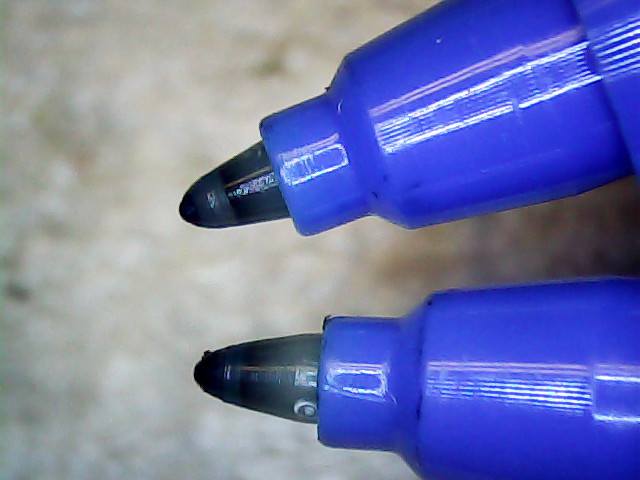
    The liquid-ink pens have a serpentine vent in the tip. This is a Genuine New-Old-Stock pen in a four-pen case labeled HP 5061-7566:

    HP7475A disposable liquid pen - new
    HP7475A disposable liquid pen – new

    The serpentine path connects the exterior vent opening (facing you) to a tiny hole (on the other side of the blue shaft) into the ink chamber. As it turns out, a new hole drilled in the reservoir admits enough air to drain the (freshly refilled) liquid ink through the serpentine path all over the workbench. Having some experience with refilling inkjet cartridges, I deployed a towel decorated with colorful splotches in anticipation of such an unexpected event, although my fingers looked considerably more cheerful than usual for a few days.

    The black pen never worked quite right, but the other three did fine. The ceramic pen is at the top:

    HP7475A - KBR to YCM Refilled disposable pens - G ceramic pen
    HP7475A – KBR to YCM Refilled disposable pens – G ceramic pen

    Protip: the blown contrast and rear-surface bleedthrough behind the yellow ink should tell you it isn’t visible in normal room light. I must mix yellow with another color if I ever refill that pen that again.

    KiCad uses only one pen for the entire schematic, even when you select “plot in color”, suggesting nobody has sent the “plotter” output stream to an actual plotter in a long, long time.

    Despite the charm of watching the plotter crank out an entire schematic page, it’s not a compelling enough user experience to replace an inkjet printer. For an art project, one might be seeking an entirely different user experience and the answer might be different, too.

    Selah.

  • Extract-copying A Video Clip

    The magic incantation to extract a few seconds of video from a longer clip and set the output file to use the same codecs:

    avconv -ss 00:00:01 -i /mnt/video/2015-05-30/08420001.AVI -codec copy -t 5 08420001-clip.avi
    

    The parameter order matters: the -ss must come before the -i input file name and the -t must come after it. Otherwise, avconv will copy the entire file before extracting the clip, which can be tedious.

    The Fly6 camera produced a video file containing ten minutes of variations on this theme:

    Fly6 - 0842001.AVI - Video compression failure
    Fly6 – 0842001.AVI – Video compression failure

    The top of the image looked pretty good, but then the decompression stalls and smears a single, slowly degenerating, line down the rest of the frame. The other files from that trip looked just fine.

    As it turned out, extracting a few seconds with avconv or binary-copying the first few megabytes with dd produced playable copies: the original file tripped vlc’s decompression, but the source data was in the file and the copies worked.

    Soooo, I could recover the video. Not that it was particularly important, but knowing how might matter some day.

    Video is weird.

    The Cycliq tech support folks recommend regularly formatting the MicroSD card using the Official SD Association Program (Windows-only, of course), not erasing any video files, and generally letting the camera handle the card. This whole affair seems remarkably fragile.

  • Michelin Pilot City Tire Bead-Carcass Joint Failure

    A year or so ago, I picked up a Michelin Pilot City tire (700x32C) to see how they compare with the twice-as-expensive Schwalbe Marathons we’ve been using on the Tour Easy recumbents.

    Having replaced a worn-out Marathon last summer, this was unexpected:

    Michelin Pilot City Protek tire - blown bead
    Michelin Pilot City Protek tire – blown bead

    I’d blame that failure on overpressure, but I’ve been running the back tires around 70 psi, well inside their 87 psi (that’s a nice, round 6 bar) sidewall rating.

    Being able to swap a back tire in the Basement Laboratory Repair Facility made up for a lot…

  • Tour Easy: Cracked Fork Autopsy

    A look inside the cracked fork lug from my Tour Easy shows that it really did fracture at the top of the fork blade:

    Tour Easy - cracked fork - interior flash
    Tour Easy – cracked fork – interior flash

    Minus the flash, plus contrast enhancement:

    Tour Easy - cracked fork - interior
    Tour Easy – cracked fork – interior

    Looks rather grotendous in there, doesn’t it? Yeah, show me the interior of your fork…

    The front is at the top, blade on the left and crown on the right. The little shiny rectangle at 1 o’clock on the crown was probably the last fragment holding the blade in place.

    Finished!

  • Tour Easy: New Front Fork

    A view from the wheel side shows the crack in my Tour Easy’s fork lug had opened a bit more to the rear, which is about what you’d expect from the forces involved:

    Tour Easy - cracked fork lug
    Tour Easy – cracked fork lug

    Removing the handlebar stem from the fork steerer tube requires removing the fairing, its mounting brackets, the fender, a speed sensor, then snipping cable ties to release all the cables and wires. Minus the prep work, removing the fork from the bike isn’t anything special.

    The lower bearing (a YST 8311N in black) has rollers, not balls. The headset has J.I.S. 1 inch dimensions, captured in a screen grab to forestall link rot:

    YST 8311N headset data
    YST 8311N headset data

    Which means cheap & readily available ISO standard headsets aren’t a drop-in replacement. The incomparable Harris Cyclery has J.I.S. ball-bearing headsets in stock and their Tange Levin CDS HD1002 needs just 1.6 mm of additional washer to match the YST’s 35 mm stack height…

    The front side of the crown got rather graunched over the last 14 years, but I punted the problem by rotating the race half a turn to put the eroded spots toward the rear, where they’ll be under minimal stress:

    Tour Easy crown bearing - damage
    Tour Easy crown bearing – damage

    Re-seating the race brought an ancient Headsetter tool from the drawer:

    Tour Easy fork with Headsetter
    Tour Easy fork with Headsetter

    It’s basically galvanized pipe, chamfered on one end, with a set of nuts & washers on a length of all-thread rod just slightly too short for the occasion: this might be the second time I’ve used the thing and I had to supply my own all-thread & nuts. Ah, well, it probably predates the Tour Easy’s design by a decade.

    The lower headset race looked to be in pretty good shape, so I left it alone. Normally, such bearing damage gives you indexed steering, but Tour Easy handlebars provide so much lever arm that nothing interferes with the bike’s steering.

    The new fork didn’t have a notch for the keyed washer isolating the locknut from the upper bearing race. The usual advice is to file off the key and apply threadlocker, which makes adjusting the two nuts tedious, so I restored the notch in the steerer threads:

    Tour Easy - filed steerer tube key slot
    Tour Easy – filed steerer tube key slot

    Yes, that’s a lethally sharp steel shaving from the not-very-well-reamed ID curling up in the middle of the notch.

    The fender mount bridge on the new fork sits half an inch higher in relation to the brake bosses, putting the fender against the V-brake cable hardware.  Anything touching the V-brake messes up the pad-to-rim alignment, so I conjured a snippet of aluminum to lower the fender just enough to clear the brakes:

    Tour Easy - new fork - fender extender
    Tour Easy – new fork – fender extender

    I think that calls for a nice 3D printed bracket, too, but the snippet got me back on the bike faster. When I preemptively replace the fork on Mary’s bike, then I’ll do a proper bracket for both of us.

    The garish red silicone tape replaces the previous black cable ties. It matches the tube paint surprisingly well and doesn’t look good on the fork, so I’ll replace it with cable ties in due course.

    A few miles of shakedown riding settled the crown race against the fork, another 1/6 turn of the upper race / lock nut snugged up the bearings, and it’s all good again.

    Wow, it’s great to be back on the bike!

    (Due to the vagaries of writing this stuff up ahead of time, there’s actually two weeks of realtime between the post that appeared on Monday and this one.)