The Smell of Molten Projects in the Morning

Ed Nisley's Blog: Shop notes, electronics, firmware, machinery, 3D printing, laser cuttery, and curiosities. Contents: 100% human thinking, 0% AI slop.

Tag: Improvements

Making the world a better place, one piece at a time

  • Multimeter Probe Cable: FAIL

    A reasonably good silicone-wire multimeter probe set arrived last spring and has worked well enough (I thought, anyhow) for the usual voltage measurements, but recently failed while measuring a small current. We all know how this will turn out, but the details may be of some interest.

    Measuring the resistance from tip to plug located the fault to the black probe, after which I poked a pin through the insulation near the plug:

    Multimeter probe - diagnosis
    Multimeter probe – diagnosis

    The two leads near the bottom go to my shiny Siglent bench multimeter. Despite their similarity to the failed probes, I’m pretty sure Siglent has better QC (well, mostly).

    The probe’s resistance was near zero from the tip (offscreen to the left) to the pin and megohms from pin to plug (on the right). Figuring the wire worked loose, I pulled it away from the plug:

    Multimeter probe - disassembly 1
    Multimeter probe – disassembly 1

    Huh.

    Although I wouldn’t have trusted those probes anywhere near their alleged 1 kV rating, seeing that exposed copper-like substance was disconcerting.

    Hacking off the strain relief bushing around the wire got closer to the fault:

    Multimeter probe - disassembly 2
    Multimeter probe – disassembly 2

    And, finally, the problem becomes obvious:

    Multimeter probe - disassembly 3
    Multimeter probe – disassembly 3

    Yet Another Cold Solder Joint:

    Multimeter probe - cold solder joint
    Multimeter probe – cold solder joint

    Pulling a black banana plug from the heap, I decided to drill a proper hole to anchor the wire:

    Multimeter probe - drilling plug
    Multimeter probe – drilling plug

    Which looked like this afterward:

    Multimeter probe - soldered plug
    Multimeter probe – soldered plug

    And produced a strongly mismatched pair:

    Multimeter probe - repaired
    Multimeter probe – repaired

    Ain’t it amazing how much fun you can have for a few bucks, all delivered by eBay? [sigh]

  • DSO150 Power Supplies: Bring the Noise!

    Finally getting around to measuring the boost converter between the 18650 lithium cell and the DSO150 oscilloscope:

    DSO150 - 18650 boost V - input output 100 mA-div
    DSO150 – 18650 boost V – input output 100 mA-div

    The yellow trace shows the booster output voltage is 9 VDC, as set by the twiddlepot, and doesn’t vary much under load. It has 200 mV ripple at 220 kHz, the booster’s switching frequency, which doesn’t induce any meaningful noise on the scope’s display, because it’s well outside the display bandwidth and well inside the voltage spec.

    The current traces are 100 mA/div from Tek Hall effect probes. The green trace is battery current to the booster, varying from 200 to 300 mA, averaging 250 mA. The cyan trace is DSO150 current from the booster, 75 mA min, 200 mA max, averaging 100 mA.

    The battery current is 2.5 × the scope current, the battery voltage is 1/2.5 × the scope voltage, and all is right with the world.

    Two multi-output wall warts (Powseed and Leapara, for whatever that’s worth) with a bag of right-angle tips just arrived and I gimmicked up a connection directly to the output:

    Powseed multi-voltage supply - hack-job test connection
    Powseed multi-voltage supply – hack-job test connection

    Which went to a 100 Ω dummy load drawing about the same current as the DSO150:

    Power supply load test - 100 ohm resistor
    Power supply load test – 100 ohm resistor

    Both seem to work OK, albeit with plenty of spiky noise:

    PowSeed Multi-Voltage Wart - 9 V 100 mA-div
    PowSeed Multi-Voltage Wart – 9 V 100 mA-div

    Much to my surprise, there’s no visible noise on the DSO150 display, surely because the scope’s bandwidth is nowhere near wide enough to grow that kind of grass.

    A power supply like that would convert the DSO150 into a bench instrument suitable for low frequency circuitry.

  • Astable Multivibrator: RGB LED and Radome Spider

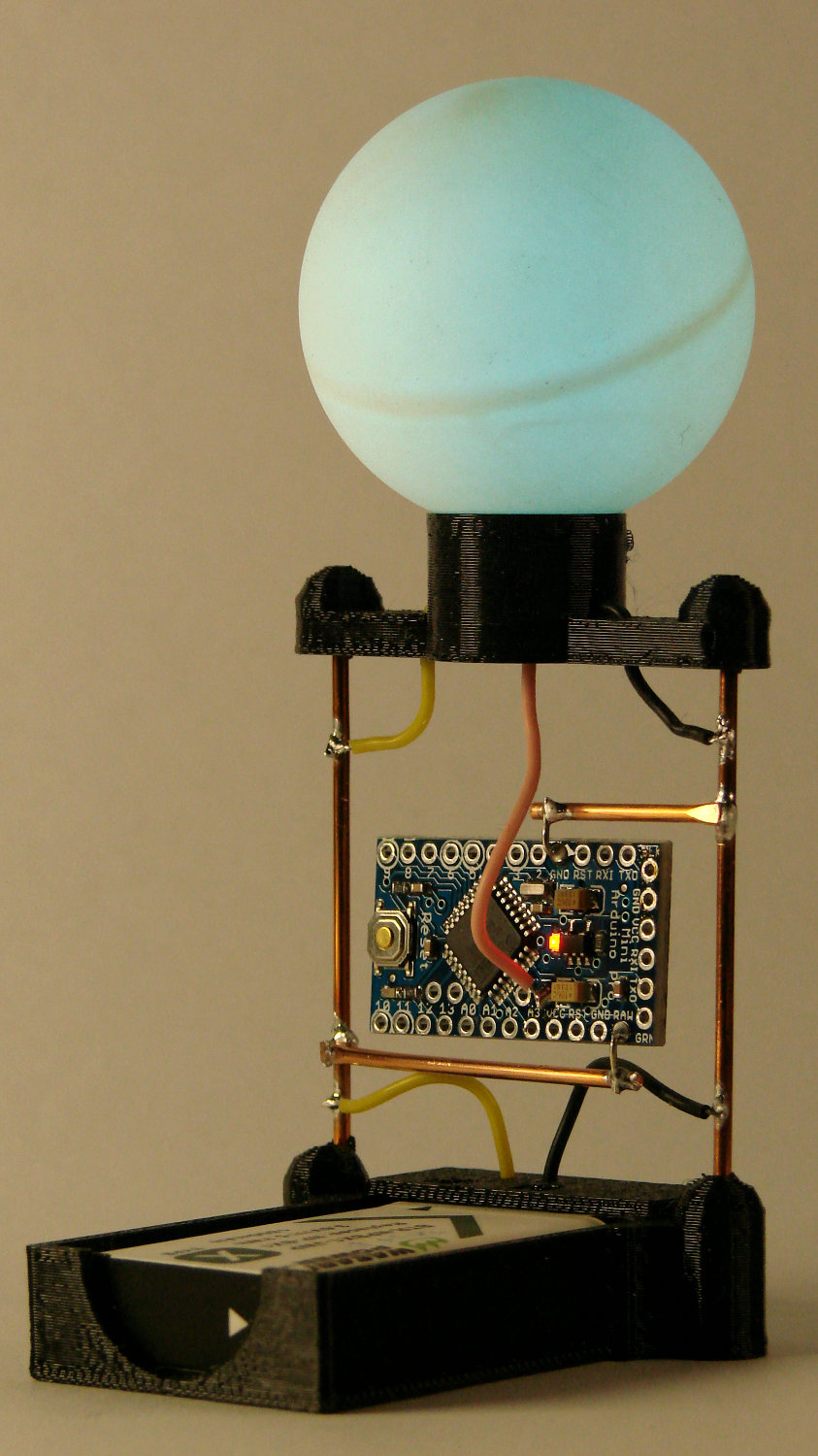
    Well, a spider with half the proper leg count:

    RGB LED - radome test
    RGB LED – radome test

    One could argue the LED spider has an unusually large abdomen, but I’m not going there.

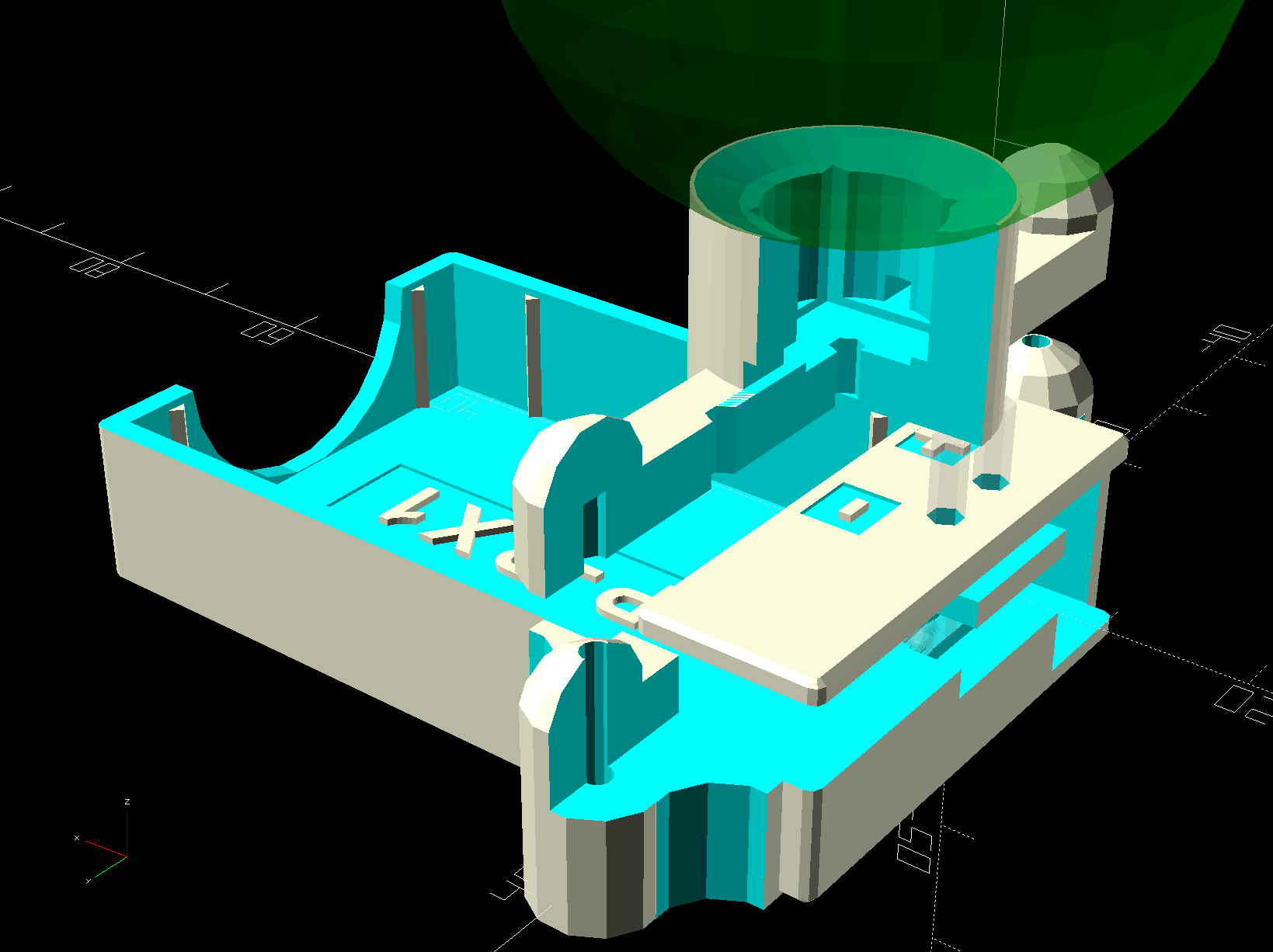
    The solid model looks the same way:

    Astable Multivibrator Battery Holder - RGB LED Spider - radome
    Astable Multivibrator Battery Holder – RGB LED Spider – radome

    And, yes, those are eye protection caps over the four wire struts, most useful during construction while maneuvering the radome into position.

    For reasons unknown to me, they’re called “Pirhana” LEDs:

    RGB LED - wiring
    RGB LED – wiring

    I trimmed off half of each pin, soldered on 28 AWG color-coded silicone wires, threaded wires through openings, then rammed the LED package into the recess so it sits just below the radome’s curve. The dent matching the ball comes from the chord equation, as always, and looks pretty good.

    The radome is, of course, a one-star ping pong ball from the usual big box retailer’s sporting goods section. The stamped logo sits at a random position with respect to the ball’s interior structure (visible when lit, as in the top picture), so I erased it with a fine-grit sanding sponge. Hollow plastic golf balls might work just as well, with an even more interesting surface texture.

    The source code includes a cutaway look at the printed parts to verify their innards:

    Astable Multivibrator Battery Holder - RGB LED Spider - fit view
    Astable Multivibrator Battery Holder – RGB LED Spider – fit view

    The OpenSCAD source code as a GitHub Gist:

    // Holder for Li-Ion battery packs
    // Ed Nisley KE4ZNU January 2013
    // 2018-11-15 Adapted for 1.5 mm pogo pins, battery data table
    // 2018-12 RGB LED spider, general cleanups
    /* [Layout options] */
    BatteryName = "NP-BX1"; // [NP-BX1,NB-5L,NB-6L]
    RGBCircuit = true; // false = 1 strut pair, true = 2 pairs
    Layout = "Case"; // [Build,Show,Fit,Case,Lid,Pins,RGBSpider]
    /* [Extrusion parameters] – must match reality! */
    // Print with +2 shells and 3 solid layers
    ThreadThick = 0.25;
    ThreadWidth = 0.40;
    HoleWindage = 0.2;
    function IntegerMultiple(Size,Unit) = Unit * ceil(Size / Unit);
    function IntegerLessMultiple(Size,Unit) = Unit * floor(Size / Unit);
    Protrusion = 0.1; // make holes end cleanly
    /* [Hidden] */
    inch = 25.4;
    BuildOffset = 3.0; // clearance for build layout
    Gap = 2.0; // separation for Fit parts
    //- Basic dimensions
    WallThick = 4*ThreadWidth; // holder sidewalls
    BaseThick = 6*ThreadThick; // bottom of holder to bottom of battery
    TopThick = 6*ThreadThick; // top of battery to top of holder
    //- Battery dimensions – rationalized from several samples
    // Coordinate origin at battery corner with contacts, key openings downward
    T_NAME = 0; // Name must fit recess, so don't get loquacious
    T_SIZE = 1;
    T_CONTACTS = 2;
    T_KEYS = 3;
    BatteryData = [
    ["NP-BX1",[43.0,30.0,9.5],[[-0.75,6.0,6.2],[-0.75,16.0,6.2]],[[1.70,3.70,2.90],[1.70,3.60,2.90]]],
    ["NB-5L", [45.0,32.0,8.0],[[-0.82,4.5,3.5],[-0.82,11.0,3.5]],[[2.2,0.75,2.0],[2.2,2.8,2.0]]],
    ["NB-6L",[42.5,35.5,7.0],[[-0.85,5.50,3.05],[-0.85,11.90,3.05]],[[2.0,0.70,2.8],[2.0,2.00,2.8]]],
    ];
    echo(str("Battery: ",BatteryName));
    BatteryIndex = search([BatteryName],BatteryData,1,0)[0];
    echo(str(" Index: ",BatteryIndex));
    BatterySize = BatteryData[BatteryIndex][T_SIZE]; // X = length, Y = width, Z = thickness
    echo(str(" Size: ",BatterySize));
    Contacts = BatteryData[BatteryIndex][T_CONTACTS]; // relative to battery edge, front, and bottom
    echo(str(" Contacts: ",Contacts));
    ContactOC = Contacts[1].y – Contacts[0].y; // + and – terminals for pogo pin contacts
    ContactCenter = Contacts[0].y + ContactOC/2;
    KeyBlocks = BatteryData[BatteryIndex][T_KEYS]; // recesses in battery face set X position
    echo(str(" Keys: ",KeyBlocks));
    //- Pin dimensions
    ID = 0;
    OD = 1;
    LENGTH = 2;
    PinShank = [1.5,2.0,6.5]; // shank, flange, compressed length
    PinFlange = [1.5,2.0,0.5]; // flange, length included in PinShank
    PinTip = [0.9,0.9,2.5]; // extended spring-loaded tip
    WireOD = 1.7; // wiring from pins to circuitry
    PinChannel = WireOD; // cut behind flange for solder overflow
    PinRecess = 3.0; // recess behind pin flange end for epoxy fill
    echo(str("Contact tip dia: ",PinTip[OD]));
    echo(str(" .. shank dia: ",PinShank[ID]));
    OverTravel = 0.5; // space beyond battery face at X origin
    //- Holder dimensions
    GuideRadius = ThreadWidth; // friction fit ridges
    GuideOffset = 7; // from compartment corners
    LidOverhang = 2.0; // atop of battery for retention
    LidClearance = LidOverhang * (BatterySize.z/BatterySize.x); // … clearance above battery for tilting
    echo(str("Lid clearance: ",LidClearance));
    CaseSize = [BatterySize.x + PinShank[LENGTH] + OverTravel + PinRecess + GuideRadius + WallThick,
    BatterySize.y + 2*WallThick + 2*GuideRadius,
    BatterySize.z + BaseThick + TopThick + LidClearance];
    echo(str("Case size: ",CaseSize));
    CaseOffset = [-(PinShank[LENGTH] + OverTravel + PinRecess),-(WallThick + GuideRadius),0]; // position around battery
    ThumbRadius = 10.0; // thumb opening at end of battery
    CornerRadius = 3*ThreadThick; // nice corner rounding
    LidSize = [-CaseOffset.x + LidOverhang,CaseSize.y,TopThick];
    LidOffset = [0.0,CaseOffset.y,0];
    //- Wire struts
    StrutDia = 1.6; // AWG 14 = 1.6 mm
    StrutSides = 3*4;
    StrutBase = [StrutDia,StrutDia + 4*WallThick,CaseSize.z – TopThick]; // ID = wire, OD = buildable
    //StrutOC = [IntegerLessMultiple(BatterySize.x – StrutBase[OD],5.0), // set easy OC wire spacing
    // IntegerMultiple(CaseSize.y + StrutBase[OD],5.0)];
    StrutOC = [IntegerLessMultiple(CaseSize.x – 2*CornerRadius -2*StrutBase[OD],5.0),
    IntegerMultiple(CaseSize.y + StrutBase[OD],5.0)];
    StrutOffset = [CaseSize.x/2 + CaseOffset.x,BatterySize.y/2]; // from case centerlines
    StrutAngle = atan(StrutOC.y/StrutOC.x);
    echo(str("Strut OC: ",StrutOC));
    //- RGB LED
    RGBBody = [8.0,8.0,5.0]; // Z = body height
    RGBPin = 5.0; // pin length
    RGBPinsOC = [5.0,5.0]; // pin layout
    RGBRecess = RGBBody.z + RGBPin/2; // maximum LED recess depth
    BallOD = 40.0; // radome sphere
    BallSides = 4*StrutSides; // nice number of sides
    BallPillar = [norm([RGBBody.x,RGBBody.y]),
    norm([RGBBody.x,RGBBody.y]) + 4*WallThick,
    StrutBase[OD] + RGBBody.z];
    BallChordM = BallOD/2 – sqrt(pow(BallOD/2,2) – (pow(BallPillar[OD],2))/4);
    echo(str("Ball chord depth: ",BallChordM));
    //———————-
    // Useful routines
    module PolyCyl(Dia,Height,ForceSides=0) { // based on nophead's polyholes
    Sides = (ForceSides != 0) ? ForceSides : (ceil(Dia) + 2);
    FixDia = Dia / cos(180/Sides);
    cylinder(r=(FixDia + HoleWindage)/2,h=Height,$fn=Sides);
    }
    //——————-
    //– Guides for tighter friction fit
    module Guides() {
    translate([GuideOffset,-GuideRadius,0])
    PolyCyl(2*GuideRadius,(BatterySize.z – Protrusion),4);
    translate([GuideOffset,(BatterySize.y + GuideRadius),0])
    PolyCyl(2*GuideRadius,(BatterySize.z – Protrusion),4);
    translate([(BatterySize.x – GuideOffset),-GuideRadius,0])
    PolyCyl(2*GuideRadius,(BatterySize.z – Protrusion),4);
    translate([(BatterySize.x – GuideOffset),(BatterySize.y + GuideRadius),0])
    PolyCyl(2*GuideRadius,(BatterySize.z – Protrusion),4);
    translate([(BatterySize.x + GuideRadius),GuideOffset/2,0])
    PolyCyl(2*GuideRadius,(BatterySize.z – Protrusion),4);
    translate([(BatterySize.x + GuideRadius),(BatterySize.y – GuideOffset/2),0])
    PolyCyl(2*GuideRadius,(BatterySize.z – Protrusion),4);
    }
    //– Contact pins
    // Rotated to put them in their natural oriention
    // Aligned to put tip base / end of shank at Overtravel limit
    module PinShape() {
    translate([-(PinShank[LENGTH] + OverTravel),0,0])
    rotate([0,90,0])
    rotate(180/6)
    union() {
    PolyCyl(PinTip[OD],PinShank[LENGTH] + PinTip[LENGTH],6);
    PolyCyl(PinShank[ID],PinShank[LENGTH] + Protrusion,6); // slight extension for clean cuts
    PolyCyl(PinFlange[OD],PinFlange[LENGTH],6);
    }
    }
    // Position pins to put end of shank at battery face
    // Does not include recess access into case
    module PinAssembly() {
    union() {
    for (p = Contacts)
    translate([0,p.y,p.z])
    PinShape();
    translate([-(PinShank[LENGTH] + OverTravel) + PinChannel/2, // solder space
    ContactCenter,
    Contacts[0].z])
    cube([PinChannel,
    (Contacts[1].y – Contacts[0].y + PinFlange[OD]),
    PinFlange[OD]],center=true);
    for (j=[-1,1]) // wire channels
    translate([-(PinShank[LENGTH] + OverTravel – PinChannel/2),
    j*ContactOC/4 + ContactCenter,
    Contacts[0].z – PinFlange[OD]/2])
    rotate(180/6)
    PolyCyl(WireOD,CaseSize.z,6);
    }
    }
    //– Case with origin at battery corner
    module Case() {
    difference() {
    union() {
    difference() {
    union() {
    translate([(CaseSize.x/2 + CaseOffset.x), // basic case shape
    (CaseSize.y/2 + CaseOffset.y),
    (CaseSize.z/2 – BaseThick)])
    hull()
    for (i=[-1,1], j=[-1,1], k=[-1,1])
    translate([i*(CaseSize.x/2 – CornerRadius),
    j*(CaseSize.y/2 – CornerRadius),
    k*(CaseSize.z/2 – CornerRadius)])
    sphere(r=CornerRadius/cos(180/8),$fn=8); // cos() fixes undersize spheres!
    for (i= RGBCircuit ? [-1,1] : -1) { // strut bases
    hull()
    for (j=[-1,1])
    translate([i*StrutOC.x/2 + StrutOffset.x,j*StrutOC.y/2 + StrutOffset.y,-BaseThick])
    rotate(180/StrutSides)
    cylinder(d=StrutBase[OD],h=StrutBase[LENGTH],$fn=StrutSides);
    translate([i*StrutOC.x/2 + StrutOffset.x,StrutOffset.y,StrutBase[LENGTH]/2 – BaseThick])
    cube([2*StrutBase[OD],StrutOC.y,StrutBase[LENGTH]],center=true); // blocks for fairing
    for (j=[-1,1]) // hemisphere caps
    translate([i*StrutOC.x/2 + StrutOffset.x,
    j*StrutOC.y/2 + StrutOffset.y,
    StrutBase[LENGTH] – BaseThick])
    rotate(180/StrutSides)
    sphere(d=StrutBase[OD]/cos(180/StrutSides),$fn=StrutSides);
    }
    }
    translate([-OverTravel,-GuideRadius,0])
    cube([(BatterySize.x + GuideRadius + OverTravel),
    (BatterySize.y + 2*GuideRadius),
    (BatterySize.z + LidClearance + Protrusion)]); // battery space
    translate([BatterySize.x/2,BatterySize.y/2,0]) // recess around battery name
    cube([0.8*BatterySize.x,8,2*ThreadThick],center=true);
    }
    Guides(); // improve friction fit
    translate([-OverTravel,-GuideRadius,0]) // battery keying blocks
    cube(KeyBlocks[0] + [OverTravel,GuideRadius,0],center=false);
    translate([-OverTravel,(BatterySize.y – KeyBlocks[1].y),0])
    cube(KeyBlocks[1] + [OverTravel,GuideRadius,0],center=false);
    translate([BatterySize.x/2,BatterySize.y/2,-ThreadThick]) // battery name!
    linear_extrude(height=2*ThreadThick,convexity=10)
    text(text=BatteryName,size=5,spacing=1.20,font="Arial:style:Bold",halign="center",valign="center");
    }
    translate([2*CaseOffset.x, // battery top access
    (CaseOffset.y – Protrusion),
    BatterySize.z + LidClearance])
    cube([2*CaseSize.x,(CaseSize.y + 2*Protrusion),2*TopThick]);
    for (i2 = RGBCircuit ? [-1,1] : -1) { // strut wire holes and fairing
    for (j=[-1,1])
    translate([i2*StrutOC.x/2 + StrutOffset.x,j*StrutOC.y/2 + StrutOffset.y,0])
    rotate(180/StrutSides)
    PolyCyl(StrutBase[ID],2*StrutBase[LENGTH],StrutSides);
    for (i=[-1,1], j=[-1,1])
    translate([i*StrutBase[OD] + (i2*StrutOC.x/2 + StrutOffset.x),
    j*StrutOC.y/2 + StrutOffset.y,
    -(BaseThick + Protrusion)])
    rotate(180/StrutSides)
    PolyCyl(StrutBase[OD],StrutBase[LENGTH] + 2*Protrusion,StrutSides);
    }
    translate([(BatterySize.x – Protrusion), // remove thumb notch
    (CaseSize.y/2 + CaseOffset.y),
    (ThumbRadius)])
    rotate([90,0,0])
    rotate([0,90,0])
    cylinder(r=ThumbRadius,
    h=(WallThick + GuideRadius + 2*Protrusion),
    $fn=22);
    PinAssembly(); // pins and wiring
    translate([CaseOffset.x + PinRecess + Protrusion,(Contacts[1].y + Contacts[0].y)/2,Contacts[0].z])
    translate([-PinRecess,0,0])
    cube([2*PinRecess,
    (Contacts[1].y – Contacts[0].y + PinFlange[OD]/cos(180/6) + 2*HoleWindage),
    2*PinFlange[OD]],center=true); // pin insertion hole
    translate([CaseOffset.x/2 + BatterySize.x/2,BatterySize.y/2,-(BaseThick + Protrusion)])
    linear_extrude(height=2*ThreadThick + Protrusion,convexity=10)
    mirror([0,1,0])
    text(text="KE4ZNU",size=6,spacing=1.20,font="Arial:style:Bold",halign="center",valign="center");
    }
    }
    // Lid position offset to match case
    module Lid() {
    difference() {
    translate([-LidSize.x/2 + LidOffset.x + LidOverhang,LidSize.y/2 + LidOffset.y,0])
    difference() {
    hull()
    for (i=[-1,1], j=[-1,1], k=[-1,1])
    translate([i*(LidSize.x/2 – CornerRadius),
    j*(LidSize.y/2 – CornerRadius),
    k*(LidSize.z – CornerRadius)]) // double thickness for flat bottom
    sphere(r=CornerRadius,$fn=8);
    translate([0,0,-LidSize.z/2]) // remove bottom
    cube([(LidSize.x + 2*Protrusion),(LidSize.y + 2*Protrusion),LidSize.z],center=true);
    translate([LidSize.x/8,0,0])
    cube([LidSize.x/4,0.75*LidSize.y,4*ThreadThick],center=true); // epoxy recess
    }
    translate([0,0,-(Contacts[0].z + PinFlange[OD])]) // punch wire holes
    PinAssembly();
    }
    }
    // Spider for RGB LED + radome atop vertical struts
    module RGBSpider() {
    difference() {
    union() {
    for (i=[-1,1], j=[-1,1]) {
    translate([i*StrutOC.x/2,j*StrutOC.y/2,StrutBase[OD]/2])
    rotate(180/StrutSides) // doesn't quite match crosspieces; close enough
    sphere(d=StrutBase[OD]/cos(180/StrutSides),$fn=StrutSides);
    translate([i*StrutOC.x/2,j*StrutOC.y/2,0])
    rotate(180/StrutSides)
    cylinder(d=StrutBase[OD],h=StrutBase[OD]/2,$fn=StrutSides);
    }
    for (m=[-1,1]) // connecting bars
    rotate(m*StrutAngle)
    translate([0,0,StrutBase[OD]/4])
    cube([norm(StrutOC),StrutBase[OD],StrutBase[OD]/2],center=true);
    translate([0,0,0]) // pillar for RGB LED and ball
    cylinder(d=BallPillar[OD],h=BallPillar[LENGTH],$fn=BallSides);
    }
    for (i=[-1,1], j=[-1,1]) // strut wires
    translate([i*StrutOC.x/2,j*StrutOC.y/2,-Protrusion])
    rotate(0)
    PolyCyl(StrutBase[ID],StrutBase[OD]/2,6);
    for (m=[-1,1], n=[0,1]) // RGBA wires through bars
    rotate(m*StrutAngle + n*180)
    translate([StrutOC.x/3,0,-Protrusion])
    PolyCyl(StrutBase[ID],StrutBase[OD],6);
    # translate([0,0,BallOD/2 + BallPillar[LENGTH] – BallChordM]) // ball inset
    sphere(d=BallOD);
    translate([0,0,2*RGBBody.z + (BallPillar[LENGTH] – BallChordM) – RGBRecess]) // LED inset
    cube(RGBBody + [HoleWindage,HoleWindage,3*RGBBody.z],center=true); // XY clearance + huge height for E-Z cut
    for (m=[-1,1]) // RGBA wires through pillar
    rotate(m*StrutAngle)
    translate([0,0,StrutBase[OD]/2 + WireOD/2 + 0*Protrusion])
    cube([norm(StrutOC)/2,WireOD,WireOD],center=true);
    }
    }
    //——————-
    // Build it!
    if (Layout == "Case")
    Case();
    if (Layout == "Lid")
    Lid();
    if (Layout == "RGBSpider") {
    RGBSpider();
    }
    if (Layout == "Pins") {
    color("Silver",0.5)
    PinShape();
    PinAssembly();
    }
    if (Layout == "Show") { // reveal pin assembly
    difference() {
    Case();
    translate([(CaseOffset.x – Protrusion),
    Contacts[1].y,
    Contacts[1].z])
    cube([(-CaseOffset.x + Protrusion),CaseSize.y,CaseSize.z]);
    translate([(CaseOffset.x – Protrusion),
    (CaseOffset.y – Protrusion),
    0])
    cube([(-CaseOffset.x + Protrusion),
    Contacts[0].y + Protrusion – CaseOffset.y,
    CaseSize.z]);
    }
    translate([0,0,BatterySize.z + Gap])
    Lid();
    color("Silver",0.15)
    PinAssembly();
    if (RGBCircuit)
    translate([StrutOC.x/2,BatterySize.y/2,2*BatterySize.z])
    difference() {
    RGBSpider();
    rotate(180-StrutAngle)
    translate([0,0,-Protrusion])
    cube([norm(StrutOC),StrutBase[OD],2*BallPillar.z],center=false);
    }
    }
    if (Layout == "Build") {
    translate([-BatterySize.x/2,-BatterySize.y/2,BaseThick])
    Case();
    translate([-CaseSize.x + LidSize.x,-(LidSize.y/2 + LidOffset.y),0])
    Lid();
    if (RGBCircuit)
    translate([StrutOC.x + BatterySize.x/2,0,0])
    RGBSpider();
    }
    if (Layout == "Fit") {
    Case();
    translate([0,0,(BatterySize.z + Gap)])
    Lid();
    color("Silver",0.25)
    PinAssembly();
    if (RGBCircuit)
    translate([StrutOC.x/2,BatterySize.y/2,2*BatterySize.z])
    RGBSpider();
    }

    The original doodles give useful dimensions, plus some details not withstanding the test of time:

    RGB LED Radome Spider - doodles
    RGB LED Radome Spider – doodles

    The actual center-to-center distances for the wire posts come from the battery dimensions, rounded up or down as appropriate, to the nearest multiple of 5 mm, so those are just serving suggestions.

  • Shoe Lace Ferrules

    A new pair of shoes arrived with extravagantly long laces requiring shortening. Years ago, I found heatshrink tubing completely unequal to the task, so I deployed Real Metal:

    Shoelaces with crimped ferrules
    Shoelaces with crimped ferrules

    The ferrules come from a kit of such things, minus their plastic strain relief:

    Ferrule terminals - hex crimper
    Ferrule terminals – hex crimper

    That’s a fancy hexagonal crimper for round-ish results. If you have a square terminal block, you should use the square crimper that comes with the kit.

    Worked perfectly and produced immediate customer satisfaction.

  • Toy Cast Iron Stove Lid Lifter

    This seemed appropriate for a day involving toys of all descriptions…

    A cast iron stove (most likely a mid-last-century reproduction rather than a Genuine Antique™) emerged from a living room recess:

    Toy stove with repaired lid lifter
    Toy stove with repaired lid lifter

    The line across the lid lifter handle shows where it broke, long ago, likely while being played with. Back then, I’d done a static-display-grade fix with a dab of clear epoxy, but a better repair seemed called for; my repair-fu has grown stronger.

    I expected the handle to be pot metal, so drilling a hole in both ends for a music-wire stiffener seemed reasonable:

    Toy lid lifter - laser alignment
    Toy lid lifter – laser alignment

    Much to my surprise, the carbide bit skittered off the surface, leaving fine swarf standing on the end. Turns out the lid lifter is cast iron, just like the rest of the stove!

    Given that much of a clue, I aligned the pieces in a pair of machinist’s vises:

    Toy lid lifter - alignment
    Toy lid lifter – alignment

    Slide apart (the vises stand on a smooth glass sheet; the nubbly side is down), dab silver solder flux on the ends, capture a snippet of 40% silver solder in the gap:

    Toy lid lifter - silver solder setup
    Toy lid lifter – silver solder setup

    Hit it ever so gently with a propane torch and slide together:

    Toy lid lifter - silver soldered
    Toy lid lifter – silver soldered

    The solder flows at 1200 °F = 650 °C, roughly corresponding to the blue-gray color near the joint. The nice purple (540 °C) on the left shows where I held the flame to start, with yellows (400 °C) on both sides. Good enough, sez I, it’s going to be a static-display exhibit.

    Most of the solder went to the back side, so I filed it smooth and buffed off most of the heat coloration with a stainless-steel wire wheel in the Dremel:

    Toy lid lifter - bottom
    Toy lid lifter – bottom

    A little more wire-brush action left the front side looking good:

    Toy lid lifter - top
    Toy lid lifter – top

    As with most of the repairs around here, it simply makes me feel better …

    Now, go play with your toys!

  • Chair Reupholstering

    We were tasked with replacing the foam cushion and seat covering on a pair of kitchen chairs. Removing the existing fabric seemed simple, until I pulled a dozen staples holding the cardboard cover to the bottom of the chair and exposed the fabric stapled to the MDF plate:

    Chair reupholstering - stapled fabric
    Chair reupholstering – stapled fabric

    That’s just part of one corner. Obviously, whoever built the chair wanted to be very very very sure the fabric didn’t come loose!

    Removing the staples from one corner produced a pile:

    Chair reupholstering - one corner of staples
    Chair reupholstering – one corner of staples

    Piling up all the staples from the other chair looked even more impressive:

    Chair reupholstering - staple pile
    Chair reupholstering – staple pile

    I fired maybe a third as many staples into the new fabric, which seems secure enough.

  • ShopVac vs. Samsung Vacuum Cleaner Bags

    While cleaning the filter in the 1 gallon ShopVac for the bandsaw and lathe, I found the last few bags from the never-sufficiently-to-be-damned and long-gone Samsung vacuum cleaner that seemed about the right size for upcycling:

    Shopvac vs Samsung vacuum cleaner bags - overview
    Shopvac vs Samsung vacuum cleaner bags – overview

    They’re a bit bulky:

    Shopvac vs Samsung vacuum cleaner bags - trial fit
    Shopvac vs Samsung vacuum cleaner bags – trial fit

    It’s surely not worth buying bags just to cut ’em up, but, with a stock on the shelf, why not?