The Smell of Molten Projects in the Morning

Ed Nisley's Blog: Shop notes, electronics, firmware, machinery, 3D printing, laser cuttery, and curiosities. Contents: 100% human thinking, 0% AI slop.

Tag: Repairs

If it used to work, it can work again

  • Sony 64 GB MicroSDXC Card: The Final Failure

    The fourth Sony MicroSDXC card went into service in late September 2015 and has now failed after about 60 sessions in my Sony HDR-AS30 Action Camera. This one sported a U3 speed rating and I had hopes that would improve its longevity, but that doesn’t seem to be true.

    The defunct Sony card (marked in red to avoid confusion) will join its defunct compadre and the Sandisk Extreme Pro card goes in the camera:

    Sony 64 GB MicroSD SR-64UX - failure
    Sony 64 GB MicroSD SR-64UX – failure

    The 16 bike rides in December added up to 220 GB; call it 13.75 GB/trip. January 2016 shows only three rides and it failed after two February rides: barely 60 rides for a total of 825-ish GB of video data. The three previous Sony cards failed after less than 1 TB of data, putting this one in the same ballpark.

    I have no way to measure the actual write speed, but the camera shuts down after recording less than a minute of 1920×1080 @ 60 f/s video. Previous cards worked fine at lower video resolutions and recording speeds; I’ll assume this one behaves similarly. It might make a capacious “disk” for a Raspberry Pi.

    When the previous card failed, Sony’s “customer support” decided that there might be something wrong with the camera’s firmware causing it to trash the cards, so there was no point in replacing the card under warranty and I should send the camera in for a checkup. When I pointed out that they’d strung me along for a year, until the camera was out of warranty, without mentioning even the possibility that the camera might be at fault and asked whether they’d pick up the $100+ bill for having the camera “examined”, the Nice Man said Level 2 would get back to me after “48 working hours”. When prodded, he agreed that “48 working hours” equaled “6 working days” and didn’t include weekends; when we had that settled, I knew they had no further interest in this matter.

    Sony hasn’t called back and, by now, I don’t expect they ever will. It’s not worth my time to pursue this any further, but if you’re wondering how well Sony MicroSD cards work in Sony cameras and how well they support the failures, now you know.

    So, starting with this riding season, we’ll see how long a Sandisk Extreme Pro card survives…


  • Filament Drive Jam

    So, while printing the first pass of the halogen lamp base, this happened:

    Lamp Base - wrecked print
    Lamp Base – wrecked print

    The first layer went down fine, but the filament stopped feeding after laying down the small linear patch along the right side. The wrinkles come from me peeling it off the platform while it was still hot and flexy.

    Although feeding PETG at 75 mm/s for infill worked so far (I mean, sheesh, look at all the stuff I’ve made in the last year), this involved a fairly large expanse of filament and maybe, just maybe, the high flow rate cooled the nozzle enough to increase the extrusion pressure and eventually strip the filament.

    I shoved the filament hard enough to get it feeding again, bumped the extrusion temperature to 260 °C and started another print, whereupon things went swimmingly for the first 12.2 mm. Alas, the filament jammed again, just below the top of the hole for the USB adapter, where you see the odd line in the middle of the finished base:

    Lamp Base - USB port
    Lamp Base – USB port

    Because it’s now printing a relatively thin cylinder at relatively slow speeds (less infill per perimeter), the “feeding too fast” argument falls flat on its face: obviously, something else is wrong.

    Removing the fans showed a bit of plastic on the drive gear teeth, but nothing too terrible:

    M2 Filament Drive - jam front view
    M2 Filament Drive – jam front view

    The witness mark on the planetary gearbox output shaft still lines up with the mark on the gear, so the tiny grub screw hasn’t come loose. Note the slight misalignment between the bottom of the filament drive and the hot end inlet; I’ve already snipped the filament and done some retraction.

    A small struggle involving needle nose pliers dragged this classic gouged filament from the drive:

    Stripped PETG Filament
    Stripped PETG Filament

    This spool of PETG filament started out at 1.70 mm, but this section measures 1.80 mm. That’s at the high end of the ±0.05 mm tolerance around the nominal 1.75 mm, but, frankly, I don’t take the tolerance too seriously.

    Undamaged filament from the spool didn’t push smoothly through the drive, so I reamed out the entire path with a 2 mm drill (actually, a #46 drill = 2.05 mm). I don’t recall if I did that before mounting the drive, but even if I did, I’d expect some crud and distortion to accumulate after a while; it’s been running without much attention since last March.

    Reassembling the drive and feeding the filament to just above the hot end showed a slight misalignment:

    M2 Filament Dive - misaligned front view
    M2 Filament Dive – misaligned front view

    I cured that by loosening the screws and rotating the whole drive slightly clockwise:

    M2 Filament Dive - realigned front view
    M2 Filament Dive – realigned front view

    Viewed from the side, the drive positions the filament slightly too far to the rear:

    M2 Filament Dive - alignment side view
    M2 Filament Dive – alignment side view

    I didn’t (think to) check if the hole in the snout has become bellmouthed, but it wouldn’t take much. In any event, the filament fed into the hot end without incident, so maybe there’s enough slop to cover that misalignment. Maybe I should add a small shim behind the drive?

    With the filament drive working again, I had Slic3r chop the bottom off the solid model of the lamp base and create the G-Code for just the top section, which printed without any problem at all.

    I drilled eight holes in the bottom surface of the new ring, slobbered epoxy around the ring and tucked it into the holes, used a pair of brass rods to align the two parts, and clamped them together while the epoxy cured:

    Lamp Base - clamping
    Lamp Base – clamping

    I should be using black PETG anyway, so we’ll call this one a prototype and move on.

    So that’s where the line came from…

  • Lithium Battery Pack Teardown

    For reasons not relevant here, I tore down a battery pack containing three 18650 lithium cells. After a major struggle that involved drilling access holes into the side of the case and hammering the cells free of their silicone potting restraint, I was confronted with this:

    Li-ion cell - unwrapped
    Li-ion cell – unwrapped

    Battery may explode or fire if mistreated. Yeah, that could happen.

    Having pretty well ignored all the warnings, the damaged cells spent two days in the cold on the patio:

    Li-ion cells - safety layout
    Li-ion cells – safety layout

    They seem unchanged, so I’ll dispose of them at the next electronics recycling event.

    As it turns out, the gadget containing the pack subsequently died of a whoopise while trying to figure out how the pack’s boost regulator worked, so it joined the cells on the outgoing pile.

    So it goes …

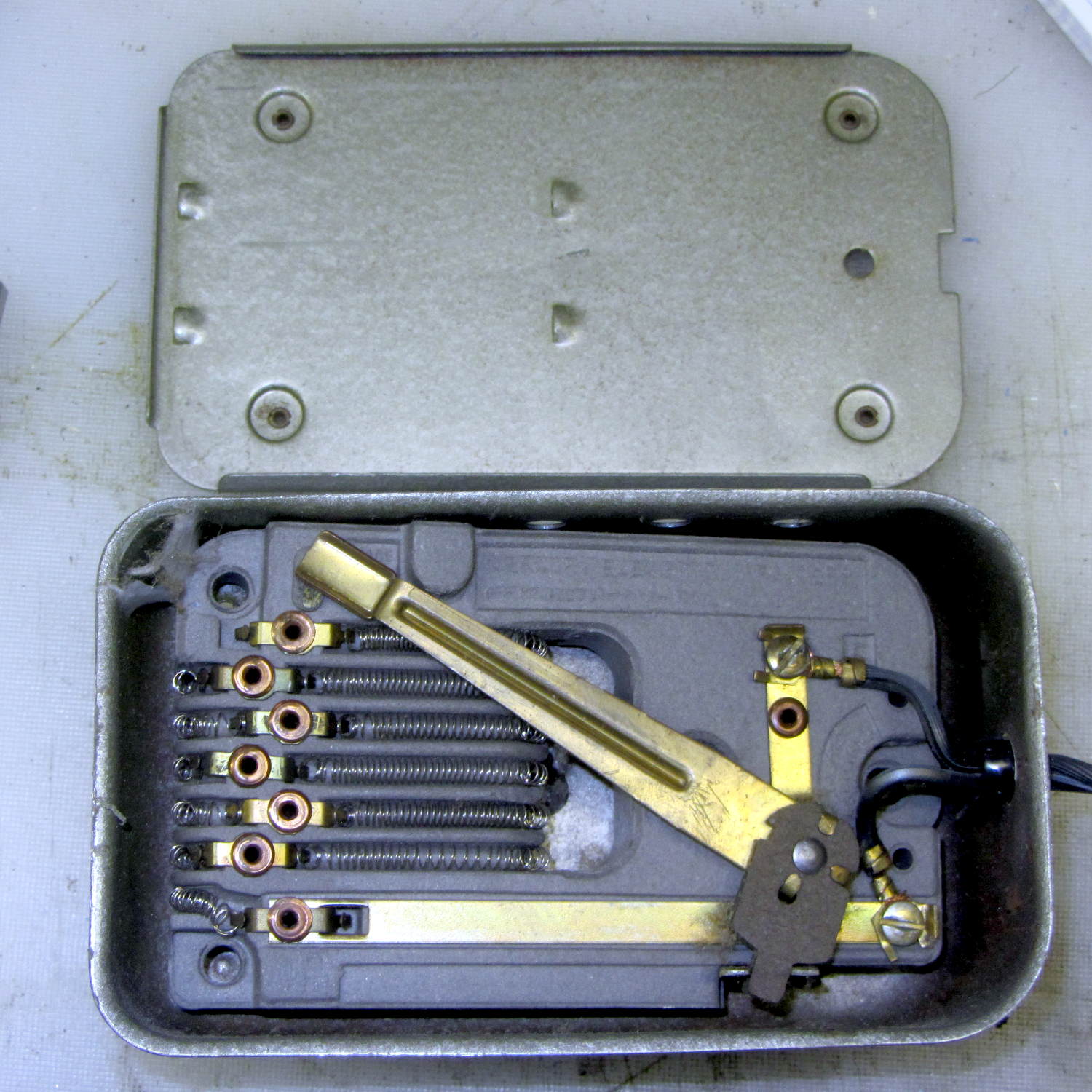
  • Bathroom Light Switch: Contact Autopsy

    The dual switch controlling the bathroom lights began requiring some fiddling, which was not to be tolerated. After replacing the switch, I cracked the old one open to see what’s inside…

    The failed side of the switch controlled the lights over the sink:

    Light switch contacts - lights
    Light switch contacts – lights

    The side for the ceiling vent fan + light got much less use, still worked, and look a bit less blasted.

    Light switch contacts - ceiling fan
    Light switch contacts – ceiling fan

    Not much to choose between the two. It’s been running for nigh onto two decades, so …

  • Olfa Rotary Cutter Spacer

    At some point along the way, the bright yellow washer (they call it a “spacer”) on Mary’s 60 mm Olfa rotary cutter went missing. A casual search suggests that replacement washers come directly from Olfa after navigating their phone tree, but …

    Judging from scuffs on the rear surface, the washer serves two purposes:

    • Hold the blade close to the handle against slightly misaligned cutting forces
    • Add more compression to the wave washer under the nut

    This model is much more intricate than the stock washer:

    Olfa Rotary Cutter - backing washer
    Olfa Rotary Cutter – backing washer

    The trench across the middle of the thicker part allows a wider compression adjustment range for the wave washer and provides more thread engagement at the lightest setting for my liking. The shape comes from the chord equation based on measurements of the wave washer:

    Olfa Rotary Cutter - washer doodles
    Olfa Rotary Cutter – washer doodles

    The wave washer keys on the bolt flats: the whole affair rotates with the blade and gives the nut no inclination to unscrew. If you remove the trench, the remaining hole has the proper shape to key on the bolt and rotate with it; with the trench in place, the wave washer’s sides haul the plastic washer along with it.

    The plain ring, just two threads thick, glues bottom-to-bottom on the thicker part to soak up the air gap and provide more blade stability. It’s not entirely clear that’s a win; it’s easy to omit.

    It looks about like you’d expect:

    Olfa Rotary Cutter - washer in place
    Olfa Rotary Cutter – washer in place

    The wave washer must go on the bolt with the smooth curve downward into the trench. That orientation that wasn’t enforced by the Official Olfa spacer washer’s smooth sides.

    The nut sits upside-down to show the face that normally sits against the wave washer. I’d lay long odds that the recess around the threads originally held a conical compression spring with a penchant for joining the dust bunnies under the sewing table. You can insert the wave washer the wrong way, but it doesn’t store enough energy to go airborne unless you drop it, which did happen once with the expected result.

    The OpenSCAD source code as a GitHub gist:

    // Olfa rotary cutter backing washer
    // Ed Nisley KE4ZNU January 2016
    Layout = "Build";
    //- Extrusion parameters must match reality!
    // Print with +1 shells and 3 solid layers
    ThreadThick = 0.20;
    ThreadWidth = 0.40;
    HoleWindage = 0.2;
    function IntegerMultiple(Size,Unit) = Unit * ceil(Size / Unit);
    Protrusion = 0.1; // make holes end cleanly
    //———————-
    // Dimensions
    WasherOD = 35.0;
    WasherThick = 1.5;
    WaveOD = 14.0; // wave washer flat dia
    WaveM = 1.8; // height of wave washer bend
    BendRad = (pow(WaveM,2) + pow(WaveOD,2)/4) / (2*WaveM); // radius of wave washer bend
    echo(str("Wave washer bend radius: ",BendRad));
    SpacerID = WaveOD + 2.0;
    SpacerThick = 2*ThreadThick;
    NumSides = 12*4;
    $fn = NumSides;
    //———————-
    // Useful routines
    module PolyCyl(Dia,Height,ForceSides=0) { // based on nophead's polyholes
    Sides = (ForceSides != 0) ? ForceSides : (ceil(Dia) + 2);
    FixDia = Dia / cos(180/Sides);
    cylinder(r=(FixDia + HoleWindage)/2,
    h=Height,
    $fn=Sides);
    }
    //———————-
    // Parts
    module Upper() {
    difference() {
    cylinder(d1=WasherOD,d2=(WasherOD – 2.0),h=WasherThick);
    translate([0,0,-Protrusion])
    intersection() {
    PolyCyl(8.2,2.0,8);
    cube([(6.0 + HoleWindage),10,2*WasherThick],center=true);
    }
    translate([-(WaveOD + 1.0)/2,0,BendRad])
    rotate([0,90,0]) rotate(0*180/16)
    PolyCyl(BendRad*2,(WaveOD + 1),16);
    }
    }
    module Spacer() {
    difference() {
    cylinder(d=WasherOD,h=SpacerThick);
    translate([0,0,-Protrusion])
    cylinder(d=SpacerID,h=2*SpacerThick);
    }
    }
    //———————-
    // Build it!
    if (Layout == "Show") {
    translate([0,0,SpacerThick])
    color("Cyan")
    Upper();
    color("LightCyan")
    Spacer();
    }
    if (Layout == "Build") {
    translate([-0.6*WasherOD,0,0])
    Upper();
    translate([0.6*WasherOD,0,0])
    Spacer();
    }
  • Sienna Hood Rod Pivot: Failure Analysis

    Our Larval Engineer returned the remaining chunk of the failed PLA hood rod pivot from “her” Sienna minivan:

    Sienna hood rod pivot - PLA fracture
    Sienna hood rod pivot – PLA fracture

    A closer look at the top surface (facing you in the picture above) shows the threads didn’t fuse into a solid mass across the entire object:

    Sienna Hood Pivot - PLA fracture - top
    Sienna Hood Pivot – PLA fracture – top

    The darker region in the middle comes from the infill pattern, which should have air gaps.

    The bottom surface (on the platform during printing) shows how the threads spread out when the nozzle is closer to the platform than the layer thickness:

    Sienna Hood Pivot - PLA fracture - bottom right
    Sienna Hood Pivot – PLA fracture – bottom right

    That’s more pronounced on the other side of the pivot:

    Sienna Hood Pivot - PLA fracture - bottom left 1
    Sienna Hood Pivot – PLA fracture – bottom left 1

    The infill looks like a separate wall inside the two perimeter threads. That’s pretty much what you get in the space between two close-set walls: there’s not enough room for the full infill pattern.

    A slightly different focus plane shows the mashed bottom layer, infill sitting atop the bottom layer, and fused perimeter threads:

    Sienna Hood Pivot - PLA fracture - bottom left 2
    Sienna Hood Pivot – PLA fracture – bottom left 2

    Because 3D printing doesn’t (and really can’t) produce a solid block of plastic, the object will fail much more readily than an injection-molded part. The threads in the most highly stressed section fail first, after which the remainder will just rip apart. In this case, the hood rod provides a huge lever that easily overstresses the plastic; I’m surprised the original part lasted as long as it did.

    We all knew PLA wasn’t the right material for the job, right from the start, so we’ll see how the enlarged PETG version works in the field.

  • Bike Helmet Earbud Replacement

    A bag arrived from halfway around the planet, bearing five sets of cheap earbuds. There was no way to tell from the eBay description, but they’re vented on the side:

    Cheap earbud - side vent detail
    Cheap earbud – side vent detail

    And also to the rear, down inside those deep slots below the chromed plastic cover:

    Cheap earbud - back openings
    Cheap earbud – back openings

    The raised lettering is a nice touch; the other earbud has a script L.

    The PET braid over the fragile wire should withstand a bit more abuse than usual. The strain relief isn’t anything to cheer, though, consisting of that rectangular channel with the wire loose inside. I figured I’d start minimal and fix whatever crops up; I have nine more earbuds to go.

    The motivation for all this was having the Gorilla Tape peel off the helmet, leaving a hardened mass of glue behind, then snagging the earbud wires. This is the new, somewhat better protected, wiring:

    Bell Helmet - mic-earbud wire - hardened tape adhesive
    Bell Helmet – mic-earbud wire – hardened tape adhesive

    In a triumph of hope over experience, I applied more Gorilla Tape:

    Bell Helmet - re-taped mic-earbud wiring
    Bell Helmet – re-taped mic-earbud wiring

    The helmet may need replacing after another iteration or two.

    My solid modeling hand has become stronger these days, so I should gimmick up a flat-ish wart anchoring the mic boom and all the wiring to the helmet shell.