The Smell of Molten Projects in the Morning

Ed Nisley's Blog: Shop notes, electronics, firmware, machinery, 3D printing, laser cuttery, and curiosities. Contents: 100% human thinking, 0% AI slop.

Tag: Improvements

Making the world a better place, one piece at a time

  • Tour Easy Rear Fender Bracket: More Cable Clearance

    Tour Easy Rear Fender Bracket: More Cable Clearance

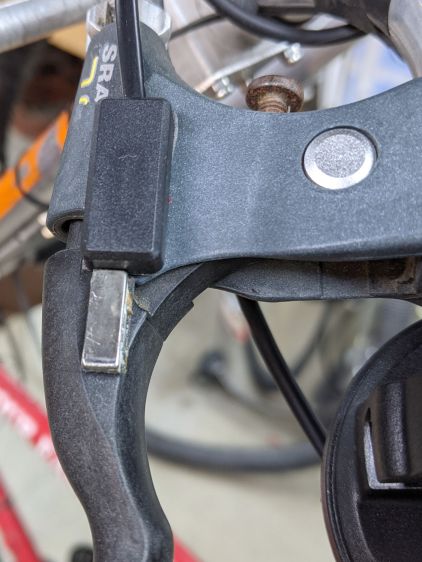
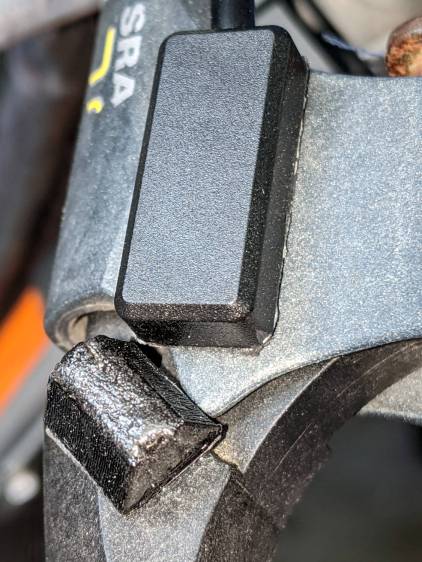
    Most likely due to the fiddling around the larger rear brake noodle, the 3D printed bracket holding the fender to the frame failed:

    Tour Easy Rear Fender Bracket - failed joint
    Tour Easy Rear Fender Bracket – failed joint

    Hey, it lasted for six years.

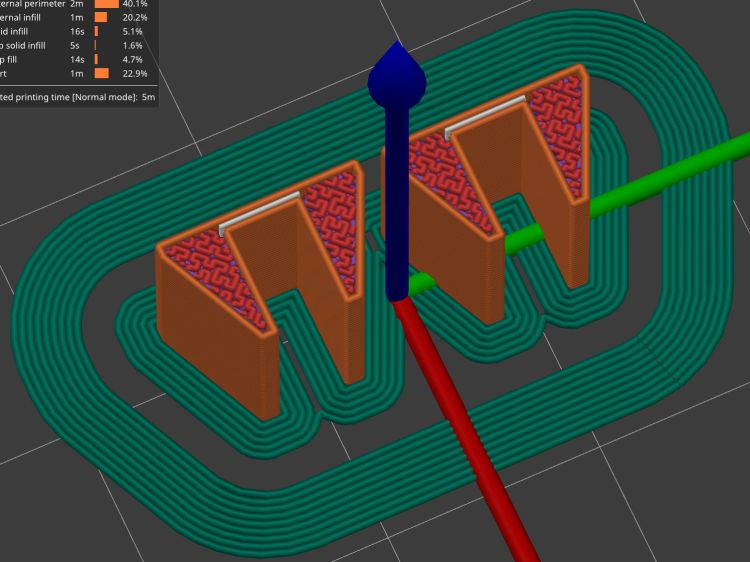
    Making another one just like the other one, but with a little more clearance for the brake cable fittings, required a few tweaks to the solid model:

    Rear Fender Bracket - more clearance
    Rear Fender Bracket – more clearance

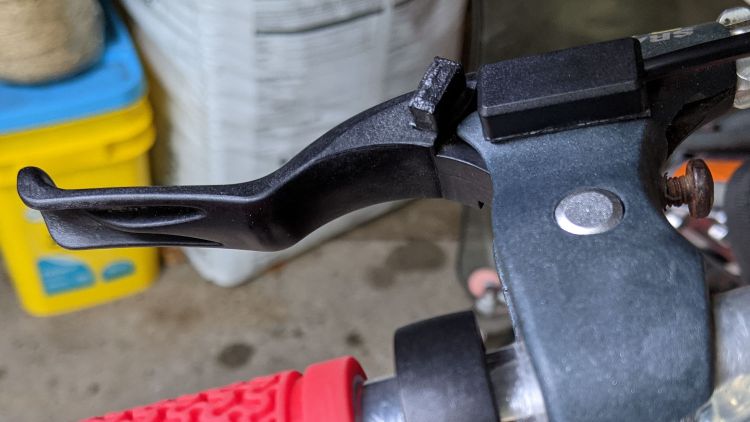
    It’s slightly less chunky and holds the fender a bit closer to the tire:

    Tour Easy Rear Fender Bracket - new vs old clearance
    Tour Easy Rear Fender Bracket – new vs old clearance

    The piece over on the left cupping the fender wasn’t broken, so I scuffed up the mating surfaces, applied a layer of JB Plastic Bonder (my new go-to adhesive for printed stuff), clamped it overnight, and it looked OK.

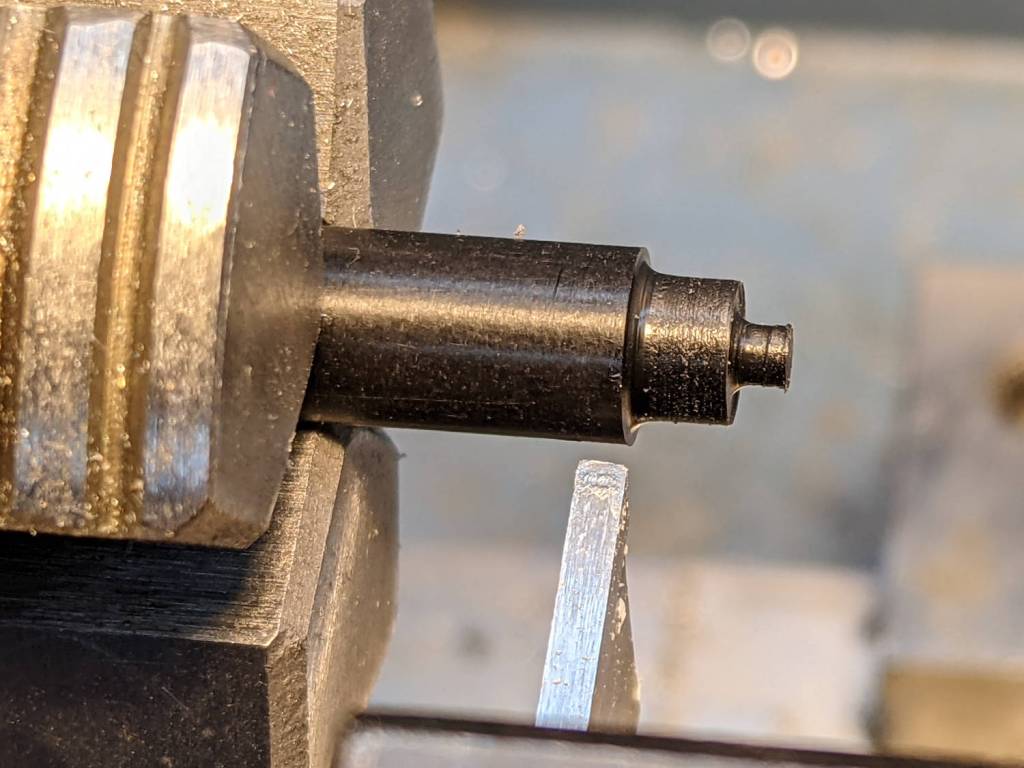
    While that was curing, I shortened the screw holding the clamp to the bike frame:

    Tour Easy Rear Fender Bracket - cutoff wheel dust collection
    Tour Easy Rear Fender Bracket – cutoff wheel dust collection

    The shop vac nozzle does a great job of collecting all the abrasive dust; highly recommended.

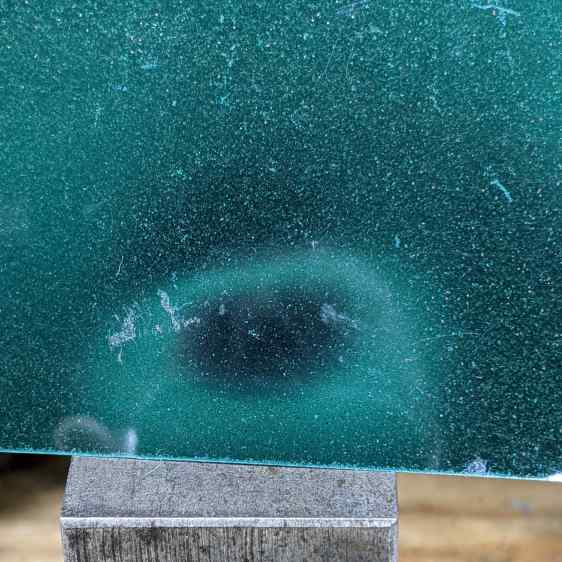
    Because I had a dollop of adhesive left over, I applied a 1.8 mm drill (from a set of metric bits I’d been meaning to buy for far too long) to the screw:

    Tour Easy Rear Fender Bracket - screw drilling
    Tour Easy Rear Fender Bracket – screw drilling

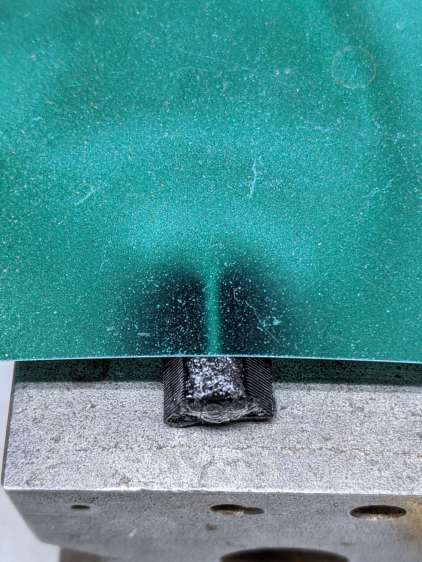
    And glued a snippet of pretty blue PETG filament in the hole:

    Tour Easy Rear Fender Bracket - frame screw PETG insert
    Tour Easy Rear Fender Bracket – frame screw PETG insert

    As far as I can tell, this will have no effect on the screw’s goodness, but it makes me feel better about crunching it onto the frame.

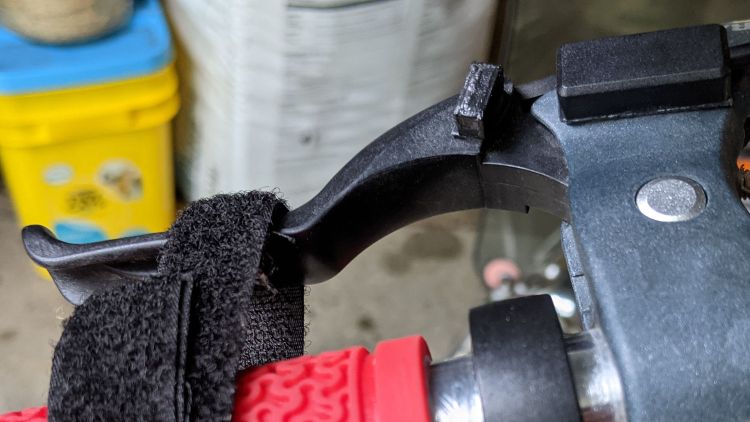
    Installation goes like you’d expect and there’s now enough clearance to keep the brake hardware off the bracket:

    Tour Easy Rear Fender Bracket - installed
    Tour Easy Rear Fender Bracket – installed

    I replaced the boot while installing the larger noodle; perhaps I should have trimmed most of it away.

    The riding season is upon us!

  • The Joggy Thing vs. LinuxCNC 2.8

    The Joggy Thing vs. LinuxCNC 2.8

    After getting the Sherline mostly working with LinuxCNC 2.8 and the Mesa 5I25 FPGA card, I updated the HAL code turning the Logitech gamepad into The Joggy Thing:

    Sherline Mill - Logitech Gamepad Joggy Thing
    Sherline Mill – Logitech Gamepad Joggy Thing

    This required significantly more effort than I expected, mainly because I can no longer edit the Eagle schematics defining the HAL file. In the intervening years, Autodesk bought the Eagle EE CAD program, converted it into a subscription service, sutured it onto their Fusion 360 package, and priced the result far beyond my toy budget. While they do offer a free tier limited to “individuals for personal, non-commercial use”, schematics with only two sheets pretty much wipes out its value.

    Because the EESchema part of Kicad can export its netlists as XML files, someone experienced in wrangling XSLT, perhaps using Python + lxml, could recreate the function of the Eagle ULP with Kicad schematics / netlists. I am not, however, that person, although it would certainly be a Learning Experience™ of the first water.

    So I updated the automatically generated HAL file on hard mode with a text editor, which, given HAL’s limited debugging support, somewhat resembles juggling a greasy bowling ball, a full-throttle chainsaw, and a squalling baby in a poopy diaper.

    The major conceptual problem was LinuxCNC’s recent separation of “axes” from “joints”, with resulting changes in both nomenclature and control. Eventually, I found some key hints in a very recent update to a LinuxCNC wiki entry describing a similar Logitech gamepad interface.

    The basic Joggy Thing logic remains the same, with “analog” values from the joysticks now presented to both the halui.axis and halui.joint controls. The new trick of holding the pre-startup values (presumably zeros) with feedback around a multiplexer qualifies as a Moby Hack preventing a startup glitch from triggering an error having something to do with an E-stop.

    The machine still runs away on X and Z at full throttle instantly after tapping the Machine-On button for the first time in the morning. Come to find out the gamepad starts up with all four joysticks jammed at -1 until the first activation of any axis or button, which I’m sure it always did, but something in HAL’s bowels now responds differently. More work will be required, although I think the simplest solution will involve holding everything inert until the logic sees a specific gamepad button.

    The LinuxCNC HAL code as a GitHub Gist:

    # HAL for Logitech Joggy Thing
    ####################################################
    # Load realtime and userspace modules
    loadusr -W hal_input -KA Dual
    #loadrt logic count=1 personality=0x104
    loadrt constant count=13
    loadrt and2 count=17
    loadrt conv_float_s32 count=1
    loadrt flipflop count=4
    loadrt mux2 count=1
    loadrt mux4 count=5
    loadrt not count=8
    loadrt or2 count=13
    loadrt scale count=7
    loadrt timedelay count=1
    loadrt toggle count=1
    ####################################################
    # Hook functions into threads
    #addf logic.0 servo-thread
    addf constant.0 servo-thread
    addf constant.1 servo-thread
    addf constant.2 servo-thread
    addf constant.3 servo-thread
    addf constant.4 servo-thread
    addf constant.5 servo-thread
    addf constant.6 servo-thread
    addf constant.7 servo-thread
    addf constant.8 servo-thread
    addf constant.9 servo-thread
    addf constant.10 servo-thread
    addf constant.11 servo-thread
    addf constant.12 servo-thread
    addf and2.0 servo-thread
    addf and2.1 servo-thread
    addf and2.2 servo-thread
    addf and2.3 servo-thread
    addf and2.4 servo-thread
    addf and2.5 servo-thread
    addf and2.6 servo-thread
    addf and2.7 servo-thread
    addf and2.8 servo-thread
    addf and2.9 servo-thread
    addf and2.10 servo-thread
    addf and2.11 servo-thread
    addf and2.12 servo-thread
    addf and2.13 servo-thread
    addf and2.14 servo-thread
    addf and2.15 servo-thread
    addf and2.16 servo-thread
    addf conv-float-s32.0 servo-thread
    addf toggle.0 servo-thread
    addf flipflop.0 servo-thread
    addf flipflop.1 servo-thread
    addf flipflop.2 servo-thread
    addf flipflop.3 servo-thread
    addf timedelay.0 servo-thread
    addf or2.0 servo-thread
    addf or2.1 servo-thread
    addf or2.2 servo-thread
    addf or2.3 servo-thread
    addf or2.4 servo-thread
    addf or2.5 servo-thread
    addf or2.6 servo-thread
    addf or2.7 servo-thread
    addf or2.8 servo-thread
    addf or2.9 servo-thread
    addf or2.10 servo-thread
    addf or2.11 servo-thread
    addf or2.12 servo-thread
    addf not.0 servo-thread
    addf not.1 servo-thread
    addf not.2 servo-thread
    addf not.3 servo-thread
    addf not.4 servo-thread
    addf not.5 servo-thread
    addf not.6 servo-thread
    addf not.7 servo-thread
    addf scale.0 servo-thread
    addf scale.1 servo-thread
    addf scale.2 servo-thread
    addf scale.3 servo-thread
    addf scale.4 servo-thread
    addf scale.5 servo-thread
    addf scale.6 servo-thread
    addf mux2.0 servo-thread
    addf mux4.0 servo-thread
    addf mux4.1 servo-thread
    addf mux4.2 servo-thread
    addf mux4.3 servo-thread
    addf mux4.4 servo-thread
    ####################################################
    # Set constants
    setp constant.0.value 0.1
    setp constant.1.value 20
    setp constant.2.value [TRAJ]MAX_LINEAR_VELOCITY
    setp constant.3.value [TRAJ]MAX_ANGULAR_VELOCITY
    setp constant.4.value 60
    setp constant.5.value 0.50
    setp constant.6.value 1.00
    setp constant.7.value 0.10
    setp constant.8.value 0.10
    setp constant.9.value 0.0
    setp constant.10.value -1.0
    setp constant.11.value 0.020
    setp constant.12.value 0.000
    ####################################################
    # Connect Modules with nets
    # both rear top buttons for e-stop, bottom right to reset
    net estop-a input.0.btn-top2 and2.0.in0
    net estop-b input.0.btn-base and2.0.in1
    net n_13 and2.0.out halui.estop.activate
    net reset-estop input.0.btn-base2 halui.estop.reset
    # button to start manual mode (probably not needed with 2.8)
    net manual-mode halui.mode.manual input.0.btn-base3
    net program-resume halui.program.resume input.0.btn-base4
    net n_14 or2.3.in0 input.0.btn-base5
    net n_15 or2.3.in1 input.0.btn-base6
    net n_16 toggle.0.in or2.3.out
    net n_17 conv-float-s32.0.out input.0.abs-x-flat input.0.abs-y-flat input.0.abs-z-flat input.0.abs-rz-flat
    net n_18 constant.1.out conv-float-s32.0.in
    net n_19 constant.4.out scale.0.gain
    net n_20 constant.5.out scale.1.gain
    net n_21 constant.6.out scale.2.gain
    net n_22 constant.7.out scale.3.gain
    net n_23 scale.4.gain constant.8.out
    net n_24 constant.0.out halui.axis.jog-deadband
    net n_42 or2.7.in0 input.0.abs-x-is-pos
    net n_43 or2.7.in1 input.0.abs-x-is-neg
    net n_44 or2.8.in0 input.0.abs-y-is-pos
    net n_45 or2.8.in1 input.0.abs-y-is-neg
    net n_46 or2.9.in0 input.0.abs-z-is-pos
    net n_47 or2.9.in1 input.0.abs-z-is-neg
    net n_48 or2.10.in0 input.0.abs-rz-is-pos
    net n_49 or2.10.in1 input.0.abs-rz-is-neg
    net n_51 constant.10.out scale.5.gain scale.6.gain
    net n_57 and2.1.out halui.axis.x.minus halui.joint.0.minus
    net n_58 and2.2.out halui.axis.x.plus halui.joint.0.plus
    net n_59 and2.3.out halui.axis.y.minus halui.joint.1.minus
    net n_60 and2.4.out halui.axis.y.plus halui.joint.1.plus
    net n_61 and2.5.out halui.axis.z.minus halui.joint.2.minus
    net n_62 and2.6.out halui.axis.z.plus halui.joint.2.plus
    net n_63 and2.7.out halui.axis.a.minus halui.joint.3.minus
    net n_64 and2.8.out halui.axis.a.plus halui.joint.3.plus
    # sort out jog speeds
    net az-buttons-active or2.1.out or2.12.in1
    net xy-buttons-active or2.5.out or2.12.in0
    net any-buttons-active or2.12.out mux4.0.sel0 timedelay.0.in
    net n_54 constant.11.out timedelay.0.on-delay
    net n_55 constant.12.out timedelay.0.off-delay
    net n_56 timedelay.0.out and2.1.in1 and2.2.in1 and2.3.in1 and2.4.in1 and2.5.in1 and2.6.in1 and2.7.in1 and2.8.in1
    net jog-crawl toggle.0.out mux4.0.sel1
    net knob-fast scale.1.out mux4.0.in0 scale.3.in
    net button-fast scale.2.out mux4.0.in1 scale.4.in
    net knob-crawl scale.3.out mux4.0.in2
    net button-crawl scale.4.out mux4.0.in3
    net jog-speed mux4.0.out halui.axis.jog-speed halui.joint.jog-speed
    net angular_motion or2.11.out mux2.0.sel
    net n_25 constant.2.out mux2.0.in0
    net n_26 constant.3.out mux2.0.in1
    net vel-per-second mux2.0.out scale.0.in
    net vel-per-minute scale.0.out scale.1.in scale.2.in
    net az-reset and2.14.out flipflop.2.reset flipflop.3.reset
    net xy-reset and2.10.out flipflop.0.reset flipflop.1.reset
    # hold jog speed unchanged until machine turns on
    # mux S&H from https://wiki.linuxcnc.org/cgi-bin/wiki.pl?Simple_Remote_Pendant
    net jog-mux-enable halui.machine.is-on mux4.1.sel1 mux4.2.sel1 mux4.3.sel1 mux4.4.sel1
    net axis-disabled-value constant.9.out mux4.1.in2 mux4.2.in2 mux4.3.in2 mux4.4.in2
    net x-analog mux4.1.out mux4.1.in0 mux4.1.in1 halui.axis.x.analog halui.joint.0.analog
    net y-analog mux4.2.out mux4.2.in0 mux4.2.in1 halui.axis.y.analog halui.joint.1.analog
    net z-analog mux4.3.out mux4.3.in0 mux4.3.in1 halui.axis.z.analog halui.joint.2.analog
    net a-analog mux4.4.out mux4.4.in0 mux4.4.in1 halui.axis.a.analog halui.joint.3.analog
    #net x-amp-enable logic.0.in-00
    #net y-amp-enable logic.0.in-01
    #net z-amp-enable logic.0.in-02
    #net a-amp-enable logic.0.in-03
    net x-buttons-active or2.4.out or2.5.in0
    net x-disable not.4.out and2.12.in1
    net x-enable flipflop.0.out not.4.in mux4.1.sel0
    net x-hat-minus or2.4.in1 input.0.abs-hat0x-is-neg and2.1.in0
    net x-hat-plus or2.4.in0 input.0.abs-hat0x-is-pos and2.2.in0
    net x-jog input.0.abs-x-position mux4.1.in3
    net x-knob-active or2.7.out not.0.in and2.9.in0
    net x-knob-inactive not.0.out and2.10.in0 and2.11.in0
    net x-set and2.9.out flipflop.0.set
    net y-buttons-active or2.6.out or2.5.in1
    net y-disable not.5.out and2.9.in1
    net y-enable flipflop.1.out not.5.in mux4.2.sel0
    net y-hat-minus or2.6.in1 input.0.abs-hat0y-is-neg and2.4.in0
    net y-hat-plus or2.6.in0 input.0.abs-hat0y-is-pos and2.3.in0
    net y-jog input.0.abs-y-position scale.5.in
    net y-jog-reversed scale.5.out mux4.2.in3
    net y-knob-active not.1.in or2.8.out and2.11.in1
    net y-knob-inactive not.1.out and2.10.in1
    net y-select and2.12.in0 and2.11.out
    net y-set flipflop.1.set and2.12.out
    net z-button-minus or2.2.in0 input.0.btn-thumb and2.5.in0
    net z-button-plus or2.2.in1 input.0.btn-top and2.6.in0
    net z-buttons-active or2.2.out or2.1.in1
    net z-disable not.6.out and2.16.in1
    net z-enable not.6.in flipflop.2.out mux4.3.sel0
    net z-jog input.0.abs-rz-position scale.6.in
    net z-jog-reversed scale.6.out mux4.3.in3
    net z-knob-active not.3.in or2.10.out and2.13.in0
    net z-knob-inactive not.3.out and2.15.in0 and2.14.in0
    net z-set and2.13.out flipflop.2.set
    net a-button-minus or2.0.in0 input.0.btn-joystick and2.7.in0
    net a-button-plus or2.0.in1 input.0.btn-thumb2 and2.8.in0
    net a-buttons-active or2.0.out or2.1.in0 or2.11.in1
    net a-disable not.7.out and2.13.in1
    net a-enable or2.11.in0 flipflop.3.out not.7.in mux4.4.sel0
    net a-jog input.0.abs-z-position mux4.4.in3
    net a-knob-active or2.9.out not.2.in and2.15.in1
    net a-knob-inactive not.2.out and2.14.in1
    net a-select and2.16.in0 and2.15.out
    net a-set flipflop.3.set and2.16.out
    view raw joggy.hal hosted with ❤ by GitHub
  • LinuxCNC: Mesa 5I25 For The Sherline Mill

    LinuxCNC: Mesa 5I25 For The Sherline Mill

    Updating the Sherline’s LinuxCNC from 2.7.ancient to 2.8.1, which I did by the simple expedient of replacing the hard drive with an SSD from the heap and doing a clean installation, provided the opportunity of switching from the parallel port to a Mesa 5I25 FPGA card to put timing-critical step generation under hardware control.

    I has flashed the card with Mesa’s Probotix PBX-RF BIT file, then invoked it with a configuration string turning off everything except the stepgen modules:

    loadrt hm2_pci config="num_encoders=0 num_pwmgens=0 num_stepgens=4"
    

    Which produces a simple pinout on the back panel DB-25 connector:

    hm2_pci: loading Mesa AnyIO HostMot2 driver version 0.7
    hm2_pci: discovered 5i25 at 0000:04:02.0
    hm2/hm2_5i25.0: Low Level init 0.15
    hm2/hm2_5i25.0: 34 I/O Pins used:
    hm2/hm2_5i25.0:     IO Pin 000 (P3-01): IOPort
    hm2/hm2_5i25.0:     IO Pin 001 (P3-14): IOPort
    hm2/hm2_5i25.0:     IO Pin 002 (P3-02): StepGen #0, pin Step (Output)
    hm2/hm2_5i25.0:     IO Pin 003 (P3-15): IOPort
    hm2/hm2_5i25.0:     IO Pin 004 (P3-03): StepGen #0, pin Direction (Output)
    hm2/hm2_5i25.0:     IO Pin 005 (P3-16): IOPort
    hm2/hm2_5i25.0:     IO Pin 006 (P3-04): StepGen #1, pin Step (Output)
    hm2/hm2_5i25.0:     IO Pin 007 (P3-17): IOPort
    hm2/hm2_5i25.0:     IO Pin 008 (P3-05): StepGen #1, pin Direction (Output)
    hm2/hm2_5i25.0:     IO Pin 009 (P3-06): StepGen #2, pin Step (Output)
    hm2/hm2_5i25.0:     IO Pin 010 (P3-07): StepGen #2, pin Direction (Output)
    hm2/hm2_5i25.0:     IO Pin 011 (P3-08): StepGen #3, pin Step (Output)
    hm2/hm2_5i25.0:     IO Pin 012 (P3-09): StepGen #3, pin Direction (Output)
    hm2/hm2_5i25.0:     IO Pin 013 (P3-10): IOPort
    hm2/hm2_5i25.0:     IO Pin 014 (P3-11): IOPort
    hm2/hm2_5i25.0:     IO Pin 015 (P3-12): IOPort
    hm2/hm2_5i25.0:     IO Pin 016 (P3-13): IOPort


    The Sherline CNC driver requires an adapter to swap the Step and Direction signals on the output connector.

    The Sherline controller expects active-low Step signals:

    # invert step output bits
    setp   [HMOT](FPGA0).gpio.002.invert_output     1
    setp   [HMOT](FPGA0).gpio.006.invert_output     1
    setp   [HMOT](FPGA0).gpio.009.invert_output     1
    setp   [HMOT](FPGA0).gpio.011.invert_output     1
    

    The Y and Z drivers needed the same Direction swap as before:

    # invert direction output bits
    setp   [HMOT](FPGA0).gpio.008.invert_output     1
    setp   [HMOT](FPGA0).gpio.010.invert_output     1
    

    Because the 5I25 uses 3.3 V logic with interface drivers to match the “parallel port” 5 V levels, it has different electrical characteristics than the parallel port built into the Dell Optiplex 760. Putting a 100 nF cap across the Probe input reduced, but did not eliminate, what looked like a nice 60 Hz signal on that long wire, so I added a firmware debouncer:

    loadrt debounce cfg=2
    addf debounce.0               servo-thread
    setp debounce.0.delay 3
    
    net probe-raw debounce.0.1.in [HMOT](FPGA0).gpio.003.in_not
    net probe-in debounce.0.1.out
    

    The additional 3 ms delay doesn’t amount to much distance, even were I to probe at the machine’s top 10 mm/s speed.

    Although the seemingly identical Home switch input seemed stable, it got the same treatment:

    net home-raw debounce.0.0.in [HMOT](FPGA0).gpio.013.in_not
    net all-home debounce.0.0.out
    

    The PID loops have a very simple setup, with P = 1000 and FF1 = 1, which seems entirely adequate without any attempt at tuning. The following errors seems to stay under 20 ppm, in the machine’s native inches, while cutting the standard Axis “splash G-Code” file with all the speeds cranked up to 24 in/min = 610 mm/min:

    LinuxCNC - Sherline f-error
    LinuxCNC – Sherline f-error

    Claiming a 20 µinch error for a Sherline is certainly aspirational.

    The INI and HAL files as a GitHub Gist:

    # DO NOT RUN PNCCONF EVER AGAIN
    loadrt [KINS]KINEMATICS
    loadrt [EMCMOT]EMCMOT servo_period_nsec=[EMCMOT]SERVO_PERIOD num_joints=[KINS]JOINTS
    loadrt hostmot2
    loadrt hm2_pci config="num_encoders=0 num_pwmgens=0 num_stepgens=4"
    loadrt debounce cfg=2
    addf debounce.0 servo-thread
    setp debounce.0.delay 3
    setp [HMOT](FPGA0).watchdog.timeout_ns 5000000
    loadrt pid names=pid.x,pid.y,pid.z,pid.a
    addf [HMOT](FPGA0).read servo-thread
    addf motion-command-handler servo-thread
    addf motion-controller servo-thread
    addf pid.x.do-pid-calcs servo-thread
    addf pid.y.do-pid-calcs servo-thread
    addf pid.z.do-pid-calcs servo-thread
    addf pid.a.do-pid-calcs servo-thread
    addf [HMOT](FPGA0).write servo-thread
    # external output signals
    #setp [HMOT](FPGA0).gpio.000.out 1
    net estop-out [HMOT](FPGA0).gpio.000.out
    #net all-amps-enabled logic.0.and [HMOT](FPGA0).gpio.007.out
    # Home switch
    net home-raw debounce.0.0.in [HMOT](FPGA0).gpio.013.in_not
    net all-home debounce.0.0.out
    # Probe switch
    net probe-raw debounce.0.1.in [HMOT](FPGA0).gpio.003.in_not
    net probe-in debounce.0.1.out
    #*******************
    # AXIS X JOINT 0
    #*******************
    setp pid.x.Pgain [JOINT_0]P
    setp pid.x.Igain [JOINT_0]I
    setp pid.x.Dgain [JOINT_0]D
    setp pid.x.bias [JOINT_0]BIAS
    setp pid.x.FF0 [JOINT_0]FF0
    setp pid.x.FF1 [JOINT_0]FF1
    setp pid.x.FF2 [JOINT_0]FF2
    setp pid.x.deadband [JOINT_0]DEADBAND
    setp pid.x.maxoutput [JOINT_0]MAX_OUTPUT
    setp pid.x.error-previous-target true
    # This setting is to limit bogus stepgen
    # velocity corrections caused by position
    # feedback sample time jitter.
    setp pid.x.maxerror 0.000500
    net x-index-enable <=> pid.x.index-enable
    net x-amp-enable => pid.x.enable
    net x-pos-cmd => pid.x.command
    net x-pos-fb => pid.x.feedback
    net x-output <= pid.x.output
    # Step Gen signals/setup
    setp [HMOT](FPGA0).stepgen.00.dirsetup [JOINT_0]DIRSETUP
    setp [HMOT](FPGA0).stepgen.00.dirhold [JOINT_0]DIRHOLD
    setp [HMOT](FPGA0).stepgen.00.steplen [JOINT_0]STEPLEN
    setp [HMOT](FPGA0).stepgen.00.stepspace [JOINT_0]STEPSPACE
    setp [HMOT](FPGA0).stepgen.00.position-scale [JOINT_0]STEP_SCALE
    setp [HMOT](FPGA0).stepgen.00.step_type 0
    setp [HMOT](FPGA0).stepgen.00.control-type 1
    setp [HMOT](FPGA0).stepgen.00.maxaccel [JOINT_0]STEPGEN_MAXACCEL
    setp [HMOT](FPGA0).stepgen.00.maxvel [JOINT_0]STEPGEN_MAXVEL
    # invert step output bit
    setp [HMOT](FPGA0).gpio.002.invert_output 1
    # —closedloop stepper signals—
    net x-pos-cmd <= joint.0.motor-pos-cmd
    net x-vel-cmd <= joint.0.vel-cmd
    net x-output <= [HMOT](FPGA0).stepgen.00.velocity-cmd
    net x-pos-fb <= [HMOT](FPGA0).stepgen.00.position-fb
    net x-pos-fb => joint.0.motor-pos-fb
    net x-amp-enable <= joint.0.amp-enable-out
    net x-amp-enable => [HMOT](FPGA0).stepgen.00.enable
    # —setup home / limit switch signals—
    net all-home => joint.0.home-sw-in
    net x-neg-limit => joint.0.neg-lim-sw-in
    net x-pos-limit => joint.0.pos-lim-sw-in
    #*******************
    # AXIS Y JOINT 1
    #*******************
    setp pid.y.Pgain [JOINT_1]P
    setp pid.y.Igain [JOINT_1]I
    setp pid.y.Dgain [JOINT_1]D
    setp pid.y.bias [JOINT_1]BIAS
    setp pid.y.FF0 [JOINT_1]FF0
    setp pid.y.FF1 [JOINT_1]FF1
    setp pid.y.FF2 [JOINT_1]FF2
    setp pid.y.deadband [JOINT_1]DEADBAND
    setp pid.y.maxoutput [JOINT_1]MAX_OUTPUT
    setp pid.y.error-previous-target true
    # This setting is to limit bogus stepgen
    # velocity corrections caused by position
    # feedback sample time jitter.
    setp pid.y.maxerror 0.000500
    net y-index-enable <=> pid.y.index-enable
    net y-amp-enable => pid.y.enable
    net y-pos-cmd => pid.y.command
    net y-pos-fb => pid.y.feedback
    net y-output <= pid.y.output
    # Step Gen signals/setup
    setp [HMOT](FPGA0).stepgen.01.dirsetup [JOINT_1]DIRSETUP
    setp [HMOT](FPGA0).stepgen.01.dirhold [JOINT_1]DIRHOLD
    setp [HMOT](FPGA0).stepgen.01.steplen [JOINT_1]STEPLEN
    setp [HMOT](FPGA0).stepgen.01.stepspace [JOINT_1]STEPSPACE
    setp [HMOT](FPGA0).stepgen.01.position-scale [JOINT_1]STEP_SCALE
    setp [HMOT](FPGA0).stepgen.01.step_type 0
    setp [HMOT](FPGA0).stepgen.01.control-type 1
    setp [HMOT](FPGA0).stepgen.01.maxaccel [JOINT_1]STEPGEN_MAXACCEL
    setp [HMOT](FPGA0).stepgen.01.maxvel [JOINT_1]STEPGEN_MAXVEL
    # invert step output bit
    setp [HMOT](FPGA0).gpio.006.invert_output 1
    # invert direction output bit
    setp [HMOT](FPGA0).gpio.008.invert_output 1
    # —closedloop stepper signals—
    net y-pos-cmd <= joint.1.motor-pos-cmd
    net y-vel-cmd <= joint.1.vel-cmd
    net y-output <= [HMOT](FPGA0).stepgen.01.velocity-cmd
    net y-pos-fb <= [HMOT](FPGA0).stepgen.01.position-fb
    net y-pos-fb => joint.1.motor-pos-fb
    net y-amp-enable <= joint.1.amp-enable-out
    net y-amp-enable => [HMOT](FPGA0).stepgen.01.enable
    # —setup home / limit switch signals—
    net all-home => joint.1.home-sw-in
    net y-neg-limit => joint.1.neg-lim-sw-in
    net y-pos-limit => joint.1.pos-lim-sw-in
    #*******************
    # AXIS Z JOINT 2
    #*******************
    setp pid.z.Pgain [JOINT_2]P
    setp pid.z.Igain [JOINT_2]I
    setp pid.z.Dgain [JOINT_2]D
    setp pid.z.bias [JOINT_2]BIAS
    setp pid.z.FF0 [JOINT_2]FF0
    setp pid.z.FF1 [JOINT_2]FF1
    setp pid.z.FF2 [JOINT_2]FF2
    setp pid.z.deadband [JOINT_2]DEADBAND
    setp pid.z.maxoutput [JOINT_2]MAX_OUTPUT
    setp pid.z.error-previous-target true
    # This setting is to limit bogus stepgen
    # velocity corrections caused by position
    # feedback sample time jitter.
    setp pid.z.maxerror 0.000500
    net z-index-enable <=> pid.z.index-enable
    net z-amp-enable => pid.z.enable
    net z-pos-cmd => pid.z.command
    net z-pos-fb => pid.z.feedback
    net z-output <= pid.z.output
    # Step Gen signals/setup
    setp [HMOT](FPGA0).stepgen.02.dirsetup [JOINT_2]DIRSETUP
    setp [HMOT](FPGA0).stepgen.02.dirhold [JOINT_2]DIRHOLD
    setp [HMOT](FPGA0).stepgen.02.steplen [JOINT_2]STEPLEN
    setp [HMOT](FPGA0).stepgen.02.stepspace [JOINT_2]STEPSPACE
    setp [HMOT](FPGA0).stepgen.02.position-scale [JOINT_2]STEP_SCALE
    setp [HMOT](FPGA0).stepgen.02.step_type 0
    setp [HMOT](FPGA0).stepgen.02.control-type 1
    setp [HMOT](FPGA0).stepgen.02.maxaccel [JOINT_2]STEPGEN_MAXACCEL
    setp [HMOT](FPGA0).stepgen.02.maxvel [JOINT_2]STEPGEN_MAXVEL
    # invert step output bit
    setp [HMOT](FPGA0).gpio.009.invert_output 1
    # invert direction output bit
    setp [HMOT](FPGA0).gpio.010.invert_output 1
    # —closedloop stepper signals—
    net z-pos-cmd <= joint.2.motor-pos-cmd
    net z-vel-cmd <= joint.2.vel-cmd
    net z-output <= [HMOT](FPGA0).stepgen.02.velocity-cmd
    net z-pos-fb <= [HMOT](FPGA0).stepgen.02.position-fb
    net z-pos-fb => joint.2.motor-pos-fb
    net z-amp-enable <= joint.2.amp-enable-out
    net z-amp-enable => [HMOT](FPGA0).stepgen.02.enable
    # —setup home / limit switch signals—
    net all-home => joint.2.home-sw-in
    net z-neg-limit => joint.2.neg-lim-sw-in
    net z-pos-limit => joint.2.pos-lim-sw-in
    #*******************
    # AXIS A JOINT 3
    #*******************
    setp pid.a.Pgain [JOINT_3]P
    setp pid.a.Igain [JOINT_3]I
    setp pid.a.Dgain [JOINT_3]D
    setp pid.a.bias [JOINT_3]BIAS
    setp pid.a.FF0 [JOINT_3]FF0
    setp pid.a.FF1 [JOINT_3]FF1
    setp pid.a.FF2 [JOINT_3]FF2
    setp pid.a.deadband [JOINT_3]DEADBAND
    setp pid.a.maxoutput [JOINT_3]MAX_OUTPUT
    setp pid.a.error-previous-target true
    # This setting is to limit bogus stepgen
    # velocity corrections caused by position
    # feedback sample time jitter.
    setp pid.a.maxerror 0.000500
    net a-index-enable <=> pid.a.index-enable
    net a-amp-enable => pid.a.enable
    net a-pos-cmd => pid.a.command
    net a-pos-fb => pid.a.feedback
    net a-output <= pid.a.output
    # Step Gen signals/setup
    setp [HMOT](FPGA0).stepgen.03.dirsetup [JOINT_3]DIRSETUP
    setp [HMOT](FPGA0).stepgen.03.dirhold [JOINT_3]DIRHOLD
    setp [HMOT](FPGA0).stepgen.03.steplen [JOINT_3]STEPLEN
    setp [HMOT](FPGA0).stepgen.03.stepspace [JOINT_3]STEPSPACE
    setp [HMOT](FPGA0).stepgen.03.position-scale [JOINT_3]STEP_SCALE
    setp [HMOT](FPGA0).stepgen.03.step_type 0
    setp [HMOT](FPGA0).stepgen.03.control-type 1
    setp [HMOT](FPGA0).stepgen.03.maxaccel [JOINT_3]STEPGEN_MAXACCEL
    setp [HMOT](FPGA0).stepgen.03.maxvel [JOINT_3]STEPGEN_MAXVEL
    # invert step output bit
    setp [HMOT](FPGA0).gpio.011.invert_output 1
    # —closedloop stepper signals—
    net a-pos-cmd <= joint.3.motor-pos-cmd
    net a-vel-cmd <= joint.3.vel-cmd
    net a-output <= [HMOT](FPGA0).stepgen.03.velocity-cmd
    net a-pos-fb <= [HMOT](FPGA0).stepgen.03.position-fb
    net a-pos-fb => joint.3.motor-pos-fb
    net a-amp-enable <= joint.3.amp-enable-out
    net a-amp-enable => [HMOT](FPGA0).stepgen.03.enable
    # —setup home / limit switch signals—
    net all-home => joint.3.home-sw-in
    net a-neg-limit => joint.3.neg-lim-sw-in
    net a-pos-limit => joint.3.pos-lim-sw-in
    #******************************
    # connect miscellaneous signals
    #******************************
    # —HALUI signals—
    net axis-select-x halui.axis.x.select
    net x-is-homed halui.joint.0.is-homed
    net axis-select-y halui.axis.y.select
    net y-is-homed halui.joint.1.is-homed
    net axis-select-z halui.axis.z.select
    net z-is-homed halui.joint.2.is-homed
    net axis-select-a halui.axis.a.select
    net a-is-homed halui.joint.3.is-homed
    net jog-selected-pos halui.axis.selected.plus
    net jog-selected-neg halui.axis.selected.minus
    net spindle-manual-cw halui.spindle.0.forward
    net spindle-manual-ccw halui.spindle.0.reverse
    net spindle-manual-stop halui.spindle.0.stop
    net MDI-mode halui.mode.is-mdi
    # —coolant signals—
    net coolant-mist <= iocontrol.0.coolant-mist
    net coolant-flood <= iocontrol.0.coolant-flood
    # —probe signal—
    net probe-in => motion.probe-input
    # —motion control signals—
    net in-position <= motion.in-position
    net machine-is-enabled <= motion.motion-enabled
    # —digital in / out signals—
    # —estop signals—
    net estop-out <= iocontrol.0.user-enable-out
    net estop-out => iocontrol.0.emc-enable-in
    # —manual tool change signals—
    loadusr -W hal_manualtoolchange
    net tool-change-request iocontrol.0.tool-change => hal_manualtoolchange.change
    net tool-change-confirmed iocontrol.0.tool-changed <= hal_manualtoolchange.changed
    net tool-number iocontrol.0.tool-prep-number => hal_manualtoolchange.number
    net tool-prepare-loopback iocontrol.0.tool-prepare => iocontrol.0.tool-prepared
    view raw razor-5i25.hal hosted with ❤ by GitHub
    # DO NOT RUN PNCCONF EVER AGAIN
    [EMC]
    MACHINE = Razor-5i25
    DEBUG = 0
    VERSION = 1.1
    [DISPLAY]
    DISPLAY = axis
    POSITION_OFFSET = RELATIVE
    POSITION_FEEDBACK = ACTUAL
    MAX_FEED_OVERRIDE = 2.000000
    MAX_SPINDLE_OVERRIDE = 1.000000
    MIN_SPINDLE_OVERRIDE = 0.500000
    INTRO_GRAPHIC = /home/ed/linuxcnc/configs/razor-5i25/Sherline.gif
    INTRO_TIME = 3
    PROGRAM_PREFIX = /mnt/bulkdata/
    INCREMENTS = 50mm 10mm 1mm 0.1mm 90 45 10 5 1
    GRIDS = 100mm 50mm 25mm 10mm 5mm
    POSITION_FEEDBACK = ACTUAL
    DEFAULT_LINEAR_VELOCITY = 0.200000
    MAX_LINEAR_VELOCITY = 0.400000
    MIN_LINEAR_VELOCITY = 0.016670
    DEFAULT_ANGULAR_VELOCITY = 12.000000
    MAX_ANGULAR_VELOCITY = 180.000000
    MIN_ANGULAR_VELOCITY = 1.666667
    EDITOR = gedit
    GEOMETRY = axyz
    [FILTER]
    PROGRAM_EXTENSION = .png,.gif,.jpg Greyscale Depth Image
    PROGRAM_EXTENSION = .py Python Script
    png = image-to-gcode
    gif = image-to-gcode
    jpg = image-to-gcode
    py = python
    [TASK]
    TASK = milltask
    CYCLE_TIME = 0.010
    [RS274NGC]
    PARAMETER_FILE = linuxcnc.var
    RS274NGC_STARTUP_CODE = G21 G40 G49 G54 G80 G90 G92.1 G94 G97 G98
    [EMCMOT]
    EMCMOT = motmod
    COMM_TIMEOUT = 1.0
    SERVO_PERIOD = 1000000
    [HMOT]
    FPGA0 = hm2_5i25.0
    [HAL]
    TWOPASS = on
    HALUI = halui
    HALFILE = razor-5i25.hal
    #HALFILE = joggy.hal
    HALFILE = custom.hal
    POSTGUI_HALFILE = postgui_call_list.hal
    SHUTDOWN = shutdown.hal
    #HALFILE = LIB:halcheck.tcl
    [HALUI]
    [KINS]
    JOINTS = 4
    KINEMATICS = trivkins coordinates=XYZA
    [TRAJ]
    COORDINATES = XYZA
    LINEAR_UNITS = inch
    ANGULAR_UNITS = degree
    DEFAULT_LINEAR_VELOCITY = 0.10
    MAX_LINEAR_VELOCITY = 0.4
    MAX_ANGULAR_VELOCITY = 45
    DEFAULT_ANGULAR_VELOCITY = 25.00
    NO_FORCE_HOMING = 1
    POSITION_FILE = lastposition.txt
    [EMCIO]
    EMCIO = io
    CYCLE_TIME = 0.100
    TOOL_TABLE = tool.tbl
    #******************************************
    [AXIS_X]
    MIN_LIMIT = -1.0
    MAX_LIMIT = 9.5
    MAX_VELOCITY = 0.4
    MAX_ACCELERATION = 5.0
    [JOINT_0]
    TYPE = LINEAR
    FERROR = 0.01
    MIN_FERROR = 0.001
    MAX_VELOCITY = 0.4
    MAX_ACCELERATION = 5.0
    BACKLASH = 0.003
    # The values below should be 25% larger than MAX_VELOCITY and MAX_ACCELERATION
    # If using BACKLASH compensation STEPGEN_MAXACCEL should be 100% larger.
    STEPGEN_MAXVEL = 0.6
    STEPGEN_MAXACCEL = 20
    P = 1000.0
    I = 0.0
    D = 0.0
    FF0 = 0.0
    FF1 = 1.0
    FF2 = 0.0
    BIAS = 0.0
    DEADBAND = 0.0
    MAX_OUTPUT = 0.0
    # these are in nanoseconds
    DIRSETUP = 25000
    DIRHOLD = 25000
    STEPLEN = 25000
    STEPSPACE = 25000
    STEP_SCALE = 16000
    MIN_LIMIT = -1.0
    MAX_LIMIT = 9.5
    HOME = 5.25
    HOME_OFFSET = 9.1
    HOME_SEARCH_VEL = 0.3
    HOME_LATCH_VEL = 0.03
    HOME_FINAL_VEL = 0.4
    HOME_USE_INDEX = NO
    HOME_IS_SHARED = 1
    HOME_SEQUENCE = 1
    #******************************************
    #******************************************
    [AXIS_Y]
    MIN_LIMIT = 0.00
    MAX_LIMIT = 5.10
    MAX_VELOCITY = 0.4
    MAX_ACCELERATION = 5.0
    [JOINT_1]
    TYPE = LINEAR
    FERROR = 0.01
    MIN_FERROR = 0.001
    MAX_VELOCITY = 0.4
    MAX_ACCELERATION = 5.0
    BACKLASH = 0.003
    # The values below should be 25% larger than MAX_VELOCITY and MAX_ACCELERATION
    # If using BACKLASH compensation STEPGEN_MAXACCEL should be 100% larger.
    STEPGEN_MAXVEL = 0.6
    STEPGEN_MAXACCEL = 10.0
    P = 1000.0
    I = 0.0
    D = 0.0
    FF0 = 0.0
    FF1 = 1.0
    FF2 = 0.0
    BIAS = 0.0
    DEADBAND = 0.0
    MAX_OUTPUT = 0.0
    # these are in nanoseconds
    DIRSETUP = 25000
    DIRHOLD = 25000
    STEPLEN = 25000
    STEPSPACE = 25000
    STEP_SCALE = 16000
    MIN_LIMIT = 0.0
    MAX_LIMIT = 5.1
    HOME = 4.5
    HOME_OFFSET = 5.1
    HOME_SEARCH_VEL = 0.3
    HOME_LATCH_VEL = 0.03
    HOME_FINAL_VEL = 0.4
    HOME_USE_INDEX = NO
    HOME_IS_SHARED = 1
    HOME_SEQUENCE = 2
    #******************************************
    #******************************************
    [AXIS_Z]
    MIN_LIMIT = 0.0
    MAX_LIMIT = 6.680
    MAX_VELOCITY = 0.333
    MAX_ACCELERATION = 3.0
    [JOINT_2]
    TYPE = LINEAR
    FERROR = 0.01
    MIN_FERROR = 0.001
    MAX_VELOCITY = 0.333
    MAX_ACCELERATION = 3.0
    BACKLASH = 0.005
    # The values below should be 25% larger than MAX_VELOCITY and MAX_ACCELERATION
    # If using BACKLASH compensation STEPGEN_MAXACCEL should be 100% larger.
    STEPGEN_MAXVEL = 0.6
    STEPGEN_MAXACCEL = 6
    P = 1000.0
    I = 0.0
    D = 0.0
    FF0 = 0.0
    FF1 = 1.0
    FF2 = 0.0
    BIAS = 0.0
    DEADBAND = 0.0
    MAX_OUTPUT = 0.0
    # these are in nanoseconds
    DIRSETUP = 25000
    DIRHOLD = 25000
    STEPLEN = 25000
    STEPSPACE = 25000
    STEP_SCALE = 16000
    MIN_LIMIT = 0.0
    MAX_LIMIT = 6.68
    HOME = 6.5
    HOME_OFFSET = 6.68
    HOME_SEARCH_VEL = 0.15
    HOME_LATCH_VEL = 0.015
    HOME_FINAL_VEL = 0.33
    HOME_USE_INDEX = NO
    HOME_IS_SHARED = 1
    HOME_SEQUENCE = 0
    #******************************************
    #******************************************
    [AXIS_A]
    MIN_LIMIT = -9999999
    MAX_LIMIT = 9999999
    MAX_VELOCITY = 45.0
    MAX_ACCELERATION = 250.0
    [JOINT_3]
    TYPE = ANGULAR
    FERROR = 0.1
    MIN_FERROR = 0.01
    MAX_VELOCITY = 45.0
    MAX_ACCELERATION = 250.0
    # The values below should be 25% larger than MAX_VELOCITY and MAX_ACCELERATION
    # If using BACKLASH compensation STEPGEN_MAXACCEL should be 100% larger.
    STEPGEN_MAXVEL = 50
    STEPGEN_MAXACCEL = 300
    P = 1000.0
    I = 0.0
    D = 0.0
    FF0 = 0.0
    FF1 = 1.0
    FF2 = 0.0
    BIAS = 0.0
    DEADBAND = 0.0
    MAX_OUTPUT = 0.0
    # these are in nanoseconds
    DIRSETUP = 25000
    DIRHOLD = 25000
    STEPLEN = 25000
    STEPSPACE = 25000
    STEP_SCALE = 160
    MIN_LIMIT = -9999999
    MAX_LIMIT = 9999999
    HOME = 0.0
    HOME_OFFSET = 0
    HOME_SEARCH_VEL = 0
    HOME_LATCH_VEL = 0
    HOME_FINAL_VEL = 0
    HOME_USE_INDEX = NO
    HOME_SEQUENCE = 3
    #******************************************
    view raw razor-5i25.ini hosted with ❤ by GitHub

    Adapting the HAL code driving my Joggy Thing to its new home didn’t go quite as smoothly, about which, more later.

  • Ed’s Low-Effort High Traction Bread

    Ed’s Low-Effort High Traction Bread

    Being that type of guy, perhaps I snug the plastic film over the top of the mixing bowl a bit too securely:

    Yeast at work
    Yeast at work

    The dough descends from my High-Traction Bread, prepared with my low-effort version of the NY Times no-knead recipe.

    The current dramatis personae:

    • 2 cups whole wheat flour (coarse grind OK)
    • 1 cup bread flour
    • ½ cup rye flour
    • ½ cup whey protein (dry milk powder OK)
    • 1 tsp yeast
    • 1 tsp salt
    • 1-½ cup warmish water

    Let the mixer work on the dry ingredients for a while, then slowly pour the water into the bowl. The dough will (probably) become a thick batter, which is perfectly OK. Cover with plastic wrap as above, let it sit from afternoon until the next morning, plop the dough / batter on a floured silicone sheet, chivvy it into a lump, cover with the wrap, let it sit for a couple more hours.

    Fire the oven to 450 °F, get the pot crazy hot, plop the lump inside, cook 25 minutes covered and 10 more uncovered, dump on a rack, slice off a QC sample, slather with butter, enjoy.

    Makes a 700 gram = 24 ounce loaf lump: 1600 kcal, 320 g carb, 90 g protein. A serving might be a scant two ounces: 135 kcal, 26 g carb, 7 g protein.

    Not keto-oid, but it’ll keep you warm in the Basement Laboratory.

    You may safely ignore all recommendations concerning exact times, temperatures, and suchlike; this ain’t no damn fainting-flower souffle.

    You could get used to it …

  • Handle With Care – FRAGILE – Thank You

    Handle With Care – FRAGILE – Thank You

    I wonder if somebody took careful aim at this particular corner:

    FRAGILE package damage
    FRAGILE package damage

    Well, it arrived in a more-or-less timely manner, unlike some packages and letters we’ve both sent and received of late. Tracking data suggests packages can vanish for days at a time, teleport to distant sorting centers, and sometimes loop between centers.

    The USPS may simply have run out of people willing to work under the current conditions.

  • Mesa 5i25 Superport: Reflash and Step-Direction Pin Swap

    Mesa 5i25 Superport: Reflash and Step-Direction Pin Swap

    For reasons lost in the mists of time, the DB-25 pinout used in the Sherline CNC Driver Box is kinda-sorta the same as everybody else’s DB-25 pinout, with minor difference of swapping the Step and Direction pins on each axis. This made no difference with the LinuxCNC parallel port driver, because (nearly) all pins are alike to it, but having recently found the Mesa 5i25 Everything I/O card and being desirous of upgrading to the latest & Greatest LinuxCNC, I figured why not throw all the balls in the air at once?

    Although it’s theoretically possible to recompile the FPGA source code to swap the pins, the least horrible alternative was converting a null modem (remember null modems?) into a passthrough pinswapper:

    DB-25 Parallel Adapter - Step-Direction pin swap
    DB-25 Parallel Adapter – Step-Direction pin swap

    Make sure you put jumper W2 in the DOWN position to route pins 22-25 to DC ground, rather than +5 V. W1 does the same for the internal header, herein unused, but it’s in the same position just for neatness.

    Similarly, put both W3 and W4 in their UP position to enable +5 V tolerance, connect the pullups to +5 V, and enable the pullups, thereby keeping the Sherline logic happy.

    Jumper W5 must be UP in order to have the thing work.

    The relevant diagram:

    Mesa 5i25 - jumper locations
    Mesa 5i25 – jumper locations

    Flashing the 5i25 with the Probotix PBX-RF firmware produced the best fit to a simple parallel port:

    sudo mesaflash --verbose --device 5i25 --write 5i25/configs/hostmot2/5i25_prob_rfx2.bit
    sudo mesaflash --verbose --device 5i25 --reload
    

    The mesaflash utility and all the BIT files come from their 5i25.zip file with all the goodies.

    The Gecko G540 pinout came in a close second and, should the Sherline box go toes-up, I’ll probably replace it with a G540 and (definitely) rewire the steppers from Sherline’s unipolar drive to bipolar drive mode.

    The 5i25 pinout now looks like this:

    halrun
    
    halcmd: loadrt hostmot2
    Note: Using POSIX realtime
    hm2: loading Mesa HostMot2 driver version 0.15
    
    halcmd: loadrt hm2_pci
    hm2_pci: loading Mesa AnyIO HostMot2 driver version 0.7
    hm2_pci: discovered 5i25 at 0000:04:02.0
    hm2/hm2_5i25.0: Low Level init 0.15
    hm2/hm2_5i25.0: 34 I/O Pins used:
    hm2/hm2_5i25.0:     IO Pin 000 (P3-01): IOPort
    hm2/hm2_5i25.0:     IO Pin 001 (P3-14): PWMGen #0, pin Out0 (PWM or Up) (Output)
    hm2/hm2_5i25.0:     IO Pin 002 (P3-02): StepGen #0, pin Step (Output)
    hm2/hm2_5i25.0:     IO Pin 003 (P3-15): IOPort
    hm2/hm2_5i25.0:     IO Pin 004 (P3-03): StepGen #0, pin Direction (Output)
    hm2/hm2_5i25.0:     IO Pin 005 (P3-16): PWMGen #0, pin Out1 (Dir or Down) (Output)
    hm2/hm2_5i25.0:     IO Pin 006 (P3-04): StepGen #1, pin Step (Output)
    hm2/hm2_5i25.0:     IO Pin 007 (P3-17): IOPort
    hm2/hm2_5i25.0:     IO Pin 008 (P3-05): StepGen #1, pin Direction (Output)
    hm2/hm2_5i25.0:     IO Pin 009 (P3-06): StepGen #2, pin Step (Output)
    hm2/hm2_5i25.0:     IO Pin 010 (P3-07): StepGen #2, pin Direction (Output)
    hm2/hm2_5i25.0:     IO Pin 011 (P3-08): StepGen #3, pin Step (Output)
    hm2/hm2_5i25.0:     IO Pin 012 (P3-09): StepGen #3, pin Direction (Output)
    hm2/hm2_5i25.0:     IO Pin 013 (P3-10): IOPort
    hm2/hm2_5i25.0:     IO Pin 014 (P3-11): Encoder #0, pin A (Input)
    hm2/hm2_5i25.0:     IO Pin 015 (P3-12): Encoder #0, pin B (Input)
    hm2/hm2_5i25.0:     IO Pin 016 (P3-13): Encoder #0, pin Index (Input)
    hm2/hm2_5i25.0:     IO Pin 017 (P2-01): IOPort
    hm2/hm2_5i25.0:     IO Pin 018 (P2-14): PWMGen #1, pin Out0 (PWM or Up) (Output)
    hm2/hm2_5i25.0:     IO Pin 019 (P2-02): StepGen #4, pin Step (Output)
    hm2/hm2_5i25.0:     IO Pin 020 (P2-15): IOPort
    hm2/hm2_5i25.0:     IO Pin 021 (P2-03): StepGen #4, pin Direction (Output)
    hm2/hm2_5i25.0:     IO Pin 022 (P2-16): PWMGen #1, pin Out1 (Dir or Down) (Output)
    hm2/hm2_5i25.0:     IO Pin 023 (P2-04): StepGen #5, pin Step (Output)
    hm2/hm2_5i25.0:     IO Pin 024 (P2-17): IOPort
    hm2/hm2_5i25.0:     IO Pin 025 (P2-05): StepGen #5, pin Direction (Output)
    hm2/hm2_5i25.0:     IO Pin 026 (P2-06): StepGen #6, pin Step (Output)
    hm2/hm2_5i25.0:     IO Pin 027 (P2-07): StepGen #6, pin Direction (Output)
    hm2/hm2_5i25.0:     IO Pin 028 (P2-08): StepGen #7, pin Step (Output)
    hm2/hm2_5i25.0:     IO Pin 029 (P2-09): StepGen #7, pin Direction (Output)
    hm2/hm2_5i25.0:     IO Pin 030 (P2-10): IOPort
    hm2/hm2_5i25.0:     IO Pin 031 (P2-11): Encoder #1, pin A (Input)
    hm2/hm2_5i25.0:     IO Pin 032 (P2-12): Encoder #1, pin B (Input)
    hm2/hm2_5i25.0:     IO Pin 033 (P2-13): Encoder #1, pin Index (Input)
    hm2/hm2_5i25.0: registered
    hm2_5i25.0: initialized AnyIO board at 0000:04:02.0

    P3 is the DB-25 on the back panel and P2 is the internal IDC header.

  • Tek Circuit Computer: V Engraved Hairlines

    Tek Circuit Computer: V Engraved Hairlines

    Without much in the way of fixturing, a small V engraving bit cuts surprisingly nice hairlines:

    Hairline tests - V tool 4 kRPM 12 24 IPM - full crop
    Hairline tests – V tool 4 kRPM 12 24 IPM – full crop

    It’s an anonymous HSS bit similar to the fancy ones with “blue nano” or “titanium” coatings, which I’m sure have the same effectiveness as the “gold” coating on audio plugs and jacks.

    The tip is pretty close to the stated 0.1 mm. The included V angle looks like 22.5°, but the descriptions use the half angle, so it’s either a generous 10° or a scant 15°, take your pick.

    It’s turning at 4000 RPM in the Sherline spindle, which is much too slow for such a tiny cut. No coolant, nothing fancy.

    The lower left group ran at increasing depths from 0.0 to about 0.6 mm, with the deepest one looking surprisingly good.

    It’s all manual jogging at either 12 or 24 inch/min and, when you (well, I) count the swirls across those 100 mil grids, the spindle really is turning at 4 kRPM. Gotta love it when the numbers work out!

    These are obviously the best-looking hairlines yet, so I must tweak the GCMC source to do the right thing with the existing fixture.