The Smell of Molten Projects in the Morning

Ed Nisley's Blog: Shop notes, electronics, firmware, machinery, 3D printing, laser cuttery, and curiosities. Contents: 100% human thinking, 0% AI slop.

Tag: Improvements

Making the world a better place, one piece at a time

  • Arduino vs. Significant Figures: Useful 64-bit Fixed Point

    Devoting eight bytes to every fixed point number may be excessive, but having nine significant figures apiece for the integer and fraction parts pushes the frequency calculations well beyond the limits of the DDS hardware, without involving any floating point library routines. This chunk of code performs a few more calculations using the format laid out earlier and explores a few idioms that may come in handy later.

    Rounding the numbers to a specific number of decimal places gets rid of the repeating-digit problem that turns 0.10 into 0.099999:

    uint64_t RoundFixedPt(union ll_u TheNumber,unsigned Decimals) {
    union ll_u Rnd;
    
      Rnd.fx_64 = (One.fx_64 / 2) / (pow(10LL,Decimals));
      TheNumber.fx_64 = TheNumber.fx_64 + Rnd.fx_64;
      return TheNumber.fx_64;
    }
    

    That pretty well trashes the digits beyond the rounded place, so you shouldn’t display any more of them:

    void PrintFixedPtRounded(char *pBuffer,union ll_u FixedPt,unsigned Decimals) {
    char *pDecPt;
    
      FixedPt.fx_64 = RoundFixedPt(FixedPt,Decimals);
    
      PrintIntegerLL(pBuffer,FixedPt);  // do the integer part
    
      pBuffer += strlen(pBuffer);       // aim pointer beyond integer
    
      pDecPt = pBuffer;                 // save the point location
      *pBuffer++ = '.';                 // drop in the decimal point, tick pointer
    
      PrintFractionLL(pBuffer,FixedPt);
    
      if (Decimals == 0)
        *pDecPt = 0;                    // 0 places means discard the decimal point
      else
        *(pDecPt + Decimals + 1) = 0;   // truncate string to leave . and Decimals chars
    }
    

    Which definitely makes the numbers look prettier:

      Tenth.fx_64 = One.fx_64 / 10;             // Likewise, 0.1
      PrintFixedPt(Buffer,Tenth);
      printf("\n0.1: %s\n",Buffer);
      PrintFixedPtRounded(Buffer,Tenth,9);                    // show rounded value
      printf("0.1 to 9 dec: %s\n",Buffer);
    
      TestFreq.fx_64 = RoundFixedPt(Tenth,3);                 // show full string after rounding
      PrintFixedPt(Buffer,TestFreq);
      printf("0.1 to 3 dec: %s (full string)\n",Buffer);
    
      PrintFixedPtRounded(Buffer,Tenth,3);                    // show truncated string with rounded value
      printf("0.1 to 3 dec: %s (truncated string)\n",Buffer);
    
    0.1: 0.099999999
    0.1 to 9 dec: 0.100000000
    0.1 to 3 dec: 0.100499999 (full string)
    0.1 to 3 dec: 0.100 (truncated string)
    
      CtPerHz.fx_64 = -1;                       // Set up 2^32 - 1, which is close enough
      CtPerHz.fx_64 /= 125 * MEGA;              // divide by nominal oscillator
      PrintFixedPt(Buffer,CtPerHz);
      printf("\nCt/Hz = %s\n",Buffer);
    
      printf("Rounding: \n");
      for (int d = 9; d >= 0; d--) {
        PrintFixedPtRounded(Buffer,CtPerHz,d);
        printf("     %d: %s\n",d,Buffer);
      }
    
    Ct/Hz = 34.359738367
    Rounding:
         9: 34.359738368
         8: 34.35973837
         7: 34.3597384
         6: 34.359738
         5: 34.35974
         4: 34.3597
         3: 34.360
         2: 34.36
         1: 34.4
         0: 34
    

    Multiplying two scaled 64-bit fixed-point numbers should produce a 128-bit result. For all the values we (well, I) care about, the product will fit into a 64-bit result, because the integer parts will always multiply out to less than 232 and we don’t care about more than 32 bits of fraction. This function multiplies two fixed point numbers of the form a.b × c.d by adding up the partial products thusly: ac + bd + ad + bc. The product of the integers ac won’t overflow 32 bits, the cross products ad and bc will always be slightly less than their integer factors, and the fractional product bd will always be less than 1.0.

    Soooo, just multiply ’em out as 64-bit integers, shift the products around to align the appropriate parts, and add up the pieces:

    
    uint64_t MultiplyFixedPt(union ll_u Mcand, union ll_u Mplier) {
    union ll_u Result;
    
      Result.fx_64  = ((uint64_t)Mcand.fx_32.high * (uint64_t)Mplier.fx_32.high) << 32; // integer parts (clear fract) 
      Result.fx_64 += ((uint64_t)Mcand.fx_32.low * (uint64_t)Mplier.fx_32.low) >> 32;   // fraction parts (always < 1)
      Result.fx_64 += (uint64_t)Mcand.fx_32.high * (uint64_t)Mplier.fx_32.low;          // cross products
      Result.fx_64 += (uint64_t)Mcand.fx_32.low * (uint64_t)Mplier.fx_32.high;
    
      return Result.fx_64;
    }
    

    This may be a useful way to set magic numbers with a few decimal places, although it does require keeping the decimal point in mind:

      TestFreq.fx_64 = (599999LL * One.fx_64) / 10;           // set 59999.9 kHz differently
      PrintFixedPt(Buffer,TestFreq);
      printf("\nTest frequency: %s\n",Buffer);
      PrintFixedPtRounded(Buffer,TestFreq,1);
      printf("         round: %s\n",Buffer);
    
    Test frequency: 59999.899999999
             round: 59999.9
    

    Contrary to what I thought, computing the CtPerHz coefficient doesn’t require pre-dividing both 232 and the oscillator by 2, thus preventing the former from overflowing a 32 bit integer. All you do is knock the numerator down by one little itty bitty count you’ll never notice:

      CtPerHz.fx_64 = -1;                       // Set up 2^32 - 1, which is close enough
      CtPerHz.fx_64 /= 125 * MEGA;              // divide by nominal oscillator
      PrintFixedPt(Buffer,CtPerHz);
      printf("\nCt/Hz = %s\n",Buffer);
    
    Ct/Hz = 34.359738367
    

    That’s also the largest possible fixed-point number, because unsigned:

      TempFX.fx_64 = -1;
      PrintFixedPt(Buffer,TempFX);
      printf("Max fixed point: %s\n",Buffer);
    
    Max fixed point: 4294967295.999999999
    

    With nine.nine significant figures in the mix, tweaking the 125 MHz oscillator to within 2 Hz will work:

    Oscillator tune: CtPerHz
     Oscillator: 125000000.00
     -10 -> 34.359741116
      -9 -> 34.359741116
      -8 -> 34.359740566
      -7 -> 34.359740566
      -6 -> 34.359740017
      -5 -> 34.359740017
      -4 -> 34.359739467
      -3 -> 34.359739467
      -2 -> 34.359738917
      -1 -> 34.359738917
      +0 -> 34.359738367
      +1 -> 34.359738367
      +2 -> 34.359737818
      +3 -> 34.359737818
      +4 -> 34.359737268
      +5 -> 34.359737268
      +6 -> 34.359736718
      +7 -> 34.359736718
      +8 -> 34.359736168
      +9 -> 34.359736168
     +10 -> 34.359735619
    

    So, all in all, this looks good. The vast number of strings in the test program bulk it up beyond reason, but in actual practice I think the code will be smaller than the equivalent floating point version, with more significant figures. Speed isn’t an issue either way, because the delays waiting for the crystal tester to settle down at each frequency step should be larger than any possible computation.

    The results were all verified with my trusty HP 50g and HP-15C calculators, both of which wipe the floor with any other way of handling mixed binary / hex / decimal arithmetic. If you do bit-wise calculations, even on an irregular basis, get yourself a SwissMicro DM16L; you can thank me later.

    The Arduino source code as a GitHub Gist:

    // Fixed point exercise for 60 kHz crystal tester
    #include <avr/pgmspace.h>
    char Buffer[10+1+10+1]; // string buffer for long long conversions
    #define GIGA 1000000000LL
    #define MEGA 1000000LL
    #define KILO 1000LL
    struct ll_fx {
    uint32_t low;
    uint32_t high;
    };
    union ll_u {
    uint64_t fx_64;
    struct ll_fx fx_32;
    };
    union ll_u CtPerHz; // will be 2^32 / 125 MHz
    union ll_u HzPerCt; // will be 125 MHz / 2^32
    union ll_u One; // 1.0 as fixed point
    union ll_u Tenth; // 0.1 as fixed point
    union ll_u TenthHzCt; // 0.1 Hz in counts
    union ll_u Oscillator; // nominal oscillator frequency
    union ll_u OscOffset; // oscillator calibration offset
    union ll_u TestFreq,TestCount; // useful variables
    union ll_u TempFX;
    //———–
    // Round scaled fixed point to specific number of decimal places: 0 through 8
    // You should display the value with only Decimals characters beyond the point
    // Must calculate rounding value as separate variable to avoid mystery error
    uint64_t RoundFixedPt(union ll_u TheNumber,unsigned Decimals) {
    union ll_u Rnd;
    // printf(" round before: %08lx %08lx\n",TheNumber.fx_32.high,TheNumber.fx_32.low);
    Rnd.fx_64 = (One.fx_64 / 2) / (pow(10LL,Decimals));
    // printf(" incr: %08lx %08lx\n",Rnd.fx_32.high,Rnd.fx_32.low);
    TheNumber.fx_64 = TheNumber.fx_64 + Rnd.fx_64;
    // printf(" after: %08lx %08lx\n",TheNumber.fx_32.high,TheNumber.fx_32.low);
    return TheNumber.fx_64;
    }
    //———–
    // Multiply two unsigned scaled fixed point numbers without overflowing a 64 bit value
    // The product of the two integer parts mut be < 2^32
    uint64_t MultiplyFixedPt(union ll_u Mcand, union ll_u Mplier) {
    union ll_u Result;
    Result.fx_64 = ((uint64_t)Mcand.fx_32.high * (uint64_t)Mplier.fx_32.high) << 32; // integer parts (clear fract)
    Result.fx_64 += ((uint64_t)Mcand.fx_32.low * (uint64_t)Mplier.fx_32.low) >> 32; // fraction parts (always < 1)
    Result.fx_64 += (uint64_t)Mcand.fx_32.high * (uint64_t)Mplier.fx_32.low; // cross products
    Result.fx_64 += (uint64_t)Mcand.fx_32.low * (uint64_t)Mplier.fx_32.high;
    return Result.fx_64;
    }
    //———–
    // Long long print-to-buffer helpers
    // Assumes little-Endian layout
    void PrintHexLL(char *pBuffer,union ll_u FixedPt) {
    sprintf(pBuffer,"%08lx %08lx",FixedPt.fx_32.high,FixedPt.fx_32.low);
    }
    // converts all 9 decimal digits of fraction, which should suffice
    void PrintFractionLL(char *pBuffer,union ll_u FixedPt) {
    union ll_u Fraction;
    Fraction.fx_64 = FixedPt.fx_32.low; // copy 32 fraction bits, high order = 0
    Fraction.fx_64 *= GIGA; // times 10^9 for conversion
    Fraction.fx_64 >>= 32; // align integer part in low long
    sprintf(pBuffer,"%09lu",Fraction.fx_32.low); // convert low long to decimal
    }
    void PrintIntegerLL(char *pBuffer,union ll_u FixedPt) {
    sprintf(pBuffer,"%lu",FixedPt.fx_32.high);
    }
    void PrintFixedPt(char *pBuffer,union ll_u FixedPt) {
    PrintIntegerLL(pBuffer,FixedPt); // do the integer part
    pBuffer += strlen(pBuffer); // aim pointer beyond integer
    *pBuffer++ = '.'; // drop in the decimal point, tick pointer
    PrintFractionLL(pBuffer,FixedPt);
    }
    void PrintFixedPtRounded(char *pBuffer,union ll_u FixedPt,unsigned Decimals) {
    char *pDecPt;
    //char *pBase;
    // pBase = pBuffer;
    FixedPt.fx_64 = RoundFixedPt(FixedPt,Decimals);
    PrintIntegerLL(pBuffer,FixedPt); // do the integer part
    // printf(" Buffer int: [%s]\n",pBase);
    pBuffer += strlen(pBuffer); // aim pointer beyond integer
    pDecPt = pBuffer; // save the point location
    *pBuffer++ = '.'; // drop in the decimal point, tick pointer
    PrintFractionLL(pBuffer,FixedPt);
    // printf(" Buffer all: [%s]\n",pBase);
    if (Decimals == 0)
    *pDecPt = 0; // 0 places means discard the decimal point
    else
    *(pDecPt + Decimals + 1) = 0; // truncate string to leave . and Decimals chars
    // printf(" Buffer end: [%s]\n",pBase);
    }
    //– Helper routine for printf()
    int s_putc(char c, FILE *t) {
    Serial.write(c);
    }
    //———–
    void setup ()
    {
    Serial.begin (115200);
    fdevopen(&s_putc,0); // set up serial output for printf()
    Serial.println (F("DDS calculation exercise"));
    Serial.println (F("Ed Nisley – KE4ZNU – May 2017\n"));
    // set up useful constants
    TempFX.fx_64 = -1;
    PrintFixedPt(Buffer,TempFX);
    printf("Max fixed point: %s\n",Buffer);
    One.fx_32.high = 1; // Set up 1.0, a very useful constant
    PrintFixedPt(Buffer,One);
    printf("\n1.0: %s\n",Buffer);
    Tenth.fx_64 = One.fx_64 / 10; // Likewise, 0.1
    PrintFixedPt(Buffer,Tenth);
    printf("\n0.1: %s\n",Buffer);
    PrintFixedPtRounded(Buffer,Tenth,9); // show rounded value
    printf("0.1 to 9 dec: %s\n",Buffer);
    TestFreq.fx_64 = RoundFixedPt(Tenth,3); // show full string after rounding
    PrintFixedPt(Buffer,TestFreq);
    printf("0.1 to 3 dec: %s (full string)\n",Buffer);
    PrintFixedPtRounded(Buffer,Tenth,3); // show truncated string with rounded value
    printf("0.1 to 3 dec: %s (truncated string)\n",Buffer);
    CtPerHz.fx_64 = -1; // Set up 2^32 – 1, which is close enough
    CtPerHz.fx_64 /= 125 * MEGA; // divide by nominal oscillator
    PrintFixedPt(Buffer,CtPerHz);
    printf("\nCt/Hz = %s\n",Buffer);
    printf("Rounding: \n");
    for (int d = 9; d >= 0; d–) {
    PrintFixedPtRounded(Buffer,CtPerHz,d);
    printf(" %d: %s\n",d,Buffer);
    }
    HzPerCt.fx_64 = 125 * MEGA; // 125 MHz / 2^32, without actually shifting!
    PrintFixedPt(Buffer,HzPerCt);
    printf("\nHz/Ct: %s\n",Buffer);
    TenthHzCt.fx_64 = MultiplyFixedPt(Tenth,CtPerHz); // 0.1 Hz as delta-phase count
    PrintFixedPt(Buffer,TenthHzCt);
    printf("\n0.1 Hz as ct: %s\n",Buffer);
    printf("Rounding: \n");
    for (int d = 9; d >= 0; d–) {
    PrintFixedPtRounded(Buffer,TenthHzCt,d);
    printf(" %d: %s\n",d,Buffer);
    }
    // Try out various DDS computations
    TestFreq.fx_64 = One.fx_64 * (60 * KILO); // set 60 kHz
    PrintFixedPt(Buffer,TestFreq);
    printf("\nTest frequency: %s\n",Buffer);
    PrintFixedPtRounded(Buffer,TestFreq,1);
    printf(" round: %s\n",Buffer);
    TestCount.fx_64 = MultiplyFixedPt(TestFreq,CtPerHz); // convert to counts
    PrintFixedPt(Buffer,TestCount);
    printf("Delta phase ct: %s\n",Buffer);
    PrintFixedPtRounded(Buffer,TestCount,0);
    printf(" round to int: %s\n",Buffer);
    TestFreq.fx_64 += Tenth.fx_64; // set 60000.1 kHz
    PrintFixedPt(Buffer,TestFreq);
    printf("\nTest frequency: %s\n",Buffer);
    PrintFixedPtRounded(Buffer,TestFreq,1);
    printf(" round: %s\n",Buffer);
    TestCount.fx_64 = MultiplyFixedPt(TestFreq,CtPerHz); // convert to counts
    PrintFixedPt(Buffer,TestCount);
    printf("Delta phase ct: %s\n",Buffer);
    PrintFixedPtRounded(Buffer,TestCount,0);
    printf(" round to int: %s\n",Buffer);
    TestFreq.fx_64 -= Tenth.fx_64 * 2; // set 59999.9 kHz
    PrintFixedPt(Buffer,TestFreq);
    printf("\nTest frequency: %s\n",Buffer);
    PrintFixedPtRounded(Buffer,TestFreq,1);
    printf(" round: %s\n",Buffer);
    TestCount.fx_64 = MultiplyFixedPt(TestFreq,CtPerHz); // convert to counts
    PrintFixedPt(Buffer,TestCount);
    printf("Delta phase ct: %s\n",Buffer);
    PrintFixedPtRounded(Buffer,TestCount,0);
    printf(" round to int: %s\n",Buffer);
    TestFreq.fx_64 = (599999LL * One.fx_64) / 10; // set 59999.9 kHz differently
    PrintFixedPt(Buffer,TestFreq);
    printf("\nTest frequency: %s\n",Buffer);
    PrintFixedPtRounded(Buffer,TestFreq,1);
    printf(" round: %s\n",Buffer);
    TestCount.fx_64 = MultiplyFixedPt(TestFreq,CtPerHz); // convert to counts
    PrintFixedPt(Buffer,TestCount);
    printf("Delta phase ct: %s\n",Buffer);
    PrintFixedPtRounded(Buffer,TestCount,0);
    printf(" round to int: %s\n",Buffer);
    TempFX.fx_64 = RoundFixedPt(TestCount,0); // compute frequency from integer count
    TestFreq.fx_64 = MultiplyFixedPt(TempFX,HzPerCt);
    PrintFixedPt(Buffer,TestFreq);
    printf("Int ct -> freq: %s\n",Buffer);
    PrintFixedPtRounded(Buffer,TestFreq,1);
    printf(" round: %s\n",Buffer);
    TestFreq.fx_64 = One.fx_64 * (10 * MEGA); // set 10 MHz
    PrintFixedPt(Buffer,TestFreq);
    printf("\nTest frequency: %s\n",Buffer);
    PrintFixedPtRounded(Buffer,TestFreq,1);
    printf(" round: %s\n",Buffer);
    TestCount.fx_64 = MultiplyFixedPt(TestFreq,CtPerHz); // convert to counts
    PrintFixedPt(Buffer,TestCount);
    printf("Delta phase ct: %s\n",Buffer);
    PrintFixedPtRounded(Buffer,TestCount,0);
    printf(" round to int: %s\n",Buffer);
    TempFX.fx_64 = RoundFixedPt(TestCount,0); // compute frequency from integer count
    TestFreq.fx_64 = MultiplyFixedPt(TempFX,HzPerCt);
    PrintFixedPt(Buffer,TestFreq);
    printf("Int ct -> freq: %s\n",Buffer);
    PrintFixedPtRounded(Buffer,TestFreq,1);
    printf(" round: %s\n",Buffer);
    TestFreq.fx_64 = One.fx_64 * (10 * MEGA); // set 10 MHz + 0.1 Hz
    TestFreq.fx_64 += Tenth.fx_64;
    PrintFixedPt(Buffer,TestFreq);
    printf("\nTest frequency: %s\n",Buffer);
    PrintFixedPtRounded(Buffer,TestFreq,1);
    printf(" round: %s\n",Buffer);
    TestCount.fx_64 = MultiplyFixedPt(TestFreq,CtPerHz); // convert to counts
    PrintFixedPt(Buffer,TestCount);
    printf("Delta phase ct: %s\n",Buffer);
    PrintFixedPtRounded(Buffer,TestCount,0);
    printf(" round to int: %s\n",Buffer);
    TempFX.fx_64 = RoundFixedPt(TestCount,0); // compute frequency from integer count
    TestFreq.fx_64 = MultiplyFixedPt(TempFX,HzPerCt);
    PrintFixedPt(Buffer,TestFreq);
    printf("Int ct -> freq: %s\n",Buffer);
    PrintFixedPtRounded(Buffer,TestFreq,1);
    printf(" round: %s\n",Buffer);
    TestFreq.fx_64 = One.fx_64 * (10 * MEGA); // set 10 MHz – 0.1 Hz
    TestFreq.fx_64 -= Tenth.fx_64;
    PrintFixedPt(Buffer,TestFreq);
    printf("\nTest frequency: %s\n",Buffer);
    PrintFixedPtRounded(Buffer,TestFreq,1);
    printf(" round: %s\n",Buffer);
    TestCount.fx_64 = MultiplyFixedPt(TestFreq,CtPerHz); // convert to counts
    PrintFixedPt(Buffer,TestCount);
    printf("Delta phase ct: %s\n",Buffer);
    PrintFixedPtRounded(Buffer,TestCount,0);
    printf(" round to int: %s\n",Buffer);
    TempFX.fx_64 = RoundFixedPt(TestCount,0); // compute frequency from integer count
    TestFreq.fx_64 = MultiplyFixedPt(TempFX,HzPerCt);
    PrintFixedPt(Buffer,TestFreq);
    printf("Int ct -> freq: %s\n",Buffer);
    PrintFixedPtRounded(Buffer,TestFreq,1);
    printf(" round: %s\n",Buffer);
    Oscillator.fx_64 = One.fx_64 * (125 * MEGA);
    Serial.println("Oscillator tune: CtPerHz");
    PrintFixedPtRounded(Buffer,Oscillator,2);
    printf(" Oscillator: %s\n",Buffer);
    for (int i=-10; i<=10; i++) {
    OscOffset.fx_64 = i * One.fx_64;
    CtPerHz.fx_64 = 1LL << 63;
    CtPerHz.fx_64 /= (Oscillator.fx_64 + OscOffset.fx_64) >> 33;
    PrintFixedPt(Buffer,CtPerHz);
    printf(" %+3d -> %s\n",i,Buffer);
    }
    }
    //———–
    void loop () {
    }
    view raw DDSCalcTest.ino hosted with ❤ by GitHub
    DDS calculation exercise
    Ed Nisley – KE4ZNU – May 2017
    Max fixed point: 4294967295.999999999
    1.0: 1.000000000
    0.1: 0.099999999
    0.1 to 9 dec: 0.100000000
    0.1 to 3 dec: 0.100499999 (full string)
    0.1 to 3 dec: 0.100 (truncated string)
    Ct/Hz = 34.359738367
    Rounding:
    9: 34.359738368
    8: 34.35973837
    7: 34.3597384
    6: 34.359738
    5: 34.35974
    4: 34.3597
    3: 34.360
    2: 34.36
    1: 34.4
    0: 34
    Hz/Ct: 0.029103830
    0.1 Hz as ct: 3.435973831
    Rounding:
    9: 3.435973832
    8: 3.43597383
    7: 3.4359738
    6: 3.435974
    5: 3.43597
    4: 3.4360
    3: 3.436
    2: 3.44
    1: 3.4
    0: 3
    Test frequency: 60000.000000000
    round: 60000.0
    Delta phase ct: 2061584.302070550
    round to int: 2061584
    Test frequency: 60000.099999999
    round: 60000.1
    Delta phase ct: 2061587.738044382
    round to int: 2061588
    Test frequency: 59999.900000000
    round: 59999.9
    Delta phase ct: 2061580.866096718
    round to int: 2061581
    Test frequency: 59999.899999999
    round: 59999.9
    Delta phase ct: 2061580.866096710
    round to int: 2061581
    Int ct -> freq: 59999.914551639
    round: 59999.9
    Test frequency: 10000000.000000000
    round: 10000000.0
    Delta phase ct: 343597383.678425103
    round to int: 343597384
    Int ct -> freq: 10000000.014506079
    round: 10000000.0
    Test frequency: 10000000.099999999
    round: 10000000.1
    Delta phase ct: 343597387.114398935
    round to int: 343597387
    Int ct -> freq: 10000000.114506079
    round: 10000000.1
    Test frequency: 9999999.900000000
    round: 9999999.9
    Delta phase ct: 343597380.242451271
    round to int: 343597380
    Int ct -> freq: 9999999.914506079
    round: 9999999.9
    Oscillator tune: CtPerHz
    Oscillator: 125000000.00
    -10 -> 34.359741116
    -9 -> 34.359741116
    -8 -> 34.359740566
    -7 -> 34.359740566
    -6 -> 34.359740017
    -5 -> 34.359740017
    -4 -> 34.359739467
    -3 -> 34.359739467
    -2 -> 34.359738917
    -1 -> 34.359738917
    +0 -> 34.359738367
    +1 -> 34.359738367
    +2 -> 34.359737818
    +3 -> 34.359737818
    +4 -> 34.359737268
    +5 -> 34.359737268
    +6 -> 34.359736718
    +7 -> 34.359736718
    +8 -> 34.359736168
    +9 -> 34.359736168
    +10 -> 34.359735619
    view raw DDSCalcTest.txt hosted with ❤ by GitHub
  • Copying Video Files From Action Cameras to a NAS Drive

    For unknown reasons, a recent VLC update caused it to ignore uppercase file extensions: MP4 and AVI files no longer appear in its directory listings, while mp4 and avi files do. The least-awful solution involved renaming the files after copying them:

    find /mnt/video -name \*AVI -print0 | xargs -0 rename -v -f 's/AVI/avi/'
    find /mnt/video -name \*MP4 -print0 | xargs -0 rename -v -f 's/MP4/mp4/'
    find /mnt/video -name \*THM -print0 | xargs -0 rename -v -f 's/THM/thm/'
    

    Yup, that scans the whole drive every time, which takes care of stray files, manual tweaks, and suchlike. The THM files are useless thumbnails; I should just delete them.

    While I had the hood up, I listed the remaining space on the NAS drive and cleaned up a few misfeatures. I manually delete old video files / directories as needed, usually immediately after the script crashes for lack of room.

    The Sony HDR-AS30V can act as a USB memory device, but it dependably segfaults the ExFAT driver; I now transfer its MicroSD card to an adapter and jam it into the media slot on the monitor, where it works fine.

    Protip: always turn the AS30V on to verify the MicroSD card has seated correctly in its socket. Unfortunately, the socket can also hold Sony’s proprietary Memory Stick Micro cards (32 GB maximum capacity = roadkill), but the dual-use / dual-direction socket isn’t a snug fit around MicroSD cards. You (well, I) can insert a card so it looks fine, while sitting slightly canted and not making proper contact. The camera will kvetch about that and it’s easier to fix with the camera in hand.

    I’ve disabled USB device automounting, as I vastly prefer to handle them manually, so the script asks for permission in order to mount the drives. The transfer requires about an hour, so I’ve extended the time the sudo password remains active.

    The script lets both cards transfer data simultaneously; the Fly6 generally finishes first because it produces less data. That produces a jumbled progress display and the script waits for both drives to finish before continuing.

    The Bash source code as a GitHub Gist:

    #!/bin/sh
    thisdate=$(date –rfc-3339=date)
    echo Date is $thisdate
    date
    # MicroSD cards not automounted
    as30v=/mnt/AS30V
    fly6=/mnt/Fly6
    sudo mount -o uid=ed /dev/sdb1 /mnt/AS30V/
    sudo mount -o uid=ed /dev/sdc1 /mnt/Fly6/
    # IOmega NAS defined as /mnt/video in fstab
    sudo mount /mnt/video
    mkdir /mnt/video/$thisdate
    rsync -ahu –progress $as30v/MP_ROOT/100ANV01/ /mnt/video/$thisdate &
    pid1=$!
    rsync -ahu –progress $fly6 /mnt/video
    date
    rc2=$?
    echo Fly6 RC is $rc2
    echo Waiting for $as30v
    wait $pid1
    rc=$(( $rc2 + $? ))
    date
    echo Overall RC: $rc
    if [ $rc -eq 0 ] ; then
    echo Fix capitalized extensions
    find /mnt/video -name \*AVI -print0 | xargs -0 rename -v -f 's/AVI/avi/'
    find /mnt/video -name \*MP4 -print0 | xargs -0 rename -v -f 's/MP4/mp4/'
    find /mnt/video -name \*THM -print0 | xargs -0 rename -v -f 's/THM/thm/'
    echo Space remaining on NAS drive:
    df -h /mnt/video
    echo Remove files on AS30V
    rm $as30v/MP_ROOT/100ANV01/*
    echo Unmount cards and NAS
    sudo umount $as30v
    sudo umount $fly6
    sudo umount /mnt/video
    else
    echo Whoopsie: $rc
    fi
    view raw savevideo.sh hosted with ❤ by GitHub
  • AD8310 Log Amp Module: Video Bandwidth Rolloff

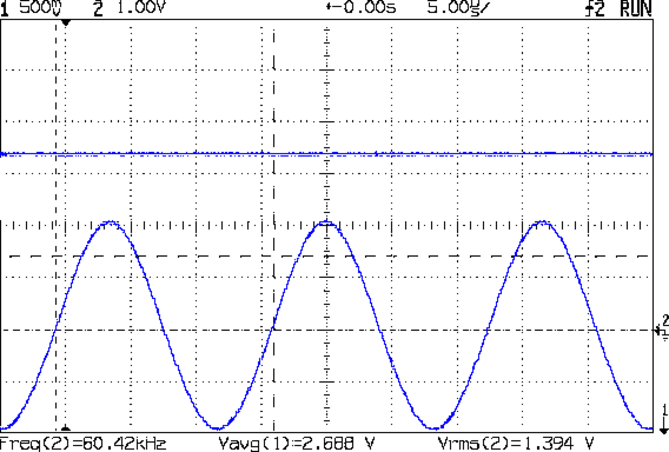
    The part I didn’t understand turned out to be the bandwidth of the final output stage = “video bandwidth”, which defaults to 25 MHz. After fixing the input circuitry, a 25 MHz VBW let the output track a 60 kHz input signal just fine:

    AD8310 - modified - 60 kHz 1Vpp
    AD8310 – modified – 60 kHz 1Vpp

    Adding a 56 nF cap across the C6 terminals (just above the AD8310) lowered the VBW to about 1 kHz:

    AD8310 Log Amp module - VBW rolloff cap
    AD8310 Log Amp module – VBW rolloff cap

    Which flattened that sucker right out:

    AD8310 - 1 kHz VBW cap - 60 kHz 1.394 V
    AD8310 – 1 kHz VBW cap – 60 kHz 1.394 V

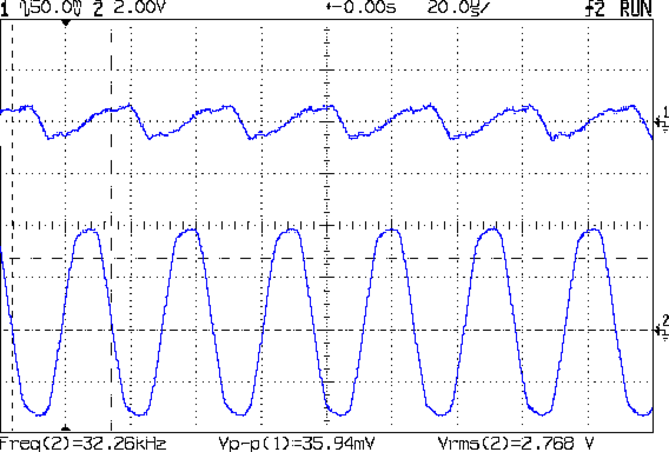
    The ripple for an absurdly high amplitude 32 kHz signal amounts to 36 mV:

    AD8310 - 1 kHz VBW cap - 32 kHz - VBW ripple
    AD8310 – 1 kHz VBW cap – 32 kHz – VBW ripple

    Firing the tracking generator into the input with a frequency sweep from 100 kHz to 250 MHz shows the low end looks much better:

    AD8310 - 1 kHz VBW cap - 100 kHz 250 MHz - 0 dB atten
    AD8310 – 1 kHz VBW cap – 100 kHz 250 MHz – 0 dB atten

    There’s a slight droop across the sweep that might amount to 50 mV = 2 dB, which I’m inclined to not worry about in this context.

    Applying the attenuators once again produces a scale factor of 23.5 mV/dB across 30 dB of RF, but this time the 60 kHz output makes sense, too.

    Using the typical output curve from AN-691, that 2.0 V output corresponds to -13 dBm, which sounds about right for the tracking generator (which might really be -10 dBm).

    I must calibrate the log amp output to find the actual intercept point (nominally -95 dBm, but could range from -86 to -102) at 60 kHz. The intercept is the extrapolated RF input producing 0 V out, which then acts as an offset for the voltage-to-dBm calculation; you start by finding the slope of the voltage vs. dBm line at some convenient power levels, then solve for dBm with V=0.

    So a cheap AD8310 Log Amp module from eBay can work in the LF band, after you rearrange the input circuitry and tweak the chip’s filters. At least now I have a better understanding of what’s going on …

  • AD8310 Log Amp Module: Corrected Input Circuit

    After puzzling over the AD8310 Log Amp module’s peculiar frequency response, I hacked up the front end circuitry to match the data sheet’s recommended layout:

    AD8310 Log Amp module - revised
    AD8310 Log Amp module – revised

    Given the intended LF crystal-measurement application, a hulking 51 Ω metal film resistor sprawled across the ground plane will work just fine. All three ceramic caps measure a bit under 1 µF; I intended to solder the input caps atop the existing 10 nF caps, but that didn’t work out well at all.

    I should harvest the InLo SMA connector to prevent anyone from mistaking it for an actual input.

    With that in place, the log amp output makes more sense:

    AD8310 - modified - 100 kHz 150 MHz - 0 dB atten
    AD8310 – modified – 100 kHz 150 MHz – 0 dB atten

    That trace tops out at 150 MHz, not the previous 500 MHz, but now the response is flat all the way out. The log amp generates plenty of hash when the tracking generator isn’t producing a valid signal.

    The 60 kHz response looks different:

    AD8310 - modified - 60 kHz 1Vpp
    AD8310 – modified – 60 kHz 1Vpp

    So it’s really the log amp response to the absolute value of the sine wave (or, more accurately, to the sine wave re-zeroed around Vcc/2), with minimum output at the input’s zero crossings. At 500 mV/div, the log amp says the input varies by 42 dB = 1000 mV/(24 mV/dB), which might actually be about right for a zero-crossing (or zero-approaching absolute value of a) signal; logarithms don’t deal well with zeros.

    The AD8310 datasheet  and AN-691 suggest the 2.5 V output corresponds to +10 dBm = 12.5 Vrms input, which flat-out isn’t the case. However, the actual 500 mVpeak = 350 mVrms input is 2.5 mW = +4 dBm, so maybe it’s within spitting distance of being right.

    AN-691 recommends 10 µF input caps for “low frequency” use, showing results down to 20 Hz; 1 µF seems to get the circuit close enough to the goal for use near 60 kHz.

    It also recommends a cap on the BFIN pin (pin 6) to reduce the output stage bandwidth = “video bandwidth” and improve the overall accuracy, which remains to be done. The datasheet suggests rolling VBW off at 1/10 the minimum input frequency, which would be around 3 kHz for use with 32.768 kHz crystals. The equation, with reference to the internal 3 kΩ bias resistor:

    CFILT = 1/(2π 3 kΩ VBW) – 2.1 pF = 18 nF

    For a bit more margin, 1 kHz would require 56-ish nF.

    The PCB has a convenient pair of pads labeled C6 for that capacitor. This may require protracted rummaging in the SMD capacitor stash.

    Rolling off the VBW should reduce the hash on the 100 kHz end of the frequency sweep and filter the 60 kHz response down to pretty much a DC level.

    Applying the 10 dB and 20 dB SMA attenuators to the input from the tracking generator and recording the log amp output voltage produces this useful table:

    AD8310 Log Amp - mods and log response
    AD8310 Log Amp – mods and log response

    With the terminating resistor on the correct side of the input caps, the log amp seems to be working the way it should, with an output varying a bit under the nominal 24-ish mV/dB over a 30 dB range.

    We need caps! Lots of caps!

    A quick search with the obvious keywords suggests nobody else has noticed how these modules work over a reasonable bandwidth. Maybe I’m the first person to use them in the LF band?

  • Zire 71 Protector: Some Things Last

    This ABS slab emerged from the Thing-O-Matic in early 2012:

    Zire 71 protector in place
    Zire 71 protector in place

    The Zire would power on whenever the switches clicked or that little joystick moved, which happened regularly enough to be annoying.

    Mary made a small case that matched the other pouches I carry around:

    Belt pack - camera case - PDA case
    Belt pack – camera case – PDA case

    She made the case to fit an HP48 calculator, but it was close enough for the Zire.

    Time passed, the Zire died, I started carrying a Kindle Fire in another pocket, but the ABS slab provided a convenient stiffener between some Geek Scratch Paper and the various pencils / pens / markers / screwdrivers / flashlight filling the available space.

    Unfortunately, minus the backup of an electronic slab, the protector finally failed along an obvious stress riser:

    Zire 71 protector - cracked
    Zire 71 protector – cracked

    I cut a similar rectangle from a sheet of unknown flexy plastic, rounded the corners, clipped the pencils & whatnot to it, and maybe it’ll survive for a while.

  • XTC-3D Epoxy Coating: Results

    Having figured the mixing ratios, found the mixing trays, and donned my shop apron, I buttered up several iterations of the badge reel case to see how XTC-3D epoxy works on the little things around here.

    In all cases, I haven’t done any sanding, buffing, or primping, mostly because I’m not that interested in the final surface finish.

    A single coat produces a glossy finish with ripples from the printed threads:

    XTC-3D - Hilbert - reflective
    XTC-3D – Hilbert – reflective

    Seen straight on, without the glare, a little speck toward the lower right corner shows that cleanliness is next to impossible around here:

    XTC-3D - lines - direct
    XTC-3D – lines – direct

    An additional coat atop a Hilbert-curve upper surface comes out somewhat smoother:

    XTC-3D - Hilbert - reflective 2
    XTC-3D – Hilbert – reflective 2

    Another view, with less glare, shows the pattern a bit better:

    XTC-3D - Hilbert - reflective 1
    XTC-3D – Hilbert – reflective 1

    With no glare, the 3D Honeycomb infill shows through the surface:

    XTC-3D - Hilbert - direct
    XTC-3D – Hilbert – direct

    Coating the surface with epoxy definitely makes it more transparent / less translucent by filling in the air gaps.

    The sides of that part have only one coat and still show typical 3D printed striations.

    Three coats wipe out the striations, along with all other surface detail:

    XTC-3D - Bezel - front oblique
    XTC-3D – Bezel – front oblique

    The bolt head recesses collected enough epoxy to require reaming / milling, which certainly isn’t what you want in that situation. The bolt holes also shrank, although my usual hand-twisted drill would probably suffice to clear the epoxy.

    Another view shows a glint from the smooth surface filling the upper-right recess:

    XTC-3D - Bezel - front
    XTC-3D – Bezel – front

    Three coats definitely hides the 3D printed threads, although you can see some ridges and edges:

    XTC-3D - heavy - oblique
    XTC-3D – heavy – oblique

    The epoxy isn’t perfectly self-leveling, probably due to my (lack of) technique:

    XTC-3D - heavy - reflection
    XTC-3D – heavy – reflection

    Blowing out the contrast shows the surface finish:

    XTC-3D - heavy - direct - boost
    XTC-3D – heavy – direct – boost

    Those scratches come from fingernails, after the overnight curing time. The surface is hard, but not impervious to scratching, which is about what you’d expect for a clear epoxy.

    Slightly over-thinning the XTC-3D with denatured alcohol in a 0.7 : 0.3 : 0.3 by weight ratio produced a watery liquid that penetrated directly into the surface:

    XTC-3D - thinned - oblique
    XTC-3D – thinned – oblique

    The finish depends critically on what’s below the surface and how much epoxy you apply. I tried to spread it uniformly with a foam brush, but the center came out somewhat rougher than the outer edge:

    XTC-3D - thinned - oblique
    XTC-3D – thinned – oblique

    The striations along the sides filled in a bit, but surely not enough to satisfy anybody who worries about such things.

    A specular reflection shows the changing surface smoothness:

    XTC-3D - thinned - oblique reflective
    XTC-3D – thinned – oblique reflective

    Perhaps two coats of thinned epoxy would produce a watertight / airtight part, without changing the overall dimensions by very much. The mechanical properties depend almost entirely on the plastic-to-plastic bond, so I doubt a thin epoxy layer would improve its pressure-handling capabilities.

    Few of the parts I make will benefit from an epoxy coating and I definitely don’t want to get into post-processing the parts just to improve their looks!

  • Wearable LED vs. Astable Multivibrator vs. Dead Lithium Cells

    Mashing the wearable LED from the completely dead CR2032 cell with a classic astable multivibrator circuit and a not-dead-yet CR123 cell produced a pure-analog desktop blinky:

    CR123A Astable - front
    CR123A Astable – front

    Of course, I managed to swap the base resistors, which meant the LED stayed on most of the time, which accounts for the slightly off-kilter brown resistor just under the LED.

    It doesn’t look like much with the LED off:

    CR123A Astable - top - off
    CR123A Astable – top – off

    Running from a 2.8 V (= dead) lithium cell, the LED lights a dark room at 3 mA:

    CR123A Astable - top - on
    CR123A Astable – top – on

    The LTSpice schematic gives the details:

    Astable Multivibrator - CR2032 - schematic
    Astable Multivibrator – CR2032 – schematic

    The LED definitely didn’t come from Nichia and the 2N3704 transistors aren’t the 2N3904s found in the LTSpice library, but, by and large, this is the kind of circuit where nearly anything will work.

    The actual LED current obviously depends critically on the particular LED and the cell voltage, so this represents more of a serving suggestion than an actual prediction:

    Astable Multivibrator - CR2032 - waveform
    Astable Multivibrator – CR2032 – waveform

    Indeed, a Tek current probe clamped around one of those 10 AWG copper wires shows a much more enthusiastic LED current (1 mA/div):

    Astable - CR123A 2.8 V - 1 mA -green
    Astable – CR123A 2.8 V – 1 mA -green

    I don’t trust the baseline very much. The simulation & back of the envelope agree: the LED-off current should be around 400 µA (which doesn’t depend on the LED at all), so it’s in the right ballpark.

    Your mileage will definitely differ.

    It runs without a trace of software, which everybody at Squidwrench thought was wonderful …