The Smell of Molten Projects in the Morning

Ed Nisley's Blog: Shop notes, electronics, firmware, machinery, 3D printing, laser cuttery, and curiosities. Contents: 100% human thinking, 0% AI slop.

Tag: CNC

Making parts with mathematics

  • Drag Knife Blade Extension

    Drag Knife Blade Extension

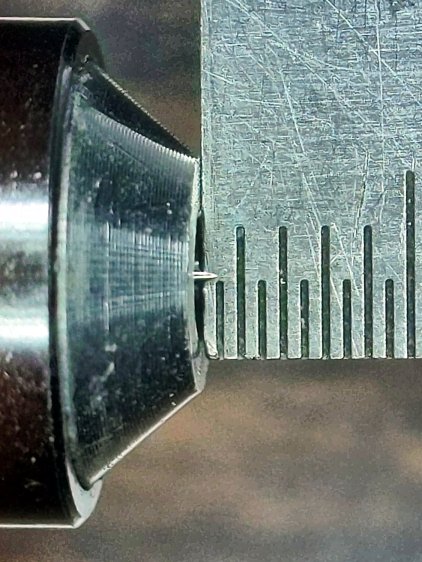
    The battered corner of my bench scale shows it’s been knocking around for quite a while, but the drag knife blade tip seems pretty close to the first 0.5 mm division:

    Drag Knife Blade - 0.5 mm
    Drag Knife Blade – 0.5 mm

    The blade extends from the LM12UU holder for the MPCNC.

    Scribbling the blade across a scrap of laminated yellow card stock (about 0.4 mm thick) showed it didn’t cut all the way through the bottom plastic layer, even with the spring mashed flat.

    So I screwed it out to 0.7 mm:

    Drag Knife Blade - 0.7 mm
    Drag Knife Blade – 0.7 mm

    The scale isn’t quite parallel to the blade axis and maybe it’s sticking out 0.8 mm; setting a drag knife’s blade extension obviously isn’t an exact science.

    In any event, another scribble slashed all the way through the laminated deck without gashing the sacrificial cardboard atop my desk, which seems good enough.

  • Round Soaker Hose Splint

    Round Soaker Hose Splint

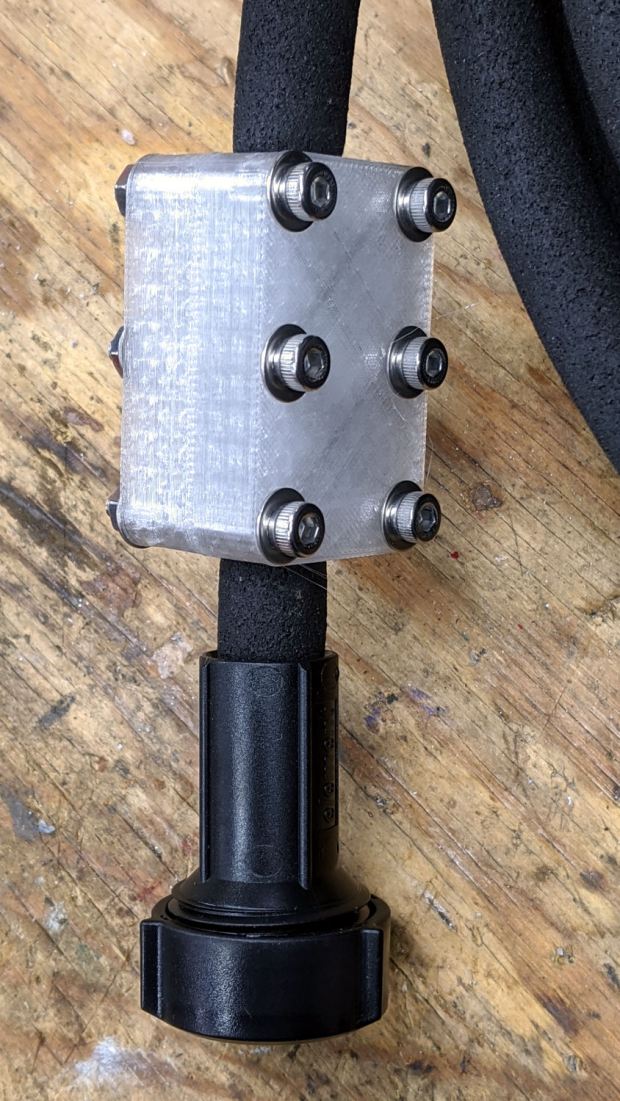
    One of two new round rubber soaker hoses arrived with a slight crimp, enough to suggest it would crumble at an inopportune moment. Rather than return the hose for something that’s not an obvious failure, I clamped the crimp:

    Round Soaker Hose Splice - top
    Round Soaker Hose Splice – top

    Unlike the clamps for the punctured flat soaker hoses, this one doesn’t need to withstand much pressure and hold back a major leak, so I made the pieces a bit thicker and dispensed with the aluminum backing plates:

    Round Soaker Hose Splice - bottom
    Round Soaker Hose Splice – bottom

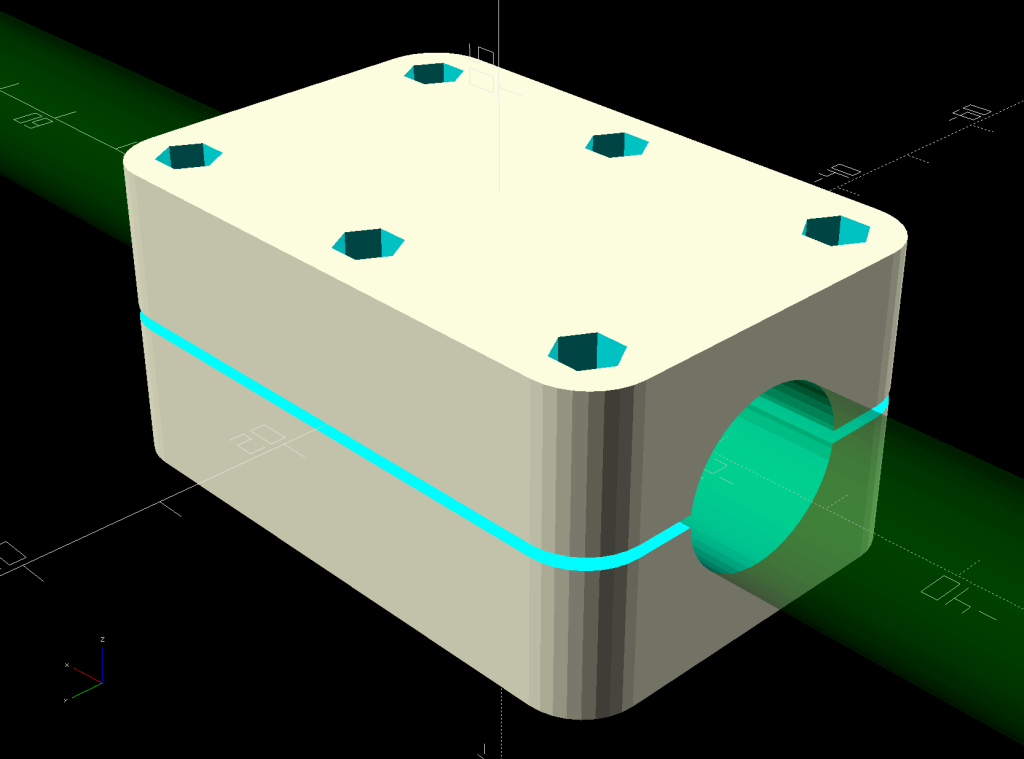
    The solid model is basically the same as for the flat hoses, with a slightly oval cylinder replacing the three channels:

    Round Soaker Hose Splice - OpenSCAD model
    Round Soaker Hose Splice – OpenSCAD model

    The OpenSCAD source code as a GitHub Gist:

    // Rubber Soaker Hose Splice
    // Ed Nisley KE4ZNU 2020-03
    Layout = "Build"; // [Hose,Block,Show,Build]
    TestFit = false; // true to build test fit slice from center
    //- Extrusion parameters must match reality!
    /* [Hidden] */
    ThreadThick = 0.25;
    ThreadWidth = 0.40;
    HoleWindage = 0.2;
    Protrusion = 0.1; // make holes end cleanly
    inch = 25.4;
    function IntegerMultiple(Size,Unit) = Unit * ceil(Size / Unit);
    ID = 0;
    OD = 1;
    LENGTH = 2;
    //———-
    // Dimensions
    // Hose lies along X axis
    Hose = [200,14.5,13.6]; // X = longer than anything else
    // 8-32 stainless screws
    Screw = [4.1,8.0,3.0]; // OD = head LENGTH = head thickness
    Washer = [4.4,9.5,1.0];
    Nut = [4.1,9.7,6.0];
    Block = [50.0,Hose.y + 2*Washer[OD],4.0 + 1.5*Hose.z]; // overall splice block size
    echo(str("Block: ",Block));
    Kerf = 1.0; // cut through middle to apply compression
    CornerRadius = Washer[OD]/2;
    NumScrews = 3; // screws along each side of cable
    ScrewOC = [(Block.x – 2*CornerRadius) / (NumScrews – 1),
    Block.y – 2*CornerRadius,
    2*Block.z // ensure complete holes
    ];
    echo(str("Screw OC: x=",ScrewOC.x," y=",ScrewOC.y));
    //———————-
    // Useful routines
    module PolyCyl(Dia,Height,ForceSides=0) { // based on nophead's polyholes
    Sides = (ForceSides != 0) ? ForceSides : (ceil(Dia) + 2);
    FixDia = Dia / cos(180/Sides);
    cylinder(d=(FixDia + HoleWindage),h=Height,$fn=Sides);
    }
    // Hose shape
    // This includes magic numbers measured from reality
    module HoseProfile() {
    NumSides = 12*4;
    rotate([0,-90,0])
    translate([0,0,-Hose.x/2])
    resize([Hose.z,Hose.y,0])
    cylinder(d=Hose.z,h=Hose.x,$fn=NumSides);
    }
    // Outside shape of splice Block
    // Z centered on hose rim circles, not overall thickness through center ridge
    module SpliceBlock() {
    difference() {
    hull()
    for (i=[-1,1], j=[-1,1]) // rounded block
    translate([i*(Block.x/2 – CornerRadius),j*(Block.y/2 – CornerRadius),-Block.z/2])
    cylinder(r=CornerRadius,h=Block.z,$fn=4*8);
    for (i = [0:NumScrews – 1], j=[-1,1]) // screw holes
    translate([-(Block.x/2 – CornerRadius) + i*ScrewOC.x,
    j*ScrewOC.y/2,
    -(Block.z/2 + Protrusion)])
    PolyCyl(Screw[ID],Block.z + 2*Protrusion,6);
    cube([2*Block.x,2*Block.y,Kerf],center=true); // slice through center
    }
    }
    // Splice block less hose
    module ShapedBlock() {
    difference() {
    SpliceBlock();
    HoseProfile();
    }
    }
    //———-
    // Build them
    if (Layout == "Hose")
    HoseProfile();
    if (Layout == "Block")
    SpliceBlock();
    if (Layout == "Show") {
    difference() {
    SpliceBlock();
    HoseProfile();
    }
    color("Green",0.25)
    HoseProfile();
    }
    if (Layout == "Build") {
    SliceOffset = TestFit && !NumScrews%2 ? ScrewOC.x/2 : 0;
    intersection() {
    translate([SliceOffset,0,Block.z/4])
    if (TestFit)
    cube([ScrewOC.x/2,4*Block.y,Block.z/2],center=true);
    else
    cube([4*Block.x,4*Block.y,Block.z/2],center=true);
    union() {
    translate([0,0.6*Block.y,Block.z/2])
    ShapedBlock();
    translate([0,-0.6*Block.y,Block.z/2])
    rotate([0,180,0])
    ShapedBlock();
    }
    }
    }
  • CNC Kitchen Sink Strainer

    CNC Kitchen Sink Strainer

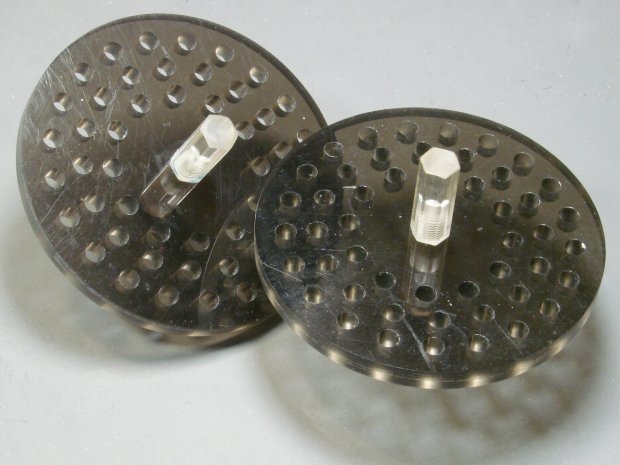
    Our Young Engineer recently rented a house, now knows why our sinks have CNC-machined strainers, and asked for something better than the disgusting stainless mesh strainer in the kitchen sink.

    Being a doting father, I turned out a pair to get a pretty one:

    CNC Sink Strainer - overview
    CNC Sink Strainer – overview

    They’re made from the same scrap smoked acrylic as the ones in our sinks:

    CNC Sink Strainer
    CNC Sink Strainer

    They’re definitely upscale from the (not watertight!) 3D printed version I built for a Digital Machinist column to explain OpenSCAD modeling:

    Strainer plate fill
    Strainer plate fill

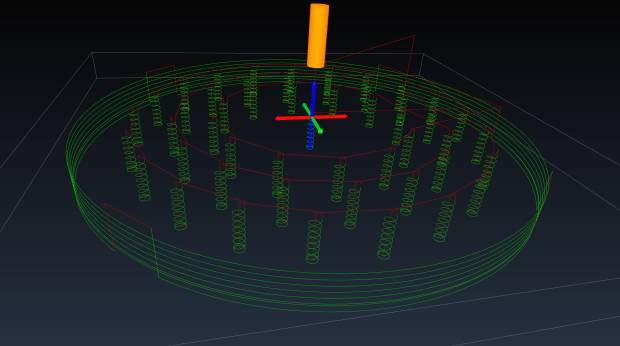
    This time around, though, I rewrote the subtractive design in GCMC, with helical milling for all the holes to eliminate the need to change tools:

    Sink Strainer - tool path simulation - CAMotics
    Sink Strainer – tool path simulation – CAMotics

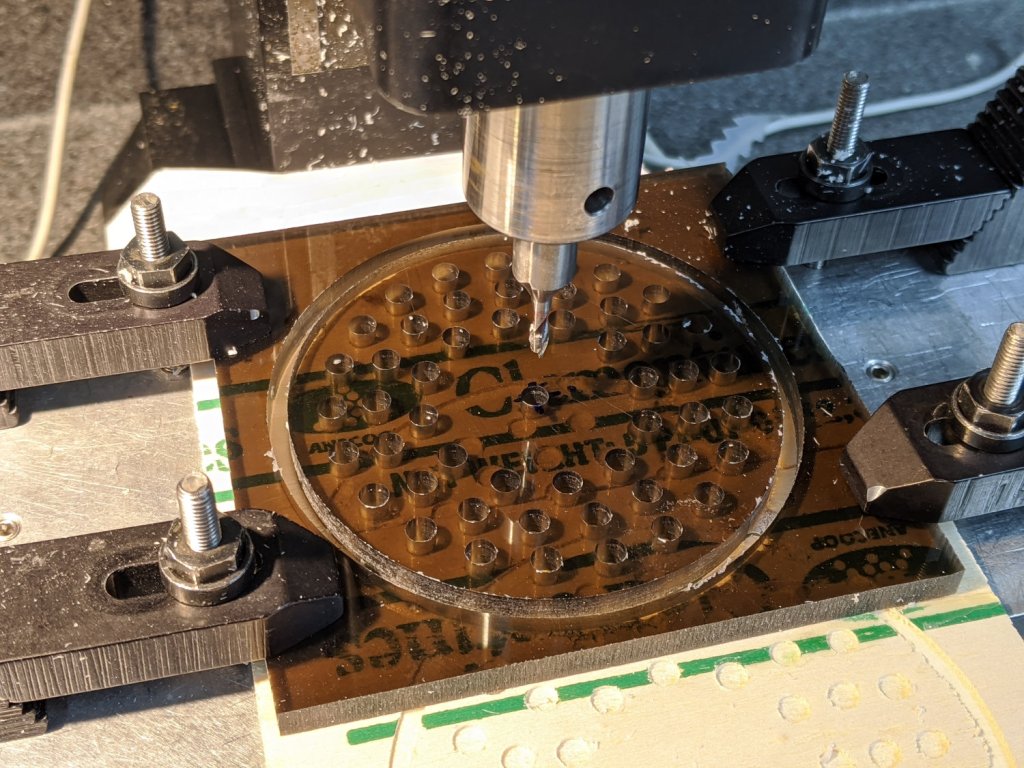
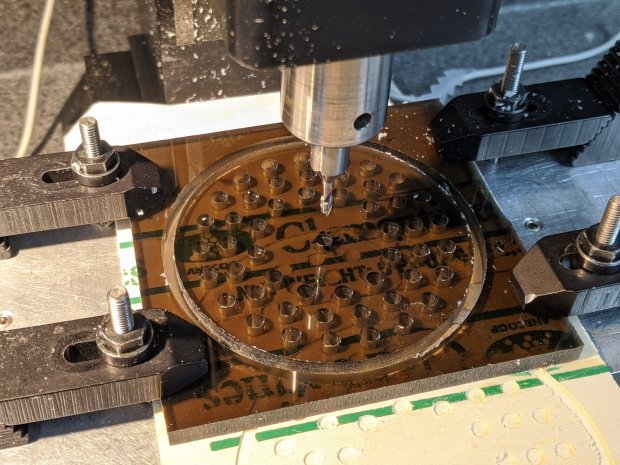
    They’re done on the Sherline, because it has real clamps:

    CNC Sink Strainer - on Sherline
    CNC Sink Strainer – on Sherline

    Four tabs eliminated the need to reclamp the stock before cutting the perimeter, but I should have ramped, not plunged, through the final cut between the tabs:

    CNC Sink Strainer - tab surface fracture
    CNC Sink Strainer – tab surface fracture

    The handles come from the same chunk of hex acrylic as before, eyeballed to length, tapped 8-32, and secured with acrylic adhesive.

    The GCMC source code as a GitHub Gist:

    // Drill & mill sink drain strainer
    // Ed Nisley KE4ZNU — Digital Machinist 15.2 Spring 2020
    // polycarbonate or acrylic sheet
    // External clamps at corners
    // Origin at center of sheet
    //—–
    // Dimensions
    DiskOD = 80.0mm; // usual kitchen drain = 3-1/4 inch
    DiskRad = DiskOD/2;
    PlateThick = 6.0mm; // stock thickness
    MillOD = 3.170mm; // measured end mill OD
    HoleDia = 4.75mm; // 3/16 inch drain holes
    ScrewOD = 0.18in; // knob screw clearance
    NumRings = 3; // rings of drain holes
    RingSpace = 1.5 * HoleDia; // .. between rings
    MaxZCut = 0.25 * MillOD; // max cut depth
    MillSpeed = 1000mm; // horizontal feedrate
    NumTabs = 4;
    TabTilt = 45deg;
    TabLength = 5.0mm;
    TabThick = 0.5mm;
    SafeZ = 10.0mm; // above all obstructions
    TravelZ = 1.0mm; // within engraving / milling area
    MillZ = -(PlateThick + 0.5mm); // through disk into spoil board
    TwoPi = 2*pi();
    //—–
    // Mill one hole
    function MillHole(ctr,radius,turns) {
    goto([-,-,TravelZ]);
    goto(head(ctr,2) + [radius,-,-]);
    goto([-,-,0]); // kiss surface
    circle_cw(ctr,turns); // helix downward
    circle_cw(head(ctr,2)); // remove last ramp
    goto(ctr); // get elbow room
    goto([-,-,TravelZ]);
    }
    //—–
    // Start cutting!
    goto([-,-,SafeZ]);
    goto([0,0,-]);
    goto([-,-,TravelZ]);
    feedrate(MillSpeed);
    // Mill center screw hole
    comment("– Center hole");
    ctr = [0,0,MillZ];
    MillHole(ctr,(ScrewOD – MillOD) / 2,ceil(abs(ctr.z) / MaxZCut));
    // Mill hole rings
    comment("– Drain hole rings");
    repeat (NumRings; ri) {
    comment("Ring: ",ri);
    rr = DiskRad – ri*RingSpace; // ring radius
    comment(" radius: ",rr);
    nh = to_int(floor(TwoPi*rr / (2*HoleDia))); // number of holes
    comment(" holes: ",nh);
    repeat(nh; h) {
    a = (h – 1) * TwoPi / nh; // angle of hole
    ctr = [rr*cos(a),rr*sin(a),MillZ]; // center point at ending Z
    MillHole(ctr,(HoleDia – MillOD)/2,ceil(abs(ctr.z) / MaxZCut));
    }
    }
    // Mill perimeter
    comment("– Perimeter");
    r = DiskRad + MillOD/2;
    goto([r,0,-]);
    goto([-,-,0]);
    ctr = [0,0,-(PlateThick – TabThick)];
    circle_ccw(ctr,ceil(abs(ctr.z) / MaxZCut)); // ramp downward
    circle_ccw(ctr,1); // remove last ramp
    goto([-,-,TravelZ]);
    comment("– Tabs");
    ta = 360deg / NumTabs; // between tabs
    tsa = to_rad(TwoPi*((TabLength + MillOD) / (TwoPi * r))); // subtended tab angle
    repeat (NumTabs; i) {
    comment(" # ",i);
    a = TabTilt + (i – 1)*ta; // tab center angle
    p0 = [r*cos(a + tsa/2),r*sin(a + tsa/2),MillZ]; // entry on ccw side
    p1 = [r*cos(a + ta – tsa/2),r*sin(a + ta – tsa/2),MillZ]; // exit at next tab
    if (0) {
    comment(" angle: ",a);
    comment(" entry: ",p0);
    comment(" exit: ",p1);
    }
    goto(head(p0,2)); // to entry point
    move(p0); // plunge through
    arc_ccw(p1,r);
    goto([-,-,TravelZ]);
    }
    goto([-,-,SafeZ]);
    goto([0,0,-]);

    All in all, a pleasant diversion from contemporary events …

  • GRBL Error 33: Arc Coordinates vs. Decimal Places

    GRBL Error 33: Arc Coordinates vs. Decimal Places

    The LinuxCNC G2/G3 arc command doc has this to say about numerical precision:

    When programming arcs an error due to rounding can result from using a precision of less than 4 decimal places (0.0000) for inch and less than 3 decimal places (0.000) for millimeters.

    So I normally set GCMC to produce three decimal digits, because its default of eight digits seems excessive for my usual millimeter measurements, and assume whatever G-Code sender I use won’t chop digits off the end in passing. Mistakenly setting bCNC to round at two decimal places showed what happens with fewer digits, as bCNC’s default is four decimal digits.

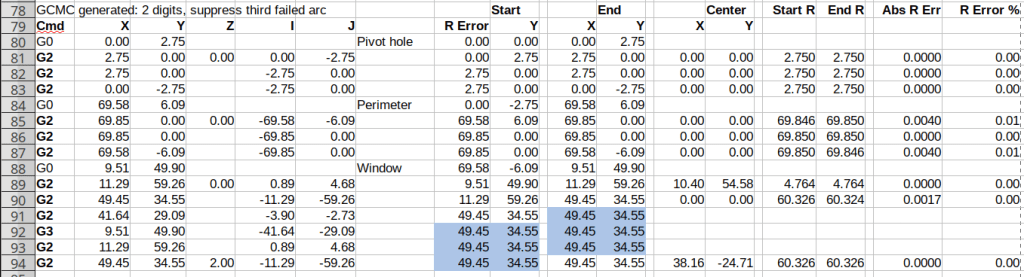
    A closer look at the coordinates in the lower right part of the spreadsheets (from yesterday) shows the limited accuracy with two decimal digits:

    Spreadsheet - GCMC 2 digit - full path - detail
    Spreadsheet – GCMC 2 digit – full path – detail

    The red blocks mark the first failing arc, where the relative error falls out of tolerance. If GRBL were less fussy (which it should not be), then the next arcs would proceed as shown.

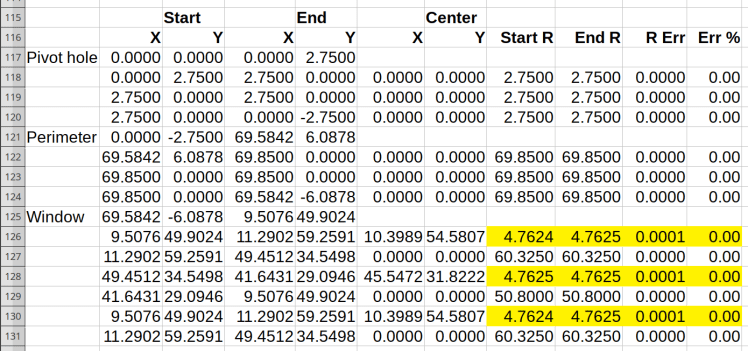
    Rounding to three decimal digits pushes the errors into to the third place, with the yellow highlight marking the worst errors:

    Spreadsheet - GCMC 3 digit - detail
    Spreadsheet – GCMC 3 digit – detail

    As you should expect, the smallest arcs have the largest relative errors, although they’re now well within GRBL’s (and LinuxCNC’s, for that matter) limits.

    Rounding to four decimal digits makes the errors vanishingly small:

    Spreadsheet - GCMC 4 digit - detail
    Spreadsheet – GCMC 4 digit – detail

    So, by and large, don’t scrimp on the decimal digits … but we knew that already.

    I’d been setting GRBL to produce three decimal places, but now I’m using four. Adding a few characters to each G-Code command reduces the number of commands fitting into GRBL’s buffer space, but bCNC normally keeps it around 90% full, so the path planner should remain perfectly happy.

  • GRBL Error 33: G-Code Arc Tolerances

    GRBL Error 33: G-Code Arc Tolerances

    After figuring out how two-place decimal fractions caused this blooper, I had to poke into the debris field surrounding the crash:

    Tek CC - top deck - failed arcs
    Tek CC – top deck – failed arcs

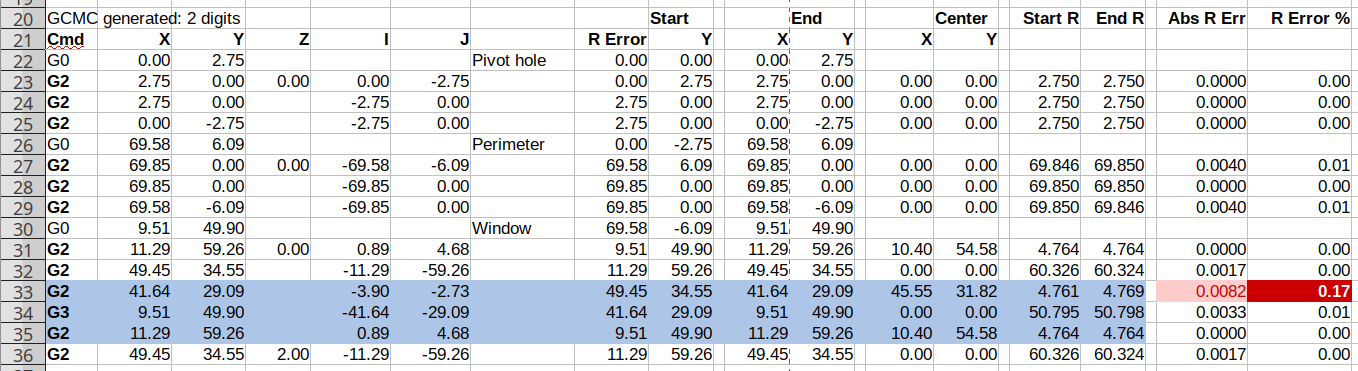
    The bCNC Terminal trace stops at the first failure, so I set GCMC to produce two-place fractions (“Number of decimals less than 3 severely limits accuracy”), then rammed the NGC file’s G-Code into a spreadsheet:

    Spreadsheet - GCMC 2 digit - full path
    Spreadsheet – GCMC 2 digit – full path

    The last two columns (perhaps you must open the image in a new tab to see the whole thing) compute the GRBL error values: the absolute difference between the two radii and that difference as a fraction of the radius. The R Error header under Start should be X, of course; I’ll regenerate the images for the DM column.

    The reduced accuracy of the two-digit fractions triggers the error marked by the red cells, where the radii differ by 0.0082 mm (>0.005) and the relative error is 0.17% (>0.1%).

    Suppressing the first failed arc by passing the same starting point to the next arc simulates the second failure:

    Spreadsheet - GCMC 2 digit - suppress first failed arc
    Spreadsheet – GCMC 2 digit – suppress first failed arc

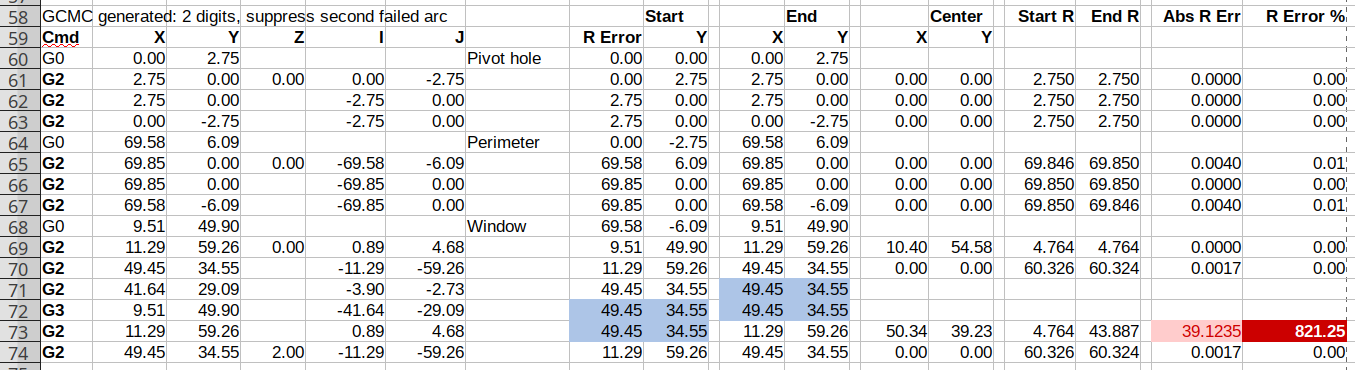
    Similarly, the third arc from the same point fails:

    Spreadsheet - GCMC 2 digit - suppress second failed arc
    Spreadsheet – GCMC 2 digit – suppress second failed arc

    The fourth arc becomes a full circle and produces the circular gash across the deck:

    Spreadsheet - GCMC 2 digit - suppress third failed arc
    Spreadsheet – GCMC 2 digit – suppress third failed arc

    Two digits definitely aren’t enough!

  • bCNC Rounding vs. G-Code Arcs: GRBL Error 33

    bCNC Rounding vs. G-Code Arcs: GRBL Error 33

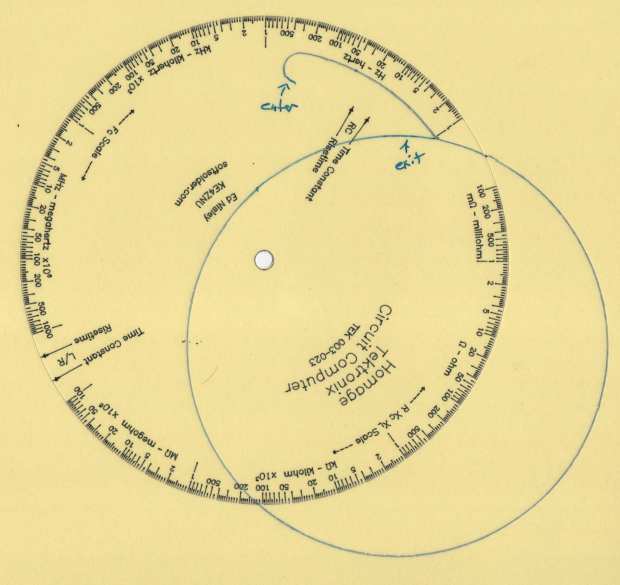
    While cutting the top deck of the Pickett-flavored Tek Circuit Computer on the MPCNC, this happened:

    Tek CC - top deck - failed arcs
    Tek CC – top deck – failed arcs

    I traced the off-center circle with a marker to make it more visible, as it’s the drag knife cut that should have been the exit move after completing the window.

    Huh. It never did that before …

    The bCNC plot looked fine, but the Terminal log showed three Error 33 reports:

    Failed arc command - bCNC screen - terminal and plot
    Failed arc command – bCNC screen – terminal and plot

    The GRBL doc has this to say about Error 33:

    The motion command has an invalid target. G2, G3, and G38.2 generates this error, if the arc is impossible to generate or if the probe target is the current position.

    The error messages don’t occur immediately after the failing G2/G3 command, because bCNC sends enough commands to keep the GRBL serial input buffer topped off. After GRBL sends the error message, it continues chewing its way through the buffer and, when bCNC notices the first error, it stops sending more G-Code commands and shudders to a stop.

    The great thing about Free Software is that when it breaks, you have all the pieces. Looking into the GRBL source code provides a definition of Error 33:

    // [G2/3 Offset-Mode Errors]: No axis words and/or offsets in selected plane. The radius to the current
    //   point and the radius to the target point differs more than 0.002mm (EMC def. 0.5mm OR 0.005mm and 0.1% radius).

    Which doesn’t quite match the code, but it’s close enough:

    // Compute difference between current location and target radii for final error-checks.
                float delta_r = fabs(target_r-gc_block.values.r);
                if (delta_r > 0.005) {
                  if (delta_r > 0.5) { FAIL(STATUS_GCODE_INVALID_TARGET); } // [Arc definition error] > 0.5mm
                  if (delta_r > (0.001*gc_block.values.r)) { FAIL(STATUS_GCODE_INVALID_TARGET); } // [Arc definition error] > 0.005mm AND 0.1% radius
                }

    I’ve drag-knifed maybe a dozen top decks with no problem, so figuring out what broke took a while.

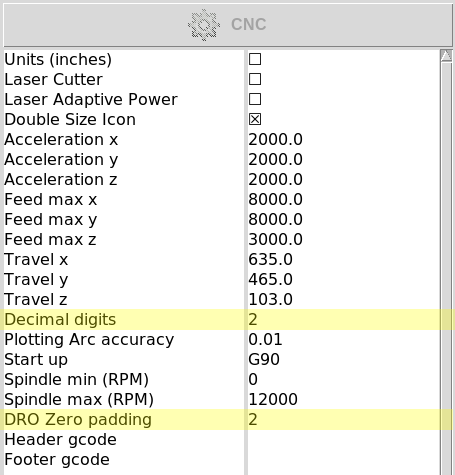
    The key turned out to be in the Terminal log, where all coordinates in the G-Code commands had, at most, two decimal places. The GCMC program producing the G-Code emits three decimal places, so bCNC rounded off a digit before squirting commands to GRBL.

    After more searching, it seems I’d told bCNC to do exactly that:

    bCNC Config - Round 2 digits - highlighted
    bCNC Config – Round 2 digits – highlighted

    Perhaps I’d mistakenly set “Decimal digits” instead of “DRO Zero padding” when I reduced the DRO resolution from three decimals to two? It’s set to “2” in the CNC 3018XL configuration, so this seems like a typical one-off brain fade.

    GRBL doesn’t execute invalid commands, so the tool position remains at the end of the window’s outer perimeter while the next two arc commands fail, because their center offsets produced completely invalid radii.

    The three failed arc commands should have cut the right end of the window, the inner side, and the left end, but left the tool position unchanged. The final arc command should have withdrawn the blade along the outer side of the window, but became a complete circle, with the commanded end point equal to the leftover starting point at the same radius from the deck center.

    The same G-Code file fails consistently with Decimal digits = 2 and runs perfectly with Decimal digits = 3, so at least I know a good fix.

    Protip: Keep your hands away from moving machinery, because you never know what might happen!

    This seems sufficiently obscure to merit becoming a Digital Machinist column. More analysis is in order …

  • Natural Enemies

    Natural Enemies

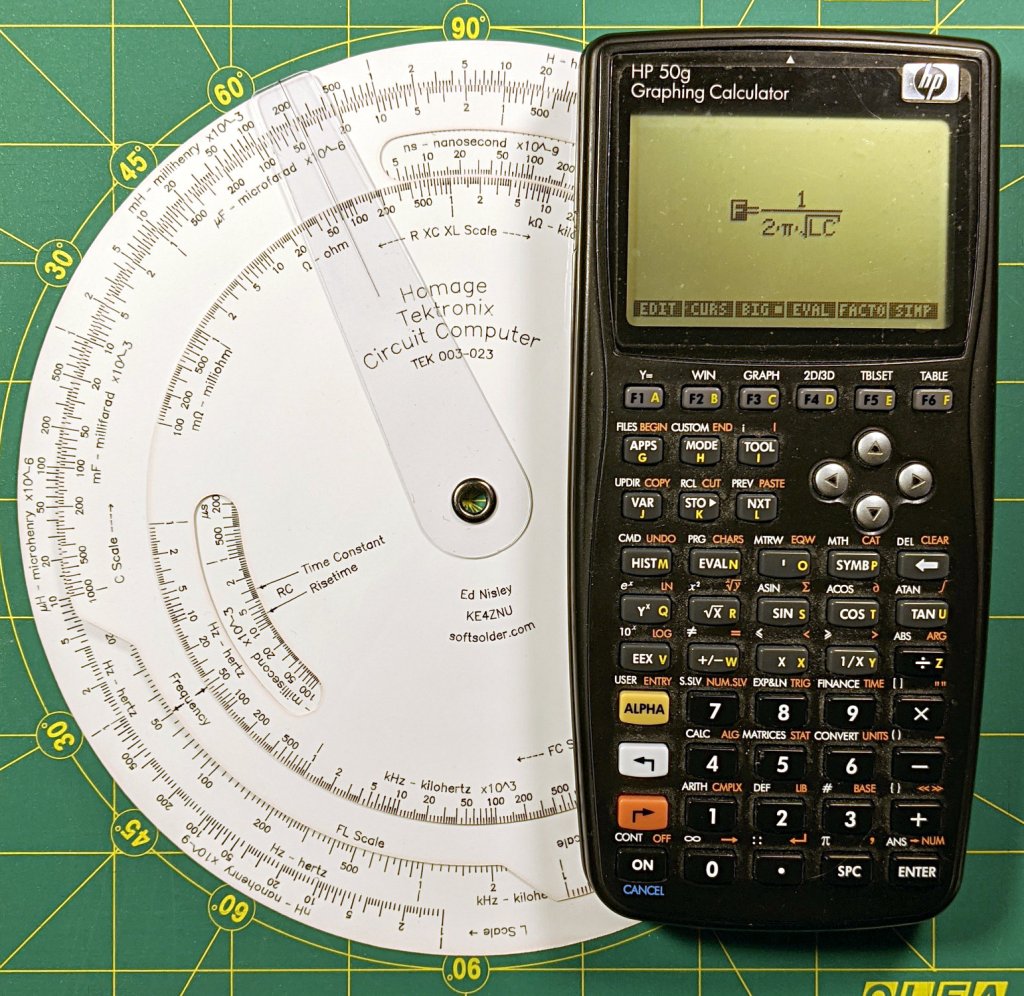
    I couldn’t resist setting this up for my next Digital Machinist column on logarithmic scales:

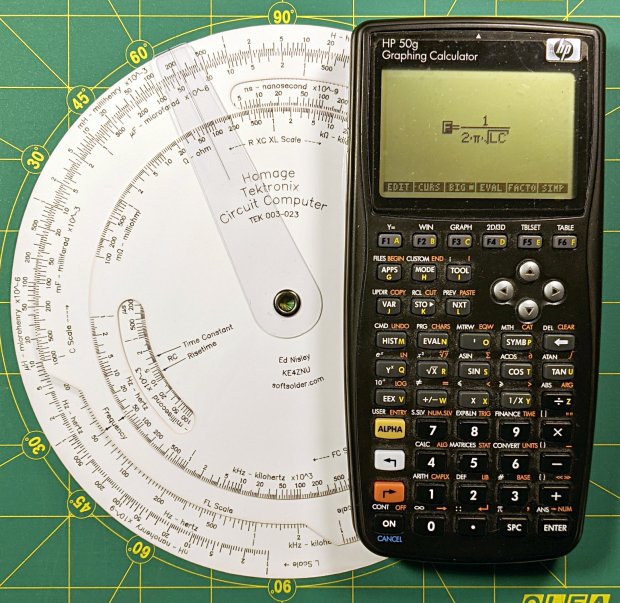
    Homage Tektronix Circuit Computer with HP 50g calculator
    Homage Tektronix Circuit Computer with HP 50g calculator

    The caption will read “Photo 1: A replica Tektronix Circuit Computer shown with its natural enemy, an HP 50g Graphing Calculator.”

    It’s my desk calculator. In the Basement Laboratory, I use the HP 48 calculator app, with a couple of $10 Sharp calculators in harm’s way.