The Smell of Molten Projects in the Morning

Ed Nisley's Blog: Shop notes, electronics, firmware, machinery, 3D printing, laser cuttery, and curiosities. Contents: 100% human thinking, 0% AI slop.

Category: Machine Shop

Mechanical widgetry

  • Chocolate Molds: Positives Ready

    After all the height map tweaking, Slic3r duplicated the Tux and SqWr STL positive models, distributed them on the platform, and the small molds printed out easily enough:

    Tux SqWr positive molds - as built
    Tux SqWr positive molds – as built

    The larger pin plate wasn’t quite as successful. Despite what this might look like, that’s the same black PLA as the smaller molds:

    Mold peg plate - repaired
    Mold peg plate – repaired

    I used 10% infill density, which was structurally good enough for a very light slab, but it left large gaps near the side walls that the top fill didn’t quite cover. Part of the problem was that the walls, being cylindrical sections, kept overhanging toward the inside, leaving the top fill nothing to grab around the nearly tangential perimeter. I think printing the slab upside-down, with the top surface against the platform, would solve that problem and also produce a glass-smooth surface under the positive molds.

    I took the easy way out by troweling JB KwikWeld epoxy into the holes, smoothing it, and sanding the surfaces more-or-less smooth. That should suffice to cast the negative mold in silicone over everything, but it sure ain’t pretty:

    Mold plate with Tux SqWr positives in place
    Mold plate with Tux SqWr positives in place

    The molds are just sitting on their pegs and haven’t been taped in place; the lower-left Tux appears to be making a break for freedom.

    The Mighty Thor will do the silicone negative mold… and the further I stay away from the chocolate tempering & pouring process, the better it’ll be for all parties concerned.


  • Kenmore Model 158 Speed Control: Carbon Disk Replacement

    The speed control pedal on Mary’s sewing machine once again started racing away from a dead stop, which we now know means more disks inside the carbon pile rheostat have disintegrated. It looked pretty much the same as when I took it apart in 2009:

    Rheostat graphite wafers and contacts
    Rheostat graphite wafers and contacts

    This time, it had one cracked wafer and several thin ones, reducing the length of the stacks so much that the pedal exerted very little force (thus, not starting the motor) before the shorting contacts caused a runaway.

    Back then, I’d machined two brass disks to fill the empty space:

    Rheostat with brass spacer button
    Rheostat with brass spacer button

    A rough measurement showed I’d have to double their thickness to about 7 mm each, but it seemed like replacing high-resistance carbon with low-resistance brass wasn’t a Good Idea, at least when taken to an extreme. Not knowing what would count as an extreme in this situation, I decided to replace the brass disks with graphite cylinders sized to fill up the empty space.

    The Little Box o’ Machinable Graphite produced a small bar, from which I sliced a square with jeweler’s pull saw:

    Machineable Graphic - rough-sawn slab
    Machineable Graphic – rough-sawn slab

    Cutting that in half, then one of the bars in half, produced a pair of cubes:

    Machineable Graphic - cubes
    Machineable Graphic – cubes

    I tried sanding off the corners:

    Machineable Graphic - sanded cube
    Machineable Graphic – sanded cube

    After it became painfully obvious that process would take just slightly less than forever, I deployed the Dremel sanding drum:

    Machineable Graphic - cylinders
    Machineable Graphic – cylinders

    Much to my surprise, the shop vacuum didn’t quite inhale the cloth, I didn’t drop either of the cylinders into its gaping maw or sand away my fingertips, and the cylinders emerged more-or-less good looking. I sanded the faces reasonably smooth and parallel, removed a few high spots left by the Dremel, and the cylinders slid neatly into the holes in the ceramic rheostat.

    I felt a definite kinship with those guys in the rackets (not squash, as I once knew) court under the stadium seats…

    I put the cylinders at the end of the stacks, against the graphite buttons (shown in the top picture), and left the disks to settle themselves against the brass contacts. In retrospect, I should have put the cylinders against the brass, so that the inevitable erosion will chew on the (relatively) easily replaced bulk cylinders.

    Each graphite cylinder displaced six disks, so now I have some spares for next time. I’m certain that the graphite has lower resistance than the equivalent length of disks, but it’s probably higher than the same length of brass. I was not going to slice those cylinders into disks.

    After vigorous and repeated handwashing with gritty cleaner after leaving the Basement Laboratory Workshop, the pedal assembly went back together smoothly and, once again, operates the way it should: controllable smooth low speeds, crazy-fast high speeds, and a steady transition between the two. Mary has resumed quilting up a storm.

    That shop vacuum may never forgive me, but it totally eliminated all the carbon dust from the work area. The filter started out coated with a generous layer of dust and crud, so I’m pretty sure it collected most of the very fine dust, too.

    I briefly considered using the lathe, but came to my senses.

    The cheap way to do AC motor speed control involves a triac chopping the sine wave, so as to produce all manner of hash above and beyond the usual motor commutation noise. It occurs to me that the sewing machine has a universal motor that would run just as happily on 120 V DC as it does on AC, so a cheap 120 V DC supply (around 2 A should suffice) from the usual eBay supplier and a high voltage MOSFET on a generous heatsink would work even better. One might even get by with just a full-wave rectifier bridge and pulsating DC.

    The rheostat doesn’t dissipate more than a few watts, I think, so thermal management should not pose a serious problem.

    The motor rating says it’s good for 1 A, which means the power should be less than a few tens of watts. Some resistance and current measurements are in order.

    You can actually buy replacement pedals, but what’s the fun in that?

  • Sewing Machine Bulb: LED Replacement Doodle

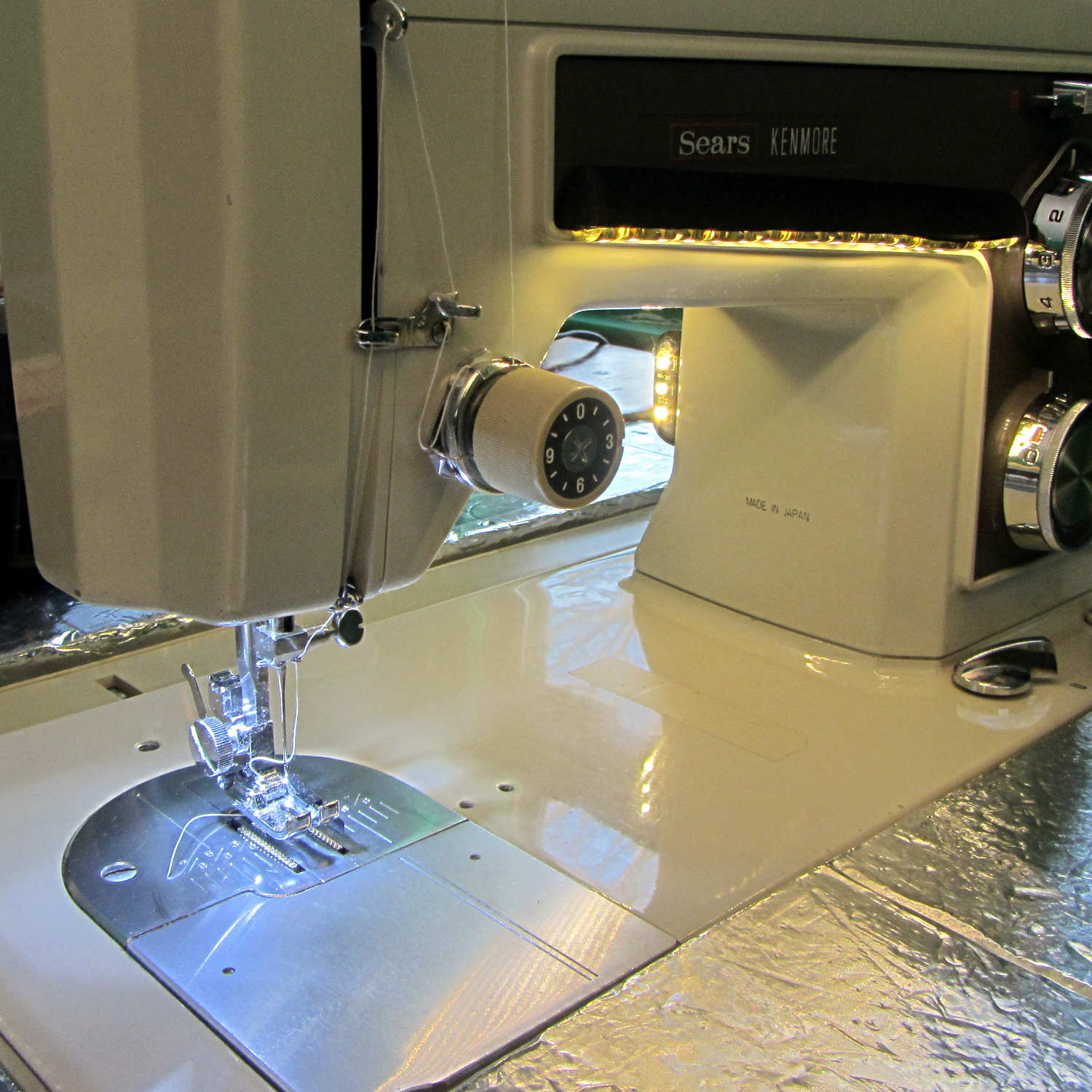
    Mary wants more light directly around the needle of her Kenmore Model 158 sewing machine, as the existing light (a 120 V 15 W incandescent bulb tucked inside the end housing) casts more of a diffuse glow than a directed beam:

    Kenmore Model 158 Sewing Machine - lamp
    Kenmore Model 158 Sewing Machine – lamp

    The end cap fits snugly around the bulb, but I thought a pair of 10 mm white LEDs, mounted side-by-side and aimed downward at the cover plate, would work. Of course, plugging a pair of white LEDs into a 120 VAC socket won’t work, but some judicious rewiring and a new 12 V DC wall wart will take care of that.

    The bulb has a dual-contact bayonet base, with both pins isolated from the shell and connected to the non-polarized (!) line cord through the power switch. I didn’t know it was called a BA15d base, but now I do.

    A 12 V automotive brake/taillight bulb (type 1157, I think) pulled from the Big Box o’ Bulbs has a slightly different pin arrangement that keys the filaments (which are not isolated from the shell) to the surrounding reflector:

    BA15d Bayonet Bulb Bases - 120V vs. 12V pins
    BA15d Bayonet Bulb Bases – 120V vs. 12V pins

    So I conjured a mockup to see if it would fit, using 2-56 screws to mimic whatever hardware might be practical:

    BA15d Bulb - LED Adapter
    BA15d Bulb – LED Adapter

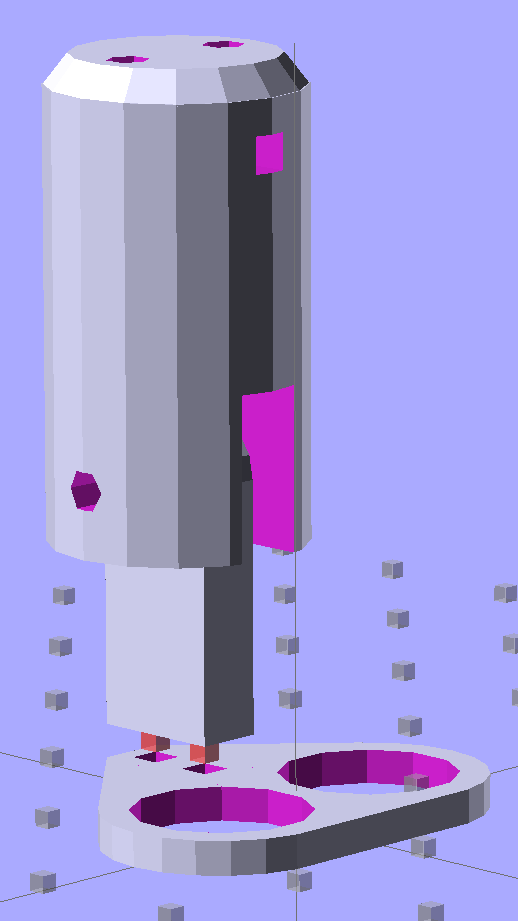
    The solid model shows how it all fits together:

    Sears Lamp LED Adapter - Show view
    Sears Lamp LED Adapter – Show view

    The two tiny ruby-red pins represent filament snippets in alignment holes, barely visible in real life:

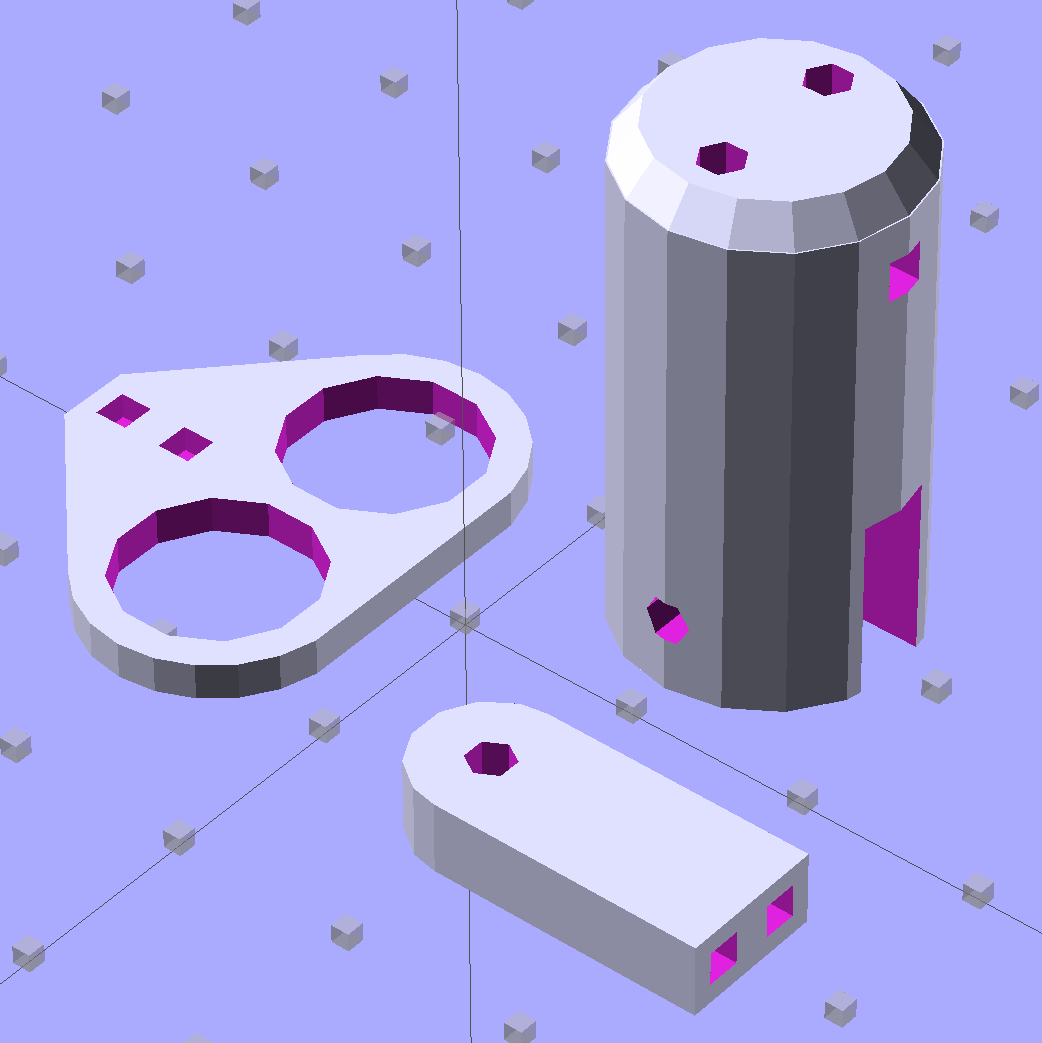
    LED holder parts
    LED holder parts

    I glued those pieces together, using a tiny machinist’s square as a jig to keep them perpendicular:

    LED holder clamping
    LED holder clamping

    Some random 10 mm LEDs served for testing:

    BA15d Bulb - 10 mm LEDs
    BA15d Bulb – 10 mm LEDs

    It actually fit pretty well, ignoring the fact that the LEDs point 90° from the intended direction (so I could see how the holes came out inside the pivot, honest), and lit up the area quite well, but it’s such a delicate affair that removing the entire socket and replacing it with a dedicated metal bracket / heatsink for two high-power SMD LEDs will be better.

    The OpenSCAD source code:

    // Adapter for LEDs in Sears sewing machine lamp socket
    // Ed Nisley - KE4ZNU - January 2014
    
    Layout = "Show";		// Build Show LEDTab LEDPlate ShellMount
    
    //- Extrusion parameters must match reality!
    //  Print with 2 shells and 3 solid layers
    
    ThreadThick = 0.20;
    ThreadWidth = 0.40;
    
    HoleWindage = 0.2;			// extra clearance
    
    Protrusion = 0.1;			// make holes end cleanly
    Gap = 2.0;					// spacing between Show parts
    
    AlignPinOD = 1.70;			// assembly alignment pins: filament dia
    
    inch = 25.4;
    
    //----------------------
    // Dimensions
    
    //-- LED mounting plate
    
    LEDDia = 10.0;				// LED case OD
    LEDFlangeOD = 10.7;
    
    LEDPlateThick = 2.0;		// mounting plate thickness
    LEDMargin = 2.0;
    
    LEDSpaceOC = LEDDia + LEDMargin;		// LED center-to-center distance (single margin between!)
    
    LEDTabLength = 15.0;		// base to screw hole center
    
    LEDTabThick = 4.0;			// tab with hole for mounting screw
    LEDTabScrewOD = 2.0;
    LEDTabWidth = (3.0*2) + LEDTabScrewOD;
    
    LEDMountHeight = 25.0;		// estimated mounting screw centerline to bottom of LEDs
    
    //-- Lamp base adapter
    //		hard inch dimensions!
    
    ShellOD = 0.600 * inch;				// dia of metallic shell
    ShellOAL = 0.66 * inch;				//  ... total length
    ShellInsert = 7/16 * inch;			//  ... length engaging socket
    
    ShellSides = 4*4;
    
    BulbOD = 0.75 * inch;				// glass bulb
    BulbLength = 1.14 * inch;
    
    InsulOD = 0.485 * inch;				// insulating stub around contact pins
    InsulThick = 0.070 * inch;			//  ... beyond end of shell
    
    ContactOD = 2.0;					// contact holes through base (not heads)
    ContactOC = 0.300 * inch;			//  ... center-to-center spacing
    
    BayonetOD = 0.080 * inch;			// bayonet pin diameter
    BayonetOffset = 0.125 * inch;		// from end of metal base
    
    LampOAL = InsulThick + ShellOAL + BulbLength;
    echo(str("Overall Length: ",LampOAL));
    
    //-- Miscellany
    
    //----------------------
    // Useful routines
    
    module PolyCyl(Dia,Height,ForceSides=0) {			// based on nophead's polyholes
    
      Sides = (ForceSides != 0) ? ForceSides : (ceil(Dia) + 2);
    
      FixDia = Dia / cos(180/Sides);
    
      cylinder(r=(FixDia + HoleWindage)/2,
               h=Height,
               $fn=Sides);
    }
    
    module ShowPegGrid(Space = 10.0,Size = 1.0) {
    
      Range = floor(50 / Space);
    
    	for (x=[-Range:Range])
    	  for (y=[-Range:Range])
    		translate([x*Space,y*Space,Size/2])
    		  %cube(Size,center=true);
    }
    
    //-- Tab for screw mounting LED holder
    //		AddLength remains below Z=0 for good union
    
    module LEDTab() {
    
    	difference() {
    		linear_extrude(height=LEDTabThick)
    			hull() {
    				circle(d=LEDTabWidth);
    				translate([LEDTabLength/2,0,0])
    					square([LEDTabLength,LEDTabWidth],center=true);
    			}
    		translate([0,0,-Protrusion])
    			rotate(180/6)
    				PolyCyl(LEDTabScrewOD,(LEDTabThick + 2*Protrusion),6);
    		for (i=[-1,1])
    			translate([LEDTabLength/2,i*LEDTabWidth/4,LEDTabThick/2])
    				rotate([0,90,0]) rotate(180/4)
    					PolyCyl(AlignPinOD,(LEDTabLength/2 + Protrusion),4);
    	}
    }
    
    //-- Plate holding LEDs
    
    module LEDPlate() {
    
    	difference() {
    		union() {
    			linear_extrude(height=LEDPlateThick)
    				hull() {
    					for (i=[-1,1])
    						translate([i*LEDSpaceOC/2,0,0])
    							circle(d=(LEDDia + 2*LEDMargin));
    					translate([0,(LEDFlangeOD/2 + LEDTabWidth/2),0])
    						square([LEDTabThick,LEDTabWidth],center=true);
    				}
    		}
    		for (i=[-1,1])
    			translate([i*LEDSpaceOC/2,0,-Protrusion])
    				rotate(180/12)
    					PolyCyl(LEDDia,(LEDPlateThick + 2*Protrusion),12);
    		for (i=[-1,1])
    			translate([0,(i*LEDTabWidth/4 + LEDFlangeOD/2 + LEDTabWidth/2),3*ThreadThick]) rotate(180/4)
    				PolyCyl(AlignPinOD,(LEDTabLength/2 + Protrusion),4);
    
    	}
    }
    
    //-- Bulb shell mounting adapter
    
    module ShellMount() {
    
    	difference() {
    		union() {
    			cylinder(r1=InsulOD/2,r2=ShellOD/2,h=(InsulThick + Protrusion),$fn=ShellSides);
    			translate([0,0,InsulThick])
    				cylinder(r=ShellOD/2,h=(LampOAL - LEDMountHeight + LEDTabWidth/2),$fn=ShellSides);
    		}
    
    		translate([0,ShellOD,(InsulThick + BayonetOffset)])		// bayonet pin hole
    			rotate([90,0,0]) rotate(180/4)
    				PolyCyl(BayonetOD,2*ShellOD,4);
    
    		translate([0,ShellOD,(InsulThick + LampOAL - LEDMountHeight)])		// LED mount screw hole
    			rotate([90,0,0])
    				PolyCyl(LEDTabScrewOD,2*BulbOD,6);
    
    		translate([0,0,(InsulThick + ShellOAL + LampOAL/2)])		// slot for LEDTab mount
    			cube([2*ShellOD,(LEDTabThick + 2*Protrusion),LampOAL],center=true);
    
    		for (i=[-1,1])											// contact pin holes
    			translate([i*ContactOC/2,0,-Protrusion])
    				rotate(180/6)
    					PolyCyl(ContactOD,2*LampOAL,6);
    	}
    
    }
    
    //- Build it
    
    ShowPegGrid();
    
    if (Layout == "LEDTab")
    	LEDTab();
    
    if (Layout == "LEDPlate")
    	LEDPlate();
    
    if (Layout == "ShellMount")
    	ShellMount();
    
    if (Layout == "Show") {
    	LEDPlate();
    	translate([-LEDTabThick/2,(LEDFlangeOD/2 + LEDTabWidth/2),(LEDTabLength + LEDPlateThick + Gap)])
    		rotate([0,90,0])
    			LEDTab();
    	for (i=[-1,1])
    #	translate([0,(i*LEDTabWidth/4 + LEDFlangeOD/2 + LEDTabWidth/2),(LEDPlateThick + Gap/4)])
    		rotate(180/4)
    		cylinder(r=AlignPinOD/2,h=Gap/1,$fn=4);		// fake the pins
    
    	translate([0,(LEDFlangeOD/2 + LEDTabWidth/2),(LampOAL - LEDTabWidth/2)])
    		rotate([0,180,0]) rotate(90)
    			ShellMount();
    }
    
    if (Layout == "Build") {
    	translate([0,LEDDia,0])
    		LEDPlate();
    
    	translate([-10,-(LEDMargin + LEDTabWidth),0])
    		rotate(-90)
    			LEDTab();
    
    	translate([10,-(LEDMargin + LEDTabWidth),0])
    		ShellMount();
    }
    

    The original doodles for the bulb dimensions and adapter layout:

    Bulb dimensions - adapter doodles
    Bulb dimensions – adapter doodles
  • Chocolate Molds: Software Stack

    This derives directly from the cookie cutter / press stack, so check that series for more background and explanation. Some height map thoughts and preliminary doodling led up to this.

    We start with a tiny grayscale image file that defines the height of each point in the mold:

    Tux
    Tux

    Feed that file into a Bash script:

    ./MakeMold.sh Tux.png

    And a corresponding STL file pops out:

    Tux positive mold - solid model - oblique
    Tux positive mold – solid model – oblique

    The MakeMold Bash script orchestrates the whole thing:

    #!/bin/bash
    DotsPerMM=3.0
    MapHeight=5
    ImageName="${1%%.*}"
    rm ${ImageName}_* ${ImageName}-positive.stl
    echo Normalize and prepare grayscale image...
    convert $1 -type Grayscale -depth 8 -trim +repage -flip +set comment ${ImageName}_prep.png
    echo Create PGM files...
    convert ${ImageName}_prep.png -compress none ${ImageName}_map.pgm
    convert ${ImageName}_prep.png -white-threshold 1 -compress none ${ImageName}_plate.pgm
    echo Create height map data files...
    ImageX=`identify -format '%[fx:w]' ${ImageName}_map.pgm`
    ImageY=`identify -format '%[fx:h]' ${ImageName}_map.pgm`
    echo Width: ${ImageX} x Height: ${ImageY}
    cat ${ImageName}_map.pgm   | tr -s ' \012' '\012' | tail -n +5 | column -x -c $((8*$ImageX)) > ${ImageName}_map.dat
    cat ${ImageName}_plate.pgm | tr -s ' \012' '\012' | tail -n +5 | column -x -c $((8*$ImageX)) > ${ImageName}_plate.dat
    echo Create mold positive...
    time openscad -D fnPlate=\"${ImageName}_plate.dat\" \
    -D fnMap=\"${ImageName}_map.dat\" -D Height=$MapHeight \
    -D ImageX=$ImageX -D ImageY=$ImageY -D DotsPerMM=$DotsPerMM \
    -o ${ImageName}-positive.stl MoldPositive.scad
    

    The first convert normalizes the grayscale file and produces a PNG file in a standard format.

    The next two convert operations translate that PNG file into uncompressed PGM files with the data as ASCII text required by OpenSCAD’s surface() function. It’s not in the proper format, however, so a few lines of Bash-fu rearrange the data into DAT files; the extension is arbitrary.

    Then OpenSCAD eats those files along with a bunch of configuration settings and spits out a solid model of the positive mold in STL format.

    The MakePositive.scad OpenSCAD source code:

    // Mold positive pattern from grayscale height map using Minkowski sum
    // Ed Nisley KE4ZNU - February 2014 - adapted from cookie press, added alignment pins
    
    //-----------------
    // Mold files
    
    fnMap = "SqWr_map.dat";					// override with -D 'fnMap="whatever.dat"'
    fnPlate = "SqWr_plate.dat";				// override with -D 'fnPlate="whatever.dat"'
    
    DotsPerMM = 3.0;						// overrride with -D DotsPerMM=number
    
    MapHeight = 5.0;						// overrride with -D MapHeight=number
    
    ImageX = 100;							// overrride with -D ImageX=whatever
    ImageY = 100;
    
    MapScaleXYZ = [1/DotsPerMM,1/DotsPerMM,MapHeight/255];
    PlateScaleXYZ = [1/DotsPerMM,1/DotsPerMM,1.0];
    
    echo("Press File: ",fnMap);
    echo("Plate File: ",fnPlate);
    
    echo(str("ImageX:",ImageX," ImageY: ", ImageY));
    echo(str("Map Height: ",MapHeight));
    echo(str("Dots/mm: ",DotsPerMM));
    echo(str("Scale Map: ",MapScaleXYZ,"  Plate: ",PlateScaleXYZ));
    
    //- Extrusion parameters - must match reality!
    
    ThreadThick = 0.25;
    ThreadWidth = 2.0 * ThreadThick;
    
    //- Buid parameters
    
    PlateThick = IntegerMultiple(1.0,ThreadThick);		// solid plate under press relief
    
    PinOD = 1.75;				// locating pin diameter
    PinDepth = PlateThick;		//  ... depth into bottom surface = total length/2
    PinOC = 20.0;				// spacing within mold item
    
    echo(str("Pin depth: ",PinDepth," spacing: ",PinOC));
    
    //- Useful info
    
    function IntegerMultiple(Size,Unit) = Unit * ceil(Size / Unit);
    
    HoleWindage = 0.2;
    
    Protrusion = 0.1;						// make holes & unions work correctly
    
    MaxConvexity = 5;						// used for F5 previews in OpenSCAD GUI
    
    ZFuzz = 0.2;							// numeric chaff just above height map Z=0 plane
    
    //-----------------
    // Import plate height map, slice off a slab to define outline
    
    module Slab(Thick=1.0) {
    	intersection() {
    		translate([0,0,Thick/2])
    			cube([2*ImageX,2*ImageY,Thick],center=true);
    		scale(PlateScaleXYZ)
    			difference() {
    				translate([0,0,-ZFuzz])
    					surface(fnPlate,center=true,convexity=MaxConvexity);
    				translate([0,0,-1])
    					cube([2*ImageX,2*ImageY,2],center=true);
    			}
    	}
    }
    
    //- Put peg grid on build surface
    
    module ShowPegGrid(Space = 10.0,Size = 1.0) {
    
    	Range = floor(50 / Space);
    
    	for (x=[-Range:Range])
    	  for (y=[-Range:Range])
    		translate([x*Space,y*Space,Size/2])
    			%cube(Size,center=true);
    }
    
    //-- convert cylinder to low-count polygon
    
    module PolyCyl(Dia,Height,ForceSides=0) {			// based on nophead's polyholes
    
      Sides = (ForceSides != 0) ? ForceSides : (ceil(Dia) + 2);
    
      FixDia = Dia / cos(180/Sides);
    
      cylinder(r=(FixDia + HoleWindage)/2,
               h=Height,
    	   $fn=Sides);
    }
    
    //-- Locating pin hole with glue recess
    //  Default length is two pin diameters on each side of the split
    
    module LocatingPin(Dia=PinOD,Len=0.0) {
    
    	PinLen = (Len != 0.0) ? Len : (4*Dia);
    
    	translate([0,0,-ThreadThick])
    		PolyCyl((Dia + 2*ThreadWidth),2*ThreadThick,4);
    
    	translate([0,0,-2*ThreadThick])
    		PolyCyl((Dia + 1*ThreadWidth),4*ThreadThick,4);
    
    	translate([0,0,-(Len/2 + ThreadThick)])
    		PolyCyl(Dia,(Len + 2*ThreadThick),4);
    
    }
    
    //- Build it
    
    //ShowPegGrid();
    
    echo("Building mold");
    union() {
    	difference() {
    		Slab(PlateThick + Protrusion);
    		for (i=[-1,1])
    			translate([0,i*PinOC/2,0])
    				rotate(180/4) LocatingPin(Len=2*PinDepth);
    	}
    	translate([0,0,PlateThick])							// cookie press height map
    		scale(MapScaleXYZ)
    		difference() {
    			translate([0,0,-ZFuzz])
    				surface(fnMap,center=true,convexity=MaxConvexity);
    			translate([0,0,-1])
    				cube([2*ImageX,2*ImageY,2],center=true);
    		}
    }


    The molds have alignment pin holes in the back:

    Tux positive mold - solid model - backside
    Tux positive mold – solid model – backside

    That match up with the holes in a baseplate:

    SqWr Positive Mold Framework - 2x3 pinsThe plate holds the molds in place, perhaps with tapeless sticky, while you’re slathering silicone goop to make the negative mold:

    Tux Positive Mold Framework - 2x3 array
    Tux Positive Mold Framework – 2×3 array

    As you might expect, the OpenSCAD file that generates the plate-with-holes can also embed the positive molds atop the plate, so you could get a solid (well, infilled at 20%) chunk of plastic without attaching the molds. I’d rather do the plate separately from the molds, so you can recycle the plate for many different molds. Your mileage may vary.

    The Positive Mold Framework.scad OpenSCAD source code:

    // Positive mold framework for chocolate slabs
    // Ed Nisley - KE4ZNU - January 2014
    
    Layout = "FramePins";		// FramePins FrameMolds Pin
    
    //- Extrusion parameters must match reality!
    //  Print with 2 shells and 3 solid layers
    
    ThreadThick = 0.20;
    ThreadWidth = 0.40;
    
    Protrusion = 0.1;			// make holes end cleanly
    
    HoleWindage = 0.2;
    
    //----------------------
    // Dimensions
    
    FileName = "Tux-positive.stl";	// overrride with -D
    
    Molds = [2,3];					// count of molds within framework
    
    MoldOC = [40.0,45.0];			// on-center spacing of molds
    MoldSlab = 1.0;					// thickness of slab under molds
    
    BaseThick = 5.0;
    
    BaseSize = [(Molds[0]*MoldOC[0] + 0),(Molds[1]*MoldOC[1] + 0),BaseThick];
    echo(str("Overall base: ",BaseSize));
    
    PinOD = 1.75;					// locating pin diameter
    PinLength = 2.0;				//  ... total length
    PinOC = 20.0;				// spacing within mold item
    
    //----------------------
    // Useful routines
    
    //- Put peg grid on build surface
    
    module ShowPegGrid(Space = 10.0,Size = 1.0) {
    
    	RangeX = floor(100 / Space);
    	RangeY = floor(125 / Space);
    
    	for (x=[-RangeX:RangeX])
    		for (y=[-RangeY:RangeY])
    			translate([x*Space,y*Space,Size/2])
    			%cube(Size,center=true);
    
    }
    
    module PolyCyl(Dia,Height,ForceSides=0) {			// based on nophead's polyholes
    
      Sides = (ForceSides != 0) ? ForceSides : (ceil(Dia) + 2);
    
      FixDia = Dia / cos(180/Sides);
    
      cylinder(r=(FixDia + HoleWindage)/2,
               h=Height,
    	   $fn=Sides);
    }
    
    // Locating pin hole with glue recess
    //  Default length is two pin diameters on each side of the split
    
    module LocatingPin(Dia=PinOD,Len=0.0) {
    
    	PinLen = (Len != 0.0) ? Len : (4*Dia);
    
    	translate([0,0,-ThreadThick])
    		PolyCyl((Dia + 2*ThreadWidth),2*ThreadThick,4);
    
    	translate([0,0,-2*ThreadThick])
    		PolyCyl((Dia + 1*ThreadWidth),4*ThreadThick,4);
    
    	translate([0,0,-(Len/2 + ThreadThick)])
    		PolyCyl(Dia,(Len + 2*ThreadThick),4);
    
    }
    
    module LocatingPins(Length) {
    	for (i=[-1,1])
    	translate([0,i*PinOC/2,0])
    		rotate(180/4)
    		LocatingPin(Len=Length);
    }
    
    //-- import a single mold item
    
    module MoldItem() {
    	import(FileName,convexity=10);
    }
    
    //-- Overall frame shape
    
    module Frame() {
    
    //	translate([0,0,BaseSize[2]/2])		// platform under molds
    //		cube(BaseSize,center=true);
    
    	difference() {
    		hull()
    			for (i=[-1,1], j=[-1,1])
    				translate([i*BaseSize[0]/2,j*BaseSize[1]/2,0])
    					sphere(r=BaseThick);
    		translate([0,0,-BaseThick])
    			cube(2*BaseSize,center=true);
    	}
    
    }
    
    //- Build it
    
    ShowPegGrid();
    
    if (Layout == "Pin")
    	LocatingPin(Len=PinLength);
    
    if (Layout == "Frame")
    	Frame();
    
    if (Layout == "FramePins")
    	difference() {
    		Frame();
    
    		translate([-MoldOC[0]*(Molds[0] - 1)/2,-MoldOC[1]*(Molds[1] - 1)/2,0])
    			for (i=[0:Molds[0]-1],j=[0:Molds[1]-1])
    				translate([i*MoldOC[0],j*MoldOC[1],BaseSize[2]])
    					LocatingPins(BaseThick);
    	}
    
    if (Layout == "FrameMolds") {
    	Frame();
    	translate([-MoldOC[0]*(Molds[0] - 1)/2,-MoldOC[1]*(Molds[1] - 1)/2,0])
    		for (i=[0:Molds[0]-1],j=[0:Molds[1]-1])
    			translate([i*MoldOC[0],j*MoldOC[1],BaseThick - MoldSlab + Protrusion])
    			MoldItem();
    }
    

    And then it’s time to pour some chocolate… which someone else knows how to do much better than I!

  • Chocolate Mold: Image Preparation Checklist

    Start with a monochrome image:

    Tux-Shirt
    Tux-Shirt

    A bit of tinkering produce a height map image:

    Tux Mold - Height Map - large
    Tux Mold – Height Map – large

    I picked a 3.0 pixel/mm scale factor, so a 33 mm mold covers only 100 pixels. That image is 1100 mm tall and will be reduced by a factor of 10 to the final image size: this is not the place for fine detail and fancy lettering!

    The conversion process assumes you’ll handle the Z axis scaling yourself, so the script no longer normalizes the gray levels. If you select gray levels using HSV, the V slider gives you a direct reading in percent-of-maximum thickness; Tux varies from V = 80 to 100, so he’s pretty much bas relief.

    The border around the image must be 0 = black and will be stripped from the final mold. That’s why Tux doesn’t turn into a bird served on a rectangular platter.

    Because this is a mold, its edges must have some draft, which means the outline must shade from black to whatever gray represents the interior of the mold. Do this:

    • Trace the outline using the Scissors Select tool = snap to high-contrast outer edge
    • Create / go to a new layer filled with whatever gray you want for the interior (V = 80 here)
    • Select → Grow the selection by 60 pixels (on a 1000×1100 image)
    • Select → Invert to select the exterior of the outline
    • Bucket fill the exterior with 0 = black
    • Select  → Invert to select the interior of the outline again
    • Select → Border: Add a 30 pixel border to the selection with the “Feather border” option
    • Bucket fill the border with 0 = black
    • Unselect and you have a layer with a nice graduation around the mold

    Which looks like this with V=80 gray inside:

    Tux Mold - Height Map - outline gradient
    Tux Mold – Height Map – outline gradient

    The 30 pixel feathered border, scaled by the 10× reduction, means the edge of the mold goes from 0 = black to the interior in about 3 pixel / (3 pixel/mm) = 1 mm. If the interior is 255 = white at 7 mm, the draft angle is arctan 1/7 = 8°, which is probably about right for the deepest part of the mold. The edge of the Tux mold is V = 80 (or about 200 gray), so it’s at 0.8 × 7 mm = 5.6 mm and the draft angle is arctan 1/5.6 = 10°.

    Inside the mold, anything goes, but you should avoid 0 = black levels so that the alignment pins don’t poke through the mold. Any 255 = 100 V = white levels will be the maximum mold thickness, which is 7 mm for the molds you see here and that may be somewhat too thick for a chocolate treat. It is really hard to maintain draft on small features, but I think if you don’t get carried away it’ll be all good.

    There’s also a 1 mm backing plate below the mold that ensures the deepest mold parts have some substance behind them and the alignment pin sockets have enough depth to be useful.

    Scaling the image down by 10× to about 110 pixels tall (including the black border) will make the final Tux mold about 37 mm tall:

    Tux
    Tux

    This image enlarges it by 10× with no smoothing to show the gritty nature of the image. This is why you can’t have delicate detail or fine lettering:

    Tux - enlarged to show texture
    Tux – enlarged to show texture

    Notice the nearly complete lack of draft on the interior features. Each level differs by about V = 5 over the range V = 80(the border) to V = 100 (beak and flipper), so they amount to only 0.05 × 7 mm =  0.35 mm = one or two thread layers at 0.20 mm/layer. I think if you were doing this right, you’d pick an overall thickness so that V = 5 increments corresponded to one layer or use whatever V increments corresponded to a single layer.

    Running that image through the Bash script & OpenSCAD programs (more on those later) produces a reasonable result:

    Tux positive mold - solid model - oblique
    Tux positive mold – solid model – oblique

    When it’s converted into plastic, you can count the layers in each V = 5 level (clicky for more dots):

    Tux positive mold - plastic - oblique
    Tux positive mold – plastic – oblique

    It may be a bit less rounded in the tummy than the real Tux, but seems good enough for the purpose.

  • Chocolate Mold Array: Solid Model Doodling

    Given an STL file generated from a height map image, import it into OpenSCAD:

    SqWr solid model - OpenSCAD - oblique view
    SqWr solid model – OpenSCAD – oblique view

    Then slide a plate under six copies to produce a positive model for a casting mold:

    SqWr Positive Mold Framework - 2x3
    SqWr Positive Mold Framework – 2×3

    This is one of the few cases where the compiled-and-rendered version looks better, as though you’d shrink-wrapped it in gold foil:

    SqWr Positive Mold Framework - 2x3 - gold
    SqWr Positive Mold Framework – 2×3 – gold

    The height map STLs each have  a bazillion tiny facets that take forever-and-a-day (well, the better part of half an hour for this set) to render, not to mention that the whole array would take two hours to print… and then be used once or twice to produce the flexy silicone negative mold.

    So it’s better to have a generic frame with alignment pin holes that you print once:

    SqWr Positive Mold Framework - 2x3 pins
    SqWr Positive Mold Framework – 2×3 pins

    Better yet, just CNC-drill those holes in a nice, flat acrylic / polycarbonate slab.

    Insert and glue filament snippets as alignment pins, trim about 1 mm over the surface to fit the small molds.

    The OpenSCAD program can punch matching holes in the back of the small mold:

    SqWr solid model - OpenSCAD - oblique bottom
    SqWr solid model – OpenSCAD – oblique bottom

    Or you could print out an array of the things with holes:

    SqWr solid model - 2x3 array - bottom
    SqWr solid model – 2×3 array – bottom

    It’s not clear having OpenSCAD labor for half an hour to generate and emit a single STL file spanning all six molds is a win. Given that you don’t care about the mold-to-mold spacing, having Slic3r duplicate the same small STL file half a dozen (or more!) times would probably be a net win.

    There’s no reason the OpenSCAD program that creates the original STL from the height map image can’t punch alignment pin holes, too, which would avoid this import-and-recompile step. If you’re going with a CNC-drilled plate, then it would make even more sense to not have a pair of OpenSCAD programs.

    Anyhow.

    Apply a handful of small molds to the backing plate with tapeless sticky, butter it up with mold release agent, slather on silicone putty, flip it over to produce a smooth surface “under” the small molds (so you can rest it flat on a table when pouring molten chocolate into the cavities), cure, peel, and you’d get a pretty good negative mold.

    This may not make any practical sense, but it was easy & fun to see what’s possible…

    The OpenSCAD source code:

    // Positive mold framework for chocolate slabs
    // Ed Nisley - KE4ZNU - January 2014
    
    Layout = "FramePins";		// Molds FramePins FrameMolds Frame Single Pin
    
    //- Extrusion parameters must match reality!
    //  Print with 2 shells and 3 solid layers
    
    ThreadThick = 0.20;
    ThreadWidth = 0.40;
    
    Protrusion = 0.1;			// make holes end cleanly
    
    HoleWindage = 0.2;
    
    //----------------------
    // Dimensions
    
    FileName = "SqWr-press.stl";	// overrride with -D
    
    Molds = [2,3];					// count of molds within framework
    
    MoldOC = [40.0,40.0];			// on-center spacing of molds
    MoldSlab = 1.0;					// thickness of slab under molds
    
    BaseThick = 5.0;
    
    BaseSize = [(Molds[0]*MoldOC[0] + 0),(Molds[1]*MoldOC[1] + 0),BaseThick];
    echo(str("Overall base: ",BaseSize));
    
    PinOD = 1.75;					// locating pin diameter
    PinLength = 2.0;				//  ... total length
    PinSpace = 15.0;				// spacing within mold item
    
    //----------------------
    // Useful routines
    
    //- Put peg grid on build surface
    
    module ShowPegGrid(Space = 10.0,Size = 1.0) {
    
    	RangeX = floor(100 / Space);
    	RangeY = floor(125 / Space);
    
    	for (x=[-RangeX:RangeX])
    		for (y=[-RangeY:RangeY])
    			translate([x*Space,y*Space,Size/2])
    			%cube(Size,center=true);
    
    }
    
    module PolyCyl(Dia,Height,ForceSides=0) {			// based on nophead's polyholes
    
      Sides = (ForceSides != 0) ? ForceSides : (ceil(Dia) + 2);
    
      FixDia = Dia / cos(180/Sides);
    
      cylinder(r=(FixDia + HoleWindage)/2,
               h=Height,
    	   $fn=Sides);
    }
    
    // Locating pin hole with glue recess
    //  Default length is two pin diameters on each side of the split
    
    module LocatingPin(Dia=PinOD,Len=0.0) {
    
    	PinLen = (Len != 0.0) ? Len : (4*Dia);
    
    	translate([0,0,-ThreadThick])
    		PolyCyl((Dia + 2*ThreadWidth),2*ThreadThick,4);
    
    	translate([0,0,-2*ThreadThick])
    		PolyCyl((Dia + 1*ThreadWidth),4*ThreadThick,4);
    
    	translate([0,0,-(Len/2 + ThreadThick)])
    		PolyCyl(Dia,(Len + 2*ThreadThick),4);
    
    }
    
    module LocatingPins(Length) {
    	for (i=[-1,1])
    	translate([i*PinSpace/2,0,0])
    		LocatingPin(Len=Length);
    }
    
    //-- import a single mold item
    
    module MoldItem() {
    	import(FileName,convexity=10);
    }
    
    //-- Overall frame shape
    
    module Frame() {
    
    	translate([0,0,BaseSize[2]/2])		// platform under molds
    		cube(BaseSize,center=true);
    
    }
    
    //- Build it
    
    ShowPegGrid();
    
    if (Layout == "Pin")
    	LocatingPin(Len=PinLength);
    
    if (Layout == "Single")
    	difference() {
    		MoldItem();
    		LocatingPins(PinLength);
    	}
    
    if (Layout == "Frame")
    	Frame();
    
    if (Layout == "Molds") {
    	translate([-MoldOC[0]*(Molds[0] - 1)/2,-MoldOC[1]*(Molds[1] - 1)/2,0])
    	for (i=[0:Molds[0]-1],j=[0:Molds[1]-1])
    		translate([i*MoldOC[0],j*MoldOC[1],0])
    			difference() {
    				MoldItem();
    				LocatingPins(PinLength);
    			}
    }
    
    if (Layout == "FramePins")
    	difference() {
    		Frame();
    
    		translate([-MoldOC[0]*(Molds[0] - 1)/2,-MoldOC[1]*(Molds[1] - 1)/2,0])
    			for (i=[0:Molds[0]-1],j=[0:Molds[1]-1])
    				translate([i*MoldOC[0],j*MoldOC[1],BaseSize[2]])
    					LocatingPins(BaseThick);
    	}
    
    if (Layout == "FrameMolds") {
    	Frame();
    	translate([-MoldOC[0]*(Molds[0] - 1)/2,-MoldOC[1]*(Molds[1] - 1)/2,0])
    		for (i=[0:Molds[0]-1],j=[0:Molds[1]-1])
    			translate([i*MoldOC[0],j*MoldOC[1],BaseThick - MoldSlab + Protrusion])
    			MoldItem();
    }
    
  • Chocolate Mold Height Map

    Given that you really don’t care about the absolute dimensions, you can generate a positive mold from a height map image and avoid the entire solid modeling process. Having already solved the cookie press problem, this was a quick-and-easy feasibility study…

    Start by selecting the logo, growing the selection by a few pixels, and feathering the edges to produce the mold draft. Then apply a square gradient behind the Squidwrench logo to produce the height map for the edge of the mold. This one is scaled at 3.0 pixel/mm and is 100×100 pixel, thus producing a 33 mm square mold:

    Squidwrench Mold Pocket

    One could, of course, produce a non-square mold with a different gradient outline shape.

    Hand the image to a slightly modified version of the cookie press script (see below) to get an STL file of the mold:

    SqWr solid model - oblique view
    SqWr solid model – oblique view

    Feed the STL into Slic3r, hand the G-Code to Pronterface, fire the M2!, and you get a positive mold that looks enough like black chocolate to seem ready-to-eat:

    SqWr - mold positive
    SqWr – mold positive

    I have no idea whether that will work as a mold, but I suspect flexy silicone putty won’t reproduce much of the fine plastic filament detail, so the negative mold won’t grab the chocolate. The logo is six threads deep with a little bit of draft, if that makes any difference.

    The backing plate is 1 mm thick and the height map is 5 mm stacked atop that. A few iterations suggested using about 0.75 gray for the logo; working backwards says 5 mm = 25 layers @ 0.20 mm/layer, so a depth of 0.25 * 25 is about six threads.

    For production use, I’d be tempted to import maybe a dozen copies of the STL into OpenSCAD, mount them on a platform with a gutter and a lip on the outside, and then print the whole positive multi-cavity mold in one shot.

    The Bash script that produces the mold strongly resembles my cookie cutter script and contains about as much cruft as you’d expect. Because we need a positive mold, not a negative press, the script doesn’t invert the colors or flop the image left-to-right, nor does it generate the cookie cutter STL around the outside of the press:

    #!/bin/bash
    DotsPerMM=3.0
    MapHeight=7
    ImageName="${1%%.*}"
    rm ${ImageName}_* ${ImageName}-press.stl ${ImageName}-cutter.stl
    echo Normalize and prepare grayscale image...
    convert $1 -type Grayscale -depth 8 -auto-level -trim +repage -flip +set comment ${ImageName}_prep.png
    echo Create PGM files...
    convert ${ImageName}_prep.png -compress none ${ImageName}_map.pgm
    convert ${ImageName}_prep.png -white-threshold 1 -compress none ${ImageName}_plate.pgm
    echo Create height map data files...
    ImageX=`identify -format '%[fx:w]' ${ImageName}_map.pgm`
    ImageY=`identify -format '%[fx:h]' ${ImageName}_map.pgm`
    echo Width: ${ImageX} x Height: ${ImageY}
    cat ${ImageName}_map.pgm   | tr -s ' \012' '\012' | tail -n +5 | column -x -c $((8*$ImageX)) > ${ImageName}_map.dat
    cat ${ImageName}_plate.pgm | tr -s ' \012' '\012' | tail -n +5 | column -x -c $((8*$ImageX)) > ${ImageName}_plate.dat
    echo Create cookie press...
    time openscad -D BuildPress=true \
    -D fnPlate=\"${ImageName}_plate.dat\" \
    -D fnMap=\"${ImageName}_map.dat\" -D Height=$MapHeight \
    -D ImageX=$ImageX -D ImageY=$ImageY -D DotsPerMM=$DotsPerMM \
    -o ${ImageName}-press.stl Cookie\ Cutter.scad
    

    The OpenSCAD program are unchanged from the cookie cutter process.