The Smell of Molten Projects in the Morning

Ed Nisley's Blog: Shop notes, electronics, firmware, machinery, 3D printing, laser cuttery, and curiosities. Contents: 100% human thinking, 0% AI slop.

Category: Machine Shop

Mechanical widgetry

  • Straightening Armature Wire

    Straightening Armature Wire

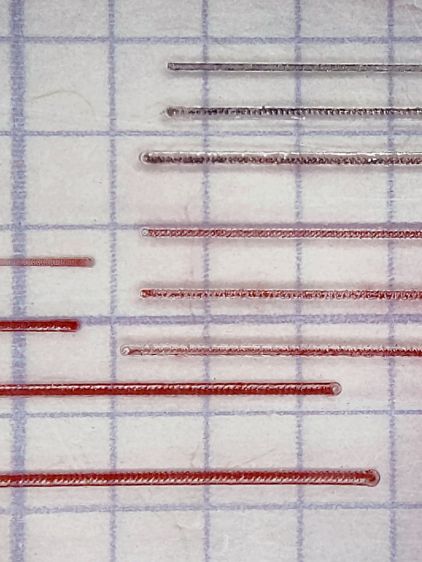
    Although I was blithely unaware when I bought some useful-looking surplus, it turns out 1/16 inch armature wire works really well to seal our homebrew masks around our noses. Mary added a narrow passage along the top edge of her slightly reshaped Fu Mask pattern to retain the wire and I provided 4.5 inch lengths of straightened wire:

    Armature wire - stock vs. straightened
    Armature wire – stock vs. straightened

    The wire comes off the roll in dead-soft condition, so I can straighten (and slightly harden) it by simply rolling each wire with eight fingertips across the battered cutting board. The slightly wavy wire shows its as-cut condition and the three straight ones are ready for their masks.

    Although nearly pure aluminum wire doesn’t work-harden quickly, half a year of mask duty definitely takes its toll. This sample came from my biking mask after the edges wore out:

    Armature wire - work-hardened
    Armature wire – work-hardened

    We initially thought using two wires would provide a better fit, but more metal just made adjusting the nose seal more difficult after each washing. The wire has work-hardened enough to make the sharper bends pretty much permanent; they can be further bent, but no longer roll out under finger pressure.

    Although we’re not yet at the point where we must reuse wires, I took this as an opportunity to improve my annealing hand: heat the wire almost to its melting point, hold it there for a few seconds, then let it cool slowly. The usual technique involves covering the aluminum with something like hand soap or permanent marker ink, heat until the soap / marker burns away, then let it air-cool. Unlike steel, there’s no need for quenching or tempering.

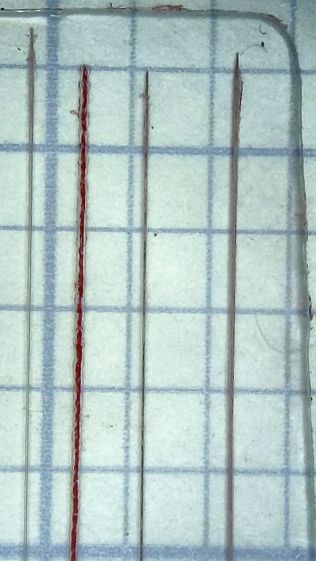
    Blue Sharpie worked surprisingly well with a propane torch:

    Armature wire - annealed straightened
    Armature wire – annealed straightened

    As far as I can tell after a few attempts, the pigment vanishes just below the annealing temperature and requires another pass to reach the right temperature. Sweep the flame steadily, don’t pause, and don’t hold the wire over anything melt-able.

    Those wires (I cut the doubled wire apart) aren’t quite as soft as the original stock, but they rolled straight and are certainly good enough for our simple needs; they’re back in the Basement Laboratory Warehouse for future (re)use.

  • MTD Snowthrower: Friction Wheel Tire Replacement

    MTD Snowthrower: Friction Wheel Tire Replacement

    Late in last winter’s snowfall, our MTD snowthrower / snowblower ran low on get-up-and-go mobility, so I resolved to check inside before the next snowfall. What with one thing and another, time passed until, a few days before the first major snowfall of this winter season, I opened the bottom cover and found this mess:

    Snowthrower friction wheel - worn in place
    Snowthrower friction wheel – worn in place

    Oops.

    A diagram from the manual identifies the components:

    MTD Snowblower - drive train - Fig 23
    MTD Snowblower – drive train – Fig 23

    The 8 HP gas engine spins the drive plate, which transfers some of those horses through the rubber tire on the friction wheel to the gear shaft, which turns the axle attached to the wheels. The shift lever (not shown) moves the friction wheel along the shaft to change the “gear ratio” setting the ground speed, with five positions to the right of the plate center going forward and two on the left going in reverse.

    It’s a modern implementation of the classic Lambert friction drive transmission from a century ago. Cheap, effective, nothing wrong with it other than requiring regular inspection and preventive maintenance.

    Unfortunately, the rubber tire seems undersized for the task and had completely worn away, leaving its steel rim to chew on the drive plate:

    Snowthrower friction wheel - scarred drive plate
    Snowthrower friction wheel – scarred drive plate

    Of course, you’re supposed to inspect the situation more regularly than I (and, most likely, anyone) ever have. I vaguely recall replacing the tire once before and, being that type of guy, ordered two to have a spare on the shelf. Anyhow, it was in fine shape the last time I checked to see what shape it was in.

    The manual recommends loosening (but not removing) the hex nut on the left side of the gear shaft:

    Snowthrower drive gear shaft bearing
    Snowthrower drive gear shaft bearing

    Then “lightly tap the hex nut to dislodge the ball bearing”. Well, it’s a nylon lock nut, not a plain hex nut, which means pounding the crimp holding the nylon ring on the nut will destroy it. I whacked the end of the shaft with a plastic hammer to no avail, removed the nut & washer, and gave it a few careful shots with a 2 lb ball peen hammer, also to no avail.

    The basic problem comes down to having the bearing mounted in what’s basically a sheet metal wall of no particular substance: banging on the shaft deflects the wall and moves the bearing along with the shaft. As far as I could tell, the shaft was stuck inside the bearing race, so I soaked it in pentrating oil while pondering the next step overnight.

    A few more shots with the hammer convinced me that wasn’t going to work and would likely damage the threads, so I made a pair of Special Service Tools:

    Snowthrower friction wheel - homebrew removal tools
    Snowthrower friction wheel – homebrew removal tools

    The smaller one fits around the threaded end of the shaft and inside the inner race to apply the impact directly to the shaft instead of the threads. The larger one fits on the inner race itself, in the expectation I would need to persuade it, but it wasn’t necessary. They both started life as iron pipe, covered in what looks like aluminumized paint for no reason we’ll ever know, and faced in the lathe.

    The combination of penetrating oil, a proper SST, and some diligent whacking popped the shaft out of the bearing without damage. The friction wheel assembly then slid off the shaft with no resistance and the shaft and right-side bearing slid easily out of the frame. Once in the shop, gentle filing knocked the rust & burrs off the shaft and let it slide freely into the bearing.

    The friction wheel clamps the tire with six bolts, three from each side so MTD can use a single part number for the halves:

    Snowthrower friction wheel - screw pattern
    Snowthrower friction wheel – screw pattern

    It came apart easily, the new tire went on easily, the drive assembly went back together easily, and the blower cleared more than a foot of snow from the driveway:

    Mary running snowthrower - 2020-12-17
    Mary running snowthrower – 2020-12-17

    Nothing can make maneuvering a snowblower easy, alas.

    I briefly thought of refacing the drive plate, but I’m pretty sure it comes heartbreakingly close to Tiny Lathe’s limited swing. With two spare tires on the shelf, should the scarred plate chew up the new tire in one season, I’ll make better measurements.

  • MTD Snowthrower: Replacement Throttle Knob

    MTD Snowthrower: Replacement Throttle Knob

    The throttle knob on our MTD snowthrower (a.k.a. snowblower) cracked apart around its metal shaft when I pulled it upward. A temporary fix involving duct tape and cable ties sufficed to start the engine, although the usual intense vibration shook the knob loose somewhere along the driveway during the next hour.

    Update: Found it!

    Although I have no photographic evidence, I did make a few quick measurements:

    Throttle Knob Dimension Doodles
    Throttle Knob Dimension Doodles

    It fits an MTD model E6A4E, but I suspect nearly all their engines have identical throttle shafts:

    Snowthrower Throttle Knob - stem end - solid model
    Snowthrower Throttle Knob – stem end – solid model

    The only practical way to build the thing has it standing on the shaft end, surrounded by a brim to improve adhesion, so I added (actually, subtracted) a pair of holes for music-wire reinforcements:

    Snowthrower throttle knob - reinforcing wires
    Snowthrower throttle knob – reinforcing wires

    It definitely has a stylin’ look, next to the original choke control knob:

    Snowthrower throttle knob - installed
    Snowthrower throttle knob – installed

    I omitted the finger grip grooves for obvious reasons.

    The slot-and-hole came out slightly smaller than the metal shaft and, rather than wait for epoxy to cure, I deployed a 230 W soldering gun (not a piddly temperature-controlled iron suitable for electronics) on the shaft and melted it into the knob.

    More snow may arrive this week and I printed another knob just in case …

    The OpenSCAD source code as a GitHub Gist:

    // MTD Snowthrower Throttle Knob
    // Ed Nisley KE4ZNU 2020-12-18
    /* [Options] */
    Layout = "Show"; // [Build, Show]
    // Extrusion parameters
    /* [Hidden] */
    ThreadThick = 0.25;
    ThreadWidth = 0.40;
    HoleWindage = 0.2;
    Protrusion = 0.1; // make holes end cleanly
    inch = 25.4;
    function IntegerMultiple(Size,Unit) = Unit * ceil(Size / Unit);
    //———————-
    // Dimensions
    Throttle = [17.0,1.85,6.5]; // blade insertion, thickness, width
    PaddleSize = [25,30,9];
    PaddleRound = 4.0;
    PaddleThick = 8.5;
    StemDia = 13.0;
    StemLength = 20.0;
    PinDia = 1.6;
    PinLength = PaddleSize.x + StemLength/2;
    echo(str("Pin: ",PinLength," x ",PinDia," mm"));
    //———————-
    // Useful routines
    module PolyCyl(Dia,Height,ForceSides=0) { // based on nophead's polyholes
    Sides = (ForceSides != 0) ? ForceSides : (ceil(Dia) + 2);
    FixDia = Dia / cos(180/Sides);
    cylinder(r=(FixDia + HoleWindage)/2,
    h=Height,
    $fn=Sides);
    }
    //———————-
    // Pieces
    module Paddle() {
    difference() {
    hull() {
    translate([PaddleSize.x/2,0,0]) {
    for (i=[-1,1], j=[-1,1])
    translate([i*(PaddleSize.x – PaddleRound)/2,j*(PaddleSize.y – PaddleRound)/2,0])
    sphere(d=PaddleRound,$fn=12);
    rotate([0,90,0]) rotate(180/12)
    cylinder(d=PaddleThick,h=PaddleSize.x,,center=true,$fn=12);
    }
    translate([-StemLength,0,0])
    rotate([0,90,0]) rotate(180/12)
    cylinder(d=StemDia,h=Throttle.x,center=false,$fn=12);
    }
    translate([-StemLength,0,0])
    cube([2*Throttle.x,Throttle.y,Throttle.z],center=true);
    translate([-(StemLength + Protrusion),0,0])
    rotate([0,90,0]) rotate(0*180/6)
    PolyCyl(2*Throttle.y,Throttle.x,6);
    for (j=[-1,1])
    translate([-StemLength/2,j*PaddleSize.y/6,0])
    rotate([0,90,0]) rotate(180/4)
    PolyCyl(PinDia,PinLength,4);
    }
    }
    //———————-
    // Build it
    if (Layout == "Show")
    Paddle();
    if (Layout == "Build") {
    translate([0,0,StemLength])
    rotate([0,-90,0])
    Paddle();
    }

  • Makergear M2: Platform Z=0 and Alignment Check

    Makergear M2: Platform Z=0 and Alignment Check

    After replacing the nozzle and filament drive on the M2, it’s definitely time to verify that the Z=0 point remains at the platform surface and the whole affair is properly aligned.

    Distribute five thinwall open squares across the platform:

    Calibration Boxes - platform alignment - 2020-12-11
    Calibration Boxes – platform alignment – 2020-12-11

    Because they’re well separated and only 3 mm tall, I set Slic3r to print them sequentially to eliminate a whole bunch of back-and-forth travel for each layer.

    Print and measure the results:

    Calibration Boxes - initial M206 Z-2.50 - 2020-12-11
    Calibration Boxes – initial M206 Z-2.50 – 2020-12-11

    The outer numbers come from the skirt around the whole platform in units of 0.01 mm: 22 → 0.22 mm. The five inner numbers are the eyeballometric average of four measurements across each square.

    They came short enough that adding 0.25 mm to their height would improve the outcome. The scribbles in the upper right corner show the initial Z offset was -2.50 mm, which means -2.75 mm should do the trick; remember to save the new value in EEPROM with M500.

    Print the same G-Code file with the new offset and measure:

    Calibration Boxes - M206 Z-2.75 - 2020-12-11
    Calibration Boxes – M206 Z-2.75 – 2020-12-11

    Can’t get much closer than that!

    The skirt gains only 0.1 mm for reasons unknown to me. It’s a good diagnostic tool for keeping an eye on the overall alignment without having to run more calibration squares, though.

    Comparing the center squares (bottom layers facing each other in the middle) from the two sets shows the difference:

    Test Squares 2.73 3.01 mm - 2020-12-11
    Test Squares 2.73 3.01 mm – 2020-12-11

    The bottom three layers got pretty well squashed with the previous offset. It’s missing about a full layer, although the nozzle wasn’t mashed flat / blocked against the platform. All the layers in the post-adjustment square look identical, as they should.

    The wall thickness on the latter squares runs from 0.40 to 0.44 mm, with an eyeballometric average around 0.43, so tweaking the Extrusion Multiplier down by maybe 5% would be in order if I were being fussy.

    Overall, not bad for a new setup!

  • Turkey Baster FAIL

    Turkey Baster FAIL

    We bought a generic Walmart-grade baster perhaps two years ago to replace a much older one with a failed rubber bulb. We use it intermittently throughout the year and had a turkey in the oven when we discovered this:

    Cracked Baster - overview
    Cracked Baster – overview

    A closer look at the business end:

    Cracked Baster - tip detail
    Cracked Baster – tip detail

    Yes, those cracks go all the way through, there’s a loose spear running the length of the thing, and it definitely doesn’t work as a baster.

    Contrary to what you might think from the general fogging and stress cracking, I haven’t used it for gasoline or brake fluid, nor do we put it away without washing it.

    The rubber bulb still works fine, though, so there’s that.

    We’ll up our spend for an OXO baster and see what happens.

  • Makergear M2: New Filament Drive and Guide Tube Adapter

    Makergear M2: New Filament Drive and Guide Tube Adapter

    After replacing the M2’s nozzle, I also installed a spare filament drive:

    Makergear M2 filament drive R3 - installed
    Makergear M2 filament drive R3 – installed

    That’s the V4 R3 version, although I bought it from Makergear rather than fight with all the support required to get a proper bearing opening.

    The long M4 screw and spring apply a constant force to the filament against the drive gear, rather than the constant position from the default (and much shorter) stock screw. The lever arm does have some springiness, but not much travel, so IMO the spring works better with the fine teeth in the drive gear.

    This drive has a 5 mm hole at the top for the stock PTFE guide tube, which I long ago replaced with ¼ inch OD HDPE tubing to reduce the friction required to get the filament off the spool and into the hot end. The rather hideous hot-melt glue blob holding a ¼ inch ID tube onto the previous drive never failed enough to bother me, but a little lathe action produced a much better adapter:

    Makergear M2 filament drive R3 - guide adapter
    Makergear M2 filament drive R3 – guide adapter

    It’s a chunk of ⅜ inch = 9.5 mm Delrin rod with a 2.4 mm hole through that 5 mm spigot for easy extraction of a gear-mashed 1.75 mm filament. The other end has a 6.5 mm hole drilled 20 mm deep to hold the guide tube.

    Looks downright dressy, it does!

  • Makergear M2: New Nozzle

    Makergear M2: New Nozzle

    A second clog in the M2’s hot end prompted me to dismantle the hot end:

    Makergear M2 V4 hot end - eroded silicone coat
    Makergear M2 V4 hot end – eroded silicone coat

    That’s what half a year of use does to a nice, shiny coat of high-temperature silicone rubber.

    This being the first time I’ve dismantled the hot end, here’s what lies inside:

    Makergear M2 V4 hot end - tapered inner guide
    Makergear M2 V4 hot end – tapered inner guide

    The tighter you make the nozzle, the closer the fit inside the hot end, and the more heat gets transferred to the plastic. The bright ring just to the right of the plastic drool shows where it fits into the brass nozzle.

    Peeling the remaining silicone off the nozzle, scraping off the black PETG around the tip, and scraping the gunk out left the inside a bit scuffed:

    Makergear 0.35 mm nozzle - interior
    Makergear 0.35 mm nozzle – interior

    The orifice still looks good and is still as close to 0.35 mm as I can measure eyeballometrically:

    Makergear 0.35 mm nozzle - exterior
    Makergear 0.35 mm nozzle – exterior

    Despite what it looks like, that’s actually a very thin PETG layer.

    Having a spare nozzle on the shelf, I decided to install it and leave the old nozzle as a backup. I’ve probably wrecked the snug seal required to keep the plastic out of the hot end.

    A fresh coat of silicone, reset the position with the platform at Z=0, and it’s back in action:

    Makergear M2 V4 hot end - Z zero set
    Makergear M2 V4 hot end – Z zero set

    The PETG remnants show I didn’t get the nozzle quite tight enough on the first attempt, but it’s all good now. The rubbery fiberglass insulator will conceal the mess.

    Protip: Always remove the hot end from the printer and clamp it securely before unscrewing the nozzle, because the very thin heat break (over on the right in the second picture) will snap under less torque than you need to break the nozzle free.

    You should unscrew the nozzle with the hot end warm enough to soften whatever plastic you’re using, lest it have glued everything inside into a solid lump.