The Smell of Molten Projects in the Morning

Ed Nisley's Blog: Shop notes, electronics, firmware, machinery, 3D printing, laser cuttery, and curiosities. Contents: 100% human thinking, 0% AI slop.

Category: Electronics Workbench

Electrical & Electronic gadgets

  • Vacuum Tube LEDs: Arduino Pro Mini vs. NP-BX1 Battery

    A year or so ago, a certain Young Engineer suggested my Vacuum Tube Lights really needed battery power and rebuffed my feeble objections concerning low LED intensity (3.6-ish V, not plug-in 5 V USB) and short run time (because three constantly lit LEDs draw too much current). Having a spare NP-BX1 holder lying about, here’s a feasibility study:

    Arduino Pro Mini - Neopixel - NP-BX1 battery
    Arduino Pro Mini – Neopixel – NP-BX1 battery

    Not much to it, eh?

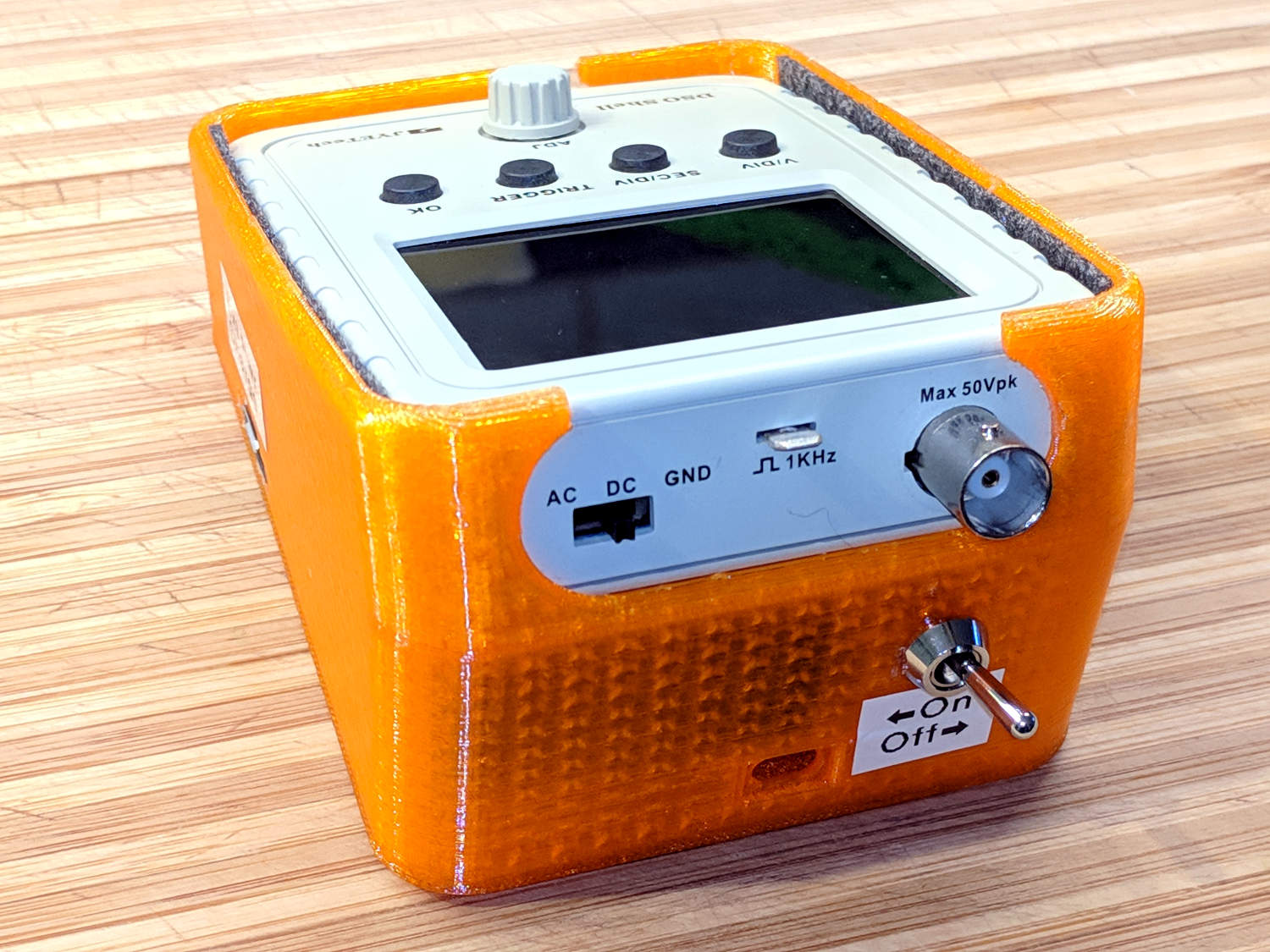
    Hitching the DSO150 to a Tek current probe (which needs a 50 Ω load, thus the terminator on the BNC tee) seems a clear-cut case of a sow’s ear joining forces with a silk purse:

    DSO150 - Arduino Pro Mini - Neopixel current
    DSO150 – Arduino Pro Mini – Neopixel current

    It was just sitting there, so why not?

    Seen with a bit more detail on a better scope:

    Ard Mini - NP-BX1 - SK6812 - 10 mA-div
    Ard Mini – NP-BX1 – SK6812 – 10 mA-div

    Each vertical increment represents the current into a single LED (at 10 mA/div), with the PWM cycles ticking along at 1.3 kHz.

    The current steps aren’t the same height, because the LEDs have different forward voltages. The taller step (at the top) probably comes from the red LED, with the other two being blue and green. The maximum current is only 40 mA, not the 60 mA you’d expect with a 5 V supply.

    The PWM width, of course, determines the brightness of each LED. Eyeballometrically, the average current will be half of 40 mA for (just less than) half of each PWM cycle, so figuring each SK6812 module (there’s only one here) will draw 10 mA seems reasonable.

    The “base load” from the Arduino looks like 2 mA, so there’s not much point in removing its power and status LEDs.

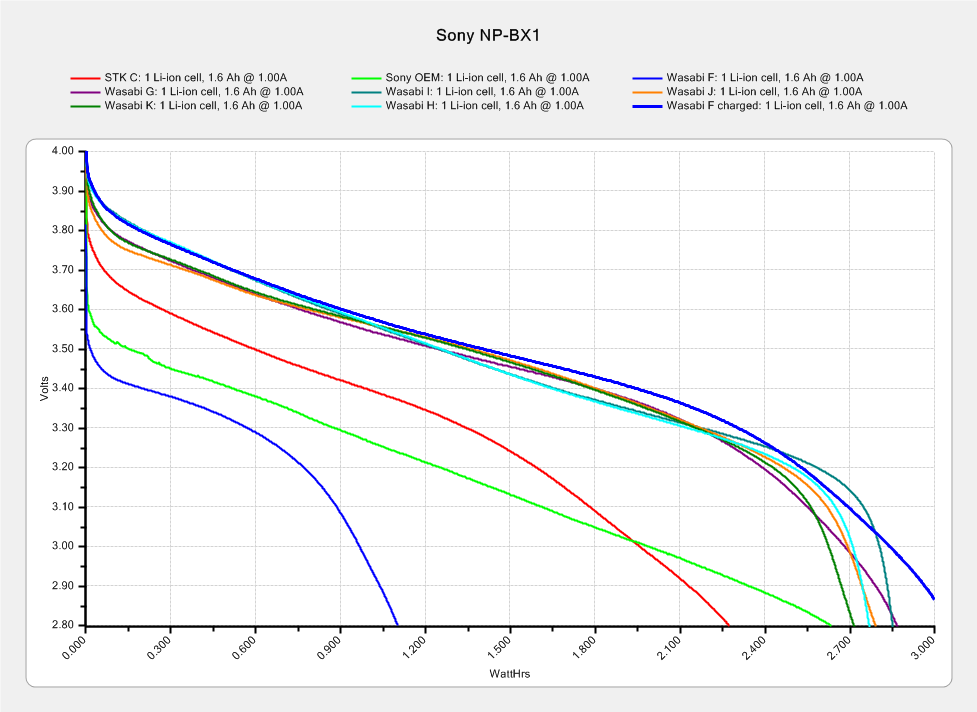
    The NP-BX1 lithium cell has lost enough capacity to no longer power my Sony HDR-AS30V helmet camera for at least half of a typical ride. The camera draws around 1 A, so you can clearly see the defunct batteries:

    Sony NP-BX1 - 2018-04-24
    Sony NP-BX1 – 2018-04-24

    If the average voltage during discharge is 3.3. V, then a 10 mA load would be 33 mW and a defunct NP-BX1 battery with 2 W·h capacity (at 1 A) might provide 60 hours of continuous use. I’d expect more capacity at lower current, although it’s not clear the cells actually behave that way.

    So a battery-powered Vacuum Tube Light might make sense, perhaps as romantic illumination for techie snuggling:

    21HB5A - Guilloche platter
    21HB5A – Guilloche platter

    Ya never know …

  • DMM Probes

    After the Great DMM Probe Debacle, I picked up similar-but-different set of cheap probes and clip leads.

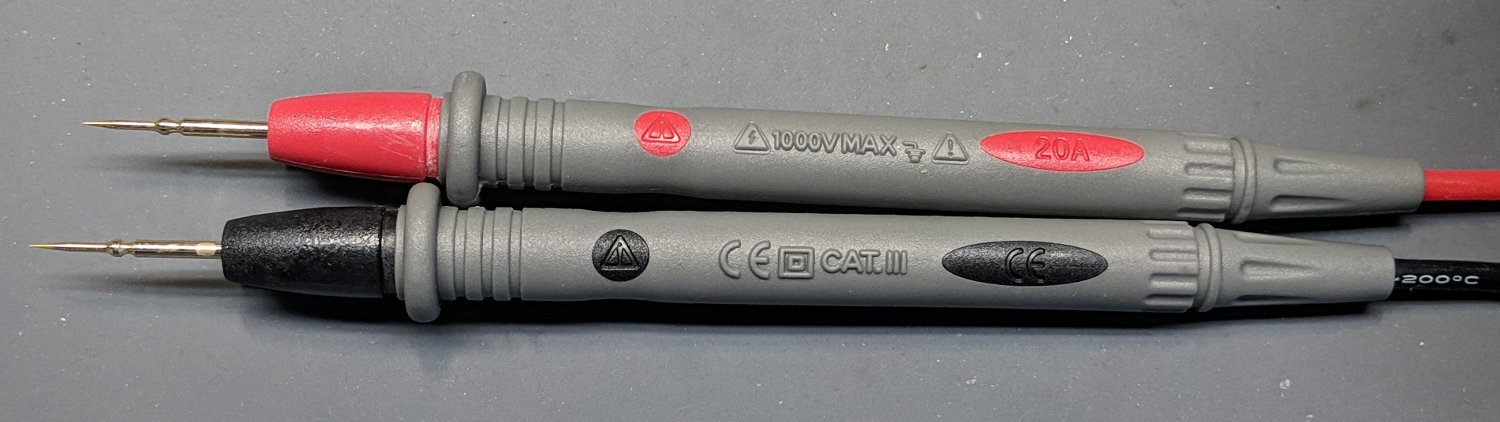
    The needle-tip probes carry a 20 A current rating:

    No-Name DMM probes - needle tip - 20 A
    No-Name DMM probes – needle tip – 20 A

    If you look out along the wire, though, you’ll find a 10 A rating:

    No-Name DMM probes - needle tip - 10 A wires
    No-Name DMM probes – needle tip – 10 A wires

    Now, even though 20 AWG wire in silicone may carry a 17 A spec, the corresponding 200 °C temperature seems excessive for a test probe. Limiting the current to 10 A would reduce the power dissipation by two thirds, which should limit the temperature rise. Whether the wire actually contains 20 AWG of actual copper strands remains an open question.

    The kit also had banana plug / test hooks with no particular rating, although the wire allegedly has 16 AWG conductors:

    DMM Clip Leads - 16 AWG
    DMM Clip Leads – 16 AWG

    The banana plug / alligator clip combo claims 30 A, also with 16 AWG conductors. Who knows? It could be true.

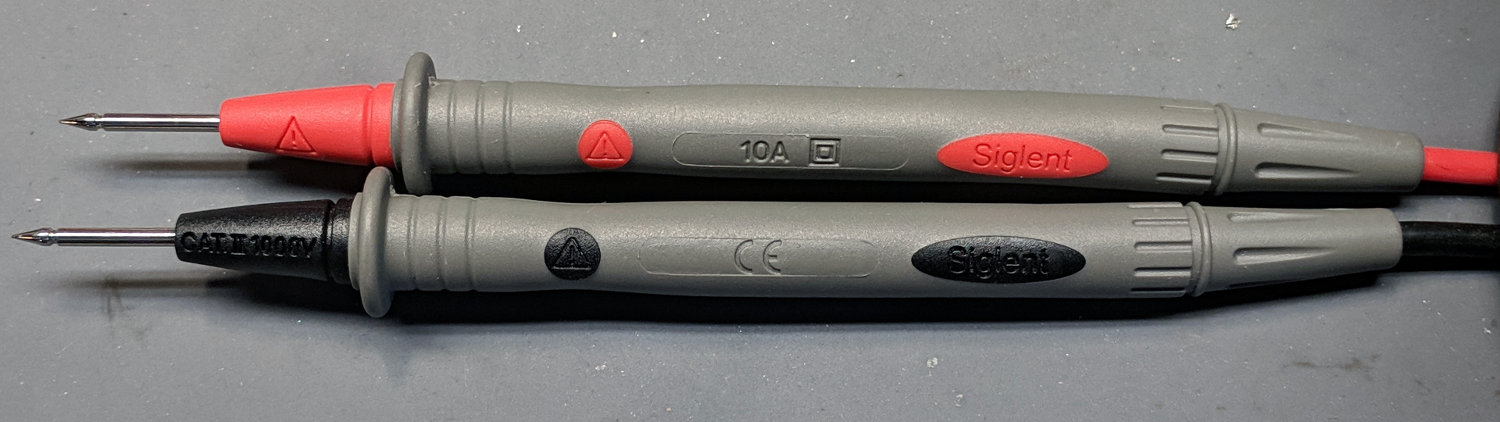
    For comparison, the Siglent SDM3045 DMM came with these probes:

    Siglent DMM probes - 10 A
    Siglent DMM probes – 10 A

    The probes carry a 10 A rating and, although the wires aren’t branded, I’ll assume they have good-enough QC to ensure the copper matches the claims. The production values seem a bit higher, too, even if they bear a striking resemblance to the cheap probes.

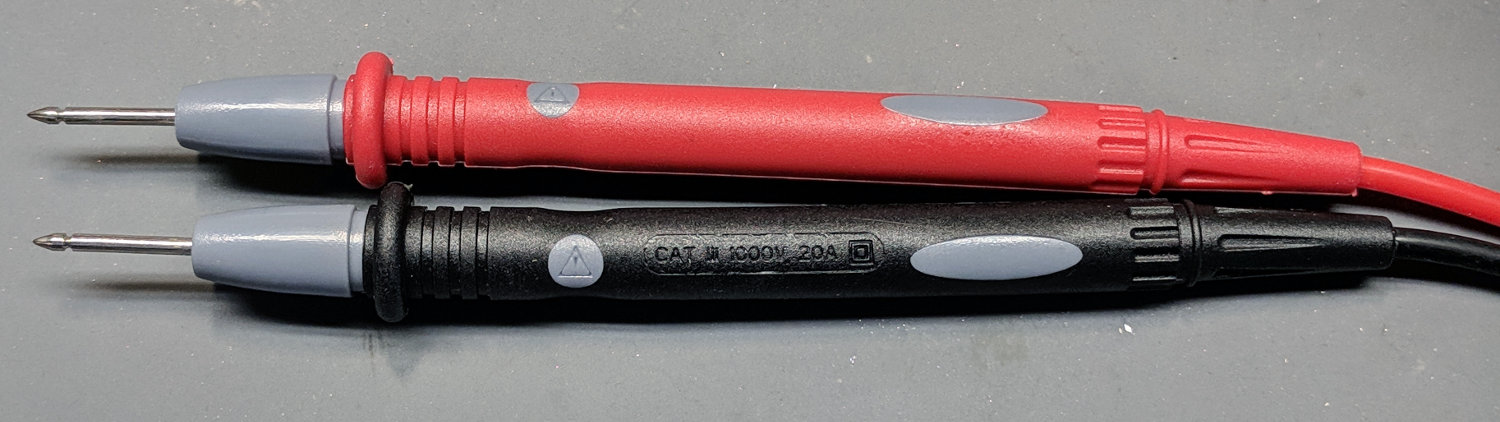
    And, for reference, the probes with the cold solder joint also claim 20 A:

    No-Name DMM probes - 20 A
    No-Name DMM probes – 20 A

    Wouldn’t trust any of ’em for more than a few amps, tops …

  • So(l)der Wick Variations

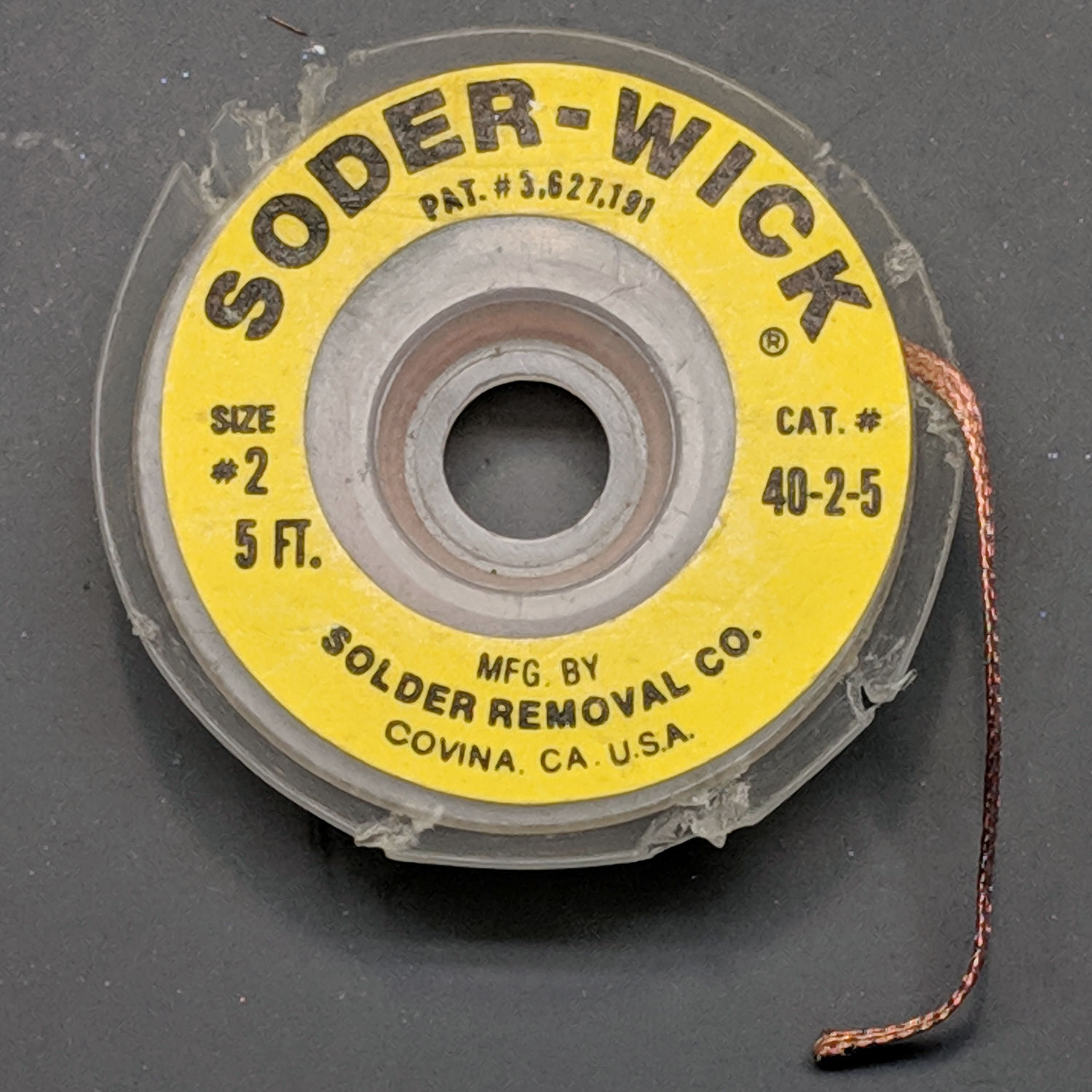
    In the process of sorting out the Small Box o’ Soldering Tools, this well-used treasure emerged:

    Soder-Wick - Original - Size 2
    Soder-Wick – Original – Size 2

    Yeah, the Genuine Article. Note the spelling and hyphenation: “Soder-Wick” is a both Registered Trademark® and patented.

    Of course, the patent having long expired, there exist knockoffs with slightly different spelling:

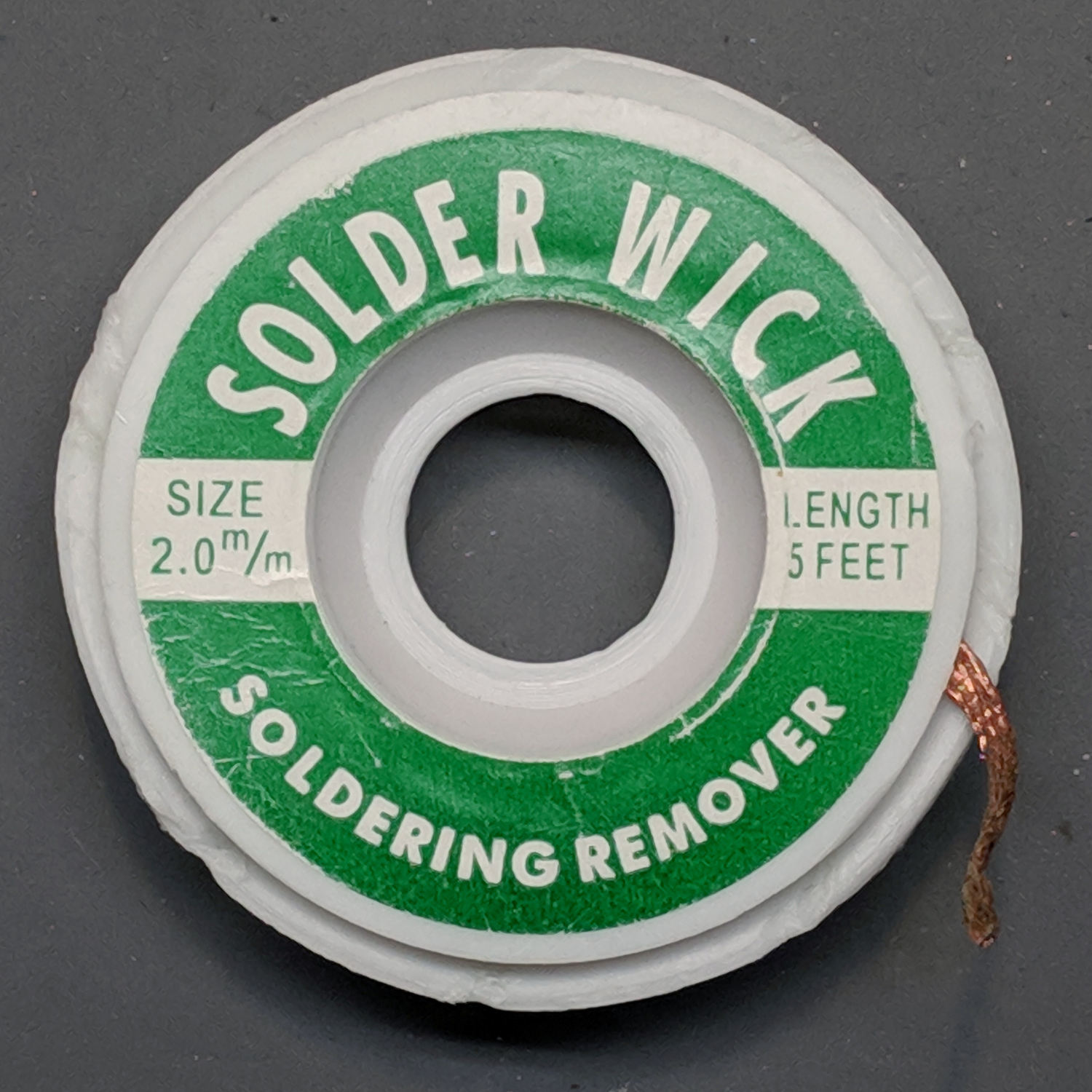
    Solder Wick - Knockoff - Size 2mm
    Solder Wick – Knockoff – Size 2mm

    And labeling:

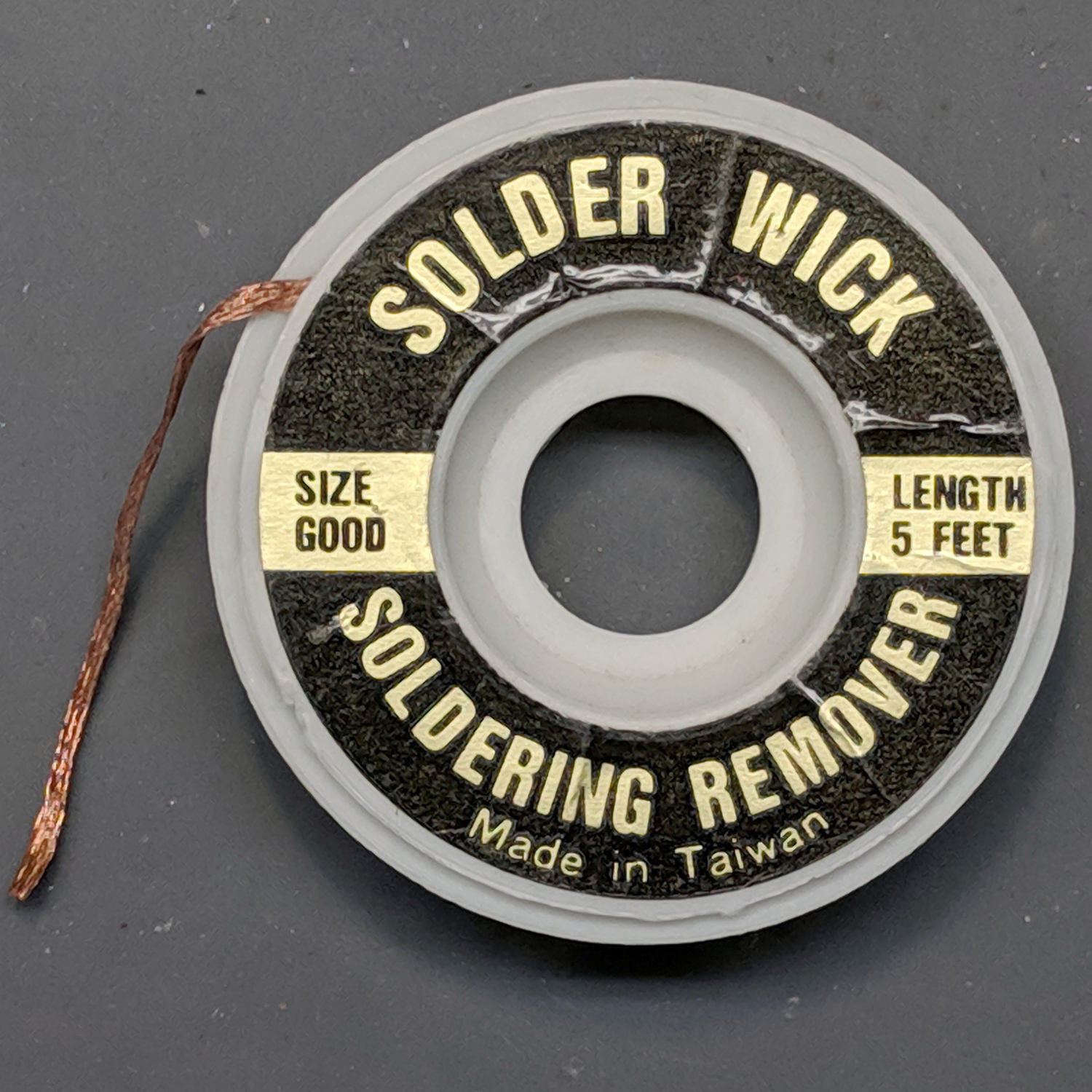
    Solder Wick - Knockoff - Size Good
    Solder Wick – Knockoff – Size Good

    “Size Good”. I like that. “Made in Taiwan”, though, suggests it’s been in my collection for quite a while.

    Despite the fact they’re all supposed to be coated with flux, I generally run a flux pen over whatever length I’m using, because it’s the only way to be sure.

  • Astable Multivibrator: DSO150 vs. Capacitor Voltage

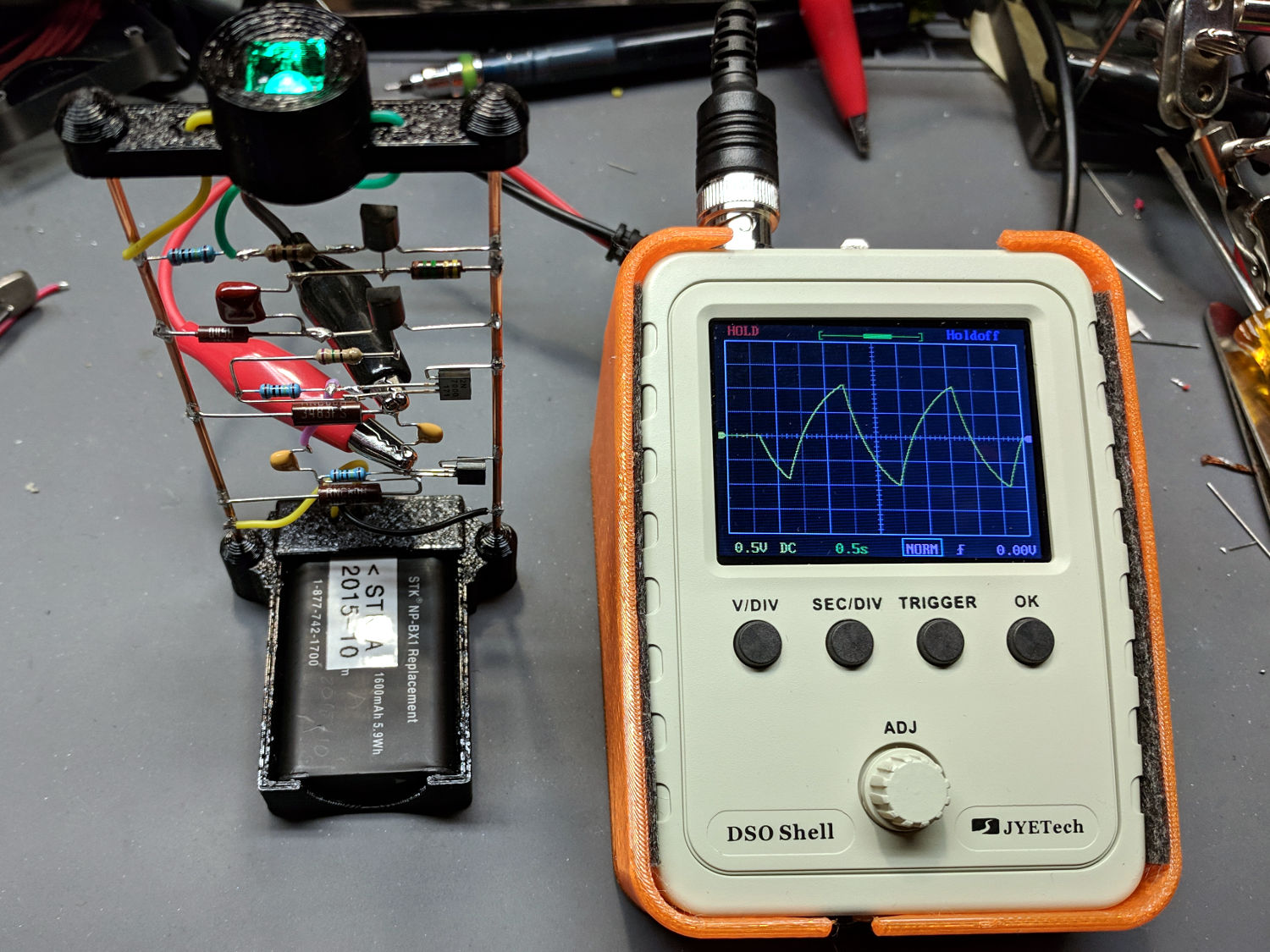
    With the astable blinking green, I had to do this:

    DSO150 - 2N7000 astable cap voltage
    DSO150 – 2N7000 astable cap voltage

    It blinks every two seconds because it uses 1 MΩ timing resistors, rather than the 2 MΩ resistors in the first version.

    Because the DSO150 runs from the internal battery, you can clip it anywhere with few ill effects. The blinky runs from a battery, too, but connecting a high-impedance node to what’s basically the power line common may lead to heartache and confusion; it’s generally a Bad Habit.

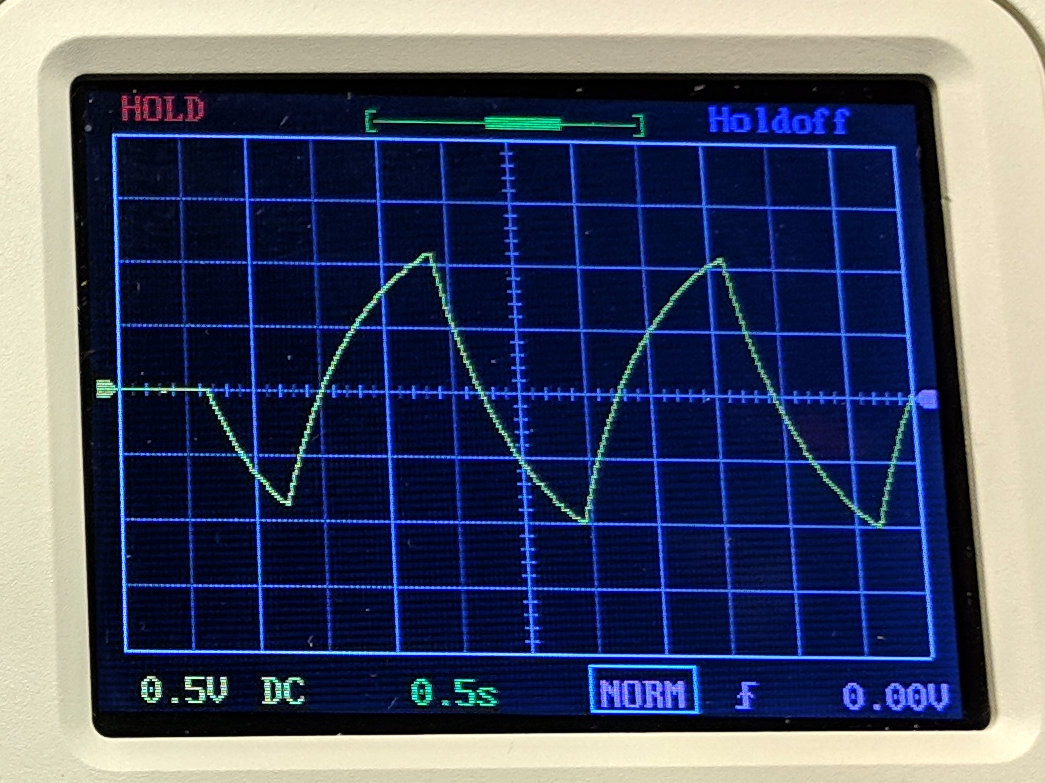
    A closer look at the DSO150 screen shows the expected bipolar exponential waveform across the 1 µF timing cap:

    DSO150 - 2N7000 astable cap voltage - screen detail
    DSO150 – 2N7000 astable cap voltage – screen detail

    The scope triggering seems iffy, as the trace capture pauses every now and again for no apparent reason. This may have something to do with the very slow sweep speed; at 500 ms/div, the complete waveform takes forever to accumulate.

    At least we know the signal lies well within the DSO150’s bandwidth!

  • Tensilizing Copper Wire

    The “bus bars” on the battery holders are 14 AWG copper wire:

    Astable - NP-BX1 base - detail
    Astable – NP-BX1 base – detail

    Slightly stretching the wire straightens and work-hardens it, which I’d been doing by clamping one end in the bench vise, grabbing the other in a Vise-Grip, and whacking the Vise-Grip with a hammer. The results tended to be, mmm, hit-or-miss, with the wires often acquiring a slight bend due to an errant whack.

    I finally fished out the slide hammer Mary made when we took a BOCES adult-ed machine shop class many many years ago:

    Slide Hammer
    Slide Hammer

    The snout captured the head of a sheet metal screw you’d previously driven into a dented automobile fender. For my simple purposes, jamming the wire into the snout and tightening it firmly provides a Good Enough™ grip:

    Slide Hammer Snout
    Slide Hammer Snout

    Clamp the other end of the wire into the bench vise, pull gently on the hammer to take the slack out of the wire, and slap the weight until one end of the wire breaks.

    With a bit of attention to detail, the wires come out perfectly straight and ready to become Art:

    Straightened 14 AWG Copper Wires
    Straightened 14 AWG Copper Wires

    The wires start out at 1.60 mm diameter (14 AWG should be 1.628, but you know how this stuff goes) and break around 1.55 mm. In principle, when the diameter drops 3%, the area will decrease by 6% and the length should increase by 6%, but in reality the 150 mm length stretches by only 1 mm = 1%, not 3 mm. My measurement-fu seems weak.

    Highly recommended, particularly when your Favorite Wife made the tool.

    The Harbor Freight version comes with a bunch of snouts suitable for car repair and is utterly unromantic.

  • Astable Multivibrator: Monochrome Pirhana LED

    The LED parts box disgorged some single-color Pirhana-style LEDs:

    Astable - 2N7000 - Mono Pirhana LED
    Astable – 2N7000 – Mono Pirhana LED

    Didn’t quite catch the blink, but the Ping-Pong ball radome lights up just as you’d expect.

    The radome sits on a stripped-down RGB LED spider:

    Astable Multivibrator Battery Holder - mono LED Spider - fit view
    Astable Multivibrator Battery Holder – mono LED Spider – fit view

    The circuitry is the same as the First Light version, with a 1 MΩ resistor stabilizing the LED ballast resistor:

    Astable - 2N7000 - Mono Pirhana LED - detail
    Astable – 2N7000 – Mono Pirhana LED – detail

    Those are 1 µF ceramic caps in the astable section, so I’m no longer abusing electrolytics, and a stylin’ 100 nF film cap metering out the LED pulse up above.

    Just for pretty, I’ve been using yellow / black wires for the battery connections and matching the LED color with its cathode lead.

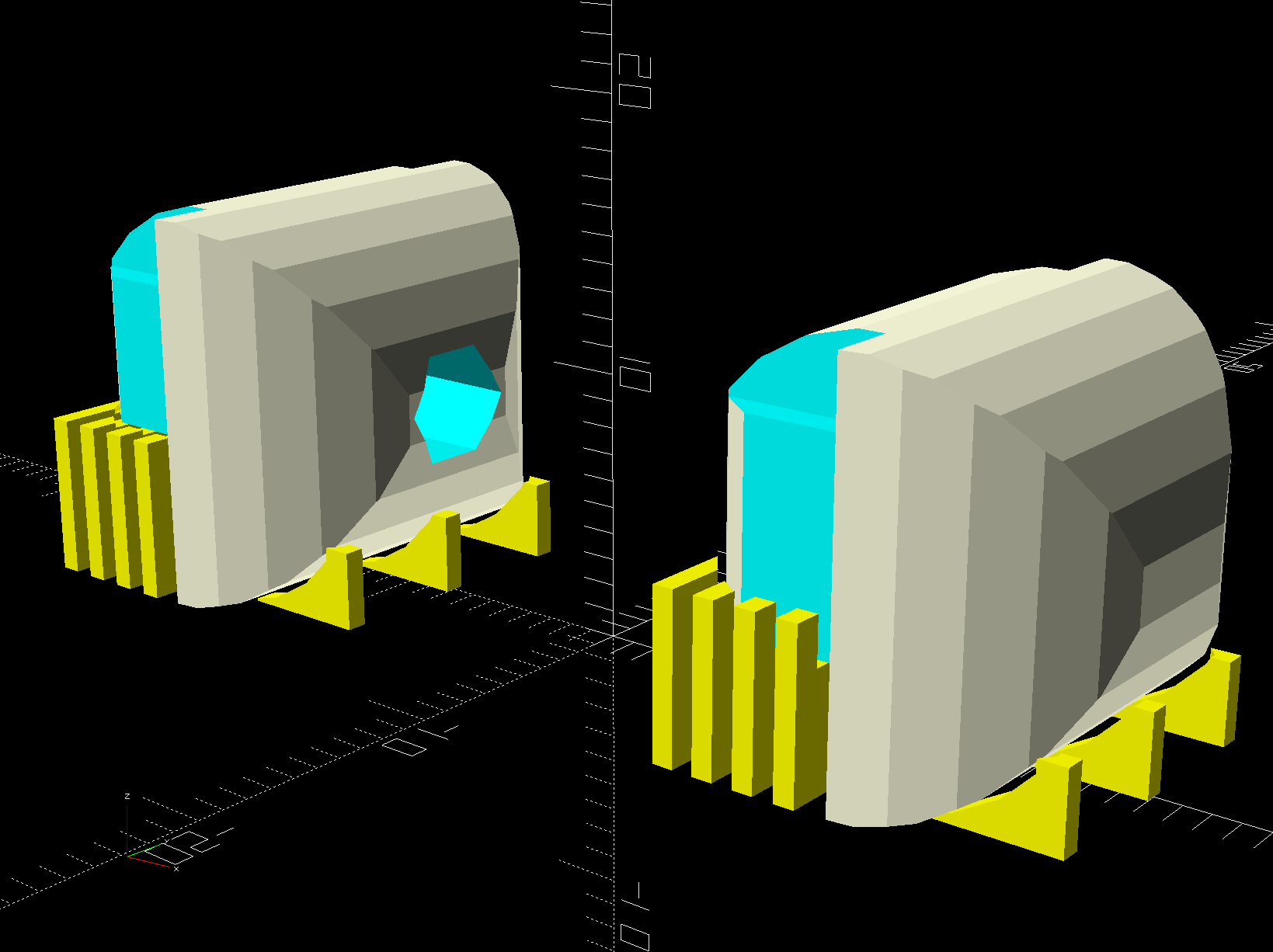
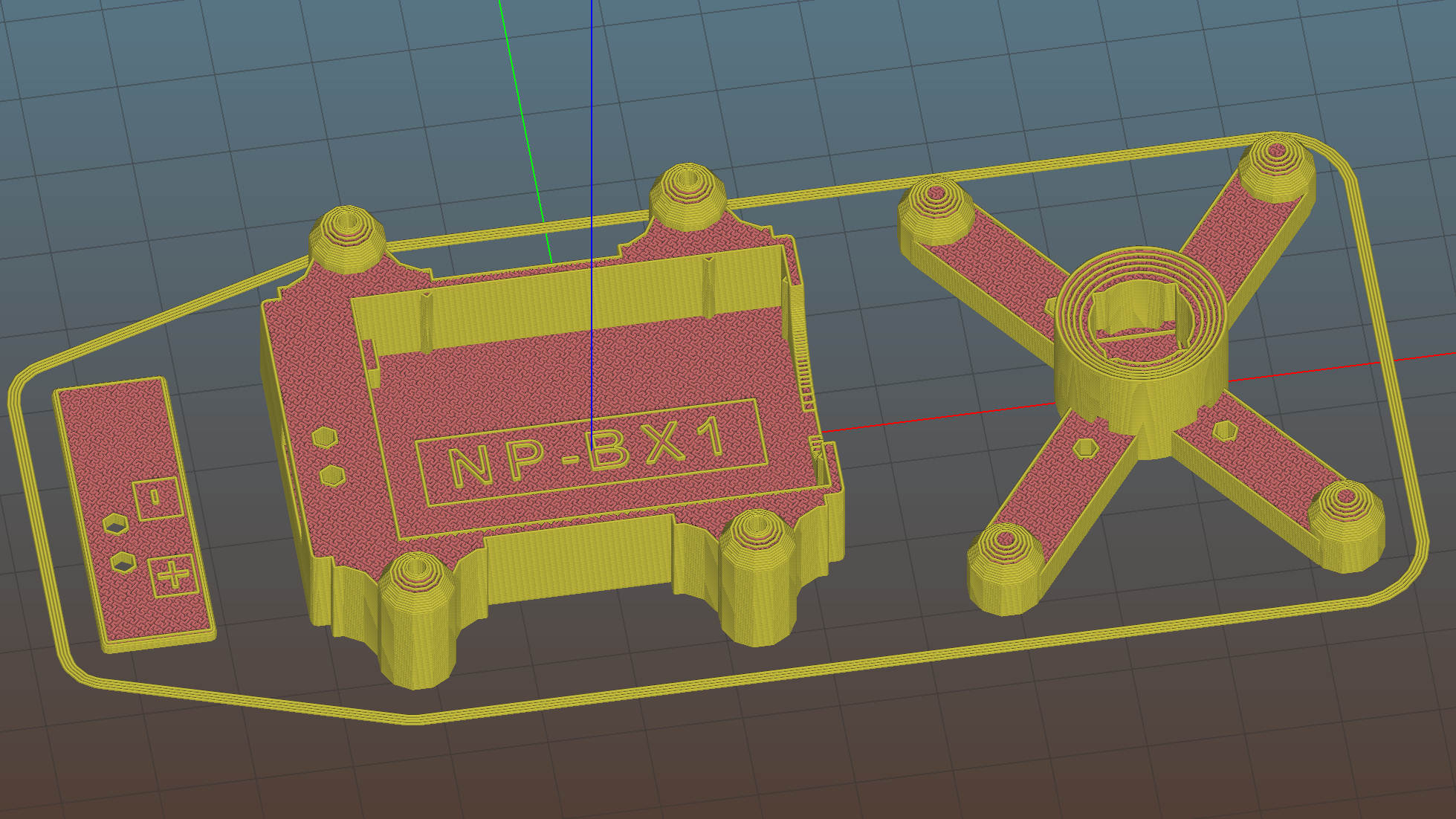
    The OpenSCAD source code as a GitHub Gist:

    // Holder for Li-Ion battery packs
    // Ed Nisley KE4ZNU January 2013
    // 2018-11-15 Adapted for 1.5 mm pogo pins, battery data table
    // 2018-12 RGB LED spider, general cleanups
    /* [Layout options] */
    BatteryName = "NP-BX1"; // [NP-BX1,NB-5L,NB-6L]
    RGBCircuit = false; // false = 1 strut pair, true = 2 pairs
    Layout = "Spider"; // [Build,Show,Fit,Case,Lid,Pins,RGBSpider,Spider]
    /* [Extrusion parameters] – must match reality! */
    // Print with +2 shells and 3 solid layers
    ThreadThick = 0.25;
    ThreadWidth = 0.40;
    HoleWindage = 0.2;
    function IntegerMultiple(Size,Unit) = Unit * ceil(Size / Unit);
    function IntegerLessMultiple(Size,Unit) = Unit * floor(Size / Unit);
    Protrusion = 0.1; // make holes end cleanly
    /* [Hidden] */
    inch = 25.4;
    BuildOffset = 3.0; // clearance for build layout
    Gap = 2.0; // separation for Fit parts
    //- Basic dimensions
    WallThick = 4*ThreadWidth; // holder sidewalls
    BaseThick = 6*ThreadThick; // bottom of holder to bottom of battery
    TopThick = 6*ThreadThick; // top of battery to top of holder
    //- Battery dimensions – rationalized from several samples
    // Coordinate origin at battery corner with contacts, key openings downward
    T_NAME = 0; // Name must fit recess, so don't get loquacious
    T_SIZE = 1;
    T_CONTACTS = 2;
    T_KEYS = 3;
    BatteryData = [
    ["NP-BX1",[43.0,30.0,9.5],[[-0.75,6.0,6.2,"+"],[-0.75,16.0,6.2,"-"]],[[1.70,3.70,2.90],[1.70,3.60,2.90]]],
    ["NB-5L", [45.0,32.0,8.0],[[-0.82,4.5,3.5,"-"],[-0.82,11.0,3.5,"+"]],[[2.2,0.75,2.0],[2.2,2.8,2.0]]],
    ["NB-6L",[42.5,35.5,7.0],[[-0.85,5.50,3.05,"-"],[-0.85,11.90,3.05,"+"]],[[2.0,0.70,2.8],[2.0,2.00,2.8]]],
    ];
    echo(str("Battery: ",BatteryName));
    BatteryIndex = search([BatteryName],BatteryData,1,0)[0];
    echo(str(" Index: ",BatteryIndex));
    BatterySize = BatteryData[BatteryIndex][T_SIZE]; // X = length, Y = width, Z = thickness
    echo(str(" Size: ",BatterySize));
    Contacts = BatteryData[BatteryIndex][T_CONTACTS]; // relative to battery edge, front, and bottom
    echo(str(" Contacts: ",Contacts));
    ContactOC = Contacts[1].y – Contacts[0].y; // + and – terminals for pogo pin contacts
    ContactCenter = Contacts[0].y + ContactOC/2;
    KeyBlocks = BatteryData[BatteryIndex][T_KEYS]; // recesses in battery face set X position
    echo(str(" Keys: ",KeyBlocks));
    //- Pin dimensions
    ID = 0;
    OD = 1;
    LENGTH = 2;
    PinShank = [1.5,2.0,6.5]; // shank, flange, compressed length
    PinFlange = [1.5,2.0,0.5]; // flange, length included in PinShank
    PinTip = [0.9,0.9,2.5]; // extended spring-loaded tip
    WireOD = 1.7; // wiring from pins to circuitry
    PinChannel = WireOD; // cut behind flange for solder overflow
    PinRecess = 3.0; // recess behind pin flange end for epoxy fill
    echo(str("Contact tip dia: ",PinTip[OD]));
    echo(str(" .. shank dia: ",PinShank[ID]));
    OverTravel = 0.5; // space beyond battery face at X origin
    //- Holder dimensions
    GuideRadius = ThreadWidth; // friction fit ridges
    GuideOffset = 7; // from compartment corners
    LidOverhang = 2.0; // atop of battery for retention
    LidClearance = LidOverhang * (BatterySize.z/BatterySize.x); // … clearance above battery for tilting
    echo(str("Lid clearance: ",LidClearance));
    CaseSize = [BatterySize.x + PinShank[LENGTH] + OverTravel + PinRecess + GuideRadius + WallThick,
    BatterySize.y + 2*WallThick + 2*GuideRadius,
    BatterySize.z + BaseThick + TopThick + LidClearance];
    echo(str("Case size: ",CaseSize));
    CaseOffset = [-(PinShank[LENGTH] + OverTravel + PinRecess),-(WallThick + GuideRadius),0]; // position around battery
    ThumbRadius = 10.0; // thumb opening at end of battery
    CornerRadius = 3*ThreadThick; // nice corner rounding
    LidSize = [-CaseOffset.x + LidOverhang,CaseSize.y,TopThick];
    LidOffset = [0.0,CaseOffset.y,0];
    //- Wire struts
    StrutDia = 1.6; // AWG 14 = 1.6 mm
    StrutSides = 3*4;
    StrutBase = [StrutDia,StrutDia + 4*WallThick,CaseSize.z – TopThick]; // ID = wire, OD = buildable
    //StrutOC = [IntegerLessMultiple(BatterySize.x – StrutBase[OD],5.0), // set easy OC wire spacing
    // IntegerMultiple(CaseSize.y + StrutBase[OD],5.0)];
    StrutOC = [IntegerLessMultiple(CaseSize.x – 2*CornerRadius -2*StrutBase[OD],5.0),
    IntegerMultiple(CaseSize.y + StrutBase[OD],5.0)];
    StrutOffset = [CaseSize.x/2 + CaseOffset.x,BatterySize.y/2]; // from case centerlines
    StrutAngle = atan(StrutOC.y/StrutOC.x);
    echo(str("Strut OC: ",StrutOC));
    //- RGB / Pirhana / Neopixel-ish LEDs
    RGBBody = [8.0,8.0,5.0]; // Z = body height
    PixelPCB = [4.0,10.0,3.0]; // Neopixel-ish PCBs, ID = chip window
    RGBPin = 5.0; // pin length
    RGBPinsOC = [5.0,5.0]; // pin layout
    RGBRecess = RGBBody.z + RGBPin/2; // maximum LED recess depth
    BallOD = 40.0; // radome sphere
    BallSides = 4*StrutSides; // nice number of sides
    BallPillar = [norm([RGBBody.x,RGBBody.y]),
    norm([RGBBody.x,RGBBody.y]) + 4*WallThick,
    StrutBase[OD] + RGBBody.z];
    BallChordM = BallOD/2 – sqrt(pow(BallOD/2,2) – (pow(BallPillar[OD],2))/4);
    echo(str("Ball chord depth: ",BallChordM));
    //———————-
    // Useful routines
    module PolyCyl(Dia,Height,ForceSides=0) { // based on nophead's polyholes
    Sides = (ForceSides != 0) ? ForceSides : (ceil(Dia) + 2);
    FixDia = Dia / cos(180/Sides);
    cylinder(r=(FixDia + HoleWindage)/2,h=Height,$fn=Sides);
    }
    //——————-
    //– Guides for tighter friction fit
    module Guides() {
    translate([GuideOffset,-GuideRadius,0])
    PolyCyl(2*GuideRadius,(BatterySize.z – Protrusion),4);
    translate([GuideOffset,(BatterySize.y + GuideRadius),0])
    PolyCyl(2*GuideRadius,(BatterySize.z – Protrusion),4);
    translate([(BatterySize.x – GuideOffset),-GuideRadius,0])
    PolyCyl(2*GuideRadius,(BatterySize.z – Protrusion),4);
    translate([(BatterySize.x – GuideOffset),(BatterySize.y + GuideRadius),0])
    PolyCyl(2*GuideRadius,(BatterySize.z – Protrusion),4);
    translate([(BatterySize.x + GuideRadius),GuideOffset/2,0])
    PolyCyl(2*GuideRadius,(BatterySize.z – Protrusion),4);
    translate([(BatterySize.x + GuideRadius),(BatterySize.y – GuideOffset/2),0])
    PolyCyl(2*GuideRadius,(BatterySize.z – Protrusion),4);
    }
    //– Contact pins
    // Rotated to put them in their natural oriention
    // Aligned to put tip base / end of shank at Overtravel limit
    module PinShape() {
    translate([-(PinShank[LENGTH] + OverTravel),0,0])
    rotate([0,90,0])
    rotate(180/6)
    union() {
    PolyCyl(PinTip[OD],PinShank[LENGTH] + PinTip[LENGTH],6);
    PolyCyl(PinShank[ID],PinShank[LENGTH] + Protrusion,6); // slight extension for clean cuts
    PolyCyl(PinFlange[OD],PinFlange[LENGTH],6);
    }
    }
    // Position pins to put end of shank at battery face
    // Does not include recess access into case
    module PinAssembly() {
    union() {
    for (p = Contacts)
    translate([0,p.y,p.z])
    PinShape();
    translate([-(PinShank[LENGTH] + OverTravel) + PinChannel/2, // solder space
    ContactCenter,
    Contacts[0].z])
    cube([PinChannel,
    (Contacts[1].y – Contacts[0].y + PinFlange[OD]),
    PinFlange[OD]],center=true);
    for (j=[-1,1]) // wire channels
    translate([-(PinShank[LENGTH] + OverTravel – PinChannel/2),
    j*ContactOC/4 + ContactCenter,
    Contacts[0].z – PinFlange[OD]/2])
    rotate(180/6)
    PolyCyl(WireOD,CaseSize.z,6);
    }
    }
    //– Case with origin at battery corner
    module Case() {
    difference() {
    union() {
    difference() {
    union() {
    translate([(CaseSize.x/2 + CaseOffset.x), // basic case shape
    (CaseSize.y/2 + CaseOffset.y),
    (CaseSize.z/2 – BaseThick)])
    hull()
    for (i=[-1,1], j=[-1,1], k=[-1,1])
    translate([i*(CaseSize.x/2 – CornerRadius),
    j*(CaseSize.y/2 – CornerRadius),
    k*(CaseSize.z/2 – CornerRadius)])
    sphere(r=CornerRadius/cos(180/8),$fn=8); // cos() fixes undersize spheres!
    for (i= RGBCircuit ? [-1,1] : -1) { // strut bases
    hull()
    for (j=[-1,1])
    translate([i*StrutOC.x/2 + StrutOffset.x,j*StrutOC.y/2 + StrutOffset.y,-BaseThick])
    rotate(180/StrutSides)
    cylinder(d=StrutBase[OD],h=StrutBase[LENGTH],$fn=StrutSides);
    translate([i*StrutOC.x/2 + StrutOffset.x,StrutOffset.y,StrutBase[LENGTH]/2 – BaseThick])
    cube([2*StrutBase[OD],StrutOC.y,StrutBase[LENGTH]],center=true); // blocks for fairing
    for (j=[-1,1]) // hemisphere caps
    translate([i*StrutOC.x/2 + StrutOffset.x,
    j*StrutOC.y/2 + StrutOffset.y,
    StrutBase[LENGTH] – BaseThick])
    rotate(180/StrutSides)
    sphere(d=StrutBase[OD]/cos(180/StrutSides),$fn=StrutSides);
    }
    }
    translate([-OverTravel,-GuideRadius,0])
    cube([(BatterySize.x + GuideRadius + OverTravel),
    (BatterySize.y + 2*GuideRadius),
    (BatterySize.z + LidClearance + Protrusion)]); // battery space
    translate([BatterySize.x/2,BatterySize.y/2,0]) // recess around battery name
    cube([0.8*BatterySize.x,8,2*ThreadThick],center=true);
    translate([CaseOffset.x + CaseSize.x/2,BatterySize.y/2,-BaseThick + ThreadThick – Protrusion]) // recess around battery name
    cube([0.75*CaseSize.x,8,2*ThreadThick],center=true);
    }
    Guides(); // improve friction fit
    translate([-OverTravel,-GuideRadius,0]) // battery keying blocks
    cube(KeyBlocks[0] + [OverTravel,GuideRadius,0],center=false);
    translate([-OverTravel,(BatterySize.y – KeyBlocks[1].y),0])
    cube(KeyBlocks[1] + [OverTravel,GuideRadius,0],center=false);
    translate([BatterySize.x/2,BatterySize.y/2,-ThreadThick])
    linear_extrude(height=2*ThreadThick,convexity=10)
    text(text=BatteryName,size=5,spacing=1.20,font="Arial:style:Bold",halign="center",valign="center");
    translate([CaseOffset.x + CaseSize.x/2,BatterySize.y/2,-BaseThick])
    linear_extrude(height=2*ThreadThick + Protrusion,convexity=10)
    mirror([0,1,0])
    text(text="KE4ZNU",size=6,spacing=1.20,font="Arial:style:Bold",halign="center",valign="center");
    }
    translate([2*CaseOffset.x, // battery top access
    (CaseOffset.y – Protrusion),
    BatterySize.z + LidClearance])
    cube([2*CaseSize.x,(CaseSize.y + 2*Protrusion),2*TopThick]);
    for (i2 = RGBCircuit ? [-1,1] : -1) { // strut wire holes and fairing
    for (j=[-1,1])
    translate([i2*StrutOC.x/2 + StrutOffset.x,j*StrutOC.y/2 + StrutOffset.y,0])
    rotate(180/StrutSides)
    PolyCyl(StrutBase[ID],2*StrutBase[LENGTH],StrutSides);
    for (i=[-1,1], j=[-1,1])
    translate([i*StrutBase[OD] + (i2*StrutOC.x/2 + StrutOffset.x),
    j*StrutOC.y/2 + StrutOffset.y,
    -(BaseThick + Protrusion)])
    rotate(180/StrutSides)
    PolyCyl(StrutBase[OD],StrutBase[LENGTH] + 2*Protrusion,StrutSides);
    }
    translate([(BatterySize.x – Protrusion), // remove thumb notch
    (CaseSize.y/2 + CaseOffset.y),
    (ThumbRadius)])
    rotate([90,0,0])
    rotate([0,90,0])
    cylinder(r=ThumbRadius,
    h=(WallThick + GuideRadius + 2*Protrusion),
    $fn=22);
    PinAssembly(); // pins and wiring
    translate([CaseOffset.x + PinRecess + Protrusion,(Contacts[1].y + Contacts[0].y)/2,Contacts[0].z])
    translate([-PinRecess,0,0])
    cube([2*PinRecess,
    (Contacts[1].y – Contacts[0].y + PinFlange[OD]/cos(180/6) + 2*HoleWindage),
    2*PinFlange[OD]],center=true); // pin insertion hole
    }
    }
    // Lid position offset to match case
    // The polarity indicator recesses are pure bodges
    module Lid() {
    union() {
    difference() {
    translate([-LidSize.x/2 + LidOffset.x + LidOverhang,LidSize.y/2 + LidOffset.y,0])
    difference() {
    hull()
    for (i=[-1,1], j=[-1,1], k=[-1,1])
    translate([i*(LidSize.x/2 – CornerRadius),
    j*(LidSize.y/2 – CornerRadius),
    k*(LidSize.z – CornerRadius)]) // double thickness for flat bottom
    sphere(r=CornerRadius,$fn=8);
    translate([0,0,-LidSize.z/2]) // remove bottom
    cube([(LidSize.x + 2*Protrusion),(LidSize.y + 2*Protrusion),LidSize.z],center=true);
    translate([LidSize.x/8,0,0])
    cube([LidSize.x/4,0.75*LidSize.y,4*ThreadThick],center=true); // epoxy recess
    }
    translate([0,0,-(Contacts[0].z + PinFlange[OD])]) // punch wire holes
    PinAssembly();
    for (n=[0,1]) // polarity recesses
    translate([-LidOverhang/2 – 0.40,Contacts[n].y,LidSize.z – ThreadThick/2])
    cube([4,4.5,ThreadThick + Protrusion],center=true);
    }
    for (n=[0,1]) // polarity indicators
    translate([-LidOverhang/2,Contacts[n].y,LidSize.z – 1*ThreadThick]) // … proud of surface
    rotate(90)
    linear_extrude(height=2*ThreadThick,convexity=10)
    text(text=Contacts[n][3],size=5,font="Arial:style:Bold",halign="center",valign="center");
    }
    }
    // Spider for RGB LED + radome atop vertical struts
    module RGBSpider() {
    difference() {
    union() {
    for (i=[-1,1], j=[-1,1]) {
    translate([i*StrutOC.x/2,j*StrutOC.y/2,StrutBase[OD]/2])
    rotate(180/StrutSides) // doesn't quite match crosspieces; close enough
    sphere(d=StrutBase[OD]/cos(180/StrutSides),$fn=StrutSides);
    translate([i*StrutOC.x/2,j*StrutOC.y/2,0])
    rotate(180/StrutSides)
    cylinder(d=StrutBase[OD],h=StrutBase[OD]/2,$fn=StrutSides);
    }
    for (m=[-1,1]) // connecting bars
    rotate(m*StrutAngle)
    translate([0,0,StrutBase[OD]/4])
    cube([norm(StrutOC),StrutBase[OD],StrutBase[OD]/2],center=true);
    translate([0,0,0]) // pillar for RGB LED and ball
    cylinder(d=BallPillar[OD],h=BallPillar[LENGTH],$fn=BallSides);
    }
    for (i=[-1,1], j=[-1,1]) // strut wires
    translate([i*StrutOC.x/2,j*StrutOC.y/2,-Protrusion])
    rotate(0)
    PolyCyl(StrutBase[ID],StrutBase[OD]/2,6);
    for (m=[-1,1], n=[0,1]) // RGBA wires through bars
    rotate(m*StrutAngle + n*180)
    translate([StrutOC.x/3,0,-Protrusion])
    PolyCyl(StrutBase[ID],StrutBase[OD],6);
    translate([0,0,BallOD/2 + BallPillar[LENGTH] – BallChordM]) // ball inset
    sphere(d=BallOD);
    translate([0,0,2*RGBBody.z + (BallPillar[LENGTH] – BallChordM) – RGBRecess]) // LED inset
    cube(RGBBody + [HoleWindage,HoleWindage,3*RGBBody.z],center=true); // XY clearance + huge height for E-Z cut
    translate([0,0,StrutBase[OD]/2]) // Neopixel recess
    PolyCyl(PixelPCB[OD],3*RGBBody.z,BallSides/2);
    for (m=[-1,1]) // RGBA wires through pillar
    rotate(m*StrutAngle)
    translate([0,0,StrutBase[OD]/2 + WireOD/2 + 0*Protrusion])
    cube([norm(StrutOC)/2,WireOD,WireOD],center=true);
    }
    }
    // Spider for single LED atop struts, with the ball
    // Aligned to struts at terminal end of battery on Y axis
    module Spider() {
    difference() {
    union() {
    for (j=[-1,1]) {
    translate([-StrutOC.x/2,j*StrutOC.y/2,StrutBase[OD]/2])
    rotate(180/StrutSides)
    sphere(d=StrutBase[OD]/cos(180/StrutSides),$fn=StrutSides);
    translate([-StrutOC.x/2,j*StrutOC.y/2,0])
    rotate(180/StrutSides)
    cylinder(d=StrutBase[OD],h=StrutBase[OD]/2,$fn=StrutSides);
    }
    translate([-StrutOC.x/2,0,StrutBase[OD]/4]) // connecting bars
    cube([StrutBase[OD]*cos(180/StrutSides),StrutOC.y,StrutBase[OD]/2],center=true);
    translate([-StrutOC.x/2,0,0]) // pillar for RGB LED and ball
    cylinder(d=BallPillar[OD],h=BallPillar[LENGTH],$fn=BallSides);
    }
    for (j=[-1,1]) // strut wires
    translate([-StrutOC.x/2,j*StrutOC.y/2,-Protrusion])
    rotate(0)
    PolyCyl(StrutBase[ID],StrutBase[OD]/2,6);
    translate([-StrutOC.x/2,0,0]) // wires through bars
    for (n=[-1,1])
    rotate(n*90)
    translate([StrutOC.x/3,0,-Protrusion])
    PolyCyl(StrutBase[ID],StrutBase[OD],6);
    translate([-StrutOC.x/2,0,-Protrusion]) // center hole for Neopixel
    rotate(180/6)
    PolyCyl(StrutBase[ID],StrutBase[OD],6);
    translate([-StrutOC.x/2,0,BallOD/2 + BallPillar[LENGTH] – BallChordM]) // ball inset
    sphere(d=BallOD);
    translate([-StrutOC.x/2,0,2*RGBBody.z + (BallPillar[LENGTH] – BallChordM) – RGBRecess]) // LED inset
    cube(RGBBody + [HoleWindage,HoleWindage,3*RGBBody.z],center=true); // XY clearance + huge height for E-Z cut
    translate([-StrutOC.x/2,0,StrutBase[OD]/2]) // Neopixel recess
    PolyCyl(PixelPCB[OD],3*RGBBody.z,BallSides/2);
    translate([-StrutOC.x/2,0,StrutBase[OD]/2 + WireOD/2 + 0*Protrusion]) // wire channels
    cube([WireOD,StrutOC.y/2,WireOD],center=true);
    }
    }
    //——————-
    // Build it!
    if (Layout == "Case")
    Case();
    if (Layout == "Lid")
    Lid();
    if (Layout == "RGBSpider") {
    RGBSpider();
    }
    if (Layout == "Spider") {
    Spider();
    }
    if (Layout == "Pins") {
    color("Silver",0.5)
    PinShape();
    PinAssembly();
    }
    if (Layout == "Fit") { // reveal pin assembly
    difference() {
    Case();
    translate([(CaseOffset.x – Protrusion),
    Contacts[1].y,
    Contacts[1].z])
    cube([(-CaseOffset.x + Protrusion),CaseSize.y,CaseSize.z]);
    translate([(CaseOffset.x – Protrusion),
    (CaseOffset.y – Protrusion),
    0])
    cube([(-CaseOffset.x + Protrusion),
    Contacts[0].y + Protrusion – CaseOffset.y,
    CaseSize.z]);
    }
    translate([0,0,BatterySize.z + Gap])
    Lid();
    color("Silver",0.15)
    PinAssembly();
    if (RGBCircuit) {
    translate([StrutOC.x/2,BatterySize.y/2,2*BatterySize.z])
    difference() {
    RGBSpider();
    rotate(180-StrutAngle)
    translate([0,0,-Protrusion])
    cube([norm(StrutOC),StrutBase[OD],2*BallPillar.z],center=false);
    }
    color("Green",0.35)
    translate([StrutOC.x/2,BatterySize.y/2,2*BatterySize.z + BallOD/2 + BallPillar[LENGTH] – BallChordM])
    sphere(d=BallOD);
    }
    else {
    difference() {
    translate([StrutOC.x/2,BatterySize.y/2,2*BatterySize.z])
    Spider();
    translate([-BallPillar[OD],BatterySize.y/2,2*BatterySize.z – Protrusion])
    cube([BallPillar[OD],StrutOC.y,2*BallPillar.z],center=false);
    }
    color("Green",0.35)
    translate([0,BatterySize.y/2,2*BatterySize.z + BallOD/2 + BallPillar[LENGTH] – BallChordM])
    sphere(d=BallOD);
    }
    }
    if (Layout == "Build") {
    rotate(90) {
    translate([-BatterySize.x/2,-BatterySize.y/2,BaseThick])
    Case();
    translate([-CaseSize.x + LidSize.x,-(LidSize.y/2 + LidOffset.y),0])
    Lid();
    if (RGBCircuit)
    translate([StrutOC.x + BatterySize.x/2,0,0])
    RGBSpider();
    else
    translate([StrutOC.x + BatterySize.x/2,0,0])
    Spider();
    }
    }
    if (Layout == "Show") {
    Case();
    translate([0,0,(BatterySize.z + Gap)])
    Lid();
    color("Silver",0.25)
    PinAssembly();
    if (RGBCircuit) {
    translate([StrutOC.x/2,BatterySize.y/2,2*BatterySize.z])
    RGBSpider();
    color("Green",0.35)
    translate([StrutOC.x/2,BatterySize.y/2,2*BatterySize.z + BallOD/2 + BallPillar[LENGTH] – BallChordM])
    sphere(d=BallOD);
    }
    else {
    translate([StrutOC.x/2,BatterySize.y/2,2*BatterySize.z])
    Spider();
    color("Green",0.35)
    translate([0,BatterySize.y/2,2*BatterySize.z + BallOD/2 + BallPillar[LENGTH] – BallChordM])
    sphere(d=BallOD);
    }
    }

  • Just A Typo. It Could Happen To Anyone: Capacitor Edition

    A bag of 100 nF ceramic caps arrived from across the continent (“US Stock”) and failed incoming inspection:

    Mislabeled 100 nF ceramic capacitor - actual 50 nF
    Mislabeled 100 nF ceramic capacitor – actual 50 nF

    The capacitor mark says 104, which is what you’d expect on a 100 nF cap, but the first half-dozen out of the bag measured around 55 nF, far outside even the loosest -20%/+50% tolerance.

    Stipulated: the factory can ship every capacitor it makes with a proper mark.

    Given their (lack of) provenance, they could be mis-marked 47 nF caps.

    Somewhat to my surprise, a refund occurred instantly after I reported the problem.

    Trust, but verify.