The Smell of Molten Projects in the Morning

Ed Nisley's Blog: Shop notes, electronics, firmware, machinery, 3D printing, laser cuttery, and curiosities. Contents: 100% human thinking, 0% AI slop.

Tag: Sherline

Sherline CNC mill

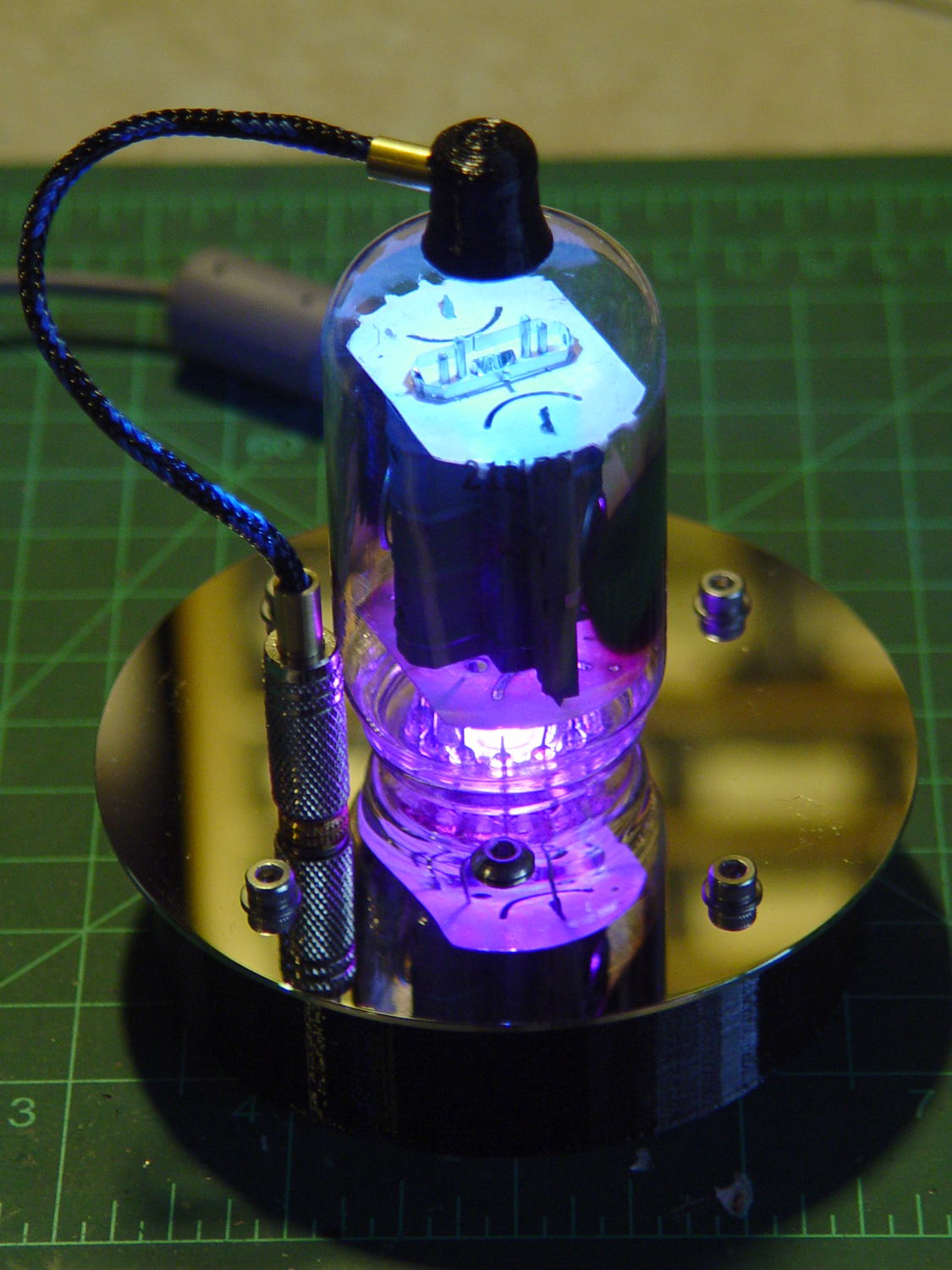
  • Vacuum Tube LEDs: 21HB5A on a Guilloche Platter

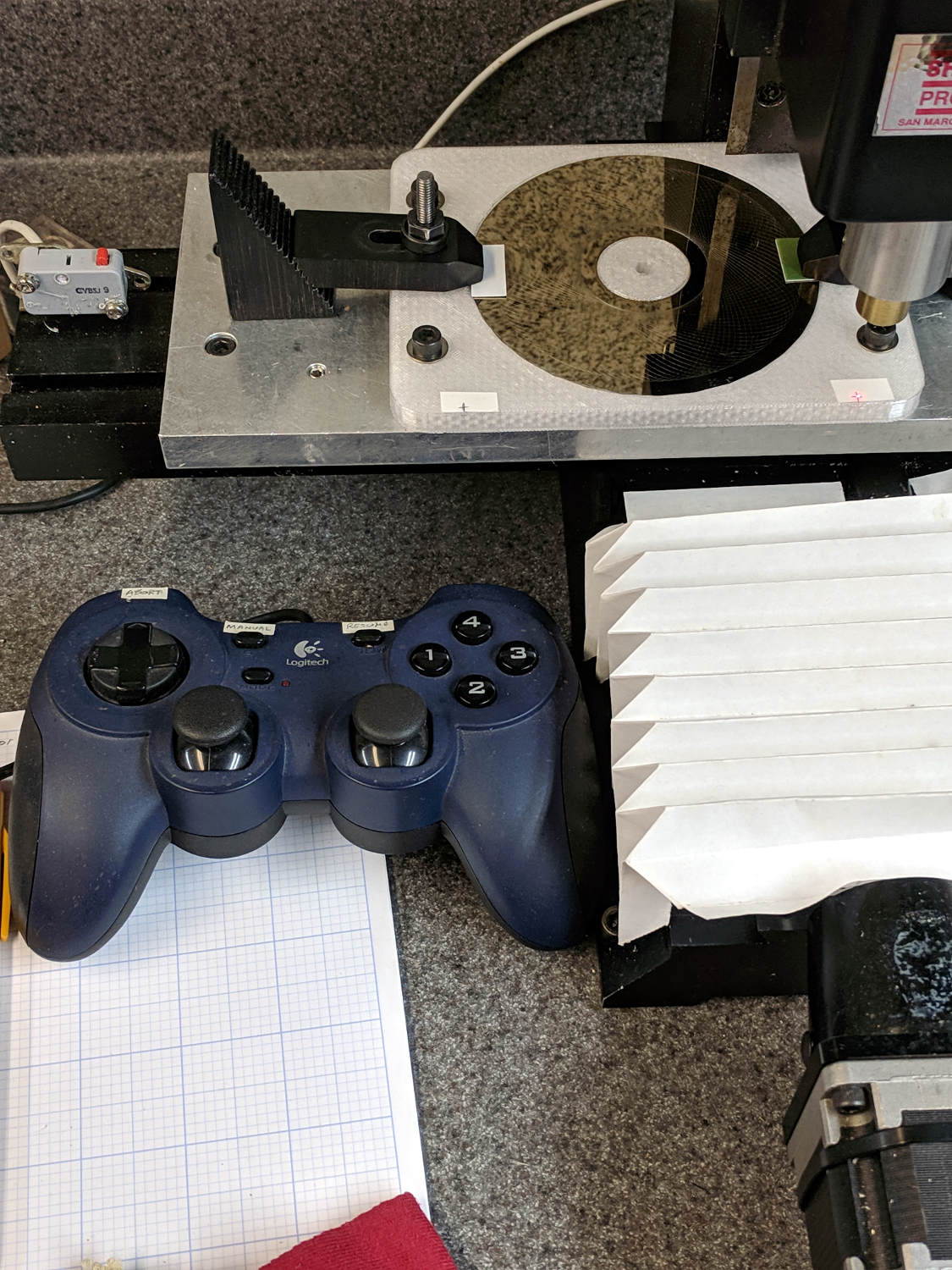
    With the Joggy Thing running in LinuxCNC 2.7, touching XY off on the fixture was trivially easy:

    LinuxCNC - Sherline Mill - Logitech Gamepad
    LinuxCNC – Sherline Mill – Logitech Gamepad

    The pips are 100 mm apart at (-50,-50) and (+50,50). Astonishingly, the laser aligner batteries are in fine shape.

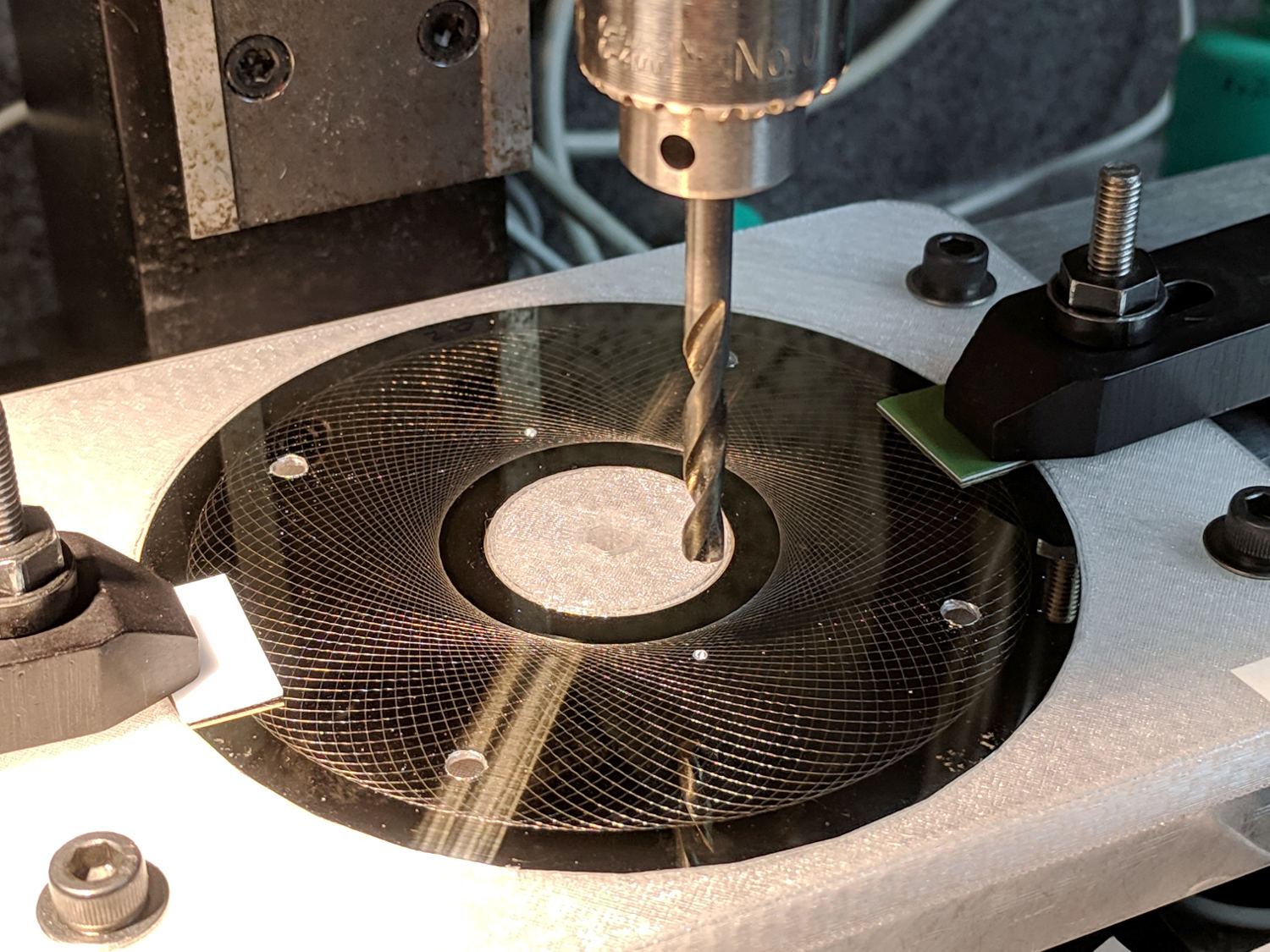
    I should have protected the platter before drilling all those holes:

    Guilloche platter - drilling
    Guilloche platter – drilling

    All’s well that ends well:

    21HB5A - Guilloche platter
    21HB5A – Guilloche platter

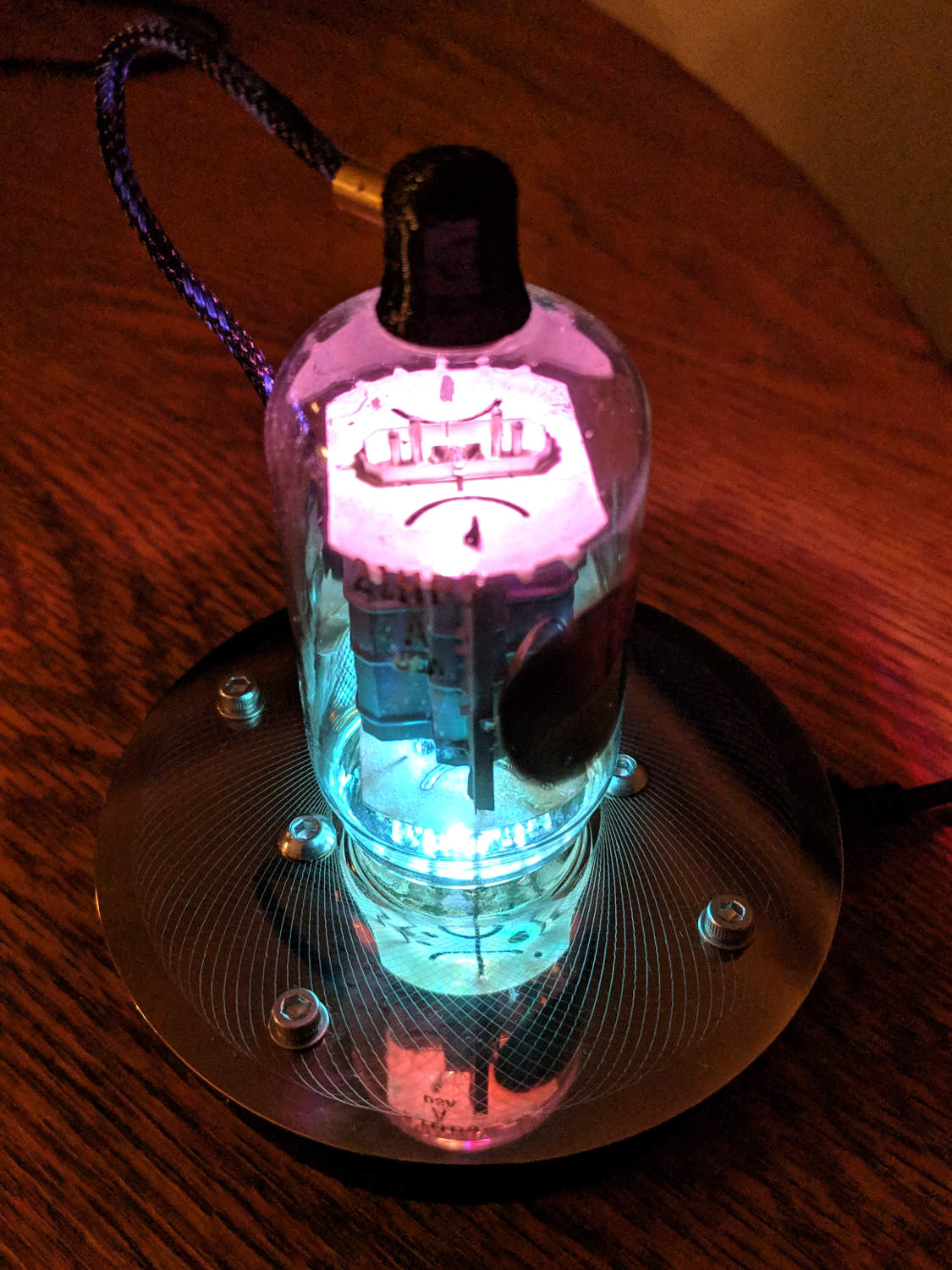
    It looks even better in the dark, although you’d never know it from this picture:

    21HB5A - Guilloche platter - dark
    21HB5A – Guilloche platter – dark

    I wish I could engrave those patterns on already-drilled platters, but dragging a diamond point into a hole can’t possibly end well. I could deploy the Tiny Sandblaster with a vinyl mask, if I had enough artistic eptitude to lay out a good-looking mask.

  • LinuxCNC 2.7 vs. Logitech Joggy Thing

    The old Atom running LinuxCNC for the Sherline finally stopped booting, so I popped the Optiplex 760 off the stack and did a live-USB trial run. The latency / jitter worked out around 25 µs, slightly worse than before, but still Good Enough, and the StepConf utility coerced the motors into working OK.

    What didn’t work was the old Eagle-to-HAL code defining the Logitch Gamepad as a Joggy Thing to allow smooth joystick jog control. Well, stuff changes over the course of eight years, but, in this case, the fix turned out to be a one-liner: the probe_parport module isn’t needed nowadays.

    With that out of the way, it runs fine:

    LinuxCNC - Sherline Mill - Logitech Gamepad
    LinuxCNC – Sherline Mill – Logitech Gamepad

    The INI and HAL files defining the Sherline configuration as a GitHub Gist:

    # HAL config file automatically generated by Eagle-CAD ULP:
    # [/mnt/bulkdata/Project Files/eagle/ulp/hal-write-2.5.ulp]
    # (C) Martin Schoeneck.de 2008
    # Charalampos Alexopoulos 2011
    # Mods Ed Nisley KE4ZNU 2010 2013
    # Path [/mnt/bulkdata/Project Files/eagle/projects/LinuxCNC for M2/]
    # ProjectName [LinuxCNC Sherline Configuration]
    # File name [/mnt/bulkdata/Project Files/eagle/projects/LinuxCNC for M2/LinuxCNC Sherline Configuration.hal]
    # Created [11:17:21 17-Feb-2013]
    ####################################################
    # Load realtime and userspace modules
    loadrt trivkins
    loadrt [EMCMOT]EMCMOT key=[EMCMOT]SHMEM_KEY num_joints=[TRAJ]AXES base_period_nsec=[EMCMOT]BASE_PERIOD servo_period_nsec=[EMCMOT]SERVO_PERIOD traj_period_nsec=[EMCMOT]SERVO_PERIOD
    # not needed in 2.7
    # loadrt probe_parport
    loadrt hal_parport cfg="[PARPORT]ADDRESS out"
    loadrt stepgen step_type=0,0,0,0
    loadrt pwmgen output_type=0
    loadusr -W hal_manualtoolchange
    loadusr -W hal_input -KA Dual
    loadrt logic count=1 personality=0x104
    loadrt constant count=13
    loadrt and2 count=17
    loadrt conv_float_s32 count=1
    loadrt flipflop count=4
    loadrt mux2 count=5
    loadrt mux4 count=1
    loadrt not count=8
    loadrt or2 count=14
    loadrt scale count=7
    loadrt timedelay count=1
    loadrt toggle count=1
    ####################################################
    # Hook functions into threads
    addf stepgen.make-pulses base-thread
    addf pwmgen.make-pulses base-thread
    addf parport.0.read base-thread
    addf parport.0.write base-thread
    addf parport.0.reset base-thread
    addf logic.0 base-thread
    addf motion-command-handler servo-thread
    addf motion-controller servo-thread
    addf stepgen.update-freq servo-thread
    addf stepgen.capture-position servo-thread
    addf pwmgen.update servo-thread
    addf constant.0 servo-thread
    addf constant.1 servo-thread
    addf constant.2 servo-thread
    addf constant.3 servo-thread
    addf constant.4 servo-thread
    addf constant.5 servo-thread
    addf constant.6 servo-thread
    addf constant.7 servo-thread
    addf constant.8 servo-thread
    addf constant.9 servo-thread
    addf constant.10 servo-thread
    addf constant.11 servo-thread
    addf constant.12 servo-thread
    addf and2.0 servo-thread
    addf and2.1 servo-thread
    addf and2.2 servo-thread
    addf and2.3 servo-thread
    addf and2.4 servo-thread
    addf and2.5 servo-thread
    addf and2.6 servo-thread
    addf and2.7 servo-thread
    addf and2.8 servo-thread
    addf and2.9 servo-thread
    addf and2.10 servo-thread
    addf and2.11 servo-thread
    addf and2.12 servo-thread
    addf and2.13 servo-thread
    addf and2.14 servo-thread
    addf and2.15 servo-thread
    addf and2.16 servo-thread
    addf conv-float-s32.0 servo-thread
    addf toggle.0 servo-thread
    addf flipflop.0 servo-thread
    addf flipflop.1 servo-thread
    addf flipflop.2 servo-thread
    addf flipflop.3 servo-thread
    addf timedelay.0 servo-thread
    addf or2.0 servo-thread
    addf or2.1 servo-thread
    addf or2.2 servo-thread
    addf or2.3 servo-thread
    addf or2.4 servo-thread
    addf or2.5 servo-thread
    addf or2.6 servo-thread
    addf or2.7 servo-thread
    addf or2.8 servo-thread
    addf or2.9 servo-thread
    addf or2.10 servo-thread
    addf or2.11 servo-thread
    addf or2.12 servo-thread
    addf or2.13 servo-thread
    addf not.0 servo-thread
    addf not.1 servo-thread
    addf not.2 servo-thread
    addf not.3 servo-thread
    addf not.4 servo-thread
    addf not.5 servo-thread
    addf not.6 servo-thread
    addf not.7 servo-thread
    addf scale.0 servo-thread
    addf scale.1 servo-thread
    addf scale.2 servo-thread
    addf scale.3 servo-thread
    addf scale.4 servo-thread
    addf scale.5 servo-thread
    addf scale.6 servo-thread
    addf mux2.0 servo-thread
    addf mux4.0 servo-thread
    addf mux2.1 servo-thread
    addf mux2.2 servo-thread
    addf mux2.3 servo-thread
    addf mux2.4 servo-thread
    ####################################################
    # Set parameters
    setp parport.0.reset-time [PARPORT]RESET_TIME
    setp stepgen.0.maxaccel [AXIS_0]STEPGEN_MAXACCEL
    setp stepgen.0.maxvel [AXIS_0]MAX_VELOCITY
    setp stepgen.0.dirhold [PARPORT]DIRHOLD
    setp stepgen.0.dirsetup [PARPORT]DIRSETUP
    setp stepgen.0.steplen [PARPORT]STEPLEN
    setp stepgen.0.stepspace [PARPORT]STEPSPACE
    setp stepgen.0.position-scale [AXIS_0]SCALE
    setp parport.0.pin-03-out-reset FALSE
    setp parport.0.pin-05-out-reset FALSE
    setp parport.0.pin-07-out-reset FALSE
    setp parport.0.pin-09-out-reset FALSE
    setp parport.0.pin-17-out-reset FALSE
    setp stepgen.1.maxaccel [AXIS_1]STEPGEN_MAXACCEL
    setp stepgen.1.maxvel [AXIS_1]MAX_VELOCITY
    setp stepgen.1.dirhold [PARPORT]DIRHOLD
    setp stepgen.1.dirsetup [PARPORT]DIRSETUP
    setp stepgen.1.steplen [PARPORT]STEPLEN
    setp stepgen.1.stepspace [PARPORT]STEPSPACE
    setp stepgen.1.position-scale [AXIS_1]SCALE
    setp stepgen.2.maxaccel [AXIS_2]STEPGEN_MAXACCEL
    setp stepgen.2.maxvel [AXIS_2]MAX_VELOCITY
    setp stepgen.2.dirhold [PARPORT]DIRHOLD
    setp stepgen.2.dirsetup [PARPORT]DIRSETUP
    setp stepgen.2.steplen [PARPORT]STEPLEN
    setp stepgen.2.stepspace [PARPORT]STEPSPACE
    setp stepgen.2.position-scale [AXIS_2]SCALE
    setp stepgen.3.maxaccel [AXIS_3]STEPGEN_MAXACCEL
    setp stepgen.3.maxvel [AXIS_3]MAX_VELOCITY
    setp stepgen.3.dirhold [PARPORT]DIRHOLD
    setp stepgen.3.dirsetup [PARPORT]DIRSETUP
    setp stepgen.3.steplen [PARPORT]STEPLEN
    setp stepgen.3.stepspace [PARPORT]STEPSPACE
    setp stepgen.3.position-scale [AXIS_3]SCALE
    setp parport.0.pin-04-out-invert TRUE
    setp parport.0.pin-06-out-invert TRUE
    ####################################################
    # Set constants
    setp constant.0.value 0.1
    setp constant.1.value 20
    setp constant.2.value [TRAJ]MAX_LINEAR_VELOCITY
    setp constant.3.value [TRAJ]MAX_ANGULAR_VELOCITY
    setp constant.4.value 60
    setp constant.5.value 0.50
    setp constant.6.value 1.00
    setp constant.7.value 0.10
    setp constant.8.value 0.10
    setp constant.9.value 0.0
    setp constant.10.value -1.0
    setp constant.11.value 0.020
    setp constant.12.value 0.000
    ####################################################
    # Connect Modules with nets
    net a-amp-enable logic.0.in-03 axis.3.amp-enable-out stepgen.3.enable
    net a-analog halui.jog.3.analog mux2.4.out
    net a-button-minus or2.0.in0 input.0.btn-joystick and2.7.in0
    net a-button-plus or2.0.in1 input.0.btn-thumb2 and2.8.in0
    net a-buttons-active or2.0.out or2.1.in0 or2.11.in1
    net a-direction parport.0.pin-08-out stepgen.3.dir
    net a-disable not.7.out and2.13.in1
    net a-enable or2.11.in0 flipflop.3.out not.7.in mux2.4.sel
    net a-jog input.0.abs-z-position mux2.4.in1
    net a-knob-active or2.9.out not.2.in and2.15.in1
    net a-knob-inactive not.2.out and2.14.in1
    net a-select and2.16.in0 and2.15.out
    net a-set flipflop.3.set and2.16.out
    net a-step parport.0.pin-09-out stepgen.3.step
    net all-amps-enabled logic.0.and parport.0.pin-17-out
    net angular_motion or2.11.out mux2.0.sel
    net any-buttons-active mux4.0.sel0 or2.12.out
    net axis-disabled-value constant.9.out mux2.1.in0 mux2.2.in0 mux2.3.in0 mux2.4.in0
    net az-buttons-active or2.1.out or2.12.in1 or2.13.in0
    net az-reset flipflop.2.reset and2.14.out flipflop.3.reset
    net button-crawl scale.4.out mux4.0.in3
    net button-fast scale.2.out mux4.0.in1 scale.4.in
    net estop-a and2.0.in0 input.0.btn-top2
    net estop-b and2.0.in1 input.0.btn-base
    net estop-out parport.0.pin-01-out iocontrol.0.emc-enable-in iocontrol.0.user-enable-out
    net homeswitches parport.0.pin-10-in-not axis.0.home-sw-in axis.1.home-sw-in axis.2.home-sw-in axis.3.home-sw-in
    net jog-crawl toggle.0.out mux4.0.sel1
    net jog-speed halui.jog-speed mux4.0.out
    net knob-crawl mux4.0.in2 scale.3.out
    net knob-fast mux4.0.in0 scale.1.out scale.3.in
    net manual-mode halui.mode.manual input.0.btn-base3
    net n_9 axis.0.motor-pos-cmd stepgen.0.position-cmd
    net n_11 axis.0.motor-pos-fb stepgen.0.position-fb
    net n_13 and2.0.out halui.estop.activate
    net n_14 or2.3.in0 input.0.btn-base5
    net n_15 or2.3.in1 input.0.btn-base6
    net n_16 toggle.0.in or2.3.out
    net n_17 conv-float-s32.0.out input.0.abs-x-flat input.0.abs-y-flat input.0.abs-z-flat input.0.abs-rz-flat
    net n_18 constant.1.out conv-float-s32.0.in
    net n_19 constant.4.out scale.0.gain
    net n_20 constant.5.out scale.1.gain
    net n_21 constant.6.out scale.2.gain
    net n_22 constant.7.out scale.3.gain
    net n_23 scale.4.gain constant.8.out
    net n_24 constant.0.out halui.jog-deadband
    net n_25 constant.2.out mux2.0.in0
    net n_26 mux2.0.in1 constant.3.out
    net n_34 axis.1.motor-pos-cmd stepgen.1.position-cmd
    net n_36 axis.1.motor-pos-fb stepgen.1.position-fb
    net n_42 or2.7.in0 input.0.abs-x-is-pos
    net n_43 or2.7.in1 input.0.abs-x-is-neg
    net n_44 or2.8.in0 input.0.abs-y-is-pos
    net n_45 or2.8.in1 input.0.abs-y-is-neg
    net n_46 or2.9.in0 input.0.abs-z-is-pos
    net n_47 or2.9.in1 input.0.abs-z-is-neg
    net n_48 or2.10.in0 input.0.abs-rz-is-pos
    net n_49 or2.10.in1 input.0.abs-rz-is-neg
    net n_51 constant.10.out scale.5.gain scale.6.gain
    net n_54 constant.11.out timedelay.0.on-delay
    net n_55 constant.12.out timedelay.0.off-delay
    net n_56 timedelay.0.out and2.1.in1 and2.2.in1 and2.4.in1 and2.3.in1 and2.5.in1 and2.6.in1 and2.8.in1 and2.7.in1
    net n_57 and2.1.out halui.jog.0.minus
    net n_58 and2.2.out halui.jog.0.plus
    net n_59 and2.3.out halui.jog.1.minus
    net n_60 halui.jog.1.plus and2.4.out
    net n_61 and2.5.out halui.jog.2.minus
    net n_62 and2.6.out halui.jog.2.plus
    net n_63 and2.7.out halui.jog.3.minus
    net n_64 and2.8.out halui.jog.3.plus
    net n_67 axis.2.motor-pos-cmd stepgen.2.position-cmd
    net n_69 axis.2.motor-pos-fb stepgen.2.position-fb
    net n_77 axis.3.motor-pos-cmd stepgen.3.position-cmd
    net n_79 axis.3.motor-pos-fb stepgen.3.position-fb
    net probe-in parport.0.pin-15-in-not motion.probe-input
    net program-resume halui.program.resume input.0.btn-base4
    net reset-estop input.0.btn-base2 halui.estop.reset
    net tool-change iocontrol.0.tool-change hal_manualtoolchange.change
    net tool-changed hal_manualtoolchange.changed iocontrol.0.tool-changed
    net tool-number iocontrol.0.tool-prep-number hal_manualtoolchange.number
    net tool-prepare-loopback iocontrol.0.tool-prepare iocontrol.0.tool-prepared
    net vel-per-minute scale.0.out scale.1.in scale.2.in
    net vel-per-second mux2.0.out scale.0.in
    net x-amp-enable logic.0.in-00 axis.0.amp-enable-out stepgen.0.enable
    net x-analog mux2.1.out halui.jog.0.analog
    net x-buttons-active or2.5.in0 or2.4.out
    net x-direction parport.0.pin-02-out stepgen.0.dir
    net x-disable not.4.out and2.12.in1
    net x-enable not.4.in flipflop.0.out mux2.1.sel
    net x-hat-minus or2.4.in1 input.0.abs-hat0x-is-neg and2.1.in0
    net x-hat-plus or2.4.in0 input.0.abs-hat0x-is-pos and2.2.in0
    net x-jog input.0.abs-x-position mux2.1.in1
    net x-knob-active or2.7.out not.0.in and2.9.in0
    net x-knob-inactive not.0.out and2.10.in0 and2.11.in0
    net x-set and2.9.out flipflop.0.set
    net x-step parport.0.pin-03-out stepgen.0.step
    net xy-buttons-active or2.5.out or2.12.in0 or2.13.in1
    net xy-reset flipflop.0.reset and2.10.out flipflop.1.reset
    net xyza-buttons-active or2.13.out timedelay.0.in
    net y-amp-enable logic.0.in-01 axis.1.amp-enable-out stepgen.1.enable
    net y-analog halui.jog.1.analog mux2.2.out
    net y-buttons-active or2.6.out or2.5.in1
    net y-direction parport.0.pin-04-out stepgen.1.dir
    net y-disable not.5.out and2.9.in1
    net y-enable flipflop.1.out not.5.in mux2.2.sel
    net y-hat-minus or2.6.in1 input.0.abs-hat0y-is-neg and2.4.in0
    net y-hat-plus or2.6.in0 input.0.abs-hat0y-is-pos and2.3.in0
    net y-jog input.0.abs-y-position scale.5.in
    net y-jog-reversed mux2.2.in1 scale.5.out
    net y-knob-active not.1.in or2.8.out and2.11.in1
    net y-knob-inactive not.1.out and2.10.in1
    net y-select and2.12.in0 and2.11.out
    net y-set flipflop.1.set and2.12.out
    net y-step parport.0.pin-05-out stepgen.1.step
    net z-amp-enable logic.0.in-02 axis.2.amp-enable-out stepgen.2.enable
    net z-analog mux2.3.out halui.jog.2.analog
    net z-button-minus or2.2.in0 input.0.btn-thumb and2.5.in0
    net z-button-plus or2.2.in1 input.0.btn-top and2.6.in0
    net z-buttons-active or2.2.out or2.1.in1
    net z-direction parport.0.pin-06-out stepgen.2.dir
    net z-disable not.6.out and2.16.in1
    net z-enable not.6.in flipflop.2.out mux2.3.sel
    net z-jog input.0.abs-rz-position scale.6.in
    net z-jog-reversed scale.6.out mux2.3.in1
    net z-knob-active not.3.in or2.10.out and2.13.in0
    net z-knob-inactive not.3.out and2.15.in0 and2.14.in0
    net z-set and2.13.out flipflop.2.set
    net z-step parport.0.pin-07-out stepgen.2.step
    view raw Sherline.hal hosted with ❤ by GitHub
    # Ed Nisley – KE4ZNU
    # Just do not run stepconf ever again…
    [EMC]
    MACHINE = Sherline-XYZA
    DEBUG = 0
    RS274NGC_STARTUP_CODE = G21 G40 G49 G54 G80 G90 G92.1 G94 G97 G98
    [DISPLAY]
    DISPLAY = axis
    EDITOR = gedit
    GEOMETRY = AXYZ
    POSITION_OFFSET = RELATIVE
    POSITION_FEEDBACK = ACTUAL
    MAX_FEED_OVERRIDE = 3.0
    INTRO_GRAPHIC = /home/ed/linuxcnc/configs/Sherline-XYZA/Sherline.gif
    INTRO_TIME = 3
    PROGRAM_PREFIX = /mnt/bulkdata/
    #PROGRAM_PREFIX = /home/ed/linuxcnc/nc_files/
    #INCREMENTS = .1in .05in .01in .005in .001in .0005in .0001in
    INCREMENTS = 10 mm, 1 mm, 0.1 mm, 90 deg, 45 deg, 10 deg
    [FILTER]
    PROGRAM_EXTENSION = .py Python Script
    py = python
    [TASK]
    TASK = milltask
    CYCLE_TIME = 0.010
    [RS274NGC]
    PARAMETER_FILE = emc.var
    [EMCMOT]
    EMCMOT = motmod
    SHMEM_KEY = 111
    COMM_TIMEOUT = 1.0
    COMM_WAIT = 0.010
    BASE_PERIOD = 50000
    SERVO_PERIOD = 1000000
    [PARPORT]
    ADDRESS = 0x378
    RESET_TIME = 10000
    STEPLEN = 25000
    STEPSPACE = 25000
    DIRSETUP = 50000
    DIRHOLD = 50000
    [HAL]
    HALUI = halui
    HALFILE = Sherline.hal
    HALFILE = custom.hal
    POSTGUI_HALFILE = custom_postgui.hal
    [TRAJ]
    AXES = 4
    COORDINATES = X Y Z A
    MAX_ANGULAR_VELOCITY = 45.00
    DEFAULT_ANGULAR_VELOCITY = 36.0
    LINEAR_UNITS = inch
    ANGULAR_UNITS = degree
    CYCLE_TIME = 0.010
    DEFAULT_VELOCITY = 0.400
    MAX_LINEAR_VELOCITY = 0.400
    POSITION_FILE = lastposition.txt
    NO_FORCE_HOMING = 1
    [EMCIO]
    EMCIO = io
    CYCLE_TIME = 0.100
    TOOL_TABLE = Sherline.tbl
    TOOL_CHANGE_AT_G30 = 1
    [AXIS_0]
    TYPE = LINEAR
    MAX_VELOCITY = 0.400
    MAX_ACCELERATION = 5.0
    STEPGEN_MAXACCEL = 10.0
    SCALE = 16000.0
    FERROR = 0.05
    MIN_FERROR = 0.01
    MIN_LIMIT = -1.0
    MAX_LIMIT = 9.5
    BACKLASH = 0.003
    HOME_IS_SHARED = 1
    HOME_SEQUENCE = 1
    HOME_SEARCH_VEL = 0.3
    HOME_LATCH_VEL = 0.03
    HOME_FINAL_VEL = 0.4
    HOME_OFFSET = 9.1
    HOME = 5.25
    [AXIS_1]
    TYPE = LINEAR
    MAX_VELOCITY = 0.400
    MAX_ACCELERATION = 5.0
    STEPGEN_MAXACCEL = 10.0
    SCALE = 16000.0
    FERROR = 0.05
    MIN_FERROR = 0.01
    MIN_LIMIT = 0.00
    MAX_LIMIT = 5.10
    BACKLASH = 0.003
    HOME_IS_SHARED = 1
    HOME_SEQUENCE = 2
    HOME_SEARCH_VEL = 0.3
    HOME_LATCH_VEL = 0.03
    HOME_FINAL_VEL = 0.4
    HOME_OFFSET = 5.1
    HOME = 4.5
    [AXIS_2]
    TYPE = LINEAR
    MAX_VELOCITY = 0.333
    MAX_ACCELERATION = 3.0
    STEPGEN_MAXACCEL = 6.0
    SCALE = 16000.0
    FERROR = 0.05
    MIN_FERROR = 0.01
    MIN_LIMIT = 0.0
    MAX_LIMIT = 6.680
    BACKLASH = 0.005
    HOME_IS_SHARED = 1
    HOME_SEQUENCE = 0
    HOME_SEARCH_VEL = 0.150
    HOME_LATCH_VEL = 0.015
    HOME_FINAL_VEL = 0.33
    HOME_OFFSET = 6.680
    HOME = 6.500
    [AXIS_3]
    TYPE = ANGULAR
    ###WRAPPED_ROTARY = 1
    MAX_VELOCITY = 40.0
    MAX_ACCELERATION = 250.0
    STEPGEN_MAXACCEL = 275.0
    SCALE = 160.0
    FERROR = 1
    MIN_FERROR = .25
    MIN_LIMIT = -999999999.9
    MAX_LIMIT = 999999999.9
    HOME_SEARCH_VEL = 0
    HOME_LATCH_VEL = 0
    HOME = 0.0
    view raw Sherline.ini hosted with ❤ by GitHub

  • T-shirt Shop Rags

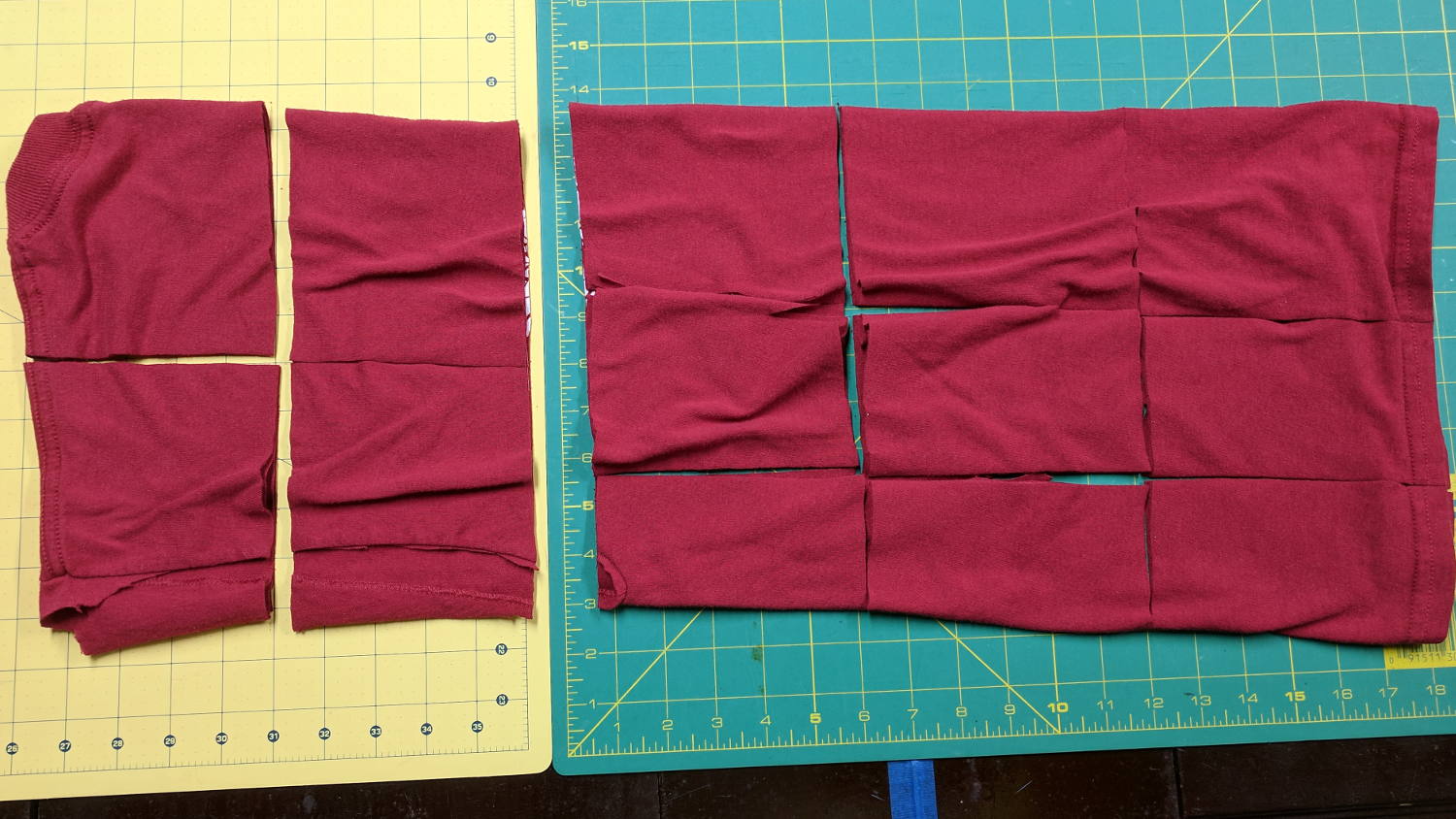
    Small wipes made from worn-out cotton t-shirts absorb most shop liquids, don’t overstay their welcome after short projects, and prevent the deep emotional attachment leaving swarf in the clothes washer. Scissors cutting gets tedious, so mooch a rotary cutter and slash away:

    T-shirt shop rags
    T-shirt shop rags

    Synthetic fabrics don’t work nearly as well as cotton, so pay attention to the labels.


  • Plotter Grit Wheel Bushings

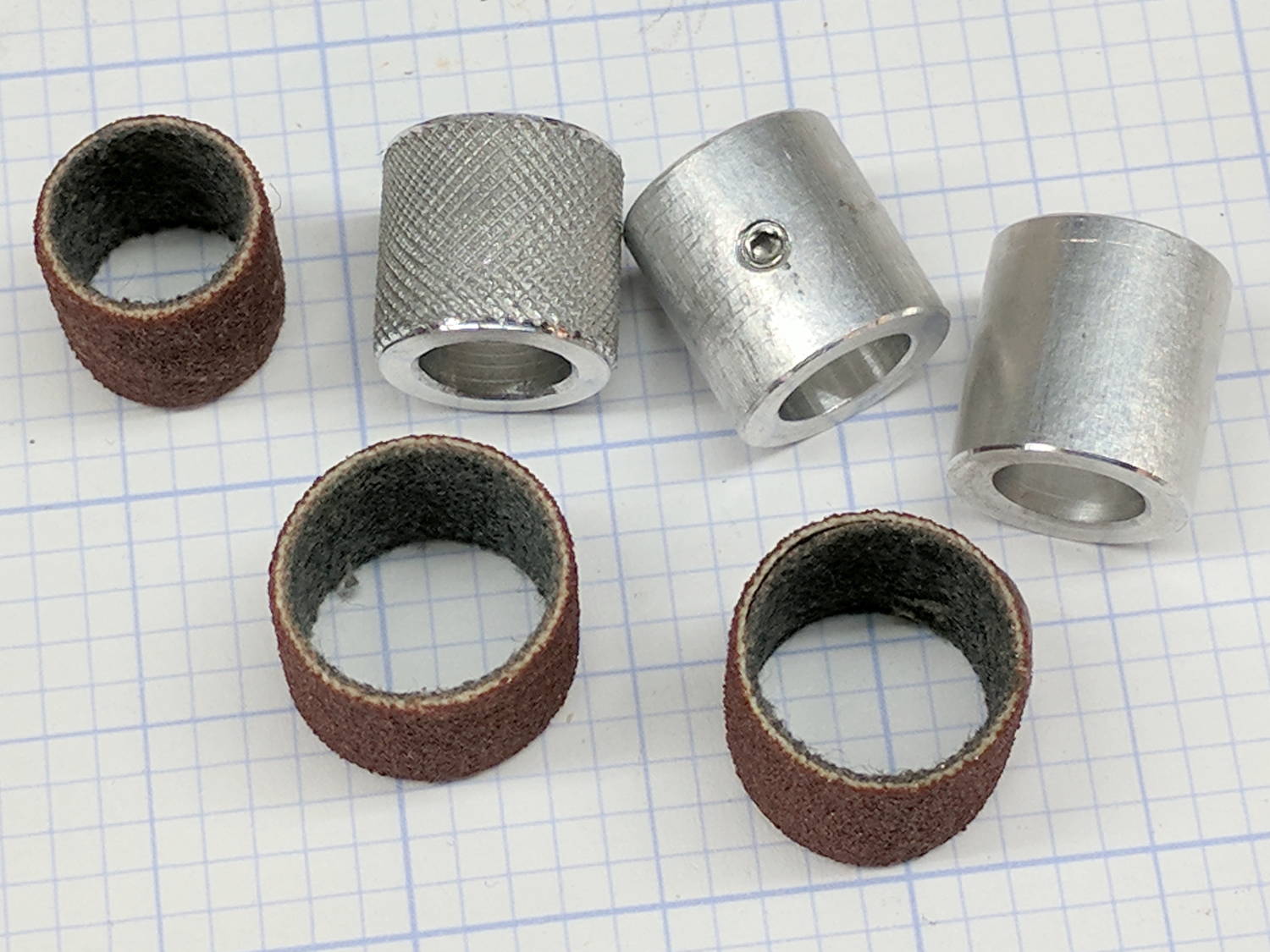
    As part of recommissioning the lathe tailstock, I made some bushings to adapt Dremel sanding drums bands to an 8 mm shaft (in imitation of the grit drive wheels on the HP plotter):

    Plotter Y bushing - samples
    Plotter Y bushing – samples

    They’re not all the same because the lad who’s building the plotter got to turn out his own bushings. We think the knurled version, with a setscrew to lock it on the shaft, will work better than adhesive-bonding the drum to the bushing.

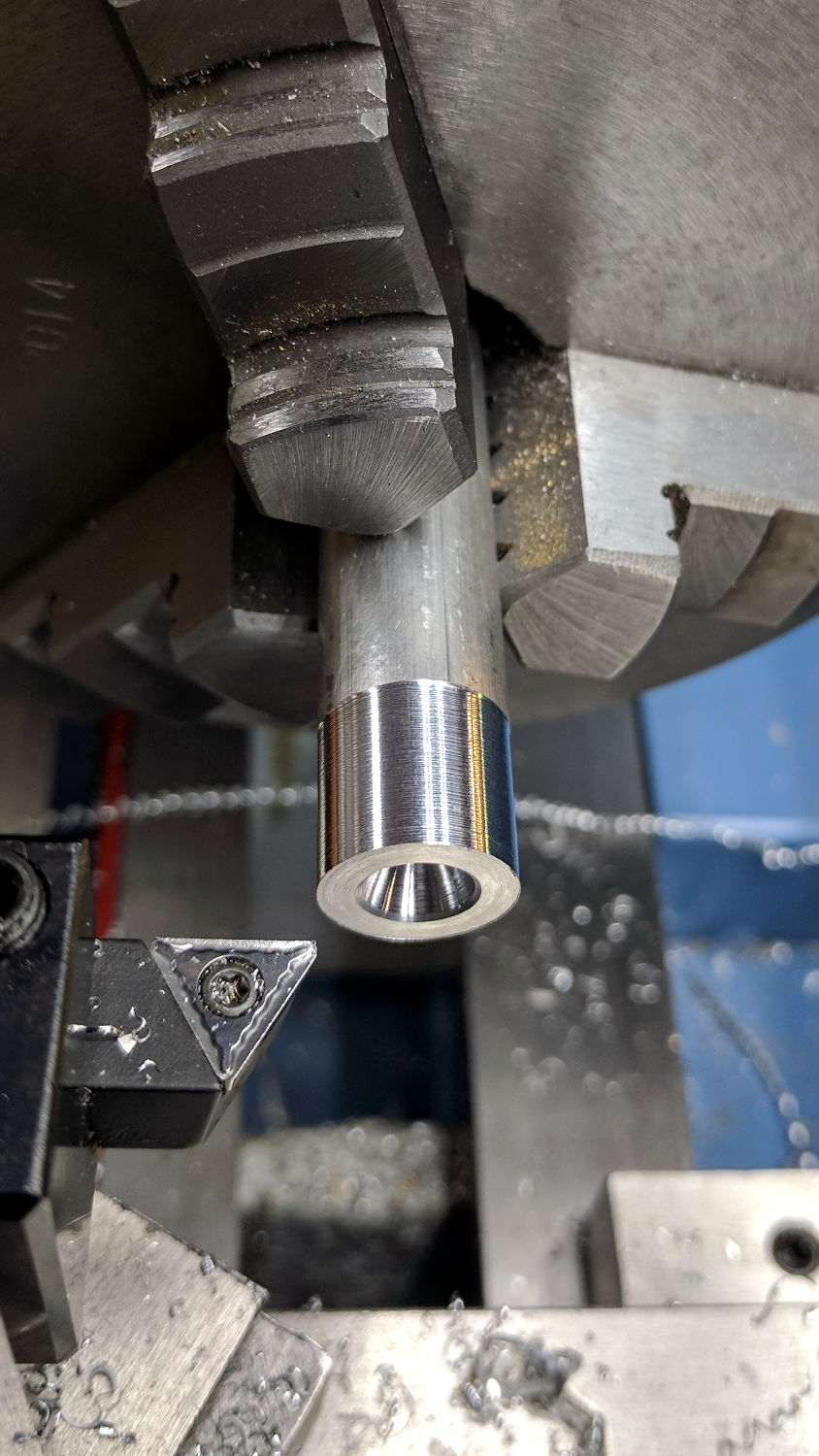
    The overall process starts with a rough 1/2 inch aluminum rod. Skim-cut to get a concentric surface and face the end smooth:

    Plotter Y bushing - facing
    Plotter Y bushing – facing

    Then knurl it:

    Plotter Y bushing - knurling
    Plotter Y bushing – knurling

    The skim cut makes the aluminum rod a loose fit inside the sanding band, but the knurling enlarges the diameter enough to make it a firm press fit and I think it’ll have enough traction to stay in place.

    FWIW, the wheels in the LittleMachineShop knurling tool seem pretty bad: the central holes aren’t quite concentric with the cutting edge, the bores are a loose fit on the mounting screws, the wheels are much narrower than the slots they ride in, so they wobble uncontrollably. It’s not a fatal flaw, but they definitely produce a sub-par knurl.

    Face off the front, cut the knurling down at each end, then part it off:

    Plotter Y bushing - cutoff
    Plotter Y bushing – cutoff

    Clamp it in the Sherline mill, laser-spot the edges, set the origin in the middle, and center drill:

    Plotter Y bushing - center drill
    Plotter Y bushing – center drill

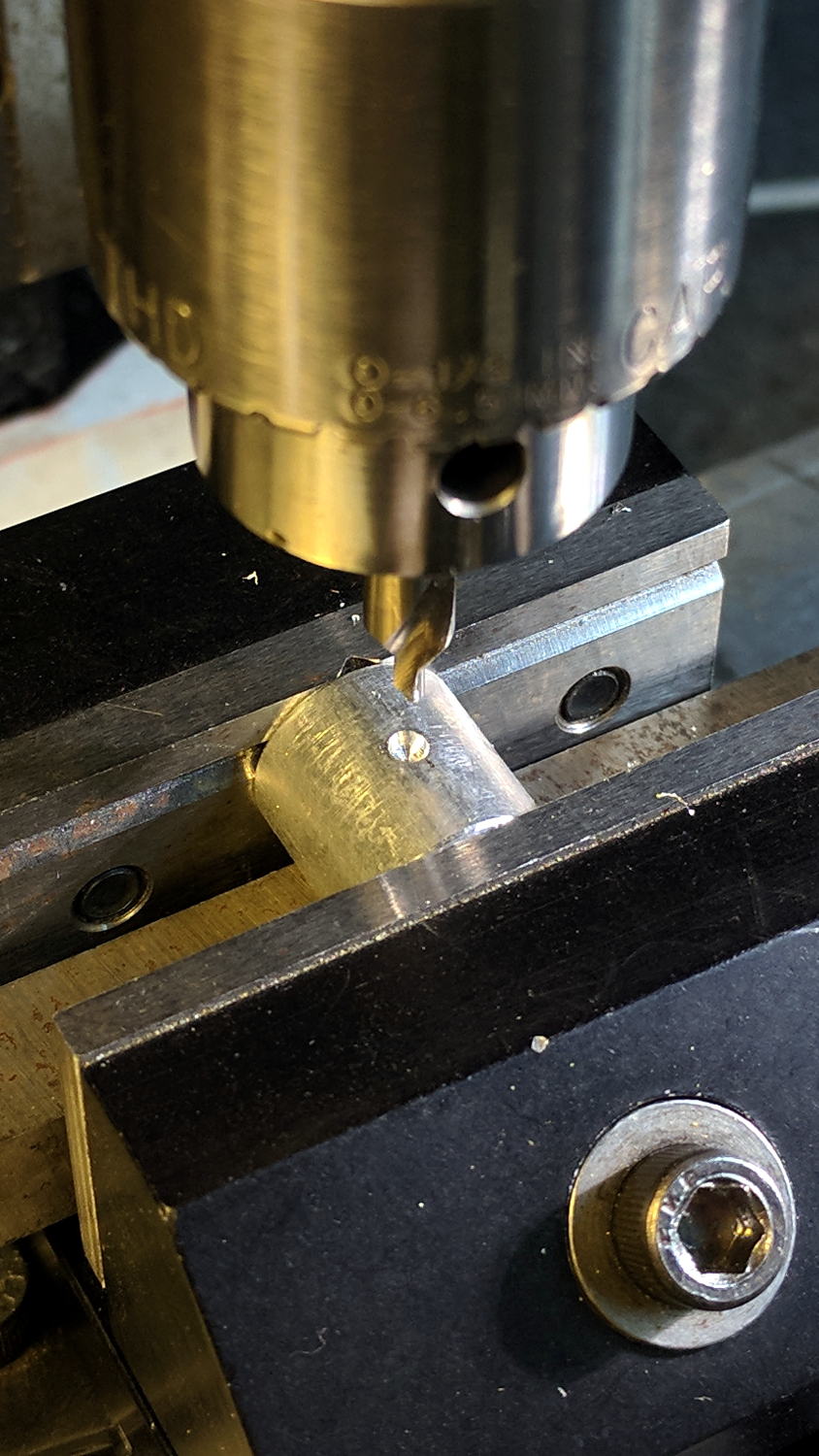
    Drill and tap for a teeny M3 setscrew:

    Plotter Y bushing - tapping
    Plotter Y bushing – tapping

    Clean out the chips, debur the hole, install the setscrew, and you’re half-done: do it again to get the second drive roller!


  • NEMA17 Motor and Bearing Mounts

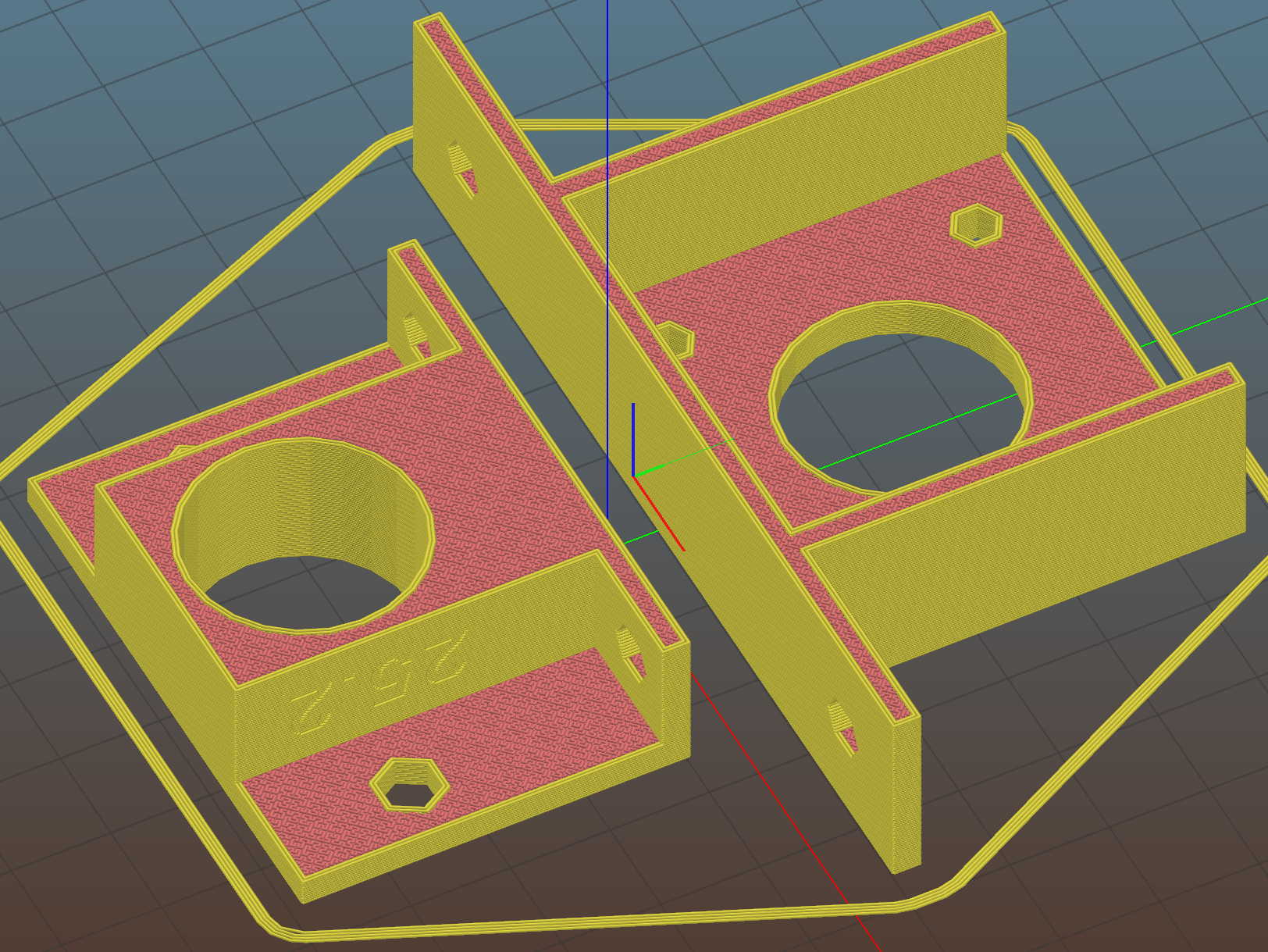
    As part of coaching a student (and his father!) on their incredibly ambitious build-a-plotter-from-scratch project, I suggested stealing using HP’s grit-wheel paper drive, rather than fiddling with guide rods to move either the pen carrier or the entire paper platform. Dremel sanding drums seem about the right size and they had an 8 mm shaft harvested from a defunct printer, so a pair of mounts moves the project along:

    NEMA17 and Bearing Mounts - Slic3r preview
    NEMA17 and Bearing Mounts – Slic3r preview

    The motor mount code is a hack job from my old NEMA17 mount and the code has a lot not to like. The bearing mount puts the bearing on the proper centerline using brute force copypasta and depends on friction to hold it in place. The two models should be integrated into the same file, the shaft centerline shouldn’t involve the printed thread width, and blah blah blah:

    NEMA17 motor and bearing mounts
    NEMA17 motor and bearing mounts

    I had him turn the shaft adapter from an aluminum rod in the mini-lathe: he’s hooked.

    The OpenSCAD source code as a GitHub Gist:

    // Ball bearing mount
    // Ed Nisley KE4ZNU 2017-10-09
    //– Extrusion parameters
    ThreadThick = 0.20;
    ThreadWidth = 0.40;
    HoleWindage = 0.2; // enlarge hole dia by this amount
    function IntegerMultiple(Size,Unit) = Unit * ceil(Size / Unit);
    Protrusion = 0.1; // make holes look good and joints intersect properly
    //– Useful sizes
    inch = 25.4;
    Tap10_32 = 0.159 * inch;
    Clear10_32 = 0.190 * inch;
    Head10_32 = 0.373 * inch;
    Head10_32Thick = 0.110 * inch;
    Nut10_32Dia = 0.433 * inch;
    Nut10_32Thick = 0.130 * inch;
    // Bearing sizes
    ID = 0;
    OD = 1;
    LENGTH = 2;
    Bearing = [8.0,22.0,7.0];
    ShaftHeight = IntegerMultiple(25.2,ThreadWidth); // arbitrary or copied from motor mount
    WallThick = 3.0;
    //– Mount Sizes
    MountSize = Bearing[OD] + 2*WallThick;
    BaseThick = max(WallThick,ShaftHeight – MountSize/2); // baseplate
    StandBoltHead = IntegerMultiple(Head10_32,2); // bolt head rounded up
    StandBoltClear = 1.25 * StandBoltHead;
    StandBoltOC = IntegerMultiple(MountSize + StandBoltClear,2);
    StandLength = StandBoltOC + StandBoltClear;
    StandThick = StandBoltClear + WallThick;
    StandHeight = MountSize + BaseThick;
    Cutout = (StandLength – MountSize)/2;
    echo(str("Stand Base: ",StandLength," x ",StandThick," x ",BaseThick));
    echo(str("Stand Bolt OC: ",StandBoltOC));
    echo(str("Shaft Height:",ShaftHeight));
    //———————-
    // Useful routines
    module PolyCyl(Dia,Height,ForceSides=0) { // based on nophead's polyholes
    Sides = (ForceSides != 0) ? ForceSides : (ceil(Dia) + 2);
    FixDia = Dia / cos(180/Sides);
    cylinder(r=(FixDia + HoleWindage)/2,
    h=Height,
    $fn=Sides);
    }
    //———————-
    // Put it together
    module BearingMount() {
    difference() {
    translate([BaseThick/2,0,StandThick/2])
    cube([StandHeight,StandLength,StandThick],center=true);
    translate([0,0,-Protrusion])
    PolyCyl(Bearing[OD],(StandThick + 2*Protrusion));
    for (j=[-1,1]) // cutouts over bolts
    translate([-(StandHeight/2 – ShaftHeight + WallThick),
    j*(StandLength/2 – Cutout/2 + Protrusion/2),
    (WallThick + StandThick/2)])
    cube([StandHeight,
    Cutout + Protrusion,
    StandThick],center=true);
    for (j=[-1,1]) // stand bolt holes – base
    translate([(MountSize/2 – Protrusion),
    j*StandBoltOC/2,
    WallThick + StandBoltClear/2])
    rotate([0,90,0])
    rotate(180/6)
    PolyCyl(Clear10_32,BaseThick + 2*Protrusion,6);
    for (j=[-1,1]) // stand bolt holes – back
    translate([0,j*StandBoltOC/2,-Protrusion])
    rotate(180/6)
    PolyCyl(Clear10_32,StandThick + 2*Protrusion,6);
    translate([0,-(MountSize/2 – ThreadWidth/2),(StandThick – WallThick)/2 + WallThick])
    rotate([90,180,0])
    linear_extrude(ThreadWidth,convexity=10)
    text(text=str(ShaftHeight),size=6,spacing=1.20,font="Arial",halign="center",valign="center");
    }
    }
    //———————-
    // Build it
    BearingMount();
    // NEMA 17 stepper mount
    // Ed Nisley KE4ZNU August 2011
    // Tweaked & thinned 2017-10-09
    //– Extrusion parameters
    ThreadThick = 0.25;
    ThreadWidth = 0.4;
    HoleWindage = 0.3; // enlarge hole dia by this amount
    function IntegerMultiple(Size,Unit) = Unit * ceil(Size / Unit);
    Protrusion = 0.1; // make holes look good and joints intersect properly
    //– Useful sizes
    inch = 25.4;
    Tap10_32 = 0.159 * inch;
    Clear10_32 = 0.190 * inch;
    Head10_32 = 0.373 * inch;
    Head10_32Thick = 0.110 * inch;
    Nut10_32Dia = 0.433 * inch;
    Nut10_32Thick = 0.130 * inch;
    NEMA17_ShaftDia = 5.0;
    NEMA17_ShaftLength = 24.0;
    NEMA17_PilotDia = 0.866 * inch;
    NEMA17_PilotLength = 0.080 * inch;
    NEMA17_BCD = 1.725 * inch;
    NEMA17_BoltDia = 3.5;
    NEMA17_BoltOC = 1.220 * inch;
    //– Mount Sizes
    MountWidth = IntegerMultiple(NEMA17_BCD,ThreadWidth); // use BCD for motor clearance
    MountThick = IntegerMultiple(4.0,ThreadThick); // for stiffness
    MountBoltDia = 3.0;
    StandThick = 3.0; // baseplate
    StrutThick = IntegerMultiple(3.0,ThreadWidth); // sides holding motor mount
    UprightLength = MountWidth + 2*StrutThick;
    StandBoltHead = IntegerMultiple(Head10_32,5); // bolt head rounded up
    StandBoltOC = IntegerMultiple(UprightLength + 2*StandBoltHead,5);
    StandLength = StandBoltOC + 2*StandBoltHead;
    StandWidth = 2*StandBoltHead;
    StandBoltClear = (StandLength – UprightLength)/2; // flat around bolt head
    MotorRecess = StandWidth – MountThick;
    ShaftHeight = IntegerMultiple(StandThick + MountWidth/2,ThreadWidth);
    echo(str("Stand Base: ",StandLength," x ",StandWidth," x ",StandThick));
    echo(str("Stand Bolt OC: ",StandBoltOC));
    echo(str("Shaft Height:",ShaftHeight));
    echo(str("Strut Thick: ",StrutThick));
    //———————-
    // Useful routines
    module PolyCyl(Dia,Height,ForceSides=0) { // based on nophead's polyholes
    Sides = (ForceSides != 0) ? ForceSides : (ceil(Dia) + 2);
    FixDia = Dia / cos(180/Sides);
    cylinder(r=(FixDia + HoleWindage)/2,
    h=Height,
    $fn=Sides);
    }
    //———————-
    // Model
    module MotorMount() {
    difference() {
    translate([StandThick/2,0,StandWidth/2])
    cube([(MountWidth + StandThick),StandLength,StandWidth],center=true);
    translate([-Protrusion/2,0,StandWidth – (MotorRecess – Protrusion)/2])
    cube([(MountWidth + Protrusion),MountWidth,(MotorRecess + Protrusion)],center=true);
    translate([0,0,-Protrusion]) // pilot hole
    PolyCyl(NEMA17_PilotDia,(MountThick + 2*Protrusion));
    for (i=[-1,1]) // motor bolt holes
    for (j=[-1,1])
    translate([i*NEMA17_BoltOC/2,j*NEMA17_BoltOC/2,-Protrusion])
    PolyCyl(MountBoltDia,(MountThick + 2*Protrusion),6);
    for (j=[-1,1]) // cutouts over bolts
    translate([-Protrusion/2,
    j*((StandLength – StandBoltClear)/2 + Protrusion/2),
    StandWidth/2])
    cube([(MountWidth + Protrusion),
    (StandBoltClear + Protrusion),
    (StandWidth + 2*Protrusion)],center=true);
    for (j=[-1,1]) // stand bolt holes
    translate([(MountWidth/2 – Protrusion),j*StandBoltOC/2,StandWidth/2])
    rotate([0,90,0])
    rotate(180/6)
    PolyCyl(Clear10_32,StandThick + 2*Protrusion,6);
    translate([0,-(UprightLength/2 – ThreadWidth/2),StandWidth/2])
    rotate([90,180,0])
    linear_extrude(ThreadWidth,convexity=10)
    text(text=str(ShaftHeight),size=6,spacing=1.20,font="Arial",halign="center",valign="center");
    }
    }
    //———————-
    // Build it
    MotorMount();
  • More Tommy Bar Handles

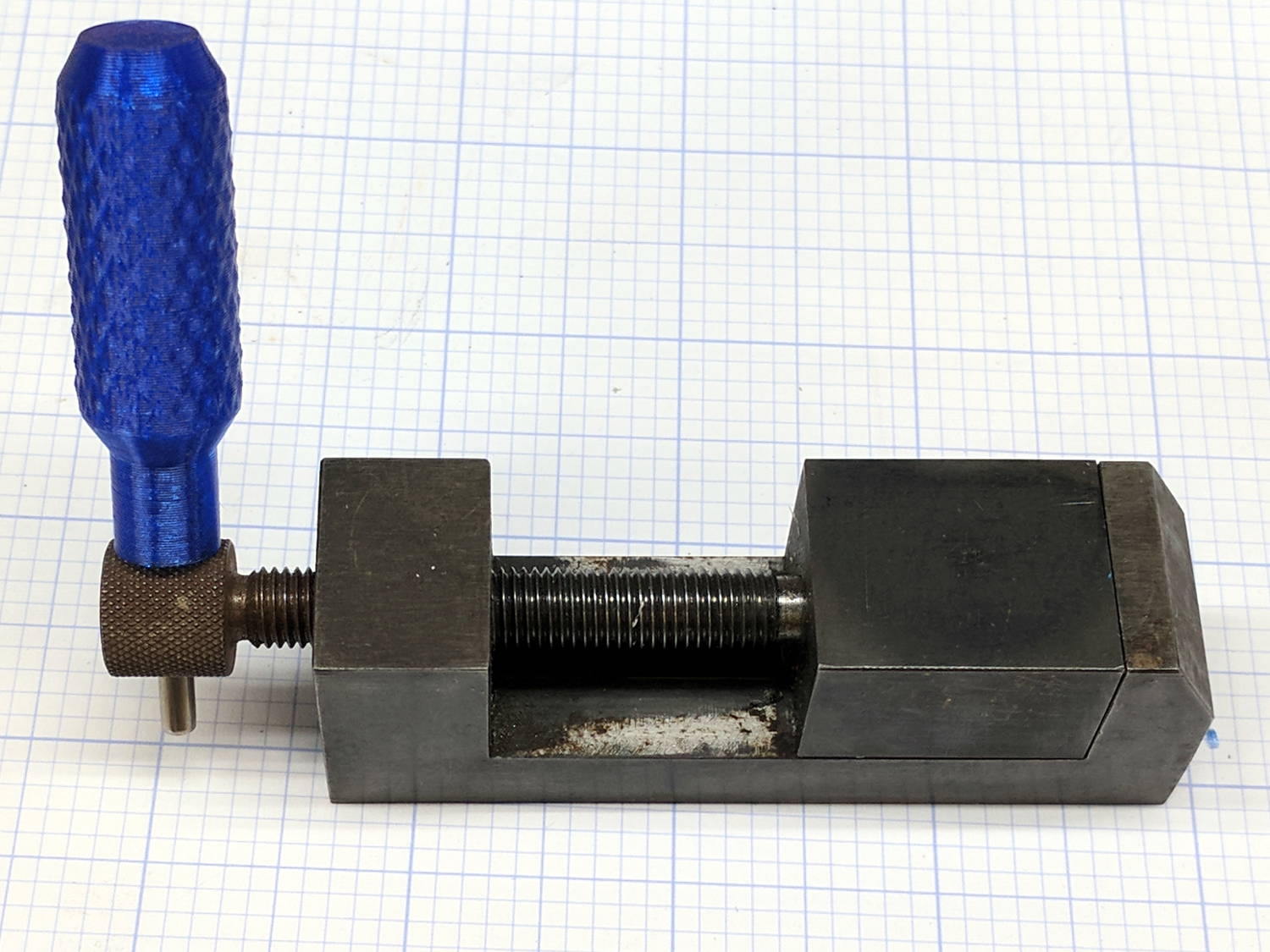
    Having used a nail for far too long, this is a definite step up for my machinist vises:

    Tommy Bar - machinist vise
    Tommy Bar – machinist vise

    The vise knob has a hole just barely passing a length of 3.4 mm = 9/64 inch mild steel rod from the Small Box o’ Cutoffs.

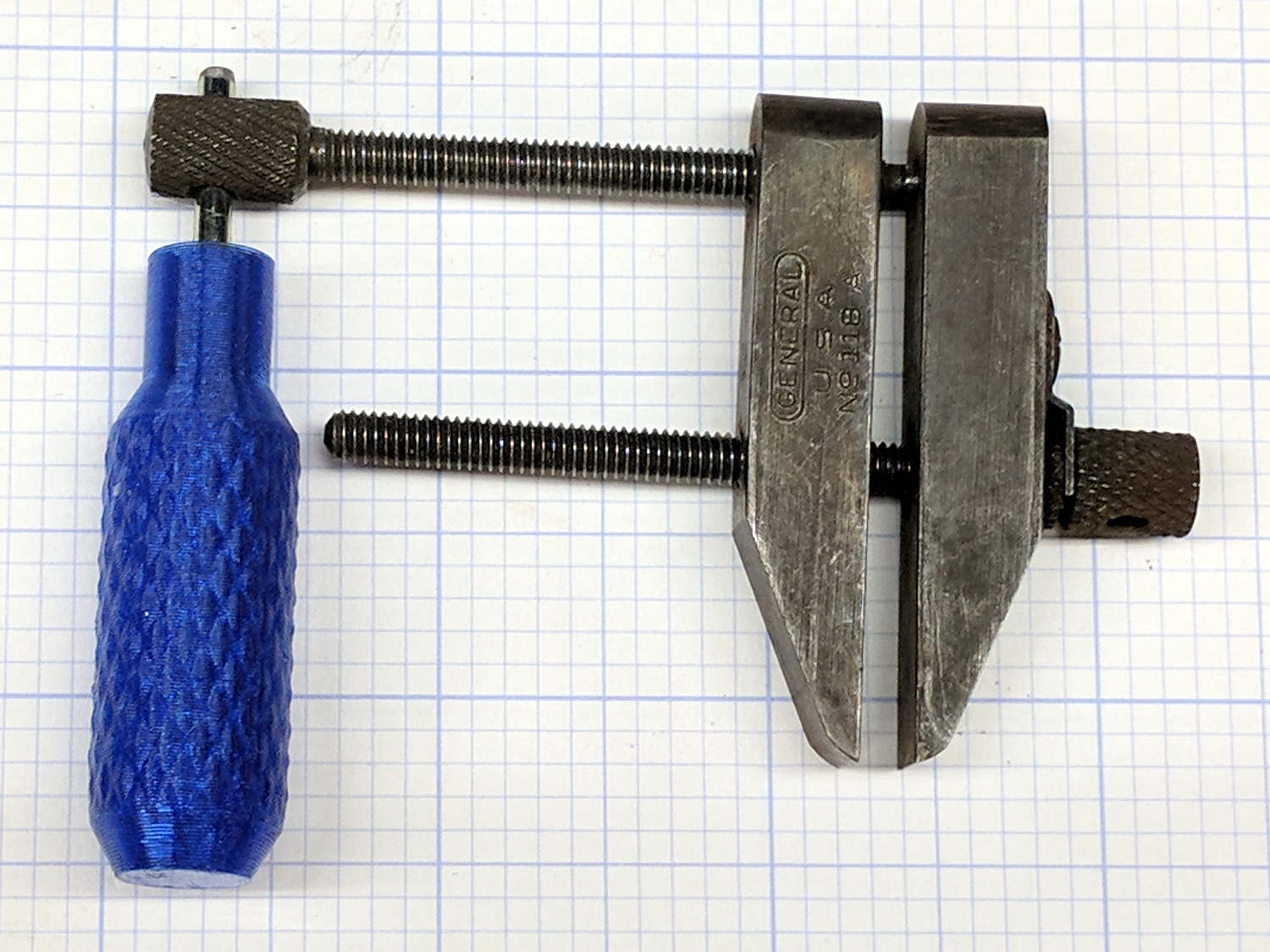
    While I was at it, I made a handle for the parallel jaw clamps:

    Tommy Bar - parallel jaw clamp
    Tommy Bar – parallel jaw clamp

    Those knobs pass a 3.0 mm = 1/8 inch rod, similarly sourced. Inexplicably, one clamp expected no more than a 7/64 inch rod; a brief introduction to Mr Drill Press persuaded it concerning the error of its ways.

    I should have made the handles distinctively different, because they’ll get mixed up in the box of vises & clamps. Next time, fer shure!

    The Tommy Bar handles use the same solid model as the Sherline Tommy Bars, with hole diameters as noted. Cyan PETG is definitely easier on the eye than red PLA, although it does fade into the background clutter around here.

  • Vacuum Tube Lights: Duodecar Rebuild

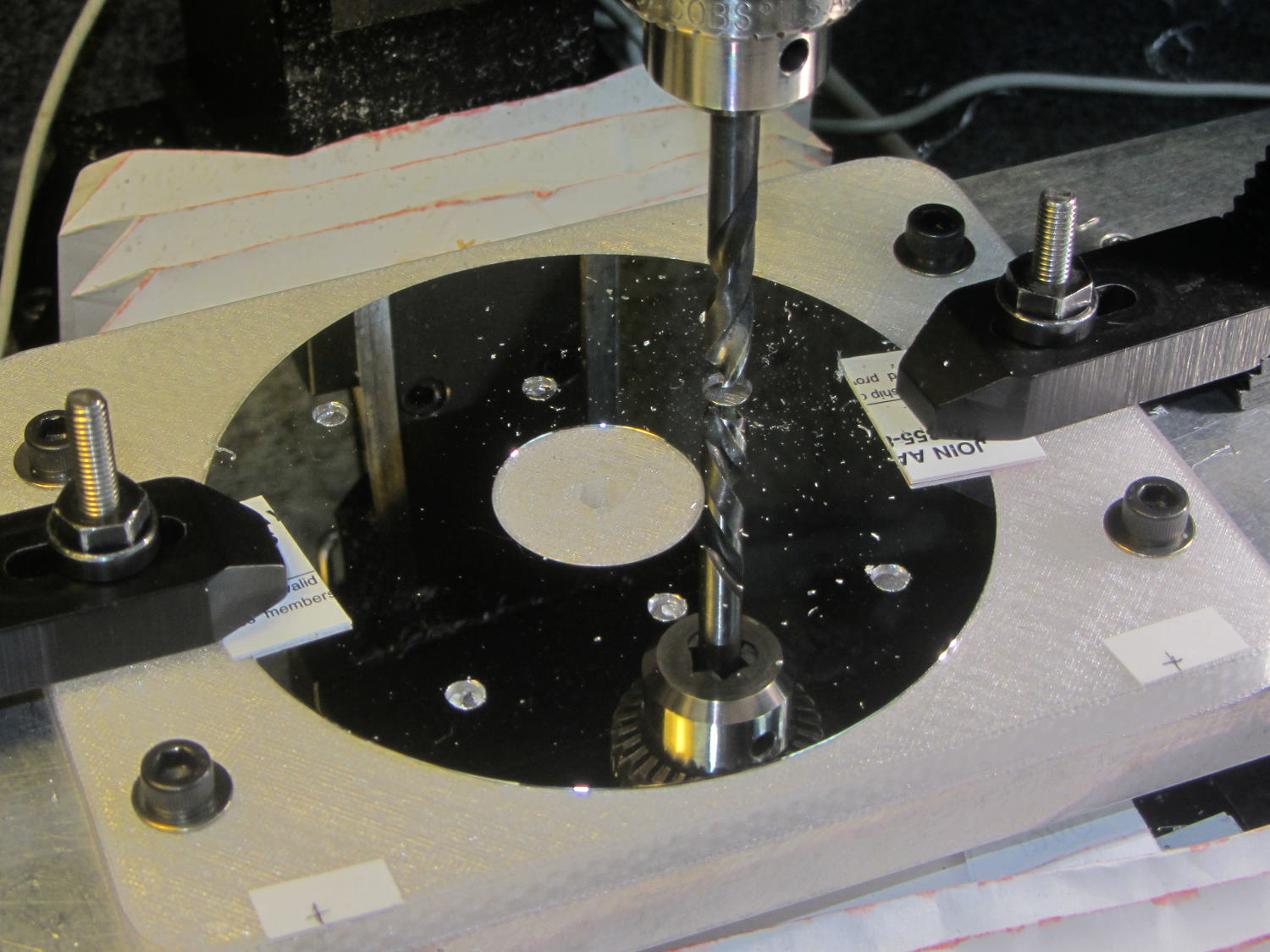
    You’ll recall the LED atop the 21HB5A tube failed, shortly after replacing the bottom LED and rewiring the ersatz plate lead, which led me to rebuild the whole thing with SK6812 RGBW LEDs. So I printed all the plastic parts again, because the duodecar tube socket’s pin circle can fit into a hard drive platter’s unmodified 25 mm hole, then drilled another platter to suit:

    Duodecar disk drilling
    Duodecar disk drilling

    The hole under the drill fits the 3.5 mm stereo socket for the ersatz plate lead, so it’s bigger than before.

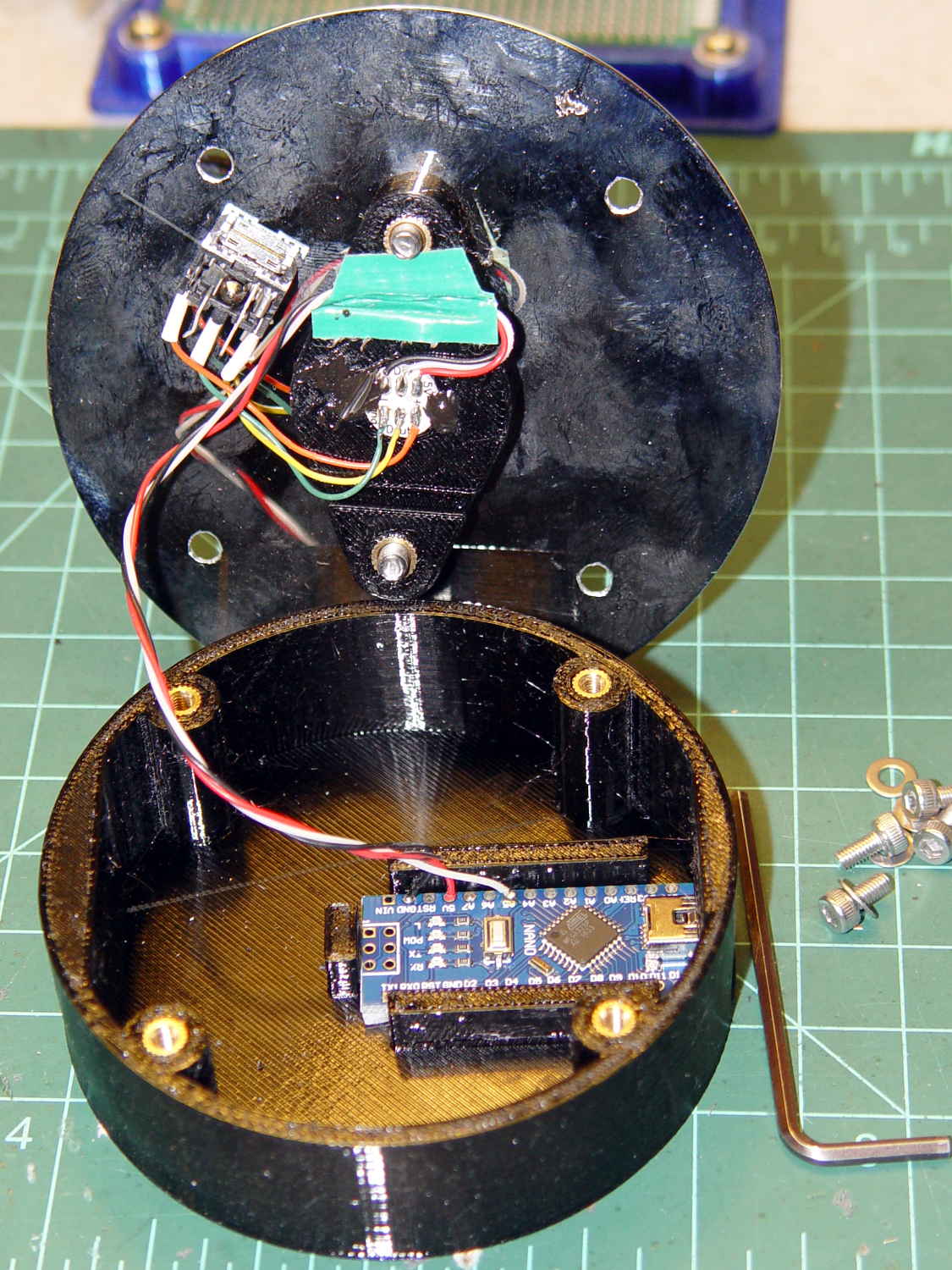
    I’ve switched from Arduino Pro Minis with a separate USB converter to Arduino Nanos with an on-board CH340 USB chip, because the fake FTDI chips on the converters are a continuing aggravation:

    21HB5A base - interior
    21HB5A base – interior

    Adding those wire slots to the sockets definitely helps tidy things up; the wires no longer need a crude cable tie anchoring them to the socket mounting screws.

    I wanted to drive the LEDs from the A7 pin, rather than the A3 pin I’d been using on the Pro Minis, to keep the wires closer together, but it turns out that A6 and A7 can’t become digital output pins. So I used A5, although I may come to regret the backward incompatibility.

    In any event, the 21HB5A tube looks spiffy with its new LEDs in full effect:

    21HB5A with RBGBW LEDs - cyan violet phase
    21HB5A with RBGBW LEDs – cyan violet phase

    I dialed the white LED PWM down to 32, making the colors somewhat pastel, rather than washed-out.

    The Arduino source code as a GitHub Gist:

    // Neopixel mood lighting for vacuum tubes
    // Ed Nisley – KE4ANU – June 2016
    // September 2016 – Add Morse library and blinkiness
    // October 2016 – Set random colors at cycle end
    // March 2017 – RGBW SK6812 LEDs
    #include <Adafruit_NeoPixel.h>
    #include <morse.h>
    #include <Entropy.h>
    //———-
    // Pin assignments
    const byte PIN_NEO = A5; // DO – data out to first Neopixel
    const byte PIN_HEARTBEAT = 13; // DO – Arduino LED
    #define PIN_MORSE 12
    //———-
    // Constants
    // number of pixels
    #define PIXELS 2
    // index of the Morse output pixel and how fast it sends
    boolean Send_Morse = false;
    #define PIXEL_MORSE (PIXELS – 1)
    #define MORSE_WPM 10
    // lag between adjacent pixel, degrees of slowest period
    #define PIXELPHASE 45
    // update LEDs only this many ms apart (minus loop() overhead)
    #define UPDATEINTERVAL 50ul
    #define UPDATEMS (UPDATEINTERVAL – 1ul)
    // number of steps per cycle, before applying prime factors
    #define RESOLUTION 500
    //———-
    // Globals
    // instantiate the Neopixel buffer array
    Adafruit_NeoPixel strip = Adafruit_NeoPixel(PIXELS, PIN_NEO, NEO_GRBW + NEO_KHZ800);
    uint32_t FullWhite = strip.Color(255,255,255,255);
    uint32_t FullOff = strip.Color(0,0,0,0);
    uint32_t MorseColor;
    struct pixcolor_t {
    unsigned int Prime;
    unsigned int NumSteps;
    unsigned int Step;
    float StepSize;
    float Phase;
    byte MaxPWM;
    };
    unsigned int PlatterSteps;
    byte PrimeList[] = {3,5,7,13,19,29};
    // colors in each LED
    enum pixcolors {RED, GREEN, BLUE, WHITE, PIXELSIZE};
    struct pixcolor_t Pixels[PIXELSIZE]; // all the data for each pixel color intensity
    uint32_t UniColor;
    unsigned long MillisNow;
    unsigned long MillisThen;
    // Morse code
    char * MorseText = " cq cq cq de ke4znu";
    LEDMorseSender Morse(PIN_MORSE, (float)MORSE_WPM);
    uint8_t PrevMorse, ThisMorse;
    //– Figure PWM based on current state
    byte StepColor(byte Color, float Phi) {
    byte Value;
    Value = (Pixels[Color].MaxPWM / 2.0) * (1.0 + sin(Pixels[Color].Step * Pixels[Color].StepSize + Phi));
    // Value = (Value) ? Value : Pixels[Color].MaxPWM; // flash at dimmest points for debug
    return Value;
    }
    //– Select three unique primes for the color generator function
    // Then compute all the step parameters based on those values
    void SetColorGenerators(void) {
    Pixels[RED].Prime = PrimeList[random(sizeof(PrimeList))];
    do {
    Pixels[GREEN].Prime = PrimeList[random(sizeof(PrimeList))];
    } while (Pixels[RED].Prime == Pixels[GREEN].Prime);
    do {
    Pixels[BLUE].Prime = PrimeList[random(sizeof(PrimeList))];
    } while (Pixels[BLUE].Prime == Pixels[RED].Prime ||
    Pixels[BLUE].Prime == Pixels[GREEN].Prime);
    do {
    Pixels[WHITE].Prime = PrimeList[random(sizeof(PrimeList))];
    } while (Pixels[WHITE].Prime == Pixels[RED].Prime ||
    Pixels[WHITE].Prime == Pixels[GREEN].Prime ||
    Pixels[WHITE].Prime == Pixels[BLUE].Prime);
    printf("Primes: %d %d %d %d\r\n",Pixels[RED].Prime,Pixels[GREEN].Prime,Pixels[BLUE].Prime,Pixels[WHITE].Prime);
    Pixels[RED].MaxPWM = 255;
    Pixels[GREEN].MaxPWM = 255;
    Pixels[BLUE].MaxPWM = 255;
    Pixels[WHITE].MaxPWM = 32;
    unsigned int PhaseSteps = (unsigned int) ((PIXELPHASE / 360.0) *
    RESOLUTION * (unsigned int) max(max(max(Pixels[RED].Prime,Pixels[GREEN].Prime),Pixels[BLUE].Prime),Pixels[WHITE].Prime));
    printf("Pixel phase offset: %d deg = %d steps\r\n",(int)PIXELPHASE,PhaseSteps);
    for (byte c=0; c < PIXELSIZE; c++) {
    Pixels[c].NumSteps = RESOLUTION * Pixels[c].Prime; // steps per cycle
    Pixels[c].StepSize = TWO_PI / Pixels[c].NumSteps; // radians per step
    Pixels[c].Step = random(Pixels[c].NumSteps); // current step
    Pixels[c].Phase = PhaseSteps * Pixels[c].StepSize;; // phase in radians for this color
    printf(" c: %d Steps: %d Init: %d Phase: %d deg",c,Pixels[c].NumSteps,Pixels[c].Step,(int)(Pixels[c].Phase * 360.0 / TWO_PI));
    printf(" PWM: %d\r\n",Pixels[c].MaxPWM);
    }
    }
    //– Helper routine for printf()
    int s_putc(char c, FILE *t) {
    Serial.write(c);
    }
    //——————
    // Set the mood
    void setup() {
    pinMode(PIN_HEARTBEAT,OUTPUT);
    digitalWrite(PIN_HEARTBEAT,LOW); // show we arrived
    Serial.begin(57600);
    fdevopen(&s_putc,0); // set up serial output for printf()
    printf("Vacuum Tube Mood Light – RGBW\r\nEd Nisley – KE4ZNU – March 2017\r\n");
    Entropy.initialize(); // start up entropy collector
    // set up pixels
    strip.begin();
    strip.show();
    // lamp test: a brilliant white flash
    printf("Lamp test: flash white\r\n");
    for (byte i=0; i<5 ; i++) {
    for (int j=0; j < strip.numPixels(); j++) { // fill LEDs with white
    strip.setPixelColor(j,FullWhite);
    }
    strip.show();
    delay(500);
    for (int j=0; j < strip.numPixels(); j++) { // fill LEDs with black
    strip.setPixelColor(j,FullOff);
    }
    strip.show();
    delay(500);
    }
    // get an actual random number
    uint32_t rn = Entropy.random();
    printf("Random seed: %08lx\r\n",rn);
    randomSeed(rn);
    // set up the color generators
    SetColorGenerators();
    // set up Morse generator
    Morse.setup();
    Morse.setMessage(String(MorseText));
    MorseColor = strip.Color(255,random(32,64),random(16),0);
    PrevMorse = ThisMorse = digitalRead(PIN_MORSE);
    printf("Morse enabled: %d at %d wpm color: %08lx\n [%s]\r\n",Send_Morse,MORSE_WPM,MorseColor,MorseText);
    MillisNow = MillisThen = millis();
    }
    //——————
    // Run the mood
    void loop() {
    if (!Morse.continueSending()) {
    printf("Restarting Morse message\r\n");
    Morse.startSending();
    }
    ThisMorse = digitalRead(PIN_MORSE);
    MillisNow = millis();
    if (((MillisNow – MillisThen) >= UPDATEMS) || // time for color change?
    (PrevMorse != ThisMorse)) { // Morse output bit changed?
    digitalWrite(PIN_HEARTBEAT,HIGH);
    if (Send_Morse && ThisMorse) { // if Morse output high, overlay flash
    strip.setPixelColor(PIXEL_MORSE,MorseColor);
    }
    PrevMorse = ThisMorse;
    strip.show(); // send out precomputed colors
    boolean CycleRun = false; // check to see if all cycles have ended
    for (byte c=0; c < PIXELSIZE; c++) { // compute next increment for each color
    if (++Pixels[c].Step >= Pixels[c].NumSteps) {
    Pixels[c].Step = 0;
    printf("Cycle %d steps %d at %8ld delta %ld ms\r\n",c,Pixels[c].NumSteps,MillisNow,(MillisNow – MillisThen));
    }
    else {
    CycleRun = true; // this color is still cycling
    }
    }
    // If all cycles have completed, reset the color generators
    if (!CycleRun) {
    printf("All cycles ended: setting new color generator values\r\n");
    SetColorGenerators();
    }
    for (int i=0; i < strip.numPixels(); i++) { // for each pixel
    byte Value[PIXELSIZE];
    for (byte c=0; c < PIXELSIZE; c++) { // … for each color
    Value[c] = (Pixels[c].MaxPWM / 2.0) * (1.0 + sin(Pixels[c].Step * Pixels[c].StepSize – i*Pixels[c].Phase));
    }
    UniColor = strip.Color(Value[RED],Value[GREEN],Value[BLUE],Value[WHITE]);
    strip.setPixelColor(i,UniColor);
    }
    MillisThen = MillisNow;
    digitalWrite(PIN_HEARTBEAT,LOW);
    }
    }
    view raw TubeMorse.ino hosted with ❤ by GitHub