The Smell of Molten Projects in the Morning

Ed Nisley's Blog: Shop notes, electronics, firmware, machinery, 3D printing, laser cuttery, and curiosities. Contents: 100% human thinking, 0% AI slop.

Tag: Repairs

If it used to work, it can work again

  • Harbor Freight 12 Inch Bar Clamp: Handle Failure

    Harbor Freight’s 12 Inch Ratcheting Bar Clamps come with a clear description:

    The 12 in. ratchet bar clamp/spreader is a light duty tool that’s perfect for delicate woodwork or scale modeling.

    Yeah, right. (*)

    It’s an awkward, clunky, heavy steel bar with chunky plastic fittings, not at all suitable for “delicate woodwork”. In my case, I attempted to clamp a 4×4 block against a bonded pair of of 2×4 studs before drilling a pair of bolt holes, whereupon one of the clamps failed. I deployed a spare clamp (always have a backup) and completed the mission.

    An autopsy showed the problem:

    Harbor Freight Bar Clamp - failed handle pivot
    Harbor Freight Bar Clamp – failed handle pivot

    The orange handle magnifies the applied force by the (more or less) 4:1 lever arm and applies it against two hollow plastic bosses on the side plates. The one just below the handle broke free, which is exactly what you’d expect to happen.

    The through hole looks like it should pass a pivot, but that’s not the case:

    Harbor Freight Bar Clamp - handle detail 1
    Harbor Freight Bar Clamp – handle detail 1

    I drilled out the hole just slightly to fit a snippet of brass tubing:

    Harbor Freight Bar Clamp - brass bushing
    Harbor Freight Bar Clamp – brass bushing

    If the tubing looks slightly off-center, that’s because it is. The two halves of the injection mold weren’t aligned, as you can see along the top edge of the picture, putting the hole off-center. The broken boss took most of the reaction force from the handle: a poor bad design compounded by crappy production QC.

    I filled the empty spaces with epoxy, topped it off with a pair of washers, match-drilled holes in the side plates, and ran a stainless 8-32 screw through the brass tubing:

    Harbor Freight Bar Clamp - reinforced pivot
    Harbor Freight Bar Clamp – reinforced pivot

    The end-on view shows the misaligned handle halves:

    Harbor Freight Bar Clamp - repaired - edge view
    Harbor Freight Bar Clamp – repaired – edge view

    It’s not nearly as stylish, but the handle pivot won’t fail again. I should preemptively repair the other clamps, but …

    “Harbor Freight: The Home of Single-Use Tools” once again performs as expected.

    (*) That’s a rare example of a double positive statement denoting a negative opinion, by the way.

  • HP 7475A Plotter: Pen Performance and a Backup

    By now, I have half a dozen baggies each containing half a dozen plotter pens, plus a demo program that can produce good-looking Superformula plots, so I can do this without any hassle:

    HP 7475A 2541A 68465 - Random pens
    HP 7475A 2541A 68465 – Random pens

    And this:

    HP 7475A 2641V 26599 - Random pens
    HP 7475A 2641V 26599 – Random pens

    I must confess to not being good at withstanding temptation; the second plot comes from another HP 7475A plotter that I won on eBay:

    Stacked HP 7475A Plotters
    Stacked HP 7475A Plotters

    Apparently, nobody else wanted a plotter advertised as “non-working”, leaving me as the sole bidder. The photos showed that it powered up properly, sported a serial (not HPIB) interface, had an (empty) carousel with rubber pen boots (that were, oddly enough, not fossilized), and came with a complete set of manuals. Turns out any one of those items sells for more than the entire package, so I can part it out, flip the pieces, and Profit! if I were so inclined.

    Load the carousel with a handful of restored pens, insert a sheet of paper, hold down the P1 + P2 buttons, flip the power switch, and out comes a perfectly drawn demo plot:

    HP 7475A 2641V 26588 - Firmware Demo Plot
    HP 7475A 2641V 26588 – Firmware Demo Plot

    Compared with the first plot from the first plotter, I’m plotting like it’s 1989!

    Which was the title of my Lightning Talk for the MHV LUG: MHVLUG – HP 7475A Demo – Plot Like Its 1989

    Anyway, now I have a backup…

  • HP 7475A Plotter: Refilled Pen Performance

    During this plot, an Inmac purple pen (in the Pen 5 slot) pretty much ran out of ink:

    HP 7475A - Pen 5 before refill
    HP 7475A – Pen 5 before refill

    It printed the legend perfectly and started the trace solidly enough, proceeding upward from the far right, but after ten circuits around the center it returned dragging a very faint line behind it.

    Ten drops = 0.05 ml of more-or-less reddish purple blended inkjet ink restored its good humor:

    HP 7475A - Pen 5 after refill
    HP 7475A – Pen 5 after refill

    If you get ’em before they fossilize, they’re refillable!

  • HP 7475A Plotter: Inmac Ball-point Pen

    Just for a change, I punched a new-old-stock Inmac pen from its sealed blister pack, only to find that it left a spotty trail. These being easy to refill, I popped the top, flipped the fiber reservoir, added ten drops of HP2000C black (i.e., not the crappiest ink I’ve ever used), and scribbled a few feet to get it started again. It left a good-enough trace, so I ran an A-size plot with the ball pen, two liquid ink pens, and a refilled ceramic pen:

    HP 7475A - Inmac ball - liquid - ceramic - pens
    HP 7475A – Inmac ball – liquid – ceramic – pens

    It’s a bit pallid compared with the black ceramic pen. The line is continuous and, in comparison with all the other plotter pens in the collection, very very very fine.

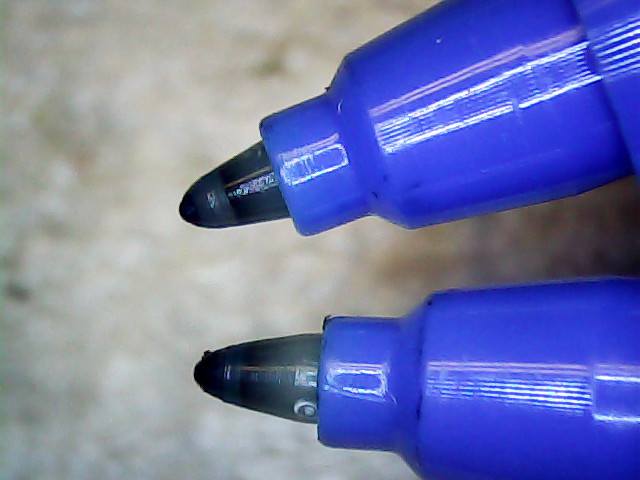
    Turns out that it’s a miniature ball-point pen:

    Inmac ball pen tip
    Inmac ball pen tip

    I’m certain that water-based inkjet juice isn’t the right stuff for a ball-point pen, which may account for the lack of color. It’d be most appropriate for a document with fine text details, not that I must plot any of those at the moment.

    There’s a bag with a dozen more of ’em in various cheerful colors, so, if I could just think of something that needed stubby ballpoint pens, I’d be all set.

    It might be intended for a different HP plotter that applies more downforce to give the ball more encouragement. We’ll never know…

  • 3D Printer Platform Alignment: Details Matter

    Being that type of guy, I measure the single-layer skirt threads to keep track of the platform alignment. Most of the time, nothing happens, because the M2 has a remarkably stable platform, but some of the objects I’d done in early August showed more than the usual variation and, worryingly, no discernible trend.

    Successive sets of thinwall hollow boxes showed the instability:

    M2 Alignment measurements - 2015-08-09 - 1
    M2 Alignment measurements – 2015-08-09 – 1

    Adjusting the platform alignment between each of those sets produced no consistent effect, which is most unusual. The X in the bottom set shows where that thinwall box came unstuck from the platform, indicating that the clearance was considerably more than the nominal 0.25 mm layer height.

    Peering under platform revealed something else that was quite unusual:

    M3 washer - bad seating
    M3 washer – bad seating

    That washer should be flat against the spider mounting plate. My first thought was a burr on the plate, but that didn’t make any sense, as the plate was clean & smooth when I installed the platform; I’d enlarged those holes with a fine file and would have checked for burrs as part of that operation.

    Removing the screw nut and extracting the washer revealed the true problem:

    M3 washer with burrs
    M3 washer with burrs

    It’s a bad washer!

    Tossing that one in the trash and installing a good washer put everything in order:

    M3 washer - proper seating
    M3 washer – proper seating

    Well, that’s after re-doing the alignment to un-do the previous flailing around, of course.

    As nearly as I can tell, that washer sat there without causing any trouble since I installed the hotrod platform. or, more likely, when I repaired a failed screw. In late July I poked the platform to measure how much it moved under pressure, which apparently dislodged the washer and put the burr in play.

    That’s how sensitive a 3D printer is to mechanical problems…

  • HP 7475A Plotter: Zombie Pens

    Following madbodger’s recommendation, but finding no local sources, a bottle of Koh-I-Noor Rapido-EZE Pen Cleaner solvent arrived. It’s billed as a solvent & cleaner for drafting ink, not plotter ink, which seems like an unnatural restriction.

    I’d previously tried refilling some fossilized pens, only to find that the ink simply won’t flow through a nib filled with dried ink. So the pens you’ll see here have refilled reservoirs atop nibs that don’t write.

    Dismantling the Koh-I-Noor black pen produced this unsightly mess:

    HP 7475A - Koh-i-Noor black pen parts
    HP 7475A – Koh-i-Noor black pen parts

    I pushed the nib out of the shell using a pin punch, pretty thoroughly crushing the tip in the process. The ink reservoir looks like some sort of fluff inside a plastic sleeve, with a hole left by the butt end of the nib and a crust left by the evaporating ink. I scraped off the crust, put the nib in a cylinder filled with solvent, and let it sit for a few days, after which most of the black ink had vanished.

    I reassembled the pen with the blunted end of the nib inside the body and the reservoir flipped end-for-end, in the hope that would work better.

    Trying a different tactic with a Staedtler green pen, I removed the reservoir, filled the body with solvent, and dunked the tip in a solvent bath:

    HP 7475A - Staedtler pen - nib soaking
    HP 7475A – Staedtler pen – nib soaking

    After a few days, the body was still mostly full of solvent, so it’s not flowing freely through the nib. Perhaps leaving the nib in air would encourage the fluid to move outward, at the risk of drying the nib even more.

    Refilling them with inkjet printer ink produced this:

    HP 7475A - Koh-I-Noor 2 - Staedtler 3 - zombie pens
    HP 7475A – Koh-I-Noor 2 – Staedtler 3 – zombie pens

    Pen 2, the gray K-I-N trace, seems a bit pallid, likely due to using cheap black inkjet ink. Apart from that, it’s continuous and presentable.

    Pen 3, the green Staedtler, remains in the land of the undead; its ink flows better than before, but not enough to be worthwhile. The demo routine writes the annotation first and those characters came out well enouigh.

    The other two pens also carry refilled ink: Pen 1 = ceramic tip, Pen 4 = Staedtler fiber (which, judging from the cap color, started out as gray and has become much darker after the inkjet ink refill).

    All in all, a modest success and I’ll try again later. Better, however, to refill each pen before it dries out, as with the two “good” pens.

  • Casio EX-Z850 Shutter Failure

    After nine years, the shutter on my muchrepaired Casio EX-Z850 camera has failed, producing images with horizontal white lines:

    Casio EX-Z850 Shutter Failure
    Casio EX-Z850 Shutter Failure

    That can also come from a sensor failure, but it takes perfectly good movies. That’s the differential diagnosis for shutter failure, because movies don’t use the shutter.

    The shutter still functions, in that peering into the lens shows the shutter closing as it takes a picture, so I suspect it’s gotten a bit sticky and slow over the years. None of the various shutter-priority speeds have any effect, which means that the shutter isn’t responding properly.

    A quick read of the service manual shows the Field Replaceable Unit for this situation is the entire lens assembly. Back in the day, a new lens assembly came with its own calibration constants on a floppy disk that you’d install with Casio’s service program (the latest version ran with Windows 98!) using a special USB communication mode triggered by a Vulcan Nerve Pinch on the camera. At this late date, none of that stuff remains available.

    While I could take the camera apart and crack the lens capsule open, I doubt that would make it better and, in this case, ending up with a crappy camera doesn’t count for much. Extracting the lens assembly requires dismantling the entire thing, which, frankly, doesn’t seem worth the effort…

    That image is number 7915: so it’s taken a bit over two images per day for the last nine years. I can’t swear the counter has never been reset, but that seems about right.

    Sic transit gloria mundi, etc.