The Smell of Molten Projects in the Morning

Ed Nisley's Blog: Shop notes, electronics, firmware, machinery, 3D printing, laser cuttery, and curiosities. Contents: 100% human thinking, 0% AI slop.

Tag: M2

Using and tweaking a Makergear M2 3D printer

  • Makergear M2: The End of Torture Test Objects

    While pulling together a talk on OpenSCAD modeling (more on this later), I ran off a batch of calibration and “torture test” objects, with the intent of seeing how my somewhat modified M2 performs. The short answer is that you (well, I) can’t ask for anything better…

    Using my OpenSCAD module based on nophead’s polyholes to adjust low-vertex polygons by a constant +0.2  mm produces results that are within ±0.1 mm of the nominal value for holes larger than 3.0 mm:
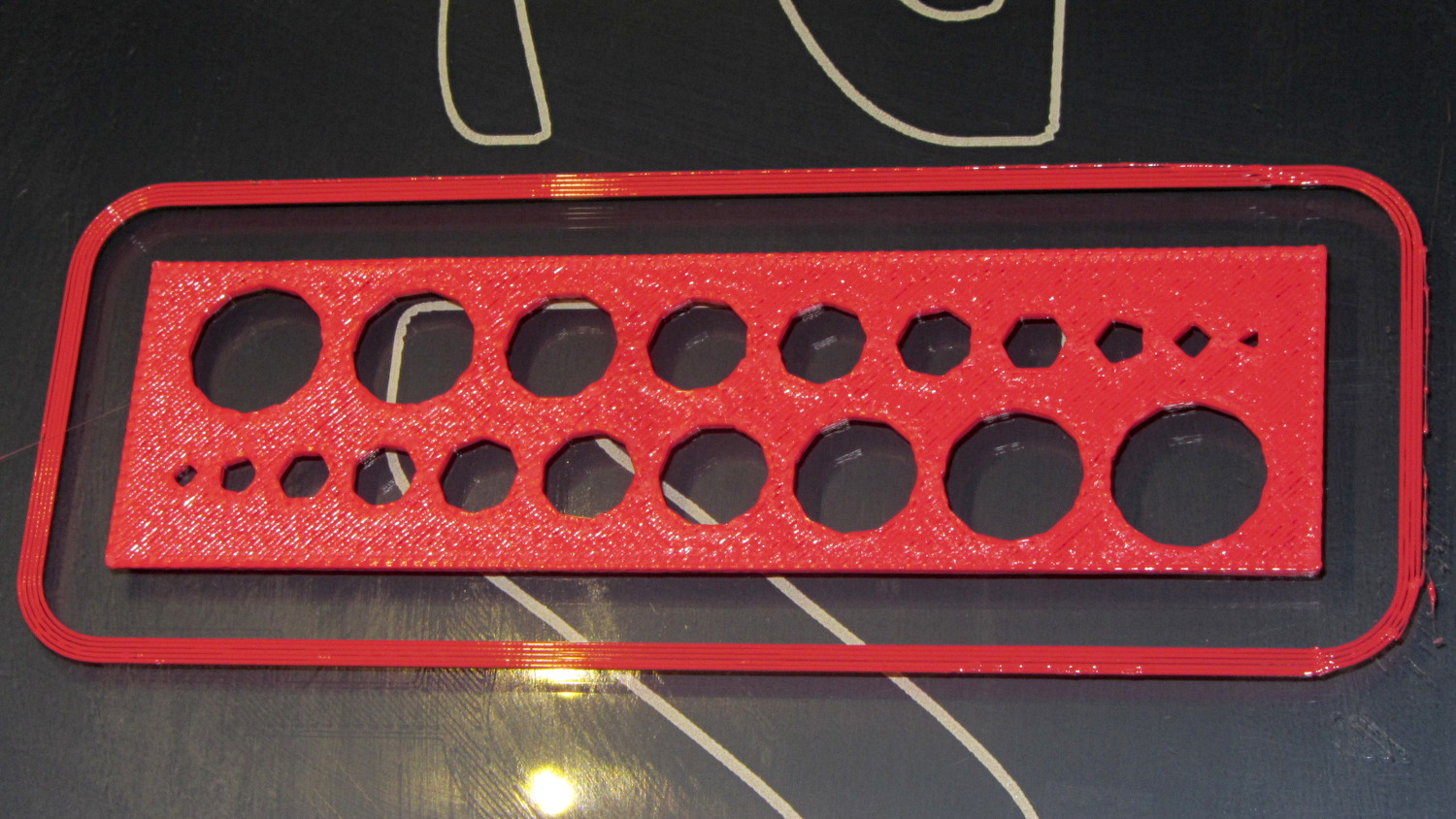
    M2 - Small Hole Calibration Test
    M2 – Small Hole Calibration Test

    That level of as-printed cleanliness is typical: no stringing, no hair, no misplaced globs, no retraction problems. Basically, the plastic shape on the platform matches the mathematical shape on screen.

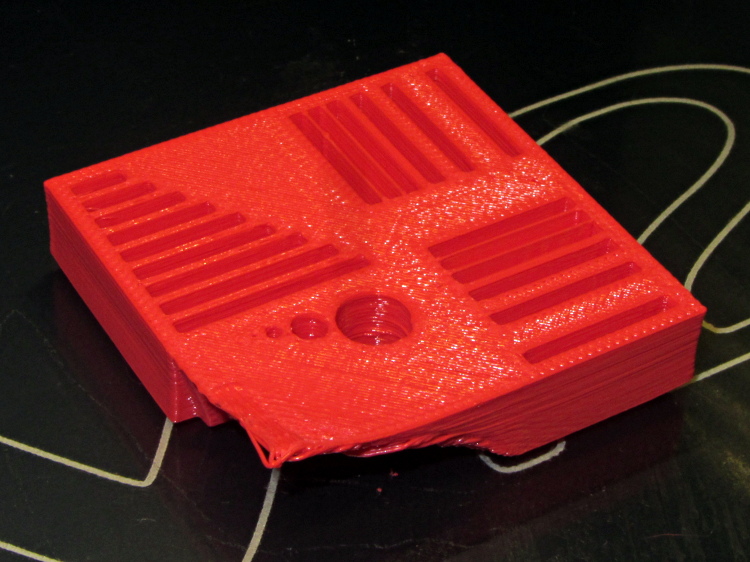
    Goaran’s Calibration Block came out fine, except for the intended-to-be-impossible overhangs:
    M2 - Calibration Block - overview
    M2 – Calibration Block – overview

    All of the linear features are with ±0.1 mm of nominal; both the 0.5 and 0.25 mm walls came out at 0.40 mm, because that’s the thread width. Slic3r doggedly puts a thread down the middle of hair-fine walls, which I think is a Good Thing.

    The holes came out less than 0.3 mm undersize, which is about what you’d expect because they’re not pre-distorted and have far too many sides. The 1.0 and 0.5 mm diameter holes are present, but just barely visible; those simply aren’t reasonable sizes for this technology.

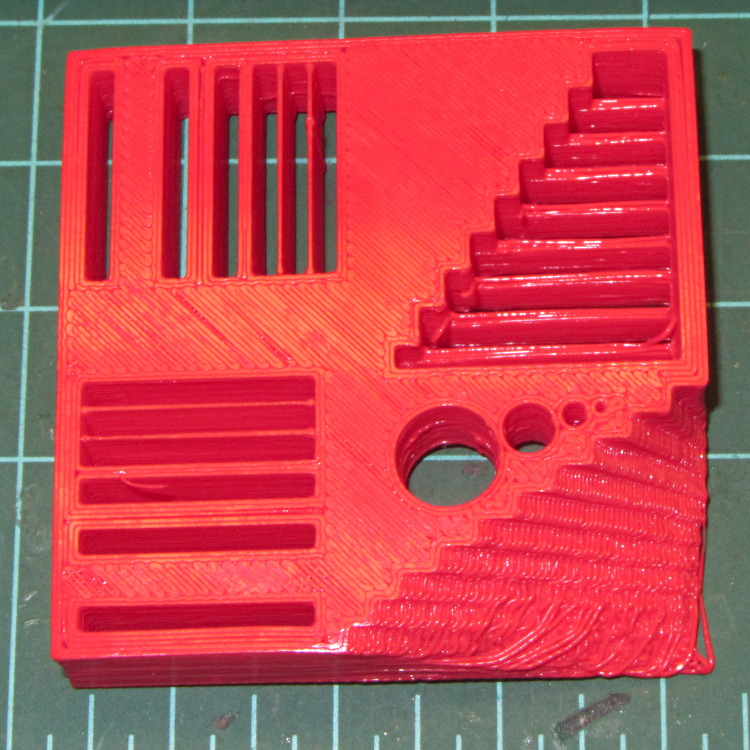
    The bottom view shows a few strings in the bridge test area and more detail of the overhang:
    M2 - Calibration Block - bottom
    M2 – Calibration Block – bottom

    Grouping the overhangs like that produced a flat surface that tended to curl upward, so the final slopes don’t match the design. In round numbers, the M2 can handle something like a 60° overhang reasonably well.

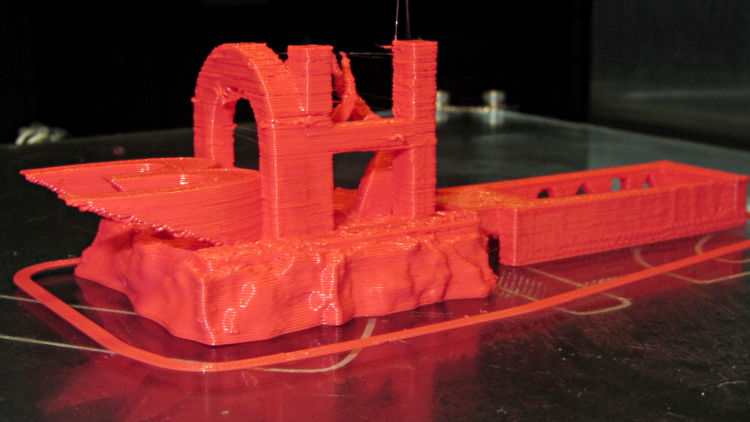
    Cymon’s 3DHacker demo object came out OK, even the severe overhangs in the legs of the digit 3:
    M2 - 3DHacker object - front
    M2 – 3DHacker object – front

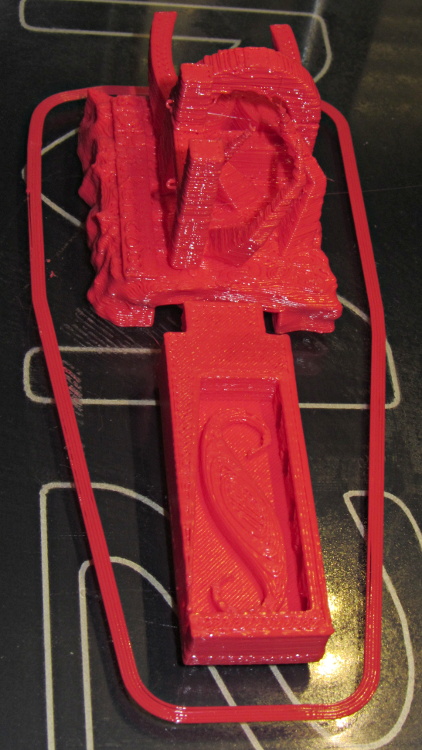
    The top view shows the shape in the box looks fine, but with some curls in the main structure. The arch closed over a few random strands, so it’s rougher than I’d like:
    M2 - 3DHacker object - top
    M2 – 3DHacker object – top

    The spires are lumpy and there’s more striation than I’d like, but this lies well outside the realm of stuff that I build. If I were doing it for real, I’d add some support structures here & there.

    A new Tux Cookie Cutter is perfect:
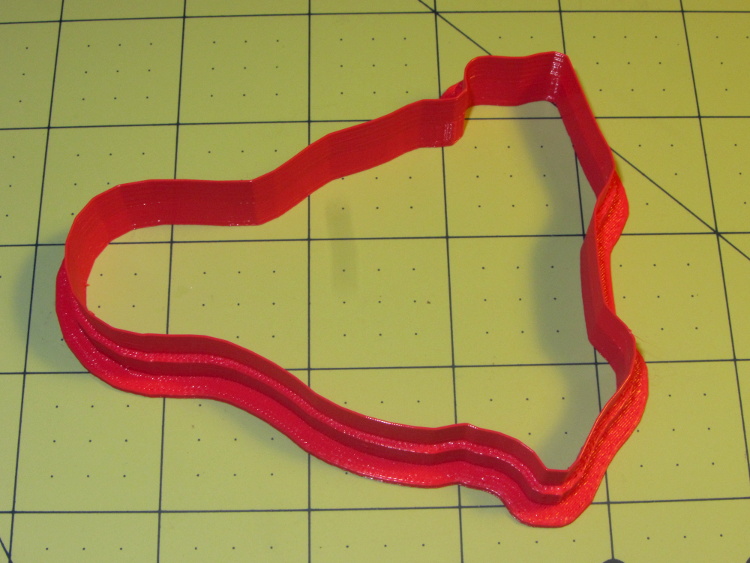
    Tux cutter - M2 single-wall blade - overview
    Tux cutter – M2 single-wall blade – overview

    The wall stacks up neatly to the single-thread blade on the top, with none of the retraction glitches found in the Thing-O-Matic version:
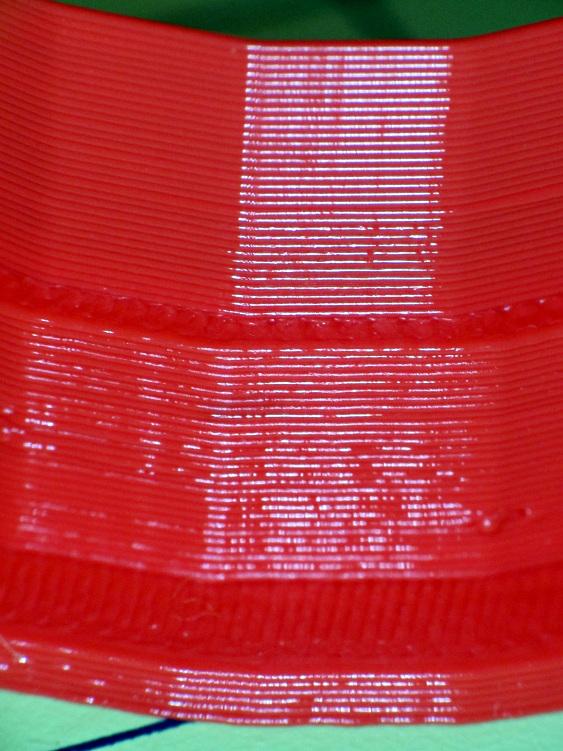
    Tux cutter - M2 single-wall blade - side view
    Tux cutter – M2 single-wall blade – side view

    So, all in all, I’d say there’s not much room for improvement.

    Now, to coerce LinuxCNC into producing similar results on the same hardware, then proceed onward from there…

  • Makergear M2: CNC Platform Corner Clips

    The CNC version of the corner clips looks much better than the prototypes:

    M2 glass retaining clip
    M2 glass retaining clip

    Tightening the screws until the clip just flattens puts enough force on the glass + heat spreader stack to hold it firmly against the balls in the bottom pad. The solid rubber L-shaped bumpers and screws hold the glass in position against XY forces… and the whole affair looks much better than the original (and perfectly serviceable) bulldog clips. These clips free up the entire surface of the glass plate, minus four 12 mm triangles that you could, if you were desperate, print right over.

    Although it’d be easier to just hack out an angular clip, I wrote a bit of G-Code to put a nice radius on each corner. The clip sits atop the rubber bumper with a 0.5 mm margin to keep the metal edges away from fingers; they’re smooth, but it’s still a strip of 6 mil (= 0.15 mm) phosphor bronze and feels a lot like a knife edge if you press hard enough.

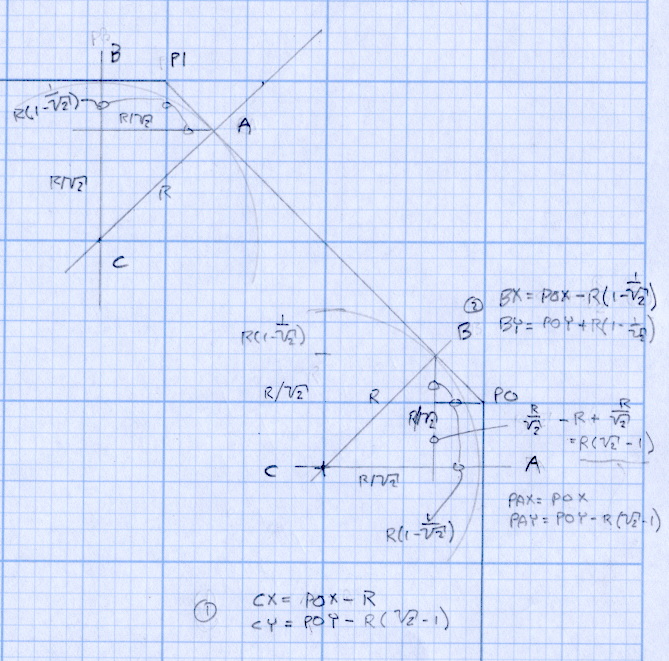
    The radius on the three outside corners is a special-case solution of the general circle-through-three-points problem, taking advantage of the symmetry and right-triangle-ness of the corners. This sketch shows the details:

    M2 Platform Clip Doodles 4 - corner fairing with margin
    M2 Platform Clip Doodles 4 – corner fairing with margin

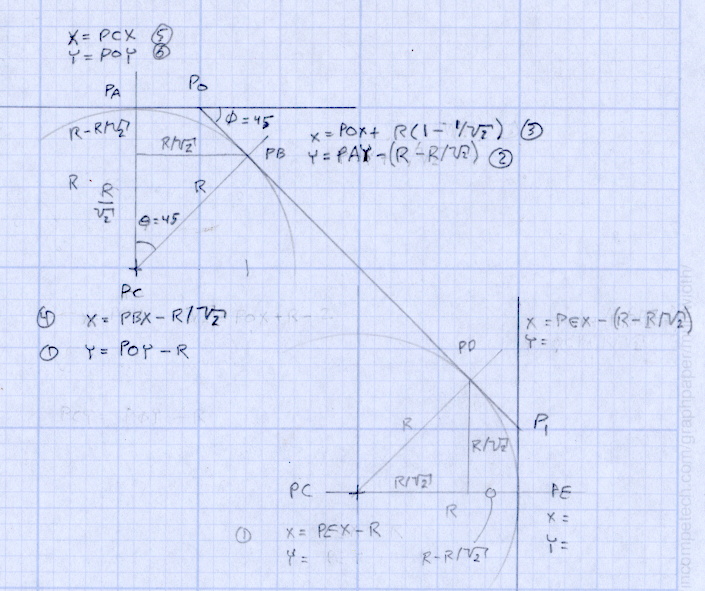
    The two corners on the bevel over the glass plate have a fixed radius. I reworked my original fairing arc solution for outside cutting and doodled it up for this situation:

    M2 Platform Clip Doodles 5 - bevel full solution
    M2 Platform Clip Doodles 5 – bevel full solution

    The outside corner radius worked out to 5 mm and I set the bevel radius at 3 mm. I think the latter made those corners a bit too sharp, but it’s Good Enough for my simple needs.

    Drilling and machining the clips required a fixture:

    M2 platform clips - milling edges
    M2 platform clips – milling edges

    That’s a story for another day.

    I used cutter diameter compensation to mill the edges, starting oversize by 1.5 mm and working downward by 0.5 mm on each pass to the actual diameter. That gradually trimmed off the edges without any excitement, so I could start with rough-trimmed stock and not worry about precision hand trimming.

    I thought climb milling (CW around the part) would produce better results, but it tended to smear the phosphor bronze against the fixture:

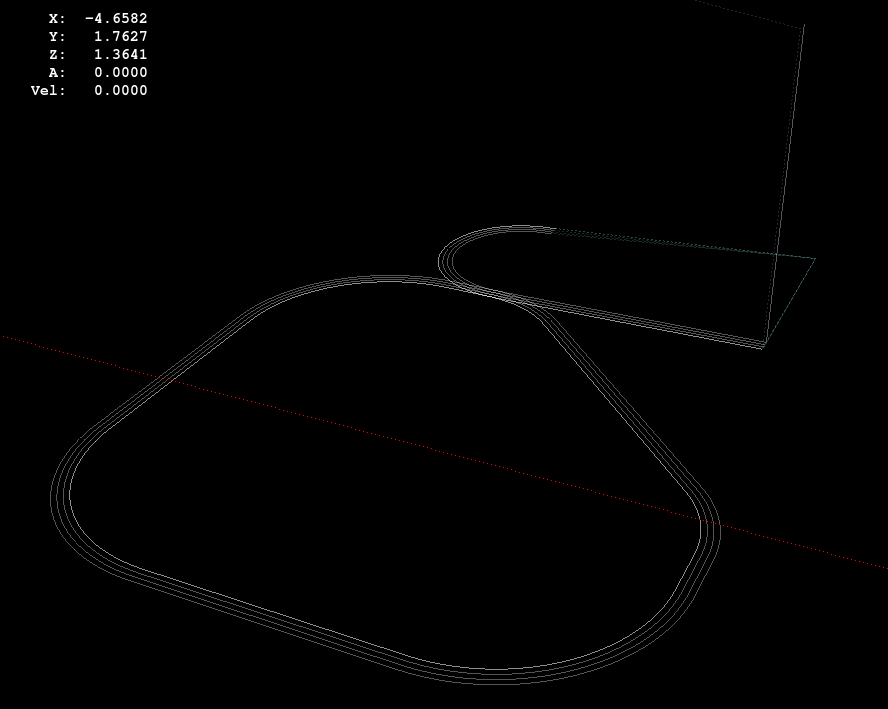
    M2 Corner Clips - Climb milling tool paths
    M2 Corner Clips – Climb milling tool paths

    Conventional milling (CCW around the part) actually worked, but it required fancier entry and exit moves:

    M2 Corner Clips - Conventional milling tool paths
    M2 Corner Clips – Conventional milling tool paths

    This part is the kind and size of machining perfectly suited to a Sherline CNC mill…

    The LinuxCNC G-Code source:

    ( M2 Build Platform Corner Clips )
    ( Ed Nisley - KE4ZNU - July 2013 )
    ( Fixture origin at right-front corner pip )
    
    ( Flow Control )
    #<_Do_Drill> = 0		( Drill two holes in clip )
    #<_Do_Mill> = 1			( Mill clip outline )
    #<_Climb_Mill> = 0		( 0 = conventional 1 = climb)
    
    ( Fixture info )
    #<_Drill_X_Fixture> = 5.0	( Drill station origin )
    #<_Drill_Y_Fixture> = 5.0
    
    #<_Drill_Num> = 30			( Drill number in tool table)
    #<_Drill_Retract> = 15
    #<_Drill_Depth> = -1.0
    #<_Drill_Feed> = 300
    #<_Drill_Speed> = 3000
    
    #<_Mill_X_Fixture> = 40.0	( Mill station origin )
    #<_Mill_Y_Fixture> = 5.0
    
    #<_Mill_Num> = 3			( Mill number in tool table)
    #<_Mill_Dia> = 4.60			( actual tool diameter)
    #<_Mill_Dia_Incr> = 0.50
    #<_Mill_Dia_Steps> = 3
    #<_Mill_Retract> = 15
    #<_Mill_Depth> = -0.5
    #<_Mill_Feed> = 300
    #<_Mill_Speed> = 8000
    
    (----------------)
    
    (  Initialize first tool length at probe switch )
    (     Assumes G59.3 is still in machine units, returns in G54 )
    (  ** Must set these constants to match G20 / G21 condition! )
    
    #<_Probe_Speed>     = 400            ( set for something sensible in mm or inch )
    #<_Probe_Retract>   =   1            ( ditto )
    
    O<Probe_Tool> SUB
    
    G49                     ( clear tool length compensation )
    G30                     ( move above probe switch )
    G59.3                   ( coord system 9 )
    
    G38.2 Z0 F#<_Probe_Speed>           ( trip switch on the way down )
    G0 Z[#5063 + #<_Probe_Retract>]     ( back off the switch )
    G38.2 Z0 F[#<_Probe_Speed> / 10]    ( trip switch slowly )
    
    #<_ToolZ> = #5063                    ( save new tool length )
    
    G43.1 Z[#<_ToolZ> - #<_ToolRefZ>]    ( set new length )
    
    G54                     ( coord system 0 )
    G30                     ( return to safe level )
    
    O<Probe_Tool> ENDSUB
    
    (-------------------)
    (-- Initialize first tool length at probe switch )
    
    O<Probe_Init> SUB
    
    #<_ToolRefZ> = 0.0      ( set up for first call )
    
    O<Probe_Tool> CALL
    
    #<_ToolRefZ> = #5063    ( save trip point )
    
    G43.1 Z0                ( tool entered at Z=0, so set it there )
    
    O<Probe_Init> ENDSUB
    
    (-------------------)
    (-- Mill one pass around outline with tool diameter passed in #1 )
    
    O<MillOutline> SUB
    
    #<X_Size> = 22.0		( size of support spider pad = nominal clip size )
    #<Y_Size> = 22.0
    #<Base_Bevel> = 3.2		( X or Y length of corners clipped from spider pad )
    
    #<Bevel_Size> = 9.0		( remaining part of trimmed edges on clip )
    #<Bevel_Radius> = 3.0	( fairing radius at bevel corners on clip)
    
    #<R_Div_Root2> = [#<Bevel_Radius> / SQRT[2]]
    #<R_1M_Recip_R2> = [#<Bevel_Radius> * [1 - 1/SQRT[2]]]
    #<R_Root2_M1> = [#<Bevel_Radius> * [SQRT[2] - 1]]
    
    #<Margin> = 0.5			( recess inside of nominal )
    
    #<X_Min> = [#<Margin>]
    #<X_Max> = [#<X_Size> - #<Margin>]
    
    #<Y_Min> = [#<Margin>]
    #<Y_Max> = [#<Y_Size> - #<Margin>]
    
    #<Corner_Rad> = [[#<Margin> * [1 - SQRT[2]] + [#<Base_Bevel> / SQRT[2]]] / [SQRT[2] - 1]]
    
    O<Climb> IF [#<_Climb_Mill>]
    
    G0 X#<X_Min> Y[#<Y_Max> + 3*#<_Mill_Dia>]
    G1 Z#<_Mill_Depth> F#<_Mill_Feed>
    
    G41.1 D#1
    
    G3 X[#<X_Min>] Y#<Y_Max> I0 J[0-1.5*#<_Mill_Dia>]	( cutter comp on: entry move)
    
    G1 X[#<Bevel_Size> - #<R_Root2_M1>]
    G2 X[#<Bevel_Size> + #<R_1M_Recip_R2>] Y[#<Y_Max> - #<R_1M_Recip_R2>] J[0-#<Bevel_Radius>]
    
    G1 X[#<X_Max> - #<R_1M_Recip_R2>] Y[#<Bevel_Size> + #<R_1M_Recip_R2>]
    G2 X#<X_Max> Y[#<Bevel_Size> - #<R_Root2_M1>] I[0-#<R_Div_Root2>] J[0-#<R_Div_Root2>]
    
    G1 Y[#<Y_Min> + #<Corner_Rad>]
    G2 X[#<X_Max> - #<Corner_Rad>] Y#<Y_Min> I[0-#<Corner_Rad>] J0
    
    G1 X[#<X_Min> + #<Corner_Rad>]
    G2 X#<X_Min> Y[#<Y_Min> + #<Corner_Rad>] I0 J#<Corner_Rad>
    
    G1 Y[#<Y_Max> - #<Corner_Rad>]
    G2 X[#<X_Min> + #<Corner_Rad>] Y#<Y_Max> I#<Corner_Rad> J0
    
    G40
    
    G0 X#<X_Min> Y[#<Y_Max> + 3*#<_Mill_Dia>]
    (G3 X#<Bevel_Size> Y[#<Y_Max> + 3*#<_Mill_Dia>] I0 J[1.5*#<_Mill_Dia>])	( cutter comp off: safe exit)
    
    G0 X#<X_Min>			( return to start)
    
    O<Climb> ELSE
    
    G0 X#<X_Size> Y[#<Y_Size> + #1/2]
    
    G1 Z#<_Mill_Depth> F#<_Mill_Feed>
    
    G42.1 D#1
    
    G1 X#<Bevel_Size> Y[#<Y_Max>]	( cutter comp on: entry move)
    
    G1 X[#<X_Min> + #<Corner_Rad>]
    G3 X#<X_Min> Y[#<Y_Max> - #<Corner_Rad>] I0 J[0-#<Corner_Rad>]
    
    G1 Y[#<Y_Min> + #<Corner_Rad>]
    G3 X[#<X_Min> + #<Corner_Rad>] Y[#<Y_Min>] I#<Corner_Rad> J0
    
    G1 X[#<X_Max> - #<Corner_Rad>]
    G3 X[#<X_Max>] Y[#<Y_Min> + #<Corner_Rad>] I0 J#<Corner_Rad>
    
    G1 Y[#<Bevel_Size> - #<R_Root2_M1>]
    G3 X[#<X_Max> - #<R_1M_Recip_R2>] Y[#<Bevel_Size> + #<R_1M_Recip_R2>] I[-#<Bevel_Radius>]
    
    G1 X[#<Bevel_Size> + #<R_1M_Recip_R2>] Y[#<Y_Max> - #<R_1M_Recip_R2>]
    G3 X[#<Bevel_Size> - #<R_Root2_M1>] Y#<Y_Max> I[-#<R_Div_Root2>] J[-#<R_Div_Root2>]
    
    G2 Y[#<Y_Max> + 3*#<_Mill_Dia>] J[#<_Mill_Dia>*1.5]		( get away from corner)
    G40
    
    G0 X#<X_Size>					( cutter comp off: safe exit)
    G0 Y[#<Y_Size> + #1/2]			( return to start)
    
    O<Climb> ENDIF
    
    O<MillOutline> ENDSUB
    
    (----------------)
    ( Start machining... )
    
    G17 G40 G49 G54 G80 G90 G94 G99	( reset many things )
    
    G21								( metric! )
    G91.1 							( incremental arc centers)
    
    (msg,Verify: G30.1 position in G54 above tool change switch? )
    M0
    (msg,Verify: fixture origin XY touched off? )
    M0
    (msg,Verify: Current tool Z=0 touched off? )
    M0
    
    ( Set up probing)
    O<Probe_Init> CALL
    T0 M6
    
    (---- Drill holes)
    
    O<DoDrill> IF [#<_Do_Drill>]
    
    (debug,Insert drill tool = #<_Drill_Num>)
    T#<_Drill_Num> M6
    O<Probe_Tool> CALL
    (debug,Set spindle to #<_Drill_Speed> rpm )
    M0
    
    G0 X#<_Drill_X_Fixture> Y#<_Drill_Y_Fixture>
    G0 Z#<_Drill_Retract>
    
    G10 L20 P2 X0 Y0 Z#<_Drill_Retract>	( P2 = G55)
    G55					( drill station coordinates )
    
    G81 X5.0 Y15.0 Z#<_Drill_Depth> R#<_Drill_Retract> F#<_Drill_Feed>
    
    G81 X15.0 Y5.0
    
    G54
    
    O<DoDrill> ENDIF
    
    (---- Mill outline )
    ( Start with large diameter and end with actual diameter to trim in stages)
    
    O<DoMill> IF [#<_Do_Mill>]
    
    (debug,Insert mill tool = #<_Mill_Num>)
    T#<_Mill_Num> M6
    O<Probe_Tool> CALL
    (debug,Set spindle to #<_Mill_Speed> rpm )
    M0
    
    G0 X#<_Mill_X_Fixture> Y#<_Mill_Y_Fixture>
    G0 Z#<_Mill_Retract>
    
    G10 L20 P2 X0 Y0 Z#<_Mill_Retract>	( P2 = G55)
    G55					( mill station coordinates )
    
    #<PassCount> = 0
    
    O<MillLoop> DO
    #<Diameter> = [#<_Mill_Dia> + [#<_Mill_Dia_Steps> - #<PassCount>]*#<_Mill_Dia_Incr>]
    
    O<MillOutline> CALL [#<Diameter>]
    
    #<PassCount> = [#<PassCount> + 1]
    O<MillLoop> WHILE [#<PassCount> LE #<_Mill_Dia_Steps>]
    
    ( Finishing pass with zero cut )
    O<MillOutline> CALL [#<Diameter>]
    
    G0 Z#<_Mill_Retract>
    G54
    
    O<DoMill> ENDIF
    
    G30
    
    (msg,Done!)
    M2
    

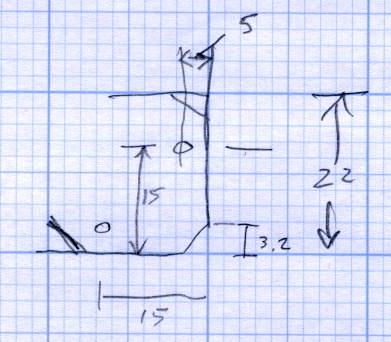
    The rest of the doodles, which don’t match up with the final G-Code because they represent the earliest versions of the layout:

    M2 Platform Clip Doodles 1 - overall layout
    M2 Platform Clip Doodles 1 – overall layout
    M2 Platform Clip Doodles 2 - bevel
    M2 Platform Clip Doodles 2 – bevel
    M2 Platform Clip Doodles 3 - corner fairing without margin
    M2 Platform Clip Doodles 3 – corner fairing without margin
  • Makergear M2: Prototype Corner Clips

    In the course of normal events around here, the M2 gets tipped to one side or the other. Every time that happens, I rediscover the blindingly obvious fact that there’s nothing holding the glass build plate and the heater to the support spider:

    M2 build platform corner
    M2 build platform corner

    A few minutes with a metric ruler produced some useful dimensions for the ends of the spider’s arms:

    M2 Platform Support Spider Pad Dimensions
    M2 Platform Support Spider Pad Dimensions

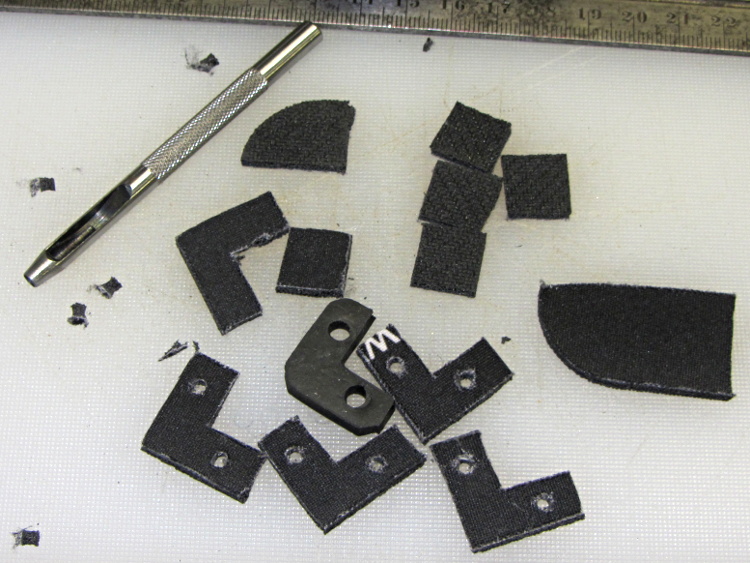
    The Big Box o’ Foamy Things emitted a mouse pad (remember mouse pads?) of exactly the right thickness to bring the corner pads just barely above the level of the glass plate, thus allowing for slight compression:

    M2 corner bumpers
    M2 corner bumpers

    That’s a 1/8 inch hole punch, which is close enough to the M3 screw diameter in foam rubber. It worked fine for the balls in the corner support pads, too.

    The long-suffering shop scissors produced results about as pretty as one might expect:

    img_3157 - M2 platform retaining clips - raw cut
    img_3157 – M2 platform retaining clips – raw cut

    Which is to say, not very.

    The material is 6 mil (about 0.15 mm) phosphor bronze, nice and springy. Combined with ripply edges and sharp corners, you get perfectly serviceable serrated knife blades suitable for use in traditional shop ceremonies of ritual scarification of the fingertips.

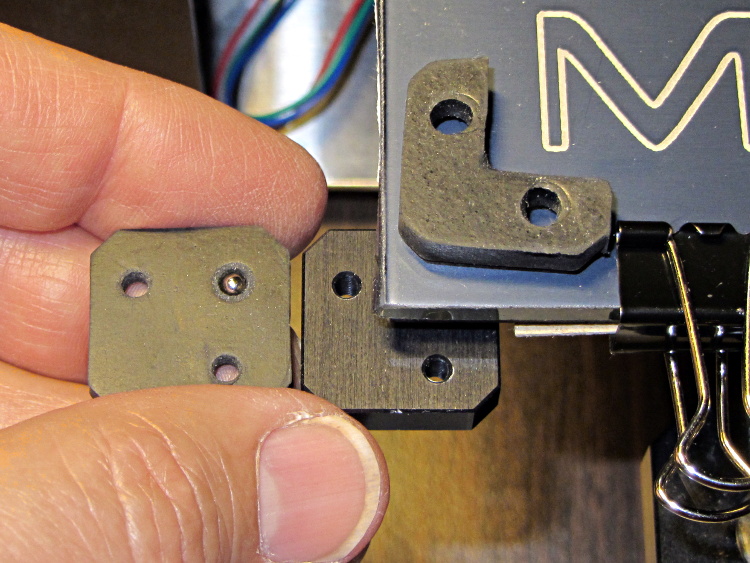
    I stacked the slips, clamped them to the Sherline’s table between sacrificial plastic sheets, used manual CNC to poke a pair of #31 holes (0.120 inch, about the right clearance for M3 screws) at the right spots, and then stacked everything up on the M2:

    M2 platform retaining clip oops - in place
    M2 platform retaining clip oops – in place

    The alert reader will notice a third #31 hole at the wrong spot, which was the first one I drilled and partially explains the lack of pictures of the operation.

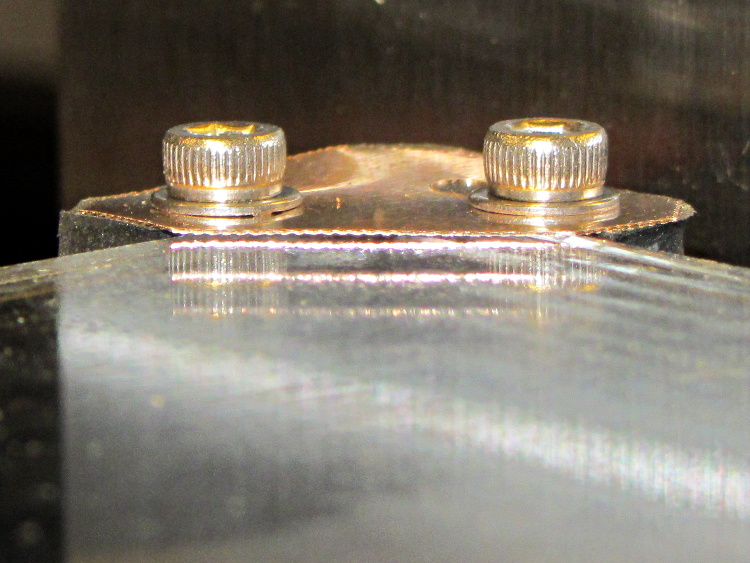
    Sighting across the platform shows that the clip doesn’t lie quite flat on the glass, due to the scissors-cut bending:

    M2 platform retaining clip - edge view
    M2 platform retaining clip – edge view

    However, four of these clips hold the glass firmly to the heat spreader and eliminate the need for the stock bulldog clips, which is what I wanted to find out.

    But they’re ugly and I don’t want to explain that extra hole…

  • Makergear M2: Platform Support Balls

    After adding the insulation below the M2’s build platform heater, I punched a hole in each of the support pads and inserted a 1/8 inch bearing ball:

    M2 HBP support balls
    M2 HBP support balls

    The pads measure just slightly less than 1/8 inch thick, so the balls support the aluminum heat spreader plate. Unlike the pads, the balls hold the plate at a constant distance from the spider which shouldn’t vary with mechanical load.

    As nearly as I can tell, generic rubber expands by maybe 100 parts per million per degree C, so a 3 mm slab might expand by all of 0.02 mm over a 70 °C range: temperature obviously doesn’t make much difference. However, I’m about to add some hold-down clamps to keep the glass plate firmly in place and that pressure might squish the pads.

    Obviously, putting a steel ball between two aluminum plates isn’t something you’d do in a high-stress machine, but the balls must support only the platform and won’t get any shock loading: any shock strong enough to indent the aluminum will probably shatter the glass. I’m pretty sure there won’t be enough motion in the XY plane to produce any wear, either.

    Four points do not define a plane, but the spider and the spreader seem close enough to being planar that all four balls make firm contact. The M2 really does have a good mechanical foundation!


  • Makergear M2: Platform Lighting

    Adding a strip of white LEDs under the X stage helps shed some light on events atop the M2’s build platform; this was very nearly the first improvement after getting the printer, but somehow I’ve never written down where that nice white glow comes from.

    This view shows the strip from below, looking up from the -Y direction in front of the stage:

    White LED strip under X axis frame
    White LED strip under X axis frame

    I originally screwed the wires into the terminals from the hulking 12 V Dell laptop brick for the platform heater, but then I had to unscrew the wires whenever I moved the M2 and I didn’t like sharing the connectors with those huge conductors. Now the LEDs are in parallel with the extruder fan (which runs continuously), sharing the FAN1 screw terminals inside the electronics case.

    The M2 firmware uses PWM to cut the 19.5 V supply from a much smaller laptop brick down to roughly 12 V RMS for the fans, but that isn’t such a Good Thing for LEDs. The strip has 120 Ω resistors that drop about 2.4 V at 20 mA from a 12 V supply, leaving 9.6 V for the LEDs (at about 3.2 V each). Running from 19.5 V means the resistors will see about 9.5 V and pass nearly 80 mA, four times the nominal rating, during each PWM pulse.

    Based on those measurements, the light output doesn’t go up by nearly a factor of four during each pulse.

    I plan to add a 12 V supply to the LinuxCNC box, probably by recycling the 12 V brick from the M2, which will get the LED current back down to a reasonable level. With any luck, they’ll survive this mistreatment and not carry a grudge.

    You could, of course, just power the LEDs from a separate 12 V wall wart, but that adds Yet Another Thing when I carry the M2 to demos.

  • Makergear M2: Platform Insulation Numbers

    A simple test of additional insulation below the Makergear M2’s heated build platform, measuring the time required to heat the platform from 30 °C to 80 °C:

    • As-shipped without insulation: 8:20
    • Cardboard + cotton cloth: 8:30
    • Cardboard + aluminum foil + cotton: 8:00

    That’s with a resolution of about 10 seconds and 1 °C. Ambient temperature was 25 °C; I preheated the platform to 30 °C for a repeatable starting point. The heater was full-on for the entire time and I tried to record the time until it first turned off at the setpoint temperature.

    So my initial insulation didn’t make any difference; ten seconds (in the wrong direction!) seems down in the noise.

    Adding aluminum improved the situation, but not by much.

    The platform wasn’t moving, so there’s no air circulation on either surface. I think it will be possible to record / plot the platform heater duty cycle during printing using LinuxCNC’s HAL components, so some useful data should emerge from that.

    I think the bottom line is that there’s so much heat transfer up through the glass plate and away that reducing the heat flow from the bottom by a little bit doesn’t matter…

  • LinuxCNC Electronics Case Mods

    I’m planning to put all the stepper driver bricks, solid state relays, power suppliers, miscellaneous doodads, and suchlike that will interface LinuxCNC with the M2 printer into a repurposed Dell desktop PC case.

    The front of the case had some tabs sticking out that anchored / aligned / captured various bits of hardware; grabbing them with a Vise-Grip, wiggling until the steel failed, and then filing the raw edge solved that problem:

    Dell PC case - removing small tabs
    Dell PC case – removing small tabs

    The PC had room for a diskette drive, with a lip protruding below the opening:

    Dell PC case - diskette drive slot tab
    Dell PC case – diskette drive slot tab

    A welding pliers wiggled nearly the entire tab at once:

    PC case - removing diskette drive tab
    PC case – removing diskette drive tab

    The bulky Dell front panel had four locating pins that mated with four round holes, one of which appears in the first picture. I wanted a somewhat less butt-ugly front than the bare metal grill, but still with some air flow into the case, so I found some 1/4 inch diameter standoffs tapped 4-40 that fit snugly in the holes and cut them to length:

    Dell PC case - trimming panel mounts
    Dell PC case – trimming panel mounts

    Another defunct Dell case contributed a side panel with roughly the right color. Four match-drilled clearance holes later:

    Dell PC case - vent panel
    Dell PC case – vent panel

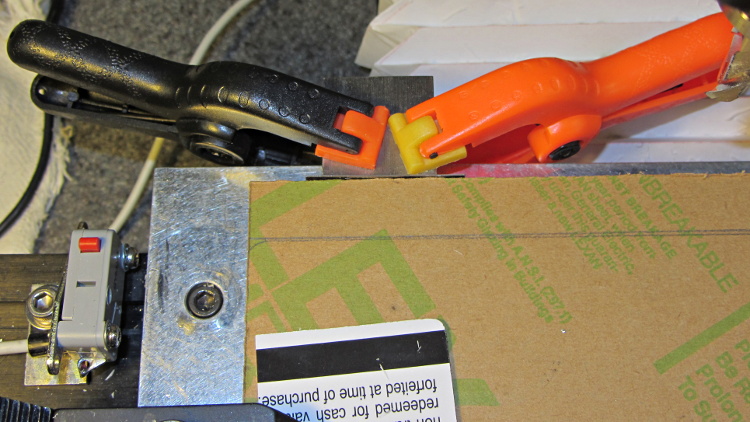
    Just for effect, I squared up a slab of nice smoke-brown polycarb to cover the upper opening and perhaps hold das Blinkenlights. The slab was, as almost always happens, slightly too large for the Sherline, so I had to reclamp it to clean up all the sides. It came out about half a millimeter out of square and, being that type of guy, I clamped a block to the back of the table with a suitable spacer against the wide side, removed the spacer, loosened the step clamp on that end, rotated the slab against the block, made another pass, and it came out perfectly square:

    Dell PC case - squaring polycarb panel
    Dell PC case – squaring polycarb panel

    Four match-drilled holes and some epoxy later:

    Dell PC case - polycarb panel mounts
    Dell PC case – polycarb panel mounts

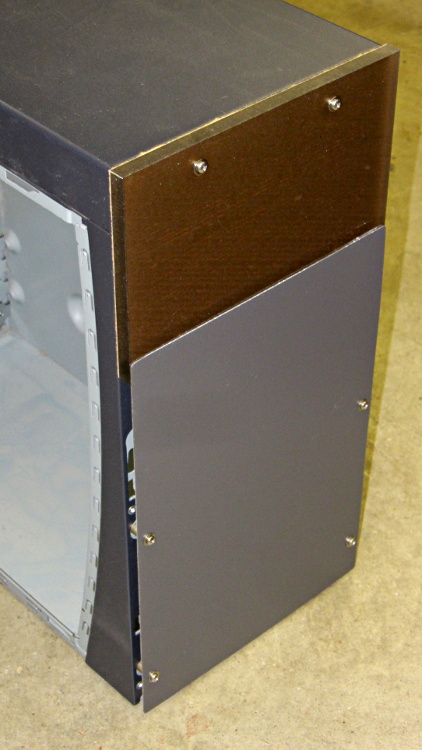
    I’ll probably put the main AC switch on that top panel, but it looks pretty good even with the protective paper on the back:

    Dell PC case - front panels
    Dell PC case – front panels

    I must mill a recess under the vent panel and counterbore the screw heads so everything fits flush and lines up neatly.

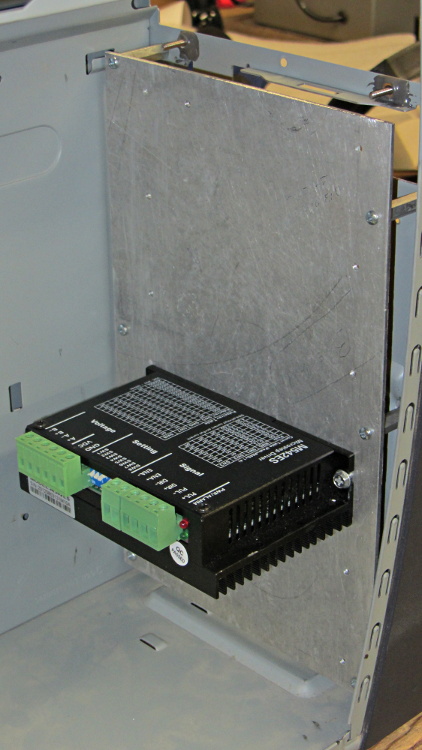
    Another chunk of aluminum will hold the stepper driver bricks along the front of the case:

    Dell PC case - stepper drive panel
    Dell PC case – stepper drive panel

    I laid out the holes with a square, eyeballed the spacing on a machinist’s scale, manually punched / drilled / tapped the holes, and it’s all good. The standoffs provide a bit of airflow around the edges; I don’t expect the drivers to get more than slightly warm, because they’re running near the bottom of their current rating. Incidentally, that sheet is a different and much nicer alloy than the pure aluminum I jeweled for the main base plate and will probably not use.

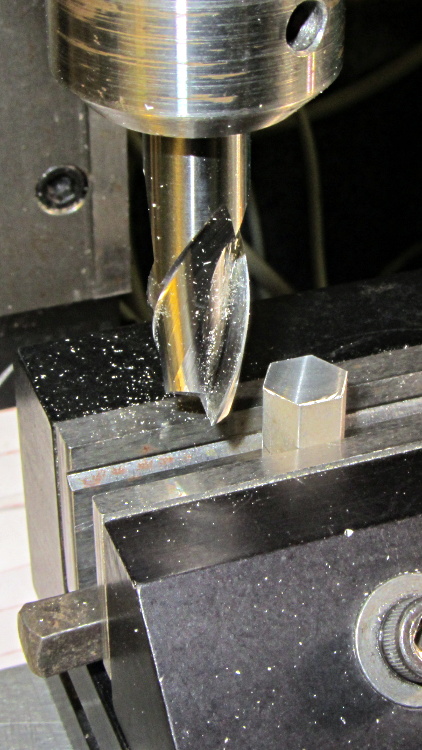
    The 24 VDC power supply will mount on the top of the case, up where the Dell PC supply used to reside. The supply has M4 tapped holes and, of course, I don’t have any such standoffs, but I did find some hex standoffs with 6-32 tapped holes on both ends. Bandsaw ’em in half and clean up the raw end to the proper length:

    Dell PC case - power supply standoffs - trimming
    Dell PC case – power supply standoffs – trimming

    Center drill in the lathe / drill / tap an M4 thread in each one, saw off some M4 screws, slather with red Loctite, insert studs into standoffs, and that should hold the power supply in place with 6-32 screws through the case top:

    Dell PC case - power supply standoffs
    Dell PC case – power supply standoffs

    More Quality Shop Time lies ahead, but it’s coming together…