The Smell of Molten Projects in the Morning

Ed Nisley's Blog: Shop notes, electronics, firmware, machinery, 3D printing, laser cuttery, and curiosities. Contents: 100% human thinking, 0% AI slop.

Tag: M2

Using and tweaking a Makergear M2 3D printer

  • LinuxCNC Stepper Following Error Calculations

    In order to get the crash-test dummy stepper running on the X axis, I had to increase the FERROR and MIN_FERROR values by about two orders of magnitude from their defaults, which suggested I didn’t understand what I was doing and should run some numbers. I don’t profess to know how this works under the hood, though, but what follows seems to make sense.

    Background reading:

    Software step generation (which I’m not using) has an obvious limitation: the real-time software can produce at most one pulse per interrupt, so the maximum interrupt rate limits the maximum speed. The normal maximum rate is half a pulse per interrupt (the rising and falling edges occur on successive interrupts), but the software step generator can also produce a complete step pulse in a single interrupt; I don’t know the interaction between minimum step pulse width and interrupt period.

    The maximum interrupt frequency / minimum interrupt period depends on the interrupt latency jitter, which seems to run around 5 to 10 μs for PC hardware that’s usable with software step generation. Assuming the pulse itself requires a few microseconds, then the minimum period seems to be around 20 to 25 μs, which limits the maximum step frequency to about 40 or 50 kHz. The Marlin firmware has an upper limit of 40000 step/s.

    For comparison, a 50 μs base period works fine for the Sherline CNC mill, which tops out at 0.4 inch/s → 6400 step/s → 156 μs/step. That’s one reason converting a CNC mill to a 3D printer doesn’t work well; “normal” 3D printer speeds overtax leadscrews.

    However, (I think) the fixed interrupt timing produces horrible period granularity: a 20 μs interrupt period = 50 kHz step frequency means that the next lower frequency with regular pulses is 25 kHz. Any speed requiring pulses between 25 kHz and 50 kHz will (I think) get irregular step timing that is, on the average, correct. That resembles Marlin’s multiple steps per interrupt bunching, without the fixed clumps.

    To avoid all that, I’m using a Mesa 5i25 FPGA board that generates step timing in hardware based on a multi-megahertz clock. The specs don’t include a maximum step rate or granularity, but all indications are that it works wonderfully well; I plan to do some measurements to see what’s happening.

    Assuming that the 5i25 can emit stepper pulses pretty much exactly when they’re supposed to happen, then the critical timing events depend on the servo loop period, for which everyone seems to use the default 1 ms. At each of those interrupts, the motion controller figures out what the stepper frequencies should be for the next period and twiddles the 5i25 to make them happen.

    If, at the end of the next millisecond, the actual (calculated) and projected positions don’t match up, then the motion controller triggers a following error. This all happens in software, as there’s no actual position feedback from the motors.

    Assuming that the required stepper pulse rate doesn’t exceed the maximum frequency, (I think) there’s only one point where a following error can happen: at the junction between constant-acceleration and constant-velocity motion. The worst case (seems to be) a G0 move that ramps upward from a dead stop to the maximum allowed speed with the maximum allowed acceleration for an axis. Recall that RepRap firmware seems to use the same code for G1 and limits the G0 speed to whatever the most recent F defined, so you tend to not find G0 commands in RepRap-family G-Code.

    The Trajectory Control doc suggests that the planner uses half the maximum defined acceleration while blending path segments. I used the full acceleration, which seems reasonable for single, non-blended motion.

    I don’t know if the motion planner forces the junction to fall exactly at an interrupt time, but if it doesn’t, then the axis could accelerate for nearly a whole period after it should start the constant-velocity part of the path. The incremental distance would be:

    x = 1/2 a t2

    Assuming 10 m/s acceleration, the excess distance would be 0.005 mm after 1 ms. The default FERROR value in PNCConf, which applies during rapid motion, turns out to be 0.0050 mm; I did see following errors as the motion begins, so I think that’s what triggers them.

    On the other end of the motion, where the motor slows at a constant acceleration to a dead stop, I think the final position may have a jitter of ±1 motor (micro)step, so the MIN_FERROR value must be at least twice as large as the minimum step size. The M2 runs at 88.9 step/mm (with 1/16 microstepping), so 1 step = 0.011 mm. The default MIN_FERROR in PNCConf is 0.0005 mm (half a micron!) and following errors happened quite predictably at the end of motion.

    Sooooo, increasing MIN_FERROR by two orders of magnitude brought it to 0.0500 mm, a bit over the 0.022 = 2 * 0.011 required to cover the ±1 step endpoint error. Because I didn’t really understand what I was doing (and may not, even now), I had been changing both of the following error limits by factors of 10, and that last change turned out to be just enough.

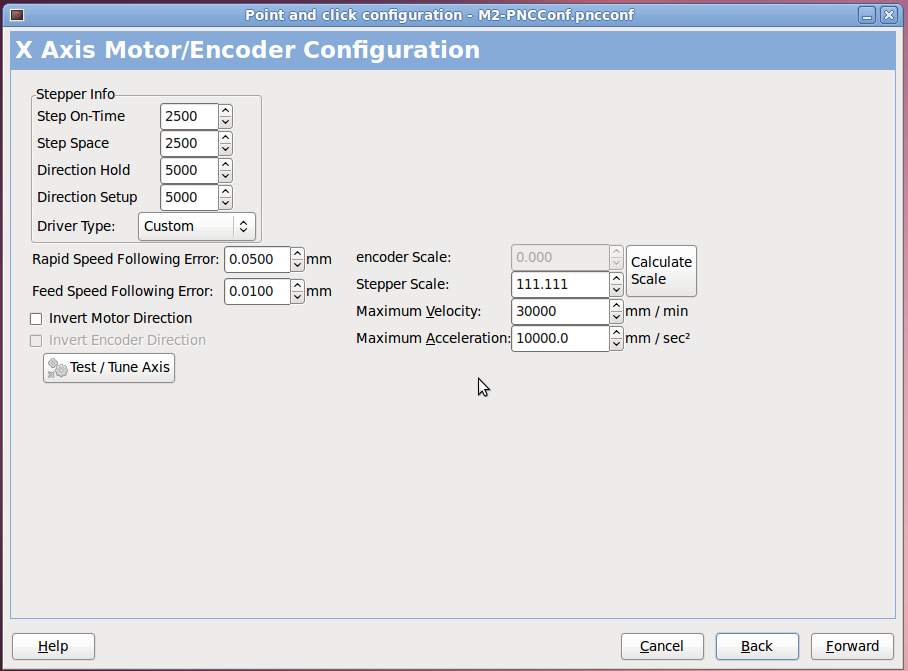
    While working all that out, I changed the M542 stepper brick DIP switches to use 1/20 microstepping, which increases the XY resolution to (36 mm/rev) / (4000 step/rev) = 0.009 mm/step → 111.1 step/mm. That doesn’t make any practical difference, but it pushes the XY step size below ten microns, which is certainly good for bragging rights. Yes, I know all about the lack of position accuracy from a microstepping motor, but work with me on this.

    Based on those numbers, I picked:

    • FERROR = 0.050 mm
    • MIN_FERROR = 0.020 mm

    Given that 3D printing involves gooey molten plastic laid down in half-millimeter strips, micron-scale error limits really don’t make much practical difference, but at least now (I think) I understand a bit more about the error boundaries.

    Also, these limits have nothing to do with the G61.x Exact Path / G64 Path Blending G-Code commands, which tell the motion planner how much slop to allow when computing the path. Given all that gooey plastic, running with something like G64 P0.1 Q0.1 might improve the overall speed quite a bit.
  • Mesa 7i76 vs. Stepper Motor: First Motion

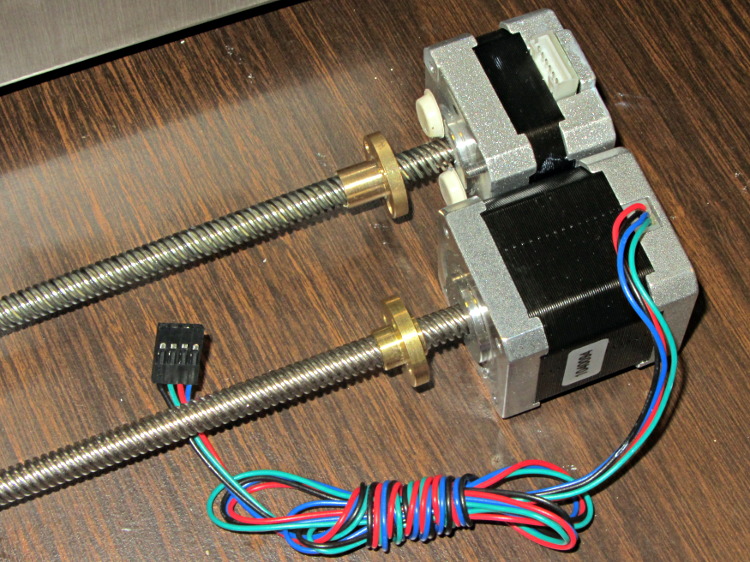
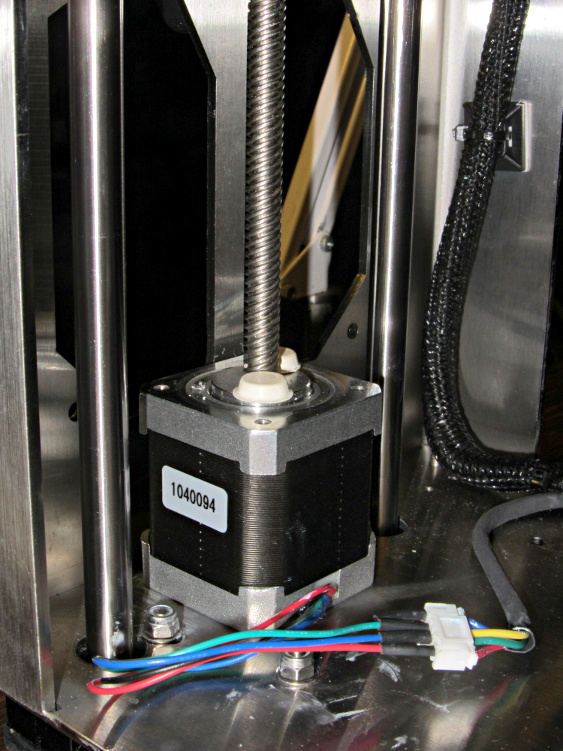
    The cables with their tidy terminations make it a little neater, but all this stuff really needs a permanent home:

    Stepper motor - first motion
    Stepper motor – first motion

    I used the LinuxCNC PNCConf utility to define a minimal system with little more than the X axis parameters filled in:

    PNCConf - X Axis
    PNCConf – X Axis

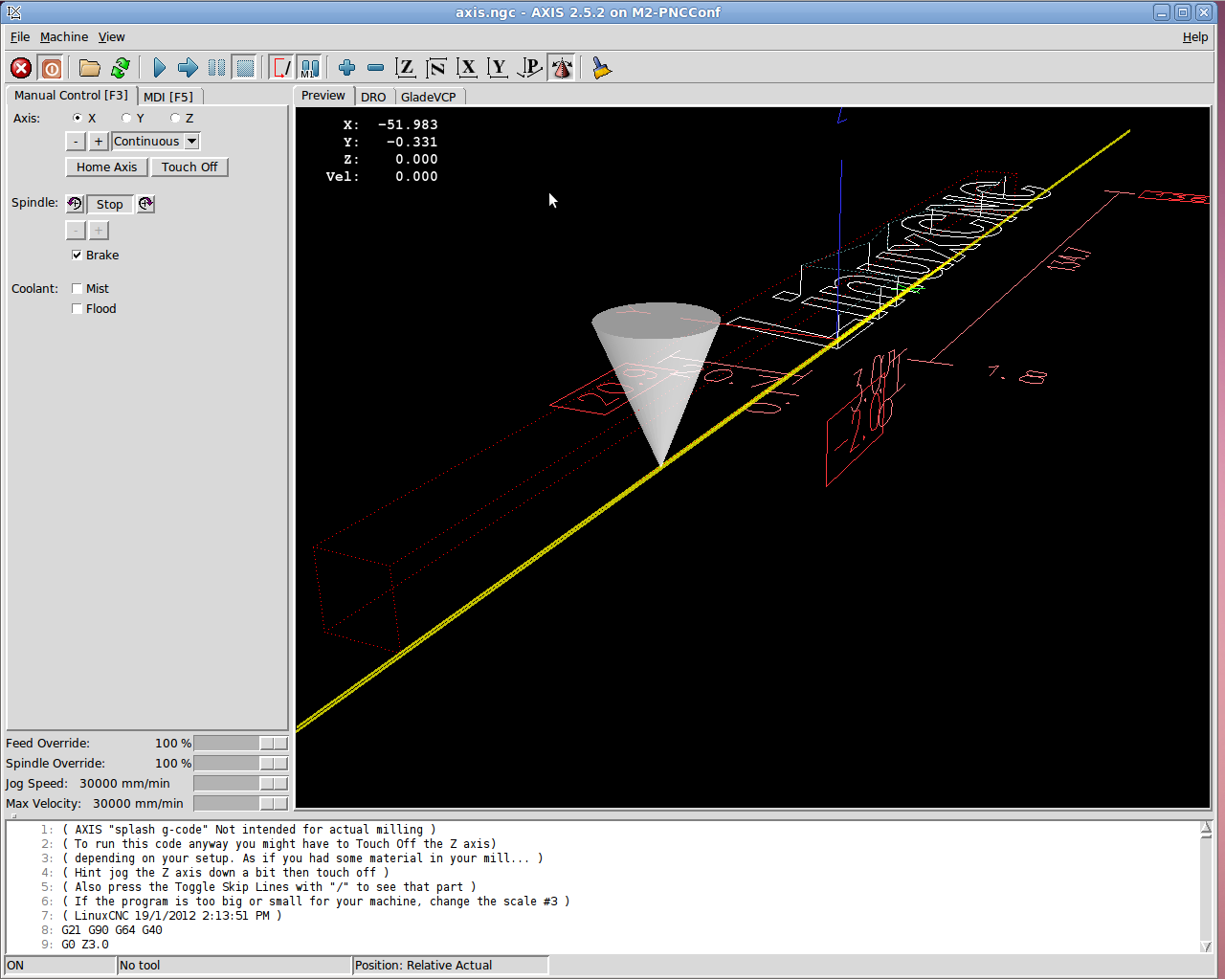
    Then I could jog the stepper motor using the Axis UI:

    7i76 - First Motion
    7i76 – First Motion

    And it worked!

    Actually, it didn’t. The first motion instantly tripped a Following Error, so I bumped those values up a bit. Then I fiddled with accelerations and speeds and suchlike. Then I adjusted the Axis defaults to not be so nose-pickin’ slow. And then it Just Worked.

    Not much to show, but at least I know the whole LinuxCNC to 5i25 to 7i76 to M542 to motor chain functions pretty much as it should, which is worth knowing. From here on out, it’s a matter of fine tuning…

  • Mesa 7i76 vs. M542 vs. Stepper Motor Wiring

    Both the Mesa 7i76 and the M542 stepper driver boards use Phoenix-style pluggable screw terminals that simplify the connections: just strip the wires, jam them into the holes, and tighten the screw. That works great in an industrial situation where the equipment gets wired up once and stays that way forever, but I expect that I’ll be doing far too much twiddling… which means the stripped wire ends will fray and shed strands across the boards.

    So, while wiring up a stepper motor, I tried soldering the wires to several different terminals I have lying around, just to see how they work.

    The M542 stepper driver brick shows the assortment:

    M542 Stepper Driver Wiring
    M542 Stepper Driver Wiring

    On the far left, the four stepper wires end in right-angle PCB pins harvested from surplus connectors. This didn’t work nearly as well as I’d like, simply because the pins are entirely too bulky. I’m not sure quite how the bricks will be arranged, but I think a right-angle connection won’t work well at all.

    The field power from the 24 VDC supply arrives on some (cheap) 18 AWG speaker zip cord, terminated in straight-line PCB pins. Those worked better, but they do stick out a goodly amount. Methinks the right thing to do with larger wire is just solder the strands together, clean the end, and not bother with pins. That’s not so good for strain relief (it concentrates at the end of the soldered strands), but, with some tubing added, maybe it’ll be Good Enough.

    The 26 AWG input wires from the 7i76 terminate in turret pins originally intended for PCB terminations or test points, back in the day when you (well, I) could actually see such things; I have a bag of 1000 that I’ve been chewing away at for a while. I think these wires are simply too small for the screw terminals, so they really need a pin of some sort and I like the way the turret pins work. The heatstink tubing provides a bit of strain relief, which always comes in handy.

    The two stray wires will eventually go to the “Enable” input. It turns out that these bricks defaults to Enabled with no input signal, so you cannot depend on a wiring fault disabling the motor: a broken Enable wire enables the drive output. This seems flat-out dumb, but I suppose there’s some planet on which it makes sense.

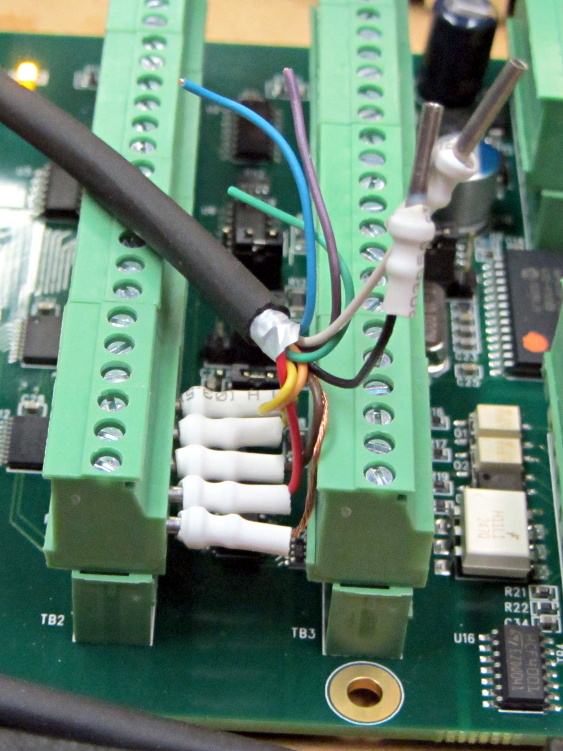
    I snipped a bunch of 3/8 inch (call it 10 mm) lengths of tubing, but that turns out to be slightly too long for the 7i76 terminal layout:

    Mesa 7i76 Wiring
    Mesa 7i76 Wiring

    So the next iteration must be a bit shorter.

    Yes, you can get commercial crimp pin terminations; search eBay for crimp insulated terminal pins, some of which are curving around the planet even as I type. They won’t fit into the tight confines of the 7i76, but they should be better for the M542 bricks. The smallest size fits 22 through 16 AWG wires, so my tiny cable wires may need some steroids to bulk ’em up.

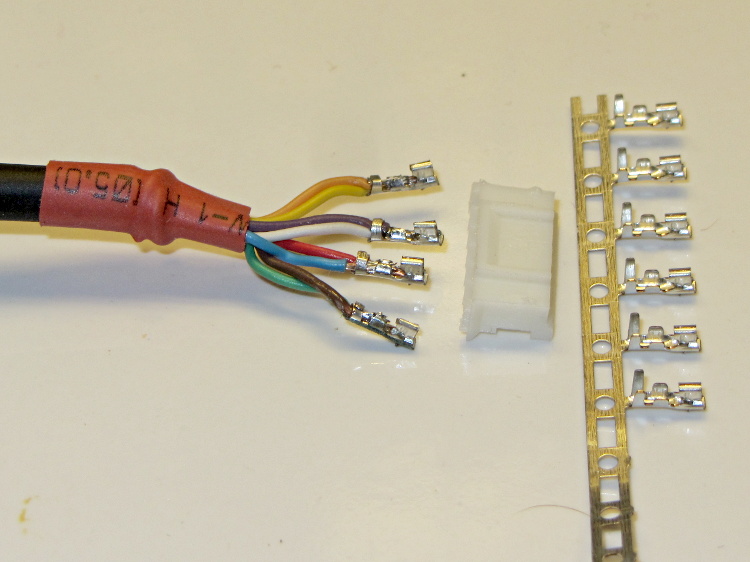
    On the stepper motor end of the cable, I picked up a bunch of JST connectors and crimp pins. Unfortunately, the proper crimp tool runs into the hundreds of dollars, even from the usual eBay suppliers, and I really don’t have that much need for those pins. So I just soldered wires from the cable to the pins and mashed them down with needle nose pliers:

    Stepper wiring - soldered JST pins
    Stepper wiring – soldered JST pins

    The alert reader will notice an egregious wire color coding faceplant. I made a corresponding blunder on the other end and nobody will ever know. Next time, maybe I’ll get it right.

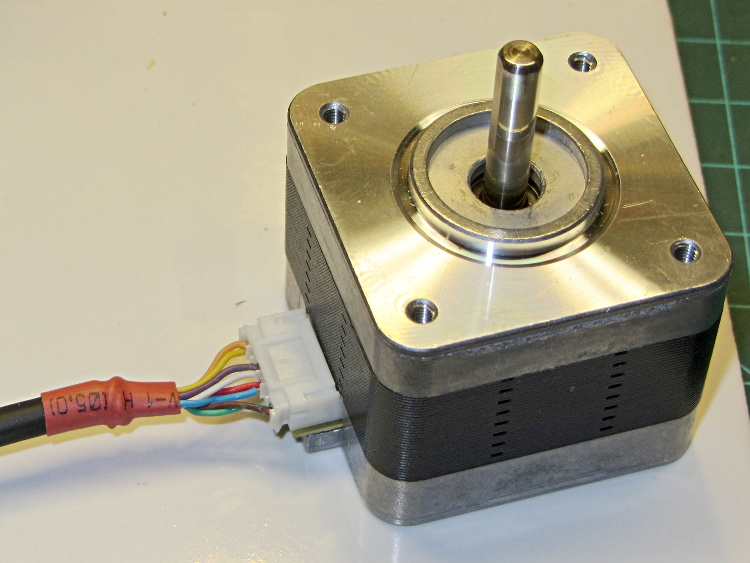
    That makes for a nice connection at the motor:

    Stepper wiring - connector in place
    Stepper wiring – connector in place

    The thin black cable has nine 26 AWG conductors that I’m doubling up for the motors. In round numbers, 26 AWG stranded has about 120 mΩ/m resistance, so two in parallel work out to 60 mΩ/m. Assuming a meter of cable between the driver and the motor, a 1 A winding current will drop 120 mV along the way and dissipate 1/8 W, which seems defensible. It’s obviously Good Enough for signal wiring.

    It is most definitely not good enough for, say, the heaters.

    The motivation for using that cable: it’s thin and super-flexy, not the rigid cylinder you get with larger conductors. Plus, I have a huge supply of the stuff… it originally served as RS-232 cable, with molded connectors on each end of a 30 foot length, with four such cables assembled into a super-cable with nylon padding yarn laid inside a protective outer sheath. Must have cost a fortune to the original buyer; decades ago I got three or five of the assemblies and have been harvesting cable ever since.

  • LinuxCNC + Mesa 7i76: Solid-state Relay Light

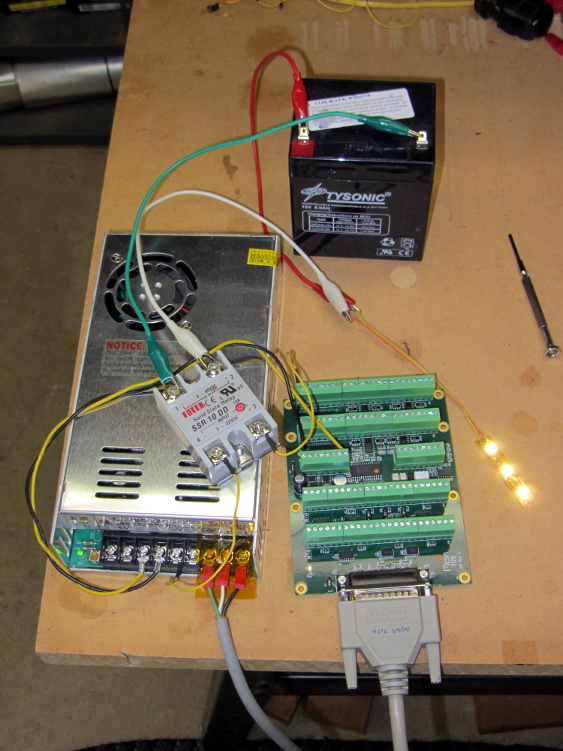
    I intend to use solid-state relays to control things like extruder and platform heaters, so I wired a Fotek SSR-10 DD to the same output bit as the First Light test, with a random 12 V SLA battery providing power for the LED strip:

    Mesa 7i76 with Fotek DC-DC SSR
    Mesa 7i76 with Fotek DC-DC SSR

    Nothing groundbreaking, but it’s always nice to confirm these things.

    Note that the SSR must have a DC output, not the more common AC output, to control DC power. In effect, a DC-DC SSR is just an up-armored power FET with an optically isolated gate terminal.

    Dan reports that the Fotek SSRs have just about exactly the internal build quality you’d expect for a cheap product from halfway around the planet. Although the specs would have you believe they operate from a 5 VDC source, that may not be the case. The 7i76 output pins switch the +24 VDC field power to the SSR, so it’s firmly turned on.

  • Mesa 5i25 + 7i76: First Light!

    Rather than start with the stepper, I wired an LED and resistor between output bit 07 and Field Ground at the power supply:

    Mesa 5i26-7i76 with LED
    Mesa 5i26-7i76 with LED

    It’s worth noting that the terminals labeled GND on TB2 and TB3 are isolated from the Field GROUND terminal on TB1. When Mesa says “isolated power supply”, that’s exactly what they mean.

    The digital output bits connect +24 VDC Field Power to the load, which should then connect to Field GROUND. I picked a good-looking 5 V panel LED from the pile, simply because it had wires soldered to it from a previous life, and put a 1 K resistor in series to drop the other 19 V.

    Then you start up HAL, load the Mesa drivers, and twiddle the bit:

    halrun
    halcmd: loadrt threads name1=th period1=1000000
    halcmd: loadrt hostmot2
    halcmd: loadrt hm2_pci
    halcmd: addf hm2_5i25.0.pet_watchdog th
    halcmd: addf hm2_5i25.0.read th
    halcmd: addf hm2_5i25.0.write th
    halcmd: start
    halcmd: setp hm2_5i25.0.7i76.0.0.output-07 true
    halcmd: setp hm2_5i25.0.7i76.0.0.output-07 false
    halcmd: quit
    

    The thread runs with a 1 ms period, mostly because it’s convenient. The .read and .write pins transfer data from and to the 5i25 FPGA each time the thread runs; if you forget those, nothing happens.

    Setting the output bit true activates the output bit, turns on the MOSFET driver, and connects the terminal to Field Power = 24 VDC. The 7i76 outputs do not sink current, they source it.

    A journey of a thousand 3D printed objects starts with a single LED…

    The watchdog timer ought to be connected to something more fragile and UI-related than the main thread, but I haven’t figured out how to do that yet.

  • Mesa 5i25 + 7i76: HAL Pins

    Some notes on setting up the Mesa 5i25 FPGA card (the manual) with the 7i76 daughter card (the manual) inside a new-to-me off-lease Dell Optiplex 760

    First up: note that Mesa uses a capital I (“eye”) in the part numbers, a decision which they’ve surely had plenty of time to regret, as many common fonts exhibit nearly identical capital-I and digit-1 characters.

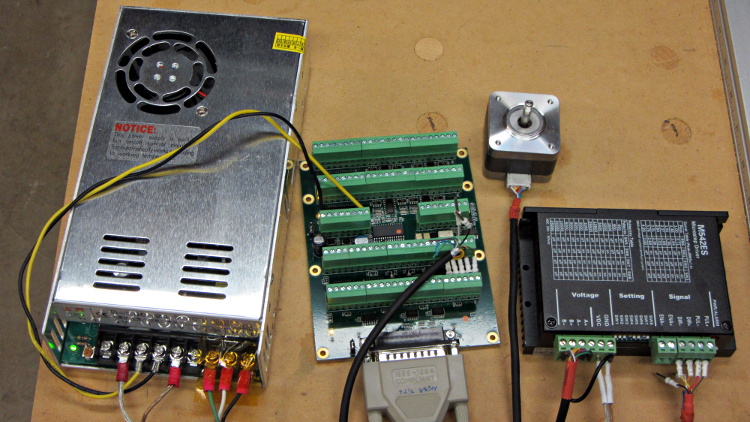
    The 7i76 connects to the 5i25 in the PC through a Mesa-supplied IEEE-1284 printer cable. I cobbled up a 24 VDC power supply (which I’ll eventually be using for the M2 motors) to provide “field power” and let the firmware identify the daughtercard:

    24 VDC power supply - Mesa 7i76 - stepper driver
    24 VDC power supply – Mesa 7i76 – stepper driver

    The default jumper positions on both cards work fine.

    The unconnected stepper driver brick and motor will serve as a simple demonstration after I’ve built the Eagle parts to represent the 5i25’s components. However, the first demo of any new hardware must be a blinking LED.

    To see whether the cards work and are detected, load the hostmot2 drivers in halrun and dump all the information:

    halrun
    halcmd: loadrt hostmot2
    halcmd: loadrt hm2_pci
    halcmd: show all
    Loaded HAL Components:
    ID      Type  Name                                      PID   State
         5  RT    hm2_pci                                         ready
         3  User  halcmd5010                                 5010 ready
         4  RT    hostmot2                                        ready
    
    Component Pins:
    Owner   Type  Dir         Value  Name
         5  bit   OUT         FALSE  hm2_5i25.0.7i76.0.0.input-00
         5  bit   OUT         FALSE  hm2_5i25.0.7i76.0.0.input-00-not
         5  bit   OUT         FALSE  hm2_5i25.0.7i76.0.0.input-01
    ... snippage ...
         5  bit   OUT         FALSE  hm2_5i25.0.7i76.0.0.input-30
         5  bit   OUT         FALSE  hm2_5i25.0.7i76.0.0.input-30-not
         5  bit   OUT         FALSE  hm2_5i25.0.7i76.0.0.input-31
         5  bit   OUT         FALSE  hm2_5i25.0.7i76.0.0.input-31-not
         5  bit   IN          FALSE  hm2_5i25.0.7i76.0.0.output-00
         5  bit   IN          FALSE  hm2_5i25.0.7i76.0.0.output-01
    ... snippage ...
         5  bit   IN          FALSE  hm2_5i25.0.7i76.0.0.output-15
         5  bit   IN          FALSE  hm2_5i25.0.7i76.0.0.spindir
         5  bit   IN          FALSE  hm2_5i25.0.7i76.0.0.spinena
         5  float IN              0  hm2_5i25.0.7i76.0.0.spinout
         5  s32   OUT             0  hm2_5i25.0.encoder.00.count
         5  s32   OUT             0  hm2_5i25.0.encoder.00.count-latched
         5  bit   I/O         FALSE  hm2_5i25.0.encoder.00.index-enable
         5  bit   IN          FALSE  hm2_5i25.0.encoder.00.latch-enable
         5  bit   IN          FALSE  hm2_5i25.0.encoder.00.latch-polarity
         5  float OUT             0  hm2_5i25.0.encoder.00.position
         5  float OUT             0  hm2_5i25.0.encoder.00.position-latched
         5  s32   OUT             0  hm2_5i25.0.encoder.00.rawcounts
         5  s32   OUT             0  hm2_5i25.0.encoder.00.rawlatch
         5  bit   IN          FALSE  hm2_5i25.0.encoder.00.reset
         5  float OUT             0  hm2_5i25.0.encoder.00.velocity
         5  s32   OUT             0  hm2_5i25.0.encoder.01.count
    ... snippage ...
         5  float OUT             0  hm2_5i25.0.encoder.01.velocity
         5  bit   OUT         FALSE  hm2_5i25.0.gpio.000.in
         5  bit   OUT          TRUE  hm2_5i25.0.gpio.000.in_not
         5  bit   OUT         FALSE  hm2_5i25.0.gpio.001.in
    ... snippage ...
         5  bit   OUT          TRUE  hm2_5i25.0.gpio.032.in
         5  bit   OUT         FALSE  hm2_5i25.0.gpio.032.in_not
         5  bit   OUT          TRUE  hm2_5i25.0.gpio.033.in
         5  bit   OUT         FALSE  hm2_5i25.0.gpio.033.in_not
         5  bit   IN          FALSE  hm2_5i25.0.led.CR01
         5  bit   IN          FALSE  hm2_5i25.0.led.CR02
         5  u32   IN     0x00000000  hm2_5i25.0.sserial.channel
         5  u32   IN     0x00000000  hm2_5i25.0.sserial.parameter
         5  u32   IN     0x00000000  hm2_5i25.0.sserial.port
         5  u32   OUT    0x00000000  hm2_5i25.0.sserial.port-0.fault-count
         5  u32   OUT    0x00000000  hm2_5i25.0.sserial.port-0.port_state
         5  bit   IN           TRUE  hm2_5i25.0.sserial.port-0.run
         5  bit   IN          FALSE  hm2_5i25.0.sserial.read
         5  u32   OUT    0x00000000  hm2_5i25.0.sserial.state
         5  u32   IN     0x00000000  hm2_5i25.0.sserial.value
         5  bit   IN          FALSE  hm2_5i25.0.sserial.write
         5  bit   IN          FALSE  hm2_5i25.0.stepgen.00.control-type
         5  s32   OUT             0  hm2_5i25.0.stepgen.00.counts
         5  float OUT             0  hm2_5i25.0.stepgen.00.dbg_err_at_match
         5  float OUT             0  hm2_5i25.0.stepgen.00.dbg_ff_vel
         5  float OUT             0  hm2_5i25.0.stepgen.00.dbg_pos_minus_prev_
         5  float OUT             0  hm2_5i25.0.stepgen.00.dbg_s_to_match
         5  s32   OUT             0  hm2_5i25.0.stepgen.00.dbg_step_rate
         5  float OUT             0  hm2_5i25.0.stepgen.00.dbg_vel_error
         5  bit   IN          FALSE  hm2_5i25.0.stepgen.00.enable
         5  float IN              0  hm2_5i25.0.stepgen.00.position-cmd
         5  float OUT             0  hm2_5i25.0.stepgen.00.position-fb
         5  float IN              0  hm2_5i25.0.stepgen.00.velocity-cmd
         5  float OUT             0  hm2_5i25.0.stepgen.00.velocity-fb
         5  bit   IN          FALSE  hm2_5i25.0.stepgen.01.control-type
    ... snippage ...
         5  float OUT             0  hm2_5i25.0.stepgen.09.velocity-fb
         5  bit   I/O         FALSE  hm2_5i25.0.watchdog.has_bit
    
    ... snippage ...
    
    Parameters:
    Owner   Type  Dir         Value  Name
         5  bit   RW          FALSE  hm2_5i25.0.7i76.0.0.output-00-invert
         5  bit   RW          FALSE  hm2_5i25.0.7i76.0.0.output-01-invert
    ... snippage ...
         5  bit   RW          FALSE  hm2_5i25.0.7i76.0.0.output-15-invert
         5  u32   RO     0x100000A5  hm2_5i25.0.7i76.0.0.serial-number
         5  bit   RW          FALSE  hm2_5i25.0.7i76.0.0.spindir-invert
         5  bit   RW          FALSE  hm2_5i25.0.7i76.0.0.spinena-invert
         5  float RW            100  hm2_5i25.0.7i76.0.0.spinout-maxlim
         5  float RW              0  hm2_5i25.0.7i76.0.0.spinout-minlim
         5  float RW            100  hm2_5i25.0.7i76.0.0.spinout-scalemax
         5  u32   RO     0x00000000  hm2_5i25.0.7i76.0.0.status
         5  bit   RW          FALSE  hm2_5i25.0.encoder.00.counter-mode
         5  bit   RW           TRUE  hm2_5i25.0.encoder.00.filter
         5  bit   RW          FALSE  hm2_5i25.0.encoder.00.index-invert
         5  bit   RW          FALSE  hm2_5i25.0.encoder.00.index-mask
         5  bit   RW          FALSE  hm2_5i25.0.encoder.00.index-mask-invert
         5  float RW              1  hm2_5i25.0.encoder.00.scale
         5  float RW            0.5  hm2_5i25.0.encoder.00.vel-timeout
         5  bit   RW          FALSE  hm2_5i25.0.encoder.01.counter-mode
    ... snippage ...
         5  float RW            0.5  hm2_5i25.0.encoder.01.vel-timeout
         5  bit   RW          FALSE  hm2_5i25.0.gpio.000.invert_output
         5  bit   RW          FALSE  hm2_5i25.0.gpio.000.is_opendrain
         5  bit   RW          FALSE  hm2_5i25.0.gpio.001.invert_output
    ... snippage ...
         5  bit   RW          FALSE  hm2_5i25.0.gpio.030.invert_output
         5  bit   RW          FALSE  hm2_5i25.0.gpio.030.is_opendrain
         5  bit   RW          FALSE  hm2_5i25.0.gpio.030.is_output
         5  bit   RW          FALSE  hm2_5i25.0.io_error
         5  s32   RO              0  hm2_5i25.0.pet_watchdog.time
         5  s32   RW              0  hm2_5i25.0.pet_watchdog.tmax
         5  s32   RO              0  hm2_5i25.0.read.time
         5  s32   RW              0  hm2_5i25.0.read.tmax
         5  s32   RO              0  hm2_5i25.0.read_gpio.time
         5  s32   RW              0  hm2_5i25.0.read_gpio.tmax
         5  u32   RW     0x00000001  hm2_5i25.0.sserial.port-0.fault-dec
         5  u32   RW     0x0000000A  hm2_5i25.0.sserial.port-0.fault-inc
         5  u32   RW     0x000000C8  hm2_5i25.0.sserial.port-0.fault-lim
         5  u32   RW     0x00077FE2  hm2_5i25.0.stepgen.00.dirhold
         5  u32   RW     0x00077FE2  hm2_5i25.0.stepgen.00.dirsetup
         5  float RW              1  hm2_5i25.0.stepgen.00.maxaccel
         5  float RW              0  hm2_5i25.0.stepgen.00.maxvel
         5  float RW              1  hm2_5i25.0.stepgen.00.position-scale
         5  u32   RW     0x00000000  hm2_5i25.0.stepgen.00.step_type
         5  u32   RW     0x00077FE2  hm2_5i25.0.stepgen.00.steplen
         5  u32   RW     0x00077FE2  hm2_5i25.0.stepgen.00.stepspace
         5  u32   RW     0x00077FE2  hm2_5i25.0.stepgen.01.dirhold
    ... snippage ...
         5  u32   RW     0x00077FE2  hm2_5i25.0.stepgen.09.stepspace
         5  u32   RW     0x004C4B40  hm2_5i25.0.watchdog.timeout_ns
         5  s32   RO              0  hm2_5i25.0.write.time
         5  s32   RW              0  hm2_5i25.0.write.tmax
         5  s32   RO              0  hm2_5i25.0.write_gpio.time
         5  s32   RW              0  hm2_5i25.0.write_gpio.tmax
    
    Parameter Aliases:
     Alias                                      Original Name
    
    Exported Functions:
    Owner   CodeAddr  Arg       FP   Users  Name
     00005  fc3d2582  f1b17000  NO       0   hm2_5i25.0.pet_watchdog
     00005  fc3c49dc  f1b17000  YES      0   hm2_5i25.0.read
     00005  fc3c4906  f1b17000  YES      0   hm2_5i25.0.read_gpio
     00005  fc3c4936  f1b17000  YES      0   hm2_5i25.0.write
     00005  fc3c48d6  f1b17000  YES      0   hm2_5i25.0.write_gpio
    
    ... snippage ...
    

    Extract the 5i25 pin assignments from the kernel log file:
    dmesg | grep hm2

    Which produces this:

    [ed@lcnc-m2 LinuxCNC for M2]$ dmesg | grep hm2
    [ 7299.887856] hm2: loading Mesa HostMot2 driver version 0.15
    [ 7407.514601] hm2_pci: loading Mesa AnyIO HostMot2 driver version 0.7
    [ 7407.514631] hm2_pci 0000:04:02.0: PCI INT A -> GSI 18 (level, low) -> IRQ 18
    [ 7407.514634] hm2_pci: discovered 5i25 at 0000:04:02.0
    [ 7407.514656] hm2: no firmware specified in config modparam!  the board had better have firmware configured already, or this won't work
    [ 7407.515018] hm2/hm2_5i25.0: Smart Serial Firmware Version 38
    [ 7407.632326] hm2/hm2_5i25.0: 34 I/O Pins used:
    [ 7407.632329] hm2/hm2_5i25.0:     IO Pin 000 (P3-01): StepGen #0, pin Direction (Output)
    [ 7407.632331] hm2/hm2_5i25.0:     IO Pin 001 (P3-14): StepGen #0, pin Step (Output)
    [ 7407.632334] hm2/hm2_5i25.0:     IO Pin 002 (P3-02): StepGen #1, pin Direction (Output)
    [ 7407.632336] hm2/hm2_5i25.0:     IO Pin 003 (P3-15): StepGen #1, pin Step (Output)
    [ 7407.632338] hm2/hm2_5i25.0:     IO Pin 004 (P3-03): StepGen #2, pin Direction (Output)
    [ 7407.632340] hm2/hm2_5i25.0:     IO Pin 005 (P3-16): StepGen #2, pin Step (Output)
    [ 7407.632343] hm2/hm2_5i25.0:     IO Pin 006 (P3-04): StepGen #3, pin Direction (Output)
    [ 7407.632345] hm2/hm2_5i25.0:     IO Pin 007 (P3-17): StepGen #3, pin Step (Output)
    [ 7407.632347] hm2/hm2_5i25.0:     IO Pin 008 (P3-05): StepGen #4, pin Direction (Output)
    [ 7407.632349] hm2/hm2_5i25.0:     IO Pin 009 (P3-06): StepGen #4, pin Step (Output)
    [ 7407.632352] hm2/hm2_5i25.0:     IO Pin 010 (P3-07): Smart Serial Interface #0, pin TxData0 (Output)
    [ 7407.632354] hm2/hm2_5i25.0:     IO Pin 011 (P3-08): Smart Serial Interface #0, pin RxData0 (Input)
    [ 7407.632356] hm2/hm2_5i25.0:     IO Pin 012 (P3-09): IOPort
    [ 7407.632358] hm2/hm2_5i25.0:     IO Pin 013 (P3-10): IOPort
    [ 7407.632360] hm2/hm2_5i25.0:     IO Pin 014 (P3-11): Encoder #0, pin Index (Input)
    [ 7407.632362] hm2/hm2_5i25.0:     IO Pin 015 (P3-12): Encoder #0, pin B (Input)
    [ 7407.632364] hm2/hm2_5i25.0:     IO Pin 016 (P3-13): Encoder #0, pin A (Input)
    [ 7407.632367] hm2/hm2_5i25.0:     IO Pin 017 (P2-01): StepGen #5, pin Direction (Output)
    [ 7407.632369] hm2/hm2_5i25.0:     IO Pin 018 (P2-14): StepGen #5, pin Step (Output)
    [ 7407.632371] hm2/hm2_5i25.0:     IO Pin 019 (P2-02): StepGen #6, pin Direction (Output)
    [ 7407.632373] hm2/hm2_5i25.0:     IO Pin 020 (P2-15): StepGen #6, pin Step (Output)
    [ 7407.632376] hm2/hm2_5i25.0:     IO Pin 021 (P2-03): StepGen #7, pin Direction (Output)
    [ 7407.632378] hm2/hm2_5i25.0:     IO Pin 022 (P2-16): StepGen #7, pin Step (Output)
    [ 7407.632380] hm2/hm2_5i25.0:     IO Pin 023 (P2-04): StepGen #8, pin Direction (Output)
    [ 7407.632382] hm2/hm2_5i25.0:     IO Pin 024 (P2-17): StepGen #8, pin Step (Output)
    [ 7407.632385] hm2/hm2_5i25.0:     IO Pin 025 (P2-05): StepGen #9, pin Direction (Output)
    [ 7407.632387] hm2/hm2_5i25.0:     IO Pin 026 (P2-06): StepGen #9, pin Step (Output)
    [ 7407.632389] hm2/hm2_5i25.0:     IO Pin 027 (P2-07): IOPort
    [ 7407.632391] hm2/hm2_5i25.0:     IO Pin 028 (P2-08): IOPort
    [ 7407.632392] hm2/hm2_5i25.0:     IO Pin 029 (P2-09): IOPort
    [ 7407.632394] hm2/hm2_5i25.0:     IO Pin 030 (P2-10): IOPort
    [ 7407.632396] hm2/hm2_5i25.0:     IO Pin 031 (P2-11): Encoder #1, pin Index (Input)
    [ 7407.632398] hm2/hm2_5i25.0:     IO Pin 032 (P2-12): Encoder #1, pin B (Input)
    [ 7407.632401] hm2/hm2_5i25.0:     IO Pin 033 (P2-13): Encoder #1, pin A (Input)
    [ 7407.632443] hm2/hm2_5i25.0: registered
    [ 7407.632445] hm2_5i25.0: initialized AnyIO board at 0000:04:02.0
    [ 7487.136417] hm2_5i25.0: dropping AnyIO board at 0000:04:02.0
    [ 7487.136422] hm2/hm2_5i25.0: unregistered
    [ 7487.136440] hm2_pci 0000:04:02.0: PCI INT A disabled
    [ 7487.136459] hm2_pci: driver unloaded
    [ 7487.138640] hm2: unloading
    

    I am, perhaps, easily confused, but it took me a while to realize those pin assignments apply to the 5i25 back panel and on-card connectors, not the 7i76 daughter card’s screw terminals. Yeah, it says 5i25 right there in the dump, but …

    The Fine 7i76 Manual gives the 7i76 pin connections, so they’re not even slightly hidden. [sigh]

    Next, to see if it actually works …

  • LinuxCNC: Optiplex 760 Setup

    I planned to use an old Dell Inspiron 531S AMD desktop for the LinuxCNC installation, but it turned out to have terrible interrupt latency, despite fiddling with all the available BIOS settings and video drivers. Mostly, it ran fine, but would occasionally burp up a millisecond-long latency spike for no apparent reason. So it’s now on the harvest / recycle heap.

    A new-to-me off-lease Dell Optiplex 760 Core 2 Duo in the SDT (Small Desktop Tower) configuration has similar latency numbers:

    Optiplex 760 latency - isolcpu 1
    Optiplex 760 latency – isolcpu 1

    What’s important here is that the latency remains rock-solid stable at those numbers. Contrary to my experience with the D520 and D525 Atoms, isolating one CPU for the real-time tasks didn’t make any noticeable difference, but it’s running that way because the overall performance isn’t a problem.

    Latency around 20 μs is near the upper limit for successful software step generation at any reasonable pace; the LinuxCNC description has more details. In round numbers, running the M2 at 500 mm/s needs a 40 kHz step rate in 1/16 microstep mode = a 25 μs period, which means 20 μs of jitter wouldn’t work well at all. Which is why I’m using Mesa FPGA card to get hardware step generation: it makes such problems Go Away.

    The Optiplex arrived with Windows Vista Business preinstalled; it dates back to mid-2009. I used System Rescue CD to shrink the Windows partition, added a few more, then installed LinuxCNC direct from the CD image (based on Ubuntu 10.04 LTS) and Xubuntu 13.04. The latter serves as a general-purpose installation for times when I don’t need LinuxCNC, because 10.04 is pretty much obsolete for anything other than real-time control.

    Digression 1: Yes, 10.04 LTS. TheRTAI project hasn’t released the patches that will slip the real-time kernel under the stock 3.x Linux kernel: LinuxCNC remains stuck at 10.04 LTS. Those changes have been coming Real Soon Now for quite a while; as with most Open Source projects, they could use more manpower and money. This isn’t a problem, as LinuxCNC is used for motion control, not a general-purpose operating system.

    The SDT case has room for two PCI cards and one PCI-E video card, so I installed the dual-head video card that couldn’t handle the U2711 monitor’s dual-DVI connection (although I’m using only DVI Output 1) and a Mesa 5i25. The middle “card” is actually a tiny PCB connected to a ribbon cable that brings out a second serial port (remember serial ports?) and what could be either or both of a PS2 keyboard or mouse connection (remember PS/2?).

    Optiplex 760 SDT - dual DVI - serial - 5i25
    Optiplex 760 SDT – dual DVI – serial – 5i25

    The back panel has a parallel printer port (which may come in handy for something) and a serial port, although you’re expected to have USB mice and keyboards these days. The front panel even has a floppy drive…

    Digression 2: LinuxCNC does not require a parallel printer port; this seems to be a common misconception among folks who don’t actually know how it works. The Mesa 5i25 FPGA card with a 7i76 step-direction daughter board provides high-resolution timing for five axes, rotary encoder inputs, a bunch of buffered digital I/O bits, a watchdog timer, plus various other useful odds and ends, all behind handy screw terminals.

    The Optiplex 760 has on-board VGA-class video that would also work fine, but the monitor I’m using has its VGA input connected to the box driving the Sherline mill and an unused DVI input. Having that dual-DVI monitor card lying around, I figured I could attach the same monitor to both systems and just poke the monitor’s input section button; I’ve found KVM switches unreliable in this application.

    The usual setup preps the system for public-key SSH on a nonstandard port, sets up the NFS mounts, and tweaks this-and-that: it’s running just fine.

    Digression 3: SSH kvetches when you swap server boxes at the same IP address, as well it should. If you’re foolish enough to have two separate Linux installs on the same box with the same IP, SSH reminds you every time you boot the other distro…