Ed Nisley's Blog: Shop notes, electronics, firmware, machinery, 3D printing, laser cuttery, and curiosities. Contents: 100% human thinking, 0% AI slop.
Adding a strip of white LEDs under the X stage helps shed some light on events atop the M2’s build platform; this was very nearly the first improvement after getting the printer, but somehow I’ve never written down where that nice white glow comes from.
This view shows the strip from below, looking up from the -Y direction in front of the stage:
White LED strip under X axis frame
I originally screwed the wires into the terminals from the hulking 12 V Dell laptop brick for the platform heater, but then I had to unscrew the wires whenever I moved the M2 and I didn’t like sharing the connectors with those huge conductors. Now the LEDs are in parallel with the extruder fan (which runs continuously), sharing the FAN1 screw terminals inside the electronics case.
The M2 firmware uses PWM to cut the 19.5 V supply from a much smaller laptop brick down to roughly 12 V RMS for the fans, but that isn’t such a Good Thing for LEDs. The strip has 120 Ω resistors that drop about 2.4 V at 20 mA from a 12 V supply, leaving 9.6 V for the LEDs (at about 3.2 V each). Running from 19.5 V means the resistors will see about 9.5 V and pass nearly 80 mA, four times the nominal rating, during each PWM pulse.
Based on those measurements, the light output doesn’t go up by nearly a factor of four during each pulse.
I plan to add a 12 V supply to the LinuxCNC box, probably by recycling the 12 V brick from the M2, which will get the LED current back down to a reasonable level. With any luck, they’ll survive this mistreatment and not carry a grudge.
You could, of course, just power the LEDs from a separate 12 V wall wart, but that adds Yet Another Thing when I carry the M2 to demos.
A simple test of additional insulation below the Makergear M2’s heated build platform, measuring the time required to heat the platform from 30 °C to 80 °C:
As-shipped without insulation: 8:20
Cardboard + cotton cloth: 8:30
Cardboard + aluminum foil + cotton: 8:00
That’s with a resolution of about 10 seconds and 1 °C. Ambient temperature was 25 °C; I preheated the platform to 30 °C for a repeatable starting point. The heater was full-on for the entire time and I tried to record the time until it first turned off at the setpoint temperature.
So my initial insulation didn’t make any difference; ten seconds (in the wrong direction!) seems down in the noise.
Adding aluminum improved the situation, but not by much.
The platform wasn’t moving, so there’s no air circulation on either surface. I think it will be possible to record / plot the platform heater duty cycle during printing using LinuxCNC’s HAL components, so some useful data should emerge from that.
I think the bottom line is that there’s so much heat transfer up through the glass plate and away that reducing the heat flow from the bottom by a little bit doesn’t matter…
I’m planning to put all the stepper driver bricks, solid state relays, power suppliers, miscellaneous doodads, and suchlike that will interface LinuxCNC with the M2 printer into a repurposed Dell desktop PC case.
The front of the case had some tabs sticking out that anchored / aligned / captured various bits of hardware; grabbing them with a Vise-Grip, wiggling until the steel failed, and then filing the raw edge solved that problem:
Dell PC case – removing small tabs
The PC had room for a diskette drive, with a lip protruding below the opening:
Dell PC case – diskette drive slot tab
A welding pliers wiggled nearly the entire tab at once:
PC case – removing diskette drive tab
The bulky Dell front panel had four locating pins that mated with four round holes, one of which appears in the first picture. I wanted a somewhat less butt-ugly front than the bare metal grill, but still with some air flow into the case, so I found some 1/4 inch diameter standoffs tapped 4-40 that fit snugly in the holes and cut them to length:
Dell PC case – trimming panel mounts
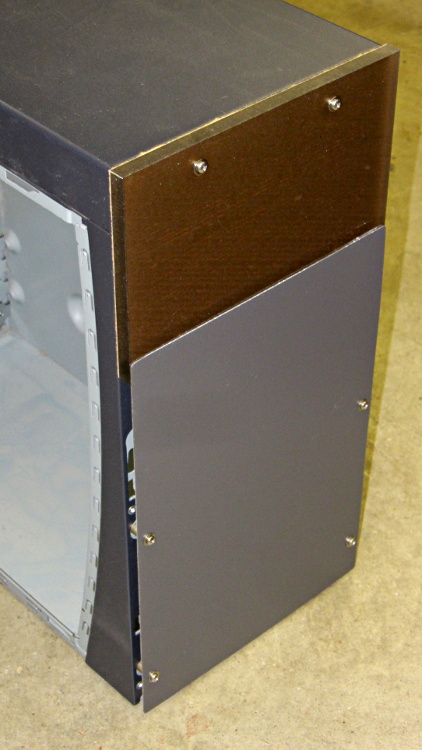
Another defunct Dell case contributed a side panel with roughly the right color. Four match-drilled clearance holes later:
Dell PC case – vent panel
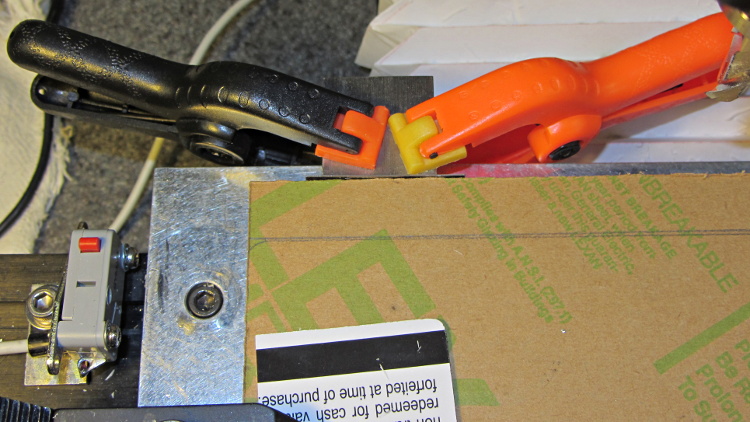
Just for effect, I squared up a slab of nice smoke-brown polycarb to cover the upper opening and perhaps hold das Blinkenlights. The slab was, as almost always happens, slightly too large for the Sherline, so I had to reclamp it to clean up all the sides. It came out about half a millimeter out of square and, being that type of guy, I clamped a block to the back of the table with a suitable spacer against the wide side, removed the spacer, loosened the step clamp on that end, rotated the slab against the block, made another pass, and it came out perfectly square:
Dell PC case – squaring polycarb panel
Four match-drilled holes and some epoxy later:
Dell PC case – polycarb panel mounts
I’ll probably put the main AC switch on that top panel, but it looks pretty good even with the protective paper on the back:
Dell PC case – front panels
I must mill a recess under the vent panel and counterbore the screw heads so everything fits flush and lines up neatly.
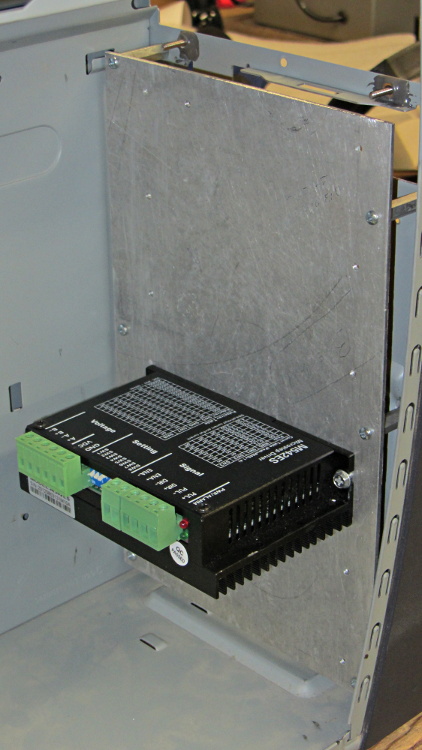
Another chunk of aluminum will hold the stepper driver bricks along the front of the case:
Dell PC case – stepper drive panel
I laid out the holes with a square, eyeballed the spacing on a machinist’s scale, manually punched / drilled / tapped the holes, and it’s all good. The standoffs provide a bit of airflow around the edges; I don’t expect the drivers to get more than slightly warm, because they’re running near the bottom of their current rating. Incidentally, that sheet is a different and much nicer alloy than the pure aluminum I jeweled for the main base plate and will probably not use.
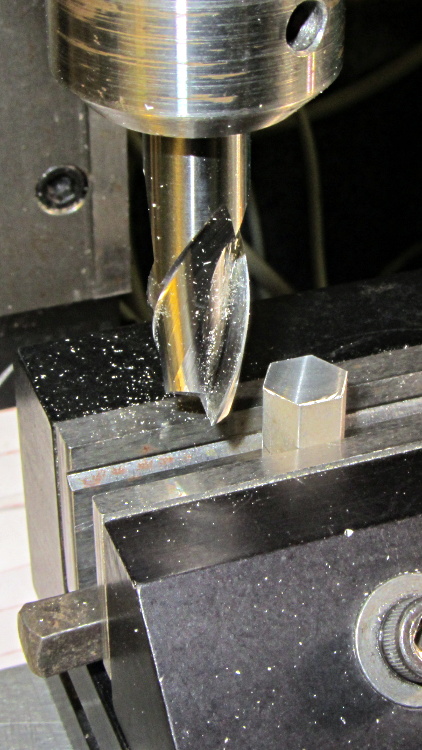
The 24 VDC power supply will mount on the top of the case, up where the Dell PC supply used to reside. The supply has M4 tapped holes and, of course, I don’t have any such standoffs, but I did find some hex standoffs with 6-32 tapped holes on both ends. Bandsaw ’em in half and clean up the raw end to the proper length:
Dell PC case – power supply standoffs – trimming
Center drill in the lathe / drill / tap an M4 thread in each one, saw off some M4 screws, slather with red Loctite, insert studs into standoffs, and that should hold the power supply in place with 6-32 screws through the case top:
Dell PC case – power supply standoffs
More Quality Shop Time lies ahead, but it’s coming together…
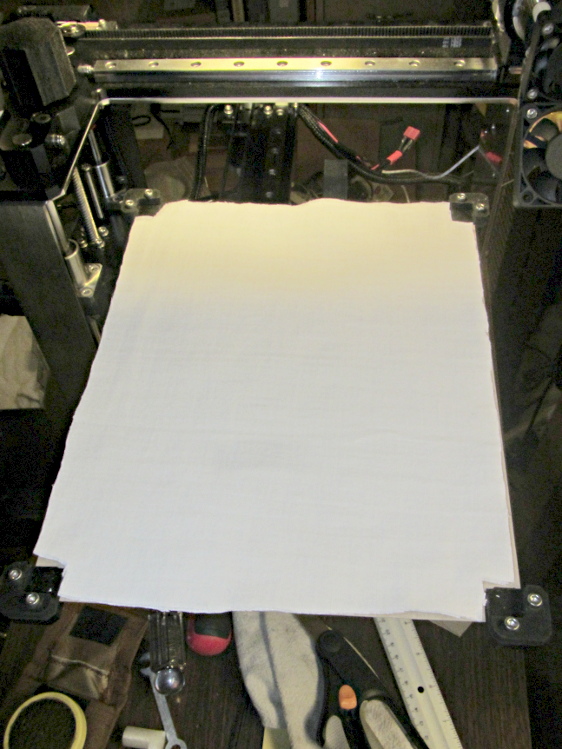
Although I don’t have any data to support the idea, it seems that there’s far too much heat loss from the bottom of the HBP. Admittedly, air is a great insulator, so most of the energy should go into the aluminum plate, but having air blow over the bottom can’t be a Good Thing. There’s a very thin space between the bottom of the silicone heater element and the black aluminum spider supporting the corners, so I added a thin cardboard sheet:
HBP insulation – cardboard base
The curiously shaped cutout clears the heater power wires, the thermistor in its lug, and the thermistor wires.
Atop that goes a pair of very thin cotton cloth sheets (again, not much to focus on, so it’s a bit blurry):
HBP insulation – cotton sheet
And then the plate fits atop the corner support pads as usual. I suppose the heater duty cycle should be lower at any given temperature, but I don’t have any records to compare against.
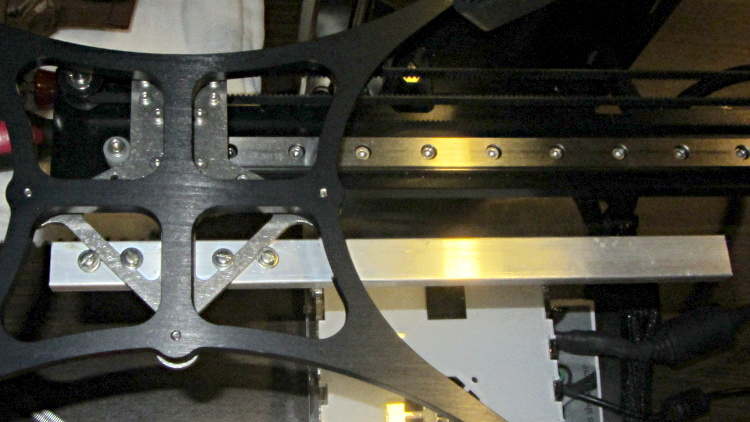
This overview shows the aluminum strut sticking out to the rear (Y+) end of the platform support spider:
HBP connector support strut – overview
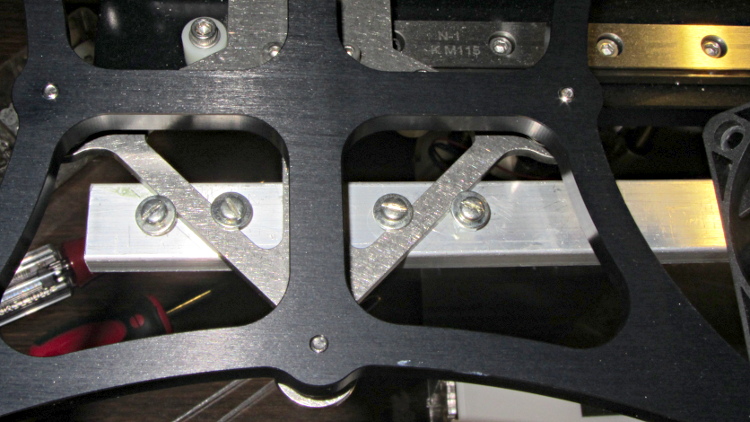
A closeup shows a quartet of 4-40 holes drilled and tapped along the strut’s midline:
HBP connector support strut – mounting detail
Admittedly, that’s a bit of a kludge, but I didn’t want to drill holes in that nice steel bracket… particularly since I’d have to dismantle the whole stage to get to it. The four screws wedge the strut firmly in position and have jam nuts on the bottom so they don’t loosen.
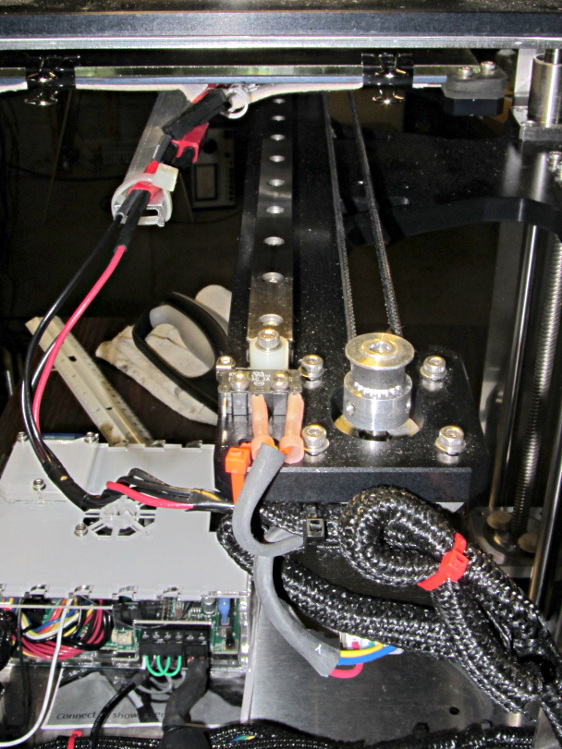
I extracted more wire from the braided sheath and moved the cable a bit further out at the cable tie holding it to the Y axis stage, then cable-tied the HBP connector to the strut.
With the stage all the way to the rear:
HBP connector support strut – at Y min
And to the front:
HBP connector support strut – at Y max
The wires may break, but now the HBP connector and heating pad joints should survive!
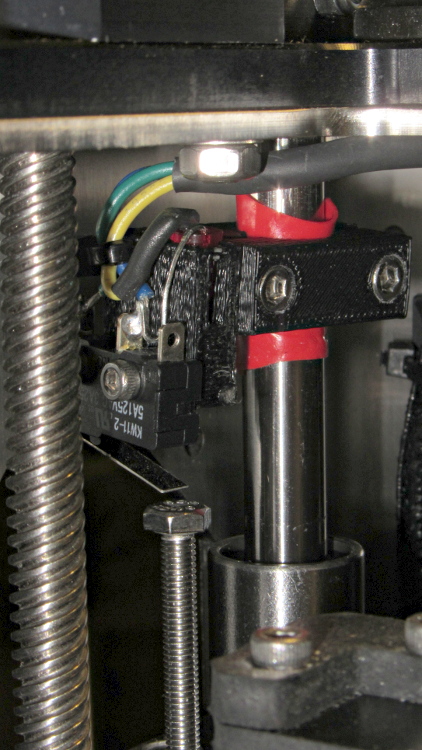
The printed bracket for the M2’s Z axis home switch doesn’t get a good grip on the oiled steel rod, so it can slide around just a little bit when nudged. That doesn’t happen often, but when it does, all your careful alignment Goes Away.
A single wrap of silicone tape solves that problem:
Z min switch on silicone tape
While I was in there, I replaced the socket-head cap screw I’d been using with a longer hex bolt and swapped the nylock nut for a plain nut that’s easier to adjust. I should file the raised markings off the top of the bolt head so it presents a smooth surface to the switch.
The original M2 Z axis motor required extremely low acceleration and speed settings, because it produced barely enough torque to lift the weight of the Z stage + HBP + glass platform. The new motor can produce about twice as much torque, so it should perform much better: all of the additional torque can go to accelerating that weight.
I weighed all the bits and pieces while I had the M2 apart, although I forgot to weigh the motor + leadscrew separately:
2.2 kg – Z stage including Z motor
290 g – old Z motor + leadscrew + nut
220 g – motor similar to new motor minus leadscrew
963 g – HBP + glass + clips
So, in round numbers, the whole assembly weighs about 3 kg = 29 N = 6.6 pounds. That’s surprisingly close to my original guesstimate of 3 kg = 7 pounds; I round in the worse direction when there’s only one significant figure.
With the new motor in place, the rods & leadscrew lubed up, and the platform in place, it’s not quite heavy enough to fall under its own weight; it would just barely fall with the old motor. The slightest touch moves it along, though, which means that the angle of friction is just over the lead angle.
The thread form is 30° trapezoidal, so the pitch diameter for an 8 mm OD thread is about PD = 7.2 mm. For an 8 mm lead thread, the lead angle is 19.5° = arctan(8 mm / π · 7.2 mm). Wikipedia’s entry on leadscrews reports the coefficient of friction for oily steel on bronze is between 0.1 and 0.16 for a buttress thread. This thread is trapezoidal, the nut isn’t worn in, the alignment’s probably off a bit, and so forth and so on; so let’s say the angle of friction is 20° and the coefficient of friction is 0.35.
If the new motor can produce, let’s suppose, 500 mN·m of torque, then the upward force on the stage will be:
(2 T) / (PD tan(lead angle + friction angle)) = 1 N·m / (7.2 mm x 0.84) = 165 N
In the ideal world of physics, applying 165 N to a 3 kg stage should accelerate it at 55 m/s2 = 55000 mm/s2 = 5 G.I don’t believe that for a moment, either, particularly because stepper motor torque drops off dramatically at higher speeds.
However, that suggests that, at a rational acceleration, the maximum stepper motor speed could very well be limited by the Marlin 40 kHz step frequency limit to 100 mm/s = (40000 step/s) / (400 step/mm) = 6000 mm/min.
Given that I’m running the XY motors at 5000 mm/s2, I set the Z acceleration to 5000 mm/s2 and discovered that it would stall on the way to 100 mm/s. Backing off to 2000 mm/s2 worked better, so I tweaked the Marlin configuration thusly: