The Smell of Molten Projects in the Morning

Ed Nisley's Blog: Shop notes, electronics, firmware, machinery, 3D printing, laser cuttery, and curiosities. Contents: 100% human thinking, 0% AI slop.

Tag: M2

Using and tweaking a Makergear M2 3D printer

  • Laser Cutter: Sheet Holder

    Laser Cutter: Sheet Holder

    Applying a laser cutter to paper-like materials requires balancing two contradictory imperatives:

    • Hold the sheet flat to avoid distortions
    • Have nothing below to avoid schmutz on the bottom

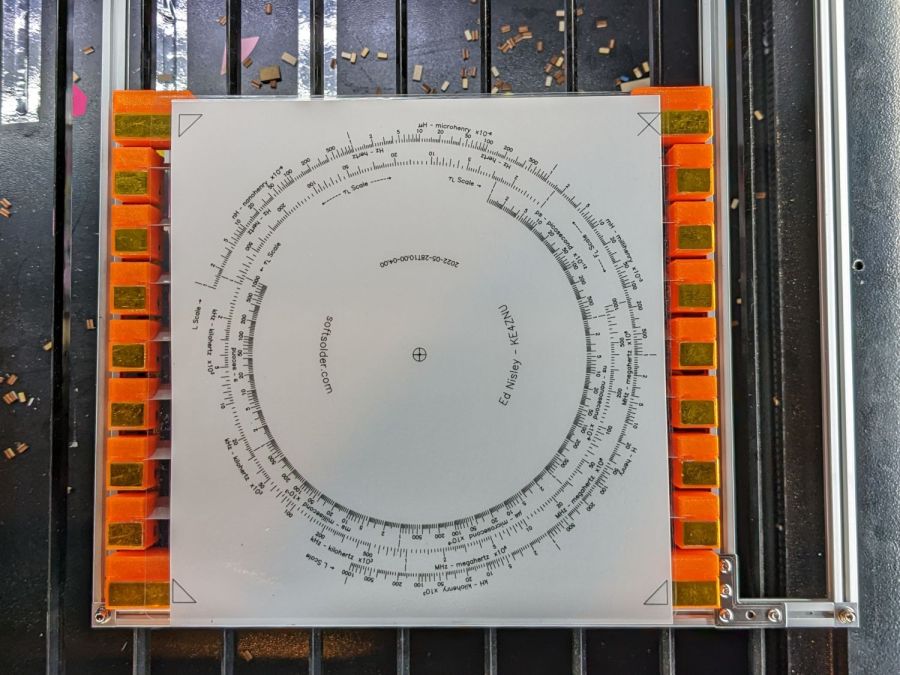
    This seemed like a good compromise:

    Sheet Holder - Tek CC bottom deck
    Sheet Holder – Tek CC bottom deck

    The orange 3D printed blocks hold aluminum miniblind blades:

    Sheet Holder - steel sheet magnet pads
    Sheet Holder – steel sheet magnet pads

    The curved slots hold the blades flush with the upper surface and align their top sides parallel to the laser beam, giving the beam very little blade to chew on near the focus point and allowing plenty of room below the sheet to dissipate cutting fumes.

    The gold-ish squares are thin steel sheets covered with Kapton tape, painstakingly filed en masse from small snippets:

    Sheet Holder - filed steel pads
    Sheet Holder – filed steel pads

    The first iteration used precisely laser-cut refrigerator magnet pieces, in the expectation a crappy rubber magnet would provide just enough attraction to let a neodymium magnets hold the paper flat, without risk of blood blisters between fingers and steel:

    Sheet Holder - ferrite magnet pads
    Sheet Holder – ferrite magnet pads

    As expected, contact with the neo magnet completely wiped away the alternating pole magnetism in the rubber sheet, leaving a weakly attractive non-metallic surface. Alas, the rubber had too little attraction through a laminated sheet of paper, so I switched to real steel and risked the blisters.

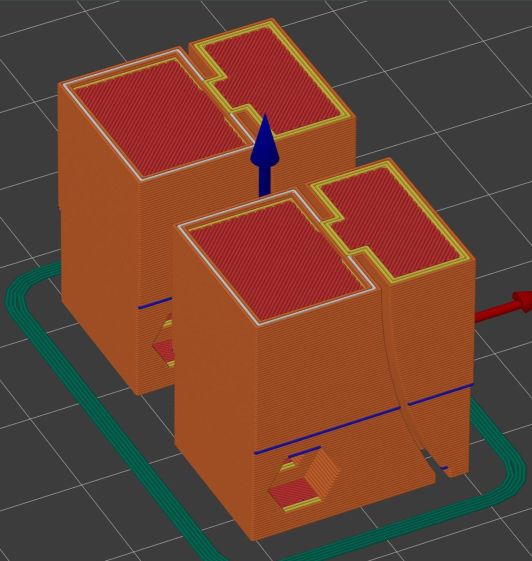
    Most of the blocks are narrow:

    Sheet Holder Bracket - solid model
    Sheet Holder Bracket – solid model

    The four corners are wider:

    Sheet Holder Bracket - wide - solid model
    Sheet Holder Bracket – wide – solid model

    They’re symmetric for simplicity, with recesses for the magnets / steel sheets on the top. The through-holes have recesses for M3 SHCS holding them to T-nuts in Makerbeam rails, with a slightly overhanging alignment ledge keeping them perpendicular to the rail.

    The magnets come from an array of worn-out Philips Sonicare toothbrush heads:

    Sheet Holder - magnet holders curing
    Sheet Holder – magnet holders curing

    They’re epoxied inside a two-piece mount, with the lower part laser-machined from 3 mm acrylic to put the two magnets in each assembly flush with the lower surface; the green area gets engraved 1 mm below the surface for the steel backing plate. The 1.5 mm upper frame fits around the plate and protrudes over the ends just enough for a fingernail grip:

    Magnet Holder Cuts
    Magnet Holder Cuts

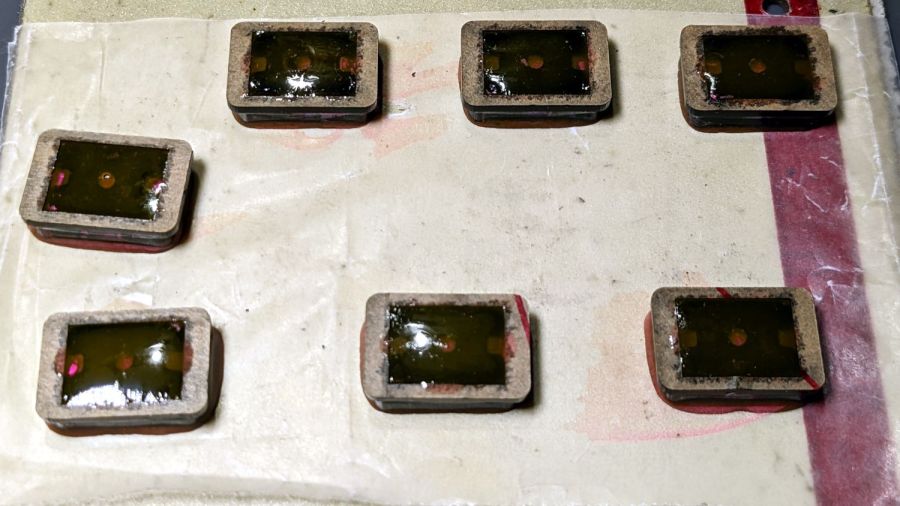
    The epoxy got a few drops of fuschia dye, because why not:

    Sheet Holder - trimmed magnet holders
    Sheet Holder – trimmed magnet holders

    The garish trimmings came from slicing the meniscus around the lower part of the holder off while the epoxy was still flexy.

    The holders must be flat for clearance under the focus pen:

    Sheet Holder - focus probe clearance
    Sheet Holder – focus probe clearance

    Some experimentation suggests I can raise the pen by maybe 2 mm (with a corresponding increase in the Home Offset distance) , but the switch travel requires nearly all of the protruding brass-colored tip and there’s not much clearance under the nozzle at the trip point.

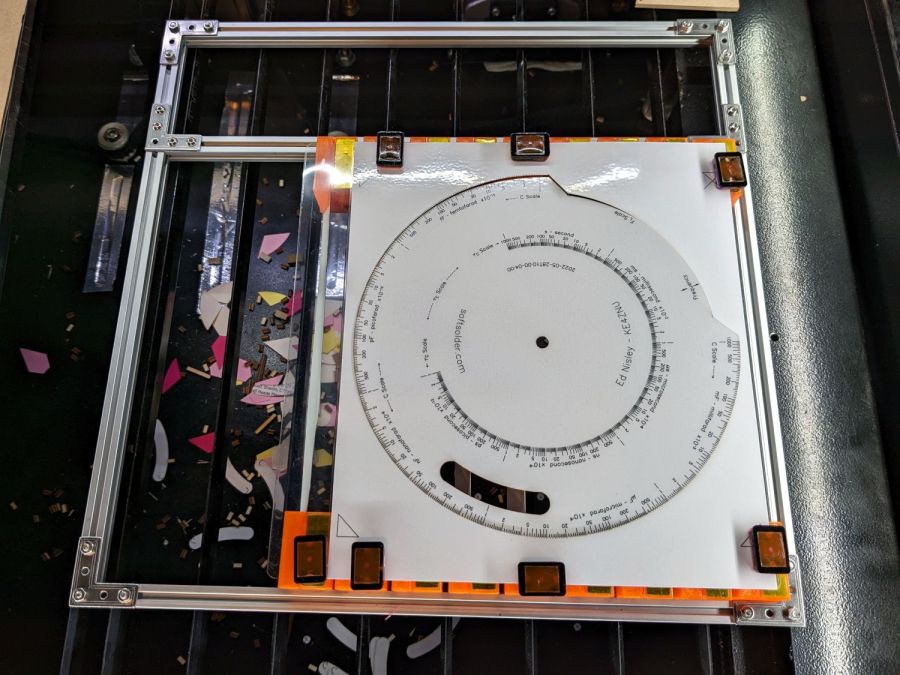
    With all that in hand, it works fairly well:

    Sheet Holder - Tek CC cutout
    Sheet Holder – Tek CC cutout

    The lower deck has very little margin for gripping, which is why the four corner blocks must be a bit wider than the others.

    The lamInator tends to curl the sheets around their width, so most of the clamping force should be along the upper and lower edges to remove the curl at the ends. This requires turning the whole affair sideways and deploying more magnets, which is possible for the smaller middle and upper decks:

    Sheet Holder - Tek CC middle deck
    Sheet Holder – Tek CC middle deck

    Protruding SHCS heads on the four corners snug up against the edge of the knife-edge bed opening for Good Enough™ angular alignment.

    Plain paper (anything non-laminated) seems generally flat enough to require no more than the corner magnets.

    It’s definitely better than the honeycomb surface for fume control!

    The OpenSCAD source code as a GitHub Gist:

    // Bracket for sheet holder
    // Ed Nisley KE4ZNU 2022-09-09
    Layout = "Show"; // [Show, Build, Blade]
    /* [Hidden] */
    ThreadThick = 0.25;
    ThreadWidth = 0.40;
    HoleWindage = 0.2;
    Protrusion = 0.1; // make holes end cleanly
    ID = 0;
    OD = 1;
    LENGTH = 2;
    module PolyCyl(Dia,Height,ForceSides=0) { // based on nophead's polyholes
    Sides = (ForceSides != 0) ? ForceSides : (ceil(Dia) + 2);
    FixDia = Dia / cos(180/Sides);
    cylinder(r=(FixDia + HoleWindage)/2,
    h=Height,
    $fn=Sides);
    }
    // Sizes
    Magnet = [10,30,0.5]; // magnetic sheet size
    //Magnet = [10,14,0.5];
    MagnetRim = 1.0;
    Screw = [3.0,5.5,3.0]; // SHCS OD=head LEN=head
    MakerBeam = 10.0; // beam size, screw = half height
    BeamRecess = 0.5; // slight overhang for alignment
    BladeSlot = 0.15 * 4; // slot with plenty of clearance
    BladeSocket = 5.0; // recess to hold miniblind
    BladeWidth = 24.6; // miniblind width
    BladeM = 1.6; // height of miniblind curve
    BladeSides = 12*8;
    BladeRadius = (pow(BladeM,2) + pow(BladeWidth,2)/4)/(2*BladeM);
    BladeAngle = 2*asin(BladeWidth/(2*BladeRadius));
    echo(BladeRadius = BladeRadius);
    echo(BladeAngle = BladeAngle);
    Block = [Magnet.x + 2*MagnetRim + ceil(BladeRadius*(1 – cos(BladeAngle)) + 2.0),
    Magnet.y + 2*MagnetRim,
    BladeRadius*sin(BladeAngle)];
    echo(Block = Block);
    // Cutter for spline recess
    // approximately correct and good enough
    module BladeRing() {
    rotate([90,0,0])
    translate([0,0,-BladeSocket])
    linear_extrude(height=2*BladeSocket,convexity=2)
    difference() {
    circle(r=BladeRadius,$fn=BladeSides);
    circle(r=BladeRadius – BladeSlot,$fn=BladeSides);
    }
    }
    // Overall bracket
    module Bracket() {
    difference() {
    translate([0,-Block.y/2,0])
    cube(Block,center=false);
    translate([Magnet.x/2 + MagnetRim,0,Block.z – Magnet.z/2 + Protrusion/2])
    cube(Magnet + [0,0,Protrusion],center=true);
    for (j=[-1,1])
    translate([0,j*Block.y/2,MakerBeam/2 – Protrusion/2])
    cube([3*Block.x,2*BeamRecess,MakerBeam + Protrusion],center=true);
    for (j=[-1,1])
    translate([Magnet.x + 2*MagnetRim + BladeRadius,j*Block.y/2,Block.z])
    BladeRing();
    for (j=[-1,1])
    translate([Block.x – 2.0 – BladeSlot,j*Block.y/2,5*ThreadThick/2 – Protrusion/2])
    cube([2*BladeSlot,2*BladeSocket,5*ThreadThick + Protrusion],center=true);
    translate([MakerBeam/2,Block.y,MakerBeam/2])
    rotate([90,0,0])
    PolyCyl(Screw[ID],2*Block.y,6);
    for (j=[-1,1])
    translate([MakerBeam/2,j*(Block.y/2 – Screw[LENGTH] – 1.0),MakerBeam/2])
    rotate([-j*90,0,0])
    PolyCyl(Screw[OD] + HoleWindage,2*Block.y,6);
    }
    }
    //———-
    // Build it
    if (Layout == "Blade")
    BladeRing();
    if (Layout == "Show")
    Bracket();
    if (Layout == "Build")
    Bracket();

  • SJCAM M20: Another Battery Bites the Dust

    SJCAM M20: Another Battery Bites the Dust

    A little more than two years after replacing its internal battery, the SJCAM M20 camera on my Tour Easy once again wouldn’t last to the end of the driveway if I forgot to turn on the external battery pack. This time around, the camera was so firmly jammed in the printed seat frame mount that I had to cut the mount apart.

    Yup, that puppy is all swoll up:

    SJCAM M20 swollen battery - side view
    SJCAM M20 swollen battery – side view

    Poor thing looks like a tiny pillow:

    SJCAM M20 swollen battery - pouch
    SJCAM M20 swollen battery – pouch

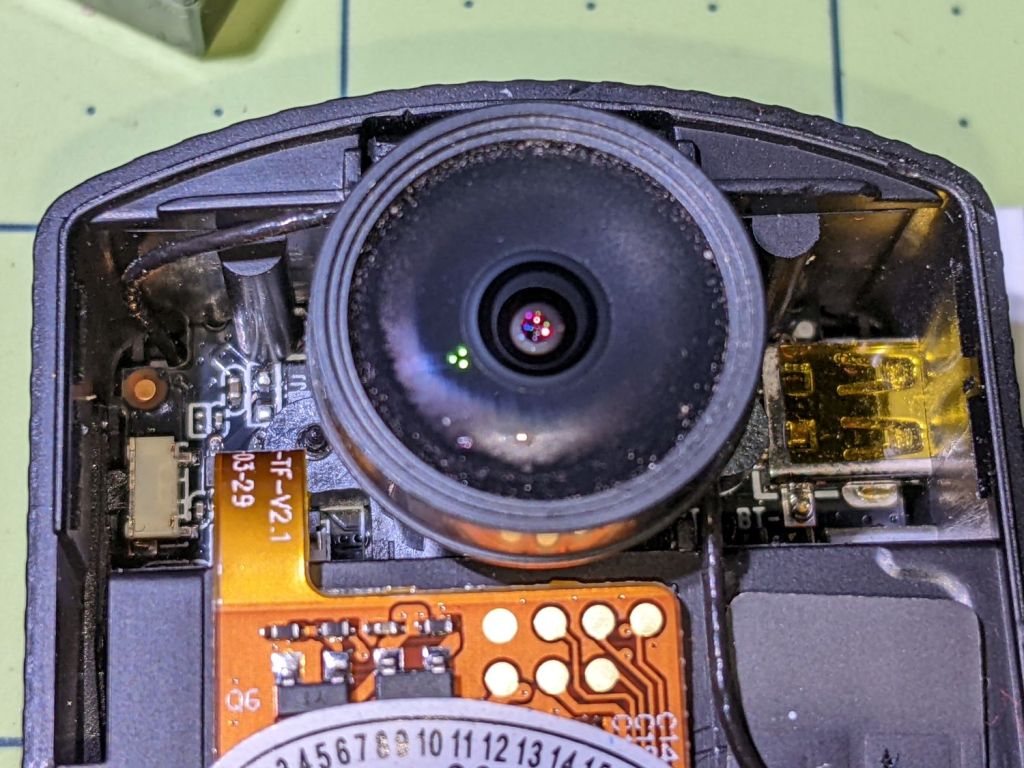
    While I had it apart, I tried to clean / refurbish the button contacts on the top. Unfortunately, they’re pretty well buried in the camera frame and I was unwilling to dismantle the optics, remove the display, and gut the camera to find out if they were more accessible from the back surface:

    SJCAM M20 - switch internals
    SJCAM M20 – switch internals

    While all that was going on, I ran off a new mount in white PETG:

    SJCAM M20 - white case installed
    SJCAM M20 – white case installed

    I’m down to the last battery. The “4.35V” on the pillow indicates they’re special high-voltage lithium-polymer cells, so I can’t just drop a random lithium pouch cell in there and expect it to Just Work.

    I think the “782633” is the cell size, so, if I were willing to have a few thousand on the shelf, a 552525 pouch might fit. The reduced capacity wouldn’t be a problem, as it must just keep the camera’s clock ticking between rides.

    Drat!

  • Replacement Muntin Clips

    Replacement Muntin Clips

    Terminology I had to look up:

    • Window: something in a wall you can see through
    • Sash: a sliding panel in a window
    • Mullion: vertical post separating two windows
    • Muntin: strips separating glass panes in a sash

    TIL: Muntin, which I’d always known was called a Mullion.

    With that as preface, one of Mary’s quilting cronies lives in a very old house updated with vinyl windows sporting wood muntins arranged in a grille. The wood strips forming the grille end in plastic clips that snap into the sash, thereby holding the grill in place to make the window look more-or-less historically correct, while not being a dead loss as far as winter heating goes.

    Time passed, sun-drenched plastic became brittle, and eventually enough clips broke that the grilles fell out. An afternoon quilting bee produced a question about the possibility of making a 3D printed clip, as the original manufacturer is either defunct or no longer offers that particular style of clip as a replacement part.

    Well, I can do that:

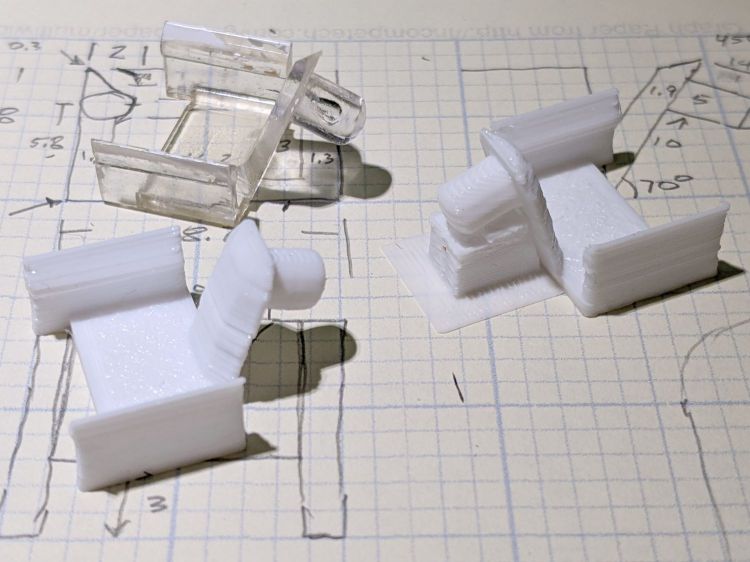
    Window Muntin Clips
    Window Muntin Clips

    The original is (obviously) the transparent injection-molded part in the upper left. The other two come hot off the M2’s platform, with the one on the right showing the support material under the sash pin.

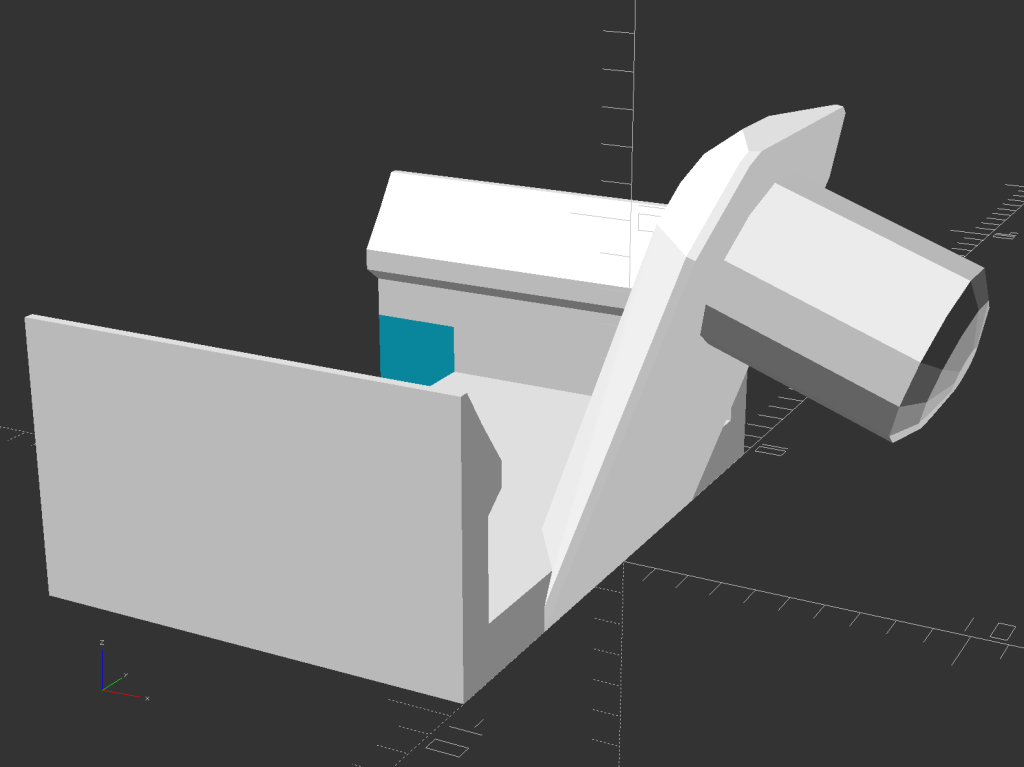
    The solid model looks about like you’d expect:

    Window Muntin Clip - solid model
    Window Muntin Clip – solid model

    There is obviously no way to build it without support material, so I painted the bottom facet of the sash pin with a PrusaSlicer support enforcer:

    Window Muntin Clip - PrusaSlicer
    Window Muntin Clip – PrusaSlicer

    The pin comes out slightly elongated top-to-bottom, but it’s still within the tolerances of the original part and ought to pop right into the sash. We’ll know how well it works shortly after the next quilting bee.

    The doodle with useful measurements amid some ideas that did not work out:

    Window Muntin Clip - Dimension Doodle
    Window Muntin Clip – Dimension Doodle

    The OpenSCAD source code as a GitHub Gist:

    // Window Muntin Clips
    // Ed Nisley KE4ZNU June 2022
    Layout = "Show"; // [Build, Show]
    /* [Hidden] */
    ThreadThick = 0.25;
    ThreadWidth = 0.40;
    HoleWindage = 0.2;
    Protrusion = 0.1; // make holes end cleanly
    inch = 25.4;
    ID = 0;
    OD = 1;
    LENGTH = 2;
    function IntegerMultiple(Size,Unit) = Unit * ceil(Size / Unit);
    //———————-
    // Dimensions
    ClipOA = [13.0,18.7,8.0];
    TongueAngle = 70;
    TongueOA = [14.0,10.0,1.8 – 0.2]; // minus Z windage for angular slices
    BuildGap = 5.0;
    //———————-
    // Useful routines
    module PolyCyl(Dia,Height,ForceSides=0) { // based on nophead's polyholes
    Sides = (ForceSides != 0) ? ForceSides : (ceil(Dia) + 2);
    FixDia = Dia / cos(180/Sides);
    cylinder(r=(FixDia + HoleWindage)/2,
    h=Height,
    $fn=Sides);
    }
    //———————-
    // Pieces
    module Shell() {
    // Clip base as 2D polygon
    // Magic numbers from measurements
    cx = ClipOA.x;
    cy = ClipOA.y;
    cz = ClipOA.z;
    ClipPts = [
    [0,0],[0,cz],[0.3,cz],
    [1.0,cz-1.0],[2.0,cz-2.3],[2.0,cz-3.0],[1.3,cz-3.5],
    [1.3,1.6],[17.4,1.6],
    [17.4,cz-3.5],[16.7,cz-3.0],[16.7,cz-2.3],[17.7,cz-1.0],
    [18.4,cz],[18.7,cz],[18.7,0.0],[0,0]
    ];
    difference() {
    translate([-ClipOA.x,-ClipOA.y/2,0])
    rotate([90,0,90])
    linear_extrude(height=ClipOA.x,convexity=3)
    polygon(convexity=3,points=ClipPts);
    translate([-(ClipOA.x – 3.0/2 + Protrusion),0,0])
    cube([3.0 + Protrusion,ClipOA.y – 2*1.3,4*1.6],center=true);
    }
    }
    module Tongue() {
    tx = TongueOA.x;
    ty = TongueOA.y;
    tz = TongueOA.z;
    tt = ty – 2*sqrt(2)*tz; // width at top of tapers
    td = ThreadWidth; // min size of features
    intersection() {
    rotate([0,-TongueAngle,0]) {
    difference() {
    union() {
    hull() {
    for (j=[-1,1]) {
    translate([td/2,j*(ty – td)/2,td/2])
    cube(td,center=true);
    translate([td/2,j*(tt – td)/2,tz – td/2])
    cube(td,center=true);
    }
    translate([10.0,0,0])
    rotate(180/12)
    cylinder(d=ty,h=td,center=false,$fn=12);
    translate([10.0,0,tz – td/2])
    rotate(180/12)
    cylinder(d=tt,h=td,center=false,$fn=12);
    };
    translate([10.0,0,-5.2])
    rotate(180/12)
    cylinder(d=5.0,h=5.2,center=false,$fn=12);
    translate([10.0,0,-5.2])
    rotate(180/12)
    resize([0,0,2.0])
    sphere(d=5.0/cos(180/12),$fn=12);
    }
    if (false)
    translate([10.0,0,-10]) // stiffening hole
    rotate(180/6)
    PolyCyl(0.1,20,6);
    }
    }
    cube([2*ClipOA.x,2*ClipOA.y,2*IntegerMultiple(13.0,ThreadThick)],center=true);
    }
    }
    module Clip() {
    Shell();
    Tongue();
    }
    //———————-
    // Build it
    if (Layout == "Show") {
    Clip();
    }
    if (Layout == "Build") {
    Clip();
    }

  • Garden Cart Handle Pivot

    Garden Cart Handle Pivot

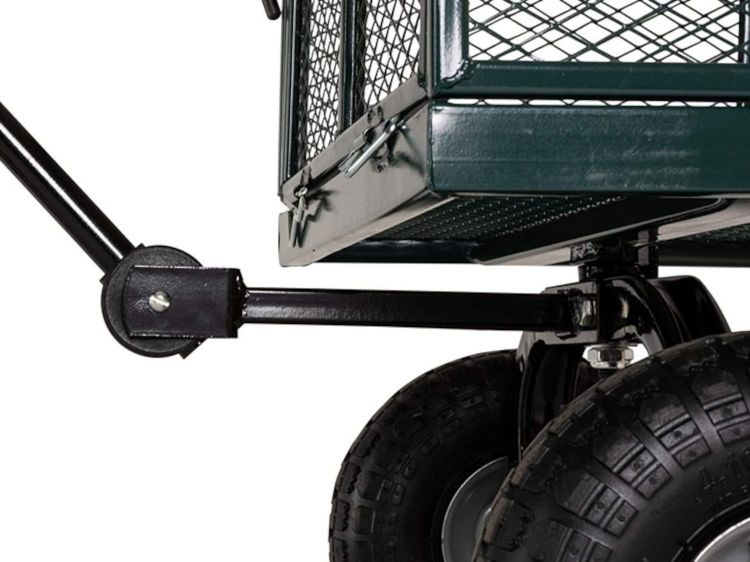
    For reasons not relevant here, I was tapped to replace the plastic parts attaching the handle to a garden cart:

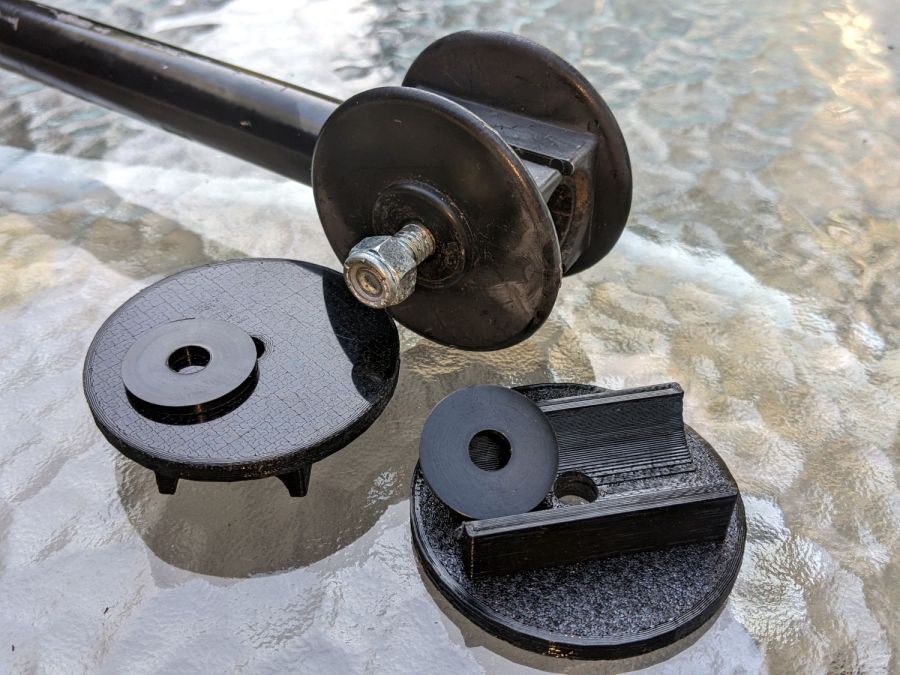
    Garden Cart - handle attachment
    Garden Cart – handle attachment

    The owner tried to contact the “manufacturer” to no avail; repair parts are simply not available, even if the name painted on the cart had a meaningful relationship to anything else.

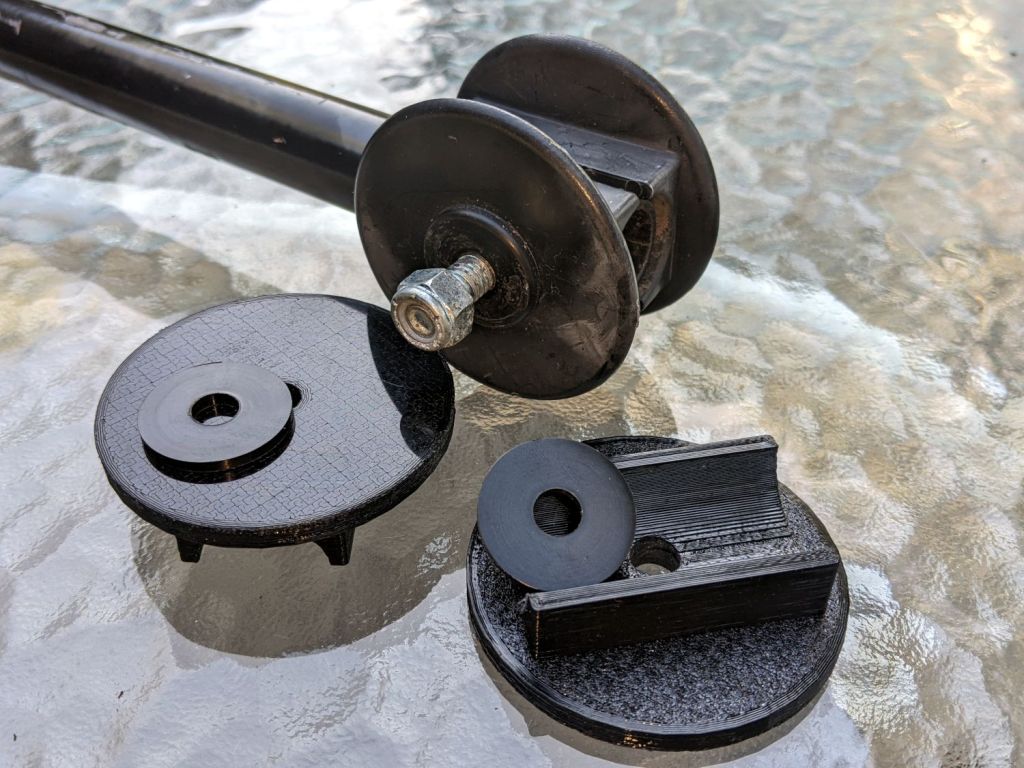
    Well, I can fix that:

    Garden Cart - handle repair parts
    Garden Cart – handle repair parts

    Fortunately, another cart in the fleet provided the missing bits so I could reverse-engineer their measurements.

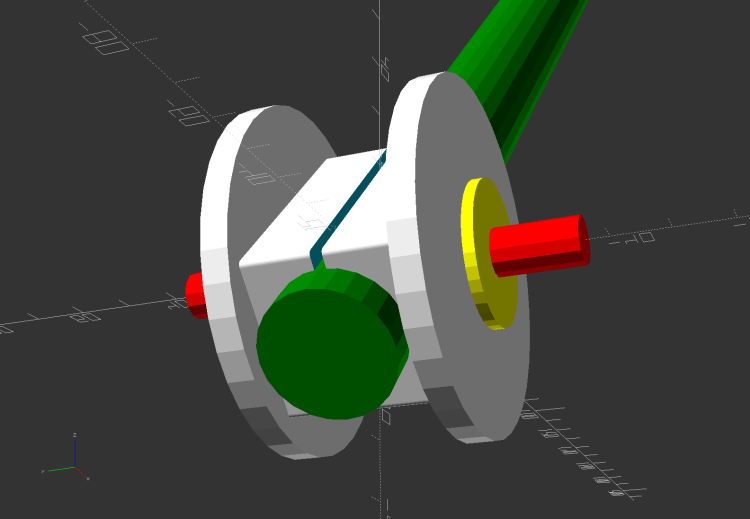
    The solid model looks about like you’d expect:

    Garden Cart Handle - show view
    Garden Cart Handle – show view

    Printing the two halves with those nice (yellow) bosses in place wasn’t feasible. They were exactly 1 inch in diameter, so I just parted two cookies from the end of a stout acetal rod after drilling a hole for the 2-¼ inch 5/16-18 bolt.

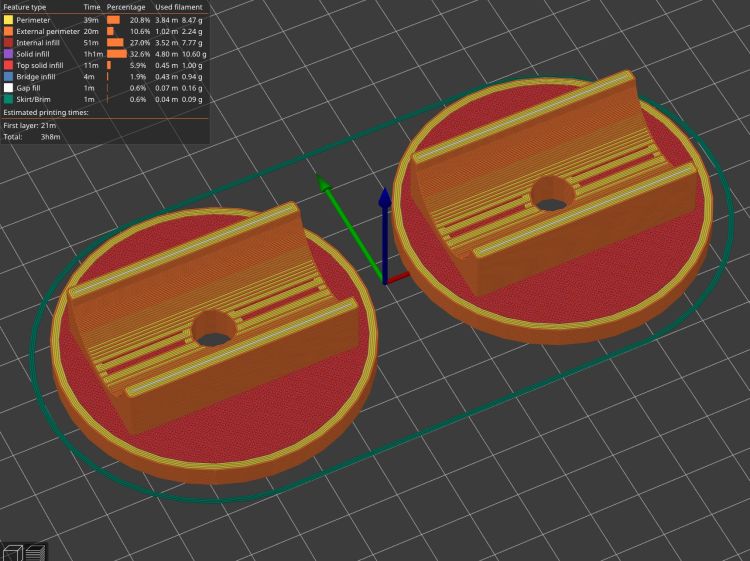
    The two pieces took nigh onto three hours with five perimeters and 50% infill:

    Garden Cart Handle - slicer preview
    Garden Cart Handle – slicer preview

    While delivering and installing the parts, I got volunteered to haul plants to cars with one of the carts during the upcoming Spring Plant Sale. That’ll teach me to stay in the Basement Shop …

    The OpenSCAD source code as a GitHub Gist:

    // Garden Cart Handle Pivot
    // Ed Nisley KE4ZNU 2022-05
    Layout = "Show"; // [Show,Build]
    /* [Hidden] */
    ThreadThick = 0.25;
    ThreadWidth = 0.40;
    HoleWindage = 0.2;
    Protrusion = 0.1; // make holes end cleanly
    inch = 25.4;
    function IntegerMultiple(Size,Unit) = Unit * ceil(Size / Unit);
    ID = 0;
    OD = 1;
    LENGTH = 2;
    //———-
    // Dimensions
    // Handle lies along X axis
    HandleOD = (7/8) * inch;
    BoltOD = (5/16) * inch;
    Washer = [BoltOD,1.0 * inch,2.0]; // just for Show
    Disk = [BoltOD,62.0,(3/16) * inch];
    ClampBase = [(1 + 7/8)*inch,(1 + 1/8)*inch,2.0];
    Kerf = 2.0;
    CornerRadius = 1.0;
    PivotOA = [Disk[OD],Disk[OD],HandleOD + 2*ClampBase.z + 2*Disk[LENGTH]];
    //———————-
    // Useful routines
    module PolyCyl(Dia,Height,ForceSides=0) { // based on nophead's polyholes
    Sides = (ForceSides != 0) ? ForceSides : (ceil(Dia) + 2);
    FixDia = Dia / cos(180/Sides);
    cylinder(d=(FixDia + HoleWindage),h=Height,$fn=Sides);
    }
    //———————-
    // Set up parts
    module Handle() {
    translate([-2*PivotOA.x,0,0])
    rotate([0,90,0])
    PolyCyl(HandleOD,4*PivotOA.x,24);
    }
    module Bolt() {
    translate([0,0,-PivotOA.z])
    PolyCyl(BoltOD,2*PivotOA.z,12);
    }
    module Pivot() {
    difference() {
    union() {
    hull()
    for (i=[-1,1], j=[-1,1]) // rounded block
    translate([i*(ClampBase.x/2 – CornerRadius),j*(ClampBase.y/2 – CornerRadius),-PivotOA.z/2])
    cylinder(r=CornerRadius,h=PivotOA.z,$fn=4*8);
    for (k=[-1,1])
    translate([0,0,k*(PivotOA.z/2 – Disk[LENGTH]/2)])
    rotate(180/36)
    cylinder(d=Disk[OD],h=Disk[LENGTH],$fn=36,center=true);
    }
    Handle();
    Bolt();
    cube([2*ClampBase.x,2*ClampBase.y,Kerf],center=true); // slice through center
    }
    }
    //———-
    // Build them
    if (Layout == "Show") {
    rotate([90,-45,0]) {
    Pivot();
    color("Green")
    translate([2*PivotOA.x – PivotOA.x/2,0,0])
    Handle();
    color("Red")
    Bolt();
    color("Yellow")
    for (k=[-1,1])
    translate([0,0,k*(PivotOA.z/2 + Washer[LENGTH])])
    rotate(180/36)
    cylinder(d=Washer[OD],h=Washer[LENGTH],$fn=36,center=true);
    }
    }
    if (Layout == "Build") {
    Offset = 5.0;
    intersection() {
    translate([-(PivotOA.x/2 + Offset),0,PivotOA.z/2])
    Pivot();
    translate([-2*PivotOA.x,-2*PivotOA.y,0])
    cube([4*PivotOA.x,4*PivotOA.y,PivotOA.z/2],center=false);
    }
    intersection() {
    translate([(PivotOA.x/2 + Offset),0,PivotOA.z/2])
    rotate([180,0,0])
    Pivot();
    translate([-2*PivotOA.x,-2*PivotOA.y,0])
    cube([4*PivotOA.x,4*PivotOA.y,PivotOA.z/2],center=false);
    }
    }

  • OMTech 60 W Laser: Improved COB LED Shades

    OMTech 60 W Laser: Improved COB LED Shades

    Adding (fake) rivets to the COB LED shade brackets definitely improves their appearance:

    Acrylic COB LED Shade - installed
    Acrylic COB LED Shade – installed

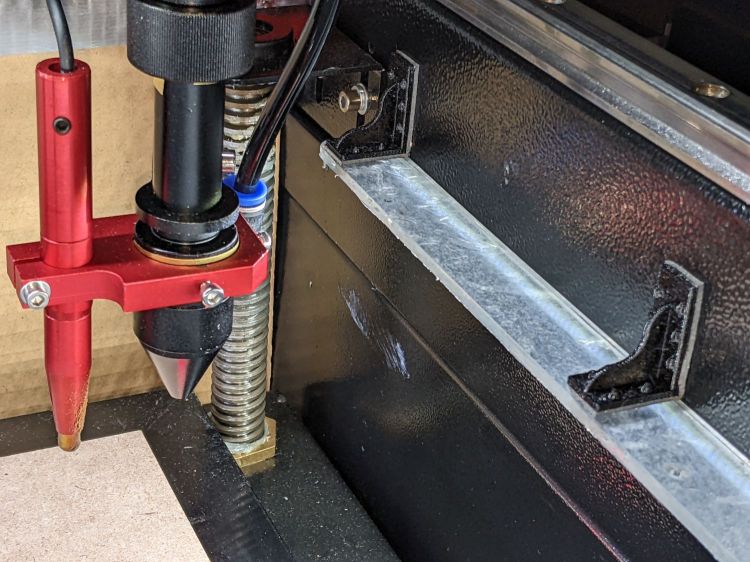
    I cut new shades from vintage clear acrylic sheet, with more aluminized mylar attached to the lower surface: you can barely see the COB LED strip through the reflecting surface.

    Depending on how you arrange all the hardware hanging on the nozzle, the shades can collide with something at the home position in the far right corner:

    Acrylic COB LED Shade - X clearance
    Acrylic COB LED Shade – X clearance

    Definitely a step up from cardboard …

  • OMTech 60 W Laser: Laser Power Indicator
    OMTech 60 W Laser: Laser Power Indicator

    Although the OMTech laser controls the laser power supply with a key-lock switch, there’s little visible difference between the OFF and ON positions. Having occasionally mistaken it in both directions, this seemed like a useful addition:

    Laser Power Lock Indicator - installed
    Laser Power Lock Indicator – installed

    The strip of black duct tape below the lock muffles the rattle of the triangle hatch key against the metal cabinet.

    Two snippets of foam tape hold the knob to the lock cylinder, making an admittedly tenuous connection, but the knob fits around the outside of the switch housing with minimal clearance and doesn’t shouldn’t suffer any torque or pulling, so it might work.

    The solid model looks about like you’d expect:

    Laser Power Lock Indicator - solid model
    Laser Power Lock Indicator – solid model

    Unfortunately, it has no good orientation for printing, so I let PrusaSlicer generate support material inside the knob:

    Laser Power Lock Indicator - Support structures
    Laser Power Lock Indicator – Support structures

    Suffice it to say: removing all that plastic did not go well.

    I eventually grabbed the knob in the lathe and bored the interior out to its more-or-less proper dimensions, figuring nobody would ever notice the carnage, and it worked reasonably well. In the unlikely event I need another pointer, I’ll add a support spider to hold up the interior with minimal contact and less plastic.

    Yeah, the laser really needs a stack light showing its condition and safety status …

    The OpenSCAD source code as a GitHub Gist:

    // Indicator for OMTech laser power lock
    // Ed Nisley KE4ZNU 2022-04-09
    KnobOD = 35.0;
    KnobHeight = 22.0;
    KnobTaper = 4.0;
    PointerLength = 45.0;
    PointerThick = 3.0;
    TipOD = 2.0;
    /* [Hidden] */
    //——
    Protrusion = 0.1; // make holes end cleanly
    HoleWindage = 0.2;
    module PolyCyl(Dia,Height,ForceSides=0) { // based on nophead's polyholes
    Sides = (ForceSides != 0) ? ForceSides : (ceil(Dia) + 2);
    FixDia = Dia / cos(180/Sides);
    cylinder(d=(FixDia + HoleWindage),h=Height,$fn=Sides);
    }
    //———-
    // Create part
    // Plenty of magic numbers from actual measurements
    module Pointer() {
    difference() {
    union() {
    linear_extrude(height=PointerThick)
    hull() {
    circle(d=KnobOD,$fn=24);
    translate([PointerLength – TipOD/2,0])
    circle(d=TipOD,$fn=12);
    }
    cylinder(d=KnobOD,h=KnobHeight – KnobTaper,$fn=24);
    translate([0,0,KnobHeight – KnobTaper – Protrusion])
    cylinder(d1=KnobOD,d2=KnobOD – 3.0,h=KnobTaper + Protrusion,$fn=24);
    }
    translate([0,0,-Protrusion]) {
    PolyCyl(29.0,14.0 + Protrusion,24);
    PolyCyl(24.0,14.0 + 5.0 + Protrusion,24); // leaves clearance under pointer
    }
    translate([0,0,KnobHeight])
    cube([12.0,2.0,2*KnobHeight],center=true);
    }
    }
    //———-
    // Build it
    Pointer();

    And doodles giving the dimensions of the key lock, not all of which can be true at the same time:

    Laser Power Lock Indicator - Dimension Doodles
    Laser Power Lock Indicator – Dimension Doodles
  • OMTech 60 W Laser: COB LED Shades

    OMTech 60 W Laser: COB LED Shades

    Adding LED strips around the interior of the laser platform definitely improved the visibility of things on the honeycomb platform:

    OMTech 60W laser - COB LED strips
    OMTech 60W laser – COB LED strips

    However, all that upward-directed light goes directly into my glare-sensitive eyeballs, so I added shades above the strips:

    COB LED Shade - installed
    COB LED Shade – installed

    They’re cut from corrugated cardboard because I have an essentially infinite supply and I’m still working out speeds and intensities. Eventually they’ll become something like black acrylic.

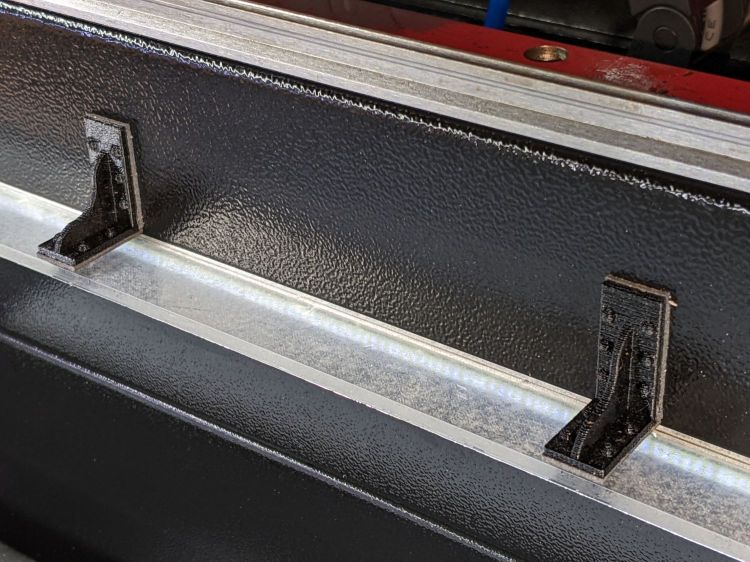
    The brackets emerged from the vasty digital deep through the miracle of 3D printing:

    COB LED Shade Brackets - slice preview
    COB LED Shade Brackets – slice preview

    They’re stuck to the laser cabinet and the cardboard with double-sided duct tape. If you’re careful, they will line up along one edge of the tape, roll over neatly to stick their other face, then a single razor knife cut can separate each pair of neighbors.

    The underside sports an aluminized mylar strip to redirect the wasted light in a more useful direction:

    COB LED Shade - aluminized Mylar reflector
    COB LED Shade – aluminized Mylar reflector

    The tapeless sticky shipped with the laser holds the reflector in place, while its 20 mm width sets the 21 mm shade dimension. Although you want a reasonably smooth layer, it need not be mirror-flat.

    Now it’s really bright in there:

    COB LED Shade - overview
    COB LED Shade – overview

    While I had my head under the hood, I stuck a fourth strip of COB LEDs on the lip along the rear edge of the opening; it’s bright enough to cast the shadow just forward of the laser head despite the OEM under-gantry LED strip. Because the rear strip is aimed downward, it didn’t need a shade.

    The perforated cardboard sheet on the left is a spike plate: more about that later.

    The SVG drawings as a GitHub Gist:

    Loading
    Sorry, something went wrong. Reload?
    Sorry, we cannot display this file.
    Sorry, this file is invalid so it cannot be displayed.

    The OpenSCAD source code as a GitHub Gist:

    // Bracket for COB LED shade
    // Ed Nisley KE4ZNU 2022-03-24
    BaseLength = 20.0;
    /* [Hidden] */
    ThreadThick = 0.25;
    ThreadWidth = 0.40;
    HoleWindage = 0.2;
    Protrusion = 0.1; // make holes end cleanly
    WebThick = 4*ThreadWidth;
    BasePlate = [BaseLength,5*WebThick,WebThick];
    //———-
    // Create parts
    module Bracket() {
    R = BaseLength/3;
    N = 36;
    union() {
    rotate([90,0,0])
    translate([0,0,-WebThick/2])
    linear_extrude(height=WebThick,convexity=2)
    difference() {
    intersection() {
    union () {
    square(2*R,center=false);
    translate([0,2*R])
    rotate(180/N)
    circle(r=R,$fn=N);
    translate([2*R,0])
    rotate(180/N)
    circle(r=R,$fn=N);
    }
    square(3*R,center=false);
    }
    translate([2*R*cos(180/N),2*R*cos(180/N)])
    rotate(180/N)
    circle(r=R,$fn=N);
    }
    rotate([0,-90,0])
    translate([0,-BasePlate.y/2,-BasePlate.z])
    cube(BasePlate,center=false);
    translate([0,-BasePlate.y/2,0])
    cube(BasePlate,center=false);
    }
    }
    //———-
    // Build them
    Bracket();