The Smell of Molten Projects in the Morning

Ed Nisley's Blog: Shop notes, electronics, firmware, machinery, 3D printing, laser cuttery, and curiosities. Contents: 100% human thinking, 0% AI slop.

Tag: Improvements

Making the world a better place, one piece at a time

  • Micromark Bandsaw Table Angle Gauge Tweak

    Mostly, the Tiny Bandsaw™ cuts thin sheets, where having the blade at a slight angle off perpendicular doesn’t make much difference. I recently started to cut a thicker block and thought the blade looked a bit slanted, so I deployed the Tiny Square™ to set it properly:

    MicroLux Bandsaw - blade perpendicular
    MicroLux Bandsaw – blade perpendicular

    Which produced this result on the blade angle gauge under the table:

    MicroLux Bandsaw - table angle offset
    MicroLux Bandsaw – table angle offset

    Huh.

    The scale pointer is printed on what’s basically a sticker. The QC regime for the bandsaw apparently doesn’t ensure the pointer appears at the proper place on the sticker, nor does it verify the overall alignment.

    I peeled the sticker off off, trimmed the near edge, and re-stuck it with the pointer aimed properly:

    MicroLux Bandsaw - tweaked table angle scale
    MicroLux Bandsaw – tweaked table angle scale

    It makes me feel better, anyway …

    Now, as why they put the scale pointer behind the table clamp knob, where it can’t be seen directly, that remains a mystery.

  • Dryer Vent Adapter Rebuild

    When we bought this house, it had its original clothes dryer, which was vented directly through the wall with a few inches of 3×10 inch square duct. Alas, contemporary dryers use 4 inch round hoses, so I conjured a round-to-square adapter from a length of air handler duct:

    Dryer Vent - end view
    Dryer Vent – end view

    I’d used … wait for it … duct tape to hold the end caps on, because I knew I’d be taking it apart to clean out the fuzz every now & again. The most recent cleanout occurred when I noticed the end cap had eased its way out of the adapter, releasing warm fuzzy air behind the dryer.

    The solution, which I should have done decades ago, holds the end caps in place with sheet metal screws:

    Dryer Vent - screws installed
    Dryer Vent – screws installed

    A pair of small clamps held everything in the proper location while I applied a suitable step drill and installed the screw:

    Dryer Vent - screw clamps
    Dryer Vent – screw clamps

    Now the duct tape just seals the gaps, rather than holding against the minimal pressure in the box, and it should be all good until the next cleanout.

    So simple I should’a done it decades ago. Right?

  • MPCNC Drag Knife: Ground Shaft in LM12UU Bearing

    The 12 mm drag knife holder on the left slides nicely in an LM12UU bearing:

    Drag Knife holders - detail
    Drag Knife holders – detail

    However, its aluminum body isn’t really intended as a bearing surface and it extends only halfway through the LM12UU, so I finally got around to modifying the 11.5 mm body on the right to fit into a section of 12 mm ground shaft:

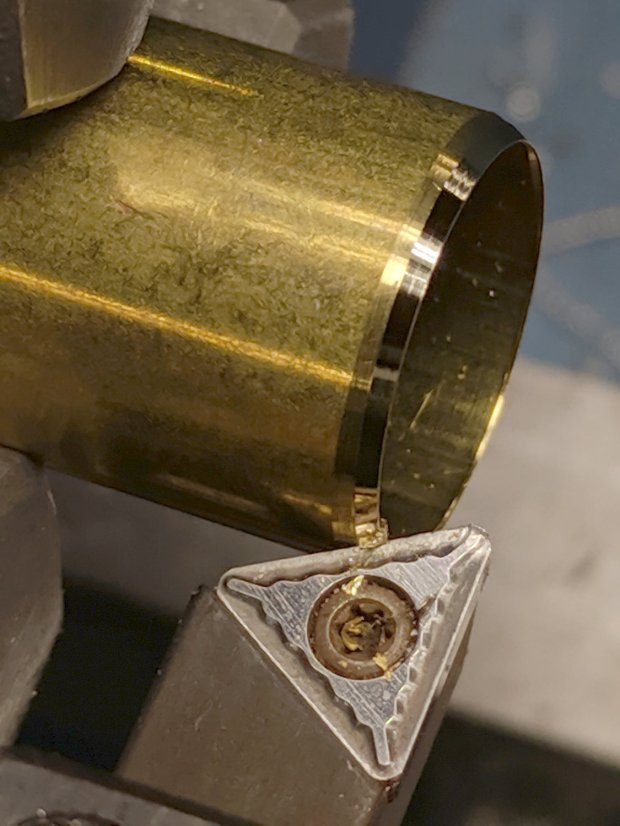
    Drag Knife - turning 11.5 mm body to 10 mm
    Drag Knife – turning 11.5 mm body to 10 mm

    The general idea is to turn the body down to 10 mm OD; the picture shows the first pass over the nose after turning the far end down and removing the flange in the process. Exact concentricity of both ends isn’t important (it gets epoxied into a 10 mm hole through the 12 mm ground shaft), but it came out rather pretty:

    Drag Knife - 11.5 mm body - turned to 10 mm
    Drag Knife – 11.5 mm body – turned to 10 mm

    The ground shaft started as a pen holder:

    DW660 Pen Holder - ground shaft
    DW660 Pen Holder – ground shaft

    I knocked off the ring and bored the interior to fit the 10 mm knife body. The large end of the existing bore came from a 25/64 inch = 9.92 mm drill, so it was just shy of 10.0 mm, and I drilled the small end upward from 0.33 inch = 8.4 mm.

    The smallest trio of a new set of cheap carbide boring bars allegedly went into a 5/16 inch = 7.9 mm bore, but I had to file the bar body down and diamond-file more end relief into the carbide for clearance inside the drilled hole:

    Modified boring bar vs original
    Modified boring bar vs original

    I blued the bit, kissed it against the drilled bore, filed off whatever wasn’t blued, and iterated until the carbide edge started cutting. Sissy cuts all the way, with no pix to show for all the flailing around.

    Epoxying the turned-down drag knife body into the shaft: anticlimactic.

    The solid model features a stylin’ tapered snout:

    Drag Knife LM12UU holder - tapered end
    Drag Knife LM12UU holder – tapered end

    Which gets an LM12UU bearing rammed into place:

    Drag Knife - LM12UU holder - inserting bearing
    Drag Knife – LM12UU holder – inserting bearing

    The steel block leaves the bearing flush with the plastic surface, rather than having it continue onward and indent itself into the wood; I can learn from my mistakes.

    The new idea: a single spring pressing the knife holder downward, reacting against a fixed plastic plate:

    Drag Knife - LM12UU ground shaft - assembled
    Drag Knife – LM12UU ground shaft – assembled

    Unlike the previous design, the upper plate doesn’t move, so there’s no problem caused by sliding along the screw threads. I should run nylock nuts up against the plate to keep it in place, stiffen the structure, and provide some friction to keep the screws from loosening.

    The top of the knife holder now has a boss anchoring the spring:

    Drag Knife - turning spring recess
    Drag Knife – turning spring recess

    As you’d expect, the ground shaft slides wonderfully in the bearing, because that’s what it’s designed to do, and the knife has essentially zero stiction and friction at any point along the bearing, which is exactly what I wanted.

    The spring, from the same assortment as all the others, has a 48 g/mm rate.

    The OpenSCAD source code as a GitHub Gist:

    // Drag Knife Holder using LM12UU linear bearing
    // Ed Nisley KE4ZNU – 2019-04-26
    // 2019-06-01 Taper the nose
    Layout = "Build"; // [Build, Show, Puck, Mount, Plate]
    /* [Extrusion] */
    ThreadThick = 0.25; // [0.20, 0.25]
    ThreadWidth = 0.40; // [0.40]
    /* [Hidden] */
    Protrusion = 0.1; // [0.01, 0.1]
    HoleWindage = 0.2;
    inch = 25.4;
    function IntegerMultiple(Size,Unit) = Unit * ceil(Size / Unit);
    ID = 0;
    OD = 1;
    LENGTH = 2;
    //- Adjust hole diameter to make the size come out right
    module PolyCyl(Dia,Height,ForceSides=0) { // based on nophead's polyholes
    Sides = (ForceSides != 0) ? ForceSides : (ceil(Dia) + 2);
    FixDia = Dia / cos(180/Sides);
    cylinder(r=(FixDia + HoleWindage)/2,h=Height,$fn=Sides);
    }
    //- Dimensions
    // Basic shape of DW660 snout fitting into the holder
    // Lip goes upward to lock into MPCNC mount
    Snout = [44.6,50.0,9.6]; // LENGTH = ID height
    Lip = 4.0; // height of lip at end of snout
    // Knife holder & suchlike
    KnifeBody = [12.0,18.0,2.0]; // body OD, flange OD, flange thickness
    Spring = [9.5,10.0,3*ThreadThick]; // compression spring loading knife blade
    PinAccess = 4.0; // hole to reach knife ejection pin
    WallThick = 4.0; // minimum thickness / width
    Screw = [4.0,8.5,25.0]; // thread ID, washer OD, length
    Insert = [4.0,6.0,10.0]; // brass insert
    Bearing = [12.0,21.0,30.0]; // linear bearing body
    Plate = [PinAccess,Snout[OD] – WallThick,WallThick]; // spring reaction plate
    echo(str("Plate: ",Plate));
    SpringSeat = [0.56,7.2,2*ThreadThick]; // wire = ID, coil = OD, seat depth = length
    PuckOAL = max(Bearing[LENGTH],(Snout[LENGTH] + Lip)); // total height of DW660 fitting
    echo(str("PuckOAL: ",PuckOAL));
    Key = [Snout[ID],25.7,(Snout[LENGTH] + Lip)]; // rectangular key
    NumScrews = 3;
    //ScrewBCD = 2.0*(Bearing[OD]/2 + Insert[OD]/2 + WallThick);
    ScrewBCD = (Snout[ID] + Bearing[OD])/2;
    NumSides = 9*4; // cylinder facets (multiple of 3 for lathe trimming)
    module DW660Puck() {
    translate([0,0,PuckOAL])
    rotate([180,0,0]) {
    cylinder(d=Snout[OD],h=Lip/2,$fn=NumSides);
    translate([0,0,Lip/2])
    cylinder(d1=Snout[OD],d2=Snout[ID],h=Lip/2,$fn=NumSides);
    cylinder(d=Snout[ID],h=(Snout[LENGTH] + Lip),$fn=NumSides);
    translate([0,0,(Snout[LENGTH] + Lip) – Protrusion])
    cylinder(d1=Snout[ID],d2=2*WallThick + Bearing[OD],h=PuckOAL – (Snout[LENGTH] + Lip),$fn=NumSides);
    intersection() {
    translate([0,0,0*Lip + Key.z/2])
    cube(Key,center=true);
    cylinder(d=Snout[OD],h=Lip + Key.z,$fn=NumSides);
    }
    }
    }
    module MountBase() {
    difference() {
    DW660Puck();
    translate([0,0,-Protrusion]) // bearing
    PolyCyl(Bearing[OD],2*PuckOAL,NumSides);
    for (i=[0:NumScrews – 1]) // clamp screws
    rotate(i*360/NumScrews)
    translate([ScrewBCD/2,0,-Protrusion])
    rotate(180/8)
    PolyCyl(Insert[OD],2*PuckOAL,8);
    }
    }
    module SpringPlate() {
    difference() {
    cylinder(d=Plate[OD],h=Plate[LENGTH],$fn=NumSides);
    translate([0,0,-Protrusion]) // ejection pin hole
    PolyCyl(PinAccess,2*Plate[LENGTH],NumSides);
    translate([0,0,Plate[LENGTH] – Spring[LENGTH]]) // spring retaining recess
    PolyCyl(Spring[OD],Spring[LENGTH] + Protrusion,NumSides);
    for (i=[0:NumScrews – 1]) // clamp screws
    rotate(i*360/NumScrews)
    translate([ScrewBCD/2,0,-Protrusion])
    rotate(180/8)
    PolyCyl(Screw[ID],2*PuckOAL,8);
    if (false)
    for (i=[0:NumScrews – 1]) // coil positioning recess
    rotate(i*360/NumScrews)
    translate([ScrewBCD/2,0,-Protrusion])
    rotate(180/8)
    PolyCyl(SpringSeat[OD],SpringSeat[LENGTH] + Protrusion,8);
    }
    }
    //—–
    // Build it
    if (Layout == "Puck")
    DW660Puck();
    if (Layout == "Plate")
    SpringPlate();
    if (Layout == "Mount")
    MountBase();
    if (Layout == "Show") {
    MountBase();
    translate([0,0,1.6*PuckOAL])
    rotate([180,0,0])
    SpringPlate();
    }
    if (Layout == "Build") {
    translate([0,Snout[OD]/2,PuckOAL])
    rotate([180,0,0])
    MountBase();
    translate([0,-Snout[OD]/2,0])
    SpringPlate();
    }
  • MPCNC Diamond Engraver: LM3UU Bearings, First Pass

    Gripping a diamond engraver in a collet chuck worked well enough, but the MPCNC’s pen holder lacks sufficient downforce and lateral stiffness. The bit has a chrome-ish plated 3 mm shank, so I tinkered up a mount for a pair of LM3UU linear bearings from the LM12UU drag knife holder:

    Diamond Scribe - LM3UU - Rev 1 - point view
    Diamond Scribe – LM3UU – Rev 1 – point view

    The shank isn’t exactly a precision part, but a few licks with a diamond file knocked off enough of the high spots so it slides reasonably well through the bearings. The bearing alignment is more critical than a simple 3D printed plastic part can provide, so a real version may need bearings in a metal shaft press-fit into the plastic; brute-forcing the bearings into alignment sufficed for now.

    The butt end of the shank press-fits into a disk held down with three springs, similar to the LM12UU mount:

    Diamond Scribe - LM3UU - Rev 1 - top view
    Diamond Scribe – LM3UU – Rev 1 – top view

    It draws Guilloché patterns just fine:

    Diamond Scribe - LM3UU - Rev 1 - first light
    Diamond Scribe – LM3UU – Rev 1 – first light

    I don’t like how the spring-around-screw motion works, even if it’s OK for small excursions.

  • MPCNC Drag Knife: LM12UU Linear Bearing

    The anodized body of the drag knife on the left measures exactly 12.0 mm OD:

    Drag Knife holders - detail
    Drag Knife holders – detail

    Which happy fact suggested I might be able to use a standard LM12UU linear bearing, despite the obvious stupidity of running an aluminum “shaft” in a steel-ball bearing race:

    Drag Knife - LM12UU holder - solid model
    Drag Knife – LM12UU holder – solid model

    The 12 mm section extends about halfway through the bearing, with barely 3 mm extending out the far end:

    Drag Knife - LM12UU - knife blade detail
    Drag Knife – LM12UU – knife blade detail

    Because the knife body isn’t touching the bearing for the lower half of its length, it’ll probably deflect too much in the XY plane, but it’s simple enough to try out.

    As before, the knife body’s flange is a snug fit in the hole bored in the upper disk:

    Drag Knife - spring plate test fit
    Drag Knife – spring plate test fit

    This time, I tried faking stripper bolts by filling the threads of ordinary socket head cap screws with epoxy:

    Ersatz stripper bolts - epoxy fill
    Ersatz stripper bolts – epoxy fill

    Turning the filled section to match the thread OD showed this just wasn’t going to work at all, so I turned the gunked section of the threads down to about 3.5 mm and continued the mission:

    Drag Knife - LM12UU holder - assembled
    Drag Knife – LM12UU holder – assembled

    Next time, I’ll try mounting the disk on telescoping brass tubing nested around the screws. The motivation for the epoxy nonsense came from the discovery that real stainless steel stripper bolts run five bucks each, which means I’m just not stocking up on the things.

    It slide surprisingly well on the cut-down screws, though:

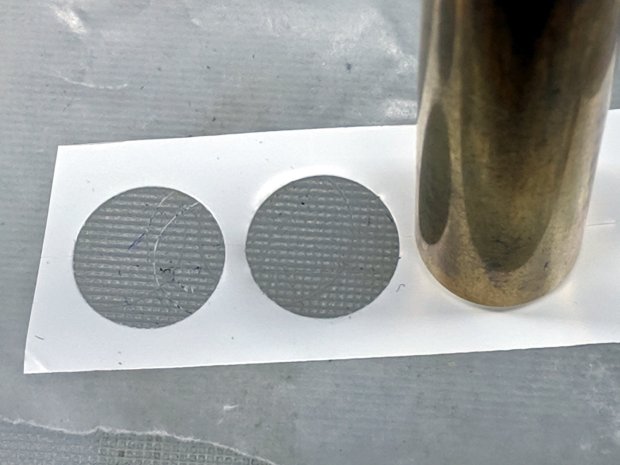
    Drag Knife - applique templates
    Drag Knife – applique templates

    Those appliqué templates came from patterns for a block in one of Mary’s current quilting projects, so perhaps I can be of some use whenever she next needs intricate cutouts.

    The OpenSCAD source code as a GitHub Gist:

    // Drag Knife Holder using LM12UU linear bearing
    // Ed Nisley KE4ZNU – 2019-04-26
    Layout = "Show"; // [Build, Show, Puck, Mount, Plate]
    /* [Extrusion] */
    ThreadThick = 0.25; // [0.20, 0.25]
    ThreadWidth = 0.40; // [0.40]
    /* [Hidden] */
    Protrusion = 0.1; // [0.01, 0.1]
    HoleWindage = 0.2;
    inch = 25.4;
    function IntegerMultiple(Size,Unit) = Unit * ceil(Size / Unit);
    ID = 0;
    OD = 1;
    LENGTH = 2;
    //- Adjust hole diameter to make the size come out right
    module PolyCyl(Dia,Height,ForceSides=0) { // based on nophead's polyholes
    Sides = (ForceSides != 0) ? ForceSides : (ceil(Dia) + 2);
    FixDia = Dia / cos(180/Sides);
    cylinder(r=(FixDia + HoleWindage)/2,h=Height,$fn=Sides);
    }
    //- Dimensions
    // Basic shape of DW660 snout fitting into the holder
    // Lip goes upward to lock into MPCNC mount
    Snout = [44.6,50.0,9.6]; // LENGTH = ID height
    Lip = 4.0; // height of lip at end of snout
    // Knife holder & suchlike
    KnifeBody = [12.0,15.9,2.0]; // flange epoxied to top of diamond shaft, with epoxy fillet
    WallThick = 4.0; // minimum thickness / width
    Screw = [4.0,8.5,8.0]; // holding it all together, OD = washer
    Insert = [4.0,6.0,10.0]; // brass insert
    Bearing = [12.0,21.0,30.0]; // linear bearing body
    Plate = [KnifeBody[ID],Snout[OD] – WallThick,KnifeBody[LENGTH] + WallThick]; // spring reaction plate
    PlateGuide = [4.0,4.8,Plate[LENGTH]]; // … guide tubes
    PuckOAL = max(Bearing[LENGTH],(Snout[LENGTH] + Lip)); // total height of DW660 fitting
    echo(str("PuckOAL: ",PuckOAL));
    Key = [Snout[ID],25.7,(Snout[LENGTH] + Lip)]; // rectangular key
    NumScrews = 3;
    ScrewBCD = 2.0*(Bearing[OD]/2 + Insert[OD]/2 + WallThick);
    NumSides = 9*4; // cylinder facets (multiple of 3 for lathe trimming)
    module DW660Puck() {
    translate([0,0,PuckOAL])
    rotate([180,0,0]) {
    cylinder(d=Snout[OD],h=Lip/2,$fn=NumSides);
    translate([0,0,Lip/2])
    cylinder(d1=Snout[OD],d2=Snout[ID],h=Lip/2,$fn=NumSides);
    cylinder(d=Snout[ID],h=PuckOAL,$fn=NumSides);
    intersection() {
    translate([0,0,0*Lip + Key.z/2])
    cube(Key,center=true);
    cylinder(d=Snout[OD],h=Lip + Key.z,$fn=NumSides);
    }
    }
    }
    module MountBase() {
    difference() {
    DW660Puck();
    translate([0,0,-Protrusion]) // bearing
    PolyCyl(Bearing[OD],2*PuckOAL,NumSides);
    for (i=[0:NumScrews – 1]) // clamp screws
    rotate(i*360/NumScrews)
    translate([ScrewBCD/2,0,-Protrusion])
    rotate(180/8)
    PolyCyl(Insert[OD],2*PuckOAL,8);
    }
    }
    module SpringPlate() {
    difference() {
    cylinder(d=Plate[OD],h=Plate[LENGTH],$fn=NumSides);
    translate([0,0,-Protrusion]) // knife holder body
    PolyCyl(KnifeBody[ID],2*PuckOAL,NumSides);
    translate([0,0,Plate[LENGTH] – KnifeBody[LENGTH]]) // flange, snug fit
    PolyCyl(KnifeBody[OD],KnifeBody[LENGTH] + Protrusion,NumSides);
    for (i=[0:NumScrews – 1]) // clamp screws
    rotate(i*360/NumScrews)
    translate([ScrewBCD/2,0,-Protrusion])
    rotate(180/8)
    PolyCyl(PlateGuide[OD],2*PuckOAL,8);
    }
    }
    //—–
    // Build it
    if (Layout == "Puck")
    DW660Puck();
    if (Layout == "Plate")
    SpringPlate();
    if (Layout == "Mount")
    MountBase();
    if (Layout == "Show") {
    MountBase();
    translate([0,0,1.6*PuckOAL])
    rotate([180,0,0])
    SpringPlate();
    }
    if (Layout == "Build") {
    translate([0,Snout[OD]/2,PuckOAL])
    rotate([180,0,0])
    MountBase();
    translate([0,-Snout[OD]/2,0])
    SpringPlate();
    }
  • Baofeng Big Battery Capacity

    I bought a pair of third-party 3800 mA·h batteries for the Baofeng UV-5RE Plus (whatever that means) radios on our bikes. Oddly, the packs carry the same “Model BL-5” identification as 1800 mA·h batteries shipped with the radio:

    Baofeng BL-5 Batteries - 1.8 and 3.8 Ah
    Baofeng BL-5 Batteries – 1.8 and 3.8 Ah

    The obviously mislabeled “Baofeng” battery eliminator also sported a 3800 mA·h label:

    Baofeng Battery Eliminator - overview
    Baofeng Battery Eliminator – overview

    I conjured a “test fixture” from a clamp, copper sheet, and copper tape snippets:

    Baofeng battery - test setup
    Baofeng battery – test setup

    Which produced interesting results:

    Baofeng BL-5 3800 mAh packs - Ah - 2019-05
    Baofeng BL-5 3800 mAh packs – Ah – 2019-05

    The 250 mA load = 15 hour rate seemed reasonable to simulate radios spending most of their time in power-save mode, but the packs still delivered only 2.8 A·h.

    The packs also claim an unnaturally precise 28.12 W·h, but they’re still underperformers at 20 W·h:

    Baofeng BL-5 3800 mAh packs - 2019-05
    Baofeng BL-5 3800 mAh packs – 2019-05

    Anyhow, I can run the radios for a week without (worrying about) running out of juice during a ride.

  • M20 Camera Operation

    A reader asked how the M20 camera mount on my bike works with respect to the camera’s clock; this description explains a few things missing from the original writeup.

    SJCAM M20 Mount - Tour Easy side view
    SJCAM M20 Mount – Tour Easy side view

    Do you have to set the time & date at start of every ride?

    The internal clock shuts down about ten seconds after you pull the battery. If-and-only-if you swap batteries fast enough, it’ll keep time forever. Screw up once and it snaps back to Epoch Zero.

    “Car mode” automagically begins recording when USB power goes on, but the manual advises:

    TIP: When using your camera as a dashcam, use a car charger cable and remove the internal battery to make sure it does not die out while you travel.

    That’s because the M20 continues to run from its internal battery when USB power drops. After recording an hour of a parking lot or your garage wall, the battery dies and so does the clock.

    Of course, without the internal battery, the clock dies ten seconds after you turn off the car.

    The internal battery has many days of capacity with the camera turned off (whew!), so I conjured the case & PowerCore battery tray to handle our normal rides. The internal battery keeps the clock alive overnight and during the rain we’ve had for the last week, the PowerCore supplies juice during the ride, and I recharge the PowerCore every few weeks.

    The M20 doesn’t draw charging current when I turn it on, but poking the PowerCore’s status button also turns on its outputs, whereupon the M20 decides it should begin charging and, bonus, draw power from the PowerCore during the entire ride. The M20 finishes charging while we ride, but the PowerCore continues supplying power and, when I turn the M20 off, the PowerCore sees no current draw and shuts itself off.

    Only a geek could love a lashup like that, but it works around the M20’s broken clock and removes its battery maintenance hassle.