The Smell of Molten Projects in the Morning

Ed Nisley's Blog: Shop notes, electronics, firmware, machinery, 3D printing, laser cuttery, and curiosities. Contents: 100% human thinking, 0% AI slop.

Tag: Improvements

Making the world a better place, one piece at a time

  • Soundbar Power

    A Dell soundbar under the landscape monitor suffices for my simple audio needs, and, when the Dell U2711 went toes-up, I conjured a 12 V wart from the heap. A recent cleanup made a smaller wart available, but required mating two coaxial plugs:

    Coax power plugs - brass tube connector
    Coax power plugs – brass tube connector

    A snippet of brass tube suffices for the center pin. The outer shell is a larger brass tube, slit lengthwise, trimmed to fit the plug circumference and rolled around a smaller drill bit to make it springy in the right direction.

    A wrap of silicone tape and it’s all good:

    Dell Sound Bar power splice
    Dell Sound Bar power splice

    Ugly, but good.

  • CNC 3018-Pro: Collet Pen Holder

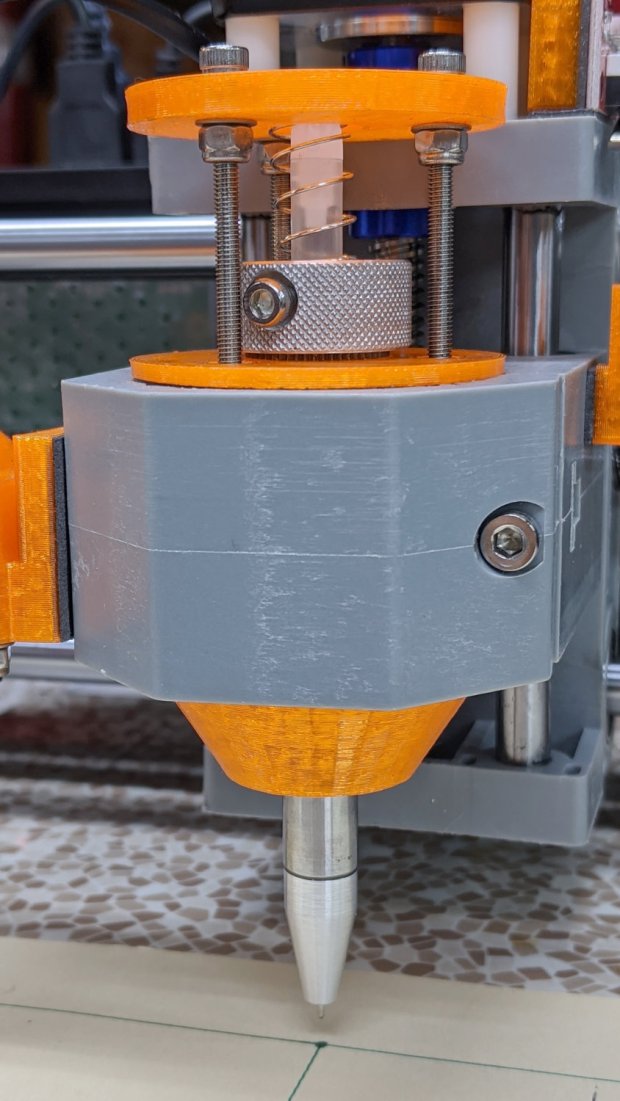
    Along the same lines as the MPCNC pen holder, I now have one for the 3018:

    CNC3018 - Collet pen holder - assembled
    CNC3018 – Collet pen holder – assembled

    The body happened to be slightly longer than two LM12UU linear bearings stacked end-to-end, which I didn’t realize must be a constraint until I was pressing them into place:

    CNC 3018-Pro Collet Holder - LM12UU - solid model
    CNC 3018-Pro Collet Holder – LM12UU – solid model

    In the unlikely event I need another one, the code will sprout a max() function in the appropriate spot.

    Drilling the aluminum rod for the knurled ring produced a really nice chip:

    CNC3018 - Collet pen holder - drilling knurled ring
    CNC3018 – Collet pen holder – drilling knurled ring

    Yeah, a good drill will produce two chips, but I’ll take what I can get.

    There’s not much left of the original holder after turning it down to 8 mm so it fits inside the 12 mm rod:

    CNC3018 - Collet pen holder - turning collet OD
    CNC3018 – Collet pen holder – turning collet OD

    Confronted by so much shiny aluminum, I realized I didn’t need an 8 mm hole through the rod, so I cut off the collet shaft and drilled out the back end to clear the flanges on the ink tubes:

    CNC3018 - Collet pen holder - drilling out collet
    CNC3018 – Collet pen holder – drilling out collet

    I figured things would eventually go badly if I trimmed enough ink-filled crimps:

    Collet holder - pen cartridge locating flanges
    Collet holder – pen cartridge locating flanges

    The OpenSCAD source code as a GitHub Gist:

    // Collet Pen Holder in LM12UU linear bearings for CNC3018
    // Ed Nisley KE4ZNU – 2019-10-30
    Layout = "Build"; // [Build, Show, Base, Mount, Plate]
    /* [Hidden] */
    ThreadThick = 0.25; // [0.20, 0.25]
    ThreadWidth = 0.40; // [0.40, 0.40]
    /* [Hidden] */
    Protrusion = 0.1; // [0.01, 0.1]
    HoleWindage = 0.2;
    inch = 25.4;
    function IntegerMultiple(Size,Unit) = Unit * ceil(Size / Unit);
    ID = 0;
    OD = 1;
    LENGTH = 2;
    //- Adjust hole diameter to make the size come out right
    module PolyCyl(Dia,Height,ForceSides=0) { // based on nophead's polyholes
    Sides = (ForceSides != 0) ? ForceSides : (ceil(Dia) + 2);
    FixDia = Dia / cos(180/Sides);
    cylinder(r=(FixDia + HoleWindage)/2,h=Height,$fn=Sides);
    }
    //- Dimensions
    PenOD = 3.5; // pen cartridge diameter
    Bearing = [12.0,21.0,30.0]; // linear bearing body
    SpringSeat = [0.56,10.0,3*ThreadThick]; // wire = ID, coil = OD, seat depth = length
    WallThick = 4.0; // minimum thickness / width
    Screw = [3.0,6.75,25.0]; // holding it all together, OD = washer
    Insert = [3.0,5.5,8.2]; // brass insert
    //Insert = [4.0,6.0,10.0];
    Clamp = [43.2,44.5,34.0]; // tool clamp ring, OD = clearance around top
    LipHeight = IntegerMultiple(2.0,ThreadThick); // above clamp for retaining
    BottomExtension = 25.0; // below clamp to reach workpiece
    MountOAL = LipHeight + Clamp[LENGTH] + BottomExtension; // total mount length
    echo(str("Mount OAL: ",MountOAL));
    Plate = [1.5*PenOD,Clamp[ID] – 0*2*WallThick,WallThick]; // spring reaction plate
    NumScrews = 3;
    ScrewBCD = Bearing[OD] + Insert[OD] + 2*WallThick;
    echo(str("Retainer max OD: ",ScrewBCD – Screw[OD]));
    NumSides = 9*4; // cylinder facets (multiple of 3 for lathe trimming)
    // Basic mount shape
    module CNC3018Base() {
    translate([0,0,MountOAL – LipHeight])
    cylinder(d=Clamp[OD],h=LipHeight,$fn=NumSides);
    translate([0,0,MountOAL – LipHeight – Clamp[LENGTH] – Protrusion])
    cylinder(d=Clamp[ID],h=(Clamp[LENGTH] + 2*Protrusion),$fn=NumSides);
    cylinder(d1=Bearing[OD] + 2*WallThick,d2=Clamp[ID],h=BottomExtension + Protrusion,$fn=NumSides);
    }
    // Mount with holes & c
    module Mount() {
    difference() {
    CNC3018Base();
    translate([0,0,-Protrusion]) // bearing
    PolyCyl(Bearing[OD],2*MountOAL,NumSides);
    for (i=[0:NumScrews – 1]) // clamp screws
    rotate(i*360/NumScrews)
    translate([ScrewBCD/2,0,MountOAL – Clamp[LENGTH]])
    rotate(180/8)
    PolyCyl(Insert[OD],Clamp[LENGTH] + Protrusion,8);
    }
    }
    module SpringPlate() {
    difference() {
    cylinder(d=Plate[OD],h=Plate[LENGTH],$fn=NumSides);
    translate([0,0,-Protrusion])
    PolyCyl(Plate[ID],2*MountOAL,NumSides);
    translate([0,0,Plate.z – SpringSeat[LENGTH]]) // spring retaining recess
    PolyCyl(SpringSeat[OD],SpringSeat[LENGTH] + Protrusion,NumSides);
    for (i=[0:NumScrews – 1]) // clamp screws
    rotate(i*360/NumScrews)
    translate([ScrewBCD/2,0,-Protrusion])
    rotate(180/8)
    PolyCyl(Screw[ID],2*MountOAL,8);
    }
    }
    //—–
    // Build it
    if (Layout == "Base")
    CNC3018Base();
    if (Layout == "Mount")
    Mount();
    if (Layout == "Plate")
    SpringPlate();
    if (Layout == "Show") {
    Mount();
    translate([0,0,1.25*MountOAL])
    rotate([180,0,0])
    SpringPlate();
    }
    if (Layout == "Build") {
    translate([0,-0.75*Clamp[OD],MountOAL])
    rotate([180,0,0])
    Mount();
    translate([0,0.75*Plate[OD],0])
    SpringPlate();
    }

  • Monthly Science: Weight

    After another two months:

    Weight Chart 2019-10 - Ed
    Weight Chart 2019-10 – Ed

    The trend is definitely not uniformly downward, perhaps due to my increasing ability to accelerate (small) masses against the local gravity vector and, definitely, garden harvest season. My pants still fit fine, if that’s any indication.

    I’ll add a skin-fold caliper dot to the weekly record after I can get repeatable measurements, perhaps by marking the test spot with a Sharpie.

  • ID3 Tagging From File Names

    The Forester can play MP3 files from a USB flash drive and, given the utter craptitude of radio stations around here, I dumped a bunch of CD tracks onto a drive. For historic reasons, very few of the tracks had ID3 tags, so the Forester’s display showed only gnarly file names for the last few years.

    This burst of Bash line noise runs through the directory of album directories, extracts the relevant information from the directory and track names, then pops the tags in place:

    for d in * ; do for f in $(ls $d) ; do art=$(echo $d | cut -d- -f1 | tr '_' ' ' | sed 's/-/ - /g') ; alb=$(echo $d | cut --complement -d- -f1 | tr '_' ' ' | sed 's/-/ - /g') ; t=$(echo $f | cut -d- -f1) ; s=$(echo ${f%.*} | cut --complement -d- -f1 | tr '_' ' ' | sed 's/-/ - /g') ; id3tag -2 -a"$art" -A"$alb" -s"$s" -t$t $d/$f ; done ; done

    It’s (marginally) easier to see this way:

    for d in * ; do 
     for f in $(ls $d) ; do 
      art=$(echo $d | cut -d- -f1 | tr '_' ' ' | sed 's/-/ - /g')
      alb=$(echo $d | cut --complement -d- -f1 | tr '_' ' ' | sed 's/-/ - /g')
      t=$(echo $f | cut -d- -f1)
      s=$(echo ${f%.*} | cut --complement -d- -f1 | tr '_' ' ' | sed 's/-/ - /g')
      id3tag -2 -a"$art" -A"$alb" -s"$s" -t$t $d/$f
     done
    done

    What’s going on:

    • cut – extracts track number and song title
    • tr – convert underscores to spaces
    • sed – put spaces around hyphens

    The id3tag program can install either ID3V1 or ID3V2 tags on each pass, so I just recalled the command, edited the -1 to -2, and ran the whole mess again.

    After a bit of manual cleanup, things looked pretty good.

    Although the id3ren program seemed as though it could do the trick, it’s really intended to rename files from existing tags. Making it go the other way rapidly became a steel-cage death match; I gave up.

  • Manjaro Linux VNC Setup

    I installed the XFCE flavor of Manjaro Linux (beside Win 8.1 Pro) on a new-to-me Dell Latitude 7250 serving as our new Token Windows box and carry-along-able Linux laptop.

    Manjaro being an offshoot of Arch, they have plenty of guides and references, with How to Set up X11VNC Server being most useful at the moment. This box needs only a VNC server and apparently works with ‑xdamage for faster updates.

    With the laptop plugged into an external display and Manjaro set up to use both displays, the X11VNC server feeds both to the client with the proper positioning, producing a truly panoramic, albeit scaled, view:

    WinFlip - X11VNC dual screen
    WinFlip – X11VNC dual screen

    TightVNC on Windows does much the same thing, although (AFAICT) Windows doesn’t allow different background pictures on the two screens; that’s irrelevant to my mmmm use case.

  • Monthly Image: Spider vs. Marmorated Stink Bug

    Fortunately, Brown Marmorated Stink Bugs haven’t been as catastrophic as predicted when they arrived a few years ago, perhaps because native critters have learned to deal with them:

    Spider vs. Marmorated Stink Bug
    Spider vs. Marmorated Stink Bug

    Looks like a week’s worth of spider chow!

  • Pride Lift Chair Control Dimming

    For reasons not relevant here, we recently decontaminated a second lift chair, this one in bariatric size (so it doesn’t suffer from fuzz-shaving struts) with a six-switch control pod:

    Pride lift chair control - dimmed LEDs
    Pride lift chair control – dimmed LEDs

    The green LED-lit buttons were so bright I took it apart to see what could be done; the picture shows the considerably dimmed result.

    Start by prying outward on the tab at the USB charging port:

    Pride lift chair control - USB port latch
    Pride lift chair control – USB port latch

    Done right, you can then release the latches along the sides:

    Pride lift chair control - side opened
    Pride lift chair control – side opened

    It’s impossible to photograph the PCB with the LEDs active, but here’s what it looks like without power:

    Pride lift chair control - PCB overview
    Pride lift chair control – PCB overview

    The eight (!) SMD LEDs align with light pipes around the switch openings:

    Pride lift chair control - button keys
    Pride lift chair control – button keys

    The black dots come from Sharpie ink daubed in the shallow recesses intended to nestle around the LEDs. Note that the four switch caps have unique keying, so you can’t put them back incorrectly without some effort.

    While we’re inside, here’s a closer look at the cable entry point, just in case I must replace the industrial-strength coily cord:

    Pride lift chair control - cable entry
    Pride lift chair control – cable entry

    Unfortunately, it has a five-conductor cable, so a cheap phone coily cord (remember when phones had coily cords?) won’t suffice.

    The PCB sports a pair of PICs, one of which seems to handle the buttons. I betcha the cable dates back to the days of hard-wired power switches, with the PIC now handling the intricate logic of deciding which motors to actuate for each function, then controlling MOSFETs as fake switch contacts.

    The other PIC snuggles against the USB interface, which the manual describes as a charging-only port. It might also serve as a programming interface for the main PIC; admittedly the notion of a firmware upgrade for a lift chair seems far-fetched.

    Reassembly is in reverse order with a resounding snap at the conclusion. It works fine and you (well, I) can now look at the control pod without sunglasses.