The Smell of Molten Projects in the Morning

Ed Nisley's Blog: Shop notes, electronics, firmware, machinery, 3D printing, laser cuttery, and curiosities. Contents: 100% human thinking, 0% AI slop.

Tag: CNC

Making parts with mathematics

  • Browning Hi-Power Magazine: Nut Trap Block Trial

    The general idea is to reduce the capacity of a 13 round Browning Hi-Power magazine to 10 rounds, in compliance with the NY Safe Act, using a number of possibly invalid assumptions. The new Firearms tag will produce earlier posts.

    This early prototype tried out the sizes, shapes, and angles, using an M3x0.5 socket head cap screw:
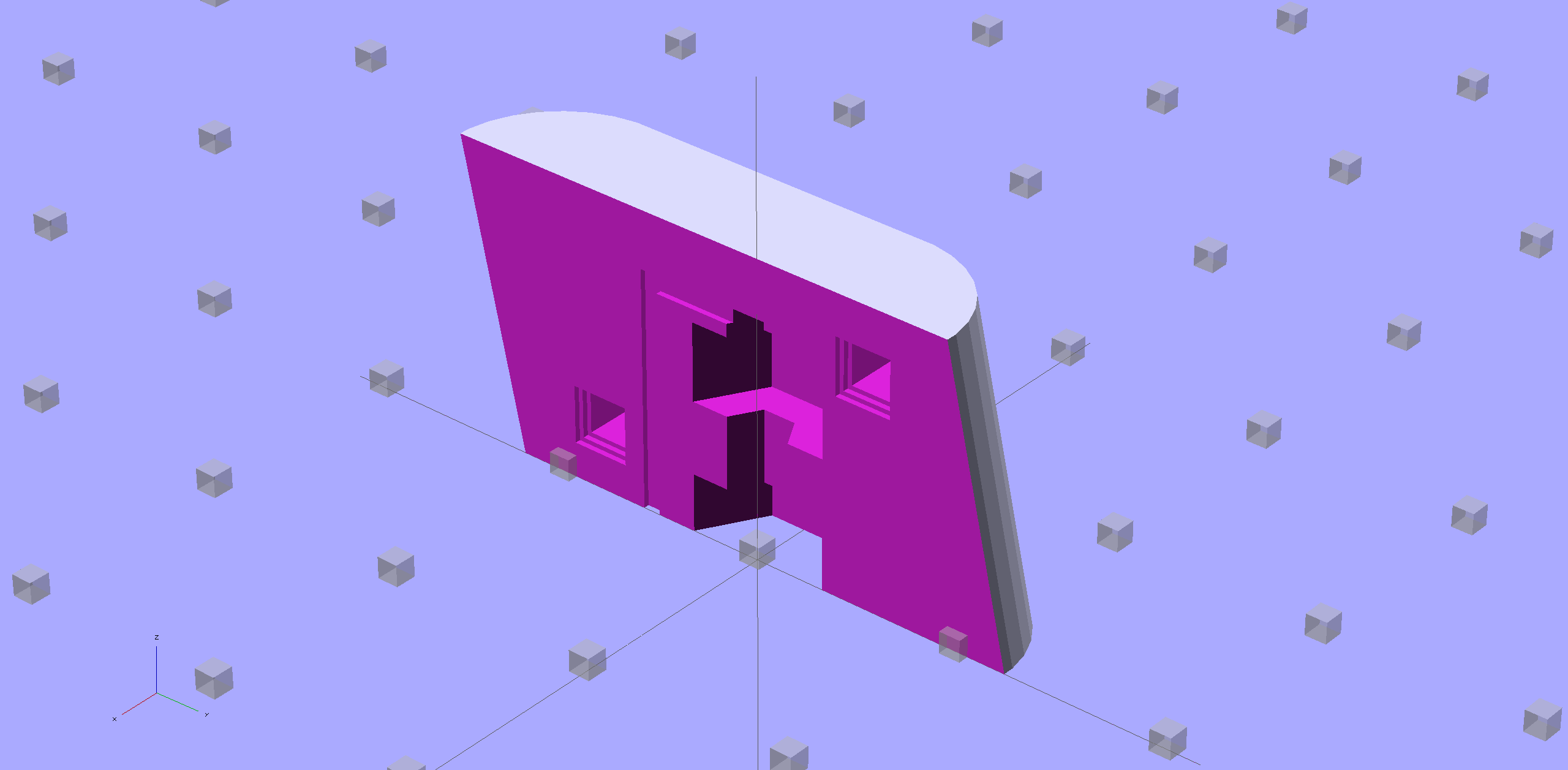
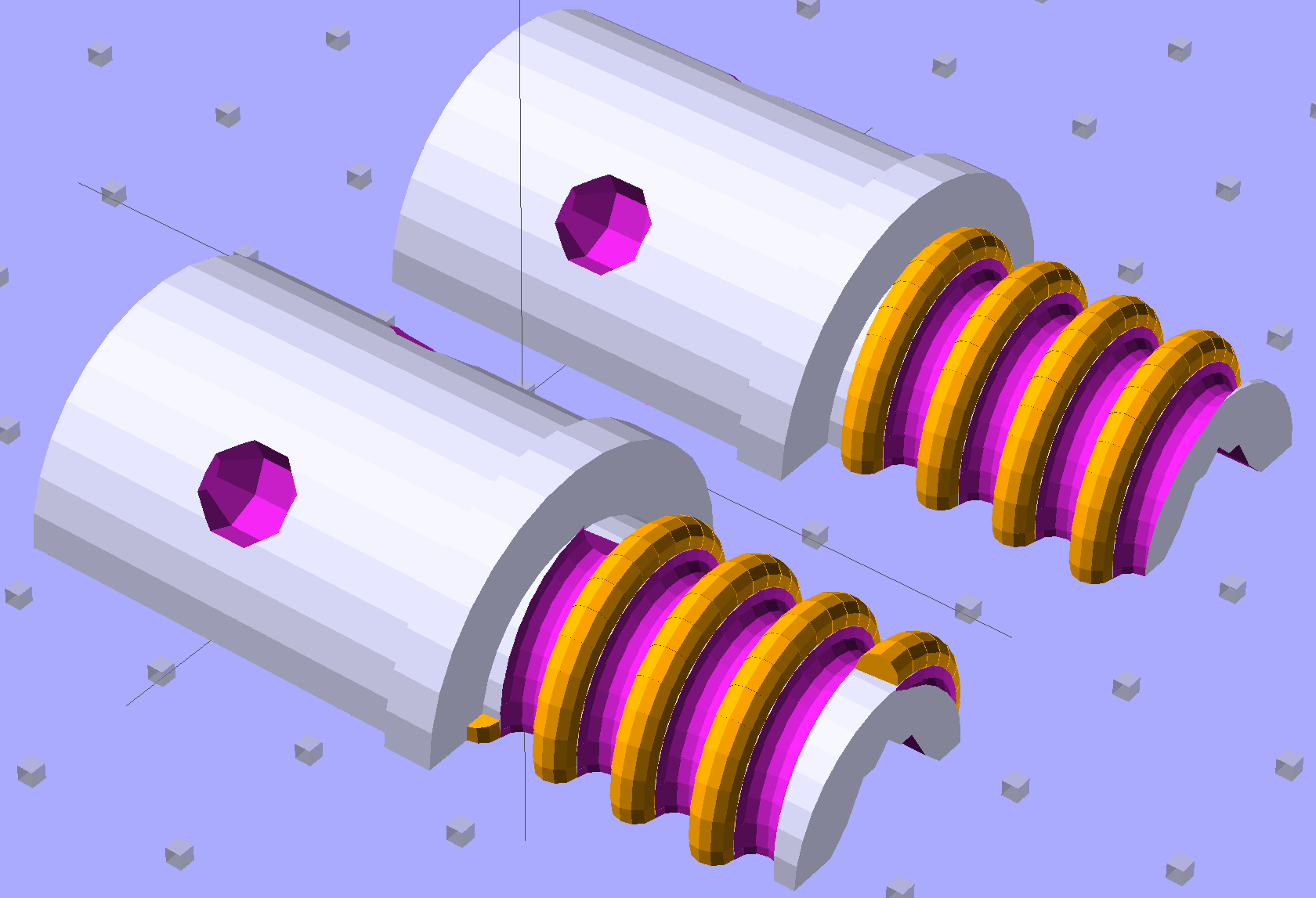
    Browning Hi-Power Magazine Block - solid model - nut trap prototype
    Browning Hi-Power Magazine Block – solid model – nut trap prototype

    The bottom nut trap locates the block on the inner floor plate by capturing the nut. It might need a bit more clearance or a chamfer to allow for brazing material around the nut flats; cleaning up the brazed nut with a file might also help.

    The central trap holds a nut that anchors the block; the trap must be about 50% longer than the nut to allow for thread alignment, because the central hole is a loose tap fit.

    That central nut probably isn’t needed, because you’d fill the central shaft with metal-loaded epoxy, which would form a perfectly serviceable, exactly form-fitting, and utterly non-removable “nut”. The vent from the end of the screw shaft releases air trapped behind the epoxy by the screw; if you don’t have a vent, then air pressure will force the epoxy out of the cavity.

    If the epoxy “nut” is workable, then you can build it in a single piece printed vertically on the platform. Having a split version makes it easier to show off and, in truth, the cemented joint is about as strong as the rest of the object.

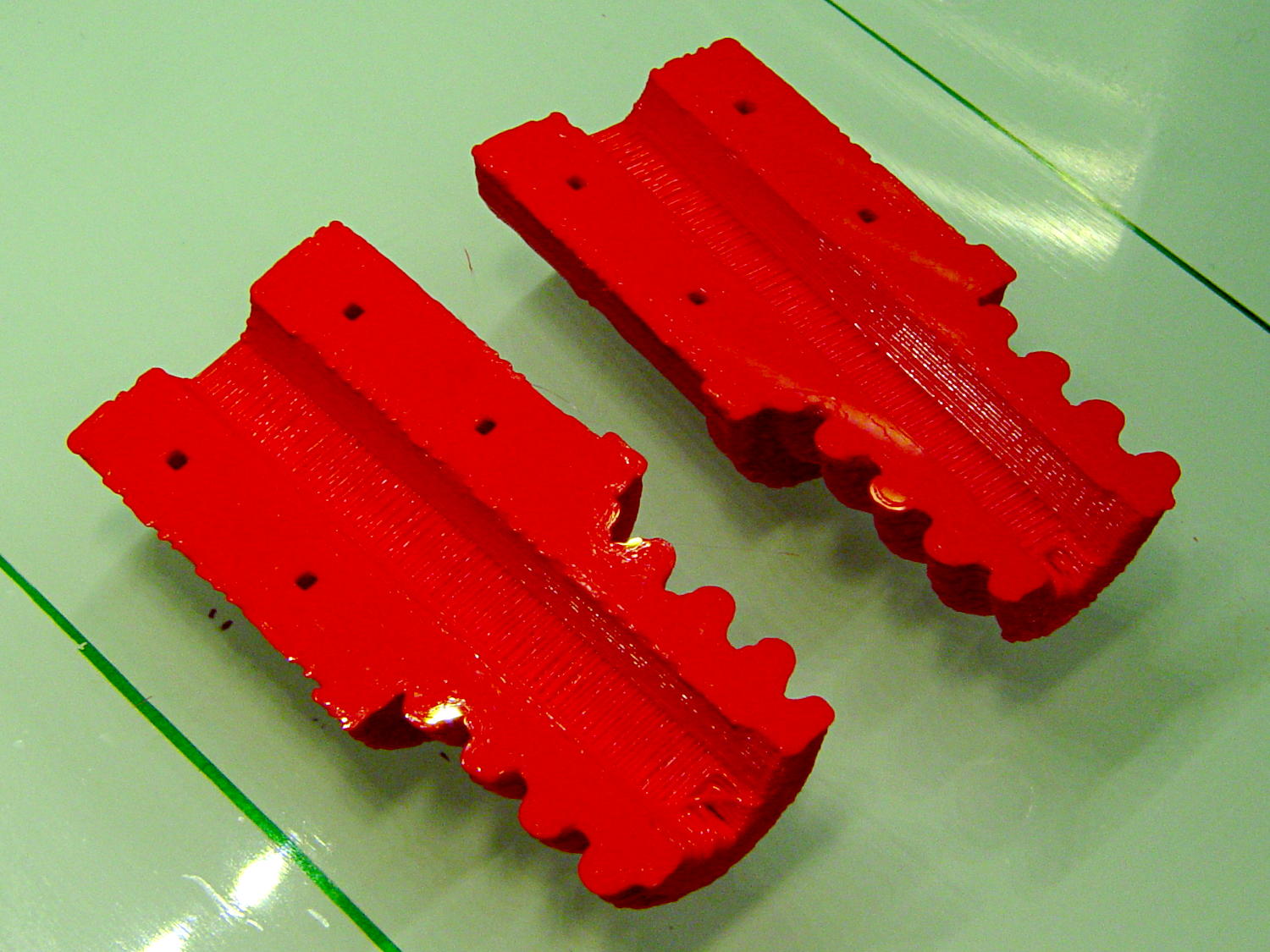
    Hot off the M2 3D printer, it looks like this:
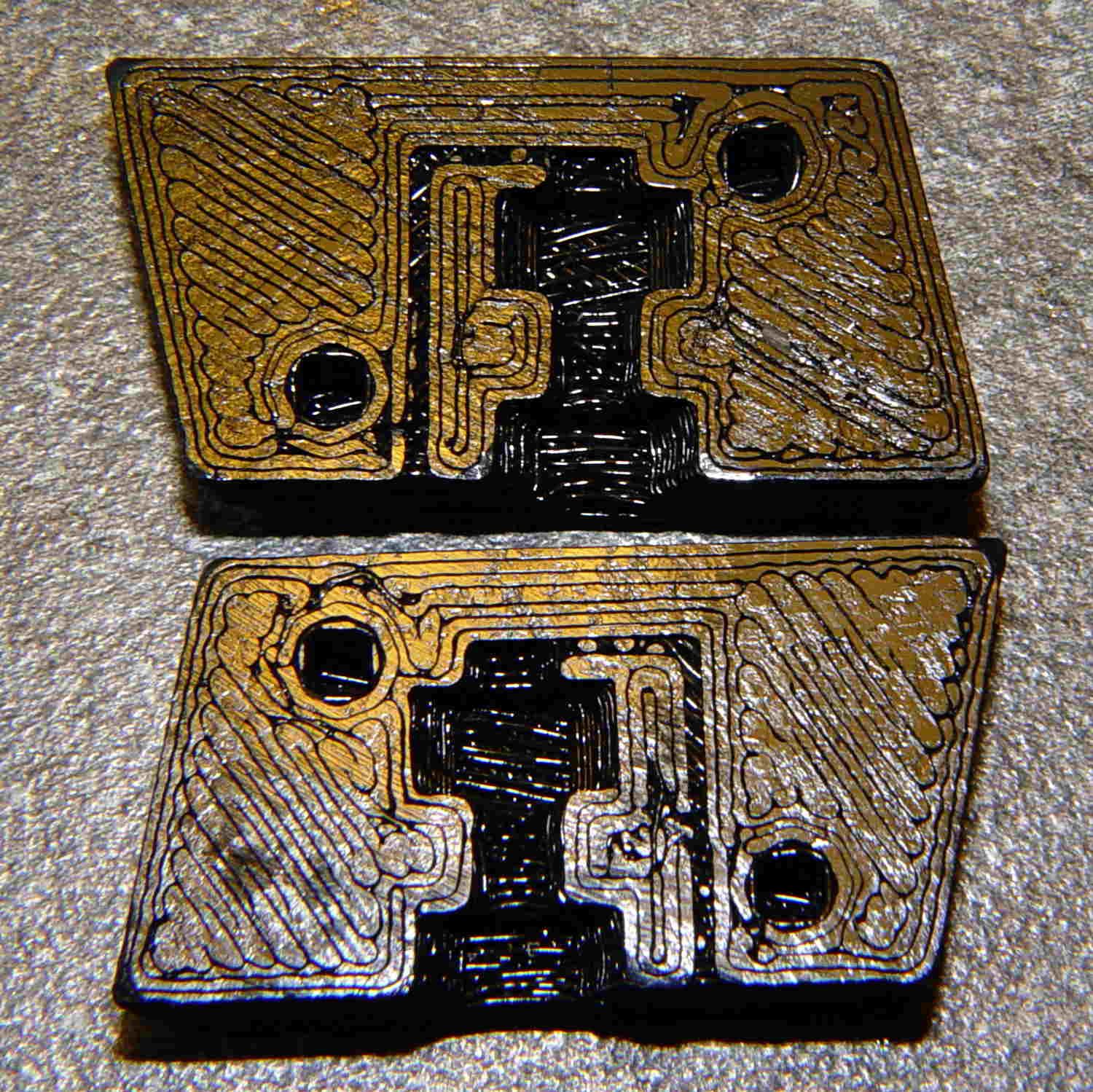
    BHP magazine block - prototype nut trap - bare
    BHP magazine block – prototype nut trap – bare

    A few threads droop into the air vent, so that channel should be larger. The overall plastic block may be porous enough to release the air pressure even without a vent.

    With locating pins glued in place and a nut in the central trap:
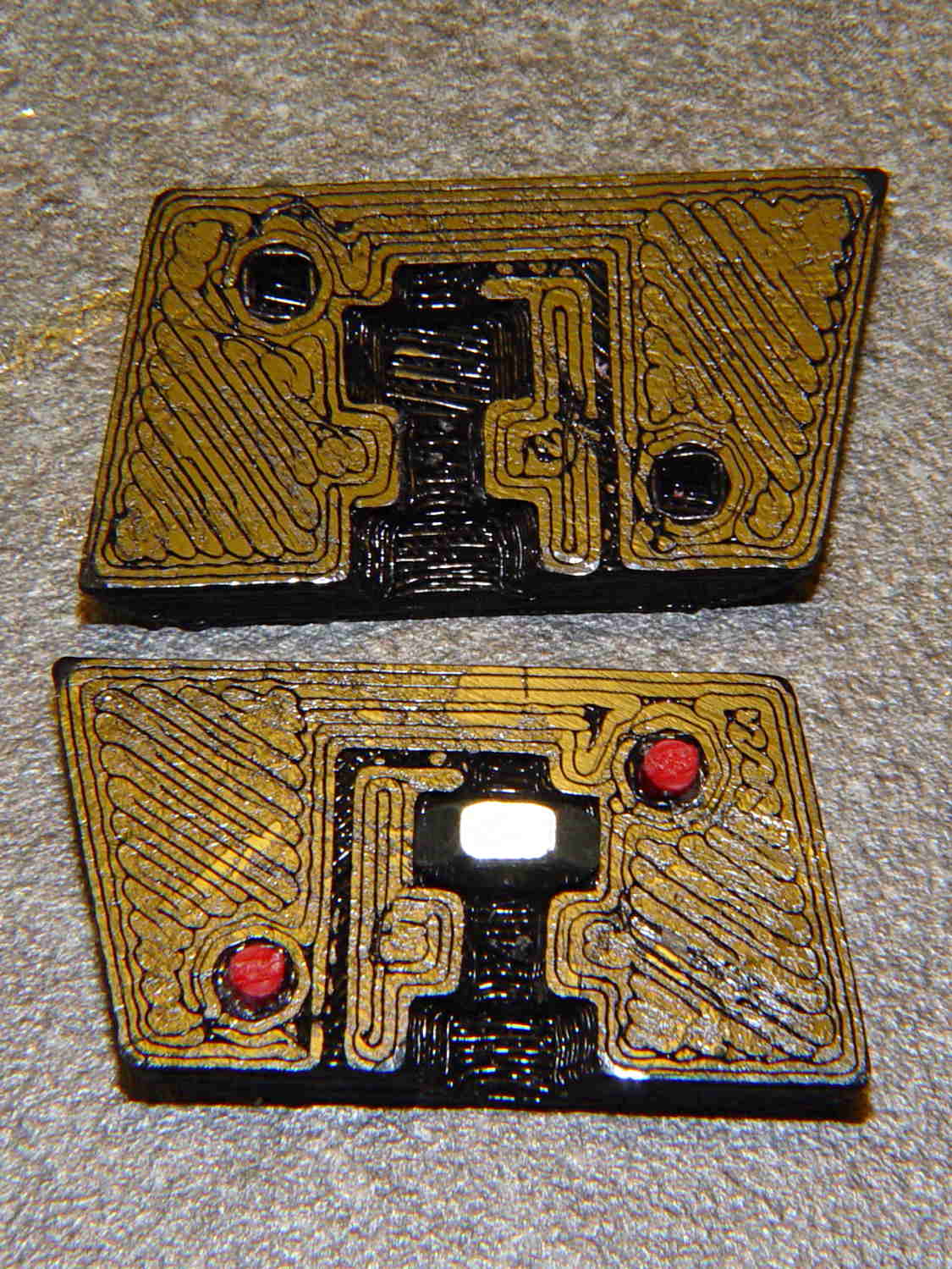
    BHP magazine block - prototype nut trap
    BHP magazine block – prototype nut trap

    Pretty much as I expected, it doesn’t quite fit in the magazine, because it doesn’t have clearance for the little tab on the inner floor plate that captures the spring.

    One might argue that a plastic block isn’t “permanent”, but it’s definitely not “readily” removed:

    • PLA doesn’t dissolve in common solvents
    • It doesn’t actually melt and flow away at high temperatures
    • It’s protected by the spring and inner floor plate
    • It’s certainly strong enough to resist simple mechanical attacks

    This is a start…

    The OpenSCAD source code, replete with inadequacies:

    // Browning Hi-Power Magazine Plug
    // Ed Nisley KE4ZNU November 2013
    
    Layout = "Show";			// Show Whole Pin Build
    
    CrossSection = 1;			// -1, 0, 1 to select section side or none
    
    Section = (Layout == "Build") ? 1 : CrossSection;		// for cross-section for build
    
    //- Extrusion parameters must match reality!
    //  Print with 2 shells and 3 solid layers
    
    ThreadThick = 0.25;
    ThreadWidth = 0.40;
    
    HoleWindage = 0.2;
    
    Protrusion = 0.1;			// make holes end cleanly
    
    //----------------------
    // Dimensions
    
    Angle = 12.5;				// from vertical
    
    EndDia = 10.3;				// an 11/32 inch drill fits
    EndRadius = EndDia / 2;
    
    Length = 24.0;				// front-to-back perpendicular to magazine shaft
    Height = 14.0;				// bottom-to-top, parallel to magazine shaft
    							//  14 = 10 round capacity
    							//  28 = 7 round
    
    RectLength = Length - EndDia;	// block length between end radii
    
    ScrewOD = 3.0 - 0.5;		// bottom screw tapping diameter
    ScrewLength = 11.0;
    ScrewOffset = 0;			//   ... from centerline
    
    NutOD = 5.5;				// hex nut dia across flats
    NutThick = 2.4;				//  ... then add 50% for thread engagement & epoxy
    NutOffset = 6.0;			//  ... base height from floor
    
    VentWidth = 2*ThreadWidth;	// air vent from back of screw recess
    VentDepth = 4*ThreadThick;
    
    NumSides = 8*4;				// default cylinder sides
    
    PinOD = 1.72;				// alignment pins
    PinLength = 6.0;
    PinInset = 0.9*EndRadius;	// from outside edges
    echo(str("Alignment pin length: ",PinLength));
    
    Offset = 5.0/2;				// from centerline for build layout
    
    //----------------------
    // Useful routines
    
    // Locating pin hole with glue recess
    //  Default length is two pin diameters on each side of the split
    
    module LocatingPin(Dia=PinOD,Len=0.0) {
    
    	PinLen = (Len != 0.0) ? Len : (4*Dia);
    
    	translate([0,0,-ThreadThick])
    		PolyCyl((Dia + 2*ThreadWidth),2*ThreadThick,4);
    
    	translate([0,0,-2*ThreadThick])
    		PolyCyl((Dia + 1*ThreadWidth),4*ThreadThick,4);
    
    	translate([0,0,-(Len/2 + ThreadThick)])
    		PolyCyl(Dia,(Len + 2*ThreadThick),4);
    
    }
    
    module PolyCyl(Dia,Height,ForceSides=0) {			// based on nophead's polyholes
    
      Sides = (ForceSides != 0) ? ForceSides : (ceil(Dia) + 2);
    
      FixDia = Dia / cos(180/Sides);
    
      cylinder(r=(FixDia + HoleWindage)/2,
               h=Height,
    	   $fn=Sides);
    }
    
    module ShowPegGrid(Space = 10.0,Size = 1.0) {
    
      Range = floor(50 / Space);
    
    	for (x=[-Range:Range])
    	  for (y=[-Range:Range])
    		translate([x*Space,y*Space,Size/2])
    		  %cube(Size,center=true);
    
    }
    
    //----------------------
    // Components
    
    module Block(SectionSelect = 0) {
    
    Delta = tan(Angle)*(Length/2);				// incremental length due to angle
    
    CropHeight = Height*cos(Angle);				// block height perpendicular to base
    
    echo(str("Perpendicular height: ",CropHeight));
    
    	difference() {
    		intersection() {
    			rotate([Angle,0,0])
    				difference() {
    					translate([0,0,-Height/2])
    						linear_extrude(height=2*Height,convexity=2) {
    							for (i=[-1,1])
    								translate([0,(i*RectLength/2),0])
    									rotate(180/NumSides)
    										circle(r=EndRadius/cos(180/NumSides),
    												$fn=NumSides);
    							square([EndDia,RectLength],center=true);
    						}
    					for (i=[-1,1])
    						translate([0,
    									(i*(Length/2 - PinInset)),
    									(CropHeight/2 + i*(CropHeight/2 - PinInset))])
    							rotate([0,90,0]) rotate(45-Angle)
    								LocatingPin(PinOD,PinLength);
    				}
    			translate([0,0,CropHeight/2])
    				cube([2*EndDia,3*Length,CropHeight],center=true);
    		}
    		translate([0,ScrewOffset,-Protrusion])		// screw
    			rotate(180/6)
    				PolyCyl(ScrewOD,(ScrewLength + Protrusion),6);
    
    		translate([0,ScrewOffset,NutOffset])		// nut trap in center
    			rotate(180/6)
    				PolyCyl(NutOD,1.5*NutThick,6);
    
    		translate([0,ScrewOffset,-Protrusion])		// nut clearance at base
    			rotate(180/6)
    				PolyCyl(NutOD,(1.1*NutThick + Protrusion),6);
    
    		translate([0,-(ScrewOffset + NutOD),(ScrewLength - Protrusion)/2])	// air vent
    			cube([VentDepth/2,VentWidth,(ScrewLength + Protrusion)],center=true);
    		translate([0,(ScrewOffset - NutOD/2),(ScrewLength - VentWidth/2)])
    			cube([VentDepth/2,NutOD,VentWidth],center=true);
    
    		if (SectionSelect == 1)
    			translate([EndDia,0,Height/2-Protrusion])
    				cube([2*EndDia,3*Length,Height+2*Protrusion],center=true);
    		else if (SectionSelect == -1)
    			translate([-EndDia,0,Height/2-Protrusion])
    				cube([2*EndDia,3*Length,Height+2*Protrusion],center=true);
    	}
    
    }
    
    //-------------------
    // Build it...
    
    ShowPegGrid();
    
    if (Layout == "Pin")
    	LocatingPin(PinOD,PinLength);
    
    if (Layout == "Show")
    	Block(CrossSection);
    
    if (Layout == "Whole")
    	Block(0);
    
    if (Layout ==  "Build") {
    	translate([(Offset + Length/2),Height/2,0])
    		rotate(90) rotate([0,-90,-Angle])
    			Block(-1);
    	translate([-(Offset + Length/2),Height/2,0])
    		rotate(-90) rotate([0,90,Angle])
    			Block(1);
    }
    
  • Browning Hi-Power Magazine: Trigonometry

    The Browning Hi-Power magazine case has a 12.5° forward angle with respect to the floor plates:

    Browning Hi-Power magazine - components
    Browning Hi-Power magazine – components

    The natural axes lie parallel and perpendicular to the case axis, which means dimensions parallel and perpendicular to the floor plates (horizontal & vertical, respectively) require a bit of trigonometry. This doodle sketches some of the key values, not all of which are hereby asserted to be correct:

    Magazine angle doodles
    Magazine angle doodles

    Name the variables:

    • Slant angle α
    • Height H along magazine axis
    • Length L perpendicular to H

    Components of H:

    • vertical = H cos α
    • horizontal = H sin α

    Components of L:

    • vertical = L sin α
    • horizontal = L cos α

    Extreme point of the tilt at the edge, relative to center point on axis:

    • vertical = (L/2) sin α
    • horizontal= (L/2) cos α

    Projection of top parallel to axis onto horizontal:

    • L / cos α

    I suppose one could set up functions for all that, but I tend to just hammer out the trig where it’s needed.

  • Dummy 9 mm Luger Cartridge: 100 μm Layers

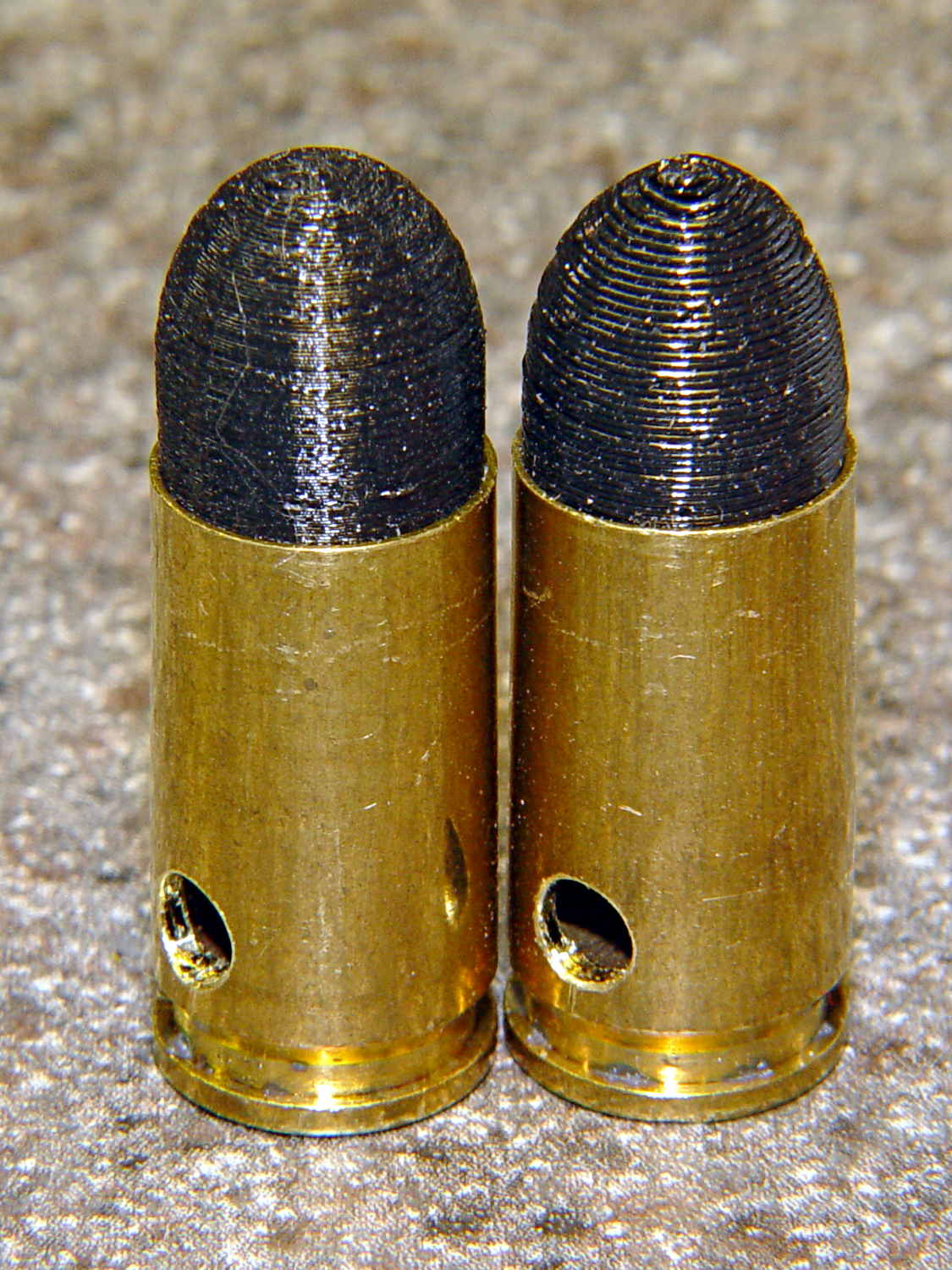
    As you might expect, changing the layer thickness to 0.1 mm = 100 μm dramatically improves the appearance of the dummy 9 mm Luger bullet on the left, compared to the 0.25 mm = 250 μm layers on the right:

    Dummy 9 mm Luger cartridges - 0.1 mm layer - overview
    Dummy 9 mm Luger cartridges – 0.1 mm layer – overview

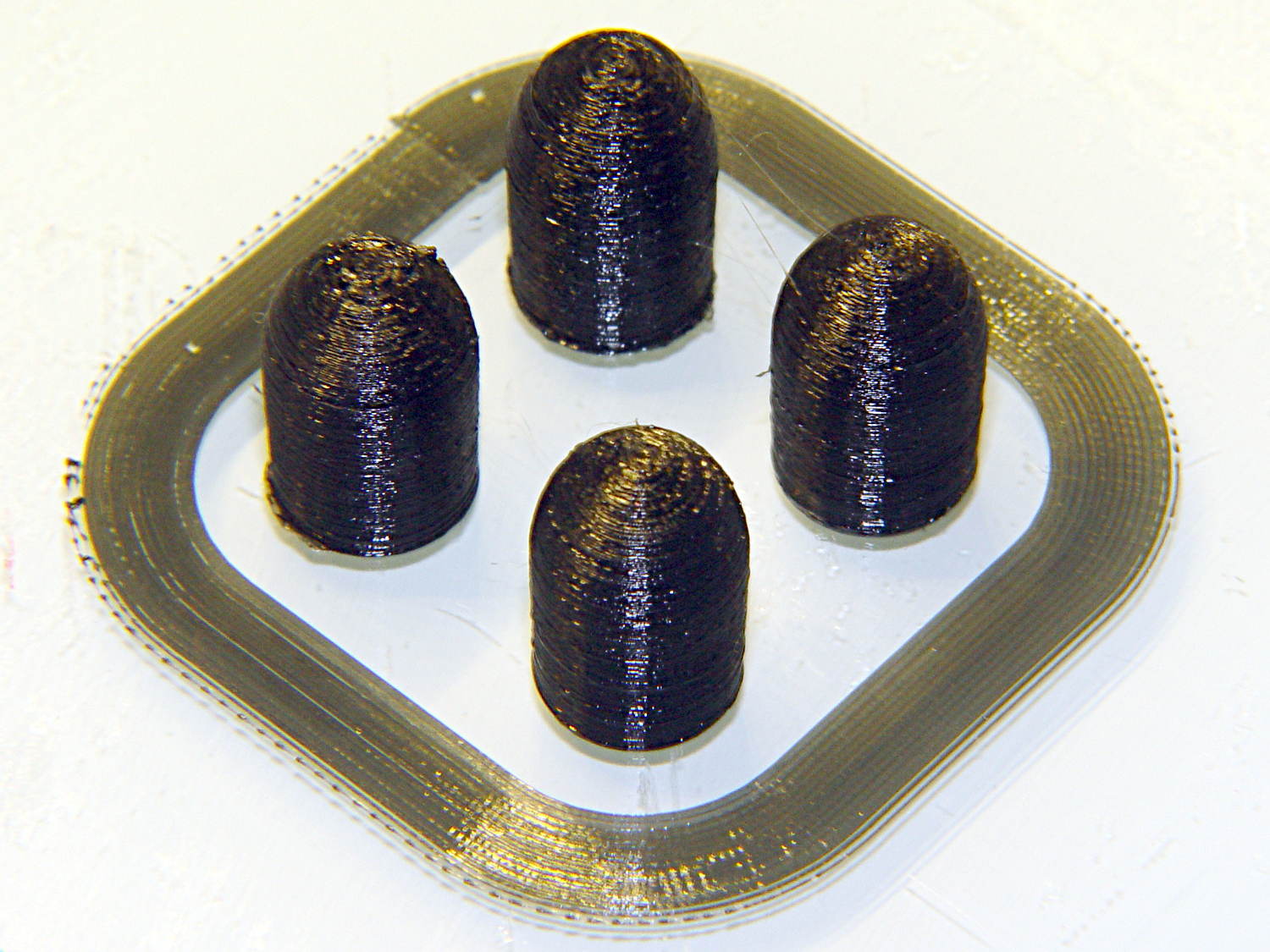
    The inside edge of the translucent skirt around the quartet measured 90 to 110 μm, so the layer height is spot on:

    Dummy 9 mm Luger bullets - 0.1 mm layer - overhead on platform
    Dummy 9 mm Luger bullets – 0.1 mm layer – overhead on platform

    That required no adjustments to the M2 at all; It Just Works. Admittedly, that’s with a custom platform and firm supports replacing the springs, plus better Z-axis homing, but the overall structure was fine to start with.

    I used the same Slic3r settings as before, with the only change being the layer thickness. Letting it pick the layer width might produce better results, but a 0.35 mm nozzle won’t go much narrower than 0.40 mm anyway.

    A closer look at the bullet show the thinner layers provide a better rendition of the stretched sphere forming the nose; it’s less pointy than the one assembled from thicker layers:

    Dummy 9 mm Luger bullets - 0.1 mm layer - side
    Dummy 9 mm Luger bullets – 0.1 mm layer – side

    The nose closes better with thinner layers:

    Dummy 9 mm Luger bullets - 0.1 mm layer - nose
    Dummy 9 mm Luger bullets – 0.1 mm layer – nose

    None of that really matters for this application, but it’s a useful data point.

    The downside is that printing with thinner layers requires more time: a single bullet (of 16) requires 2.2 minutes at 250 μm and (of 4) 9 minutes at 100 μm. The simple ratio of layer thicknesses predicts a factor of 2.5, not 4, but the skirt requires a larger fraction of the total time. The estimated time for a 4×4 array at 100 μm comes out at 5.2 minutes each, a factor of 2.4, which is close enough.

    Although 100 μm certainly looks better, it doesn’t really improve anything for most of the blocky stuff I make…

  • Dummy 9 mm Luger Cartridge

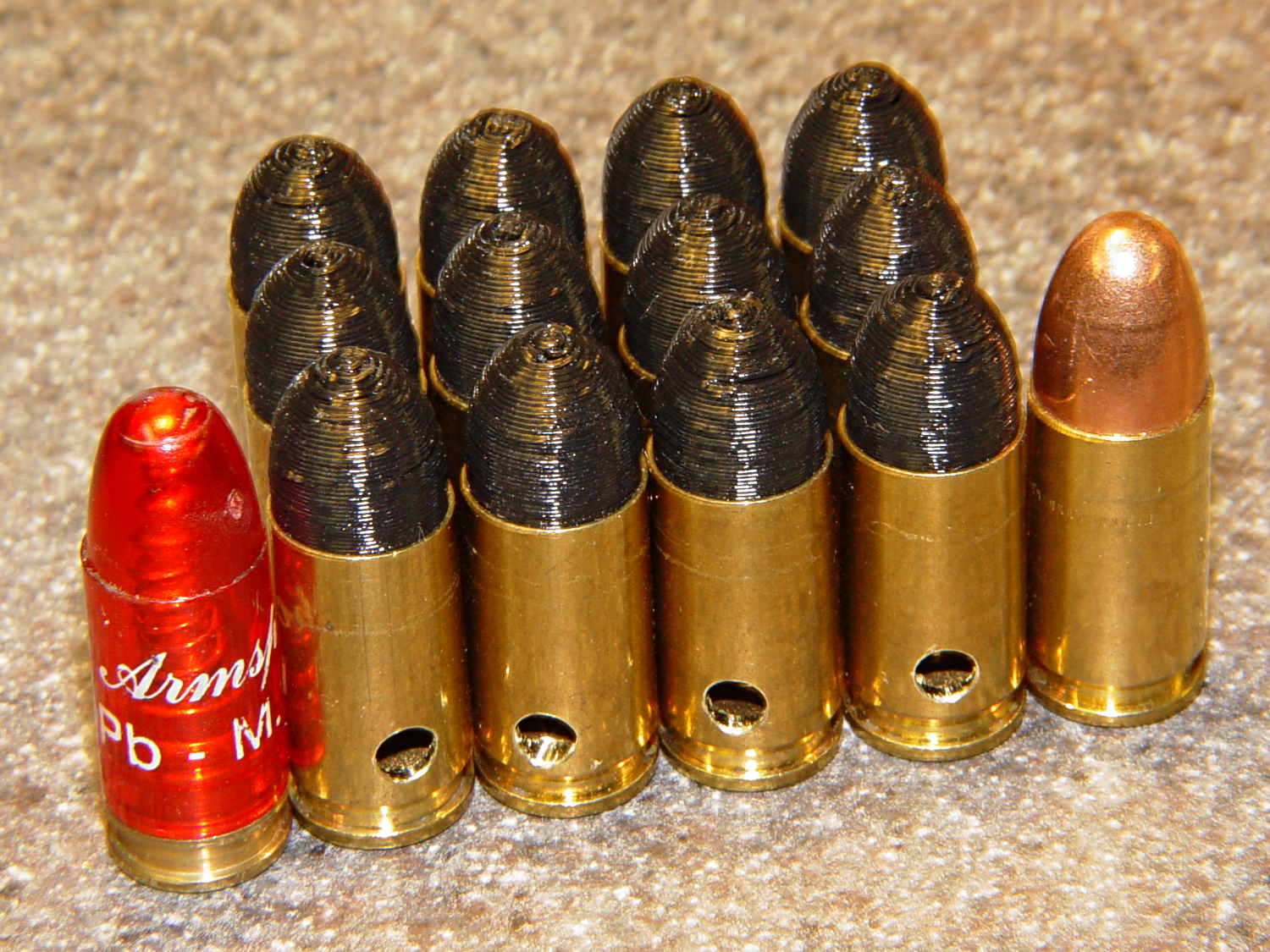
    An interesting project requires a handful of 9 mm Luger (aka 9 mm NATO) dummy cartridges with real brass. You can buy exact form / fit / weight dummies or plastic training rounds, but these will suit my simple needs:

    Dummy 9 mm Luger cartridges
    Dummy 9 mm Luger cartridges

    That’s a snap cap on the left and a real 9 mm Luger cartridge on the right. The holes in the dummy brass indicate that they are absolutely, positively, unquestionably not loaded cartridges.

    Start by drilling a 1/8 inch hole in the side of each unfired, primerless case:

    Dummy 9 mm Luger - drilling case
    Dummy 9 mm Luger – drilling case

    I set up the chuck on the rotary table, thinking I might drill three holes in each cartridge, but came to my senses. It’s lined up by eye, flush with the end of the jaws, and the hole is just above the inside of the base.

    The solid model has the same overall length and proportion as a 115 grain FMJ bullet, but doesn’t match the proper ogive or base diameter. Basically, I stretched a 9 mm sphere and stuck it atop a slightly tapered base cylinder:

    Dummy 9 mm Luger bullet - solid model
    Dummy 9 mm Luger bullet – solid model

    For reasons I don’t profess to understand, the sphere has a slightly different diameter at its equator than the top of the cylinder, even though they’re both the same BulletOD diameter with the same number of faces. Fortunately, that didn’t affect the final results.

    Print up a handful of the things:

    Dummy 9 mm Luger bullets - on platform
    Dummy 9 mm Luger bullets – on platform

    The shadow from the flash makes the bases look slightly fatter than they really are.

    Using a thinner layer would look better in this orientation. They’d definitely look better if they were split, printed with the long axis parallel to the plate, and glued together, as the grain would run lengthwise; I’m not sure there’s enough room for alignment pins, though.

    At this diameter and number of faces, the M2 produces almost perfectly accurate dimensions, so the bullets press-fit just like you’d expect. They’re twisted into a dab of urethane glue inside the brass that foams just enough to hold them place.

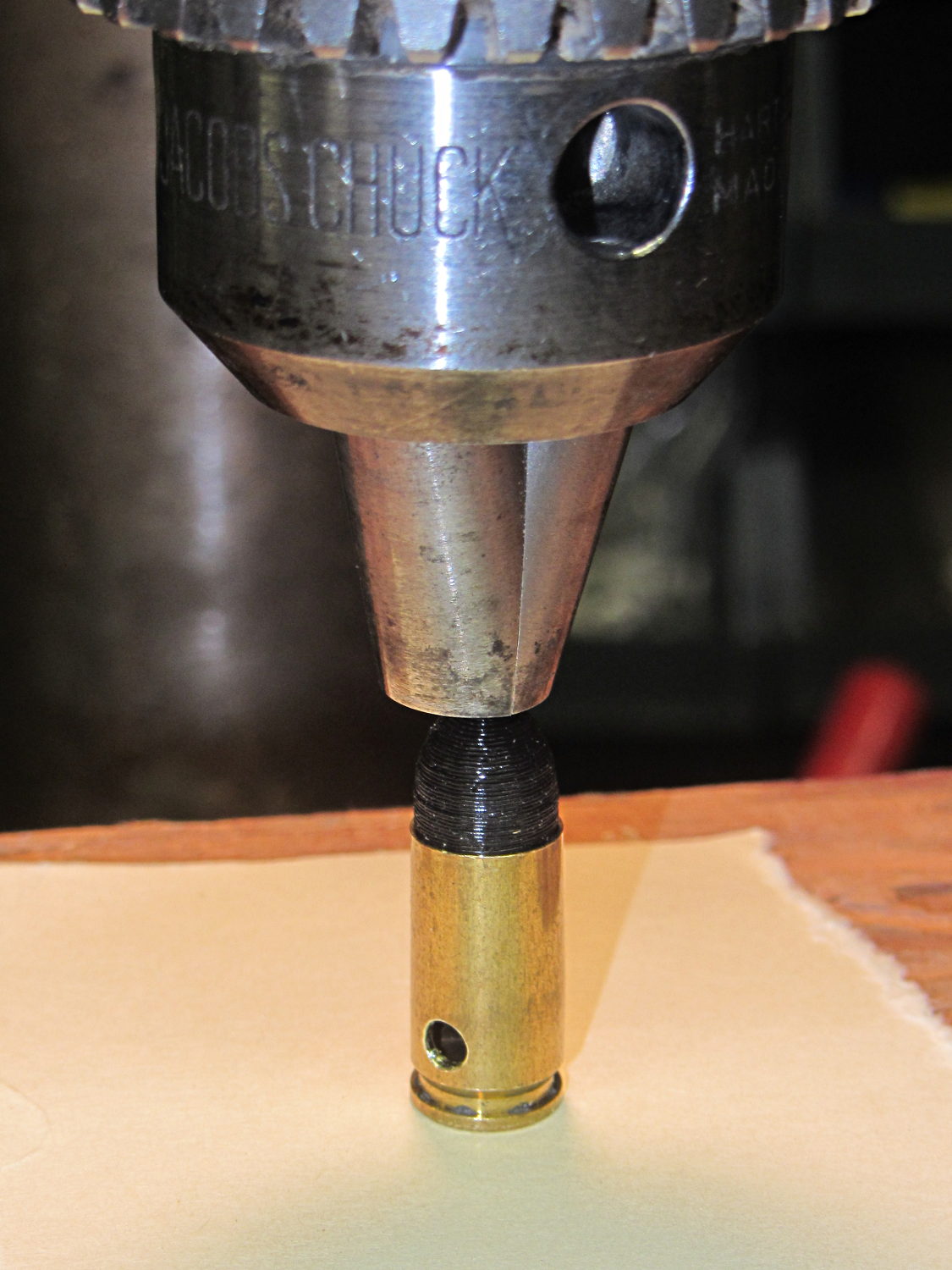
    Rather than use a real seating die, I deployed a closed chuck on the drill press. The trick is to set the depth stop to produce slightly too-long cartridges, then shim the platform without changing the stop and seat the bullet to the proper depth:

    Dummy 9 mm Luger - seating bullet
    Dummy 9 mm Luger – seating bullet

    The OAL tolerance for various 9 mm Luger cartridges seems to range from 1.08 inch to 1.17 inch, so anything in that range should be fine. I used 1.10 inch.

    These are not intended for firing. You could fire them with just a primer (in a non-drilled case) and (maybe) not melt or shatter the plastic, but they’re slightly larger than the nominal 8.82 mm land diameter and won’t obturate or spin-stabilize worth diddly: expect short range and keyholing.

    The sectional density is a whopping 0.008, should you keep track of such things: 0.47 gram = 7.2 grain. Note that the US small arms definition of sectional density has units of pound/inch2, not the pound/foot2 you’ll find right next to values computed using inches; the magic number 1/7000 just converts from grains to pounds. In the rest of the (metric) world, it’s entirely different.

    The OpenSCAD source code:

    // Dummy 9mm Luger bullet
    // Ed Nisley KE4ZNU November 2013
    
    //----------------------
    // Dimensions
    
    BulletOD = 9.05;			// main diameter
    BulletBaseOD = 8.8;			//  ... easy insertion
    
    BulletOAL = 14.0;			// overall length
    BaseLength = 8.0;			// cylindrical base length
    
    NoseLength = BulletOAL - BaseLength;
    
    NumSides = 8*4;
    
    //----------------------
    // Useful routines
    
    module ShowPegGrid(Space = 10.0,Size = 1.0) {
    
      Range = floor(50 / Space);
    
    	for (x=[-Range:Range])
    	  for (y=[-Range:Range])
    		translate([x*Space,y*Space,Size/2])
    		  %cube(Size,center=true);
    }
    
    //-------------------
    // Build it...
    
    ShowPegGrid();
    
    color("Orange")
    cylinder(r1=BulletBaseOD/2,r2=BulletOD/2,h=BaseLength,$fn=NumSides);
    
    color("DarkOrange")
    translate([0,0,BaseLength])
    	resize([0,0,2*NoseLength])
    		sphere(BulletOD/2,$fn=NumSides);
    
  • Improved Alignment Pin Hole for Split 3D Prints

    I’ve been working on an object (more on this later) that requires precise alignment of two parts that capture a nut deep inside. This calls for alignment pins, similar to the ones I used for, say, the Triple-Cylinder Thing:

    Cylinder Thing - rotated
    Cylinder Thing – rotated

    The general idea is to design holes that fit the pins, then locate them at the parting line of the model, where they’re subtracted from the solid and appear in exactly the proper places when the model splits for printing:

    Cylinder Thing - alignment pegs
    Cylinder Thing – alignment pegs

    You slather solvent glue on both halves, jam pins into the holes, slap the parts together, and clamp until cured. Works fine, I use pins all over the place.

    The gotcha of using just a (polygonal) cylinder as the hole: if you glue one end of the pin at a time, a small rim of dissolved plastic may form around the pin at the surface. That can bond the two halves together or prevent them from joining properly after being disassembled.

    Sooo, here’s a new alignment pin hole with a gutter around the pin on both surfaces to capture the glop:

    Alignment pin hole - overview
    Alignment pin hole – overview

    Remember, that’s the negative volume that will hold the pin, not the pin itself!

    Here’s how it works in real plastic, with a 1.75 mm peg glued into one hole with a bit of crud in the gutter:

    Alignment Hole and Pin
    Alignment Hole and Pin

    The secret to making the gutter work: offset the second layer by half the thread width, so that it’s reasonably well supported on the first layer. If you don’t do that, the inner layers simply drop down through the hole and fill the gutter. Even doing that, notice the distortion of the first few layers inside the hole.

    The OpenSCAD source code looks about like you’d expect:

    //-- Locating pin hole with glue recess
    
    module LocatingPin(Dia=PinOD,Len=5.00) {
    
    	translate([0,0,-ThreadThick])
    		PolyCyl((Dia + 2*ThreadWidth),2*ThreadThick,4);
    
    	translate([0,0,-2*ThreadThick])
    		PolyCyl((Dia + 1*ThreadWidth),4*ThreadThick,4);
    
    	translate([0,0,-(Len/2 + ThreadThick)])
    		PolyCyl(Dia,(Len + 2*ThreadThick),4);
    }
    

    Ideally, the pin length should extend at least two diameters into each side of the object, but you can feed in whatever you need to make it come out right.

    The PolyCyl() routine produces a low-vertex-count polygon that circumscribes the nominal diameter, which is what you need for vertical holes in 3D printed objects:

    module PolyCyl(Dia,Height,ForceSides=0) {			// based on nophead's polyholes
    
      Sides = (ForceSides != 0) ? ForceSides : (ceil(Dia) + 2);
    
      FixDia = Dia / cos(180/Sides);
    
      cylinder(r=(FixDia + HoleWindage)/2,
               h=Height,
    	   $fn=Sides);
    }
    

    Tip o’ the cycling helmet to nophead for figuring out the polyhole idea and explaining why they’re needed…

  • Broom Handle Screw With Dedendum: Effect of Printing Orientation

    Although the current OpenSCAD could produce a solid model with the screw thread’s dedendum, I’d never actually printed one of them:

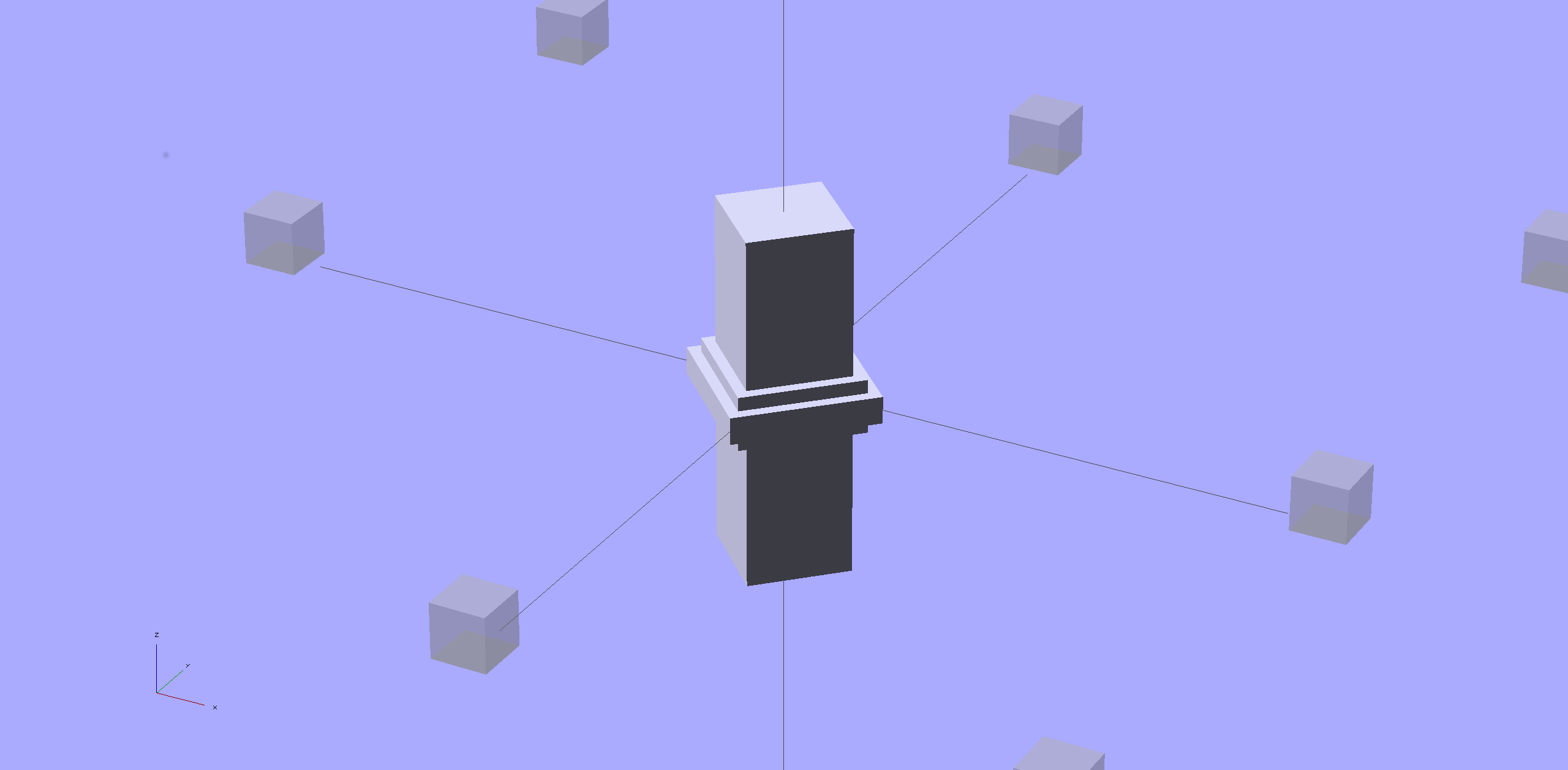
    Broom Handle Screw - full thread - solid model
    Broom Handle Screw – full thread – solid model

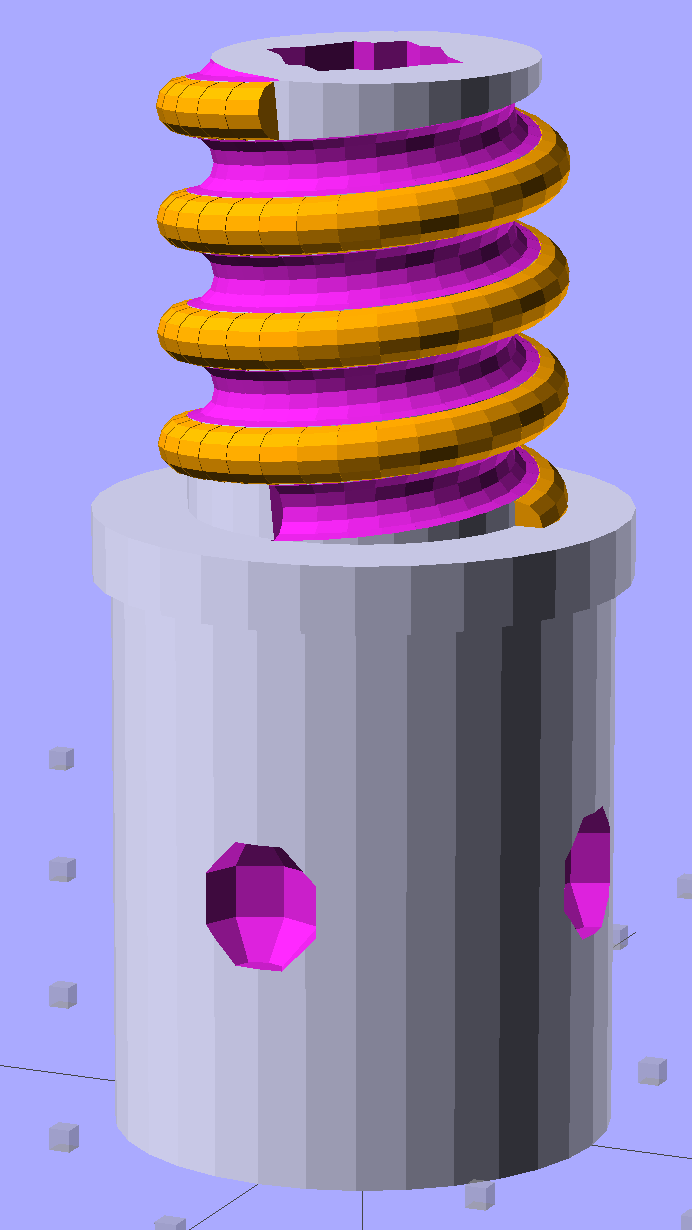
    I need some fondlestuff illustrating how to handle overhangs, so I ran one standing vertically, which (pretty much as I expected) didn’t work well at all:

    Broom Handle Screw - dedendum - vertical
    Broom Handle Screw – dedendum – vertical

    The trick is to split the model down the middle:

    Broom Handle Screw - horizontal top
    Broom Handle Screw – horizontal top

    And put holes in each half for alignment pins:

    Broom Handle Screw - horizontal bottom
    Broom Handle Screw – horizontal bottom

    Then you can print it lying down:

    Broom Handle Screw - horizontal - as-printed top
    Broom Handle Screw – horizontal – as-printed top

    The internal overhang would probably call for some support material, particularly in the square recess at the end, but in this case it’s a lesson:

    Broom Handle Screw - horizontal - as-printed bottom
    Broom Handle Screw – horizontal – as-printed bottom

    Glue some filament snippets into the holes, snap it together, and it looks just fine over there on the right:

    Broom Handle Screw - orientation comparison
    Broom Handle Screw – orientation comparison

    Doesn’t matter how many I print, it still doesn’t make any economic sense as a broom repair…

    The OpenSCAD source code now has a Layout variable to control the orientation and, not as shown in the model, the alignment pins have glue gutters in the first layer:

    // Broom Handle Screw End Plug
    // Ed Nisley KE4ZNU October 2013
    
    Layout = "Horizontal";		// Vertical Horizontal Pin
    
    UseDedendum = true;			// true to create full thread form
    
    //- Extrusion parameters must match reality!
    
    ThreadThick = 0.25;
    ThreadWidth = 0.40;
    
    HoleWindage = 0.2;
    
    Protrusion = 0.1;			// make holes end cleanly
    
    //----------------------
    // Dimensions
    
    PostOD = 22.3;				// post inside metal handle
    PostLength = 25.0;
    
    FlangeOD = 24.0;			// stop flange
    FlangeLength = 3.0;
    
    PitchDia = 15.5;			// thread center diameter
    ScrewLength = 20.0;
    
    ThreadFormOD = 2.5;			// diameter of thread form
    ThreadPitch = 5.0;
    NumSegments = 32;			//  .. number of cylinder approximations per turn
    
    BoltOD = 7.0;				// clears 1/4-20 bolt
    BoltSquare = 6.5;			// across flats
    BoltHeadThick = 3.0;
    
    RecessDia = 6.0;			// recesss to secure post in handle
    
    OALength = PostLength + FlangeLength + ScrewLength;
    
    SplitOC = 1.25*FlangeOD;	// separation in Horizontal layout
    PinOD = 1.75;				// alignment pin diameter = filament stub
    PinLength = 7.0;			//  ... length
    
    $fn=8*4;					// default cylinder sides
    
    echo("Pitch dia: ",PitchDia);
    echo("Root dia: ",PitchDia - ThreadFormOD);
    echo("Crest dia: ",PitchDia + ThreadFormOD);
    
    Pi = 3.14159265358979;
    
    //----------------------
    // Useful routines
    
    // Wrap cylindrical thread segments around larger plug cylinder
    
    module CylinderThread(Pitch,Length,PitchDia,ThreadOD,PerTurn) {
    
    CylFudge = 1.02;				// force overlap
    
        RotIncr = 1/PerTurn;
        PitchRad = PitchDia/2;
    
        Turns = Length/Pitch;
        NumCyls = Turns*PerTurn;
    
        ZStep = Pitch / PerTurn;
    
        HelixAngle = atan(Pitch/(Pi*PitchDia));
        CylLength = CylFudge * (Pi*(PitchDia + ThreadOD) / PerTurn) / cos(HelixAngle);
    
    	for (i = [0:NumCyls-1]) {
    		assign(Angle = 360*i/PerTurn)
    			translate([PitchRad*cos(Angle),PitchRad*sin(Angle),i*ZStep])
    				rotate([90+HelixAngle,0,Angle])
    					cylinder(r1=ThreadOD/2,
    							r2=ThreadOD/(2*CylFudge),
    							h=CylLength,
    							center=true,$fn=12);
    	}
    }
    
    // Build complete plug
    
    module ScrewPlug() {
    	difference() {
    		union() {
    			cylinder(r=PostOD/2,h=PostLength);
    			cylinder(r=PitchDia/2,h=OALength);
    			translate([0,0,PostLength])
    				cylinder(r=FlangeOD/2,h=FlangeLength);
    			color("Orange")
    			translate([0,0,(PostLength + FlangeLength)])
    				CylinderThread(ThreadPitch,(ScrewLength - ThreadFormOD/2),PitchDia,ThreadFormOD,NumSegments);
    		}
    
    		translate([0,0,-Protrusion])
    			PolyCyl(BoltOD,(OALength + 2*Protrusion),6);
    
    		translate([0,0,(OALength - BoltHeadThick)])
    			PolyCyl(BoltSquare,(BoltHeadThick + Protrusion),4);
    
    		if (UseDedendum)
    			translate([0,0,(PostLength + FlangeLength + ThreadFormOD/2 - ThreadPitch/(2*NumSegments))])
    				rotate(-90 - 360/(2*NumSegments))
    				CylinderThread(ThreadPitch,ScrewLength,PitchDia,ThreadFormOD,NumSegments);
    
    		for (i = [0:90:270]) {
    			rotate(45 + i)					// 45 works better with Horizontal layout
    				translate([PostOD/2,0,PostLength/2])
    					sphere(r=RecessDia/2,$fn=8);
    		}
    	}
    }
    
    // Locating pin hole with glue recess
    
    module LocatingPin() {
    
    	translate([0,0,-ThreadThick])
    		PolyCyl((PinOD + 2*ThreadWidth),2*ThreadThick,4);
    	translate([0,0,-(PinLength/2 + ThreadThick)])
    		PolyCyl(PinOD,(PinLength + 2*ThreadThick),4);
    
    }
    
    module PolyCyl(Dia,Height,ForceSides=0) {			// based on nophead's polyholes
    
      Sides = (ForceSides != 0) ? ForceSides : (ceil(Dia) + 2);
    
      FixDia = Dia / cos(180/Sides);
    
      cylinder(r=(FixDia + HoleWindage)/2,
               h=Height,
    	   $fn=Sides);
    }
    
    module ShowPegGrid(Space = 10.0,Size = 1.0) {
    
      Range = floor(50 / Space);
    
    	for (x=[-Range:Range])
    	  for (y=[-Range:Range])
    		translate([x*Space,y*Space,Size/2])
    		  %cube(Size,center=true);
    
    }
    
    //-------------------
    // Build it...
    
    ShowPegGrid();
    
    if (Layout == "Vertical")
    	ScrewPlug();
    
    if (Layout == "Pin")
    	LocatingPin();
    
    if (Layout == "Horizontal")
    	for (i=[-1,1])
    		difference() {
    			translate([i*SplitOC/2,PostLength/2,0])
    				rotate([90,180*(i + 1)/2,0])
    					ScrewPlug();
    
    			translate([0,0,-FlangeOD/2])
    				cube([2*OALength,2*OALength,FlangeOD],center=true);
    
    			for (j=[-1,1], pin=[-1,1])
    				assign(PinX = i*SplitOC/2 + pin*(PostOD + BoltOD)/4,
    					   PinY = j*PostLength/4) {
    					translate([PinX,PinY,0])
    						rotate(45)
    							LocatingPin();
    					echo("i j pin: ",i,j,pin);
    					echo("X Y: ",PinX,PinY);
    				}
    		}
    
  • Makergear M2: Relocating the Z-Min Switch

    Fairly obviously, taping the Z-min switch to the back of the X gantry isn’t a long-term solution. There’s just enough clearance between the extruder and the X gantry for the switch, so I made a small block with clearance holes for the screws holding the X axis linear slide rail in place and tapping holes for the M2.5×0.45 screws in the switch:

    Z-min Front Mount Switch Block - solid model
    Z-min Front Mount Switch Block – solid model

    Not much to it, is there? That printed just fine with the taped-in-place switch and exactly fit the screws; the rail screws dropped right through the holes and the switch screws tapped their way in.

    The stock M2 cable reaches to the front of the X gantry, but only with the switch mounted to the left side:

    M2 Z-min switch - left gantry
    M2 Z-min switch – left gantry

    Those are 25 mm M3 screws shortened to about 19 mm; the one on the right looks a bit short to me, too.

    Unfortunately, that spot on the gantry is the only place you can pick up the M2 with one hand: it balances perfectly when you (well, I) put four fingers between the five leftmost rail screws. It’s a beast to carry any other way, so that switch had to move.

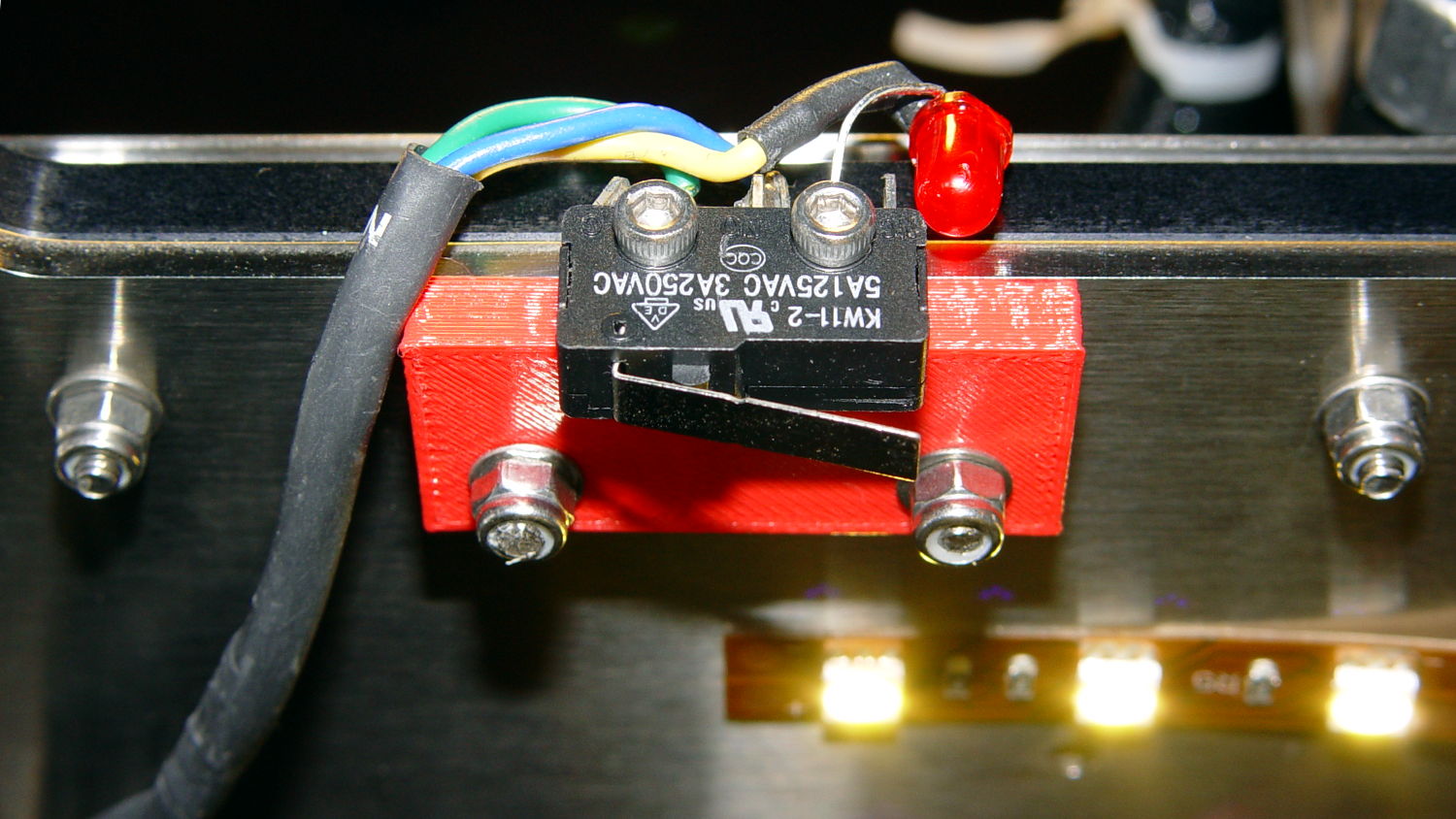
    So I spliced in a snippet of six conductor cable, just so I could match the original color code, replaced the red through-hold LED with a blue SMD LED, and moved it to the middle of the gantry:

    M2 Z-min switch - center gantry
    M2 Z-min switch – center gantry

    The view from below shows a sticky clamp holding a bight of the original cable and a small clamp (bent & drilled from a steel strap) holding the new cable in place:

    M2 Z-min switch - center gantry - bottom view
    M2 Z-min switch – center gantry – bottom view

    It’s once again possible to grab the printer and lug it away…

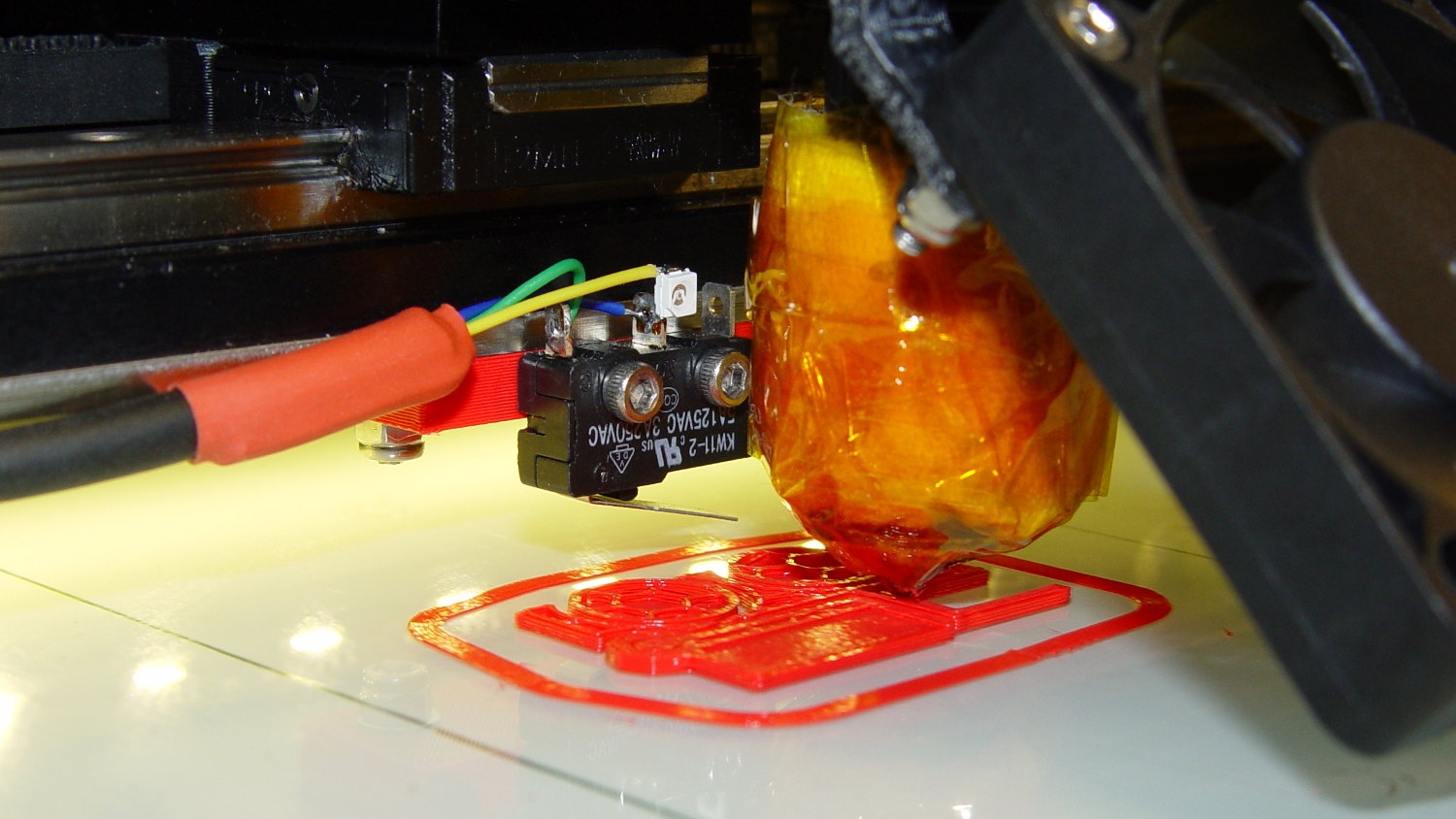
    The first test piece was Madscifi’s classic Tiny Toy Dump Truck, because I needed a show-n-tell tchotchke for a Squidwrench meeting:

    M2 Z-min switch - center gantry - in action
    M2 Z-min switch – center gantry – in action

    Yes, that dangling switch lever looks precarious, but it can’t touch the platform because the nozzle is below it.

    With the switch in place, I melted a blob of solder atop the brass tubing on the platform, popped it off, and removed the residue with a razor scraper.

    Before doing the truck, however, I had to recalibrate the Z switch and make the homing sequence do a different dance:

    • Home Y and leave the platform at the rear
    • Home X and move it to the far right to clear the platform
    • Home Z against the platform glass

    The complete start.gcode sequence (which isn’t really a separate file in Slic3r, but the notation helps keep things straight):

    ;-- Slic3r Start G-Code for M2 starts --
    ;  Ed Nisley KE4NZU - 7 Oct 2013
    ; Z-min switch at platform, must move nozzle to X=130 to clear platform
    M140 S[first_layer_bed_temperature]	; start bed heating
    G90				; absolute coordinates
    G21				; millimeters
    M83				; relative extrusion distance
    M84				; disable stepper current
    ;G4 S3			; allow Z stage to freefall to the floor
    G28 Y0			; home Y to be sure of clearing probe point in X
    G92 Y-127 		; set origin to 0 = center of plate
    G28 X0			; home X
    G92 X-95		; set origin to 0 = center of plate
    G1 X130 F30000	; move off platform to right side
    G28 Z0			; home Z
    G92 Z-4.55		; set origin to measured z offset
    G0 Z10 F2000    ; get nozzle clearance
    G0 X0 Y-124 Z3.0 F20000     ; set up for priming
    M190 S[first_layer_bed_temperature]	; wait for bed to finish heating
    M109 S[first_layer_temperature]	; set extruder temperature and wait
    G1 Z0.0 F2000	; plug extruder on plate
    G1 E10 F300		; prime to get pressure
    G1 Z5 F2000		; rise above blob
    G1 X5 Y-123 F30000	; move away from blob
    G1 Z0.0 F2000		; dab nozzle to remove outer snot
    G4 P1			; pause to clear
    G1 Z0.5 F2000		; clear bed for travel
    ;-- Slic3r Start G-Code ends --
    

    The G92 Z-4.55 instruction sets the Z position (without moving the stage) to the measured difference between the switch trip point and the nozzle tip.

    Finding that value is a two-step process:

    • Manually home Z against the platform (with the nozzle off to the right!)
    • Issue G92 Z0 to define the switch trip point as Z=0.0
    • Move the Z stage downward by a known distance so it clears the nozzle
    • Move the nozzle over the platform
    • Measure the distance between nozzle and platform (perhaps with a tapered gauge)
    • Subtract that measurement from the distance you moved the nozzle

    For example, I lowered the platform by 7.0 mm and measured 2.6 mm between the nozzle and the platform, so the G92 value = -7.0 + 2.6 = -4.4. Put that in the start.gcode G92 instruction: G92 Z-4.4.

    That’ll get you in the ballpark, so print a thinwall open box and measure its top-to-bottom height at the corners. The second box came out about 4.85 mm tall, which means the nozzle was 0.15 mm too close to the platform: subtract 0.15 from the G92 setting: -4.4 – 0.15 = -4.55.

    The next thinwall box came out exactly 5.0 mm tall.

    Then I could print that truck, which came out just fine, apart from the usual slight drooping where the filament must bridge the left side of the dump box:

    M2 Tiny Toy Dump Truck test piece
    M2 Tiny Toy Dump Truck test piece

    After breaking one errant strand from the left side of the hinge, everything moved smoothly.

    I must tinker up some G-Code to measure the switch closure point along the length of the platform, which would detect front-to-back tilt.

    The OpenSCAD source code for the switch mounting block:

    // Block to mount M2 Z-min switch on X gantry
    // Ed Nisley KE4ZNU - Oct 2013
    
    //- Extrusion parameters - must match reality!
    
    ThreadThick = 0.25;
    ThreadWidth = 0.40;
    
    function IntegerMultiple(Size,Unit) = Unit * ceil(Size / Unit);
    
    Protrusion = 0.1;
    
    HoleWindage = 0.2;
    
    //- Sizes
    
    SwitchScrewOD = 2.05;					// microswitch screw tapping
    SwitchScrewOC = 9.5;					//  ... on-center spacing
    
    GantryScrewOD = 3.0;					// X rail screw clearance
    GantryScrewOC = 25.0;					//  ... on-center spacing along X
    GantryScrewOffset = 12.0;				//  ... Y offset from gantry front
    
    BlockSize = [1.5*GantryScrewOC,17.0,5.0];			// XYZ dimensions as mounted
    
    SwitchScrewLength = BlockSize[1] - 5*ThreadWidth;	// net length of switch screws
    echo ("Max switch screw length: ",SwitchScrewLength + 5.0);		// ... allow switch thickness
    
    //- Adjust hole diameter to make the size come out right
    
    module PolyCyl(Dia,Height,ForceSides=0) {			// based on nophead's polyholes
    
      Sides = (ForceSides != 0) ? ForceSides : (ceil(Dia) + 2);
    
      FixDia = Dia / cos(180/Sides);
    
      cylinder(r=(FixDia + HoleWindage)/2,h=Height,$fn=Sides);
    }
    
    //- Put peg grid on build surface
    
    module ShowPegGrid(Space = 10.0,Size = 1.0) {
    
      RangeX = floor(100 / Space);
      RangeY = floor(125 / Space);
    
    	for (x=[-RangeX:RangeX])
    	  for (y=[-RangeY:RangeY])
    		translate([x*Space,y*Space,Size/2])
    		  %cube(Size,center=true);
    
    }
    
    //- Build it
    
    ShowPegGrid();
    
    difference() {
    	translate([-BlockSize[0]/2,-GantryScrewOffset,0])
    		cube(BlockSize,center=false);
    	for (i=[-1,1]) {
    		translate([i*GantryScrewOC/2,0,-Protrusion])
    			rotate(-90)
    				PolyCyl(GantryScrewOD,(BlockSize[2] + 2*Protrusion));
    		translate([i*SwitchScrewOC/2,-(GantryScrewOffset + Protrusion),BlockSize[2]/2])
    			rotate([-90,0,0])
    				rotate(90)
    					PolyCyl(SwitchScrewOD,(SwitchScrewLength + Protrusion));
    	}
    }