Ed Nisley's Blog: Shop notes, electronics, firmware, machinery, 3D printing, laser cuttery, and curiosities. Contents: 100% human thinking, 0% AI slop.
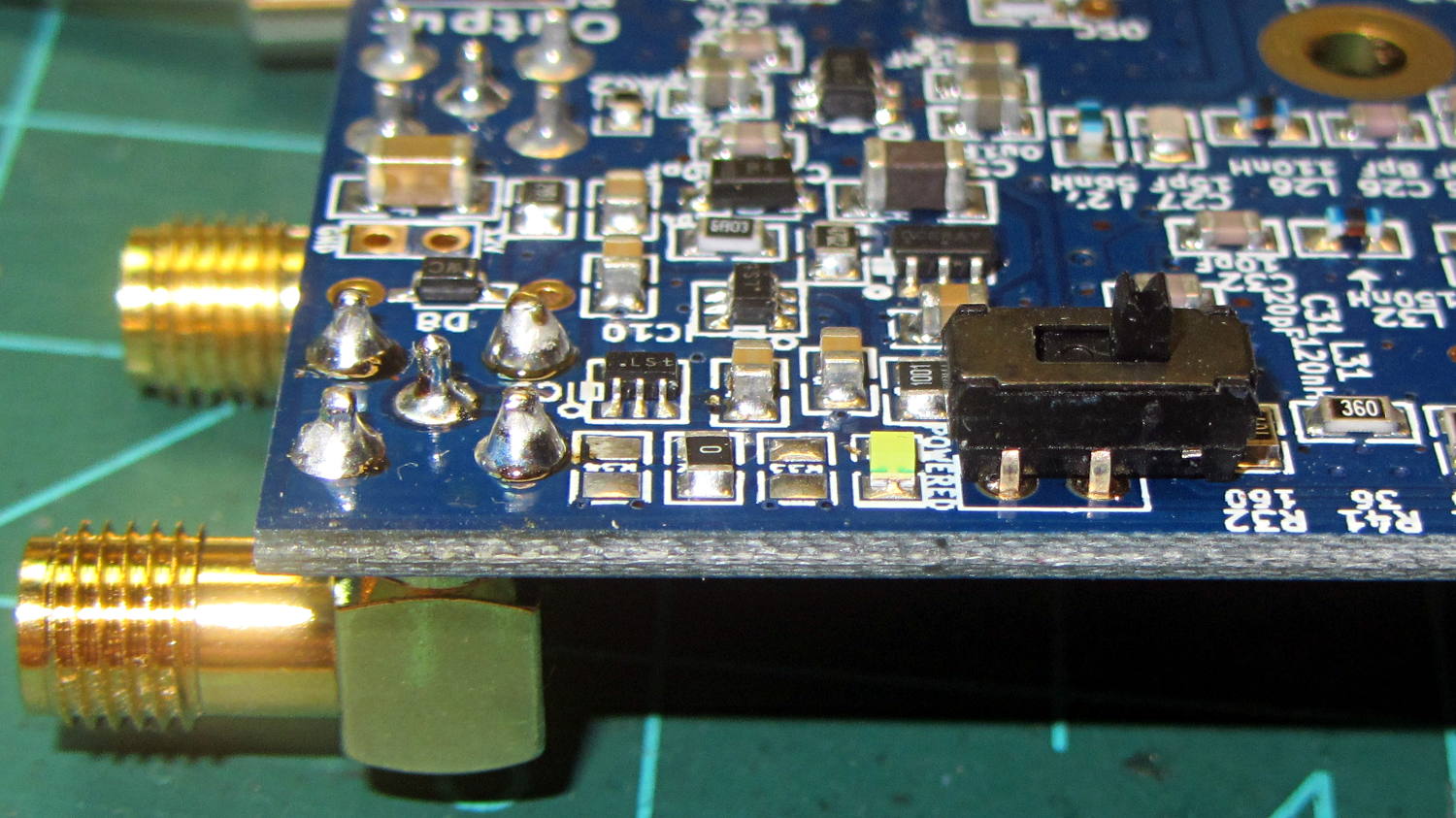
Some rummaging produced a tiny DPDT switch that actually fit the holes intended for a pin header on the recently arrived Ham It Up board, at least after I amputated 2/3 of the poor thing’s legs:
Ham-It-Up – noise source switch – B
The new SMA noise output jack sits in the front left, with the white “noise on” LED just left of the switch:
Ham-It-Up – noise source switch – A
There’s no way to measure these things accurately, at least as far as I can tell, but the holes came out pretty close to where they should be. The new SMA connector lined up horizontally with the existing IF output jack and vertically with the measured / rounded-to-the-nearest-millimeter on-center distance:
Ham It Up – noise SMA drilling
The Enable switch doesn’t quite line up with the LED, so the holes will always look like I screwed up:
Ham-It-Up – noise source switch – case holes
That’s OK, nobody will ever notice.
Now, to stack up enough adapters to get from the SMA on the Ham It Up board to the N connector on the spectrum analyzer …
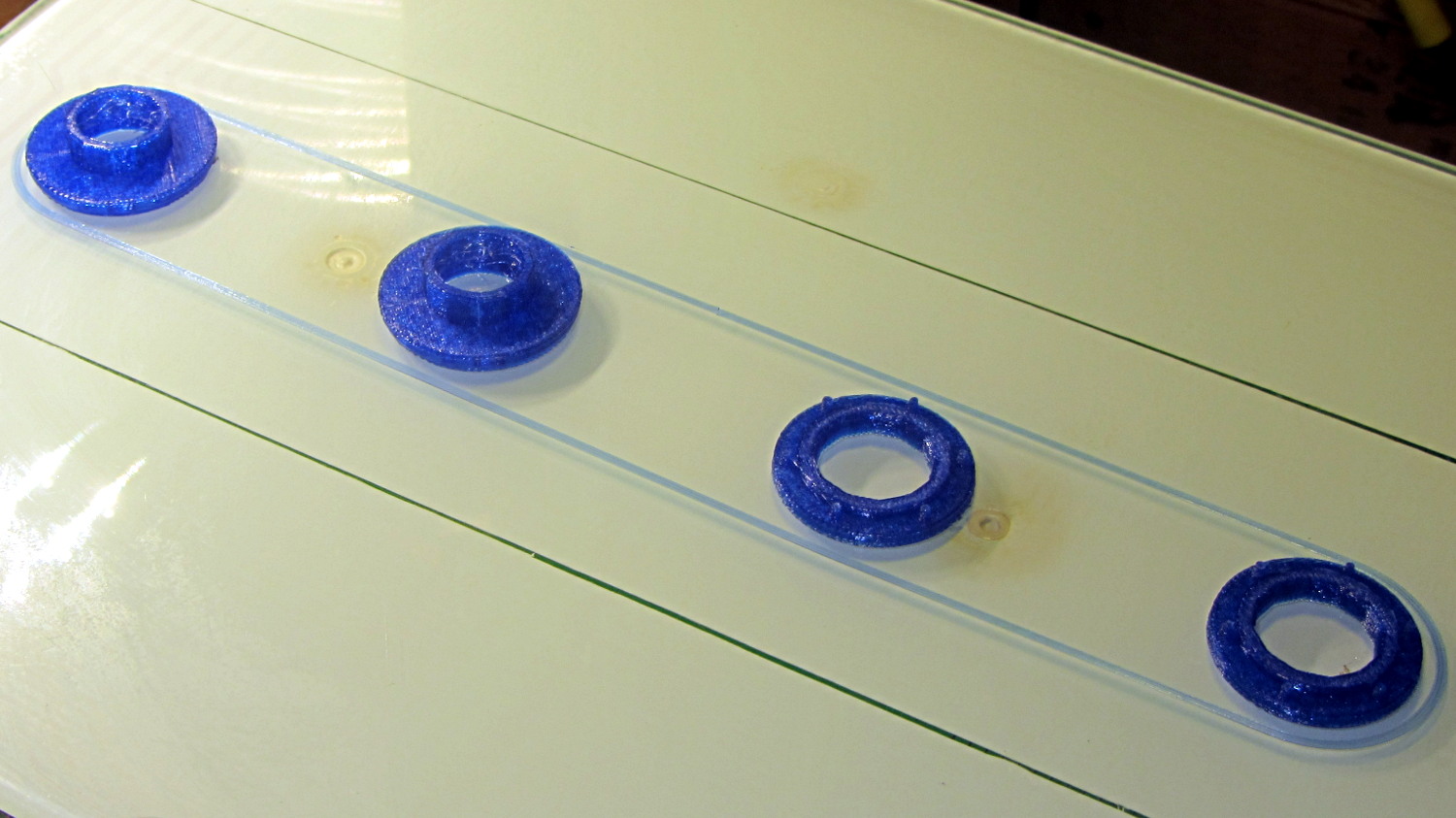
The tiny posts on the fencing helmet ear grommet produced a remarkable amount of PETG hair, because the nozzle had to skip between four separate pieces on the platform at each layer:
So I told Slic3r to build each part separately:
Fencing helmet grommet – separate builds – first attempt
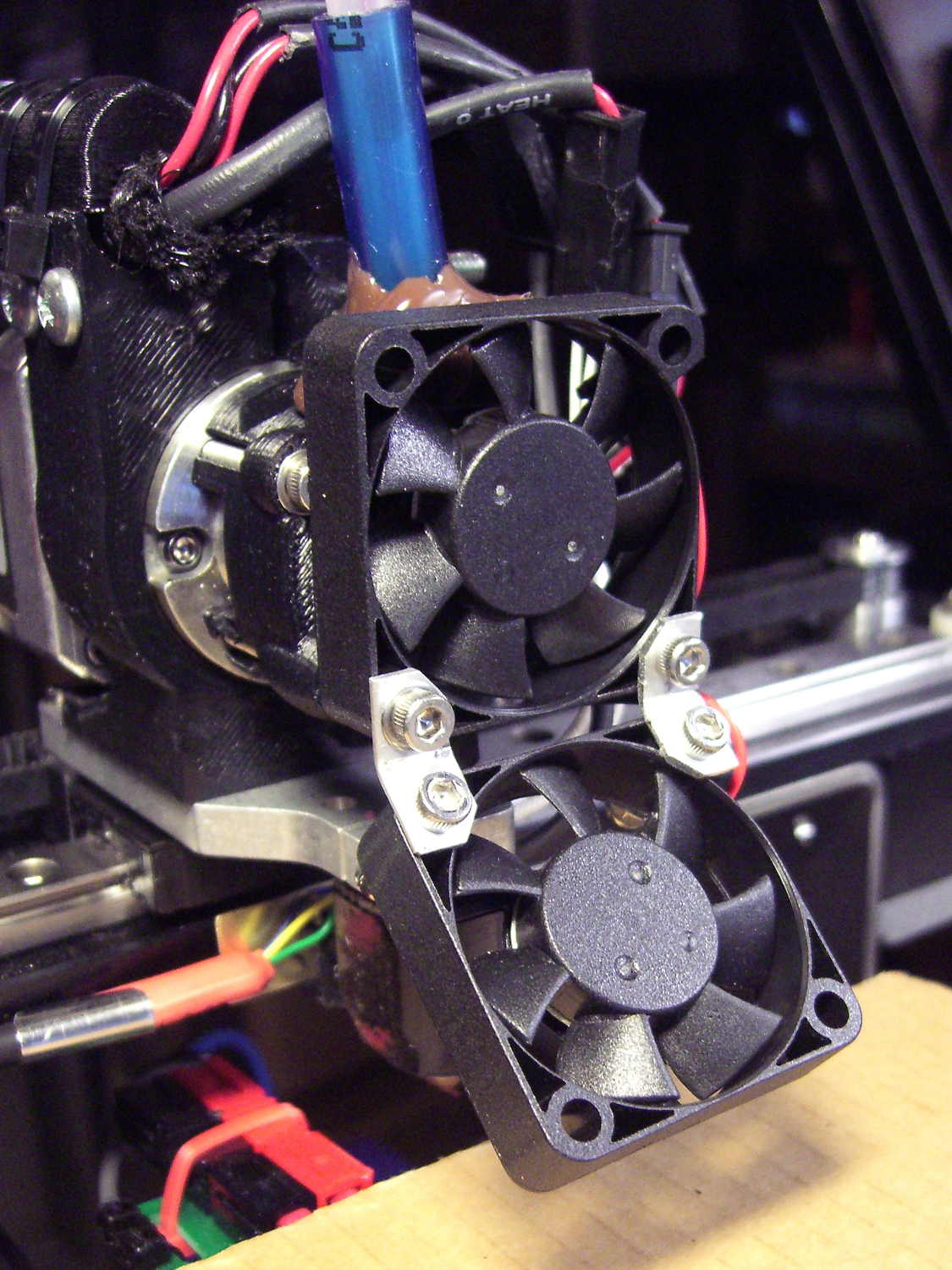
Due to absolutely no forethought or planning on my part, that actually worked. Slic3r defines a cylindrical keep-out zone around the nozzle that I set to 15 mm radius and 25 mm height, but those numbers are completely wrong for the M2, particularly with a V4 hot end.
To the rear, the nuts & bolts along the bottom of the X gantry sit 5 mm above the V4 nozzle, with the relaxed actuator on my re-relocated Z-axis home switch at Z=+1 mm:
V4 PETG – extruder priming
To the front, the bed fan doesn’t sit much higher:
M2 V4 Extruder – 24 V fans
As it turned out, the front washers built first, sitting there in front of the gantry and behind the fan, the rear washers appeared last, and Everything Just Worked.
However, even though the M2’s layout won’t allow for automated layout, I figured I could do it manually by building the parts from front to rear:
Fencing Helmet Ear Grommet – Slic3r layout
That way, the already-built parts never pass under the gantry / switch. For particularly tall parts, I could remove / relocate the bed fan to clear the already-built parts as they appear.
Come to find out that Slic3r, for whatever reason, doesn’t build the parts in the order you’d expect from the nice list on the far right side of the screen:
Sequential Build Order – Slic3r vs Pronterface
Worse, the Slic3r 3D preview shows the threads by layer (which is what you’d expect), rather than by object for sequential builds:
Slic3r – sequential preview vs build order
I don’t know how you’d force-fit a four-dimensional preview into the UI, so I won’t complain at all.
There’s no way to tell which part will build first; selecting the part will highlight its entry in the list (and vice versa), but the order of appearance in that list doesn’t tell you where the G-Code will appear in the output file. That’s not a problem for extruders with a keep-out volume that looks like a cylinder, so there’s no reason for Slic3r to do it any differently: it will manage the extruder position to clear all the objects in any order.
The Pronterface preview creates the objects by reading the G-Code file and displaying the threads in order, so, if you’re quick and it’s slow, you can watch the parts appear in their to-be-built order. The detailed preview (in the small window on the right in the screenshot) does show the parts in the order they will be built as you scroll upward through the “layers”, which is the only way you can tell what will happen.
So doing sequential builds requires iterating through these steps until the right answer appears:
Add all objects separately to get each one as a separate line in the list to the right
Using the More option to duplicate objects produces multiple objects per line = Bad Idea
Arrange objects in a line from front to back
Export G-Code file
Load G-Code file into Pronterface
Pop up the Pronterface layer preview, scroll upward to show build order, note carefully
Rearrange parts in Slic3r accordingly
That’s do-able (note the different order from the Slic3r preview):
Fencing helmet grommet – manual sequential build
But it’s tedious and enough of a pain that it probably makes no sense for anything other than parts that you absolutely can’t build any other way.
In this case, completing each of the bottom washers separately eliminated all of the PETG hair between the small pegs. The upper washers still had some hair inside the inner cylinder, but not much. If you were fussy, you could suppress that by selecting “Avoid crossing perimeters”, at the cost of more flailing around in the XY plane.
All those spare grommets will make a good show-n-tell exhibit…
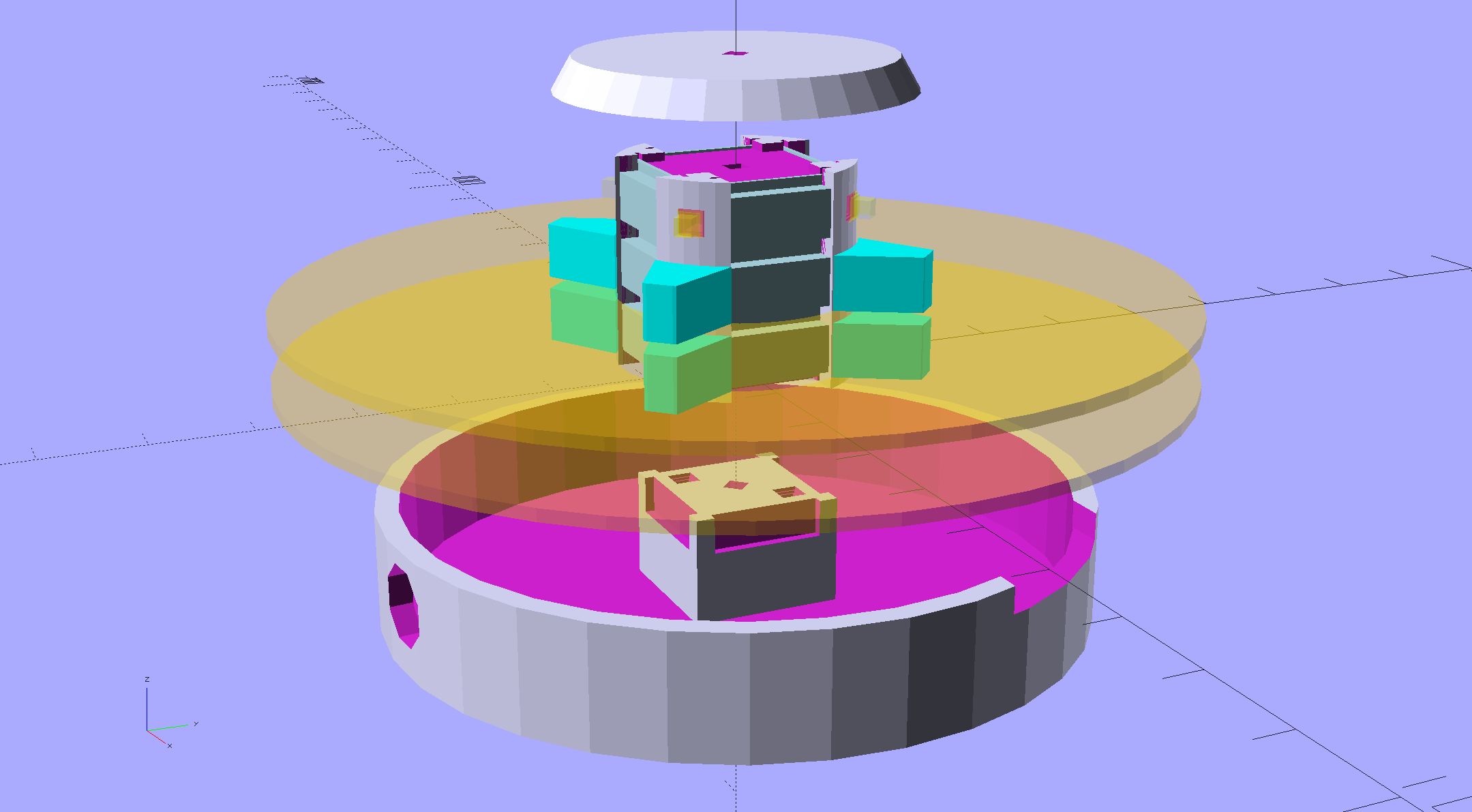
An improved version of the 3D printed plastic bits going into the Hard Drive Platter Mood Light:
Hard Drive Mood Light – improved – solid model – Show view
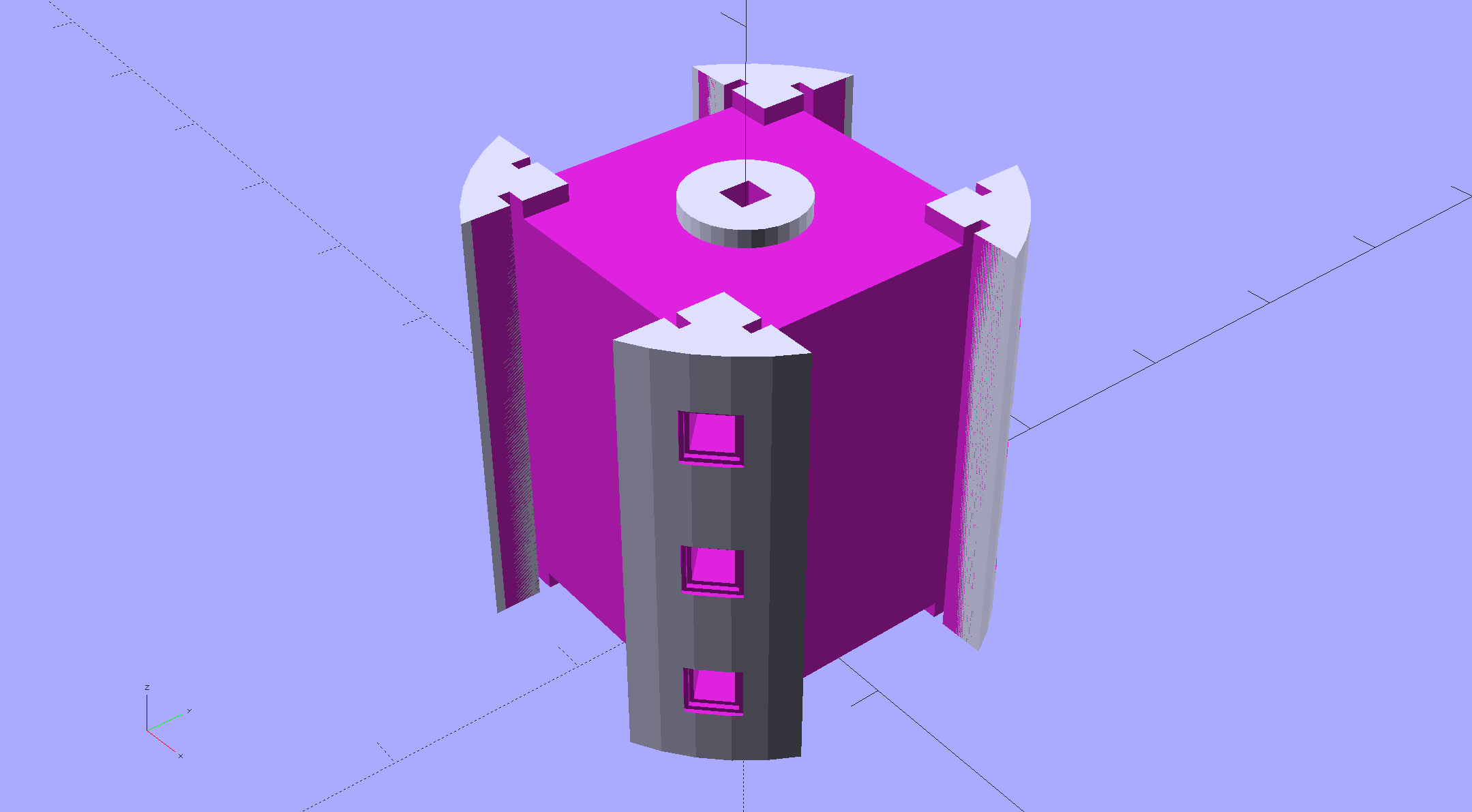
The central pillar now has cutouts behind the Neopixel strips so you (well, I) can solder directly to the larger half-pads on the back, plus a boss on the top for better wire management:
Hard Drive Mood Light – improved – Pillar – solid model
I’m not entirely satisfied with the little slots for the strip edges; the resolution limits of 3D printing call for larger openings, but there’s not much meat around those pins up the edge.
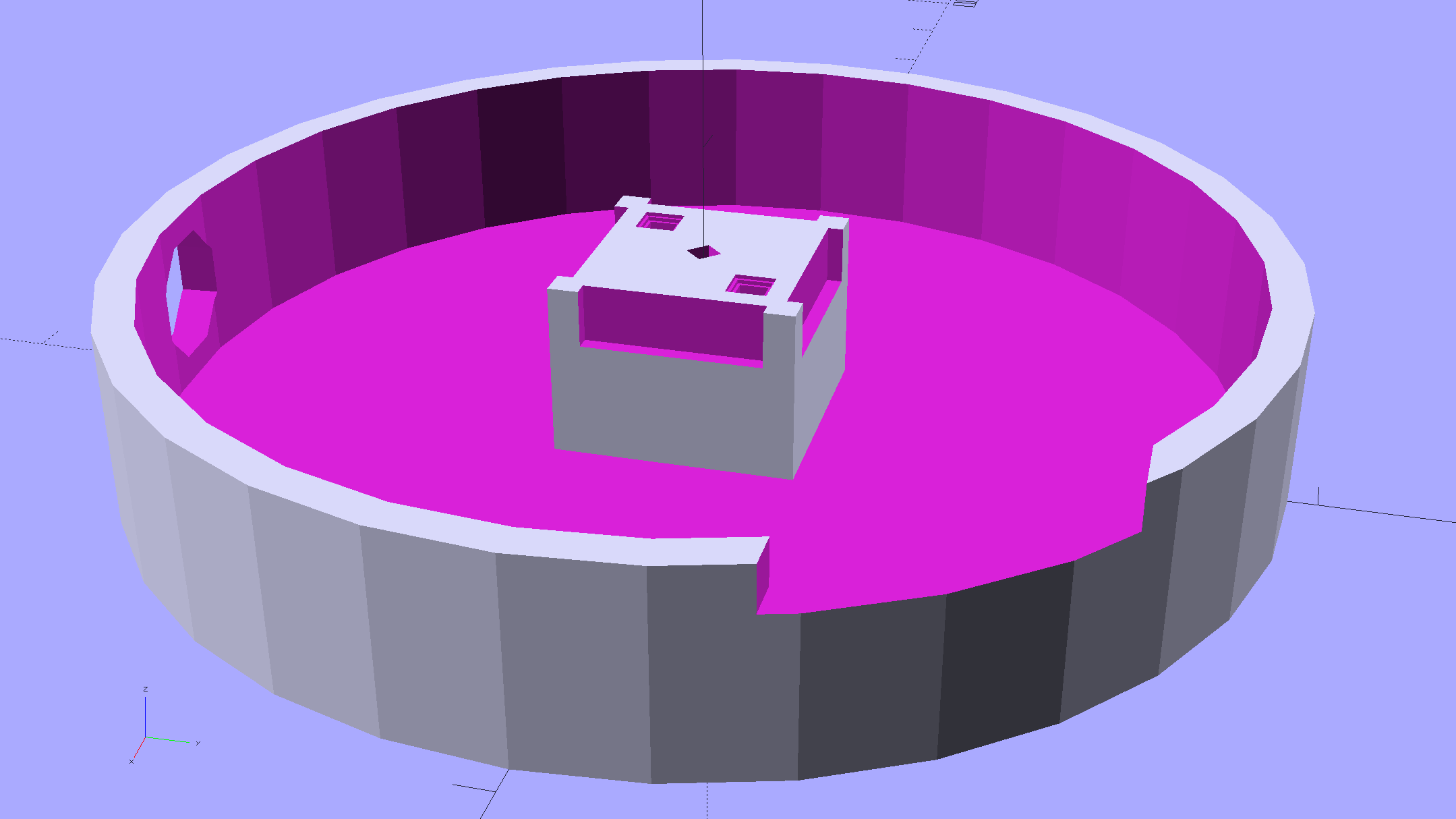
The base becomes much larger to hold the Arduino Pro Mini and gains an optional slot to let the programming cable reach the outside:
Hard Drive Mood Light – improved – Base – solid model
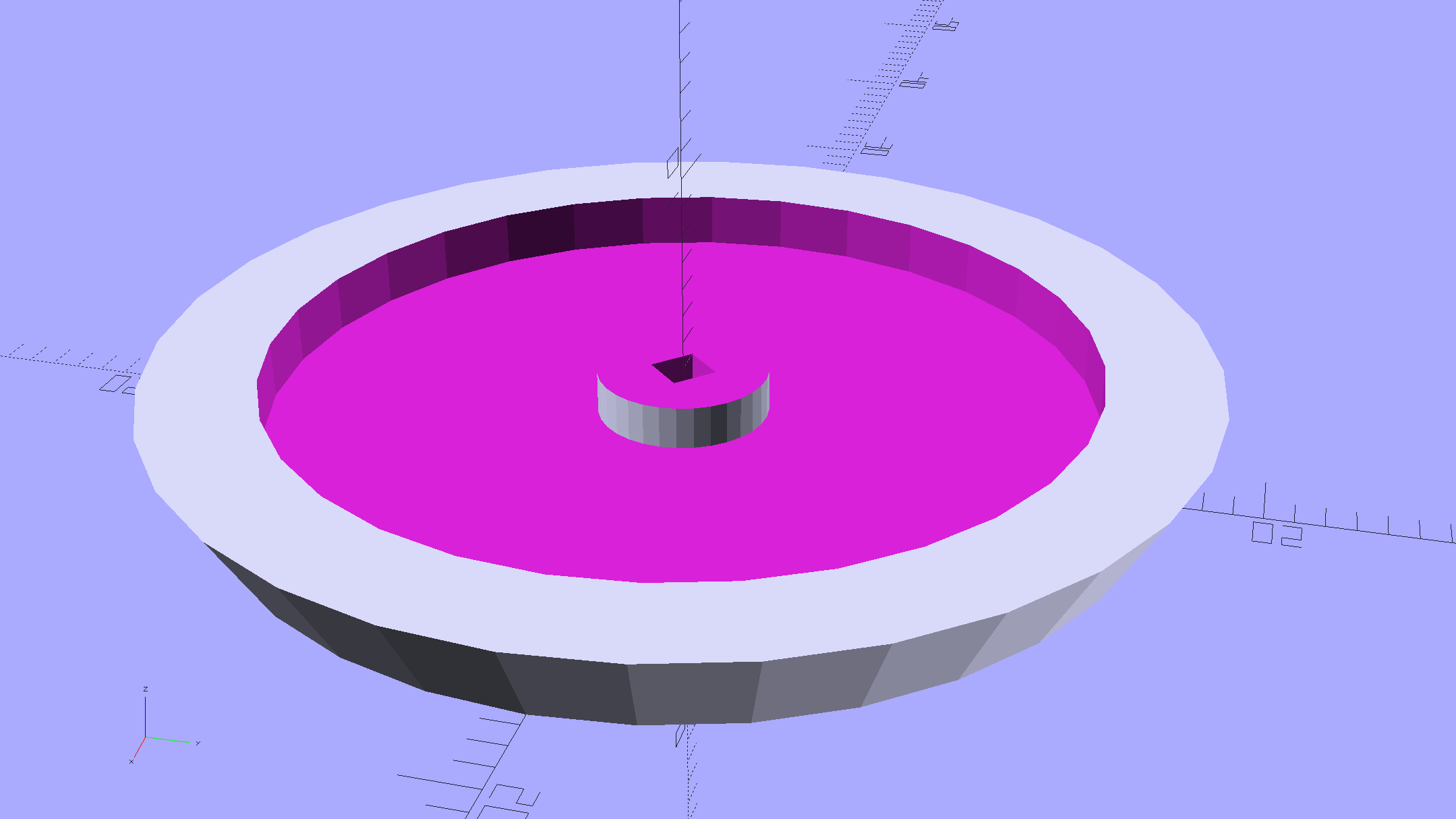
The cap has a boss matching the one atop the pillar:
Hard Drive Mood Light – improved – Cap – solid model
Both the cap & base have center features recessed by two thread thicknesses to let their rims apply a slight clamping force on the platters.
Our Larval Engineer says it really needs an internal battery with maybe four hours of runtime, a charging base station (ideally with inductive power transfer), buttons (or, better, a tilt switch / accelerometer) for mode selection, and perhaps a microphone to synchronize lighting effects with music. To my horror, her co-op job seems to have exposed her to Marketeers…
We do, however, agree that the Cap would look better in lathe-turned brass with a non-tarnish clearcoat.
The OpenSCAD source code:
// Hard Drive Platter Mood Light
// Ed Nisley KE4ZNU November 2015

Layout = "Spacers";					// Build Show Pixel LEDString Platters Pillar Spacers TopCap Base

CablePort = true;

ShowDisks = 2;						// number of disks in Show layout

//- Extrusion parameters must match reality!

ThreadThick = 0.25;
ThreadWidth = 0.40;

HoleWindage = 0.2;

Protrusion = 0.1;			// make holes end cleanly

inch = 25.4;

function IntegerMultiple(Size,Unit) = Unit * ceil(Size / Unit);

//----------------------
// Dimensions

ID = 0;
OD = 1;
LENGTH = 2;

Platter = [25.0,95.0,1.27];						// hard drive platters - must match actual thickness!

LEDStringCount = 3;								// number of LEDs on each strip
LEDStripCount = 4;								// number of strips (verify locating pin holes & suchlike)

WireSpace = 1.0;								// allowance for wiring along strip ends

Pixel = [13.0, 1000 / 144, 0.6];				// smallest indivisible unit of LED strip
PixelMargin = [1.0, 1.0, 2.0];					// LED and circuitry atop the strip

BeamAngle = 120;								// LED viewing angle
BeamShape = [
	[0,0],
	[Platter[OD]*cos(BeamAngle/2),-Platter[OD]*sin(BeamAngle/2)],
	[Platter[OD]*cos(BeamAngle/2), Platter[OD]*sin(BeamAngle/2)]
];

PillarSides = 12*4;

PillarCore = Platter[ID] - 2*(Pixel[2] + PixelMargin[2] + 2.0);		// LED channel distance across pillar centerline
PillarLength = LEDStringCount*Pixel[1] + Platter[LENGTH];
echo(str("Pillar core size: ",PillarCore));
echo(str("      ... length:"),PillarLength);

PCB = [34.5,17.5,1.6];								// Arduino Pro Mini (or whatever) PCB size
PCBClearTop = 5.0;
PCBClearBot = 5.0;
PCBHeight = PCB[2] + PCBClearBot + PCBClearTop;

PCBRadius = sqrt(pow(Platter[ID]/2 + PCB[1],2) + pow(PCB[0]/2,2));
echo(str("PCB Corner radius: ",PCBRadius));

CoaxConn = [7.8,11.2,5.0];							// power connector

Cap = [Platter[ID] + 4.0,Platter[ID] + 4.0 + 10*2*ThreadWidth,2*WireSpace + 6*ThreadThick];		// cap over top of pillar
CapSides = 8*4;

BaseClearHeight = max(PCBHeight,CoaxConn[OD]);

Base = [2.0 + 2*PCBRadius,2.0 + 2*PCBRadius + CoaxConn[LENGTH],BaseClearHeight + 6*ThreadThick];
BaseSides = 8*4;

Screw = [1.5,2.0,20.0];							// screws used to secure cap & pillar

Spacer = [Platter[ID],(Platter[ID] + 2*8),(Pixel[1] - Platter[LENGTH])];
echo(str("Spacer  OD: ",Spacer[OD]));
echo(str(" ... thick:",Spacer[LENGTH]));

LEDStripProfile = [
	[0,0],
	[Pixel[0]/2,0],
	[Pixel[0]/2,Pixel[2]],
	[(Pixel[0]/2 - PixelMargin[0]),Pixel[2]],
	[(Pixel[0]/2 - PixelMargin[0]),(Pixel[2] + PixelMargin[2])],
	[-(Pixel[0]/2 - PixelMargin[0]),(Pixel[2] + PixelMargin[2])],
	[-(Pixel[0]/2 - PixelMargin[0]),Pixel[2]],
	[-Pixel[0]/2,Pixel[2]],
	[-Pixel[0]/2,0]
];

//----------------------
// Useful routines

module PolyCyl(Dia,Height,ForceSides=0) {			// based on nophead's polyholes

  Sides = (ForceSides != 0) ? ForceSides : (ceil(Dia) + 2);

  FixDia = Dia / cos(180/Sides);

  cylinder(r=(FixDia + HoleWindage)/2,
		h=Height,
	$fn=Sides);
}

//- Locating pin hole with glue recess
//  Default length is two pin diameters on each side of the split

PinOD = 1.70;

module LocatingPin(Dia=PinOD,Len=0.0) {

	PinLen = (Len != 0.0) ? Len : (4*Dia);

	translate([0,0,-ThreadThick])
		PolyCyl((Dia + 2*ThreadWidth),2*ThreadThick,4);

	translate([0,0,-2*ThreadThick])
		PolyCyl((Dia + 1*ThreadWidth),4*ThreadThick,4);

	translate([0,0,-(PinLen/2 + ThreadThick)])
		PolyCyl(Dia,(PinLen + 2*ThreadThick),4);

}
//----------------------
// Pieces

//-- LED strips

module OnePixel() {

	render()
		rotate([-90,0,0]) rotate(180)				// align result the way you'd expect from the dimensions
			difference() {
				linear_extrude(height=Pixel[1],convexity=3)
					polygon(points=LEDStripProfile);
				translate([-Pixel[0]/2,Pixel[2],-PixelMargin[0]])
					cube([Pixel[0],2*PixelMargin[2],2*PixelMargin[0]]);
				translate([-Pixel[0]/2,Pixel[2],Pixel[1]-PixelMargin[0]])
					cube([Pixel[0],2*PixelMargin[2],2*PixelMargin[0]]);
			}
}

module LEDString(n = LEDStringCount) {

	for (i=[0:n-1])
		translate([0,i*Pixel[1]])
//			resize([0,Pixel[1] + 2*Protrusion,0])
				OnePixel();
}

//-- Stack of hard drive platters

module Platters(n = LEDStringCount + 1) {

	color("gold",0.4)
	for (i=[0:n-1]) {
		translate([0,0,i*Pixel[1]])
			difference() {
				cylinder(d=Platter[OD],h=Platter[LENGTH],center=false,$fn=PillarSides);
				cylinder(d=Platter[ID],h=3*Platter[LENGTH],center=true,$fn=PillarSides);
			}
	}
}

//-- Pillar holding the LED strips

module Pillar() {

	difflen = PillarLength + 2*Protrusion;

//	render(convexity=5)
	difference() {
		linear_extrude(height=PillarLength,convexity=4)
			difference() {
				rotate(180/(12*4))
					circle(d=Platter[ID] - 1*ThreadWidth,$fn=PillarSides);

				for (i=[0:LEDStripCount-1]) 					// clearance for LED beamwidth, may not actually cut surface
					rotate(i*360/LEDStripCount)
						translate([PillarCore/2,0,0])
							polygon(points=BeamShape);

				for (i=[0:LEDStripCount-1])						// LED front clearance
					rotate(i*360/LEDStripCount)
						translate([(PillarCore/2 + Pixel[2]),(Pixel[0] - 2*PixelMargin[0])/2])
							rotate(-90)
								square([Pixel[0] - 2*PixelMargin[0],Platter[ID]]);

			}

		for (i=[0:LEDStripCount-1])								// LED strip slots
			rotate(i*360/LEDStripCount)
				translate([PillarCore/2,0,-Protrusion])
					linear_extrude(height=difflen,convexity=2)
						rotate(-90)
							polygon(points=LEDStripProfile);

		difference() {											// wiring recess on top surface, minus boss
			for (i=[0,90])
				rotate(i)
					translate([0,0,(PillarLength - (WireSpace/2 - Protrusion))])
						cube([(PillarCore + 2*Protrusion),Pixel[0] - 2*PixelMargin[0],WireSpace],center=true);
			cylinder(d=3*Screw[OD],h=PillarLength + Protrusion,$fn=CapSides);
		}

		for (i=[0:LEDStripCount-1])								// wiring recess on bottom surface
			rotate(i*90)
				translate([PillarCore/2 - (WireSpace - Protrusion)/2,0,WireSpace/2 - Protrusion])
					cube([WireSpace + Protrusion,Pixel[0] - 2*PixelMargin[0],WireSpace],center=true);

		for (j=[0:LEDStringCount-1])							// platter spacer alignment pins
			for (i=[0:LEDStripCount-1])
				rotate(i*360/LEDStripCount + 180/LEDStripCount)
					translate([(Platter[ID] - 1*ThreadWidth)/2,0,(j*Pixel[1] + Pixel[1]/2 + Platter[LENGTH]/2)])
						rotate([0,90,0])
							rotate(45)
								LocatingPin();

		translate([0,0,-Protrusion])							// central screw hole
			rotate(180/4)
				PolyCyl(Screw[ID],difflen,4);

		if (false)
		for (i=[-1,1])											// vertical wire channels
			rotate(i*360/LEDStripCount + 180/LEDStripCount)
				translate([PillarCore/2 - 2.0,0,-Protrusion])
					PolyCyl(2.0,difflen,4);

		for (i=[-1,1])											// locating pins
			rotate(i*360/LEDStripCount - 180/LEDStripCount)
				translate([PillarCore/2 - 2.0,0,0])
					LocatingPin();
	}
}

//-- Spacers to separate platters

module Spacers() {

	difference() {
		linear_extrude(height=Spacer[LENGTH],convexity=4)
			difference() {
				rotate(180/PillarSides)
					circle(d=Spacer[OD],$fn=PillarSides);

				for (i=[0:LEDStripCount-1]) 					// clearance for LED beamwidth, may not actually cut surface
					rotate(i*360/LEDStripCount)
						translate([PillarCore/2,0,0])
							polygon(points=BeamShape);

				for (i=[0:LEDStripCount-1])						// LED front clearance
					rotate(i*360/LEDStripCount)
						translate([(PillarCore/2 + Pixel[2]),(Pixel[0] - 2*PixelMargin[0])/2])
							rotate(-90)
								square([Pixel[0] - 2*PixelMargin[0],Platter[ID]]);


				rotate(180/PillarSides)
					circle(d=Spacer[ID],$fn=PillarSides);		// central pillar fits in the hole
			}

		for (i=[0:LEDStripCount-1])
			rotate(i*360/LEDStripCount + 180/LEDStripCount)
				translate([Platter[ID]/2,0,(Pixel[1] - Platter[LENGTH])/2])
					rotate([0,90,0])
						rotate(45)
							LocatingPin();

	}
}

//-- Cap over top of pillar

module TopCap() {

	difference() {
		cylinder(d1=(Cap[OD] + Cap[ID])/2,d2=Cap[OD],h=Cap[LENGTH],$fn=CapSides);		// outer lid

		translate([0,0,-Protrusion])
			PolyCyl(Screw[ID],Cap[LENGTH] + WireSpace + Protrusion,4);					// screw hole

		translate([0,0,Cap[LENGTH] - 2*WireSpace])
			difference() {
				cylinder(d=Cap[ID],h=2*Cap[LENGTH],$fn=CapSides);						// cutout
				cylinder(d=3*Screw[OD],h=Cap[LENGTH],$fn=CapSides);						// boss
			}

		translate([0,0,Cap[LENGTH] - 2*ThreadThick])
			cylinder(d=Cap[ID]/2,h=2*ThreadThick + Protrusion,$fn=CapSides);			// recess boss
	}
}

//-- Base below pillar

module Base() {

	SideWidth = 0.5*Base[OD]*sin(180/BaseSides);						// close enough

	difference() {
		union() {
			difference() {
				cylinder(d=Base[OD],h=Base[LENGTH],$fn=BaseSides);			// outer base

				translate([0,0,6*ThreadThick])								// main cutout
					cylinder(d=Base[ID],h=Base[LENGTH],$fn=BaseSides);

				rotate(180/BaseSides)
					translate([0,0,Base[LENGTH] - BaseClearHeight/2]) 					// power connector hole
						rotate([90,0,0]) rotate(180/8)
							PolyCyl(CoaxConn[ID],Base[OD],8);
			}

			translate([0,0,Base[LENGTH]/2])									// recess pillar support below rim
				cube([PillarCore,PillarCore,Base[LENGTH] - 2*ThreadThick],center=true);
		}

		for (i=[0:LEDStripCount-1])											// wiring recesses
			rotate(i*90)
				translate([PillarCore/2 - (WireSpace - Protrusion)/2,0,Base[LENGTH] - 4*WireSpace/2])
					cube([WireSpace + Protrusion,PillarCore - 4*WireSpace,4*WireSpace],center=true);

		translate([0,0,-Protrusion])
			PolyCyl(Screw[ID],2*Base[LENGTH],4);						// screw hole

		translate([0,0,-Protrusion])									// screw head recess
			rotate(180/8)
				PolyCyl(8.5,Base[LENGTH] - 3.0 + Protrusion,8);

		for (i=[-1,1])													// locating pins
			rotate(i*360/LEDStripCount - 180/LEDStripCount)
				translate([PillarCore/2 - 2.0,0,Base[LENGTH] - ThreadThick])
					LocatingPin();

		if (CablePort)
			translate([0,Platter[ID]/2 + PCB[1],Base[LENGTH] - 3.0 + Protrusion])
				rotate(-90)
					cube([PCB[1],Base[OD],3.0]);

	}

}

//----------------------
// Build it

if (Layout == "Pixel")
	OnePixel();

if (Layout == "LEDString")
	LEDString(LEDStringCount);

if (Layout == "Platters")
	Platters(LEDStringCount + 1);

if (Layout == "Pillar")
	Pillar(LEDStringCount);

if (Layout == "TopCap")
	TopCap();

if (Layout == "Base")
	Base();

if (Layout == "Spacers")
	Spacers();

if (Layout == "Show") {
	Pillar();

	for (i=[0:LEDStripCount-1])											// LED strips
		rotate(i*360/LEDStripCount)
			translate([PillarCore/2,0,Platter[LENGTH]/2])
				rotate([90,0,90])
					color("lightblue") LEDString();
	if (true)
	for (j=[0:max(1,ShowDisks - 2)])									// spacers
		translate([0,0,(j*Pixel[1] + Platter[LENGTH])])
			color("cyan") Spacers();

	for (j=[0:max(2,ShowDisks - 2)])										// spacer alignment pins
		for (i=[0:LEDStripCount-1])
			rotate(i*360/LEDStripCount + 180/LEDStripCount)
				translate([(Platter[ID] - 1*ThreadWidth)/2,0,(j*Pixel[1] + Pixel[1]/2 + Platter[LENGTH]/2)])
					rotate([0,90,0])
						rotate(45)
							 color("Yellow",0.25) LocatingPin(Len=4);
	translate([0,0,PillarLength + 3*Cap[LENGTH]])
		rotate([180,0,0])
			TopCap();

	translate([0,0,-2*Base[LENGTH]])
		Base();

	if (ShowDisks > 0)
		Platters(ShowDisks);

}

// Ad-hoc build layout

if (Layout == "Build") {
	if (true)
		Pillar();

	if (true)
		translate([0,(Platter[ID] + Cap[OD])/2,0])
			TopCap();

	if (true)
		translate([0,-(Platter[ID] + Base[OD])/2,0])
			Base();

	Ybase = Spacer[OD] * (LEDStringCount%2 ? (LEDStringCount - 1) : (LEDStringCount - 2)) / 4;
	if (true)
		for (i=[0:LEDStringCount])										// build one extra set of spacers!
			translate([(i%2 ? 1 : -1)*(Spacer[OD] + Base[OD])/2,		// alternate X sides to shrink Y space
					(i%2 ? i-1 : i)*Spacer[OD]/2 - Ybase,				// same Y for even-odd pairs in X
					0])
				Spacers();
}
It should come as no surprise that hard drive platters have different thicknesses:
Hard Drive Platter Thickness
The thicker ones measure 1.25 mm, which is near enough to 50 mils to suggest they date back to the Good Old Days. The three thinner ones in the middle are 0.77 mm = 30 mil and could be slightly younger than dirt. There’s more where these came from and I expect more variation on the theme.
The beveled edges make the platters look thinner than they really are; they’re firmly clamped together with no space between them.
After donating the never–sufficiently-to-be-damnedSamsungvacuumcleaner (and all its remaining bags & doodads) to a nonprofit’s tag sale, we picked up a Sears Kenmore Progressive vacuum cleaner that seemed to be the least awful of the current offerings. Unlike all previous vacuum cleaners, its tools & doodads have complex plastic fittings with latches and keyways and all manner of gimcrackery. The designers seem to have hands and legs of far-above-average size, but that’s another rant.
All this came to a head when I attempted to vacuum the fuzz out of the refrigerator’s evaporator coils, because the long snout that reaches the back of the refrigerator doesn’t fit the aperture in the giant handle.
Well, at least I can fix that…
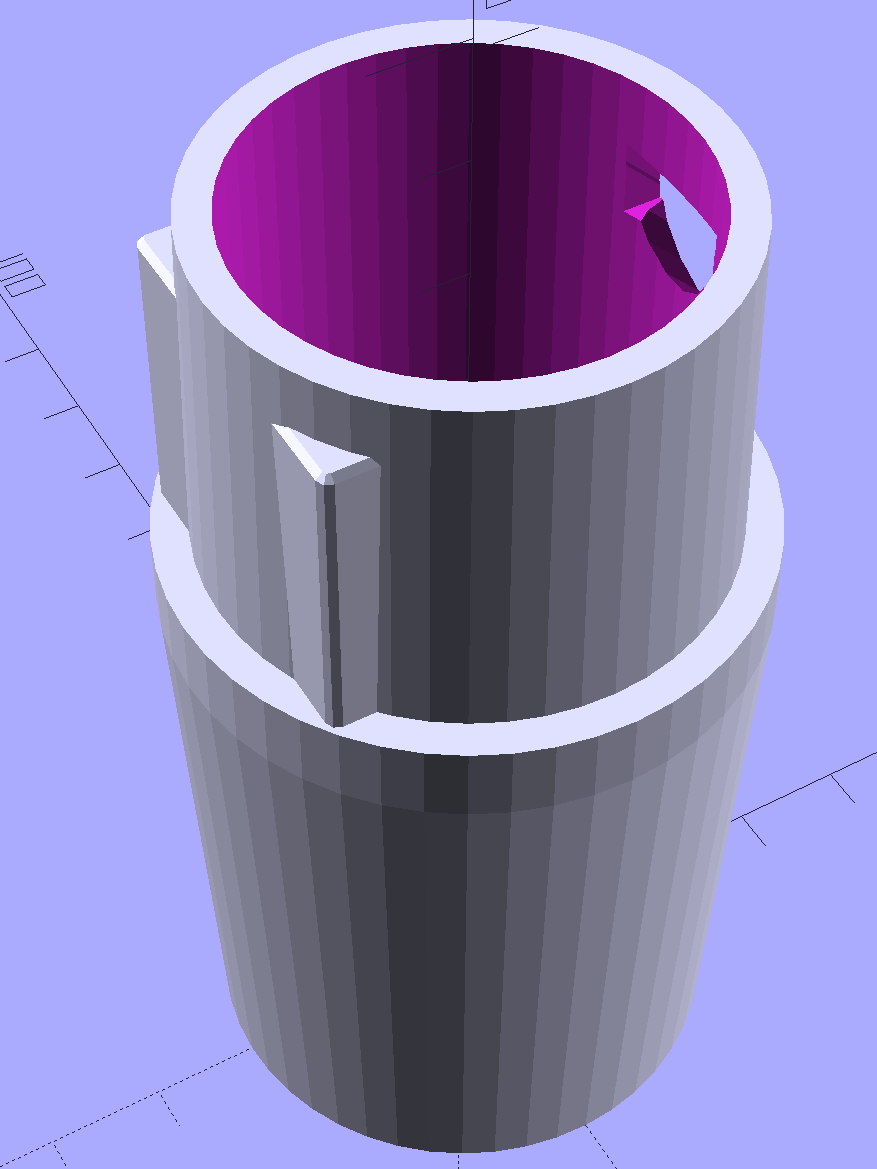
The first step involved modeling the plastic fitting that snaps into the handle:
Which spits out two suitable shapes with the proper positions and alignments:
Kenmore Male Fitting – Latch detail – Solid model
The magic wand for the refrigerator originally slid into the Samsung’s metal pipe, so I put a slightly tapered cylinder inside a somewhat more tapered exterior (which seems chunky enough to withstand my flailing around under the refrigerator), then topped it off with the male fitting:
Refrigerator Coil Wand Adapter
The Kenmore crevice tool snaps under the gargantuan plastic handle, which limits it to being 6.5 inches long, totally unable to reach into any of the nontrivial crevices around here, and in the way when it’s not being used. Some rummaging turned up a longer crevice tool from the Electrolux That Came With The House™, an old-school tool that slipped over its pipe. Modeling a straight cylinder inside a tapered cylinder that fits the tool didn’t take long:
Crevice Tool Adapter
Flushed with success, I found a smaller floor brush than the new Kenmore, with dimensions similar to the Electrolux snout, so another module appeared:
Floor Brush Adapter
All of them build with the latch end upward to avoid needing support structure, with a 5 mm brim for good platform adhesion:
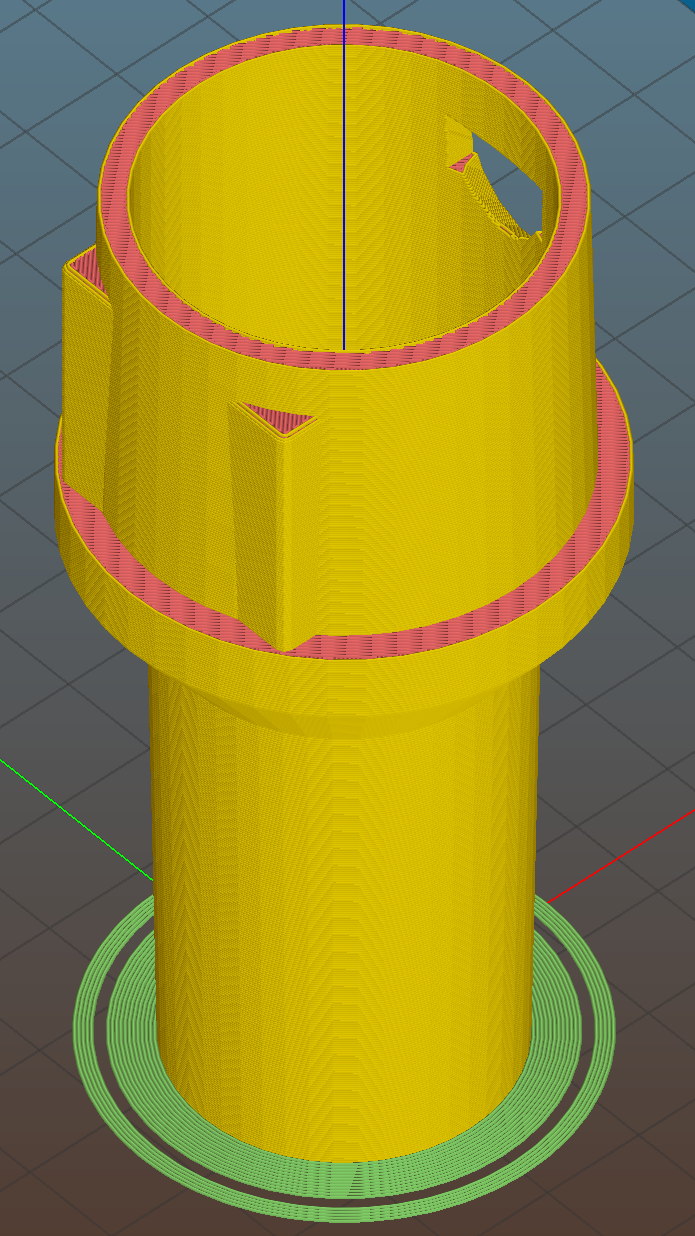
Floor Brush Adapter – Slic3r preview
I printed them during the PDS Mini Maker Faire as examples of Useful Things You Can Do With a 3D Printer:
Kenmore Vacuum Cleaner – Tool Adapters
As I pointed out to nearly everybody, the Big Lie about 3D printing is that you’ll just download somebody else’s model to solve your problem. In general, that won’t work, because nobody else has your problem; if you can’t do solid modeling, there’s no point in you having a 3D printer. There’s also no point in going to Kinko’s to get a standardized 3D printed doodad, because you can just order a better-looking injection-molded part directly from Sears (or an aftermarket source) and be done with it.
I loves me some good OpenSCAD action on my Makergear M2, though…
The OpenSCAD source code:
// Kenmore vacuum cleaner nozzle adapters
// Ed Nisley KE4ZNU November 2015
// Layout options
Layout = "CreviceTool"; // MaleFitting CoilWand FloorBrush CreviceTool
//- Extrusion parameters must match reality!
// Print with +1 shells and 3 solid layers
ThreadThick = 0.25;
ThreadWidth = 0.40;
HoleWindage = 0.2;
function IntegerMultiple(Size,Unit) = Unit * ceil(Size / Unit);
Protrusion = 0.1; // make holes end cleanly
//----------------------
// Dimensions
ID1 = 0; // for tapered tubes
ID2 = 1;
OD1 = 2;
OD2 = 3;
LENGTH = 4;
OEMTube = [35.0,35.0,41.7,40.5,30.0]; // main fitting tube
EndStop = [OEMTube[ID1],OEMTube[ID2],47.5,47.5,6.5]; // flange at end of main tube
FittingOAL = OEMTube[LENGTH] + EndStop[LENGTH];
$fn = 12*4;
//----------------------
// Useful routines
module PolyCyl(Dia,Height,ForceSides=0) { // based on nophead's polyholes
Sides = (ForceSides != 0) ? ForceSides : (ceil(Dia) + 2);
FixDia = Dia / cos(180/Sides);
cylinder(r=(FixDia + HoleWindage)/2,
h=Height,
$fn=Sides);
}
//-------------------
// Male fitting on end of Kenmore tools
// This slides into the end of the handle or wand and latches firmly in place
module MaleFitting() {
Latch = [40,11.5,5.0]; // rectangle latch opening
EntryAngle = 45; // latch entry ramp
EntrySides = 16;
EntryHeight = 15.0; // lower edge on *inside* of fitting
KeyRadius = 1.0;
translate([0,0,6.5])
difference() {
union() {
cylinder(d1=OEMTube[OD1],d2=OEMTube[OD2],h=OEMTube[LENGTH]); // main tube
hull() // insertion guide
for (i=[-(6.0/2 - KeyRadius),(6.0/2 - KeyRadius)],
j=[-(28.0/2 - KeyRadius),(28.0/2 - KeyRadius)],
k=[-(26.0/2 - KeyRadius),(26.0/2 - KeyRadius)])
translate([(i - (OEMTube[ID1]/2 + OEMTube[OD1]/2)/2 + 6.0/2),j,(k + 26.0/2 - 1.0)])
sphere(r=KeyRadius,$fn=8);
translate([0,0,-EndStop[LENGTH]]) // wand tube butts against this
cylinder(d=EndStop[OD1],h=EndStop[LENGTH] + Protrusion);
}
translate([0,0,-OEMTube[LENGTH]]) // main bore
cylinder(d=OEMTube[ID1],h=2*OEMTube[LENGTH] + 2*Protrusion);
            translate([0,-11.5/2,23.0 - 5.0])                                    // latch opening
                cube(Latch);

            translate([OEMTube[ID1]/2 + EntryHeight/tan(90-EntryAngle),0,0])    // latch ramp
                translate([(Latch[1]/cos(180/EntrySides))*cos(EntryAngle)/2,0,(Latch[1]/cos(180/EntrySides))*sin(EntryAngle)/2])
                    rotate([0,-EntryAngle,0])
                        intersection() {
                            rotate(180/EntrySides)
                                PolyCyl(Latch[1],Latch[0],EntrySides);
                            translate([-(2*Latch[0])/2,0,-Protrusion])
                                cube(2*Latch[0],center=true);
                        }
}
}
//-------------------
// Refrigerator evaporator coil wand
module CoilWand() {
union() {
translate([0,0,50.0])
rotate([180,0,0])
difference() {
cylinder(d1=EndStop[OD1],d2=42.0,h=50.0);
translate([0,0,-Protrusion])
cylinder(d1=35.0,d2=35.8,h=100);
}
translate([0,0,50.0 - Protrusion])
MaleFitting();
}
}
//-------------------
// Refrigerator evaporator coil wand
module FloorBrush() {
union() {
translate([0,0,60.0])
rotate([180,0,0])
difference() {
union() {
cylinder(d1=EndStop[OD1],d2=32.4,h=10.0);
translate([0,0,10.0 - Protrusion])
cylinder(d1=32.4,d2=30.7,h=50.0 + Protrusion);
}
translate([0,0,-Protrusion])
cylinder(d1=28.0,d2=24.0,h=100);
}
translate([0,0,60.0 - Protrusion])
MaleFitting();
}
}
//-------------------
// Crevice tool
module CreviceTool() {
union() {
translate([0,0,60.0])
rotate([180,0,0])
difference() {
union() {
cylinder(d1=EndStop[OD1],d2=32.0,h=10.0);
translate([0,0,10.0 - Protrusion])
cylinder(d1=32.0,d2=30.4,h=50.0 + Protrusion);
}
translate([0,0,-Protrusion])
cylinder(d1=28.0,d2=24.0,h=100);
}
translate([0,0,60.0 - Protrusion])
MaleFitting();
}
}
//----------------------
// Build it!
if (Layout == "MaleFitting")
MaleFitting();
if (Layout == "CoilWand")
CoilWand();
if (Layout == "FloorBrush")
FloorBrush();
if (Layout == "CreviceTool")
CreviceTool();
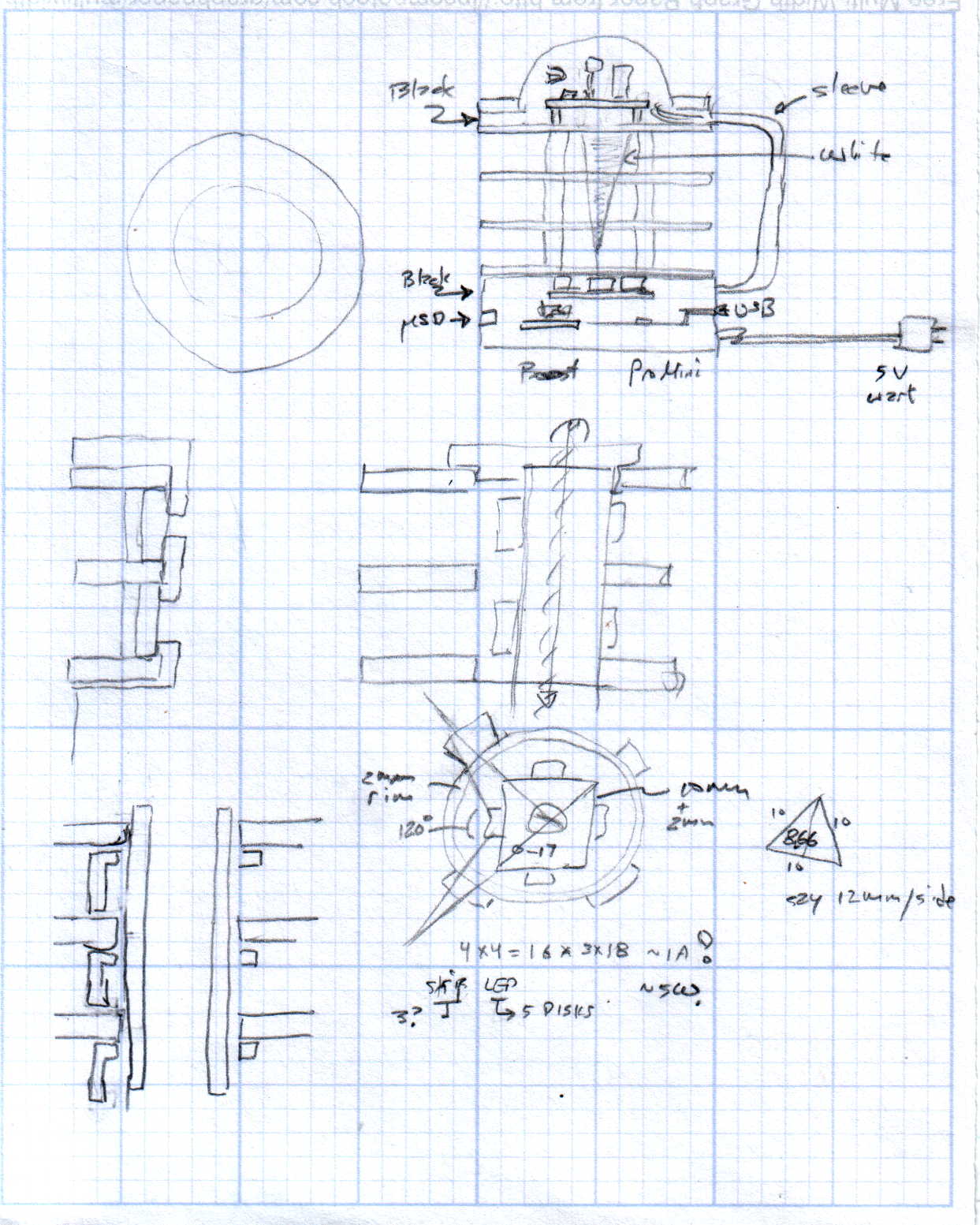
Harvesting a stack of hard drive platters and discovering that four Neopixel strips could stand vertically inside the central hole suggested this overall structure:
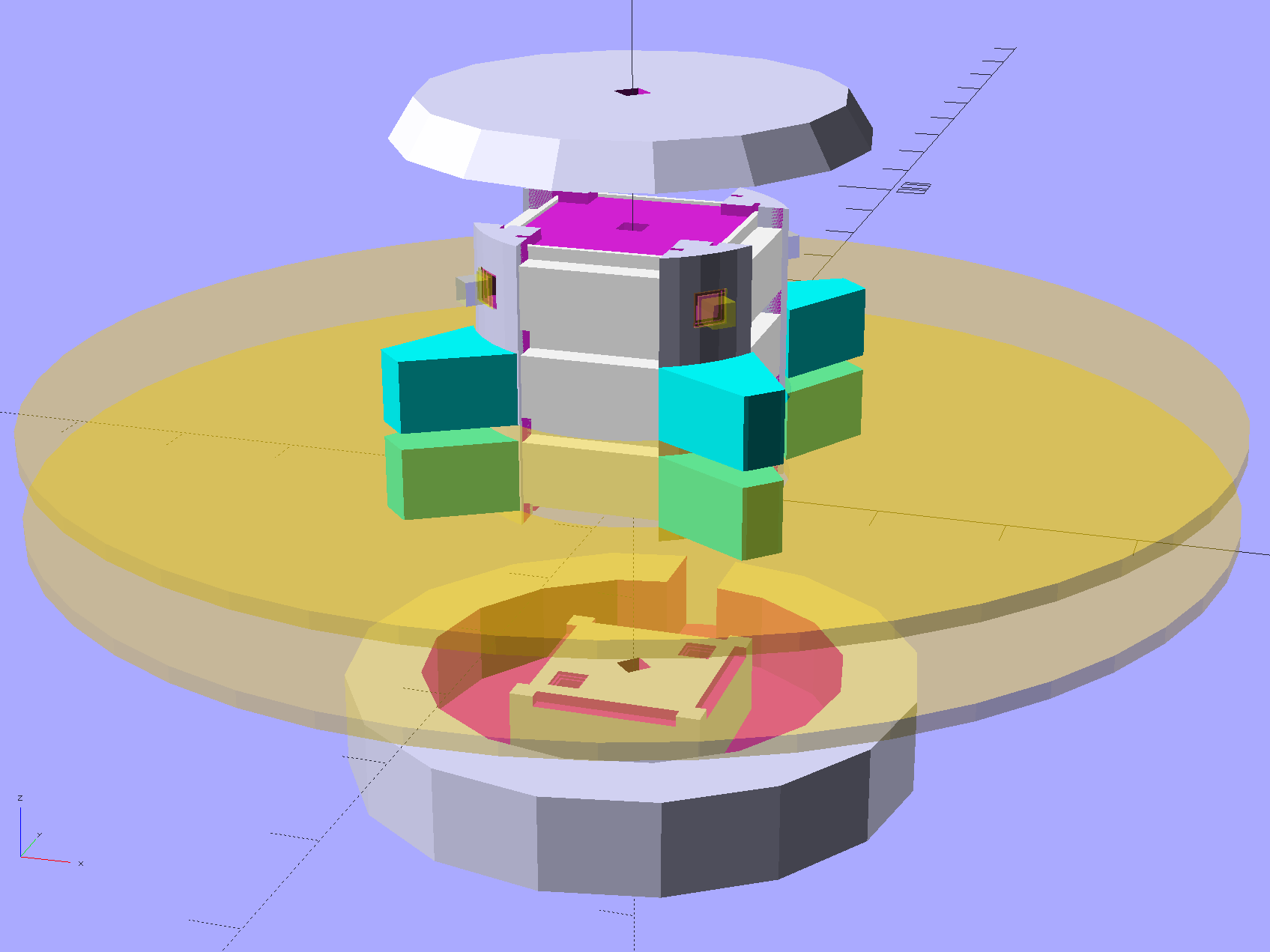
Hard Drive Mood Light – solid model – Show view
The model includes a parameter for the number of strips, but not everything respects that. I’m not sure I’ll ever make a three-LED column and five strips won’t fit, so it probably doesn’t matter.
The central pillar holds everything together:
Hard Drive Mood Light – solid model – Pillar
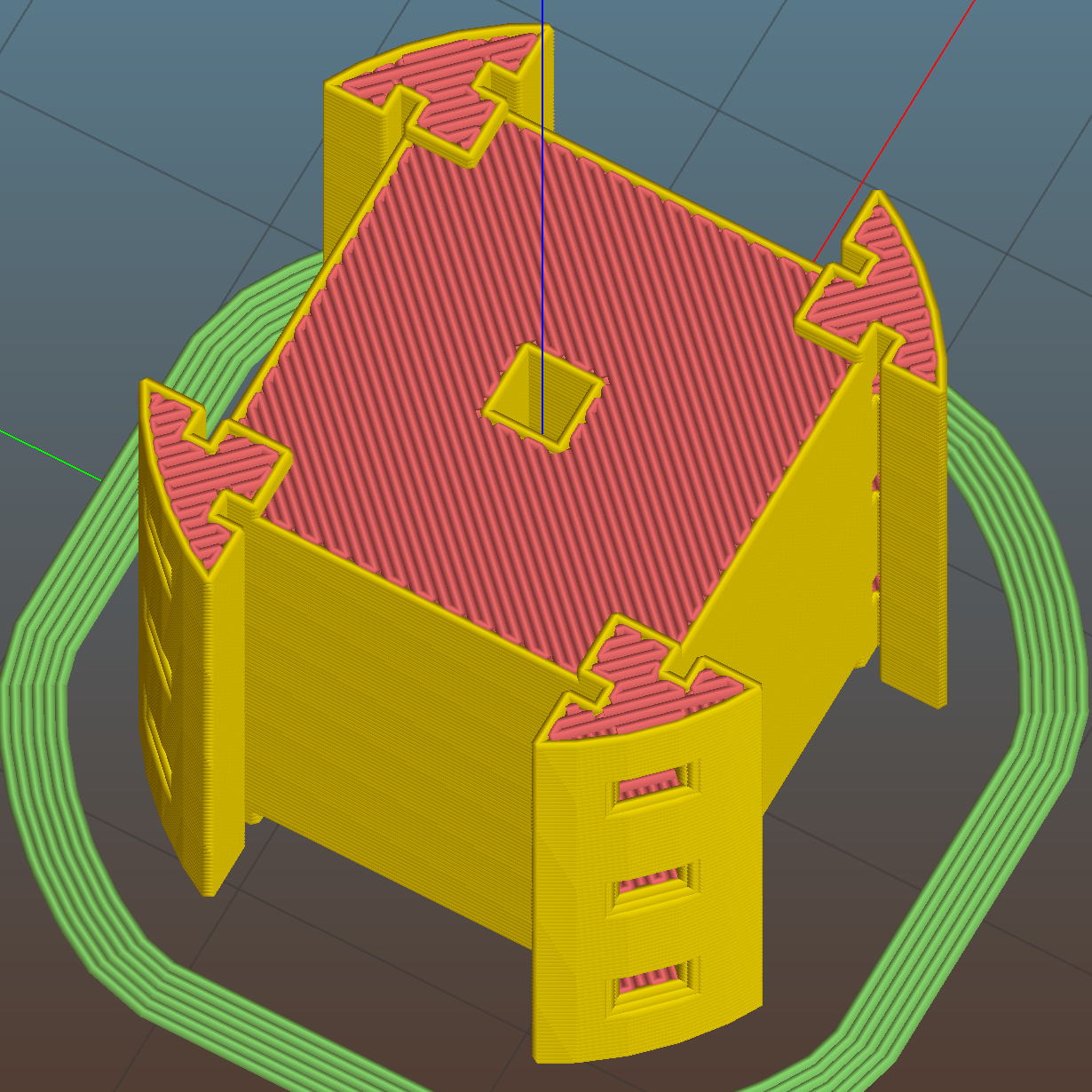
The Neopixel strips slide into those slots, which turned out to be too small to actually print, because the molten plastic pretty much squeezed the slots closed. Some deft pull saw action enlarged them enough to pass the strips, at the cost of tedious hand-fitting and considerable hidden ugliness. Printing the slots slightly larger bangs against the (lack of) printer resolution, because there’s not much wiggle room between the tiny slots and the outer diameter of the column:
Hard Drive Mood Light – Pillar – Slic3r preview
The three alignment pin holes along each edge sit 6.944 mm on center, which is what you get when you divide the nominal 1 meter strip length by 144 Neopixels. I’m using knockoff Neopixels from halfway around the planet, but they’re probably pretty close to the real thing (also from halfway around the planet, I’m sure).
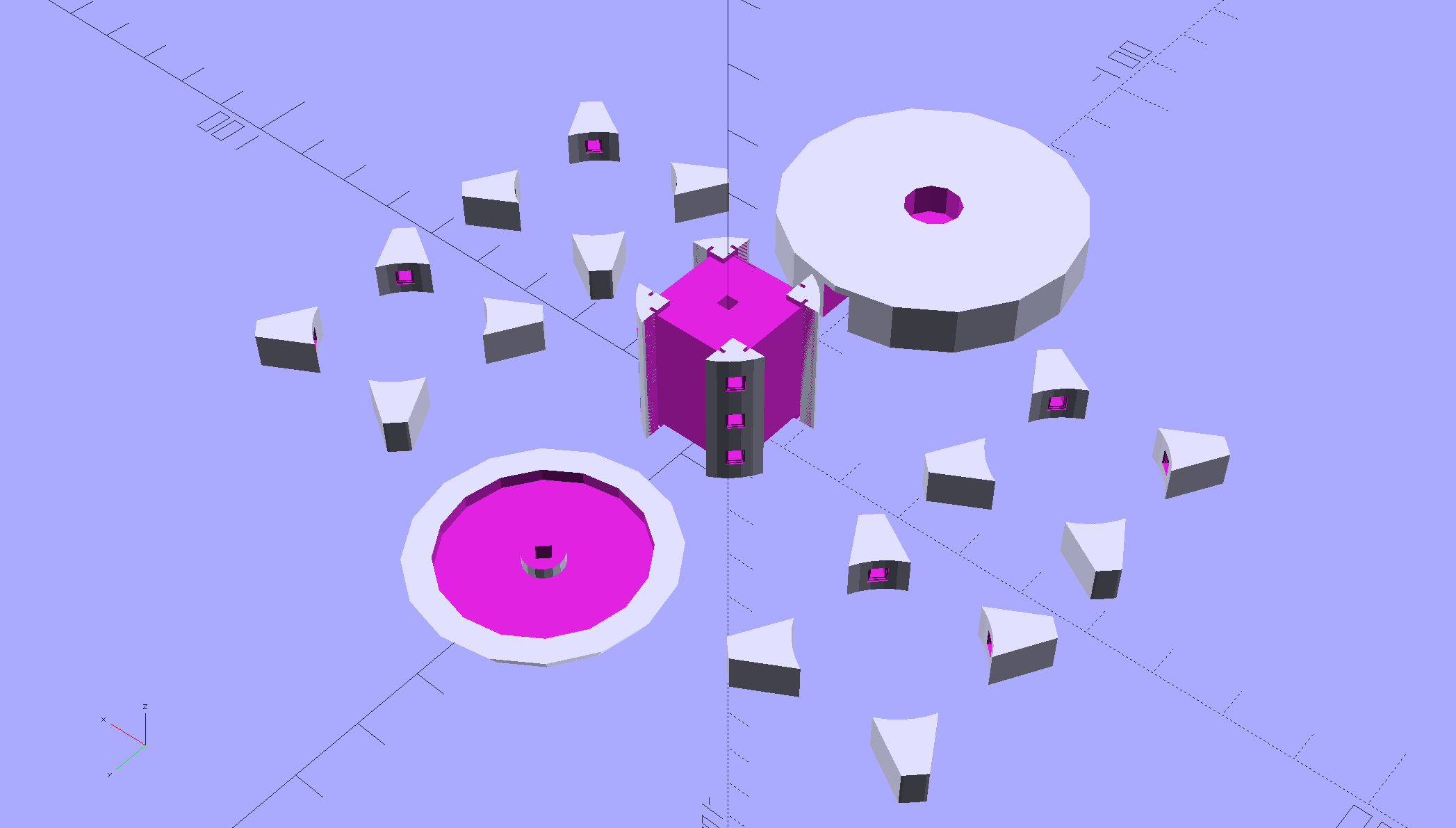
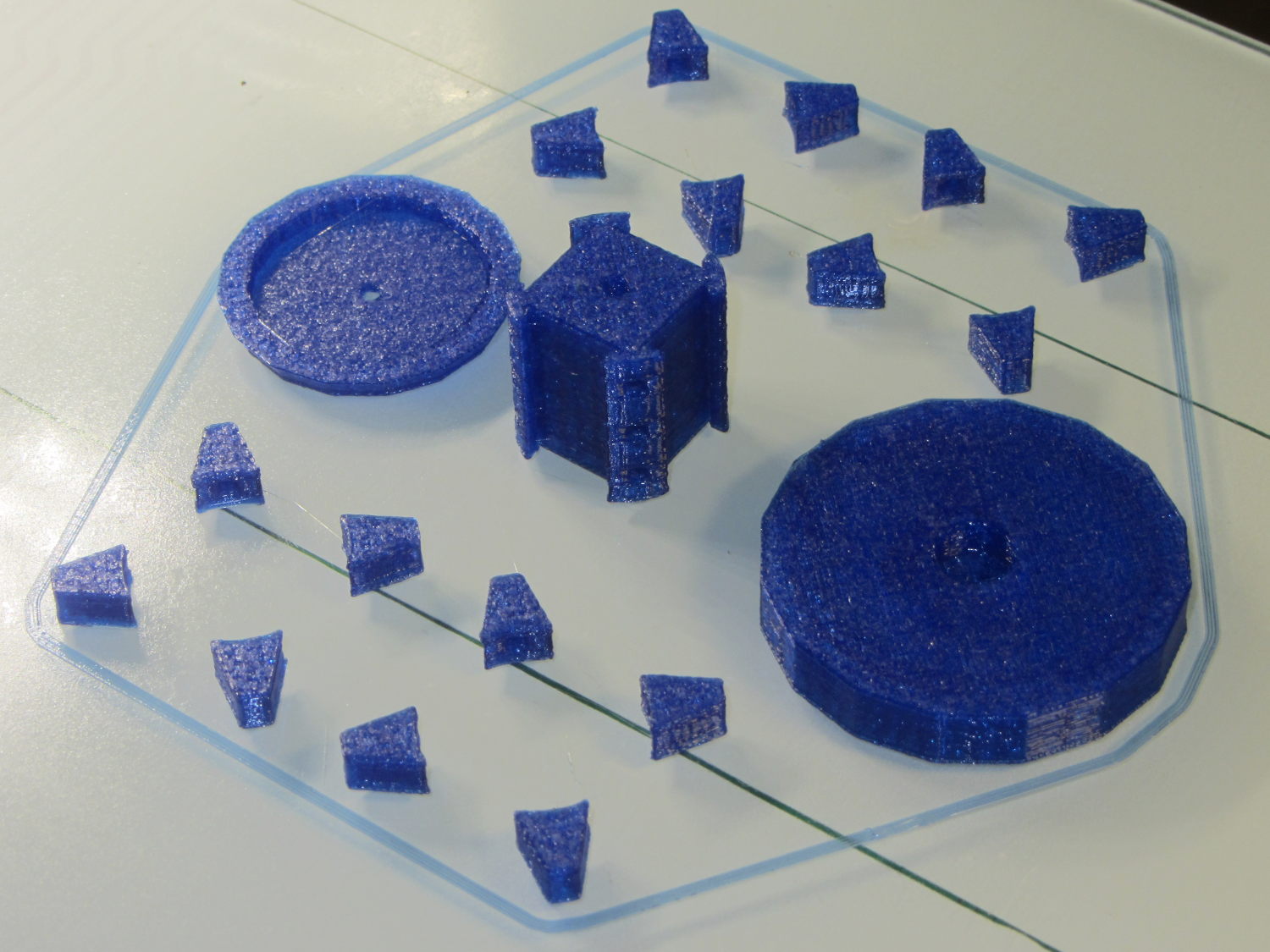
All those parts laid out on the platform, along with a fourth set of spacers in case I drop one:
Hard Drive Mood Light – solid model – Build view
And they print in cyan PETG just like you’d expect:
Hard Drive Mood Light – parts on platform
The round base (on the right) prints bottom-side-up, with bridging from the rim to the central pillar, and came out looking just fine. The top doesn’t have the central post and the pillar doesn’t have the top recess shown in the model: those tweaks will appear in the next iteration.
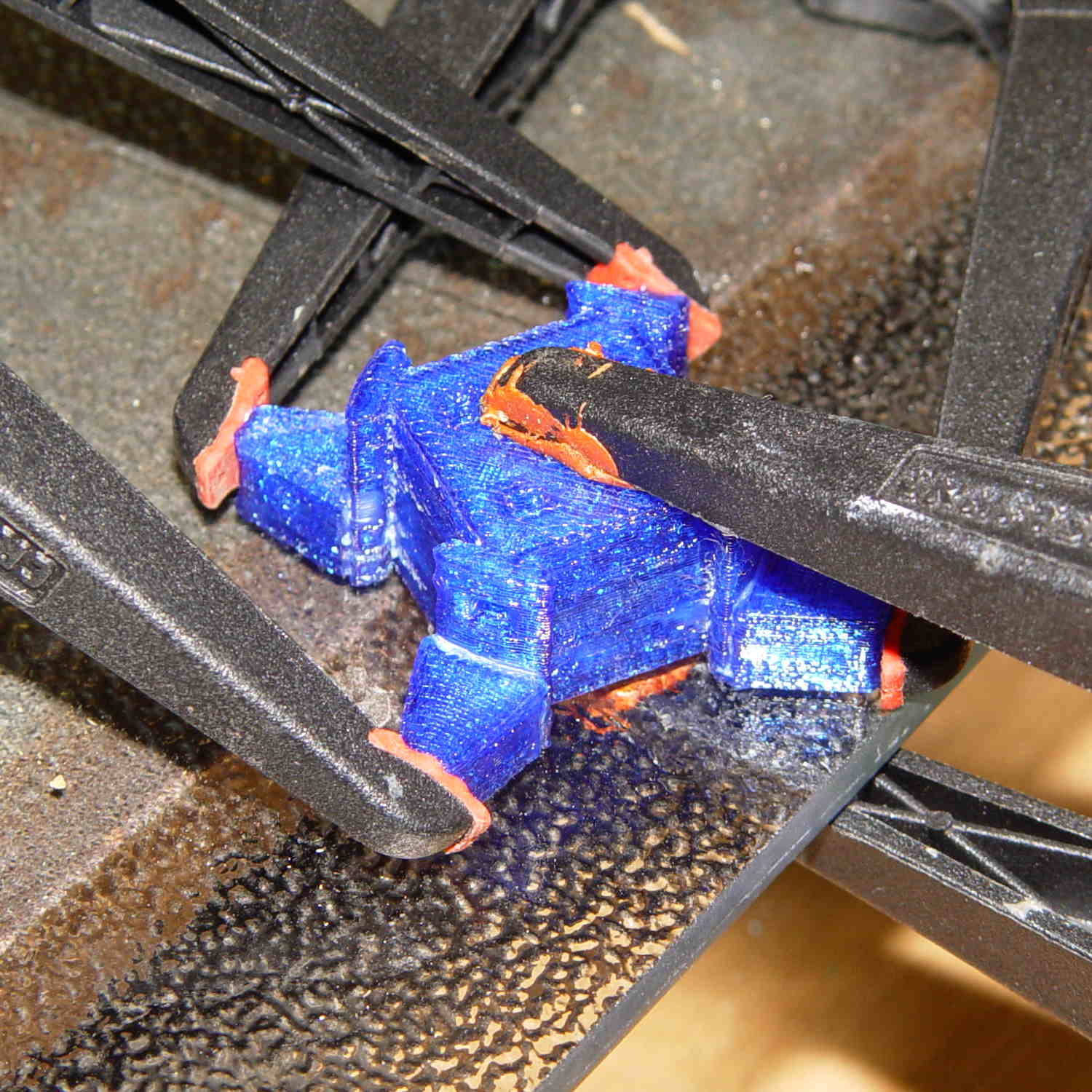
Each tiny triangular spacer gets an alignment pin glued into its inner surface, then four of them get glued to the pillar. This crash test dummy pillar worked out the dimensions, so it’s squat and ugly:
Hard Drive Platter Mood Light – pillar gluing
It’s clamped to a glass plate (smooth side up!) to force the spacers onto on a plane, with the other clamps smashing them against the pillar. All the other spacers get glued in situ atop each platter as it’s installed, which is a definite downside.
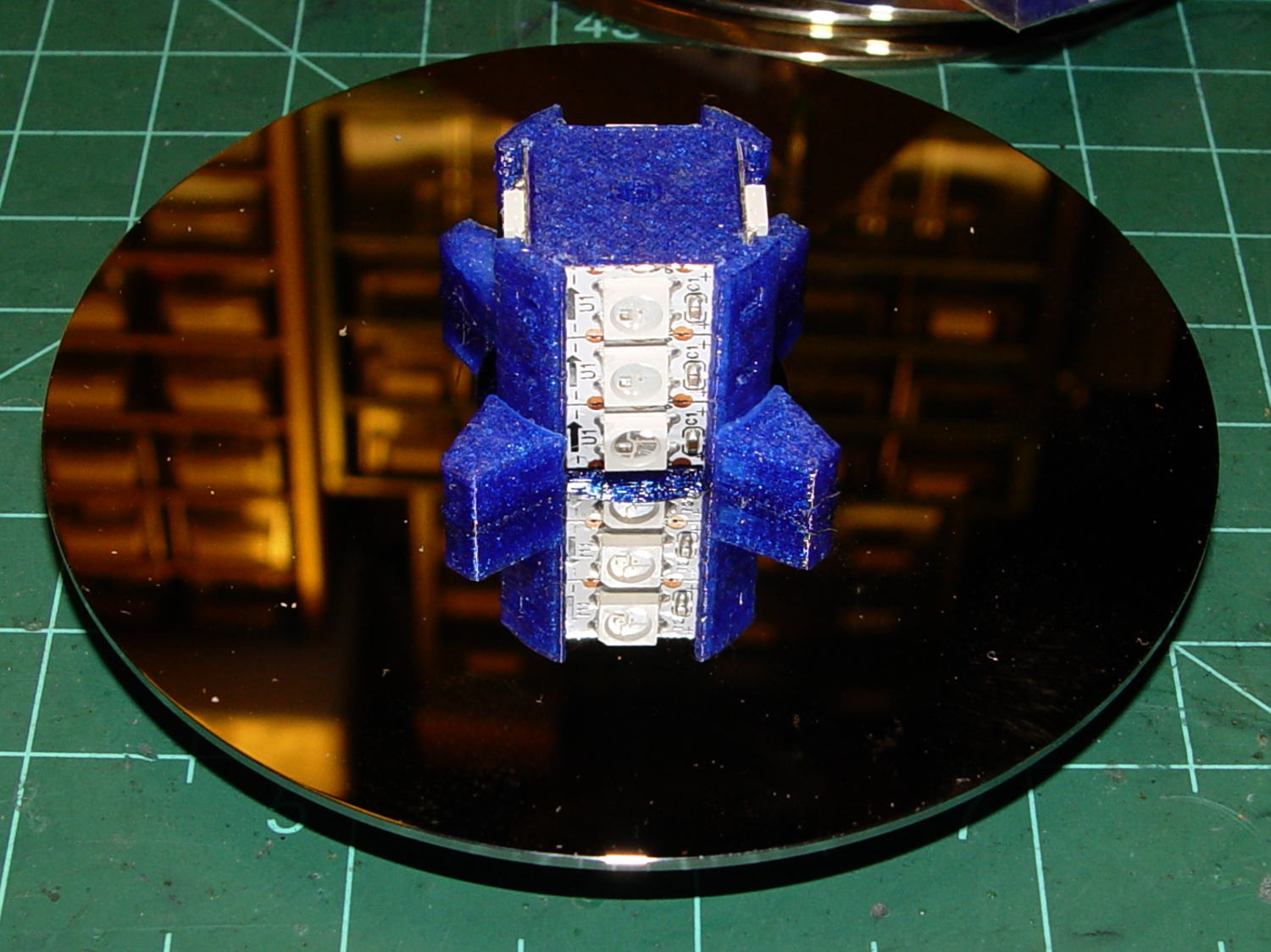
Installing the Neopixels before assembling the platters seemed to be the right way to go:
Hard Drive Mood Light – first platter assembly
After that, just stack ’em up:
Hard Drive Mood Light – top Neopixels
I dry-assembled the upper two spacer sets, so I could pull it apart in case that seemed necessary. Turned out to be a good idea.
And then screw the lid on top to see what it looks like:
Hard Drive Mood Light – trial assembly
That top screw should be a pan-head or something similarly smooth, rather than a random PC case screw. The sacrificial hard drives provided a bunch of Torx screws that would surely look better; most are far too small.
I thought a taller stack would be appropriate, but I kinda like the short, squat aspect ratio.
Now for some wiring…
The OpenSCAD source code:
// Hard Drive Platter Mood Light
// Ed Nisley KE4ZNU November 2015

Layout = "Show";					// Build Show Pixel LEDString Platters Pillar Spacers TopCap Base

ShowDisks = 2;						// number of disks in Show layout

//- Extrusion parameters must match reality!

ThreadThick = 0.20;
ThreadWidth = 0.40;

HoleWindage = 0.2;

Protrusion = 0.1;			// make holes end cleanly

inch = 25.4;

function IntegerMultiple(Size,Unit) = Unit * ceil(Size / Unit);

//----------------------
// Dimensions

ID = 0;
OD = 1;
LENGTH = 2;

Platter = [25.0,95.0,1.27];						// hard drive platters

LEDStringCount = 3;								// number of LEDs on each strip (Show mode looks odd for less than 3)
LEDStripCount = 4;								// number of strips (verify locating pin holes & suchlike)

WireSpace = 1.0;								// allowance for wiring along strip ends

BaseSize = [40,14,3.0];							// overall base plate outside engine controller slot

Pixel = [13.0, 1000 / 144, 0.5];				// smallest indivisible unit of LED strip
PixelMargin = [1.0, 1.0, 2.0];					// LED and circuitry atop the strip

BeamAngle = 120;								// LED viewing angle
BeamShape = [
	[0,0],
	[Platter[OD]*cos(BeamAngle/2),-Platter[OD]*sin(BeamAngle/2)],
	[Platter[OD]*cos(BeamAngle/2), Platter[OD]*sin(BeamAngle/2)]
];

PillarSides = 12*4;

PillarCore = Platter[ID] - 2*(Pixel[2] + PixelMargin[2] + 2.0);		// LED channel distance across pillar centerline
PillarLength = LEDStringCount*Pixel[1] + Platter[LENGTH];
echo(str("Pillar core size: ",PillarCore));
echo(str("      ... length:"),PillarLength);

Cap = [Platter[ID] + 4.0,Platter[ID] + 4.0 + 10*2*ThreadWidth,2*WireSpace + 6*ThreadThick];		// cap over top of pillar
CapSides = 16;

Base = [Platter[ID] + 10.0,0.5*Platter[OD],8.0];
BaseSides = 16;

Screw = [2.0,3.0,20.0];							// screws used to secure cap & pillar

Spacer = [Platter[ID],(Platter[ID] + 2*8),(Pixel[1] - Platter[LENGTH])];
echo(str("Spacer  OD: ",Spacer[OD]));
echo(str(" ... thick:",Spacer[LENGTH]));

LEDStripProfile = [
	[0,0],
	[Pixel[0]/2,0],
	[Pixel[0]/2,Pixel[2]],
	[(Pixel[0]/2 - PixelMargin[0]),Pixel[2]],
	[(Pixel[0]/2 - PixelMargin[0]),(Pixel[2] + PixelMargin[2])],
	[-(Pixel[0]/2 - PixelMargin[0]),(Pixel[2] + PixelMargin[2])],
	[-(Pixel[0]/2 - PixelMargin[0]),Pixel[2]],
	[-Pixel[0]/2,Pixel[2]],
	[-Pixel[0]/2,0]
];

//----------------------
// Useful routines

module PolyCyl(Dia,Height,ForceSides=0) {			// based on nophead's polyholes

  Sides = (ForceSides != 0) ? ForceSides : (ceil(Dia) + 2);

  FixDia = Dia / cos(180/Sides);

  cylinder(r=(FixDia + HoleWindage)/2,
		h=Height,
	$fn=Sides);
}

//- Locating pin hole with glue recess
//  Default length is two pin diameters on each side of the split

PinOD = 1.70;

module LocatingPin(Dia=PinOD,Len=0.0) {

	PinLen = (Len != 0.0) ? Len : (4*Dia);

	translate([0,0,-ThreadThick])
		PolyCyl((Dia + 2*ThreadWidth),2*ThreadThick,4);

	translate([0,0,-2*ThreadThick])
		PolyCyl((Dia + 1*ThreadWidth),4*ThreadThick,4);

	translate([0,0,-(PinLen/2 + ThreadThick)])
		PolyCyl(Dia,(PinLen + 2*ThreadThick),4);

}
//----------------------
// Pieces

//-- LED strips

module OnePixel() {

	render()
		rotate([-90,0,0]) rotate(180)				// align result the way you'd expect from the dimensions
			difference() {
				linear_extrude(height=Pixel[1],convexity=3)
					polygon(points=LEDStripProfile);
				translate([-Pixel[0]/2,Pixel[2],-PixelMargin[0]])
					cube([Pixel[0],2*PixelMargin[2],2*PixelMargin[0]]);
				translate([-Pixel[0]/2,Pixel[2],Pixel[1]-PixelMargin[0]])
					cube([Pixel[0],2*PixelMargin[2],2*PixelMargin[0]]);
			}
}

module LEDString(n = LEDStringCount) {

	for (i=[0:n-1])
		translate([0,i*Pixel[1]])
//			resize([0,Pixel[1] + 2*Protrusion,0])
				OnePixel();
}

//-- Stack of hard drive platters

module Platters(n = LEDStringCount + 1) {

	color("gold",0.4)
	for (i=[0:n-1]) {
		translate([0,0,i*Pixel[1]])
			difference() {
				cylinder(d=Platter[OD],h=Platter[LENGTH],center=false,$fn=PillarSides);
				cylinder(d=Platter[ID],h=3*Platter[LENGTH],center=true,$fn=PillarSides);
			}
	}
}

//-- Pillar holding the LED strips

module Pillar() {

	difflen = PillarLength + 2*Protrusion;

//	render(convexity=5)
	difference() {
		linear_extrude(height=PillarLength,convexity=4)
			difference() {
				rotate(180/(12*4))
					circle(d=Platter[ID] - 1*ThreadWidth,$fn=PillarSides);

				for (i=[0:LEDStripCount-1]) 					// clearance for LED beamwidth, may not actually cut surface
					rotate(i*360/LEDStripCount)
						translate([PillarCore/2,0,0])
							polygon(points=BeamShape);

				for (i=[0:LEDStripCount-1])						// LED front clearance
					rotate(i*360/LEDStripCount)
						translate([(PillarCore/2 + Pixel[2]),(Pixel[0] - 2*PixelMargin[0])/2])
							rotate(-90)
								square([Pixel[0] - 2*PixelMargin[0],Platter[ID]]);

			}

		for (i=[0:LEDStripCount-1])								// LED strip slots
			rotate(i*360/LEDStripCount)
				translate([PillarCore/2,0,-Protrusion])
					linear_extrude(height=difflen,convexity=2)
						rotate(-90)
							polygon(points=LEDStripProfile);

		for (i=[0,90])											// wiring recess on top surface
			rotate(i)
				translate([0,0,(PillarLength - (WireSpace/2 - Protrusion))])
					cube([(PillarCore + 2*Protrusion),Pixel[0] - 2*PixelMargin[0],WireSpace],center=true);

		for (i=[0:LEDStripCount-1])								// wiring recess on bottom surface
			rotate(i*90)
				translate([PillarCore/2 - (WireSpace - Protrusion)/2,0,WireSpace/2 - Protrusion])
					cube([WireSpace + Protrusion,Pixel[0] - 2*PixelMargin[0],WireSpace],center=true);

		for (j=[0:LEDStringCount-1])							// platter spacer alignment pins
			for (i=[0:LEDStripCount-1])
				rotate(i*360/LEDStripCount + 180/LEDStripCount)
					translate([(Platter[ID] - 1*ThreadWidth)/2,0,(j*Pixel[1] + Pixel[1]/2 + Platter[LENGTH]/2)])
						rotate([0,90,0])
							rotate(45)
								LocatingPin();

		translate([0,0,-Protrusion])							// central screw hole
			rotate(180/4)
				PolyCyl(Screw[ID],difflen,4);

		if (false)
		for (i=[-1,1])											// vertical wire channels
			rotate(i*360/LEDStripCount + 180/LEDStripCount)
				translate([PillarCore/2 - 2.0,0,-Protrusion])
					PolyCyl(2.0,difflen,4);

		for (i=[-1,1])											// locating pins
			rotate(i*360/LEDStripCount - 180/LEDStripCount)
				translate([PillarCore/2 - 2.0,0,0])
					LocatingPin();
	}
}

//-- Spacers to separate platters

module Spacers() {

	difference() {
		linear_extrude(height=Spacer[LENGTH],convexity=4)
			difference() {
				rotate(180/PillarSides)
					circle(d=Spacer[OD],$fn=PillarSides);

				for (i=[0:LEDStripCount-1]) 					// clearance for LED beamwidth, may not actually cut surface
					rotate(i*360/LEDStripCount)
						translate([PillarCore/2,0,0])
							polygon(points=BeamShape);

				for (i=[0:LEDStripCount-1])						// LED front clearance
					rotate(i*360/LEDStripCount)
						translate([(PillarCore/2 + Pixel[2]),(Pixel[0] - 2*PixelMargin[0])/2])
							rotate(-90)
								square([Pixel[0] - 2*PixelMargin[0],Platter[ID]]);


				rotate(180/PillarSides)
					circle(d=Spacer[ID],$fn=PillarSides);		// central pillar fits in the hole
			}

		for (i=[0:LEDStripCount-1])
			rotate(i*360/LEDStripCount + 180/LEDStripCount)
				translate([Platter[ID]/2,0,(Pixel[1] - Platter[LENGTH])/2])
					rotate([0,90,0])
						rotate(45)
							LocatingPin();

	}
}

//-- Cap over top of pillar

module TopCap() {

	difference() {
		cylinder(d1=(Cap[OD] + Cap[ID])/2,d2=Cap[OD],h=Cap[LENGTH],$fn=CapSides);		// outer lid

		translate([0,0,-Protrusion])
			PolyCyl(Screw[ID],Cap[LENGTH] + WireSpace + Protrusion,4);					// screw hole

		translate([0,0,Cap[LENGTH] - 2*WireSpace])
			difference() {
				cylinder(d=Cap[ID],h=2*Cap[LENGTH],$fn=CapSides);						// cutout
				cylinder(d=2*Screw[OD],h=Cap[LENGTH],$fn=CapSides);						// boss
			}

		translate([0,0,Cap[LENGTH] - ThreadThick])
			cylinder(d=Cap[ID]/2,h=ThreadThick + Protrusion,$fn=CapSides);				// recess boss
	}
}

//-- Base below pillar

module Base() {

	SideWidth = 0.5*Base[OD]*sin(180/BaseSides);						// close enough

	difference() {
		union() {
			difference() {
				cylinder(d=Base[OD],h=Base[LENGTH],$fn=BaseSides);			// outer base

				translate([0,0,6*ThreadThick])								// main cutout
					cylinder(d=Base[ID],h=Base[LENGTH],$fn=BaseSides);

				translate([-SideWidth/2,0,6*ThreadThick]) 					// cable port
					cube([SideWidth,Base[OD],Base[LENGTH]]);
			}

			translate([0,0,Base[LENGTH]/2])									// pillar support is recessed below rim
				cube([PillarCore,PillarCore,Base[LENGTH] - ThreadThick],center=true);
		}

		for (i=[0:LEDStripCount-1])											// wiring recesses
			rotate(i*90)
				translate([PillarCore/2 - (WireSpace - Protrusion)/2,0,Base[LENGTH] - WireSpace/2])
					cube([WireSpace + Protrusion,PillarCore - 4*WireSpace,WireSpace],center=true);

		translate([0,0,-Protrusion])
			PolyCyl(Screw[ID],2*Base[LENGTH],4);						// screw hole

		translate([0,0,-Protrusion])									// screw head recess
			PolyCyl(8.5,5.0 + Protrusion,$fn=6);

		for (i=[-1,1])													// locating pins
			rotate(i*360/LEDStripCount - 180/LEDStripCount)
				translate([PillarCore/2 - 2.0,0,Base[LENGTH] - ThreadThick])
					LocatingPin();

	}

}

//----------------------
// Build it

if (Layout == "Pixel")
	OnePixel();

if (Layout == "LEDString")
	LEDString(LEDStringCount);

if (Layout == "Platters")
	Platters(LEDStringCount + 1);

if (Layout == "Pillar")
	Pillar(LEDStringCount);

if (Layout == "TopCap")
	TopCap();

if (Layout == "Base")
	Base();

if (Layout == "Spacers")
	Spacers();

if (Layout == "Show") {
	Pillar();

	for (i=[0:LEDStripCount-1])											// LED strips
		rotate(i*360/LEDStripCount)
			translate([PillarCore/2,0,Platter[LENGTH]/2])
				rotate([90,0,90])
					color("lightblue") LEDString();
	if (true)
	for (j=[0:max(1,ShowDisks - 2)])									// spacers
		translate([0,0,(j*Pixel[1] + Platter[LENGTH])])
			color("cyan") Spacers();

	for (j=[0:max(2,ShowDisks - 2)])										// spacer alignment pins
		for (i=[0:LEDStripCount-1])
			rotate(i*360/LEDStripCount + 180/LEDStripCount)
				translate([(Platter[ID] - 1*ThreadWidth)/2,0,(j*Pixel[1] + Pixel[1]/2 + Platter[LENGTH]/2)])
					rotate([0,90,0])
						rotate(45)
							 color("Yellow",0.25) LocatingPin(Len=4);
	translate([0,0,PillarLength + 3*Cap[LENGTH]])
		rotate([180,0,0])
			TopCap();

	translate([0,0,-3*Base[LENGTH]])
		Base();

	if (ShowDisks > 0)
		Platters(ShowDisks);

}

// Ad-hoc build layout

if (Layout == "Build") {
	Pillar();

	translate([0,Cap[OD],0])
		TopCap();

	translate([0,-Base[OD],Base[LENGTH]])
		rotate([0,180,0])
			Base();

	Ybase = Spacer[OD] * (LEDStringCount%2 ? (LEDStringCount - 1) : (LEDStringCount - 2)) / 4;
	for (i=[0:LEDStringCount])										// build one extra set of spacers!
		translate([(i%2 ? 1 : -1)*(Spacer[OD] + Base[OD])/2,		// alternate X sides to shrink Y space
				   (i%2 ? i-1 : i)*Spacer[OD]/2 - Ybase,			// same Y for even-odd pairs in X
				   0])
			Spacers();
}
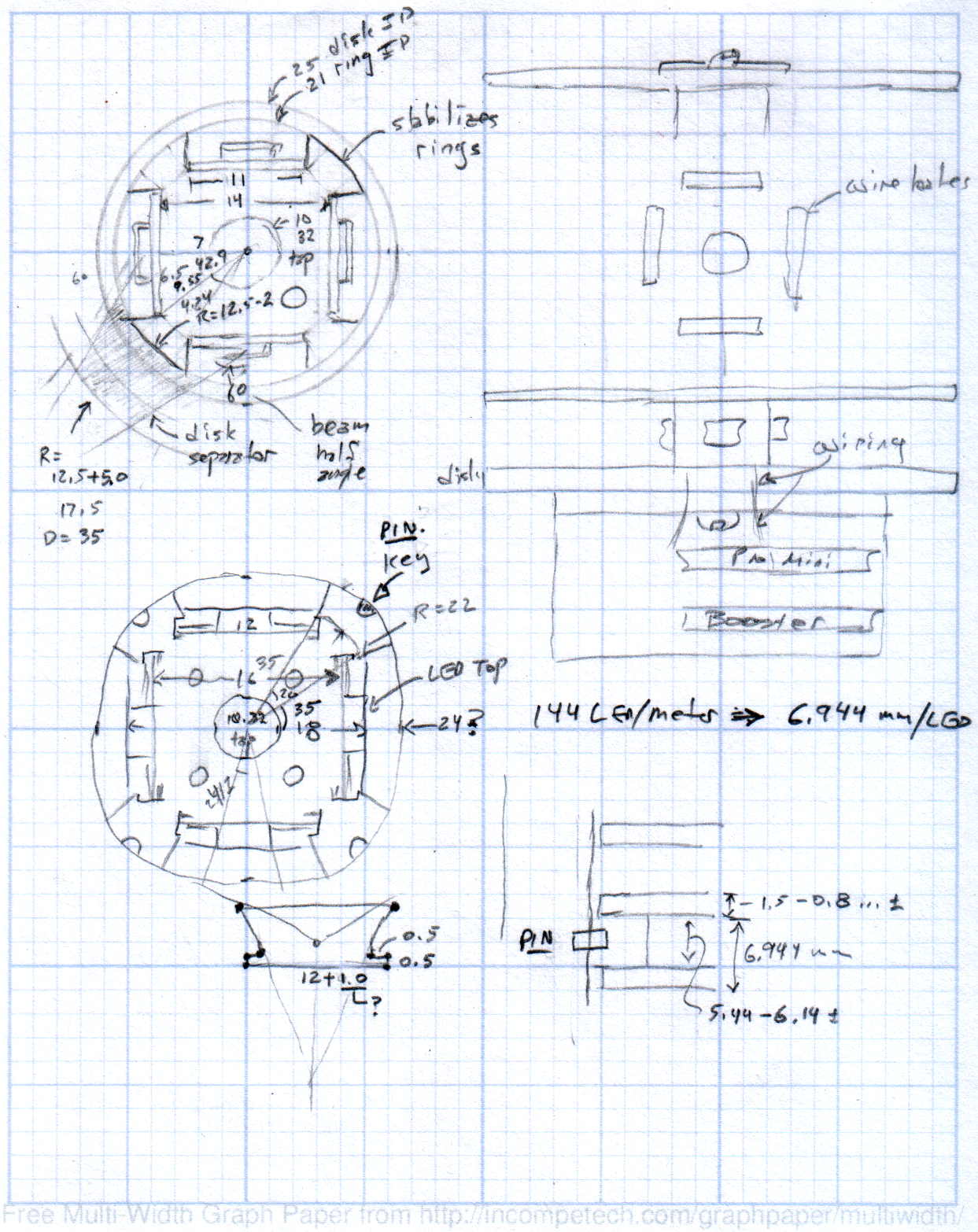
The original doodles showing this might work, along with some ideas that wouldn’t:
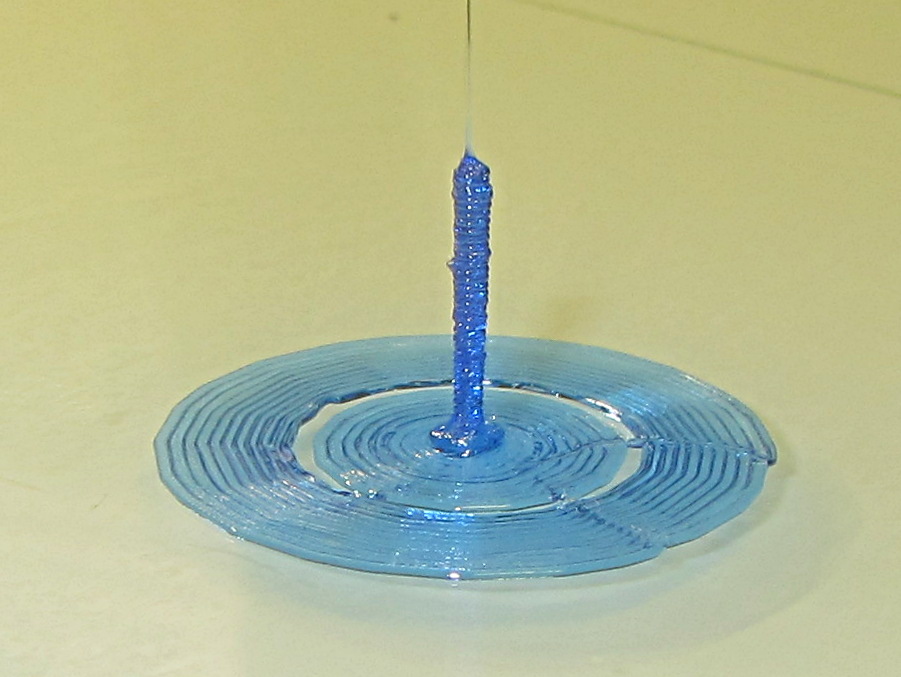
Sliced with Slic3r for PETG at 1 mm/s, with fans in full effect. It sits amid a 5 mm brim, inside a skirt that uses 15 mm of filament, giving it a Washington Monument aspect.
The challenge was to print a 0.7x9.0 cylinder, which doesn’t work well with a 0.35 mm nozzle. Instead, I went with 0.9 mm diameter. The result measures 1.1 mm over all the obvious bumps, so it’s surprisingly close. The “nail head” at the bottom most likely comes from the hot end depressurizing as it suddenly transitions from 15 mm/s in the brim to 1 mm/s for the cylinder.
Fairly obviously, you can’t print something like that at full speed (50 mm/s was claimed for a Rep 2 and I don’t believe that for an instant). Indeed, it’s such a pathological model that Slic3r’s minimum layer time and small perimeter settings had no effect; I had to manually set the extrusion speed to 1 mm/s in order to make it work. Plus adding that brim, because I knew it wouldn’t stand by itself.
Other than that, printing it was no big deal.
A picture from that M2 forum discussion suggests you can go crazy with this stuff:














 The Smell of Molten Projects in the Morning