The Smell of Molten Projects in the Morning

Ed Nisley's Blog: Shop notes, electronics, firmware, machinery, 3D printing, laser cuttery, and curiosities. Contents: 100% human thinking, 0% AI slop.

Category: Science

If you measure something often enough, it becomes science

  • Makergear M2: Post and Hole Calibration Test Objects

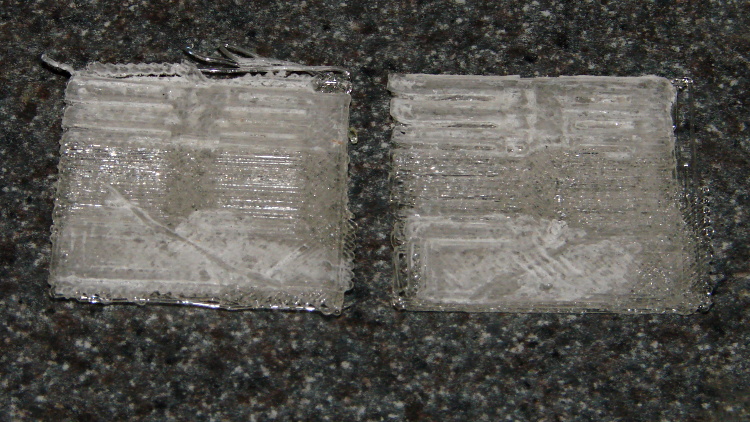
    Despite the profusion of surface-finish and print quality test objects, I really care about the dimensions of a 3D printed object, because I tend to build widgets rather than art objects. These two objects, from walter’s Hole and Column Test Print, produce calibrated holes and columns from 0.20 mm to 10.00 mm in diameter, incrementing by 0.20 mm, that should slip neatly together:

    M2 - walter hole-column test
    M2 – walter hole-column test

    Of course, they didn’t, but they came surprisingly close for a first attempt.

    The 0.20 and 0.40 posts simply aren’t there, because they’re too small to print with a 0.35 mm diameter nozzle. The 0.60 through 1.40 mm posts were present, albeit fugly, and posts larger than that looked increasingly better.

    Although all the holes were present, in the sense that you could see a disturbance in the top and bottom infill pattern, the first visibly open hole appeared at the 0.80 mm spot… and it was immeasurably small. Some holes had misplaced perimeter strands stretching across the openings, which is probably due to excessive speed from my fiddling around with the numbers.

    Measuring them with a digital caliper, with no effort at finding the best orientation, then slapping the data into a Libreoffice spreadsheet, produces an interesting graph:

    M2 - Initial Hole and Post Diameter Calibration
    M2 – Initial Hole and Post Diameter Calibration

    Above about 3 mm diameter: posts are 0.1 mm too small and holes are 0.3 mm too small. Around 2 mm, posts are too big and holes are way too small. What’s important: above maybe 2.5 mm, the error is essentially constant and does not scale with diameter, so a simple Finagle Constant (or two) can solve (most of) the problem.

    Some experiments involving slic3r’s small-perimeter speed seem in order; it was 25 mm/s for these pieces.

    More care in measurement would produce better answers, but the real question is whether you can produce holes and columns with known sizes; the answer (as expected) remains “with some care”. That’s not surprising; I expect to have an M2 + PLA version of the small hole diameter Finagle Constant that I’ve been using with Skeinforge + Thing-O-Matic; the correction will certainly fall in the same ballpark.

    The slic3r configuration:

    ; generated by Slic3r 0.9.8 on 2013-04-01 at 16:20:49
    
    ; layer_height = 0.25
    ; perimeters = 1
    ; top_solid_layers = 3
    ; bottom_solid_layers = 3
    ; fill_density = 0.10
    ; perimeter_speed = 100
    ; infill_speed = 300
    ; travel_speed = 500
    ; scale = 1
    ; nozzle_diameter = 0.35
    ; filament_diameter = 1.70
    ; extrusion_multiplier = 0.9
    ; perimeters extrusion width = 0.40mm
    ; infill extrusion width = 0.40mm
    ; first layer extrusion width = 0.39mm
    

    The source code comes from the Thingiverse customizer as bare G-Code, so there’s not much point in reproducing it here.

  • Makergear M2: Z Axis Numbers

    Now that I understand why the M2 Z axis stepper gets so hot, the question is: does it matter?

    The Z axis stage moves very smoothly along the two guide rails, so there’s little friction and no binding involved. I can’t weigh the thing without dismantling the whole printer, which isn’t going to happen right now, but some crude experiments indicate that 7 pounds = 3 kgf = 30 N isn’t too far from the truth.

    The 8 mm OD leadscrew has a 4-start thread at 3.25 turn/inch = 0.311 inch/turn = 0.13 turn/mm = 7.8 mm/turn.

    [Update: Thanks to Jetguy for pointing out the blindingly obvious fact that it’s really 8 mm/turn = 0.125 turn/mm and you can do the inch conversion yourself if you need it. That doesn’t materially affect the results, given that they have about one significant figure of accuracy to start with.]

    The firmware uses 1/16 microstepping at 400 step/mm = 3077 3200 step/turn.

    Using a pull scale to, yes, pull a string wound around the knob on the Z axis leadscrew shows about 1 pound raises the platform at a slow, constant speed. The polygonal knob is about 35 mm in diameter, so the torque works out to 11 ounce·inch = 80 mN·m. Presumably, holding the platform at a given position would require somewhat less torque, but I can’t measure that with any confidence.

    The motor has very little excess torque: a gentle touch can stall the Z axis motor as it raises the stage. I guesstimate the motor produces 150 mN·m, tops, during low-speed motion at 600 mA.

    Lowering the stage requires no effort at all: it falls under its own weight, prompting me to install those bumpers. The design doesn’t have much compliance, but it’s well-adjusted and works fine.

    Searching with the appropriate keywords produces a 17HD-B8X300-H motor from Kysan:

    • 12 V
    • 400 mA
    • 30 Ω
    • 42 mH
    • 2.6 kg·cm = 260 mN·m

    That’s a close-enough match to suggest my measurements are in the right ballpark. The extremely high resistance and inductance indicate this is the wrong motor for a high-performance microstepping application.

    The firmware has DEFAULT_MAX_ACCELERATION = 30 mm/s2 for the Z axis. It’s 9000 for X and Y, 10000 for the extruder. The extremely low Z acceleration says there’s something badly wrong with this setup.

    There is also a DEFAULT_ACCELERATION = 3000 for all axes. I don’t know how that interacts with the per-axis limit, but I’m certain the Z axis doesn’t come close to that value.

    I do not know how the firmware actually handles motor steps while ramping up and down, but I do intend to clamp a current probe around a motor wire and measure what goes on. Let us assume it works in the usual way all ideal components behave in physics labs.

    Assuming a constant 30 mm/s2 acceleration for the first half of a 0.25 mm Z axis move, the time should be:

    0.25 / 2 = (1/2) * 30 * t2
    t = 90 ms

    At the end of that ramp-up, the Z stage will be trundling along at:

    v2 = 2 * 30 * 0.25/2
    v = 2.8 mm/s

    The move requires exactly 50 steps = 0.25/2 mm * 400 step/mm.

    Assuming the same deceleration during the second half of the move, a 0.25 mm layer change requires about twice that long: 180 ms for 100 steps.

    Along the X axis, a 0.25/2 mm move requires 5.3 ms and reaches a peak speed of 47 mm/s. The total move requires 11 ms and 22.22 steps (= 0.25 mm * 88.88 step/mm, obviously rounded to 22).

    I think a difference of more than an order of magnitude matters, although some actual measurements are definitely appropriate.

  • Makergear M2: Filament Drive

    The M2 filament drive works surprisingly well. The OD of the curved section around the drive gear could easily be another few millimeters larger, which would put the mounting screw holes completely within the plastic perimeter:

    M2 extruder - filament embossing
    M2 extruder – filament embossing

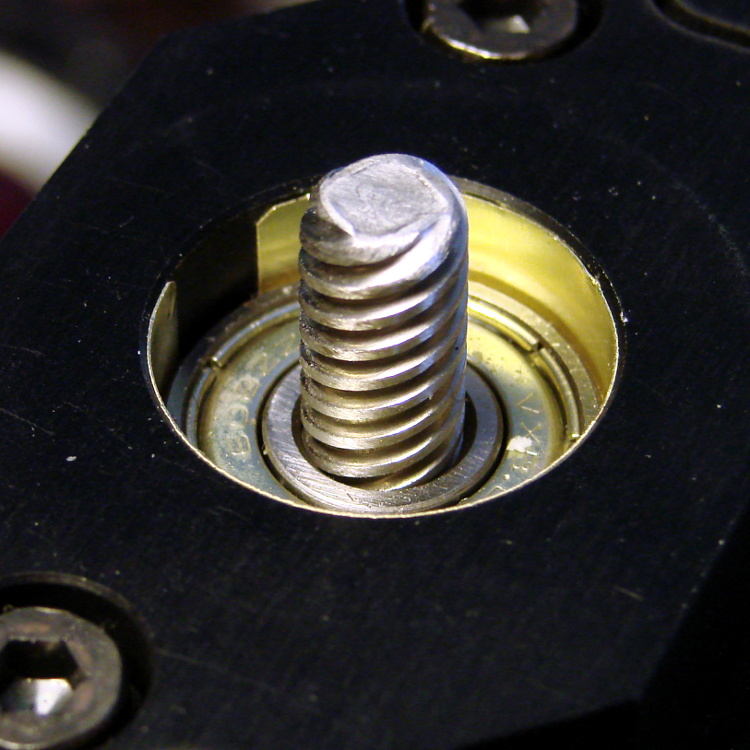
    I haven’t changed the position of the filament compression screw and the default setting produces a really aggressive grip on the filament; the picture shows the deep track from the drive gear in the natural-color PLA filament along the bottom of the opening. That may be entirely too much of a good thing, but I’ll leave well enough alone for now.

    Makergear had scraped out the recess that accepts the end of the motor gearbox housing, but it still didn’t quite fit the motor’s snout, so I continued the scraping job until the drive sat square on the end of the gearbox. It mounts to the gearbox with three screws: the gearbox has four threaded holes, but the fourth screw would pass through an inconvenient spot above the bearing / below the compression screw / beside the filament / inside the clamp arm.

    Perhaps rotating the motor slightly would reposition the mounting holes a bit better? Disadvantage: hard to make the extruder sit vertically with a crooked motor. Maybe integrate the extruder with the motor mount, so the vertical reference comes from the X stage linear slide platform and the mount forces the proper motor and extruder alignment?

    The filament compression screw is offset rearward from the filament, so the upper part of the clamp must apply serious torque through its plastic body to the bearing pressing the filament against the drive gear:

    M2 extruder - added filament guide
    M2 extruder – added filament guide

    I think a spring-loaded bearing would work better, with force applied through a pair of springs bracketing the bearing to reduce the single-point load and torque, with a hinge pin below the bearing. The Wade-ScribbleJ bearing clamp on the Thing-O-Matic has worked perfectly since I installed it, but there are now simpler designs out there that should be adaptable.

    The twist of paper embedded in a blob of hot-melt glue encourages the filament guide tube to stand up straight and not flop over during reversals. That should be somewhat longer and fit neatly around the guide; it should be part of the filament drive body. This end of the guide tube should not be anchored, so it can pop upward when the filament reverses; there’s no need to push the filament backwards through a fixed guide tube at full reversal speed.

    The drive came pre-assembled to and aligned with the hot end, here seen without the paper / glue guide after the first-pass assembly:

    M2 extruder wiring
    M2 extruder wiring

    I want to insert strain gauges between the mount and the extruder barrel in order to measure the force applied to the hot end during extrusion, but it’s not clear how to do that with this design. I think I must build a bench model that extrudes a plastic tangle into air before I understand the problems. Again, an integrated motor + extruder mount might work better.

    The PTFE (?) filament guide tube had both ends slightly crimped from the pliers that cut it off the reel, which isn’t unexpected. I reshaped / reamed the ends of the tube to pass the filament without undue friction. There’s still a bit too much friction, methinks, but it doesn’t pose a problem yet.

    The spool holder and filament guide don’t match the drawings at all; some discussions in the Google Group indicate this design works much better than the original, fiercely complex, design.

    The end of the filament guide tube over the spool also tends to flop over and bend the filament, so I blobbed enough hot melt glue around it on the guide bracket to both anchor it and enforce good alignment. The red cable tie holds the blob in place, as there’s no mechanical interlock on the bracket for the glue to grab:

    M2 spool filament guide anchor
    M2 spool filament guide anchor

    Another design for a much longer bracket positions the guide tube over the spool’s midline, which should reduce the snap when the filament slips over a bunching on one side or the other. I think I’ll gimmick up something with an integral alignment doodad for the filament tube.

    The guide tube reorients the filament to be tangential to the spool, with the bracket providing the reaction force required to hold the guide tube in place while the filament transmits force from the extruder motor that unrolls the filament. Given that we know exactly how much filament travels into the extruder, we could add a motor drive to unroll exactly that amount from the spool and maintain the length of the filament loop without a guide tube. At higher feed rates, that would allow the extruder drive to feed filament into the hot end without any drag, thus eliminating any effects not related to the actual extrusion process. I like that sound…

  • Makergear M2 vs. LinuxCNC: Project Overview

    M2 - cushwa Owl - half scale
    M2 – cushwa Owl – half scale

    During the course of my Makerbot Thing-O-Matic experience, I concluded:

    • Enthusiasm may get a product out, but engineering makes it work
    • Plywood and plastic do not produce a stable 3D printer
    • Measurements matter
    • 8-bit microcontrollers belong in the dustbin of history

    With that in mind, I’ve long thought that LinuxCNC (formerly EMC2) would provide a much better basis for the control software required for a 3D printer than the current crop of Arduino-based microcontrollers. LinuxCNC provides:

    • Hard real time motion control with proven performance
    • A robust, well-defined hardware interface layer
    • Ladder-logic machine control
    • Isolated userspace programming
    • Access to a complete Linux distro’s wealth of programs / utilities
    • Access to an x86 PC’s wealth of hardware gadgetry

    Rather than (try to) force-fit new functions in an Arduino microcontroller, I decided it would be interesting to retrofit a DIY 3D printer with a LinuxCNC controller, improve the basic hardware control and sensing, instrument the extruder, then take measurements that might shed some light on DIY 3D printing’s current shortcomings.

    The overall plan looks like this:

    • Start with a Makergear M2
    • See what the stock hardware can do
    • Replace the RAMBo controller with LinuxCNC
    • See what the hardware can do with better drivers
    • Adapt the G-Code / M-Code processing to use more-or-less stock Marlin G-Code
    • Add useful controllers along the lines of the Joggy Thing
    • Improve the platform height / level sensing
    • Rebuild the extruder with temperature and force sensors
    • Start taking measurements!

    My reasons for choosing the Makergear M2 as the basis for this project should be obvious:

    • All metal: no plywood, no acrylic (albeit a plastic filament drive)
    • Decent stepper motors (with one notable exception)
    • Reasonable hot end design
    • Good reputation

    The first step of the overall plan included a meticulously documented M2 build that I figured would take a month or two, what with the usual snafus and gotchas that accompany building any complex mechanism. Quite by coincidence, a huge box arrived on my birthday (the Thing-O-Matic arrived on Christmas Eve, so perhaps this is a tradition), the day when I learned that Mad Phil had entered his final weeks of life.

    As the Yiddish proverb puts it: If you wish to hear G*d laugh, tell him of your plans.

    So I converted a box of parts into a functional M2 3D printer over the course of four intense days, alternating between our living room floor and a card table in Phil’s home office, showing him how things worked, getting his advice & suggestions, and swapping “Do you remember when?” stories. Another few days sufficed for software installation, configuration, and basic tuneup; I managed to show him some shiny plastic doodads just before he departed consensus reality; as nearly as I can tell, we both benefited from the distractions.

    Which means I don’t have many pictures or much documentation of the in-process tweakage that produced a functional printer. The next week or so of posts should cover the key points in enough detail to be useful.

    Not to spoil the plot or anything: a stock M2 works wonderfully well.

    Owl - half size - left
    Owl – half size – left

    For example, a half-scale cushwa owl printed in PLA at 165 °C with no bed cooling and these Slic3r parameters:

    • 500 mm/s move
    • 300 mm/s infill
    • 200 mm/s solid infill
    • 100 mm/s internal perimeter
    • 50 mm/s bottom layer
    • 30 mm/s external perimeter
    • 1 mm retract @ 300 mm/s

    The beak came out slightly droopy and each downward-pointing feather dangles a glittery drop. There’s room for improvement, but that’s pretty good a week after opening a box o’ parts…

  • LED Forward Voltages vs. Color

    Running a random set of colored LEDs from the Basement Laboratory Parts Warehouse Wing through the LED Curve Tracer produced this pleasant plot:

    ROYGBUIW

    The white LED doesn’t match up with either the blue or the UV LED. Perhaps the blue LED uses a completely different chemistry that shoves further to the right than seems proper? I suppose I should run a handful of white, blue, and UV LEDs through the thing just to see what’s going on…

    The Bash / Gnuplot source code:

    #!/bin/sh
    numLEDs=8
    #-- overhead
    export GDFONTPATH="/usr/share/fonts/truetype/"
    base="${1%.*}"
    echo Base name: ${base}
    ofile=${base}.png
    echo Input file: $1
    echo Output file: ${ofile}
    #-- do it
    gnuplot << EOF
    #set term x11
    set term png font "arialbd.ttf" 18 size 950,600
    set output "${ofile}"
    set title "${base}"
    set key noautotitles
    unset mouse
    set bmargin 4
    set grid xtics ytics
    set xlabel "Forward Voltage - V"
    set format x "%4.1f"
    set xrange [0.5:4.5]
    #set xtics 0,5
    set mxtics 2
    #set logscale y
    #set ytics nomirror autofreq
    set ylabel "Current - mA"
    set format y "%3.0f"
    set yrange [0:35]
    set mytics 2
    #set y2label "right side variable"
    #set y2tics nomirror autofreq 2
    #set format y2 "%3.0f"
    #set y2range [0:200]
    #set y2tics 32
    #set rmargin 9
    set datafile separator whitespace
    set label 1 "IR" at 1.32,32 center
    set label 2 "R"  at 1.79,32 center
    set label 3 "O"  at 2.10,32 center
    set label 4 "Y"  at 2.65,32 center
    set label 5 "G"  at 2.42,32 center
    set label 6 "B"  at 4.05,32 center
    set label 7 "UV" at 3.90,32 center
    set label 8 "W"  at 3.25,32 center
    #set arrow from 2.100,32 to 2.125,31 lt 1 lw 2 lc 0
    plot \
     "$1" index 0 using (\$5/1000):(\$2/1000) with linespoints pt 1 lw 2 lc rgb "red" ,\
     "$1" index 1 using (\$5/1000):(\$2/1000) with linespoints pt 1 lw 2 lc rgb "orange" ,\
     "$1" index 2 using (\$5/1000):(\$2/1000) with linespoints pt 1 lw 2 lc rgb "dark-yellow" ,\
     "$1" index 3 using (\$5/1000):(\$2/1000) with linespoints pt 1 lw 2 lc rgb "green" ,\
     "$1" index 4 using (\$5/1000):(\$2/1000) with linespoints pt 1 lw 2 lc rgb "blue" ,\
     "$1" index 5 using (\$5/1000):(\$2/1000) with linespoints pt 1 lw 2 lc rgb "purple" ,\
     "$1" index 6 using (\$5/1000):(\$2/1000) with linespoints pt 1 lw 2 lc rgb "magenta" ,\
     "$1" index 7 using (\$5/1000):(\$2/1000) with linespoints pt 1 lw 2 lc rgb "dark-gray"
    EOF
    

    And the raw data file:

    # LED Curve Tracer
    # Ed Nisley - KE4ZNU - March 2013
    # VCC at LED: 4897 mV
    # Bandgap reference voltage: 1041 mV
    
    # Insert LED, press button 1 to start...
    # INOM	ILED		VccLED	VD	VLED		VG	VS	VGS VDS <--- LED 1
    0	0	4892		3889		1002		0	0	0	3889
    5	4613		4892		3264		1627		1990		48	1942		3216
    10	10148	4892		3216		1675		2092		106 1985		3109
    15	15223	4892		3182		1709		2199		159 2039		3022
    20	19836	4892		3148		1743		2271		208 2063		2940
    25	24910	4897		3129		1767		2354		261 2092		2867
    30	30446	4897		3104		1792		2431		319 2111		2785
    
    # Insert LED, press button 1 to start...
    # INOM	ILED		VccLED	VD	VLED		VG	VS	VGS VDS <--- LED 2
    0	0	4892		3884		1007		0	0	0	3884
    5	4613		4892		3124		1767		1985		48	1937		3075
    10	9687		4897		3037		1860		2111		101 2010		2935
    15	14761	4897		2964		1932		2189		155 2034		2809
    20	19836	4897		2906		1990		2271		208 2063		2697
    25	24910	4897		2848		2048		2349		261 2087		2586
    30	30446	4892		2794		2097		2431		319 2111		2475
    
    # Insert LED, press button 1 to start...
    # INOM	ILED		VccLED	VD	VLED		VG	VS	VGS VDS <--- LED 3
    0	0	4892		3826		1065		0	0	0	3826
    5	4613		4897		2862		2034		1990		48	1942		2814
    10	10148	4897		2688		2208		2097		106 1990		2581
    15	15223	4897		2552		2344		2194		159 2034		2392
    20	19836	4892		2436		2455		2276		208 2068		2228
    25	24910	4897		2349		2547		2354		261 2092		2087
    30	29985	4897		2257		2639		2426		314 2111		1942
    
    # Insert LED, press button 1 to start...
    # INOM	ILED		VccLED	VD	VLED		VG	VS	VGS VDS <--- LED 4
    0	0	4892		3734		1157		0	0	0	3734
    5	5074		4892		2935		1956		1976		53	1922		2882
    10	10148	4897		2823		2073		2102		106 1995		2717
    15	15223	4892		2722		2170		2199		159 2039		2562
    20	20297	4897		2649		2247		2276		213 2063		2436
    25	24910	4897		2567		2329		2349		261 2087		2305
    30	29985	4897		2489		2407		2426		314 2111		2174
    
    # Insert LED, press button 1 to start...
    # INOM	ILED		VccLED	VD	VLED		VG	VS	VGS VDS <--- LED 5
    0	0	4892		4485		406 0	0	0	4485
    5	4613		4897		1724		3172		1990		48	1942		1675
    10	10148	4892		1443		3448		2097		106 1990		1336
    15	15223	4897		1249		3647		2199		159 2039		1089
    20	19836	4892		1099		3792		2276		208 2068		891
    25	24910	4897		983 3913		2354		261 2092		721
    30	29985	4892		862 4030		2426		314 2111		547
    
    # Insert LED, press button 1 to start...
    # INOM	ILED		VccLED	VD	VLED		VG	VS	VGS VDS <--- LED 6
    0	0	4892		4165		726 0	0	0	4165
    5	5074		4892		1448		3443		1985		53	1932		1395
    10	10148	4897		1322		3574		2102		106 1995		1215
    15	15223	4892		1220		3671		2194		159 2034		1060
    20	20297	4892		1147		3744		2276		213 2063		934
    25	25372	4892		1075		3816		2354		266 2087		808
    30	29985	4892		1002		3889		2426		314 2111		687
    
    # Insert LED, press button 1 to start...
    # INOM	ILED		VccLED	VD	VLED		VG	VS	VGS VDS <--- LED 7
    0	0	4892		4247		644 0	0	0	4247
    5	5074		4892		3647		1244		1981		53	1927		3594
    10	10148	4892		3618		1273		2107		106 2000		3511
    15	14761	4892		3603		1288		2170		155 2015		3448
    20	20297	4892		3584		1307		2271		213 2058		3371
    25	25372	4892		3574		1317		2354		266 2087		3308
    30	29523	4892		3565		1327		2412		310 2102		3255
    
    # Insert LED, press button 1 to start...
    # INOM	ILED		VccLED	VD	VLED		VG	VS	VGS VDS <--- LED 8
    0	0	4892		4945		-53 0	0	0	4945
    5	5074		4892		2160		2731		1985		53	1932		2107
    10	10148	4892		2034		2857		2097		106 1990		1927
    15	15223	4897		1927		2969		2194		159 2034		1767
    20	19836	4892		1826		3066		2271		208 2063		1617
    25	25372	4897		1734		3162		2349		266 2082		1467
    30	29523	4892		1666		3225		2412		310 2102		1356
    
    # Insert LED, press button 1 to start...
    
  • Stepper Motor Thermal Coefficient vs. Thermal Compound and Forced Air

    Prompted by that comment, a bit more data emerges.

    This unsteady ziggurat barely supports the aluminum CPU heatsink atop a PC CPU exhaust duct; the two came from different PCs and have no relation to each other.  The vise in the background keeps the whole affair from falling over. The fan sucks air through the heatsink and exhausts it out the front.

    NEMA 17 Stepper - Heatsink with Fan
    NEMA 17 Stepper – Heatsink with Fan

    Throughout all this, the stepper driver runs at a bit over 10 k step/sec, tuned to avoid the howling mechanical resonances in that stack. At 1/8 microstepping, that’s 6.25 rev/s = 375 RPM, which would drive the Thing-O-Matic at 210 mm/s and the M2 at 225 mm/s. Your speed will vary, of course, depending on the pulley diameter / number of teeth / belt pitch, etc.

    Under the same conditions as before (i.e., no thermal compound, fan off), the stepper stabilized at 143 °F = 62 °C in the 57 °F = 14 °C Basement Laboratory ambient, with 1.91 A peak current (I don’t believe that second decimal place, either) and a 6.6 °C/W case-to-ambient coefficient. That’s close enough to the 63 °C and 6.7 °C/W coefficient from the earlier test, so the conditions seem roughly the same.

    Smoothing a thin layer of heatsink compound on the butt of the motor, then squishing it firmly atop the heatsink, cut the temperature to 130 °F = 53 °C without the fan. That suggests the case-to-ambient coefficient is now 5.3 °C/W: the thermal compound helps by 1.3 °C/W.

    Turning on the fan drops the case temperature to 84 °F = 29 °C, which works out to a coefficient of 2.1 °C/W. Obviously, moving air over that heatsink helps the cooling a lot: the heatsink felt cold to the touch and the motor case was barely warm.

    Increasing the current to 2.37 A dissipates 11.2 W, which would be scary without the heatsink and air flow. The temperature stabilized at 91 °F = 33 °C, for a coefficient of 1.7 °C/W.

    At 2.83 A = 16 W, the temperature rises to 100 °F = 38 °C, with a coefficient of 1.5 °C/W. While it’s not unstoppable with that much current, the motor has plenty of torque! The motor becomes pleasantly warm, the heatsink stays just above cool, and all seems right with the world. I suspect the windings get a bit toasty in there, but they can’t possibly be worse off than inside a case at boiling-water temperatures.

    Using the original insulated-motor coefficient of 19 °C/W, 16 W would cook the motor at 320 °C. Perhaps the case would make a nice extruder heater after it stopped being a motor?

    [Update: See the comments for the results of just blowing air over the motor case.]

  • Stepper Motor Thermal Coefficient

    You’ve probably seen this exchange on whatever DIY 3D printing forum you monitor:

    1. My stepper motors get scorching hot, what should I do?
    2. Turn down the current!
    3. That worked great, but …
    4. … now all my objects have a shift in the middle.
    5. Your motor is losing steps: turn up the current!
    6. Uh, right.
    NEMA 17 Stepper on cloth
    NEMA 17 Stepper on cloth

    So, with that setup on the bench, I ran a simple experiment with current, temperature, and heat transfer. Most DIY 3D printers have stepper motors attached to a plywood chassis or plastic holder, so the first data point comes from a motor with no mechanical thermal path to the outside world (which is the Basement Laboratory at 14 °C ambient).

    Running at about 1200 step/s with a winding current of 1 A peak from a 24 A supply, the motor stabilized at 52 °C = 125 °F after half an hour.

    Both windings have a 2 Ω resistance and carry 1 A peak = 0.7 A rms, so the total power dissipation is:

    2 × [(1 A / √2)2 × 2 Ω] = 2 W

    That’s the same power produced with the motor stopped at a full step position, where the peak current flows in a single winding and the other winding carries zero current:

    (1 A)2 × 2 Ω = 2 W

    The temperature rise suggests a thermal coefficient of about 19 °C/W = (52 °C – 14 °C) / 2 W.

    The next current setting on the driver is 1.46 A, which doubles the power dissipation to 4.3 W. Assuming a large number of linearities, that would cook the motor at 82 °C = 180 °F above ambient. Even though the motor could probably withstand that temperature, for what should be obvious reasons I didn’t go there.

    Instead, I parked the motor atop a big CPU heatsink harvested from an obsolete PC, sans thermal compound, mechanical fitting, and anything more secure than gravity holding it in place:

    NEMA 17 Stepper on Heatsink
    NEMA 17 Stepper on Heatsink

    The results:

    Ambient 14 °C
    Winding 2 ohm
    A pk A rms Power W Case °C °C/W amb °C/W incr
    1.00 0.71 2.0 28 7.0 7.0
    1.46 1.03 4.3 42 6.6 6.2
    1.91 1.35 7.3 63 6.7 6.9

    The thermal coefficients represent the combination of all interfaces from motor case to ambient, but the case and heatsink stabilized to about the same temperature, so the main limit (as always) will be heat transfer to ambient air. Obviously, the heatsink sits in the wrong orientation with little-to-no air flow, not to mention that the butt end of a stepper motor isn’t precisely machined and has plenty of air between the two surfaces. Improving all that would be in the nature of fine tuning and should substantially lower the coefficient.

    What’s of interest: just perching the motor on a big chunk of aluminum dropped the case temperature 24 °C without no further effort.

    Blowing air over the case (probably) won’t be nearly as effective. Epoxy-ing a liquid-cooled cold plate to the end cap would improve the situation beyond all reasonable bounds, plus confer extreme geek cred.

    Hmmm, the Warehouse Wing does have some copper tubing…