The Smell of Molten Projects in the Morning

Ed Nisley's Blog: Shop notes, electronics, firmware, machinery, 3D printing, laser cuttery, and curiosities. Contents: 100% human thinking, 0% AI slop.

Category: Science

If you measure something often enough, it becomes science

  • Magnetics Overview

    I wound up doing an impromptu magnetics (as it applies to transformers) review during a recent SqWr meeting. This summarizes, re-orders, and maybe expands on some quadrille paper scribbling, so that if I ever do it again I’ll have a better starting point. Searching on the obvious terms will produce a surfeit of links; Wikipedia may be helpful for diagrams.

    Corrections and further points-to-ponder will be gratefully received…

    Magnetizing force H comes from amp-turns (amps I, turns N) around the core, which produces flux phi = Φ = NI. Edit: that’s not quite right. Thanks to Martin Bosch for catching the units mismatch!

    Magnetomotive force ℱ comes from ampere-turns (amps I, turns N) around the core: mmf = ℱ = NI.

    The magnetizing force H is the mmf per unit length of the solenoid or core: H = ℱ / L.

    Flux density B comes from permeability (mu = μ) times H, which is a DC relationship that doesn’t care about frequency in the least: B = μH. For an air-core inductor or transformer, μ is the mu-sub-zero = μ0 of free space, but if there’s a core involved, then you use the permeability of the material near the conductor, which will be the material’s dimensionless relative permeability μR times μ0.

    Total flux Φ is the integral of flux density B over all the little areas covering the surface you’re interested in, oriented in a consistent manner using the right-hand rule.

    If you have an iron(-like) core inside the coil, then essentially all the flux is in the core, so the integral reduces to B times the area (call it a) of the core at right angles to the flux: Φ = Ba = μaH. In this case, μ is the relative permeability of the core times μ0 of free space.

    You can plot BH curves (B for various H values) using a straightforward circuit and an oscilloscope. The X axis voltage is proportional to the winding current I and the Y axis voltage is proportional to Φ. The trick is the integrator on the secondary that converts EMF = dΦ / dt into a voltage directly proportional to Φ. The same trick works on inductors if you add a few turns to act as a secondary.

    All that’s true for DC as well as AC, but transformers only work on AC, as summarized by Lenz.

    The induced EMF is proportional to flux change through the secondary windings, which number n turns: EMF = – n dΦ / dt. That’s obviously proportional to frequency: higher frequency = higher EMF. Flux is all in the transformer core, so it’s still μaH. Note that these are secondary turns, so it’s n rather than N. Air-core transformers exist, but coupling the flux poses a problem; looking up variometer or variocoupler may be instructive.

    The negative sign says the induced EMF creates a current that creates a magnetic field that points the other way, so as to oppose the original field change. In effect, the induced EMF works to cancel out the field you’re creating.

    Knowing how much EMF you need in the secondary for the purposes of your circuit, you know the product of five things:

    • n – secondary turns
    • μ – (relative) core permeability
    • a – area
    • f – frequency
    • H – from primary

    Now you get to pick what’s important, but they all have gotchas:

    The ratio n:N seems easy to control, but it tops out at a few hundred. If you care about the voltage ratio, then that fixes the turns ratio.

    Choose different core material to increase μ, but then you hit core saturation in B as H increases. Practical core materials may give you permeability over two or three orders of magnitude, but with significant side effects.

    Reduce B for a given Φ by using a larger core area a, which obviously requires a bigger core that may not fit the application.

    Increase frequency f to get more EMF and thus H, but it may be limited by your application and other losses and effects. Higher frequency = more traverses of that BH curve with hysteresis = more core losses = can’t use lossy metals.

    Increase primary H, but again you hit core saturation in B.

    The circuit driving the primary must be able to handle the total load, which means it must be able to drive the impedance presented by the transformer + secondary load. That determines the primary inductance (to get the reactance high enough that the transformer presents the secondary load to the primary circuit), which determines the core + turns at the operating frequency.

    The core must support the flux required to drive the load without saturation, which constrains the material and the area. For heavy loads (i.e., “power” transformers), output power also constrains the secondary turns and wire size, which constrains the minimum core opening and thus overall size.
  • Marlin Firmware: Stepper Interrupt Timing

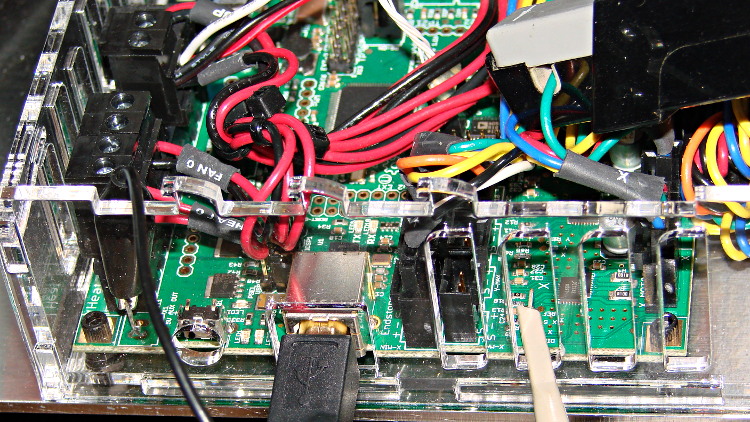
    Based on the discussion attached to the post on Z axis numbers, I wanted to take a look at the points where Marlin switches from one step per interrupt to two, then to four, just to see what the timing looks like. The RAMBo board has neatly labeled test points, to which I tack-soldered a pin for the scope probe poked through one of the ventilation slots, and an unused power connector on the left edge of the PCB that provided a ground point (admittedly, much too far away for good RF grounding, but it suffices for CMOS logic signals). The Tek Hall-effect current probe leaning in from the top right captures the current in one of the X axis windings:

    X axis Step and Current probes
    X axis Step and Current probes

    I’ve reset the Marlin constants based on first principles, per the notes on distance, speed, and acceleration, so they’re not representative of the as-shipped M2 firmware. Recapping the XY settings:

    • Distance: 88.89 step/mm
    • Speed: 450 mm/s = 27000 mm/min
    • Acceleration: 5000 mm/s2, with the overall limit at 10 m/s2

    The maximum interrupt frequency is about 10 kHz and the handler can issue zero, one, two, or four steps per axis per interrupt as required by the speed along each axis, up to a maximum of step rate of 40 kHz. There are complexities involved which I do not profess to understand.

    The maximum 10 kHz step rate for one-step-per-interrupt motion corresponds to a speed of:

    112.5 mm/s = (10000 step/s) / (88.89 step/mm)

    The maximum 40 kHz step rate produces, naturally enough, four times that speed:

    450 mm/s = (40000 step/s) / (88.89 step/mm)

    Assuming constant acceleration, the distance required to reach a given speed from a standing start or to decelerate from that speed to a complete stop is:
    x = v2 / (2 * a)

    The time required to reach that speed is:
    t = v/a

    Accelerating at 5000 mm/s2:

    • 112.5 mm/s = 6700 mm/min → 1.27 mm, 22.5 ms
    • 150 mm/s = 9000 mm/min → 2.25 mm, 30 ms
    • 450 mm/s = 27000 mm/min → 20.3 mm and 90 ms

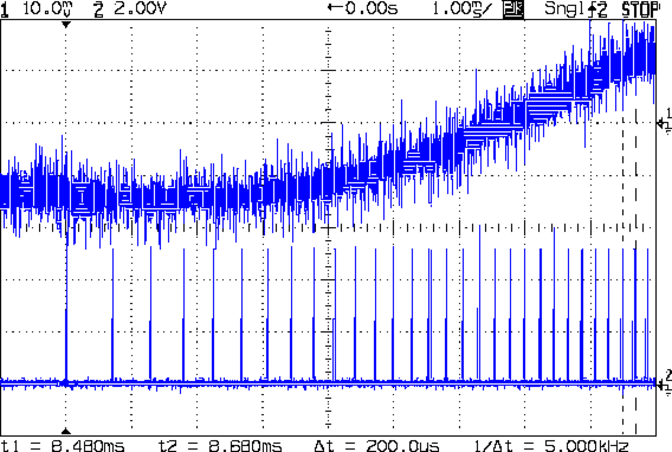
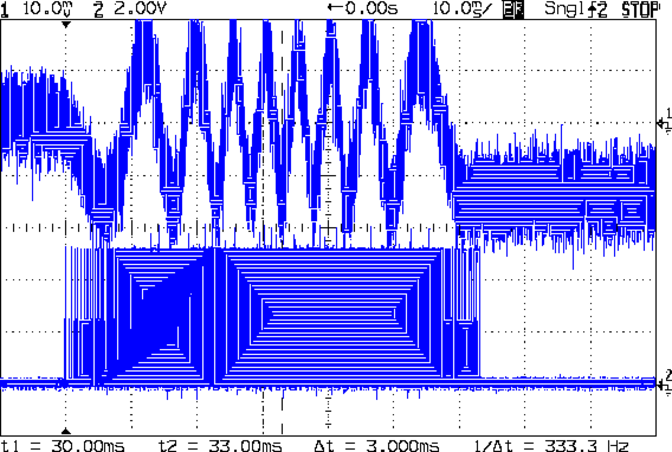
    An overview of a complete 6 mm move at 150 mm/s shows the acceleration and deceleration at each end, with a constant-speed section in the middle:

    X Axis 150 mm-s 6 mm - overview
    X Axis 150 mm-s 6 mm – overview

    The bizarre patterns in the traces come from hp2xx‘s desperate attempts to discern the meaning of the scope’s HPGL graphic data where the trace forms a solid block of color; take it as given that there’s no information in the pattern. I described the trace conversion process there.

    The upper trace shows the X axis motor winding current at a scale of 500 mA/div, with far more hash than one would expect. The RAMBo drivers evidently produce much more current noise than the brick drivers I intend to use.

    The lower trace is the X axis step signal produced by the Arduino microcontroller. You can barely make out the individual step signals at each end, but there’s not enough horizontal resolution to show them when the motor moves at a reasonable pace.

    In round numbers, the acceleration and deceleration should require about 30 ms each. The overall move takes 63 ms, so the constant-speed section in the middle must be about 3 ms long. That’s probably not right…

    Here’s a closer look at the step pulses as the motion starts from zero on the way to 150 mm/s:

    X Axis 150 mm-s 6 mm - 1 ms-div 0 ms dly
    X Axis 150 mm-s 6 mm – 1 ms-div 0 ms dly

    Over on the right, the 5 kHz step rate after 8.5 ms suggests a speed of 56 mm/s and counting 28 pulses says it moved 0.32 mm. Plugging those numbers into the equations:

    • a = v/t = 6600 mm/s2
    • a = (2 * x)/t2 = 8900 mm/s2

    It’s not clear (to me, anyway) whether:

    • The firmware accelerates faster than the alleged 5000 mm/s2 limit
    • It’s accelerating near the overall limit of 10000 mm/s2
    • The acceleration isn’t constant: starts high, then declines
    • The measurement accuracy doesn’t support any conclusions
    • I understand what’s happening

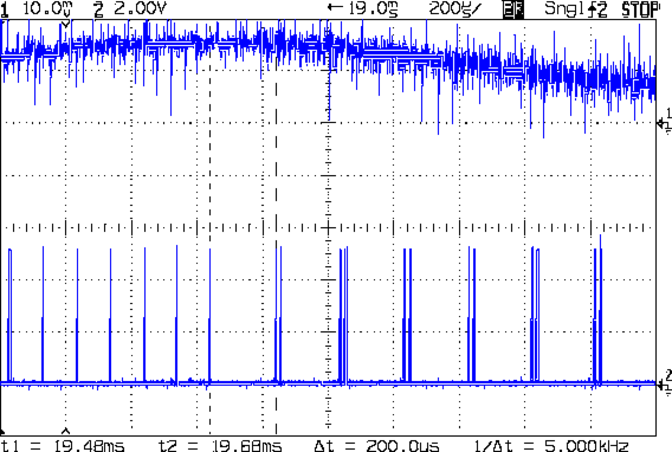
    In order to see the double- and quad-step outputs, here’s a 50 mm move at 450 mm/s, with a 19 ms delay to the point where the interrupt handler transitions from single-step to double-step output:

    X Axis 450 mm-s 50 mm - 200 us-div 19 ms dly
    X Axis 450 mm-s 50 mm – 200 us-div 19 ms dly

    The interrupt frequency drops from just under 10 kHz to a bit under 5 kHz, with the doubled pulses about 16 μs apart. At the transition, the axis speed is 112.5 mm/s, pretty much as predicted.

    If that’s the case, the overall acceleration to the transition works out to:

    5800 mm/s2 = (113 mm/s) / (19.5 ms)

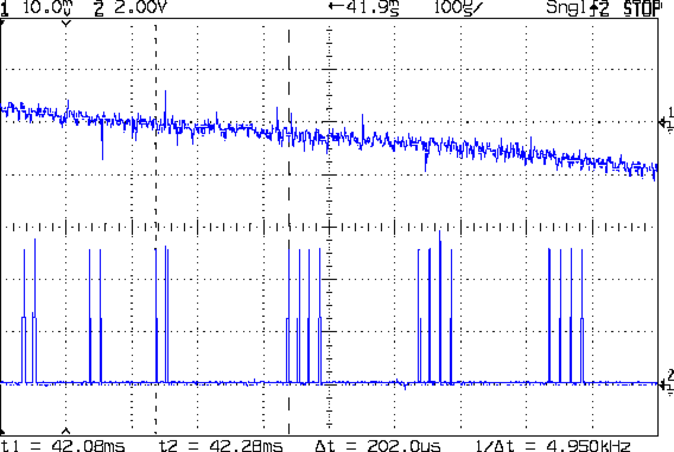
    Delaying the traces to 41.9 ms after the motion starts shows the double-to-quad step transition:

    X Axis 450 mm-s 50 mm - 100 us-div 41.9 ms dly
    X Axis 450 mm-s 50 mm – 100 us-div 41.9 ms dly

    Once again, the pulse frequency drops from 10 kHz down to 5 kHz. The speed is now 225 mm/s, half the maximum possible speed, which also makes sense: at top speed, the pulses will be essentially continuous at 40 kHz.

    The average acceleration from the start of the motion:

    5300 mm/s2 = (225 mm/s) / (42.1 ms)

    That implies the initial acceleration starts higher than the limit, but it evens out on the way to the commanded speed.

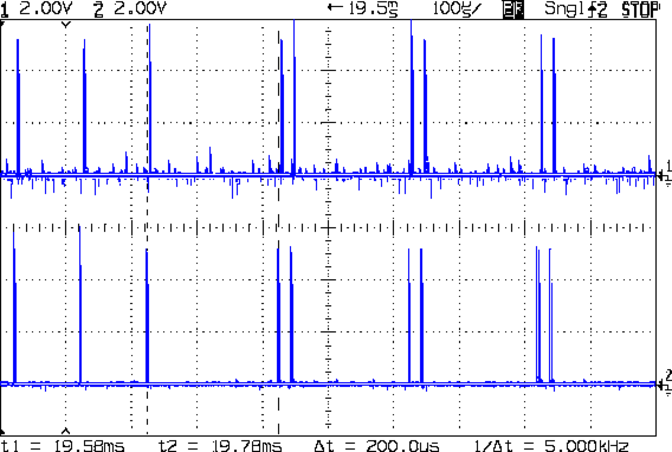
    Those scope shots come from moving only the X axis. Moving both the X and Y axes, with Trace 1 now showing the Y axis output, for 50 mm at 450 mm/s, produces similar results; the Y axis output lags the X axis by a few microseconds:

    XY 450 mm-s 50 mm - 100 us-div 19.5 ms dly
    XY 450 mm-s 50 mm – 100 us-div 19.5 ms dly

    Once again, that’s at the single- to double-step transition at 19+ ms. The overall timing doesn’t depend on how many axes are moving, as long as they can accelerate at the same pace; otherwise, the firmware must adjust the accelerations to make both axes track the intended path.

    None of this is too surprising.

    For a motor running at a constant speed just beyond the single-to-double step transition at 112.5 mm/s or the double-to-quad transition at 225 mm/s, the rotor motion should have a 5 kHz perturbation around its nominal position: it coasts for nearly the entire period, then a pair of steps kicks it toward the proper position. At those transitions, the rotor turns at:

    3.2 rev/s = (10000 step/s) / (3200 step/rev)
    6.4 rev/s = (20000 step/s) / (3200 step/rev)

    The perturbation should look like a 5 kHz oscillation (not exactly sinusoidal, maybe triangular?) superimposed on the nominal position, which is changing more-or-less parabolically as a function of time. I expect that the overall inertia damps it out pretty well, but I’d like to attach a rotary encoder to the motor shaft (or a linear encoder to the axis) to show the actual outcome, but I don’t have the machinery for that.

    In any event, LinuxCNC’s step outputs should behave better, which is why I’m doing this whole thing in the first place…

  • Monthly Science: Basement Safe Humidity

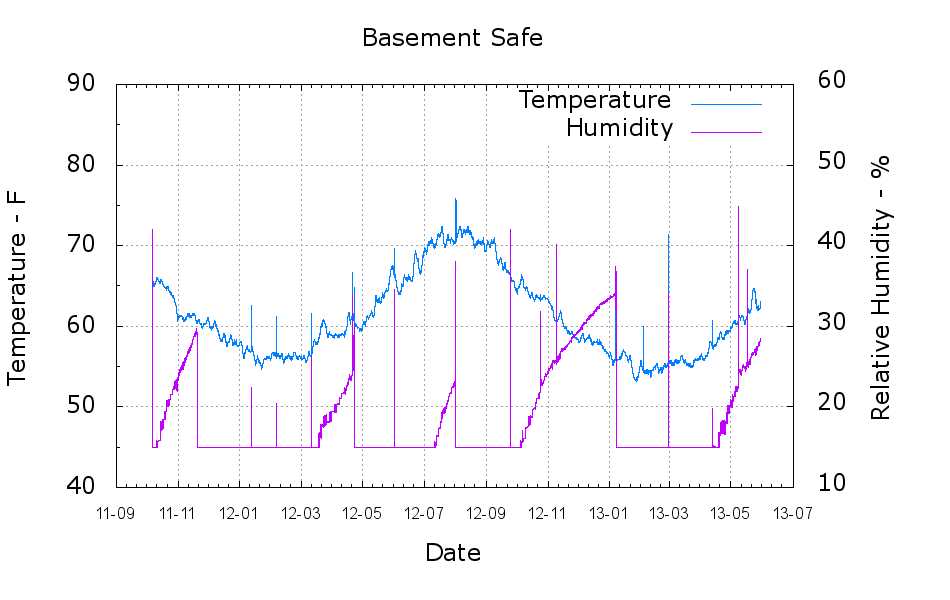
    A plot of the temperature and humidity inside the basement safe over the last year-and-a-half:

    Basement Safe
    Basement Safe

    The tray of silica gel (or whatever those granules might be) holds the humidity firmly at 14 to 15 %, at least with a simple masking tape seal around the door opening that dates back to early 2012. Less water vapor gets through the door during the winter, due to the lower basement humidity when it’s cold outside, but it looks like four regenerations per year with just under a kilogram of desiccant in the tray.

    Ordinarily, it’d be time for those granules to endure another oven session, but I just picked up a bunch of real silica gel beads and must conjure up some porous bags.

    The Bash / Gnuplot script that cleaned the CSV files and produced the plot:

    #!/bin/sh
    #-- overhead
    export GDFONTPATH="/usr/share/fonts/truetype/"
    base="${1%.*}"
    echo Base name: ${base}
    ofile=${base}.png
    tfile=$(tempfile)
    echo Input file: $1
    echo Temporary file: ${tfile}
    echo Output file: ${ofile}
    #-- prepare csv Hobo logger file
    sed 's/^\"/#&/' "$1" | sed 's/^.*Logged/#&/' | sed 's/ ,/,/' | sed 's/\/\([0-9][0-9]\) /\/20\1 /' > ${tfile}
    #-- do it
    gnuplot << EOF
    #set term x11
    set term png font "arialbd.ttf" 18 size 950,600
    set output "${ofile}"
    set title "${base}"
    set key noautotitles
    unset mouse
    set bmargin 4
    set grid xtics ytics
    set timefmt "%m/%d/%Y %H:%M:%S"
    set xdata time
    set xlabel "Date"
    set format x "%y-%m"
    #set xrange [1.8:2.2]
    set xtics font "arial,12"
    #set mxtics 2
    #set logscale y
    set ytics nomirror autofreq
    set ylabel "Temperature - F"
    set format y "%3.0f"
    set yrange [40:90]
    set mytics 2
    set y2label "Relative Humidity - %"
    set y2tics nomirror autofreq
    set format y2 "%3.0f"
    set y2range [10:60]
    #set y2tics 32
    #set rmargin 9
    set datafile separator ","
    #set label 1 "label text" at 2.100,110 right font "arialbd,18"
    #set arrow from 2.100,110 to 2.105,103 lt 1 lw 2 lc 0
    plot    \
        "${tfile}" using 2:3 axes x1y1 with lines lt 3 title "Temperature",\
        "${tfile}" using 2:4 axes x1y2 with lines lt 4 title "Humidity"
    EOF
    
  • LED Output vs. Current: Efficiency Loss

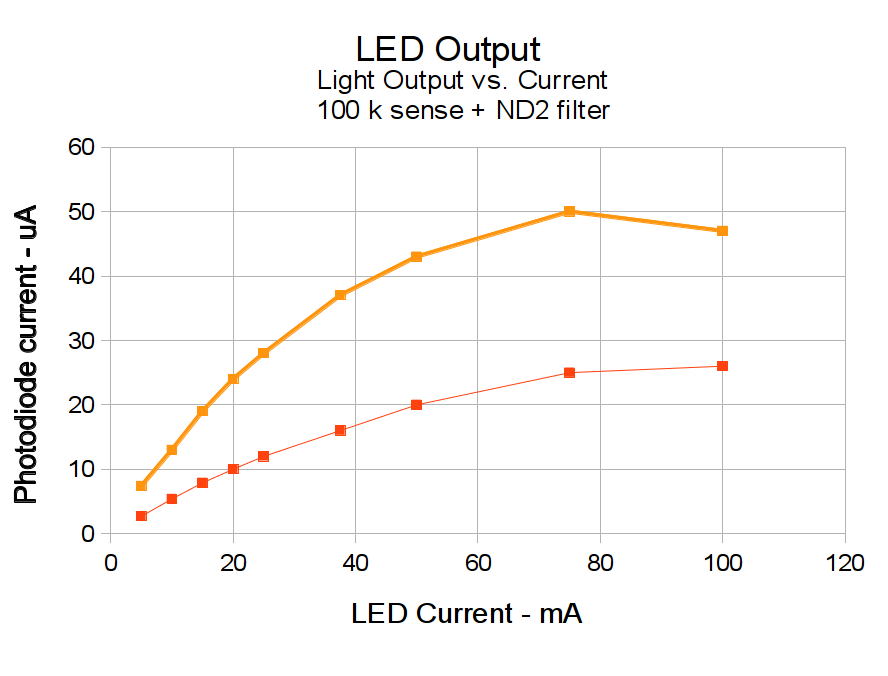
    Some data points from that circuit produced this graph:

    LED Output vs Current
    LED Output vs Current

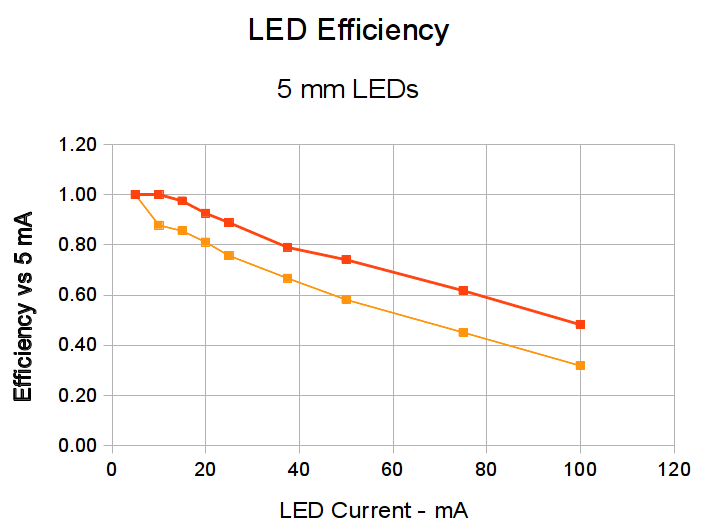
    Relative to the output at 5 mA, the efficiency drops off pretty much linearly:

    LED Efficiency vs Current
    LED Efficiency vs Current

    That’s computed as the ratio of the actual light output to the output at 5 mA scaled by the current ratio.

    So putting the screws to the LEDs does produce more light, but not quite as much as you’d expect. Above maybe 40 mA, it’s not worth the effort.

    Now we know…


  • LED Driver + Zero-bias Photodiode Amplifier

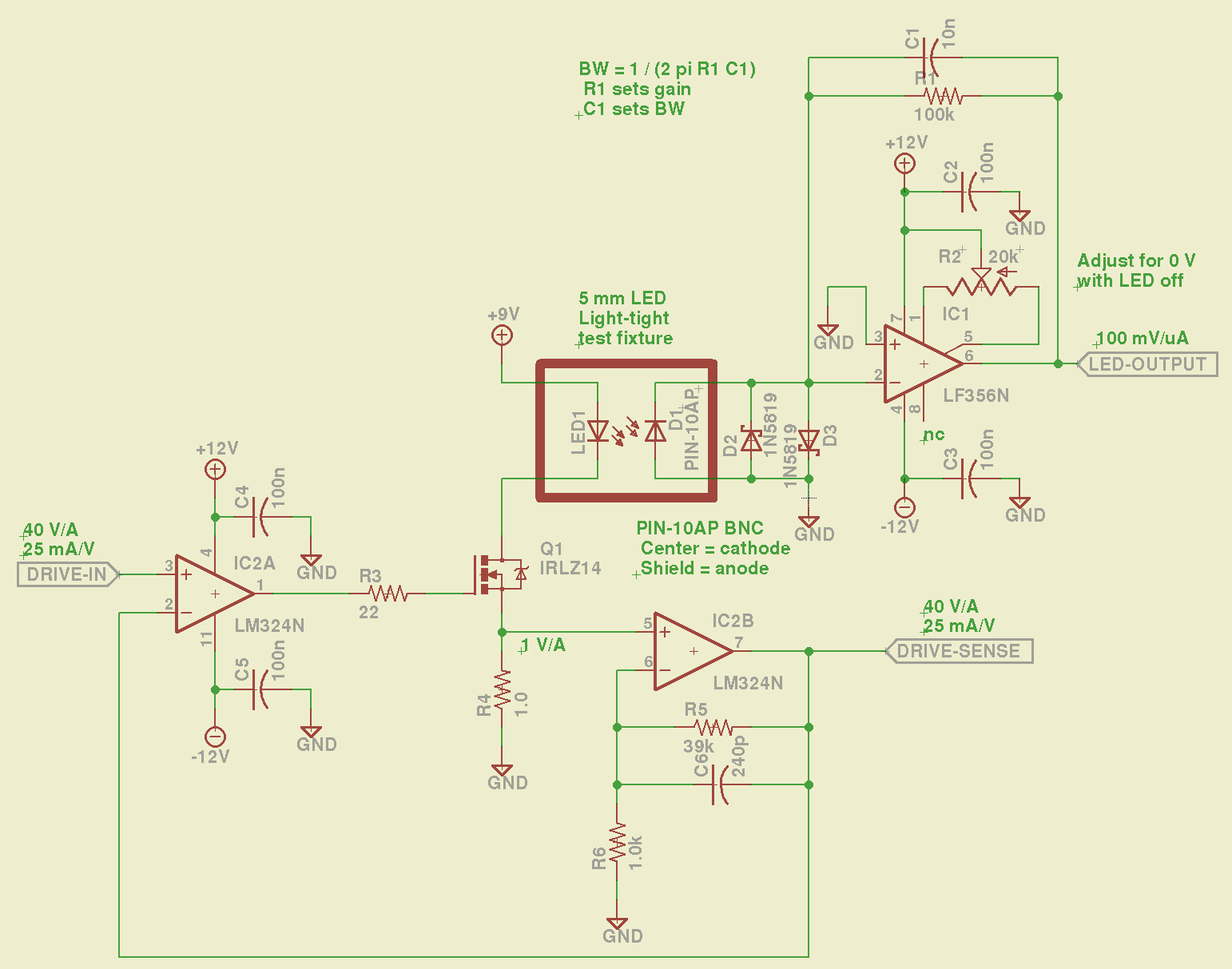
    This may come in handy for something, like measuring LED output:

    LED Output Tester - Schematic
    LED Output Tester – Schematic

    The LM324 converts the input voltage to an LED drive current, scaled by the sense resistor and the gain of IC2B to 25 mA/V. The feedback loop closes through the MOSFET and C6 rolls off the response, so there’s a nasty overshoot on the leading edge of input pulses where the current increases faster than the op amp can tamp it down:

    Red LED - 25 mA 14 uA
    Red LED – 25 mA 14 uA

    The LM356 acts as a transimpedance amplifer to convert the photodiode current to voltage. The PIN-10AP specs say it should operate in photovoltaic mode with zero bias and that more than -3V of bias will kill the photodiode; the LM356 should hold its inverting input at virtual ground, but the two 1N5819 Schottky diodes enforce that limit. There being zero volts across the diodes, they don’t leak in either direction, so it’s all good.

    The circuit is an embarrassing hairball on solderless breadboard, so use your imagination…

    You could mash this together with the LED Curve Tracer, although you’d want better low-current resolution from the Arduino output.

  • LED + Photodiode: Verifying Linearity

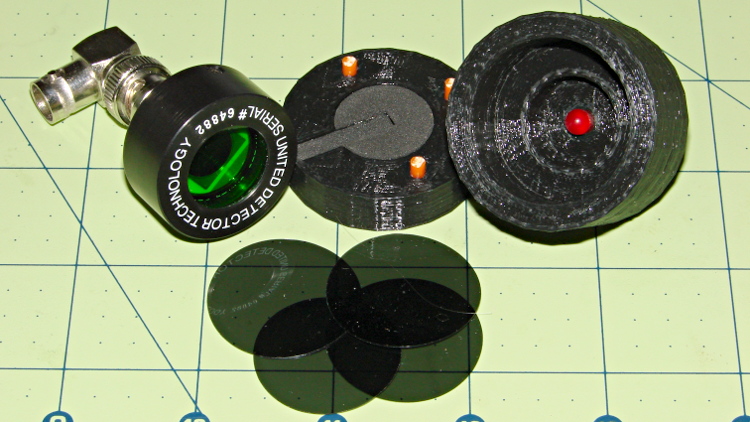
    Given that test fixture, the obvious question is whether the PIN-10AP photodiode’s output current varies linearly with light intensity, just like the specs would lead you to believe. I excavated the sheet of 2-stop neutral density filter gel from the Parts Warehouse Wing and cut some 30 mm disks:

    LED Photodiode test fixture - ND filter disks
    LED Photodiode test fixture – ND filter disks

    A single filter layer should reduce the light intensity by 2 f/stops = a factor of 4. Each successive layer reduces the intensity by another factor of 4. They’re all at least reasonably clean and free of defects, but they’re definitely not optical lens quality.

    Running the LED with a 100 mA pulse at 20% duty cycle and stacking the disks in the fixture, one by one, between the LED and photodiode, produces this data:

    Layers Attenuation Scale V I – uA Ratio
    0 1 1.0000 8.7 87  
    1 4 0.2500 1.9 19 4.58
    2 16 0.0625 0.43 4.3 4.42
    3 64 0.0156 0.097 0.97 4.43
    4 256 0.0039 0.022 0.22 4.41

    The Ratio column divides successive pairs of current values. The first step, from “no filter” to “one filter”, came out a bit larger than the rest, probably because the gel sheet isn’t anti-reflective and some light bounces off the top.

    After that, though, it looks just like I’m cheating, doesn’t it?

    The ratios should be 4.0, but the actual 4.4 means it’s a 2.1 stop filter. Close enough, methinks.

  • Makergear M2: Extruder Thermistor Recalibration

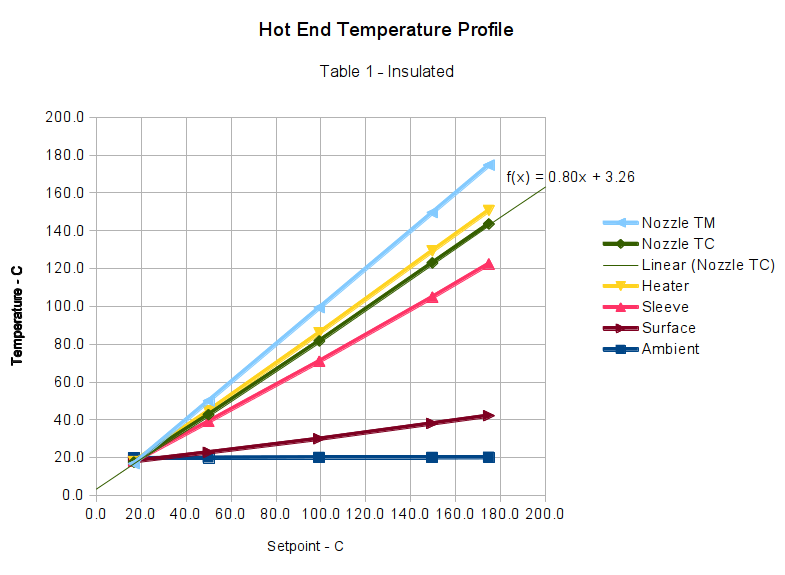
    Those measurements suggested that my initial correction to the Table 1 values weren’t quite correct, but a similar correction might work as long as I didn’t change the insulating wrap. This graph includes a linear fit to the Nozzle TC data, based on the original M2 firmware’s Table 1 thermistor data and cotton insulation:

    M2 Extruder Thermistor Recal - Table 1 Insulated - Nozzle TC linear fit
    M2 Extruder Thermistor Recal – Table 1 Insulated – Nozzle TC linear fit

    Applying that equation to Table 1 produces this thermistor lookup table:

    #if (THERMISTORHEATER_0 == 8) || (THERMISTORHEATER_1 == 8) || (THERMISTORHEATER_2 == 8) || (THERMISTORBED == 8) // M2 thermistors on RAMBO
    const short temptable_8[][2] PROGMEM = {
    	{23*OVERSAMPLENR, 243},
    	{25*OVERSAMPLENR, 239},
    	{27*OVERSAMPLENR, 235},
    	{28*OVERSAMPLENR, 231},
    	{31*OVERSAMPLENR, 227},
    	{33*OVERSAMPLENR, 223},
    	{35*OVERSAMPLENR, 219},
    	{38*OVERSAMPLENR, 215},
    	{41*OVERSAMPLENR, 211},
    	{44*OVERSAMPLENR, 207},
    	{48*OVERSAMPLENR, 203},
    	{52*OVERSAMPLENR, 199},
    	{56*OVERSAMPLENR, 195},
    	{61*OVERSAMPLENR, 191},
    	{66*OVERSAMPLENR, 187},
    	{71*OVERSAMPLENR, 183},
    	{78*OVERSAMPLENR, 179},
    	{84*OVERSAMPLENR, 175},
    	{92*OVERSAMPLENR, 171},
    	{100*OVERSAMPLENR, 167},
    	{109*OVERSAMPLENR, 163},
    	{120*OVERSAMPLENR, 159},
    	{131*OVERSAMPLENR, 155},
    	{143*OVERSAMPLENR, 151},
    	{156*OVERSAMPLENR, 147},
    	{171*OVERSAMPLENR, 143},
    	{187*OVERSAMPLENR, 139},
    	{205*OVERSAMPLENR, 135},
    	{224*OVERSAMPLENR, 131},
    	{245*OVERSAMPLENR, 127},
    	{268*OVERSAMPLENR, 123},
    	{293*OVERSAMPLENR, 119},
    	{320*OVERSAMPLENR, 115},
    	{348*OVERSAMPLENR, 111},
    	{379*OVERSAMPLENR, 107},
    	{411*OVERSAMPLENR, 103},
    	{445*OVERSAMPLENR, 99},
    	{480*OVERSAMPLENR, 95},
    	{516*OVERSAMPLENR, 91},
    	{553*OVERSAMPLENR, 87},
    	{591*OVERSAMPLENR, 83},
    	{628*OVERSAMPLENR, 79},
    	{665*OVERSAMPLENR, 75},
    	{702*OVERSAMPLENR, 71},
    	{737*OVERSAMPLENR, 67},
    	{770*OVERSAMPLENR, 63},
    	{801*OVERSAMPLENR, 59},
    	{830*OVERSAMPLENR, 55},
    	{857*OVERSAMPLENR, 51},
    	{881*OVERSAMPLENR, 47},
    	{903*OVERSAMPLENR, 43},
    	{922*OVERSAMPLENR, 39},
    	{939*OVERSAMPLENR, 35},
    	{954*OVERSAMPLENR, 31},
    	{966*OVERSAMPLENR, 27},
    	{977*OVERSAMPLENR, 23},
    	{985*OVERSAMPLENR, 19},
    	{993*OVERSAMPLENR, 15},
    	{999*OVERSAMPLENR, 11},
    	{1004*OVERSAMPLENR, 7},
    	{1008*OVERSAMPLENR, 3},
    	{1011*OVERSAMPLENR, 0}
    };
    #endif
    

    I extrapolated the last entry from the previous two, because if the table doesn’t include an entry for 0 °C, then when you turn the heater off, the setpoint winds up being the lowest temperature greater than zero. Doesn’t make any difference, I think, but looks odd.

    Load that table, run the temperature up, record more data:

    M2 Extruder Thermistor Recal - slope-offset fit from Table 1
    M2 Extruder Thermistor Recal – slope-offset fit from Table 1

    The error isn’t particularly pretty, being off by +4 °C at the high end. You could hand-tweak the linear fit equation to push the error down at normal operating temperatures, but it’s close enough for my purposes.

    Although I don’t have any numbers, one benefit of tighter thermal coupling to the extruder nozzle is greatly reduced overshoot during heating.