The Smell of Molten Projects in the Morning

Ed Nisley's Blog: Shop notes, electronics, firmware, machinery, 3D printing, laser cuttery, and curiosities. Contents: 100% human thinking, 0% AI slop.

Tag: Slipstick

  • Tek Circuit Computer: V Engraved Hairlines

    Tek Circuit Computer: V Engraved Hairlines

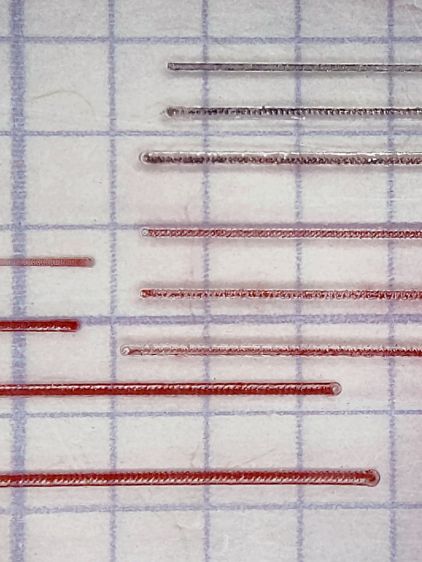
    Without much in the way of fixturing, a small V engraving bit cuts surprisingly nice hairlines:

    Hairline tests - V tool 4 kRPM 12 24 IPM - full crop
    Hairline tests – V tool 4 kRPM 12 24 IPM – full crop

    It’s an anonymous HSS bit similar to the fancy ones with “blue nano” or “titanium” coatings, which I’m sure have the same effectiveness as the “gold” coating on audio plugs and jacks.

    The tip is pretty close to the stated 0.1 mm. The included V angle looks like 22.5°, but the descriptions use the half angle, so it’s either a generous 10° or a scant 15°, take your pick.

    It’s turning at 4000 RPM in the Sherline spindle, which is much too slow for such a tiny cut. No coolant, nothing fancy.

    The lower left group ran at increasing depths from 0.0 to about 0.6 mm, with the deepest one looking surprisingly good.

    It’s all manual jogging at either 12 or 24 inch/min and, when you (well, I) count the swirls across those 100 mil grids, the spindle really is turning at 4 kRPM. Gotta love it when the numbers work out!

    These are obviously the best-looking hairlines yet, so I must tweak the GCMC source to do the right thing with the existing fixture.

  • Tek Circuit Computer: Sawed Hairline Fixture

    Tek Circuit Computer: Sawed Hairline Fixture

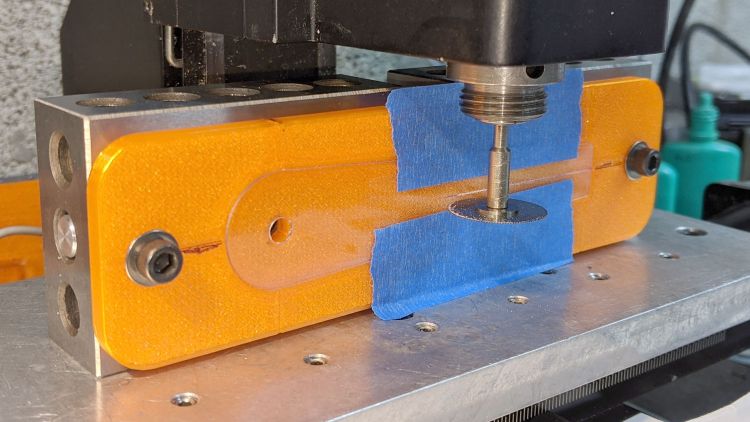
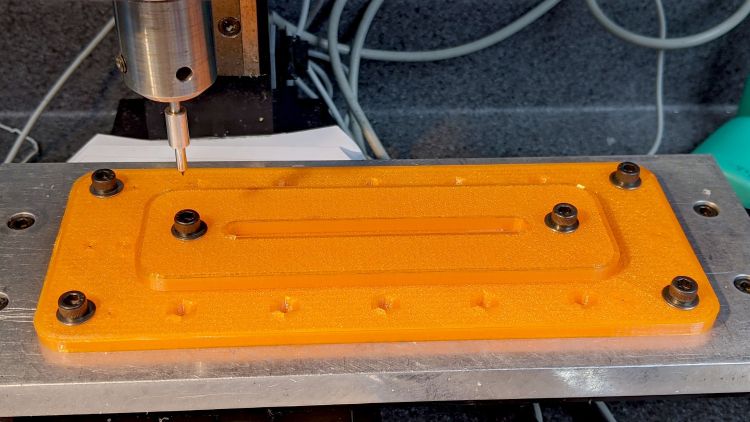
    This is a fixture to hold a cursor for an Homage Tektronix Circuit Computer while a tiny circular saw blade cuts a narrow flat-bottomed trench:

    Tek CC - sawed cursor - Sherline setup
    Tek CC – sawed cursor – Sherline setup

    Each of the 123 blocks is held to the Sherline tooling plate with a 10-32 SHCS in a little aluminum pin, with another threaded pin for the screw holding the fixture on the side. The minimal top clearance provided some of the motivation behind making those pins in the first place; there’s no room for the usual threaded stud sticking out of the block with a handful of washers under the nut.

    The fixture has locating slots (scribbled with black Sharpie) to touch off the spindle axis and the saw blade at the XZ origin at the pivot hole center. Touching off the saw blade on the cursor surface sets Y=0, although only a few teeth will go ting, so the saw must be spinning.

    I cut the first slot under manual control to a depth of 0.3 mm on a scrap cursor with a grotty engraved hairline:

    Tek CC - first sawed cursor - detail
    Tek CC – first sawed cursor – detail

    It looks better than I expected with some red lacquer crayon scribbled into it:

    Tek CC - first sawed cursor - vs scribed
    Tek CC – first sawed cursor – vs scribed

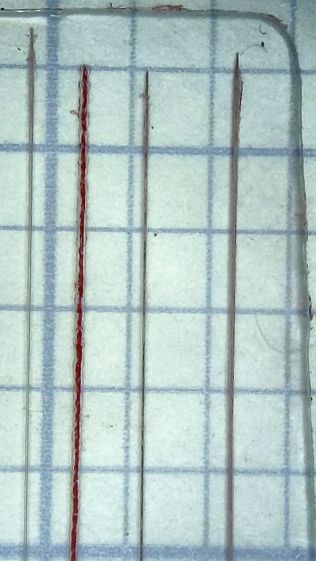
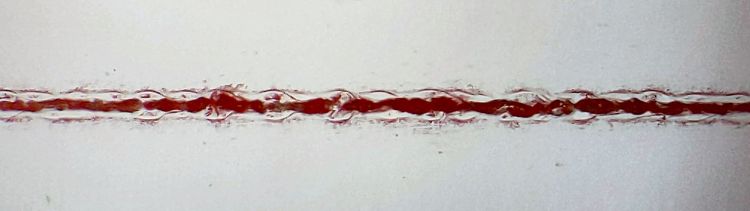
    A few variations of speed and depth seem inconclusive, although they look more consistent and much smoother than the diamond-drag engraved line with red fill:

    Tek CC - sawed cursor test - magnified
    Tek CC – sawed cursor test – magnified

    The saw produces a ramp at the entry and exit which I don’t like at all, but the cut is, overall, an improvement on the diamond point.

    The OpenSCAD source code as a GitHub Gist:

    // Sawing fixtures for Tek Circuit Computer cursor hairline
    // Ed Nisley KE4ZNU Jan 2021
    // Rotated 90° and screwed to 123 blocks for sawing
    Layout = "Show"; // [Show, Build, Cursor]
    Gap = 4.0;
    /* [Hidden] */
    ThreadThick = 0.25;
    ThreadWidth = 0.40;
    HoleWindage = 0.2;
    Protrusion = 0.1; // make holes end cleanly
    inch = 25.4;
    function IntegerMultiple(Size,Unit) = Unit * ceil(Size / Unit);
    module PolyCyl(Dia,Height,ForceSides=0) { // based on nophead's polyholes
    Sides = (ForceSides != 0) ? ForceSides : (ceil(Dia) + 2);
    FixDia = Dia / cos(180/Sides);
    cylinder(d=(FixDia + HoleWindage),h=Height,$fn=Sides);
    }
    //———————-
    // Dimensions
    CursorHubOD = 1.0*inch; // must match SVG hub OD
    CursorThick = 0.71; // including protective layers
    HairlineMin = 48.4188; // extent of hairline
    HairlineMax = 97.4250;
    HairlineDepth = 0.20;
    PocketDepth = 0.75*CursorThick; // half above surface for taping
    PocketClear = 0.25; // E-Z insertion clearance
    TableOC = [1.16*inch,1.16*inch]; // Sherline tooling plate grid
    BlockOC = [(9/16)*inch,(9/16)*inch]; // 123 block hole grid
    BlockOffset = [(3/8)*inch,(3/8)*inch]; // .. block edge to hole center
    ScrewClear = 5.0; // … screw clearance
    CursorOffset = [2*BlockOC.x,0,0]; // hub center relative to leftmost screw
    FixtureGrid = [5*TableOC.x,0,0]; // size in Table grid units
    Screws = [ // relative to leftmost screw
    [0,0,0], // on table grid
    CursorOffset, // on block grid
    [FixtureGrid.x,0,0] // on table grid
    ];
    echo(str("Screw centers: ",Screws));
    CornerRad = 10.0; // corner radius
    Fixture = [2*CornerRad + FixtureGrid.x,2*CornerRad + CursorHubOD,5.0];
    echo(str("Fixture plate: ",Fixture));
    //———————-
    // Import SVG of cursor outline
    // Requires our CursorHubOD to match actual cut outline
    // Hub center at origin
    module CursorSVG(t=CursorThick,ofs=0.0) {
    hr = CursorHubOD/2;
    translate([-hr,-hr,0])
    linear_extrude(height=t,convexity=3)
    offset(r=ofs)
    import(
    file="/mnt/bulkdata/Project Files/Tektronix Circuit Computer/Firmware/TekCC-Cursor-Mark.svg",
    center=false);
    }
    //———————-
    // Show-n-Tell cursor
    module Cursor() {
    difference() {
    CursorSVG(CursorThick,0.0);
    translate([0,0,-Protrusion])
    rotate(180/6)
    PolyCyl(ScrewClear,CursorThick + 2*Protrusion,6);
    }
    }
    //———————-
    // Sawing fixture for cursor hairline
    // Plate center at origin
    module Fixture() {
    difference() {
    hull() // basic plate shape
    for (i=[-1,1], j=[-1,1])
    translate([i*(Fixture.x/2 – CornerRad),j*(Fixture.y/2 – CornerRad),0])
    cylinder(r=CornerRad,h=Fixture.z,$fn=24);
    translate([0,0,Fixture.z – ThreadThick/2 + Protrusion/2]) // will be Z=0 index
    cube([2*Fixture.x,ThreadWidth,ThreadThick + Protrusion],center=true);
    translate(-FixtureGrid/2) {
    translate(CursorOffset + [0,0,Fixture.z – 2*PocketDepth])
    difference() {
    CursorSVG(2*PocketDepth + Protrusion,PocketClear);
    CursorSVG(PocketDepth + Protrusion,-PocketClear);
    }
    translate([CursorOffset.x,0,Fixture.z – ThreadThick/2 + Protrusion/2]) // will be front X=0 index
    cube([ThreadWidth,2*Fixture.y,ThreadThick + Protrusion],center=true);
    translate([CursorOffset.x,Fixture.y/2 – ThreadThick/2 + Protrusion/2,0]) // will be top X=0 index
    cube([ThreadWidth,ThreadThick + Protrusion,2*Fixture.z],center=true);
    translate([CursorOffset.x + HairlineMin,0,Fixture.z – ThreadThick/2 + Protrusion/2]) // hairline min
    cube([ThreadWidth,2*Fixture.y,ThreadThick + Protrusion],center=true);
    translate([CursorOffset.x + HairlineMax,0,Fixture.z – ThreadThick/2 + Protrusion/2]) // hairline min
    cube([ThreadWidth,2*Fixture.y,ThreadThick + Protrusion],center=true);
    /*
    # translate(CursorOffset + [0,0,Fixture.z – 2*ThreadThick]) { // alignment pips
    for (x=[-20.0,130.0], y=[-30.0,0.0,30.0])
    translate([x,y,0])
    cylinder(d=4*ThreadWidth,h=1,$fn=6);
    # for (x=[-30.0,130.0,150.0])
    translate([x,0,0])
    cylinder(d=4*ThreadWidth,h=1,$fn=6);
    */
    for (pt=Screws)
    translate(pt + [0,0,-Protrusion])
    rotate(180/6)
    PolyCyl(ScrewClear,Fixture.z + 2*Protrusion,6);
    }
    }
    }
    //———————-
    // Build it
    if (Layout == "Cursor") {
    Cursor();
    }
    if (Layout == "Show") {
    rotate([0*90,0,0]) {
    Fixture();
    color("Green",0.3)
    translate(-FixtureGrid/2 + CursorOffset + [0,0,Fixture.z + Gap])
    Cursor();
    }
    }
    if (Layout == "Build"){
    // rotate(90)
    Fixture();
    }
  • Tek Circuit Computer: Cursor Hairline

    Tek Circuit Computer: Cursor Hairline

    Given a machined cursor blank, clamp it into position:

    Tek CC Cursor - cursor hairline fixture
    Tek CC Cursor – cursor hairline fixture

    You don’t want to clamp the cursor directly to the Sherline tooling plate, because the diamond drag bit would pass over two or three of those 10-32 screw holes which would, by the conservation of perversity, leave visible defects. In hindsight, I should have put a recess for an aluminum plate in there.

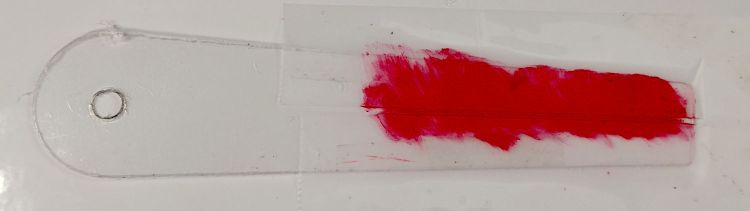
    After a single pass at Z=-4.0 mm, add two strips of tape to protect the adjoining surface and scribble it with red lacquer crayon:

    Tek CC Cursor - tape color fill
    Tek CC Cursor – tape color fill

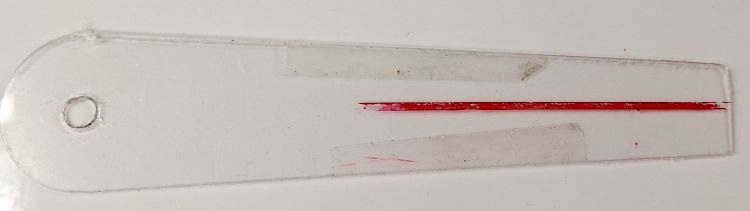
    Peel the tape off:

    Tek CC Cursor - tape removed
    Tek CC Cursor – tape removed

    Then wipe off the residue using a soft cloth wetted with denatured alcohol:

    Tek CC Cursor - red cursor detail
    Tek CC Cursor – red cursor detail

    That looks much like the previous efforts. I’d like a more uniform trench, but I don’t know how to get there from here.

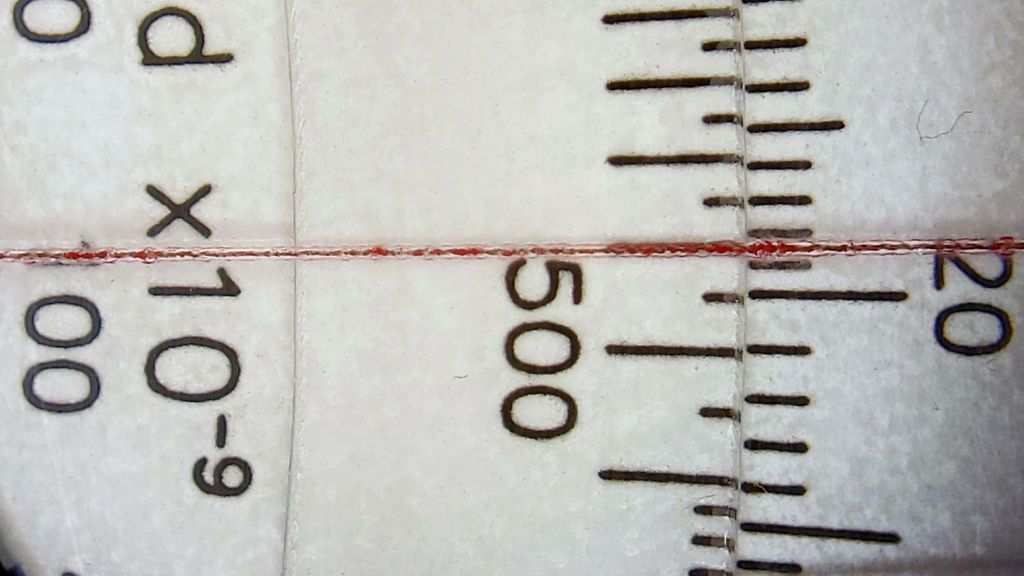
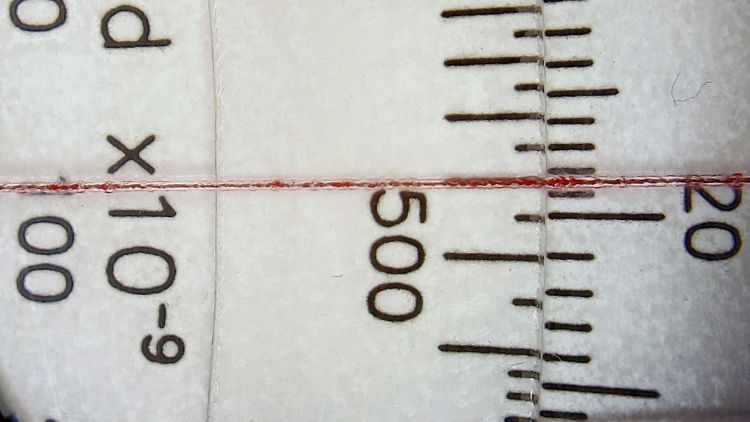
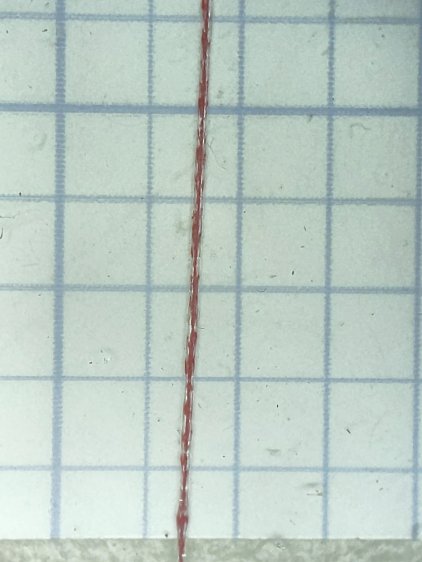
    In any event, the hairline looks pretty good against laser-printed scales:

    Tek CC Cursor - red cursor white laser decks - magnified
    Tek CC Cursor – red cursor white laser decks – magnified

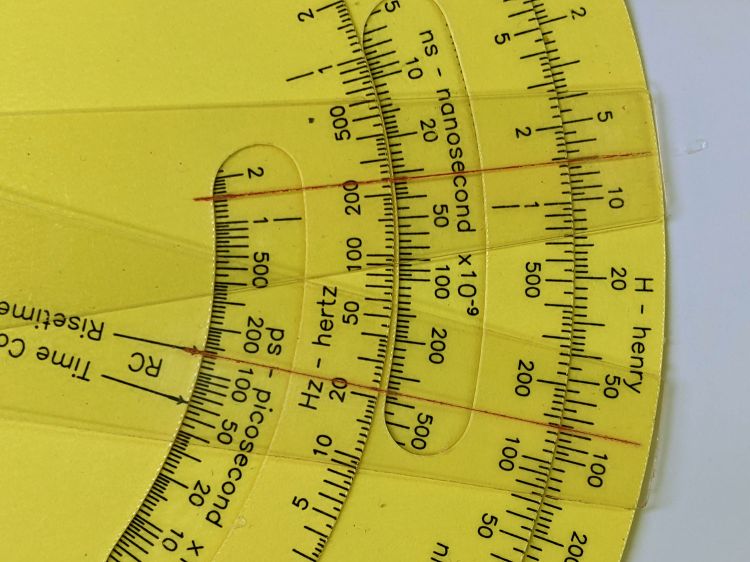
    The new cursor is the lower one lying atop a laser-printed Pickett-style Circuit Computer:

    Tek CC Cursor - red cursor yellow laser decks - overview
    Tek CC Cursor – red cursor yellow laser decks – overview

    Looks good enough to eat, as the saying goes …

  • Tek Circuit Computer: Cursor Milling Toolpath

    Tek Circuit Computer: Cursor Milling Toolpath

    Unlike the adhesive fixture, this setup requires a pause while milling the cursor outline to reclamp it from the front:

    Tek CC Cursor Fixture - outline rear clamp
    Tek CC Cursor Fixture – outline rear clamp

    The trick is applying the front clamp before releasing the rear clamp:

    Tek CC Cursor Fixture - outline both clamp
    Tek CC Cursor Fixture – outline both clamp

    Then continue the mission:

    Tek CC Cursor Fixture - outline front clamp
    Tek CC Cursor Fixture – outline front clamp

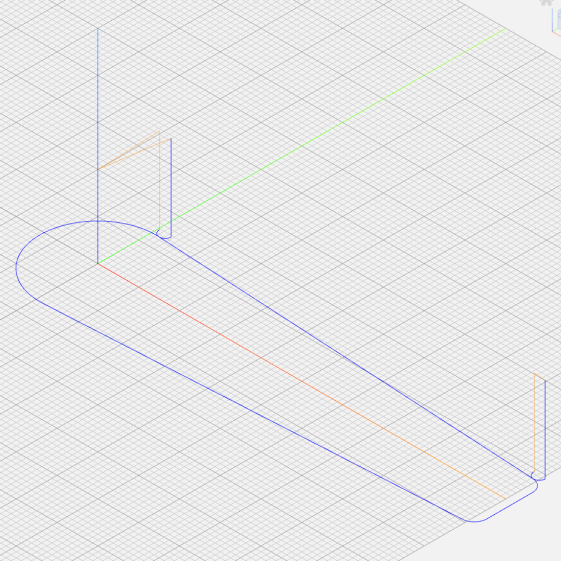
    Because the tool path includes cutter compensation, GCMC adds entry and exit arcs to ensure a smooth transition:

    Tek CC Cursor - Milling path
    Tek CC Cursor – Milling path

    The pix show a single cursor in the fixture while verifying the setup worked the way it should. Obviously, milling a stack of cursors eliminates a whole bunch of fiddling.

    The tweaked MillCursor function from the mostly otherwise unchanged GCMC code:

        comment("Clamp on rear half of cursor!");
    
        local cp = {p0};                                             // enter at hub tangent point
        cp += varc_ccw([0mm,-2*p0.y,-],-hr,0,0.2mm,5deg) + p0;       // arc to tangent at hub bottom
    
        cp += {[p1.x,-p1.y,-]};                                      // lower tip entry point
        cp += varc_ccw([p2.x-p1.x,-(p2.y-p1.y),-],CursorTipRadius,0,0.2mm,5deg) + [p1.x,-p1.y,-];  // arc to tip exit at p2
    
        cp += varc_ccw([p1.x-p2.x,p1.y-p2.y,-],CursorTipRadius,0,0.2mm,5deg) + p2;  // arc to tip exit at p1
    
        goto([-,-,CursorSafeZ]);
        goto([0,0,-]);
        feedrate(MillSpeed);
        tracepath_comp(cp,CutterOD/2,TPC_OLDZ + TPC_RIGHT + TPC_ARCIN + TPC_ARCOUT);
    
        comment("Clamp on front half of cursor!");
        pause();                                      // wait for reclamping
    
        p1.z = MillZ;                                //  ... set milling depth
        cp = {p1};
        cp += {p0};
                                                     // exit at hub tangent
        tracepath_comp(cp,CutterOD/2,TPC_OLDZ + TPC_RIGHT + TPC_ARCIN + TPC_ARCOUT);
    
    <<< snippage >>>
    
      goto([-,-,CursorSafeZ]);
      goto([0,0,-]);
    

    Next, scribing a nice hairline with the new fixture.

  • Tek Circuit Computer: 3D Printed Cursor Milling Fixture

    Tek Circuit Computer: 3D Printed Cursor Milling Fixture

    The original Tektronix Circuit Computer cursor was probably die-cut from a larger sheet carrying pre-printed hairlines:

    Tek CC - genuine - detail
    Tek CC – genuine – detail

    Machining a punch-and-die setup lies well beyond my capabilities, particularly given the ahem anticipated volume, so milling seems the only practical way to produce a few cursors.

    Attaching a cursor blank to a fixture with sticky tape showed that the general idea worked reasonably well:

    Tek CC - Cursor blank on fixture
    Tek CC – Cursor blank on fixture

    However, the tape didn’t have quite enough griptivity to hold the edges completely flat against milling forces (a downcut bit might have worked better) and I found myself chasing the cutter with a screwdriver to hold the cursor in place. Worse, the tape’s powerful attraction to swarf made it a single-use item.

    Some tinkering showed a single screw in the (pre-drilled) pivot hole, without adhesive underneath, lacked enough oomph to keep the far end of the cursor in place, which meant I had to think about how to hold it down with real clamps.

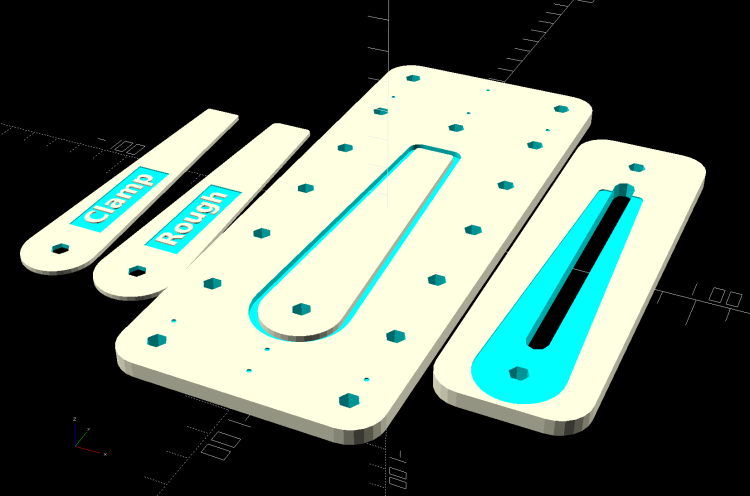
    Which, of course, meant conjuring a fixture from the vasty digital deep. The solid model includes the baseplate, two cutting templates, and a clamping fixture for engraving the cursor hairline:

    Cursor Fixture - build layout
    Cursor Fixture – build layout

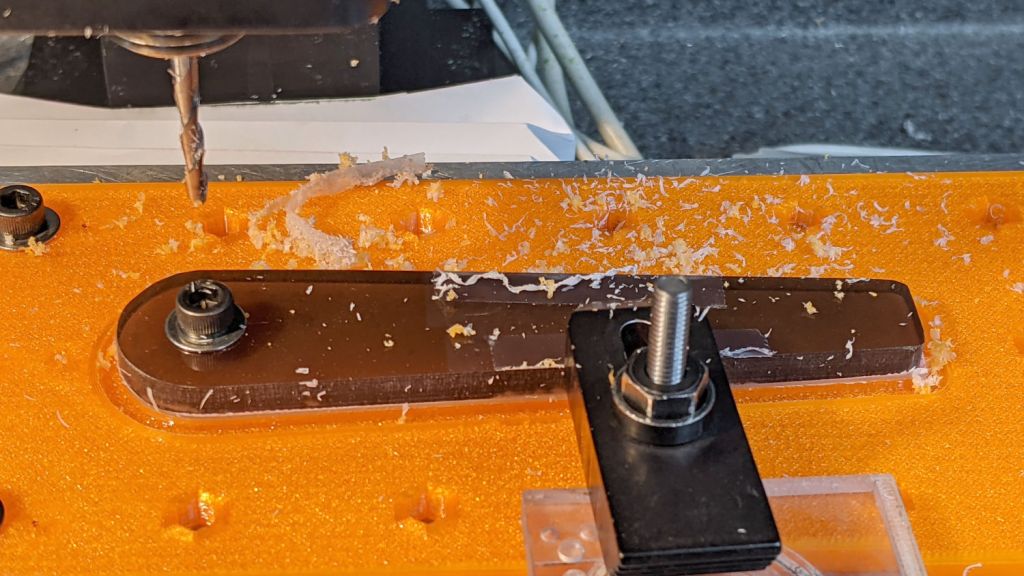
    The perimeter of the Clamp template on the far left is 0.5 mm inside the cursor perimeter. Needing only one Clamp, I could trace it on a piece of acrylic, bandsaw it pretty close, introduce it to Mr Belt Sander for final shaping, and finally drill the hole:

    Tek CC Cursor Fixture - clamp drilling
    Tek CC Cursor Fixture – clamp drilling

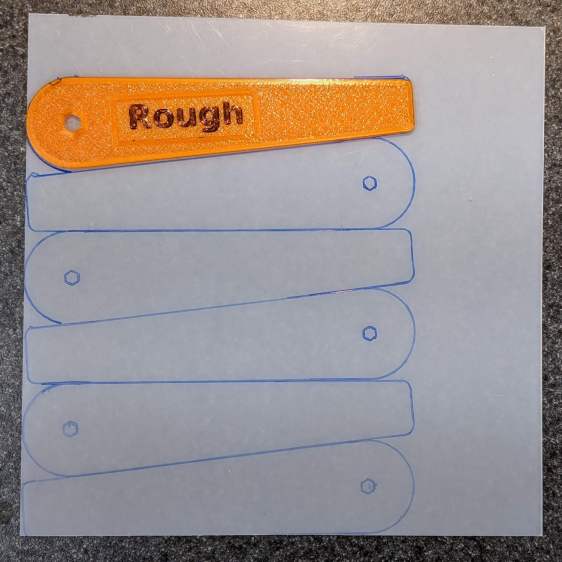
    The Rough template is 1.0 mm outside the cursor perimeter, so I can trace those outlines on a PET sheet:

    Tek CC Cursor Fixture - Rough template layout
    Tek CC Cursor Fixture – Rough template layout

    Then cut the patterns with a scissors, stack ’em up, and tape the edges to keep them aligned:

    TekCC Cursor Fixture - Rough template
    TekCC Cursor Fixture – Rough template

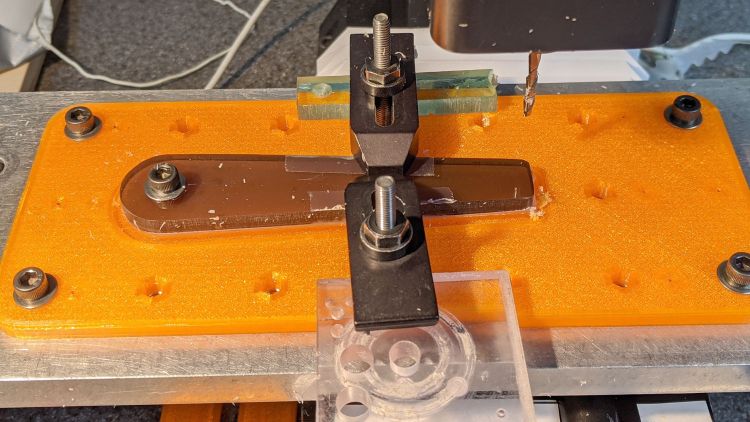
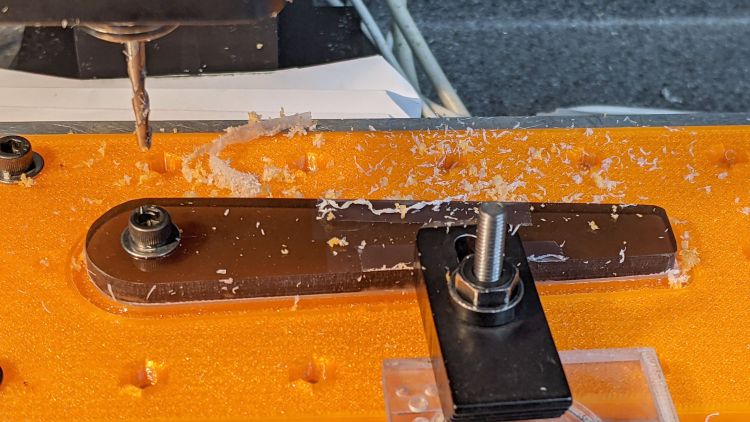
    Align the stack by feel, apply the Clamp to hold them in place, and secure the stack with a Sherline clamp:

    Tek CC Cursor Fixture - outline rear clamp
    Tek CC Cursor Fixture – outline rear clamp

    The alert reader will note it’s no longer possible to machine the entire perimeter in one pass; more on that in a while.

    The baseplate pretty much fills the entire Sherline tooling plate. It sports several alignment pips at known offsets from the origin at the center of the pivot hole:

    Tek CC Cursor Fixture - touch-off point
    Tek CC Cursor Fixture – touch-off point

    Dropping the laser alignment dot into a convenient pip, then touching off X and Y to the known offset sets the origin without measuring anything. Four screws in the corners align the plate well enough to not worry about angular tweakage.

    The OpenSCAD source code as a GitHub Gist:

    // Machining fixtures for Tek Circuit Computer cursor
    // Ed Nisley KE4ZNU Jan 2021
    Layout = "Show"; // [Show, Build, Cursor, Clamp, Rough, Engrave]
    /* [Hidden] */
    ThreadThick = 0.25;
    ThreadWidth = 0.40;
    HoleWindage = 0.2;
    Protrusion = 0.1; // make holes end cleanly
    inch = 25.4;
    function IntegerMultiple(Size,Unit) = Unit * ceil(Size / Unit);
    module PolyCyl(Dia,Height,ForceSides=0) { // based on nophead's polyholes
    Sides = (ForceSides != 0) ? ForceSides : (ceil(Dia) + 2);
    FixDia = Dia / cos(180/Sides);
    cylinder(d=(FixDia + HoleWindage),h=Height,$fn=Sides);
    }
    //———————-
    // Dimensions
    CursorHubOD = 1.0*inch; // original Tek CC was hard inch!
    CursorTipWidth = (9.0/16.0)*inch;
    CursorTipRadius = (1.0/16.0)*inch;
    CursorThick = 0.5; // plastic sheet thickness
    CutterOD = 3.175; // milling cutter dia
    CutterDepth = 2.0; // … depth of cut
    CutterLip = 0.5; // … clearance under edge
    ScribeOD = 3.0; // diamond scribe shank
    StudOC = [1.16*inch,1.16*inch]; // Sherline tooling plate grid
    StudClear = 5.0; // … screw clearance
    StudWasher = 11.0; // … washer OD
    CursorOffset = [-2*StudOC.x,0,0]; // hub center relative to fixture center
    // must have even multiples of stud spacing to put studs along centerlines
    BasePlateStuds = [6*StudOC.x,2*StudOC.y]; // fixture screws
    echo(str("Stud spacing: ",StudOC));
    CornerRad = 10.0; // corner radius
    BasePlate = [2*StudWasher + BasePlateStuds.x,2*StudWasher + BasePlateStuds.y,5.0];
    echo(str("Base Plate: ",BasePlate));
    EngravePlate = [5*StudOC.x,1.5*StudOC.y,BasePlate.z];
    echo(str("Engrave Plate: ",EngravePlate));
    TemplateThick = 6*ThreadThick;
    LegendThick = 2*ThreadThick;
    Gap = 3.0;
    //———————-
    // Import SVG of cursor outline
    // Requires our hub OD to match reality
    // Hub center at origin
    module CursorSVG(t=CursorThick,od=0) {
    hr = CursorHubOD/2;
    translate([-hr,-hr,0])
    linear_extrude(height=t,convexity=3)
    offset(r=od/2)
    import(file="/mnt/bulkdata/Project Files/Tektronix Circuit Computer/Firmware/TekCC-Cursor-Mark.svg",center=false);
    }
    //———————-
    // Milling fixture for cursor blanks
    module Fixture() {
    difference() {
    hull() // basic plate shape
    for (i=[-1,1], j=[-1,1])
    translate([i*(BasePlate.x/2 – CornerRad),j*(BasePlate.y/2 – CornerRad),0])
    cylinder(r=CornerRad,h=BasePlate.z,$fn=24);
    translate(CursorOffset + [0,0,BasePlate.z – CutterDepth])
    difference() {
    CursorSVG(CutterDepth + Protrusion,1.5*CutterOD);
    CursorSVG(CutterDepth + Protrusion,-CutterLip);
    }
    translate(CursorOffset + [0,0,BasePlate.z – 2*ThreadThick]) { // alignment pips
    for (x=[-20.0,130.0], y=[-30.0,0.0,30.0])
    translate([x,y,0])
    cylinder(d=4*ThreadWidth,h=1,$fn=6);
    for (x=[-30.0,130.0,150.0])
    translate([x,0,0])
    cylinder(d=4*ThreadWidth,h=1,$fn=6);
    }
    for (i=[-1,1], j=[-1,1]) // mounting stud holes
    translate([i*BasePlateStuds.x/2,j*BasePlateStuds.y/2,-Protrusion])
    rotate(180/6)
    PolyCyl(StudClear,BasePlate.z + 2*Protrusion,6);
    translate(CursorOffset + [0,0,-Protrusion]) // hub clamp hole
    rotate(180/6)
    PolyCyl(StudClear,BasePlate.z + 2*Protrusion,6);
    translate([2*StudOC.x,0,-Protrusion]) // tip clamp hole
    rotate(180/6)
    PolyCyl(StudClear,BasePlate.z + 2*Protrusion,6);
    for (i=[-2:2], j=[-1,1]) // side clamp holes
    translate([i*StudOC.x,j*StudOC.y,-Protrusion])
    rotate(180/6)
    PolyCyl(StudClear,BasePlate.z + 2*Protrusion,6);
    }
    }
    //———————-
    // Show-n-Tell cursor
    module Cursor() {
    difference() {
    CursorSVG(CursorThick,0.0);
    translate([0,0,-Protrusion])
    rotate(180/6)
    PolyCyl(StudClear,TemplateThick + 2*Protrusion,6);
    }
    }
    //———————-
    // Template for rough-cutting blanks
    module Rough() {
    bb = [40,12,LegendThick];
    difference() {
    CursorSVG(TemplateThick,1.0);
    translate([0,0,-Protrusion])
    rotate(180/6)
    PolyCyl(StudClear,TemplateThick + 2*Protrusion,6);
    difference() {
    translate([bb.x/2 + CursorHubOD/2,0,TemplateThick – bb.z/2 + Protrusion])
    cube(bb + [0,0,Protrusion],center=true);
    translate([bb.x/2 + CursorHubOD/2,0,TemplateThick – bb.z])
    linear_extrude(height=bb.z,convexity=10)
    text(text="Rough",size=7,spacing=1.00,font="DejaVu Sans:style:Bold",halign="center",valign="center");
    }
    }
    }
    //———————-
    // Template for aluminium clamping plate
    module Clamp() {
    bb = [40,12,LegendThick];
    difference() {
    CursorSVG(TemplateThick,-1.0);
    translate([0,0,-Protrusion])
    rotate(180/6)
    PolyCyl(StudClear,TemplateThick + 2*Protrusion,6);
    difference() {
    translate([bb.x/2 + CursorHubOD/2,0,TemplateThick – bb.z/2 + Protrusion])
    cube(bb + [0,0,Protrusion],center=true);
    translate([bb.x/2 + CursorHubOD/2,0,TemplateThick – bb.z])
    linear_extrude(height=bb.z,convexity=10)
    text(text="Clamp",size=7,spacing=1.00,font="DejaVu Sans:style:Bold",halign="center",valign="center");
    }
    }
    }
    //———————-
    // Engraving clamp
    module Engrave() {
    difference() {
    hull() // clamp outline
    for (i=[-1,1], j=[-1,1])
    translate([i*(EngravePlate.x/2 – CornerRad),j*(EngravePlate.y/2 – CornerRad),0])
    cylinder(r=CornerRad,h=EngravePlate.z,$fn=24);
    translate(CursorOffset + [0,0,-Protrusion])
    CursorSVG(CursorThick + Protrusion,0.5); // pocket for blank cursor
    translate(CursorOffset + [0,0,-Protrusion])
    rotate(180/6)
    PolyCyl(StudClear,EngravePlate.z + 2*Protrusion,6);
    translate([2*StudOC.x,0,-Protrusion])
    rotate(180/6)
    PolyCyl(StudClear,EngravePlate.z + 2*Protrusion,6);
    hull() {
    for (i=[-1,1])
    translate([i*1.5*StudOC.x,0,-Protrusion])
    PolyCyl(2*ScribeOD,EngravePlate.z + 2*Protrusion,8);
    }
    }
    }
    //———————-
    // Build it
    if (Layout == "Cursor") {
    Cursor();
    }
    if (Layout == "Clamp") {
    Clamp();
    }
    if (Layout == "Rough") {
    Rough();
    }
    if (Layout == "Engrave") {
    Engrave();
    }
    if (Layout == "Show") {
    Fixture();
    color("Green",0.3)
    translate(CursorOffset + [0,0,BasePlate.z + Protrusion])
    Cursor();
    color("Orange")
    translate(CursorOffset + [0,0,BasePlate.z + 10])
    Rough();
    color("Brown")
    translate(CursorOffset + [0,0,BasePlate.z + 20])
    Clamp();
    color("Gold")
    translate(0*CursorOffset + [0,0,BasePlate.z + 40])
    Engrave();
    }
    if (Layout == "Build"){
    rotate(90) {
    Fixture();
    translate([0,-((BasePlate.y + EngravePlate.y)/2 + Gap),EngravePlate.z])
    rotate([180,0,0])
    Engrave();
    translate(CursorOffset + [0,(BasePlate.y + CursorHubOD)/2 + Gap,0])
    Rough();
    translate(CursorOffset + [0,(BasePlate.y + 3*CursorHubOD)/2 + 2*Gap,0])
    Clamp();
    }
    }

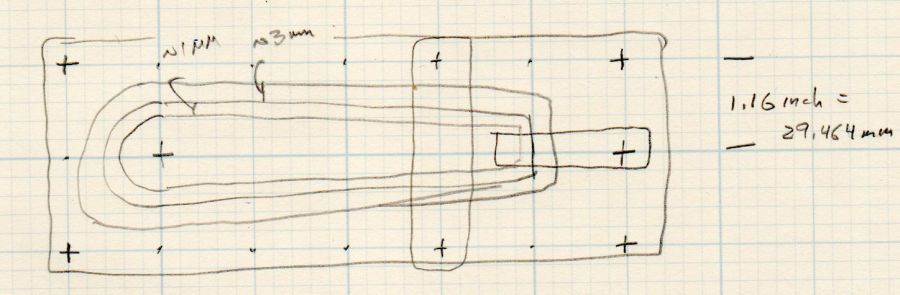
    The original doodle with some notions and dimensions that didn’t survive contact with reality:

    Cursor Fixture doodle
    Cursor Fixture doodle

    I have no idea why the Sherline tooling plate has a 10-32 screw grid on 1.16 inch = 29.46 mm centers, but there they are.

  • Homage Tektronix Circuit Computer: Laser Printed Scales

    Homage Tektronix Circuit Computer: Laser Printed Scales

    Given the proper command-line options, GCMC can produce an SVG image and, after some Bash fiddling and a bank shot off Inkscape, the same GCMC program I’ve been using to plot Homage Tektronix Circuit Computer decks can produce laser-printed decks:

    Tek CC - laser - detail
    Tek CC – laser – detail

    Pen-plotting on yellow Astrobrights paper showed how much ink bleeds on slightly porous paper, but laser-printing the same paper produces crisp lines:

    Tek CC - laser - yellow detail
    Tek CC – laser – yellow detail

    Laser printing definitely feels like cheating, but, for comparison, here’s a Genuine Tektronix Circuit Computer:

    Tek CC - genuine - detail
    Tek CC – genuine – detail

    Plotting the decks on hard mode was definitely a learning experience!

    Obviously, my cursor engraving hand remains weak.

  • Tek Circuit Computer: Cursor Hairline Scraping

    Tek Circuit Computer: Cursor Hairline Scraping

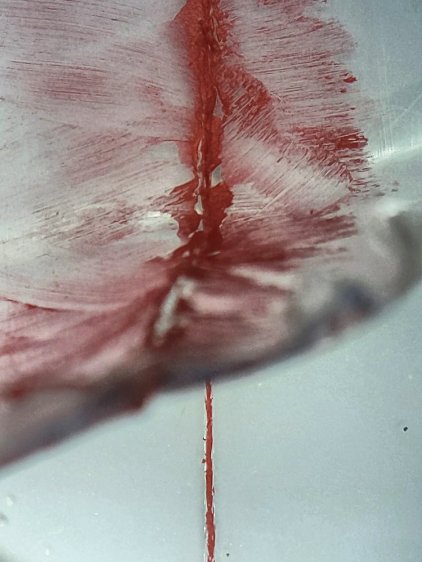
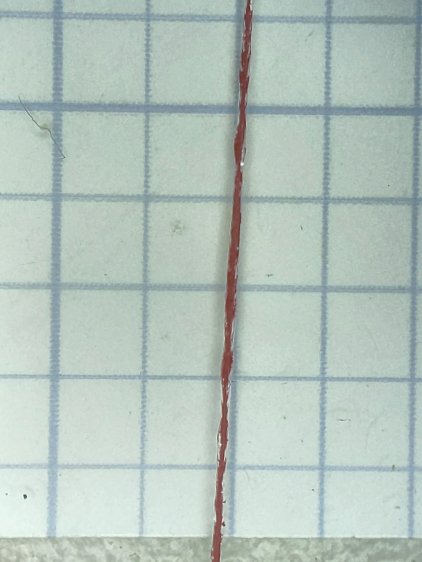
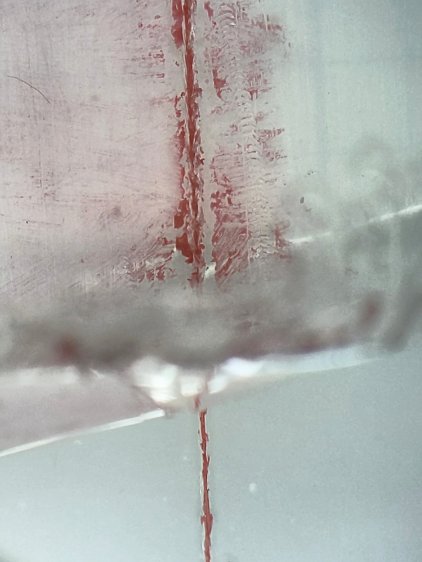
    Engraving a PETG sheet with a diamond drag engraver on the Sherline and filling the scratch produces a good-looking hairline, but there’s a tradeoff between having the protective sheet pull the paint out of the scratch and having the crayon scuff the unprotected surface. This time around, I scribbled the crayon through the protective film, let it cure for a few days, then scraped the surface to level the paint and see what happens.

    First, an unscraped cursor:

    Tek CC - Cursor red lacquer - plain - overview
    Tek CC – Cursor red lacquer – plain – overview

    Peeling the transparent protective film:

    Tek CC - Cursor red lacquer - plain - partial peel
    Tek CC – Cursor red lacquer – plain – partial peel

    The hairline is solidly filled:

    Tek CC - Cursor red lacquer - plain - peeled
    Tek CC – Cursor red lacquer – plain – peeled

    Scribbling another cursor the same way, then scraping the protective film to flatten the shredded edges:

    Tek CC - Cursor red lacquer - scraped - overview
    Tek CC – Cursor red lacquer – scraped – overview

    The hairline remains filled, but not as completely:

    Tek CC - Cursor red lacquer - scraped - partial peel
    Tek CC – Cursor red lacquer – scraped – partial peel

    A closer look:

    Tek CC - Cursor red lacquer - scraped - peeled
    Tek CC – Cursor red lacquer – scraped – peeled

    Scraping the crayon off the film removes a substantial amount of paint from the hairline, but, on the upside, the protective film does exactly what it says on the box and the PETG surface remains pristine.

    Both hairlines are, at least eyeballometrically, Just Fine™ for their intended purpose.