The Smell of Molten Projects in the Morning

Ed Nisley's Blog: Shop notes, electronics, firmware, machinery, 3D printing, laser cuttery, and curiosities. Contents: 100% human thinking, 0% AI slop.

Tag: Sherline

Sherline CNC mill

  • Tek Circuit Computer: Cursor Milling Toolpath

    Tek Circuit Computer: Cursor Milling Toolpath

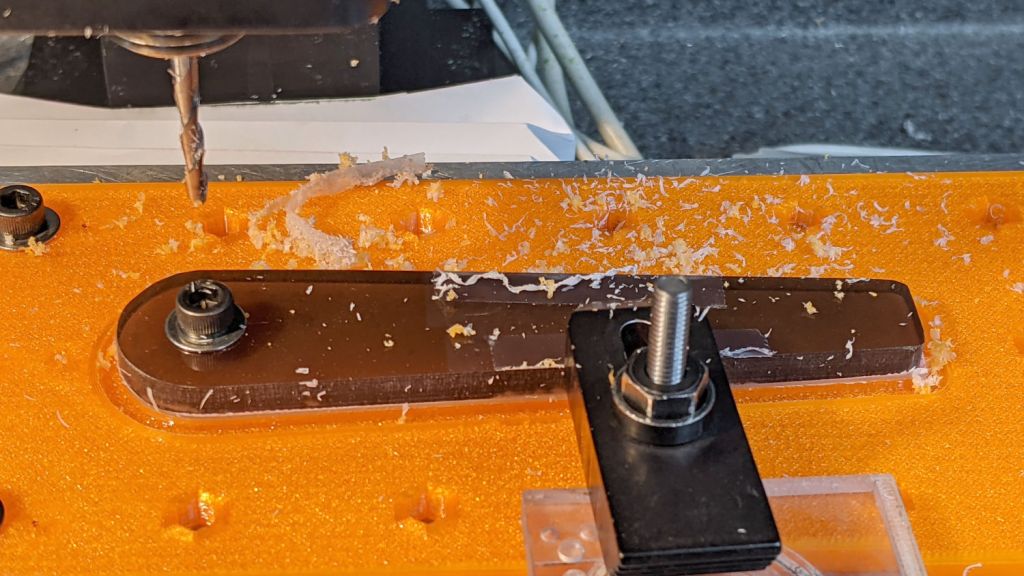
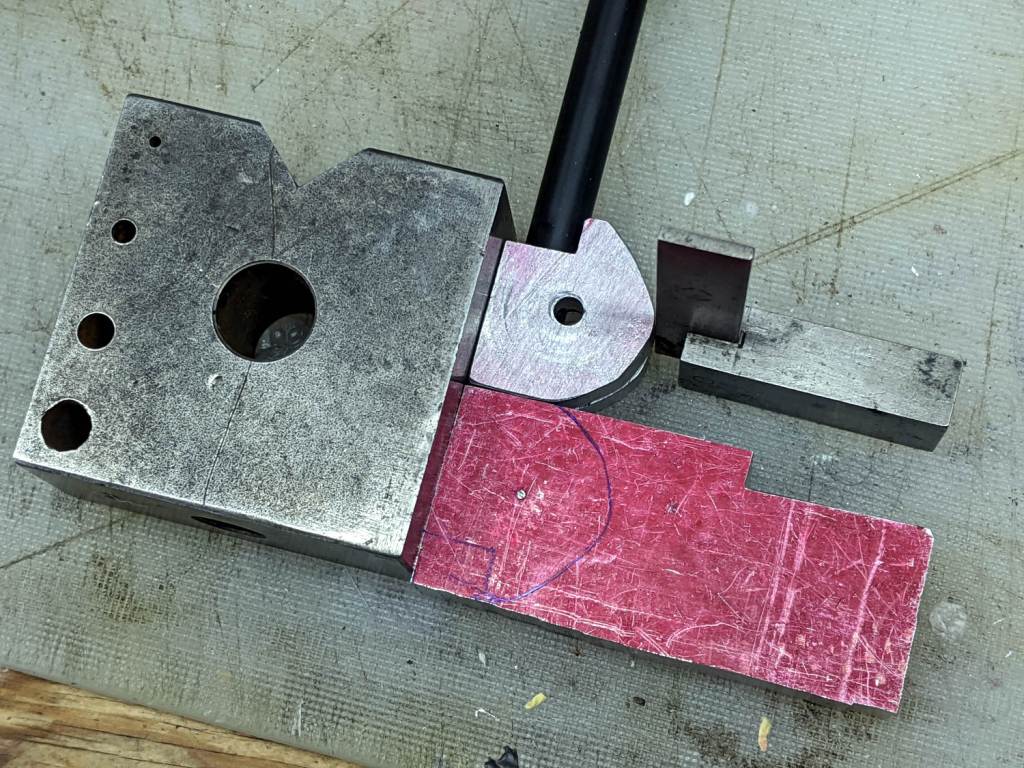
    Unlike the adhesive fixture, this setup requires a pause while milling the cursor outline to reclamp it from the front:

    Tek CC Cursor Fixture - outline rear clamp
    Tek CC Cursor Fixture – outline rear clamp

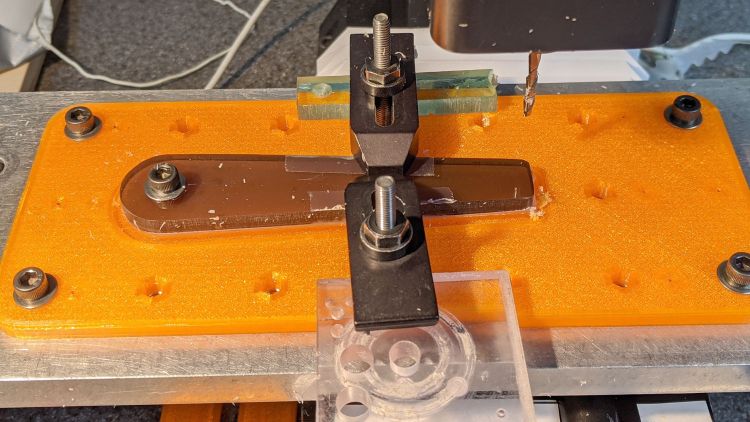
    The trick is applying the front clamp before releasing the rear clamp:

    Tek CC Cursor Fixture - outline both clamp
    Tek CC Cursor Fixture – outline both clamp

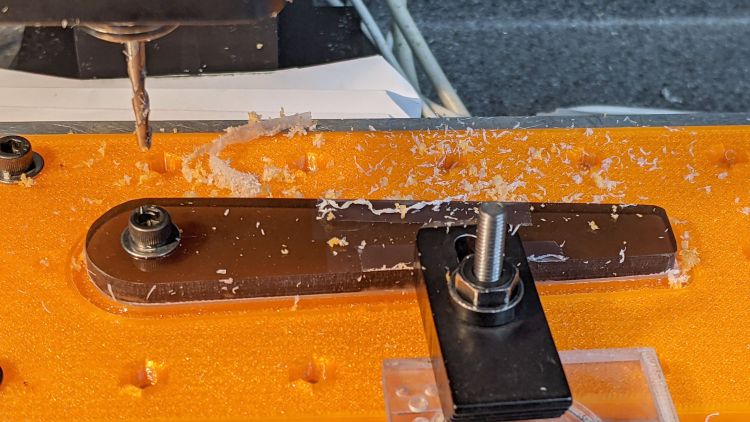
    Then continue the mission:

    Tek CC Cursor Fixture - outline front clamp
    Tek CC Cursor Fixture – outline front clamp

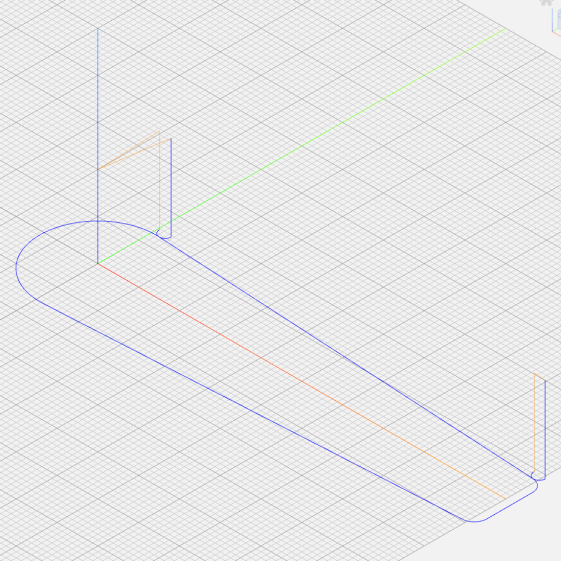
    Because the tool path includes cutter compensation, GCMC adds entry and exit arcs to ensure a smooth transition:

    Tek CC Cursor - Milling path
    Tek CC Cursor – Milling path

    The pix show a single cursor in the fixture while verifying the setup worked the way it should. Obviously, milling a stack of cursors eliminates a whole bunch of fiddling.

    The tweaked MillCursor function from the mostly otherwise unchanged GCMC code:

        comment("Clamp on rear half of cursor!");
    
        local cp = {p0};                                             // enter at hub tangent point
        cp += varc_ccw([0mm,-2*p0.y,-],-hr,0,0.2mm,5deg) + p0;       // arc to tangent at hub bottom
    
        cp += {[p1.x,-p1.y,-]};                                      // lower tip entry point
        cp += varc_ccw([p2.x-p1.x,-(p2.y-p1.y),-],CursorTipRadius,0,0.2mm,5deg) + [p1.x,-p1.y,-];  // arc to tip exit at p2
    
        cp += varc_ccw([p1.x-p2.x,p1.y-p2.y,-],CursorTipRadius,0,0.2mm,5deg) + p2;  // arc to tip exit at p1
    
        goto([-,-,CursorSafeZ]);
        goto([0,0,-]);
        feedrate(MillSpeed);
        tracepath_comp(cp,CutterOD/2,TPC_OLDZ + TPC_RIGHT + TPC_ARCIN + TPC_ARCOUT);
    
        comment("Clamp on front half of cursor!");
        pause();                                      // wait for reclamping
    
        p1.z = MillZ;                                //  ... set milling depth
        cp = {p1};
        cp += {p0};
                                                     // exit at hub tangent
        tracepath_comp(cp,CutterOD/2,TPC_OLDZ + TPC_RIGHT + TPC_ARCIN + TPC_ARCOUT);
    
    <<< snippage >>>
    
      goto([-,-,CursorSafeZ]);
      goto([0,0,-]);
    

    Next, scribing a nice hairline with the new fixture.

  • Tek Circuit Computer: 3D Printed Cursor Milling Fixture

    Tek Circuit Computer: 3D Printed Cursor Milling Fixture

    The original Tektronix Circuit Computer cursor was probably die-cut from a larger sheet carrying pre-printed hairlines:

    Tek CC - genuine - detail
    Tek CC – genuine – detail

    Machining a punch-and-die setup lies well beyond my capabilities, particularly given the ahem anticipated volume, so milling seems the only practical way to produce a few cursors.

    Attaching a cursor blank to a fixture with sticky tape showed that the general idea worked reasonably well:

    Tek CC - Cursor blank on fixture
    Tek CC – Cursor blank on fixture

    However, the tape didn’t have quite enough griptivity to hold the edges completely flat against milling forces (a downcut bit might have worked better) and I found myself chasing the cutter with a screwdriver to hold the cursor in place. Worse, the tape’s powerful attraction to swarf made it a single-use item.

    Some tinkering showed a single screw in the (pre-drilled) pivot hole, without adhesive underneath, lacked enough oomph to keep the far end of the cursor in place, which meant I had to think about how to hold it down with real clamps.

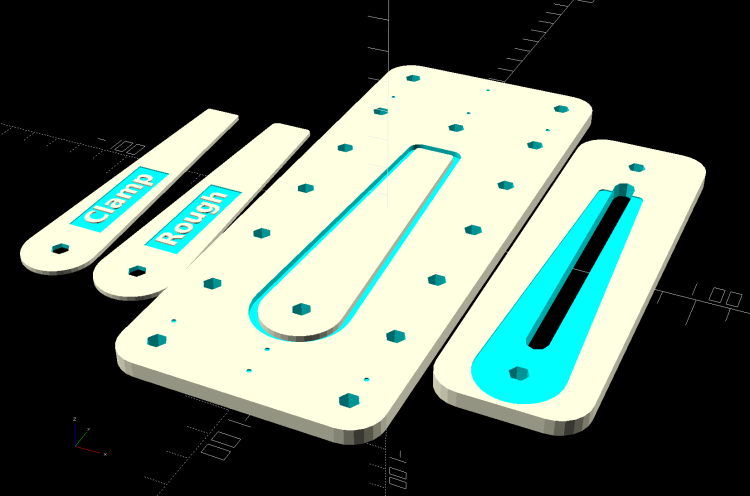
    Which, of course, meant conjuring a fixture from the vasty digital deep. The solid model includes the baseplate, two cutting templates, and a clamping fixture for engraving the cursor hairline:

    Cursor Fixture - build layout
    Cursor Fixture – build layout

    The perimeter of the Clamp template on the far left is 0.5 mm inside the cursor perimeter. Needing only one Clamp, I could trace it on a piece of acrylic, bandsaw it pretty close, introduce it to Mr Belt Sander for final shaping, and finally drill the hole:

    Tek CC Cursor Fixture - clamp drilling
    Tek CC Cursor Fixture – clamp drilling

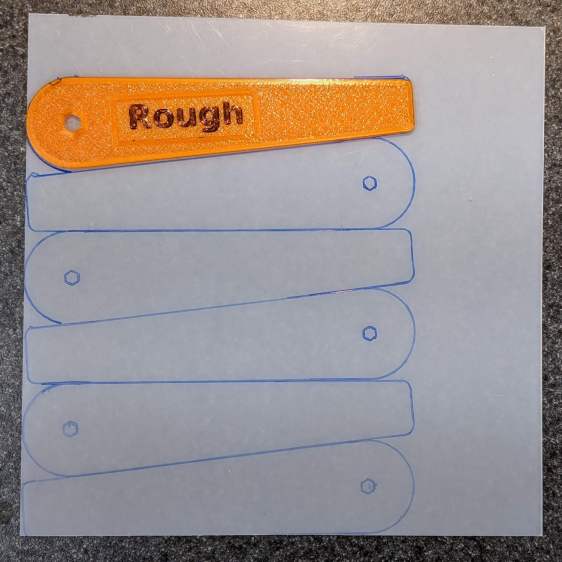
    The Rough template is 1.0 mm outside the cursor perimeter, so I can trace those outlines on a PET sheet:

    Tek CC Cursor Fixture - Rough template layout
    Tek CC Cursor Fixture – Rough template layout

    Then cut the patterns with a scissors, stack ’em up, and tape the edges to keep them aligned:

    TekCC Cursor Fixture - Rough template
    TekCC Cursor Fixture – Rough template

    Align the stack by feel, apply the Clamp to hold them in place, and secure the stack with a Sherline clamp:

    Tek CC Cursor Fixture - outline rear clamp
    Tek CC Cursor Fixture – outline rear clamp

    The alert reader will note it’s no longer possible to machine the entire perimeter in one pass; more on that in a while.

    The baseplate pretty much fills the entire Sherline tooling plate. It sports several alignment pips at known offsets from the origin at the center of the pivot hole:

    Tek CC Cursor Fixture - touch-off point
    Tek CC Cursor Fixture – touch-off point

    Dropping the laser alignment dot into a convenient pip, then touching off X and Y to the known offset sets the origin without measuring anything. Four screws in the corners align the plate well enough to not worry about angular tweakage.

    The OpenSCAD source code as a GitHub Gist:

    // Machining fixtures for Tek Circuit Computer cursor
    // Ed Nisley KE4ZNU Jan 2021
    Layout = "Show"; // [Show, Build, Cursor, Clamp, Rough, Engrave]
    /* [Hidden] */
    ThreadThick = 0.25;
    ThreadWidth = 0.40;
    HoleWindage = 0.2;
    Protrusion = 0.1; // make holes end cleanly
    inch = 25.4;
    function IntegerMultiple(Size,Unit) = Unit * ceil(Size / Unit);
    module PolyCyl(Dia,Height,ForceSides=0) { // based on nophead's polyholes
    Sides = (ForceSides != 0) ? ForceSides : (ceil(Dia) + 2);
    FixDia = Dia / cos(180/Sides);
    cylinder(d=(FixDia + HoleWindage),h=Height,$fn=Sides);
    }
    //———————-
    // Dimensions
    CursorHubOD = 1.0*inch; // original Tek CC was hard inch!
    CursorTipWidth = (9.0/16.0)*inch;
    CursorTipRadius = (1.0/16.0)*inch;
    CursorThick = 0.5; // plastic sheet thickness
    CutterOD = 3.175; // milling cutter dia
    CutterDepth = 2.0; // … depth of cut
    CutterLip = 0.5; // … clearance under edge
    ScribeOD = 3.0; // diamond scribe shank
    StudOC = [1.16*inch,1.16*inch]; // Sherline tooling plate grid
    StudClear = 5.0; // … screw clearance
    StudWasher = 11.0; // … washer OD
    CursorOffset = [-2*StudOC.x,0,0]; // hub center relative to fixture center
    // must have even multiples of stud spacing to put studs along centerlines
    BasePlateStuds = [6*StudOC.x,2*StudOC.y]; // fixture screws
    echo(str("Stud spacing: ",StudOC));
    CornerRad = 10.0; // corner radius
    BasePlate = [2*StudWasher + BasePlateStuds.x,2*StudWasher + BasePlateStuds.y,5.0];
    echo(str("Base Plate: ",BasePlate));
    EngravePlate = [5*StudOC.x,1.5*StudOC.y,BasePlate.z];
    echo(str("Engrave Plate: ",EngravePlate));
    TemplateThick = 6*ThreadThick;
    LegendThick = 2*ThreadThick;
    Gap = 3.0;
    //———————-
    // Import SVG of cursor outline
    // Requires our hub OD to match reality
    // Hub center at origin
    module CursorSVG(t=CursorThick,od=0) {
    hr = CursorHubOD/2;
    translate([-hr,-hr,0])
    linear_extrude(height=t,convexity=3)
    offset(r=od/2)
    import(file="/mnt/bulkdata/Project Files/Tektronix Circuit Computer/Firmware/TekCC-Cursor-Mark.svg",center=false);
    }
    //———————-
    // Milling fixture for cursor blanks
    module Fixture() {
    difference() {
    hull() // basic plate shape
    for (i=[-1,1], j=[-1,1])
    translate([i*(BasePlate.x/2 – CornerRad),j*(BasePlate.y/2 – CornerRad),0])
    cylinder(r=CornerRad,h=BasePlate.z,$fn=24);
    translate(CursorOffset + [0,0,BasePlate.z – CutterDepth])
    difference() {
    CursorSVG(CutterDepth + Protrusion,1.5*CutterOD);
    CursorSVG(CutterDepth + Protrusion,-CutterLip);
    }
    translate(CursorOffset + [0,0,BasePlate.z – 2*ThreadThick]) { // alignment pips
    for (x=[-20.0,130.0], y=[-30.0,0.0,30.0])
    translate([x,y,0])
    cylinder(d=4*ThreadWidth,h=1,$fn=6);
    for (x=[-30.0,130.0,150.0])
    translate([x,0,0])
    cylinder(d=4*ThreadWidth,h=1,$fn=6);
    }
    for (i=[-1,1], j=[-1,1]) // mounting stud holes
    translate([i*BasePlateStuds.x/2,j*BasePlateStuds.y/2,-Protrusion])
    rotate(180/6)
    PolyCyl(StudClear,BasePlate.z + 2*Protrusion,6);
    translate(CursorOffset + [0,0,-Protrusion]) // hub clamp hole
    rotate(180/6)
    PolyCyl(StudClear,BasePlate.z + 2*Protrusion,6);
    translate([2*StudOC.x,0,-Protrusion]) // tip clamp hole
    rotate(180/6)
    PolyCyl(StudClear,BasePlate.z + 2*Protrusion,6);
    for (i=[-2:2], j=[-1,1]) // side clamp holes
    translate([i*StudOC.x,j*StudOC.y,-Protrusion])
    rotate(180/6)
    PolyCyl(StudClear,BasePlate.z + 2*Protrusion,6);
    }
    }
    //———————-
    // Show-n-Tell cursor
    module Cursor() {
    difference() {
    CursorSVG(CursorThick,0.0);
    translate([0,0,-Protrusion])
    rotate(180/6)
    PolyCyl(StudClear,TemplateThick + 2*Protrusion,6);
    }
    }
    //———————-
    // Template for rough-cutting blanks
    module Rough() {
    bb = [40,12,LegendThick];
    difference() {
    CursorSVG(TemplateThick,1.0);
    translate([0,0,-Protrusion])
    rotate(180/6)
    PolyCyl(StudClear,TemplateThick + 2*Protrusion,6);
    difference() {
    translate([bb.x/2 + CursorHubOD/2,0,TemplateThick – bb.z/2 + Protrusion])
    cube(bb + [0,0,Protrusion],center=true);
    translate([bb.x/2 + CursorHubOD/2,0,TemplateThick – bb.z])
    linear_extrude(height=bb.z,convexity=10)
    text(text="Rough",size=7,spacing=1.00,font="DejaVu Sans:style:Bold",halign="center",valign="center");
    }
    }
    }
    //———————-
    // Template for aluminium clamping plate
    module Clamp() {
    bb = [40,12,LegendThick];
    difference() {
    CursorSVG(TemplateThick,-1.0);
    translate([0,0,-Protrusion])
    rotate(180/6)
    PolyCyl(StudClear,TemplateThick + 2*Protrusion,6);
    difference() {
    translate([bb.x/2 + CursorHubOD/2,0,TemplateThick – bb.z/2 + Protrusion])
    cube(bb + [0,0,Protrusion],center=true);
    translate([bb.x/2 + CursorHubOD/2,0,TemplateThick – bb.z])
    linear_extrude(height=bb.z,convexity=10)
    text(text="Clamp",size=7,spacing=1.00,font="DejaVu Sans:style:Bold",halign="center",valign="center");
    }
    }
    }
    //———————-
    // Engraving clamp
    module Engrave() {
    difference() {
    hull() // clamp outline
    for (i=[-1,1], j=[-1,1])
    translate([i*(EngravePlate.x/2 – CornerRad),j*(EngravePlate.y/2 – CornerRad),0])
    cylinder(r=CornerRad,h=EngravePlate.z,$fn=24);
    translate(CursorOffset + [0,0,-Protrusion])
    CursorSVG(CursorThick + Protrusion,0.5); // pocket for blank cursor
    translate(CursorOffset + [0,0,-Protrusion])
    rotate(180/6)
    PolyCyl(StudClear,EngravePlate.z + 2*Protrusion,6);
    translate([2*StudOC.x,0,-Protrusion])
    rotate(180/6)
    PolyCyl(StudClear,EngravePlate.z + 2*Protrusion,6);
    hull() {
    for (i=[-1,1])
    translate([i*1.5*StudOC.x,0,-Protrusion])
    PolyCyl(2*ScribeOD,EngravePlate.z + 2*Protrusion,8);
    }
    }
    }
    //———————-
    // Build it
    if (Layout == "Cursor") {
    Cursor();
    }
    if (Layout == "Clamp") {
    Clamp();
    }
    if (Layout == "Rough") {
    Rough();
    }
    if (Layout == "Engrave") {
    Engrave();
    }
    if (Layout == "Show") {
    Fixture();
    color("Green",0.3)
    translate(CursorOffset + [0,0,BasePlate.z + Protrusion])
    Cursor();
    color("Orange")
    translate(CursorOffset + [0,0,BasePlate.z + 10])
    Rough();
    color("Brown")
    translate(CursorOffset + [0,0,BasePlate.z + 20])
    Clamp();
    color("Gold")
    translate(0*CursorOffset + [0,0,BasePlate.z + 40])
    Engrave();
    }
    if (Layout == "Build"){
    rotate(90) {
    Fixture();
    translate([0,-((BasePlate.y + EngravePlate.y)/2 + Gap),EngravePlate.z])
    rotate([180,0,0])
    Engrave();
    translate(CursorOffset + [0,(BasePlate.y + CursorHubOD)/2 + Gap,0])
    Rough();
    translate(CursorOffset + [0,(BasePlate.y + 3*CursorHubOD)/2 + 2*Gap,0])
    Clamp();
    }
    }

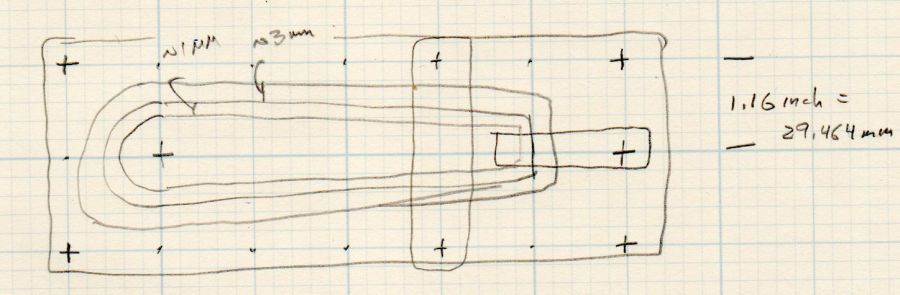
    The original doodle with some notions and dimensions that didn’t survive contact with reality:

    Cursor Fixture doodle
    Cursor Fixture doodle

    I have no idea why the Sherline tooling plate has a 10-32 screw grid on 1.16 inch = 29.46 mm centers, but there they are.

  • Soft Vise Jaws

    Soft Vise Jaws

    A Round Tuit™ finally arrived for this long-delayed project:

    Vise soft jaws - installed
    Vise soft jaws – installed

    They’re bandsawed from an impossibly heavy-duty U-shaped aluminum extrusion salvaged from a scrap pile; the flanges are 6 and 7 mm thick. I’ll put in a good word for the Proxxon 10/14 TPI blade, because it goes through aluminum plate like butter.

    The wood strip under the top flange raises the fillet on the interior angle enough to let the extrusion sit flat on the top vise jaw and square against the gripping side. It’s held in place with double-sided carpet tape.

    They’re faced with a rubber sheet I thought was twice as thick when I picked it out of the Big Box o’ Squishy Sheets, but turned out to be two thinner sheets invisibly stuck together. Carpet tape holds one of the sheets to the jaw; I expect the other sheet to fall off in short order.

    You’re supposed to embed neodymium magnets in the jaws to hold them to the vise. As far as I can tell, they’re perfectly happy to just sit there all by themselves and, anyway, magnets would grow lethally sharp and bulky steel fur coats in short order.

    Squaring the long edge didn’t pose much of a problem:

    Vise soft jaws - squaring edge
    Vise soft jaws – squaring edge

    Tidying the ends, however, required more setup:

    Vise soft jaws - squaring ends
    Vise soft jaws – squaring ends

    That’s the Sherline Tilting Angle Plate at 90°, with barely enough room on the far side for the base of a Starrett Double Square to set the extrusion vertical; the hand clamp holds it in place while tightening the step clamps. It sits on an aluminum sheet to put its upper end three smidgens over the angle plate, letting me flycut one smidgen for a clean edge.

    Now I can retire the old soft jaws, which have served for too many decades and are far too ugly to show; improvised from weatherstripping glued to bent-square copper pipe and intended as a quick fix. You know how that goes …

  • Reversible Belt Buckle: Setscrew

    Reversible Belt Buckle: Setscrew

    The post in my reversible belt buckle popped out again, a year after punching it back in place, so it’s time to do a better job.

    Grab the buckle in the Sherline vise, center on the post hole, and drill a #38 = 2.58 mm hole:

    Reversible Belt Buckle - cross drilling
    Reversible Belt Buckle – cross drilling

    Tap it M3×0.5, clean out the hole, tap the post + spring back in place, dab threadlocker on the shortest M3 setscrew from the assortment, snug down on the post, and reinstall the belt:

    Reversible Belt Buckle - M3 setscrew installed
    Reversible Belt Buckle – M3 setscrew installed

    Looks like it grew there, doesn’t it?

    Now, as my buddy dBm will remind me, the real problem is too much weight in the saddle, but this fix should move the symptoms elsewhere …

  • Tek Circuit Computer: Cursor Hairline Scraping

    Tek Circuit Computer: Cursor Hairline Scraping

    Engraving a PETG sheet with a diamond drag engraver on the Sherline and filling the scratch produces a good-looking hairline, but there’s a tradeoff between having the protective sheet pull the paint out of the scratch and having the crayon scuff the unprotected surface. This time around, I scribbled the crayon through the protective film, let it cure for a few days, then scraped the surface to level the paint and see what happens.

    First, an unscraped cursor:

    Tek CC - Cursor red lacquer - plain - overview
    Tek CC – Cursor red lacquer – plain – overview

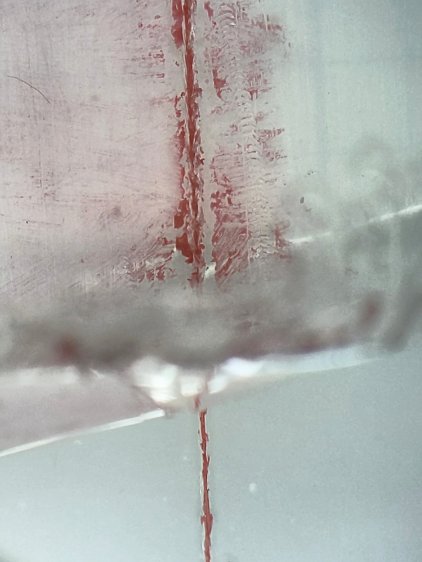
    Peeling the transparent protective film:

    Tek CC - Cursor red lacquer - plain - partial peel
    Tek CC – Cursor red lacquer – plain – partial peel

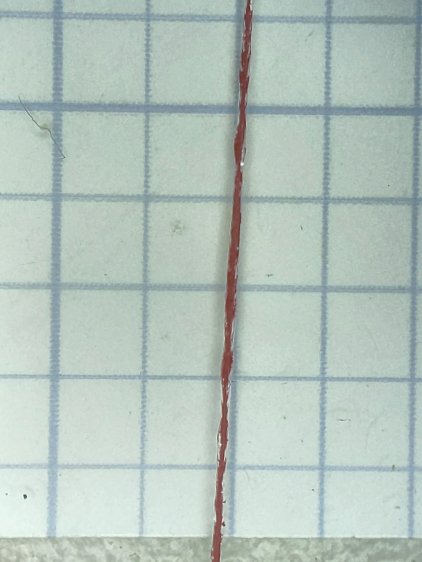
    The hairline is solidly filled:

    Tek CC - Cursor red lacquer - plain - peeled
    Tek CC – Cursor red lacquer – plain – peeled

    Scribbling another cursor the same way, then scraping the protective film to flatten the shredded edges:

    Tek CC - Cursor red lacquer - scraped - overview
    Tek CC – Cursor red lacquer – scraped – overview

    The hairline remains filled, but not as completely:

    Tek CC - Cursor red lacquer - scraped - partial peel
    Tek CC – Cursor red lacquer – scraped – partial peel

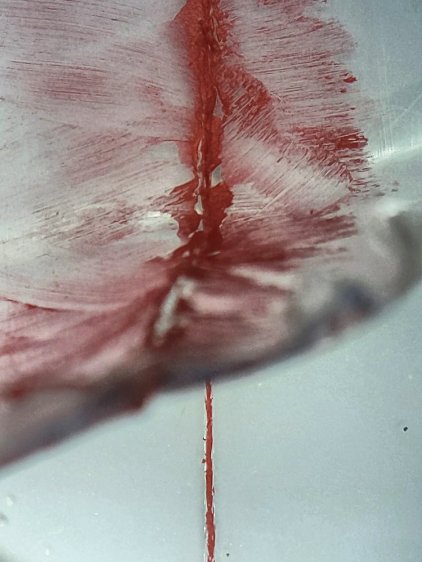
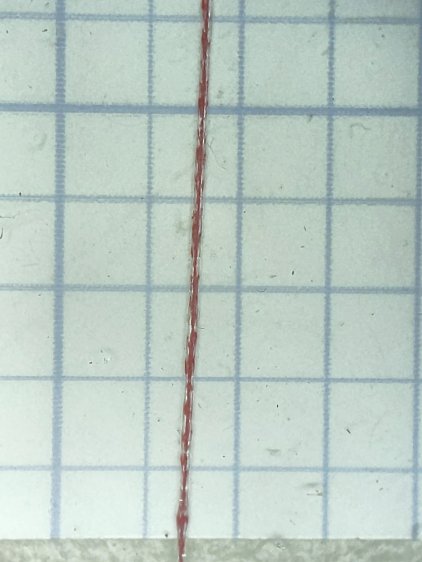
    A closer look:

    Tek CC - Cursor red lacquer - scraped - peeled
    Tek CC – Cursor red lacquer – scraped – peeled

    Scraping the crayon off the film removes a substantial amount of paint from the hairline, but, on the upside, the protective film does exactly what it says on the box and the PETG surface remains pristine.

    Both hairlines are, at least eyeballometrically, Just Fine™ for their intended purpose.

  • Magnifying Desk Lamp Pivot Clamp: One More

    Magnifying Desk Lamp Pivot Clamp: One More

    For reasons not relevant here, I made another clamp for a magnifying desk lamp and mailed it off in a small box. A few measurements suggested all such lamps share a common design and similar parts, so I duplicated my previous attempt, with some improvements.

    On the upside, the same scrap of aluminum plate I used for the previous clamp emerged from the stockpile and, after a session with Mr Disk Sander, sported two square & reasonably perpendicular sides:

    Magnifying Lamp Clamp - squaring stock
    Magnifying Lamp Clamp – squaring stock

    Rather than rely on my original dimension scribble, I transfer-punched the hole location from my as-built clamp to the stock:

    Magnifying Lamp Clamp - locating stem hole
    Magnifying Lamp Clamp – locating stem hole

    That’s a reenactment based on a true story: the actual punching happened on the bench vise’s anvil surface, with too many moving pieces supported & aligned by an insufficient number of hands.

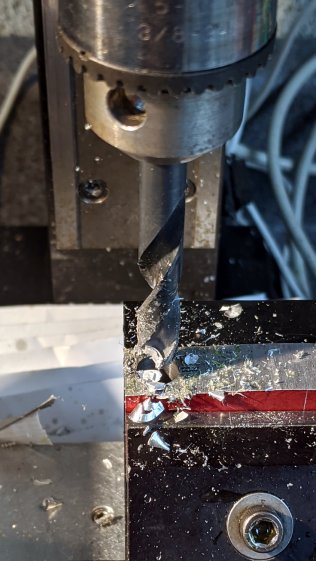
    Drilling the 5/16 inch hole required mounting the Greater Chuck on an MT1 taper adapter for the Sherline:

    Magnifying Lamp Clamp - drilling stem clamp
    Magnifying Lamp Clamp – drilling stem clamp

    It’s normally on an MT2 adapter for the mini-lathe tailstock, where it handles drills up to 3/8 inch. For the record, the Sherline’s Lesser Check tops out at 1/4 inch and the Least Chuck at 5/32 inch.

    Punch & drill the 4 mm cross hole for the clamping screw:

    Magnifying Lamp Clamp - drill cross hole
    Magnifying Lamp Clamp – drill cross hole

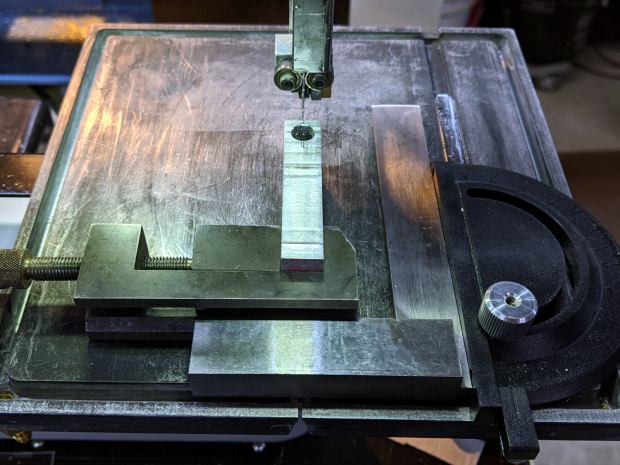
    Grab the plate in a toolmaker’s vise, set up some casual guidance, and bandsaw right down the middle:

    Magnifying Lamp Clamp - sawing clamp halves
    Magnifying Lamp Clamp – sawing clamp halves

    Bandsaw the outline to free the two halves from the stock, then clean up their perimeter:

    Magnifying Lamp Clamp - rounded
    Magnifying Lamp Clamp – rounded

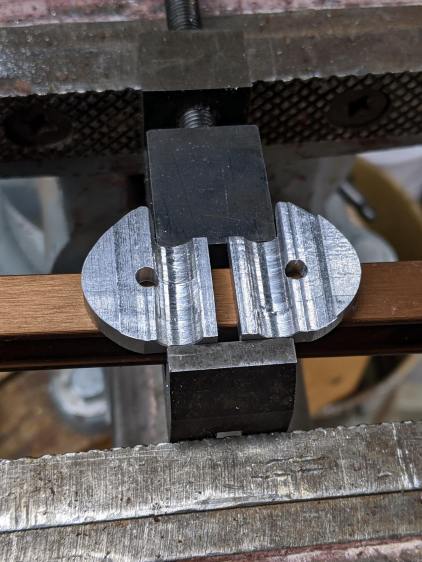
    Saw the clamp clearance almost all the way through to leave a protrusion, then file the scarred kerf more-or-less flat:

    Magnifying Lamp Clamp - filing interior
    Magnifying Lamp Clamp – filing interior

    Do a trial fit in my lamp, which lacks the fancy brushed-metal finish of the remote one:

    Magnifying Lamp Clamp - trial fit
    Magnifying Lamp Clamp – trial fit

    It holds tight and rotates well, so break the edges and shine up the outside to a used-car finish (“high polish over deep scratches”):

    Magnifying Lamp Clamp - surface finish
    Magnifying Lamp Clamp – surface finish

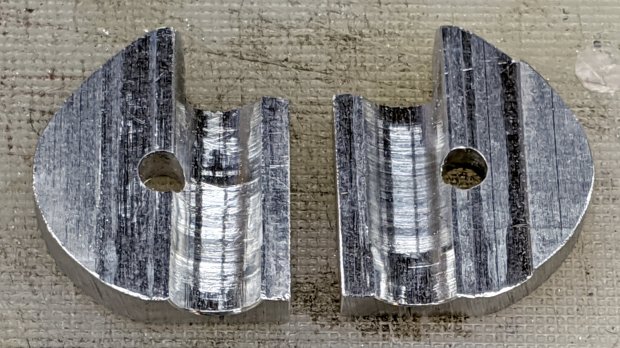
    The inside remains gritty to improve traction on the lamp stem:

    Magnifying Lamp Clamp - interior
    Magnifying Lamp Clamp – interior

    Declare victory, box it up, and away it goes!

  • Nissan Fog Lamp: RGB LED “Bulb”

    Nissan Fog Lamp: RGB LED “Bulb”

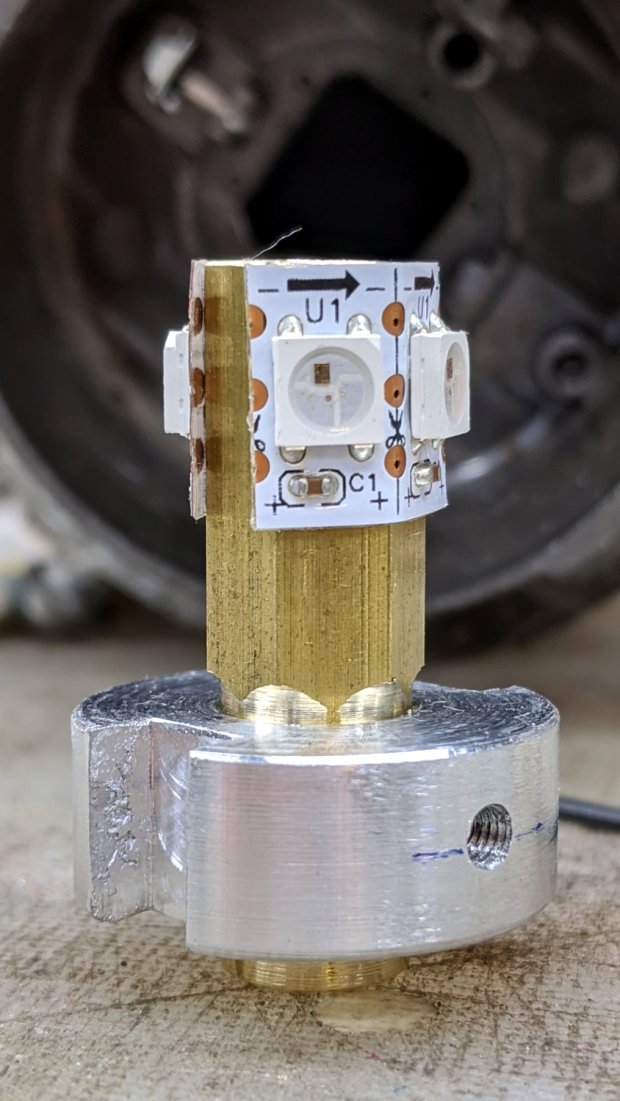
    After cleaning the fog lamp lens enough to be encouraging, I made an LED “bulb” from four WS2812 RGB pixels:

    Nissan Fog Lamp - LED bulb standup
    Nissan Fog Lamp – LED bulb standup

    The small threaded hole has an M3 setscrew to let the brass post slide up & down to adjust the LED position inside the fog lamp’s reflector.

    Despite my poor experience with the PCB-based WS2812 LEDs, the strip-mounted ones have been ticking along in the hard drive platter lamp basically forever, at least after I tamped down the heat problem.

    The brass hex rod has plenty of thermal conductivity, particularly clamped into an aluminum disk connected more-or-less well to the fog lamp’s base.

    Nissan Fog Lamp - RGB LED lamp
    Nissan Fog Lamp – RGB LED lamp

    The two short wires linking the two LED strips (the purple wire is data into the first LED) hold them in place around the hex, despite their desire to straighten out, pull free of their adhesive, and fall off.

    The general idea was to put the LEDs at about the same level as the halogen bulb filament, thereby spreading enough light to fill the reflector housing:

    Nissan Fog Lamp - LED vs halogen
    Nissan Fog Lamp – LED vs halogen

    I drilled a hole through the hex as a cable “conduit”, turned the end into a nice rod, then machined a stub of aluminum to fit:

    Nissan Fog Lamp - parting off LED base
    Nissan Fog Lamp – parting off LED base

    A pair of slots milled along the sides of the aluminum disk fit the housing’s locating features:

    Nissan Fog Lamp - LED bulb trial fit
    Nissan Fog Lamp – LED bulb trial fit

    Nissan used an elaborate spring latch to clamp the halogen bulb’s sheet-metal base in place, but its 50 mil wire didn’t have nearly enough give for my chunky aluminum disk. My version of a spring latch came from a length of 24 mil music wire, which definitely beats the epoxy I was planning to use.

    Heat transfer seems to be a non-issue, as the LEDs get barely warm to the touch. Until they drop dead, I’ll assume it’s all good in there.

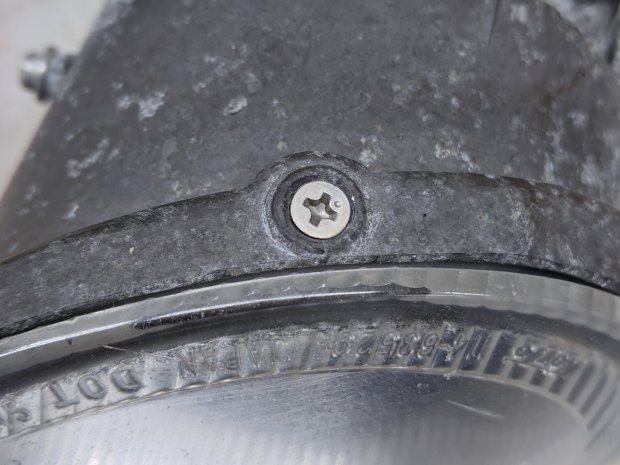
    Two screws hold the lens in place, but the collision seems to have stripped their grip on the plastic and they didn’t un-screw:

    Nissan Fog Lamp - lens retaining screw
    Nissan Fog Lamp – lens retaining screw

    Jamming a utility knife blade under the screw head and prying upward while turning the screwdriver persuaded them out of their sockets, after which the lens popped out of its form-fitted silicone gasket with surprisingly little effort:

    Nissan Fog Lamp - reflector stains
    Nissan Fog Lamp – reflector stains

    The lamp spent a week or so beside the road, out in the weather, and shipped a few drops of rainwater through the rectangular hole under the spring latch anchor. Some delicate cotton-swab action removed most of the grime without too much damage, but the reflective film on those corrugations won’t ever be the same again.

    Now it’s just a simple matter of software …