The Smell of Molten Projects in the Morning

Ed Nisley's Blog: Shop notes, electronics, firmware, machinery, 3D printing, laser cuttery, and curiosities. Contents: 100% human thinking, 0% AI slop.

Tag: RPi

Raspberry Pi

  • Streaming Radio Advertisements: Carpet Bombing

    After a protracted silence in a Radionomy stream, the Raspberry Pi player offered this log:

    2017-03-05 11:17:07,890 INFO: Starting mplayer on Plenitude -> /home/pi/Playlists/Radio-PLENITUDE.m3u
    2017-03-05 11:17:13,651 INFO: Track name: []
    2017-03-05 11:44:02,296 INFO: Track name: [David Wahler - Whispers from Eternity]
    2017-03-05 11:46:36,995 INFO: Track name: [Radio PLENITUDE - Jingle Intro Publicité]
    2017-03-05 11:47:07,117 INFO: Track name: []
    2017-03-05 11:49:07,080 INFO: Track name: [Radio PLENITUDE - Jingle Extro Publicité]
    2017-03-05 11:49:10,079 INFO: Track name: [Jef Mounet & Danièle Mounet - L'ancre musicale Natures d'Eau]
    2017-03-05 12:02:02,271 INFO: Track name: [Radio PLENITUDE - Jingle Intro Publicité]
    2017-03-05 12:02:32,424 INFO: Track name: []
    2017-03-05 12:04:32,243 INFO: Track name: [Radio PLENITUDE - Jingle Intro Publicité]
    2017-03-05 12:05:01,925 INFO: Track name: [Targetspot - TargetSpot]
    2017-03-05 12:07:02,276 INFO: Track name: [Radio PLENITUDE - Jingle Intro Publicité]
    2017-03-05 12:07:31,968 INFO: Track name: [Targetspot - TargetSpot]
    2017-03-05 12:09:32,262 INFO: Track name: [Radio PLENITUDE - Jingle Intro Publicité]
    2017-03-05 12:10:02,192 INFO: Track name: [Targetspot - TargetSpot]
    2017-03-05 12:12:02,311 INFO: Track name: [Radio PLENITUDE - Jingle Intro Publicité]
    2017-03-05 12:12:32,184 INFO: Track name: [Targetspot - TargetSpot]
    2017-03-05 12:14:32,085 INFO: Track name: [Radio PLENITUDE - Jingle Intro Publicité]
    2017-03-05 12:15:02,217 INFO: Track name: [Targetspot - TargetSpot]
    2017-03-05 12:17:02,057 INFO: Track name: [Radio PLENITUDE - Jingle Intro Publicité]
    2017-03-05 12:17:32,445 INFO: Track name: [Targetspot - TargetSpot]
    2017-03-05 12:19:32,083 INFO: Track name: [Radio PLENITUDE - Jingle Extro Publicité]
    2017-03-05 12:19:35,171 INFO: Track name: [Jean-Marc Staehle - Bercé par tant de beauté]
    2017-03-05 12:23:42,410 INFO: Track name: [Francesco - Sur le chemin]
    2017-03-05 12:29:50,265 INFO: Track name: [Michel Pépé - Pacifica]
    2017-03-05 12:35:07,493 INFO: Track name: [Radio PLENITUDE - Jingle Intro Publicité]
    2017-03-05 12:35:37,377 INFO: Track name: [Targetspot - TargetSpot]
    2017-03-05 12:37:37,478 INFO: Track name: [Radio PLENITUDE - Jingle Extro Publicité]
    2017-03-05 12:37:41,476 INFO: Track name: [Music And Wellness (Musique Et Bien Etre) - Absolute Winner]
    2017-03-05 12:46:36,742 INFO: Track name: [Radio PLENITUDE - Jingle Intro Publicité]
    2017-03-05 12:47:06,668 INFO: Track name: [Targetspot - TargetSpot]
    2017-03-05 12:49:06,538 INFO: Track name: [Radio PLENITUDE - Jingle Extro Publicité]
    2017-03-05 12:49:10,270 INFO: Track name: [Patrick Vuillaume &Nicole Bally - Pearls of Light (Instrumental by Nicole Bally)]
    2017-03-05 12:53:45,357 INFO: Track name: [Trine Opsahl - Sister moon]
    2017-03-05 12:54:58,596 INFO: Track name: [Peter Kater - Rebirth]
    2017-03-05 13:04:52,726 INFO: Track name: [Radio PLENITUDE - Jingle Intro Publicité]
    2017-03-05 13:05:22,665 INFO: Track name: [Targetspot - TargetSpot]
    2017-03-05 13:07:21,561 INFO: Track name: [Radio PLENITUDE - Jingle Extro Publicité]
    2017-03-05 13:07:25,808 INFO: Track name: [Deuter - Flowing]
    2017-03-05 13:12:55,970 INFO: Track name: [Radio PLENITUDE - Jingle Intro Publicité]
    2017-03-05 13:13:25,859 INFO: Track name: []
    2017-03-05 13:15:26,449 INFO: Track name: [Radio PLENITUDE - Jingle Extro Publicité]
    2017-03-05 13:15:33,022 INFO: Track name: [Radio PLENITUDE - Jingle Intro Publicité]
    2017-03-05 13:15:59,437 INFO: Track name: [Targetspot - TargetSpot]
    2017-03-05 13:17:59,559 INFO: Track name: [Radio PLENITUDE - Jingle Extro Publicité]
    2017-03-05 13:18:06,133 INFO: Track name: [O - Part I]
    

    The Jingle lines introduce a short interlude of chimes separating music from advertisements. The Intro chimes play for 30 seconds and the Extro chimes play for three to five seconds. Some stations have similar interludes, others do not; apparently the station gets to choose the format.

    The [Targetspot - TargetSpot] lines mark two minutes of TargetSpot insertion: either advertisements (if you’re in their target market) or generic musical interludes similar to the station’s genre (if you’re out-of-market). The ads and music often lack volume-matching with the streaming music, rarely have lower volume, and the ads are incomprehensible to my ears. The musical interludes seem to be randomly chosen from a small set of candidate tracks that, along with the chimes, become annoyingly familiar in short order.

    The [] lines (yes, an empty string) mark two minutes of Public Service Announcements, advertisements, or generic musical interludes. I’m uncertain how they differ from the [Targetspot - TargetSpot] insertions.

    At a minimum, Radionomy inserts two minutes of TargetSpot / PSAs after every 12 to 15 minutes of music. Adding in the Jingle markers, ads occupy just under 20% of the total “airtime” for this station.

    However, bizarre events like the 17 nonstop minutes of jingles and ads inserted just after noon occur with inexplicable frequency. I’ve noticed half an hour of similar back-to-back-to-back ads on other stations, so it’s not a rare event.

    To quote the TargetSpot website:

    TargetSpot serves ads in real time to each listener’s personalized stream, creating a one-to-one relationship between the advertiser and the listener. The result is a dramatic increase in message relevancy and campaign effectiveness

    Those keyword markers turn out to be incredibly convenient. Just sayin’…
  • Another Numeric Keypad Snowflake

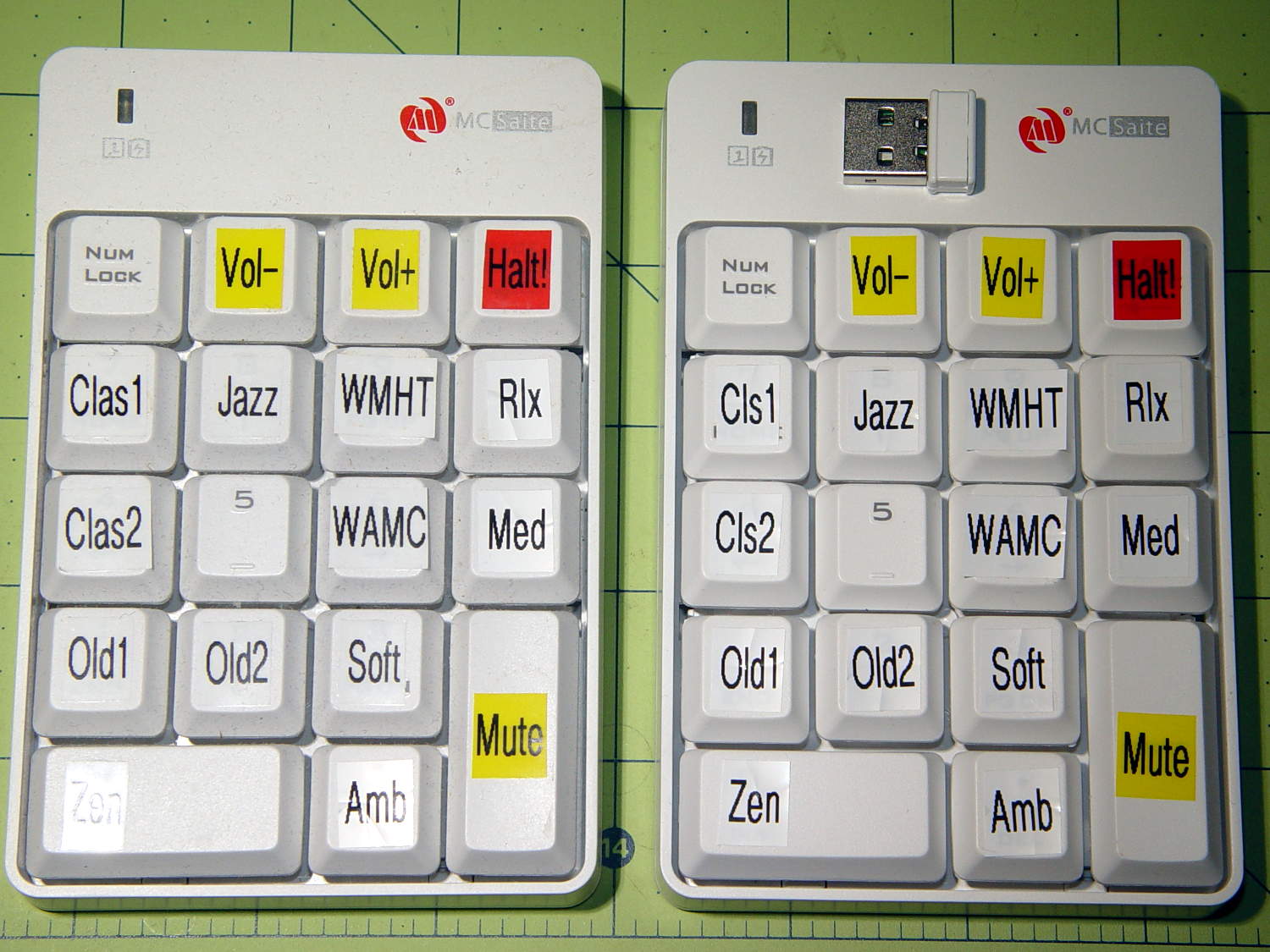
    I got another batch of wireless keypads that, from the outside, look identical to the previous set:

    Wireless USB Numeric keypads
    Wireless USB Numeric keypads

    The keypad on the right reports Model ID 0x4182, the same as the black plastic batch, and different from the 0x4101 of the previous batch (on the left). Apparently, the small USB dongle carries the Model ID data and the keypads can carry anybody’s logo.

    The Vendor ID, of course, still shows Creative Lab’s 0x062a and all the serial numbers are 1.

    Fortunately, the udev rules already have that combination and the streaming player can’t tell the difference.

    Those labels on the keytops still don’t quite fit, but we’re coping as best we can.


  • Raspberry Pi 3: Disabling the Build-In WiFi

    streaming media player in the Basement Laboratory Warehouse Wing has a concrete block wall between it and the WiFi router, so that even high(er)-gain USB antennas can’t grab enough signal for reliable streaming. After some fiddling, I snaked a cable from a hub, along the floor joints, to the Pi and declared victory. It turned out the Pi, an old Pi 1 Model B, had some trouble keeping up with the times, and I eventually swapped it for a Pi 3.

    Forcing a static address for the wired port followed the now-standard recipe, with eth0 instead of wlan0 in /etc/dhcpcd.conf.

    However, plugging a network cable into the Pi 3 then produces two network connections: the wired one I wanted and the aforementioned unreliable WiFi link through the built-in hardware. The only reliable way to turn off the WiFi connection seems to require applying The BFH through a line in /etc/rc.local:

    sudo ifconfig wlan0 down
    

    Removing my WiFi credentials from /etc/wpa_supplicant/wpa_supplicant.conf prevents the hardware from connecting before the hammer comes down.

    And then it streams perfectly…

  • Raspberry Pi Boot vs. Avahi vs. DHCP

    Sometimes, one of our homebrew streaming media players will emerge from reset without starting up properly. The system board LEDs blink more-or-less normally, but the WiFi activity monitor seems … odd. This post documents the results of some exploratory surgery hinting at a possible solution.

    I set the router’s DHCP server to assign a fixed IP address to each of our homebrew streaming media players based on its MAC address. That seemed less horrible than setting a static IP address in each player’s configuration, although I could see advantages to either approach. For streamer1, the player discussed here, the IP address is 192.168.1.101; that’s a non-routable address used only on our network behind the router.

    During the Raspberry Pi’s boot, the default /etc/rc.local script finds and displays its IP address:

    _IP=$(hostname -I) || true
    if [ "$_IP" ]; then
      printf "My IP address is %s\n" "$_IP"
    fi
    

    The /var/log/boot log showed this after one boot:

    --- snippage ---
             Starting LSB: Raise network interfaces....
    ---
    [  OK  ] Started LSB: Raise network interfaces..
             Starting ifup for wlan0...
    [  OK  ] Started ifup for wlan0.
    [  OK  ] Reached target System Initialization.
    [  OK  ] Listening on Avahi mDNS/DNS-SD Stack Activation Socket.
    ---
    [  OK  ] Reached target Sockets.
    ---
    [  OK  ] Reached target Basic System.
             Starting Avahi mDNS/DNS-SD Stack...
             Starting Regular background program processing daemon...
    [  OK  ] Started Regular background program processing daemon.
             Starting dhcpcd on all interfaces...
    ---
    [  OK  ] Started Avahi mDNS/DNS-SD Stack.
    ---
    [  OK  ] Started dhcpcd on all interfaces.
    [  OK  ] Reached target Network.
    ---
             Starting /etc/rc.local Compatibility...
             Starting Permit User Sessions...
    [  OK  ] Reached target Network is Online.
             Starting LSB: Start NTP daemon...
    My IP address is 169.254.14.12
    [  OK  ] Started Permit User Sessions.
    connect: Network is unreachable
    [  OK  ] Started /etc/rc.local Compatibility.
             Starting Terminate Plymouth Boot Screen...
             Starting Hold until boot process finishes up...
    

    That mysterious IP address is a Link-local address, about which Wikipedia says: “If a host on an IEEE 802 (Ethernet) network cannot obtain a network address via DHCP, an address from 169.254.1.0 to 169.254.254.255 may be assigned pseudorandomly.”

    So, having the router hand out IP addresses doesn’t quite work the way I expected. The Pi awards itself a link-local IP address before getting one from the DHCP server, presumably because the vast Linux startup Pachinko machine has a race condition. Alas, the pseudorandom LL address doesn’t fit in the 192.168.0.0/16 network handled by the router: the Pi can’t connect to the network.

    My code in /etc/rc.local starts the streaming player immediately after the default code displaying the IP address, thus joining the race condition: if the player starts up before the DCHP server assigns the proper IP address, it can’t connect to the music server out on the Interwebs. My code includes a retry loop with a five second delay which eventually connects, at least most of the time, but sometimes gets wedged.

    The most reasonable fix seems to involve forcing a static address on each Raspberry Pi, so it can immediately connect to the network, without any negotiation, and get on with the business at hand.

    Rather than configuring that in  /etc/network/interfaces as before, the New Hotness adds a stanza to  /etc/dhcpcd.conf:

    interface wlan0
    static ip_address=192.168.1.101/8
    static routers=192.168.1.1
    static domain_name_servers=192.168.1.1
    

    En passant, I killed off IPV6 with this line in /etc/sysctl.conf:

    net.ipv6.conf.all.disable_ipv6=1
    

    The router doesn’t support IPV6 and there’s no point in using it. Bonus: less log clutter. Double Bonus: startup happens faster!

    All of which may help the NTP client update the system clock sooner, perhaps preventing time jumps like this:

    2017-02-14 08:42:24,183 INFO: Player setup for: BR1
    2017-02-14 08:42:24,184 INFO: Volume control knob: /dev/input/volume
    2017-02-14 08:42:24,225 INFO: Starting mplayer on Ambient -> http://185.32.125.42:7331/maschinengeist.org.mp3
    2017-02-14 08:42:27,175 INFO: Track name: [Arcticology - Nocturnal Sounds]
    2017-02-14 08:42:27,194 INFO: Track unmuted
    2017-02-15 04:25:00,386 INFO: Track name: [Oöphoi - Suspended Matter]
    2017-02-15 04:25:00,413 INFO: Track unmuted
    

    The timestamps in the first five lines date back to the previous shutdown. The Pi remains plugged in and powered while it’s reset, which apparently preserves the system clock variables, albeit without a hardware clock ticking along: time stands still between shutdown and restart.

    In this case, the IP address situation worked itself out before the player started, but the NTP clock reset on the sixth line happened at least three seconds after the log began.

    This chunk of /var/log/syslog has more detail:

     highlight="1,5,6,7,8,15,21"]
    Feb 14 08:42:24 streamer1 dhcpcd[693]: wlan0: leased 192.168.1.101 for 86400 seconds
    Feb 14 08:42:24 streamer1 dhcpcd[693]: wlan0: adding route to 192.168.1.0/24
    Feb 14 08:42:24 streamer1 dhcpcd[693]: wlan0: adding default route via 192.168.1.1
    Feb 14 08:42:24 streamer1 avahi-daemon[387]: Registering new address record for 192.168.1.101 on wlan0.IPv4.
    Feb 14 08:42:24 streamer1 dhcpcd[693]: wlan0: deleting route to 169.254.0.0/16
    Feb 14 08:42:24 streamer1 avahi-daemon[387]: Withdrawing address record for 169.254.14.12 on wlan0.
    Feb 14 08:42:24 streamer1 avahi-daemon[387]: Leaving mDNS multicast group on interface wlan0.IPv4 with address 169.254.14.12.
    Feb 14 08:42:24 streamer1 avahi-daemon[387]: Joining mDNS multicast group on interface wlan0.IPv4 with address 192.168.1.101.
    Feb 14 08:42:25 streamer1 dhcpcd[693]: wlan0: no IPv6 Routers available
    Feb 14 08:42:25 streamer1 ntpd_intres[728]: DNS 0.debian.pool.ntp.org -> 206.71.252.18
    Feb 14 08:42:25 streamer1 ntpd_intres[728]: DNS 1.debian.pool.ntp.org -> 45.33.13.54
    Feb 14 08:42:25 streamer1 ntpd_intres[728]: DNS 2.debian.pool.ntp.org -> 204.9.54.119
    Feb 14 08:42:25 streamer1 ntpd_intres[728]: DNS 3.debian.pool.ntp.org -> 216.229.4.66
    Feb 14 08:42:26 streamer1 ntpd[720]: Listen normally on 6 wlan0 192.168.1.101 UDP 123
    Feb 14 08:42:26 streamer1 ntpd[720]: Deleting interface #3 wlan0, 169.254.14.12#123, interface stats: received=0, sent=0, dropped=4, active_time=3 secs
    Feb 14 08:42:26 streamer1 ntpd[720]: 216.229.4.66 interface 169.254.14.12 -> (none)
    Feb 14 08:42:26 streamer1 ntpd[720]: 204.9.54.119 interface 169.254.14.12 -> (none)
    Feb 14 08:42:26 streamer1 ntpd[720]: 45.33.13.54 interface 169.254.14.12 -> (none)
    Feb 14 08:42:26 streamer1 ntpd[720]: 206.71.252.18 interface 169.254.14.12 -> (none)
    Feb 14 08:42:26 streamer1 ntpd[720]: peers refreshed
    Feb 15 04:20:10 streamer1 systemd[1]: Time has been changed
    [/sourcecode]

    Given the timestamp resolution, NTP (or systemd) apparently resets the clock three seconds after the IP address changes. That may be as good as it gets, if only because the NTP daemon must find its servers, evaluate their status, then whack the local clock.

    After forcing the static address, things look better, but it’s too soon to be sure. Many things can clobber streaming, not all of which happen on this side of our router.

  • Monthly Science: WWVB Reception Sample

    Further results from the SDR-based WWVB receiver:

    60 kHz Receiver - preamp HIT N3 Pi3 - attic layout
    60 kHz Receiver – preamp HIT N3 Pi3 – attic layout

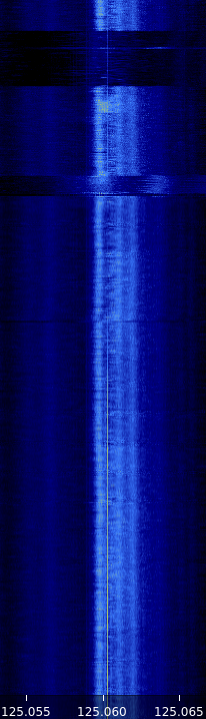
    Seven hours of mid-January RF, tight-zoomed in both frequency and amplitude, from 0350 to 1050 local:

    WWVB waterfall - N3 - 2017-01-24 1050 - composite
    WWVB waterfall – N3 – 2017-01-24 1050 – composite

    The yellow line of the WWVB carrier comes out 2 ppm high, which means the local oscillator chain is 2 ppm low. We know the WWVB transmitter frequency is exactly 60.000 kHz, translated up by 125 MHz to the N3’s tuning range; you can, ahem, set your clock by it.

    The blue band marks the loop antenna + preamp passaband, which isn’t quite centered around 60.000 kHz. Tweaking the mica compression caps just a bit tighter should remedy that situation.

    Given that input, a very very tight bandpass filter should isolate the WWVB carrier and then it’s all a matter of fine tuning…

  • WWVB Receiver: First Light!

    All the blocks for a WWVB receiver, lined up on the attic floor:

    60 kHz Receiver - preamp HIT N3 Pi3 - attic layout
    60 kHz Receiver – preamp HIT N3 Pi3 – attic layout

    The dramatis personae:

    The headless Pi connects to the house WLAN through its built-in WiFi link, so I can run the whole mess from the Comfy Chair at my desk through Remmina / VNC.

    Recording 24 hours of WWVB shows it works:

    WWVB - 24 hr reception AGC - 2017-01-16 to 17 - cropped
    WWVB – 24 hr reception AGC – 2017-01-16 to 17 – cropped

    The wavy line along the left edge looks like a birdie formed by a local oscillator in the attic, because the frequency varies (inversely) with temperature. It’s probably a signal on the Pi board, rectified by some junction, and translated in-band by some Ham-It-Up harmonic. Whatever.

    The other traces come out bar-straight, suggesting that the 0.5 ppm (presumably, per °C) temperature-compensated oscillators along the whole RF chain behave as they should.

    There’s a slight frequency shift, on the order of a few parts-per-million, between the absolutely accurate WWVB carrier and the indicated display. Not a big deal.

    The broad, albeit irregular, orange band down the middle shows the loop antenna / preamp bandwidth, which is on the order of 2 kHz at -3 dB and a few kilohertz more down to the noise level.

    The broad horizontal gashes seem to come from the N3’s on-board hardware AGC reacting to signals far outside the waterfall. Various birdies appear & disappear, even in this limited view, so you can just imagine what’s happening off-screen; anything popping up within the SDR’s tuning range clobbers the gain, which becomes painfully visible when zoomed this far in along both frequency and amplitude. Turning AGC off should stabilize things; perhaps software can tweak the SDR gain based on a very narrowband filter around 60.000 kHz.

    The upper half of the waterfall shows decent reception for most of the night. The bottom half shows there’s basically nothing goin’ down during the day, which is about what I’d expect based watching the Alpha Geek Clock for seven years.

    In any event, another 24 hours with the AGC turned off looks better:

    WWVB 24 hr waterfall - Thumbnet N3 - 2017-01-19
    WWVB 24 hr waterfall – Thumbnet N3 – 2017-01-19

    Various sources still clobber the receiver response, but it’s not quite so dramatic.


  • Raspberry Pi CPU Temperature Watcher

    Having just put a headless Raspberry Pi in the attic, the chip temperature is of some interest. Doing this in an SSH session comes in handy:

    watch 'echo "scale=1 ; d = $(cat /sys/class/thermal/thermal_zone0/temp) / 1000 ; print d , \" °C\n\" " | bc'
    # blank line to ensure the underscore displays correctly
    

    Raspbian doesn’t have the bc calculator by default, so do that first.

    For whatever it’s worth, the Pi starts out at 10 °C and warms over 60 °C under heavy load:

    Every 2.0s: echo "scale=1 ; d = $(cat /sys/class/thermal/thermal_zone0/temp) / 1000 ; print d , \" °...  Sat Jan 14 19:58:59 2017
    
    61.7 °C
    

    It ticks along in the mid 30s under light load.

    You can run all that in one tab of a terminal window through VNC. If you’ve got that much GUI goin’ on, just add a thermal monitor in the panel and be done with it.