The Smell of Molten Projects in the Morning

Ed Nisley's Blog: Shop notes, electronics, firmware, machinery, 3D printing, laser cuttery, and curiosities. Contents: 100% human thinking, 0% AI slop.

Tag: Repairs

If it used to work, it can work again

  • Tour Easy Front Derailleur Cable Clamp

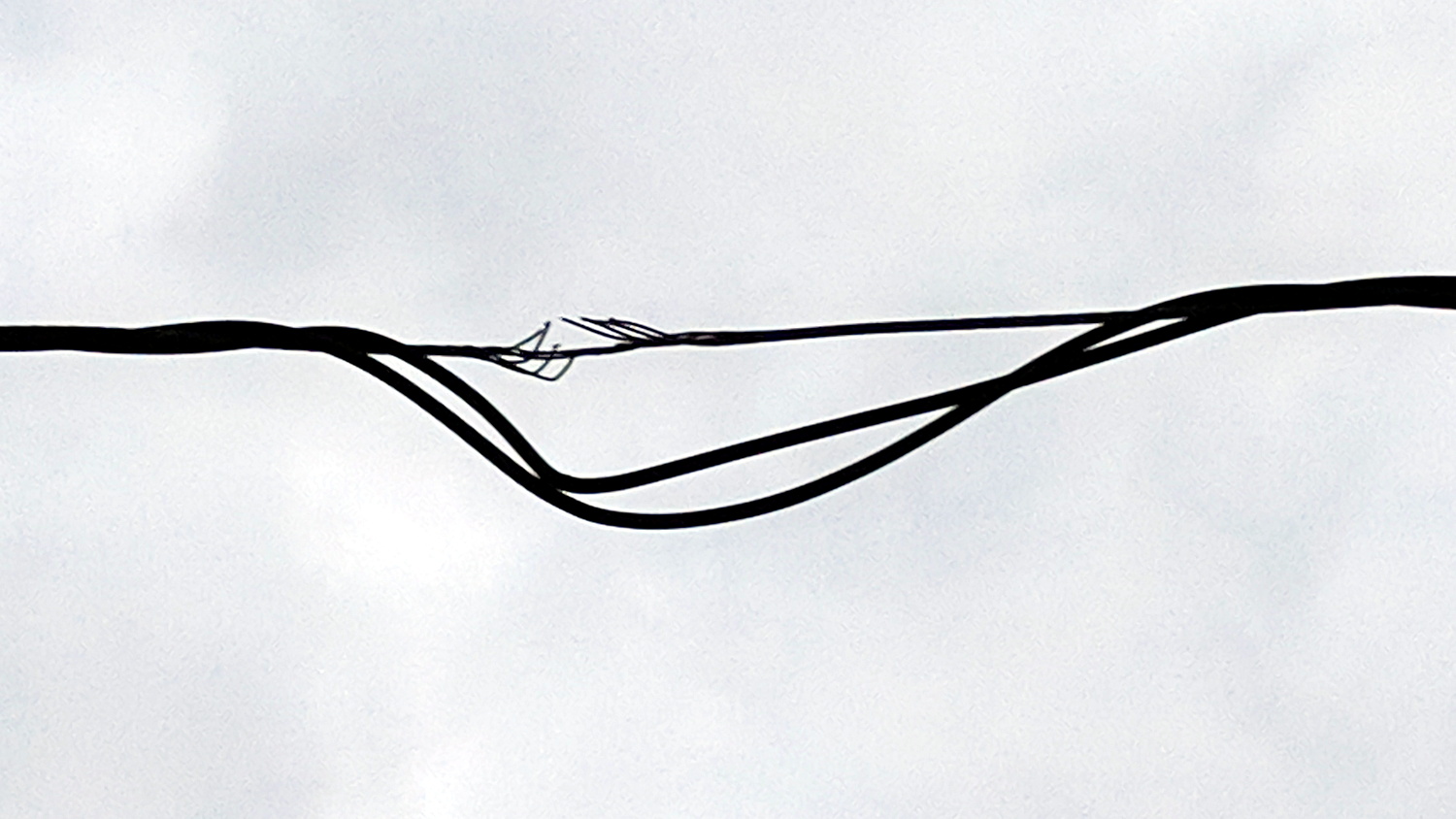
    In addition to sawing through the side of the cable ferrule, the front derailleur cable began breaking at the edge of the derailleur arm:

    Tour Easy Front Derailleur Cable - frayed
    Tour Easy Front Derailleur Cable – frayed

    It wouldn’t have survived another ride!

    Dan pointed out CNC machined aluminum cable clamps are a thing, but those are sized for larger frame tubes than the 1.0 inch steel used on our Tour Easy ‘bents and, although I’ve shimmed everything else on the frame, I wanted to tweak the cable angle to match the arm on the derailleur.

    A bit of OpenSCAD wrangling produces a likely candidate:

    Front Derailleur Cable Clamp - Slic3r
    Front Derailleur Cable Clamp – Slic3r

    That’s a bulked-up revision of the prototype:

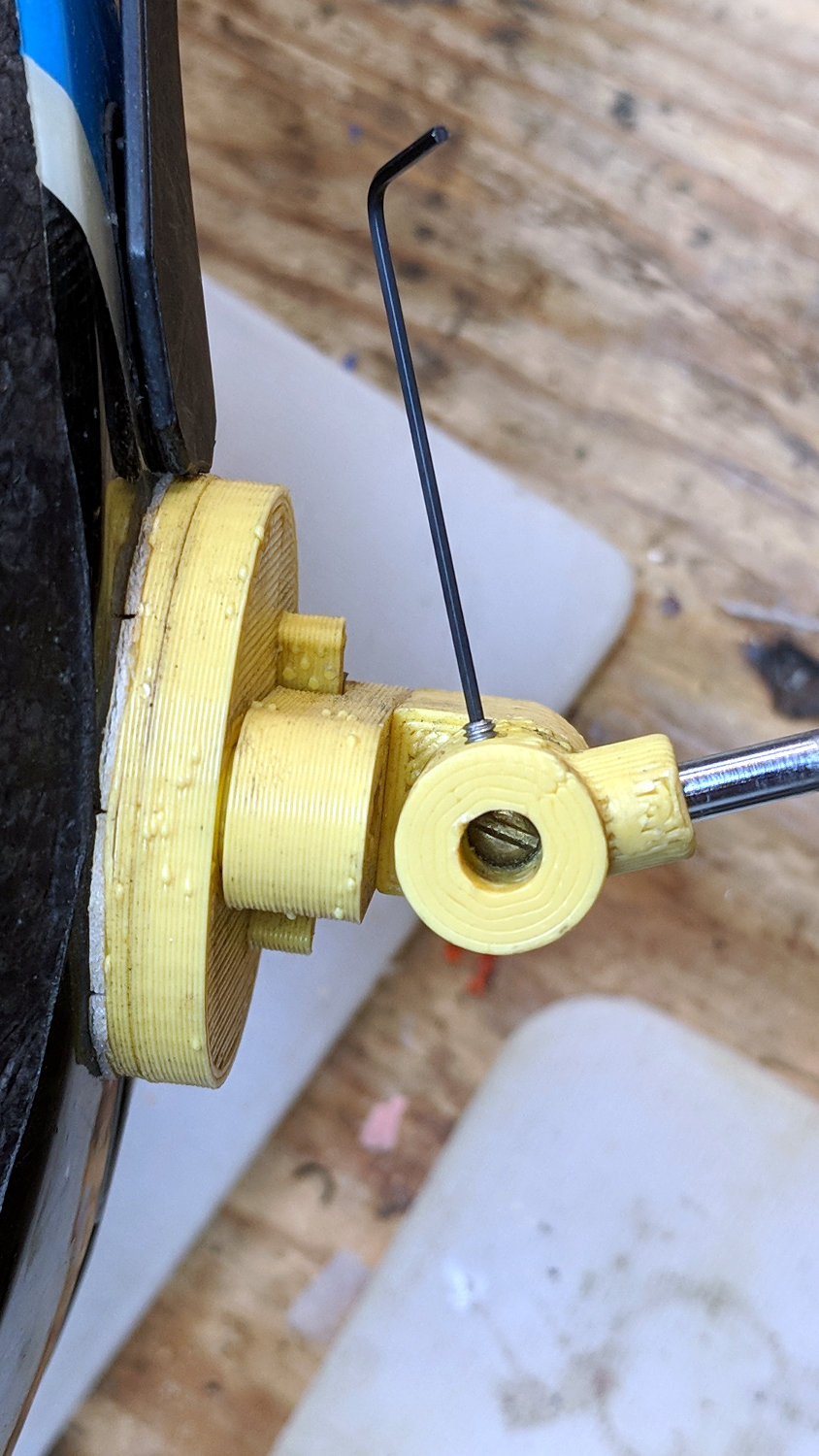
    Tour Easy Front Derailleur Cable Clamp - installed
    Tour Easy Front Derailleur Cable Clamp – installed

    Done up in orange PETG, it demonstrated the idea worked, but two perimeter threads wrapped around 15% infill isn’t quite up to the task. Note the split along the screw on the far half and various irregularities around the ferrule.

    The cable angle isn’t quite right, either, as the proper compound angle would, alas, aim the cable into the pedal crank. The bulky bushings get in the way of putting the ferrule where it should be with the screws aligned in a tidy manner, so I must get used to the jaunty angle.

    The bulkier version, done with 50% infill and four perimeter threads, has the same tilt angle, but the ferrule sits further from the screws:

    Tour Easy Front Derailleur Cable Clamp V2 - rear quarter view
    Tour Easy Front Derailleur Cable Clamp V2 – rear quarter view

    The view from the left side shows the cable angles slightly to the rear, but the smaller angle should make it happier:

    Tour Easy Front Derailleur Cable Clamp V2 - side view
    Tour Easy Front Derailleur Cable Clamp V2 – side view

    Probably should have used black PETG. Next time, for sure!

    The OpenSCAD source code as a GitHub Gist:

    // Tour Easy Derailleur Cable Clamp
    // Ed Nisley KE4ZNU – June 2017
    /* [Build Options] */
    Layout = "Build"; // [Build, Show]
    /* [Extrusion] */
    ThreadThick = 0.25; // [0.20, 0.25]
    ThreadWidth = 0.40; // [0.40]
    function IntegerMultiple(Size,Unit) = Unit * ceil(Size / Unit);
    /* [Hidden] */
    Protrusion = 0.01; // [0.01, 0.1]
    HoleWindage = 0.2;
    ID = 0;
    OD = 1;
    LENGTH = 2;
    /* [Cable Clamp] */
    FrameOD = 25.7; // Tour Easy has hard inch tubing + paint
    Ferrule = [1.5,5.1,12.0]; // cable ferrule
    EntryPoint = [0,13,60]; // cable entry to derailleur, +Y to rear of bike
    CableTilt = -20; // tilt from parallel to frame tube
    CableTheta = 0; // rotation around clamp from +X axis
    /* [Screws and Inserts] */
    ClampScrew = [3.0,5.5,35.0]; // M3 button / socket head cap screw
    ClampWasher = [3.7,7.0,0.7]; // M3 washer
    ClampNut = [3.0,6.0,4.0]; // M3 nylock nut
    /*
    ClampScrew = [4.0,7.0,25.0]; // M4 button head cap screw
    ClampWasher = [4.5,9.0,0.8]; // M4 washer
    ClampNut = [4.0,8.0,5.0]; // M4 nylock nut
    */
    NutShift = -0; // slide bushing toward nut for clearance
    //- Set clamp ring dimensions
    WallThick = 10.0;
    BushingSides = 8;
    Bushing = [ClampScrew[ID],
    // ClampWasher[OD]/cos(180/8) + 4*ThreadWidth,
    Ferrule[LENGTH]/cos(180/BushingSides),
    ClampScrew[LENGTH] – 2*ClampWasher[LENGTH] – ClampNut[LENGTH]];
    Ring = [FrameOD + HoleWindage,FrameOD + 2*WallThick,Ferrule[LENGTH]];
    ClampScrewOC = IntegerMultiple(FrameOD + ClampWasher[OD],1);
    echo(str(" screw OC: ",ClampScrewOC));
    ClampKerf = 0.75; // kerf between separated halves
    NumSides = 8*4;
    //- Adjust hole diameter to make the size come out right
    module PolyCyl(Dia,Height,ForceSides=0) { // based on nophead's polyholes
    Sides = (ForceSides != 0) ? ForceSides : (ceil(Dia) + 2);
    FixDia = Dia / cos(180/Sides);
    cylinder(r=(FixDia + HoleWindage)/2,h=Height,$fn=Sides);
    }
    // Construct things
    module ClampRing() {
    difference() {
    union() {
    cylinder(d=Ring[OD],h=Ring[LENGTH],$fn=NumSides); // basic ring
    for (j=[-1,1]) // screw bushings
    translate([Bushing[LENGTH]/2 + NutShift,j*ClampScrewOC/2,Ring[LENGTH]/2])
    rotate([0,-90,0]) rotate(180/BushingSides)
    cylinder(d=Bushing[OD],h=Bushing[LENGTH],$fn=BushingSides);
    intersection() {
    rotate([CableTilt,0,CableTheta]) // reinforce cable ferrule
    translate([(Ring[ID] + Ring[OD])/4,0,Ferrule[LENGTH]/2])
    rotate(180/8)
    cylinder(d=3*Ferrule[OD] + 0*ThreadWidth,2*Ferrule[LENGTH],center=true,$fn=8);
    cylinder(d=2*Ring[OD],h=Ring[LENGTH],$fn=NumSides); // basic ring
    }
    }
    translate([0,0,-Protrusion]) // frame tube
    cylinder(d=Ring[ID],h=Ring[LENGTH] + 2*Protrusion,$fn=NumSides);
    rotate([CableTilt,0,CableTheta]) // cable ferrule
    translate([(Ring[ID] + Ring[OD])/4,0,-0.25*Ferrule[LENGTH]]) {
    rotate(180/8)
    PolyCyl(Ferrule[OD],Ferrule[LENGTH],8);
    rotate(-22.5)
    PolyCyl(Ferrule[ID],2*Ferrule[LENGTH],4);
    }
    for (j=[-1,1]) // screw holes
    translate([Ring[OD]/2,j*ClampScrewOC/2,Ring[LENGTH]/2])
    rotate([0,-90,0]) rotate(180/6)
    PolyCyl(Bushing[ID],Ring[OD],6);
    for (i=[-1,1], j=[-1,1]) // screw & nut seats
    translate([i*(Bushing[LENGTH]/2) + NutShift,j*ClampScrewOC/2,Ring[LENGTH]/2])
    rotate([0,i*90,0]) rotate(180/BushingSides)
    cylinder(d=Bushing[OD],h=Bushing[LENGTH],$fn=BushingSides);
    translate([0,0,Ring[LENGTH]/2]) // slice it apart
    cube([ClampKerf,2*Ring[OD],2*Ring[LENGTH]],center=true);
    }
    }
    //- Build things
    if (Layout == "Show") {
    translate(EntryPoint)
    cube(1,center=true);
    ClampRing();
    }
    if (Layout == "Build") {
    ClampRing();
    }
  • Tour Easy: Front Derailleur Cable Angle

    Spotted while in the midst of replacing my Tour Easy’s rear grip shifter:

    Tour Easy - front derailleur cable angle
    Tour Easy – front derailleur cable angle

    As you might expect, the cable saws through the side of its ferrule and the brazed-on frame fitting, because it’s been basically impossible (for me, anyhow) to find a replacement derailleur duplicating whatever the good folks at Easy Racers shipped back in 2001.

    On the upside, this derailleur’s cable entry has a nicely rounded ramp eliminating the need for my brass cable pulley widget.

    Memo to Self: Perhaps running the cable around a bearing anchored to the frame fitting would help?

    I’ve obviously forgotten to fix this for several years, so putting it here may serve as a Round Tuit.

  • Primo Comet vs. Green Glass Chip: Kevlar FTW!

    The gashes don’t look like much:

    Primo Comet gash - tread view
    Primo Comet gash – tread view

    Not even from the side:

    Primo Comet gash - side view
    Primo Comet gash – side view

    When they happened, I knew where to look, because the Kevlar-belted Primo Comet had two conspicuous bulges surrounding debris jammed between the tread and the carcass along the sidewall: the gashes were wide open!

    Much to my astonishment, the tire hadn’t gone instantly flat.

    Some screwdriver probing in the leftmost gash produced this nasty glass chip:

    Primo Comet gash - chip side view
    Primo Comet gash – chip side view

    AFAICT, the smooth side slid over the internal Kevlar belt as the edge sliced between the rubber tread and the carcass. I think the top entered first, with the somewhat crushed end hitting the pavement on each revolution:

    Primo Comet gash - chip edge view
    Primo Comet gash – chip edge view

    The other gash emitted a somewhat smaller chip.

    I rode over something crunchy, most likely the remains of a beer bottle, in a shaded section along Rt 376, and we stopped a few driveways later to diagnose a once-per-revolution thump from the front tire. The tube still wasn’t losing pressure, even after extracting the glass, so I continued the mission; it was a fine day for a ride!

    I later filled those gashes (plus a few others) with silicone rubber to keep grit out. It’s surely a feel-good gesture, but maybe it’ll help the tire reach the end of its tread life.

    You can judge our “riding environment” by the tire’s condition …

  • Siglent SDS2304X Screen Shot File

    Poking the Print button on the front of the Siglent SDS2304X scope saves the screen to a BMP file (in the /BMP directory) on a USB flash drive plugged into its front-panel port:

    Siglent SDS2304X Front Panel - Print Button - USB port
    Siglent SDS2304X Front Panel – Print Button – USB port

    Which produces files like these:

    ll --block-size=1 /path-to-USB-stick/BMP/
    total 2318336
    drwxr-xr-x 2 ed ed    4096 May 23 13:13 ./
    drwxr-xr-x 4 ed ed    4096 Dec 31  1969 ../
    -rw-r--r-- 1 ed ed 1152054 May 23 13:13 SDS00001.BMP
    -rw-r--r-- 1 ed ed 1152054 May 23 13:13 SDS00002.BMP
    

    The files are 1152054 bytes long, as specified by the BMP header inside the file:

    hexdump -C /path-to-USB-stick/BMP/SDS00001.BMP | head
    00000000  42 4d 36 94 11 00 00 00  00 00 36 00 00 00 28 00  |BM6.......6...(.|
    00000010  00 00 20 03 00 00 e0 01  00 00 01 00 18 00 00 00  |.. .............|
    00000020  00 00 00 94 11 00 00 00  00 00 00 00 00 00 00 00  |................|
    00000030  00 00 00 00 00 00 01 01  01 01 01 01 01 01 01 01  |................|
    00000040  01 01 01 01 01 01 01 01  01 01 01 01 01 01 01 01  |................|
    *
    00000880  01 01 01 01 01 01 01 01  01 01 01 01 01 01 1e 1e  |................|
    00000890  1e 1e 1e 1e 1e 1e 1e 1e  1e 1e 1e 1e 1e 1e 1e 1e  |................|
    *
    00000990  1e 1e 1e 1e 1e 1e 01 01  01 01 01 01 01 01 01 01  |................|
    

    The first 14 bytes contain the Bitmap file header, with the file size in Little-Endian order in the four bytes at offset +0x02: 0x00119436 = 1152054.

    The four bytes at offset +0x0A give the offset of the pixel data: +0x36. That’s the series of 0x01 bytes in the fourth row. Unlike most images, BMP pixel arrays start at the lower left corner of the image and proceed rightward / upward to the last pixel at the upper right corner.

    The data between the Bitmap file header and the start of the pixel data contains at least a Device Independent Bitmap header, identified by its length in the first four bytes at offset +0x0E. In this case, the length of 0x28 = 40 bytes makes it a Windows (no surprise) header.

    The two bytes at +1C give the bits-per-pixel value: 0x18 = 24 = 3 bytes/pixel, so parse the pixels in RGB order.

    The four bytes at +0x12 give the bitmap width in pixels: 0x320 = 800. Each pixel row must be a multiple of 4 bytes long, which works out fine at 2400 bytes.

    The tail end of the file shows one dark pixel at the upper right:

    hexdump -C /path-to-USB-stick/BMP/SDS00001.BMP | tail
    00118330  00 cc 00 00 cc 00 00 cc  00 00 cc 00 00 cc 00 00  |................|
    00118340  cc 00 00 cc 00 00 cc 00  00 cc 00 00 cc 00 00 cc  |................|
    00118350  00 00 cc 00 00 cc 00 00  cc 0f 0f 75 1e 1e 1e 1e  |...........u....|
    00118360  1e 1e 1e 1e 1e 1e 1e 1e  1e 1e 1e 1e 1e 1e 1e 1e  |................|
    *
    00118ad0  1e 1e 1e 01 01 01 1e 1e  1e 1e 1e 1e 1e 1e 1e 1e  |................|
    00118ae0  1e 1e 1e 1e 1e 1e 1e 1e  1e 1e 1e 1e 1e 1e 1e 1e  |................|
    *
    00119430  1e 1e 1e 01 01 01                                 |......|
    

    Which looks like this, expanded by a factor of eight (clicky for more dots to reveal the situation):

    Screenshot - upper right corner - 8x expansion
    Screenshot – upper right corner – 8x expansion

    The scope can also transfer a screenshot over the network:

    lxi screenshot -a 192.168.1.42 /tmp/lxi-shot.bmp 
    Loaded siglent-sds screenshot plugin
    Saved screenshot image to /tmp/lxi-shot.bmp
    

    Which has the same header:

    hexdump -C /tmp/lxi.bmp | head
    00000000  42 4d 36 94 11 00 00 00  00 00 36 00 00 00 28 00  |BM6.......6...(.|
    00000010  00 00 20 03 00 00 e0 01  00 00 01 00 18 00 00 00  |.. .............|
    00000020  00 00 00 94 11 00 00 00  00 00 00 00 00 00 00 00  |................|
    00000030  00 00 00 00 00 00 01 01  01 01 01 01 01 01 01 01  |................|
    00000040  01 01 01 01 01 01 01 01  01 01 01 01 01 01 01 01  |................|
    *
    00000880  01 01 01 01 01 01 01 01  01 01 01 01 01 01 1e 1e  |................|
    00000890  1e 1e 1e 1e 1e 1e 1e 1e  1e 1e 1e 1e 1e 1e 1e 1e  |................|
    *
    00000990  1e 1e 1e 1e 1e 1e 01 01  01 01 01 01 01 01 01 01  |................|
    

    But the resulting file is three bytes = one pixel (!) too large:

    ll --block-size=1 /tmp/lxi.bmp
    -rw-rw-r-- 1 ed ed 1152057 May 23 19:09 /tmp/lxi.bmp
    

    The tail end of the file:

    hexdump -C /tmp/lxi.bmp | tail
    00118330  00 cc 00 00 cc 00 00 cc  00 00 cc 00 00 cc 00 00  |................|
    00118340  cc 00 00 cc 00 00 cc 00  00 cc 00 00 cc 00 00 cc  |................|
    00118350  00 00 cc 00 00 cc 00 00  cc 0f 0f 75 1e 1e 1e 1e  |...........u....|
    00118360  1e 1e 1e 1e 1e 1e 1e 1e  1e 1e 1e 1e 1e 1e 1e 1e  |................|
    *
    00118ad0  1e 1e 1e 01 01 01 1e 1e  1e 1e 1e 1e 1e 1e 1e 1e  |................|
    00118ae0  1e 1e 1e 1e 1e 1e 1e 1e  1e 1e 1e 1e 1e 1e 1e 1e  |................|
    *
    00119430  1e 1e 1e 01 01 01 01 01  0a                       |.........|
    

    Because the file header doesn’t include those three bytes, they don’t go into the image and the resulting screenshot is visually the same.

    Which looks like a picket-fence error, doesn’t it? I’d lay long odds the erroneous loop runs from 0 to NUMPIXELS, rather than 0 to NUMPIXELS-1. Raise your hand if you’ve ever made that exact mistake.

    I have no practical way to determine whether the error is inside the scope or the LXI network code, but given Siglent’s overall attention to software fit-and-finish, I suspect the former.

    One can convert BMP files to the much more compact PNG format:

    convert /tmp/lxi.bmp /tmp/lxi.png
    convert: length and filesize do not match `/tmp/lxi.bmp' @ warning/bmp.c/ReadBMPImage/829.
    

    Yes. Yes, there is a mismatch.

    The space savings is impressive, particularly in light of PNG being a lossless format:

    ll /tmp/lxi.*
    -rw-rw-r-- 1 ed ed 1.1M May 23 19:09 /tmp/lxi.bmp
    -rw-rw-r-- 1 ed ed  14K May 23 19:17 /tmp/lxi.png
    

    You can eliminate the nag by truncating the file:

    truncate --size=1152054 /tmp/lxi.bmp
    

    One could wrap it all up in a script:

    #!/bin/bash
    lxi screenshot -a 192.168.1.42 /tmp/"$1".bmp
    truncate --size=1152054 /tmp/"$1".bmp
    convert /tmp/"$1".bmp "$1".png
    echo Screenshot: "$1".png

    And then It Just Works:

    getsds2304x.sh "Test Shot Starfish"
    Loaded siglent-sds screenshot plugin
    Saved screenshot image to /tmp/Test Shot Starfish.bmp
    Screenshot: Test Shot Starfish.png
    
    Test Shot Starfish
    Test Shot Starfish

    SpaceX uses Test Shot Starfish tracks for pre-launch background music; the actual test shot was spectacular.

  • Mower Blade Standardization, Lack Thereof

    The blade from our current Craftsman mower is on the right:

    Sears Craftsman mower blades
    Sears Craftsman mower blades

    The other two came from our previous Craftsman mowers.

    Stipulated: Sears sources their mowers from various suppliers, but it’d be great if everybody could agree on a single blade mount and be done with it.

    Obligatory XKCD.

    For the record, a 5/8 inch socket works fine. One could surely use a 16 mm socket in a pinch.

    Wear leather gloves to prevent a nasty gash from the stamped-steel muffler shroud as you pull the sparkle plug cap to avoid an absolutely impossible engine startup while you’re wrenching under the deck.

    Replace the air cleaner while you’re at it.

  • Littelfuse Automotive Fuse Tester

    Fuses came up during the Second Squidwrench Electronics Workshop, so I’ll bring a handful along to the next session. Conveniently, the doomed Sienna’s rear storage compartment disgorged a new-old-stock box of fuses, along with a fuse puller/tester containing a pair of feeble vintage 164 / LR60 / AG1 alkaline cells:

    Littelfuse Mini Auto Fuse Puller-tester - as opened
    Littelfuse Mini Auto Fuse Puller-tester – as opened

    Somewhat to my surprise, the other side of the PCB has components:

    Littelfuse Mini Auto Fuse Puller-tester - circuitry
    Littelfuse Mini Auto Fuse Puller-tester – circuitry

    It looks like a transistor switch to minimize the current through the fuse and protect the LED from over / reverse voltage, should you apply it to a live circuit.

    A pair of new cells had it working just fine, not that I expect to need it in real life.

  • Kenmore 158: First Needle LED Failure

    The first white LED fixture built to illuminate one of Mary’s Kenmore 158 sewing machines has been in regular use for the last four years:

    Kenmore 158 Sewing Machine - mixed LED lighting
    Kenmore 158 Sewing Machine – mixed LED lighting

    We never found a good time to rip-and-replace the “prototype” with brighter SMD LEDs and one of the LEDs finally gave up.

    They’re 10 mm white LEDs with five chips wired in parallel, which is obvious when you look into the remaining LED running at 1 mA:

    10 mm white LED - chips
    10 mm white LED – chips

    The center chip is just dimmer than the others, which means their QC doesn’t tightly control the forward voltage spec.

    The wire bonds on the anode terminal of the failed LED look a bit sketchy:

    10 mm white LED - wire bonds
    10 mm white LED – wire bonds

    Fortunately, I hadn’t removed the 120 VAC wiring for the original bulb and I have two OEM bulbs from other machines, so I just removed my LED gimcrackery, installed a good old incandescent bulb, and she’s back to sewing with a pleasantly warm machine.

    The fixture holding the LEDs broke apart as I extracted it, but it’ll never be used again:

    10 mm white LED - fixture
    10 mm white LED – fixture

    The LEDs are rated at 3.5 V and 200 mA (!), but were reasonably bright in series from a 6 V unregulated supply. Perhaps a power glitch killed the poor thing? We’ll never know.

    LEDs are reputed to have lifetimes in the multiple tens of thousands of hours, but I’ve seen plenty of failed automotive LEDs and fancy new LED streetlights out there, not to mention many dead and dying traffic signals. Seeing as how they’re in (presumably) well-engineered fixtures with good power supplies and are at most only a few years old, there shouldn’t be any failures yet.