The Smell of Molten Projects in the Morning

Ed Nisley's Blog: Shop notes, electronics, firmware, machinery, 3D printing, laser cuttery, and curiosities. Contents: 100% human thinking, 0% AI slop.

Tag: Repairs

If it used to work, it can work again

  • Dishwasher Rack Protectors: Into The Maw

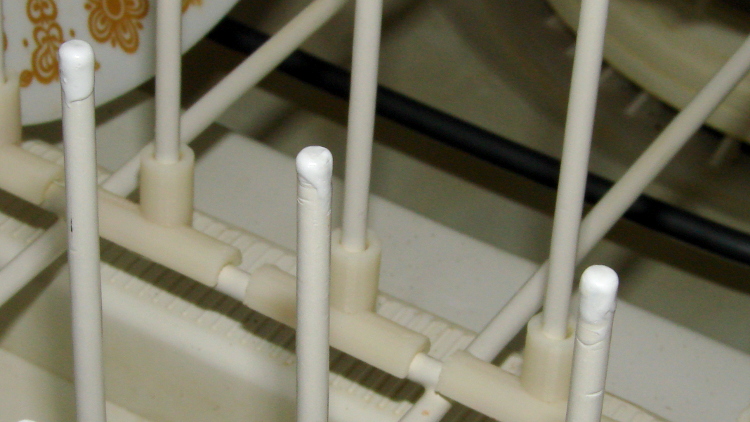
    Three rack protectors have gone missing over the last few months, presumably being digested by the dishwasher’s grinder, so I ran off another batch:

    Dishwasher Rack Protectors - on platform
    Dishwasher Rack Protectors – on platform

    I used the original solid model, shown here with the support structure outside for visibility:

    Dishwasher rack protector - support model
    Dishwasher rack protector – support model

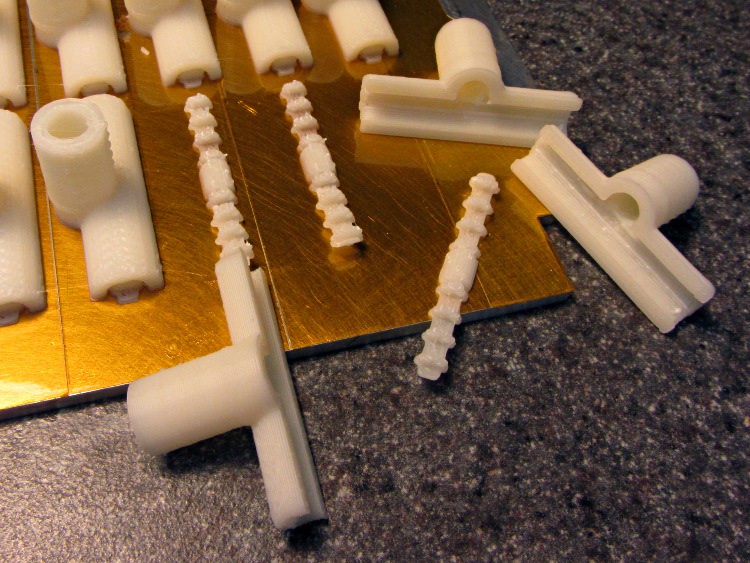
    I re-sliced the model to pick up whatever printer config tweakage happened since then. Those ribbed doodads snapped out easily and, in fact, some remained bonded to the platform:

    Dishwasher Rack Protectors - support structures
    Dishwasher Rack Protectors – support structures

    No finishing required: just slide them over the pins atop a blob of acrylic caulk. Despite the few missing protectors, it does a good job of bonding them to the rack and sealing gaps in the worn vinyl coating.

    I picked up a jar of ReRack glop on closeout duing my last pass through the Big Box Home Repair Store. It seemed a bit stiff, so I’ve added generous dollops of xylene, acetone, and MEK to thin it out; that’ll take a while to stabilize.

  • Samsung VAC-9048 Vaccuum Cleaner: Floor Brush Strips

    After beating the Samsung’s nozzle handle and hose into submission, I made a set of floor brush strips for the hard-floor attachment:

    Floor brush strips - replacements in place
    Floor brush strips – replacements in place

    The original brushes had non-woven felt glued to a cleverly molded strip of white plastic, which lasted not very long at all. I’d replaced them (*) with wool fabric glued to hand-hewn strips of polypropylene cut from the usual blister pack material, but that was so labor-intensive as to make no sense at all; it did show that replacement brushes would work, though, which was the whole point. This view looks through a finished strip to the urethane glue and wool fabric:

    Floor brush strip - manual version
    Floor brush strip – manual version

    Fortunately, there’s an easier way to make the strips:

    Floor brush strip - solid model
    Floor brush strip – solid model

    Note that the smaller tab (the one in the front) is not centered on the midline. The openings for the larger tab in the floor brush housing seem to have a small offset, but it’s not worth worrying about. The printed ones are 4 layers thick, but I think 3 layers will work as well; that’s what the OpenSCAD source will produce.

    This is one of the few situation where the hand-knitted top surface of a 3D-printed object is an advantage: that, plus the holes, provides enough griptitude for urethane glue to hold the fabric strips firmly in place.

    Obviously, you print them in multiples:

    Floor brush strips - on platform
    Floor brush strips – on platform

    A trial fit:

    Floor brush strip - trial fit
    Floor brush strip – trial fit

    They really are bowed slightly outward in the middle, which ensures there’s more pressure on the middle of the strip against the floor. I think the weird indented pattern in the brush housing under the strips was for a complex spring assembly that never made it into production; the OEM strips looked just like the ones I’m making, minus the perforations.

    I glued two strips individually to make sure everything lined up, then glued these two in one operation and separated them with a razor knife:

    Floor brush strips - gluing fabric
    Floor brush strips – gluing fabric

    (*) It goes without saying that OEM replacement brushes weren’t available and, in fact, they have never been available at any time when we’ve owned the vacuum cleaner. Maybe I’m not looking in the right place, but so it goes.

    The OpenSCAD source code, which you’ll want to print with Multiply set to maybe 8:

    // Samsung Vacuum cleaner nozzle floor strips
    // Ed Nisley KE4ZNU January 2013
    
    Layout = "Build";			// Show, Build
    
    //- Extrusion parameters must match reality!
    //  Print with +0 shells and 3 solid layers
    
    ThreadThick = 0.25;
    ThreadWidth = 2.0 * ThreadThick;
    
    HoleWindage = 0.75;
    
    function IntegerMultiple(Size,Unit) = Unit * ceil(Size / Unit);
    
    Protrusion = 0.1;           // make holes end cleanly
    
    //----------------------
    // Dimensions
    
    Body = [6.0,59.0,3*ThreadThick];	// width, length, thick
    
    Tab1 = [4.5,5.0,0.0];				// width, length, offset from centerline
    Tab2 = [3.5,5.0,0.5];
    
    HoleOC = 8.0;						// adhesive anchoring holes
    HoleDia = 1.0;
    HoleSides = 4;
    HoleMax = floor(Body[1]/(2*HoleOC));
    
    echo("HoleMax: ",HoleMax);
    
    //----------------------
    // Useful routines
    
    module PolyCyl(Dia,Height,ForceSides=0) {           // based on nophead's polyholes
    
    Sides = (ForceSides != 0) ? ForceSides : (ceil(Dia) + 2);
    
    FixDia = Dia / cos(180/Sides);
    
    cylinder(r=(FixDia + HoleWindage)/2,
             h=Height,
             $fn=Sides);
    }
    
    module ShowPegGrid(Space = 10.0,Size = 1.0) {
    
        Range = floor(50 / Space);
    
        for (x=[-Range:Range])
            for (y=[-Range:Range])
                translate([x*Space,y*Space,Size/2])
                %cube(Size,center=true);
    
    }
    
    module BackingStrip() {
    
    	difference() {
    		union() {
    			translate([0,0,Body[2]/2])
    			cube(Body,center=true);
    			translate([Tab1[2],-1*Body[1]/2,Body[2]/2])
    			cube([Tab1[0],2*Tab1[1],Body[2]],center=true);
    			translate([Tab2[2],+1*Body[1]/2,Body[2]/2])
    			cube([Tab2[0],2*Tab2[1],Body[2]],center=true);
    		}
    		for (i = [-HoleMax:HoleMax])
    			translate([0,i*HoleOC,-Protrusion])
    			rotate(45)
    			PolyCyl(HoleDia,(Body[2] + 2*Protrusion),HoleSides);
    	}
    }
    
    //----------------------
    // Build it!
    
    ShowPegGrid();
    
    if (Layout == "Show")
    	BackingStrip();
    
    if (Layout == "Build")
    	rotate(90) BackingStrip();
    
    
  • Samsung VAC-9048R Vacuum Cleaner: Nozzle Handle Hose Bushing

    The hose going into the handle of the neversufficently-to-be-damned Samsung VAC-9048R suck dog has been collapsing for quite some time, but I couldn’t figure out how to take the handle apart. Recently, the lock ring that I would have sworn was glued in place came loose, revealing the secret:

    Samsung vacuum cleaner - handle lock ring
    Samsung vacuum cleaner – handle lock ring

    You slide four lugs on the lock ring into the open slots, then turn the ring clockwise to force the lugs over barriers into recesses that capture them and hold the lock ring against the handle. The handle under the lock ring isn’t quite circular, nor is the lock ring, and I think (based on later events) that they expect the ring to deform as it turns in order to let the lugs spring over the barriers.

    Anyhow, with the lock ring loose, removing four screws released the two halves of the handle:

    Samsung vacuum cleaner - handle interior
    Samsung vacuum cleaner – handle interior

    The handle includes a switch for the powered floor brush, which we rarely use, and a suction control lever that’s basically a binary leak: on or off. With the handle opened in front of you, remove the innards, unwrap the decorative duct tape, unwind enough of the two power conductor / spring wire ribs to allow for rebuilding the electrical connections, and cut off the damaged part of the hose.

    Now, obviously, what that hose needs is a little bit of strain relief, along the lines of the hideous snout I’d affixed to its other end a while ago. The general idea is to replace the lock ring with a little attachment that will hold the heatshrink tubing in place. Something like this:

    Bushing Solid Model - top
    Bushing Solid Model – top

    The bottom view, looking up through the layer of 1 mm cubes defining the Z=0 plane, shows the lugs:

    Bushing Solid Model - bottom
    Bushing Solid Model – bottom

    I thought the slit would provide enough springiness to let the lugs bump over the ridges, but it wasn’t quite enough: the relatively stiff ABS isn’t nearly as springy as the original black plastic for about the same thickness. For the next version, I’ll try four slits, all of which must end at different levels to avoid concentrating the stress on a single layer.

    In any event, it came out about like you’d expect:

    Handle Bushing - on platform
    Handle Bushing – on platform

    As with many projects, though, I had to make a pair of simpler prototypes to get the measurements correct. The lugs, for example, are not 90° apart, spaced neatly around the handle’s midline seam, as I assumed for Prototype 1 on the right:

    Handle bushings - prototypes 2 and 1
    Handle bushings – prototypes 2 and 1

    Prototype 2, on the left, has a support structure holding up a horizontal step that butted against the handle, which turned out to be unnecessary. The OpenSCAD version substitutes a pair of conical transitions that worked much better; they’re at different levels with a thicker wall section between them.

    With the ring and somewhat preshrunk heatshrink tubing slipped along the hose, rewiring proceeds in reverse order. Next time, I’ll add a QD fitting in the hose-to-socket wire so I can take the whole thing apart again without cutting that wire:

    Samsung Vacuum Handle - wiring detail
    Samsung Vacuum Handle – wiring detail

    Assemble the handle, snap the glaring white strain relief fitting in place, shrink the tubing, add a cable tie mostly for show:

    Samsung Vacuum Handle - heatshrink over bushing
    Samsung Vacuum Handle – heatshrink over bushing

    I cut a few slits in the tubing’s end to improve its bendiness, but it’s already Much Better than it was.

    A few things I’d do differently:

    • Add a recess for the cable tie, with a flat spot for its latch
    • Four slits, not just one
    • Ribs on the snout to help anchor the tubing
    • Longer snout?

    The OpenSCAD source code for the final version, with a module for the support ring that you won’t need:

    // Samsung Vacuum cleaner hose bushing
    // Ed Nisley KE4ZNU January 2013
    
    // Layout options
    
    Layout = "Build";
                        // Overall layout: Show Build
                        // Parts: Ring Sleeve
    
    //- Extrusion parameters must match reality!
    //  Print with +1 shells and 3 solid layers
    
    ThreadThick = 0.25;
    ThreadWidth = 2.0 * ThreadThick;
    
    HoleWindage = 0.75;
    
    function IntegerMultiple(Size,Unit) = Unit * ceil(Size / Unit);
    
    Protrusion = 0.1;           // make holes end cleanly
    
    //----------------------
    // Dimensions
    
    HoseOD = 47.0;					// spiral tube diameter
    TubeWall = 1.4;					// heatshrink tubing wall thickness
    HandleRingLong = 8.5;			// length of ring stub on handle
    
    RingID = 51.0;					// lock ring over handle end
    RingOD = 58.0;
    RingLong = 12.0;
    
    Locks = 4;						// bumps inside lock ring
    LockLength = 4.0;
    LockWide = 4.0;
    LockThick = 0.75;
    
    LockAngleOffset = 52.0;			// offset of lock bump from handle top dead center
    LockAngleIncluded = 102.4;		// between first and second lock bump (also 3 & 4)
    LockAngles = [-LockAngleOffset,
    				-(LockAngleOffset+LockAngleIncluded),
    				-(LockAngleOffset+180),
    				-(LockAngleOffset+LockAngleIncluded+180)];
    
    BushID = HoseOD + 1.0;			// over spiral hose
    BushOD = RingOD - 2*TubeWall;	// allow flush heatshrink fit
    BushLength = 15.0;
    
    SlitWidth = 2*ThreadWidth;		// allow expansion of lock ring, sorta kinda
    SlitHeight = 20.0;
    SlitAngle = 0;
    SlitLength = max(RingOD,BushOD);
    
    RingSides = 4*8;
    RingAlign = 360/(2*RingSides);
    $fn = RingSides;
    
    //----------------------
    // Useful routines
    
    module PolyCyl(Dia,Height,ForceSides=0) {           // based on nophead's polyholes
    
    Sides = (ForceSides != 0) ? ForceSides : (ceil(Dia) + 2);
    
    FixDia = Dia / cos(180/Sides);
    
    cylinder(r=(FixDia + HoleWindage)/2,
             h=Height,
             $fn=Sides);
    }
    
    module ShowPegGrid(Space = 10.0,Size = 1.0) {
    
        Range = floor(50 / Space);
    
        for (x=[-Range:Range])
            for (y=[-Range:Range])
                translate([x*Space,y*Space,Size/2])
                %cube(Size,center=true);
    
    }
    
    //-------------------
    // Component parts
    
    module Ring() {
    	union() {
    		difference() {
    			union() {
    				cylinder(r=RingOD/2,h=(RingLong + Protrusion));
    				translate([0,0,RingLong])
    					cylinder(r1=(RingOD/2),r2=(BushOD - Protrusion)/2,h=(RingOD - BushOD));
    			}
    			translate([0,0,-Protrusion]) {
    				PolyCyl(RingID,(HandleRingLong + Protrusion),RingSides);
    				cylinder(r=BushID/2,h=(2*RingLong));
    			}
    			translate([0,0,(HandleRingLong - Protrusion)])
    				cylinder(r1=((RingID/2) / cos(180/RingSides) + HoleWindage),
    						 r2=BushID/2,
    						 h=(RingID - BushID)/2);
    		}
    		for (i=[0:Locks-1])
    			rotate(LockAngles[i] + RingAlign)
    				translate([(RingID/2),0,LockWide/2])
    					cube([2*LockThick,LockLength,LockWide],center=true);
    	}
    }
    
    module Sleeve() {
    	difference() {
    		cylinder(r=BushOD/2,h=(BushLength + Protrusion));
    		translate([0,0,-Protrusion])
    			cylinder(r=BushID/2,h=BushLength + 3*Protrusion);
    	}
    }
    
    module Bushing() {
    	difference() {
    		union() {
    			Ring();
    			translate([0,0,RingLong])
    				Sleeve();
    		}
    		rotate(SlitAngle)
    			translate([SlitLength/2,0,(SlitHeight - Protrusion)/2])
    				cube([SlitLength,SlitWidth,(SlitHeight + Protrusion)],center=true);
    	}
    }
    
    // This turned out to be unnecessary after tapering the transitions
    module Support() {
    
    SuppHeight = RingLong - ThreadThick;
    
    	color("Yellow")
    	union() {
    		difference() {
    			cylinder(r=(RingID/2 - LockThick - ThreadWidth/2),h=SuppHeight);
    			translate([0,0,-Protrusion])
    				cylinder(r=(BushID/2 - ThreadWidth),h=2*RingLong);
    			for (i=[0:RingSides-1])
    				rotate(i*2*RingAlign)
    					translate([RingID/4,0,SuppHeight - ThreadThick/2 + Protrusion/2])
    						cube([RingID/2,(LockLength - 3*ThreadWidth),(ThreadThick + Protrusion)],center=true);
    		}
    	}
    }
    
    //----------------------
    // Build it!
    
    ShowPegGrid();
    
    if (Layout == "Build")
    	union() {
    		Bushing();
    //		Support();
    	}
    
    if (Layout == "Show")
    	Bushing();
    
    if (Layout == "Ring")
    	Ring();
    
    if (Layout == "Sleeve")
    	Sleeve();
    
    if (Layout == "Support")
    	Support();
    
    
  • XFCE Window Manager Recovery

    The XFCE window manager, at least in its Xubuntu incarnation, seems surprisingly fragile. Every now and again, it won’t start up: all the auto-starting application windows pile atop each other on a single workspace, with no title bar or window decorations, with no way to move them around or change focus. In some cases, the mouse will be active and the keyboard will be dead. This is Not Good.

    Rebooting that sucker isn’t productive, as the failure seems to occur most often after a normal system update that, inexplicably, clobbers the window manager’s state information. After that, the window manager will wake up dead every time.

    The usual recovery technique involves activating a terminal window and entering xfwm4 --replace to forcibly restart the XFCE window manager, clear the state, and ensure it’s the default. That is remarkably difficult with a nonfunctional keyboard and can’t be accomplished remotely without access to the jammed user’s X session.

    What has worked is to SSH in from another PC and delete the XFCE caches for the affected user:

    cd ~/.cache
    rm -rf xfce4
    rm -rf sessions
    

    You can blow away the entire .cache subdirectory if you prefer.

    That this should not be necessary goes without saying. Remember that XFCE is currently the least-awful Linux Desktop Environment; all the rest have even greater complexity and much larger problems.

  • Windows 7 Home Premium Remote Desktop: The Missing Link

    The tiny Lenovo Q150 has become the dedicated Windows box for running TurboTax this season. In earlier years, I used the Token Windows Laptop through a remote desktop session that appears on a Xubuntu desktop, but the Q150 runs rings around the old laptop.

    This time, no matter what I tried, I couldn’t connect to the Windows 7 desktop on the Q150 from my Xubuntu desktop. The usual search results suggested Windows configuration settings that didn’t quite match what the Q150 provided; a bit more searching revealed that Windows 7 Home flavors of the OS (this one is Home Premium) lack the Remote Desktop Protocol server required to export the desktop. The Q150 could act as a client that controlled another machine’s desktop server, but not the other way around.

    The suggested solutions required applying patches, in the form of EXE files downloaded from sketchy websites, or dropping in replacement DLLs obtained from similar sites. All that seems like Bad Practice, particularly for a Windows box used to prepare our taxes, and I was unwilling to proceed along those lines.

    Instead, I fetched UltraVNC, installed it on the Q150, and it works perfectly. Remmina occasionally requires a resize-window-to-match-server at startup and then it’s all good.

    From what I hear, Windows 7 doesn’t display the classic Blue Screen of Death nearly so often as before, although I did manage to lock it up during the course of this adventure. That’s OK, I can still use my favorite Windows wallpaper image:

    Windows 7 Home - UltraVNC via Remmina
    Windows 7 Home – UltraVNC via Remmina
  • Cheap LED Flashlight Switch Disassembly

    The pushbutton switch on the end cap of a cheap LED flashlight became intermittent, for reasons that should be obvious:

    LED Flashlight switch - intact
    LED Flashlight switch – intact

    Pulling the spring contact out revealed the usual situation inside:

    LED Flashlight switch - spring removed
    LED Flashlight switch – spring removed

    I thought that the discolorations around the central plug indicated a solder joint between the two, but the scratches showed that the plug was actually a press-fit plastic cylinder. Having nothing to lose, I pried the rubber dome off the outside of the switch, balanced the cap’s outer rim on the bench vise, centered an aluminum cylinder over the switch post, and gave it a hammer shot:

    LED Flashlight switch - guts
    LED Flashlight switch – guts

    It appears the Basement Warehouse Wing inventory lacks a push-on switch that fits the cap, so this one goes on the pile of potentially useful parts. If a suitable switch appears, I know what to do with it, but if I should need a nice aluminum cylinder that fits a trio of AA cells before then, well …

  • Tektronix 2215A Oscilloscope Power Switch Rebuild

    My trusty Tek 2215A oscilloscope might be useful for a Larval Engineer engaged in late-night debugging away from the lab, but the power switch has become flaky: sometimes the ‘scope didn’t turn on at all, sometimes the switch required multiple pokes, sometimes everything worked fine. Removing the cover revealed there’s a long plastic bar connecting the power button on the front panel (to the right in the picture) to the power switch near the rear panel AC line socket, tucked under the EMI filter with the red sticker:

    Tek2215A - internal top view
    Tek2215A – internal top view

    Removing the high voltage shield below the PCB reveals the switch has DPDT terminals, but it’s wired as DPST:

    Tek2215A power switch - PCB terminals
    Tek2215A power switch – PCB terminals

    This knowledge will come in handy later…

    Unsoldering the switch and wriggling the bar out of the front panel puts the switch on the bench, solder terminals upward. A plastic shell snapped around the actual switch insulates the top of the six terminals from prying fingers:

    Tek2215A power switch - bottom
    Tek2215A power switch – bottom

    Remove the shell, remove the toggle-action U-shaped steel pin, release the spring, and pull off the top plate:

    Tek2215A power switch - internal
    Tek2215A power switch – internal

    Remove the plunger hardware, remove the rocker arms and their springs:

    Tek2215A power switch - disassembled
    Tek2215A power switch – disassembled

    One contact on each rocker shows signs of distress, but the other button remains pristine (having never seen any voltage differential):

    Tek2215A power switch - rockers
    Tek2215A power switch – rockers

    Pull out the fixed contact tabs and note that they’ve been scorched a bit. The one on the right corresponds to the bottom rocker above:

    Tek2215A power switch - contact tabs
    Tek2215A power switch – contact tabs

    I cleaned everything with a fiber wipe wetted in DeoxIT, then decided that I’d take the easy way out. The tabs have heavy silver plate on both sides, so I flipped them over and reinstalled them with the unused side facing the rockers. The rockers went back in with their unused contact buttons facing the flipped tabs, so we now have fresh, shiny new contact surfaces. Reassemble the switch, soldered it in place, button up the case, and a firm push on the button lights the ‘scope exactly the way it should.

    While I had the cover off, I measured the ESR of all those electrolytic capacitors: they’re in fine shape!

    The next time the switch needs repair, in another couple of decades, someone can swap in the completely unused tabs from the other end of the switch, then pick whichever contact buttons look best… [grin]