Ed Nisley's Blog: Shop notes, electronics, firmware, machinery, 3D printing, laser cuttery, and curiosities. Contents: 100% human thinking, 0% AI slop.
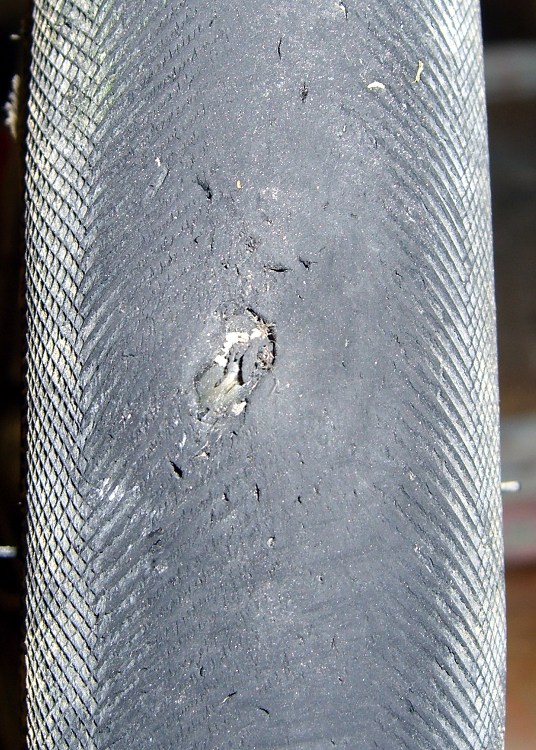
A glass chip gashed the front tire of my bike a while ago, but the slit didn’t cut the Kevlar belt underneath and I let it slide. The pre-ride check before our 50-mile day trip to Old Rhinebeck Aerodrome showed that things had gotten worse (the tire liner was peeking out through the belt), so I replaced the tire before we set out.
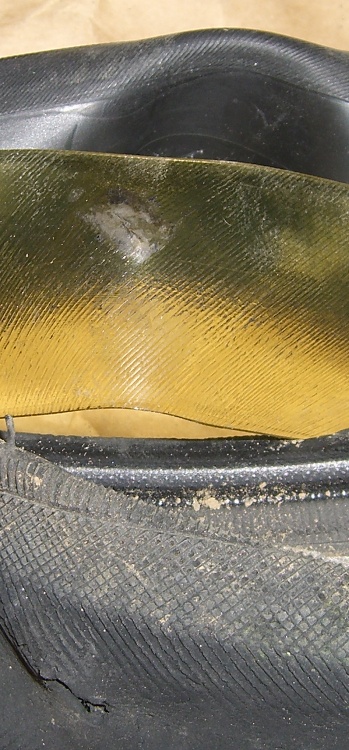
Tire liner abrasion
This pic shows that the tire liner was doing its job, although it was slightly abraded and had picked up some road grit. The tube had a barely visible mark.
I generally use fluorescent green Slime tire liners, but this one is a competing brand I picked up a while ago. Not much to choose between the two, although I think Slime liners have a better edge taper and tend to be more flexible.
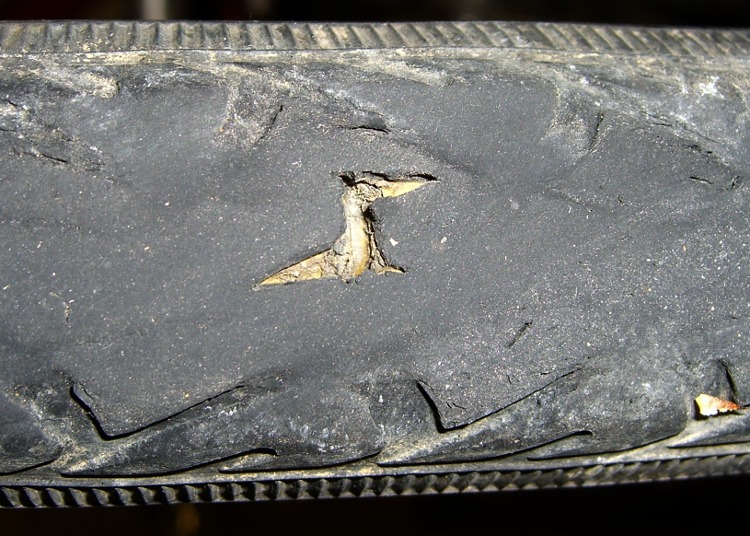
Notice the other nicks and gashes in the tire tread? We run Schwalbe Marathons on the rear and Primo Comets on the front, both have Kevlar belts. Flats are not a problem any more, even with plenty of sharp road debris; I replace the tires every two years or so when the tread wears smooth or a major gash worries even me. My rule of thumb: when I can see the liner, it’s time to replace the tire.
Tread gash – Schwalbe Marathon
There are riders who argue for very lightweight tires on the basis of performance: better acceleration and lower rolling resistance. I’m willing to trade all that off against not having to dismount a tire by the side of the road…
[Update: Plenty more posts on this general subject, with graphic illustrations of tire damage. Search for liner and you’ll find ’em.]
Usually I replace the blade on my ancient (cast iron!) 14-inch Delta band saw when I can no longer force it through the thing-to-be-cut, which means every few years, tops, unless I procrastinate. Having just stripped the teeth off a foot of blade, it was time for a replacement long before one was due…
The first step is whacking off 93″ of blade from the 100-foot coil I bought ever so many years ago, using a cold chisel on the vise’s anvil surface. If you’re fussy, wrap a piece of duct tape around the ends-to-be so they don’t fly away after the cut. Otherwise, just enjoy the twang and risk some ritual scarification.
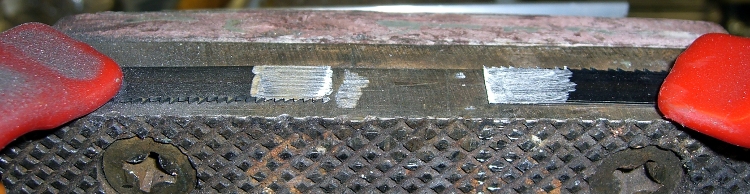
Scarfing the blade ends
Clamp the blade to the top of the vise with a half-twist so opposite sides face up, then scarf both ends about halfway through, so the finished joint will be more-or-less the same thickness as the rest of the blade. Chuck up a grinding wheel / cylinder in your Dremel-tool-like gadget, go slow so as to not overheat the joint, and shower your workbench with steel dust.
To emphasize: note that the teeth face this way on one end and that way on the other! You might want to butt the ends together, but I’m not sure I could get the taper thin enough in the middle that way. You want to cut about halfway through the width of the teeth, too, because they must overlap in the finished joint.
Preparing solder foil
I use a homebrew resistance soldering gadget, but a honkin’ big soldering gun might work. In any event, solder foil works better than solder wire, so I put a snippet of Brownell’s Hi-Force 44 4% silver solder (far more expensive now than when I bought that 1-lb spool long ago) in a stainless-steel sleeve and massage it with a hammer. Crude, but effective: the point is to keep the solder clean, which doesn’t happen when you just whack it on the anvil.
Aligning and clamping blade ends
However you do the joint, you must align the blade ends so they’re collinear: you do not want a kink in the middle of the blade. This setup reflects my soldering gear: a graphite slab clamped to a brass plate caught in the vise, an aluminum channel for alignment, and a pair of battery clamps to hold the blade in place. I apply paste flux to both sides of the joint and poke the solder foil into the flux, too. If you squint, you can see the trimmed-to-fit solder foil lying atop the scarfed edge.
Resistance soldering
Slide the right side over the left, make sure the teeth on both ends overlay each other, clamp in place, check the alignment, and apply heat. This is a slightly staged shot showing the carbon gouging rod in position well after the joint has solidified. The key advantage of resistance soldering is having a footswitch so you can hold everything in position while the joint cools.
Thinning the joint
Clamp the finished blade to the vise and thin both sides to the width of the rest of the blade. If you’ve done a better job of scarfing than I usually do, this is just a matter of tapering the edge a bit. The pic shows the first surface I thinned, so there’s some flux hanging in the teeth. That’ll vanish as you cut if you don’t clear it off while thinning.
Finished joint – victim's view
The end result should look like this, as seen from the victim’s position in the bandsaw: no lumps, no bumps, nothing sticking out on either side.
The whole process takes about half an hour, what with clearing space on the workbench, setting up the soldering gear, deploying the Dremel tool, and cleaning up a bit afterward. That would be crazy in a production environment, which is why they have blade welders bolted to the side of the bandsaws, but it’s OK for something I do every few years.
I formerly used a propane torch and a fixture to align the pieces, but the resistance soldering unit eliminates the flame and delivers a much better result because it compresses the joint while the solder cools.
Side views, just for completeness…
Finished joint – left sideFinished joint – right side
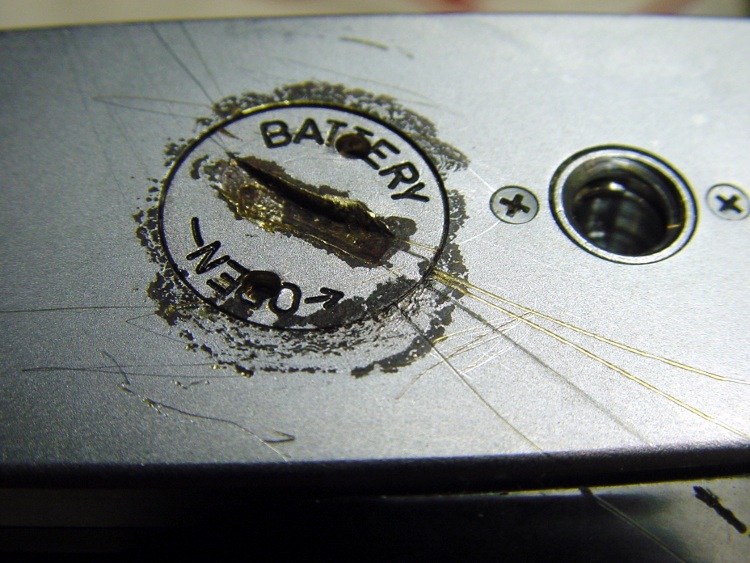
Some years ago a friend brought a favorite old camera that he’d just rediscovered. As you might expect, the exposure meter battery had long since died and its lid was rust-welded in place. Alas, he’d tried and failed to remove the lid by applying, mmmm, inappropriate tools to the coin slot.
I proposed building a quick-and-dirty pin wrench from an aluminum knob, which requires a matching pair of holes in the lid. Given that the lid was already pretty well pooched, he had no objection.
IIRC, I laid a strip of masking tape over the lid, laid out the holes perpendicular to the slot, then drilled them out by eyeball. The trick is to avoid drilling into the battery; it’s likely all dried out by now, but there’s no reason to release any more of that glop than absolutely necessary.
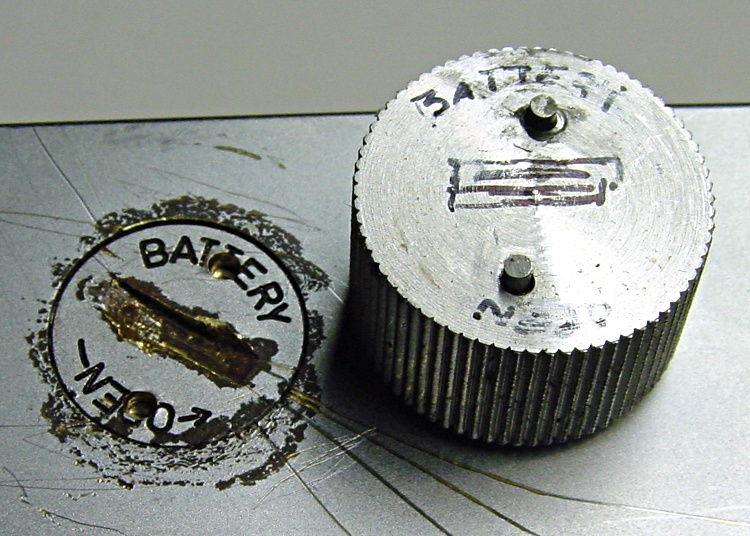
Battery cover wrench
Then I turned the threaded boss off the bottom of the knob and drilled two slightly larger holes separated by the same distance. This would be ideal for manual CNC, but I didn’t have the Sherline at the time, difficult though that may be to imagine.
When you can’t do precision work, epoxy is your friend.
Lay new tape over the battery lid
Cut two lengths of music wire with a diameter to match the holes in the battery lid using a Dremel abrasive cutoff wheel
Stuff the wire stubs into the holes, wipe off excess epoxy
Jam the pins through the tape into the holes in the battery lid
Wait for a few minutes…
You can see the top pin is slightly offset in its hole, but the epoxy ensures that the pins are an exact fit to the lid. The tape prevents the wrench from becoming one with the battery lid. Not drilling into the battery means the pins bottom out on the battery. Music wire means the pins won’t bend; copper wire doesn’t work in this application.
If you’re good with the Dremel, the pins will be not only the same length, but the proper length. IIRC, I made them a bit long and then trimmed them to fit.
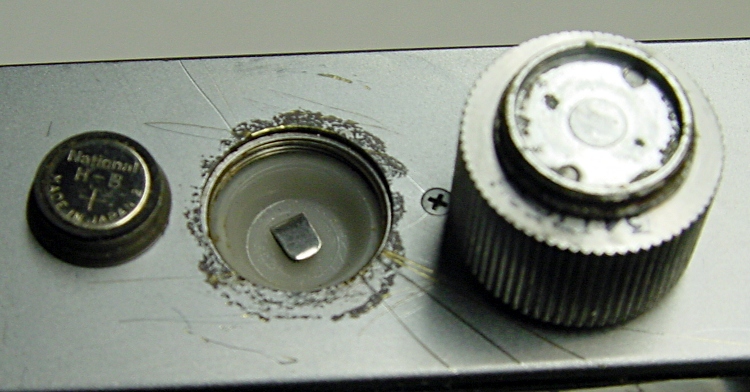
Battery lid removed
When the epoxy cures:
Remove the wrench
Remove the tape
Install the wrench
Twist the lid right off.
Works like a champ!
Much to our surprise, the inside of the battery compartment wasn’t a mass of corrosion and the threads were actually in pretty good shape, all things considered. It’s not clear why the lid was so corroded, but there you have it.
He went home happy… taking the wrench along, although we hope it’ll never be used again.
(I found these pix while I was looking for something else. My close-up technique has improved over the years: a tripod, bright lights, and the smallest possible aperture are my friends.)
We used Diamond K540KM truck mirror-bracket antenna mounts clamped to the top seatback rail on our Tour Easy recumbents for several years, but they weren’t entirely satisfactory. The vibration from our ordinary on-road bike rides (a TE isn’t an off-road bike!) fractured the stamped-steel base after four years.
Antenna Bracket Repair
I fixed that by screwing a steel plate across the crack. It became obvious that these mounts weren’t suited to the application when the second mount failed shortly thereafter.
Broken Diamond K540KM Antenna Mount
But we kept using them and, as you might expect, Mary’s mount failed in the middle of a 350-mile bike ride when the die-cast support dingus broke. The fresh granular metal fracture looks dead white in the picture.
I lashed the pieces together with a multitude of cable ties and we completed the mission. When I rolled our bikes into the Basement Laboratory Bike Repair Wing after returning home, the mount on my bike failed.
These mounts aren’t intended for “high vibration” applications and, it seems, bicycles produce much higher vibration than trucks. I’m certain that the frequency range is higher, although I’m not sure about the amplitude.
Obviously, it was time for something better… which meant some quality shop time. More on that tomorrow.
Mary dropped a pair of her sunglasses that disintegrated on impact: both earpieces broke off. She has trouble finding sunglasses that fit, so this is not to be taken lightly…
The sunglasses had interchangeable lenses, a feature which she’d never used, and the lower of the two tabs that snapped into the earpieces had broken off — on both sides, simultaneously. These weren’t high-snoot items, but they were name-brand: Rudy Project from, IIRC, nashbar.com.
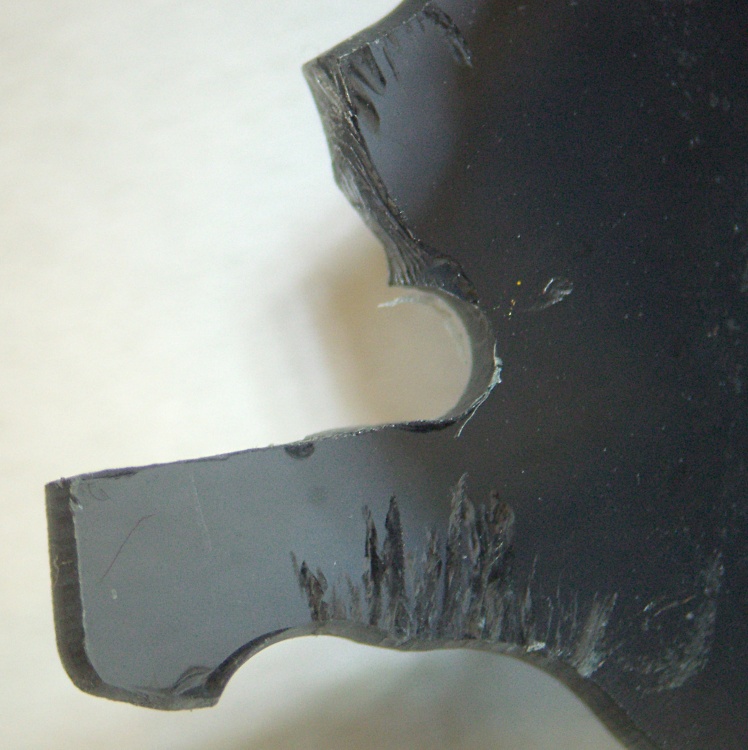
Peering through the microscope, it turns out that the lens material may have been pretty good optically, but wasn’t up to the mechanical task: the two remaining tabs had deep stress cracks. The right-side picture shows the lens upside-down, as that was the easiest way to set up the shot.
Notice the many, many cracks that penetrate nearly all the way through the tabs. The tabs didn’t break because she dropped the glasses on the floor, they broke because there was barely anything left holding the tabs in place.
Mind you, she’d never removed the lenses from the earpieces, so this isn’t a case of failure-from-overuse, either. They’re about a year old, more or less, and have been used in stressful tasks like gardening and the occasional bike ride.
Urethane adhesive foam-in-place
I slobbered urethane glue into the ends of the earpieces to mechanically lock the remaining tabs in place and fill all the voids. It looks rather ugly here, but the excess adhesive simply snaps off because it doesn’t chemically bond with either of the other two plastics.
Rudy sunglasses stress cracking – center
After screwing everything back together again, I noticed that there’s another stress crack growing in the middle of the lens, just over the nosepiece. These sunglasses are not long for this world: that failure will be an end-of-life event.
The frames claim “Designed in Italy” which doesn’t win any points with me; the design is fundamentally flawed.
Yo, Rudy, how about designing some sunglasses with a high-tech feature like durability… rather than style?
Oh, yeah, I suppose this repair voids the Warranty. Perhaps buying from Nashbar on sale triggers this clause: “Buying Rudy Project sunglasses, goggles or helmets from an online retailer at a price below the suggested retail price (MSRP) voids your warranty.” The expense of sending them in negates any possible benefit, which I’m sure they realize, too.
Our daughter has been helping a friend learn to ride a bike (at age 15: it’s never too late!) and we’ve been rehabilitating a new-to-her bike in the process. It’s an inexpensive Ross bike, perfect for the task at hand, and is providing a good introduction to machine-shop work.
The fact that it’s much older than she is makes not a whit of difference. Nay, verily, I rode a bike pretty much like this one for hundreds & hundreds of miles back in the day. I got better ones when I could afford them and she will, too; maybe we’ll tempt her into a recumbent bike some day…
Anyhow, the seat tended to spin around even with the clamp cranked dangerously tight. Taking a look down the tube showed that they used welded-seam tubing (it really was an inexpensive bike) and didn’t bother to clean up the internal seam. As a result, the chromed steel seat post rested on maybe three small patches of metal that didn’t provide much friction at all.
I wrapped a neodymium magnet in a rag and stuffed it down the tube to catch the filings, then applied a coarse cylindrical file (a rat-tail would work as well) to the seam. When it was nearly flush, I switched to a finer file to smooth it and the other high spots. The picture shows the improved seam, ready for the seat post. Ugly, but rough is actually a Good Thing in this situation.
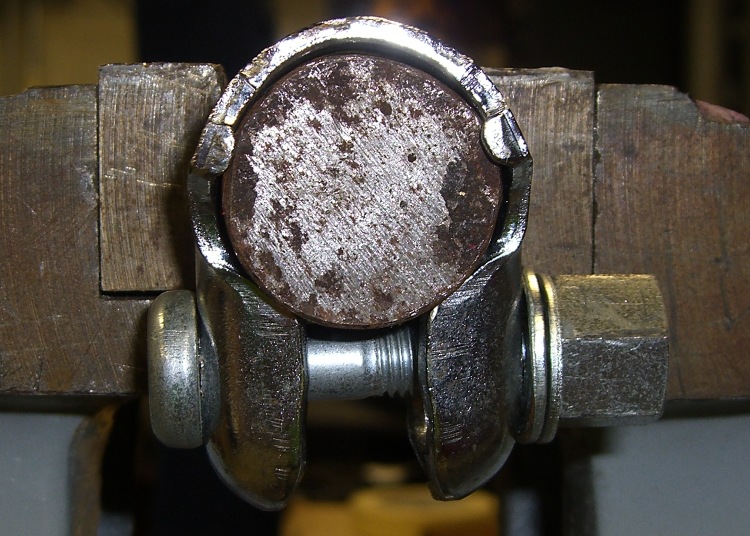
Seat Clamp Swaging
The seat tube has a nominal 1-inch OD, so I clamped a random round from the heap in the vise, tapped the clamp around it, and massaged it lightly with a hammer to persuade it into a more cylindrical shape. It’s still not perfect, but at least the bolt lugs engage the seat tube around the slit somewhat better.
With all that in hand, the seat post is now perfectly secure.
On her first “I can ride!” parking-lot outing, she experimentally determined that a bicycle wheel’s lowest-energy state resembles the edge of a potato chip. Fortunately, it was the front wheel and, after a bit more shop derring-do than one might wish, we swapped in another wheel that’s been hanging on the garage wall for a decade, ready for just such an occasion.
Remember how independent your first bike made you feel? It’s working that way for those two, just like it did for us. Life is full of bumps and they’ll get hurt every now and then, but there’s no other way to get through it; they’re just about ready to ride over the horizon.
Happy Independence Day for those of us in the USA!
A friend brought over a broken toy (well, an Argent GPS tracker) with a peculiar problem: everything worked, but after a few minutes the front-panel LEDs would get intermittent. The LEDs are hand-soldered to the board with leads that extend maybe 7 mm from the surface.
After a bit of poking around, I stuck the gadget under the microscope, at which point the problems became obvious.
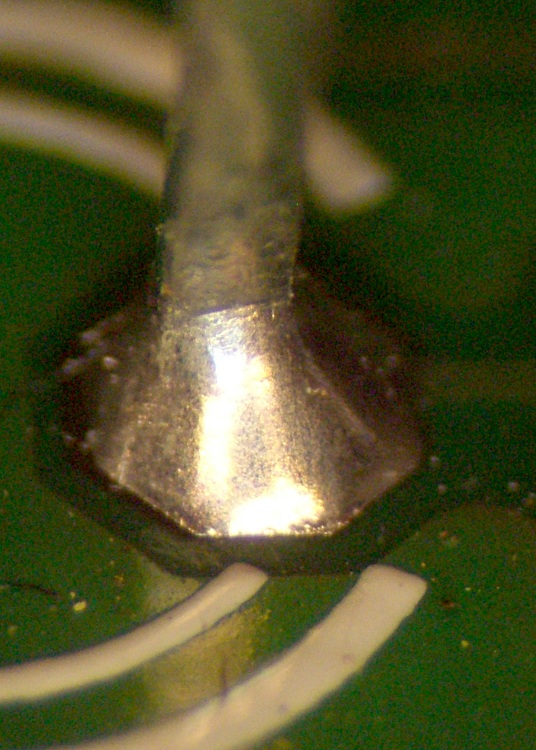
See that distinct line where the solder meniscus ends at the lead? Yup, that’s the teltale sign of a cold solder joint. The lead never got hot enough to bond properly with the solder, so the failure extends all the way down through the board. The only electrical contact is at a random point where the flux layer is thin enough to pass current; as the joint heats up, that point Goes Away.
Worse, do you see (click on the pix for bigger images) the small discontinuity about 1/3 of the way down the solder cone? My buddy Eks alerted me to that failure: that’s where the solder joint fractures from repeated heat stress.
Solder Thermal Stress
Here’s the quick sketch he drew on the canonical back-of-the-envelope. I added the red oval as a replacement for his emphatic gestures; with any luck, you’ll never forget it, either.
In this case the LED is anchored in a front-panel hole and the lead is mechanically locked to the board. As the lead heats & cools, it expands & contracts (duh) at a slightly different rate than the solder. After a while, the solder cracks; it’s much less ductile than copper.
Joint 2 – clear fracture
I’m not convinced that’s what happened here, as the LED leads have a bend in the middle that should relieve the stress, but it’s at exactly the spot where he sketched the failure he’s found in many, many gadgets. Power transistors standing above boards with their backs screwed to heatsinks seem particularly prone to this failure, as they have short leads stressed by the differential expansion between copper and aluminum.
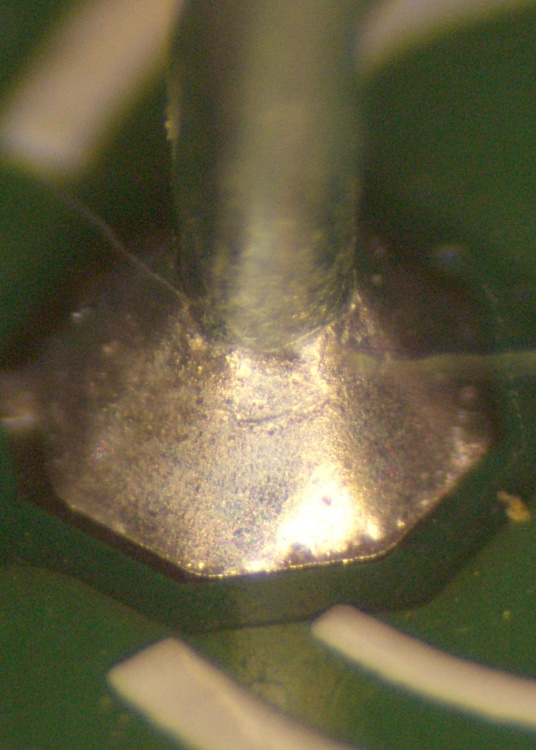
Here’s another LED lead from the same gadget. A random out-of-focus fiber enters from the right and exits around to the left rear, but you can clearly see the bad joint at the top of the solder cone and the fracture line just below the fiber.
A touch of the soldering iron generally solves the problem, although you might want to suck the old solder out so the new solder can re-flux the joint.
Arduino Pro USB (cold) Solder Pads
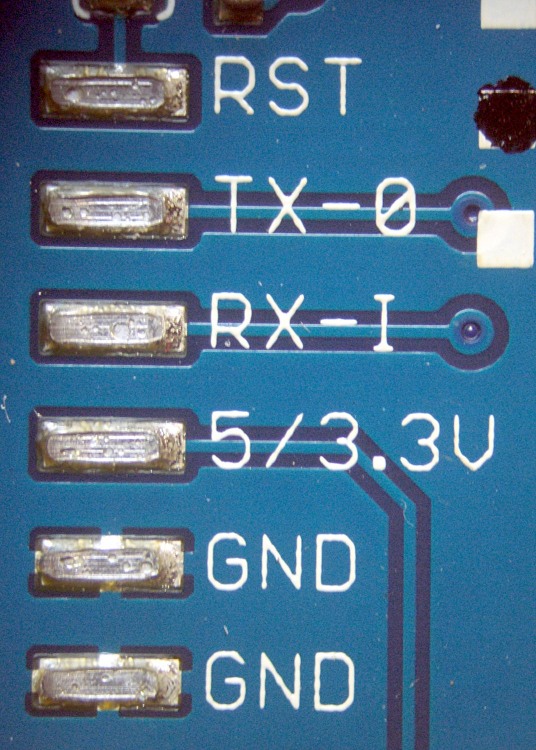
This doesn’t happen only to hand-soldered joints. The USB header fell right off an Arduino Pro board while I was debugging something else. I had to re-heat the joints and the header separately, add flux, and then solder ’em together. Notice the bubbles in the solder layer? That header just never got up to the proper temperature. The current version of that board uses a through-hole header, which is more rugged than this surface-mount equivalent.
TinyTrak3 cold-solder joints
And a TinyTrak3+ board had few cold joints, too, where the leads just didn’t bond at all.
In both of those cases, the vendors did a quick check and didn’t find similar problems with their stock, so the boards I got seem like random failures on the soldering line.
Now, if I’d never made a cold solder joint in my life, I’d be in a position to get all snooty. That’s just not the case: it happens to everybody, once in a while, and you just learn to live with it.