The Smell of Molten Projects in the Morning

Ed Nisley's Blog: Shop notes, electronics, firmware, machinery, 3D printing, laser cuttery, and curiosities. Contents: 100% human thinking, 0% AI slop.

Tag: M2

Using and tweaking a Makergear M2 3D printer

  • Makergear M2: Heated Build Platform Insulation

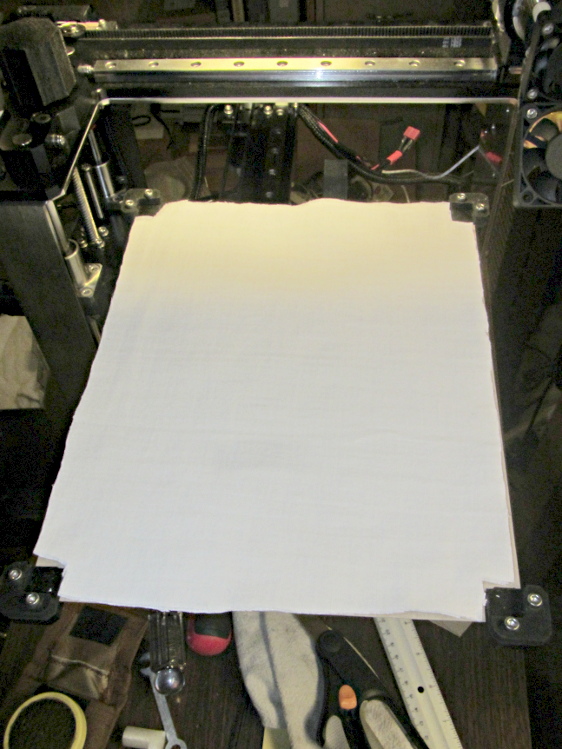
    Although I don’t have any data to support the idea, it seems that there’s far too much heat loss from the bottom of the HBP. Admittedly, air is a great insulator, so most of the energy should go into the aluminum plate, but having air blow over the bottom can’t be a Good Thing. There’s a very thin space between the bottom of the silicone heater element and the black aluminum spider supporting the corners, so I added a thin cardboard sheet:

    HBP insulation - cardboard base
    HBP insulation – cardboard base

    The curiously shaped cutout clears the heater power wires, the thermistor in its lug, and the thermistor wires.

    Atop that goes a pair of very thin cotton cloth sheets (again, not much to focus on, so it’s a bit blurry):

    HBP insulation - cotton sheet
    HBP insulation – cotton sheet

    And then the plate fits atop the corner support pads as usual. I suppose the heater duty cycle should be lower at any given temperature, but I don’t have any records to compare against.

  • Makergear M2: HBP Connector Stabilization

    Given my experience with the TOM’s platform heater connector, I was bothered by having the M2’s heated build platform connection flex as the Y stage travels back and forth. After replacing the Z axis motor, I added a strut to the Y axis stage to stabilize the HBP connector.

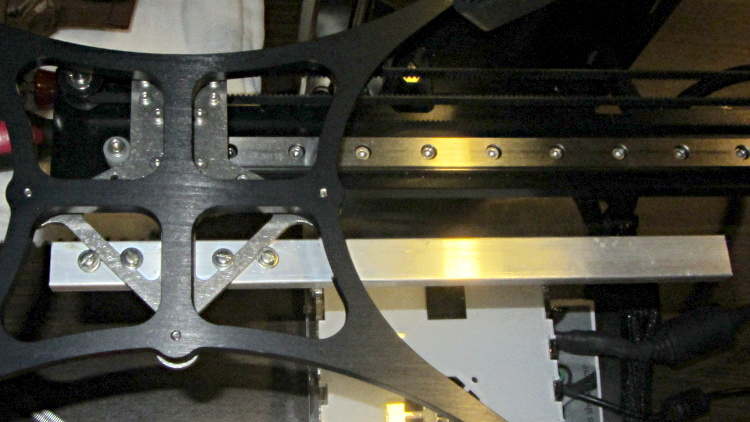
    This overview shows the aluminum strut sticking out to the rear (Y+) end of the platform support spider:

    HBP connector support strut - overview
    HBP connector support strut – overview

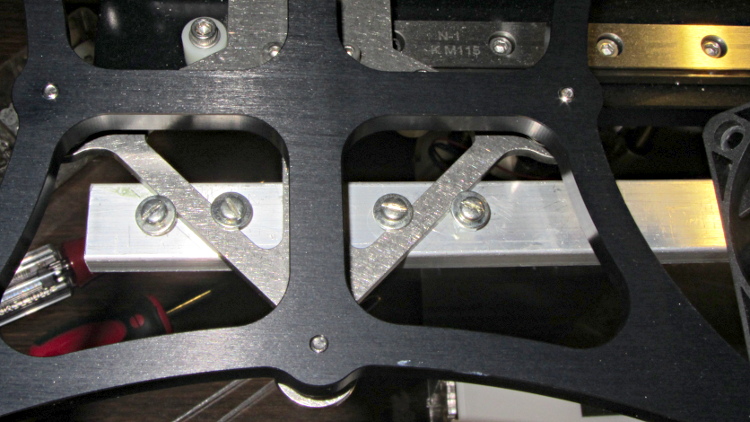
    A closeup shows a quartet of 4-40 holes drilled and tapped along the strut’s midline:

    HBP connector support strut - mounting detail
    HBP connector support strut – mounting detail

    Admittedly, that’s a bit of a kludge, but I didn’t want to drill holes in that nice steel bracket… particularly since I’d have to dismantle the whole stage to get to it. The four screws wedge the strut firmly in position and have jam nuts on the bottom so they don’t loosen.

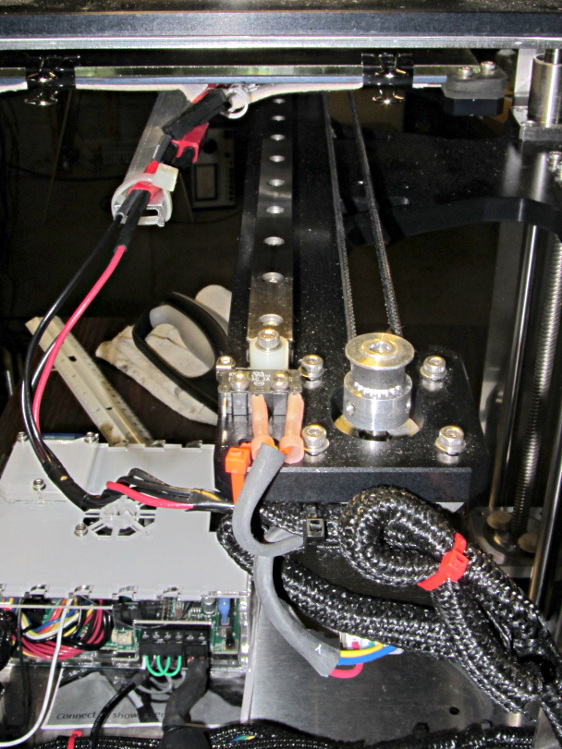
    I extracted more wire from the braided sheath and moved the cable a bit further out at the cable tie holding it to the Y axis stage, then cable-tied the HBP connector to the strut.

    With the stage all the way to the rear:

    HBP connector support strut - at Y min
    HBP connector support strut – at Y min

    And to the front:

    HBP connector support strut - at Y max
    HBP connector support strut – at Y max

    The wires may break, but now the HBP connector and heating pad joints should survive!

  • Makergear M2: Grippier Z-min Switch Mount

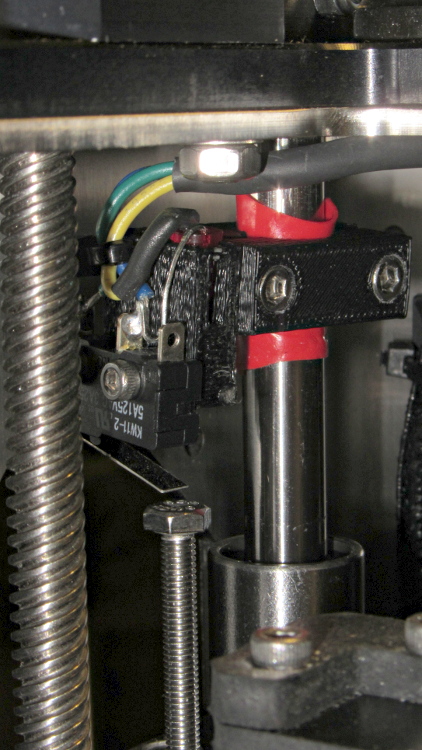
    The printed bracket for the M2’s Z axis home switch doesn’t get a good grip on the oiled steel rod, so it can slide around just a little bit when nudged. That doesn’t happen often, but when it does, all your careful alignment Goes Away.

    A single wrap of silicone tape solves that problem:

    Z min switch on silicone tape
    Z min switch on silicone tape

    While I was in there, I replaced the socket-head cap screw I’d been using with a longer hex bolt and swapped the nylock nut for a plain nut that’s easier to adjust. I should file the raised markings off the top of the bolt head so it presents a smooth surface to the switch.

    That was easy…

  • Makergear M2: Better Z Axis Motor Calculations

    The original M2 Z axis motor required extremely low acceleration and speed settings, because it produced barely enough torque to lift the weight of the Z stage + HBP + glass platform. The new motor can produce about twice as much torque, so it should perform much better: all of the additional torque can go to accelerating that weight.

    I weighed all the bits and pieces while I had the M2 apart, although I forgot to weigh the motor + leadscrew separately:

    • 2.2 kg – Z stage including Z motor
    • 290 g – old Z motor + leadscrew + nut
    • 220 g – motor similar to new motor minus leadscrew
    • 963 g – HBP + glass + clips

    So, in round numbers, the whole assembly weighs about 3 kg = 29 N = 6.6 pounds. That’s surprisingly close to my original guesstimate of 3 kg = 7 pounds; I round in the worse direction when there’s only one significant figure.

    With the new motor in place, the rods & leadscrew lubed up, and the platform in place, it’s not quite heavy enough to fall under its own weight; it would just barely fall with the old motor. The slightest touch moves it along, though, which means that the angle of friction is just over the lead angle.

    The thread form is 30° trapezoidal, so the pitch diameter for an 8 mm OD thread is about PD = 7.2 mm. For an 8 mm lead thread, the lead angle is 19.5° = arctan(8 mm / π · 7.2 mm). Wikipedia’s entry on leadscrews reports the coefficient of friction for oily steel on bronze is between 0.1 and 0.16 for a buttress thread. This thread is trapezoidal, the nut isn’t worn in, the alignment’s probably off a bit, and so forth and so on; so let’s say the angle of friction is 20° and the coefficient of friction is 0.35.

    If the new motor can produce, let’s suppose, 500 mN·m of torque, then the upward force on the stage will be:

    (2 T) / (PD tan(lead angle + friction angle)) = 1 N·m / (7.2 mm x 0.84) = 165 N

    In the ideal world of physics, applying 165 N to a 3 kg stage should accelerate it at 55 m/s2 = 55000 mm/s2 = 5 G.I don’t believe that for a moment, either, particularly because stepper motor torque drops off dramatically at higher speeds.

    However, that suggests that, at a rational acceleration, the maximum stepper motor speed could very well be limited by the Marlin 40 kHz step frequency limit to 100 mm/s = (40000 step/s) / (400 step/mm) = 6000 mm/min.

    Given that I’m running the XY motors at 5000 mm/s2, I set the Z acceleration to 5000 mm/s2 and discovered that it would stall on the way to 100 mm/s. Backing off to 2000 mm/s2 worked better, so I tweaked the Marlin configuration thusly:

    #define HOMING_FEEDRATE {75*60, 75*60, 30*60, 0}  // set the homing speeds (mm/min)
    
    #define DEFAULT_MAX_FEEDRATE          {450, 450, 100, 94}    // (mm/sec)
    #define DEFAULT_MAX_ACCELERATION      {5000,5000,2000,10000}
    

    Now that’s more like it…

  • Makergear M2: Z Axis Stepper Motor Transplant

    Dan sent me a Kysan 17HD-B8X300-A, a leadscrew-equipped stepper motor with much higher torque than the Makergear Z axis motor. According to the Kysan description, which is all we have to go on: 4.2 V @ 1.5 A means 2.8 Ω, at which current it produces 5.5 kg·cm = 540 mN·m of torque. I measure 3.2 Ω and 3.5 mH, not that that makes much difference.

    I worked out some of the numbers in that post and, if they’re close, then the new motor has twice the torque of the OEM one. What’s more important is that the new motor will work correctly with a microstepping drive and won’t bake while doing so.

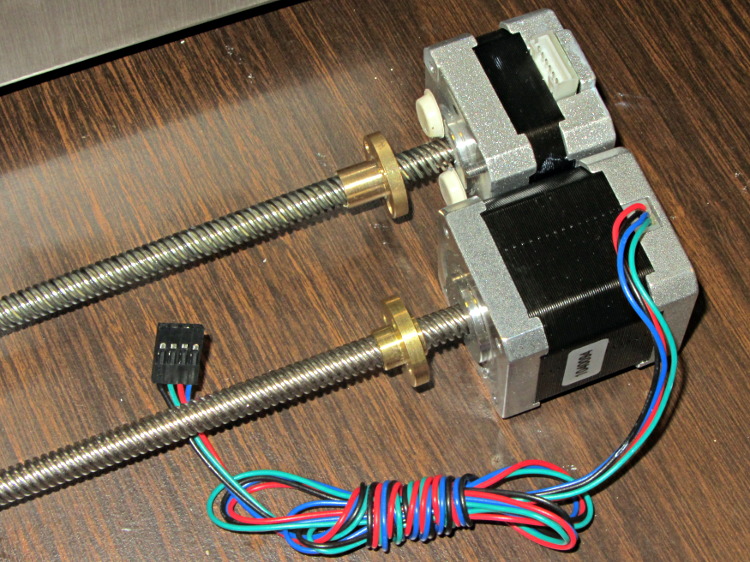
    The new motor has more metal to it than the old one:

    M2 Z Axis motors - OEM vs replacement
    M2 Z Axis motors – OEM vs replacement

    The leadscrew follower nut has unthreaded holes, but, mercifully, has the same OD, fits nicely into the Z stage, and those four holes line up perfectly.

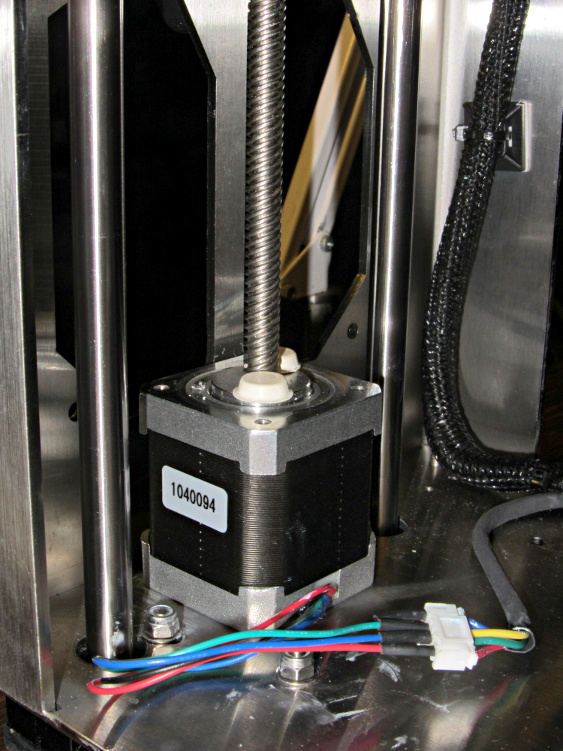
    I chopped off most of the wires and spliced a JST plug onto the end; of course, the motor ran backwards. Having foreseen that eventuality, I had not shrunk the tubing over the wires: swap a pair, shrink the tubing, and it’s done:

    M2 Z Axis motor replacement
    M2 Z Axis motor replacement

    Some notes from the operation:

    • Disconnect all the cables
    • Remove HBP + glass plate
    • Lay printer on +X side of the chassis
    • Remove screws holding Z motor to chassis
    • Remove nylock nuts and screws from leadscrew follower nut
    • Remove Z axis home switch
    • Run Z stage to top of rods
    • The leadscrew bearing will probably have fallen out by now
    • Loosen Z rod clamp nuts & bolts (top & bottom of rods)
    • Push Z rods out using a nut driver, pull with a rag for traction
    • Be ready to catch the Z stage when you remove the rods!
    • Angle motor & leadscrew out of the chassis
    • Angle new motor & leadscrew into the chassis
    • Reinstall everything in reverse order
    • Recalibrate everything…

    The Z rod sliders have little balls inside, but they didn’t fall out during this adventure. I don’t know if that’s reliable information or not.

    Now, to see what a better motor can do…

  • Optical Filament Diameter Sensor Doodles

    It should be possible to sense the filament diameter with a cheap webcam and some optics:

    Filament Diameter Sensor - Optical Path Layout
    Filament Diameter Sensor – Optical Path Layout

    The general idea:

    Given that LinuxCNC runs on a bone-stock PC, you can plug in a stock USB webcam and capture pictures (I have done this already). Because LinuxCNC isolates the motion control in a hard real time process, you can run heavy metal image manipulation code in userland (think ImageMagick) without affecting the motors.

    So you can put a macro lens in front of a webcam (like that macro lens holder) and mount it just above the extruder with suitable lighting to give a high-contrast view of the filament. Set it so the filament diameter maps to about 1/4 of the width of the image, for reasons explained below.

    For a crappy camera with 640×480 resolution, this gives you 160 pixel / 1.75 mm filament = 91 pixel/mm → about 0.01 mm resolution = 0.6%. Use a better camera, get better resolution: 1280 pixel = 0.3% resolution.

    That gives you roughly 1% or 0.5% resolution in area. This is pretty close to the holy grail for DIY filament diameter measurement.

    Add two first-surface mirrors / prisms aligned at right angles, so that the camera sees three views of the filament: straight on, plus two views at right angles, adjacent to the main view. Set the optics so they’re all about 1/4 of the image width, to produce an image with three parts filament and one part high-contrast background separating them. This is the ideal, reality will be messier.

    Figure 1 shows an obvious arrangement, the mirrors in Figure 2 give more equal distances.

    You could align the mirrors to provide three views at mutual 120° angles, which would equalize the distances and give you three identical angles for roundness computation, should that matter.

    Diameter measurement process:

    • Extract one (*) scan line across the image.
    • Convert to binary pixels: 1 = filament, 0 = background, perhaps with ImageMagick auto thresholding.
    • Add pixel values across the line, divide by 3, multiply by mm/pixel → average filament diameter.
    • Done!

    Adding binary pixels is easy: it’s just the histogram, which ImageMagick does in one step. Dump data to a file / pipe, process it with Python. It all feeds into a LinuxCNC HAL component, which may constrain the language to C / Python / something else.

    (*) You can get vertical averaging over a known filament length, essentially for free. Extract three (or more) scan lines, process as above, divide by 3 (or more), and you get a nicely averaged average.

    Win: the image is insensitive to position / motion / vibration within reasonable limits, because you’re doing the counting on pixel values, not filament position. The camera can mount near, but not on, the extruder, so you can measure the filament just above the drive motor without cooking the optics or vibrating the camera to death.

    Win: it’s non-contacting, so there’s not much to get dirty

    Win: you get multiple simultaneous diameter measurements around one slice of the filament

    You could mount the camera + optics at one end of the printer’s axis (on the M2, the X axis). Drive the extruder to a known X position, take a picture of the straight-on view, drive to another position, take a picture of the mirrored views, and you have two pictures in perfect focus. Combine & process as above.

    You can do that every now and again, because any reasonable filament won’t vary that much over a few tens of millimeters. Maybe you do it once per layer, as part of the Z step process?

    You could generalize this to a filament QC instrument that isn’t on the printer itself: stream the filament from spool to spool while measuring it every 10 mm, report the statistics. That measurement could run without stopping, because you don’t reposition the filament between measurements: it’s all fixed-focus against a known background. You could have decent roller guides for the filament to ensure it’s in a known position.

    Heck, that instrument could produce a huge calibration file that gives diameter / roundness vs. position along the entire length of the filament. Use it to accept/reject incoming plastic supplies or, even better, feed the data into the printer along with the spool to calibrate the extrusion on the fly without fancy optics or measurements.

    Dan wonders if this might be patented. I’m sure it is: I’m nowhere near as bright as the average engineering bear at a company that’s been spending Real Money for three decades. My working assumption: all the knowledge is out there, behind a barrier I can’t see through or reach around: there’s no point in looking for it beyond a casual Google search on the obvious terms that, so far, hasn’t produced anything similar.

    Memo to Self: Might even be marketable, right up until they crush me like a bug…

  • LinuxCNC Stepper Following Error Calculations

    In order to get the crash-test dummy stepper running on the X axis, I had to increase the FERROR and MIN_FERROR values by about two orders of magnitude from their defaults, which suggested I didn’t understand what I was doing and should run some numbers. I don’t profess to know how this works under the hood, though, but what follows seems to make sense.

    Background reading:

    Software step generation (which I’m not using) has an obvious limitation: the real-time software can produce at most one pulse per interrupt, so the maximum interrupt rate limits the maximum speed. The normal maximum rate is half a pulse per interrupt (the rising and falling edges occur on successive interrupts), but the software step generator can also produce a complete step pulse in a single interrupt; I don’t know the interaction between minimum step pulse width and interrupt period.

    The maximum interrupt frequency / minimum interrupt period depends on the interrupt latency jitter, which seems to run around 5 to 10 μs for PC hardware that’s usable with software step generation. Assuming the pulse itself requires a few microseconds, then the minimum period seems to be around 20 to 25 μs, which limits the maximum step frequency to about 40 or 50 kHz. The Marlin firmware has an upper limit of 40000 step/s.

    For comparison, a 50 μs base period works fine for the Sherline CNC mill, which tops out at 0.4 inch/s → 6400 step/s → 156 μs/step. That’s one reason converting a CNC mill to a 3D printer doesn’t work well; “normal” 3D printer speeds overtax leadscrews.

    However, (I think) the fixed interrupt timing produces horrible period granularity: a 20 μs interrupt period = 50 kHz step frequency means that the next lower frequency with regular pulses is 25 kHz. Any speed requiring pulses between 25 kHz and 50 kHz will (I think) get irregular step timing that is, on the average, correct. That resembles Marlin’s multiple steps per interrupt bunching, without the fixed clumps.

    To avoid all that, I’m using a Mesa 5i25 FPGA board that generates step timing in hardware based on a multi-megahertz clock. The specs don’t include a maximum step rate or granularity, but all indications are that it works wonderfully well; I plan to do some measurements to see what’s happening.

    Assuming that the 5i25 can emit stepper pulses pretty much exactly when they’re supposed to happen, then the critical timing events depend on the servo loop period, for which everyone seems to use the default 1 ms. At each of those interrupts, the motion controller figures out what the stepper frequencies should be for the next period and twiddles the 5i25 to make them happen.

    If, at the end of the next millisecond, the actual (calculated) and projected positions don’t match up, then the motion controller triggers a following error. This all happens in software, as there’s no actual position feedback from the motors.

    Assuming that the required stepper pulse rate doesn’t exceed the maximum frequency, (I think) there’s only one point where a following error can happen: at the junction between constant-acceleration and constant-velocity motion. The worst case (seems to be) a G0 move that ramps upward from a dead stop to the maximum allowed speed with the maximum allowed acceleration for an axis. Recall that RepRap firmware seems to use the same code for G1 and limits the G0 speed to whatever the most recent F defined, so you tend to not find G0 commands in RepRap-family G-Code.

    The Trajectory Control doc suggests that the planner uses half the maximum defined acceleration while blending path segments. I used the full acceleration, which seems reasonable for single, non-blended motion.

    I don’t know if the motion planner forces the junction to fall exactly at an interrupt time, but if it doesn’t, then the axis could accelerate for nearly a whole period after it should start the constant-velocity part of the path. The incremental distance would be:

    x = 1/2 a t2

    Assuming 10 m/s acceleration, the excess distance would be 0.005 mm after 1 ms. The default FERROR value in PNCConf, which applies during rapid motion, turns out to be 0.0050 mm; I did see following errors as the motion begins, so I think that’s what triggers them.

    On the other end of the motion, where the motor slows at a constant acceleration to a dead stop, I think the final position may have a jitter of ±1 motor (micro)step, so the MIN_FERROR value must be at least twice as large as the minimum step size. The M2 runs at 88.9 step/mm (with 1/16 microstepping), so 1 step = 0.011 mm. The default MIN_FERROR in PNCConf is 0.0005 mm (half a micron!) and following errors happened quite predictably at the end of motion.

    Sooooo, increasing MIN_FERROR by two orders of magnitude brought it to 0.0500 mm, a bit over the 0.022 = 2 * 0.011 required to cover the ±1 step endpoint error. Because I didn’t really understand what I was doing (and may not, even now), I had been changing both of the following error limits by factors of 10, and that last change turned out to be just enough.

    While working all that out, I changed the M542 stepper brick DIP switches to use 1/20 microstepping, which increases the XY resolution to (36 mm/rev) / (4000 step/rev) = 0.009 mm/step → 111.1 step/mm. That doesn’t make any practical difference, but it pushes the XY step size below ten microns, which is certainly good for bragging rights. Yes, I know all about the lack of position accuracy from a microstepping motor, but work with me on this.

    Based on those numbers, I picked:

    • FERROR = 0.050 mm
    • MIN_FERROR = 0.020 mm

    Given that 3D printing involves gooey molten plastic laid down in half-millimeter strips, micron-scale error limits really don’t make much practical difference, but at least now (I think) I understand a bit more about the error boundaries.

    Also, these limits have nothing to do with the G61.x Exact Path / G64 Path Blending G-Code commands, which tell the motion planner how much slop to allow when computing the path. Given all that gooey plastic, running with something like G64 P0.1 Q0.1 might improve the overall speed quite a bit.