The Smell of Molten Projects in the Morning

Ed Nisley's Blog: Shop notes, electronics, firmware, machinery, 3D printing, laser cuttery, and curiosities. Contents: 100% human thinking, 0% AI slop.

Tag: M2

Using and tweaking a Makergear M2 3D printer

  • Round Soaker Hose Splint

    Round Soaker Hose Splint

    One of two new round rubber soaker hoses arrived with a slight crimp, enough to suggest it would crumble at an inopportune moment. Rather than return the hose for something that’s not an obvious failure, I clamped the crimp:
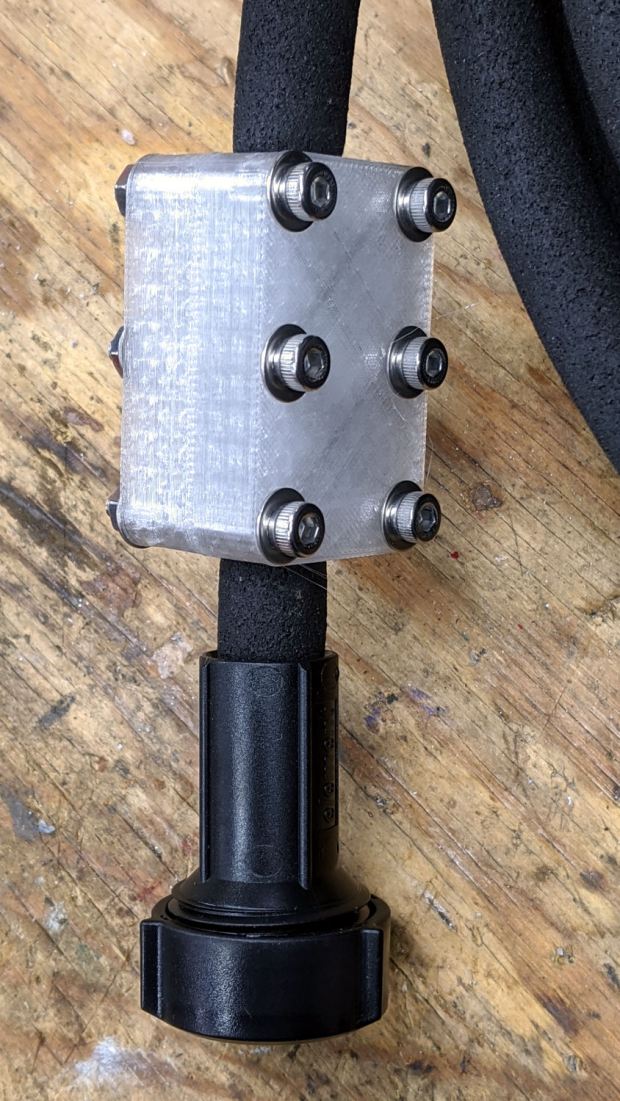
    Round Soaker Hose Splice - top
    Round Soaker Hose Splice – top

    Unlike the clamps for the punctured flat soaker hoses, this one doesn’t need to withstand much pressure and hold back a major leak, so I made the pieces a bit thicker and dispensed with the aluminum backing plates:

    Round Soaker Hose Splice - bottom
    Round Soaker Hose Splice – bottom

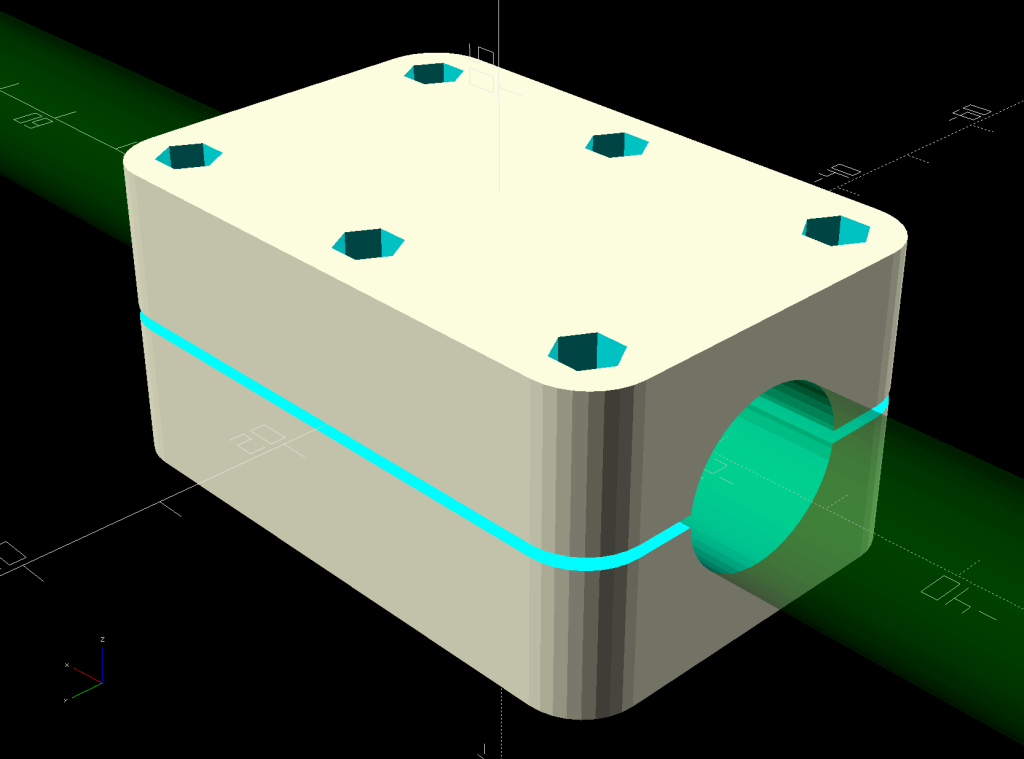
    The solid model is basically the same as for the flat hoses, with a slightly oval cylinder replacing the three channels:

    Round Soaker Hose Splice - OpenSCAD model
    Round Soaker Hose Splice – OpenSCAD model

    The OpenSCAD source code as a GitHub Gist:

    // Rubber Soaker Hose Splice
    // Ed Nisley KE4ZNU 2020-03
    Layout = "Build"; // [Hose,Block,Show,Build]
    TestFit = false; // true to build test fit slice from center
    //- Extrusion parameters must match reality!
    /* [Hidden] */
    ThreadThick = 0.25;
    ThreadWidth = 0.40;
    HoleWindage = 0.2;
    Protrusion = 0.1; // make holes end cleanly
    inch = 25.4;
    function IntegerMultiple(Size,Unit) = Unit * ceil(Size / Unit);
    ID = 0;
    OD = 1;
    LENGTH = 2;
    //———-
    // Dimensions
    // Hose lies along X axis
    Hose = [200,14.5,13.6]; // X = longer than anything else
    // 8-32 stainless screws
    Screw = [4.1,8.0,3.0]; // OD = head LENGTH = head thickness
    Washer = [4.4,9.5,1.0];
    Nut = [4.1,9.7,6.0];
    Block = [50.0,Hose.y + 2*Washer[OD],4.0 + 1.5*Hose.z]; // overall splice block size
    echo(str("Block: ",Block));
    Kerf = 1.0; // cut through middle to apply compression
    CornerRadius = Washer[OD]/2;
    NumScrews = 3; // screws along each side of cable
    ScrewOC = [(Block.x – 2*CornerRadius) / (NumScrews – 1),
    Block.y – 2*CornerRadius,
    2*Block.z // ensure complete holes
    ];
    echo(str("Screw OC: x=",ScrewOC.x," y=",ScrewOC.y));
    //———————-
    // Useful routines
    module PolyCyl(Dia,Height,ForceSides=0) { // based on nophead's polyholes
    Sides = (ForceSides != 0) ? ForceSides : (ceil(Dia) + 2);
    FixDia = Dia / cos(180/Sides);
    cylinder(d=(FixDia + HoleWindage),h=Height,$fn=Sides);
    }
    // Hose shape
    // This includes magic numbers measured from reality
    module HoseProfile() {
    NumSides = 12*4;
    rotate([0,-90,0])
    translate([0,0,-Hose.x/2])
    resize([Hose.z,Hose.y,0])
    cylinder(d=Hose.z,h=Hose.x,$fn=NumSides);
    }
    // Outside shape of splice Block
    // Z centered on hose rim circles, not overall thickness through center ridge
    module SpliceBlock() {
    difference() {
    hull()
    for (i=[-1,1], j=[-1,1]) // rounded block
    translate([i*(Block.x/2 – CornerRadius),j*(Block.y/2 – CornerRadius),-Block.z/2])
    cylinder(r=CornerRadius,h=Block.z,$fn=4*8);
    for (i = [0:NumScrews – 1], j=[-1,1]) // screw holes
    translate([-(Block.x/2 – CornerRadius) + i*ScrewOC.x,
    j*ScrewOC.y/2,
    -(Block.z/2 + Protrusion)])
    PolyCyl(Screw[ID],Block.z + 2*Protrusion,6);
    cube([2*Block.x,2*Block.y,Kerf],center=true); // slice through center
    }
    }
    // Splice block less hose
    module ShapedBlock() {
    difference() {
    SpliceBlock();
    HoseProfile();
    }
    }
    //———-
    // Build them
    if (Layout == "Hose")
    HoseProfile();
    if (Layout == "Block")
    SpliceBlock();
    if (Layout == "Show") {
    difference() {
    SpliceBlock();
    HoseProfile();
    }
    color("Green",0.25)
    HoseProfile();
    }
    if (Layout == "Build") {
    SliceOffset = TestFit && !NumScrews%2 ? ScrewOC.x/2 : 0;
    intersection() {
    translate([SliceOffset,0,Block.z/4])
    if (TestFit)
    cube([ScrewOC.x/2,4*Block.y,Block.z/2],center=true);
    else
    cube([4*Block.x,4*Block.y,Block.z/2],center=true);
    union() {
    translate([0,0.6*Block.y,Block.z/2])
    ShapedBlock();
    translate([0,-0.6*Block.y,Block.z/2])
    rotate([0,180,0])
    ShapedBlock();
    }
    }
    }
  • HON Lateral File: Shelf Rebuild

    HON Lateral File: Shelf Rebuild

    After sliding the HON Lateral File Cabinet shelf into place and installing the bumpers, it seemed rather loose and floppy. Comparing the situation with the other file cabinet showed it had a missing glide button in the rear and two missing slides at the front.

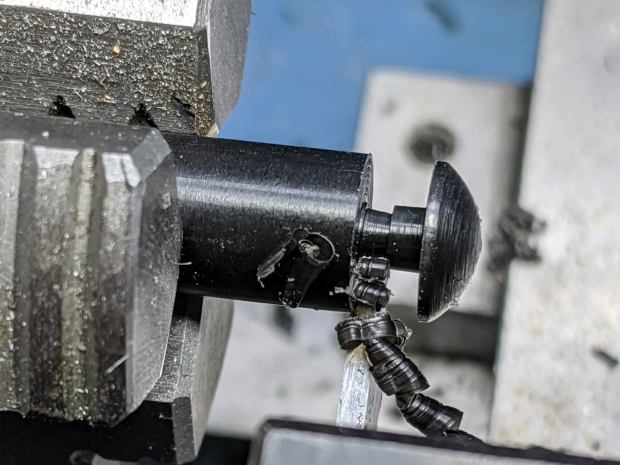
    A replacement button emerged from the end of a Delrin rod:

    HON Lateral File - shelf button - parting off
    HON Lateral File – shelf button – parting off

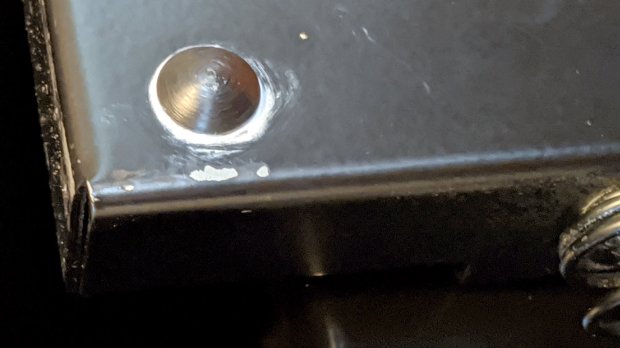
    The original buttons had an expanding stem, which is easy to do with an injection-molded part. I opted for simple adhesive, with enough of a blob underneath the shelf to (presumably) lock it in place forevermore:

    HON Lateral File - shelf button - installed
    HON Lateral File – shelf button – installed

    The slides required an iterative design technique (pronounced “fumbling around”), because nothing on either side remained square / plumb / true / unbent. I hacked the first version from scrap acrylic, broke off anything that didn’t fit, and got better measurements from what remained:

    HON Lateral File - shelf front guide - size test
    HON Lateral File – shelf front guide – size test

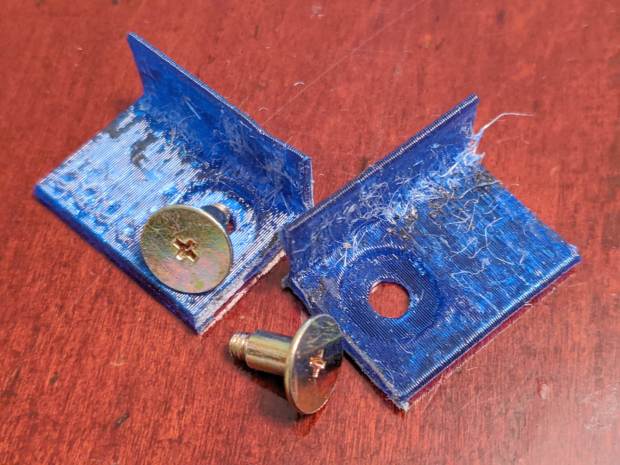
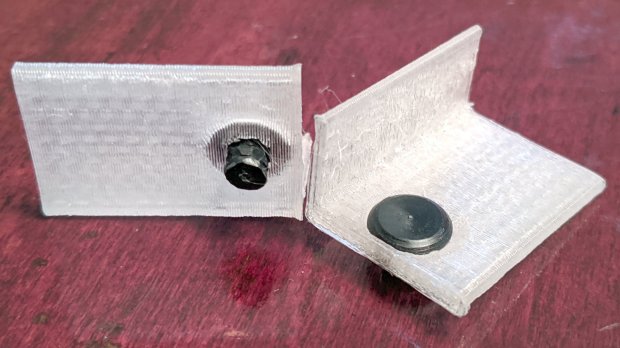
    With those measurements in hand, the second version used a pair of weird flat-head shoulder screws (probably from a hard drive) to anchor 3D printed angle brackets into the frame:

    HON Lateral File - shelf slides - version 2
    HON Lateral File – shelf slides – version 2

    Those worked reasonably well, but PETG doesn’t produce a nice sliding surface, so the final version has flat-head Delrin studs in slightly tweaked brackets:

    HON Lateral File - shelf slides - version 3
    HON Lateral File – shelf slides – version 3

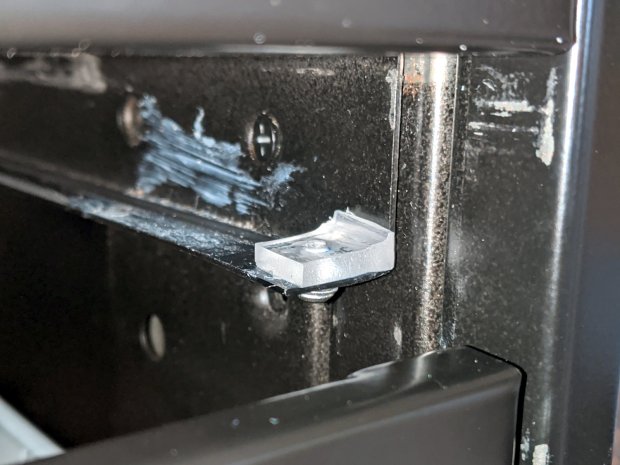
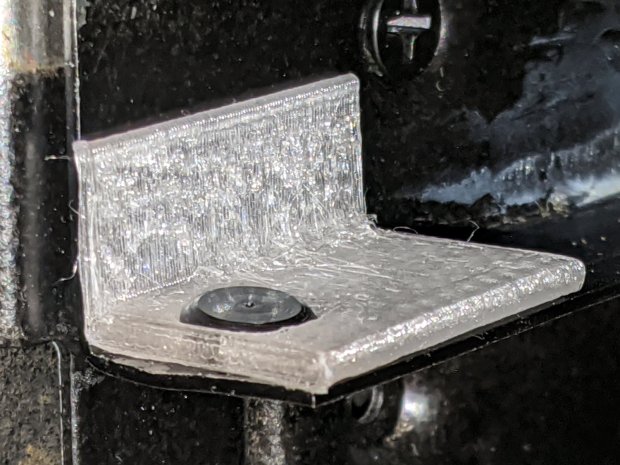
    As with the buttons in the back, the original slides had expanding studs holding them in place, but glue works fine here, too:

    HON Lateral File - shelf slides - version 3 - installed
    HON Lateral File – shelf slides – version 3 – installed

    The button isn’t quite square to the surface and the slide isn’t quite flush with the bent metal in the frame, but it’s Good Enough™ for a shelf that won’t get lots of mileage.

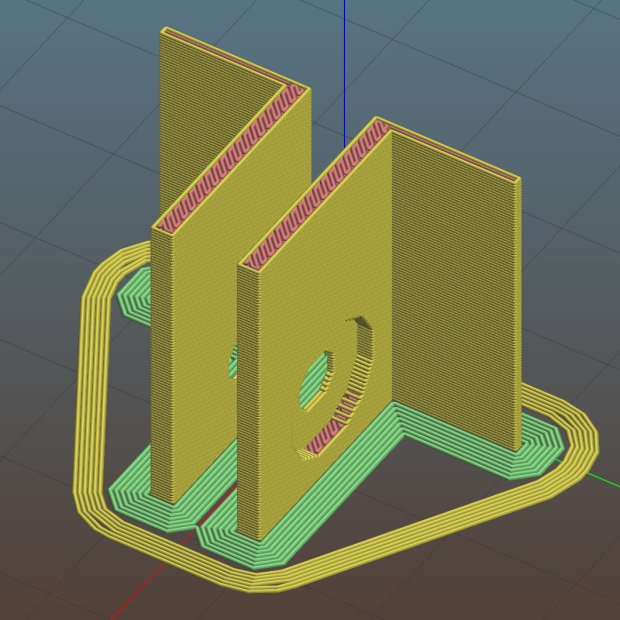
    For reference, the brackets should print vertically to wrap the plastic threads around the upright for better strength:

    HON Lateral File Shelf Slide - Slic3r
    HON Lateral File Shelf Slide – Slic3r

    If you did it the obvious way, the upright side would break right off at the first insult from the hulking shelf, although they’re basically a solid chip of plastic, with a little infill inside the bottom slab.

    While I was at it, I pulled the springs to make them a bit longer, so they touch the back of the frame when the shelf is half an inch behind the front face of the drawers. A firm push and those Delrin contact points let the shelf pop out an inch or so, with plenty of room for fingers underneath the front edge.

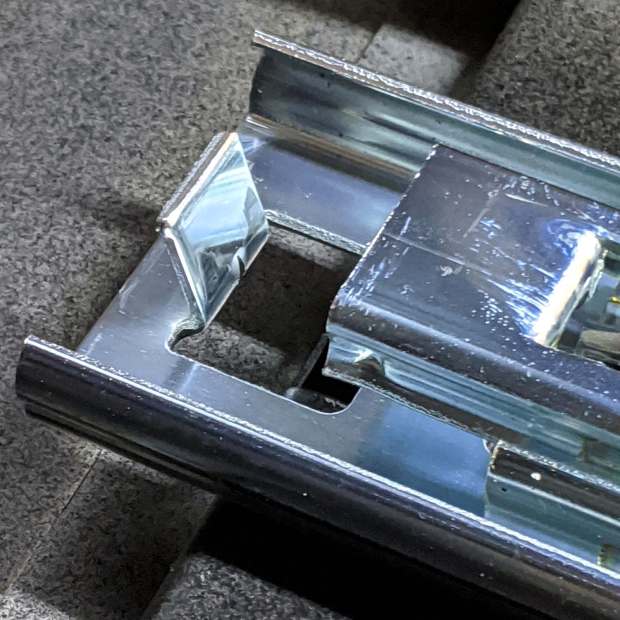
    Some drawer slide stops near the back needed attention, too:

    HON Lateral File - slide stop bumper - bent
    HON Lateral File – slide stop bumper – bent

    I cannot imagine how hard somebody slammed the drawers, because bending the stops back to a right angle required a Vise-Grip and some muttering:

    HON Lateral File - slide stop bumper
    HON Lateral File – slide stop bumper

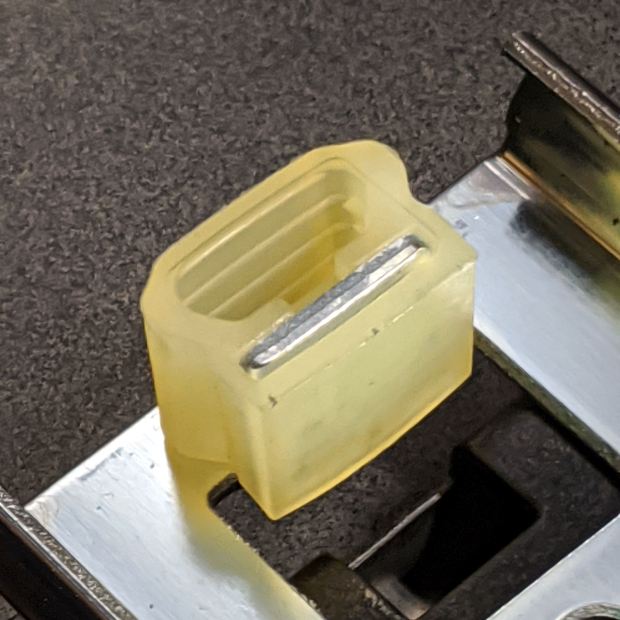
    Oddly, the cushiony hollow side faces away from the drawer, toward the back of the frame, because putting it forward holds the drawer front proud of the front frame face. Maybe HON cost-reduced the steel slides by making them just slightly shorter and using the same bumpers?

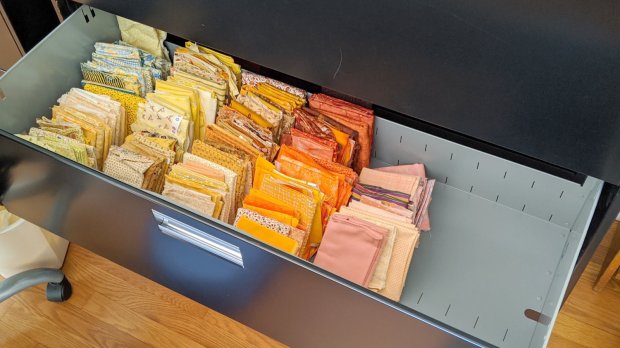
    The drawers have begun filling up from boxes scattered around the house:

    HON Lateral File - fabric stash
    HON Lateral File – fabric stash

    That’s the “orange” part of Mary’s collection, now with plenty of room to grow!

    The OpenSCAD source code as a GitHub Gist:

    // HON Lateral File Cabinet
    // Shelf slides
    // Ed Nisley KE4ZNU 2020-02-25
    //- Extrusion parameters must match reality!
    // Print with 3 shells and 3 solid layers
    ThreadThick = 0.25;
    ThreadWidth = 0.40;
    HoleWindage = 0.2;
    function IntegerMultiple(Size,Unit) = Unit * ceil(Size / Unit);
    Protrusion = 0.1; // make holes end cleanly
    inch = 25.4;
    ID = 0;
    OD = 1;
    LENGTH = 2;
    module PolyCyl(Dia,Height,ForceSides=0) { // based on nophead's polyholes
    Sides = (ForceSides != 0) ? ForceSides : (ceil(Dia) + 2);
    FixDia = Dia / cos(180/Sides);
    cylinder(r=(FixDia + HoleWindage)/2,h=Height,$fn=Sides);
    }
    //———————-
    // Dimensions
    SlideBlock = [18.0,25.0,12.0]; // across, along, height of left shelf bracket
    SlideWalls = [1.0,-SlideBlock.y/2,2.0]; // wall thicknesses, dummy Y
    HoleOffset = [8.4,7.0,0]; // hole center from left, front, dummy Z
    HoleOD = 4.0;
    Screw = [4.0,10,0.8]; // weird flat-head shoulder screw
    ScrewRecess = Screw.z + 2*ThreadThick; // depth to keep head below slide surface
    echo(str("Head base: ",SlideWalls.z – ScrewRecess));
    $fn = 12*4;
    //——————-
    // Single slide
    module Slide() {
    difference() {
    cube(SlideBlock,center=false);
    translate(SlideWalls)
    cube(SlideBlock * 2,center=false);
    translate(HoleOffset – [0,0,SlideBlock.z/2])
    rotate(180/8)
    PolyCyl(HoleOD,2*SlideBlock.z,8);
    translate(HoleOffset + [0,0,SlideWalls.z] – [0,0,ScrewRecess])
    rotate(180/12)
    PolyCyl(Screw[OD],3*Screw[LENGTH],12);
    }
    }
    //——————-
    // Build them
    Gap = 5.0/2;
    translate([0,-Gap,0])
    rotate([90,0,0])
    Slide();
    translate([0,Gap,0])
    rotate([-90,0,0])
    mirror([0,1,0])
    Slide();
  • Refrigerator Coil Wand Adapter Rebuild

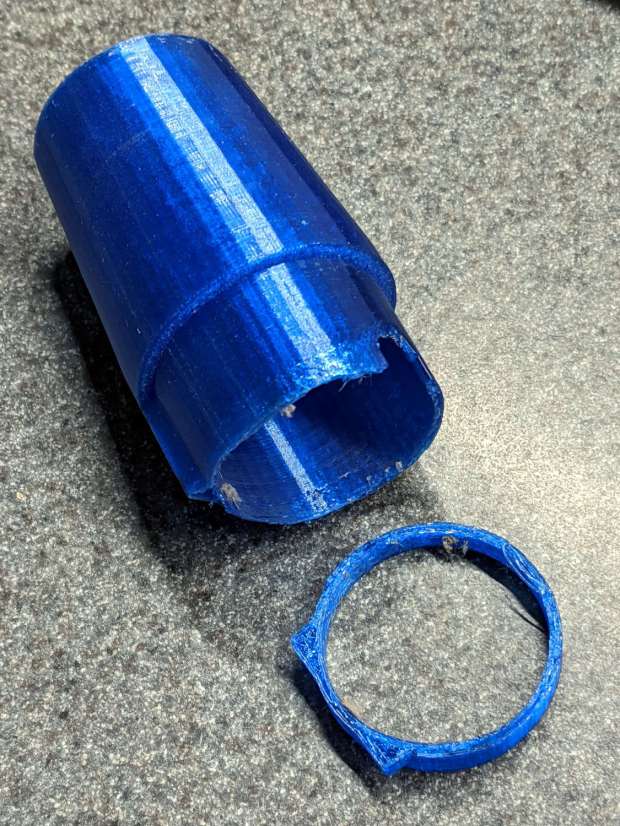
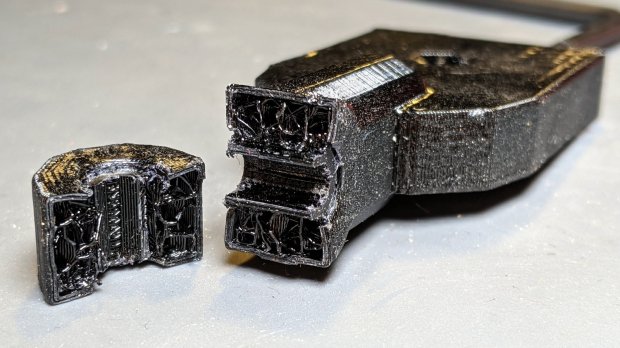
    After five years, the adapter between the Kenmore Progressive vacuum cleaner and the long wand required to reach inside the refrigerator evaporator coils broke at the latch opening:

    Kenmore Vacuum - refrigerator coil adapter - fracture
    Kenmore Vacuum – refrigerator coil adapter – fracture

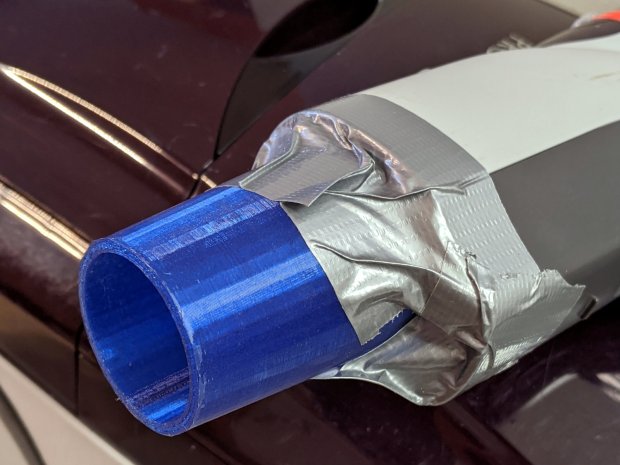
    A quick fix let me continue the mission:

    Kenmore Vacuum - refrigerator coil adapter - temporary fix
    Kenmore Vacuum – refrigerator coil adapter – temporary fix

    A better fix required a few minutes of OpenSCAD tweakage and a few hours of hands-off build time:

    Refrigerator Coil Wand Adapter - Slic3r preview
    Refrigerator Coil Wand Adapter – Slic3r preview

    The fitting ID is now 2 mm smaller, the 3D honeycomb infill is 25%, and (contrary to the picture) it now has 4 perimeter threads. It’s a two-line change from the last time:

    OEMTube = [35.0 - 2.0,35.0,41.7,40.5,30.0];           // main fitting tube
    … then, inside MaleFitting() …
    cylinder(d1=OEMTube[ID2],d2=OEMTube[ID1],h=2*OEMTube[LENGTH] + 2*Protrusion);

    Those will propagate to anything I build from now on, although this is the first latch fracture.

    Gotta love it when 3D printing lives up to the hype!

  • Bird Box Entrance Reducers: Round 2

    One of the bird box entrance reducers I installed nigh onto a decade ago is still on duty, although downy woodpeckers definitely want a larger hole:

    Bird Box - gray PVC pipe reducer - woodpecker damage
    Bird Box – gray PVC pipe reducer – woodpecker damage

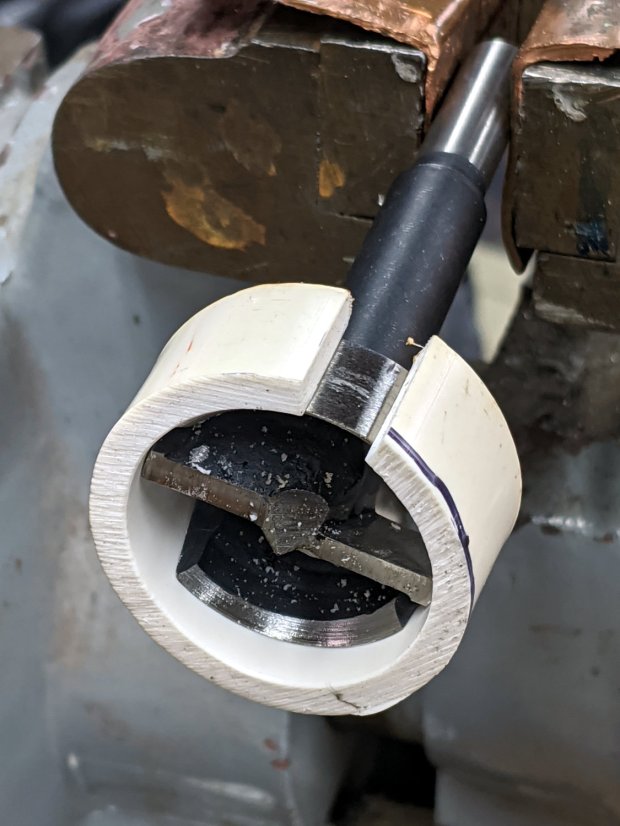
    Another reducer had gone missing over the years, so I made one from a length of PVC pipe:

    Bird Box - PVC pipe reducer - shaping
    Bird Box – PVC pipe reducer – shaping

    It started as 1-½ PVC pipe, 1-⅞ inch actual OD and should fit into a 1-½ hole, so I measured 1.5 × 3.15 around the circumference, bandsawed out the excess, draped it over a 1-½ Forstner bit, toasted it with a heat gun, and squashed it so it’s just a little bit bigger than the (enlarged!) hole in the box.

    Now the entrance is 1-¼ (-ish), just like it should be:

    Bird Box - PVC pipe reducer - installed
    Bird Box – PVC pipe reducer – installed

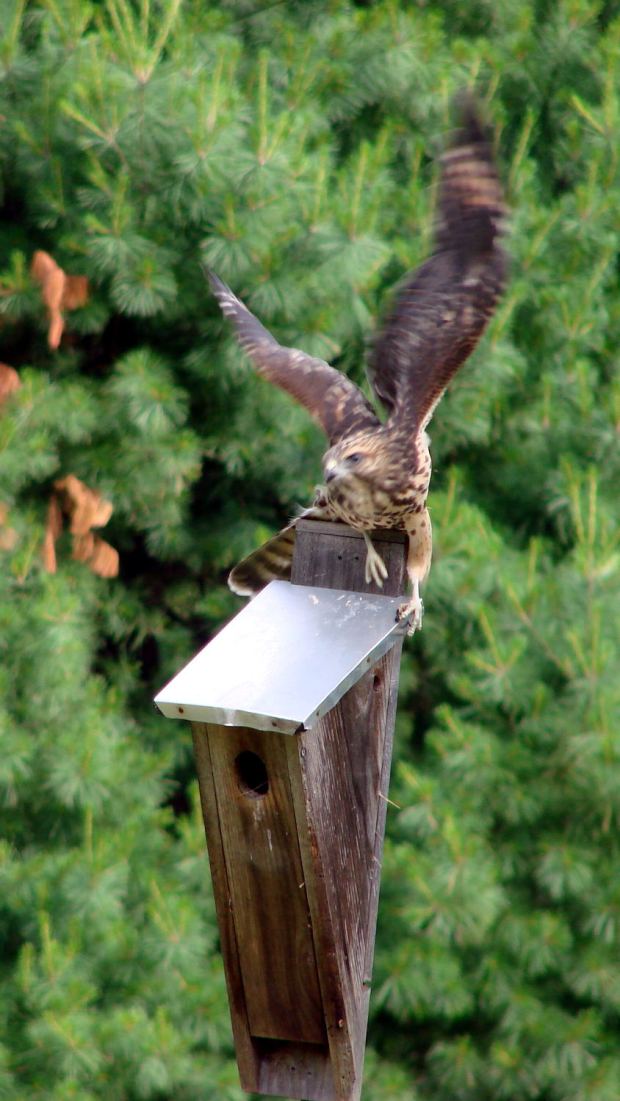
    The bird box in the front yard has been attracting starlings, in addition to serving as a hawk perch:

    New Coopers Hawks - bird box takeoff whoops
    New Coopers Hawks – bird box takeoff whoops

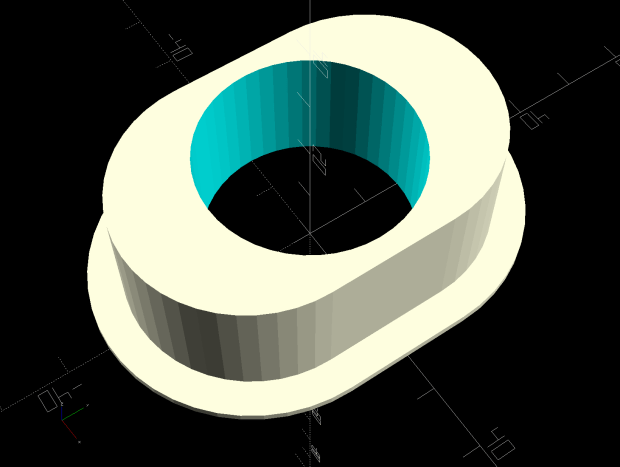
    The oblong hole required advanced manufacturing techniques:

    Oval Entrance Reducer
    Oval Entrance Reducer

    The front face should be too slick for larger birds and the little ones will zip right into the hole:

    Bird Box - 3D printed entrance reducer
    Bird Box – 3D printed entrance reducer

    The two starlings who’d been evaluating the box seem to have moved on; we doubt they’re now homeless.

    The OpenSCAD source code as a GitHub Gist:

    // Bird Box – oval entrance reducer
    // Ed Nisley KE4ZNU 2020-02-12
    //- Extrusion parameters must match reality!
    // Print with 3 shells and 3 solid layers
    ThreadThick = 0.25;
    ThreadWidth = 0.40;
    HoleWindage = 0.2;
    function IntegerMultiple(Size,Unit) = Unit * ceil(Size / Unit);
    Protrusion = 0.1; // make holes end cleanly
    inch = 25.4;
    //———————-
    // Dimensions
    EntranceID = 1.25 * inch;
    BoxHole = [1.5,2.25] * inch;
    BoxWall = 0.75 * inch;
    HoleOC = BoxHole.y – BoxHole.x;
    FlangeWidth = 5.0;
    FlangeThick = 5*ThreadThick;
    $fn = 12*4;
    //——————-
    // Build it
    difference() {
    union() {
    linear_extrude(height=BoxWall + FlangeThick)
    hull()
    for (j=[-1,1])
    translate([0,j*HoleOC/2])
    circle(d=BoxHole.x);
    linear_extrude(height=FlangeThick)
    hull()
    for (j=[-1,1])
    translate([0,j*HoleOC/2])
    circle(d=BoxHole.x + 2*FlangeWidth);
    }
    translate([0,0,-Protrusion])
    cylinder(d=EntranceID,h=2*BoxWall);
    }
  • Filament Spool Sidewall

    A new spool of retina-burn orange PETG snagged when the takeup guide let the filament fall off the inboard side and the extruder tightened the loops around the spool holder. I carefully unwound the loops without removing the spool to ensure I didn’t introduce a crossover, scraped the bird’s next off the platform, and restarted the print.

    After undoing the second snag, I added a crude spool sidewall:

    Makergear M2 - filament spool sidewall
    Makergear M2 – filament spool sidewall

    It’s decidedly unlovely, but I was in a hurry to get a PCB holder printed and ready for use. Worked perfectly!

    I’ve rarely had a problem with any other spools and I don’t know what’s new-and-different with this one.

  • Photo Lamp Mount: Moah Plastic!

    One of the cold shoe mounts I made for the photo lamps cracked:

    Photo Lamp Mount - fractured
    Photo Lamp Mount – fractured

    It’s done in PETG with my more-or-less standard two perimeter threads and 15% 3D honeycomb infill, which is Good Enough™ for most of my parts. In this case, there’s obviously not nearly enough plastic in there!

    Redoing it with three perimeters and 50% infill should improve the situation, even though it looks identical on the outside:

    Photo Lamp Mount - reinstalled
    Photo Lamp Mount – reinstalled

    I didn’t replace the other mount. If it breaks, it’ll get the same 50% infill as this one. If this one breaks, I’ll try 75%.

    An easy fix!

  • CNC 3018XL: Adding Run-Hold Switches

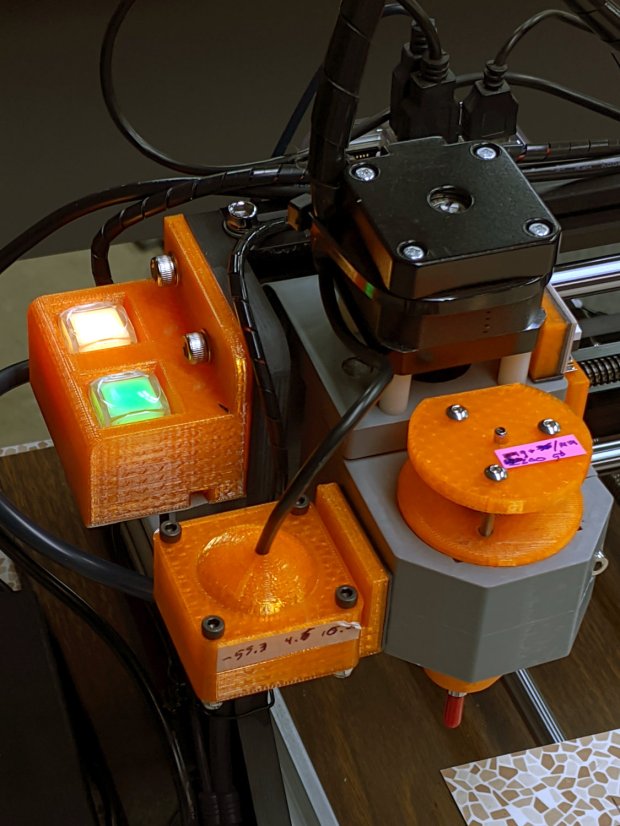
    Although the bCNC GUI has conspicuous Run / Hold buttons, it’s easier to poke a physical switch when you really really need a pause in the action or have finished a (manual) tool change. Rather than the separate button box I built for the frameless MPCNC, I designed a chunky switch holder for the CNC 3018XL’s gantry plate:

    CNC 3018-Pro - Run Hold Switches - installed
    CNC 3018-Pro – Run Hold Switches – installed

    The original 15 mm screws were just slightly too short, so those are 20 mm stainless SHCS with washers.

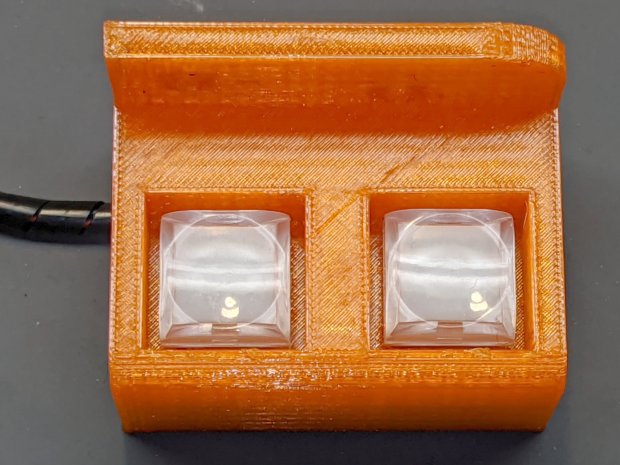
    The switches come from a long-ago surplus deal and have internal green and red LEDs. Their transparent cap shows what might be white plastic underneath:

    CNC 3018-Pro - Run Hold Switches - top unlit
    CNC 3018-Pro – Run Hold Switches – top unlit

    I think you could pry the cap off and tuck a printed legend inside, but appropriate coloration should suffice:

    CNC 3018-Pro - Run Hold Switches - lit
    CNC 3018-Pro – Run Hold Switches – lit

    Making yellow from red and green LEDs always seems like magic; in these buttons, red + green produces a creamy white. Separately, the light looks like what you get from red & green LEDs.

    The solid model shows off the recesses around the LED caps, making their tops flush with the surface to prevent inadvertent pokery:

    Run Hold Switch Mount - Slic3r
    Run Hold Switch Mount – Slic3r

    The smaller square holes through the block may require a bit of filing, particularly in the slightly rounded corners common to 3D printing, to get a firm press fit on the switch body. The model now has slightly larger holes which may require a dab of epoxy.

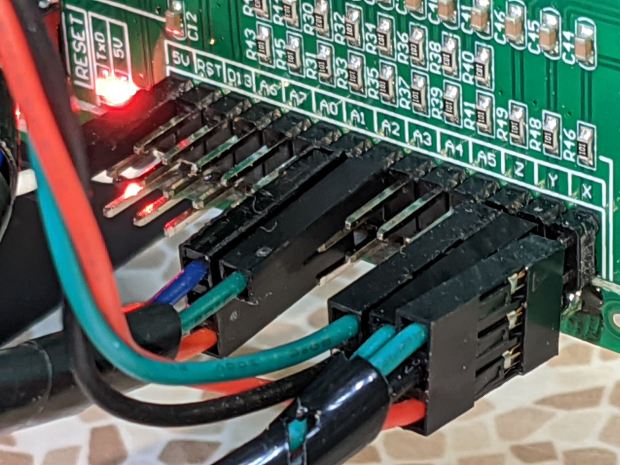
    A multi-pack of RepRap-style printer wiring produced the cable, intended for a stepper motor and complete with a 4-pin Dupont socket housing installed on one end. I chopped the housing down to three pins, tucked the fourth wire into a single-pin housing, and plugged them into the CAMtool V3.3 board:

    CNC 3018-Pro - Run Hold Switches - CAMtool V3.3 header
    CNC 3018-Pro – Run Hold Switches – CAMtool V3.3 header

    The CAMtool schematic matches the default GRBL pinout, which comes as no surprise:

    CAMtool schematic - Start Hold pinout
    CAMtool schematic – Start Hold pinout

    The color code, such as it is:

    • Black = common
    • Red = +5 V
    • Green = Run / Start (to match the LED)
    • Blue = Hold (because it’s the only color left)

    The cable goes into 4 mm spiral wrap for protection & neatness, with the end hot-melt glued into the block:

    CNC 3018-Pro - Run Hold Switches - bottom
    CNC 3018-Pro – Run Hold Switches – bottom

    The model now includes the wiring channel between the two switches, which is so obviously necessary I can’t imagine why I didn’t include it. The recess on the top edge clears the leadscrew sticking slightly out of the gantry plate.

    The LEDs require ballast resistors: 120 Ω for red and 100 Ω for green, producing about 15 mA in each LED. Those are 1/8 W film resistors; I briefly considered SMD resistors, but came to my senses just in time.

    A layer of black duct tape finishes the bottom sufficiently for my simple needs.

    Note: the CAMtool board doesn’t have enough +5 V pins, so add a row of +5 V pins just below the standard header. If you’ve been following along, you needed them when you installed the home switches:

    3018 CNC CAMTool - Endstop power mod
    3018 CNC CAMTool – Endstop power mod

    A doodle giving relevant dimensions and layouts:

    Run Hold Switch Mount - Layout Doodles
    Run Hold Switch Mount – Layout Doodles

    I originally planned to mount the switches on the other gantry plate and sketched them accordingly, but (fortunately) realized the stepper motor was in the way before actually printing anything.

    The OpenSCAD source code as a GitHub Gist:

    // CNC 3018-Pro Run-Hold Switches
    // Ed Nisley – KE4ZNU – 2020-01
    Layout = "Build"; // [Show,Build,ProjectionX,ProjectionY,ProjectionZ,Block]
    /* [Hidden] */
    ThreadThick = 0.25;
    ThreadWidth = 0.40;
    HoleWindage = 0.2;
    Protrusion = 0.1; // make holes end cleanly
    function IntegerMultiple(Size,Unit) = Unit * ceil(Size / Unit);
    ID = 0;
    OD = 1;
    LENGTH = 2;
    inch = 25.4;
    //———————-
    // Dimensions
    RodScrewOffset = [22,0,-14.5]; // X=left edge, Y=dummy, Z=from top edge
    BeamScrewOffset = [50,0,-10];
    LeadScrewOffset = [RodScrewOffset.x,0,-45]; // may be off the bottom; include anyway
    LeadScrew = [8.0,10.0,5.0]; // ID=actual, OD=clearance, LENGTH=stick-out
    Screw = [5.0,10.0,6.0]; // M5 SHCS, OD=washer, LENGTH=washer+head
    ScrewSides = 8; // hole shape
    WallThick = 3.0; // minimum wall thickness
    FlangeThick = 5.0; // flange thickness
    Switch = [15.0 + 2*HoleWindage,15.0 + 2*HoleWindage,12.5]; // switch body
    SwitchCap = [17.5,17.5,12.0]; // … pushbutton
    SwitchClear = SwitchCap + [2*2.0,2*2.0,Screw[OD]/(2*cos(180/ScrewSides))];
    SwitchContacts = 5.0; // contacts below switch
    SwitchBase = SwitchContacts + Switch.z; // bottom to base of switch
    MountOffset = abs(RodScrewOffset.z) + SwitchClear.z; // top of switch mounting plate
    FrameWidth = 60.0; // CNC 3018-Pro upright
    FrameRadius = 10.0; // … front corner rounding
    CornerRadius = 5.0; // pretty part rounding
    CornerSquare = 10; // dummy for square corner
    MountOAL = [FrameWidth, // covers machine frame
    2*FlangeThick + 2*Screw[LENGTH] + SwitchClear.y, // clear screw heads
    MountOffset + Switch.z + SwitchContacts
    ];
    echo(str("MountOAL: ",MountOAL));
    SwitchOC = [MountOAL.x/2,FlangeThick + 2*Screw[LENGTH] + SwitchClear.y/2,0];
    CableOD = 5.0;
    NumSides = 2*3*4;
    Gap = 2.0; // between build layout parts
    //———————-
    // Useful routines
    module PolyCyl(Dia,Height,ForceSides=0) { // based on nophead's polyholes
    Sides = (ForceSides != 0) ? ForceSides : (ceil(Dia) + 2);
    FixDia = Dia / cos(180/Sides);
    cylinder(r=(FixDia + HoleWindage)/2,
    h=Height,
    $fn=Sides);
    }
    // Projections for intersections
    module ProjectionX() {
    sr = CornerSquare/2;
    rotate([0,90,0]) rotate([0,0,90])
    linear_extrude(height=FrameWidth,convexity=3)
    // mirror([1,0]) // mount on motor side of gantry
    union() {
    translate([0,-MountOAL.z])
    square([FlangeThick,MountOAL.z]);
    hull() {
    translate([MountOAL.y – CornerRadius,-MountOffset + SwitchCap.z – CornerRadius])
    circle(r=CornerRadius,$fn=NumSides);
    translate([sr,-MountOffset + SwitchCap.z – sr])
    square(CornerSquare,center=true);
    translate([sr,-MountOAL.z + sr])
    square(CornerSquare,center=true);
    translate([MountOAL.y – sr,-MountOAL.z + sr])
    square(CornerSquare,center=true);
    }
    }
    }
    module ProjectionY() {
    sr = CornerSquare/2;
    rotate([90,0,0])
    translate([0,0,-FrameWidth])
    difference() {
    linear_extrude(height=2*FrameWidth,convexity=3)
    hull() {
    translate([FrameRadius,-FrameRadius])
    circle(r=FrameRadius,$fn=NumSides);
    translate([FrameWidth – sr,-sr])
    square(CornerSquare,center=true);
    translate([sr,-MountOAL.z + sr])
    square(CornerSquare,center=true);
    translate([MountOAL.x – sr,-MountOAL.z + sr])
    square(CornerSquare,center=true);
    }
    translate([RodScrewOffset.x,RodScrewOffset.z,-Protrusion])
    rotate(180/ScrewSides) PolyCyl(Screw[ID],2*(FrameWidth + Protrusion),ScrewSides);
    for (j=[-FlangeThick,FrameWidth + FlangeThick])
    translate([RodScrewOffset.x,RodScrewOffset.z,j])
    rotate(180/ScrewSides) PolyCyl(Screw[OD],FrameWidth,ScrewSides);
    translate([BeamScrewOffset.x,BeamScrewOffset.z,-Protrusion])
    rotate(180/ScrewSides) PolyCyl(Screw[ID],2*(FrameWidth + Protrusion),ScrewSides);
    for (j=[-FlangeThick,FrameWidth + FlangeThick])
    translate([BeamScrewOffset.x,BeamScrewOffset.z,j])
    rotate(180/ScrewSides) PolyCyl(Screw[OD],FrameWidth,ScrewSides);
    translate([LeadScrewOffset.x,LeadScrewOffset.z,FrameWidth – LeadScrew[LENGTH]])
    rotate(180/ScrewSides) PolyCyl(LeadScrew[OD],2*LeadScrew[LENGTH],ScrewSides);
    }
    }
    module ProjectionZ() {
    translate([0,0,-MountOAL.z])
    // mirror([0,1]) // mount on motor side of gantry
    difference() {
    linear_extrude(height=MountOAL.z,convexity=3)
    difference() {
    square([MountOAL.x,MountOAL.y]);
    translate([SwitchOC.x/2,SwitchOC.y])
    square([Switch.x,Switch.y],center=true);
    translate([3*SwitchOC.x/2,SwitchOC.y])
    square([Switch.x,Switch.y],center=true);
    }
    for (i=[-1,1])
    translate([i*SwitchOC.x/2 + MountOAL.x/2,SwitchOC.y,SwitchBase + MountOAL.z/2])
    cube([SwitchClear.x,SwitchClear.y,MountOAL.z],center=true);
    translate([-Protrusion,SwitchOC.y – 2*CableOD – Switch.y/2,-Protrusion])
    cube([MountOAL.x + 2*Protrusion,CableOD,CableOD + Protrusion],center=false);
    for (i=[-1,1])
    translate([i*SwitchOC.x/2 + MountOAL.x/2,SwitchOC.y – SwitchCap.y/2,CableOD/2 – Protrusion])
    cube([CableOD,SwitchClear.y/2,CableOD + Protrusion],center=true);
    translate([SwitchOC.x/2,SwitchOC.y – CableOD/2,-Protrusion])
    cube([SwitchOC.x,CableOD,CableOD + Protrusion],center=false);
    }
    }
    module Block() {
    intersection() {
    ProjectionX();
    ProjectionY();
    ProjectionZ();
    }
    }
    //- Build things
    if (Layout == "ProjectionX")
    ProjectionX();
    if (Layout == "ProjectionY")
    ProjectionY();
    if (Layout == "ProjectionZ")
    ProjectionZ();
    if (Layout == "Block")
    Block();
    if (Layout == "Show") {
    translate([-MountOAL.x/2,-MountOAL.y/2,MountOAL.z]) {
    Block();
    translate([MountOAL.x/2 + SwitchOC.x/2,SwitchOC.y,SwitchCap.z/2 – MountOAL.z + SwitchBase + 0*Switch.z])
    color("Yellow",0.75)
    cube(SwitchCap,center=true);
    translate([MountOAL.x/2 – SwitchOC.x/2,SwitchOC.y,SwitchCap.z/2 – MountOAL.z + SwitchBase + 0*Switch.z])
    color("Green",0.75)
    cube(SwitchCap,center=true);
    }
    }
    if (Layout == "Build")
    translate([-MountOAL.x/2,-MountOAL.y/2,MountOAL.z])
    Block();

    It seems bCNC doesn’t update its “Restart Spindle” message after a tool change when you poke the green button (instead of the GUI button), but that’s definitely in the nature of fine tuning.