Ed Nisley's Blog: Shop notes, electronics, firmware, machinery, 3D printing, laser cuttery, and curiosities. Contents: 100% human thinking, 0% AI slop.
Tag: Improvements
Making the world a better place, one piece at a time
Our Larval Engineer may have a commission to fit her Speed-Sensing Ground Effect Lighting controller to another longboard. To that end, the case now sports mouse ears to spread the force from the cooling ABS over more of the Kapton tape, in the hope the plastic won’t pull the tape off the aluminum build platform:
Longboard Case Solid Model – mouse ears
That view shows the bottom slice that will hold the battery, but the ears appear on all three layers.
The plunger is basically a pin that eventually deforms the top of the switch membrane. Tee’s DSC-H1 had an exposed switch, although this picture shows that membrane was still in reasonably good condition:
Shutter Switch Closeup
My DSC-H5 has a thin black protective disk atop the switch, but the disk wasn’t particularly protective and developed a dimple that held the contacts closed even with the shutter button released (which is why I’m tearing the camera apart in the first place):
DSC-H5 Shutter Switch – dimpled protector
The C-clip around the plunger is now plastic, rather than metal, making it less likely to erode the thin plastic shaft. Pulling the clip off while holding the button down releases all the parts:
DSC-H5 Shutter Button – components
A few measurements from an intact shutter button, which may come in handy if you don’t have one:
DSC-H5 Shutter Button – plunger measurements
Mount three-jaw chuck on the Sherline table, laser-align chuck to spindle, grab shutter button by its shaft in a Jacobs chuck, grab shutter button in three-jaw chuck, release from Jacobs chuck:
DSC-H5 Shutter Button – in Sherline chuck
That’s not particularly precise, but it’s close enough for this purpose. I used manual jogging while testing the fit with a paper shim until all three jaws had the same clearance, then tightened the jaws.
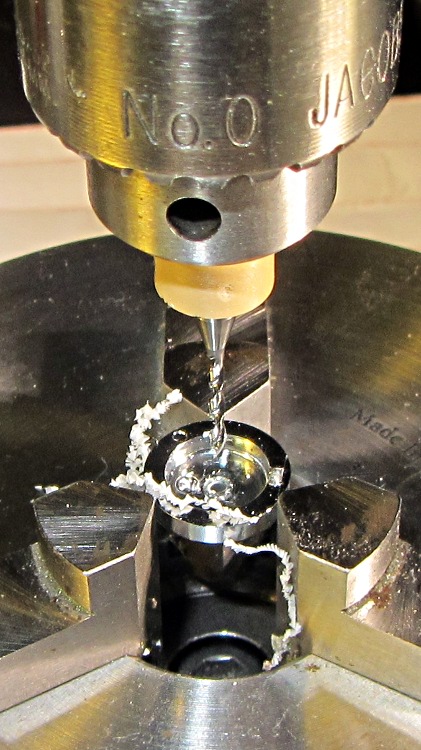
I nicked the plunger at its base with a flush-cutting diagonal cutter, snapped off the plunger, and drilled a #56 hole through the button:
DSC-H5 Shutter Button – cap drilling
For reasons that made sense at the time, I repaired Tee’s DSC-H1 with a 1-72 brass screw. This time, I used an 0-80 (which I learned as ought-eighty, if you’re wondering about the indefinite article) screw and nut, because the screw head fit neatly into the bezel recess and I had a better idea of how to smooth out the threads.
This being plastic, I used the chuck to hold the tap in the proper alignment, then turned the tap through by finger pressure. This trial fit showed it worked:
DSC-H5 Shutter Button – 0-80 screw
Milling the nut down to a 2.8 mm cylinder required the usual manual CNC, with repeated iterations of this chunk of code in the MDI panel:
The 2.8 in the first line is the current OD and the 3.11 is the measured diameter of the 1/8 inch end mill. I started from a 5.0 mm OD that just kissed the nut, then worked inward by 0.2 mm at a time for very shallow 0.1 mm cuts:
DSC-H5 Shutter Button – 0-80 nut milling
The alert reader will notice, as did I, that the head isn’t quite centered: the cut trimmed the left side and left the right untouched, with an offset far larger than the centering error. As nearly as I can tell, the heads of those screws aren’t exactly centered on their threaded shafts, but the final result fixed that… and the overall error is a few tenths of a millimeter = maybe 10 mils, tops, so it’s no big deal.
With all that in hand, I applied a very very thin layer of epoxy to fill the threads below the now-cylindrical nut and convert the screw into a rod:
DSC-H5 Shutter Button – 0-80 plunger
My original intent was to use the screw head as-is atop the PET shield (per those instructions) on the switch membrane, but after reassembling enough of the camera to try that out, it didn’t work correctly: the half-pressed switch didn’t activate reliably before the full-pressed switch tripped.
The PET shield I used came from the side of a 1 liter soda bottle and turned out to be 0.27 mm thick:
DSC-H5 Shutter Switch – cover removed
I think the PET shield would work with the original plunger shape concentrating the force in the middle of the shield, but the nice flat screw head spreads the force out over a wider area. As a result, the force required to close the half-pressed switch contacts was roughly the same as that required to close the full-pressed contacts; remember the nub on the bottom of the black plastic tray concentrates the force in the middle of the full-pressed switch membrane.
So I removed the PET shield, added a dot of epoxy to fill the screw slot and compensate for the missing shield thickness, then filed a flat to make a nice pad:
DSC-H5 Shutter Button – epoxy on plunger
Reassembling the camera once more showed it worked exactly the way it should. In fact, the button seems more stable than the OEM version, probably because the slightly enlarged plunger shaft fits better in the bezel. Too bad about those scuffs on that nice shiny button dome, though:
DSC-H5 – repaired shutter button
Tossing the leftover parts seems entirely appropriate…
The half-pressed shutter switch position on my Sony DSC-H5 recently stopped working, which seems to be one of two common failures. The other, a broken switch shaft, happened to Tee’s camera, as described there, and I figured I should preemptively fix that while I was inside my camera.
This being a common failure, several folks have described how to dismantle the camera; I followed that guide’s English version.
The DSC-H5 differs slightly from that description. After I got the thing apart, it became obvious that there’s no need to remove the LCD panel, the main control board, and most of the ribbon cables if you have a Philips #0 or #00 screwdriver with a very thin shaft. There’s no way to describe this operation, so take it apart his way, then you’ll see what I mean: the guts can come out as one big lump.
In any event, all the camera controls eventually emerge from the body:
DSC-H5 Control Assembly
Looking back into the camera body reveals the bottom of the shutter button, captured by a static discharge contact and the gray plastic frame of the Focus / Break button caps:
DSC-H5 Shutter Button – interior view
Removing the pushbutton frame and pushing the left button bezel latch with a small flat-blade screwdriver extracts the shutter button; it falls out of the inverted body. This is one of the few intact DSC-H[1-9] shutter buttons you’ll ever see:
DSC-H5 Shutter Button – bottom view
Those rectangular protrusions lock into the slots in the black plastic cap that appears almost silver in this front view that shows the dimple in the switch membrane:
DSC-H5 Shutter Button Switch – depressed surface
You must remove the cap to release the flex PCB with the shutter switches. Two heat-staked pins retain the cap; a scalpel neatly slices off the melted plastic:
DSC-H5 Shutter Switch – cover removed
Nota bene: the DSC-H1 button bezel I repaired earlier does not have features that lock into the cap over the switch assembly, which means you can remove and replace it without disassembling the camera. You cannot remove or install the DSC-H5 button without taking the camera apart. I suppose this counts as a continuous product improvement, but …
The shutter switch has two parts:
The full-press switch that takes the picture (the white dot on the blue flex, shown above)
The half-press switch that triggers the focus & exposure is in a black plastic tray (seen edge-on above the white dot)
The bottom of the half-press tray has a small nub that activates the full-press switch, so the force required to activate the half-press switch must be considerably less than the force that activates the full-press switch. This turns out to be a critical part of the repair…
A closeup of the half-press switch with the protective cover sheet (the “damn confetti” of the disassembly instruction) and the dimple that held the contacts together with the button released:
DSC-H5 Shutter Switch – dimpled protector
A closeup of the switch through a snippet of PET plastic shows the switch membrane itself is in fine shape:
DSC-H5 Shutter Switch – cover removed
However, the new plastic shield did not work out well, for reasons having to do with the new button plunger. That’s the next step: rebuild the plunger…
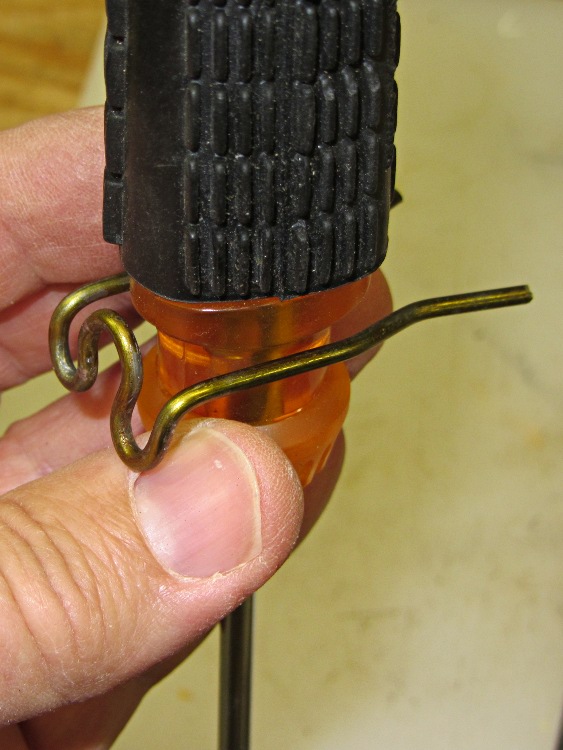
A while back I picked up one of Harbor Freight’s cheap screwdrivers sets; the largest two drivers far exceed my simple needs, but the smaller screwdrivers work surprisingly well. I couldn’t figure out where to store the things, as they’re used often enough to remain ready to hand, while being too bulky for any of the drawers. Emboldened by my success with those shoe latch springs, I decided to bend some coat hanger wire into simple clips that grab the screwdrivers around their waists:
Screwdriver clip – rear view
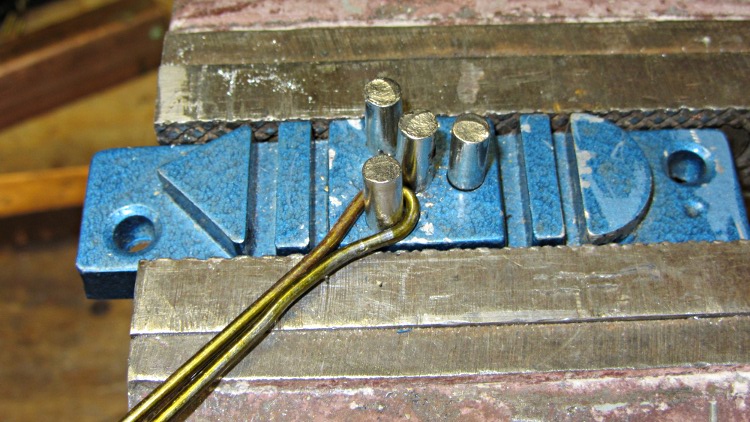
The first step forms a loop where the mounting screw will go; squeezing the wire around the pin with pliers made a reasonably good imitation of a screw hole:
Screwdriver clip – screw bend
The next two bends shape the wire to the arms; I eventually figured out that bending the wire ends to a mutual right angle worked out better than the acute angle you see here:
Screwdriver clip – second bend
Bending both wires at a right angle formed the arms:
Screwdriver clip – arm bend
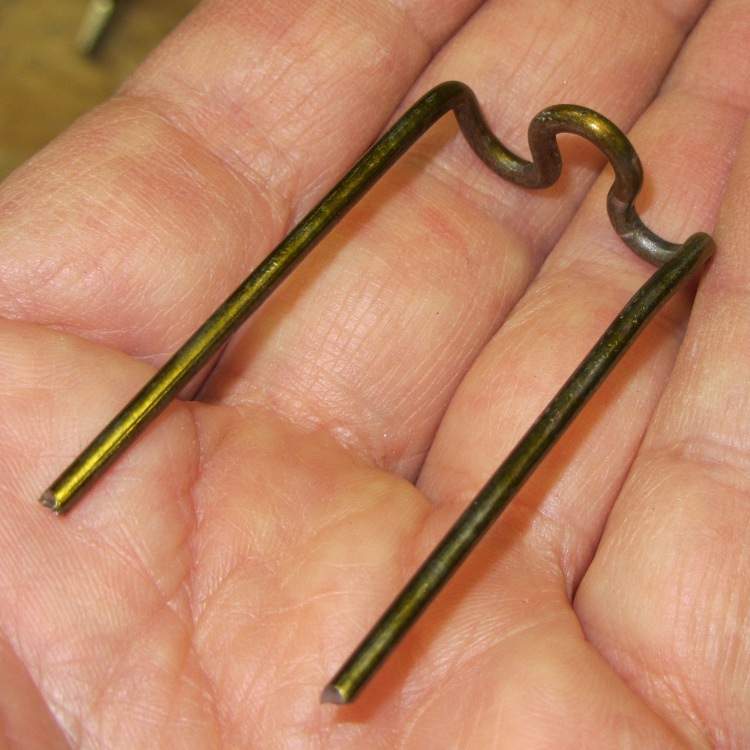
Two more bends in each arm finished off the clip:
Screwdriver clip – entry bends
I chopped up a coat hanger with smaller diameter wire to make clips for the smallest screwdrivers with narrower handles.
Repeat that a dozen times, drill pilot holes into a ready-to-use bit of scrap lumber, screw the clips with 3/4 inch flat-head screws, add four more holes on the right for finishing nails to hold the red screwdrivers (which have suitable holes in their handles), screw the whole affair to the bottom of the floor joist, and it’s all good:
Screwdriver rack on floor joist
After running the first half dozen screws with great effort, I fetched the beeswax and the rest slid right into place.
The larger driver handles stick up inconveniently far behind the fluorescent lamp fixture that’s barely visible along the top, but (I’m pretty sure) I won’t use those nearly enough for that to be a problem.
I suppose I should dip the raw ends of the wires in goop to avoid harpooning myself; I think I’ll mostly handle the screwdrivers by their shafts, so maybe that won’t be a problem, either.
Bench vises (not vices) have heavy steel handles that clank when the ball end slams into the hub. You can fix that by slipping suitable rubber washers over the balls on each end:
Vise handle bumper
After which the handle gives off a pleasant thump and won’t nip a careless finger.
This is an old trick and certainly not original with me; the occasion being that I just replaced the old and much-abused washers which were letting the clank through again. IIRC, a retail package consisting of both red rubber garden hose washers and black rubber O-rings followed me home from a tag sale, so I used both.
Friends of ours planted a few dozen Liriope spicata as a border around their nicely trimmed flower garden. This did not work out well, as the stuff spreads like a weed and duplicated beyond their wildest imagination. However, this part of the description caught our attention:
No serious diseases or pests occur for creeping lilyturf. […] Lilyturf is reported to have little wildlife value.
Translation: nothing kills the stuff and deer don’t eat it. Sounds like exactly what we need for the section of the front yard that slopes down to the road, where mowing poses a threat to life & limb.
We said we’d take it, they dug it out and bagged it, I hitched up the bike trailer, and we paid them a visit:
YAK Bike Trailer – 55 lb of grass
They’re a few miles off the south end of the Dutchess Rail Trail, which is (by definition) pretty much dead flat and made the trip a lot easier: that load of grass added up to 55 pounds! They dropped off a few bags on their next trip past our house, which tells you how much they wanted to get rid of it.
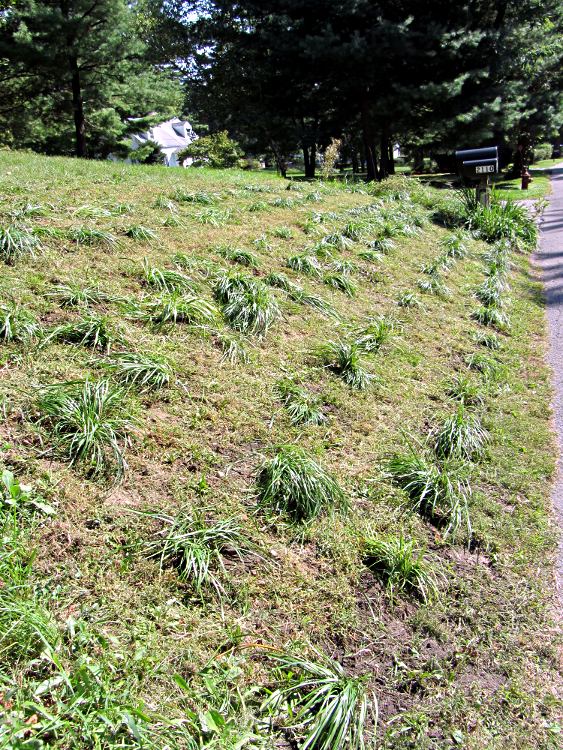
I wielded the post-hole digger to prepare about 100 sites, shook the dirt off the existing grass roots to backfill the holes, we divided the new clumps by chopping them with a shovel, and a day later we had everything installed and watered down:
The handle cracked and fell off this ball valve while I collected the hoses and suchlike from the Vassar Farms plot:
Ball valve with broken handle
Surprisingly, it’s not plastic, but (most likely) some cheap & grainy pot metal that wasn’t designed for durability. Rather than throw out that nice brass and stainless steel valve body, I figured a new handle was in order.
To the Basement Laboratory Machine Shop Wing!
The ball rotates freely inside the valve with the handle missing, so I found an aluminum rod (which, IIRC, was the original kickstand from my Linear Mach III ‘bent) that exactly fit the ball opening’s ID:
Ball valve – removing nut
What with it being a dark and stormy night outside (and having shut down all the computers in anticipation of a monster thunderstorm), I decided to get medieval with some hand tools. The first step involved finding an aluminum plate of about the right size and thickness, with markings left over from whatever I’d been building when it last saw the ceiling lights:
Ball valve handle – initial layout
After carefully drilling & filing the shaft hole, it looked like it’d work fine. Then I realized that, for whatever reason, the original design aligned the handle parallel to the hose when the valve was closed, which made very little sense when analyzed according to the Principle of Least Surprise.
So I drilled-and-filed another hole on the other end at right angles to the first one:
Ball valve handle – proper alignment
The original handle had two bumps molded on the bottom that acted as stops at each end of its 90° rotation. I figured a pair of 10-32 screws would suffice, not to mention they’d provide a bit of adjustment in case I blundered the hole positions. I planned to chop these stubs to whatever set the proper length below the plate:
Ball valve handle – trial fit
It turned out that the proper length was just about exactly that of a 1/4 inch 10-32 set screw flush with the top of the plate, so that’s what I used instead. They’re located one radius out from the outline of the valve body; trace the body shape on the handle in each orientation, eyeball one setscrew radius out from those intersections, and drill the holes.
Lay out a nice handle shape by eye, rough it on the bandsaw, introduce it to Mr Belt Sander for final shaping, touch up the concave corners with a rat-tail file, scuff the flat surfaces clean with a Dremel stainless steel wire brush to produce a used-car finish (nice polish over deep scratches), and it’s all good:
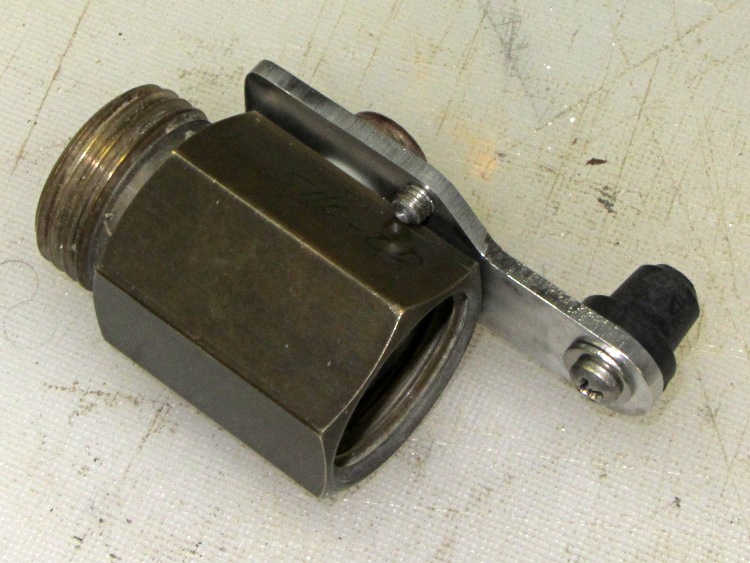
Ball valve handle – top view
The knob on the end is actually a foot intended for the bottom of a widget case:
Ball valve handle – bottom view
It won’t get leak-tested until next year, but what could possibly go wrong?
One thing, perhaps: that screw likely lies too close to the hose, particularly one sporting a replacement connector. I may be forced to bend the narrow part of the handle up a bit…










 The Smell of Molten Projects in the Morning