The Smell of Molten Projects in the Morning

Ed Nisley's Blog: Shop notes, electronics, firmware, machinery, 3D printing, laser cuttery, and curiosities. Contents: 100% human thinking, 0% AI slop.

Tag: CNC

Making parts with mathematics

  • Tek Circuit Computer: Cursor Hairline

    Tek Circuit Computer: Cursor Hairline

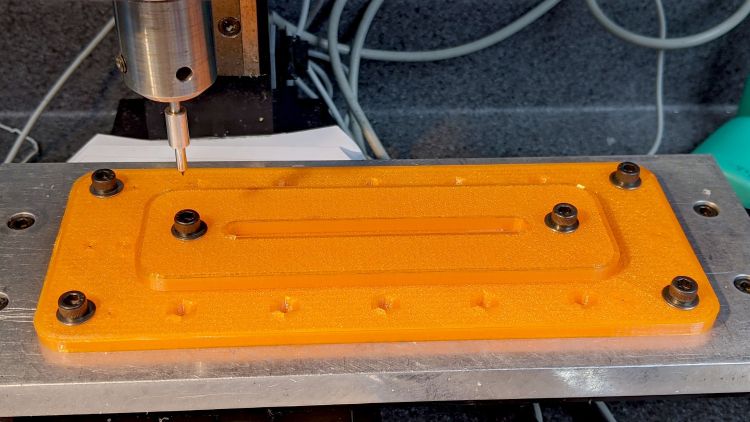
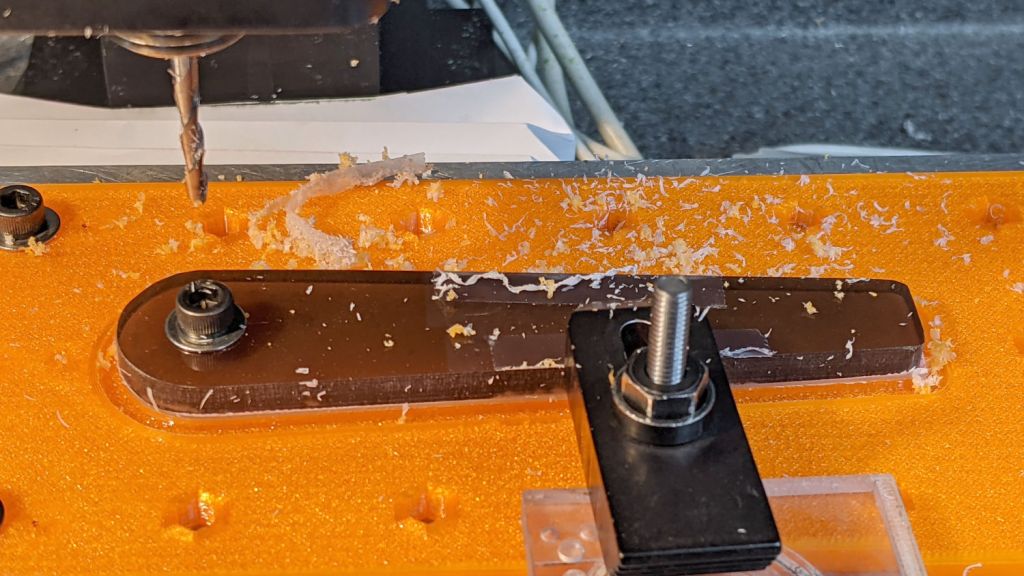
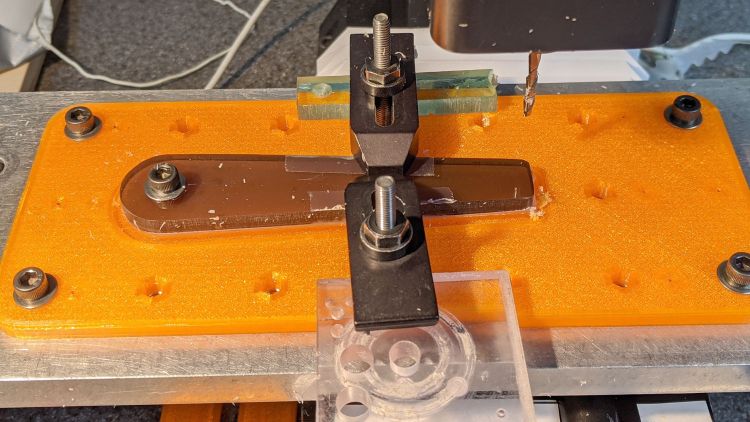
    Given a machined cursor blank, clamp it into position:

    Tek CC Cursor - cursor hairline fixture
    Tek CC Cursor – cursor hairline fixture

    You don’t want to clamp the cursor directly to the Sherline tooling plate, because the diamond drag bit would pass over two or three of those 10-32 screw holes which would, by the conservation of perversity, leave visible defects. In hindsight, I should have put a recess for an aluminum plate in there.

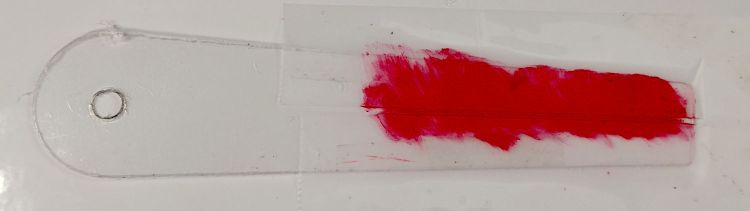
    After a single pass at Z=-4.0 mm, add two strips of tape to protect the adjoining surface and scribble it with red lacquer crayon:

    Tek CC Cursor - tape color fill
    Tek CC Cursor – tape color fill

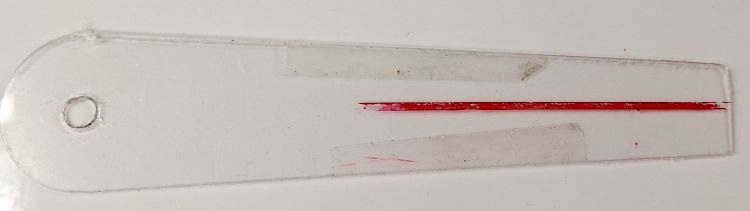
    Peel the tape off:

    Tek CC Cursor - tape removed
    Tek CC Cursor – tape removed

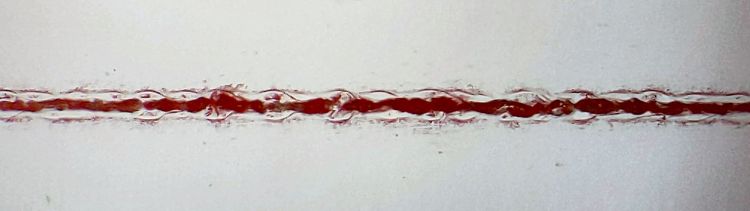
    Then wipe off the residue using a soft cloth wetted with denatured alcohol:

    Tek CC Cursor - red cursor detail
    Tek CC Cursor – red cursor detail

    That looks much like the previous efforts. I’d like a more uniform trench, but I don’t know how to get there from here.

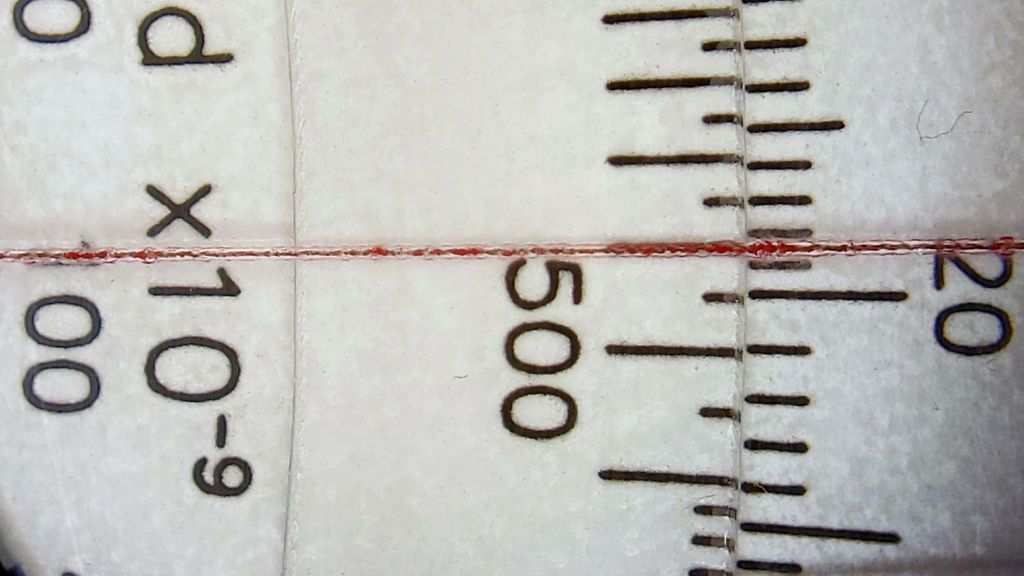
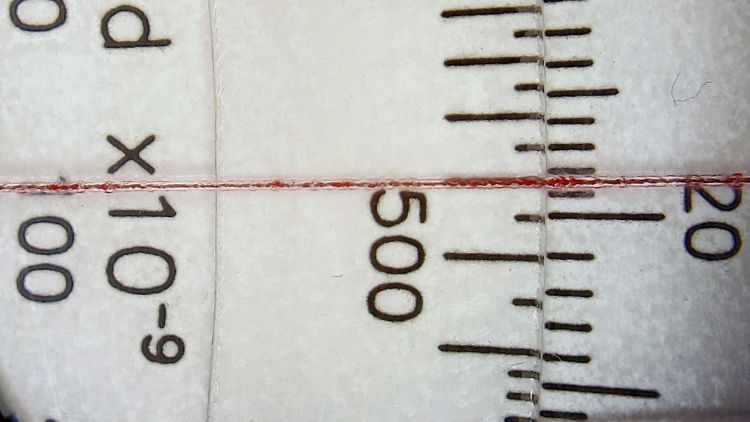
    In any event, the hairline looks pretty good against laser-printed scales:

    Tek CC Cursor - red cursor white laser decks - magnified
    Tek CC Cursor – red cursor white laser decks – magnified

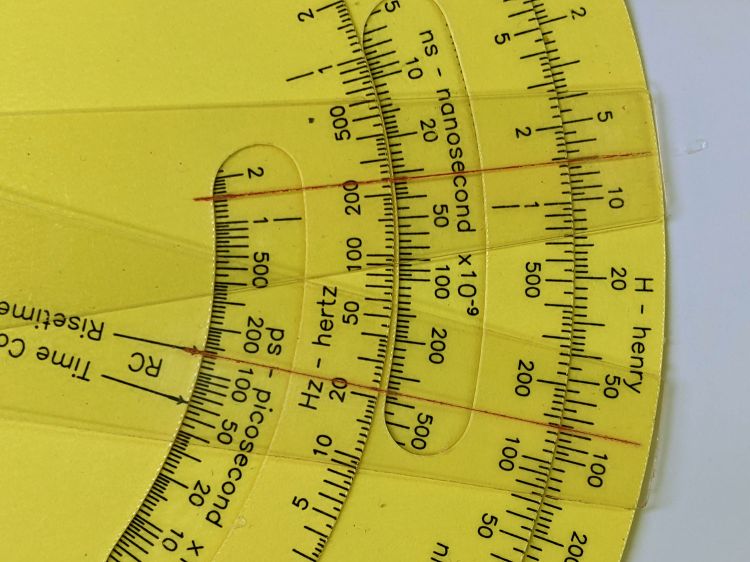
    The new cursor is the lower one lying atop a laser-printed Pickett-style Circuit Computer:

    Tek CC Cursor - red cursor yellow laser decks - overview
    Tek CC Cursor – red cursor yellow laser decks – overview

    Looks good enough to eat, as the saying goes …

  • Tek Circuit Computer: Cursor Milling Toolpath

    Tek Circuit Computer: Cursor Milling Toolpath

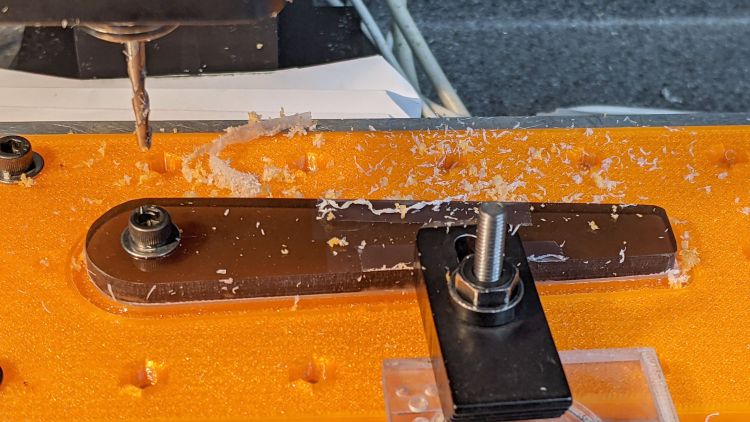
    Unlike the adhesive fixture, this setup requires a pause while milling the cursor outline to reclamp it from the front:

    Tek CC Cursor Fixture - outline rear clamp
    Tek CC Cursor Fixture – outline rear clamp

    The trick is applying the front clamp before releasing the rear clamp:

    Tek CC Cursor Fixture - outline both clamp
    Tek CC Cursor Fixture – outline both clamp

    Then continue the mission:

    Tek CC Cursor Fixture - outline front clamp
    Tek CC Cursor Fixture – outline front clamp

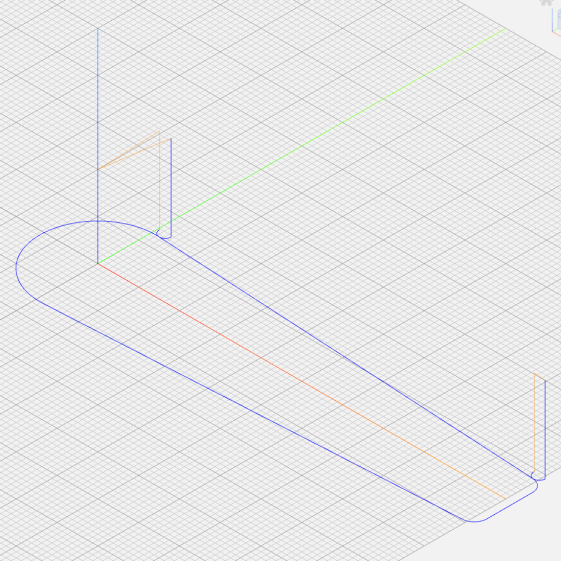
    Because the tool path includes cutter compensation, GCMC adds entry and exit arcs to ensure a smooth transition:

    Tek CC Cursor - Milling path
    Tek CC Cursor – Milling path

    The pix show a single cursor in the fixture while verifying the setup worked the way it should. Obviously, milling a stack of cursors eliminates a whole bunch of fiddling.

    The tweaked MillCursor function from the mostly otherwise unchanged GCMC code:

        comment("Clamp on rear half of cursor!");
    
        local cp = {p0};                                             // enter at hub tangent point
        cp += varc_ccw([0mm,-2*p0.y,-],-hr,0,0.2mm,5deg) + p0;       // arc to tangent at hub bottom
    
        cp += {[p1.x,-p1.y,-]};                                      // lower tip entry point
        cp += varc_ccw([p2.x-p1.x,-(p2.y-p1.y),-],CursorTipRadius,0,0.2mm,5deg) + [p1.x,-p1.y,-];  // arc to tip exit at p2
    
        cp += varc_ccw([p1.x-p2.x,p1.y-p2.y,-],CursorTipRadius,0,0.2mm,5deg) + p2;  // arc to tip exit at p1
    
        goto([-,-,CursorSafeZ]);
        goto([0,0,-]);
        feedrate(MillSpeed);
        tracepath_comp(cp,CutterOD/2,TPC_OLDZ + TPC_RIGHT + TPC_ARCIN + TPC_ARCOUT);
    
        comment("Clamp on front half of cursor!");
        pause();                                      // wait for reclamping
    
        p1.z = MillZ;                                //  ... set milling depth
        cp = {p1};
        cp += {p0};
                                                     // exit at hub tangent
        tracepath_comp(cp,CutterOD/2,TPC_OLDZ + TPC_RIGHT + TPC_ARCIN + TPC_ARCOUT);
    
    <<< snippage >>>
    
      goto([-,-,CursorSafeZ]);
      goto([0,0,-]);
    

    Next, scribing a nice hairline with the new fixture.

  • Makergear M2: Initial PrusaSlicer Configuration

    Makergear M2: Initial PrusaSlicer Configuration

    After replacing the nozzle and the filament drive body on the M2, I figured I might as well throw all the balls in the air and switch to PrusaSlicer for all my slicing needs. It’s built from the Slic3r project, gaining features used by Prusa’s printers / filaments and a considerably improved UI, with a full-time paid staff working on it:

    PrusaSlicer screenshot
    PrusaSlicer screenshot

    Of course, I immediately turned on Expert mode.

    CAUTION: My heavily customized start_gcode will crash your M2, because you haven’t relocated the Z-axis switch, haven’t calibrated Z=0 at the platform surface, and don’t put the XY=0 origin in the center of the platform.

    You have been warned: consider this as a serving suggestion, not a finished product.

    Because everything I design looks more-or-less like a bracket, I absolutely don’t care about surface finish, and I’m content to use only a few colors of PETG from a single supplier, a single Slic3r configuration has sufficed for nearly everything I print. A few manual tweaks for specific models, perhaps to change the number of perimeters or the infill percentage, handle the remaining cases.

    With all that in mind, here’s the current result of File → Export → Export Config as a GitHub Gist:

    # generated by PrusaSlicer 2.2.0+linux-x64 on 2021-01-01 at 13:33:03 UTC
    avoid_crossing_perimeters = 0
    bed_custom_model =
    bed_custom_texture =
    bed_shape = -100x-125,100x-125,100×125,-100×125
    bed_temperature = 90
    before_layer_gcode =
    between_objects_gcode =
    bottom_fill_pattern = hilbertcurve
    bottom_solid_layers = 3
    bottom_solid_min_thickness = 0
    bridge_acceleration = 0
    bridge_angle = 0
    bridge_fan_speed = 100
    bridge_flow_ratio = 1
    bridge_speed = 50
    brim_width = 0
    clip_multipart_objects = 1
    colorprint_heights =
    complete_objects = 0
    cooling = 1
    cooling_tube_length = 5
    cooling_tube_retraction = 91.5
    default_acceleration = 0
    default_filament_profile = ""
    default_print_profile =
    deretract_speed = 0
    disable_fan_first_layers = 6
    dont_support_bridges = 1
    draft_shield = 0
    duplicate_distance = 6
    elefant_foot_compensation = 0
    end_filament_gcode = "; Filament-specific end gcode \n;END gcode for filament\n"
    end_gcode = ;– PrusaSlicer End G-Code for M2 starts –\n; Ed Nisley KE4NZU – 15 November 2013\nG1 Z160 F2000 ; lower bed\nG1 X135 Y100 F30000 ; nozzle to right, bed front\nM104 S0 ; drop extruder temperature\nM140 S0 ; drop bed temperature\nM106 S0 ; bed fan off\nM84 ; disable motors\n;– PrusaSlicer End G-Code ends –\n\n
    ensure_vertical_shell_thickness = 1
    external_perimeter_extrusion_width = 0
    external_perimeter_speed = 50%
    external_perimeters_first = 0
    extra_loading_move = -2
    extra_perimeters = 1
    extruder_clearance_height = 20
    extruder_clearance_radius = 20
    extruder_colour = ""
    extruder_offset = 0x0
    extrusion_axis = E
    extrusion_multiplier = 0.95
    extrusion_width = 0.4
    fan_always_on = 0
    fan_below_layer_time = 15
    filament_colour = #29B2B2
    filament_cooling_final_speed = 3.4
    filament_cooling_initial_speed = 2.2
    filament_cooling_moves = 4
    filament_cost = 25
    filament_density = 0.95
    filament_deretract_speed = nil
    filament_diameter = 1.72
    filament_load_time = 0
    filament_loading_speed = 28
    filament_loading_speed_start = 3
    filament_max_volumetric_speed = 0
    filament_minimal_purge_on_wipe_tower = 15
    filament_notes = ""
    filament_ramming_parameters = "120 100 6.6 6.8 7.2 7.6 7.9 8.2 8.7 9.4 9.9 10.0| 0.05 6.6 0.45 6.8 0.95 7.8 1.45 8.3 1.95 9.7 2.45 10 2.95 7.6 3.45 7.6 3.95 7.6 4.45 7.6 4.95 7.6"
    filament_retract_before_travel = nil
    filament_retract_before_wipe = nil
    filament_retract_layer_change = nil
    filament_retract_length = nil
    filament_retract_lift = nil
    filament_retract_lift_above = nil
    filament_retract_lift_below = nil
    filament_retract_restart_extra = nil
    filament_retract_speed = nil
    filament_settings_id = "M2 Esun PETG"
    filament_soluble = 0
    filament_toolchange_delay = 0
    filament_type = PET
    filament_unload_time = 0
    filament_unloading_speed = 90
    filament_unloading_speed_start = 100
    filament_vendor = (Unknown)
    filament_wipe = nil
    fill_angle = 45
    fill_density = 25%
    fill_pattern = 3dhoneycomb
    first_layer_acceleration = 0
    first_layer_bed_temperature = 90
    first_layer_extrusion_width = 0
    first_layer_height = 0.25
    first_layer_speed = 15
    first_layer_temperature = 250
    gap_fill_speed = 25
    gcode_comments = 0
    gcode_flavor = marlin
    gcode_label_objects = 0
    high_current_on_filament_swap = 0
    host_type = octoprint
    infill_acceleration = 0
    infill_every_layers = 1
    infill_extruder = 1
    infill_extrusion_width = 0
    infill_first = 1
    infill_only_where_needed = 0
    infill_overlap = 15%
    infill_speed = 60
    interface_shells = 0
    layer_gcode =
    layer_height = 0.25
    machine_max_acceleration_e = 10000,5000
    machine_max_acceleration_extruding = 10000,1250
    machine_max_acceleration_retracting = 10000,1250
    machine_max_acceleration_x = 2500,1000
    machine_max_acceleration_y = 2500,1000
    machine_max_acceleration_z = 2500,200
    machine_max_feedrate_e = 10000,5000
    machine_max_feedrate_x = 450,200
    machine_max_feedrate_y = 450,200
    machine_max_feedrate_z = 100,30
    machine_max_jerk_e = 100,50
    machine_max_jerk_x = 25,10
    machine_max_jerk_y = 25,10
    machine_max_jerk_z = 10,5
    machine_min_extruding_rate = 0,0
    machine_min_travel_rate = 0,0
    max_fan_speed = 100
    max_layer_height = 0
    max_print_height = 200
    max_print_speed = 80
    max_volumetric_speed = 0
    min_fan_speed = 100
    min_layer_height = 0.1
    min_print_speed = 10
    min_skirt_length = 25
    notes =
    nozzle_diameter = 0.35
    only_retract_when_crossing_perimeters = 1
    ooze_prevention = 0
    output_filename_format = [input_filename_base].gcode
    overhangs = 1
    parking_pos_retraction = 92
    perimeter_acceleration = 0
    perimeter_extruder = 1
    perimeter_extrusion_width = 0
    perimeter_speed = 50
    perimeters = 3
    post_process =
    print_host =
    print_settings_id = M2 Default
    printer_model =
    printer_notes =
    printer_settings_id = M2 Default
    printer_technology = FFF
    printer_variant =
    printer_vendor =
    printhost_apikey =
    printhost_cafile =
    raft_layers = 0
    remaining_times = 0
    resolution = 0.01
    retract_before_travel = 3
    retract_before_wipe = 0%
    retract_layer_change = 0
    retract_length = 1
    retract_length_toolchange = 10
    retract_lift = 0
    retract_lift_above = 0
    retract_lift_below = 0
    retract_restart_extra = 0
    retract_restart_extra_toolchange = 0
    retract_speed = 60
    seam_position = nearest
    serial_port =
    serial_speed = 250000
    silent_mode = 1
    single_extruder_multi_material = 0
    single_extruder_multi_material_priming = 1
    skirt_distance = 3
    skirt_height = 1
    skirts = 3
    slice_closing_radius = 0.049
    slowdown_below_layer_time = 5
    small_perimeter_speed = 25%
    solid_infill_below_area = 70
    solid_infill_every_layers = 0
    solid_infill_extruder = 1
    solid_infill_extrusion_width = 0
    solid_infill_speed = 75%
    spiral_vase = 0
    standby_temperature_delta = -5
    start_filament_gcode = "; Filament gcode\n"
    start_gcode = ;– PrusaSlicer Start G-Code for M2 starts –\n; Ed Nisley KE4NZU\n; Makergear V4 hot end\n; Origin at platform center, set by MANUAL_X_HOME_POS compiled constants\n; Z-min switch at platform, must move nozzle to X=135 to clear\nG90 ; absolute coordinates\nG21 ; millimeters\nM83 ; relative extrusion distance\nM104 S[first_layer_temperature] ; start extruder heating\nM140 S[first_layer_bed_temperature] ; start bed heating\nM17 ; enable steppers\nG4 P500 ; … wait for power up\nG92 Z0 ; set Z to zero, wherever it might be now\nG0 Z10 F1000 ; move platform downward to clear nozzle; may crash at bottom\nG28 Y ; home Y to clear plate, offset from compiled constant\nG28 X ; home X, offset from M206 X, offset from compiled constant\nG0 X135 Y0 F15000 ; move off platform to right side, center Y\nG28 Z ; home Z to platform switch, offset from M206 Z measured\nG0 Z2.0 F1000 ; get air under switch\nG0 Y-126 F10000 ; set up for priming, zig around corner\nG0 X0 ; center X\nG0 Y-124.5 ; just over platform edge\nG0 Z0 F500 ; exactly at platform\nM190 S[first_layer_bed_temperature] ; wait for bed to finish heating\nM109 S[first_layer_temperature] ; set extruder temperature and wait\nG1 E20 F300 ; prime to get pressure, generate blob on edge\nG0 Y-123 F5000 ; shear off blob\nG0 X15 F15000 ; jerk away from blob, move over surface\nG4 P500 ; pause to attach\nG1 X45 F500 ; slowly smear snot to clear nozzle\nG1 Z1.0 F2000 ; clear bed for travel\n;– PrusaSlicer Start G-Code ends –\n
    support_material = 0
    support_material_angle = 0
    support_material_auto = 1
    support_material_buildplate_only = 0
    support_material_contact_distance = 0.2
    support_material_enforce_layers = 0
    support_material_extruder = 1
    support_material_extrusion_width = 0.31
    support_material_interface_contact_loops = 0
    support_material_interface_extruder = 1
    support_material_interface_layers = 3
    support_material_interface_spacing = 0
    support_material_interface_speed = 100%
    support_material_pattern = rectilinear
    support_material_spacing = 2.5
    support_material_speed = 60
    support_material_synchronize_layers = 0
    support_material_threshold = 0
    support_material_with_sheath = 1
    support_material_xy_spacing = 50%
    temperature = 250
    thin_walls = 1
    threads = 4
    thumbnails =
    toolchange_gcode =
    top_fill_pattern = hilbertcurve
    top_infill_extrusion_width = 0
    top_solid_infill_speed = 50%
    top_solid_layers = 3
    top_solid_min_thickness = 0
    travel_speed = 300
    use_firmware_retraction = 0
    use_relative_e_distances = 0
    use_volumetric_e = 0
    variable_layer_height = 1
    wipe = 0
    wipe_into_infill = 0
    wipe_into_objects = 0
    wipe_tower = 0
    wipe_tower_bridging = 10
    wipe_tower_no_sparse_layers = 0
    wipe_tower_rotation_angle = 0
    wipe_tower_width = 60
    wipe_tower_x = 180
    wipe_tower_y = 140
    wiping_volumes_extruders = 70,70
    wiping_volumes_matrix = 0
    xy_size_compensation = 0
    z_offset = 0
  • Shuttles Game: Tapered Pegs

    Shuttles Game: Tapered Pegs

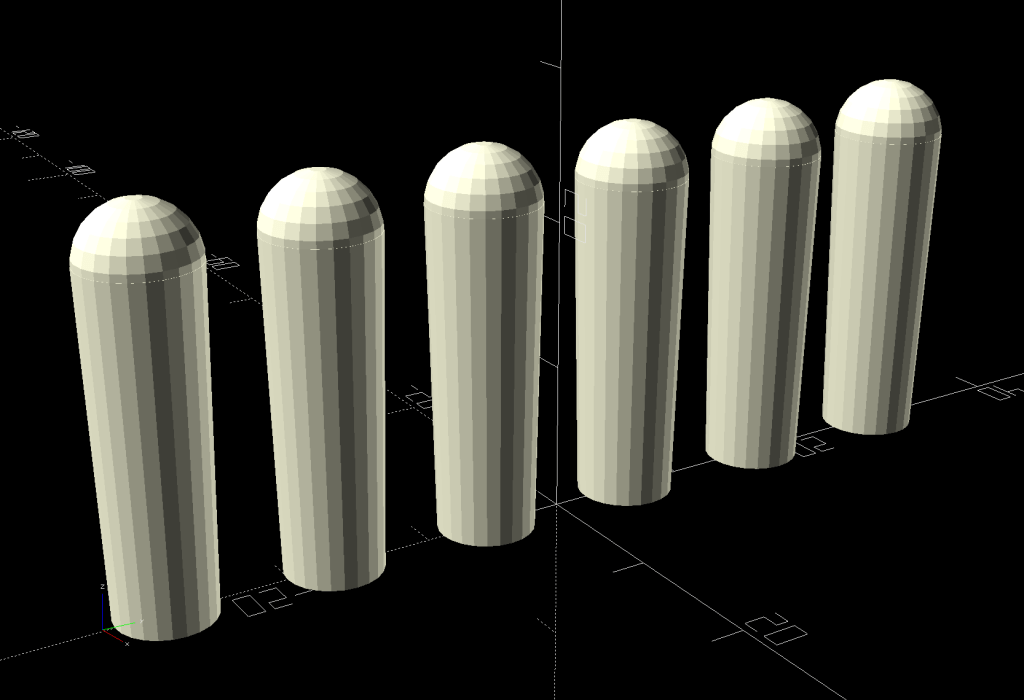
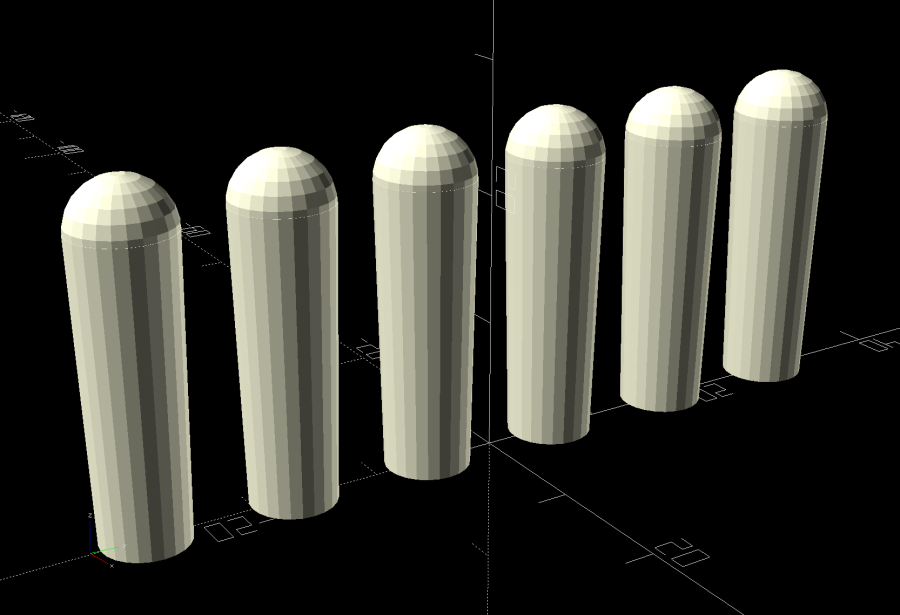
    As is all too common with 3D printed replacement parts done remotely, the first Shuttles game pegs didn’t quite fit into the game board’s holes. Fortunately, living in the future means rapid prototyping and quick turnaround:

    Shuttles Game pegs - tapered - solid model
    Shuttles Game pegs – tapered – solid model

    They’re slightly smaller, tapered toward the bottom, and take slightly less time to print.

    The OpenSCAD code in the GitHub Gist now has has the tweaks.

  • Seedling Shelter Frame

    Seedling Shelter Frame

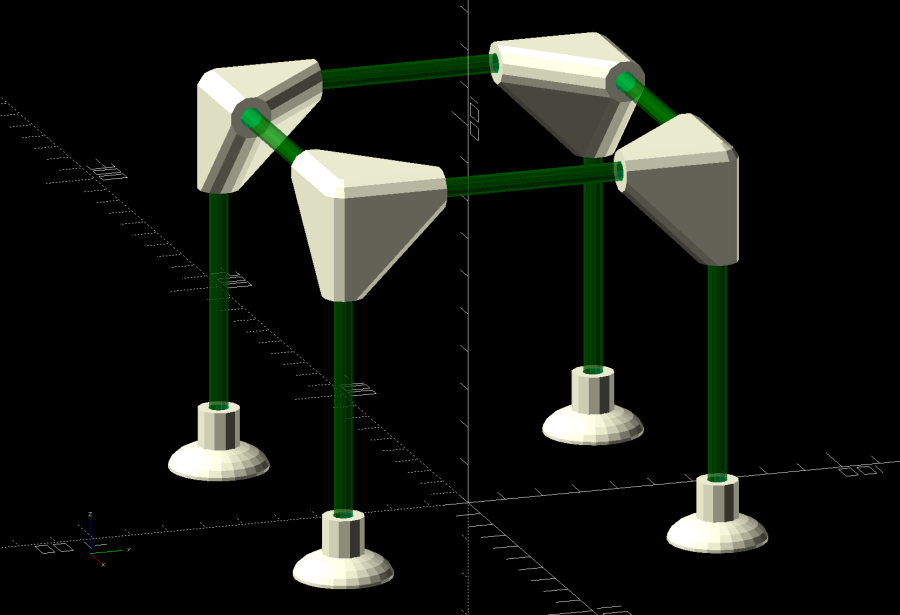
    Plant seedlings started in pots require some hardening off time outdoors before being transplanted. Veggie seedlings also require protection from critters regarding them as a buffet, so Mary covers them with a sheet of floating row cover, which must be both suspended over the plants to give them growing room and tucked under the tray to keep the bugs out. She asked for a frame to simplify the process:

    Mesh Shelter Frame - assembled
    Mesh Shelter Frame – assembled

    The solid model shows the structure with no regard for proportion:

    Mesh Shelter Frame - show view
    Mesh Shelter Frame – show view

    The 5 mm fiberglass rods come from our decommissioned six-passenger umbrella, cut to length in the Tiny Lathe™ by applying a Swiss Pattern knife file around the perimeter, over the ShopVac’s snout to catch the glass dust. I started with a pull saw (also over the vacuum) during the weekly Squidwrench v-meeting, whereupon Amber recommended either a Dremel slitting wheel or a file, so I mashed everything together and it worked wonderfully well, without producing any errant glass-fiber shards to impale my fingers.

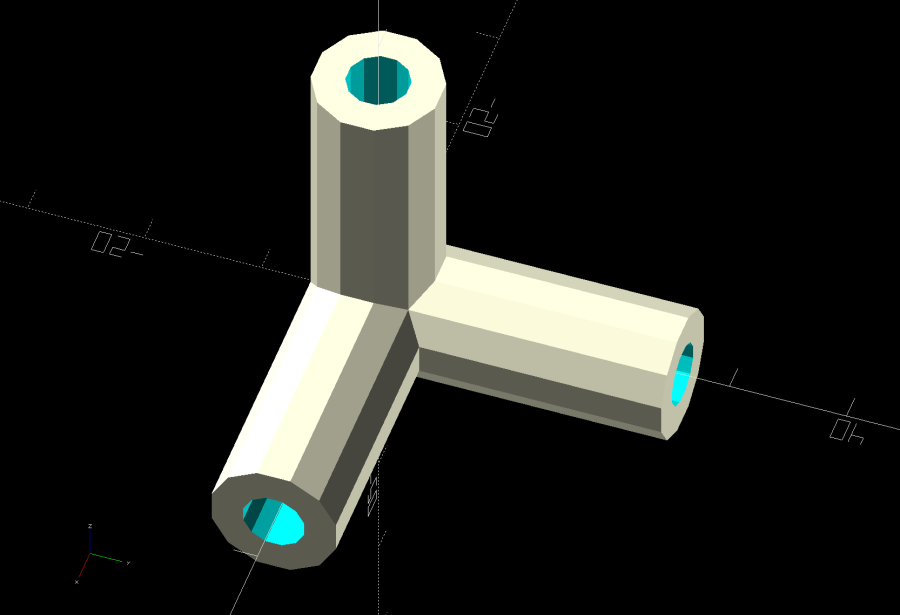
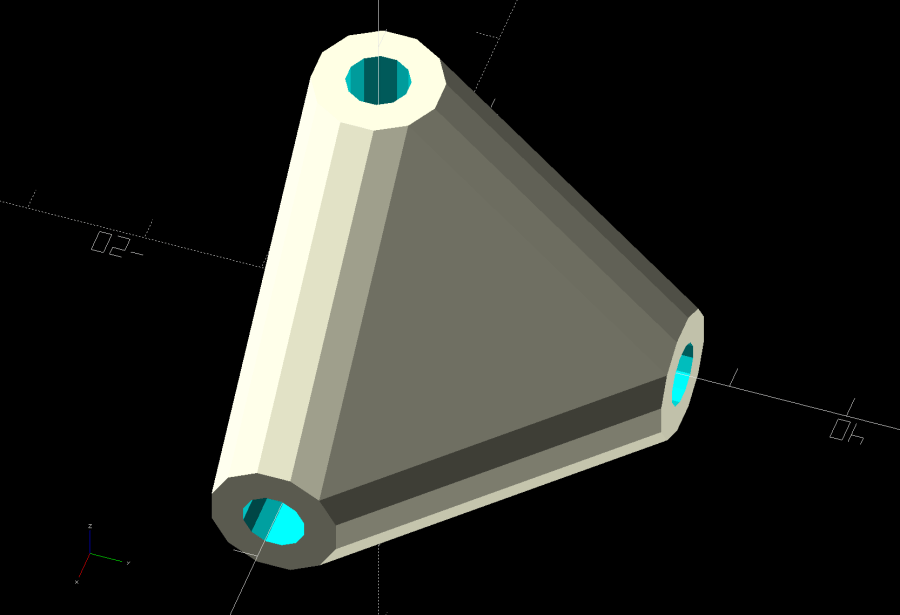
    The corners consist of three tubes stuck together at the origin:

    Mesh Shelter Frame - non-hulled corner model
    Mesh Shelter Frame – non-hulled corner model

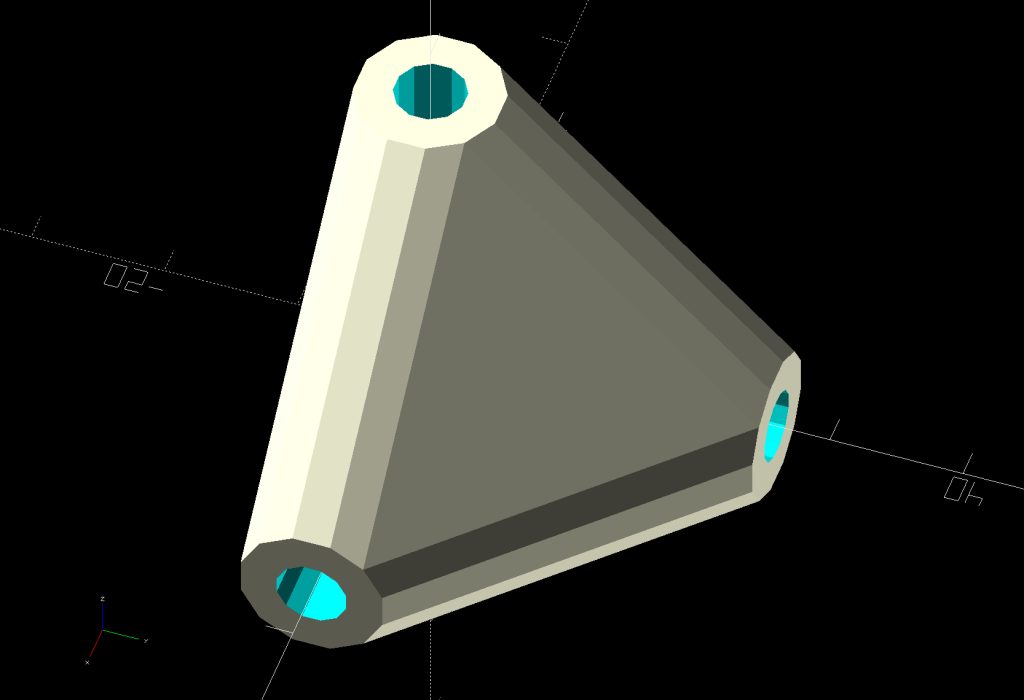
    Shrink-wrapping them with a hull() adds plenty of strength where it’s needed:

    Mesh Shelter Frame - hulled corner model
    Mesh Shelter Frame – hulled corner model

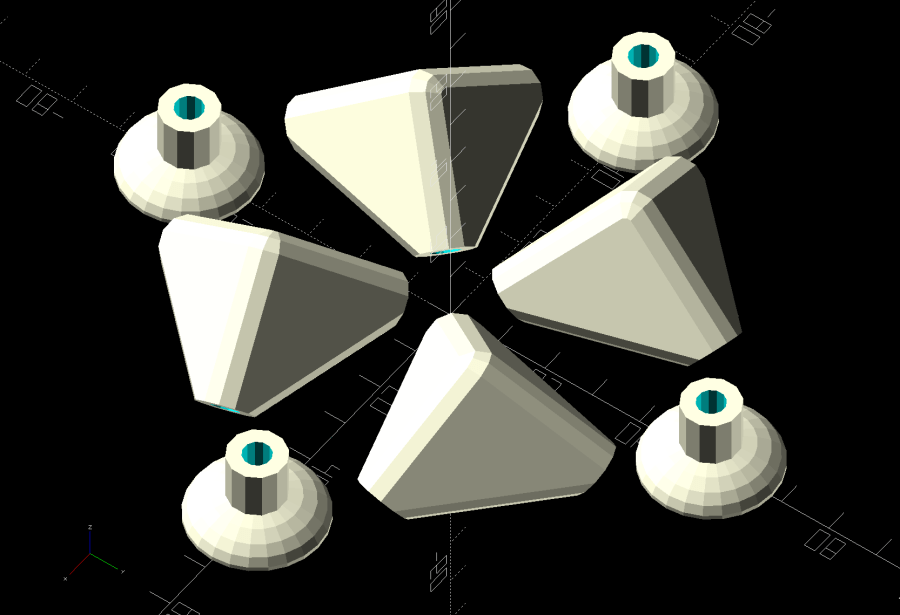
    I decided putting the belly side (facing you in the picture) downward on the platform and the peak upward would distribute the distortion equally among the tubes and produce a nicely rounded outer surface for the mesh fabric:

    Mesh Shelter Frame - build layout
    Mesh Shelter Frame – build layout

    Which led to some Wikipedia trawling to disturb the silt over my long-buried analytic geometry, plus some calculator work to help recall the process; back in the day I would have used a slipstick, but I was unwilling to go there. Although I could special-case this particular layout, the general method uses Euler’s Rotation Theorem, simplified because I need only one rotation.

    Should you need concatenated rotations, you probably need quaternions, but, at this point, I don’t even remember forgetting quaternions.

    Anyhow, the Euler rotation axis is the cross product of the [1,1,1] vector aimed through the middle of the corner’s belly with the [0,0,-1] target vector pointing downward toward the platform. The rotation amount is the acos() of the dot product of those two vectors divided by the product of their norms. With vector and angle in hand, dropping them into OpenSCAD’s rotate() transformation does exactly what’s needed:

    rotate(acos((BaseVector*Nadir)/(norm(BaseVector)*norm(Nadir))),
           v=cross(BaseVector,Nadir))   // aim belly side downward
      Corner();

    Dang, I was so happy when that worked!

    Because the corner model rotates around the origin where all three tube centerlines meet, the result puts the belly below the platform, pointed downward. The next step applies a translation to haul the belly upward:

    translate([ArmOAL,0,    // raise base to just below platform level
               ArmOC/sqrt(3) + (ArmRadius/cos(180/SocketSides))*cos(atan(sqrt(3)/2)) + Finagle])

    This happens in a loop positioning the four corners for printing, so the first ArmOAL as the X axis parameter translates the shape far enough to let four of them coexist around the origin, as shown above.

    The mess in the Z axis parameter has three terms:

    • Raise the centerline of the ends of the tubes to Z=0
    • Raise the rim of the tube to Z=0
    • Add a wee bit to make the answer come out right

    The 0.18 mm Finagle constant fixes things having to do with the hull() applied to miscellaneous leftover angled-circles-as-polygons approximations and leaves just a skin below the platform to be sheared off by a huge cube below Z=0, matching the corner bellies with the bottoms of the feet.

    Because the corners have awful overhangs, the results look a bit raggedy:

    Mesh Shelter Frame - corner underside
    Mesh Shelter Frame – corner underside

    That’s after knocking off the high spots with a grubby sanding sponge and making a trial fit. They look somewhat less grotendous in person.

    If we need another iteration, I’ll think hard about eliminating the overhangs by splitting the corner parallel to the belly, flipping the belly upward, and joining the pieces with a screw. What we have seems serviceable, though.

    The OpenSCAD source code as a GitHub Gist:

    // Mesh Shelter Frame for outdoor sprouts
    // Ed Nisley KE4ZNU – July 2020
    /* [Layout Options] */
    Layout = "Show"; // [Build, Show, Corner, CornerSet, Base, BaseSet]
    //——-
    //- Extrusion parameters must match reality!
    // Print with 2 shells
    /* [Hidden] */
    ThreadThick = 0.25;
    ThreadWidth = 0.40;
    HoleFinagle = 0.2;
    HoleFudge = 1.00;
    function HoleAdjust(Diameter) = HoleFudge*Diameter + HoleFinagle;
    Protrusion = 0.1; // make holes end cleanly
    function IntegerMultiple(Size,Unit) = Unit * ceil(Size / Unit);
    inch = 25.4;
    //——-
    // Dimensions
    RodOD = 5.0;
    SocketDepth = 3*RodOD;
    WallThick = 3.0;
    ArmOD = RodOD + 2*WallThick;
    ArmRadius = ArmOD / 2;
    SocketSides = 3*4;
    ArmOC = SocketDepth + ArmOD; // rod entry to corner centerline
    ArmOAL = ArmOC + ArmRadius; // total arm length to outer edge
    echo(str("ArmOC: ",ArmOC));
    echo(str("ArmOAL: ",ArmOAL));
    Nadir = [0,0,-1]; // vector toward print platform
    RodLength = 100; // just for show
    //——-
    module PolyCyl(Dia,Height,ForceSides=0) { // based on nophead's polyholes
    Sides = (ForceSides != 0) ? ForceSides : (ceil(Dia) + 2);
    FixDia = Dia / cos(180/Sides);
    cylinder(r=HoleAdjust(FixDia)/2,h=Height,$fn=Sides);
    }
    //——-
    BaseVector = [1,1,1]; // vector through middle of base surface
    module Corner() {
    difference() {
    hull() {
    scale([1/cos(180/SocketSides),1/cos(180/SocketSides),1])
    rotate(180/SocketSides)
    sphere(d=ArmOD,$fn=SocketSides);
    rotate(180/SocketSides)
    cylinder(d=ArmOD,h=ArmOC,$fn=SocketSides);
    rotate([-90,0,0]) rotate(180/SocketSides)
    cylinder(d=ArmOD,h=ArmOC,$fn=SocketSides);
    rotate([0,90,0]) rotate(180/SocketSides)
    cylinder(d=ArmOD,h=ArmOC,$fn=SocketSides);
    }
    rotate(180/SocketSides)
    translate([0,0,ArmOD])
    PolyCyl(RodOD,SocketDepth + Protrusion,SocketSides);
    rotate([-90,0,0]) rotate(180/SocketSides)
    translate([0,0,ArmOD])
    PolyCyl(RodOD,SocketDepth + Protrusion,SocketSides);
    rotate([0,90,0]) rotate(180/SocketSides)
    translate([0,0,ArmOD])
    PolyCyl(RodOD,SocketDepth + Protrusion,SocketSides);
    }
    }
    module CornerSet(s=RodLength) {
    translate([-s/2,-s/2,s])
    mirror([0,0,1])
    Corner();
    translate([s/2,-s/2,s])
    rotate([0,0,90]) mirror([0,0,1])
    Corner();
    translate([s/2,s/2,s])
    rotate([0,0,180]) mirror([0,0,1])
    Corner();
    translate([-s/2,s/2,s])
    rotate([0,0,-90]) mirror([0,0,1])
    Corner();
    }
    module Base() {
    difference() {
    union() {
    cylinder(d=ArmOD,h=ArmOAL/2,$fn=SocketSides);
    resize([0,0,ArmOC/2])
    sphere(d=ArmOC,$fn=2*SocketSides);
    }
    translate([0,0,3*ThreadThick])
    PolyCyl(RodOD,ArmOAL,SocketSides);
    translate([0,0,-SocketDepth]) // cut sphere below platform
    cube(2*SocketDepth,center=true);
    }
    }
    module BaseSet(s=RodLength) {
    for (i=[-1,1], j=[-1,1])
    translate([i*s/2,j*s/2,0])
    Base();
    }
    //——-
    // Build it!
    if (Layout == "Corner")
    Corner();
    if (Layout == "CornerSet")
    CornerSet();
    if (Layout == "Base")
    Base();
    if (Layout == "BaseSet")
    BaseSet();
    if (Layout == "Show") {
    CornerSet();
    for (i=[-1,1])
    translate([i*RodLength/2,RodLength/2,RodLength])
    rotate([90,0,0])
    color("Green",0.5)
    cylinder(d=RodOD,h=RodLength,$fn=SocketSides);
    for (j=[-1,1])
    translate([RodLength/2,j*RodLength/2,RodLength])
    rotate([0,-90,0])
    color("Green",0.5)
    cylinder(d=RodOD,h=RodLength,$fn=SocketSides);
    BaseSet();
    for (i=[-1,1], j=[-1,1])
    translate([i*RodLength/2,j*RodLength/2,0])
    color("Green",0.5)
    cylinder(d=RodOD,h=RodLength,$fn=SocketSides);
    }
    if (Layout == "Build") {
    Finagle = 0.18; // hack for hull's angled round-to-polygon approximations, I think
    difference() { // slice sliver from base to sit flat on platform
    union()
    for (a=[45:90:360])
    rotate(a) // distribute around origin
    translate([ArmOAL,0, // raise base to just below platform level
    ArmOC/sqrt(3) + (ArmRadius/cos(180/SocketSides))*cos(atan(sqrt(3)/2)) + Finagle])
    rotate(17) // arbitrary rotation for tidy arrangement
    rotate(acos((BaseVector*Nadir)/(norm(BaseVector)*norm(Nadir))),
    v=cross(BaseVector,Nadir)) // aim belly side downward
    Corner();
    translate([0,0,-ArmOD/2]) // slicing block below platform
    cube([6*ArmOAL,6*ArmOAL,ArmOD],center=true);
    }
    rotate(45)
    for (i=[-1,1], j=[-1,1])
    translate([i*1.5*ArmOC,j*1.5*ArmOC,0])
    Base();
    }
  • Shuttles Board Game: Replacement Pegs

    Shuttles Board Game: Replacement Pegs

    For reasons not relevant here, I made replacement pegs for the Shuttles board game:

    Shuttles Game - solid model - Slic3r
    Shuttles Game – solid model – Slic3r

    Not the most challenging solid model I’ve ever conjured from the vasty digital deep, but 3D printing is really good for stuff like this.

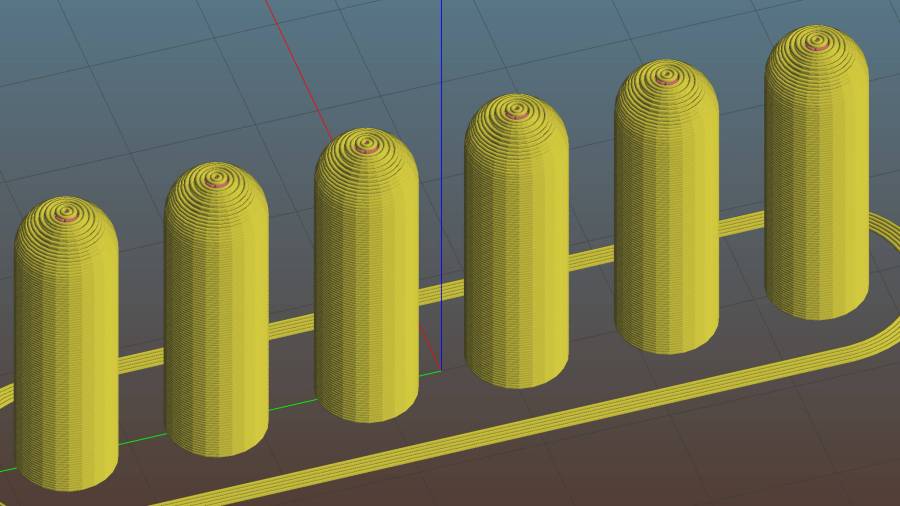
    The OEM pegs have a hollow center, most likely to simplify stripping them from the injection mold, which I dutifully duplicated:

    Shuttles Game pegs - hollow - solid model
    Shuttles Game pegs – hollow – solid model

    It turns out the additional perimeter length inside the pegs requires 50% more printing time, far offsetting the reduced 10% infill. Given that each solid set takes just under an hour, I decided to lose half an hour of verisimilitude.

    I plunked a nice round cap atop the OEM peg’s flat end, but stopped short of printing & installing a round plug for the butt end.

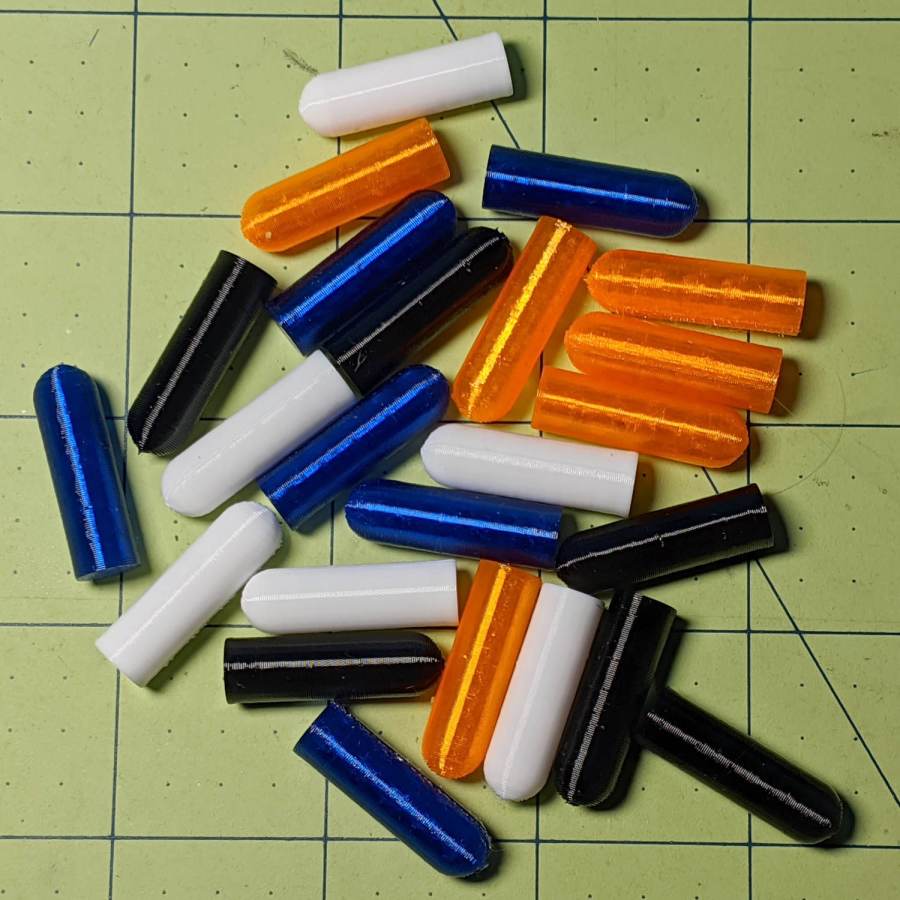
    While the 3D printer’s hot, ya may as well make a bunch:

    Shuttles game pegs
    Shuttles game pegs

    Game on …

    The OpenSCAD source code as a GitHub Gist:

    Update: They’re a bit too large, so the Gist now produces tapered pegs.

    // Shuttles game pegs
    // Ed Nisley KE4ZNU – July 2020
    /* [Layout Options] */
    Layout = "Peg"; // [Build, Peg]
    Hollow = false;
    //——-
    //- Extrusion parameters must match reality!
    /* [Hidden] */
    ThreadThick = 0.25;
    ThreadWidth = 0.40;
    HoleWindage = 0.2;
    Protrusion = 0.1; // make holes end cleanly
    ID = 0;
    OD = 1;
    LENGTH = 2;
    //——-
    // Dimensions
    /* [Dimensions] */
    Peg = [4.0,7.5,26.0]; // overall length, including the rounded Cap
    Taper = 1.0;
    CapRadius = Peg[OD]/2;
    PegBaseLength = Peg[LENGTH] – CapRadius;
    NumPegs = [1,6]; // lay out in array
    ArrayCenter = [NumPegs[0] – 1,NumPegs[1] – 1] / 2;
    NumSides = 6*4;
    //——-
    module PolyCyl(Dia,Height,ForceSides=0) { // based on nophead's polyholes
    Sides = (ForceSides != 0) ? ForceSides : (ceil(Dia) + 2);
    FixDia = Dia / cos(180/Sides);
    cylinder(r=FixDia/2 + HoleWindage,h=Height,$fn=Sides);
    }
    //——-
    // One peg
    module Peg() {
    union() {
    translate([0,0,PegBaseLength])
    difference() {
    sphere(d=Peg[OD],$fn=NumSides);
    translate([0,0,-Peg[OD]/2])
    cube([2*Peg[OD],2*Peg[OD],Peg[OD]],center=true);
    }
    difference() {
    cylinder(d1=Peg[OD] – Taper,d2=Peg[OD],h=PegBaseLength,$fn=NumSides);
    if (Hollow)
    translate([0,0,-Protrusion])
    PolyCyl(Peg[ID],PegBaseLength+Protrusion,NumSides);
    }
    }
    }
    //——-
    // Build it!
    if (Layout == "Peg")
    Peg();
    if (Layout == "Build")
    for (i=[0:NumPegs[0] – 1], j=[0:NumPegs[1] – 1])
    translate([(i – ArrayCenter.x)*1.5*Peg[OD],(j – ArrayCenter.y)*1.5*Peg[OD],0])
    Peg();
  • Garden Soaker Hose Repairs In Use

    Garden Soaker Hose Repairs In Use

    Just for completeness, here’s what the various soaker hose clamps look like in the garden, as solid models only let you visualize the ideal situation:

    Soaker Hose Connector Clamp - Show view
    Soaker Hose Connector Clamp – Show view

    This one prevents a puddle in the path to the right:

    Soaker hose repairs in situ - clamp
    Soaker hose repairs in situ – clamp

    Bending the hoses around the end of a bed puts them on edge, with this clamp suppressing a shin-soaking spray to the left:

    Soaker hose repairs in situ - end-on clamp
    Soaker hose repairs in situ – end-on clamp

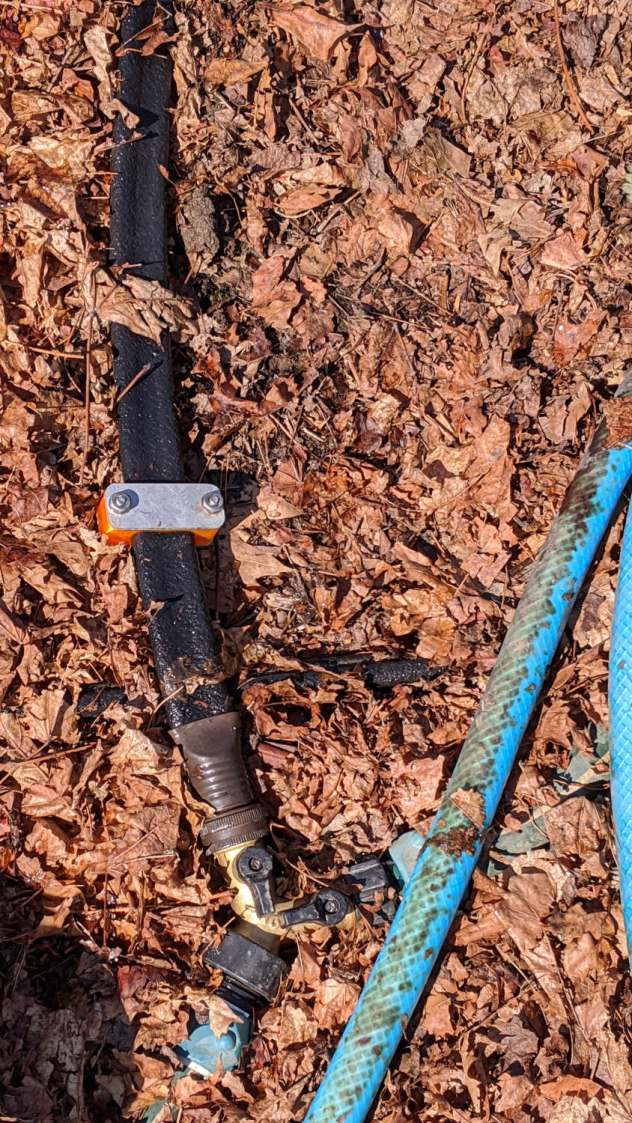
    The clamp at the connector closes a leak around the crimped brass fitting, with the other two preventing gouges from direct sprays into the path along the bottom of the picture:

    Soaker hose repairs in situ - clamps and connector fix
    Soaker hose repairs in situ – clamps and connector fix

    All in all, a definite UI improvement!

    As far as I can tell, we have the only soaker hose repairs & spritz stoppers in existence. Hooray for 3D printing!