The Smell of Molten Projects in the Morning

Ed Nisley's Blog: Shop notes, electronics, firmware, machinery, 3D printing, laser cuttery, and curiosities. Contents: 100% human thinking, 0% AI slop.

Tag: CNC

Making parts with mathematics

  • Water Cooled Stepper Motors: Flow Calculation

    A discussion on the Makergear Google Group about a heated enclosure prompted me to run the numbers for cooling stepper motors with water, rather than fans and finned heatsinks.

    The general idea comes from my measurements of the air-cooled heatsink stuck to a stepper’s end cap. The metal-to-metal conductivity works surprisingly well and reduces the case temperature to slightly over ambient with decent airflow through the heatsink; epoxying a cold plate to the end cap should work just as well. A NEMA 17 stepper case is 42.3 mm square, so a standard 40 mm square CPU cooling plate will fit almost exactly.

    The question then becomes: how much water flow do you need to keep the motors cool?

    Some numbers:

    • Water’s heat capacity is 4.2 J/g·K
    • 1 J = 1 W·s, 1 W = 1 J/s
    • NEMA 17 motors dissipate about 5 W (13 W if you’re abusing them)
    • We’ll cool all four motors in parallel, for a total of 20 W
    • Allow a 5 K = 5 °C temperature rise in each cold plate

    Rub them all together:

    (20 J/s) / (5 K * (4.2 J/g·K)) = 0.95 g/s

    For water, 1 g = 1 cc, so the total flow is 1 cc/s = 3600 cc/h = 3.6 liter/h, which, here in the US, works out to a scant 1 gallon/hour. It’s tough getting a pump that small and cheap flowmeters run around 0.5 liter/m…

    If you don’t want a pump. put an aquarium up on a (sturdy) shelf and drain it through the cold plates. A cubic foot of water, all eight gallons and sixty-some-odd pounds of it, will last 8 hours, which should be enough for most printing projects.

    If you want reliability, drain the coolers into a sump with a float switch (high = on), put another float switch (high = off) on the aquarium, and have the pump top up the aquarium. If the pump fails, your steppers stay cool for the next 8 hours. Heating the water about 5 °C during 8 hours won’t require active cooling.

    Now, managing the hoses leading to the X axis stepper may be challenging, but a cable drag chain would control the rest of the wiring, too.

  • Browning Hi-Power Magazine Capacity Reduction Block: Steel Version

    The Shapeways stainless steel process produces nice results:

    Browning HP Mag Blocks - stainless and plastic - side
    Browning HP Mag Blocks – stainless and plastic – side

    It’s actually bronze-infused stainless steel powder, so it’s not exactly solid steel. The parts spend a day rattling around in a vibratory polisher that slightly rounds off their edges and smooths the surface, but (as with all 3D printed objects) you must learn to love the results; it’s certainly more photogenic than the black plastic version from my M2.

    The bottom view shows the hole I added to reduce the metallic volume; they charge a bit under $0.01/mm3, which encourages airy design:

    Browning HP Mag Blocks - stainless and plastic - bottom
    Browning HP Mag Blocks – stainless and plastic – bottom

    A cross-section view of the solid model shows the interior structure:

    Browning Hi-Power Magazine Block - steel - solid model - section
    Browning Hi-Power Magazine Block – steel – solid model – section

    The vent pipes are somewhat larger than in the plastic version and, obviously, I didn’t include the yellow support structures in the model I sent to Shapeways.

    Their specs give a minimum wall thickness of 3.0 mm, which I’m definitely pushing on some of the internal features. The pipes came out perfectly, as nearly as I can tell, although some polishing media did get wedged in the smaller hole. Air passes freely across the top, which is the important part.

    Although the specs list a ±2 mm (!) tolerance, a comment in a Shapeways forum said that applies to larger objects, with 0.2 mm being typical for smaller objects. The steel and plastic parts match within 0.2 mm of the nominal model dimensions, so that lower tolerance seems about right; I have no idea how consistent it is.

    Another comment recommended carbide tools for secondary operations and that’s definitely true; I wrecked a perfectly good HSS tap trying to thread the central hole. Fortunately, I made the block slightly smaller outside and slightly larger inside, specifically to avoid having a deep thread; I intend to ram a standard M3x0.5 SHCS into that hole and epoxy it in place without worrying about thread damage.

    A trial fit shows it captures the spring tab just like the plastic version did:

    Browning Hi-Power magazine - steel block trial fit
    Browning Hi-Power magazine – steel block trial fit

    I must contact my legislators again, as I’m pretty sure they’re not going to contact me.

    The OpenSCAD source code:

    // Browning Hi-Power Magazine Plug
    // Ed Nisley KE4ZNU December 2013
    
    Layout = "Show";			// Show Whole Split
    							//  Show = section view for demo, not for building
    							//  Whole = upright for steel or plastic
    							//  Split = laid flat for plastic show-n-tell assembly
    
    AlignPins = (Layout == "Split");					// pins only for plastic show-n-tell
    
    Support = true && (Layout != "Split");				// no support for split, optional otherwise
    
    //- Extrusion parameters must match reality!
    //  Print with 2 shells and 3 solid layers
    
    ThreadThick = 0.15;
    ThreadWidth = 0.40;
    
    HoleWindage = 0.2;
    
    Protrusion = 0.1;			// make holes end cleanly
    
    //----------------------
    // Dimensions
    
    Angle = 12.5;				// from vertical
    
    SpringID = 10.3;			// magazine spring curvature (measure with drill shank)
    SpringRadius = SpringID / 2;
    
    Length = 23.0;				// front-to-back perpendicular to magazine shaft
    Height = 18.0;				// bottom-to-top, parallel to magazine shaft
    							//  18 = 10 round max capacity
    
    RectLength = Length - SpringID;	// block length between end radii
    
    HornBaseOD = 8.0;			// fits between follower pegs to prevent shortening
    HornTipOD = 5.0;
    HornAddTip = (HornTipOD/2)*tan(Angle);
    HornAddBase = (HornBaseOD/2)*tan(Angle);
    HornAddLength = HornAddTip + HornAddBase + 2*Protrusion;
    HornLength = 12.0;			// should recompute ODs, but *eh*
    
    ScrewOD = 3.0 - 0.25;		// screw hole dia - minimal thread engagement
    ScrewLength = 13.0;
    ScrewOffset = -1.5;			//   ... from centerline
    							//  OEM = 0.0
    							//  generic A = -1.5
    
    NutOD = 5.6;				// hex nut dia across flats
    NutThick = 2.4;				//  ... generous allowance for nut
    NutTrapLength = 1.5*NutThick;		// allow for epoxy buildup
    NutOffset = 6.0;			//  ... base height from floor
    
    TrimHeight = 2.5;			// vertical clearance for spring clip on base plate
    							//   OEM = 2.5
    							//   generic A = 2.5
    
    TrimOffset = -9.5 + ScrewOffset;	// ... horizontal from centerline
    							//	 OEM = 0.0
    							//   generic A = 1.5
    
    SupportLength = 4.0;		// length of support struts under Trim
    SupportWidth = SpringID;	// ... width
    
    VentDia = 2.5;				// air vent from back of screw recess
    VentOffset = ScrewOffset - 6.0;
    
    RecessDia = 5.0;			// recess to reduce weight
    RecessLength = 0.66*Length;	//  ... internal length
    RecessOffset = 8.5;	//  ... offset from centerline
    
    PinOD = 1.72;				// alignment pins
    PinLength = 6.0;
    PinInset = 0.6*SpringRadius;	// from outside edges
    echo(str("Alignment pin length: ",PinLength));
    
    NumSides = 8*4;				// default cylinder sides
    
    Offset = 5.0/2;				// from centerline for build layout
    
    //----------------------
    // Useful routines
    
    function Delta(a,l) = l*tan(a);				// incremental length due to angle
    
    // Locating pin hole with glue recess
    //  Default length is two pin diameters on each side of the split
    
    module LocatingPin(Dia=PinOD,Len=0.0) {
    
    	PinLen = (Len != 0.0) ? Len : (4*Dia);
    
    	translate([0,0,-ThreadThick])
    		PolyCyl((Dia + 2*ThreadWidth),2*ThreadThick,4);
    
    	translate([0,0,-2*ThreadThick])
    		PolyCyl((Dia + 1*ThreadWidth),4*ThreadThick,4);
    
    	translate([0,0,-(Len/2 + ThreadThick)])
    		PolyCyl(Dia,(Len + 2*ThreadThick),4);
    
    }
    
    module PolyCyl(Dia,Height,ForceSides=0) {			// based on nophead's polyholes
    
      Sides = (ForceSides != 0) ? ForceSides : (ceil(Dia) + 2);
    
      FixDia = Dia / cos(180/Sides);
    
      cylinder(r=(FixDia + HoleWindage)/2,
               h=Height,
    	   $fn=Sides);
    }
    
    module ShowPegGrid(Space = 10.0,Size = 1.0) {
    
      Range = floor(50 / Space);
    
    	for (x=[-Range:Range])
    	  for (y=[-Range:Range])
    		translate([x*Space,y*Space,Size/2])
    		  %cube(Size,center=true);
    
    }
    
    //----------------------
    // The magazine block
    
    module Block(SectionSelect = 0) {
    
    CropHeight = Height*cos(Angle);				// block height perpendicular to base
    echo(str("Perpendicular height: ",CropHeight));
    
    	difference() {
    		union() {
    			intersection() {
    				rotate([Angle,0,0])
    					hull() {
    						for (i=[-1,1])
    							translate([0,i*RectLength/2,-((Length/2)*sin(Angle) + Protrusion)])						cylinder(r=SpringRadius,
    										h=(Height + 2*(Length/2)*sin(Angle) + 2*Protrusion),
    										$fn=NumSides);
    					}
    				translate([0,0,CropHeight/2])
    					cube([2*SpringID,3*Length,CropHeight],center=true);
    			}
    			translate([0,-Height*sin(Angle),Height*cos(Angle)])
    				resize([SpringID,0,0])
    					intersection() {
    						rotate([Angle,0,0])
    							translate([0,0,-(HornAddBase + Protrusion)])
    								cylinder(r1=HornBaseOD/2,
    										r2=HornTipOD/2,
    										h=(HornLength + HornAddLength + Protrusion),
    										$fn=NumSides);
    					cube([2*SpringID,Length,2*(HornLength*cos(Angle) + Protrusion)],center=true);
    				}
    		}
    
    		translate([0,ScrewOffset,-Protrusion])		// screw
    			rotate(180/6)
    				PolyCyl(ScrewOD,(ScrewLength + Protrusion),6);
    
    		translate([0,ScrewOffset,NutOffset])		// nut trap in center
    			rotate(180/6)
    				PolyCyl(NutOD,NutTrapLength,6);
    
    		translate([0,ScrewOffset,-Protrusion])		// nut clearance at base
    			rotate(180/6)
    				PolyCyl(NutOD,(1.1*NutThick + Protrusion),6);
    
    		translate([SpringID/2,TrimOffset,-Protrusion])
    			rotate(180)
    				cube([SpringID,Length,(TrimHeight + Protrusion)],center=false);
    
    		if (AlignPins)								// alignment pins
    			for (i=[-1,1])
    				rotate([Angle,0,0])
    				translate([0,
    							(i*((Length/2)*cos(Angle) - PinInset)),
    							(CropHeight/2 - i*2*PinInset)])
    					rotate([0,90,0]) rotate(45 - Angle)
    						LocatingPin(PinOD,PinLength);
    
    		translate([0,(ScrewOffset + 1.25*NutOD),ScrewLength])	// air vent
    			rotate([90,0,0]) rotate(180/8)
    				PolyCyl(VentDia,3*NutOD,8);
    		translate([0,VentOffset,-(VentDia/2)*tan(Angle)])
    			rotate([Angle,0,0]) rotate(180/8)
    				PolyCyl(VentDia,(RecessLength + (VentDia/2)*tan(Angle)),8);
    
    		translate([0,(RecessOffset + ScrewOffset),0])			// weight reduction recess
    			rotate([Angle,0,0]) rotate(180/8)
    				translate([0,0,-((RecessDia/2)*tan(Angle))])
    				PolyCyl(RecessDia,(RecessLength + (RecessDia/2)*tan(Angle)),8);
    
    		if (SectionSelect == 1)
    			translate([0*SpringID,-2*Length,-Protrusion])
    				cube([2*SpringID,4*Length,(Height + HornLength + 2*Protrusion)],center=false);
    		else if (SectionSelect == -1)
    			translate([-2*SpringID,-2*Length,-Protrusion])
    				cube([2*SpringID,4*Length,(Height + HornLength + 2*Protrusion)],center=false);
    	}
    
    SupportBars = floor((SupportWidth/2) / (4*ThreadWidth));
    
    	if (Support) {									// add support structures
    		for (i = [-SupportBars:SupportBars])
    			translate([i*4*ThreadWidth,
    					   (TrimOffset - SupportLength/2 - ThreadWidth),
    					   (TrimHeight - ThreadThick)/2])
    				color("Yellow")
    				cube([(2*ThreadWidth),SupportLength,(TrimHeight - ThreadThick)],center=true);
    
    		translate([0,(TrimOffset - SupportLength - ThreadWidth),(TrimHeight - ThreadThick)/2])
    			color("Yellow")
    			cube([SupportWidth,(2*ThreadWidth),(TrimHeight - ThreadThick)],center=true);
    
    		translate([0,ScrewOffset,0])
    			for (j=[0:5]) {
    			rotate(30 + 360*j/6)
    				translate([(NutOD/2 - ThreadWidth)/2,0,(1.1*NutThick - ThreadThick)/2])
    					color("Yellow")
    					cube([(NutOD/2 - ThreadWidth),
    						  (2*ThreadWidth),
    						  (1.1*NutThick - ThreadThick)],
    						  center=true);
            }
    	}
    
    }
    
    //-------------------
    // Build it...
    
    ShowPegGrid();
    
    if (Layout == "Show")
    	Block(1);
    
    if (Layout == "Whole")
    	Block(0);
    
    if (Layout ==  "Split") {
    	translate([(Offset + Length/2),Height/2,0])
    		rotate(90) rotate([0,-90,-Angle])
    			Block(-1);
    	translate([-(Offset + Length/2),Height/2,0])
    		rotate(-90) rotate([0,90,Angle])
    			Block(1);
    }
    
  • Planetary Gear Bearing: Now With Knurling!

    OK, I couldn’t resist. Tweaking a few lines of code wrapped a knurl around emmitt’s Gear Bearing for enhanced griptivity:

    Knurled vs original Planetary Gear Bearing
    Knurled vs original Planetary Gear Bearing

    That image has desaturated red to suppress the camera’s red burnout. It looks better in the realm of pure math:

    Planetary Gear Bearing - Kurled - solid model
    Planetary Gear Bearing – Kurled – solid model

    Reducing the tolerance parameter to 0.4 produced a surprisingly rigid, yet freely turning, bearing that required no cleanup: it popped off the plate ready to roll!

    The heavy lifting in the OpenSCAD source code remains emmitt’s work. I replaced the outer cylinder with a knurl and simplified his monogram to stand out better amid the diamonds. This is the affected section:

    ... snippage ...
    translate([0,0,T/2]){
    	difference(){
    //		cylinder(r=D/2,h=T,center=true,$fn=100);
    		render(convexity=10)
    		translate([0,0,-T/2])
    			knurl(k_cyl_hg=T,
    			k_cyl_od=D,
    			knurl_wd=5.0,
    			knurl_hg=5.0,
    			knurl_dp=0.5,
    			e_smooth=5.0/2);
    		herringbone(nr,pitch,P,DR,-tol,helix_angle,T+0.2);
    //		difference(){
    			translate([0,-(D/2+4.5),0])rotate([90,0,0])monogram(h=10);
    //			cylinder(r=D/2-0.25,h=T+2,center=true,$fn=100);
    //		}
    	}
    	rotate([0,0,(np+1)*180/ns+phi*(ns+np)*2/ns])
    	difference(){
    		mirror([0,1,0])
    			herringbone(ns,pitch,P,DR,tol,helix_angle,T);
    		cylinder(r=w/sqrt(3),h=T+1,center=true,$fn=6);
    	}
    	for(i=[1:m])rotate([0,0,i*360/m+phi])translate([pitchD/2*(ns+np)/nr,0,0])
    		rotate([0,0,i*ns/m*360/np-phi*(ns+np)/np-phi])
    			render(convexity=10)
    			herringbone(np,pitch,P,DR,tol,helix_angle,T);
    }
    

    I also added a few render(convexity=n) operations to improve the preview, but that’s just cosmetic.

  • Gauge Block Set Oiling

    Ray’s Rule of Precision:

    Measure with a micrometer. Mark with chalk. Cut with an axe.

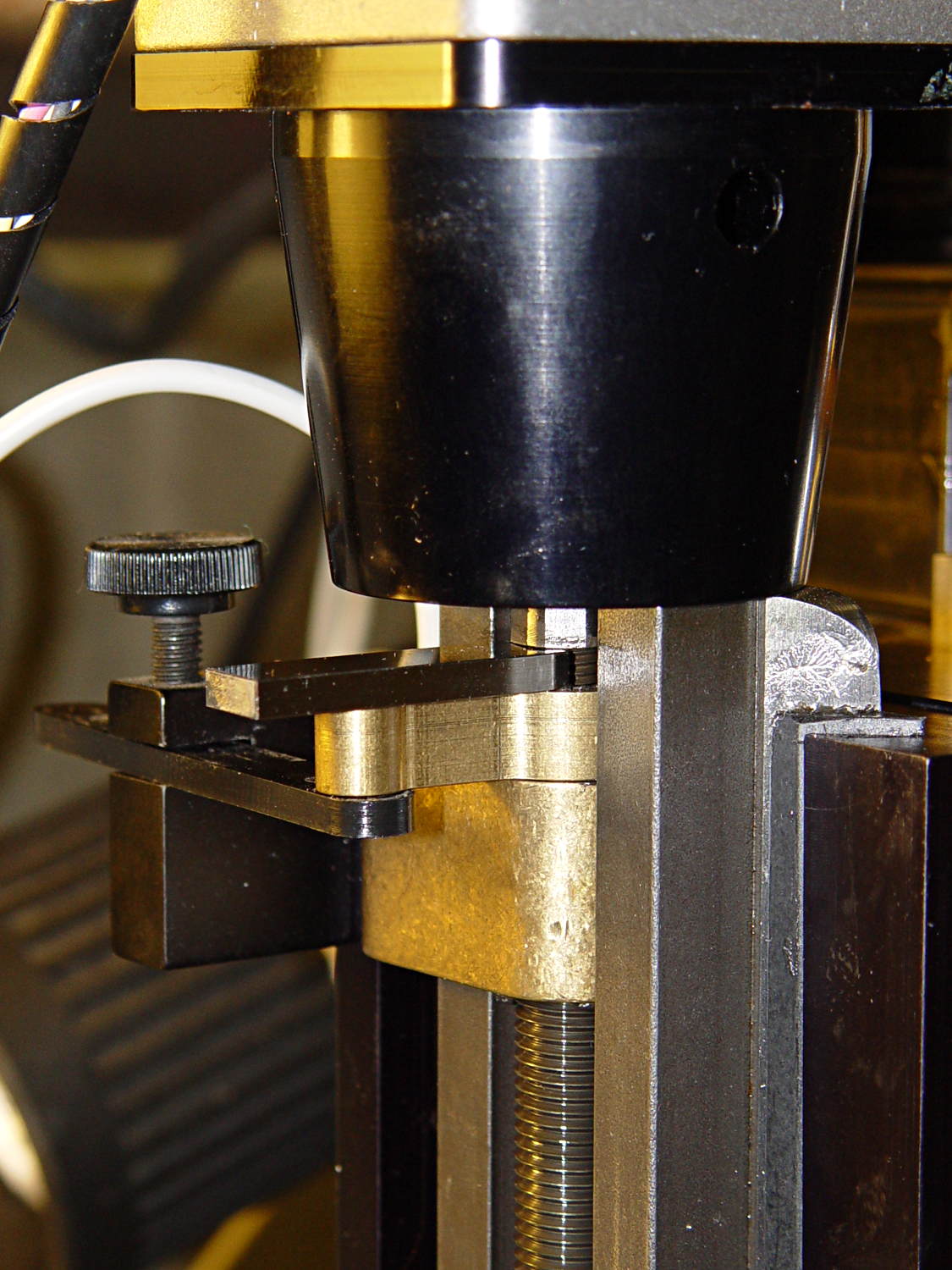
    While pondering the problem of having the Sherline’s Z-axis anti-backlash nut unscrew at the top of its travel, I excavated the gauge block set and measured the gap between it and the bearing preload nut:

    Sherline Z-axis leadscrew nut - gauge block
    Sherline Z-axis leadscrew nut – gauge block

    Turns out that it’s 0.1340 inches, determined by bracketing the sliver above that 0.1300 block with feeler gauges. I don’t believe that last zero, either, as the Basement Shop was about 10 °F below the block’s 68 °F calibration temperature.  [grin]

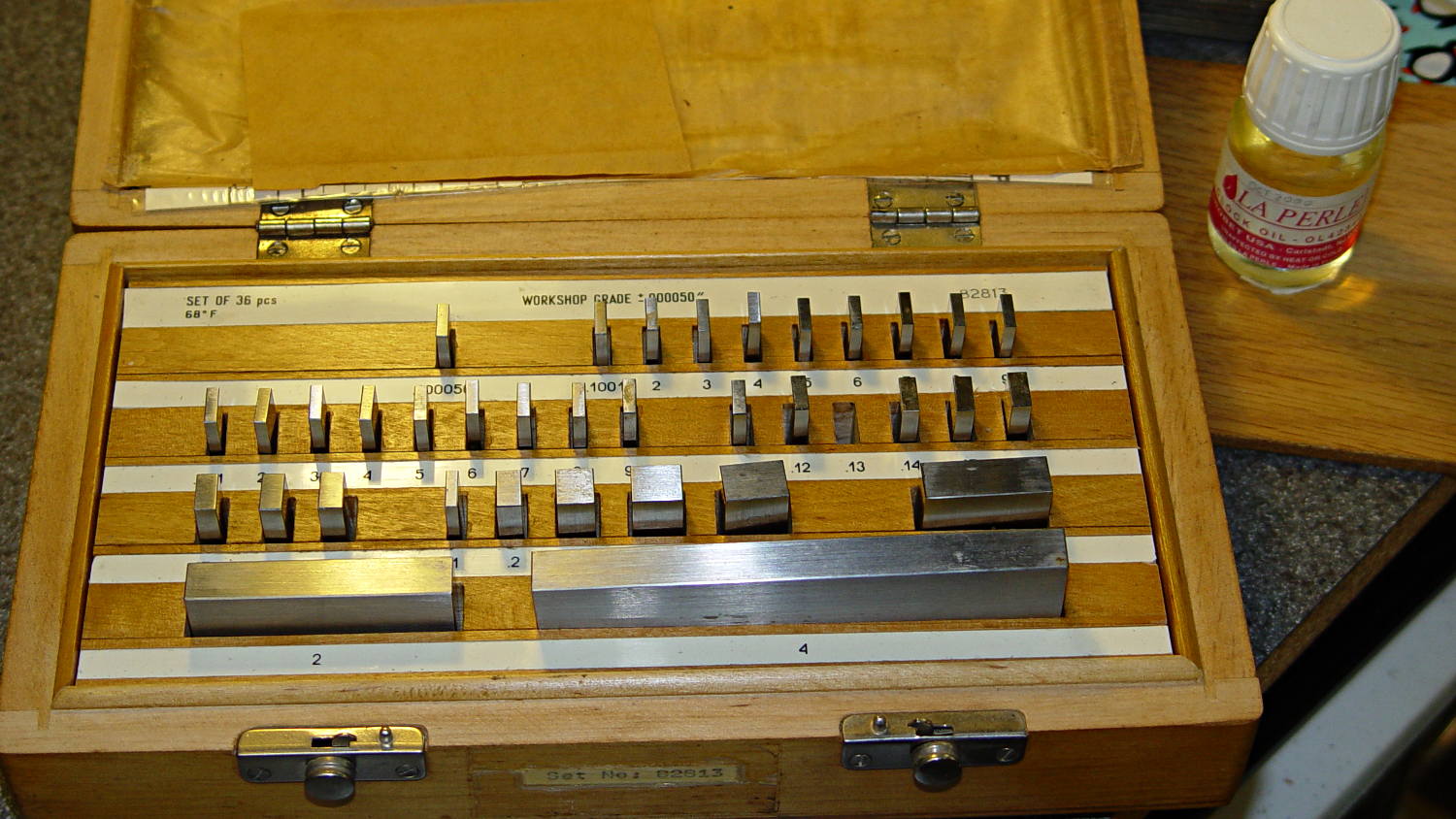
    The actual size of that gap makes absolutely no difference whatsoever, but fooling around with the gauge blocks gave me an excuse to renew my acquaintance with them and, en passant, massage some oil over their long-neglected bodies:

    Gauge block set
    Gauge block set

    I used La Perle Clock Oil, which isn’t Official Gauge Block Oil, but doesn’t go bad on the shelf. Verily, this bottle may be the last of its kind, as it’s no longer available from any of the usual sources; it appears I bought it back in 2000.

    The blocks are in good shape, probably because they don’t often see the light. FWIW, I have experimentally determined that my body oil doesn’t etch fingerprints into steel.

    The block set, which is similar to a current box o’ blocks from Enco, claims “Workshop Grade”, but the ±0.00050 inch = 1.27 μm tolerance shown in the top row of the labels is much worse than even grade B’s sub-micron tolerance. That newer box claims “Economy” accuracy with the same spec, so I suppose somebody kvetched about mis-using the terms.

    Ah, well, they’re far better than any measurements I’ve needed in a while and entirely suitable for verifying my other instruments.

  • Sherline CNC Mill Z-axis Overrun Prevention Block

    The alert reader will already have noticed the absence of the Z-axis home switch in this picture from yesterday’s post:

    Sherline CNC mill - tommy bar and collet pusher
    Sherline CNC mill – tommy bar and collet pusher

    Turns out that I managed to crunch it, exactly as I expected: I’d added a block to the Z-axis stage that poked the home switch just slightly before the anti-backlash nut unscrewed from the top of the leadscrew, but the stage could continue moving another few millimeters.

    You can see the gap just above the brass anti-backlash nut:

    Sherline Z-axis leadscrew nut - top end
    Sherline Z-axis leadscrew nut – top end

    At that point, the nut has barely a single micro-smidgen of thread engaged; that last 0.1340 inch of travel (yeah, I measured it) isn’t usable.

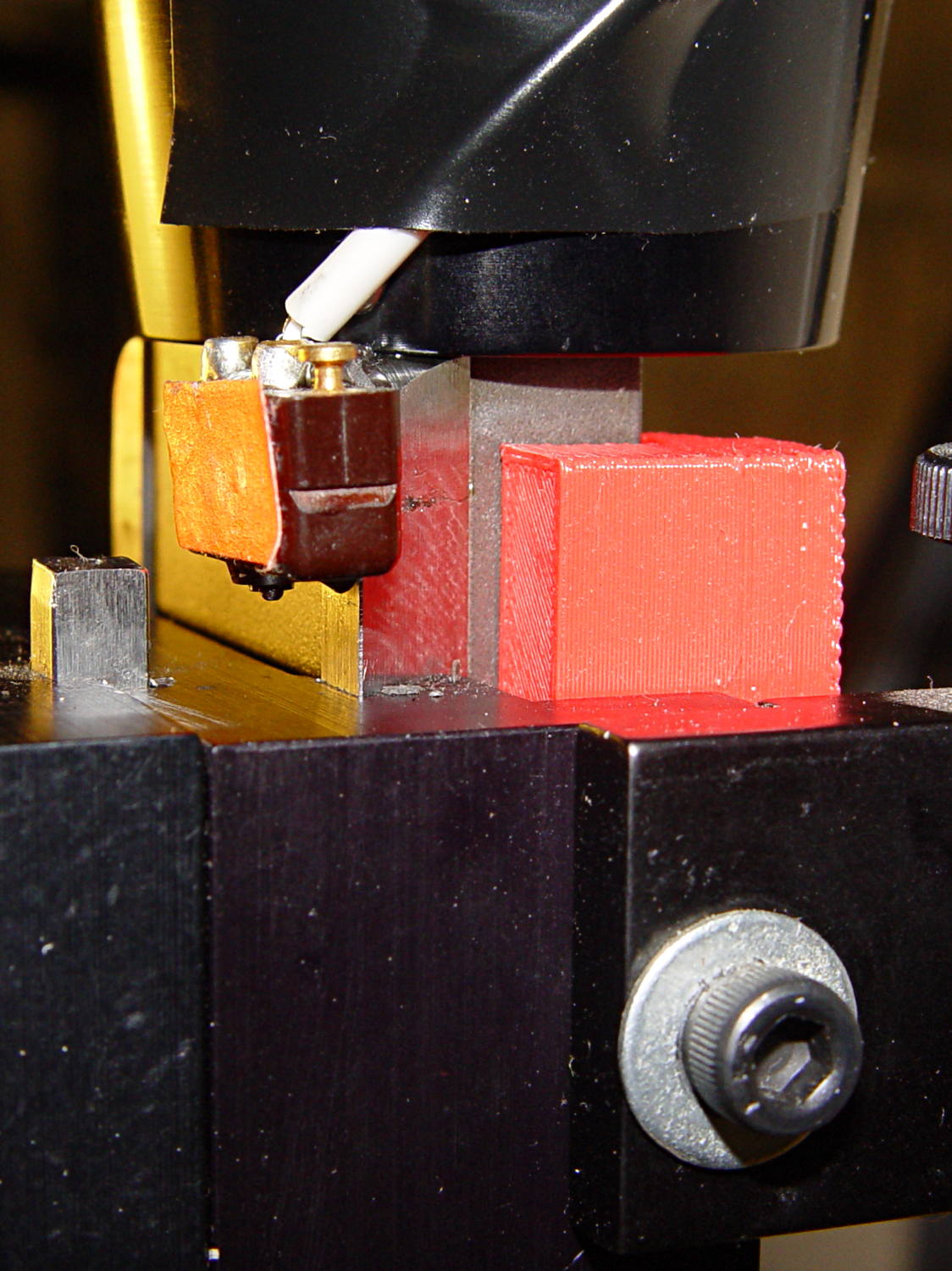
    Rather than put a collar around the end of the leadscrew, I opted for a brute-force block atop the Z-axis saddle nut that will slam into the bottom of the stepper motor mount just before the anti-backlash nut disengages:

    Sherline Z-axis Overrun Block - rear view
    Sherline Z-axis Overrun Block – rear view

    A strip of tapeless sticky (double-sided tape, minus the tape) holds the block in place on the saddle nut. It’s not subject to any particular stress: as long as it doesn’t fall off, it’s all good.

    I ran the stage upward until it stalled, then epoxied a new switch (with the old fluorescent tape) in place. This shows the result after backing the stage down a few millimeters:

    Sherline Z-axis Overrun Block - side view
    Sherline Z-axis Overrun Block – side view

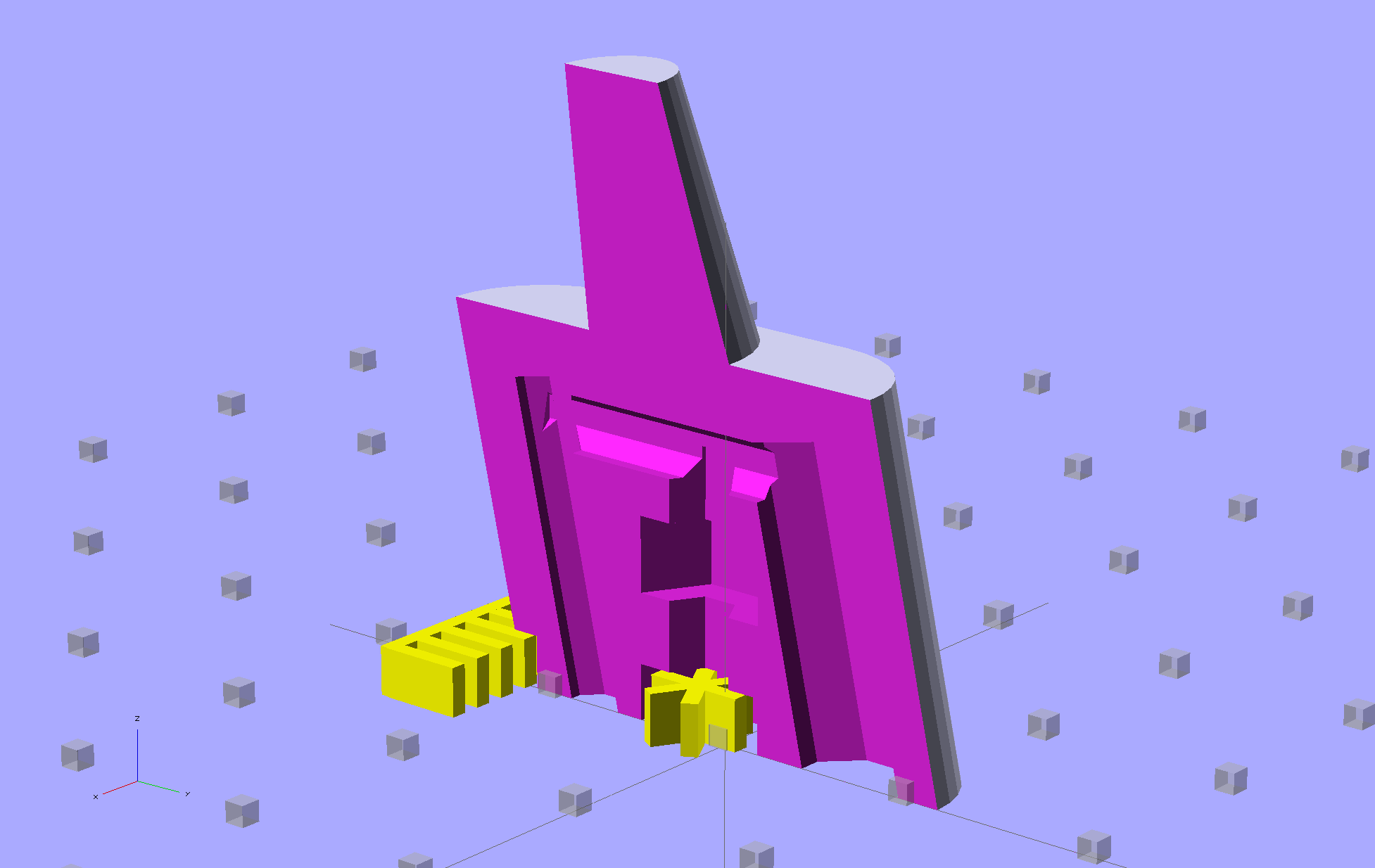
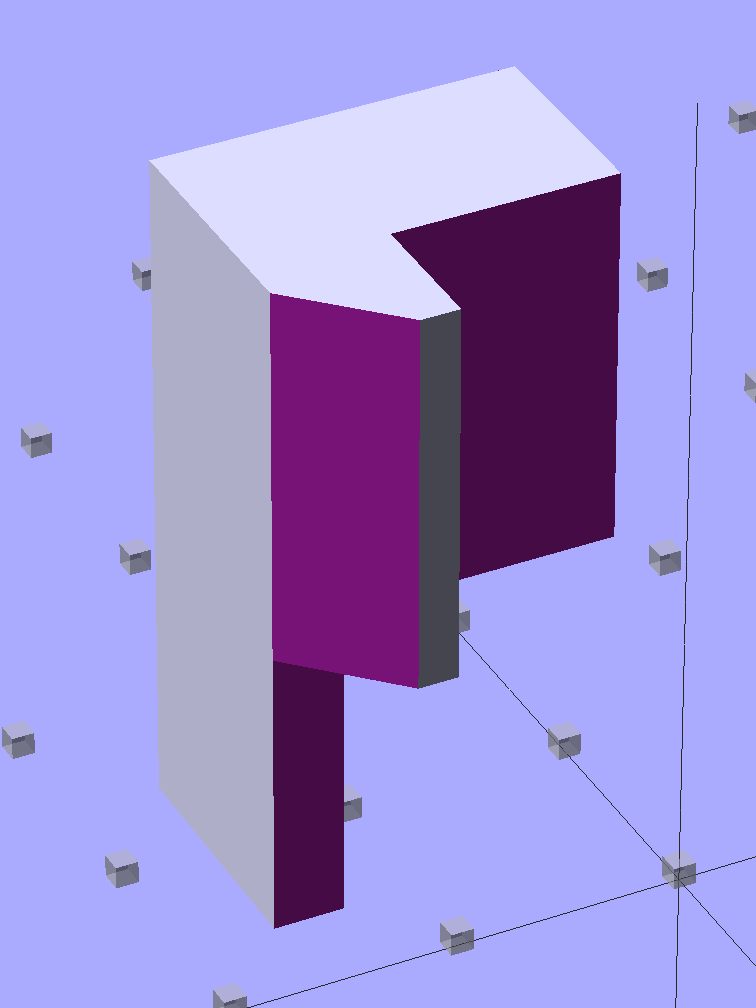
    The solid model shows off the bevel that provides a bit more room for anti-backlash nut adjustment, not that I ever adjust it that much:

    Sherline Z-Axis Overrun Prevention Block - solid model
    Sherline Z-Axis Overrun Prevention Block – solid model

    Obviously, it doesn’t print in that position, but it’s easier to design it in the natural orientation and flip it around for printing.

    The OpenSCAD source code:

    // Sherline Z-axis Overrun Prevention Block
    // Ed Nisley KE4ZNU December 2013
    
    Layout = "Show";			// Show Build
    
    //- Extrusion parameters must match reality!
    //  Print with 2 shells and 3 solid layers
    
    ThreadThick = 0.25;
    ThreadWidth = 0.40;
    
    HoleWindage = 0.2;
    
    Protrusion = 0.1;			// make holes end cleanly
    
    //----------------------
    // Dimensions
    
    BlockZ = 30.0;				// overall height
    ZLimit = 17.0;				// Z travel limit
    
    TongueX = 9.0;				// beside Z axis dovetail
    TongueY = 10.0;
    
    StubX = 6.0;				// behind Z axis pillar
    StubY = 3.0;
    
    BlockX = TongueX + StubX;	// overall X
    
    TabY = 3.0;					// behind brass bracket
    TabX = BlockX - sqrt(2)*TabY;
    TabZ = BlockZ - ZLimit;
    
    BlockY = TongueY + StubY + TabY;	// overall Y
    
    //----------------------
    // Useful routines
    
    module ShowPegGrid(Space = 10.0,Size = 1.0) {
    
      Range = floor(50 / Space);
    
    	for (x=[-Range:Range])
    	  for (y=[-Range:Range])
    		translate([x*Space,y*Space,Size/2])
    		  %cube(Size,center=true);
    
    }
    
    //- The Block
    
    module Block() {
    
    	difference() {
    		cube([BlockX,BlockY,BlockZ]);
    
    		translate([-Protrusion,-Protrusion,-Protrusion])	// remove column
    			cube([(StubX + Protrusion),(TongueY + Protrusion),2*BlockZ]);
    
    		translate([-BlockX/2,-Protrusion,-Protrusion])		// form tab
    			cube([2*BlockX,(TongueY + StubY),(TabZ + Protrusion)]);
    
    		translate([0,BlockY,(BlockZ/2 - 0*Protrusion)])
    			rotate(45)
    				cube([3*StubY,2*StubY,(BlockZ + 2*Protrusion)],center=true);
    
    		translate([0,0,-Protrusion])
    			cube([sqrt(2)*TabY,2*BlockY,(TabZ + Protrusion)]);
    	}
    }
    
    //-------------------
    // Build it...
    
    ShowPegGrid();
    
    if (Layout == "Show")
    	Block();
    
    if (Layout == "Build")
    	translate([-BlockZ/2,-BlockY/2,BlockX])
    	rotate([0,90,0])
    		Block();
    
  • Sherline Tommy Bar Handles

    While putting the speed wrenches in the box with the Sherline four-jaw chuck, it occurred to me that I had all the makings of a handle for Sherline’s steel tommy bars:

    Sherline Tommy Bar Handle - solid model
    Sherline Tommy Bar Handle – solid model

    Because these are intended for pushing, rather than twisting, I dialed the knurl back to 32 DP, reduced the depth to 0.5 mm, and ran the bar almost all the way through the handle for strength:

    Sherline Tommy Bar Handles
    Sherline Tommy Bar Handles

    A dab of urethane adhesive inside the handle holds the bar in place. They started out a snug slip fit, so we’ll see how well that holds the bars in place.

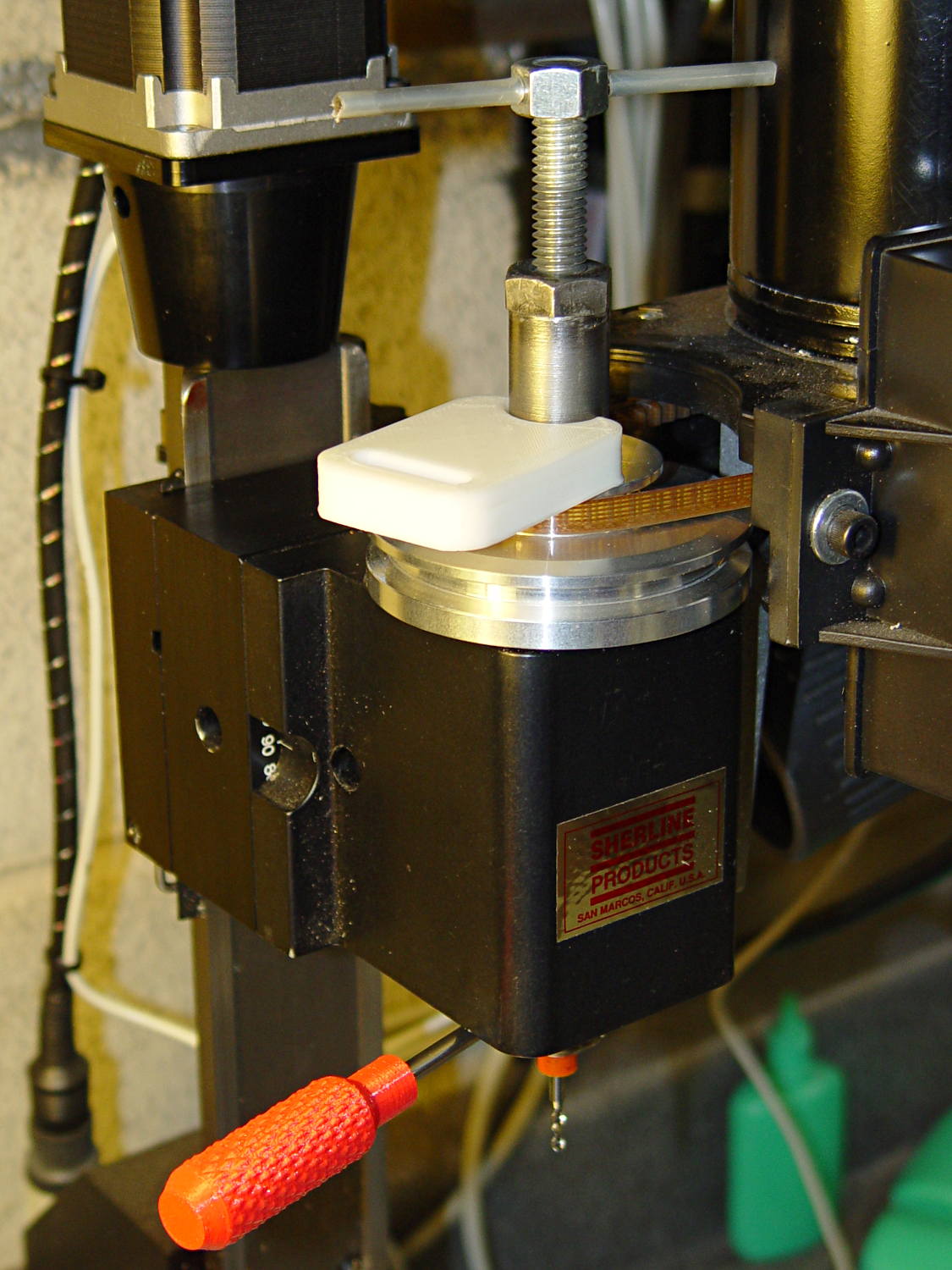
    A tommy bar holds the spindle against the torque from the collet pusher:

    Sherline CNC mill - tommy bar and collet pusher
    Sherline CNC mill – tommy bar and collet pusher

    A pair will come in handy with the three-jaw chuck the next time that one appears.

    The white slab is a very early 3D printed tool from my Thing-O-Matic, made to hold the pin at exactly the proper distance from the pulley so it fits squarely into the pusher and locks it to the spindle:

    Locking pin holder - spindle end view
    Locking pin holder – spindle end view

    Other folks make much nicer tommy bar handles than mine, but I’d say my 3D printed handles beat a common nail any day!

    The OpenSCAD source code:

    // Knurled handles for Sherline tommy bars
    // Ed Nisley - KE4ZNU - December 2013
    
    use <knurledFinishLib_v2.scad>
    
    //- Extrusion parameters must match reality!
    //  Print with 2 shells and 3 solid layers
    
    ThreadThick = 0.20;
    ThreadWidth = 0.40;
    
    HoleWindage = 0.2;			// extra clearance
    
    Protrusion = 0.1;			// make holes end cleanly
    
    PI = 3.14159265358979;
    inch = 25.4;
    
    //----------------------
    // Dimensions
    
    ShaftDia = 10.0;				// un-knurled section diameter
    ShaftLength = 10.0;				//  ... length
    
    SocketDia = 4.0;				// tommy bar diameter
    SocketDepth = 40.0;
    
    KnurlLen = 35.0;				// length of knurled section
    KnurlDia = 15.0;				//   ... diameter
    KnurlDPNom = 32;				// Nominal diametral pitch = (# diamonds) / (OD inches)
    
    DiamondDepth = 0.5;				//   ... depth of diamonds
    DiamondAspect = 2;				// length to width ratio
    
    NumDiamonds = floor(KnurlDPNom * KnurlDia / inch);
    echo(str("Num diamonds: ",NumDiamonds));
    
    NumSides = 4*(NumDiamonds - 1);		// 4 facets per diamond. Library computes diamonds separately!
    
    KnurlDP = NumDiamonds / (KnurlDia / inch);				// actual DP
    echo(str("DP Nom: ",KnurlDPNom," actual: ",KnurlDP));
    
    DiamondWidth = (KnurlDia * PI) / NumDiamonds;
    
    DiamondLenNom = DiamondAspect * DiamondWidth;					// nominal diamond length
    DiamondLength = KnurlLen / round(KnurlLen/DiamondLenNom);		//  ... actual
    
    TaperLength = 0.75*DiamondLength;
    
    //----------------------
    // Useful routines
    
    module PolyCyl(Dia,Height,ForceSides=0) {			// based on nophead's polyholes
    
      Sides = (ForceSides != 0) ? ForceSides : (ceil(Dia) + 2);
    
      FixDia = Dia / cos(180/Sides);
    
      cylinder(r=(FixDia + HoleWindage)/2,
               h=Height,
               $fn=Sides);
    }
    
    module ShowPegGrid(Space = 10.0,Size = 1.0) {
    
      Range = floor(50 / Space);
    
    	for (x=[-Range:Range])
    	  for (y=[-Range:Range])
    		translate([x*Space,y*Space,Size/2])
    		  %cube(Size,center=true);
    }
    
    //- Build it
    
    ShowPegGrid();
    
    difference() {
    	union() {
    		render(convexity=10)
    		translate([0,0,TaperLength])
    			knurl(k_cyl_hg=KnurlLen,
    				  k_cyl_od=KnurlDia,
    				  knurl_wd=DiamondWidth,
    				  knurl_hg=DiamondLength,
    				  knurl_dp=DiamondDepth,
    				  e_smooth=DiamondLength/2);
    		color("Orange")
    		cylinder(r1=ShaftDia/2,
    					r2=(KnurlDia - DiamondDepth)/2,
    					h=(TaperLength + Protrusion),
    					$fn=NumSides);
    		color("Orange")
    		translate([0,0,(TaperLength + KnurlLen - Protrusion)])
    			cylinder(r2=ShaftDia/2,
    					r1=(KnurlDia - DiamondDepth)/2,
    					h=(TaperLength + Protrusion),
    					$fn=NumSides);
    		color("Moccasin")
    		translate([0,0,(2*TaperLength + KnurlLen - Protrusion)])
    			cylinder(r=ShaftDia/2,h=(ShaftLength + Protrusion),$fn=NumSides);
    
    	}
    	translate([0,0,(2*TaperLength + KnurlLen + ShaftLength - SocketDepth + Protrusion)])
    		PolyCyl(SocketDia,(SocketDepth + Protrusion),6);
    }
    
  • Sherline Four-Jaw Chuck Speed Wrenches: 3D Printed Edition

    A Home Shop Machinist article (A Speed Key for Your Four-Jaw Chuck, p 67 Nov-Dec 2013, David Morrow) showed some lovely knurled steel knobs. These 3D printed knobs aren’t nearly as pretty, but they do much the same thing:

    Sherline Knobs - in 4 jaw chuck
    Sherline Knobs – in 4 jaw chuck

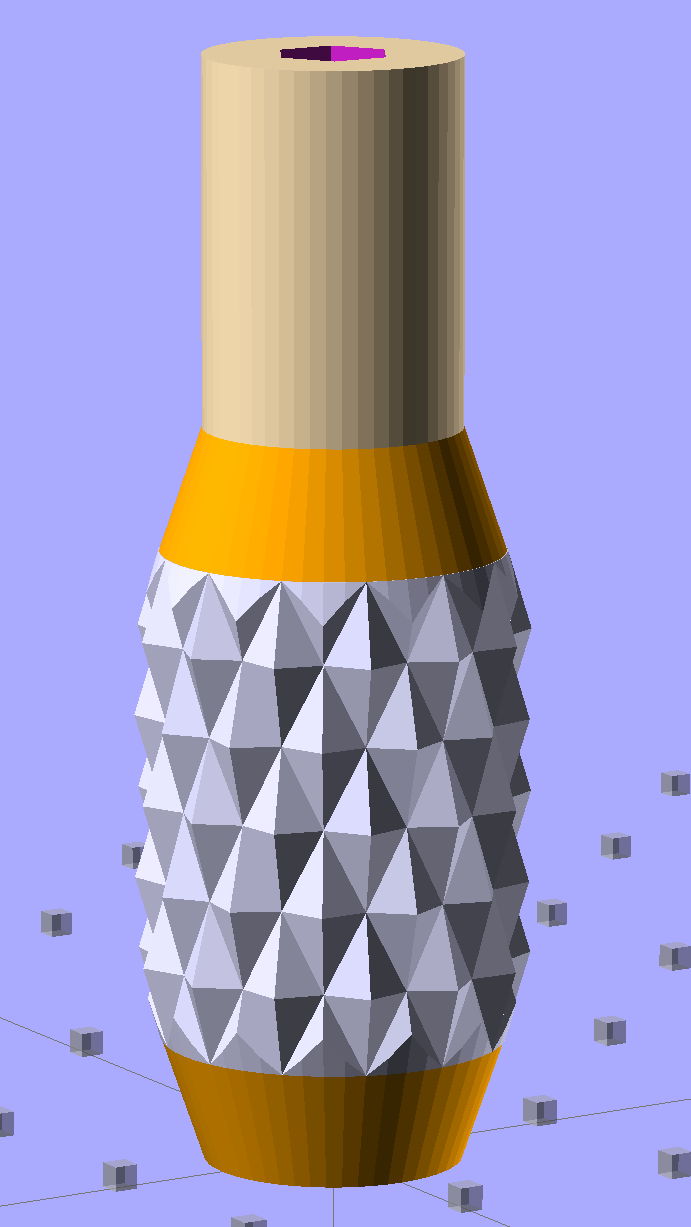
    The solid model resembles the illegitimate offspring of a wine bottle and a pineapple:

    Sherline Knob - solid model
    Sherline Knob – solid model

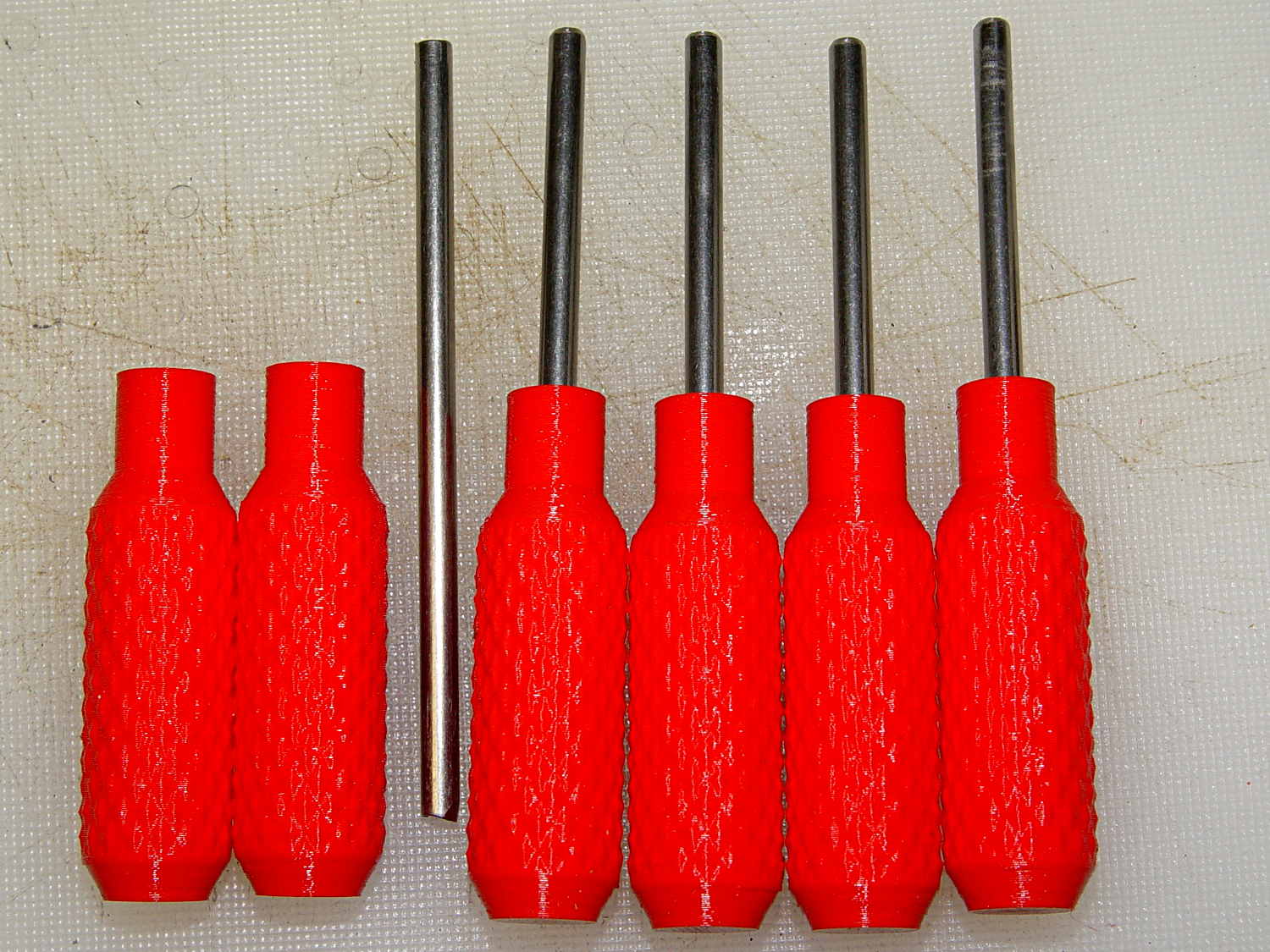
    The knurling comes from aubenc’s Knurled Surface Library v2. I ran off a prototype (on the left), then tweaked the dimensions to get the final version on the right:

    Sherline Knobs - knurl depth variation
    Sherline Knobs – knurl depth variation

    Being that type of guy, I define the knurl in terms of its diametral pitch, compute the diamond width & length to fit in the available space, then hand those measurements to the knurling library… which recomputes everything and decides on one less diamond than I do: NumSides has a Finagle Constant of -1 to make the answer come out right. We may be using a different diameter or something, but I haven’t deciphered the source code. It’s parametric out the wazoo, as usual, so you can spin up what you like, how you like it.

    Anyhow, a 24 DP knurl with 1.0 mm depth looks and feels pretty good; the XY resolution isn’t good enough for a 48 DP knurl around that knob diameter. The diamonds don’t come out as crisp and pointy as crushed steel knurls, but they’re OK for my fingers.

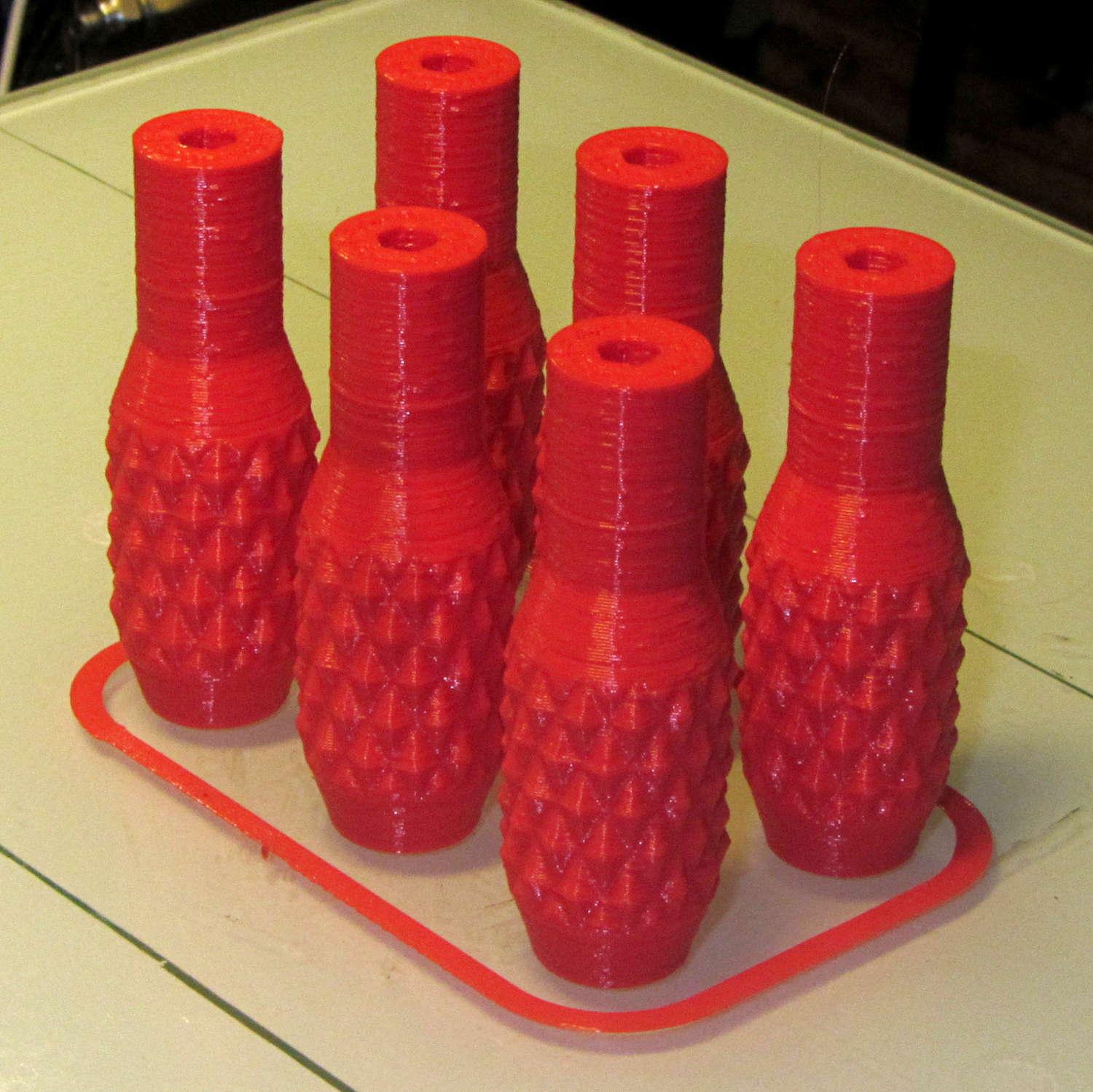
    Doing half a dozen doesn’t take much longer than doing a few, because there’s a 20 second minimum layer time in effect and those things don’t have much plastic, so now I have one for the hold-down clamps and another for Show-n-Tell sessions:

    Sherline Knobs - M2 platform
    Sherline Knobs – M2 platform

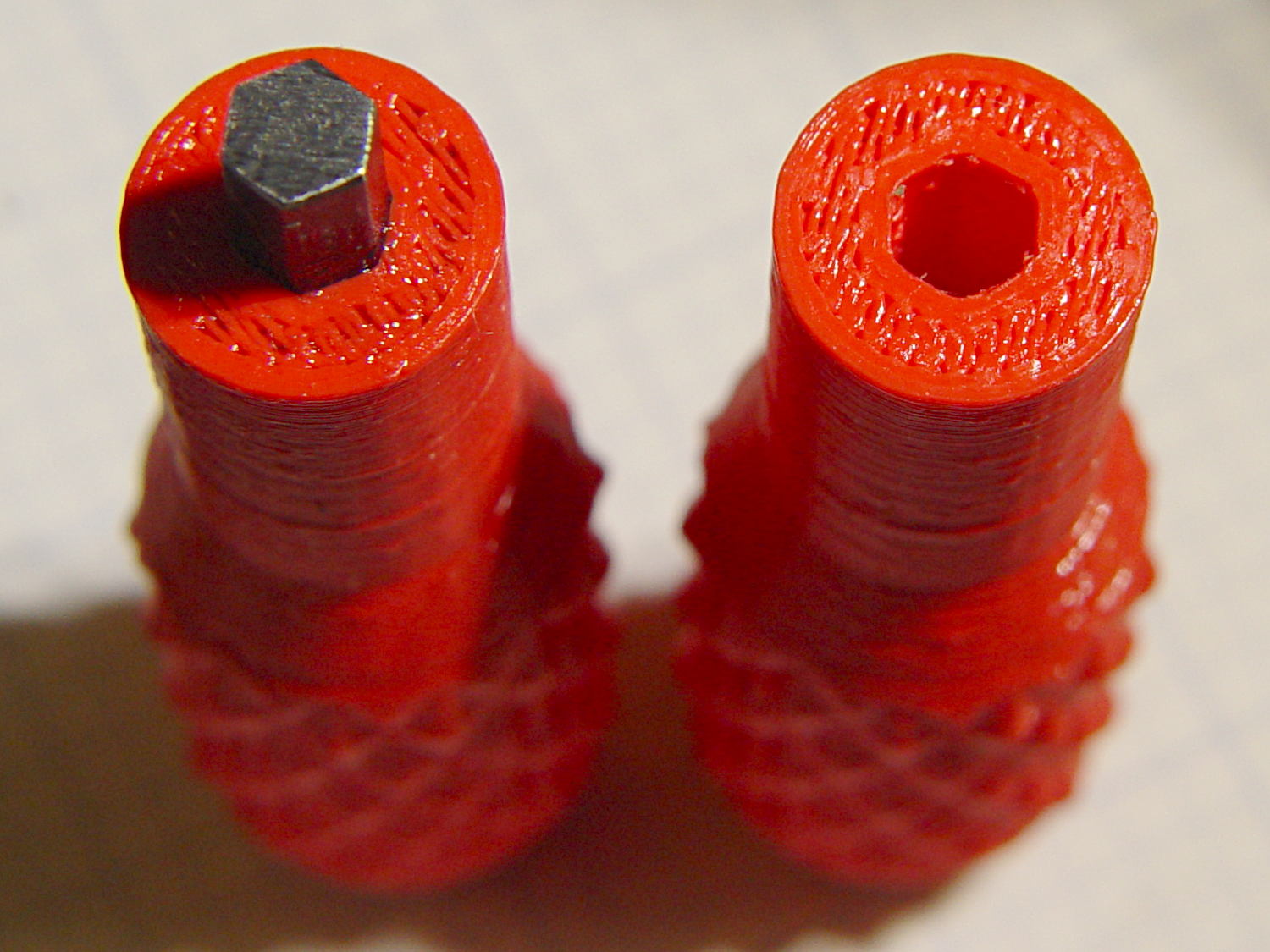
    I chopped a 5/32 inch hex key into five 15 mm lengths with a Dremel cutoff wheel, then filed both ends flat and broke the edges. The hex stubs were a press fit in the hex holes, so I finger-started them, grabbed the hex in the drill press, aligned the handle below, and rammed the stub about 5 mm deep. The final depth comes from jamming the wrench into the chuck and pressing firmly, so the stubs project exactly as far as possible:

    Sherline Knobs - hex key inserted
    Sherline Knobs – hex key inserted

    One might quibble about the infill on the end; one may go adjust one’s own printer as one prefers.

    There’s 0.1 mm more HoleWindage than usual, because these holes must fix a hex shaft, not a circular pin, and the corners need some clearance. They came out a firm press fit: exactly what’s needed.

    They’re no good for final tightening of those chuck jaws, but that’s not their purpose…

    The OpenSCAD source code:

    // Knurled handles for Sherline hex keys
    // Ed Nisley - KE4ZNU - November 2013
    
    use <knurledFinishLib_v2.scad>
    
    //- Extrusion parameters must match reality!
    //  Print with 2 shells and 3 solid layers
    
    ThreadThick = 0.20;
    ThreadWidth = 0.40;
    
    HoleWindage = 0.3;			// extra clearance to improve hex socket fit
    
    Protrusion = 0.1;			// make holes end cleanly
    
    PI = 3.14159265358979;
    inch = 25.4;
    
    //----------------------
    // Dimensions
    
    ShaftDia = 10.5;				// un-knurled section diameter
    ShaftLength = 15.0;				//  ... length
    
    SocketDia = (5/32) * inch;		// hex key size
    SocketDepth = 10.0;
    
    KnurlLen = 20.0;				// length of knurled section
    KnurlDia = 15.0;				//   ... diameter
    KnurlDPNom = 24;				// Nominal diametral pitch = (# diamonds) / (OD inches)
    
    DiamondDepth = 1.0;				//   ... depth of diamonds
    DiamondAspect = 2;				// length to width ratio
    
    NumDiamonds = floor(KnurlDPNom * KnurlDia / inch);
    echo(str("Num diamonds: ",NumDiamonds));
    
    NumSides = 4*(NumDiamonds - 1);		// 4 facets per diamond. Library computes diamonds separately!
    
    KnurlDP = NumDiamonds / (KnurlDia / inch);				// actual DP
    echo(str("DP Nom: ",KnurlDPNom," actual: ",KnurlDP));
    
    DiamondWidth = (KnurlDia * PI) / NumDiamonds;
    
    DiamondLenNom = DiamondAspect * DiamondWidth;					// nominal diamond length
    DiamondLength = KnurlLen / round(KnurlLen/DiamondLenNom);		//  ... actual
    
    TaperLength = 0.75*DiamondLength;
    
    //----------------------
    // Useful routines
    
    module PolyCyl(Dia,Height,ForceSides=0) {			// based on nophead's polyholes
    
      Sides = (ForceSides != 0) ? ForceSides : (ceil(Dia) + 2);
    
      FixDia = Dia / cos(180/Sides);
    
      cylinder(r=(FixDia + HoleWindage)/2,
               h=Height,
    	   $fn=Sides);
    }
    
    module ShowPegGrid(Space = 10.0,Size = 1.0) {
    
      Range = floor(50 / Space);
    
    	for (x=[-Range:Range])
    	  for (y=[-Range:Range])
    		translate([x*Space,y*Space,Size/2])
    		  %cube(Size,center=true);
    }
    
    //- Build it
    
    ShowPegGrid();
    
    difference() {
    	union() {
    		render(convexity=10)
    		translate([0,0,TaperLength])
    			knurl(k_cyl_hg=KnurlLen,
    				  k_cyl_od=KnurlDia,
    				  knurl_wd=DiamondWidth,
    				  knurl_hg=DiamondLength,
    				  knurl_dp=DiamondDepth,
    				  e_smooth=DiamondLength/2);
    		color("Orange")
    		cylinder(r1=ShaftDia/2,
    					r2=(KnurlDia - DiamondDepth)/2,
    					h=(TaperLength + Protrusion),
    					$fn=NumSides);
    		color("Orange")
    		translate([0,0,(TaperLength + KnurlLen - Protrusion)])
    			cylinder(r2=ShaftDia/2,
    					r1=(KnurlDia - DiamondDepth)/2,
    					h=(TaperLength + Protrusion),
    					$fn=NumSides);
    		color("Moccasin")
    		translate([0,0,(2*TaperLength + KnurlLen - Protrusion)])
    			cylinder(r=ShaftDia/2,h=(ShaftLength + Protrusion),$fn=NumSides);
    
    	}
    	translate([0,0,(2*TaperLength + KnurlLen + ShaftLength - SocketDepth + Protrusion)])
    		PolyCyl(SocketDia,(SocketDepth + Protrusion),6);
    }
    

    This might be a good stocking stuffer for that guy who has everything, but you’d need his shop to make it, so what’s the point in that?