The Smell of Molten Projects in the Morning

Ed Nisley's Blog: Shop notes, electronics, firmware, machinery, 3D printing, laser cuttery, and curiosities. Contents: 100% human thinking, 0% AI slop.

Category: Science

If you measure something often enough, it becomes science

  • Quartz Resonator Test Fixture: 32 kHz Quartz Tuning Fork

    Soldering a 32.768 kHz quartz tuning fork resonator into the test fixture:

    Quartz crystal resonance test fixture
    Quartz crystal resonance test fixture

    The HP 8591 tracking generator doesn’t go below 100 kHz, so I used the FG085 DDS function generator as a source. I trust the 8591’s calibration more than the FG805’s, but right now I’m more interested in the differences between successive frequencies and the DDS can step in 1 Hz increments.

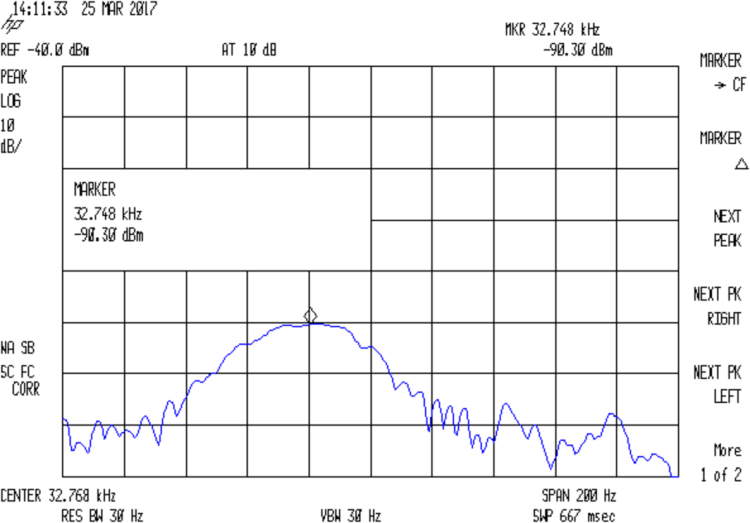
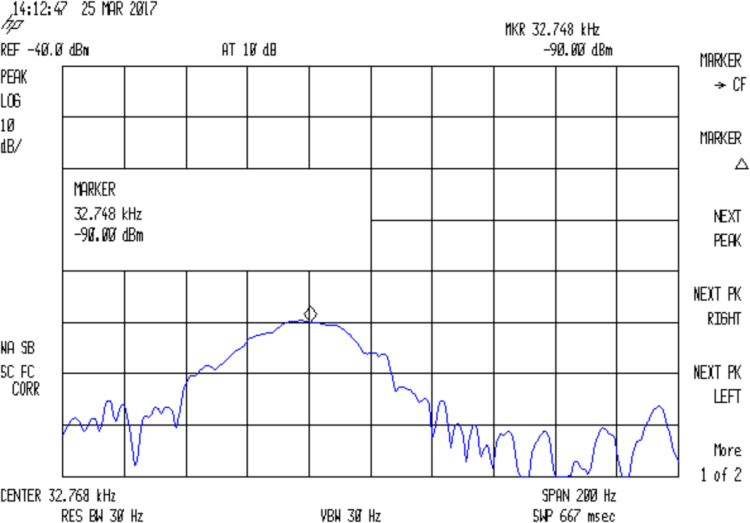
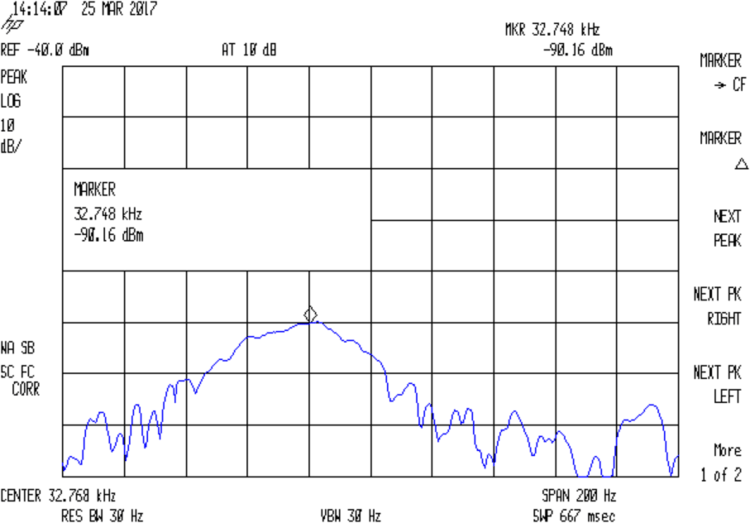
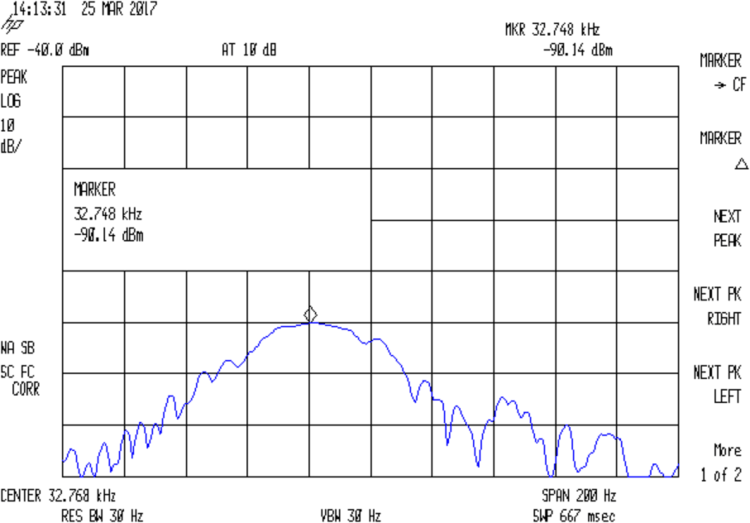
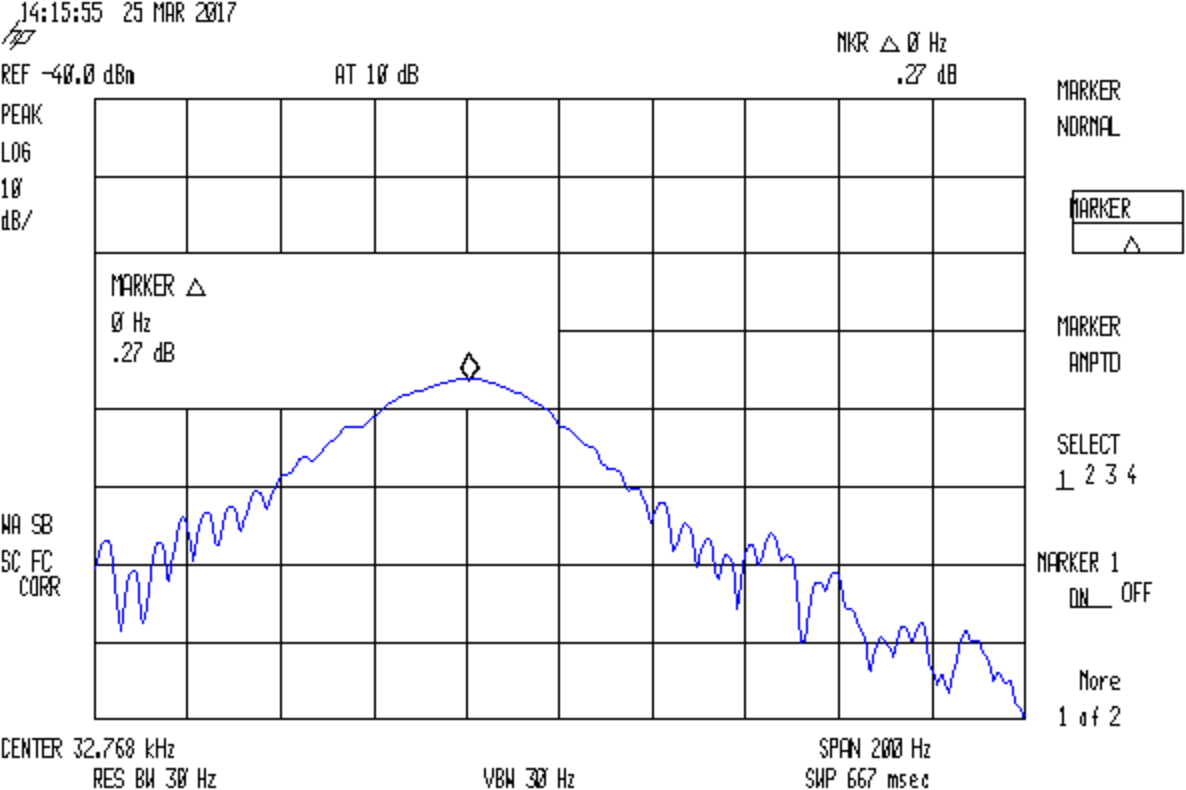
    The output appears on the 8591, with a big hump comes from the analyzer’s 30 Hz IF filter response sweeping across what’s essentially a single-frequency input. The hump is not the crystal’s response spectrum!

    With the jumper installed to short the 33 pF cap, the output peaks at 32.764:

    Removing the jumper to put the cap in the circuit, the response peaks at 32.765 kHz:

    The marker delta shows the difference between the two peaks, ignoring their 1 Hz difference:

    Quartz Resonator 32.764-5 no-34.6 pF delta
    Quartz Resonator 32.764-5 no-34.6 pF delta

    So I’d say the cap really does change the resonator series resonance by just about exactly 1 Hz.

    With the jumper installed to remove the cap from the circuit, setting the reference marker at the 32.764 kHz peak, and measuring the relative response at 32.765 kHz :

    Quartz Resonator 32.764-5 no cap delta
    Quartz Resonator 32.764-5 no cap delta

    So the response peak is much much narrower than 1 Hz: being off-peak by 1 Hz knocks 13-ish dB from the response.

    What’s painfully obvious: my instrumentation is totally inadequate for crystal measurements at these frequencies!

  • Quartz Resonator Test Fixture: 3.58 MHz Crystal Test

    Just to see if the resonator test fixture produced meaningful results, I plugged a 3.57954 MHz color burst crystal into the socket:

    Quartz test fixture - 3.57954 MHz crystal
    Quartz test fixture – 3.57954 MHz crystal

    This is a staged recreation based on actual events; pay no attention to the Colpitts oscillators growing in the background.

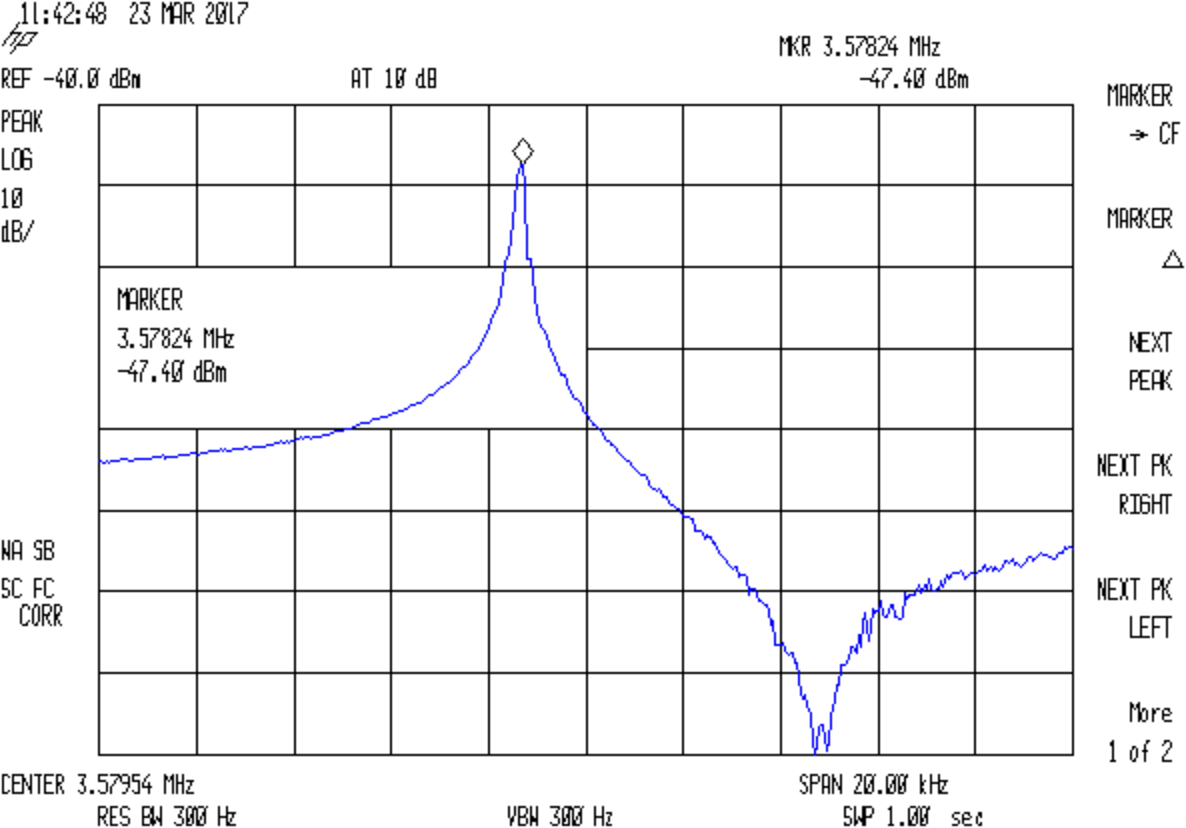
    Attaching goesinta and goesouta cables to the HP 8591 spectrum analyzer & tracking generator showed it worked just fine:

    Quartz 3.57954 MHz - no cap
    Quartz 3.57954 MHz – no cap

    The reference level is -40 dBm, not the usual 0 dBm, due to the loss in those resistive pads. Unsurprisingly, the parallel resonance valley looks pretty ragged at -120 dBm = 1 nW = 7 µV.

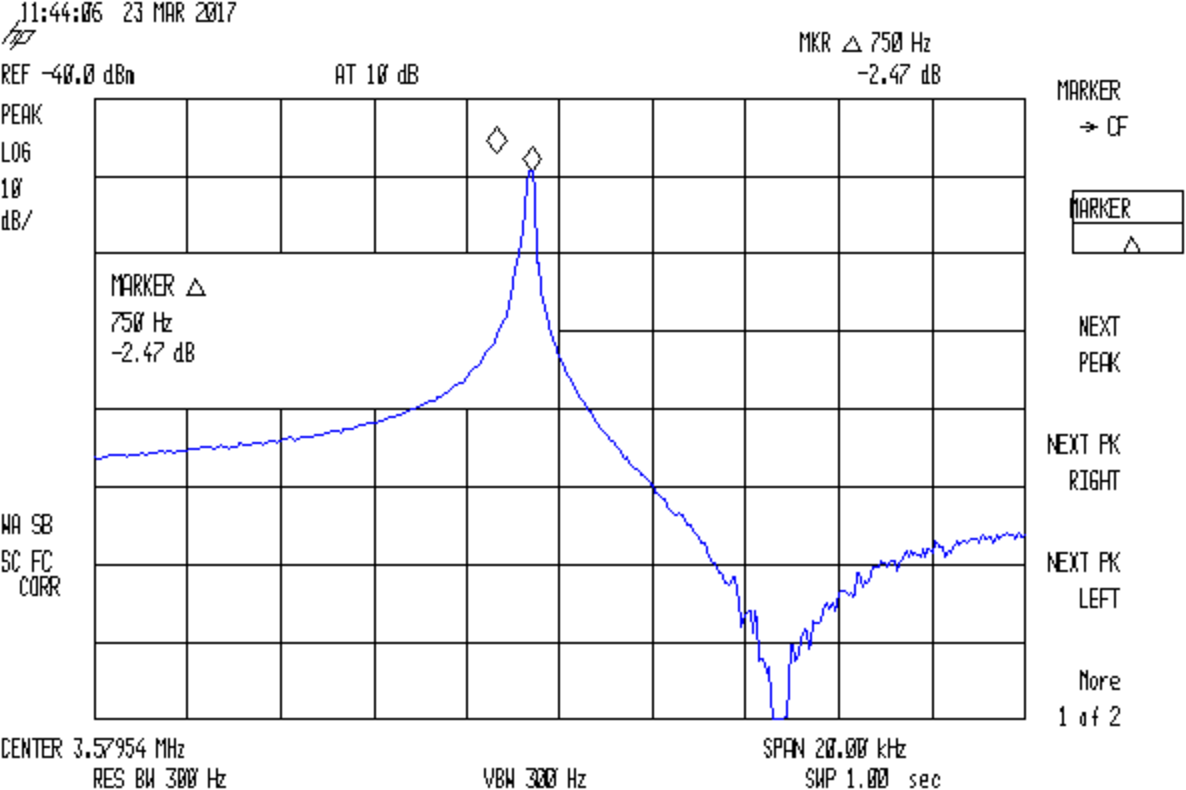
    Remove the jumper to put the capacitor in series:

    Quartz 3.57954 MHz - 36.4pF
    Quartz 3.57954 MHz – 36.4pF

    The marker delta resolution surely isn’t 1 Hz, but 750 Hz should get us in the right ballpark.

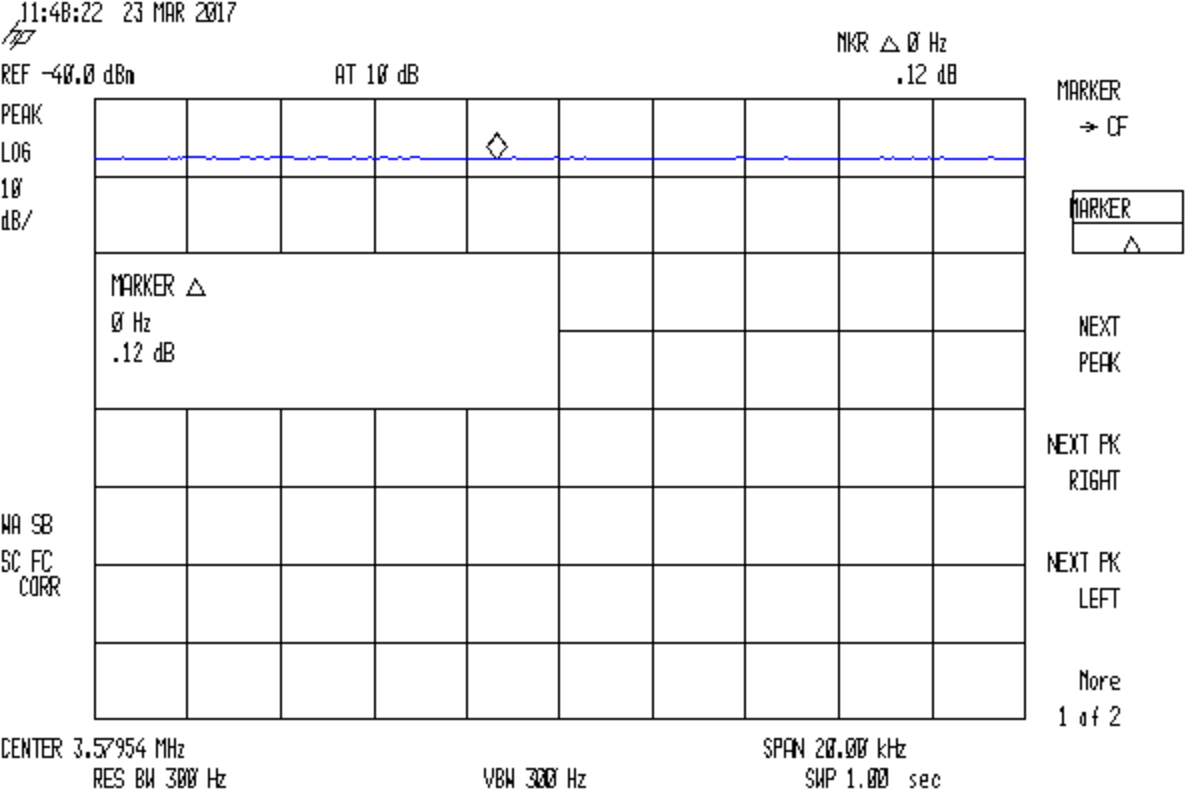
    Substituting a 72 Ω resistor, found by binary search rather than twiddling a pot:

    Quartz 3.57954 MHz - 72ohm
    Quartz 3.57954 MHz – 72ohm

    Which gives us all the measurements:

    • Fs = 3.57824 MHz
    • Fc = Fs + 750 Hz = 3.57899 MHz
    • Rm = 72 Ω
    • C0 = 3.83 pF
    • Cpar = 3.70 pF

    Turn the crank and the crystal motional parameters pop out:

    • Lm = 117 mH
    • Cm = 17 fF
    • Rm = 72 Ω
    • Q = 36 k

    Looks like a pretty good crystal to me!

  • Cheap WS2812 LEDs: Failure Waveforms

    The failed WS2812 pixel remains defunct:

    WS2812 array - failure 1
    WS2812 array – failure 1

    Attach scope probes to its data input and output pins (with the fixture face-down on the bench):

    WS2812 LED - fixture probing
    WS2812 LED – fixture probing

    The output no longer comes from the Land of Digital Signals:

    WS2812 Array Fail 1 - in vs out
    WS2812 Array Fail 1 – in vs out

    I immediately thought the broken bits occupied the first 24 bit times, when the WS2812 controller should be absorbing those bits from the incoming stream. The vertical cursors show the failed bits occupy 54 µs = 40-ish bit times at 800 kHz (or you can count them), so it’s worse than a simple logic failure.

    A closer look:

    WS2812 Array Fail 1 - in vs out - detail
    WS2812 Array Fail 1 – in vs out – detail

    At least for those bits, neither output transistor works well at all. On the other paw, the output shouldn’t even be enabled for the first 24 bits, so there’s that to consider.

    Lo and behold, it also fails the Josh Sharpie Test:

    WS2812 LED - test array failure 1 - ink test
    WS2812 LED – test array failure 1 – ink test

    You may recall it passed the leak test shortly before I assembled the test array a month ago. Evidently, just few days of operation suffices to wreck the seal, let air / moisture into the package, and kill the controller. Not a problem you’d find during a production-line test (assuming there is such a thing), but it should certain appear during the initial design & production qualification test phase (another assumption).

    Weirdly, a day after taking that photo, the controller began working perfectly again and the LEDs look just like they should: there is no explaining that!


  • Cheap WS2812 LEDs: Test Fixture Failure 1

    Well, that didn’t take long:

    WS2812 array - failure 1
    WS2812 array – failure 1

    The red spot in the next-to-bottom row of the test fixture (*) marks a failed WS2812 LED. All of the LEDs above it, plus the LED just to its left, are in pinball panic mode: random colors flicker across the panel as the LED’s controller transmits garbled data and the downstream LEDs pass it on.

    This failure provides several bits of information:

    • The LED sees the same power supply as all the rest, so it’s not a power thing
    • The LED gets data from the adjacent WS2812, so it’s not an Arduino output thing
    • It failed after about four days = 100 hours of continuous operation

    I connected the previous LED’s output (#6) to the next one’s input (#8), so the failed LED (#7, now with output disconnected) continues to flicker, but doesn’t influence any of the downstream LEDs.

    (*) The LEDs are daisy-chained from lower right to upper left, row by row, so that’s LED #7 of 28.
  • Squirrel vs. Bird Feeder

    After months of attempts and (occasionally) spectacular failures, one of the backyard squirrels managed to climb aboard the bird feeder:

    Squirrel on bird feeder
    Squirrel on bird feeder

    The shutter closes when more than two cardinals and a titmouse perch on the wood bar, so the squirrel didn’t get anything. However, back in 2008, one of that critter’s ancestors mastered the trick:

    Not a Squirrel-Proof Feeder
    Not a Squirrel-Proof Feeder

    Since then, I’ve raised the feeder about five feet and inverted a big pot over two feet of loose PVC pipe around the pole.

    Given the number of squirrel-training videos on Youtube, however, it’s only a matter of time until the critters put all the tricks together!

  • Monthly Science: Minimal-Woo Cast Iron Pan Seasoning

    After trying several variations on a theme, our daily-use pan now looks like this:

    Cast Iron Pan - after weekly seasoning
    Cast Iron Pan – after weekly seasoning

    Those obvious wiping marks come from an oily rag in a hot pan. What could go wrong?

    The reflected light bar comes from the under-cabinet LED strip.

    The surface withstands stainless utensils, cooks omelets with aplomb, and requires no fussy KP:

    Omelet in cast-iron pan
    Omelet in cast-iron pan

    The low-woo seasoning recipe, done maybe once a week when the bottom has more gunk than usual:

    • Clean the pan as usual, wipe dry
    • Begin heating on medium burner set to High
    • Add 0.2 ml = 10 drops = 1 squirt of flaxseed oil
    • Wipe around pan interior with small cotton cloth
    • Continue heating to 500 °F, about four minutes
    • Carefully wipe oily cloth around pan again
    • Let cool

    Works for us and doesn’t involve any magic.

  • Cheap WS2812 LEDs: Test Fixture

    Given that I no longer trust any of the knockoff Neopixels, I wired the remaining PCB panel into a single hellish test fixture:

    WS2812 4x7 LED test fixture - wiring
    WS2812 4×7 LED test fixture – wiring

    The 22 AWG wires deliver +5 V and Common, with good old-school Wire-Wrap wire passing to the four LEDs betweem them. The data daisy chain snakes through the entire array.

    It seems only fitting to use a knockoff Arduino Nano as the controller:

    WS2812 4x7 LED test fixture - front
    WS2812 4×7 LED test fixture – front

    The code descends from an early version of the vacuum tube lights, gutted of all the randomizing and fancy features. It updates the LEDs every 20 ms and, with only 100 points per cycle, the colors tick along fast enough reassure you (well, me) that the thing is doing something: the pattern takes about 20 seconds from one end of the string to the other.

    At full throttle the whole array draws 1.68 A = 60 mA × 28 with all LEDs at full white, which happens only during the initial lamp test and browns out the supply (literally: the blue LEDs fade out first and produce an amber glow). The cheap 5 V 500 mA power supply definitely can’t power the entire array at full brightness.

    The power supply current waveform looks fairly choppy, with peaks at the 400 Hz PWM frequency:

    WS2812 4x7 array - 200 mA VCC
    WS2812 4×7 array – 200 mA VCC

    With the Tek current probe set at 200 mA/div, the upper trace shows 290 mA RMS. That’s at MaxPWM = 127, which reduces the average current but doesn’t affect the peaks. At full brightness the average current should be around 600 mA, a tad more than the supply can provide, but maybe it’ll survive; the bottom trace shows a nice average, but the minimum hits 4.6 V during peak current.

    Assuming that perversity will be conserved as usual, none of the LEDs will fail for as long as I’m willing to let them cook.

    The Arduino source code as a GitHub Gist:

    // WS2812 LED array exerciser
    // Ed Nisley – KE4ANU – February 2017
    #include <Adafruit_NeoPixel.h>
    //———-
    // Pin assignments
    const byte PIN_NEO = A3; // DO – data out to first Neopixel
    const byte PIN_HEARTBEAT = 13; // DO – Arduino LED
    //———-
    // Constants
    #define UPDATEINTERVAL 20ul
    const unsigned long UpdateMS = UPDATEINTERVAL – 1ul; // update LEDs only this many ms apart minus loop() overhead
    // number of steps per cycle, before applying prime factors
    #define RESOLUTION 100
    // phase difference between LEDs for slowest color
    #define BASEPHASE (PI/16.0)
    // LEDs in each row
    #define NUMCOLS 4
    // number of rows
    #define NUMROWS 7
    #define NUMPIXELS (NUMCOLS * NUMROWS)
    #define PINDEX(row,col) (row*NUMCOLS + col)
    //———-
    // Globals
    // instantiate the Neopixel buffer array
    Adafruit_NeoPixel strip = Adafruit_NeoPixel(NUMPIXELS, PIN_NEO, NEO_GRB + NEO_KHZ800);
    uint32_t FullWhite = strip.Color(255,255,255);
    uint32_t FullOff = strip.Color(0,0,0);
    struct pixcolor_t {
    byte Prime;
    unsigned int NumSteps;
    unsigned int Step;
    float StepSize;
    float TubePhase;
    byte MaxPWM;
    };
    // colors in each LED
    enum pixcolors {RED, GREEN, BLUE, PIXELSIZE};
    struct pixcolor_t Pixels[PIXELSIZE]; // all the data for each pixel color intensity
    unsigned long MillisNow;
    unsigned long MillisThen;
    //– Figure PWM based on current state
    byte StepColor(byte Color, float Phi) {
    byte Value;
    Value = (Pixels[Color].MaxPWM / 2.0) * (1.0 + sin(Pixels[Color].Step * Pixels[Color].StepSize + Phi));
    // Value = (Value) ? Value : Pixels[Color].MaxPWM; // flash at dimmest points
    // printf("C: %d Phi: %d Value: %d\r\n",Color,(int)(Phi*180.0/PI),Value);
    return Value;
    }
    //– Helper routine for printf()
    int s_putc(char c, FILE *t) {
    Serial.write(c);
    }
    //——————
    // Set the mood
    void setup() {
    pinMode(PIN_HEARTBEAT,OUTPUT);
    digitalWrite(PIN_HEARTBEAT,LOW); // show we arrived
    Serial.begin(57600);
    fdevopen(&s_putc,0); // set up serial output for printf()
    printf("WS2812 array exerciser\r\nEd Nisley – KE4ZNU – February 2017\r\n");
    /// set up Neopixels
    strip.begin();
    strip.show();
    // lamp test: run a brilliant white dot along the length of the strip
    printf("Lamp test: walking white\r\n");
    strip.setPixelColor(0,FullWhite);
    strip.show();
    delay(250);
    for (int i=1; i<NUMPIXELS; i++) {
    digitalWrite(PIN_HEARTBEAT,HIGH);
    strip.setPixelColor(i-1,FullOff);
    strip.setPixelColor(i,FullWhite);
    strip.show();
    digitalWrite(PIN_HEARTBEAT,LOW);
    delay(250);
    }
    strip.setPixelColor(NUMPIXELS – 1,FullOff);
    strip.show();
    delay(250);
    // fill the array, row by row
    printf(" … fill\r\n");
    for (int i=0; i < NUMROWS; i++) { // for each row
    digitalWrite(PIN_HEARTBEAT,HIGH);
    for (int j=0; j < NUMCOLS; j++) {
    strip.setPixelColor(PINDEX(i,j),FullWhite);
    strip.show();
    delay(100);
    }
    digitalWrite(PIN_HEARTBEAT,LOW);
    }
    // clear to black, column by column
    printf(" … clear\r\n");
    for (int j=NUMCOLS-1; j>=0; j–) { // for each column
    digitalWrite(PIN_HEARTBEAT,HIGH);
    for (int i=NUMROWS-1; i>=0; i–) {
    strip.setPixelColor(PINDEX(i,j),FullOff);
    strip.show();
    delay(100);
    }
    digitalWrite(PIN_HEARTBEAT,LOW);
    }
    delay(1000);
    // set up the color generators
    MillisNow = MillisThen = millis();
    printf("First random number: %ld\r\n",random(10));
    Pixels[RED].Prime = 11;
    Pixels[GREEN].Prime = 7;
    Pixels[BLUE].Prime = 5;
    printf("Primes: (%d,%d,%d)\r\n",Pixels[RED].Prime,Pixels[GREEN].Prime,Pixels[BLUE].Prime);
    unsigned int PixelSteps = (unsigned int) ((BASEPHASE / TWO_PI) *
    RESOLUTION * (unsigned int) max(max(Pixels[RED].Prime,Pixels[GREEN].Prime),Pixels[BLUE].Prime));
    printf("Pixel phase offset: %d deg = %d steps\r\n",(int)(BASEPHASE*(360.0/TWO_PI)),PixelSteps);
    Pixels[RED].MaxPWM = 127;
    Pixels[GREEN].MaxPWM = 127;
    Pixels[BLUE].MaxPWM = 127;
    for (byte c=0; c < PIXELSIZE; c++) {
    Pixels[c].NumSteps = RESOLUTION * (unsigned int) Pixels[c].Prime;
    Pixels[c].Step = (3*Pixels[c].NumSteps)/4;
    Pixels[c].StepSize = TWO_PI / Pixels[c].NumSteps; // in radians per step
    Pixels[c].TubePhase = PixelSteps * Pixels[c].StepSize; // radians per tube
    printf("c: %d Steps: %5d Init: %5d",c,Pixels[c].NumSteps,Pixels[c].Step);
    printf(" PWM: %3d Phi %3d deg\r\n",Pixels[c].MaxPWM,(int)(Pixels[c].TubePhase*(360.0/TWO_PI)));
    }
    }
    //——————
    // Run the mood
    void loop() {
    MillisNow = millis();
    if ((MillisNow – MillisThen) > UpdateMS) {
    digitalWrite(PIN_HEARTBEAT,HIGH);
    unsigned int AllSteps = 0;
    for (byte c=0; c < PIXELSIZE; c++) { // step to next increment in each color
    if (++Pixels[c].Step >= Pixels[c].NumSteps) {
    Pixels[c].Step = 0;
    printf("Color %d steps %5d at %8ld delta %ld ms\r\n",c,Pixels[c].NumSteps,MillisNow,(MillisNow – MillisThen));
    }
    AllSteps += Pixels[c].Step; // will be zero only when all wrap at once
    }
    if (0 == AllSteps) {
    printf("Grand cycle at: %ld\r\n",MillisNow);
    }
    for (int k=0; k < NUMPIXELS; k++) { // for each pixel
    byte Value[PIXELSIZE];
    for (byte c=0; c < PIXELSIZE; c++) { // … for each color
    Value[c] = StepColor(c,-k*Pixels[c].TubePhase); // figure new PWM value
    // Value[c] = (c == RED && Value[c] == 0) ? Pixels[c].MaxPWM : Value[c]; // flash highlight for tracking
    }
    uint32_t UniColor = strip.Color(Value[RED],Value[GREEN],Value[BLUE]);
    strip.setPixelColor(k,UniColor);
    }
    strip.show();
    MillisThen = MillisNow;
    digitalWrite(PIN_HEARTBEAT,LOW);
    }
    }
    view raw ArrayTest.ino hosted with ❤ by GitHub