The Smell of Molten Projects in the Morning

Ed Nisley's Blog: Shop notes, electronics, firmware, machinery, 3D printing, laser cuttery, and curiosities. Contents: 100% human thinking, 0% AI slop.

Category: Oddities

Who’d’a thunk it?

  • High Impact Art: Smashed Glass Coaster

    High Impact Art: Smashed Glass Coaster

    Given a few pounds of smashed tempered glass:

    NHR Crash - tempered glass
    NHR Crash – tempered glass

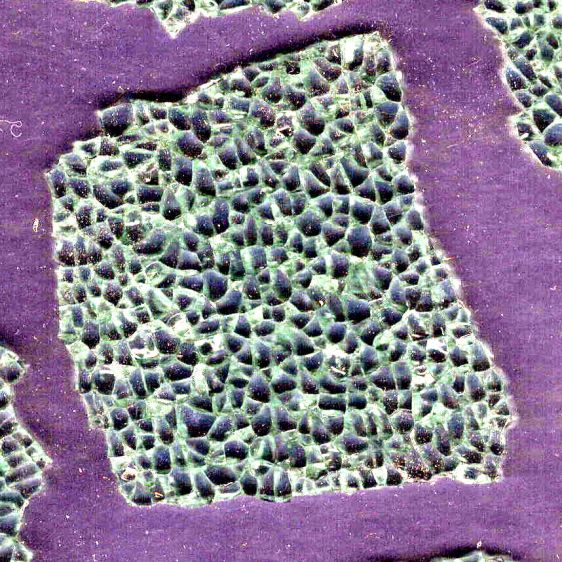
    Lay some pieces atop an acetate sheet (to prevent scratching) on the scanner, grab the whole thing, then isolate an interesting chunk:

    Smashed Glass - dark - piece 1
    Smashed Glass – dark – piece 1

    Next time: flip the image left-to-right to match the glass piece as seen from the top, because the scanner was looking at the bottom.

    The weird purple background started as black, but blowing out the contrast while ignoring the color mis-correction makes the next step easier.

    Trace around the perimeter with Scissors Select, clean up the result in Quick Mask mode, expand the selection by a few pixels to improve clearance, then turn it into a two-color image mask:

    Smashed Glass - piece 1 - outline
    Smashed Glass – piece 1 – outline

    Import the mask into Lightburn, trace it into vector paths (which is trivially easy and accurate given such a high-contrast image), then cut a chipboard prototype to make sure it fits:

    Smashed Glass - piece 1 - acrylic mount
    Smashed Glass – piece 1 – acrylic mount

    Clean up any misfits, test as needed, cut the inner shape and outer perimeter from 1.5 mm black acrylic, cut just the outer perimeter from 3 mm clear acrylic. Put the piece of black acrylic matching the glass shape into the scrap box.

    Mix up a few milliliters of clear pourable epoxy, butter up the clear acrylic, lay the black acrylic on top, line up the edges, then gently place the shattered glass into the cutout:

    Smashed Glass - piece 1 - acrylic top
    Smashed Glass – piece 1 – acrylic top

    Next time: apply gentle pressure, perhaps through a flexy sheet, to ensure the entire glass surface contacts the epoxy layer while squeezing out the bubbles. This will surely skate the glass across the acrylic, so don’t leave it unsupervised.

    The relatively clear areas show where epoxy eased its way into the cracks between the granules; there is no correlation between the air bubbles and unfilled cracks. The epoxy had the viscosity of warm honey and I didn’t expect it to flow so easily, but it doesn’t affect the outcome.

    Wait for a day, no matter how hard that may seem, for the epoxy to cure. Leave the small cup holding the remnants of the mixed epoxy nearby so you can test the cure without disturbing the Main Event.

    The bottom looks pretty much like the top:

    Smashed Glass - piece 1 - acrylic bottom
    Smashed Glass – piece 1 – acrylic bottom

    The shattered edge reflects off the bottom of the clear acrylic, as seen through the side:

    Smashed Glass - piece 1 - acrylic side
    Smashed Glass – piece 1 – acrylic side

    Matching the perimeter to the fragment would be interesting, despite my low-vertex-polygon fixation.

    It could become a paperweight or a (shot glass) coaster.

  • High Impact Art(ifact)

    High Impact Art(ifact)

    At first we thought a mighty crunch in the morning meant the trash collection truck had dropped a garbage bin from a great height, but the sound of sirens and a myriad flashing lights revealed the true cause in our neighbor’s front yard:

    NHR Crash - frontal view
    NHR Crash – frontal view

    The extent of the damage was more apparent from the road side:

    NHR Crash - passenger side
    NHR Crash – passenger side

    Another one that ain’t gonna buff right out.

    The driver was walking around uninjured and the ambulance left quietly.

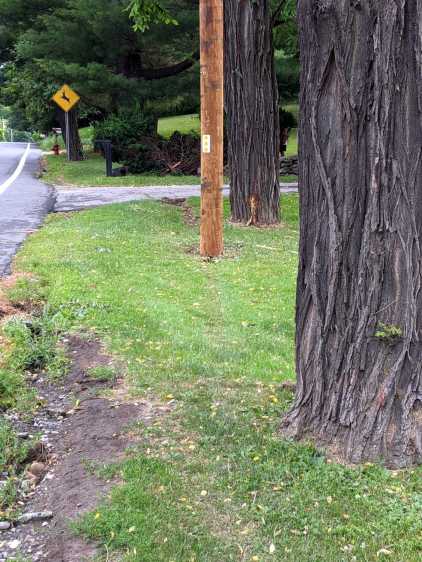
    A day later, the trajectory became apparent:

    NHR Crash - trajectory
    NHR Crash – trajectory

    The right side barely kissed the tree on the right, but the front wheel hooked the utility pole (that’s the new pole in the picture), snapped it off at ground level in addition to the usual break maybe ten feet up, and bounced a piece off the other tree:

    NHR Crash - utility pole
    NHR Crash – utility pole

    I didn’t know you could shatter a cast aluminum alloy wheel, but the missing half of the outer face was lying amid the rather scrambled stone wall along driveway.

    We’re reasonably sure we know the cause. Feel free to draw your own conclusions.

    After the flatbed hauled away the car and everybody left, I harvested a few pounds of interesting debris from the lawn:

    NHR Crash - tempered glass
    NHR Crash – tempered glass

    It’s tempered glass from the driver-side windows, shattered into small chunks and barely hanging together in those sheets. Laminated windshield glass is entirely different stuff.

    The smaller chunks glitter like jewels:

    NHR Crash - tempered glass fragments
    NHR Crash – tempered glass fragments

    Obviously, the window had a bit of tint.

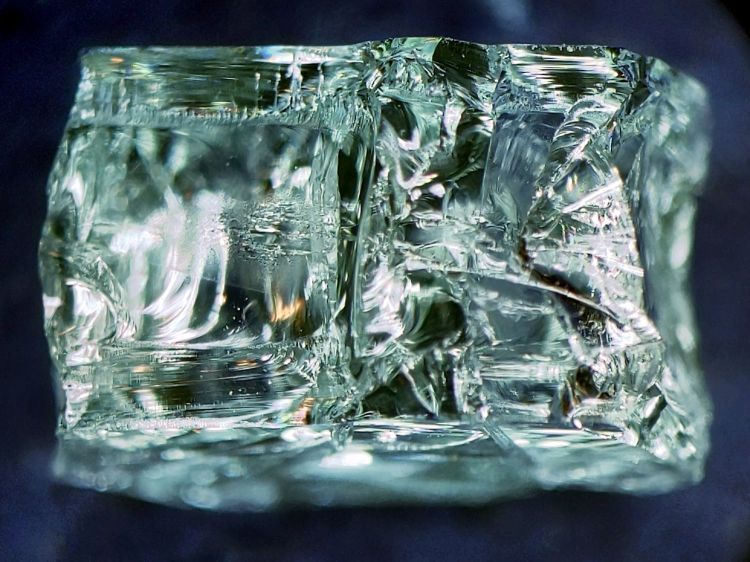
    The smallest chunk, seen from its flat surface, shows the cuboid fragments:

    NHR Crash - tempered glass fragment - front
    NHR Crash – tempered glass fragment – front

    A side view shows more complexity:

    NHR Crash - tempered glass fragment - side
    NHR Crash – tempered glass fragment – side

    Tempering prevents a glass sheet from shattering into long knife-blade shards. Although the edges of the fragments are not keen, we are dealing with broken glass: they are sharp.

    How sharp? They make glass knives for slicing eyes and cells.

    Broken tempered glass also sheds razor-edged flakes perfectly shaped to penetrate bike tires, although most roadside glass comes from ordinary beverage bottles. The tiniest flakes can make a mess of your eyes, so exercise at least some rudimentary shop safety practices.

    Those slabs ought to be good for something, even if they fall apart at the slightest touch …

  • LED Bulb Life Data Point

    LED Bulb Life Data Point

    A rare trip to the Poughkeepsie Railroad Station provided an opportunity to check out the LED bulbs in the chandeliers:

    • Pok RR Station - Chandelier A
    • Pok RR Station - Chandelier B
    • Pok RR Station - Chandelier C

    The 108 bulbs had only one deader (lower left in chandelier C).

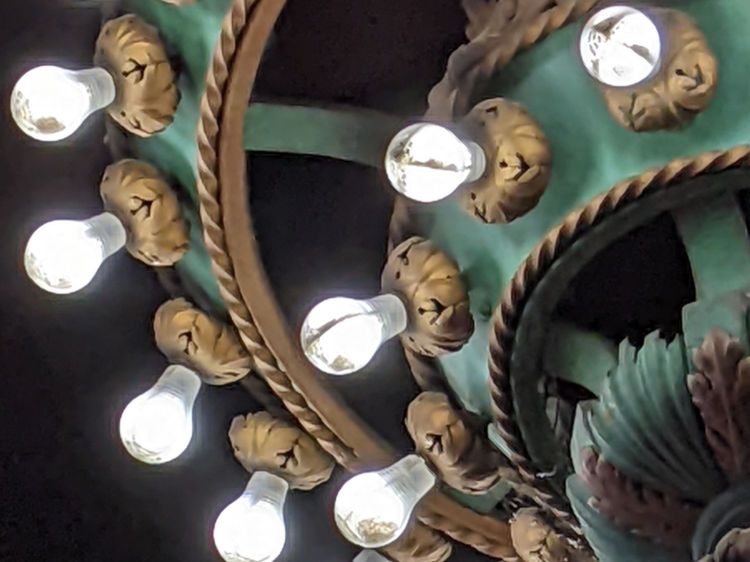
    I have no way of knowing if they’re the same bulbs from six years ago, but the accumulation of bugs / dust / crud inside the (what I would expect to be) sealed envelopes suggests they’ve been hanging there for quite a while:

    Pok RR Station - Chandelier B - detail
    Pok RR Station – Chandelier B – detail

    The dark cruciform patches might come from failed LED chip strings, although the bulbs all had the same eyeballometric brightness. The patches all seem to have a hard lower edge, so we may be seeing shadows from dust accumulating atop the chips on the PCB.

    They’re a definite step up from CFL bulbs, although still not as pleasant as OG incandescent filaments.

  • Nothing Lasts, Chemical Edition

    Nothing Lasts, Chemical Edition

    Cleanup after painting the hairlines involved opening the cap of the rarely used can of methyl ethyl ketone:

    MEK can - fractured cap
    MEK can – fractured cap

    It seems white-tinted polyethylene deteriorates after a dozen years of exposure to concentrated MEK fumes, suggesting I don’t use nearly enough enamel paint.

    The Container Stockpile disgorged a pair of pure polyethylene jars that should last another decade.

  • Memory Is the First Thing to Go

    Memory Is the First Thing to Go

    An email from Amazon arrived a few days ago:

    Purchase Reminder - not found
    Purchase Reminder – not found

    I suppose we’re even, because I have no recollection of setting a Purchase Reminder on anything at any time.

    By default, my email client does not display remote content in messages, which chops out the cute pictures, as well as killing all the cruft and tracking widgetry infesting commercial email these days.

  • Pine Pollen Season

    Pine Pollen Season

    When the driveway runs yellow in the rain, it’s pine pollen season:

    Pine Pollen Season - Driveway Flow
    Pine Pollen Season – Driveway Flow

    Our robot vacuum snuffles up quite a collection of dust:

    Pine Pollen Season - vac filter B
    Pine Pollen Season – vac filter B

    Peeling a layer of the usual fuzz off the filter reveals the pollen:

    Pine Pollen Season - vac filter A
    Pine Pollen Season – vac filter A

    This, too, shall pass and my eyes will rejoice.

  • Paracord Hot Knife

    Paracord Hot Knife

    An upcoming project calls for cutting dozens of lengths from a spool of 550 (pound tensile strength) all-nylon paracord, which means I must also heat-seal the ends. Cold-cutting paracord always produces wildly fraying ends, so I got primal on an old soldering iron tip:

    Paracord cutting - flattened soldering iron tip
    Paracord cutting – flattened soldering iron tip

    Bashed into a flattish blade, it does a Good Enough job of hot-cutting paracord and sealing the end in one operation:

    Paracord cutting - results
    Paracord cutting – results

    Setting the iron to 425 °C = 800 °F quickly produces reasonably clean and thoroughly sealed cut ends.

    Obviously, I need more practice.

    Yes, I tried laser cutting the paracord. Yes, it works great, makes a perfectly flat cut, and heat-seals both ends, but it also makes no sense whatsoever without a fixture holding a dozen or so premeasured lengths in a straight line. No, I’m not doing that.