The Smell of Molten Projects in the Morning

Ed Nisley's Blog: Shop notes, electronics, firmware, machinery, 3D printing, laser cuttery, and curiosities. Contents: 100% human thinking, 0% AI slop.

Category: Machine Shop

Mechanical widgetry

  • Branson Ultrasonic Cleaner Switch Cover

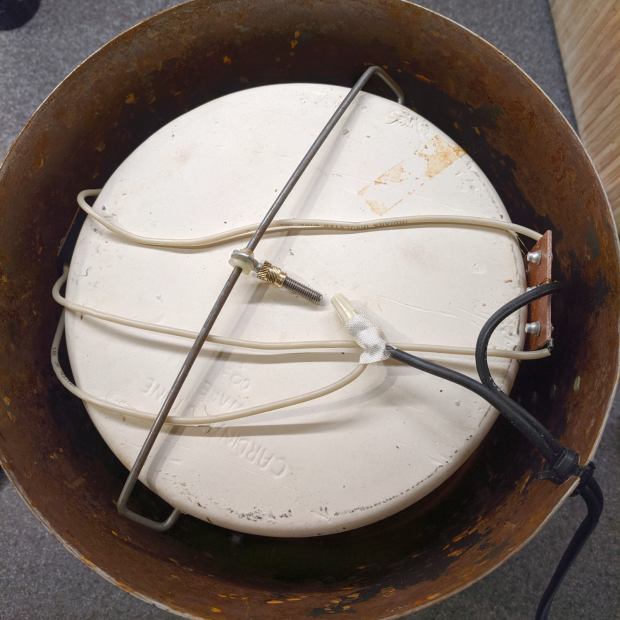
    Back in the early 90s, I bought a Branson Ultrasonic Cleaner for small parts. It turned out to be ideal for eyeglasses, migrated to the bathroom, and has been used at least daily ever since. After nigh onto three decades, this happened:

    Branson ultrasonic cleaner - failed switch cover
    Branson ultrasonic cleaner – failed switch cover

    We tend to push the ON button and let it turn off by itself after a little over four minutes (exactly 255 seconds!), so the gray plastic sheet over the ON switch failed first. You can barely see the outline of the transparent film previously covering both switches, which probably helped waterproof the switches.

    The gray plastic disk sits atop the switch actuator, so I punched a slightly larger polypropylene disk (from my stash of clamshell packages), stuck it to the disk with double-sided tape, lined it up over the hole, and covered the mess with Kapton tape:

    Branson ultrasonic cleaner - expedient fix
    Branson ultrasonic cleaner – expedient fix

    This is in the nature of an expedient fix, as I’m not sure the polypro disk is flexible enough. The next iteration will cover the entire gray area and I’ll see about a transparent tape covering.

    Maybe in another decade?

  • CNC 3018-Pro: CD Fixture Probe Camera Target

    Taping the CD fixture to the CNC 3018-Pro’s raised platform solves the repeatability problem by putting the CD at a fixed location relative to the machine’s Home coordinates. The next step puts the XY=0 coordinate origin at the exact center of the platter, so the pattern comes out exactly centered on the disc:

    CNC 3018-Pro - CD fixture
    CNC 3018-Pro – CD fixture

    The fixture has a central boss:

    Platter Fixtures - CD on 3018 - tape flange
    Platter Fixtures – CD on 3018 – tape flange

    The blue boss centers the CD’s hub hole, the red plateau supports the disc, and the white background lies 5 mm below the CD’s upper surface:

    CNC 3018-Pro - CD holder target
    CNC 3018-Pro – CD holder target

    Yup, red and blue Sharpies FTW.

    The bCNC probe camera image includes two faint cyan rings centered on the crosshair:

    CNC 3018-Pro - bCNC probe camera - red-blue CD target
    CNC 3018-Pro – bCNC probe camera – red-blue CD target

    Set the diameter to 15 mm (or a bit less), center the outer ring on the hub hole = the border between blue & red, set XY=0, and it’s within maybe ±0.1 mm of the true center.

    Done!

  • bCNC Probe Camera Calibration

    I’m sure I’ll do this again some time …

    Focus the camera at whatever distance needed to clear the longest tooling you’ll use or, at least, some convenient distance from the platform. You must touch off Z=0 at the surface before using bCNC’s probe camera alignment, because it will move the camera to the preset focus distance.

    Align the camera’s optical axis perpendicular to the table by making it stare into a mirror flat on the platform, then tweaking the camera angles until the crosshair centers on the reflected lens image. This isn’t dead centered, but it’s pretty close:

    CNC 3018-Pro - bCNC Probe Camera - collimation - detail
    CNC 3018-Pro – bCNC Probe Camera – collimation – detail

    The camera will be focused on the mirror, not the reflection, as you can tell by the in-focus crud on the mirror. Whenever you focus the lens, you’ll probably move the optical axis, so do the best you can with the fuzzy image.

    You can adjust small misalignments with the Haircross (seems backwards to me) Offset values.

    A cheap camera’s lens barrel may not be aligned with its optical axis, giving the lens a jaunty tilt when it’s correctly set up:

    CNC 3018-Pro - Engraving - taped
    CNC 3018-Pro – Engraving – taped

    With the camera focus set correctly, calibrate the camera Offset from the tool (a.k.a. Spindle) axis:

    • Put a pointy tool at XY=0
    • Touch off Z=0 on a stack of masking tape
    • Put a dent in the tape with the bit
    • Move to the camera’s focused Z level
    • Make the dent more conspicuous with a Sharpie, as needed
    • Register the spindle location
    • Jog to center the crosshair on the dent
    • Register the camera location

    Calibrate the Crosshair ring diameter thusly:

    • Put an object with a known size on the platform
    • Touch off Z=0 at its surface
    • Move to the camera’s focused Z level
    • Set the Crosshair diameter equal to the known object size
    • Adjust the Scale value to make the Crosshair overlay reality

    For example, calibrating the diameter to 10 mm against a shop scale:

    CNC 3018-Pro Probe Camera - scale factor - detail
    CNC 3018-Pro Probe Camera – scale factor – detail

    At 10 mm above the CD, setting the camera’s resolution to 11.5 pixel/mm:

    CNC 3018-Pro - bCNC probe camera - settings
    CNC 3018-Pro – bCNC probe camera – settings

    Makes the outer circle exactly 15.0 mm in diameter to match the CD hub ring ID:

    CNC 3018-Pro - bCNC probe camera - red-blue CD target
    CNC 3018-Pro – bCNC probe camera – red-blue CD target

    I doubt anybody can find the pixel/mm value from first principles, so you must work backwards from an object’s actual size.

  • CNC 3018-Pro: Diamond Drag Engraving Test Disk

    The smaller and more rigid CNC 3018-Pro should be able to engrave text faster than the larger and rather springy MPCNC, which could engrave text at about 50 mm/min. This test pattern pushes both cutting depth and engraving speed to absurd values:

    Engraving Test Pattern - 2019-09-18
    Engraving Test Pattern – 2019-09-18

    Compile the GCMC source to generate G-Code, lash a CD / DVD to the platform (masking tape works fine), touch off the XY coordinates in the center, touch off Z=0 on the surface, then see what happens:

    CNC 3018-Pro - Engraving test pattern - curved text
    CNC 3018-Pro – Engraving test pattern – curved text

    The “engraving depth” translates directly into the force applied to the diamond point, because the spring converts displacement into force. Knowing the Z depth, you can calculate or guesstimate the force.

    Early results from the 3018 suggest it can engrave good-looking text about 20 times faster than the MPCNC:

    CNC 3018-Pro - Engraving - speeds
    CNC 3018-Pro – Engraving – speeds

    You must trade off speed with accuracy on your very own machine, as your mileage will certainly differ!

    The GCMC source code as a GitHub Gist:

    // Engraving test piece
    // Ed Nisley KE4ZNU – 2019-09
    //—–
    // Command line parameters
    // -D OuterDia=number
    if (!isdefined("OuterDia")) {
    OuterDia = 120mm – 2mm; // CD = 120, 3.5 inch drive = 95
    }
    OuterRad = OuterDia / 2.0;
    comment("Outer Diameter: ",OuterDia);
    comment(" Radius: ",OuterRad);
    //—–
    // Library routines
    include("tracepath.inc.gcmc");
    include("engrave.inc.gcmc");
    //—–
    // Bend text around an arc
    function ArcText(TextPath,Center,Radius,BaseAngle,Align) {
    PathLength = TextPath[-1].x;
    Circumf = 2*pi()*Radius;
    TextAngle = to_deg(360 * PathLength / Circumf);
    AlignAngle = BaseAngle + (Align == "Left" ? 0 :
    Align == "Center" ? -TextAngle / 2 :
    Align == "Right" ? -TextAngle :
    0);
    ArcPath = {};
    foreach(TextPath; pt) {
    if (!isundef(pt.x) && !isundef(pt.y) && isundef(pt.z)) { // XY motion, no Z
    r = Radius – pt.y;
    a = 360deg * (pt.x / Circumf) + AlignAngle;
    ArcPath += {[r*cos(a) + Center.x, r*sin(a) + Center.y,-]};
    }
    elif (isundef(pt.x) && isundef(pt.y) && !isundef(pt.z)) { // no XY, Z up/down
    ArcPath += {pt};
    }
    else {
    error("Point is not pure XY or pure Z: " + to_string(pt));
    }
    }
    return ArcPath;
    }
    //—–
    // Set up for drawing
    SafeZ = 10.0mm; // above clamps and screws
    TravelZ = 1.0mm; // above workpiece
    PlotZ = -0.5mm; // tune for best results
    TextSpeed = 1000mm; // intricate detail
    DrawSpeed = 2000mm; // smooth curves
    TextFont = FONT_HSANS_1_RS;
    TextSize = [2.0mm,2.0mm];
    TextLeading = 2*TextSize.y; // line spacing
    DiskCenter = [0mm,0mm]; // middle of the platter
    InnerDia = 40mm;
    InnerRad = InnerDia / 2.0;
    comment("Inner Diameter: ",InnerDia);
    comment(" Radius: ",InnerRad);
    NumRings = ceil((OuterRad – (InnerRad + TextLeading))/TextLeading); // number of rings to draw
    comment("Numer of rings: ",NumRings);
    if (1) {
    comment("Text Size begins");
    feedrate(TextSpeed);
    ts = "Text size: " + to_string(TextSize);
    tp = scale(typeset(ts,TextFont),TextSize);
    tpa = ArcText(tp,DiskCenter,OuterRad,90deg,"Left");
    engrave(tpa,TravelZ,PlotZ);
    }
    if (1) {
    comment("Depth variations begin");
    TextRadius = OuterRad;
    pz = 0.0mm;
    repeat(NumRings ; i) {
    comment(" depth: " + to_string(pz));
    feedrate(TextSpeed);
    ts = "Depth: " + to_string(pz) + " at " + to_string(TextSpeed) + "/min";
    tp = scale(typeset(ts,TextFont),TextSize);
    tpa = ArcText(tp,DiskCenter,TextRadius,-5deg,"Right");
    engrave(tpa,TravelZ,pz);
    feedrate(DrawSpeed);
    goto([0,-TextRadius,-]);
    move([-,-,pz]);
    arc_ccw([-TextRadius,0,-],-TextRadius);
    goto([-,-,TravelZ]);
    feedrate(TextSpeed);
    tp = scale(typeset("Rad: " + to_string(TextRadius),TextFont),TextSize);
    tpa = ArcText(tp,DiskCenter,TextRadius,180deg,"Right");
    engrave(tpa,TravelZ,PlotZ);
    TextRadius -= TextLeading;
    pz -= 0.10mm;
    }
    }
    if (1) {
    comment("Feedrate variations begin");
    TextRadius = OuterRad;
    ps = 250mm;
    repeat(NumRings ; i) {
    comment(" speed: " + to_string(ps) + "/min");
    feedrate(ps);
    ts = "Speed: " + to_string(ps) + "/min at " + to_string(PlotZ);
    tp = scale(typeset(ts,TextFont),TextSize);
    tpa = ArcText(tp,DiskCenter,TextRadius,5deg,"Left");
    engrave(tpa,TravelZ,PlotZ);
    TextRadius -= TextLeading;
    ps += 250mm;
    }
    }
    if (1) {
    comment("Off-center text arcs begin");
    feedrate(TextSpeed);
    tc = [-40mm/sqrt(2),-40mm/sqrt(2)]; // center point
    r = 3mm;
    s = [0.5mm,0.5mm];
    ts = "Radius: " + to_string(r) + " Size: " + to_string(s);
    tp = scale(typeset(ts,TextFont),s);
    tpa = ArcText(tp,tc,r,0deg,"Center");
    engrave(tpa,TravelZ,PlotZ);
    r = 5mm;
    s = [1.0mm,1.0mm];
    ts = "Radius: " + to_string(r) + " Size: " + to_string(s);
    tp = scale(typeset(ts,TextFont),s);
    tpa = ArcText(tp,tc,r,0deg,"Center");
    engrave(tpa,TravelZ,PlotZ);
    r = 8mm;
    s = [1.5mm,1.5mm];
    ts = "Radius: " + to_string(r) + " Size: " + to_string(s);
    tp = scale(typeset(ts,TextFont),s);
    tpa = ArcText(tp,tc,r,0deg,"Center");
    engrave(tpa,TravelZ,PlotZ);
    r = 15mm;
    s = [3.0mm,3.0mm];
    ts = "Radius: " + to_string(r) + " Size: " + to_string(s);
    tp = scale(typeset(ts,FONT_HSCRIPT_2),s);
    tpa = ArcText(tp,tc,r,0deg,"Center");
    engrave(tpa,TravelZ,PlotZ);
    }
    if (1) {
    comment("Attribution begins");
    feedrate(TextSpeed);
    tp = scale(typeset("Ed Nisley – KE4ZNU – softsolder.com",TextFont),TextSize);
    tpa = ArcText(tp,DiskCenter,15mm,0deg,"Center");
    engrave(tpa,TravelZ,PlotZ);
    tp = scale(typeset("Engraving Test Disc",TextFont),TextSize);
    tpa = ArcText(tp,DiskCenter,15mm,180deg,"Center");
    engrave(tpa,TravelZ,PlotZ);
    }
    goto([-,-,SafeZ]);
    goto([0mm,0mm,-]);
    comment("Done!");
    #!/bin/bash
    # Engraving test pattern generator
    # Ed Nisley KE4ZNU – 2019-08
    Diameter='OuterDia=116mm'
    Flags='-P 3 –pedantic'
    # Set these to match your file layout
    LibPath='/opt/gcmc/library'
    Prolog='/mnt/bulkdata/Project Files/CNC 3018-Pro Router/Patterns/gcmc/prolog.gcmc'
    Epilog='/mnt/bulkdata/Project Files/CNC 3018-Pro Router/Patterns/gcmc/epilog.gcmc'
    Script='/mnt/bulkdata/Project Files/CNC 3018-Pro Router/Patterns/Engraving Test.gcmc'
    ts=$(date +%Y%m%d-%H%M%S)
    fn='TestPattern_'${ts}'.ngc'
    echo Output: $fn
    rm -f $fn
    echo "(File: "$fn")" > $fn
    /opt/gcmc/src/gcmc -D $Diameter $Flags \
    –include "$LibPath" –prologue "$Prolog" –epilogue "$Epilog" \
    "$Script" >> $fn

  • CNC 3018-Pro: DRV8825 Drivers at the Edge of Madness

    Having previously concluded running the CNC 3018-Pro steppers from 12 V would let the DRV8825 chips provide better current control in Fast Decay mode at reasonable speeds, I wondered what effect a 24 V supply would have at absurdly high speeds with the driver in 1:8 microstep mode to reduce the IRQ rate.

    So, in what follows, the DRV8825 chip runs in 1:8 microstep mode with Fast Decay current control. You must apply some hardware hackage to the CAMTool V 3.3 board on the CNC 3018-Pro to use those modes.

    In all the scope pix, horizontal sync comes from the DRV8825 Home pulse in the top trace, with the current in the two windings of the X axis motor in the lower traces at 1 A/div. Because only the X axis is moving, the actual axis speed matches the programmed feed rate.

    Homework: figure out the equivalent two-axis-moving speed.

    The 12 V motor supply works well at 140 mm/min, with Fast Decay mode producing clean microstep current levels and transitions:

    3018 X - Fast - 12V - 140mm-min 1A-div
    3018 X – Fast – 12V – 140mm-min 1A-div

    The sine waves deteriorate into triangles around 1400 mm/min, suggesting this is about as fast as you’d want to go with a 12 V supply:

    3018 X - Fast - 12V - 1400mm-min 1A-div
    3018 X – Fast – 12V – 1400mm-min 1A-div

    Although the axis can reach 3000 mm/min, it’s obviously running well beyond its limits:

    3018 X - Fast - 12V - 3000mm-min 1A-div
    3018 X – Fast – 12V – 3000mm-min 1A-div

    The back EMF fights the 12 V supply to a standstill during most of the waveform, leaving only brief 500 mA peaks, so there’s no torque worth mentioning and terrible position control.

    Increasing the supply to 24 V, still with 1:8 microstepping and Fast Decay …

    At a nose-pickin’ slow 14 mm/min, Fast Decay mode looks rough, albeit with no missteps:

    3018 X - Fast - 24V - 14mm-min 1A-div
    3018 X – Fast – 24V – 14mm-min 1A-div

    At 140 mm/min, things look about the same:

    3018 X - Fast - 24V - 140mm-min 1A-div
    3018 X – Fast – 24V – 140mm-min 1A-div

    For completeness, a detailed look at the PWM current control waveforms at 140 mm/min:

    3018 X - Fast detail - 24V - 140mm-min 1A-div
    3018 X – Fast detail – 24V – 140mm-min 1A-div

    The dead-flat microstep in the middle trace happens when the current should be zero, which is comforting.

    At 1400 mm/min, where the 12 V waveforms look triangular, the 24 V supply has enough mojo to control the current, with increasing roughness and slight undershoots after the zero crossings:

    3018 X - Fast - 24V - 1400mm-min 1A-div
    3018 X – Fast – 24V – 1400mm-min 1A-div

    At 2000 mm/min, the DRV8825 is obviously starting to have trouble regulating the current against the increasing back EMF:

    3018 X - Fast - 24V - 2000mm-min 1A-div
    3018 X – Fast – 24V – 2000mm-min 1A-div

    At 2500 mm/min, the back EMF is taking control away from the DRV8825:

    3018 X - Fast - 24V - 2500mm-min 1A-div
    3018 X – Fast – 24V – 2500mm-min 1A-div

    The waveforms take on a distinct triangularity at 2700 mm/min:

    3018 X - Fast - 24V - 2700mm-min 1A-div
    3018 X – Fast – 24V – 2700mm-min 1A-div

    They’re fully triangular at 3000 mm/min:

    3018 X - Fast - 24V - 3000mm-min 1A-div
    3018 X – Fast – 24V – 3000mm-min 1A-div

    In round numbers, you’d expect twice the voltage to give you twice the speed for a given amount of triangularity, because the current rate-of-change varies directly with the net voltage. I love it when stuff works out!

    At that pace, the X axis carrier traverses the 300 mm gantry in 6 s, which is downright peppy compared to the default settings.

    Bottom lines: the CNC 3018-Pro arrives with a 24 V supply that’s too high for the DRV8825 drivers in Mixed Decay mode and the CAMTool V3.3 board’s hardwired 1:32 microstep mode limits the maximum axis speed. Correcting those gives you 3000 mm/min rapids with good-looking current waveforms.

    I’m reasonably sure engraving plastic and metal disks at 3000 mm/min is a Bad Idea™, but having some headroom seems desirable.

  • Mailbox Door Rebuild

    The flanges around the door of our giant mailbox rusted through, leaving the door to bend along the embossed (debossed? Whatever) lines across the front. Eventually, the bend got bad enough to keep the door from latching closed, but reviews of the current crop of mailboxes suggest they’re even more prone to rusting after even fewer years.

    Well, I can fix that:

    Mailbox door rebuild - installed
    Mailbox door rebuild – installed

    Because the bottom third of the door, basically everything around and below that horizontal ridge, had corroded, the general idea was to stiffen it with an internal plate:

    Mailbox door rebuild - interior
    Mailbox door rebuild – interior

    The array of small holes suggest the plate’s rich lived experience. Some are even tapped!

    External angle brackets stiffen the sides along the corroded flanges and surround the equally corroded pivot holes:

    Mailbox door rebuild - exterior
    Mailbox door rebuild – exterior

    The term “brick shithouse” springs unbidden to mind, doesn’t it? Those spare holes come from previous uses; I decided this application didn’t demand cosmetic perfection and, as a result, the remaining angle stock has no holes at all.

    Also, the angle brackets are as long as they are because that’s the maximum throat depth for Tiny Bandsaw™. I splurged on a Proxxon 10-14 TPI blade (for future reference: PN 28172) that cuts aluminum like butter, much better than the stock 14 TPI blade.

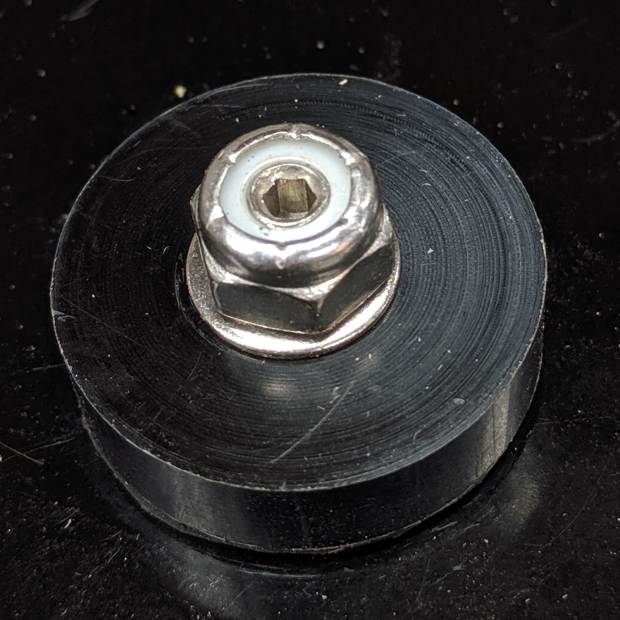
    The hinge pins used to be rivets. After careful consideration, I replaced them with 1/4-20 button-head cap screws:

    Mailbox door rebuild - hinge detail
    Mailbox door rebuild – hinge detail

    Yes, the sheet metal now pivots on screw threads, rather than a nice smooth cylinder. The nyloc nut maintains the proper amount of looseness around the battered sheet metal.

    While I had the door open, I slobbered hot melt glue over the flag anchor, which should keep it from spitting the ratchet pin into the roadside debris ever again:

    Mailbox door rebuild - flag anchor
    Mailbox door rebuild – flag anchor

    A pleasant evening of Quality Shop Time, indeed!

    The alert reader will note I’m securing aluminum plates with stainless steel hardware on a (nominally) galvanized steel box, thereby forming several batteries with a brine electrolyte from wintertime road salt. My engineering judgement determined this repair will last Long Enough™ and, most likely, succumb to somebody not quite making the curve while accelerating from the traffic signal.

    Aaaaand those painted numbers still look pretty good after four years.

  • Schwalbe Marathon Plus and Michelin Protek vs. Glass Chip

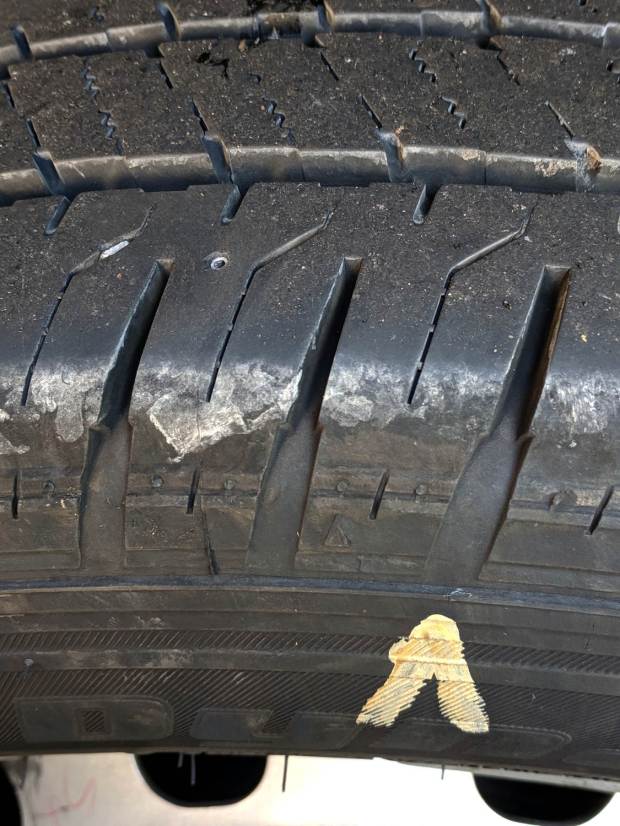
    The rear tire of my bike was flat before our morning ride and pumping it up produced a hissing sound with a spray of tube sealant:

    Marathon tire puncture - tread gash
    Marathon tire puncture – tread gash

    We run Schwalbe Marathon Plus tires on the rear of our Tour Easy ‘bents, because otherwise I’d be spending far too many hours repairing flats by the side of the road. Searching the blog for the obvious keywords will produce many examples of what it’s like to ride a bike in Dutchess County NY.

    Schwalbe says the tires have 5 mm of “highly elastic special rubber” and claims “Even thumbtacks can’t puncture it.” They use the term “Flat-Less” in the sense of “flat less often”, rather than “not flatting”, which seems disingenuous at best.

    Flatting less often may be true, but they obviously haven’t tested against Dutchess County road debris:

    Marathon tire puncture - glass chip
    Marathon tire puncture – glass chip

    It’s not quite 5 mm in the longest dimension, but it was embedded deep enough in the tire tread to cut through the armor belt and nick the Michelin Protek tube:

    Marathon tire puncture - tube damage
    Marathon tire puncture – tube damage

    Of course, the hole is dead-center between the two bumps that are supposed to compress around the puncture while the goo fills and seals the void.

    Before taking everything apart, I tried gently inflating the tire and putting the puncture at the bottom to let the sealant fill the hole overnight. In the morning, the tire was once again flat, although the floor wasn’t covered in goo. Pumping the tire up produced another spray of sealant.

    It’s likely the Protek tube got me home with a slow leak on the previous day’s ride, but it definitely didn’t solve the problem and, frankly, I’ve had ordinary tubes do the same thing. Given the trivial size of the puncture and the complete lack of permanent self-repair, I don’t know what kind of damage it’s supposed to cure.

    I’ve already discarded two Protek tubes with slow leaks through the valve stem and no punctures, so they’re definitely not worth the hassle. Michelin no longer lists the tubes on their bike tire site, so it seems they agree.

    I made up a boot by punching a 5 mm polypropylene disk, sticking it to a small tire patch, then sticking the patch over the puncture on the tire. With a bit of luck, nothing will line up with the gash and punch through the boot.

    I recently replaced all four tires on the Forester, slightly ahead of schedule for reasons not relevant here, and it’s worth noting that a Marathon Plus tire costs about a third of what I paid for a car tire; they’re not to be discarded lightly.