The general idea is to frequency modulate the sine wave coming from a DDS, thereby generating a signal suitable for upconverting in amateur repeaters now tied to unobtainable crystals. The crystals run from 4-ish to 20-ish MHz, with frequency multiplication from 3 to 36 producing RF outputs from 30-ish MHz through 900-ish MHz; more details as I work through the choices.
The demo code runs on a bare Teensy 3.6 as a dipstick test for the overall timing and functionality:

The fugliest thing you’ve seen in a while, eh?
An overview of the results:
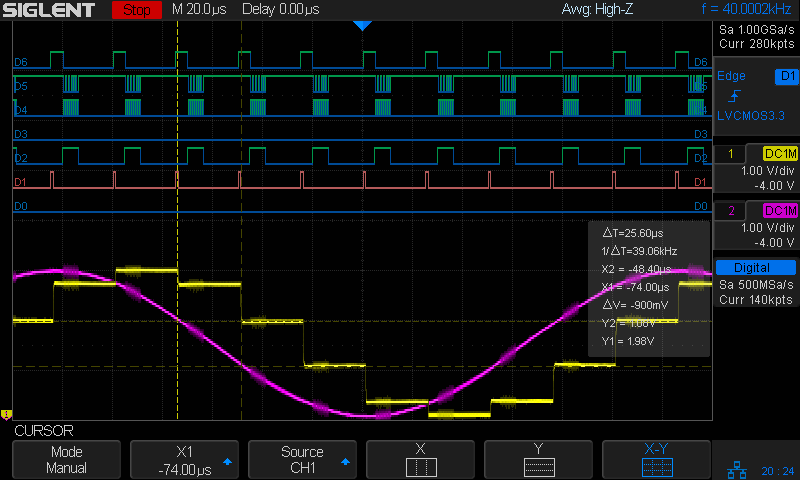
The pulses in D1 (orange digital) mark timer ticks at a 40 kHz pace, grossly oversampling the 4 kHz audio bandwidth in the hope of trivializing the antialiasing filters. The timer tick raises the DDS latch pin (D6, top trace) to change the DDS frequency, fires off another ADC conversion, and (for now) copies the previous ADC value to the DAC output:
void timer_callback(void) {
  digitalWriteFast(TIMER_PIN,HIGH);
  digitalWriteFast(DDS_FQUD_PIN,HIGH);                // latch previously shifted bits
  adc->startSingleRead(AUDIO_PIN, ADC_0);             // start ADC conversion
  analogWriteDAC0(AnalogSample);                      // show previous audio sample
  digitalWriteFast(TIMER_PIN,LOW);
}
The purple analog trace is the input sine wave at 4 kHz. The yellow analog stairstep comes from the DAC, with no hint of a reconstruction filter knocking off the sharp edges.
The X1 cursor (bold vertical dots) marks the start of the ADC read. I hope triggering it from the timer tick eliminates most of the jitter.
The Y1 cursor (upper dotted line, intersecting X1 just left of the purple curve) shows the ADC sample apparently happens just slightly after the conversion. The analog scales may be slightly off, so I wouldn’t leap to any conclusions.
The pulses in D2 mark the ADC end-of-conversion interrupts:
void adc0_isr(void) {
  digitalWriteFast(ANALOG_PIN,HIGH);
  AnalogSample = adc->readSingle();                     // fetch just-finished sample
  SPI.beginTransaction(SPISettings(8000000, MSBFIRST, SPI_MODE0));
  digitalWriteFast(DDS_FQUD_PIN, LOW);
  SPI.transfer(DDSBuffer.Phase);                // interleave with FM calculations
  SPI.transfer(DDSBuffer.Bits31_24);
  SPI.transfer(DDSBuffer.Bits23_16);
  SPI.transfer(DDSBuffer.Bits15_8);
  SPI.transfer(DDSBuffer.Bits7_0);
  SPI.endTransaction();                         // do not raise FQ_UD until next timer tick!
  digitalWriteFast(ANALOG_PIN,LOW);
}
The real FM code will multiply the ADC reading by the amplitude-to-frequency-deviation factor, add it to the nominal “crystal” frequency, convert the sum to the DDS delta-phase register value, then send it to the DDS through the SPI port. For now, I just send five constant bytes to get an idea of the minimum timing with the SPI clock ticking along at 8 MHz.
The tidy blurs in D4 show the SPI clock, with the corresponding data in D5.
D6 (top trace) shows the DDS FQ_UD (pronounced “frequency update”) signal dropping just before the SPI data transfer begins. Basically, FQ_UD is the DDS Latch Clock: low during the delta-phase value transfer, with the low-to-high transition latching all 40 control + data bits into the DDS to trigger the new frequency.
A closer look at the sample and transfer:

For reference, the digital players from bottom to top:
- D0 – unused here, shows pulses marking main loop
- D1 – 40 kHz timer ticks = ADC start conversion
- D2 – ADC end of conversion,”FM calculation”, send DDS data
- D3 – unused here, shows error conditions
- D4 – SPI clock = rising edge active
- D5 – SPI MOSI data to DDS = MSB first
- D6 – SPI CS = FQ_UD = DDS latch
Remember, the yellow analog stairstepped trace is just a comfort signal showing the ADC actually samples the intended input.
The ARM CPU has floating-point hardware, but I suspect fixed-point arithmetic will once again win out over double-precision multiplies & divides.
Dropping the sampling to 20 kHz would likely work just as well and double the time available for calculations. At least now I can measure what’s going on.
All in all, it looks feasible.
And, yes, the scope is a shiny new Siglent SDS2304X with the MSO logic-analyzer option. It has some grievous UX warts & omissions suggesting an architectural botch job, but it’s mostly Good Enough for what I need. More later.
The TeensyDuino source code as a GitHub Gist:
| // FM DDS | |
| // Ed Nisley – KE4ZNU | |
| // 2017-04-19 Demo 1 | |
| #include <IntervalTimer.h> | |
| #include <ADC.h> | |
| #include <SPI.h> | |
| #define HEART_PIN 14 | |
| #define TIMER_PIN 15 | |
| #define ANALOG_PIN 16 | |
| #define GLITCH_PIN 17 | |
| #define AUDIO_PIN A9 | |
| #define DDS_FQUD_PIN 10 | |
| // data to DDS MOSI0 11 | |
| // no data from DDS MISO0 12 | |
| // DDS clock on SCK0 13 — also LED | |
| #define BUILTIN_LED 13 | |
| //——————— | |
| // Useful constants | |
| int SamplePeriod = 25; // microseconds per analog sample | |
| //——————— | |
| // Globals | |
| ADC *adc = new ADC(); | |
| IntervalTimer timer; | |
| volatile unsigned int AnalogSample; | |
| typedef struct { | |
| uint8_t Phase; | |
| uint8_t Bits31_24; | |
| uint8_t Bits23_16; | |
| uint8_t Bits15_8; | |
| uint8_t Bits7_0; | |
| } DDS; | |
| DDS DDSBuffer = {0x01,0x02,0x04,0x08,0x10}; | |
| double DDSFreq, EpsilonFreq, DDSStepFreq; | |
| double CenterFreq, TestFreq; | |
| //——————— | |
| // Handy routines | |
| void FlipPin(int pin) { | |
| digitalWriteFast(pin,!digitalRead(pin)); | |
| } | |
| void PulsePin(int p) { | |
| FlipPin(p); | |
| FlipPin(p); | |
| } | |
| //——————— | |
| // Timer handler | |
| void timer_callback(void) { | |
| digitalWriteFast(TIMER_PIN,HIGH); | |
| digitalWriteFast(DDS_FQUD_PIN,HIGH); // latch previously shifted bits | |
| adc->startSingleRead(AUDIO_PIN, ADC_0); // start ADC conversion | |
| analogWriteDAC0(AnalogSample); // show previous audio sample | |
| digitalWriteFast(TIMER_PIN,LOW); | |
| } | |
| //——————— | |
| // Analog read handler | |
| void adc0_isr(void) { | |
| digitalWriteFast(ANALOG_PIN,HIGH); | |
| AnalogSample = adc->readSingle(); // fetch just-finished sample | |
| SPI.beginTransaction(SPISettings(8000000, MSBFIRST, SPI_MODE0)); | |
| digitalWriteFast(DDS_FQUD_PIN, LOW); | |
| SPI.transfer(DDSBuffer.Phase); // interleave with FM calculations | |
| SPI.transfer(DDSBuffer.Bits31_24); | |
| SPI.transfer(DDSBuffer.Bits23_16); | |
| SPI.transfer(DDSBuffer.Bits15_8); | |
| SPI.transfer(DDSBuffer.Bits7_0); | |
| SPI.endTransaction(); // do not raise FQ_UD until next timer tick! | |
| digitalWriteFast(ANALOG_PIN,LOW); | |
| } | |
| //——————— | |
| // Hardware setup | |
| void setup(void) { | |
| pinMode(BUILTIN_LED,OUTPUT); // will eventually become SCK0 | |
| pinMode(HEART_PIN, OUTPUT); // show we arrived | |
| digitalWrite(HEART_PIN,LOW); | |
| PulsePin(HEART_PIN); | |
| PulsePin(HEART_PIN); | |
| pinMode(TIMER_PIN,OUTPUT); | |
| digitalWrite(TIMER_PIN,LOW); | |
| pinMode(GLITCH_PIN,OUTPUT); | |
| digitalWrite(GLITCH_PIN,LOW); | |
| pinMode(ANALOG_PIN,OUTPUT); | |
| digitalWrite(ANALOG_PIN,LOW); | |
| pinMode(AUDIO_PIN,INPUT); | |
| pinMode(DDS_FQUD_PIN,OUTPUT); | |
| digitalWriteFast(DDS_FQUD_PIN,HIGH); | |
| Serial.begin(115200); | |
| int waited = 0; | |
| while (!Serial && waited < 3000) { // fall out after a few seconds | |
| delay(1); | |
| waited++; | |
| if (! (waited % 50)) | |
| FlipPin(BUILTIN_LED); | |
| } | |
| Serial.printf("FM Modulated DDS\nEd Nisley KE4ZNU\n"); | |
| Serial.printf(" serial wait: %d ms\n\n",waited); | |
| SPI.begin(); | |
| SPI.usingInterrupt(255); // attached through analog IRQs | |
| adc->setAveraging(0); | |
| adc->setResolution(12); | |
| adc->setConversionSpeed(ADC_CONVERSION_SPEED::MED_SPEED); | |
| adc->setSamplingSpeed(ADC_SAMPLING_SPEED::MED_SPEED); | |
| adc->enableInterrupts(ADC_0); | |
| if (!timer.begin(timer_callback, SamplePeriod)) { | |
| Serial.printf("Timer start failed\n"); | |
| while (true) { | |
| FlipPin(BUILTIN_LED); | |
| delay(50); | |
| } | |
| } | |
| DDSFreq = 180.0e6; | |
| EpsilonFreq = 1.0e-5; | |
| DDSStepFreq = DDSFreq / (1LL << 32); | |
| Serial.printf("DDS frequency: %18.7f Hz\n",DDSFreq); | |
| Serial.printf(" epsilon: %18.7f Hz\n",EpsilonFreq); | |
| Serial.printf(" step: %18.7f Hz\n\n",DDSStepFreq); | |
| CenterFreq = 146520000.0; | |
| TestFreq = CenterFreq; | |
| Serial.printf("Center frequency: %18.7f Hz\n",CenterFreq); | |
| Serial.printf("Setup done\n"); | |
| } | |
| //——————— | |
| // Do things forever | |
| void loop(void) { | |
| digitalWrite(HEART_PIN,HIGH); | |
| if (TestFreq < (CenterFreq + 100*EpsilonFreq)) | |
| TestFreq += EpsilonFreq; | |
| else | |
| TestFreq += DDSStepFreq; | |
| Serial.printf(" %18.7f Hz\n",TestFreq); | |
| digitalWrite(HEART_PIN,LOW); | |
| delay(500); | |
| } |








 The Smell of Molten Projects in the Morning