Ed Nisley's Blog: Shop notes, electronics, firmware, machinery, 3D printing, laser cuttery, and curiosities. Contents: 100% human thinking, 0% AI slop.
The pushbutton on the X10 wall switch controlling the fiercely incandescent lamp over the kitchen table has gotten erratic, so I dug into the Big Box o’ X10 Crap for a replacement. Turns out The Box has only 3-way switches, but the lamp needs a standard two-wire switch.
The instruction sheet shows this diagram:
X10 3-way Wall Switch Wiring
The pushbutton on the CS277 “Companion” switch connects the red lead to the two blue leads. The blue leads are always connected together and carry the lamp current, so the red lead is just a signal from the remote button.
The WS477 “Master” switch will work as an ordinary switch if you cap the red lead with a wire nut and tuck it into the box.
FC1002 Frequency Counter – faceplate – circular polarizer
A sheet of linear polarizing film held in front of the lens:
FC1002 Frequency Counter – faceplate – linear polarizer
For reference, none of the other instrument faceplates on the bench show anything other than uniform gray, with one exception that points directly to the plastic injection point.
I’d say this plate cracked due to unrelieved internal stresses and not anything I did or didn’t do.
Our Larval Engineer’s new camera uses Canon NB-6LH batteries, which have exactly the same nominal capacity as the NB-5L batteries for my camera, despite being not quite the same size. I cannot imagine any reason for that, other than brand fractionation, but there it is.
That hideous Powerpole thing came from one of the AA cell packs I’d been using to power the HTs on the bikes, before switching to lithium battery packs. It’s easier to harvest something suitable than to build a new thing, particularly for such a low duty cycle gadget.
This view of the solid model shows the contact pins, with the lid floating over its alignment pegs (made from snippets of 1.75 mm filament):
NB-6L Holder – fit layout
The pegs simplify gluing the lid in place, a process for which you can never have enough clamps:
Canon NB-6L holder – lid gluing
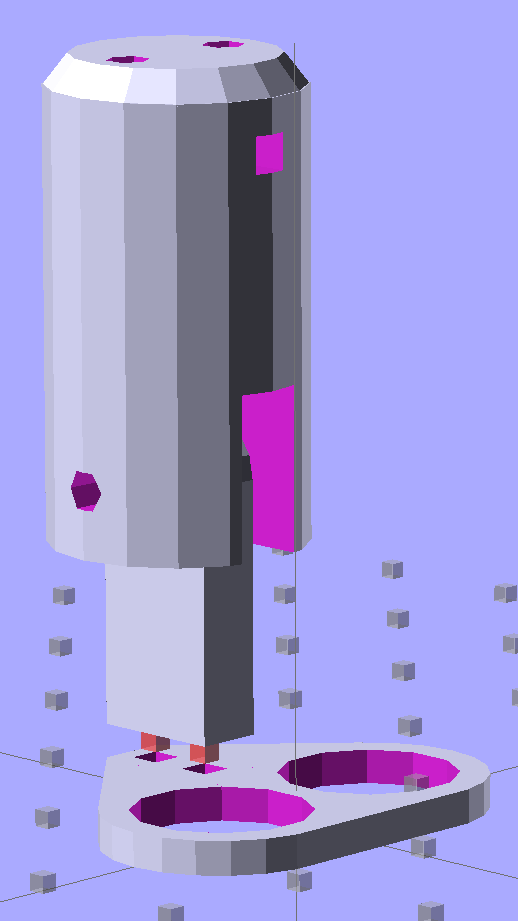
A cutaway shows the stepped holes around the contact pin, with the coil springs being the largest cylinder to the right of the solid-looking plug:
NB-6L Holder – show layout
The contact pins look like this, at least after one remembers to slide on all the parts before soldering the wires in place:
Canon NB-6L holder – contact pin detail
I filed off the inevitable solder bumps, rounded the butt ends with gentle suasion, and generally tidied the pins up so they’re smooth and symmetrical. The springs don’t have a lot of oomph, so wasting any force on friction or binding is a Bad Thing.
The holes require reaming with twist drills for a nice slip fit around the pins. The OpenSCAD script prints out the relevant diameters and depths:
ECHO: "Contact pin tip dia: 1.6"
ECHO: "Drill depth to taper end: 24.1 -- Dia: 2.4"
ECHO: " to ferrule end: 15 -- Dia: 3.1"
ECHO: " to plug end: 4 -- Dia: 5.2"
Grab the proper drill in a pin punch, adjust so that length protrudes, and have at it. Making the holes about 0.2 mm larger than nominal works well, although your mileage will definitely vary.
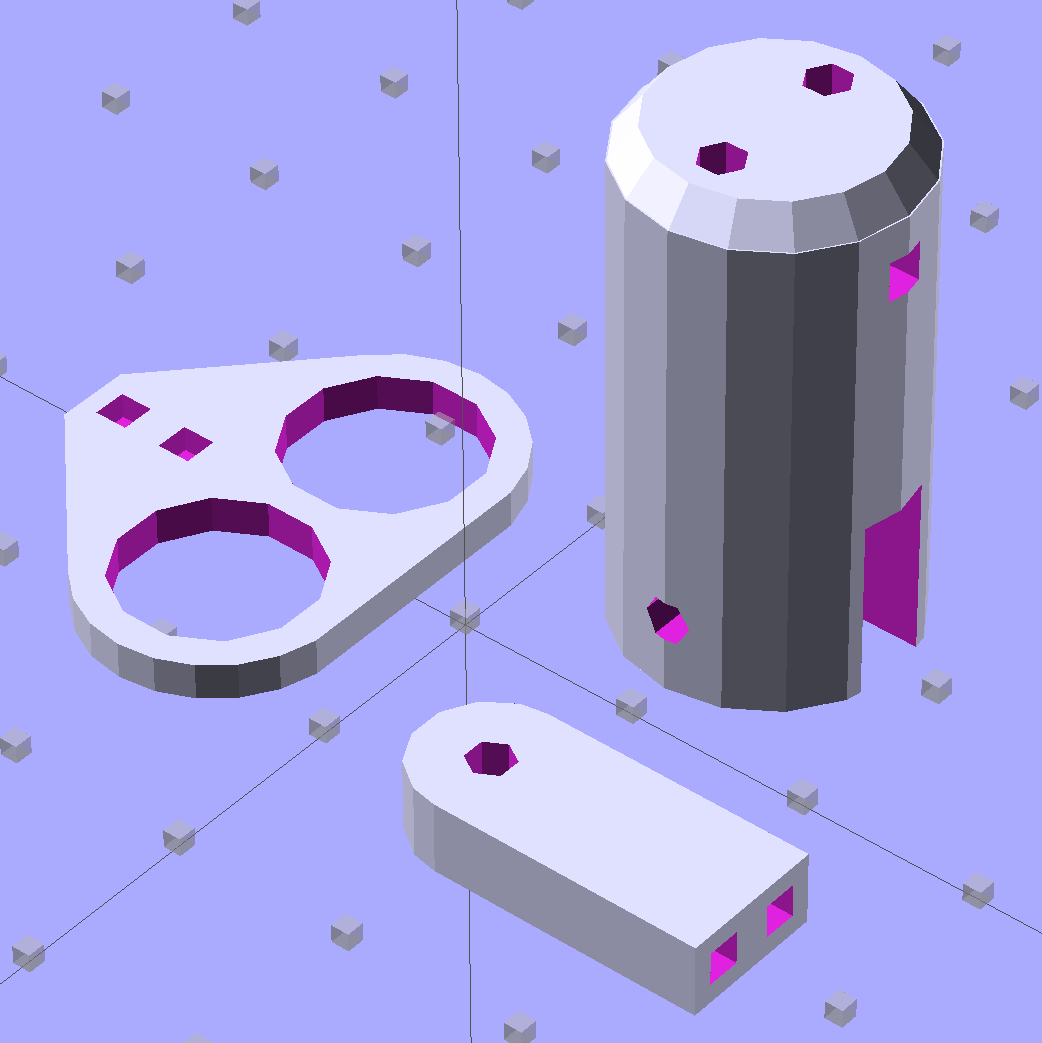
The build layout includes extra retaining plugs, as they tend to go walkabout under the bench:
NB-6L Holder – build layout
Add a dab of PVC cement with THF inside the holes and the plugs push firmly into place:
Our Larval Engineer reported that her camera, which is my old Casio pocket camera, has begun fading away, so we’re getting her a shiny new camera of her very own. Being a doting father, I picked up a pair of Wasabi NB-6L batteries (and a charger, it not costing much more for the package) so she’s never without electrons, and did the usual rundown test on all three batteries:
Canon NB-6L – 2014 OEM vs Wasabi
Fairly obviously, the Wasabi batteries aren’t first tier products, but they’re definitely better than that bottom-dollar crap from eBay.
A few months ago I fired the Thing-O-Matic, only to have it wake up dead. Not exactly dead, but spitting out checksum errors on simple G-Code files sent from Pronterface, which used to work just fine. Trying a bit of this-and-that to no avail, I proposed to The Mighty Thor that I could loan the carcass to Squidwrench, reanimate it with a less bizarre set of hardware and firmware than the much-hacked Makerbot menagerie under the hood, and use it as an exemplar in my 3D Printing classes.
Fortunately, that particular Thing-O-Matic has the most well-documented hardware evah…
Matt suggested an Azteeg X3 controller, because it has thermocouple inputs that match the existing sensor, Thor ordered one, and I tinkered up a first-pass version of Marlin that could read the inputs and twiddle the motors. The firmware is on Github, not that you’ll need it for anything you’re doing; more on that later.
Here’s the Official Doc for the microstepping jumpers hidden under the driver boards:
Azteeg X3 – microstep jumpers
That’s XYZE = 16 16 8 4, respectively, with a spare slot (and spare driver, not installed) for the second extruder it’ll never have.
The extruder’s Type K thermocouple connects to the TC1 port on the shield, exactly reversed from the way you see the test thermocouple there: the red lead is to the left, the yellow lead is to the right. If you get it backwards, the indicated temperature goes down when you touch the bead. The printer’s thermocouple has some backstory.
The 10 kΩ thermistor bead connects to the BED port on the main board and isn’t polarized. The Heated Build Platform has a bit of backstory, too.
The gutted TOM286 carcass with the MBI hardware off to the side:
TOM286 – gutted electronics bay
After a few sessions, it looked pretty cheerful again:
This is what you see when looking down through the acrylic baseplate:
Azteeg X3 – inside TOM286
The blurry silver rectangle off to the left is an aluminum channel glommed to bottom of the acrylic baseplate with silicone snot to eliminate a nasty mechanical resonance.
The thermal cutout circuitry isn’t wired in yet; the ATX power supply has its -Power-On pin hotwired to the adjacent ground pin for now. The X3 gets its power directly from the +12 V supply, so there doesn’t seem to be any way to power the X3 from the +5 V Standby ouput, deliver +12 V to the motors, and switch the supply through the X3’s ATX output pin.
The heaters work fine, the motors turn properly, and the extruder feeds molten plastic; all the motor calibrations seem to be pretty close. The first test object was a total botch, of course, but the printer’s parts seem to work OK again.
The main reason for taking the FC1002 frequency counter apart was to replace the failed quad-AA NiCd battery pack. Rather than buy new cells with tabs, I recycled some low-discharge “ready to use” NiMH cells from the heap. Back in 2009, they looked like this:
Tenergy RTU Pack A Tests – Aug 2009
Nowadays, they’re a bit less peppy:
Tenergy RTU – 2014-01 – loose cells
The red blooper shows that you can’t trust a smart fast charger to get the right answer; it concluded that pair was fully charged. After the discharge test and an overnight C/10 charge, they regained as much enthusiasm as they’ll ever have.
They have slightly less capacity than in 2009 and also a somewhat lower terminal voltage. That shouldn’t matter here, as the frequency meter has a power supply to take care of that problem.
Although I’ve sometimes been able to (quickly!) solder directly to ordinary AA cells, a trial run on a defunct RTU cell showed that wasn’t going to work on whatever variety of steel they used, no matter how much I scuffed it and despite using aggressive flux that normally blends silver solder onto stainless steel.
Fortunately, the top half of a four cell case fit exactly in the space available, so I used woven copper fabric tape inside the case to interconnect the cells, then lashed everything together with the obligatory Kapton tape:
FC1002 Frequency Counter – battery pack
That cracked faceplate isn’t the nicest thing to confront, but it’ll suffice until I get more motivation:
I did five minutes of standup comedy at yesterday’s MHV Lug meeting, pointing out some of the more interesting ways to compromise a PC when you have an infinite budget for development and consumables.
You don’t get my patter with the PDF (unless you had access to the room’s bugging hardware), but the links may come in handy in the unlikely event you haven’t been following the story closely.
If you have a security clearance or are in line for one, you probably shouldn’t click on the link, because it contains copies of pages from the leaked NSA catalog: