Given a random transformer, create a decent Spice model… I have to do this rarely enough that I’d better write it down so it’s easy to find. There’s no magic here; it’s all described in ON Semi (nee Motorola) App Note AN-1679/D. See page 4 for the grisly details; I’ve reordered things a bit here.
Go to the basement lab and measure:
- Primary & secondary voltages with a sine-wave input: Vp & Vs.
- Primary inductance with secondary open: Lps(open)
- Primary inductance with secondary shorted: Lps(short)
- DC resistance of primary & secondary: Rp & Rs
Then return to the Comfy Chair and calculate:
- Turns ratio N = Vp/Vs.
- Coupling coefficent k = sqrt(1 – Lps(short)/Lps(open))
- Primary leakage inductance LI1 = (1 – k) · Lps(open)
- Secondary leakage inductance LI2 = (1 – k) · Lps(open) / N^2
- Magnetizing inductance Lm = k · Lps(open)
To wit…
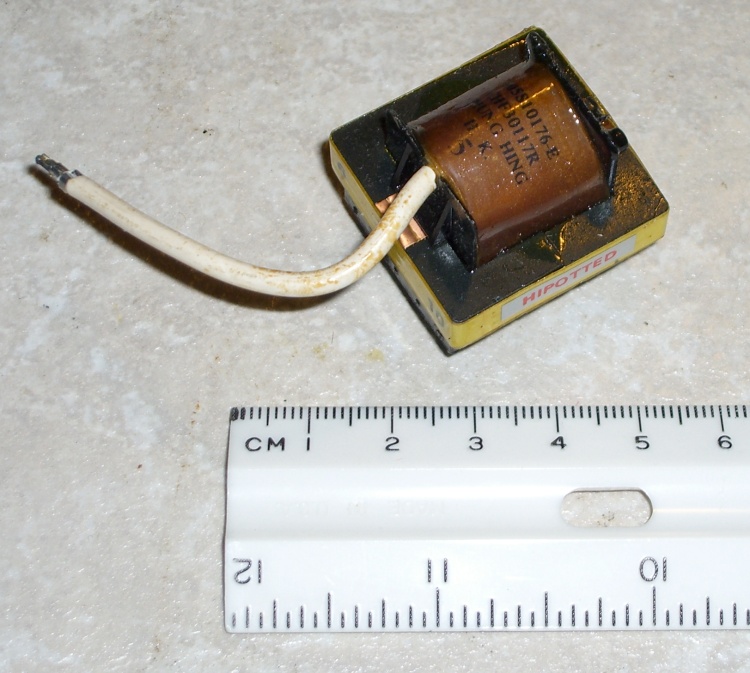
A quick trip to the basement lab produces these numbers for this small high-voltage transformer:
| Primary | Secondary | |
| Voltage | 1.08 | 27.32 |
| DC resistance | 2.03 | 349 |
| L other open | 15.5 mH | 9.68 H |
| L other short | 45.0 uH | 31.3 mH |
You don’t actually need the secondary inductances, but while you have the meter out, you may as well write those down, too. Maybe someday you’ll use the transformer backwards?
And a session with the calculator produces a Spice model:
- N = 1.076 / 27.32 = 0.0394
- k = sqrt(1 – 45.0 uH / 15.5 mH) = 0.998
- LI1 = (1 – 0.998) ·15.5 mH = 22.5 uH
- LI2 = (1 – 0.998) ·15.5 mH / 0.0394^2 = 20.0 mH
- Lm = 0.998 ·15.5 mH = 15.48 mH
Note: the value of (1 – k) is the small difference of two nearly equal numbers, so you wind up with a bunch of significant figures that might not be all that significant. The values of LI1 and LI2 depend strongly on how many figures you carry in the calculations; if you don’t get the same numbers I did, that’s probably why.
The coupled inductors L1 & L2 form an ideal transformer with a primary inductance L1 chosen so that its reactance is large with respect to anything else. I picked L1 = 1 H here, which is probably excessive.
The coupling coefficient would be 1.0 if that were allowed in the Spice model, but it’s not, so use 0.9999. Notice that this is not the k you find from the real transformer: it’s as close to 1.0 as you can get. [Update: either I was mistaken about 1.0 not being allowed or something’s changed in a recent release; 1.0 works fine now.]
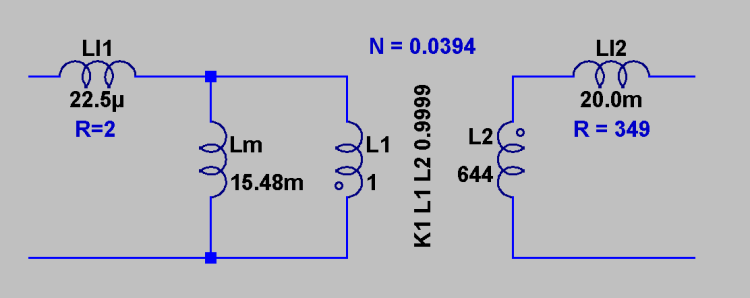
The primary inductance and turns ratio determine the secondary inductance according to:
Vp / Vs = N = sqrt(L1 / L2)
So:
L2 = L1 / (N^2) = 1 / 0.0394^2 = 644 H (!)
The models for LI1 and LI2 include the DC resistance, so that’s not visible in the schematic.
And now you can model a high-voltage DC supply…
Memo to Self: It’s G16821 from Electronic Goldmine
- Primary on pins 2 & 10
- HV secondary on pin 8 & flying wire
- Electrostatic shield on pin 3
Note: You can compute the turns ratio either way, as long as you keep your wits about you. With any luck, I’ve done so… but always verify what you read!