The Smell of Molten Projects in the Morning

Ed Nisley's Blog: Shop notes, electronics, firmware, machinery, 3D printing, laser cuttery, and curiosities. Contents: 100% human thinking, 0% AI slop.

Category: Electronics Workbench

Electrical & Electronic gadgets

  • 128×64 OLED Display: I²C Timings

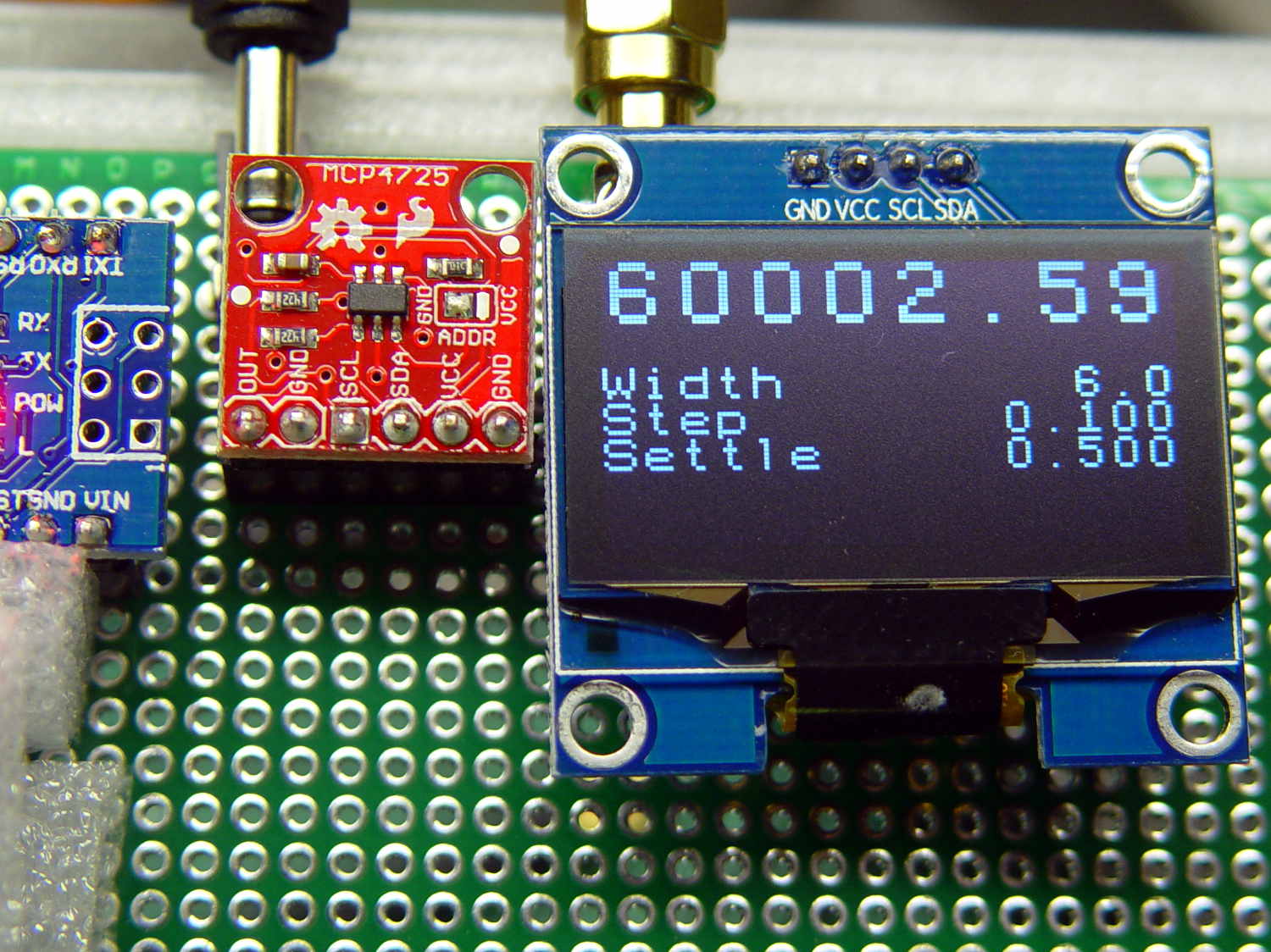
    The OLED display has a noticeable delay between writing the first (double-size) line of text and the last line, which seemed odd:

    White 128x64 OLED Display - crystal tester
    White 128×64 OLED Display – crystal tester

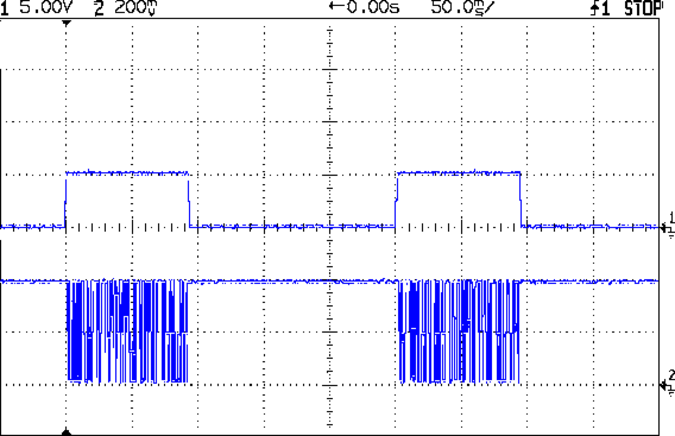
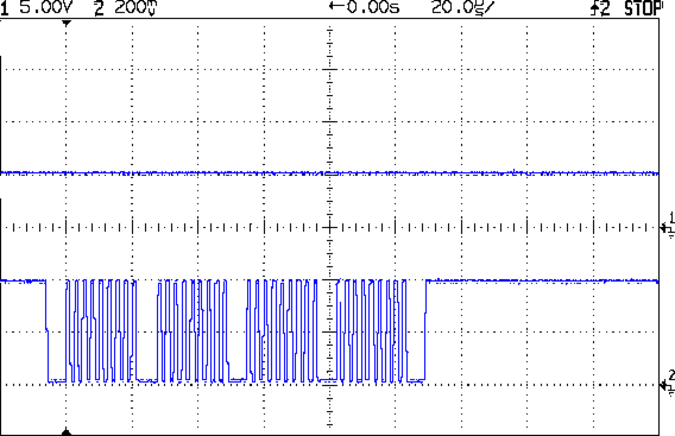
    The top trace in this scope shot goes high while the code begins the display update, which involves converting the variable to strings, the characters to bitmaps, then writing the data to the display:

    IIC Timing - overall
    IIC Timing – overall

    The bottom trace shows I²C bus activity pretty much blots up all the time, with very little required for the computations in between the display writes for each text line.

    Near the leading edge of the top trace, the code computes the new delta phase value and the X axis DAC output corresponding to that frequency:

    TestCount.fx_64 = MultiplyFixedPt(ScanFreq,CtPerHz); // compute DDS delta phase
    TestCount.fx_32.low = 0; // truncate count to integer
    TestFreq.fx_64 = MultiplyFixedPt(TestCount,HzPerCt); // compute actual frequency
    
    Temp.fx_64 = (DAC_MAX * (ScanFreq.fx_64 - ScanFrom.fx_64)) / ScanWidth.fx_32.high;
    XAxisValue = Temp.fx_32.high;
    
    WriteDDS(TestCount.fx_32.high); // set DDS to new frequency
    XAxisDAC.setVoltage(XAxisValue,DAC_WR); // and set X axis to match
    

    The burst in the top trace shows the five SPI writes to the DDS (one pulse per byte, with the hardware handling the serialization) and the bottom trace shows four I²C bus writes to the DAC:

    IIC Timing - DDS to SPI - IIC to DAC
    IIC Timing – DDS to SPI – IIC to DAC

    A bit more detail shows writing each I²C byte to the DAC requires nine clock pulses (8 data, 1 ack):

    IIC Timing - DDS to SPI - IIC to DAC detail
    IIC Timing – DDS to SPI – IIC to DAC detail

    The I²C bus ticks along at 400 kHz, with each byte requiring 33.4 µs (including the mandatory downtime around each burst), so the DAC update requires about 100 µs. The MCP4725 datasheet suggests a three byte “fast mode” write, but there’s not much point in doing so for my simple needs.

    The display ticks along at the same pace with far more data.

    In round numbers, the entire display update hits 6 text lines (1 double-height + 4 single-height) × 16 characters / line × 64 pixels / character = 6144 pixels.

    The first scope shot shows the update requires something close to 90 ms, which allows for 2700 bytes = 90 ms / 33.4 µs, the equivalent of 21 k pixels. The SH1106 hardware includes an internal address counter, so there’s no need to transfer an address with each byte; I’m not sure where the factor-of-two overhead goes.

    In order to get a faster update, there’s a definite need for lazy screen updates: no writes when there’s no change.

    This probably doesn’t matter, because I can’t watch much faster, but it’s good to know the fancy fixed-point arithmetic isn’t the limiting factor.

  • AD8310 Log Amp Module: Sidesaddle Bracket

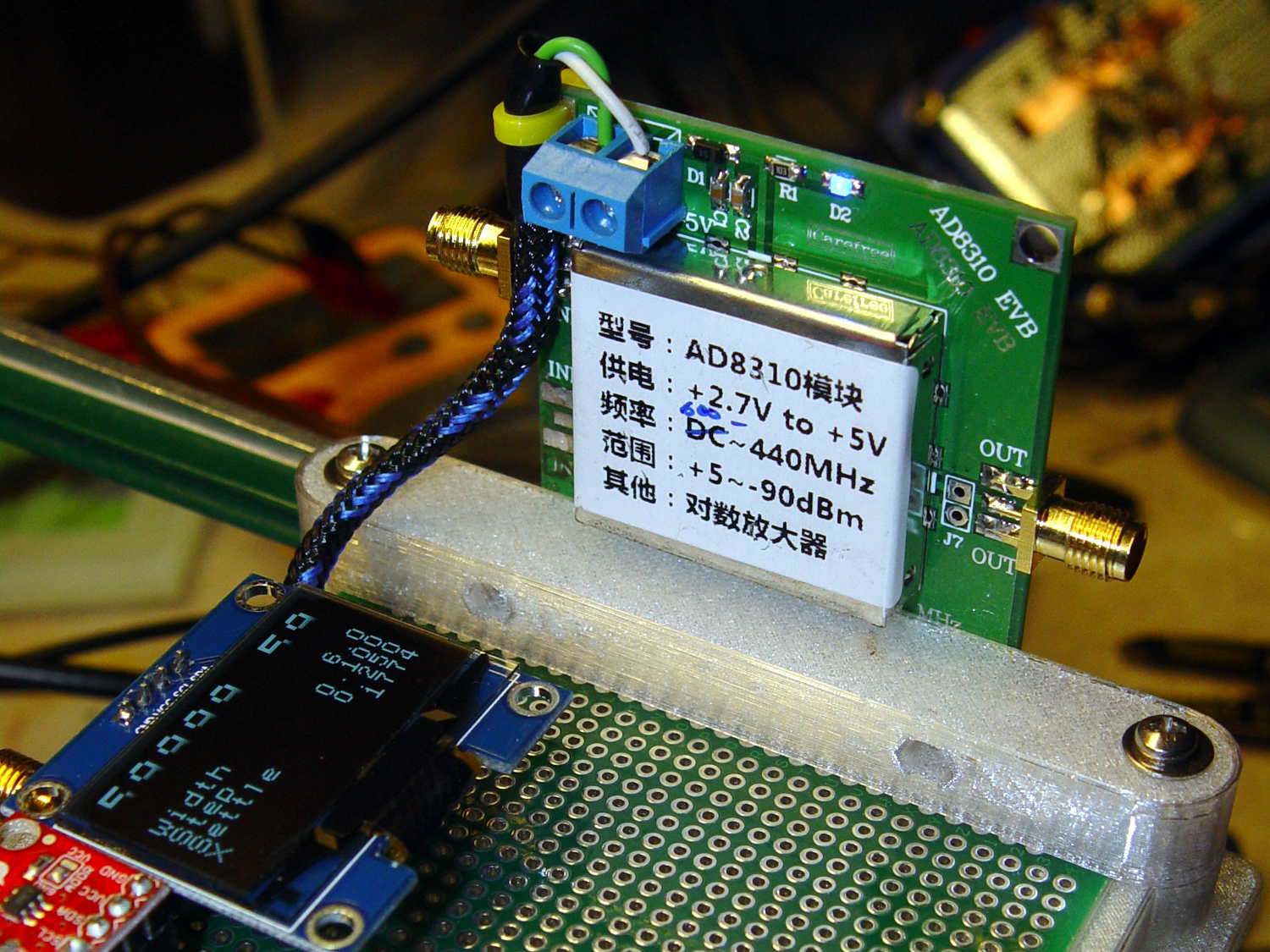
    This little bracket attaches to a proto board holder, with holes for M3 inserts to mount the AD8310 log amp module:

    PCB Side Bracket - 80x120
    PCB Side Bracket – 80×120

    Thusly:

    AD8310 module bracket on proto board holder - component side
    AD8310 module bracket on proto board holder – component side

    The OLED display looks a bit faded, which seems to be an interaction between matrix refresh and camera shutter: looks just fine in person!

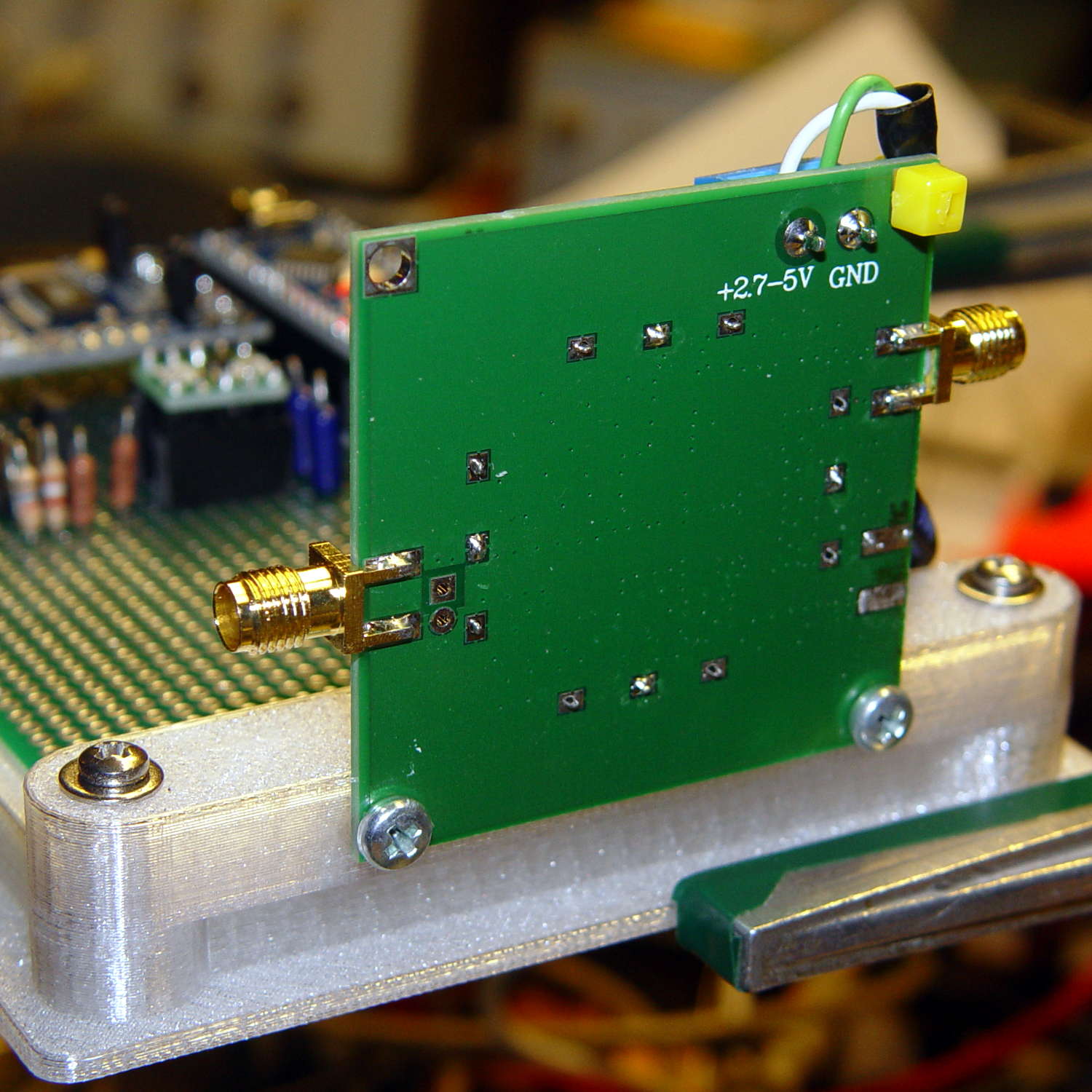
    Not much to see from the other side:

    AD8310 module bracket on proto board holder - solder side
    AD8310 module bracket on proto board holder – solder side

    I should have included an offset to slide it a bit forward; then I could mount it on the other end with clearance for the Nano’s USB port. Maybe next time.

    The OpenSCAD source code as a GitHub Gist:

    // Test support frame for proto boards
    // Ed Nisley KE4ZNU – Jan 2017
    // June 2017 – Add side-mount bracket
    Layout = "Bracket";
    ClampFlange = true;
    Channel = false;
    //- Extrusion parameters – must match reality!
    ThreadThick = 0.25;
    ThreadWidth = 0.40;
    function IntegerMultiple(Size,Unit) = Unit * ceil(Size / Unit);
    Protrusion = 0.1;
    HoleWindage = 0.2;
    //- Screw sizes
    inch = 25.4;
    Tap4_40 = 0.089 * inch;
    Clear4_40 = 0.110 * inch;
    Head4_40 = 0.211 * inch;
    Head4_40Thick = 0.065 * inch;
    Nut4_40Dia = 0.228 * inch;
    Nut4_40Thick = 0.086 * inch;
    Washer4_40OD = 0.270 * inch;
    Washer4_40ID = 0.123 * inch;
    ID = 0;
    OD = 1;
    LENGTH = 2;
    Insert = [3.9,4.6,5.8];
    //- PCB sizes
    PCBSize = [80.0,120.0,1.6];
    PCBShelf = 1.5;
    Clearance = 2*[ThreadWidth,ThreadWidth,0];
    WallThick = 4.0;
    FrameHeight = 8.0;
    ScrewOffset = 0.0 + Clear4_40/2;
    ScrewSites = [[-1,1],[-1,1]]; // -1/0/+1 = left/mid/right and bottom/mid/top
    OAHeight = FrameHeight + Clearance[2] + PCBSize[2];
    echo(str("OAH: ",OAHeight));
    FlangeExtension = 3.0;
    FlangeThick = IntegerMultiple(2.0,ThreadThick);
    Flange = PCBSize
    + 2*[ScrewOffset,ScrewOffset,0]
    + 2*[Washer4_40OD,Washer4_40OD,0]
    + [2*FlangeExtension,2*FlangeExtension,(FlangeThick – PCBSize[2])]
    ;
    echo(str("Flange: ",Flange));
    NumSides = 4*5;
    WireChannel = [Flange[0],15.0,3.0 + PCBSize[2]];
    WireChannelOffset = [Flange[0]/2,25.0,(FrameHeight + PCBSize[2] – WireChannel[2]/2)];
    //- Adjust hole diameter to make the size come out right
    module PolyCyl(Dia,Height,ForceSides=0) { // based on nophead's polyholes
    Sides = (ForceSides != 0) ? ForceSides : (ceil(Dia) + 2);
    FixDia = Dia / cos(180/Sides);
    cylinder(r=(FixDia + HoleWindage)/2,h=Height,$fn=Sides);
    }
    //- Build things
    if (Layout == "Frame")
    difference() {
    union() { // body block
    translate([0,0,OAHeight/2])
    cube(PCBSize + Clearance + [2*WallThick,2*WallThick,FrameHeight],center=true);
    for (x=[-1,1], y=[-1,1]) { // screw bosses
    translate([x*(PCBSize[0]/2 + ScrewOffset),
    y*(PCBSize[1]/2 + ScrewOffset),
    0])
    cylinder(r=Washer4_40OD,h=OAHeight,$fn=NumSides);
    }
    if (ClampFlange) // flange for work holder
    linear_extrude(height=Flange[2])
    hull()
    for (i=[-1,1], j=[-1,1]) {
    translate([i*(Flange[0]/2 – Washer4_40OD/2),j*(Flange[1]/2 – Washer4_40OD/2)])
    circle(d=Washer4_40OD,$fn=NumSides);
    }
    }
    for (x=[-1,1], y=[-1,1]) { // screw position indexes
    translate([x*(PCBSize[0]/2 + ScrewOffset),
    y*(PCBSize[1]/2 + ScrewOffset),
    -Protrusion])
    rotate(x*y*180/(2*6))
    PolyCyl(Clear4_40,(OAHeight + 2*Protrusion),6); // screw clearance holes
    translate([x*(PCBSize[0]/2 + ScrewOffset),
    y*(PCBSize[1]/2 + ScrewOffset),
    OAHeight – PCBSize[2] – Insert[LENGTH]])
    rotate(x*y*180/(2*6))
    PolyCyl(Insert[OD],Insert[LENGTH] + Protrusion,6); // inserts
    translate([x*(PCBSize[0]/2 + ScrewOffset),
    y*(PCBSize[1]/2 + ScrewOffset),
    OAHeight – PCBSize[2]])
    PolyCyl(1.2*Washer4_40OD,(PCBSize[2] + Protrusion),NumSides); // washers
    }
    translate([0,0,OAHeight/2]) // through hole below PCB
    cube(PCBSize – 2*[PCBShelf,PCBShelf,0] + [0,0,2*OAHeight],center=true);
    translate([0,0,(OAHeight – (PCBSize[2] + Clearance[2])/2 + Protrusion/2)]) // PCB pocket on top
    cube(PCBSize + Clearance + [0,0,Protrusion],center=true);
    if (Channel)
    translate(WireChannelOffset) // opening for wires from bottom side
    cube(WireChannel + [0,0,Protrusion],center=true);
    }
    // Add-on bracket to hold smaller PCB upright at edge
    PCB2Insert = [3.0,4.9,4.1];
    PCB2OC = 45.0;
    if (Layout == "Bracket")
    difference() {
    hull() // frame body block
    for (x=[-1,1]) // bosses around screws
    translate([x*(PCBSize[0]/2 + ScrewOffset),0,0])
    cylinder(r=Washer4_40OD,h=OAHeight,$fn=NumSides);
    for (x=[-1,1]) // frame screw holes
    translate([x*(PCBSize[0]/2 + ScrewOffset),0,-Protrusion])
    rotate(x*180/(2*6))
    PolyCyl(Clear4_40,(OAHeight + 2*Protrusion),6);
    for (x=[-1,1]) // PCB insert holes
    translate([x*PCB2OC/2,(Washer4_40OD + Protrusion),OAHeight/2])
    rotate([90,0,0])
    cylinder(d=PCB2Insert[OD],h=2*(Washer4_40OD + Protrusion),$fn=6);
    }
  • AD9850 DDS Module: 1.3 inch I²C OLED FTW

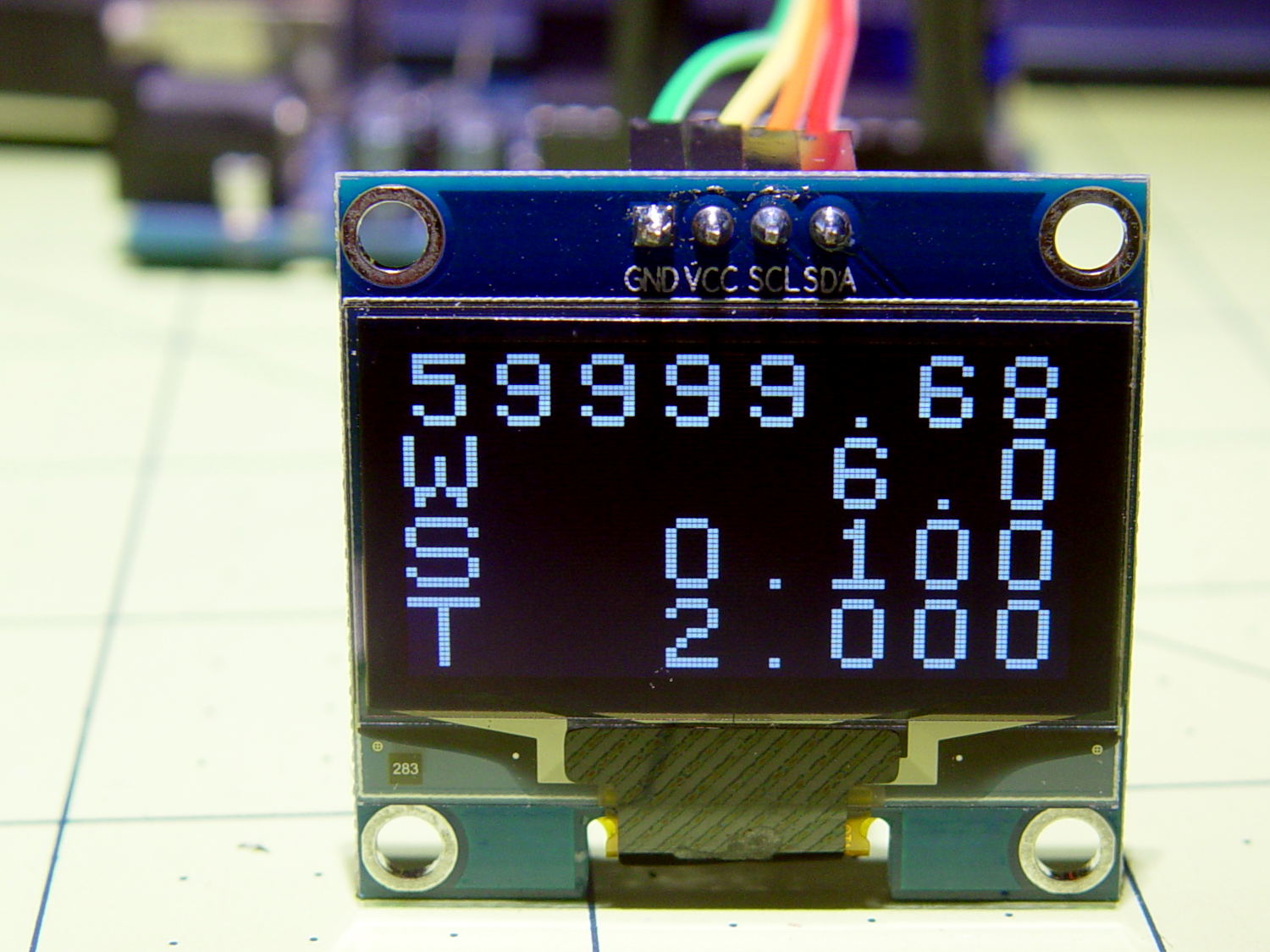
    A white 1.3 inch I²C OLED turns out to be much more readable than the yellow-blue 0.96 inch version:

    Arduino with OLED - white 1.3 inch
    Arduino with OLED – white 1.3 inch

    Of course, after you make it readable, you immediately make room to cram more data on it:

    White 1.3 inch OLED on crystal tester
    White 1.3 inch OLED on crystal tester

    That’s on the proto board with the Arduino and AD9850 DDS ticking away on the left; the bright red MCP4725 DAC will eventually drive the scope’s X axis. Shifting the display to the I²C interface and cleaning up my SPI initialization code worked wonders: the DDS now steps a sine wave at 0.1 Hz (pretty nearly) intervals from 57.0 to 60.3 Hz.

  • AD9850 DDS Module: OLED Display

    Those little OLED displays might just work:

    Arduino with OLED - simulated DDS
    Arduino with OLED – simulated DDS

    The U8X8 driver produces those double-size bitmap characters; the default 8×8 matrix seem pretty much unreadable on a 0.96 inch OLED at any practical distance from a benchtop instrument. They might be workable on a 1.3 inch white OLED, minus the attractive yellow highlight for the frequency in the top line.

    The OLED uses an SPI interface, although the U8X8 library clobbers my (simpleminded) SPI configuration for the AD9850 DDS and I’ve dummied out the DDS outputs. A soon-to-arrive I²C OLED should resolve that problem; changing the interface from SPI to I²C involves changing the single line of code constructing the driver object, so It Should Just Work.

    The U8X8 driver writes directly to the display, thus eliminating the need for a backing buffer in the Arduino’s painfully limited RAM. I think the library hauls in all possible fonts to support font selection at runtime, even though I need at most two fonts, so it may be worthwhile to hack the unneeded ones from the library (or figure out if I misunderstand the situation and the Flash image includes only the fonts actually used). Each font occupies anywhere from 200 to 2000 bytes, which I’d rather have available for program code. Chopping out unused functions would certainly be less useful.

    The display formatting is a crude hack just to see what the numbers look like:

        int ln = 0;
        u8x8.draw2x2String(0,ln,Buffer);
        ln += 2;
    
        TestFreq.fx_64 = ScanTo.fx_64 - ScanFrom.fx_64;
        PrintFixedPtRounded(Buffer,TestFreq,1);
        u8x8.draw2x2String(0,ln,"W       ");
        u8x8.draw2x2String(2*(8-strlen(Buffer)),ln,Buffer);
        ln += 2;
    
        PrintFixedPtRounded(Buffer,ScanStep,3);
        u8x8.draw2x2String(0,ln,"S       ");
        u8x8.draw2x2String(2*(8-strlen(Buffer)),ln,Buffer);
        ln += 2;
    
        TestFreq.fx_32.high = SCAN_SETTLE;                    // milliseconds
        TestFreq.fx_32.low = 0;
        TestFreq.fx_64 /= KILO;                               // to seconds
        PrintFixedPtRounded(Buffer,TestFreq,3);
        u8x8.draw2x2String(0,ln,"T       ");
        u8x8.draw2x2String(2*(8-strlen(Buffer)),ln,Buffer);
        ln += 2;
    

    Updating the display produces a noticeable and annoying flicker, which isn’t too surprising, so each value should have an “update me” flag to avoid gratuitous writes. Abstracting the display formatting into a table-driven routine might be appropriate, when I need more than one layout, but sheesh.

    I calculate the actual frequency from the 32 bit integer delta phase word written to the DDS, rather than use the achingly precise fixed point value, so a tidy 0.100 Hz frequency step doesn’t produce neat results. Instead, the displayed value will be within ±0.0291 Hz (the frequency resolution) of the desired frequency, which probably makes more sense for the very narrow bandwidths involved in a quartz crystal test gadget.

    Computing the frequency step size makes heavy use of 64 bit integers:

    //  ScanStep.fx_64 = One.fx_64 / 4;                       // 0.25 Hz = 8 or 9 tuning register steps
      ScanStep.fx_64 = One.fx_64 / 10;                    // 0.1 Hz = 3 or 4 tuning register steps
    //  ScanStep.fx_64 = One.fx_64 / 20;                    // 0.05 Hz = 2 or 3 tuning register steps
    //  ScanStep = HzPerCt;                                   // smallest possible frequency step
    

    The fixed point numbers resulting from those divisions will be accurate to nine decimal places; good enough for what I need.

    The sensible way of handling discrete scan width / step size / settling time options is through menus showing the allowed choices, with joystick / joyswitch navigation & selection, rather than keyboard entry. An analog joystick has the distinct advantage of using two analog inputs, not four digital pins, although the U8X8 driver includes a switch-driven menu handler.

    There’s a definite need to log all the values through the serial output for data collection without hand transcription.

    The Arduino source code as a GitHub Gist:

    // OLED display test for 60 kHz crystal tester
    #include <avr/pgmspace.h>
    //#include <SPI.h>
    #include <U8g2lib.h>
    #include <U8x8lib.h>
    // Turn off DDS SPI for display checkout
    #define DOSPI 0
    //———————
    // Pin locations
    // SPI uses hardware support: those pins are predetermined
    #define PIN_HEARTBEAT 9
    #define PIN_DDS_RESET 7
    #define PIN_DDS_LATCH 8
    #define PIN_DISP_SEL 4
    #define PIN_DISP_DC 5
    #define PIN_DISP_RST 6
    #define PIN_SCK 13
    #define PIN_MISO 12
    #define PIN_MOSI 11
    #define PIN_SS 10
    char Buffer[10+1+10+1]; // string buffer for long long conversions
    #define GIGA 1000000000LL
    #define MEGA 1000000LL
    #define KILO 1000LL
    struct ll_fx {
    uint32_t low; // fractional part
    uint32_t high; // integer part
    };
    union ll_u {
    uint64_t fx_64;
    struct ll_fx fx_32;
    };
    union ll_u CtPerHz; // will be 2^32 / 125 MHz
    union ll_u HzPerCt; // will be 125 MHz / 2^32
    union ll_u One; // 1.0 as fixed point
    union ll_u Tenth; // 0.1 as fixed point
    union ll_u TenthHzCt; // 0.1 Hz in counts
    // All nominal values are integers for simplicity
    #define OSC_NOMINAL (125 * MEGA)
    #define OSC_OFFSET_NOMINAL (-344LL)
    union ll_u OscillatorNominal; // nominal oscillator frequency
    union ll_u OscOffset; // … and offset, which will be signed 64-bit value
    union ll_u Oscillator; // true oscillator frequency with offset
    union ll_u CenterFreq; // center of scan width
    #define SCAN_WIDTH 6
    #define SCAN_SETTLE 2000
    union ll_u ScanFrom, ScanTo, ScanFreq, ScanStep; // frequency scan settings
    uint8_t ScanStepCounter;
    union ll_u TestFreq,TestCount; // useful variables
    //U8X8_SH1106_128X64_NONAME_4W_HW_SPI u8x8(PIN_DISP_SEL, PIN_DISP_DC , PIN_DISP_RST);
    U8X8_SH1106_128X64_NONAME_4W_SW_SPI u8x8(PIN_SCK, PIN_MOSI, PIN_DISP_SEL, PIN_DISP_DC , PIN_DISP_RST);
    //U8X8_SH1106_128X64_NONAME_HW_I2C u8x8(U8X8_PIN_NONE);
    #define HEARTBEAT_MS 3000
    unsigned long MillisNow,MillisThen;
    //———–
    // Useful functions
    // Pin twiddling
    void TogglePin(char bitpin) {
    digitalWrite(bitpin,!digitalRead(bitpin)); // toggle the bit based on previous output
    }
    void PulsePin(char bitpin) {
    TogglePin(bitpin);
    TogglePin(bitpin);
    }
    // SPI I/O
    void EnableSPI(void) {
    digitalWrite(PIN_SS,HIGH); // set SPI into Master mode
    SPCR |= 1 << SPE;
    }
    void DisableSPI(void) {
    SPCR &= ~(1 << SPE);
    }
    void WaitSPIF(void) {
    while (! (SPSR & (1 << SPIF))) {
    TogglePin(PIN_HEARTBEAT);
    TogglePin(PIN_HEARTBEAT);
    continue;
    }
    }
    byte SendRecSPI(byte Dbyte) { // send one byte, get another in exchange
    SPDR = Dbyte;
    WaitSPIF();
    return SPDR; // SPIF will be cleared
    }
    // DDS module
    void EnableDDS(void) {
    digitalWrite(PIN_DDS_LATCH,LOW); // ensure proper startup
    digitalWrite(PIN_DDS_RESET,HIGH); // minimum reset pulse 40 ns, not a problem
    digitalWrite(PIN_DDS_RESET,LOW);
    delayMicroseconds(1); // max latency 100 ns, not a problem
    DisableSPI(); // allow manual control of outputs
    digitalWrite(PIN_SCK,LOW); // ensure clean SCK pulse
    PulsePin(PIN_SCK); // … to latch hardwired config bits
    PulsePin(PIN_DDS_LATCH); // load hardwired config bits = begin serial mode
    EnableSPI(); // turn on hardware SPI controls
    SendRecSPI(0x00); // shift in serial config bits
    PulsePin(PIN_DDS_LATCH); // load serial config bits
    }
    // Write delta phase count to DDS
    // This comes from the integer part of a 64-bit scaled value
    void WriteDDS(uint32_t DeltaPhase) {
    SendRecSPI((byte)DeltaPhase); // low-order byte first
    SendRecSPI((byte)(DeltaPhase >> 8));
    SendRecSPI((byte)(DeltaPhase >> 16));
    SendRecSPI((byte)(DeltaPhase >> 24));
    SendRecSPI(0x00); // 5 MSBs = phase = 0, 3 LSBs must be zero
    PulsePin(PIN_DDS_LATCH); // write data to DDS
    }
    //———–
    // Round scaled fixed point to specific number of decimal places: 0 through 8
    // You should display the value with only Decimals characters beyond the point
    // Must calculate rounding value as separate variable to avoid mystery error
    uint64_t RoundFixedPt(union ll_u TheNumber,unsigned Decimals) {
    union ll_u Rnd;
    Rnd.fx_64 = (One.fx_64 / 2) / (pow(10LL,Decimals));
    TheNumber.fx_64 = TheNumber.fx_64 + Rnd.fx_64;
    return TheNumber.fx_64;
    }
    //———–
    // Multiply two unsigned scaled fixed point numbers without overflowing a 64 bit value
    // The product of the two integer parts mut be < 2^32
    uint64_t MultiplyFixedPt(union ll_u Mcand, union ll_u Mplier) {
    union ll_u Result;
    Result.fx_64 = ((uint64_t)Mcand.fx_32.high * (uint64_t)Mplier.fx_32.high) << 32; // integer parts (clear fract)
    Result.fx_64 += ((uint64_t)Mcand.fx_32.low * (uint64_t)Mplier.fx_32.low) >> 32; // fraction parts (always < 1)
    Result.fx_64 += (uint64_t)Mcand.fx_32.high * (uint64_t)Mplier.fx_32.low; // cross products
    Result.fx_64 += (uint64_t)Mcand.fx_32.low * (uint64_t)Mplier.fx_32.high;
    return Result.fx_64;
    }
    //———–
    // Long long print-to-buffer helpers
    // Assumes little-Endian layout
    void PrintHexLL(char *pBuffer,union ll_u FixedPt) {
    sprintf(pBuffer,"%08lx %08lx",FixedPt.fx_32.high,FixedPt.fx_32.low);
    }
    // converts all 9 decimal digits of fraction, which should suffice
    void PrintFractionLL(char *pBuffer,union ll_u FixedPt) {
    union ll_u Fraction;
    Fraction.fx_64 = FixedPt.fx_32.low; // copy 32 fraction bits, high order = 0
    Fraction.fx_64 *= GIGA; // times 10^9 for conversion
    Fraction.fx_64 >>= 32; // align integer part in low long
    sprintf(pBuffer,"%09lu",Fraction.fx_32.low); // convert low long to decimal
    }
    void PrintIntegerLL(char *pBuffer,union ll_u FixedPt) {
    sprintf(pBuffer,"%lu",FixedPt.fx_32.high);
    }
    void PrintFixedPt(char *pBuffer,union ll_u FixedPt) {
    PrintIntegerLL(pBuffer,FixedPt); // do the integer part
    pBuffer += strlen(pBuffer); // aim pointer beyond integer
    *pBuffer++ = '.'; // drop in the decimal point, tick pointer
    PrintFractionLL(pBuffer,FixedPt);
    }
    void PrintFixedPtRounded(char *pBuffer,union ll_u FixedPt,unsigned Decimals) {
    char *pDecPt;
    FixedPt.fx_64 = RoundFixedPt(FixedPt,Decimals);
    PrintIntegerLL(pBuffer,FixedPt); // do the integer part
    pBuffer += strlen(pBuffer); // aim pointer beyond integer
    pDecPt = pBuffer; // save the point location
    *pBuffer++ = '.'; // drop in the decimal point, tick pointer
    PrintFractionLL(pBuffer,FixedPt); // do the fraction
    if (Decimals == 0)
    *pDecPt = 0; // 0 places means discard the decimal point
    else
    *(pDecPt + Decimals + 1) = 0; // truncate string to leave . and Decimals chars
    }
    //———–
    // Calculate useful "constants" from oscillator info
    // Args are integer constants in Hz
    void CalcOscillator(uint32_t Base,uint32_t Offset) {
    union ll_u Temp;
    Oscillator.fx_32.high = Base + Offset; // get true osc frequency from integers
    Oscillator.fx_32.low = 0;
    HzPerCt.fx_32.low = Oscillator.fx_32.high; // divide oscillator by 2^32 with simple shifting
    HzPerCt.fx_32.high = 0;
    CtPerHz.fx_64 = -1; // Compute (2^32 – 1) / oscillator
    CtPerHz.fx_64 /= (uint64_t)Oscillator.fx_32.high; // remove 2^32 scale factor from divisor
    TenthHzCt.fx_64 = MultiplyFixedPt(Tenth,CtPerHz); // 0.1 Hz as delta-phase count
    #if 0
    printf("Inputs: %ld = %ld%+ld\n",Base+Offset,Base,Offset);
    PrintFixedPt(Buffer,Oscillator);
    printf("Osc freq: %s\n",Buffer);
    PrintFixedPt(Buffer,HzPerCt);
    printf("Hz/Ct: %s\n",Buffer);
    PrintFixedPt(Buffer,CtPerHz);
    printf("Ct/Hz: %s\n",Buffer);
    PrintFixedPt(Buffer,TenthHzCt);
    printf("0.1 Hz Ct: %s",Buffer);
    #endif
    }
    //– Helper routine for printf()
    int s_putc(char c, FILE *t) {
    Serial.write(c);
    }
    //———–
    void setup ()
    {
    pinMode(PIN_HEARTBEAT,OUTPUT);
    digitalWrite(PIN_HEARTBEAT,HIGH); // show we got here
    Serial.begin (115200);
    fdevopen(&s_putc,0); // set up serial output for printf()
    Serial.println (F("DDS OLED exercise"));
    Serial.println (F("Ed Nisley – KE4ZNU – May 2017\n"));
    // DDS module controls
    pinMode(PIN_DDS_LATCH,OUTPUT);
    digitalWrite(PIN_DDS_LATCH,LOW);
    pinMode(PIN_DDS_RESET,OUTPUT);
    digitalWrite(PIN_DDS_RESET,HIGH);
    // Light up the display
    Serial.println("Initialize OLED");
    u8x8.begin();
    u8x8.setPowerSave(0);
    u8x8.setFont(u8x8_font_pxplusibmcga_f);
    u8x8.draw2x2String(0,0,"OLEDTest");
    u8x8.drawString(0,2,"Ed Nisley");
    u8x8.drawString(0,3," KE4ZNU");
    u8x8.drawString(0,4,"May 2017");
    // configure SPI hardware
    #if DOSPI
    SPCR = B01110001; // Auto SPI: no int, enable, LSB first, master, + edge, leading, f/16
    SPSR = B00000000; // not double data rate
    pinMode(PIN_SS,OUTPUT);
    digitalWrite(PIN_SCK,HIGH);
    pinMode(PIN_SCK,OUTPUT);
    digitalWrite(PIN_SCK,LOW);
    pinMode(PIN_MOSI,OUTPUT);
    digitalWrite(PIN_MOSI,LOW);
    pinMode(PIN_MISO,INPUT_PULLUP);
    #endif
    TogglePin(PIN_HEARTBEAT); // show we got here
    // Calculate useful constants
    One.fx_64 = 1LL << 32; // Set up 1.0, a very useful constant
    Tenth.fx_64 = One.fx_64 / 10; // Likewise, 0.1
    // Set oscillator "constants"
    CalcOscillator(OSC_NOMINAL,OSC_OFFSET_NOMINAL);
    TogglePin(PIN_HEARTBEAT); // show we got here
    // Set the crystal-under-test nominal frequency
    CenterFreq.fx_64 = One.fx_64 * (60 * KILO);
    #if 1
    PrintFixedPtRounded(Buffer,CenterFreq,1);
    printf("Center: %s\n",Buffer);
    #endif
    // Set up scan limits based on center frequency
    ScanFrom.fx_64 = CenterFreq.fx_64 – SCAN_WIDTH * (One.fx_64 >> 1);
    ScanTo.fx_64 = CenterFreq.fx_64 + SCAN_WIDTH * (One.fx_64 >> 1);
    ScanFreq = ScanFrom; // start scan at lower limit
    // ScanStep.fx_64 = One.fx_64 / 4; // 0.25 Hz = 8 or 9 tuning register steps
    ScanStep.fx_64 = One.fx_64 / 10; // 0.1 Hz = 3 or 4 tuning register steps
    // ScanStep.fx_64 = One.fx_64 / 20; // 0.05 Hz = 2 or 3 tuning register steps
    // ScanStep = HzPerCt; // smallest possible frequency step
    #if 1
    Serial.println("\nScan limits");
    PrintFixedPtRounded(Buffer,ScanFrom,1);
    printf(" from: %11s\n",Buffer);
    PrintFixedPtRounded(Buffer,ScanFreq,1);
    printf(" at: %11s\n",Buffer);
    PrintFixedPtRounded(Buffer,ScanTo,1);
    printf(" to: %11s\n",Buffer);
    PrintFixedPtRounded(Buffer,ScanStep,3);
    printf(" step: %s\n",Buffer);
    #endif
    // Wake up and load the DDS
    #if DOSPI
    TestCount.fx_64 = MultiplyFixedPt(ScanFreq,CtPerHz);
    EnableDDS();
    WriteDDS(TestCount.fx_32.high);
    #endif
    delay(2000);
    u8x8.clearDisplay();
    u8x8.setFont(u8x8_font_artossans8_r);
    Serial.println("\nStartup done!");
    MillisThen = millis();
    }
    //———–
    void loop () {
    MillisNow = millis();
    if ((MillisNow – MillisThen) >= SCAN_SETTLE) {
    TogglePin(PIN_HEARTBEAT);
    MillisThen = MillisNow;
    PrintFixedPtRounded(Buffer,ScanFreq,2);
    TestCount.fx_64 = MultiplyFixedPt(ScanFreq,CtPerHz);
    // printf("%12s -> %9ld\n",Buffer,TestCount.fx_32.high);
    #if DOSPI
    WriteDDS(TestCount.fx_32.high);
    #endif
    TestCount.fx_32.low = 0; // truncate to integer
    TestFreq.fx_64 = MultiplyFixedPt(TestCount,HzPerCt); // recompute frequency
    PrintFixedPtRounded(Buffer,TestFreq,2);
    int ln = 0;
    u8x8.draw2x2String(0,ln,Buffer);
    ln += 2;
    TestFreq.fx_64 = ScanTo.fx_64 – ScanFrom.fx_64;
    PrintFixedPtRounded(Buffer,TestFreq,1);
    u8x8.draw2x2String(0,ln,"W ");
    u8x8.draw2x2String(2*(8-strlen(Buffer)),ln,Buffer);
    ln += 2;
    PrintFixedPtRounded(Buffer,ScanStep,3);
    u8x8.draw2x2String(0,ln,"S ");
    u8x8.draw2x2String(2*(8-strlen(Buffer)),ln,Buffer);
    ln += 2;
    TestFreq.fx_32.high = SCAN_SETTLE; // milliseconds
    TestFreq.fx_32.low = 0;
    TestFreq.fx_64 /= KILO; // to seconds
    PrintFixedPtRounded(Buffer,TestFreq,3);
    u8x8.draw2x2String(0,ln,"T ");
    u8x8.draw2x2String(2*(8-strlen(Buffer)),ln,Buffer);
    ln += 2;
    ScanFreq.fx_64 += ScanStep.fx_64;
    if (ScanFreq.fx_64 > (ScanTo.fx_64 + ScanStep.fx_64 / 2)) {
    ScanFreq = ScanFrom;
    }
    }
    }
    view raw DDSOLEDTest.ino hosted with ❤ by GitHub
  • Beckman DM73 Circuitmate: Back From the Dead!

    Prompted by the condolences on the death of my Beckman DM73 Circuitmate, I brought the carcass back to Squidwrench, took it apart, annoyed the switches, and re-soldered the battery connections:

    Beckman DM73 Circuitmate - restored
    Beckman DM73 Circuitmate – restored

    I worked minute dots of Caig DeoxIT into the switches, without disassembling them, with magical thinking guiding my technique. One of the battery connections seemed suspect, but we’ll never know.

    In any event, it beeps happily when turned on (*), the LCD behaves properly, it’s no longer pressure-sensitive, and life is good! It surely needs calibration, but that’s definitely in the nature of fine tuning.

    Thanks for nudging me into Doing The Right Thing™.

    (*) Including the double beep with the AC/DC button held down.

  • AD9850 DDS Module: Temperature Sensitivity

    While tinkering with the SPI code for the AD9850 DDS module, I wrote down the ambient temperature and the frequency tweak required to zero-beat the 10 MHz output with the GPS-locked oscillator. A quick-n-dirty plot summarizing two days of randomly timed observations ensued:

    AD9850 DDS Module - Frequency vs Temperature
    AD9850 DDS Module – Frequency vs Temperature

    The frequency offset comes from the tweak required to zero-beat the output by adjusting the initial oscillator error: a positive tweak produces a smaller count-per-hertz coefficient and reduces the output frequency. As a result, the thermal coefficient sign is backwards, because increasing temperature raises the oscillator frequency and reduces the necessary tweak. I think so, anyway; you know how these things can go wrong. More automation and reliable data would be a nice touch.

    Foam sheets formed a block around the DDS module, isolating it from stray air currents and reducing the clock oscillator’s sensitivity:

    AD9850 DDS module - foam insulation
    AD9850 DDS module – foam insulation

    I used the ambient temperature, because the thermocouple inside the foam (not shown in the picture) really wasn’t making good contact with the board, the readings didn’t make consistent sense, and, given a (nearly) constant power dissipation, the (average) oscillator temperature inside the foam should track ambient temperature with a constant offset. I think so, anyway.

    The coefficient works out to 0.02 ppm/°C. Of course, the initial frequency offset is something like -400 Hz = 3 ppm, so we’re not dealing with lab-grade instrumentation here.

  • DDS Musings: Arithmetic with 32-bit Fixed Point Numbers

    Spoiler alert: having spent a while trying to fit the DDS calculations into fixed-point numbers stuffed into a single 32 bit unsigned long value, it’s just a whole bunch of nope.

    The basic problem, as alluded to earlier, comes from calculations on numbers near 32768.0 and 60000.0 Hz, which require at least 6 significant digits. Indeed, 0.1 Hz at 60 kHz works out to 1.7 ppm, so anything around 0.05 Hz requires seven digits.

    The motivation for fixed-point arithmetic, as alluded to earlier, comes from the amount of program memory and RAM blotted up by the BigNumber arbitrary precision arithmetic library, which seems like a much bigger hammer than necessary for this problem.

    So, we begin.

    Because the basic tuning increment works out to 0.0291 Hz, you can’t adjust the output frequency in nice, clean 0.01 Hz clicks. That doesn’t matter, as long as you know the actual frequency with some accuracy.

    Setting up the DDS requires calculations involving numbers near 125.000000 MHz and 2³², both of which sport nine or ten significant figures, depending on how fussy you are about calibrating the actual oscillator frequency and how you go about doing it. Based on a sample of one AD8950 DDS board, the 125 MHz oscillator runs 300 to 400 Hz below its nominal 125 MHz: about 3 ppm low, with a -2.3 Hz/°C tempco responding to a breath. It’s obviously not stable enough for precise calibration, but even 1 ppm = 125 Hz chunks seem awkwardly large.

    Many of the doodles below explore various ways to fit integer values up to 125 MHz and fractions down to 0.0291 Hz/count into fixed point numbers with 24 integer bits + 8 fraction bits, perhaps squeezed a few bits either way. Fairly obviously, at least in retrospect, it can’t possibly work: 125×10⁶ requires 28 bits. Worse, 8 fraction bits yield steps of 0.0039, so you start with crappy resolution.

    The DDS tuning word is about 2×10⁶ for outputs around 60 kHz, barely covered by 21 bits. You really need at least seven significant figures = 0.1 ppm for those computations, which means the 125 MHz / 2³² ratio must carry seven significant figures, which means eight decimal places: 0.02910383 and not a digit less.

    En passant, it’s disturbing how many Arduino DDS libraries declare all their variables as double and move on as if the quantities were thereby encoded in 64 bit floating point numbers. Were that the case, I’d agree 125e6 / pow(2.0,32) actually meant something, but it ain’t so.

    The original non-linear doodles, which, despite containing some values useful in later computations, probably aren’t worth your scrutiny:

    AD9850 DDS Fixed-point Number Doodles - 1
    AD9850 DDS Fixed-point Number Doodles – 1
    AD9850 DDS Fixed-point Number Doodles - 2
    AD9850 DDS Fixed-point Number Doodles – 2
    AD9850 DDS Fixed-point Number Doodles - 3
    AD9850 DDS Fixed-point Number Doodles – 3
    AD9850 DDS Fixed-point Number Doodles - 4
    AD9850 DDS Fixed-point Number Doodles – 4
    AD9850 DDS Fixed-point Number Doodles - 5
    AD9850 DDS Fixed-point Number Doodles – 5
    AD9850 DDS Fixed-point Number Doodles - 6
    AD9850 DDS Fixed-point Number Doodles – 6
    AD9850 DDS Fixed-point Number Doodles - 7
    AD9850 DDS Fixed-point Number Doodles – 7
    AD9850 DDS Fixed-point Number Doodles - 8
    AD9850 DDS Fixed-point Number Doodles – 8