Ed Nisley's Blog: Shop notes, electronics, firmware, machinery, 3D printing, laser cuttery, and curiosities. Contents: 100% human thinking, 0% AI slop.
It should come as no surprise that hard drive platters have different thicknesses:
Hard Drive Platter Thickness
The thicker ones measure 1.25 mm, which is near enough to 50 mils to suggest they date back to the Good Old Days. The three thinner ones in the middle are 0.77 mm = 30 mil and could be slightly younger than dirt. There’s more where these came from and I expect more variation on the theme.
The beveled edges make the platters look thinner than they really are; they’re firmly clamped together with no space between them.
The original Mood Light firmware used the current time in milliseconds as a factor in the sin() argument, assuming that the Arduino runtime would Do The Right Thing. Having been gently disabused of that notion, here’s another pass that resets the argument after every full cycle to keep the trig from going crazy. Thanks to all of you for helping out… [grin]
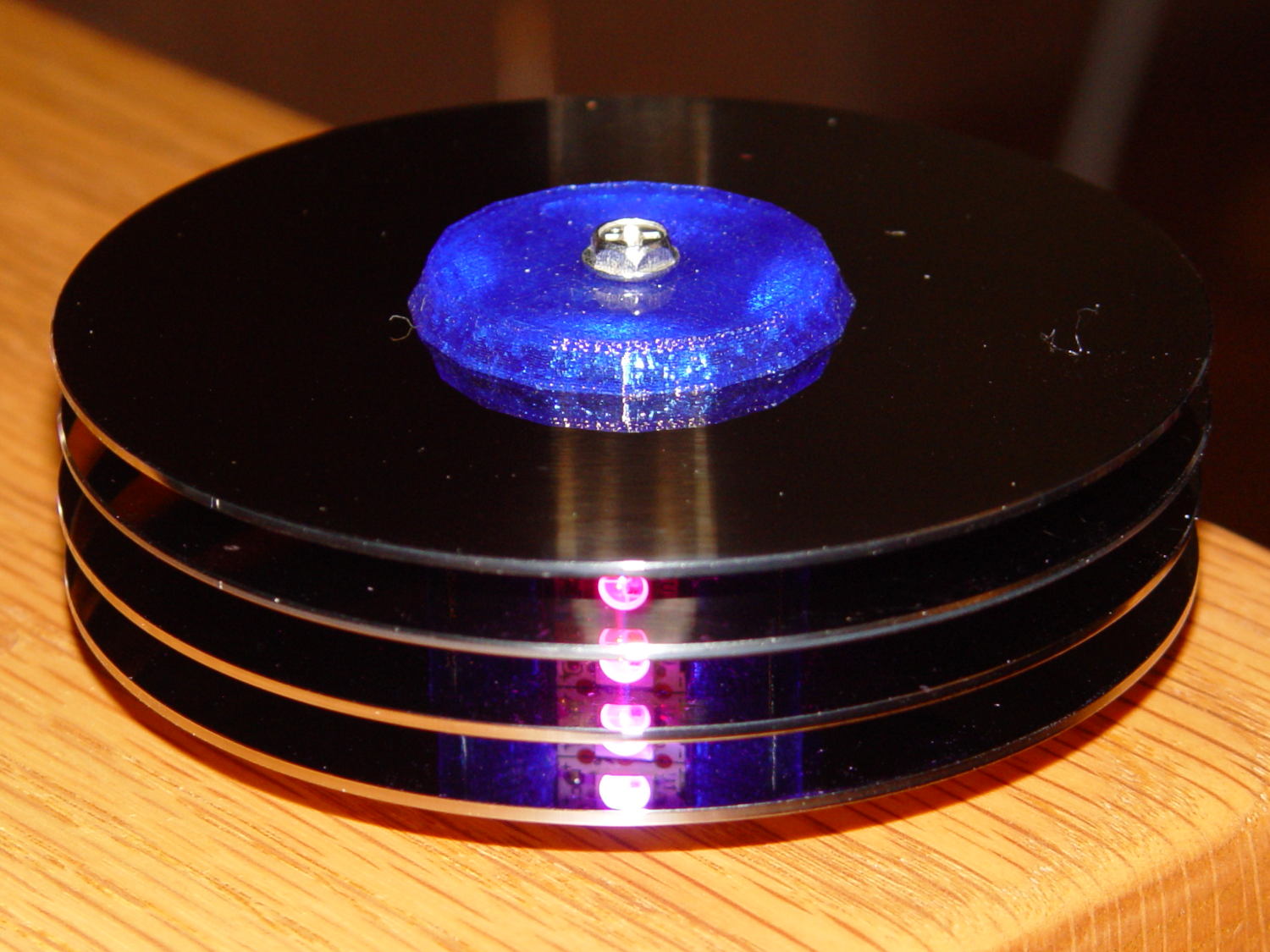
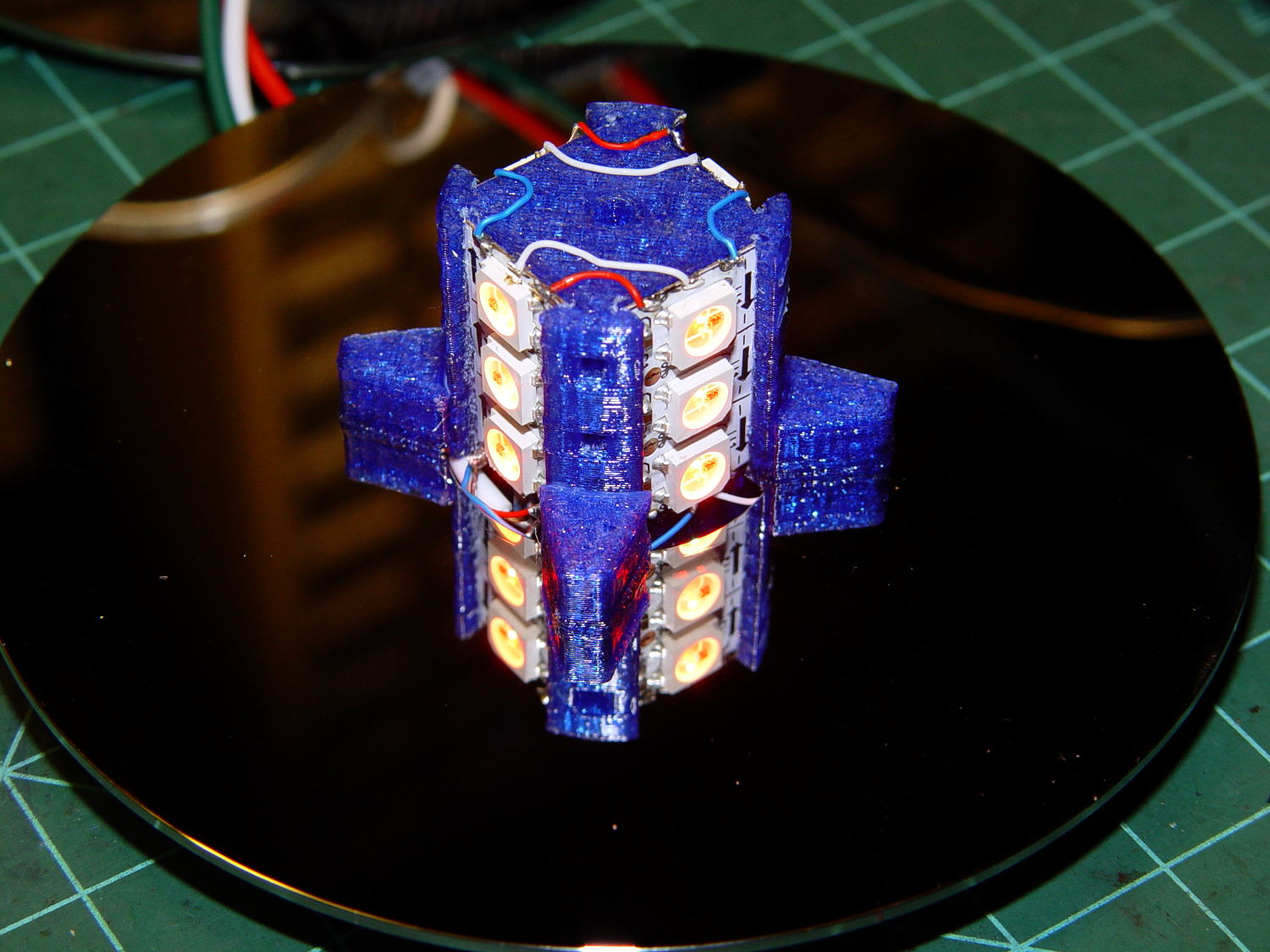
The hardware still looks like this, though:
Hard Drive Mood Light – high angle
Define a structure to hold everything needed to calculate each color, then make an array holding one structure per color:
The general idea is to increment the integer Step from 0 through NumSteps - 1 to create the sine wave, with the total number of steps per cycle being Prime times the RESOLUTION.
The angular argument is Step * StepSize, with the size of each step equal to 2π / NumSteps. Because Step gets reset to zero after reaching NumSteps - 1, the argument never exceeds 2π and the trig never falls off the rails.
Soooo, calculating the PWM value for each color goes like this:
The MaxPWM parameter limits the perceived brightness, although not the peak current. Each Neopixel dissipates 300-ish mW at full throttle, they’re mounted on a plastic structure, and there’s not a lot of air flowing between those platters; running at half power makes a lot of sense.
Initializing the structure values happens in the setup() function, because it’s easier than filling in all the array structure entries by hand:
The Phase value has Gone Away, because it really didn’t add anything to the proceedings. Instead, I randomize the starting Step, although there’s not a lot of randomness to be had early on in an Arduino program; that needs a bit more work. Adding a little PCB with a random noise source doesn’t seem cost-effective, although a photodetector peering out the side and adjusting the MaxPWM values might be a Good Thing.
Come to think of it, limiting the sum of the PWM values might be more useful than limiting their individual maximum values. That’s a simple matter of software…
The main() loop doesn’t have a lot to do. Every 25 ms it updates the three color PWM values, sets the new values into all 12 LED buffer locations, and sends the whole mess to the Neopixels. The RESOLUTION value acts as a gearshift between the 25 ms update rate and the speed at which complete cycles zip past. Absent the Prime factor, each cycle would require 25 ms * RESOLUTION ms to complete: call it 25 seconds.
The Prime factors slow that down proportionally and push the repetition interval out to the product of all the factors. For the (5, 7, 11) factors shown below, that’s 5x7x11x253 s = 6×10⁶ s = 70 days,
Now it doesn’t matter how often the millis() value wraps. Every now & again, MillisThen will be just under 232 and MillisNow will be just over 0, but their (unsigned) difference will be some huge number, the conditional will trip, and nobody will notice the timing glitch…
The Arduino source code:
// Neopixel mood lighting for hard drive platter sculpture
// Ed Nisley - KE4ANU - November 2015
#include <Adafruit_NeoPixel.h>
//----------
// Pin assignments
const byte PIN_NEO = 6; // DO - data out to first Neopixel
const byte PIN_HEARTBEAT = 13; // DO - Arduino LED
//----------
// Constants
const unsigned long UpdateMS = 25ul - 4ul; // update LEDs only this many ms apart minus loop() overhead
//----------
// Globals
unsigned long MillisNow;
unsigned long MillisThen;
Adafruit_NeoPixel strip = Adafruit_NeoPixel(12, PIN_NEO, NEO_GRB + NEO_KHZ800);
uint32_t FullWhite = strip.Color(255,255,255);
uint32_t FullOff = strip.Color(0,0,0);
struct pixcolor_t {
	byte Prime;
	unsigned int NumSteps;
	unsigned int Step;
	float StepSize;
	byte MaxPWM;
	byte Value;
};

enum pixcolors {RED, GREEN, BLUE, PIXELSIZE};

#define RESOLUTION 1000

struct pixcolor_t Pixels[PIXELSIZE]; // everything that calculates the pixel colors
byte Map[] = {0,5,6,11, 1,4,7,10, 2,3,8,9}; // pixel numbers around platter, bottom to top.
//-- Figure PWM based on current state
byte StepColor(byte Color) {
Pixels[Color].Value = (Pixels[Color].MaxPWM / 2.0) * (1.0 + sin(Pixels[Color].Step * Pixels[Color].StepSize));
Pixels[Color].Step = (Pixels[Color].Step >= Pixels[Color].NumSteps) ? 0 : Pixels[Color].Step + 1;
if (0 == Pixels[Color].Step) {
printf("Color %d cycle end at %d\r\n",Color,Pixels[Color].NumSteps);
}
// printf("Step: %d Color: %d Value: %d\r\n",Pixels[Color].Step,(word)Color,(word)Pixels[Color].Value);
return Pixels[Color].Value;
}
//-- Helper routine for printf()
int s_putc(char c, FILE *t) {
Serial.write(c);
}
//------------------
// Set the mood
void setup() {
pinMode(PIN_HEARTBEAT,OUTPUT);
digitalWrite(PIN_HEARTBEAT,LOW); // show we arrived
Serial.begin(57600);
fdevopen(&s_putc,0); // set up serial output for printf()
printf("Mood Light with Neopixels\r\nEd Nisley - KE4ZNU - November 2015\r\n");
/// set up Neopixels
strip.begin();
strip.show();
// lamp test: run a brilliant white dot along the length of the strip
printf("Lamp test: walking white\r\n");
strip.setPixelColor(0,FullWhite);
strip.show();
delay(500);
for (int i=1; i<strip.numPixels(); i++) {
digitalWrite(PIN_HEARTBEAT,HIGH);
strip.setPixelColor(i-1,FullOff);
strip.setPixelColor(i,FullWhite);
strip.show();
digitalWrite(PIN_HEARTBEAT,LOW);
delay(500);
}
strip.setPixelColor(strip.numPixels() - 1,FullOff);
strip.show();
delay(500);
// and around the disks
printf(" ... using Map array\r\n");
strip.setPixelColor(Map[0],FullWhite);
strip.show();
delay(250);
for (int i=1; i<strip.numPixels(); i++) {
digitalWrite(PIN_HEARTBEAT,HIGH);
strip.setPixelColor(Map[i-1],FullOff);
strip.setPixelColor(Map[i],FullWhite);
strip.show();
digitalWrite(PIN_HEARTBEAT,LOW);
delay(250);
}
strip.setPixelColor(Map[strip.numPixels() - 1],FullOff);
strip.show();
delay(250);
MillisNow = MillisThen = millis();
randomSeed(MillisNow + analogRead(7));
printf("First random number: %ld\r\n",random(10));
	Pixels[RED].Prime = 5;
	Pixels[GREEN].Prime = 7;
	Pixels[BLUE].Prime = 11;

	for (byte c=0; c < PIXELSIZE; c++) {
		Pixels[c].NumSteps = RESOLUTION * Pixels[c].Prime;
		Pixels[c].Step = random(Pixels[c].NumSteps);
		Pixels[c].StepSize = TWO_PI / Pixels[c].NumSteps;
		Pixels[c].MaxPWM = 128;
		StepColor(c);
	}
printf("Prime scales: (%d,%d,%d)\r\n",Pixels[RED].Prime,Pixels[GREEN].Prime,Pixels[BLUE].Prime);
printf("Initial step: (%d,%d,%d)\r\n",Pixels[RED].Step,Pixels[GREEN].Step,Pixels[BLUE].Step);
printf(" ... color: (%d,%d,%d)\r\n",Pixels[RED].Value,Pixels[GREEN].Value,Pixels[BLUE].Value);
for (int i=0; i<strip.numPixels(); i++) { strip.setPixelColor(Map[i],strip.Color(Pixels[RED].Value,Pixels[GREEN].Value,Pixels[BLUE].Value)); } strip.show(); } //------------------ // Run the mood void loop() { // printf("Loop! %ld %ld\r\n",MillisNow,MillisThen); MillisNow = millis(); if ((MillisNow - MillisThen) > UpdateMS) {
digitalWrite(PIN_HEARTBEAT,HIGH);
for (byte c=0; c < PIXELSIZE; c++) {
StepColor(c);
}
for (int i=0; i < strip.numPixels(); i++) {
strip.setPixelColor(i,strip.Color(Pixels[RED].Value,Pixels[GREEN].Value,Pixels[BLUE].Value));
}
strip.show();
MillisThen = MillisNow;
digitalWrite(PIN_HEARTBEAT,LOW);
}
}
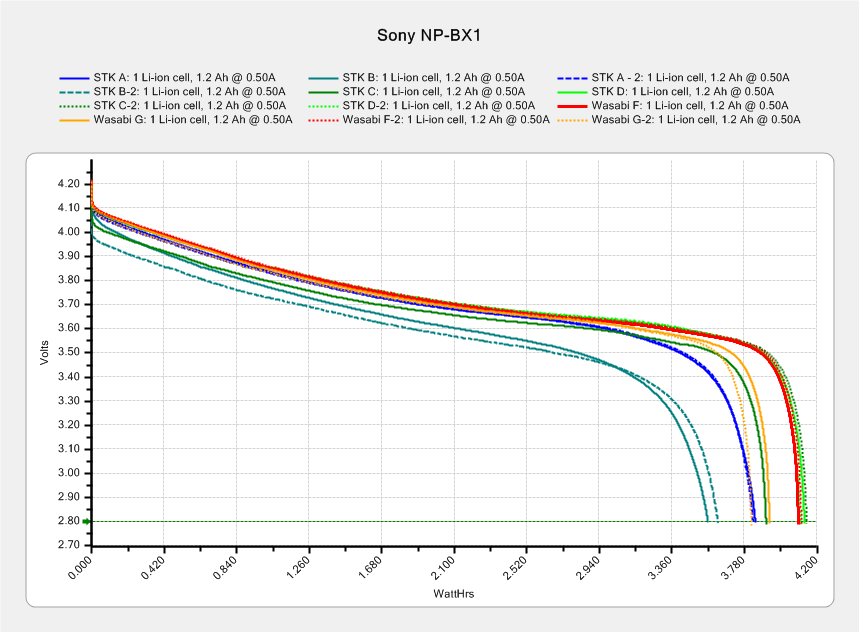
This sheaf of tests shows three of the four STK NP-BX1 batteries deliver about 4 W·h during a constant 500 mA discharge, with battery B trailing behind:
After the three most recent bike rides, I popped the partially discharged battery into the tester and used the same test current:
Sony NP-BX1 – STK ABD – charged vs used – Wh scale – 2015-11-22
The longer curves come from the top chart (with different colors), the shorter ones from the partially discharged batteries. In an ideal world, the shorter curves should give the energy left in the battery after the ride, so subtracting that from the before-ride capacity gives the energy used during the ride.
The results for battery A may not be typical, as the camera turned off before I rolled into the garage. The camera may run with a battery voltage below the 2.8 V cutoff in those tests, so it can extract more energy than the tests. The slope of the curve toward the end suggests it won’t get much, but that will still bias the results.
In round numbers, the bike rides required:
A: 3.8 – 0.1 = 3.7 W·h
B: 3.6 – 1.4 = 2.2 W·h
D: 4.2 – 1.0 = 3.2 W·h
I generally turn the camera off during the mid-ride pause (Protip: never wear a helmet camera into a Port-a-Loo), so at least two of the rides have discontinuous usage. I figured the total run time from the video file sizes at the rate of 22.75 min/4.0 GB, blithely ignoring issues like the battery recovering during the pauses, the effect of ambient temperature vs. camera heating on battery temperature, and so forth and so on.
In an ideal world, dividing the total energy by the run time (converted from minutes to hours and not venturing into pirate·ninja territory) should produce a nearly constant value equal to the camera’s power dissipation:
A: 3.7 W·h / 1.25 h = 2.96 W
B: 2.2 W·h / 1.0 h = 2.1 W
D: 3.2 W·h / 1.4 h = 2.25
Ignoring the suspiciously high result for battery A, it looks like the HDR-AS30V really does dissipate a bit over 2 W while recording 1920×1080@60fps video. That’s with GPS, WiFi, and NFC turned off, of course.
Which turns out to be pretty close to the test conditions: 3.7 V x 500 mA = 1.85 W. I could goose the test current to 600 mA = 2.2 W/3.7 V for the next tests, but maybe long-term consistency is a virtue.
After donating the never–sufficiently-to-be-damnedSamsungvacuumcleaner (and all its remaining bags & doodads) to a nonprofit’s tag sale, we picked up a Sears Kenmore Progressive vacuum cleaner that seemed to be the least awful of the current offerings. Unlike all previous vacuum cleaners, its tools & doodads have complex plastic fittings with latches and keyways and all manner of gimcrackery. The designers seem to have hands and legs of far-above-average size, but that’s another rant.
All this came to a head when I attempted to vacuum the fuzz out of the refrigerator’s evaporator coils, because the long snout that reaches the back of the refrigerator doesn’t fit the aperture in the giant handle.
Well, at least I can fix that…
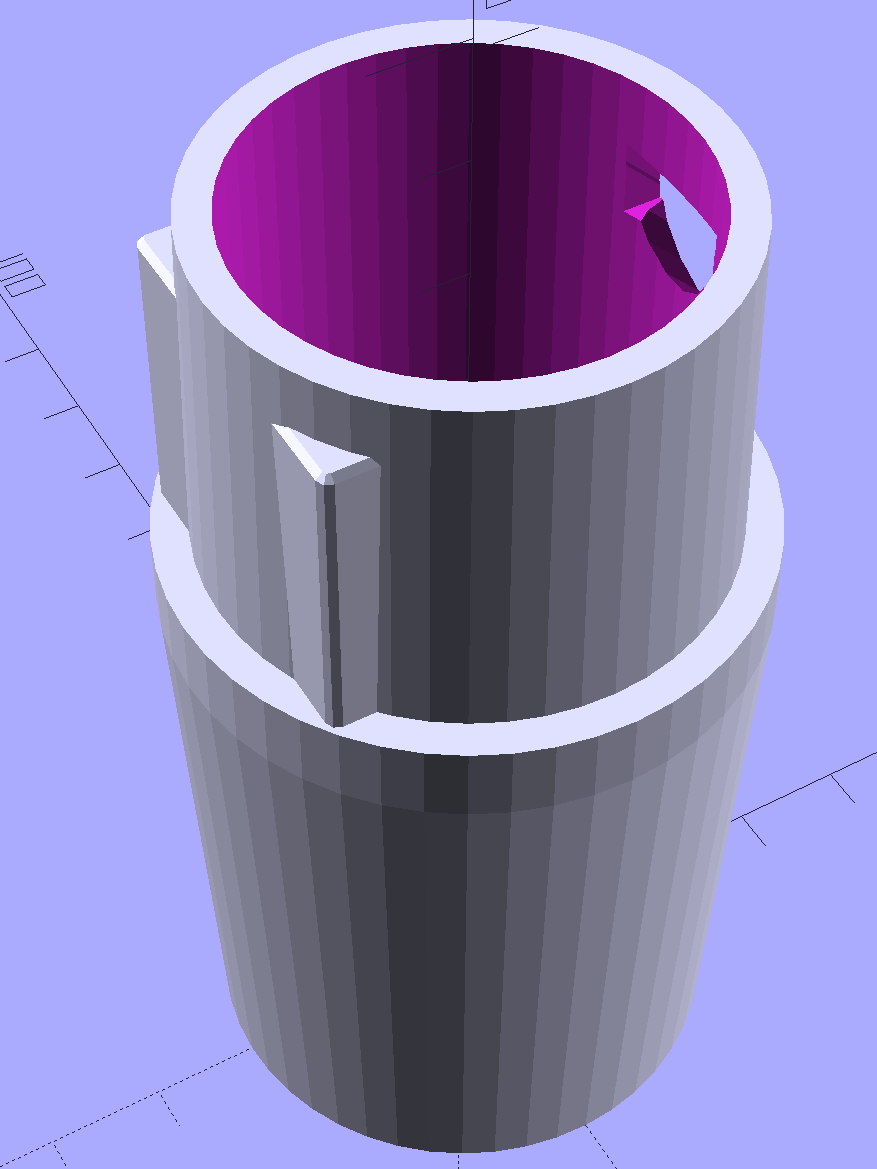
The first step involved modeling the plastic fitting that snaps into the handle:
Which spits out two suitable shapes with the proper positions and alignments:
Kenmore Male Fitting – Latch detail – Solid model
The magic wand for the refrigerator originally slid into the Samsung’s metal pipe, so I put a slightly tapered cylinder inside a somewhat more tapered exterior (which seems chunky enough to withstand my flailing around under the refrigerator), then topped it off with the male fitting:
Refrigerator Coil Wand Adapter
The Kenmore crevice tool snaps under the gargantuan plastic handle, which limits it to being 6.5 inches long, totally unable to reach into any of the nontrivial crevices around here, and in the way when it’s not being used. Some rummaging turned up a longer crevice tool from the Electrolux That Came With The House™, an old-school tool that slipped over its pipe. Modeling a straight cylinder inside a tapered cylinder that fits the tool didn’t take long:
Crevice Tool Adapter
Flushed with success, I found a smaller floor brush than the new Kenmore, with dimensions similar to the Electrolux snout, so another module appeared:
Floor Brush Adapter
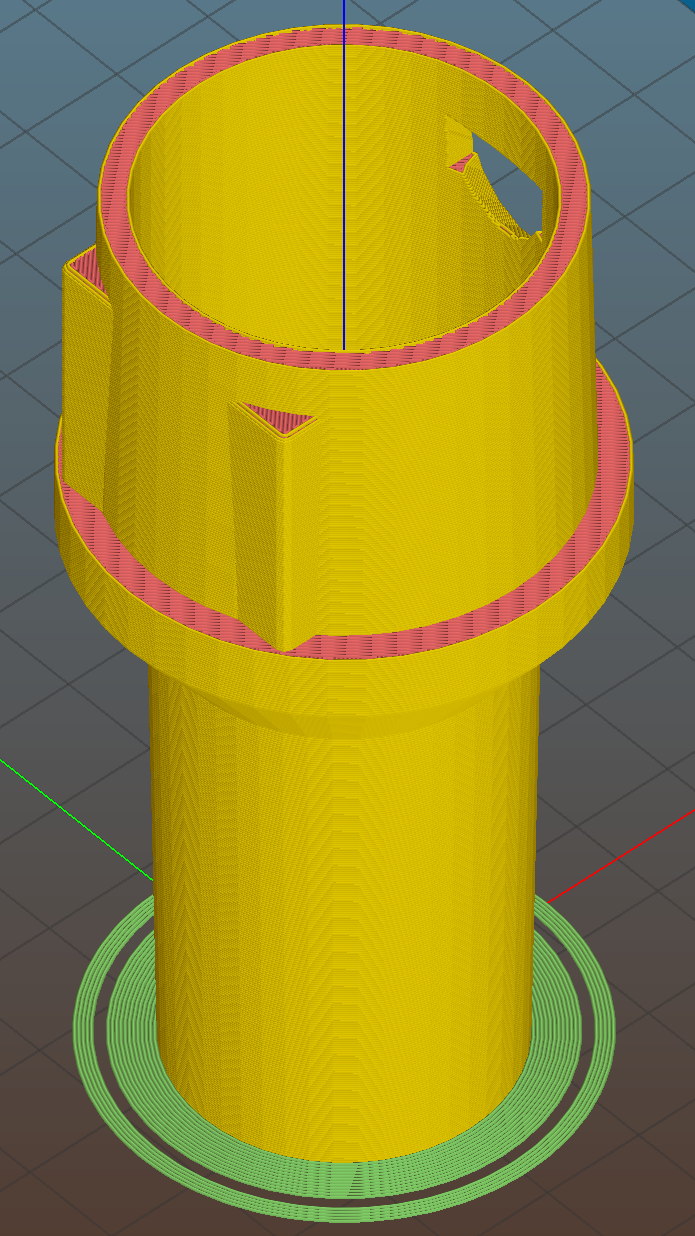
All of them build with the latch end upward to avoid needing support structure, with a 5 mm brim for good platform adhesion:
Floor Brush Adapter – Slic3r preview
I printed them during the PDS Mini Maker Faire as examples of Useful Things You Can Do With a 3D Printer:
Kenmore Vacuum Cleaner – Tool Adapters
As I pointed out to nearly everybody, the Big Lie about 3D printing is that you’ll just download somebody else’s model to solve your problem. In general, that won’t work, because nobody else has your problem; if you can’t do solid modeling, there’s no point in you having a 3D printer. There’s also no point in going to Kinko’s to get a standardized 3D printed doodad, because you can just order a better-looking injection-molded part directly from Sears (or an aftermarket source) and be done with it.
I loves me some good OpenSCAD action on my Makergear M2, though…
The OpenSCAD source code:
// Kenmore vacuum cleaner nozzle adapters
// Ed Nisley KE4ZNU November 2015
// Layout options
Layout = "CreviceTool"; // MaleFitting CoilWand FloorBrush CreviceTool
//- Extrusion parameters must match reality!
// Print with +1 shells and 3 solid layers
ThreadThick = 0.25;
ThreadWidth = 0.40;
HoleWindage = 0.2;
function IntegerMultiple(Size,Unit) = Unit * ceil(Size / Unit);
Protrusion = 0.1; // make holes end cleanly
//----------------------
// Dimensions
ID1 = 0; // for tapered tubes
ID2 = 1;
OD1 = 2;
OD2 = 3;
LENGTH = 4;
OEMTube = [35.0,35.0,41.7,40.5,30.0]; // main fitting tube
EndStop = [OEMTube[ID1],OEMTube[ID2],47.5,47.5,6.5]; // flange at end of main tube
FittingOAL = OEMTube[LENGTH] + EndStop[LENGTH];
$fn = 12*4;
//----------------------
// Useful routines
module PolyCyl(Dia,Height,ForceSides=0) { // based on nophead's polyholes
Sides = (ForceSides != 0) ? ForceSides : (ceil(Dia) + 2);
FixDia = Dia / cos(180/Sides);
cylinder(r=(FixDia + HoleWindage)/2,
h=Height,
$fn=Sides);
}
//-------------------
// Male fitting on end of Kenmore tools
// This slides into the end of the handle or wand and latches firmly in place
module MaleFitting() {
Latch = [40,11.5,5.0]; // rectangle latch opening
EntryAngle = 45; // latch entry ramp
EntrySides = 16;
EntryHeight = 15.0; // lower edge on *inside* of fitting
KeyRadius = 1.0;
translate([0,0,6.5])
difference() {
union() {
cylinder(d1=OEMTube[OD1],d2=OEMTube[OD2],h=OEMTube[LENGTH]); // main tube
hull() // insertion guide
for (i=[-(6.0/2 - KeyRadius),(6.0/2 - KeyRadius)],
j=[-(28.0/2 - KeyRadius),(28.0/2 - KeyRadius)],
k=[-(26.0/2 - KeyRadius),(26.0/2 - KeyRadius)])
translate([(i - (OEMTube[ID1]/2 + OEMTube[OD1]/2)/2 + 6.0/2),j,(k + 26.0/2 - 1.0)])
sphere(r=KeyRadius,$fn=8);
translate([0,0,-EndStop[LENGTH]]) // wand tube butts against this
cylinder(d=EndStop[OD1],h=EndStop[LENGTH] + Protrusion);
}
translate([0,0,-OEMTube[LENGTH]]) // main bore
cylinder(d=OEMTube[ID1],h=2*OEMTube[LENGTH] + 2*Protrusion);
            translate([0,-11.5/2,23.0 - 5.0])                                    // latch opening
                cube(Latch);

            translate([OEMTube[ID1]/2 + EntryHeight/tan(90-EntryAngle),0,0])    // latch ramp
                translate([(Latch[1]/cos(180/EntrySides))*cos(EntryAngle)/2,0,(Latch[1]/cos(180/EntrySides))*sin(EntryAngle)/2])
                    rotate([0,-EntryAngle,0])
                        intersection() {
                            rotate(180/EntrySides)
                                PolyCyl(Latch[1],Latch[0],EntrySides);
                            translate([-(2*Latch[0])/2,0,-Protrusion])
                                cube(2*Latch[0],center=true);
                        }
}
}
//-------------------
// Refrigerator evaporator coil wand
module CoilWand() {
union() {
translate([0,0,50.0])
rotate([180,0,0])
difference() {
cylinder(d1=EndStop[OD1],d2=42.0,h=50.0);
translate([0,0,-Protrusion])
cylinder(d1=35.0,d2=35.8,h=100);
}
translate([0,0,50.0 - Protrusion])
MaleFitting();
}
}
//-------------------
// Refrigerator evaporator coil wand
module FloorBrush() {
union() {
translate([0,0,60.0])
rotate([180,0,0])
difference() {
union() {
cylinder(d1=EndStop[OD1],d2=32.4,h=10.0);
translate([0,0,10.0 - Protrusion])
cylinder(d1=32.4,d2=30.7,h=50.0 + Protrusion);
}
translate([0,0,-Protrusion])
cylinder(d1=28.0,d2=24.0,h=100);
}
translate([0,0,60.0 - Protrusion])
MaleFitting();
}
}
//-------------------
// Crevice tool
module CreviceTool() {
union() {
translate([0,0,60.0])
rotate([180,0,0])
difference() {
union() {
cylinder(d1=EndStop[OD1],d2=32.0,h=10.0);
translate([0,0,10.0 - Protrusion])
cylinder(d1=32.0,d2=30.4,h=50.0 + Protrusion);
}
translate([0,0,-Protrusion])
cylinder(d1=28.0,d2=24.0,h=100);
}
translate([0,0,60.0 - Protrusion])
MaleFitting();
}
}
//----------------------
// Build it!
if (Layout == "MaleFitting")
MaleFitting();
if (Layout == "CoilWand")
CoilWand();
if (Layout == "FloorBrush")
FloorBrush();
if (Layout == "CreviceTool")
CreviceTool();
It’s one of those 1920-ish things with the impeccable stonework and bronze casting that you couldn’t possibly duplicate nowadays. But, at least twice between then and now, somebody thought it’d be a Good Idea to decorate it with what look to be Genuine Christmas Tree Lights:
Provincetown Pilgrim Memorial – detail
The most recent lamps and wires seem to be restrained by plastic clips glued onto the face of the stone:
Provincetown Pilgrim Memorial – lamp detail
A previous generation drilled small holes and inserted metal pins that didn’t survive in a salt-spray environment, so I guess plastic seemed like the right answer.
Orienting the strips in alternate directions kept the white data connections between adjacent strips on the top and bottom level. If they sat in the same direction, the data wires would run from top to bottom.
Each Neopixel draw 60 mA max, so each side of the pillar can draw 180 mA and lighting up all four sides in full-throttle white draws a bit over 720 mA. That’s more than those little Wire-Wrap wires should be forced to carry, but the tiny Neopixel solder pads aren’t good for much more than that. The revised column model has wiring channels behind both strip ends to provide access to the slightly larger pads on the rear surface; the fact that all the end pads get cut in half doesn’t help matters.
The red and blue power wires connect adjacent strips, with two opposite strips wired in parallel at the bottom of the column. There’s a 100 µF cap across the incoming power leads: as much capacitor as would fit in the somewhat undersized base.
A knockoff Arduino Pro Mini sits inline between a 5.2 VDC wall wart and the Mood Light with three connections: VCC, GND, and D6. It’s flapping around in mid-air with no protection whatsoever, so I’ll let your imagination draw that picture. I want to hide it in the base, along with a power jack, as part of the fine tuning.
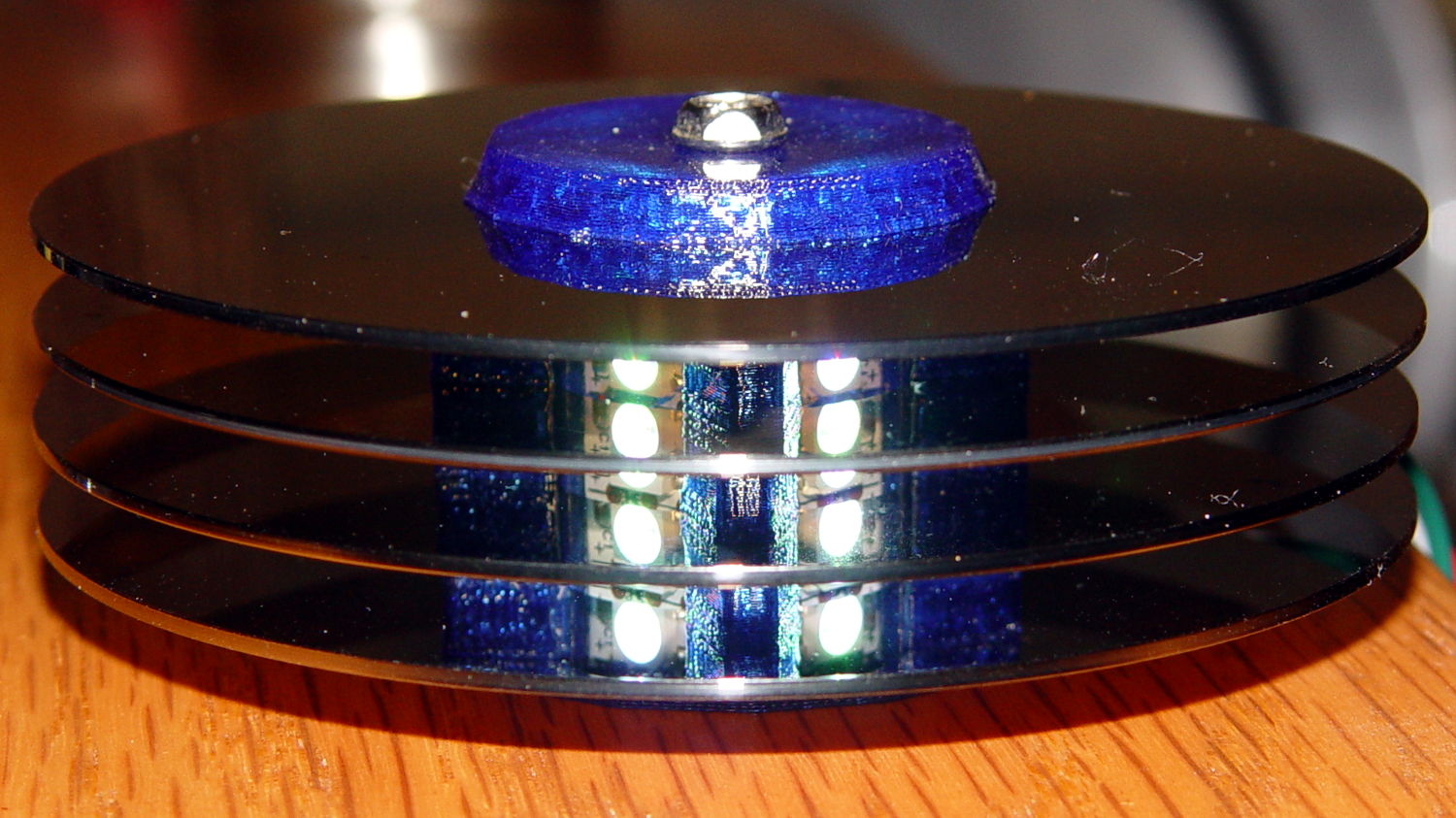
Anyhow, restacking the platters produced this pleasant effect:
Hard Drive Mood Light – low angle
You’re seeing each LEDs both directly and through a reflection in the platter below it. Despite having handled the platters for a few days, the reflection’s clarity surprised me; the multiple reflections required to bounce the LED image to the edge of the platter work perfectly:
Hard Drive Mood Light – high angle
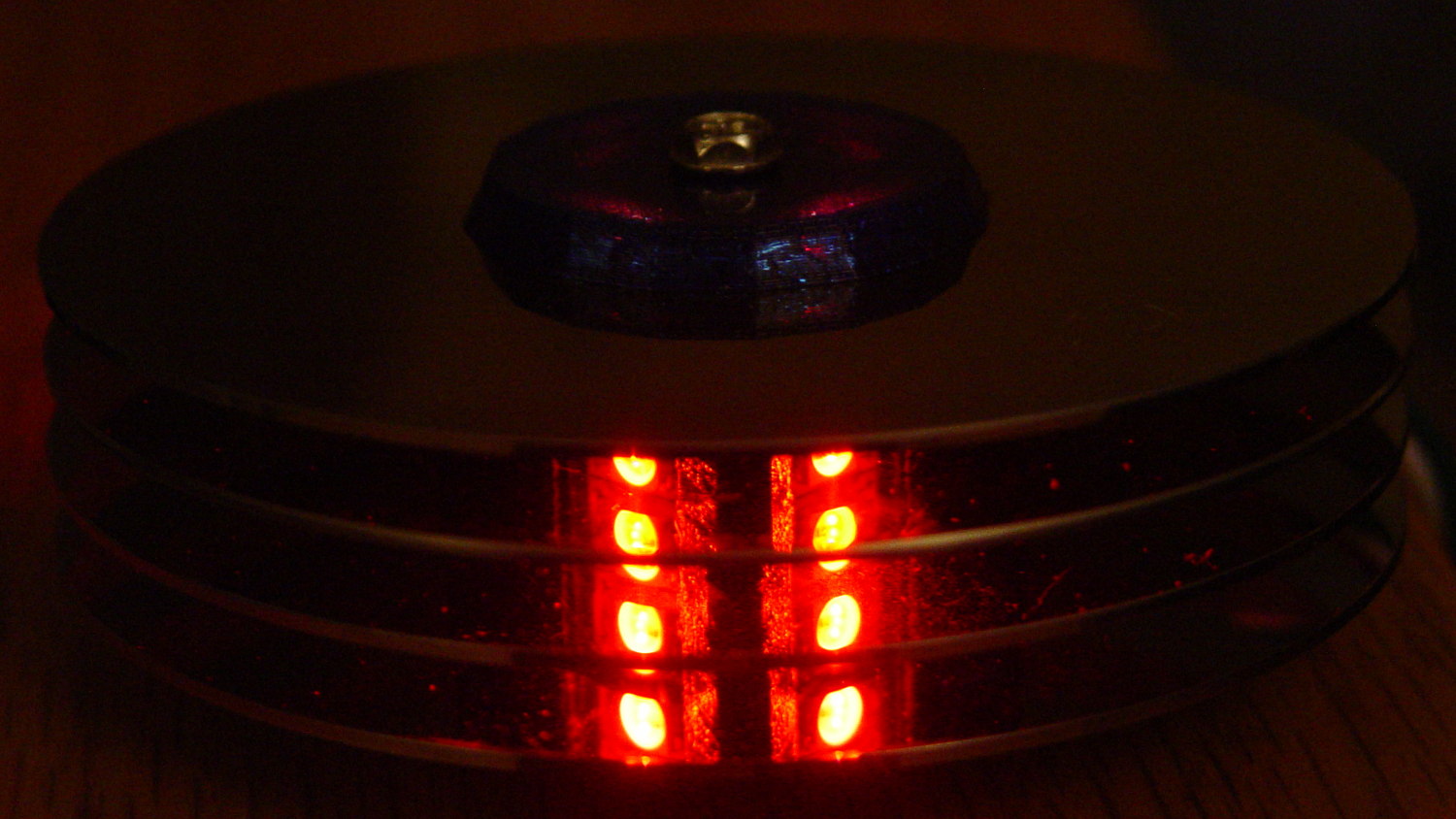
Running the original firmware (which, as noted in the comments, will eventually fall off its rails), the colors change slowly enough to be always the same while you’re watching and always different after you look away:
Hard Drive Mood Light – red
The platters stack sufficiently parallel to each other that the LED images still have the right spacing after multiple reflections. It’s not quite an infinite house of mirrors.
With the LEDs running at half intensity (PWM limited to 128/255), the stack lights up a dark living room just fine. At full throttle, it’d probably be too bright…










 The Smell of Molten Projects in the Morning