The Smell of Molten Projects in the Morning

Ed Nisley's Blog: Shop notes, electronics, firmware, machinery, 3D printing, laser cuttery, and curiosities. Contents: 100% human thinking, 0% AI slop.

Author: Ed

  • Monthly Image: Hawk vs. Squirrel

    A hawk, perhaps an immature Red-Tailed, landed on a branch outside the kitchen window while we were eating lunch.

    After a minute or so, a squirrel ran up the maple and began taunting (?) the hawk:

    Immature Red-Tail Hawk vs. Squirrel - approach
    Immature Red-Tail Hawk vs. Squirrel – approach

    The hawk obviously had no clue what’s going on inside that critter’s little brain:

    Immature Red-Tail Hawk vs. Squirrel - faceoff
    Immature Red-Tail Hawk vs. Squirrel – faceoff

    The squirrel alternated between inching out on the branch, closer each time, and dashing back to the tree trunk, for maybe ten minutes. It eventually reached the rightmost patch of lichen, a foot from the hawk, without suffering any damage, after which it ran down the tree and away. We have no explanation.

    Perhaps this is the same squirrel as before? All we know: (over)confidence goeth before gibbage.

    Taken with the DSC-H5 near the end of the adventure; it took me a while to deploy the camera. The first picture looks diagonally upward from the kitchen, through three layers of 1950-era glass. The second comes from the back door, zoomed about 10x, with no tele-adapter. Obviously, good color correction didn’t happen here…


  • Kindle Fire Power Switch Rebuild

    The single moving part on my first-generation (2011) Kindle Fire tablet stopped working: the power switch became erratic, to the point where the only dependable way to turn the thing on required the USB charging cable. Obviously not a long-term solution.

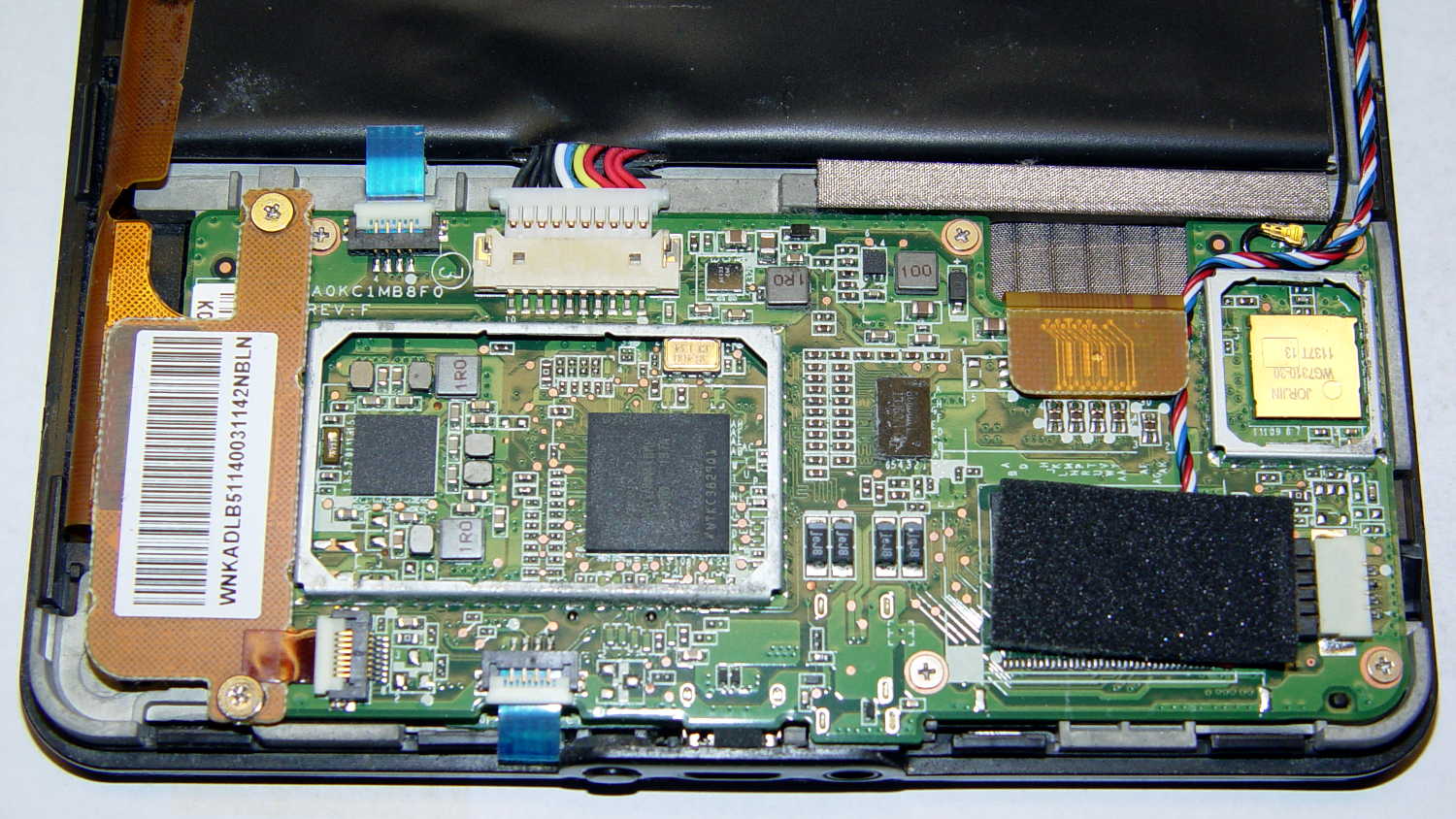
    Having nothing to lose, I consulted the Internet’s vast steaming pile of advice on how to pop the Kindle’s cover, picked one, and ran with it. Basically, you jam a sharp tool into the end with the speakers, then crack the back off along both sides, leading to this:

    Kindle Fire - pre-teardown overview
    Kindle Fire – pre-teardown overview

    Things to note:

    • No need to remove the battery: pull the heavy connector straight out
    • Disconnect the battery first, before unplugging anything else
    • Most of the ribbon cable connectors have a white flip-up latch
    • You will break the ground shield from the flex PCB to the battery along the left edge
    • The antenna must make that 270° turn into the minuscule U.FL connector
    • The four-wire cable to the speakers has a pull-out connector in the lower right corner
    • The PCB backplate on the large video (?) connector in the upper right pulls straight up-and-out

    Remove the six obvious screws, pull the battery edge of the board upward, and rotate the whole affair out of the chassis:

    Kindle Fire - power LED board - in place
    Kindle Fire – power LED board – in place

    Protip: the power switch is not mounted on the tiny PCB (under the ribbon cable with the blue tab) sometimes advertised as the Power Button Board. That tiny PCB suspends an amber/green LED behind the visible button, but a yoke surrounds the LED to transfer the button motion to the power switch soldered to the CPU board. Replacing that board will not cure an erratic power switch; I think the entire CPU board is the FRU.

    Fortunately, I can actually see the power switch and know sorta-kinda what to expect.

    A bit of awkward multimeter probing showed the switch was defunct, with intermittent action and generally high resistance when pressed. I unsoldered the switch, verified that it didn’t work in isolation, and examined some likely candidates from the Big Box o’ Small Switches:

    Kindle Fire - potential power switches
    Kindle Fire – potential power switches

    Some could be made to fit and maybe actually function, with effort ranging from tedious to Really Hard.

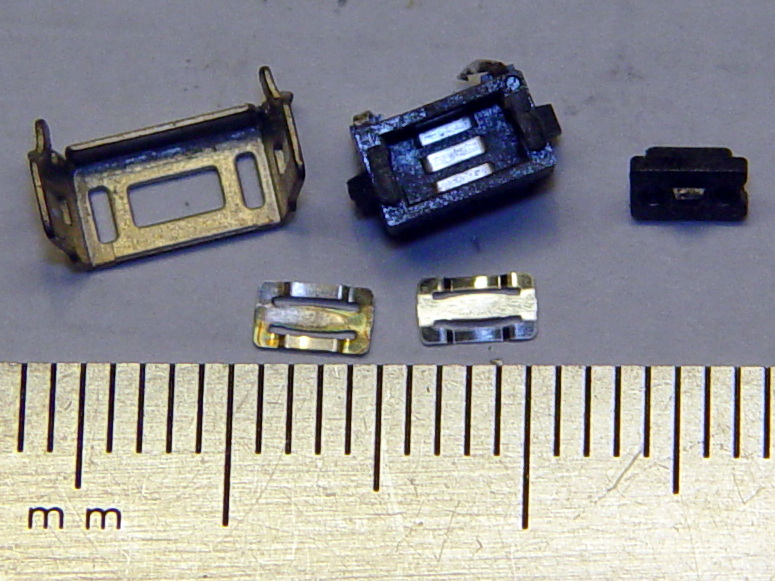
    Then it occurred to me that maybe, just maybe, I could refurbish / clean / repair the Kindle’s switch contacts. Shaving off the two heat-staked plastic bumps on the front and prying the side latches outward produced an explosion of small parts:

    Kindle Fire - disassembled power switch
    Kindle Fire – disassembled power switch

    That’s after cleaning the expected grunge from the three contact strips in the body and the innermost of the two (!) buckling-spring contact doodads (bottom left). I scrubbed with the cardboard-ish stem of a cotton swab and, as always, a dot of DeoxIT Red, inserted the unused-and-pristine contact spring doodad (bottom right) first, and reassembled the switch in reverse order.

    The metal shell around the body has two locating tabs that fit in two PCB holes, giving the switch positive alignment and good strain relief. The front view shows the three human-scale components amid a sea of 0201 SMD parts:

    Kindle Fire - repaired power switch - front
    Kindle Fire – repaired power switch – front

    For completeness, the view from the battery side:

    Kindle Fire - repaired power switch - rear
    Kindle Fire – repaired power switch – rear

    It’s worth noting that you can see right through the 3.5 mm headphone jack, which accounts for the remarkable amount of dust & fuzz I blew out of the chassis. The overall dust sealing isn’t great, but after five years of life in my pocket, I suppose that’s to be expected.

    Installing the board requires holding all the cables out of the way (tape the antenna & speaker wires to the battery), aiming the USB connector into its cutout, rotating the battery edge of the board downward, pushing the mesh EMI shield along the battery upward to clear the board edge, not forcing anything, and eventually it slides into place.

    Insert cables, latch latches, plug in the battery, snap the rear cover in place, and It Just Works again. The power switch responds to a light touch with complete reliability; it hasn’t worked this well in a year.

    Bonus: To my utter & complete astonishment, disconnecting the battery for few hours had no effect on the stored data: it powered up just fine with all the usual settings in place. I expected most of the settings to live in the Flash file system, but apparently nothing permanent lives in RAM.

    Take that, entropy!

  • Pencil Guides for Ruler Quilting

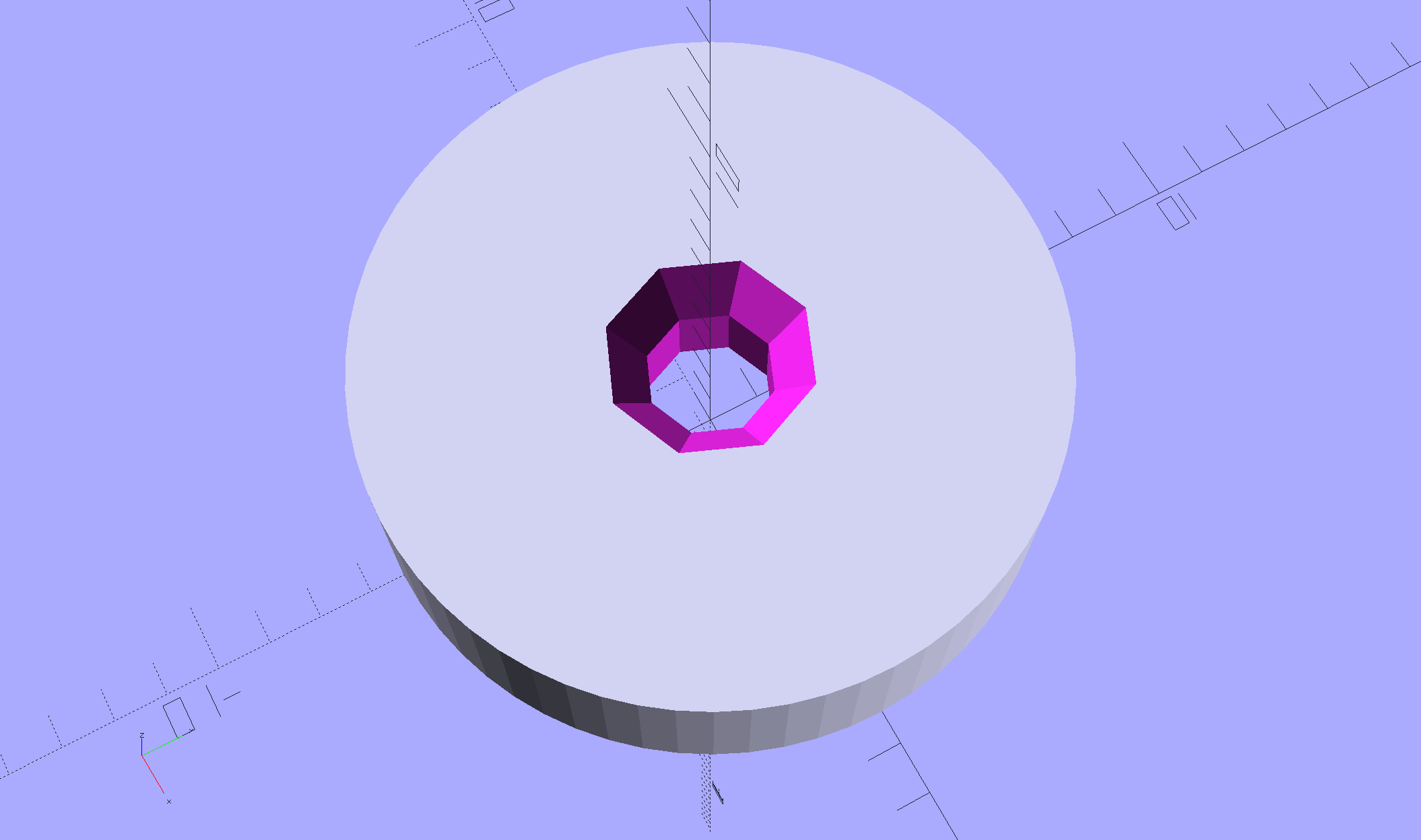
    Mary has been doing Ruler Quilting and wanted a pencil guide (similar to the machine’s ruler foot) to let her sketch layouts before committing stitches to fabric. The general idea is to offset the pencil by 1/4 inch from the edge of the ruler:

    Ruler Adapter - solid model
    Ruler Adapter – solid model

    That was easy.

    Print three to provide a bit of cooling time and let her pass ’em around at her next quilting bee:

    Ruler Adapter - Slic3r preview
    Ruler Adapter – Slic3r preview

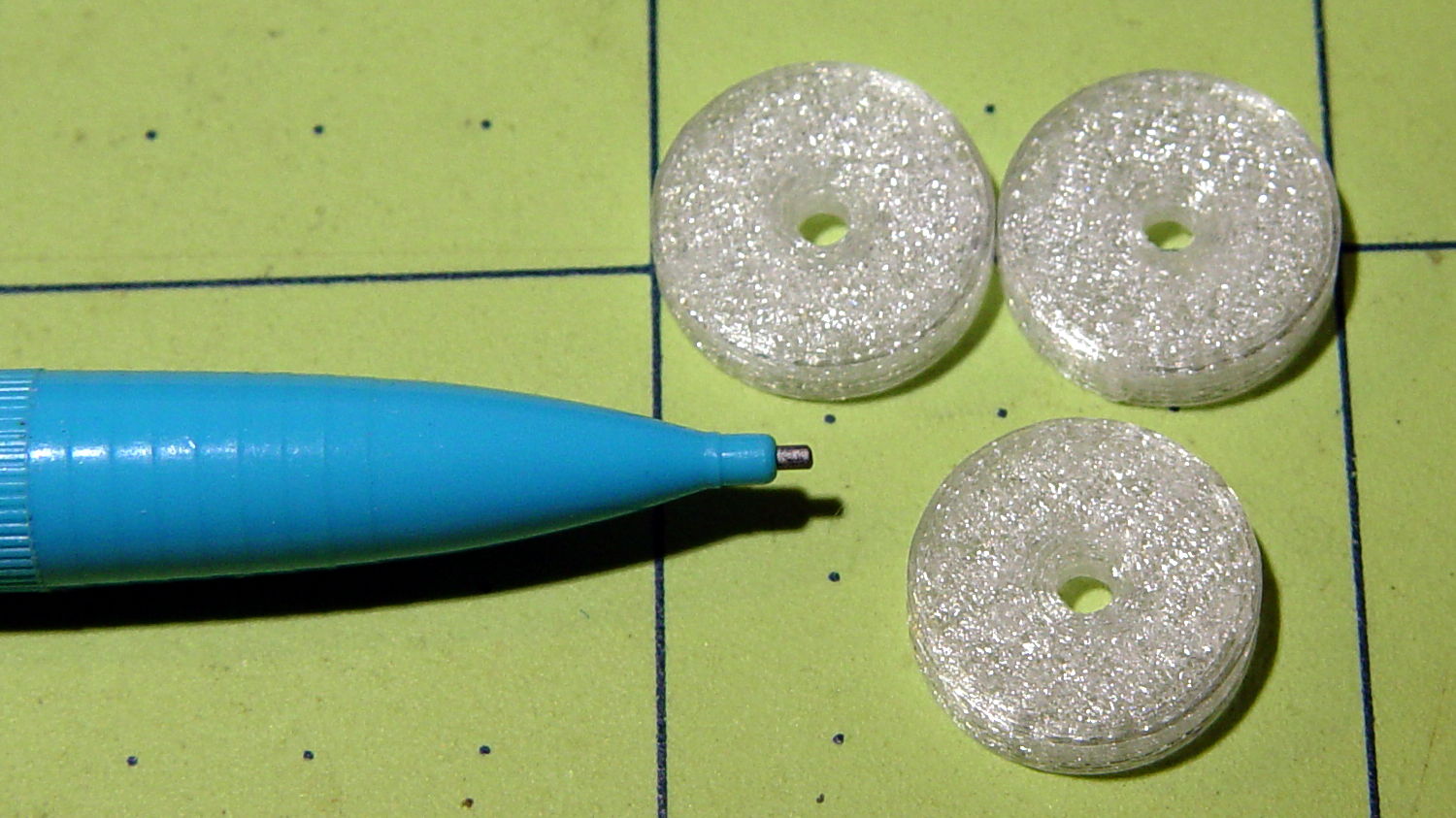
    Her favorite doodling pencil shoves a 0.9 mm lead through a 2 mm ferrule, so ream the center hole with a #44 drill (86 mil = 2.1 mm) to suit:

    Ruler quilting pencil guides
    Ruler quilting pencil guides

    The outer perimeters have 64 facets, an unusually high number for my models, so they’re nice & smooth on the ruler. Even though I didn’t build them sequentially, they had zero perimeter zits and the OD came out 0.500 inch on the dot.

    The chamfers guide the pencil point into the hole and provide a bit of relief for the pencil’s snout.

    If I had a laser cutter, I could make special rulers for her, too …

    The OpenSCAD source code as a GitHub Gist:

    // Quilting Ruler Adapters
    // Ed Nisley KE4ZNU October 2016
    //- Extrusion parameters must match reality!
    ThreadThick = 0.25;
    ThreadWidth = 0.40;
    HoleWindage = 0.2;
    Protrusion = 0.1; // make holes end cleanly
    inch = 25.4;
    function IntegerMultiple(Size,Unit) = Unit * ceil(Size / Unit);
    //———-
    // Dimensions
    ID = 0;
    OD = 1;
    LENGTH = 2;
    Offset = 0.25 * inch;
    Template = [2.0,2*Offset,3.0];
    NumSides = 16*4;
    HoleSides = 8;
    //———————-
    // Useful routines
    module PolyCyl(Dia,Height,ForceSides=0) { // based on nophead's polyholes
    Sides = (ForceSides != 0) ? ForceSides : (ceil(Dia) + 2);
    FixDia = Dia / cos(180/Sides);
    cylinder(d=(FixDia + HoleWindage),h=Height,$fn=Sides);
    }
    //———-
    // Build it
    difference() {
    cylinder(d=Template[OD],h=Template[LENGTH],$fn=NumSides);
    translate([0,0,-Template[LENGTH]])
    PolyCyl(Template[ID],3*Template[LENGTH],HoleSides);
    translate([0,0,-Protrusion])
    cylinder(d1=2*Template[ID],d2=Template[ID],h=Template[LENGTH]/3 + Protrusion,$fn=HoleSides);
    translate([0,0,Template[LENGTH] + Protrusion])
    mirror([0,0,1])
    cylinder(d1=2*Template[ID],d2=Template[ID],h=Template[LENGTH]/3 + Protrusion,$fn=HoleSides);
    }
  • Vacuum Tube LEDs: Now With Morse Code

    Adding Mark Fickett’s non-blocking Morse Arduino library turns the tubes into transmitters:

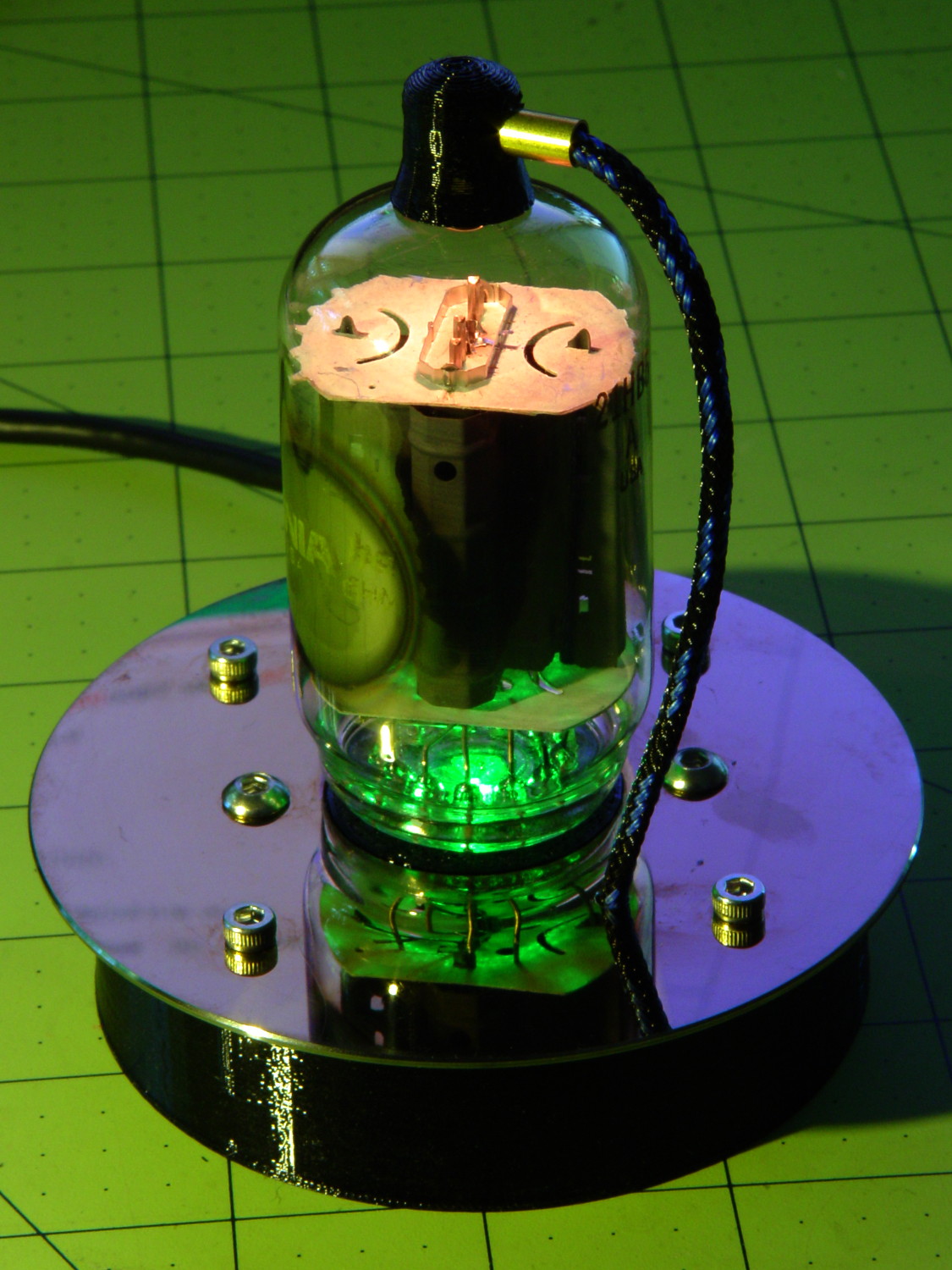
    21HB5A on platter - orange green
    21HB5A on platter – orange green

    The plate cap LED blinks the message in orange, while both LEDs continue to slowly change color as before.

    You define a Morse sender object (C++, yo!) by specifying its output pin and code speed in words per minute, dump a string into it, then call a continuation function fast enough to let it twiddle the output bit for each pulse. Obviously, the rate at which the callback happens determines the timing granularity.

    However, setting a knockoff Neopixel to a given color requires more than just a binary signal on an output pin. The continuation function returns false when it’s done with the message, after which you can initialize and send another message. There’s no obvious (to me, anyhow) way to get timing information out of the code.

    The easiest solution: called the Morse continuation function at the top of the main loop, read its output pin to determine when a dit or dah is active, then set the plate cap color accordingly:

    LEDMorseSender Morse(PIN_MORSE, (float)MORSE_WPM);
    ...
    Morse.setup();
    Morse.setMessage(String("       cq cq cq de ke4znu       "));
    PrevMorse = ThisMorse = digitalRead(PIN_MORSE);
    ...
    if (!Morse.continueSending()) {
      Morse.startSending();
    }
    ThisMorse = digitalRead(PIN_MORSE);
    ...
    if (ThisMorse) {             // if Morse output high, overlay
        strip.setPixelColor(PIXEL_MORSE,MorseColor);
    }
    PrevMorse = ThisMorse;
    strip.show();               // send out precomputed colors
    ...
    <<compute colors for next iteration as usual>>
    

    I use the Entropy library to seed the PRNG, then pick three prime numbers for the sine wave periods (with an ugly hack to avoid matching periods):

    uint32_t rn = Entropy.random();
    ...
    randomSeed(rn);
    ...
    
    Pixels[RED].Prime = PrimeList[random(sizeof(PrimeList))];
    
    do {
      Pixels[GREEN].Prime = PrimeList[random(sizeof(PrimeList))];
    } while (Pixels[RED].Prime == Pixels[GREEN].Prime);
    
    do {
      Pixels[BLUE].Prime = PrimeList[random(sizeof(PrimeList))];
    } while (Pixels[BLUE].Prime == Pixels[RED].Prime ||
            Pixels[BLUE].Prime == Pixels[GREEN].Prime);
    
    printf("Primes: (%d,%d,%d)\r\n",Pixels[RED].Prime,Pixels[GREEN].Prime,Pixels[BLUE].Prime);
    

    In the spirit of “Video or it didn’t happen”: YouTube!

    The Arduino source code as a GitHub Gist:

    // Neopixel mood lighting for vacuum tubes
    // Ed Nisley – KE4ANU – June 2016
    // September 2016 – Add Morse library and blinkiness
    #include <Adafruit_NeoPixel.h>
    #include <morse.h>
    #include <Entropy.h>
    //———-
    // Pin assignments
    const byte PIN_NEO = A3; // DO – data out to first Neopixel
    const byte PIN_HEARTBEAT = 13; // DO – Arduino LED
    #define PIN_MORSE 12
    //———-
    // Constants
    #define PIXELS 2
    #define PIXEL_MORSE 1
    #define MORSE_WPM 10
    #define UPDATEINTERVAL 50ul
    const unsigned long UpdateMS = UPDATEINTERVAL – 1ul; // update LEDs only this many ms apart (minus loop() overhead)
    // number of steps per cycle, before applying prime factors
    #define RESOLUTION 250
    // want to randomize the startup a little?
    #define RANDOMIZE true
    //———-
    // Globals
    // instantiate the Neopixel buffer array
    Adafruit_NeoPixel strip = Adafruit_NeoPixel(PIXELS, PIN_NEO, NEO_GRB + NEO_KHZ800);
    uint32_t FullWhite = strip.Color(255,255,255);
    uint32_t FullOff = strip.Color(0,0,0);
    uint32_t MorseColor = strip.Color(255,191,0);
    struct pixcolor_t {
    byte Prime;
    unsigned int NumSteps;
    unsigned int Step;
    float StepSize;
    byte MaxPWM;
    };
    unsigned int PlatterSteps;
    byte PrimeList[] = {3,5,7,13,19,29};
    // colors in each LED
    enum pixcolors {RED, GREEN, BLUE, PIXELSIZE};
    struct pixcolor_t Pixels[PIXELSIZE]; // all the data for each pixel color intensity
    uint32_t UniColor;
    unsigned long MillisNow;
    unsigned long MillisThen;
    // Morse code
    LEDMorseSender Morse(PIN_MORSE, (float)MORSE_WPM);
    uint8_t PrevMorse, ThisMorse;
    //– Figure PWM based on current state
    byte StepColor(byte Color, float Phi) {
    byte Value;
    Value = (Pixels[Color].MaxPWM / 2.0) * (1.0 + sin(Pixels[Color].Step * Pixels[Color].StepSize + Phi));
    // Value = (Value) ? Value : Pixels[Color].MaxPWM; // flash at dimmest points
    return Value;
    }
    //– Helper routine for printf()
    int s_putc(char c, FILE *t) {
    Serial.write(c);
    }
    //——————
    // Set the mood
    void setup() {
    pinMode(PIN_HEARTBEAT,OUTPUT);
    digitalWrite(PIN_HEARTBEAT,LOW); // show we arrived
    Serial.begin(57600);
    fdevopen(&s_putc,0); // set up serial output for printf()
    printf("Vacuum Tube Mood Light\r\nEd Nisley – KE4ZNU – September 2016\r\n");
    Entropy.initialize(); // start up entropy collector
    // set up Neopixels
    strip.begin();
    strip.show();
    // lamp test: a brilliant white flash
    printf("Lamp test: flash white\r\n");
    for (byte i=0; i<3 ; i++) {
    for (int j=0; j < strip.numPixels(); j++) { // fill LEDs with white
    strip.setPixelColor(j,FullWhite);
    }
    strip.show();
    delay(500);
    for (int j=0; j < strip.numPixels(); j++) { // fill LEDs with black
    strip.setPixelColor(j,FullOff);
    }
    strip.show();
    delay(500);
    }
    // set up real random numbers
    uint32_t rn = Entropy.random();
    if (RANDOMIZE) {
    printf("Preloading LED array with seed: %08lx\r\n",rn);
    randomSeed(rn);
    }
    else {
    printf("Start not randomized\r\n");
    }
    printf("First random number: %ld\r\n",random(10));
    // set up the color generators
    Pixels[RED].Prime = PrimeList[random(sizeof(PrimeList))];
    do {
    Pixels[GREEN].Prime = PrimeList[random(sizeof(PrimeList))];
    } while (Pixels[RED].Prime == Pixels[GREEN].Prime);
    do {
    Pixels[BLUE].Prime = PrimeList[random(sizeof(PrimeList))];
    } while (Pixels[BLUE].Prime == Pixels[RED].Prime ||
    Pixels[BLUE].Prime == Pixels[GREEN].Prime);
    printf("Primes: (%d,%d,%d)\r\n",Pixels[RED].Prime,Pixels[GREEN].Prime,Pixels[BLUE].Prime);
    Pixels[RED].MaxPWM = 255;
    Pixels[GREEN].MaxPWM = 255;
    Pixels[BLUE].MaxPWM = 255;
    for (byte c=0; c < PIXELSIZE; c++) {
    Pixels[c].NumSteps = RESOLUTION * (unsigned int) Pixels[c].Prime;
    Pixels[c].Step = RANDOMIZE ? random(Pixels[c].NumSteps) : (3*Pixels[c].NumSteps)/4;
    Pixels[c].StepSize = TWO_PI / Pixels[c].NumSteps; // in radians per step
    printf("c: %d Steps: %d Init: %d",c,Pixels[c].NumSteps,Pixels[c].Step);
    printf(" PWM: %d\r\n",Pixels[c].MaxPWM);
    }
    // set up Morse generator
    printf("Morse %d wpm\n",MORSE_WPM);
    Morse.setup();
    Morse.setMessage(String(" cq cq cq de ke4znu "));
    PrevMorse = ThisMorse = digitalRead(PIN_MORSE);
    MillisNow = MillisThen = millis();
    }
    //——————
    // Run the mood
    void loop() {
    if (!Morse.continueSending()) {
    Morse.startSending();
    }
    ThisMorse = digitalRead(PIN_MORSE);
    MillisNow = millis();
    if (((MillisNow – MillisThen) > UpdateMS) || // time for color change?
    (PrevMorse != ThisMorse)) { // Morse output bit changed?
    digitalWrite(PIN_HEARTBEAT,HIGH);
    if (ThisMorse) { // if Morse output high, overlay
    strip.setPixelColor(PIXEL_MORSE,MorseColor);
    }
    PrevMorse = ThisMorse;
    strip.show(); // send out precomputed colors
    for (byte c=0; c < PIXELSIZE; c++) { // compute next increment for each color
    if (++Pixels[c].Step >= Pixels[c].NumSteps) {
    Pixels[c].Step = 0;
    printf("Cycle %d steps %d at %8ld delta %ld ms\r\n",c,Pixels[c].NumSteps,MillisNow,(MillisNow – MillisThen));
    }
    }
    byte Value[PIXELSIZE];
    for (byte c=0; c < PIXELSIZE; c++) { // … for each color
    Value[c] = StepColor(c,0.0); // figure new PWM value
    }
    UniColor = strip.Color(Value[RED],Value[GREEN],Value[BLUE]);
    for (int j=0; j < strip.numPixels(); j++) { // fill all LEDs with color
    strip.setPixelColor(j,UniColor);
    }
    MillisThen = MillisNow;
    digitalWrite(PIN_HEARTBEAT,LOW);
    }
    }
    view raw TubeMorse.ino hosted with ❤ by GitHub
  • Makergear M2: Spring-Loaded Extruder Feed Gear

    When I installed the new fine-tooth filament drive gear (wheel, whatever) in the M2, I ran some numbers that suggested replacing the fixed-position screw with a (more-or-less-)constant-force spring. Some recent discussions on the M2 forum suggest, at least to me, that the drive gear is, indeed, less forgiving of filament diameter variations, drive housing wear, and suchlike than the chunkier old gear.

    Having recently bought an assortment of longer M4 screws, I finally got around to installing an appropriate spring from the Big Box o’ Springs and another washer to capture it:

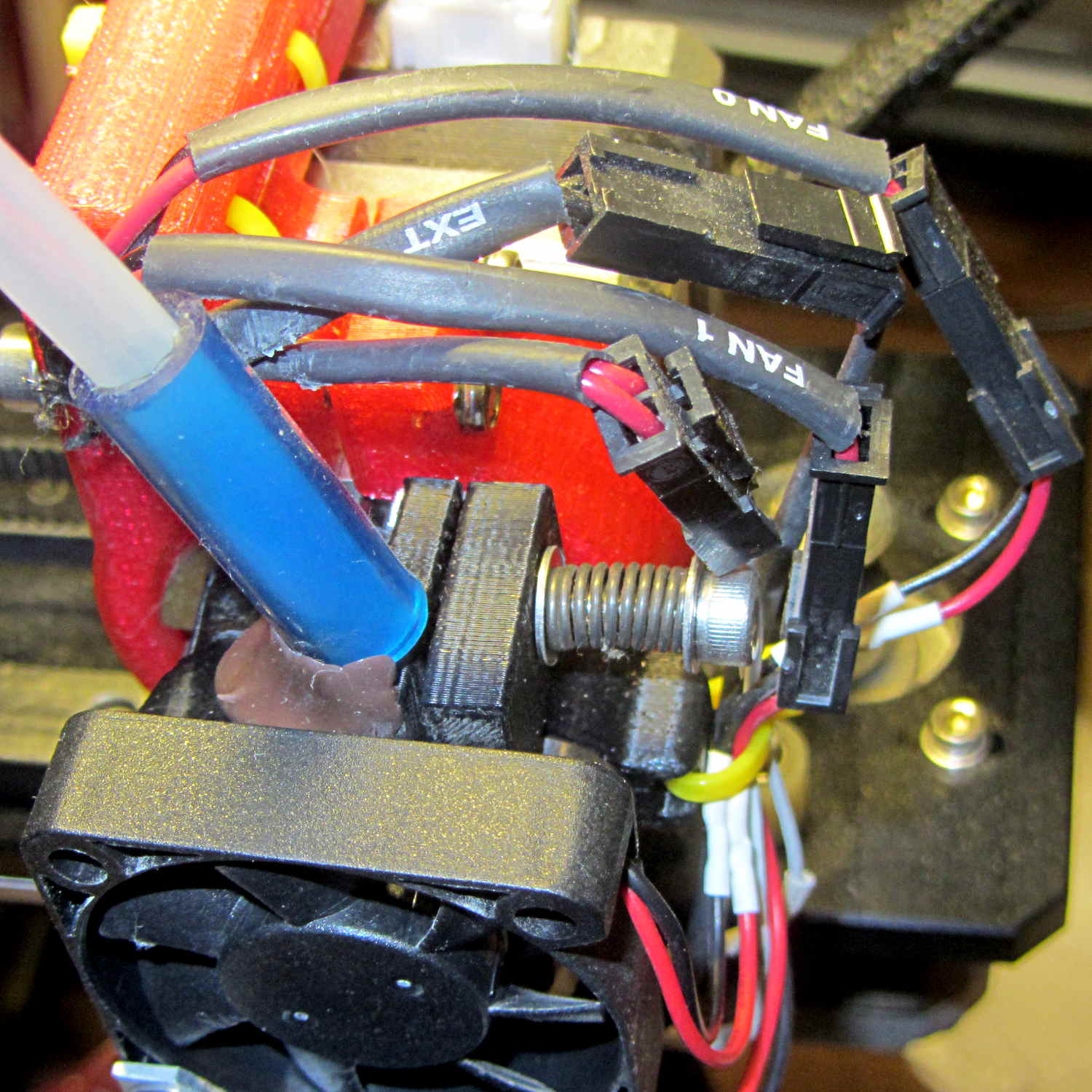
    Makergear M2 - spring-loaded filament drive
    Makergear M2 – spring-loaded filament drive

    Before doing anything, I measured the gap between the filament drive body (on the left) and the lever arm (on the right) holding the idler bearing: 21 mil = 0.53 mm.

    I don’t have a number for the spring constant; it’s rather stiff.

    After installing the spring, I cranked the screw to restore the same gap as before, which should mean the spring is exerting roughly the same force on the arm as the fixed-position screw.

    The general idea: the spring allows the flexible arm to move as the filament diameter changes, while maintaining roughly the same pressure on the drive gear, thus producing nearly the same depth-of-engagement grooves in the filament. Maintaining “the same pressure” requires the motion to be relatively small compared to the spring preload distance, which seems reasonable with ±0.1 mm diameter variations and maybe 5 mm of preload.

    The new filament drive gear hasn’t ever stripped out (after that initial finger fumble), so this will be more of a test to verify that the spring doesn’t make the situation worse.

  • Rewiring a Baofeng Battery Eliminator

    An aftermarket “battery eliminator” for Baofeng UV-5R radios costs under seven bucks delivered:

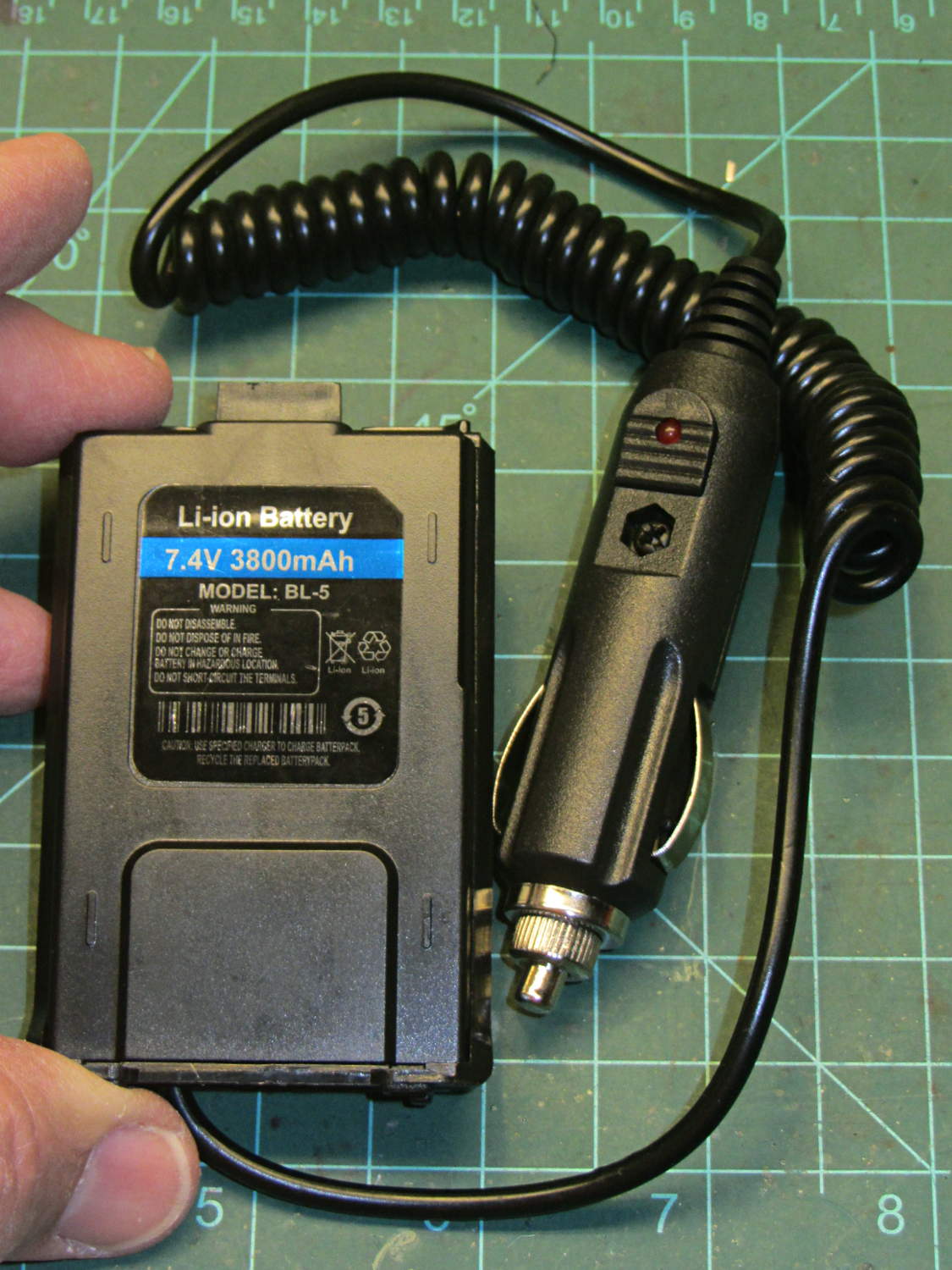
    Baofeng Battery Eliminator - overview
    Baofeng Battery Eliminator – overview

    That label seemed … odd:

    Baofeng Battery Eliminator - Li-ion Label
    Baofeng Battery Eliminator – Li-ion Label

    The OEM battery, tucked inside a case that’s for all intents and purposes identical to this one, sports an 1800 mA·h rating that I regarded as mmmm optimistic; I’d expect maybe 1000 mA·h, tops. From what I can tell, the 3800 mA·h label should go on an extended-capacity “big” battery that wraps around the bottom of the radio. Maybe the factory produced a pallet of mis-labeled small packs that they couldn’t fob off on actual customers with a straight face and couldn’t justify the labor to peel-and-stick the proper labels.

    Anyhow, it’s not a battery.

    The circuitry inside shows considerably more fit & finish than I expected:

    Baofeng Battery Eliminator - interior
    Baofeng Battery Eliminator – interior

    It’s not clear how effective that heatsink could be, given that it’s trapped inside a compact plastic enclosure snugged against the radio’s metal chassis, but it’s a nice touch. Two layers of foam tape anchor the terminals at the top and hold the heatsink / LM7808-class TO-220 regulator in place.

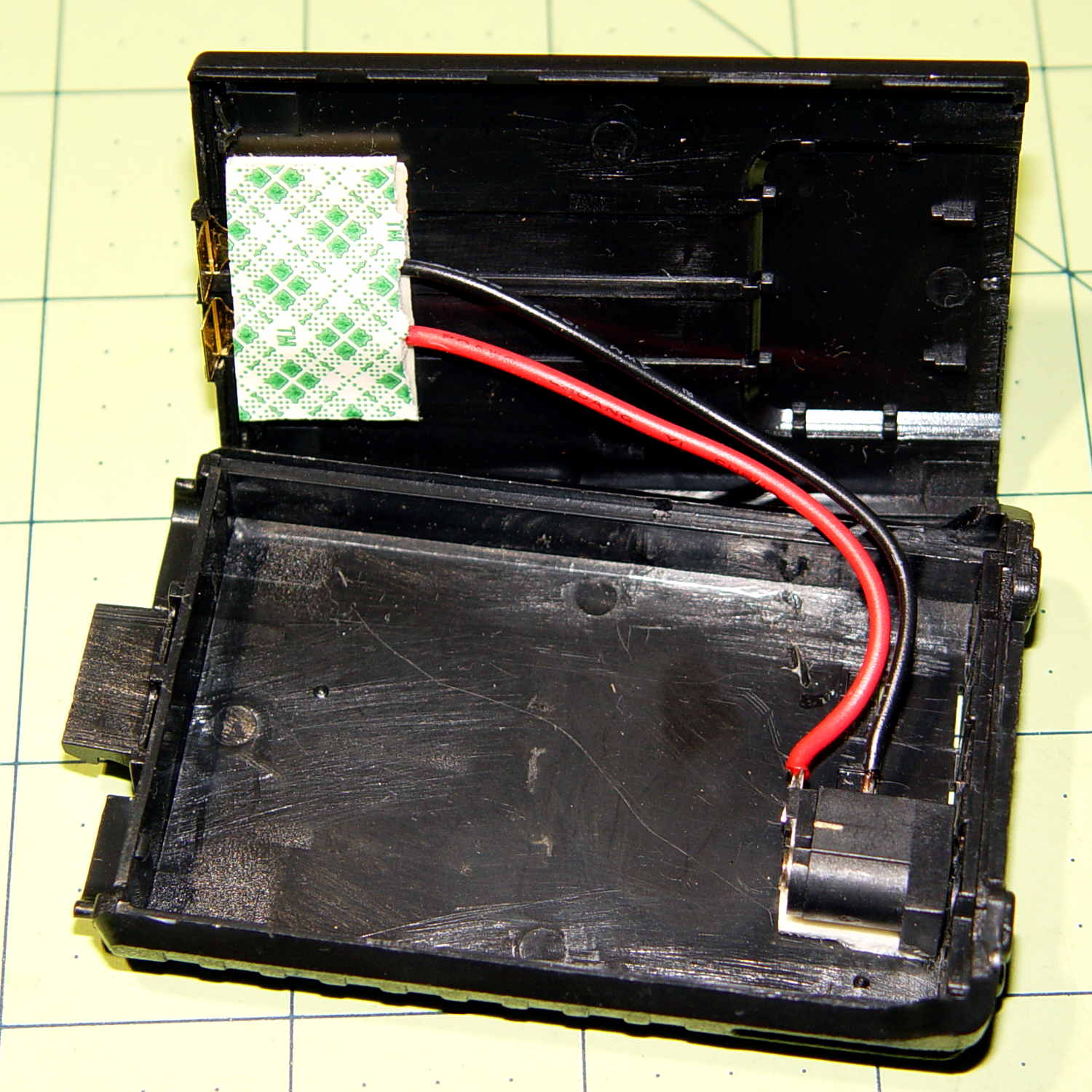
    Although I wanted the DC input to come from the side, rather than the bottom, so the radio could stand up, the pack simply isn’t thick enough to accommodate the jack in that orientation. I drilled out the existing wire hole to fit a coaxial power plug and deployed my own foam tape:

    Baofeng Battery Eliminator - rewired interior
    Baofeng Battery Eliminator – rewired interior

    Replacing the foam tape at the top holds the bent-brass (?) terminals in more-or-less the proper orientation, with Genuine 3M / Scotch Plaid adding a festive touch. A groove in the other half of the shell captures the free ends of those terminals, so they’re not flopping around in mid-air.

    The jack fits an old-school 7.5 V transformer wall wart that produces 11 V open-circuit. It’s probably still a bit too high with the UV-5R’s minimal receive-only load, but I refuse to worry.

    Now KE4ZNU-10 won’t become a lithium fire in the attic stairwell…

    While I had the hood up, I used Chirp to gut the radio’s stored frequencies / channels / memories and set 144.39 in Memory 0 as the only non-zero value. With a bit of luck, that will prevent it from crashing and jamming a randomly chosen frequency outside the amateur bands…

  • Pi Measuring Tape

    This clearly demonstrates that the world is even more weird than I imagined (clicky for more dots):

    Pi Tape
    Pi Tape

    I don’t measure that many big cylinders that I can’t figure out their diameter by hand.

    The prices suggest folks who need Pi Tapes need them bad.