The Smell of Molten Projects in the Morning

Ed Nisley's Blog: Shop notes, electronics, firmware, machinery, 3D printing, laser cuttery, and curiosities. Contents: 100% human thinking, 0% AI slop.

Tag: Repairs

If it used to work, it can work again

  • Amateur Lock Picking

    For reasons not relevant here, I was called upon to open a bulletin-board lock with a complete lack of keys:

    Bulletin Board Lock - locked
    Bulletin Board Lock – locked

    It’s obviously not the highest security lock you’ve ever seen. Armed with a small screwdriver and an old darning needle, this took the better part of 30 seconds:

    Bulletin Board Lock - opened
    Bulletin Board Lock – opened

    Actually, I devoted a few minutes to verify none of my collection of random keys would suffice.

    Replacing the lock not being within my remit, I improvised a simple retainer from available materials:

    Bulletin Board Lock - improvised strap retainer - front
    Bulletin Board Lock – improvised strap retainer – front

    Yes, the nylon cable tie will surely pull out of the latch:

    Bulletin Board Lock - improvised strap retainer
    Bulletin Board Lock – improvised strap retainer

    And I admit the installation’s security has taken a definite downward step:

    Bulletin Board Lock - push pin security
    Bulletin Board Lock – push pin security

    Some day, I’ll tote a wrench to the site, remove the lock, and improve the improvisation.

    Replacing the lock seems mired in an intractable budgetary wrangle. Similar locks being five bucks on Amazon, I’m tempted to just make it happen, but doing so would apparently roil the decision-making stratum. I’m perfectly happy to remain an on-call techie devoid of political ambition.

  • Cheese Slicer: XTC-3D Epoxy Coating

    We have, as you might expect, a Favorite Cheese Slicer of no particular provenance. Being made of cheap pot metal, it left black smudges wherever it went and, decades ago, I coated it with bright red rubbery grip material. Recently, the coating became lumpy and peeling off the loose sections revealed a definite problem:

    Cheese slicer - aluminum corrosion
    Cheese slicer – aluminum corrosion

    Vigorous scrubbing with a foam sanding block and a Scotchbrite pad, interspersed with rotary wire brushing, removed the corrosion and left a slightly pitted metal frame. Protip: scrub under water and wire-brush with a vacuum hose to keep the dust under control.

    A pair of 6-32 screws, nuts, and brass sleeves, with two oil dots protecting the frame threads, provided hand grips while I wiped it down with denatured alcohol and coated it with XTC-3D epoxy:

    Cheese slicer - epoxy curing
    Cheese slicer – epoxy curing

    Turns out the mixing stick worked quite well to cover the entire thing, as the epoxy does a great job of leveling itself. I suppose wasting a tiny brush would be more professional, but …

    It quietly dripped excess epoxy into a strategically placed trash can for about ten minutes. I wiped off the final drip before the epoxy solidified, leaving a smooth layer over the end of the handle:

    Cheese slicer - reassembled
    Cheese slicer – reassembled

    It’s back in service and works as well as ever, with a handle now smooth to the touch. I suppose I could have tinted the epoxy to hide the metal, but we regard those corrosion pits as beausage.

    I’ve slathered XTC-3D on some 3D printed parts, but have no idea how durable it is; this should serve as an accelerated survival test under rather harsh usage.

    The instruction sheet says XTC-3D isn’t the most transparent epoxy they make and, indeed, the layer left in the mixing pan came out more hazy than I expected:

    XTC-3D Epoxy - thin cured layer
    XTC-3D Epoxy – thin cured layer

    They point out the haze doesn’t matter for thin surface coatings, which is certainly true.

  • Whirlpool Refrigerator Drawer Slide: Another Bracket

    Thirteen years after the original repair on the left side and eight years after I fixed the drawer slide on the right side, this happened:

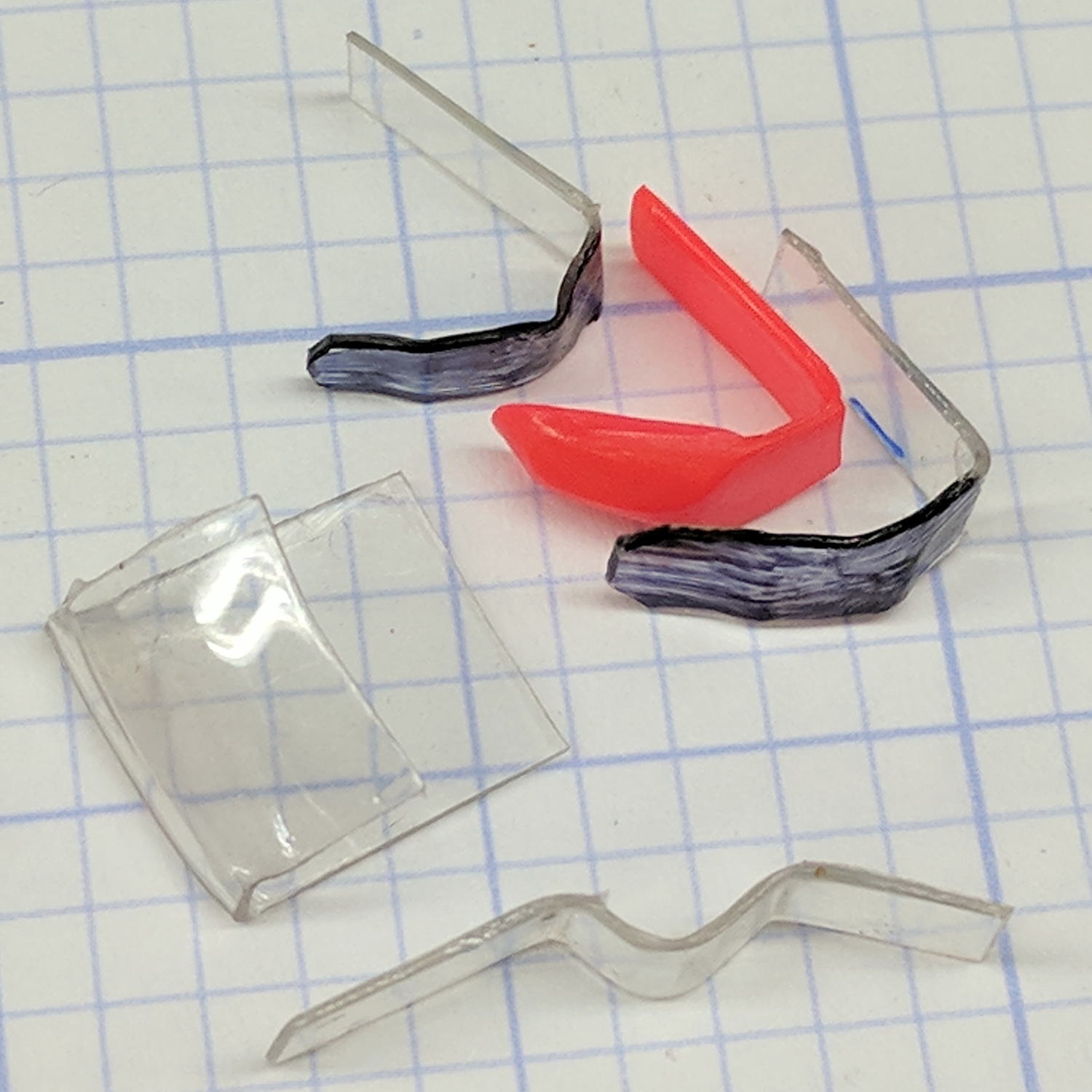
    Refrigerator shelf slide - failed parts
    Refrigerator shelf slide – failed parts

    The general idea is to wrap a new bracket around the old bracket, because trying to remove the old one will probably cause more damage:

    Refrigerator shelf slide - trial assembly
    Refrigerator shelf slide – trial assembly

    A pair of screws hold the new bracket to the shelf support:

    Refrigerator shelf slide - support screw nut openings
    Refrigerator shelf slide – support screw nut openings

    Those two screws must support the entire weight of the drawer, which is exactly what broke the original all-plastic frame and slide.

    The epoxy chip and transparent plastic sheet in the first picture spaced the old aluminum bracket away from the shelf support and reduced the space beyond the new bracket enough to require drilling access holes. Fortunately, they’re hidden inside the support frame, so nobody will ever know.

    The shelf support is a huge floppy rectangle, so I clamped it to the bench vise while drilling the holes:

    Refrigerator shelf slide - upright vise clamp
    Refrigerator shelf slide – upright vise clamp

    The new bracket is on the right, with a sheet of white acrylic spacing it away from the shelf support by exactly the same distance as the angled aluminum snippet replacing the failed epoxy & plastic on the broken part:

    Refrigerator shelf slide - bracket parts
    Refrigerator shelf slide – bracket parts

    The two holes in the middle of the aluminum parts show that I used exactly the same angle brackets as raw material. It’ll be a sad day when I eventually use the last of those brackets.

    Putting the parts together, with double-stick tape holding all the parts in place, shows how they fit:

    Refrigerator shelf slide - repair trial assembly
    Refrigerator shelf slide – repair trial assembly

    And then it just snapped into place. I didn’t bother pretending solvent glue would help anything, nor did I apply any epoxy, so this whole thing hangs from those two 4-40 screws. On the other paw, their steel beats the original white plastic.

    I devoutly hope to never rebuild the actual drawer slide, but these dimensions may help somebody else out of a jam:

    Refrigerator shelf slide - dimensions
    Refrigerator shelf slide – dimensions

    The vertical “40” dimension refers to the available space from the bottom of the white plastic part to the top of the shelf support frame; the new bracket is a tad shorter than that.

    The plastic parts in that refrigerator have been a complete disappointment: were it not for my relentless repair jones, we’d likely be on our third or fourth refrigerator by now. Oddly, the cooling parts continue to chug along (*), without more than the occasional loud noise in the middle of the night.

    We’re definitely doing our part to reduce our waste stream.

    (*) The most recent freezer fan hasn’t failed yet!

  • 60 kHz Preamp: Power LED Resistor Oops

    I eventually noticed the yellow LED indicating +24 V input from the power supply (previously, a noisy wall wart) was dark. Poking around revealed I’d inadvertently installed a 1 kΩ ballast resistor:

    LF Preamp - burned power-on LED resistor
    LF Preamp – burned power-on LED resistor

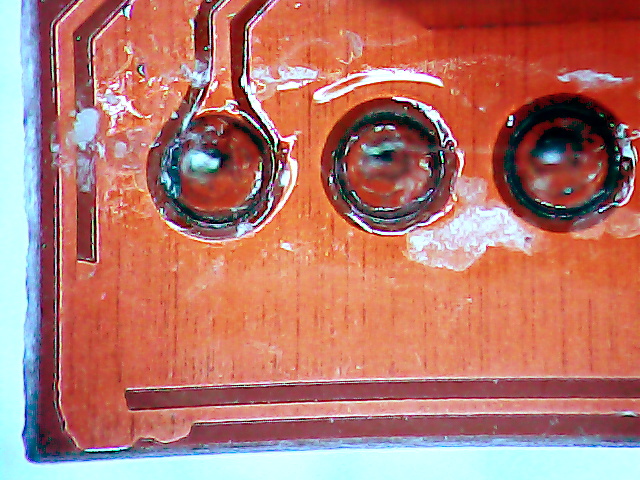
    A 1/4 W resistor can’t dissipate half a watt for very long, as shown by the discolored circuit board around the leads and the faint smell of electrical death in the area.

    I swapped in a 3.3 kΩ resistor, the yellow LED lit up for a few seconds, then went dark again. This time, the LED was dead; apparently, it’d been overstressed for long enough to fail. I can’t be too annoyed.

    Unfortunately, replacing the LED required removing the entire housing with all three LEDs, chopping off the defunct block, reinstalling the attenuated block with the two green LEDs, installing a similar red LED, and finally installing a nice 3.3 kΩ half-watt resistor:

    Power LED - Red with 0.5 W resistor
    Power LED – Red with 0.5 W resistor

    So it goes …

  • 60 kHz Preamp: Power Supply Noise

    This took entirely too long to figure out:

    Ground noise - 24 VDC wall wart - probe on gnd lug
    Ground noise – 24 VDC wall wart – probe on gnd lug

    That’s with the scope probe ground clip connected to the wall wart coax connector barrel and the scope probe tip on the ground clip. It’s not the noise on the 24 VDC supply, it’s the noise injected into the ground connection!

    Huh. Makes it tough to sort out low-level signals, it does indeed.

    Consider one of my bench power supplies at 24 V:

    Ground noise - bench supply 24 V - probe on gnd lug
    Ground noise – bench supply 24 V – probe on gnd lug

    Nice & quiet, the way power should be. One might quibble about the residual noise, but at least it’s not blasting out horrific bursts at 120 Hz.

    For completeness, the PCB inside the offending SMAKN 24 V wall wart:

    SMAKN 24 VDC wart - PCB
    SMAKN 24 VDC wart – PCB

    “High Quality Commercial Grade” my aching eyeballs.

    [Update: Edits based on eagle-eyed observations in the comments. ]

    Not as many missing components as I expected, though, if the truth be told. The missing transformer common-mode choke seems odd and, AFAICT, the resistor inductor angling out from the R1 callout doesn’t connect to anything, connects directly to the AC line because  C5 is missing and the pad joining them doesn’t go anywhere else it replaces the jumper (?) to the bottom-left pad and the missing parts. The red LED in the upper right isn’t visible through the black case, although it might serve as a voltage regulator.

    Over on the far right, beyond the transformer and between the two capacitor cans, is a component marked C9 with an oddly angled part. Seen from the other end, it’s a ferrite bead:

    SMAKN 24 VDC wart - output ferrite
    SMAKN 24 VDC wart – output ferrite

    I don’t know why that spot has an inductor symbol with a capacitor part callout.

    The other side of the PCB looks clean:

    SMAKN 24 VDC wart - PCB solder side
    SMAKN 24 VDC wart – PCB solder side

    It’ll probably serve well in a noise-tolerant application, maybe an LED power supply.

    As pointed out in the comments, there’s a UL mark:

    SMAKN 24 VDC wart - label
    SMAKN 24 VDC wart – label

    Not sure what I’ll replace it with, although a small 24 V power supply brick may suffice.

  • Google Pixel XL: Google Play Services Phone Number Update

    This notification appeared every day after I got my shiny-new / soon-to-be-obsolete Google Pixel XL:

    Screenshot_20170906-085931 - Update Your Phone Number - detail
    Screenshot_20170906-085931 – Update Your Phone Number – detail

    Fast-forward through nearly a month of doing the obvious things to no avail:

    • Tap the notification to update my phone number
    • Update my phone number from Firefox on the Pixel
    • Update my phone number from Firefox on my desktop
    • Ditto, from Chromium
    • Just dismiss the notification, repeatedly
    • Change my phone number in various Google places
    • Ditto, in various ways

    Searching on the obvious keywords provided very few hits and none with a resolution. I followed one suggestion to flush the Google Play and Google Play Services caches, to no visible effect.

    So I started a chat with Google Support by coredumping the entire list of Things Already Tried. After ten minutes of pleasantries, mostly spent idling while Holmes (great name for a tech support guy) read my coredump (and, most likely, timeshared a dozen other support chats), this transpired:

    11:36:01​ ​ Holmes:​ ​ I ​ ​ see​ ​ that​ ​ you’ve​ ​ tried​ ​ almost​ ​ all​ ​ the​ ​ things​ ​ to​ ​ get​ ​ rid​ ​ of​ ​ the​ ​ notification​ ​ for​ ​ Google​ ​ play services.
    11:36:05​ ​ Holmes:​ ​ Is​ ​ that​ ​ right?
    11:36:57​ ​ Ed​ ​ Nisley:​ ​ It’s​ ​ everything​ ​ I ​ ​ could​ ​ think​ ​ of,​ ​ plus​ ​ a ​ ​ bit​ ​ of​ ​ searching​ ​ the​ ​ usual​ ​ forums.​ ​ A ​ ​ few​ ​ other folks​ ​ have​ ​ the​ ​ same​ ​ problem,​ ​ but​ ​ none​ ​ have​ ​ a ​ ​ resolution.
    11:38:04​ ​ Holmes:​ ​ Sure,​ ​ I ​ ​ understand​ ​ that.​ ​ Please​ ​ don’t​ ​ worry​ ​ at​ ​ all,​ ​ we’ve​ ​ a ​ ​ dedicated​ ​ team​ ​ of​ ​ experts​ ​ for Play​ ​ related​ ​ concern.​ ​ I’m​ ​ from​ ​ hardware​ ​ nexus​ ​ Support​ ​ team.
    11:38:15​ ​ Holmes:​ ​ I’d​ ​ connect​ ​ you​ ​ directly​ ​ with​ ​ them.

    I’ve never gotten to Level 2 that fast in my entire life!

    Fifteen minutes later (again, mostly his reading & timesharing):

    11:54:37​ ​ Calvin​ ​ S:​ ​ The​ ​ issue​ ​ might​ ​ be​ ​ due​ ​ to​ ​ some​ ​ residual​ ​ files​ ​ that​ ​ might​ ​ hinder​ ​ the​ ​ download​ ​ process.
    Lets​ ​ try​ ​ to​ ​ clear​ ​ cache​ ​ of​ ​ Google​ ​ Play​ ​ Store,​ ​ to​ ​ see​ ​ if​ ​ the​ ​ issue​ ​ can​ ​ be​ ​ resolved.
    11:55:06​ ​ Calvin​ ​ S:​ ​ I ​ ​ can​ ​ help​ ​ you​ ​ with​ ​ the​ ​ steps,​ ​ if​ ​ you​ ​ want​ ​ to.
    11:55:10​ ​ Ed​ ​ Nisley:​ ​ As​ ​ I ​ ​ said​ ​ in​ ​ the​ ​ initial​ ​ description,​ ​ I’ve​ ​ already​ ​ done​ ​ that.
    11:55:39​ ​ Calvin​ ​ S:​ ​ I ​ ​ appreciate​ ​ your​ ​ efforts​ ​ to​ ​ fix​ ​ this​ ​ issue.
    11:56:08​ ​ Ed​ ​ Nisley:​ ​ Blew​ ​ away​ ​ all​ ​ the​ ​ caches​ ​ for​ ​ anything​ ​ to​ ​ do​ ​ with​ ​ Google​ ​ Play​ ​ anything!
    11:56:20​ ​ Calvin​ ​ S:​ ​ Could​ ​ you​ ​ please​ ​ let​ ​ me​ ​ know,​ ​ what​ ​ all​ ​ troubleshooting​ ​ steps​ ​ you​ ​ have​ ​ tried?
    11:57:05​ ​ Ed​ ​ Nisley:​ ​ Did​ ​ you​ ​ read​ ​ the​ ​ initial​ ​ description​ ​ I ​ ​ sent​ ​ to​ ​ start​ ​ this​ ​ chat?​ ​ Took​ ​ Holmes​ ​ five​ ​ minutes to​ ​ chew​ ​ through​ ​ it.
    11:58:11​ ​ Calvin​ ​ S:​ ​ I ​ ​ see​ ​ that​ ​ you​ ​ have​ ​ cleared​ ​ cache​ ​ of​ ​ Play​ ​ services.
    11:58:50​ ​ Calvin​ ​ S:​ ​ Let​ ​ us​ ​ uninstall​ ​ updates​ ​ for​ ​ the​ ​ Play​ ​ Store​ ​ app​ ​ Play​ ​ Store​ ​ and​ ​ Google​ ​ Play​ ​ Services.

    At which point it became obvious I was going to spend the rest of the day dinking around:

    12:00:58​ ​ Ed​ ​ Nisley:​ ​ Given​ ​ that​ ​ this​ ​ notification​ ​ appears​ ​ in​ ​ the​ ​ morning,​ ​ doing​ ​ this​ ​ step​ ​ by​ ​ step​ ​ will​ ​ take days.​ ​ Give​ ​ me​ ​ a ​ ​ list​ ​ of​ ​ everything​ ​ you​ ​ will​ ​ suggest​ ​ so​ ​ I ​ ​ can​ ​ do​ ​ it​ ​ without​ ​ wasting​ ​ hours​ ​ typing​ ​ at​ ​ you.
    12:02:22​ ​ Calvin​ ​ S:​ ​ Respecting​ ​ your​ ​ time,​ ​ I’ll​ ​ follow​ ​ up​ ​ with​ ​ you​ ​ over​ ​ an​ ​ email​ ​ with​ ​ all​ ​ the​ ​ possible troubleshooting​ ​ steps.

    The “troubleshooting steps” look like a generic list of progressively more desperate measures applicable to any mysterious Android problem:

    Clear app data for the Play Store

    Go to Settings > Apps.
    Tap Google Play Store > Storage > Clear data > Ok.
    At the top left, tap the Back arrow to go to the “App info” screen.
    At the top right, tap More (3 dots) > Uninstall updates > Ok > Ok to restore the app to its factory version.
    Note: The Play Store will update automatically within 48 hours. If “Uninstall updates” is dimmed, you can skip this step.
    Note: If you’ve changed the Google Play Store app settings (content filters, password protection, etc.), you’ll need to set them up again.

    Clear the app data of Google Play services

    Warning: Clearing the app data of Google Play services can reset settings, affect app performance, and cause unpredictable behavior across the device.

    Go to Settings > Apps or Application Manager.
    At the top right, tap More (3 dots) > Show system apps (on Android versions lower than 6.0, go to All instead).
    Tap Google Play services.
    Note: If you don’t see “Google Play services,” check Show all system apps and make sure that both Google Play Framework and Google Play Services are enabled. ​​If they aren’t enabled, download the Google Play Service from Play Store.
    Tap Storage > Clear cache.
    Then tap Manage Space > Clear All Data > Ok.

    After completing this step, you should check the settings on your apps to see if they’re still configured correctly.

    Remove and re-add your Google Account

    Note: This may reset settings and remove in-app content. However, your purchases and synced data (Gmail, Google contacts, etc.) are tied to your account and will be available after re-adding your account.

    Go to Settings > Accounts > Google.
    Tap the name of the account you wish to remove.
    Important: Make sure you remember your account password. You’ll need it to sign back in to your account.
    At the top right, tap More (3 dots) > Remove account > Remove account.
    At the top left, tap the Back arrow > Add account > Google.
    Sign in to your Google Account.

    Uninstall and reinstall Play Store updates

    Temporarily uninstalling updates to the Google Play Store app can help fix some issues.

    To revert the Play Store app to the previous version:

    Go to Settings.
    Tap Apps or Application manager (depending on the device).
    Tap Google Play Store (depending on the device, you may need to go to All).
    Tap on the menu button, and then Uninstall updates.
    If the Uninstall updates button isn’t available, skip the rest of this step and continue troubleshooting.
    When prompted to change the Play Store app back to the factory version, tap OK.
    Go back to the device’s home screen and relaunch the Play Store. Your Play Store app should update to the latest version within a few minutes.
    If the Play Store app doesn’t update, tap on the menu button from within the app and go to Settings. Scroll down until you see Play Store Version. Tap on that to check for an update. If none is available, continue to the next step.

    Uninstall updates for Google Play Services

    Go to Settings.
    Tap Apps or Application manager (depending on the device).
    Tap Google Play Services (depending on the device, you may need to go to All).
    Tap on the menu button, and then Uninstall updates.
    If the Uninstall updates button isn’t available, skip the rest of this step and continue troubleshooting.
    When prompted to change the Play Store app back to the factory version, tap OK.

    Reset your device to factory settings

    If you’d like help with resetting your device, contact us from another device and we’ll walk you through it.

    To reset your device:

    If you have an SD card, remove it to save the data on the card.
    Reset your Android device to factory settings.
    Sign in to your device with a Google Account that was signed in before the reset.
    If you removed an SD card, reinsert it.

    To reload your apps and data:

    Open the Play Store app.
    Tap the Menu (3 lines) > My apps & games > Library.
    Next to the apps that you’d like to install, tap Install or Enable.

    If the issue still persist after performing all the troubleshooting steps I request you to reply to this email with the screenshot.

    As it turned out, blowing away “the app data of the Google Play services” did the trick; the notification Went Away and hasn’t returned.

    I hope I never need that information again …

  • Tour Easy Headset Wrench

    The headset on my Tour Easy ‘bent worked its way loose, which led to a disturbing discovery: the headset wrench I made from a discarded flat wrench vanished with the shop tools donated to MakerSmiths.

    Fortunately, we live in the future:

    Tour Easy Headset Wrench - Slic3r preview
    Tour Easy Headset Wrench – Slic3r preview

    A thin plastic wrench is absolutely no good for torquing down the locknut, but that’s not what it’s for. Adjust the bearing race to the proper preload with this wrench, hold it in place, then torque the locknut with the BFW.

    The OpenSCAD source code as a GitHub Gist:

    // Tour Easy Headset Wrench
    // Ed Nisley KE4ZNU – September 2017
    /* [Extrusion] */
    ThreadThick = 0.25; // [0.20, 0.25]
    ThreadWidth = 0.40; // [0.40]
    function IntegerMultiple(Size,Unit) = Unit * ceil(Size / Unit);
    Protrusion = 0.01; // [0.01, 0.1]
    HoleWindage = 0.2;
    //- Sizes
    /* [Dimensions] */
    WrenchSize = 32.0; // headset race across-the-flats size
    NumFlats = 8;
    JawWidth = 10.0;
    JawOD = 2*JawWidth + WrenchSize;
    echo(str("Jaw OD: ",JawOD));
    StemOD = 23.0;
    WrenchThick = 5.0;
    HandleLength = 2*JawOD;
    HandleWidth = 25.0;
    //- Build things
    difference() {
    linear_extrude(height=WrenchThick,convexity=4) {
    hull() { // taper wrench body to handle
    circle(d=JawOD);
    translate([0.75*JawOD,0,0])
    circle(d=HandleWidth);
    }
    hull() { // handle
    translate([0.75*JawOD,0,0])
    circle(d=HandleWidth);
    translate([HandleLength,0,0])
    circle(d=HandleWidth);
    }
    }
    translate([0,0,-Protrusion])
    rotate(1*180/NumFlats) { // cosine converts across-flats to circle dia
    cylinder(d=WrenchSize/cos(180/NumFlats),h=(WrenchThick + 2*Protrusion),$fn=NumFlats);
    }
    translate([-StemOD,0,WrenchThick/2])
    cube([2*StemOD,StemOD,(WrenchThick + 2*Protrusion)],center=true);
    translate([WrenchSize,0,WrenchThick – 3*ThreadThick])
    linear_extrude(3*ThreadThick + Protrusion,convexity=10)
    text(text=str("TE Headset"),size=8,spacing=1.20,font="Arial",halign="left",valign="center");
    }

    Now, I’d like to say that was easy, but in actual point of fact …

    First, I forgot to divide by cos(180/6) to convert the across-the-flats size to the diameter of OpenSCAD’s circumscribed hexagon-as-circle, which made the wrench uselessly small:

    Tour Easy Headset Wrench - v1
    Tour Easy Headset Wrench – v1

    If you have a 28 mm nut with low torque requirements, though, I’ve got your back.

    While I had the hood up, I slenderized the handle into a much shapelier figure:

    Tour Easy Headset Wrench
    Tour Easy Headset Wrench

    Trotting off to the garage with a warm plastic wrench in hand, I discovered the blindingly obvious fact that the headset nuts have eight sides. On the upside, the number of sides became a parameter, so, should you happen to need a five-sided wrench (perhaps on Mars), you can have one.

    So, yeah, it’s rapid prototyping in full effect:

    Tour Easy Headset Wrench Iterations
    Tour Easy Headset Wrench Iterations

    Remember, kids, never design while distracted …