The Smell of Molten Projects in the Morning

Ed Nisley's Blog: Shop notes, electronics, firmware, machinery, 3D printing, laser cuttery, and curiosities. Contents: 100% human thinking, 0% AI slop.

Tag: Repairs

If it used to work, it can work again

  • Jonas Peeler: Reshaping and Origin Mystery

    Jonas Peeler: Reshaping and Origin Mystery

    This past summer we replaced a worn-out vegetable peeler with what was allegedly a high-quality Linden Jonas peeler. It worked quite well, which it should have, given that it cost nigh onto seven bucks, until I recently backed over it with my wheelchair (about which, more later) and smashed it flat.

    World+dog having recently discovered the virtues of home-cooked meals, the replacement cost nigh onto ten bucks and, through the wonders of Amazon, came from a different seller, albeit with a letter-for-letter identical description:

    Linden Jonas peeler orders
    Linden Jonas peeler orders

    With a spare in the kitchen, I applied some shop-fu to unbend the first peeler:

    Jonas peeler - reshaping tools
    Jonas peeler – reshaping tools

    Tapping the handle against the bandsawed dowel sufficed to remove the sharpest bends. The final trick involved clamping one edge of the handle to the section cut from a thread spool, resting the Vise-Grip on the bench vise, and whacking the other edge with the rubber mallet to restore the smooth curve around the main axis, repeating the process along the other side, then hand-forming the gentle curve closer to the blade. It ain’t perfect and never will be, but it’s once again comfortable in the hand.

    During that process I had plenty of time to admire the identification stamped into the handle:

    Jonas peeler - weak emboss
    Jonas peeler – weak emboss

    Which, frankly, looks rather gritty on an allegedly high-quality product from a Swedish factory.

    Compare it with the new peeler:

    Jonas peeler - good emboss
    Jonas peeler – good emboss

    Now, that’s more like it.

    The genuine Linden website doesn’t provide much detail, so I can’t be absolutely sure which peeler is a counterfeit, but it sure looks like at least one fails the sniff test. Linden’s site redirects to Amazon through a Google search link (!) that, given the way Amazon works, could result in anything appearing as a valid result:

    https://www.google.com/search?q=amazon.com+linden+sweden

    As one should expect by now, Amazon’s commingled inventory produces a fair percentage of reviews complaining about craptastic peelers stamped “Made in China” from any of the sellers unearthed by that search.

  • USB Memory: Premature Deaths

    USB Memory: Premature Deaths

    After about a year of streaming music, the music died over the course of a month, producing progressively bizarre symptoms on all the local Icecast stations. Killing the streaming server and yanking all the USB memory sticks produced this tableau:

    USB Memory - streamer failures
    USB Memory – streamer failures

    The USB 2.0 32 GB SanDisk Cruzer Fit (tiny, black, upper left) holds images from various network cameras and is not involved with music. It’s nigh onto seven years old and, apparently, still going strong.

    The USB 2.0 Centron (gray-and-retroreflective, upper right) was forgotten from the last time I set up a drive for our Forester’s player. There’s another one just like it in the car; they’re impossibly old, as you’d expect from their minuscule size.

    The USB 3.0 64 GB Samsung Fit (small, white, lower left) is totally dead, to the extent it doesn’t even announce its presence when plugged into a USB socket. It’s 2.5 years into a five year warranty, but their new USB 3.1 version is twelve bucks; Samsung wins. It formerly contained an extensive selection of public-domain music.

    The 64 GB Sandisk Cruzer (huge, black, lower right) suffered some serious damage:

    sudo mount -o ro /dev/sdg1 /mnt/part
    ll /mnt/part
     ls: cannot access '/mnt/part/PILZ': Input/output error
     total 384K
     drwxr-xr-x   6 ed   users 4.0K Nov 28  2019 ./
     drwxr-xr-x  17 root root  4.0K Jun  7  2019 ../
     -rw-r--r--   1 ed   ed    215K Mar  9  2019 CDClassical.m3u
     drwxrwxr-x  56 ed   ed    4.0K Mar  9  2019 Classical/
     drwx------   2 root root   16K Mar  9  2019 lost+found/
     d?????????   ? ?    ?        ?            ? PILZ/
     drwxrwxr-x 116 ed   ed     12K Mar  9  2019 Pop/
     -rw-r--r--   1 ed   ed    117K Nov 28  2019 Pop.m3u
    

    It still contains a fair amount of music ripped from the CDs we’ve collected over the decades, but it’s obviously unusable. Just for fun, I tried reformatting and copying some files to it, but it eventually hard-crashed with I/O errors:

    [37787.872410] usb 2-1: new high-speed USB device number 2 using xhci_hcd
     [37788.013027] usb 2-1: New USB device found, idVendor=0781, idProduct=5530, bcdDevice= 1.00
     [37788.013030] usb 2-1: New USB device strings: Mfr=1, Product=2, SerialNumber=3
     [37788.013032] usb 2-1: Product: Cruzer
     [37788.013034] usb 2-1: Manufacturer: SanDisk
     [37788.013036] usb 2-1: SerialNumber: 4C530001151215101233
     [37788.013604] usb-storage 2-1:1.0: USB Mass Storage device detected
     [37788.014778] scsi host9: usb-storage 2-1:1.0
     [37789.033409] scsi 9:0:0:0: Direct-Access     SanDisk  Cruzer           1.00 PQ: 0 ANSI: 6
     [37789.034569] sd 9:0:0:0: [sdf] 120225792 512-byte logical blocks: (61.6 GB/57.3 GiB)
     [37789.035820] sd 9:0:0:0: [sdf] Write Protect is off
     [37789.035825] sd 9:0:0:0: [sdf] Mode Sense: 43 00 00 00
     [37789.036137] sd 9:0:0:0: [sdf] Write cache: disabled, read cache: enabled, doesn't support DPO or FUA
     [37789.086533]  sdf: sdf1
     [37789.089418] sd 9:0:0:0: [sdf] Attached SCSI removable disk
     [38035.071013] EXT4-fs (sdf1): mounting ext3 file system using the ext4 subsystem
     [38035.183172] EXT4-fs (sdf1): mounted filesystem with ordered data mode. Opts: (null)
     [38485.302549] usb 2-1: reset high-speed USB device number 2 using xhci_hcd
     [38490.622285] usb 2-1: device descriptor read/64, error -110
     [38506.195617] usb 2-1: device descriptor read/64, error -110
     [38506.425616] usb 2-1: reset high-speed USB device number 2 using xhci_hcd
     [38511.742339] usb 2-1: device descriptor read/64, error -110
     <<< snippage >>>
     [38548.845743] usb 2-1: USB disconnect, device number 2
     [38548.858925] blk_update_request: I/O error, dev sdf, sector 99556320 op 0x1:(WRITE) flags 0x4800 phys_seg 30 prio class 0
     [38548.858933] EXT4-fs warning (device sdf1): ext4_end_bio:309: I/O error 10 writing to inode 1531939 (offset 0 size 0 starting block 12444541
     )
     [38548.858937] Buffer I/O error on device sdf1, logical block 12444284
     [38548.858944] EXT4-fs warning (device sdf1): ext4_end_bio:309: I/O error 10 writing to inode 1531939 (offset 0 size 0 starting block 12444542
     )
     <<< snippage >>>
     [38548.858984] Buffer I/O error on device sdf1, logical block 12444293
     [38548.859034] blk_update_request: I/O error, dev sdf, sector 99017520 op 0x1:(WRITE) flags 0x4000 phys_seg 3 prio class 0
     [38548.859158] blk_update_request: I/O error, dev sdf, sector 99556560 op 0x1:(WRITE) flags 0x4800 phys_seg 30 prio class 0
     [38548.859224] blk_update_request: I/O error, dev sdf, sector 99017760 op 0x1:(WRITE) flags 0x4000 phys_seg 2 prio class 0
     [38548.859237] blk_update_request: I/O error, dev sdf, sector 99018000 op 0x1:(WRITE) flags 0x4000 phys_seg 2 prio class 0
     >>
     [38549.230765] JBD2: Detected IO errors while flushing file data on sdf1-8
     [38549.230920] Aborting journal on device sdf1-8.
     [38549.231008] Buffer I/O error on dev sdf1, logical block 1545, lost sync page write
     [38549.231011] JBD2: Error -5 detected when updating journal superblock for sdf1-8.
     [38549.231325] Buffer I/O error on dev sdf1, logical block 0, lost sync page write
     [38549.231332] EXT4-fs (sdf1): I/O error while writing superblock
     [38549.231333] EXT4-fs error (device sdf1): ext4_journal_check_start:61: Detected aborted journal
     [38549.231334] EXT4-fs (sdf1): Remounting filesystem read-only
     <<< and so forth and so on >>>

    So, yeah, it’s dead, Jim.

    The Icecast streaming server reads data continuously from the USB sticks and, given that I set up half a dozen “stations”, there’s plenty of reading going on. The drives are formatted as ext3 and mounted with the noatime option, so there shouldn’t be any writing going on, but it seems a year of constant reading can kill a USB drive.

    Fortunately, the original data lives elsewhere, with scripts to copy the appropriate files to the right places, so rebuilding the drives on a pair of new USB sticks wasn’t a big deal.

  • Mini-lathe DRO Battery Lifetime

    Mini-lathe DRO Battery Lifetime

    It seems 390/389 alkaline button cells can power the mini-lathe’s DROs for about a year:

    Mini-lathe DRO battery replacement - 11 months
    Mini-lathe DRO battery replacement – 11 months

    Given that the replacement cells all come from the same batch, they’re aging on the shelf as well as in the DROs.

    Once again, I replaced both of them.

  • Epson R380 CISS Waste Ink Tank Replacement

    Epson R380 CISS Waste Ink Tank Replacement

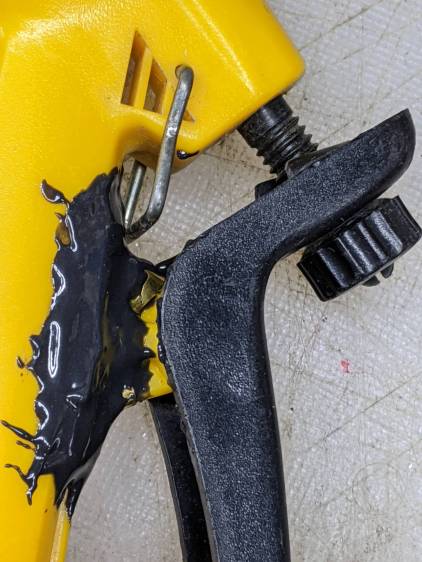
    Transferring the printers to a new “server” provided an opportunity to dump another king’s ransom of waste ink down the drain, whereupon the tank cracked under finger pressure:

    Epson R380 - fractured CISS waste tank
    Epson R380 – fractured CISS waste tank

    The black smudge on the far side is an ink stain on adhesive left over from the hook-n-loop strip formerly holding it to the printer.

    It looks to be an ordinary polypropylene tube, nothing fancy, and, after a decade, it really doesn’t owe me anything.

    Scrounge a suitable bottle from one of the Big Boxes o’ Containers, run a bead of JB Weld Plasticbonder around the shoulder matching the discarded lid, jam on an original waste ink tank cap, and let the urethane goo cure while rotating slowly in the lathe to avoid unsightly dribbles:

    Epson R380 - DIY waste tank - epoxy curing
    Epson R380 – DIY waste tank – epoxy curing

    The goo surely won’t bond to the polyethylene bottle, but it’s likely better than anything else in my inventory. We shall see.

    Drill a hole for the hose, ignore the chips left inside the tank due to a sequence error, stick the original hook-n-loop tape in place, replace the drip-catcher rags, and install:

    Epson R380 - DIY waste tank - installed
    Epson R380 – DIY waste tank – installed

    The red silicone tape encourages the cap to remain in place against the urethane adhesive. One fewer endcap = one less seal.

    The cap need not be removable, as you just squeeze the tube slightly to squirt the aforementioned king’s ransom down the drain.

    It ought to last until I finally scrap out the printer.

  • Huion H610Pro (V2) Tablet vs. USB 3.0

    Huion H610Pro (V2) Tablet vs. USB 3.0

    For reasons that surely made sense at the time, the Huion H610Pro (V2) tablet can recognize when it’s connected to an Android device’s USB port and enter a special mode where the stylus only responds in a phone-shaped portrait rectangle over on the left side:

    Huion H610Pro (V2) Tablet - Android layout
    Huion H610Pro (V2) Tablet – Android layout

    There’s a Vulcan Nerve Pinch button push to force the tablet into Android mode if it doesn’t automagically get there on its own, but AFAICT there’s no way to force it out of Android mode.

    It’s a USB 2.0 device, but I had plugged it into a USB 3.0 port on my desktop box, whereupon it would enter Android mode on pretty nearly every boot. The only way to coerce it back into normal mode was to unplug it, replug it, then manually run the xsetwacom incantation to restrict the coordinates to the portrait monitor.

    I just discovered it works perfectly when plugged into one of the few USB 2.0 ports on the box.

    Apparently, USB 3.0 ports keep the thing powered all the time, whereupon it doesn’t see the proper sequence of events (or, perhaps, sees the Android sequence) during the next boot. USB 2.0 ports don’t do that and it works fine all the time.

    Much better!

  • XFCE vs. Screen Locking

    XFCE vs. Screen Locking

    For reasons not relevant here, I was asked to tweak an XFCE 20.04 installation to not ask for a password after the screen power-saver kicks in. There’s no need for a screensaver with an LCD panel, so this should be straightforward, as per the XFCE 18.04 setup:

    XFCE Power Manager Light Locker settings 18.04
    XFCE Power Manager Light Locker settings 18.04

    Which had no effect.

    For some reason, perhaps having to do with an upgrade from 18.04 to 20.04, Light Locker wasn’t actually handling the screen locking; some dedicated searching suggested this is a problem of long standing.

    So tweak the Lock Screen settings of the screen saver that’s not in use:

    XFCE Screensaver Lock Screen Preferences - 20.04
    XFCE Screensaver Lock Screen Preferences – 20.04

    If you’re doing this remotely, adding a stanza to ~/.config/xfce4/xfconf/xfce-perchannel-xml/xfce4-screensaver.xml should suffice:

    <?xml version="1.0" encoding="UTF-8"?>
    
    <channel name="xfce4-screensaver" version="1.0">
      <property name="saver" type="empty">
        <property name="mode" type="int" value="0"/>
      </property>
      <property name="lock" type="empty">
        <property name="enabled" type="bool" value="false"/>
      </property>
    </channel>
    

    The threat model for this particular installation is “minimal”.

  • Craftsman Garage Door Opener: Rogue Remote

    Craftsman Garage Door Opener: Rogue Remote

    Just before midnight, the garage door opened, but, being early-to-bed folks, it wasn’t either of us. I pulled my fingernails out of the ceiling, padded out to the garage, verified there was nobody (not even a critter more substantial than a spider) inside, closed the door with the hardwired control button on the wall, and went back to bed. An hour later, the door opened again, then tried to take a bite out of me when I walked under it.

    I pulled the opener’s plug, yanked its emergency release latch, lowered the door, and returned to bed; it was not a restful night.

    The key to the diagnosis came from the little yellow LED on the back of the opener, just above the purple LEARN button:

    Craftsman Garage Opener - indicator LED
    Craftsman Garage Opener – indicator LED

    In addition to indicating various programming states, it also lights when the opener’s radio receives a transmission from one of the remote controls. The LED was flickering continuously, showing that something was hosing the receiver with RF.

    We have three remotes: one in the car, one on my bike, and one in the back room overlooking the garage. None of them worked reliably, suggesting the RF interference was clobbering their transmissions.

    Disabling the remotes by removing their batteries (which were all good) also stopped the interference. Reinstalling the batteries one-by-one identified the rogue opener:

    Craftsman Garage Opener - remote innards
    Craftsman Garage Opener – remote innards

    The slip of paper let me isolate the battery terminal and stick a milliammeter in the circuit, which showed the remote was drawing about 1.5 mA continuously. I thought one of the pushbutton switches had gone flaky, but swapping an unused one for the main door switch had no effect.

    I lost track of which remote it was, but it lived in the car or the back room for all its life, so it hasn’t suffered extreme environmental stress. I have no idea why it would fail late one night, although I admit to not monitoring the LED on a regular basis. For whatever it’s worth, in the weeks leading up to the failure, activating the opener sometimes required two pokes at the remote, but nothing bad enough to prompt any further investigation.

    A new cheap knockoff remote arrived in few days and it’s all good.

    Protip: different openers, even from the same company, use different RF frequencies. For Craftsman openers, the color of the LEARN button is the key to the frequency; purple = 139.53753 MHz.