Ed Nisley's Blog: Shop notes, electronics, firmware, machinery, 3D printing, laser cuttery, and curiosities. Contents: 100% human thinking, 0% AI slop.
Well, that fix didn’t last nearly as long as I’d hope, although I must admit whacking the pitcher lid against the refrigerator door certainly hastened its demise.
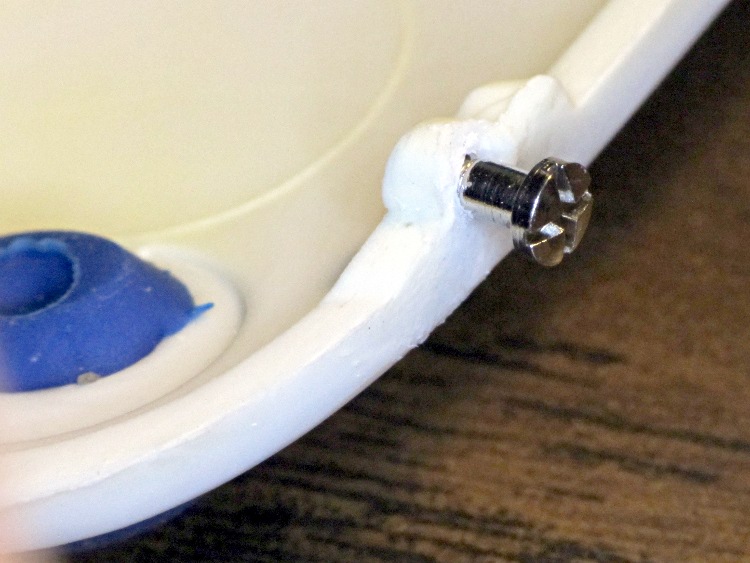
So I found a suitable screw in the Tiny Box o’ Teeny Screws (in a sub-container of eyeglass repair screws), drilled a snug hole where the plastic pin used to be (entirely by hand on the drill press, feeding the lid into the drill), and snapped everything together again:
Brita pitcher lid hinge – screw
The remaining plastic pin had a fracture at its base, but I just glued it and will defer installing a screw until it finishes disintegrating. At some point we’re going to be forced to buy a new pitcher…
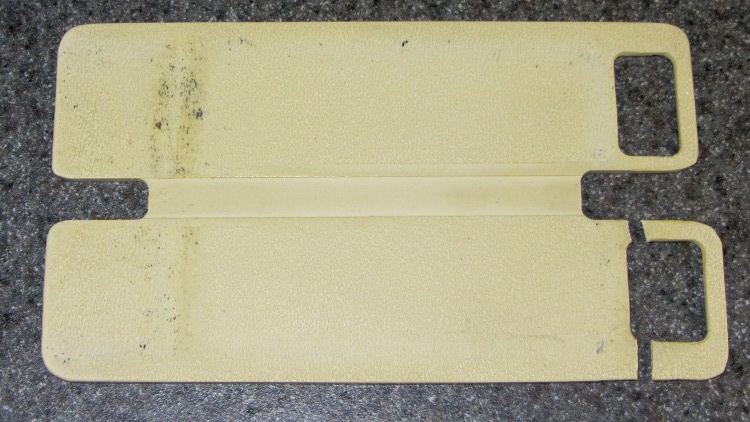
My decrepit Zire 71 PDA (remember PDAs?) has a cute little joystick dingus that, when pressed, displays the clock. That’s great, except that it stands proud of the surface by just enough to be constantly pressed by my pants fabric. Hence, the need for a button shield… which, after all these years, snapped at an obvious high-stress spot:
Broken Zire button shield
A dab of solvent glue, a few minutes of finger pressure, and let it cure overnight. That was easy.
But then it occurred to me that this was a broken plastic part and I had a 3D printer…
Although reading PDF documents on the shining screen works fine for some topics, I’d much rather curl up with a printed version for the first read-through. Adobe Reader’s print-as-booklet option does all the heavy lifting required to print a PDF document four pages to a single Letter-size sheet of paper, after which I do a little slicing & binding to get a nice comb-bound book.
So I printed out the entire EAGLE 6 manual (found in /wherever/eagle-6.1.0/doc/), which led to the discovery that page 86 is missing (at least in the 1st edition version). That screws up the pagination from page 87 onward: odd-numbered pages move to the left side of the binding, even-numbered pages to the right, and the blank space reserved for the gutter / binding appears on the outside margins. Fortunately, it’s still readable.
To avoid that problem, do this:
Print Range → Pages → [1-85,301,86-334]
That selects the first set of contiguous pages, jams a copy of a “This page has been left free intentionally” page from the back of the manual in place of the missing page 86, and then selects the rest of the book.
Print the front sides, flip the stack over, print the back sides (with the same page range), and bind as usual.
FWIW, this is much better than having the printer mis-feed about 3/4 of the way through the back sides, which it has done in the past while printing a big book. I now run off about 20 sheets at a time, with only that many pieces of paper in the feeder, just to make sure it doesn’t ruin the entire job.
One could, I suppose, use pdftk to shuffle the PDF into a complete file which would Just Work, but that seems like more trouble than it’s worth. Ditto for expecting CadSoft to re-create the PDF.
Memo to Self: Check the last page. If the logical page doesn’t match what’s shown on the PDF page, then something’s wrong.
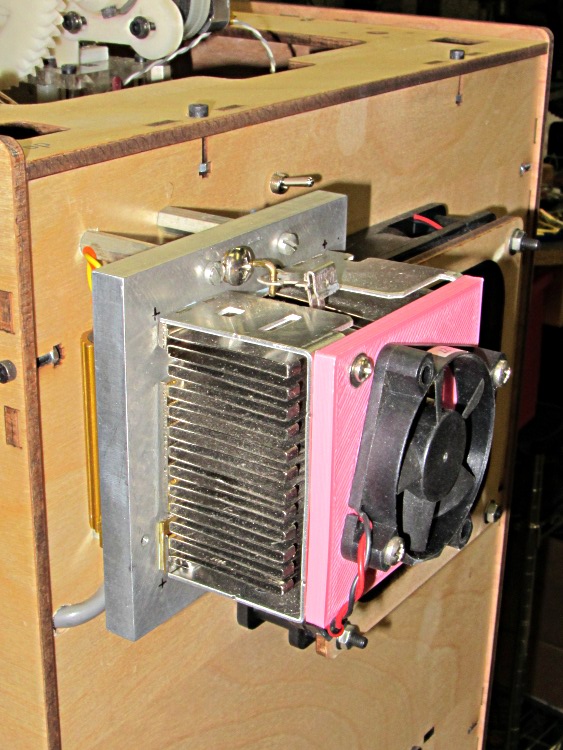
The fan on the dummy load that consumes the required minimum current to keep the ATX power supply happy wasn’t starting up reliably. That’s not surprising: I connected it to 5 V rather than the rated 12 V, because the load heatsink needs just a whisper of air flow to stay barely above room temperature, so it’s barely turning over and has no spare torque at all.
It turns out the heatsink really doesn’t need any forced air flow, despite having the fins oriented crosswise. Without the fan, it stabilizes just above comfortable-to-the-touch, a bit hotter than I’d prefer.
While I had the hood up for the HBP rebuild, though, I swapped in another fan and the heatsink is now cool to the touch. I did clean that dust off the fins, too.
If this one also fails at +5 V, I’ll fiddle the wiring to put it across the +12 V and +5 V supplies, where it’ll see 7 V. That should improve its disposition…
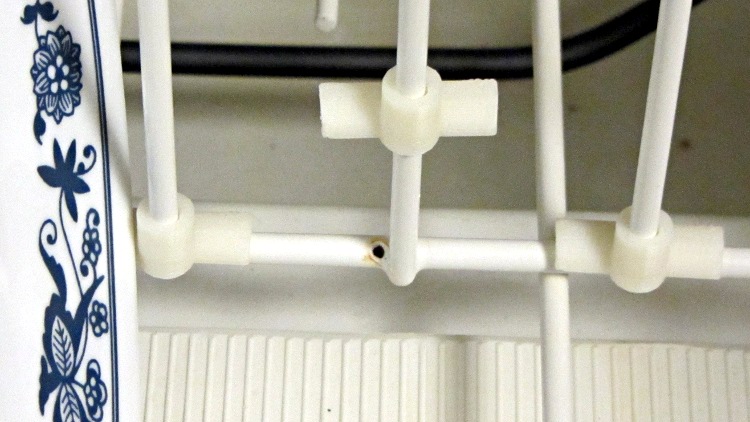
After a decade of stacking the plates in the dishwasher the same way every time, the flexible coating over the steel rods has worn through:
Dishwasher rack abrasion
We can’t stack them the other way, because the rotor spray rattles them unmercifully, and a fix is in order. Apparently, one can purchase touchup paint for this very purpose, but what’s the fun in that? Besides, I’d expect it to wear through even faster than the original coating, if only because adhesion is never as good as you’d expect from reading the label.
So this little dingus fits around a vertical pin and rests atop the horizontal rod, with the edge of the plate nestled into the joint between the two cylinders:
Dishwasher rack protector – solid model
Being very small, they build best in large groups:
Dishwasher rack protectors – on build platform
The horizontal half-cylinders require internal support, shown here adjacent to the protector for easy viewing:
Dishwasher rack protector – support model
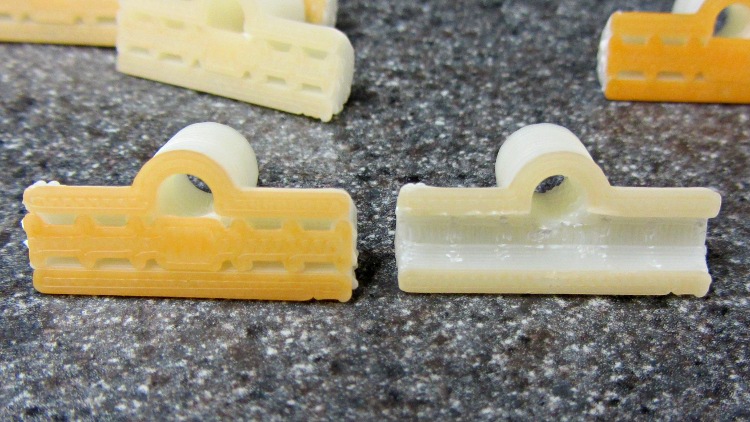
Those fins just barely clear the interior of the horizontal cylinder, so the two parts don’t bond together very well (that’s the ideal condition, of course). The flat plate glues the support fins firmly to the build platform, which is easier to see on these somewhat shorter prototypes with a layer or two of orange filament on their bottoms:
Dishwasher rack protectors – support
The support chops out neatly with a repurposed nail set punch:
Dishwasher rack protector – removing support
Actually, I stood each one vertically on an aluminum chunk, held the punch in place with finger pressure, and whacked it with a small brass hammer. The OpenSCAD code now adds a small tab each end to help align the punch for the first whack.
The rod (vertical) hole came out just about exactly the right size (admittedly, with a 0.4 mm HoleFinagle adjustment), but required a pass with a drill in a pin vise to clear out the Reversal Zittage. The result slides easily over undamaged pins, but some pins had rust at either the top or bottom that required a bit of cleanup. This is a trial fit:
Dishwasher rack protectors – trial fit
I put a blob of acrylic caulk on the abraded spots to (attempt to) seal them from further damage, then squished the protectors in place. The dishwasher demonstrated that it’s perfectly capable of blasting an unglued protector (without a plate) up and off the pin, ingesting it into the trash grinder, chewing it up, and spitting the pieces down the drain. Lost a couple of prototypes before I figured that out, too.
Ya learn something new every day…
The OpenSCAD source code:
// Dishwasher rack protector
// Ed Nisley KE4ZNU - Jan 2012

Layout = "Show";                    // Show Build Support

Support = true;                     // true to add support inside rod half-cylinder

include </home/ed/Thing-O-Matic/lib/visibone_colors.scad>

//-------
//- Extrusion parameters must match reality!
//  Print with +0 shells
//  Infill = 1.0, line, perpendicular to Bar axis on first bridge layer
//  Multiply = at least four copies to prevent excessive slowdown

ThreadThick = 0.25;
ThreadWidth = 2.0 * ThreadThick;

HoleFinagle = 0.4;
HoleFudge = 1.00;

function HoleAdjust(Diameter) = HoleFudge*Diameter + HoleFinagle;

Protrusion = 0.1;           // make holes end cleanly

function IntegerMultiple(Size,Unit) = Unit * ceil(Size / Unit);
function IntegerMultipleMin(Size,Unit) = Unit * floor(Size / Unit);

//-------
// Dimensions

PinDia = 4.0 + 0.5;                 // upright pin diameter + clearance
PinRadius = PinDia/2;

PinSpace = 35.0;                    // pin spacing along bar

PinOC = 3.4;                        // bar center to pin center

PinTubeLength = 15.0;               // length of upright tube along pin

BarDia = 4.7 + 0.2;                 // horizontal bar diameter + clearance
BarRadius = BarDia/2;

BarTubeLength = PinSpace - 5.0;     // length of horizontal half tube along bar

TubeWall = 4*ThreadWidth;           // wall thickness -- allow for fill motion

TubeSides = 4 * 4;                  // default side count for tubes (in quadrants)
$fn = TubeSides;

SupportClear = 0.85;                // support structure clearance fraction

//-------

module PolyCyl(Dia,Height,ForceSides=0) {           // based on nophead's polyholes
  Sides = (ForceSides != 0) ? ForceSides : (ceil(Dia) + 2);
  FixDia = Dia / cos(180/Sides);
  cylinder(r=HoleAdjust(FixDia)/2,h=Height,$fn=Sides);
}

module ShowPegGrid(Space = 10.0,Size = 1.0) {

  Range = floor(50 / Space);
  for (x=[-Range:Range])
    for (y=[-Range:Range])
      translate([x*Space,y*Space,Size/2])
        %cube(Size,center=true);
}

//--------
// Support under bar tube shells

module SupportStructure() {

  color("cyan")
  difference() {
    union() {
      for (Index=[-4:4])
        translate([Index*(BarTubeLength/8.5),0,0])
          rotate([0,90,0])
            rotate(180/TubeSides)
              cylinder(r=SupportClear*BarRadius,h=2*ThreadWidth,center=true);

      rotate([0,90,0])
        rotate(180/TubeSides)
          cylinder(r=SupportClear*BarRadius,h=10*ThreadWidth,center=true);

      translate([0,0,ThreadThick])
        cube([(BarTubeLength + 4*ThreadWidth),BarRadius,2*ThreadThick],center=true);
    }

    translate([0,0,-(BarRadius + Protrusion)/2])
      cube([(BarTubeLength + 2*Protrusion),
          BarDia,
          (BarRadius + Protrusion)],center=true);

  }

}

//-------
// Put it together

module Protector() {

  difference() {
    union() {
      translate([0,PinOC,0])
        rotate(180/TubeSides)
          cylinder(r=(PinDia + 2*TubeWall)/2,h=PinTubeLength);
      translate([-BarTubeLength/2,0,0])
        rotate([0,90,0])
          rotate(180/TubeSides)
            cylinder(r=(BarDia + 2*TubeWall)/2,h=BarTubeLength);
    }

    translate([0,PinOC,-Protrusion])
      rotate(180/TubeSides)
        PolyCyl(PinDia,(PinTubeLength + 2*Protrusion),TubeSides);

    translate([-BarTubeLength/2,0,0])
      rotate([0,90,0])
        rotate(180/TubeSides)
          translate([0,0,-Protrusion])
            cylinder(r=BarRadius,h=(BarTubeLength + 2*Protrusion));

    translate([0,0,-(BarRadius + TubeWall + Protrusion)/2])
      cube([(BarTubeLength + 2*Protrusion),
          BarTubeLength,
          (BarRadius + TubeWall + Protrusion)],center=true);
  }

}

//-------
// Build it!

ShowPegGrid();

if (Layout == "Support")
  SupportStructure();

if (Layout == "Show") {
  Protector();
  translate([0,-10,0])
    SupportStructure();
}

if (Layout == "Build")
  rotate(90) {
    if (Support)
      SupportStructure();
    Protector();
  }
The basic problem with the heater on the Heated Build Platform is that the SMD pads must both make electrical contact to the Molex-style connector and withstand mechanical stress from the dangling wires & cables as the platform moves along the X and Y axes. Rather than replace the entire heater, I attached pigtail leads to the PCB, anchored those leads to the wood platform under the heater, and routed the cables through the deck under the Y axis stage a bit differently.
However, attaching pigtail leads to the PCB poses a problem, because ordinary electronic hookup wire has thermoplastic insulation that melts or deforms at temperatures well under my usual 110 °C platform heat setting; shorting the heater wires would be a Very Bad Thing.
Some concerted rummaging in the Big Box o’ Multiconductor Cable turned up a hank of Teflon-insulated shielded two-wire cable that, as nearly as I can tell, has pure silver conductors and shield braid: the ends were tarnished like silver and there’s nary a trace of copper in the fresh cuts. It must be military surplus and, based on a vague recollection, was most likely cough salvaged by my father, who worked as an avionics tech at Olmstead AFB in the mid-60s. Ya gotta have stuff, right?
[Update: Alas, it’s not pure silver, as shown in the comments.]
The general idea is to scuff up the shiny PCB surface enough to anchor blobs of JB Industro Weld epoxy that surround brass tubes holding the cables. A pair of tubes secure each cable and provide strain relief; the cable is free to move, but not by very much. The thermistor cable has a long arch that will, I hope, keep the cable at the platform temperature and reduce its cooling effect on the thermistor:
Thermistor rewiring – heat cure
The alligator clips connect to a bench power supply that delivered 4 V @ 2 A = 8 W that heated the PCB to about 40 °C in the rather chilly Basement Laboratory and encouraged the epoxy to cure in less time than forever.
The final result looked like this, with Anderson Powerpoles now attached to the heater cable:
Rewired HBP
The 24 AWG conductors in the cable may seem scanty for 6 A of heater current, but, hey, they’re silver.
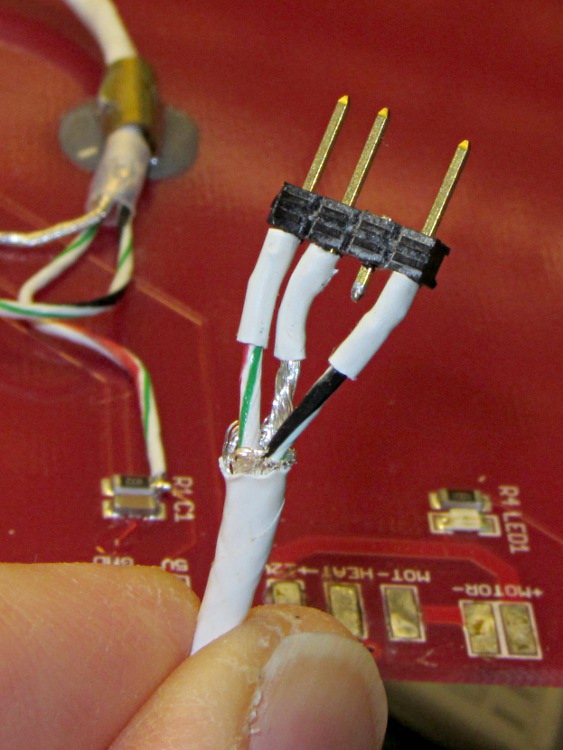
The three-pin connector on the end of the thermistor cable is a pure kludge, built from a 4-pin header to match the CD-ROM audio pinout on the new cable from the Extruder Controller. I kept the default pinout on this end to provide some protection against plugging it in backwards:
Kludged HBP thermistor connector
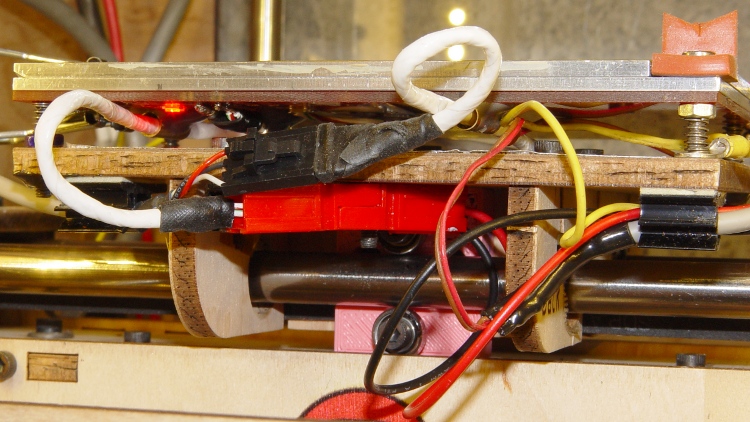
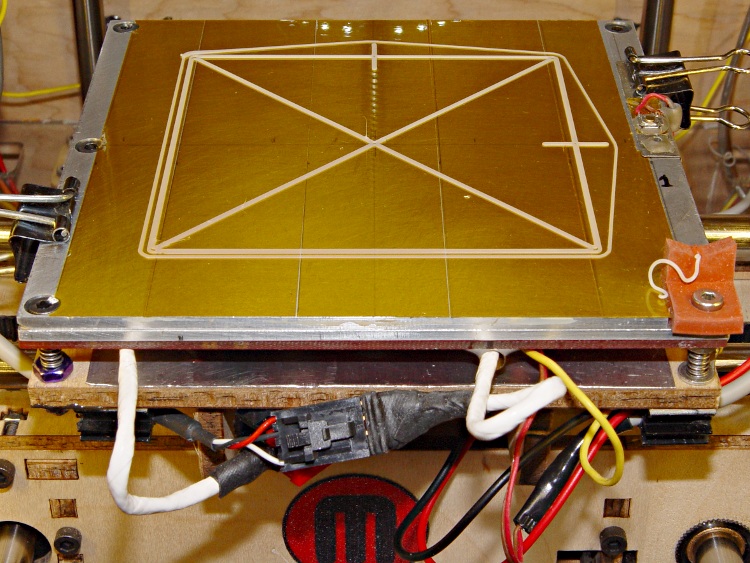
With all that in hand, I screwed the PCB to the aluminum sub-plate, bolted it to the plywood platform, and stuck the cables onto the platform with adhesive clamps:
Rewired HBP – front
Reaming out the hole between the red and black Powerpole shells provided just enough room for an M3 screw to anchor them to the HBP: they won’t flop around under acceleration.
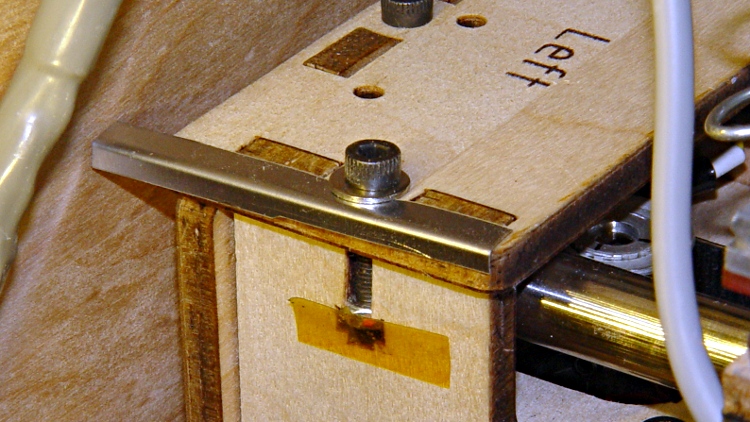
The thermistor cable exits to the left, the rest to the right, and I’m unhappy with the overall routing. I added a small bumper (made from bent steel shim stock) to keep the thermistor cable out of the gap between the Y axis stage and the left side wall:
The platform is holding level within ±0.05 mm across build plates 1 and 2, somewhat better than before. On the other paw, the whole thing doesn’t have many hours on it…
Although Thanksgiving is Update Your Parents’ Browser Day, I ended up rebuilding their old Dell Dimension 2350 PC over their New Year visit: it had succumbed to a nasty case of bit rot. It may have had the odd malware infestation, although booting with the invaluable System Rescue CD and unleashing a ClamAV scan didn’t turn up anything exciting.
I had full partition backups from August 2010, so I set up a new hard drive (well, an old drive from my heap, but new to them) with the restored partitions before they arrived, swapped it into the PC, then attempted to boot the Windows Recovery Console from their Windows CD to restore the MBR. Alas, I didn’t set the Dell Utility partition to type DE, thus throwing off the drive letter sequence, and the subsequent thrashing (including a steel-cage death match with fixboot and chkdsk) wrecked the Windows partition.
Figuring that situation out from a simple NTLDR missing boot message took a while.
But after restoring the partition again and doing the WRC dance, we had a perfectly serviceable Windows XP installation that inhaled a year’s worth of Windows updates in a surprisingly short process that required only a single (!) reboot. I tossed a bunch of obsolete & unused software over the side, emptied the Recycle bin, manually deleted a bunch of files in the various temporary directories, updated Firefox, installed LibreOffice, imported the Outlook Express address book from the rotted drive, did not import the email messages, and away they drove.
I had suggested it was time for a new PC, but … maybe next time.
Notes:
My USB-to-SATA adapter cable injected occasional read errors (which partimage caught), but a klunky drop-in-the-slot vertical desktop adapter worked OK.
A CHKDSK fixed one or more files message doesn’t really prepare you for the discovery that it obliterated the entire directory structure and left a vacant drive behind.
The PC had 512 MB of DDR RAM in two 256 MB sticks. I swapped in a 512 MB stick (harvested from an old PC on its way to the recycler) and, as you’d expect, 768 MB of RAM dramatically improved the poor thing’s attitude.
System Rescue CD is invaluable for this sort of thing.
What is it with Firefox being stuck at V3 forever, then ratcheting instantly to V9? Version envy?





 The Smell of Molten Projects in the Morning