Ed Nisley's Blog: Shop notes, electronics, firmware, machinery, 3D printing, laser cuttery, and curiosities. Contents: 100% human thinking, 0% AI slop.
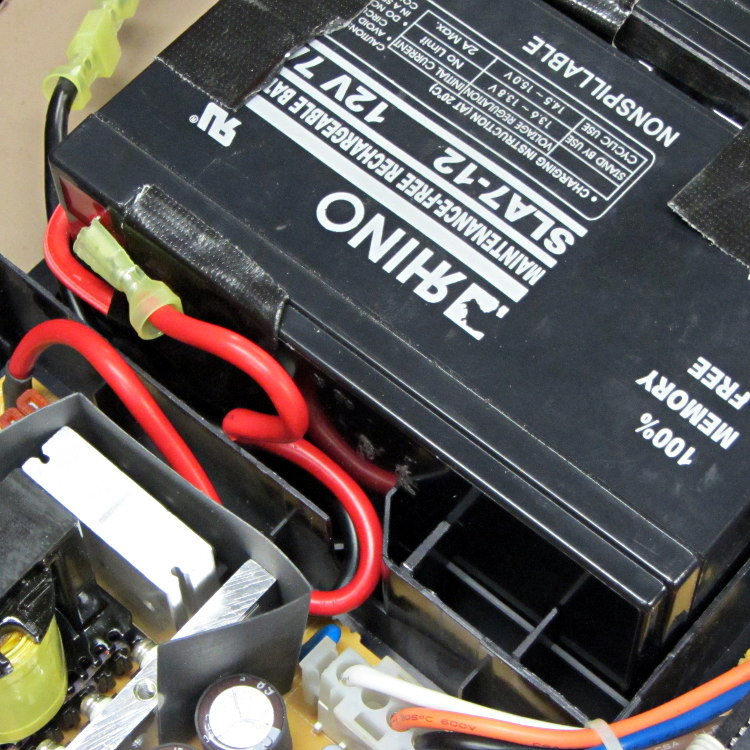
Given the length of the battery wires inside a Belkin F6C1500 UPS, you might think any arrangement will work. Not so. The wires from the guts of the UPS must exit to the batteries exactly like this:
F6C1500 Battery wires from UPS
There’s a black wire tucked under the red wire, both of which must exit though the angled slot and run toward the front of the battery compartment.
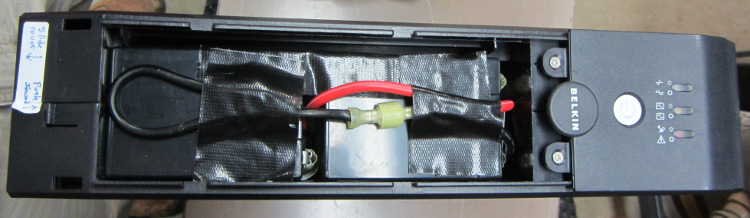
Seen from the front, the red wire connects the positive terminal of the lower (left) battery to the negative terminal of the top (right) battery and the black wire connects the negative terminal of the lower battery to the UPS circuitry:
F6C1500 Battery interconnect wires
Trust me on this: there is no other arrangement of those wires that will simultaneously connect everything properly and fit within the case.
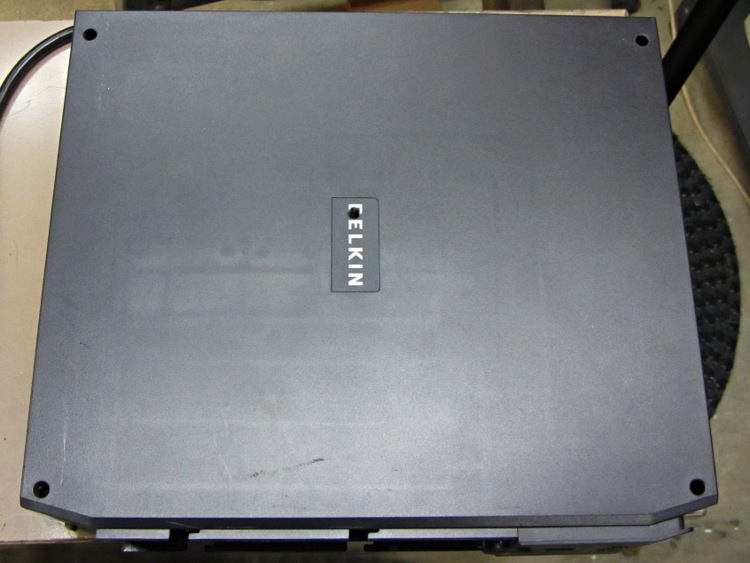
As for disassembly, the small tab on the left end of the case holds the front panel in place. Press that inward with a flat screwdriver, then slide the cover toward the tab. Four locking slots along the sides will disengage and you can then lift the panel off.
With that out of the way, there’s a screw hidden under the BELKIN label in the middle of the removable cover:
Somehow, we wound up with a broom handle and a broom head, the former missing a threaded stub that was firmly lodged in the latter. A few minutes of Quality Shop Time sawed off the end of the handle and unscrewed the stub to produce this array of fragments:
Broken broom handle thread
It’s a cylindrical Thing tailor-made for (or, back in the day, by!) a lathe. My lathe has quick-change gears that can actually cut a 5 TPI thread, but that seems like a lot of work for such a crude fitting. Instead, an hour or so of desk work produced this:
Broom Handle Screw – solid model – overview
Some after-the-fact search-fu revealed that the thread found on brooms and paint rollers is a 3/4-5 Acme. Machinery’s Handbook has 13 pages of data for various Acme screw threads, making a distinction between General Purpose Acme threads and Stub Acme Threads: GP thread depth = 0.5 × pitch, Stub = 0.3 × pitch. For a 5 TPI thread = 0.2 inch pitch, that’s GP = 0.1 inch vs. Stub = 0.06 inch.
I measured a 5.0 mm pitch (which should be 5.08 mm = 0.2 inch exactly) and a crest-to-root depth of 1.4 mm = 0.055 inch, which makes them look like 3/4-5 Stub Acme threads. But, I didn’t know that at the time; a simple half-cylinder 2.5 mm wide and 1.25 mm tall was a pretty close match to what I saw on the broken plastic part.
Although OpenSCAD’s MCAD library has some screw forms, they’re either machine screws with V threads or ball screws with spheres. The former obviously weren’t appropriate and the latter produced far too many facets, so I conjured up a simpler shape: 32 slightly overlapping cylinders per turn, sunk halfway in the shaft at their midpoint, and tilted at the thread’s helix angle.
Broom Handle Screw – thread model closeup
The OpenSCAD source code has a commented-out section that removes a similar shape from the shaft between the raised thread, but that brought the rendering to its knees. Fortunately, it turned out to be unnecessary, but it’s there if you want it.
With the shaft diameter set to the “root diameter” of the thread and the other dimensions roughly matching the broken plastic bits, this emerged an hour later:
Broom handle screw plug – as built
The skirt thread was 0.25 to 0.30 mm thick, so the first-layer height tweak and packing density adjustments worked fine and all the dimensions came out perfectly. The cylindrical thread form doesn’t have much overhang and the threads came out fine; I think the correct straight-sided form would have more problems.
The hole down the middle accommodates a 1/4-20 bolt that applies enough clamping force to keep the shaft in compression, which ought to prevent it from breaking in normal use. I intended to use a hex bolt, but found a carriage bolt that was exactly the right length and had a head exactly the same diameter as the shaft, so I heated it with a propane torch and mushed its square shank into the top of the hexagonal bolt hole (the source code now includes a square recess):
Broom handle screw plug – in handle
The dimples on the side duplicate the method that secured the original plastic piece: four dents punched into the metal handle lock the plastic in place. It seems to work reasonably well, though, and is certainly less conspicuous than the screws I’d use.
Screwing it in place shows that it’s slightly too long (I trimmed the length in the source code):
Broom handle installed
It’s back in service, ready for use…
The OpenSCAD source code:
// Broom Handle Screw End Plug
// Ed Nisley KE4ZNU March 2013

// Extrusion parameters must match reality!
//  Print with +1 shells and 3 solid layers

ThreadThick = 0.25;
ThreadWidth = 2.0 * ThreadThick;

HoleWindage = 0.2;

function IntegerMultiple(Size,Unit) = Unit * ceil(Size / Unit);

Protrusion = 0.1;			// make holes end cleanly

//----------------------
// Dimensions

PI = 3.14159265358979;

PostOD = 22.3;              // post inside metal handle
PostLength = 25.0;

FlangeOD = 24.0;            // stop flange
FlangeLength = 3.0;

PitchDia = 15.5;            // thread center diameter
ScrewLength = 20.0;

ThreadFormOD = 2.5;         // diameter of thread form
ThreadPitch = 5.0;

BoltOD = 7.0;               // clears 1/4-20 bolt
BoltSquare = 6.5;          	// across flats
BoltHeadThick = 3.0;

RecessDia = 6.0;			// recesss to secure post in handle

OALength = PostLength + FlangeLength + ScrewLength; // excludes bolt head extension

$fn=8*4;

echo("Pitch dia: ",PitchDia);
echo("Root dia: ",PitchDia - ThreadFormOD);
echo("Crest dia: ",PitchDia + ThreadFormOD);

//----------------------
// Useful routines

module Cyl_Thread(pitch,length,pitchdia,cyl_radius,resolution=32) {

Cyl_Adjust = 1.25;                      // force overlap

    Turns = length/pitch;
    Slices = Turns*resolution;
    RotIncr = 1/resolution;
    PitchRad = pitchdia/2;
    ZIncr = length/Slices;
    helixangle = atan(pitch/(PI*pitchdia));
    cyl_len = Cyl_Adjust*(PI*pitchdia)/resolution;

    union() {
        for (i = [0:Slices-1]) {
            translate([PitchRad*cos(360*i/resolution),PitchRad*sin(360*i/resolution),i*ZIncr])
                rotate([90+helixangle,0,360*i/resolution])
                    cylinder(r=cyl_radius,h=cyl_len,center=true,$fn=12);
        }
    }
}

module PolyCyl(Dia,Height,ForceSides=0) {			// based on nophead's polyholes

  Sides = (ForceSides != 0) ? ForceSides : (ceil(Dia) + 2);

  FixDia = Dia / cos(180/Sides);

  cylinder(r=(FixDia + HoleWindage)/2,
           h=Height,
	   $fn=Sides);
}

module ShowPegGrid(Space = 10.0,Size = 1.0) {

  Range = floor(50 / Space);

	for (x=[-Range:Range])
	  for (y=[-Range:Range])
		translate([x*Space,y*Space,Size/2])
		  %cube(Size,center=true);

}

//-------------------
// Build it...

ShowPegGrid();

difference() {
    union() {
        cylinder(r=PostOD/2,h=PostLength);
        cylinder(r=PitchDia/2,h=OALength);
        translate([0,0,PostLength])
            cylinder(r=FlangeOD/2,h=FlangeLength);
        translate([0,0,(PostLength + FlangeLength)])
            Cyl_Thread(ThreadPitch,(ScrewLength - ThreadFormOD/2),PitchDia,ThreadFormOD/2);
    }

    translate([0,0,-Protrusion])
        PolyCyl(BoltOD,(OALength + 2*Protrusion),6);
    translate([0,0,(OALength - BoltHeadThick)])
        PolyCyl(BoltSquare,(BoltHeadThick + Protrusion),4);

//    translate([0,0,(PostLength + FlangeLength + ThreadFormOD)])
//        Cyl_Thread(ThreadPitch,(ScrewLength - ThreadFormOD/2),PitchDia,ThreadFormOD/2);

	for (i = [0:90:270]) {
		rotate(i)
			translate([PostOD/2,0,PostLength/2])
				sphere(r=RecessDia/2,$fn=8);
	}
}
While extricating the sawhorses from the garage, one of the bright yellow cap strips fell off. Whether by coincidence or not, it was the same one I’d previously repaired after sawing completely through the poor thing, but this time the failure came from what’s called inherent vice in the molded bracket-and-pin feature that holds the cap in place:
Fractured sawhorse top pin
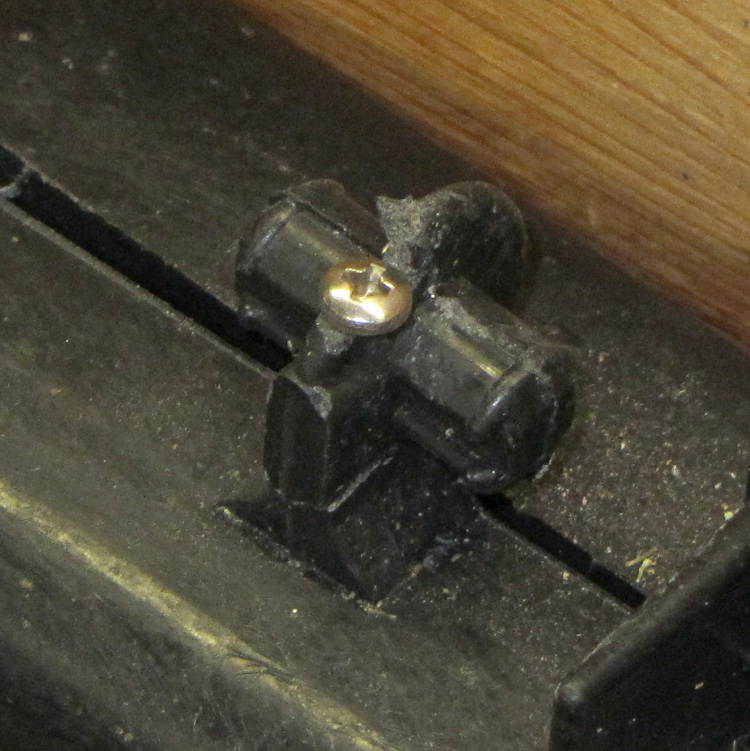
I filed a flat on the top of the bracket, drilled a 4-40 clearance hole, and then held everything in place while drilling a 4-40 tapping hole into the sawhorse. There was just enough plastic to make all that work, at least for the not very strenuous conditions it should experience around here:
Fractured sawhorse top pin – with screw
While trying to reassemble the cap, I discovered why the bracket broke. The yellow cap has a bulkhead with an opening for the pin, plus a solid bulkhead that butts against the hinge along the top of the sawhorse. The bulkheads lie too close together: you simply cannot get the opening over the pin on this end with the cap parallel to the top of the sawhorse, which you must do in order to get the pin in the corresponding hole on that end.
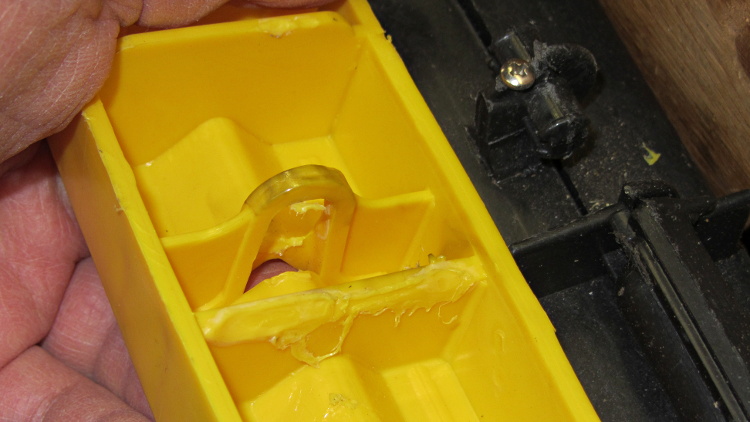
Evidently they had the same problem at the factory and “solved” it by melting the bulkhead with a hot blade:
Sawhorse top cover – factory bodge
That didn’t really help me, but I carved off a few more slices to weaken the solid bulkhead enough to bend it around the hinge. I think the strain involved in the original assembly, plus what happened when I had to take it apart to fix the sawed-off end, weakened the bracket enough to snap off at some point over the winter.
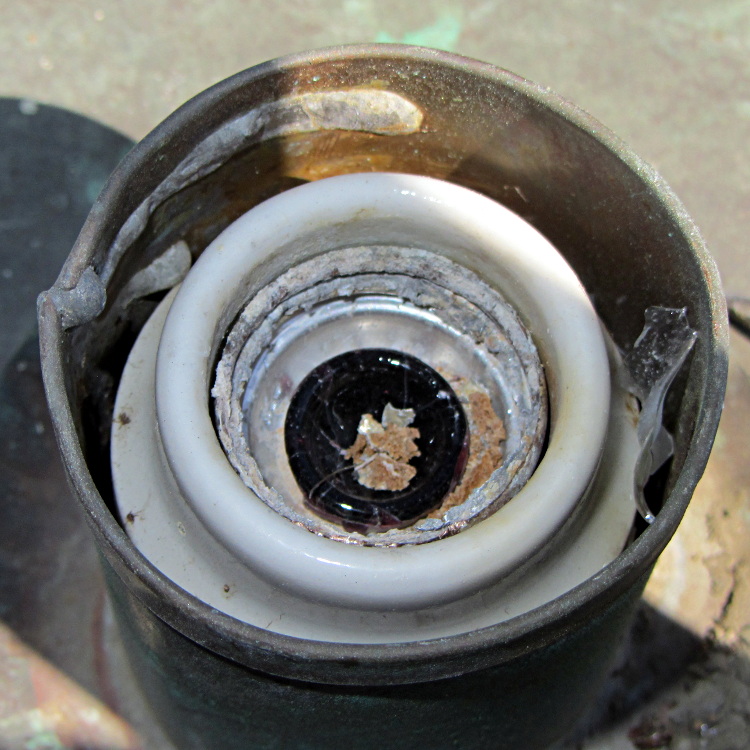
Mad Phil asked me to replace the bulb in a lamp along the walkway to their garage, which turned into a bit of a circus: the bulb had shattered, leaving only the base in the socket. After clearing away the rubble, I was confronted with this:
Corroded lamp socket
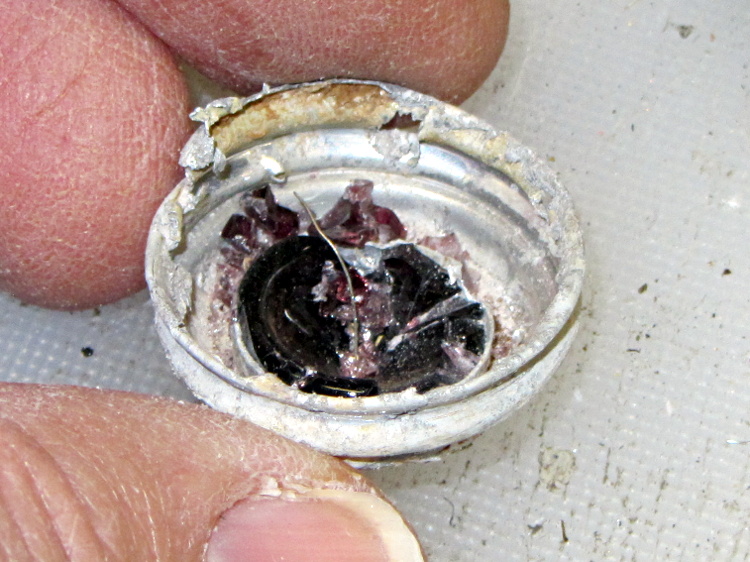
I removed the entire lamp housing, laid it out on my workbench, and eventually resorted to jamming needle-nose pliers into the base and forcibly unscrewing it. That worked:
Corroded lamp base
Fortunately, the aluminum lamp base had corroded against the brass socket, not the other way around, so buffing the socket with a brass wheel in a Dremel handset and polishing the base contacts brought it back to life.
Mary has been listening to library books while she quilts and sews; some of the older books actually come on cassette tapeand our tape players still work. The newer books come on CDs, but it seems the library hasn’t gotten into audio e-reader files yet. She actually prefers tapes, because she can simply stop the tape and restart it from the same place without any further intervention.
In any event, a recent tape stalled about 1/4 of the way through and refused to either rewind or fast forward.
Rather than returning it to the library, which I’m certain all previous borrowers did, I took the cassette apart. This is no big deal, I’ve done it many times before cassettes fell into the dustbin of history.
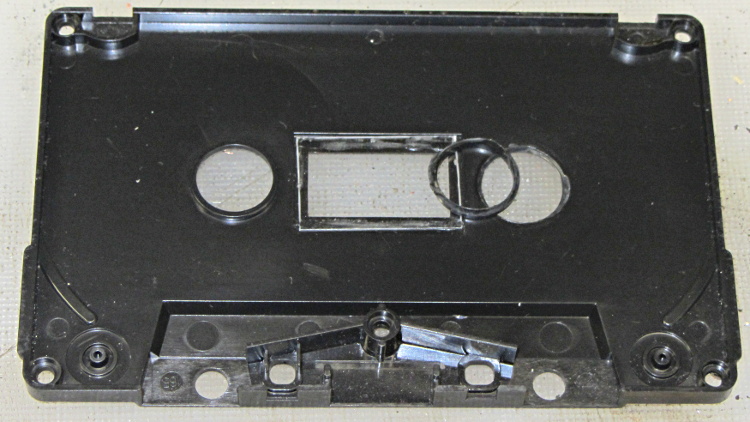
That made the failure quite obvious:
Cassette tape case – detached bushing
The bushing around one of the hub openings had completely fractured and come loose, jamming the tape hub in place.
A ring of solvent adhesive around both parts, a few minutes of clamping, and it’s all good again.
Don’t tell the library; they get tetchy about DIY repairs…
Judging from the much-folded Dayton 4X221 Snap-Around Ammeter Operating Instructions (a scanned copy that I folded around the original and tucked inside the case), the ammeter dates back to 1979, which says Mad Phil probably used it in the early 80s, when he was repairing AV equipment. Unlike most vintage clamp-on ammeters, this one can also measure voltage and resistance:
Dayton 4X221 Snap-Around Ammeter – Specifications
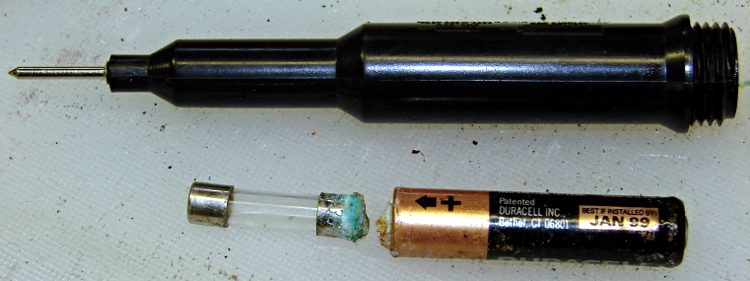
The resistance function requires a single AAA alkaline cell in the bulky probe, so this should come as no surprise:
The probe housing contains a 1 A fast-blow fuse, which blocked the corrosion from getting deeper into the probe tip:
Dayton 4X221 Resistance Probe – battery and fuse
The AAA cell was “Best if installed by Jan 1999”, which I’m sure was true. Somehow, you never recognize the last time you use something; I suppose old instruments get used to not seeing the light over the workbench after a while.
Anyhow.
Douse the corrosion with vinegar to neutralize the potassium hydroxide, rinse out the probe body, polish the top of the fuse, buff up the battery contact on the test lead, and it’s all good again.
That comment suggested scroll ring failures on a Kensington Expert Mouse (it’s a trackball) might occur when the apertures become misaligned from the IR emitter-detector pair, although later results were equivocal. I tore apart a failed unit to see what the alignment looked like for a known-bad scroll ring.
The right side view shows the receiver roughly centered in an aperture:
Kensington Expert Mouse – Scroll Ring aperture – right
The left side view shows that the ring is almost flush against the circuit board, with the isolating cutout just in front, and it’s not obvious how to lower it any further:
Kensington Expert Mouse – Scroll Ring aperture – left
So I think there’s no way to realign this one, other than to raise the aperture ring a bit, but that doesn’t seem like it would make any difference: the detector already has a good view of the emitter.
If your trackball has a failed scroll ring, tweaking the aperture ring’s alignment certainly can’t hurt: try it and report back.
If you don’t expect a miracle, you probably won’t be disappointed, alas.
Hi, I wanted to leave a comment for your page here: [this url]
I’ve got an expert mouse trackball that was having intermittent scroll ring problems, then finally quit working altogether. Dismantled it easily using the instructions on this site.
Cleaned it and it still wasn’t working. Tried changing the alignment of the IR emitter/detectors and it still wasn’t working. Then we kept on fiddling with the alignment and voilà.
Like others have said, the alignment seems to be SUPER sensitive. So if any others are reading this with the same problem, keep persevering.
Thanks to everyone who has posted to help find solutions!