Ed Nisley's Blog: Shop notes, electronics, firmware, machinery, 3D printing, laser cuttery, and curiosities. Contents: 100% human thinking, 0% AI slop.
Mary has been listening to library books while she quilts and sews; some of the older books actually come on cassette tapeand our tape players still work. The newer books come on CDs, but it seems the library hasn’t gotten into audio e-reader files yet. She actually prefers tapes, because she can simply stop the tape and restart it from the same place without any further intervention.
In any event, a recent tape stalled about 1/4 of the way through and refused to either rewind or fast forward.
Rather than returning it to the library, which I’m certain all previous borrowers did, I took the cassette apart. This is no big deal, I’ve done it many times before cassettes fell into the dustbin of history.
That made the failure quite obvious:
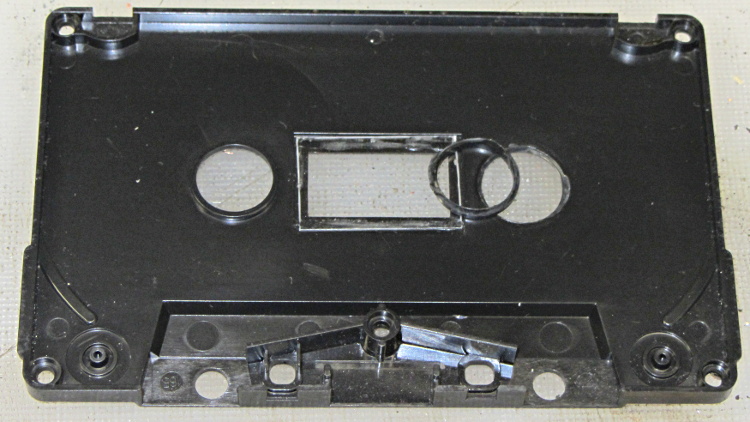
Cassette tape case – detached bushing
The bushing around one of the hub openings had completely fractured and come loose, jamming the tape hub in place.
A ring of solvent adhesive around both parts, a few minutes of clamping, and it’s all good again.
Don’t tell the library; they get tetchy about DIY repairs…
Judging from the much-folded Dayton 4X221 Snap-Around Ammeter Operating Instructions (a scanned copy that I folded around the original and tucked inside the case), the ammeter dates back to 1979, which says Mad Phil probably used it in the early 80s, when he was repairing AV equipment. Unlike most vintage clamp-on ammeters, this one can also measure voltage and resistance:
Dayton 4X221 Snap-Around Ammeter – Specifications
The resistance function requires a single AAA alkaline cell in the bulky probe, so this should come as no surprise:
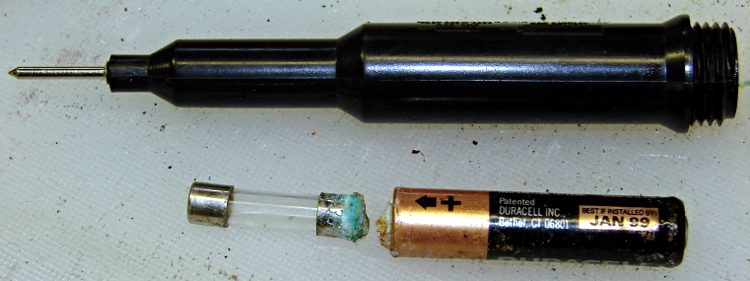
The probe housing contains a 1 A fast-blow fuse, which blocked the corrosion from getting deeper into the probe tip:
Dayton 4X221 Resistance Probe – battery and fuse
The AAA cell was “Best if installed by Jan 1999”, which I’m sure was true. Somehow, you never recognize the last time you use something; I suppose old instruments get used to not seeing the light over the workbench after a while.
Anyhow.
Douse the corrosion with vinegar to neutralize the potassium hydroxide, rinse out the probe body, polish the top of the fuse, buff up the battery contact on the test lead, and it’s all good again.
That comment suggested scroll ring failures on a Kensington Expert Mouse (it’s a trackball) might occur when the apertures become misaligned from the IR emitter-detector pair, although later results were equivocal. I tore apart a failed unit to see what the alignment looked like for a known-bad scroll ring.
The right side view shows the receiver roughly centered in an aperture:
Kensington Expert Mouse – Scroll Ring aperture – right
The left side view shows that the ring is almost flush against the circuit board, with the isolating cutout just in front, and it’s not obvious how to lower it any further:
Kensington Expert Mouse – Scroll Ring aperture – left
So I think there’s no way to realign this one, other than to raise the aperture ring a bit, but that doesn’t seem like it would make any difference: the detector already has a good view of the emitter.
If your trackball has a failed scroll ring, tweaking the aperture ring’s alignment certainly can’t hurt: try it and report back.
If you don’t expect a miracle, you probably won’t be disappointed, alas.
Hi, I wanted to leave a comment for your page here: [this url]
I’ve got an expert mouse trackball that was having intermittent scroll ring problems, then finally quit working altogether. Dismantled it easily using the instructions on this site.
Cleaned it and it still wasn’t working. Tried changing the alignment of the IR emitter/detectors and it still wasn’t working. Then we kept on fiddling with the alignment and voilà.
Like others have said, the alignment seems to be SUPER sensitive. So if any others are reading this with the same problem, keep persevering.
Thanks to everyone who has posted to help find solutions!
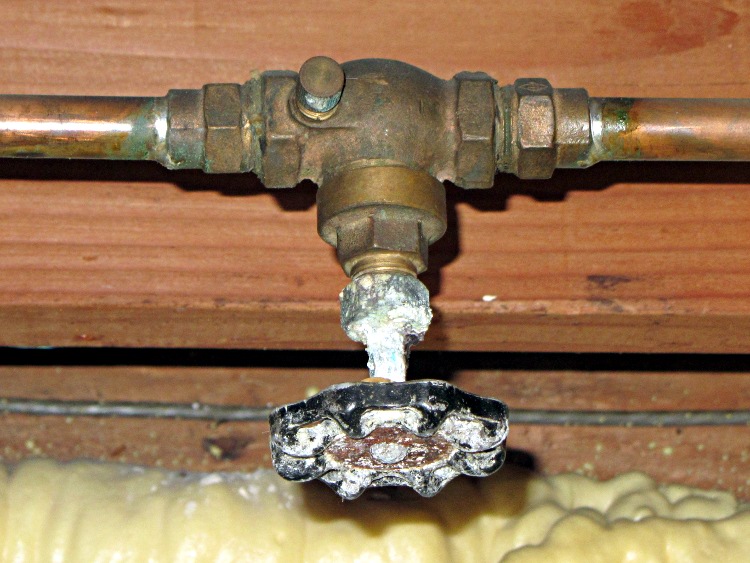
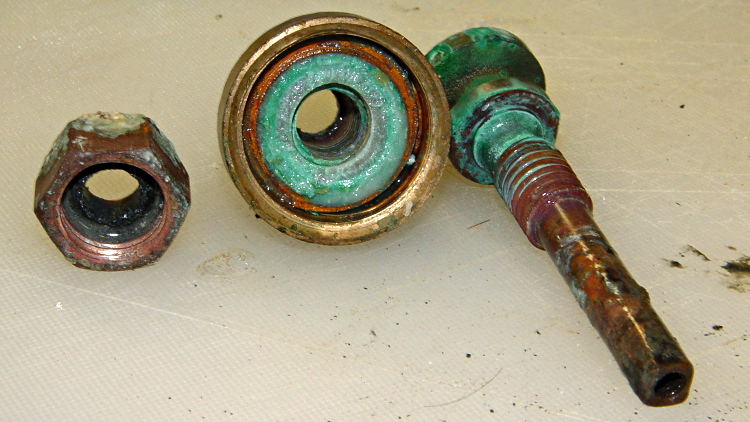
After replacing the hose valve in the garage, I promised to repair its leaky upstream shutoff valve:
Corroded gate valve
I shut off the hard water supply, dismantled the valve, and let everything soak in a cup of white vinegar for a few hours. The fizzing was a wonder to behold and the parts came out much cleaner without any effort at all.
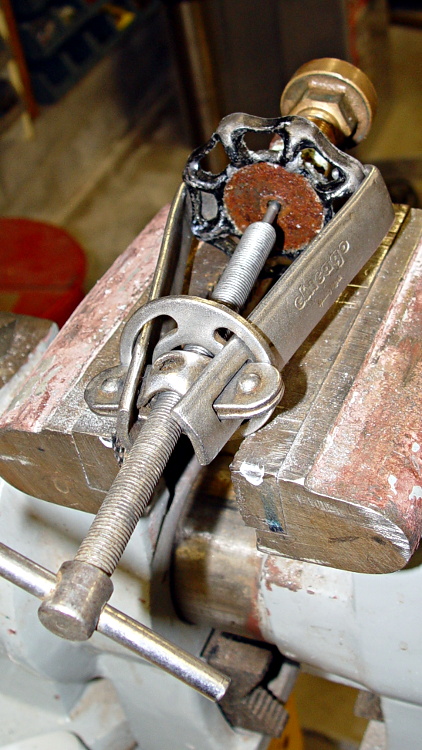
Removing the handle required the handle puller and considerable rapping on the corroded-in-place handle at the tapered shaft. That reddish disk used to be a tin-plated steel data plate, but now it’s just a corroded sheet:
Shutoff valve – handle puller
Because a shutoff valve will be open nearly all the time, it has a large washer that seals the cap and valve stem in addition to the usual stem packing:
Shutoff valve – full-open washer
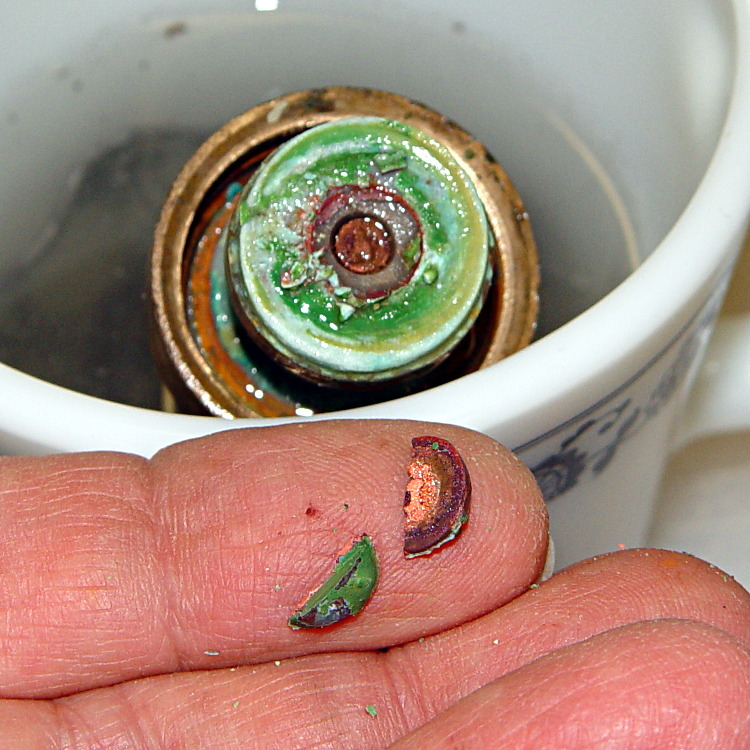
Attempting to remove the screw from the stem broke the head into two pieces:
Shutoff valve – broken washer screw
Worse, the screw shaft was a soft mass of corroded brass, so I had to drill it out and chase the threads with a 10-32 tap. I replaced the full-open washer with a slightly smaller one from the supply box, which required drilling out the hole to suit, adding some packing string under the main cap, and replacing the packing around the stem. But, eventually, putting everything back together works fine with no leaks at all.
This turned out to be slightly less horrible than I expected, which probably doesn’t justify procrastinating until the evening before the coldest night of the season.
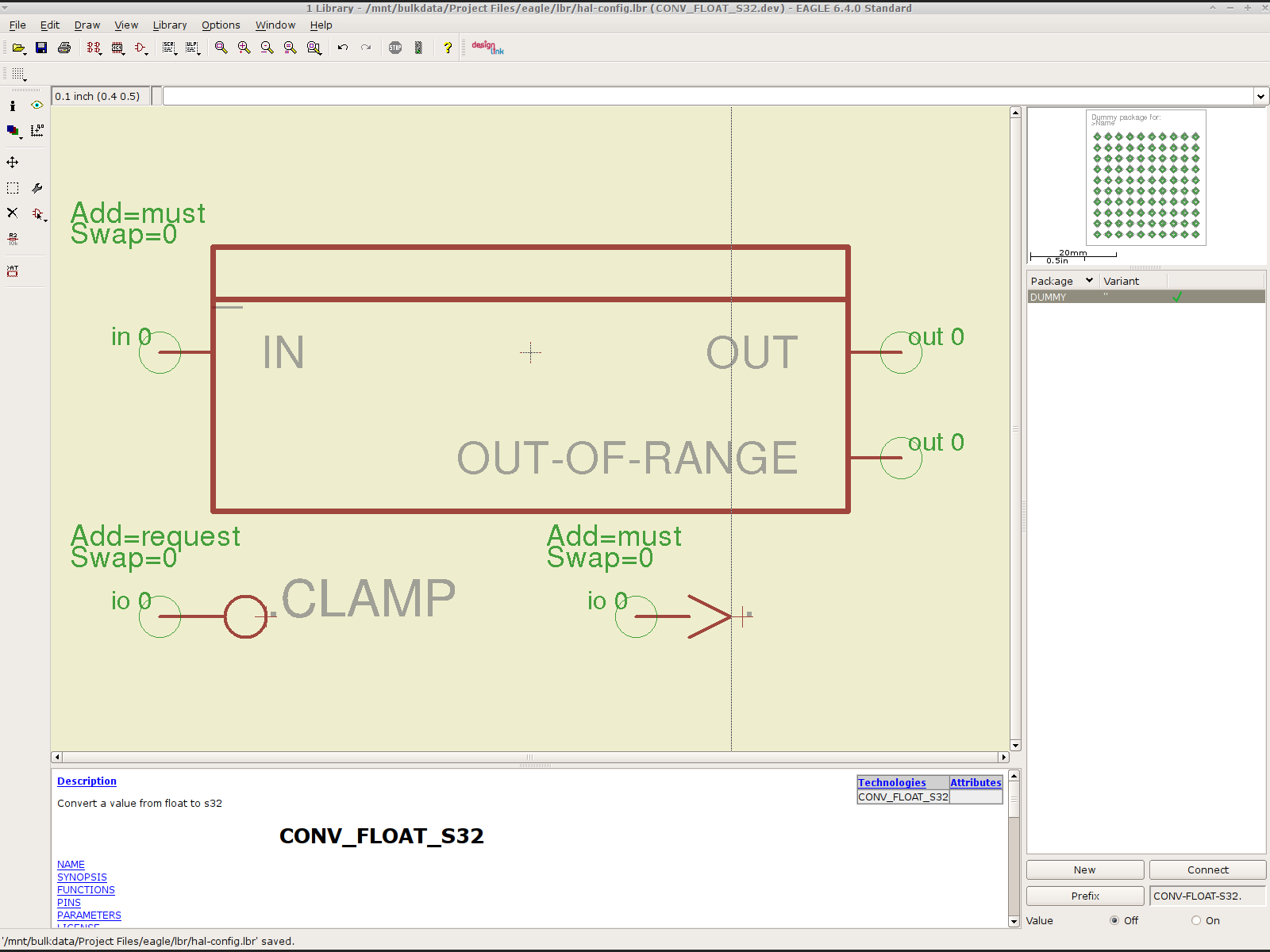
To that end, here’s a checklist for creating a new Eagle device corresponding to a HAL module.
Remember: although this process has a tremendous number of moving parts, you do it exactly once when you need a device that doesn’t already exist. After that, you just click to add an existing device to your schematic, wire it up, then the tedious write-only HAL overhead happens automagically.
Cross-check the documentation with the actual component code!
The man page lists the names, pins, parameters, and suchlike, but may have typos. This isn’t a criticism, it’s a fact of life.
Before investing a ton o’ time creating an Eagle device, load the module and find out what’s really there:
halrun
halcmd: loadrt conv_float_s32
halcmd: show all
Loaded HAL Components:
ID      Type  Name                                      PID   State
     4  RT    conv_float_s32                                  ready
     3  User  halcmd2395                                 2395 ready

Component Pins:
Owner   Type  Dir         Value  Name
     4  float IN              0  conv-float-s32.0.in
     4  s32   OUT             0  conv-float-s32.0.out
     4  bit   OUT         FALSE  conv-float-s32.0.out-of-range

... snippage ...

Parameters:
Owner   Type  Dir         Value  Name
     4  bit   RW          FALSE  conv-float-s32.0.clamp
     4  s32   RO              0  conv-float-s32.0.time
     4  s32   RW              0  conv-float-s32.0.tmax

... snippage ...

Exported Functions:
Owner   CodeAddr  Arg       FP   Users  Name
 00004  fc0a9000  fc0630b8  YES      0   conv-float-s32.0
... snippage ...
Achtung!
The module name uses underscores as separators: loadrt conv_float_s32
The function name uses h-y-p-h-e-n-s as separators: conv-float-s32.0
Unlike in the Linux kernel, the two characters are not equivalent
Add the HAL Module to the Conversion Script
The hal-write.ulp script contains a table of all the module names, so you must update the script in parallel with the hal-config.lbr Eagle library.
However, you can create an Eagle device that is not a HAL module by omitting it from the script. In that case, the Eagle device name will become part of the net names that define and interconnect the pins, but the script will not create a statement to load a module. For example, the hal_input userspace program creates a set of pins for each input device that start with input.n, but there’s no corresponding HAL module. I’ll put up an example of all this in a bit.
Create a Schematic Symbol
The name of the symbol is not critical: CONVERT.sym
use either dashes or hyphens as you prefer
The >NAME string must be on layer 95-Names
No need for a >VALUE string, but put it on layer 96-Values if present
HAL pins become symbol pins
Use the HAL pin name, with hyphens
Set Visibility to Pin
Set Direction to in / out / io to match the HAL description
Set Function to None to indicate an ordinary net connection
Verify the pins against the HAL device!
Create a HAL Schematic Device
The new device name must match the HAL module name, with underscores, as entered in the conversion script table
CONV_FLOAT_S32.dev
Set the Prefix to the HAL function name, plus a trailing period, with hyphens
CONV-FLOAT-S32.
Create the Description using copy-and-paste from the HTML source: use the man page in the LinuxCNC doc
Ctrl-U in Firefox reveals the HTML source, Ctrl-A and Ctrl-C, flip windows, then Ctrl-V
Delete all the boilerplate at the top, leave the centered Title, ditch the reference links
Add the symbol you created earlier or reuse an existing symbol
Set the symbol NAME to a single underscore: _
Change the Add level to must
Add a PIN_FUNCTION symbol to the device
Change the symbol name from G$1 (or whatever) to a single period: .
Change the Add Level to must
Add PIN_PARAMETER symbols as needed
Change the symbol name from G$1 (or whatever) to the parameter name preceded by a single period: .CLAMP
Change the Add Level to request
Change the Direction as needed
Add the DUMMY physical package, then connect all the pins to pads
Create a non-HAL Schematic Device
The new device name may be anything that’s not in the conversion script table
The Prefix must match the desired pin names, plus a trailing period. For hal_input pins:
INPUT.
Create the Description as above
Add the symbol you created earlier
Set the symbol NAME to a single underscore: _
Change the Add level to must
Do not add a PIN_FUNCTION symbol, because it has no corresponding module
Add PIN_PARAMETER symbols as needed
Change the symbol name from G$1 (or whatever) to the parameter name preceded by a single period: .CLAMP
Change the Add Level to request
Change the Direction as needed
Add the DUMMY physical package, then connect all the pins to pads
Devices may have multiple Symbols, with different Add Level options; can seems appropriate. As nearly as I can tell, you must name each Symbol as a suffix to the full name to differentiate them within the Device; I use a hyphen before the suffix, so that -KEYS generates INPUT.0-KEYS. Those suffixes don’t appear elsewhere in the generated HAL configuration file.
Save the library, update it in the schematic editor (Library → Update ...), and you’re set.
Although it’s tempting, do not include a version number in the library file name, because Eagle stores the file name inside the schematic file along with the devices from that file. As a result, when you bump the library version number and use devices from the new library file, the schematic depends on both library files and there’s no way within Eagle to migrate devices from one library to the other; you must delete the existing devices from the schematic and re-place them from the new library. Or you can do like I did: hand-edit the XML fields inside the library file.
Eagle HAL Device
You’ll almost certainly drive this procedure off the rails, so let me know what I’ve screwed up. It does, in fact, work wonderfully well and, as far as I’m concerned, makes HAL usable, if only because HAL is a write-only language to start with and now you need not read it to modify it.
Strange though it may seem, the kitchen faucet handle broke while Mary was using it. The rear wall of the socket that fits over the cartridge valve stem fractured:
American Standard Faucet Handle – broken mount
Having no water in the kitchen is not to be tolerated, so I applied a redneck fix while pondering the problem:
Kitchen Faucet – redneck handle repair
Based on that comment, I called the American Standard hotline (800-442-1920), described the situation, and they’re sending a replacement handle and cartridge. Evidently the new handle won’t fit the old cartridge, which makes me feel better about not stockpiling repair parts, even while I now wonder what the new cartridge part number might be and how you’d tell them apart.
Anyhow, the redneck fix wouldn’t suffice for the next week; I needed something slightly more permanent. The broken wall fit neatly in place on the mount, but:
It must withstand far more force than a simple glue joint can provide
I can’t machine square holes
Wrapping a metal sleeve around the mount seemed like too much work
You undoubtedly saw this coming a while ago:
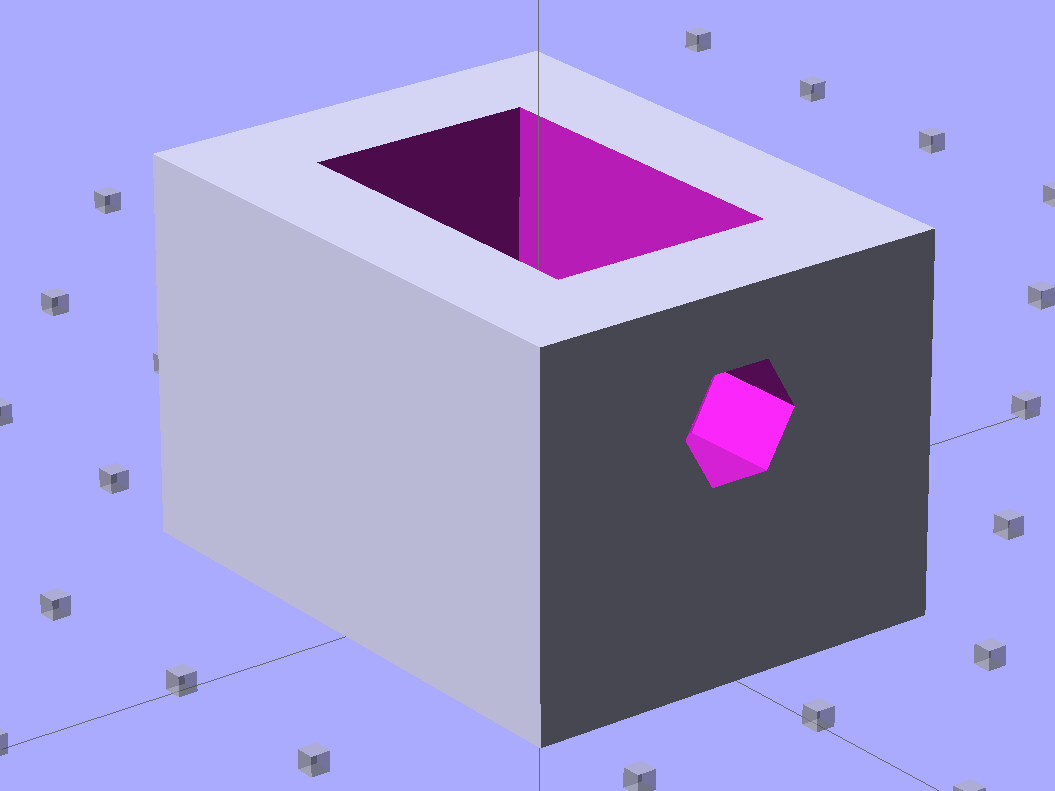
Am Std Faucet Handle Sleeve – solid model
The mount tapers slightly from the handle body toward the open end to provide draft for the molding process. I applied a hull() operator to two thin rectangles spaced the right distance apart along the Z axis to create a positive model of the mount, which then gets subtracted from the blocky outer rectangle. The hole clears a 10-32 screw that fits the standard setscrew threads (normally hidden behind the handle’s red-and-blue button).
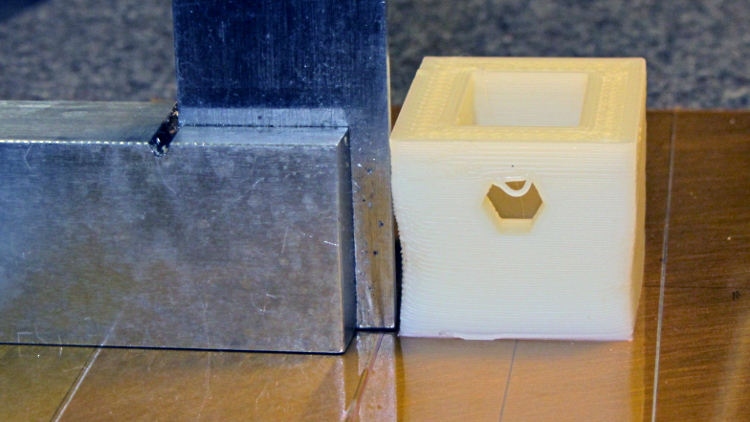
Unlike most printed parts I’ve done recently, the sleeve suffered from severe shrinkage along the outside walls:
Faucet handle sleeve – build distortion
The inside maintained the right shape, so I cleared the nubs with a file and pressed it in place around the mount with the rear wall snapped into position. The black plastic socket evidently isolates the handle from the valve stem and I used a stainless 10-32 screw to prevent the nightmare scenario of having the sleeve slide downward along the tapered mount and block the setscrew. Overall, it came out fine:
American Standard faucet handle – compression sleeve
However, the chunky sleeve didn’t clear the opening in the escutcheon cap, which put the cap on the windowsill for the next week. The result works much better than the redneck fix and looks almost presentable. It’s certainly less conspicuous:
American Standard faucet handle – temporary repair
I hope the new handle has a much more robust socket…
The OpenSCAD source code:
// Quick fix for broken American Standard Elite 4454 faucet handle
// Ed Nisley KE4ZNU February 2013

//- Extrusion parameters must match reality!
//  Print with +2 shells and 3 solid layers

ThreadThick = 0.25;
ThreadWidth = 2.0 * ThreadThick;

HoleFinagle = 0.4;
HoleFudge = 1.00;

function IntegerMultiple(Size,Unit) = Unit * ceil(Size / Unit);
function HoleAdjust(Diameter) = HoleFudge*Diameter + HoleFinagle;

Protrusion = 0.1;           // make holes end cleanly

//----------------------
// Dimensions

Wall = 5.0;

Slice = ThreadThick;                // minimal thickness for hull object

ShaftEnd = [11.6,17.8,Slice];
ShaftBase = [12.1,18.8,Slice];
ShaftLength = 19.0;

Block = [(ShaftBase[0] + 2*Wall),(ShaftBase[1] + 2*Wall),ShaftLength - Protrusion];

ScrewOffset = 6.5;          // from End
ScrewDia = 5.0;             // clearance

//----------------------
// Useful routines

module ShowPegGrid(Space = 10.0,Size = 1.0) {

    Range = floor(50 / Space);

    for (x=[-Range:Range])
        for (y=[-Range:Range])
            translate([x*Space,y*Space,Size/2])
            %cube(Size,center=true);

}

module PolyCyl(Dia,Height,ForceSides=0) {           // based on nophead's polyholes
  Sides = (ForceSides != 0) ? ForceSides : (ceil(Dia) + 2);
  FixDia = Dia / cos(180/Sides);
  cylinder(r=HoleAdjust(FixDia)/2,h=Height,$fn=Sides);
}

//----------------------
// Model the handle's tapered shaft

module Shaft() {

    hull() {
        translate([0,0,ShaftLength - Slice/2])
            cube(ShaftEnd, center=true);
        translate([0,0,Slice/2])
            cube(ShaftBase, center=true);
    }

}

//----------------------
// Build it!

ShowPegGrid();

difference() {
    translate([0,0,ShaftLength/2])
        cube(Block,center=true);
    Shaft();
    translate([0,0,ShaftLength - ScrewOffset])
        rotate([-90,0,0])
            PolyCyl(ScrewDia,ShaftBase[1],6);
}
Just got a quartet of 12 V 7 A·h lead batteries, prompted by a big Belkin UPS that instantly shut down during a power blink. It needs only two batteries, but the shipping was the same for two or four and I’m sure the spares will come in handy.
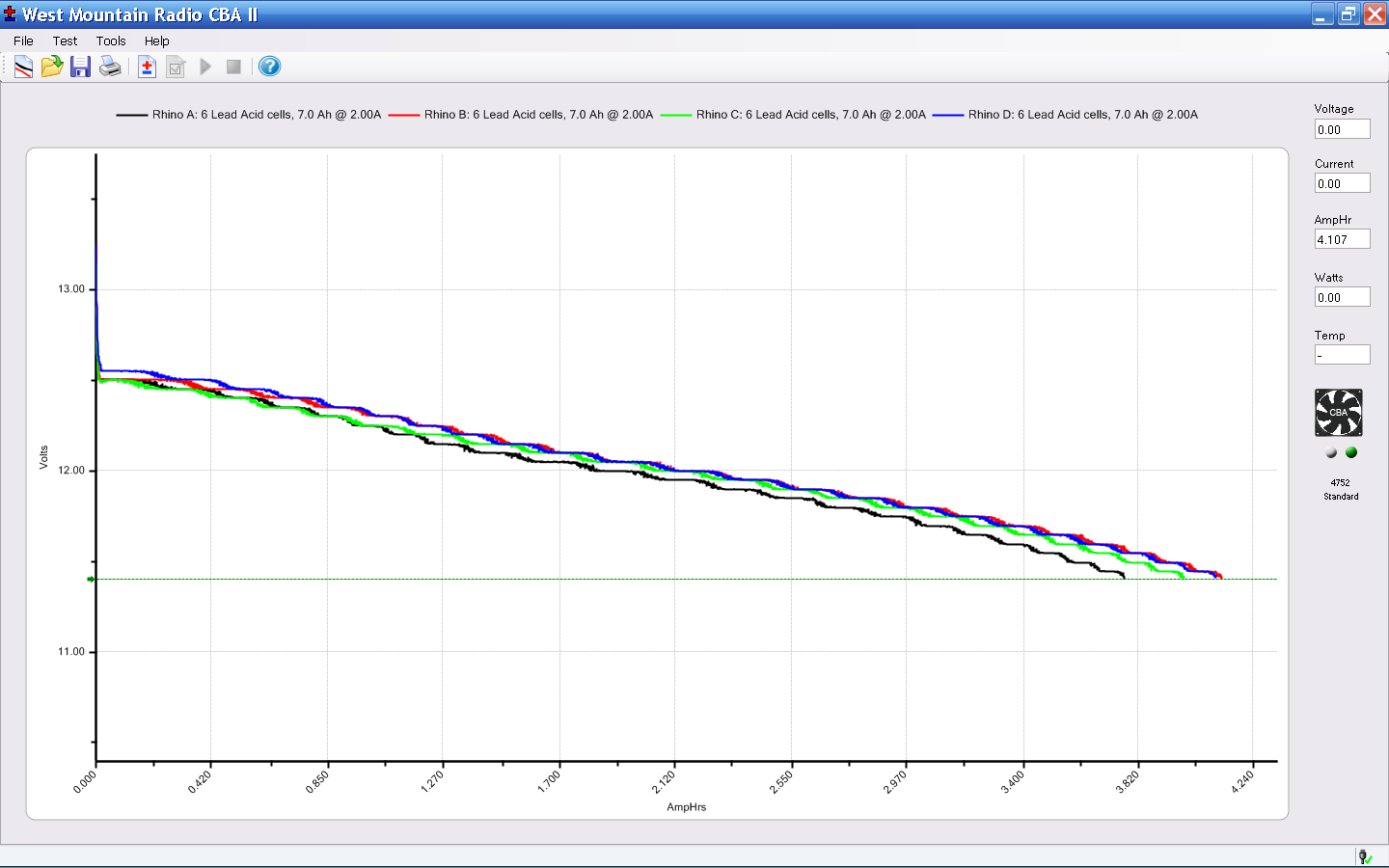
A stiff 2 A discharge test shows that SLA batteries really don’t like high currents, which is exactly what they must provide in a UPS:
Rhino SLA – 2013-01
The capacity is barely 4 A·h at 2 A, not to mention that I’m using a conservative 11.4 V cutoff.
The two batteries with the highest capacity also were the closest matches, so they’re now in the UPS.








 The Smell of Molten Projects in the Morning