The Smell of Molten Projects in the Morning

Ed Nisley's Blog: Shop notes, electronics, firmware, machinery, 3D printing, laser cuttery, and curiosities. Contents: 100% human thinking, 0% AI slop.

Tag: M2

Using and tweaking a Makergear M2 3D printer

  • Vacuum Tube LEDS: Neopixel Plate Cap

    [Edit: Welcome Hackaday! You might prefer real vacuum tubes; searching for “vacuum tube leds” will turn up more posts about this long-running project. And, yes, I lit up a tube, just for old time’s sake, and have some plans for that huge triode.]

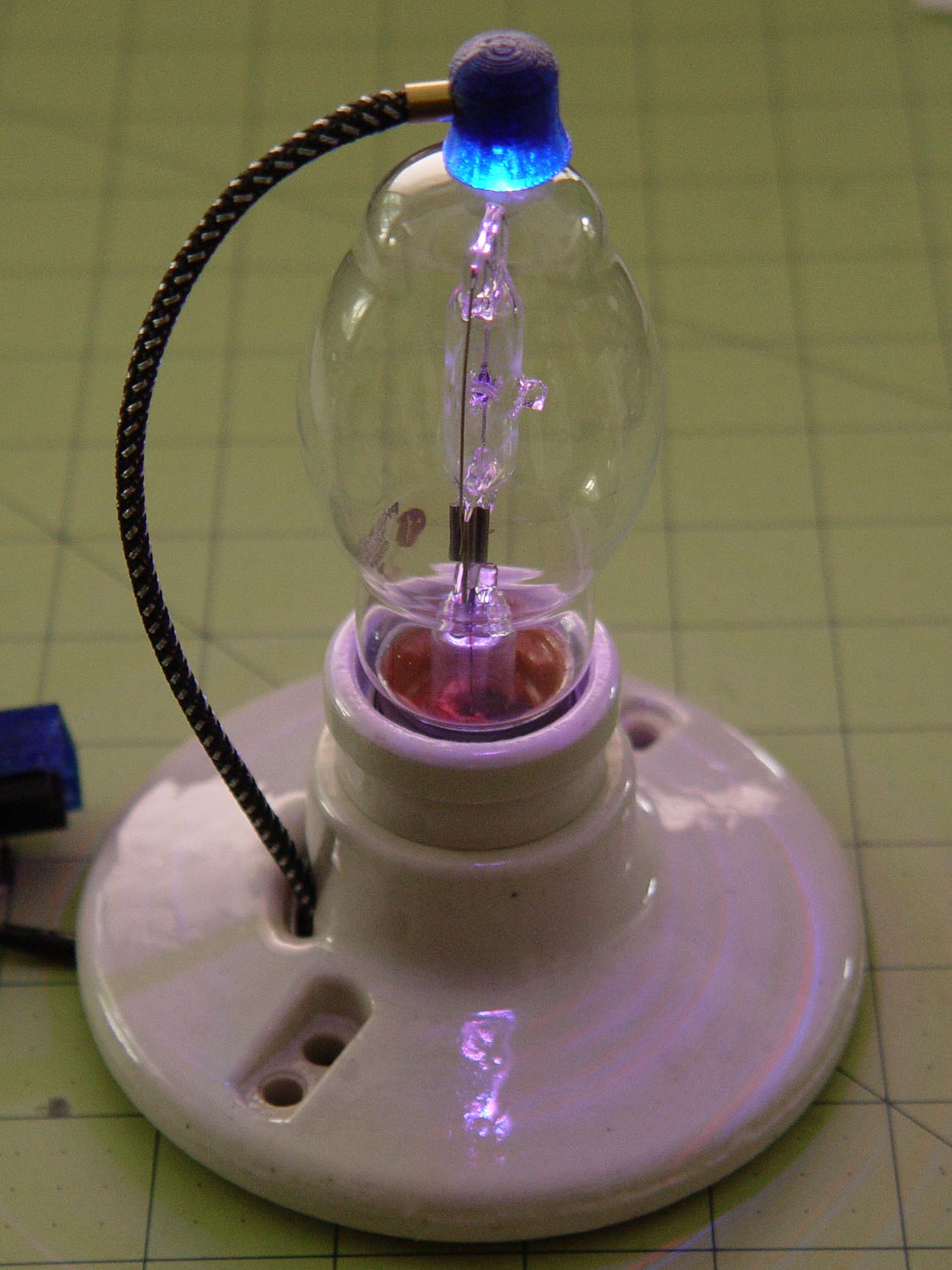
    A single (knockoff) Neopixel hovers over a defunct halogen bulb:
    Vacuum Tube LEDs - plate lead - overview
    Vacuum Tube LEDs – plate lead – overview

    The Arduino code comes from stripping down the Hard Drive Platter Mood Light to suit just one Neopixel, with the maximum PWM values favoring the red-blue-purple end of the color wheel:

    	Pixels[RED].Prime = 3;
    	Pixels[GREEN].Prime = 5;
    	Pixels[BLUE].Prime = 7;
    	printf("Primes: (%d,%d,%d)\r\n",Pixels[RED].Prime,Pixels[GREEN].Prime,Pixels[BLUE].Prime);
    
    	Pixels[RED].MaxPWM = 255;
    	Pixels[GREEN].MaxPWM = 64;
    	Pixels[BLUE].MaxPWM = 255;
    

    Unlike the Mood Light’s dozen Neopixels jammed into the platter’s hub ring, running one Neopixel at full throttle atop the tube doesn’t overheat the poor controller. In a 22 °C room, PWM 255 white raises the cap’s interior temperature to 35 °C, which looks like a horrific 40 °C/W thermal coefficient if you figure the dissipation at 300 mW = 5 V x 60 mA.

    Feeding those parameters into the raised sine wave equation causes the cap to tick along at 27 °C for an average dissipation of 120 mW, which sounds about right:

    113 mW = 5 V x (20 + 20 + 5 mA) / 2

    The effect is striking in a dark room, but it’s hard to photograph; the halogen capsule inside the bulb resembles a Steampunk glass jellyfish:

    Vacuum Tube LEDs - plate lead - detail
    Vacuum Tube LEDs – plate lead – detail

    That ceramic light socket should stand on a round base with room for the Arduino controller. I think powering it from a wall wart through a USB cable makes sense, with a USB-to-serial converter epoxied inside the box for reprogramming.

    It looks pretty good, methinks, should you like that sort of thing.

    The Arduino source code as a GitHub gist:

    // Neopixel mood lighting for vacuum tubes
    // Ed Nisley – KE4ANU – January 2016
    #include <Adafruit_NeoPixel.h>
    //———-
    // Pin assignments
    const byte PIN_NEO = 6; // DO – data out to first Neopixel
    const byte PIN_HEARTBEAT = 13; // DO – Arduino LED
    //———-
    // Constants
    #define UPDATEINTERVAL 25ul
    const unsigned long UpdateMS = UPDATEINTERVAL – 1ul; // update LEDs only this many ms apart minus loop() overhead
    // number of steps per cycle, before applying prime factors
    #define RESOLUTION 100
    // want to randomize the startup a little?
    #define RANDOMIZE true
    //———-
    // Globals
    // instantiate the Neopixel buffer array
    Adafruit_NeoPixel strip = Adafruit_NeoPixel(1, PIN_NEO, NEO_GRB + NEO_KHZ800);
    uint32_t FullWhite = strip.Color(255,255,255);
    uint32_t FullOff = strip.Color(0,0,0);
    struct pixcolor_t {
    byte Prime;
    unsigned int NumSteps;
    unsigned int Step;
    float StepSize;
    byte MaxPWM;
    };
    unsigned int PlatterSteps;
    // colors in each LED
    enum pixcolors {RED, GREEN, BLUE, PIXELSIZE};
    struct pixcolor_t Pixels[PIXELSIZE]; // all the data for each pixel color intensity
    unsigned long MillisNow;
    unsigned long MillisThen;
    //– Figure PWM based on current state
    byte StepColor(byte Color, float Phi) {
    byte Value;
    Value = (Pixels[Color].MaxPWM / 2.0) * (1.0 + sin(Pixels[Color].Step * Pixels[Color].StepSize + Phi));
    // Value = (Value) ? Value : Pixels[Color].MaxPWM; // flash at dimmest points
    return Value;
    }
    //– Helper routine for printf()
    int s_putc(char c, FILE *t) {
    Serial.write(c);
    }
    //——————
    // Set the mood
    void setup() {
    pinMode(PIN_HEARTBEAT,OUTPUT);
    digitalWrite(PIN_HEARTBEAT,LOW); // show we arrived
    Serial.begin(57600);
    fdevopen(&s_putc,0); // set up serial output for printf()
    printf("Vacuum Tube Mood Light with Neopixels\r\nEd Nisley – KE4ZNU – January 2016\r\n");
    /// set up Neopixels
    strip.begin();
    strip.show();
    // lamp test: a brilliant white dot
    printf("Lamp test: flash white\r\n");
    for (byte i=0; i<3 ; i++) {
    for (int j=0; j < strip.numPixels(); j++) { // fill LEDs with white
    strip.setPixelColor(j,FullWhite);
    }
    strip.show();
    delay(500);
    for (int j=0; j < strip.numPixels(); j++) { // fill LEDs with black
    strip.setPixelColor(j,FullOff);
    }
    strip.show();
    delay(500);
    }
    // set up the color generators
    MillisNow = MillisThen = millis();
    if (RANDOMIZE)
    randomSeed(MillisNow + analogRead(7));
    else
    printf("Start not randomized\r\n");
    printf("First random number: %ld\r\n",random(10));
    Pixels[RED].Prime = 3;
    Pixels[GREEN].Prime = 5;
    Pixels[BLUE].Prime = 7;
    printf("Primes: (%d,%d,%d)\r\n",Pixels[RED].Prime,Pixels[GREEN].Prime,Pixels[BLUE].Prime);
    Pixels[RED].MaxPWM = 255;
    Pixels[GREEN].MaxPWM = 64;
    Pixels[BLUE].MaxPWM = 255;
    for (byte c=0; c < PIXELSIZE; c++) {
    Pixels[c].NumSteps = RESOLUTION * (unsigned int) Pixels[c].Prime;
    Pixels[c].Step = (RANDOMIZE) ? random(Pixels[c].NumSteps) : (3*Pixels[c].NumSteps)/4;
    Pixels[c].StepSize = TWO_PI / Pixels[c].NumSteps; // in radians per step
    printf("c: %d Steps: %d Init: %d",c,Pixels[c].NumSteps,Pixels[c].Step);
    printf(" PWM: %d\r\n",Pixels[c].MaxPWM);
    }
    }
    //——————
    // Run the mood
    void loop() {
    MillisNow = millis();
    if ((MillisNow – MillisThen) > UpdateMS) {
    digitalWrite(PIN_HEARTBEAT,HIGH);
    for (byte c=0; c < PIXELSIZE; c++) { // step to next increment in each color
    if (++Pixels[c].Step >= Pixels[c].NumSteps) {
    Pixels[c].Step = 0;
    printf("Cycle %d steps %d at %8ld delta %ld ms\r\n",c,Pixels[c].NumSteps,MillisNow,(MillisNow – MillisThen));
    }
    }
    byte Value[PIXELSIZE];
    for (byte c=0; c < PIXELSIZE; c++) { // … for each color
    Value[c] = StepColor(c,0.0); // figure new PWM value
    // Value[c] = (c == RED && Value[c] == 0) ? Pixels[c].MaxPWM : Value[c]; // flash highlight for tracking
    }
    uint32_t UniColor = strip.Color(Value[RED],Value[GREEN],Value[BLUE]);
    for (int j=0; j < strip.numPixels(); j++) { // fill LEDs with color
    strip.setPixelColor(j,UniColor);
    }
    strip.show();
    MillisThen = MillisNow;
    digitalWrite(PIN_HEARTBEAT,LOW);
    }
    }
    view raw TubeMood.ino hosted with ❤ by GitHub
  • Vacuum Tube LEDS: Ersatz Plate Cap

    Lighting up that old voltage regulator tube conclusively demonstrated there’s no point in conjuring high voltages in this day & age. Nay, verily, merely lighting the filament of some tubes would require more power than seems reasonable.

    1B3GT high-voltage regulator tube in the Box o’ Hollow State Electronics suggested a different approach:

    1B3GT HV tube regulator
    1B3GT HV tube regulator

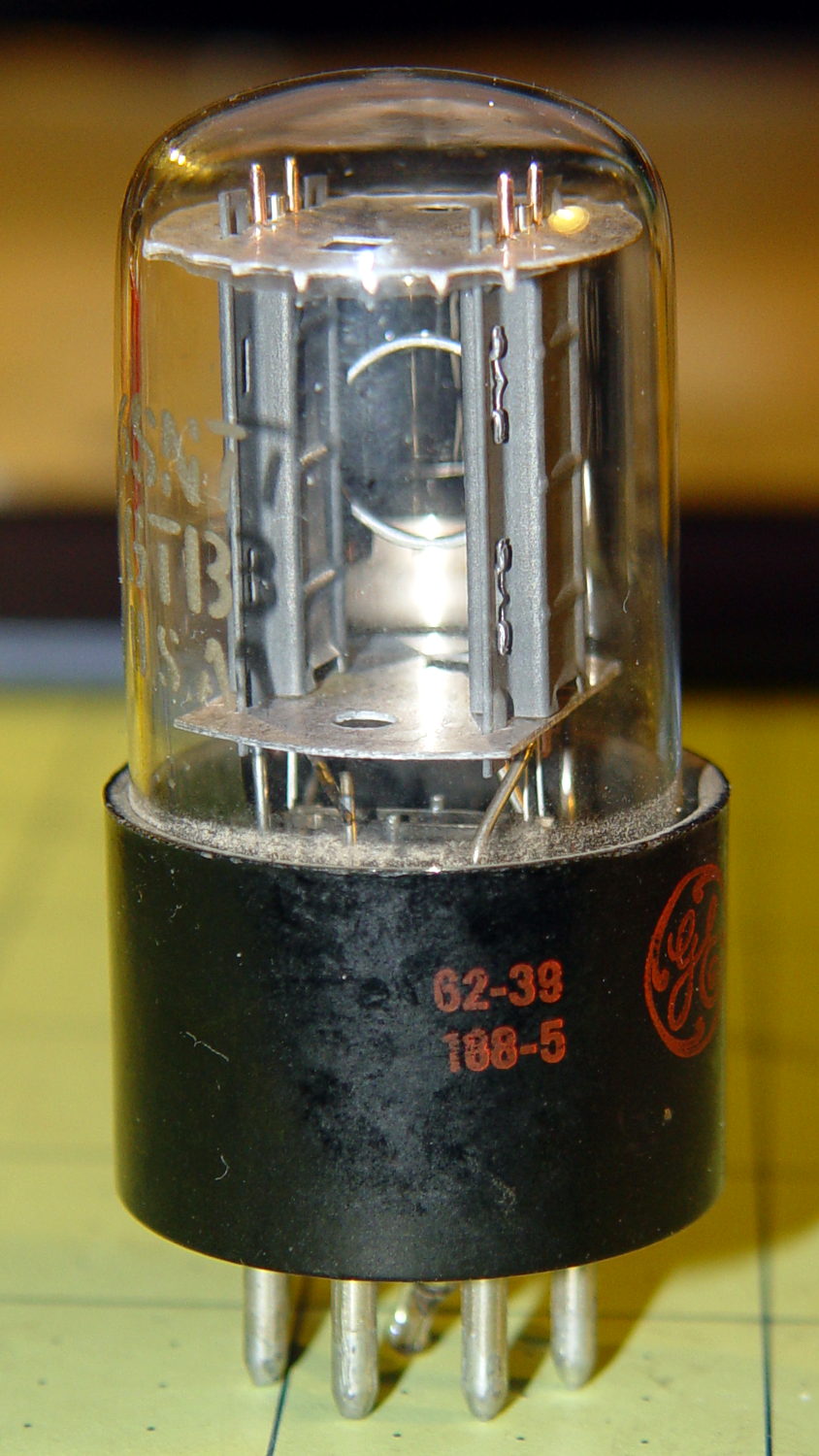
    With only a slight loss of historical accuracy, one could light the tube from the top with a Neopixel LED tucked into a similar cap, with power-and-data arriving through a suitably antiqued flying lead. That won’t work on tubes like that 1B3GT with an actual plate terminal  at the top, nor with small Noval / miniature 7-pin tubes topped with an evacuation tip, but it’s fine for tubes like this 6SN7GTB:

    6SN7GTB Vacuum Tube
    6SN7GTB Vacuum Tube

    Obviously, you want a relatively small cap atop the tube, lest the LED visually overwhelm the tube. Some preliminary tests (a.k.a. screwing around) showed that the mica spacer holding the dual triode elements together lights up wonderfully well and diffuses the glow throughout the tube.

    Adafruit has relatively large round (and smaller roundish) Neopixel breakout boards, but I bought a bunch of knockoff Neopixels mounted on a 10 mm circular PCB from the usual eBay supplier:

    Vacuum Tube LEDs - plate lead - connections
    Vacuum Tube LEDs – plate lead – connections

    Some PET braid tucked into a snippet of brass tubing dresses up a length of what might once have been audio cable. The braid wants to fray on the ends; confining it with heatstink or brass tubing is mandatory.

    That’s a 1 µF ceramic SMD cap soldered between the +5 V and Gnd traces, atop a snippet of Kapton tape, in the hopes that it will help the 100 nF cap (on the other side of the board) tamp down the voltage dunks from PWM current pulses through that long thin wire. The leads come off toward the center to bend neatly upward into the cap.

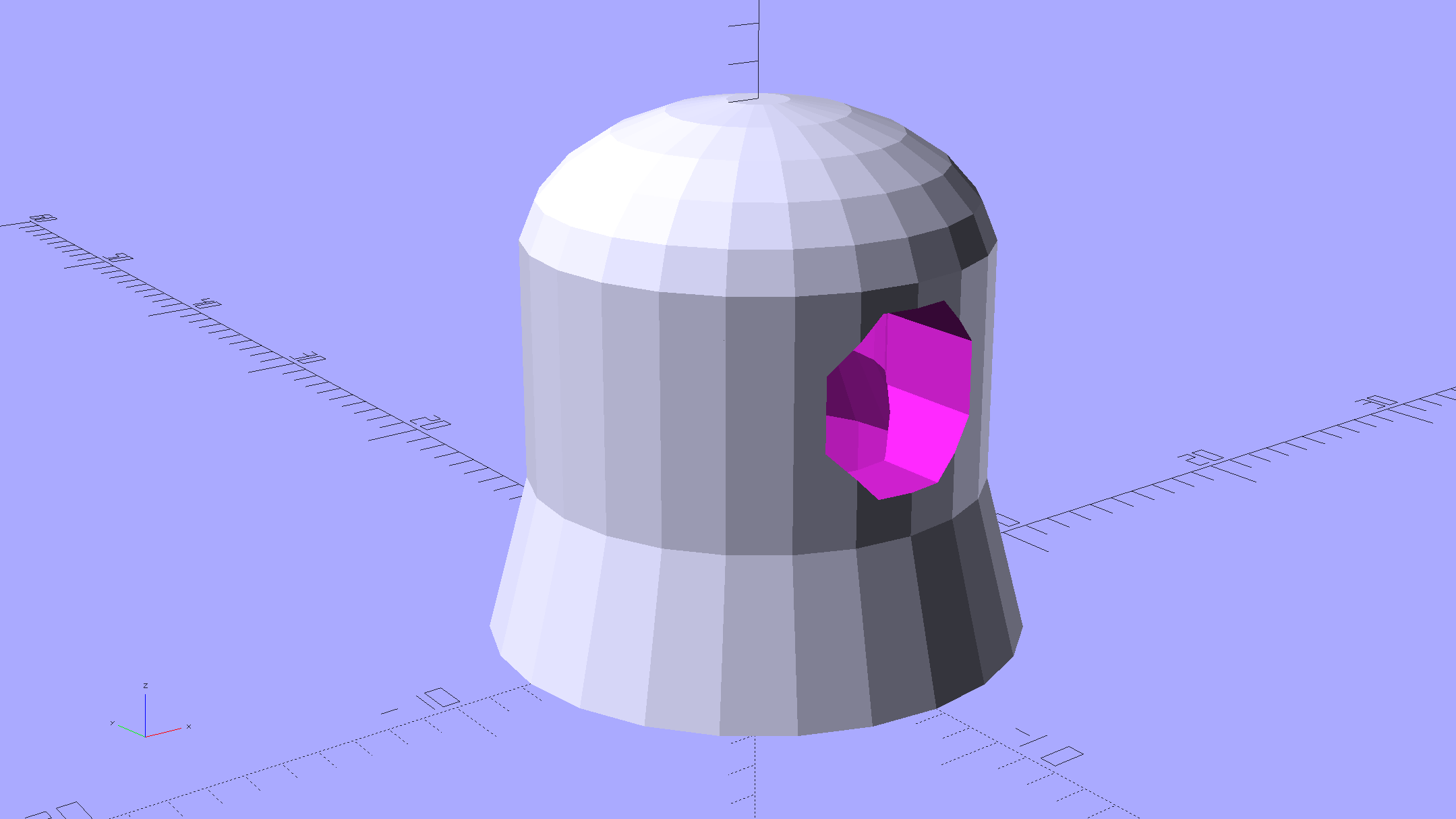
    Duplicating that old plate cap on the 1B3GT would be a fool’s errand, so I went full frontal Vader:

    Vacuum Tube Lights - cap solid model - Overview
    Vacuum Tube Lights – cap solid model – Overview

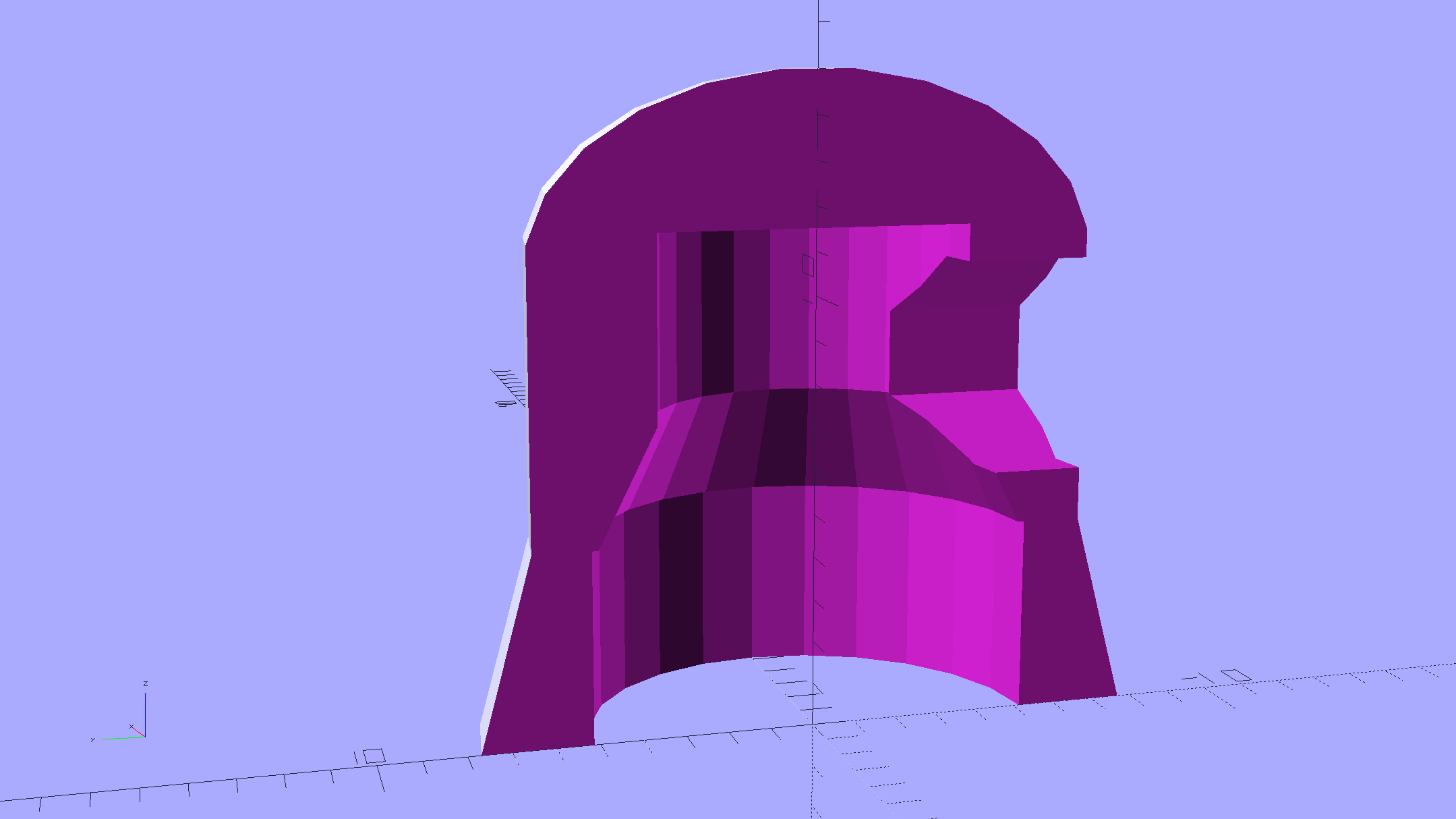
    The interior recesses the LED far enough to allow for the tube’s top curvature, with a conical adapter to the smaller wiring channel that allows for more plastic supporting the brass tube:

    Vacuum Tube Lights - cap solid model - section
    Vacuum Tube Lights – cap solid model – section

    A glob of epoxy inside the cap anchors the PCB and fuses all the loose ends / floppy wires / braid strands into a solid block that will never come apart again.

    It should be printed (or primered and painted) with opaque black or maybe Bakelite Brown, but right now I have cyan PETG and want to see how it plays, soooo:

    Vacuum Tube LEDs - plate lead - overview
    Vacuum Tube LEDs – plate lead – overview

    The cap floats in mid-air over a defunct Philips 60 W halogen bulb that I’ve been saving for just such an occasion. Obviously, you must epoxy / glue the cap in place for a permanent display.

    The OpenSCAD source code as a Github gist:

    // Vacuum Tube LED Lights
    // Ed Nisley KE4ZNU January 2016
    Layout = "Cap"; // Show Build Cap Box Octal Noval Mini7
    Section = true; // cross-section the object
    //- Extrusion parameters must match reality!
    ThreadThick = 0.25;
    ThreadWidth = 0.40;
    HoleWindage = 0.2;
    Protrusion = 0.1; // make holes end cleanly
    inch = 25.4;
    function IntegerMultiple(Size,Unit) = Unit * ceil(Size / Unit);
    //———————-
    // Dimensions
    // https://en.wikipedia.org/wiki/Tube_socket#Summary_of_Base_Details
    T_NAME = 0;
    T_NUMPINS = 1; // Socket specifications
    T_PINCIRC = 2;
    T_PINDIA = 3;
    T_SOCKDIA = 4;
    TubeBase = [
    ["Mini7", 8, 9.53, 1.016, 19.0],
    ["Octal", 8, 17.45, 2.36, 33.0],
    ["Noval",10, 11.89, 1.1016,20.5],
    ];
    ID = 0;
    OD = 1;
    LENGTH = 2;
    Pixel = [7.0,10.0,3.0]; // ID = contact patch, OD = PCB dia, LENGTH = overall thickness
    //———————-
    // Useful routines
    module PolyCyl(Dia,Height,ForceSides=0) { // based on nophead's polyholes
    Sides = (ForceSides != 0) ? ForceSides : (ceil(Dia) + 2);
    FixDia = Dia / cos(180/Sides);
    cylinder(r=(FixDia + HoleWindage)/2,
    h=Height,
    $fn=Sides);
    }
    //———————-
    // Tube cap
    CapTube = [4.0,3/16 * inch,10.0]; // brass tube for flying lead to cap LED
    CapSize = [Pixel[ID],(Pixel[OD] + 3.0),(CapTube[OD] + 2*Pixel[LENGTH])];
    CapSides = 6*4;
    module Cap() {
    difference() {
    union() {
    cylinder(d=CapSize[OD],h=(CapSize[LENGTH]),$fn=CapSides); // main cap body
    translate([0,0,CapSize[LENGTH]]) // rounded top
    scale([1.0,1.0,0.65])
    sphere(d=CapSize[OD]/cos(180/CapSides),$fn=CapSides); // cos() fixes slight undersize vs cylinder
    cylinder(d1=(CapSize[OD] + 2*3*ThreadWidth),d2=CapSize[OD],h=1.5*Pixel[LENGTH],$fn=CapSides); // skirt
    }
    translate([0,0,-Protrusion]) // bore for wiring to LED
    PolyCyl(CapSize[ID],(CapSize[LENGTH] + 3*ThreadThick + Protrusion),CapSides);
    translate([0,0,-Protrusion]) // PCB recess with clearance for tube dome
    PolyCyl(Pixel[OD],(1.5*Pixel[LENGTH] + Protrusion),CapSides);
    translate([0,0,(1.5*Pixel[LENGTH] – Protrusion)]) // step + cone to retain PCB
    cylinder(d1=(Pixel[OD]/cos(180/CapSides)),d2=Pixel[ID],h=(Pixel[LENGTH] + Protrusion),$fn=CapSides);
    translate([0,0,(CapSize[LENGTH] – CapTube[OD]/(2*cos(180/8)))]) // hole for brass tube holding wire loom
    rotate([90,0,0]) rotate(180/8)
    PolyCyl(CapTube[OD],CapSize[OD],8);
    }
    }
    //———————-
    // Build it
    if (Layout == "Cap") {
    if (Section)
    difference() {
    Cap();
    translate([-CapSize[OD],0,CapSize[LENGTH]])
    cube([2*CapSize[OD],2*CapSize[OD],3*CapSize[LENGTH]],center=true);
    }
    else
    Cap();
    }
    if (Layout == "Build") {
    Cap();
    Spigot();
    }
  • Microscope Stage Positioner

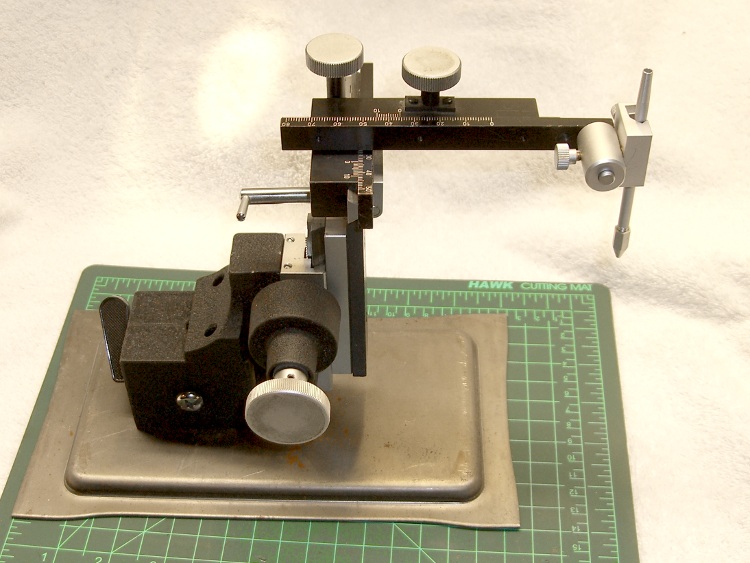
    Given the vanishingly small depth of field provided by a cheap USB camera peering through the stereo zoom microscope, I’ve always wanted a better way of moving objects by small increments. The rehabilitated micropositioner didn’t have the right orientation or end effector:

    Micropositioner
    Micropositioner

    So I rearranged the axis slides and added a small table:

    Microscope Stage Positioner
    Microscope Stage Positioner

    That frees up the magnetic base and husky angle bracket, plus a few odds & ends, for future adventures.

    The clear base is a random chunk of acrylic, bandsawed to the proper length, then tediously squared and drilled on the Sherline:

    Microscope Stage Positioner - base squaring
    Microscope Stage Positioner – base squaring

    I briefly thought of printing the base, but came to my senses: there are better ways to make big flat surfaces.

    The little aluminum table has a nubbly spray coating that came straight from the heap and looks surprisingly good after squaring & drilling. The X axis block puts it below the platform and one screw head above the desk when the Y axis arm sits flat on the acrylic base.

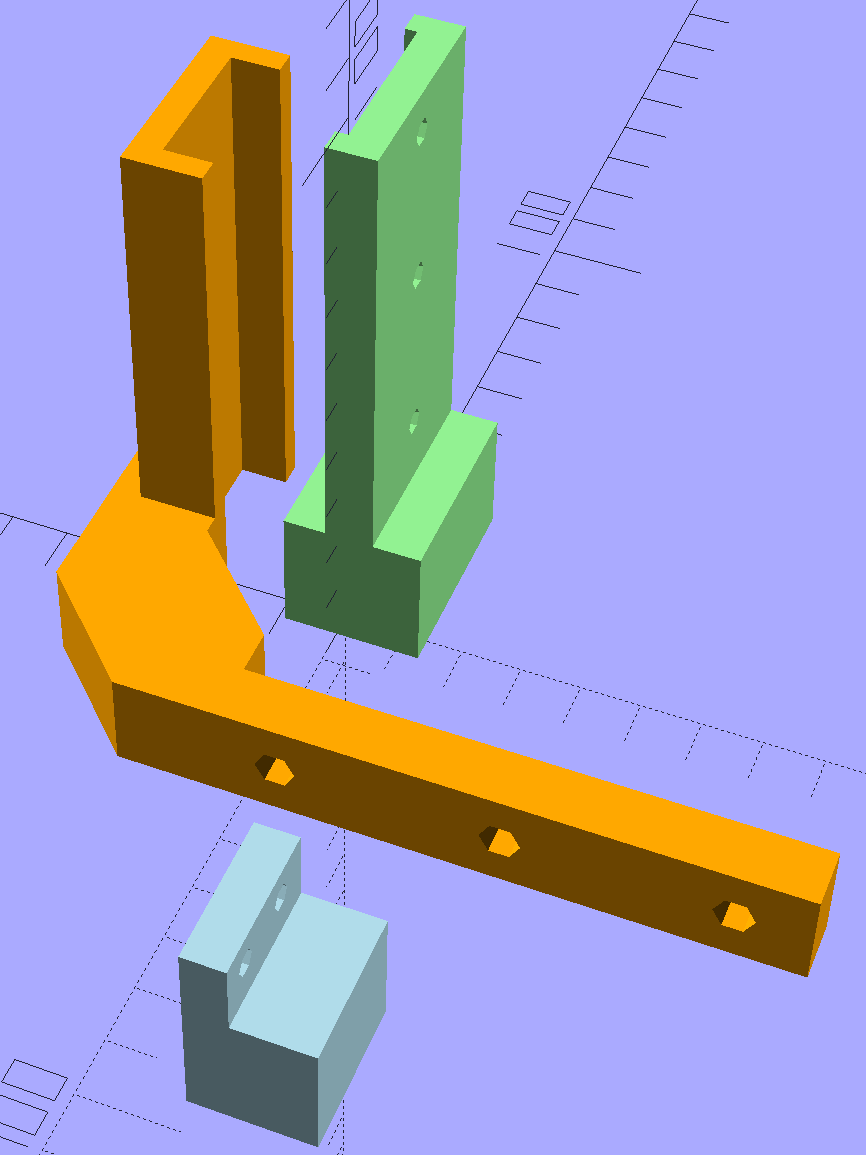
    One solid model view arranges things in more-or-less the proper layout to check the alignment:

    Microscope Stage Positioner - solid model - Show layout
    Microscope Stage Positioner – solid model – Show layout

    The build layout reduces the platform space:

    Microscope Stage Positioner - Slic3r preview
    Microscope Stage Positioner – Slic3r preview

    You’re looking at four hours of PETG print time at 0.2 mm layer thickness with 15% infill and Hilbert Curve surfaces.

    All of the screws have UNF fine-pitch threads (4-48, 6-40, 8-36, stuff like that), so the solid model includes the spacing required to reuse the original screws: those big holes in the Y axis arm end in little clearance holes for the tiny screws. Some of the screws bottom out with barely two millimeters of thread engagement in the slides, while others could jam against the racks. I didn’t want to cut that many screws from my Brownell’s gun screw assortment unless I absolutely had to. So far, so good.

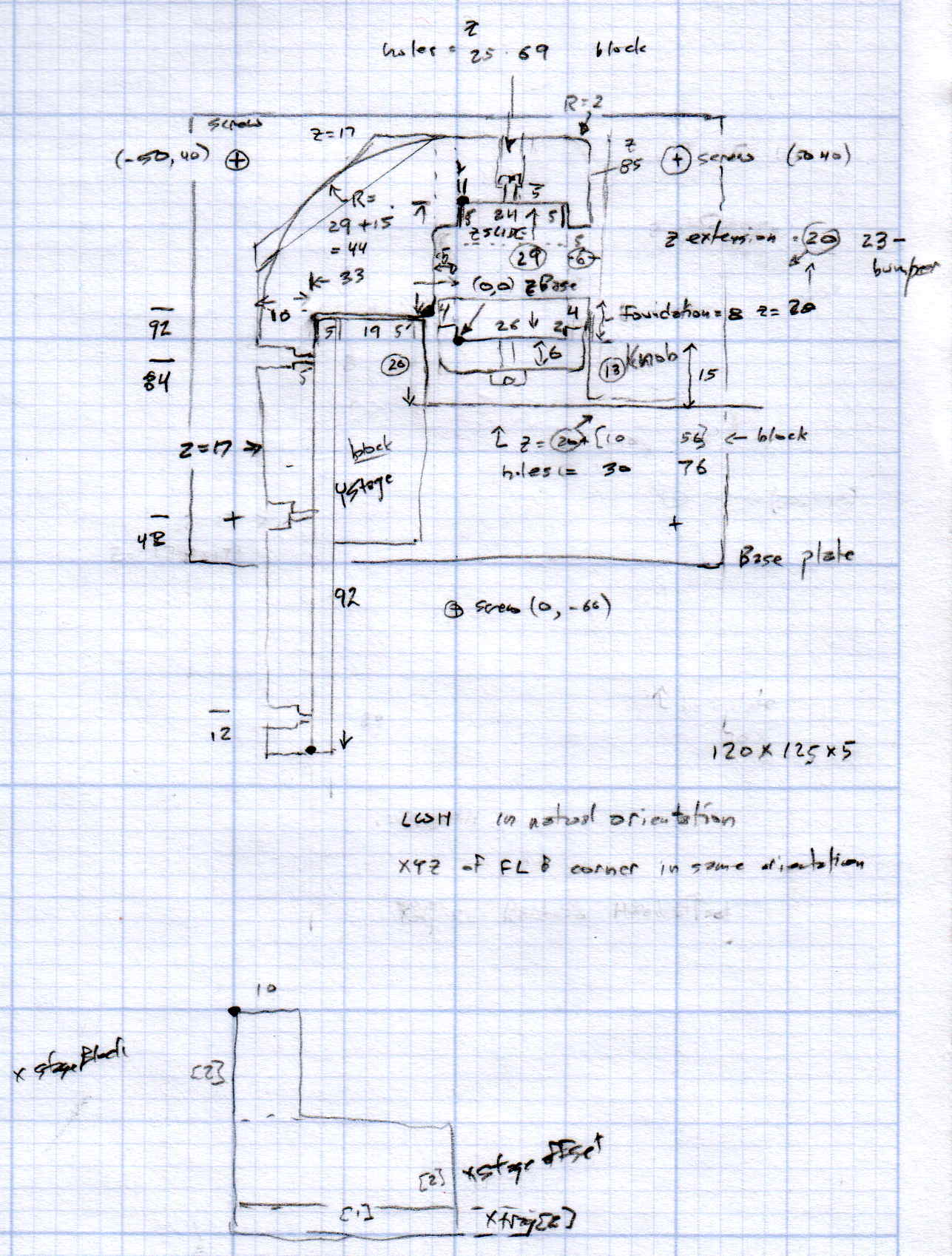
    I spent quite a while doodling the layout to convince myself that it would actually work:

    Microscope Stage Positioner - layout doodle
    Microscope Stage Positioner – layout doodle

    Memo to self: Next time, use a larger scale!

    Although the whole lashup works as intended, those metal hunks are way too heavy for the plastic block that fits between the Z axis drive pillar and the X axis slide: that long Y axis arm drooped toward the front by about 5 mm. A small shim raised the front of the Z axis footprint enough to level the arm, but I think the right answer is a metal upright with a bigger footprint that spreads the load.

    All that mass hanging out in mid-air turns the plastic pieces into springs: you can’t keep your fingers on the knobs. Fortunately, everything returns to the same position after you release the knob, so it’s easy to move in precise increments if you close your eyes until the view settles down.

    There’s a reason optical equipment uses cast iron, steel, and brass… but I’ll settle for plastic.

    The OpenSCAD source code as a GitHub gist:

    // Microscope Stage Positioner
    // Ed Nisley KE4ZNU January 2016
    Layout = "Build"; // Show Build
    // Base ZStand YMount XMount
    Gap = 0.0;
    //- Extrusion parameters must match reality!
    ThreadThick = 0.25;
    ThreadWidth = 0.40;
    HoleWindage = 0.2;
    Protrusion = 0.1; // make holes end cleanly
    inch = 25.4;
    function IntegerMultiple(Size,Unit) = Unit * ceil(Size / Unit);
    //———————-
    // Dimensions
    SlipFit = 0.1;
    ZDrive = [26.0,19.6,75.0]; // stationary part of Z drive
    ZDriveOffset =[0,0,22.0]; // left front corner of stationary Z base
    ZWall = 4.0; // thickness of edge wrapped around Z columns
    YStageBlock = [25.0,61.0,17.0]; // Y stage mount + slide
    YStageOffset = [-6.0,4.0,0.0]; // offset to inner corner of Y stage holder
    YArm = [10.0,93.0,17.0]; // mount to stationary part of Y stage
    ZStage = [24.0,9.7,85.0]; // moving part of Z drive
    ZYArm = [(2*ZWall + ZStage[0]),10.0,YArm[2]]; // attaches to ZStage, same thickness as YArm
    XStageBlock = [25.0,20.0,12.0]; // X stage mount + slide
    XStageOffset = [-95.0,-15.0,-26]; // offset to rear left bottom corner of X stage slide
    XTray = [25,25,5]; // X tray attached to bottom of X mount
    //———————-
    // Useful routines
    module PolyCyl(Dia,Height,ForceSides=0) { // based on nophead's polyholes
    Sides = (ForceSides != 0) ? ForceSides : (ceil(Dia) + 2);
    FixDia = Dia / cos(180/Sides);
    cylinder(r=(FixDia + HoleWindage)/2,
    h=Height,
    $fn=Sides);
    }
    //– Z Stand
    module ZStand() {
    Holes = [12.0,41.5,68.0];
    HoleOD = 3.5;
    HolesOC = 15.0;
    echo(str("Z Stand holes OC: ",HolesOC));
    ZPlate = 6.0; // thickness of Z plate = max screw grab distance
    ZStandWrap = 2.0; // length of edge wrapped around Z column
    MaxY = 9.0;
    MinY = -14.0;
    difference() {
    union() {
    linear_extrude(height=ZDriveOffset[2])
    polygon(points=[
    [-ZWall,MaxY], // limited by Z slide rack
    [ZDrive[0] + ZWall,MaxY],
    [ZDrive[0] + ZWall,MinY], // limited by X slide rack
    [-ZWall,MinY]
    ]);
    linear_extrude(height=(ZDrive[2] + ZDriveOffset[2]),convexity=4)
    polygon(points=[
    [-SlipFit,0],
    [ZDrive[0] + SlipFit,0.0],
    [ZDrive[0] + SlipFit,ZStandWrap],
    [ZDrive[0] + ZWall,ZStandWrap],
    [ZDrive[0] + ZWall,-ZPlate],
    [-ZWall,-ZPlate],
    [-ZWall,ZStandWrap],
    [-SlipFit,ZStandWrap]
    ]);
    }
    for (i = [0:len(Holes) – 1]) // holes along Z stand
    translate([ZDrive[0]/2,ZDrive[1]/2,(Holes[i] + ZDriveOffset[2])])
    rotate([90,0,0])
    PolyCyl(HoleOD,ZDrive[1]);
    for (i = [-1,1]) // mounting screw holes
    translate([i*HolesOC/2 + ZDrive[0]/2, // center the holes from side to side
    (MaxY + MinY)/2, // moby hack to put holes on midline
    -Protrusion])
    PolyCyl(3.5,0.75*ZDriveOffset[2],6);
    }
    }
    //– Y Mounting arm
    // Polygon origin at inner corner nearest the Z stand column
    module YMount() {
    YHoles = [12.0,48.0,84.0]; // mounting holes along Y stage arm, from outside in
    YScrewLength = 4.0; // screw head to Y stage mount
    ZStageBase = [(ZDrive[0] – ZStage[0])/2,(ZDrive[1] + ZStage[1]),0.0] – YStageOffset; // local coordinates of Z slide left rear corner
    ZHoles = [26.5,55.0,71.0];
    ZStageWrap = 8.0; // length of edge wrapped around Z stage
    Trim = ZStageBase[1] – ZStageWrap;
    union() {
    difference() {
    linear_extrude(height=YArm[2],convexity=5)
    polygon(points=[
    [-Trim,0.0],
    [-YStageBlock[0],0.0],
    [-YStageBlock[0],-(YArm[1] + SlipFit)],
    [-(YStageBlock[0] + YArm[0]),-(YArm[1] + SlipFit)],
    [-(YStageBlock[0] + YArm[0]),Trim],
    [-Trim,(ZStageBase[1] + ZYArm[1])],
    [(ZStageBase[0] + ZStage[0]/2),(ZStageBase[1] + ZYArm[1])],
    [(ZStageBase[0] + ZStage[0] + ZWall),(ZStageBase[1] + 0*ZYArm[1])],
    [(ZStageBase[0] + ZStage[0] + ZWall),(ZStageBase[1] – ZStageWrap)],
    [(ZStageBase[0] + ZStage[0] + SlipFit),(ZStageBase[1] – ZStageWrap)],
    [(ZStageBase[0] + ZStage[0] + SlipFit),ZStageBase[1]],
    [(ZStageBase[0] – SlipFit),ZStageBase[1]],
    [(ZStageBase[0] – SlipFit),(ZStageBase[1] – ZStageWrap)],
    [0.0,(ZStageBase[1] – ZStageWrap)],
    [0.0,Trim]
    ]);
    for (j=[0:len(YHoles) – 1]) { // Y stage mounting screws
    translate([-(YStageBlock[0] + YScrewLength),
    (-YArm[1] + YHoles[j] – 2*SlipFit),
    YArm[2]/2])
    rotate([0,-90,0]) rotate(180/6)
    PolyCyl(5.5,YArm[0],6);
    translate([-(YStageBlock[0] – Protrusion),
    (-YArm[1] + YHoles[j] – 2*SlipFit),
    YArm[2]/2])
    rotate([0,-90,0]) rotate(180/6)
    PolyCyl(2.5,2*YArm[0],6);
    }
    }
    if (true)
    difference() {
    linear_extrude(height=ZStage[2],convexity=5)
    polygon(points=[
    [(ZStageBase[0] – ZWall),(ZStageBase[1] + 5.0)],
    [(ZStageBase[0] + ZStage[0] + ZWall),(ZStageBase[1] + 5.0)],
    [(ZStageBase[0] + ZStage[0] + ZWall),(ZStageBase[1] – ZStageWrap)],
    [(ZStageBase[0] + ZStage[0] + SlipFit),(ZStageBase[1] – ZStageWrap)],
    [(ZStageBase[0] + ZStage[0] + SlipFit),ZStageBase[1]],
    [(ZStageBase[0] – SlipFit),ZStageBase[1]],
    [(ZStageBase[0] – SlipFit),(ZStageBase[1] – ZStageWrap)],
    [(ZStageBase[0] – ZWall),(ZStageBase[1] – ZStageWrap)],
    ]);
    for (k=[0:len(ZHoles) – 1])
    translate([(ZStageBase[0] + ZStage[0]/2),0.0,ZHoles[k]])
    rotate([-90,0,0])
    PolyCyl(3.5,2*ZStageBase[1],6);
    }
    }
    }
    //– X Slide attachment
    // Origin at left rear bottom of mount
    module XMount() {
    XHoles = [6.0,18.0]; // from end of X slide
    XHolesOffset = 7.0; // from bottom of X slide
    TrayHolesOC = 10.0;
    echo(str("Tray holes OC: ",TrayHolesOC));
    BlockOAH = XStageBlock[2] – XStageOffset[2] – XTray[2]; // overall height of mount
    difference() {
    translate([XStageBlock[0],0,BlockOAH])
    rotate([0,90,180])
    linear_extrude(height=XStageBlock[0],convexity=2)
    polygon(points=[
    [0,0],
    [0.0,7.0],
    [(XStageBlock[2] + SlipFit),7.0],
    [(XStageBlock[2] + SlipFit),XStageBlock[1]],
    [BlockOAH,XStageBlock[1]],
    [BlockOAH,0.0],
    ]);
    for (i=[0:len(XHoles) – 1]) // holes for X stage screws
    translate([XHoles[i],Protrusion,BlockOAH – XStageBlock[2] + XHolesOffset])
    rotate([90,0,0])
    PolyCyl(3.5,2*7.0,6);
    for (i=[-1,1]) // holes for tray mount
    translate([i*TrayHolesOC/2 + XStageBlock[0]/2,-XStageBlock[1]/2,-Protrusion])
    PolyCyl(2.5,0.75*(BlockOAH – XStageBlock[2]),6);
    }
    }
    //———————-
    // Build it
    if (Layout == "ZStand")
    ZStand();
    if (Layout == "YMount")
    YMount();
    if (Layout == "XMount")
    XMount();
    if (Layout == "Show") {
    color("lightgreen")
    ZStand();
    color("orange")
    translate(YStageOffset)
    YMount();
    color("lightblue")
    translate(XStageOffset + [0,0,-XStageOffset[2]])
    XMount();
    }
    if (Layout == "Build") {
    translate([20,0,0])
    ZStand();
    translate([YStageBlock[0]/2,0,0])
    YMount();
    translate([20,-30,0])
    XMount();
    }
  • Olfa Rotary Cutter Spacer

    At some point along the way, the bright yellow washer (they call it a “spacer”) on Mary’s 60 mm Olfa rotary cutter went missing. A casual search suggests that replacement washers come directly from Olfa after navigating their phone tree, but …

    Judging from scuffs on the rear surface, the washer serves two purposes:

    • Hold the blade close to the handle against slightly misaligned cutting forces
    • Add more compression to the wave washer under the nut

    This model is much more intricate than the stock washer:

    Olfa Rotary Cutter - backing washer
    Olfa Rotary Cutter – backing washer

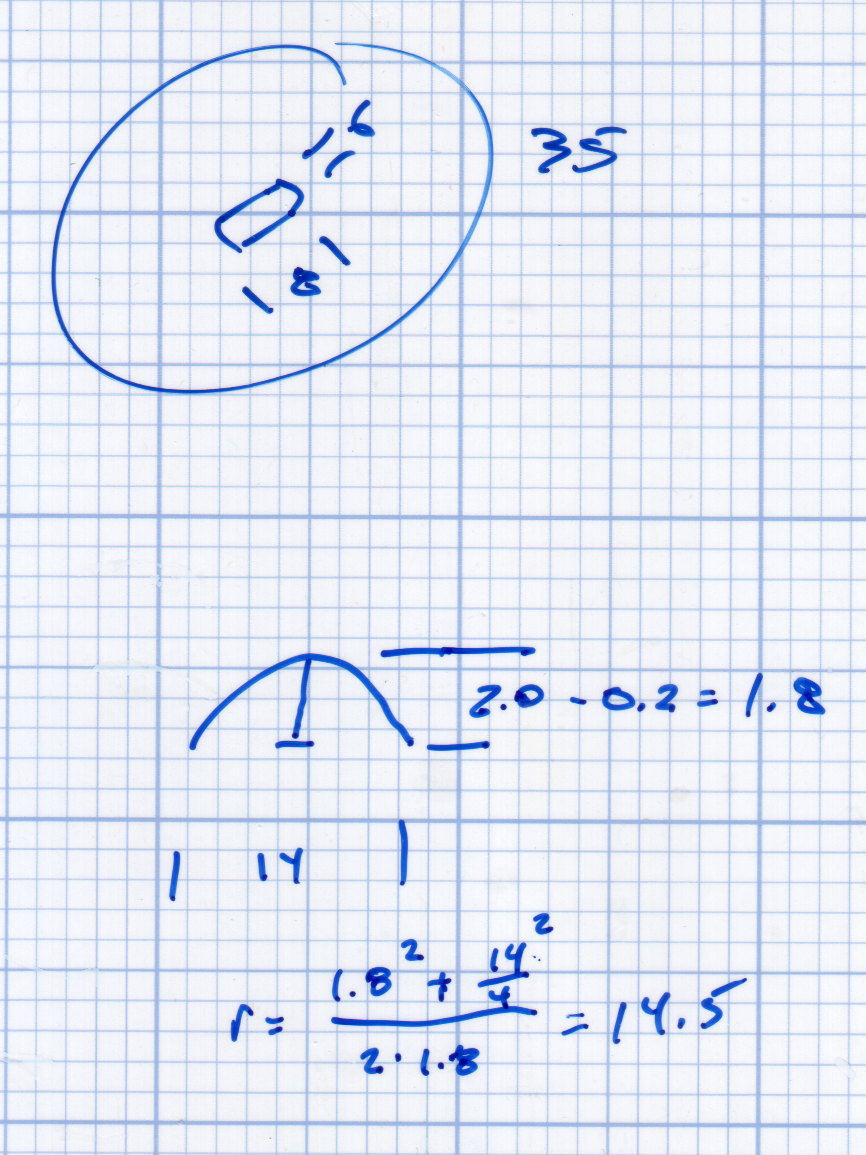
    The trench across the middle of the thicker part allows a wider compression adjustment range for the wave washer and provides more thread engagement at the lightest setting for my liking. The shape comes from the chord equation based on measurements of the wave washer:

    Olfa Rotary Cutter - washer doodles
    Olfa Rotary Cutter – washer doodles

    The wave washer keys on the bolt flats: the whole affair rotates with the blade and gives the nut no inclination to unscrew. If you remove the trench, the remaining hole has the proper shape to key on the bolt and rotate with it; with the trench in place, the wave washer’s sides haul the plastic washer along with it.

    The plain ring, just two threads thick, glues bottom-to-bottom on the thicker part to soak up the air gap and provide more blade stability. It’s not entirely clear that’s a win; it’s easy to omit.

    It looks about like you’d expect:

    Olfa Rotary Cutter - washer in place
    Olfa Rotary Cutter – washer in place

    The wave washer must go on the bolt with the smooth curve downward into the trench. That orientation that wasn’t enforced by the Official Olfa spacer washer’s smooth sides.

    The nut sits upside-down to show the face that normally sits against the wave washer. I’d lay long odds that the recess around the threads originally held a conical compression spring with a penchant for joining the dust bunnies under the sewing table. You can insert the wave washer the wrong way, but it doesn’t store enough energy to go airborne unless you drop it, which did happen once with the expected result.

    The OpenSCAD source code as a GitHub gist:

    // Olfa rotary cutter backing washer
    // Ed Nisley KE4ZNU January 2016
    Layout = "Build";
    //- Extrusion parameters must match reality!
    // Print with +1 shells and 3 solid layers
    ThreadThick = 0.20;
    ThreadWidth = 0.40;
    HoleWindage = 0.2;
    function IntegerMultiple(Size,Unit) = Unit * ceil(Size / Unit);
    Protrusion = 0.1; // make holes end cleanly
    //———————-
    // Dimensions
    WasherOD = 35.0;
    WasherThick = 1.5;
    WaveOD = 14.0; // wave washer flat dia
    WaveM = 1.8; // height of wave washer bend
    BendRad = (pow(WaveM,2) + pow(WaveOD,2)/4) / (2*WaveM); // radius of wave washer bend
    echo(str("Wave washer bend radius: ",BendRad));
    SpacerID = WaveOD + 2.0;
    SpacerThick = 2*ThreadThick;
    NumSides = 12*4;
    $fn = NumSides;
    //———————-
    // Useful routines
    module PolyCyl(Dia,Height,ForceSides=0) { // based on nophead's polyholes
    Sides = (ForceSides != 0) ? ForceSides : (ceil(Dia) + 2);
    FixDia = Dia / cos(180/Sides);
    cylinder(r=(FixDia + HoleWindage)/2,
    h=Height,
    $fn=Sides);
    }
    //———————-
    // Parts
    module Upper() {
    difference() {
    cylinder(d1=WasherOD,d2=(WasherOD – 2.0),h=WasherThick);
    translate([0,0,-Protrusion])
    intersection() {
    PolyCyl(8.2,2.0,8);
    cube([(6.0 + HoleWindage),10,2*WasherThick],center=true);
    }
    translate([-(WaveOD + 1.0)/2,0,BendRad])
    rotate([0,90,0]) rotate(0*180/16)
    PolyCyl(BendRad*2,(WaveOD + 1),16);
    }
    }
    module Spacer() {
    difference() {
    cylinder(d=WasherOD,h=SpacerThick);
    translate([0,0,-Protrusion])
    cylinder(d=SpacerID,h=2*SpacerThick);
    }
    }
    //———————-
    // Build it!
    if (Layout == "Show") {
    translate([0,0,SpacerThick])
    color("Cyan")
    Upper();
    color("LightCyan")
    Spacer();
    }
    if (Layout == "Build") {
    translate([-0.6*WasherOD,0,0])
    Upper();
    translate([0.6*WasherOD,0,0])
    Spacer();
    }
  • Miniature Chain Mail: Handouts

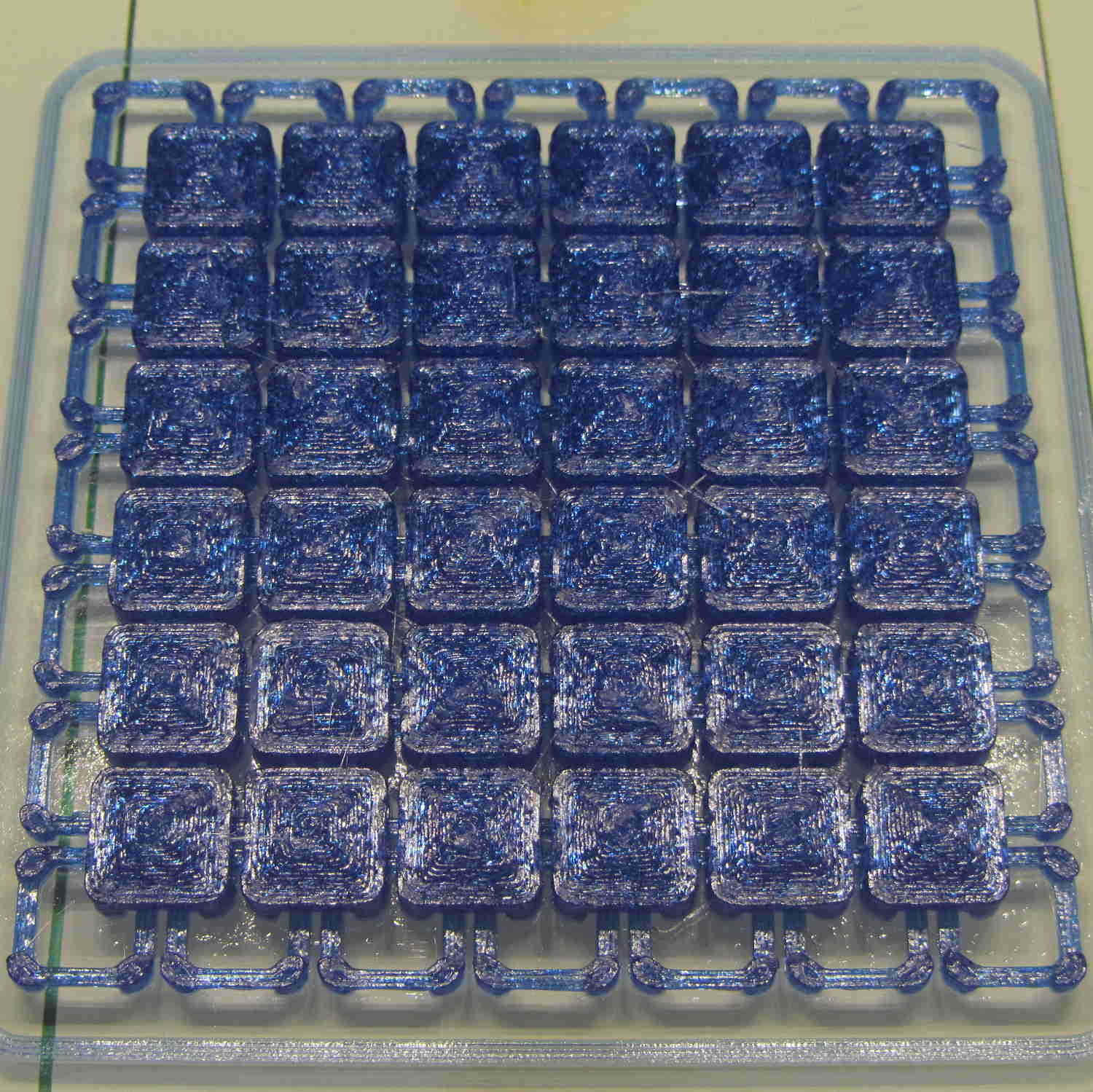
    I ran off a few patches of miniature chain mail for holiday handouts to a few folks who’d appreciate them:

    Chain Mail Armor - 6x6 9.6 mm - top view
    Chain Mail Armor – 6×6 9.6 mm – top view

    A little patch like that makes a fondletoy that’s easier to pocket than, say, a planetary gear bearing and should be robust enough to withstand quite a bit of abuse.

    Alas, it turned out that recent Slic3r development versions suffered a bridging regression. The stable 1.2.9 version does the right thing:

    Slic3r 1.2.9 - good bridging
    Slic3r 1.2.9 – good bridging

    The hot-from-Github version goes diagonally, producing a pattern like an internal layer that normally sits atop the (omitted) bridge layer:

    Slic3r 7c8b710 - diagonal bridging
    Slic3r 7c8b710 – diagonal bridging

    While that might barely work, the little bitty link bars will certainly fall into the abyss:

    Slic3r 7c8b710 - diagonal bridging on links
    Slic3r 7c8b710 – diagonal bridging on links

    Given the complexity of slicing algorithms, I definitely can’t track down the problem; using the stable version for a while should suffice.

    The OpenSCAD source code as a GitHub gist:

    // Chain Mail Armor Buttons
    // Ed Nisley KE4ZNU – December 2014
    Layout = "Build"; // Link Button LB Joiner Joiners Build PillarMod
    //——-
    //- Extrusion parameters must match reality!
    // Print with 1 shell and 2+2 solid layers
    ThreadThick = 0.25;
    ThreadWidth = 0.40;
    HoleWindage = 0.2;
    Protrusion = 0.1; // make holes end cleanly
    function IntegerMultiple(Size,Unit) = Unit * ceil(Size / Unit);
    //——-
    // Dimensions
    //- Set maximum sheet size
    SheetSizeX = 125; // 170 for full sheet on M2
    SheetSizeY = 125; // 230 …
    //- Diamond or rectangular sheet?
    Diamond = false; // true = rotate 45 degrees, false = 0 degrees for square
    BendAround = "X"; // X or Y = maximum flexibility *around* designated axis
    Cap = true; // true = build bridge layers over links
    CapThick = 4 * ThreadThick; // flat cap on link: >= 3 layers for solid bridging
    Armor = true && Cap; // true = build armor button atop (required) cap
    ArmorThick = IntegerMultiple(2.0,ThreadThick); // height above cap surface
    ArmorSides = 4;
    ArmorAngle = true ? 180/ArmorSides : 0; // true -> rotate half a side for best alignment
    //- Link bar sizes
    BarThick = 3 * ThreadThick;
    BarWidth = 3.3 * ThreadWidth;
    BarClearance = 3 * ThreadThick; // vertical clearance above & below bars
    VertexHack = false; // true to slightly reduce openings to avoid coincident vertices
    //- Compute link sizes from those values
    //- Absolute minimum base link: bar width + corner angle + build clearance around bars
    // rounded up to multiple of thread width to ensure clean filling
    BaseSide = IntegerMultiple((4*BarWidth + 2*BarWidth/sqrt(2) + 3*(2*ThreadWidth)),ThreadWidth);
    BaseHeight = 2*BarThick + BarClearance; // both bars + clearance
    echo(str("BaseSide: ",BaseSide," BaseHeight: ",BaseHeight));
    //echo(str(" Base elements: ",4*BarWidth,", ",2*BarWidth/sqrt(2),", ",3*(2*ThreadWidth)));
    //echo(str(" total: ",(4*BarWidth + 2*BarWidth/sqrt(2) + 3*(2*ThreadWidth))));
    BaseOutDiagonal = BaseSide*sqrt(2) – BarWidth;
    BaseInDiagonal = BaseSide*sqrt(2) – 2*(BarWidth/2 + BarWidth*sqrt(2));
    echo(str("Outside diagonal: ",BaseOutDiagonal));
    //- On-center distance measured along coordinate axis
    // the links are interlaced, so this is half of what you think it should be…
    LinkOC = BaseSide/2 + ThreadWidth;
    LinkSpacing = Diamond ? (sqrt(2)*LinkOC) : LinkOC;
    echo(str("Base spacing: ",LinkSpacing));
    //- Compute how many links fit in sheet
    MinLinksX = ceil((SheetSizeX – (Diamond ? BaseOutDiagonal : BaseSide)) / LinkSpacing);
    MinLinksY = ceil((SheetSizeY – (Diamond ? BaseOutDiagonal : BaseSide)) / LinkSpacing);
    echo(str("MinLinks X: ",MinLinksX," Y: ",MinLinksY));
    NumLinksX = ((0 == (MinLinksX % 2)) && !Diamond) ? MinLinksX + 1 : MinLinksX;
    NumLinksY = ((0 == (MinLinksY % 2) && !Diamond)) ? MinLinksY + 1 : MinLinksY;
    echo(str("Links X: ",NumLinksX," Y: ",NumLinksY));
    //- Armor button base
    ButtonHeight = BaseHeight + BarClearance + CapThick;
    echo(str("ButtonHeight: ",ButtonHeight));
    //- Armor ornament size & shape
    // Fine-tune OD & ID to suit the number of sides…
    TotalHeight = ButtonHeight + ArmorThick;
    echo(str("Overall Armor Height: ",TotalHeight));
    ArmorOD = 1.0 * BaseSide; // tune for best base fit
    ArmorID = 10 * ThreadWidth; // make the tip blunt & strong
    //——-
    module ShowPegGrid(Space = 10.0,Size = 1.0) {
    RangeX = floor(95 / Space);
    RangeY = floor(125 / Space);
    for (x=[-RangeX:RangeX])
    for (y=[-RangeY:RangeY])
    translate([x*Space,y*Space,Size/2])
    %cube(Size,center=true);
    }
    //——-
    // Create link with armor button as needed
    module Link(Topping = false) {
    LinkHeight = (Topping && Cap) ? ButtonHeight : BaseHeight;
    render(convexity=3)
    rotate((BendAround == "X") ? 90 : 0)
    rotate(Diamond ? 45 : 0)
    union() {
    difference() {
    translate([0,0,LinkHeight/2]) // outside shape
    intersection() {
    cube([BaseSide,BaseSide,LinkHeight],center=true);
    rotate(45)
    cube([BaseOutDiagonal,BaseOutDiagonal,(LinkHeight + 2*Protrusion)],center=true);
    }
    translate([0,0,(BaseHeight + BarClearance + 0*ThreadThick – Protrusion)/2])
    intersection() { // inside shape
    cube([(BaseSide – 2*BarWidth),
    (BaseSide – 2*BarWidth),
    (BaseHeight + BarClearance + 0*ThreadThick + (VertexHack ? Protrusion/2 : 0))],
    center=true);
    rotate(45)
    cube([BaseInDiagonal,
    BaseInDiagonal,
    (BaseHeight + BarClearance + 0*ThreadThick + (VertexHack ? Protrusion/2 : 0))],
    center=true);
    }
    translate([0,0,((BarThick + 2*BarClearance)/2 + BarThick)]) // openings for bars
    cube([(BaseSide – 2*BarWidth – 2*BarWidth/sqrt(2) – (VertexHack ? Protrusion/2 : 0)),
    (2*BaseSide),
    BarThick + 2*BarClearance – Protrusion],
    center=true);
    translate([0,0,(BaseHeight/2 – BarThick)])
    cube([(2*BaseSide),
    (BaseSide – 2*BarWidth – 2*BarWidth/sqrt(2) – (VertexHack ? Protrusion/2 : 0)),
    BaseHeight],
    center=true);
    }
    if (Topping && Armor)
    translate([0,0,(ButtonHeight – Protrusion)]) // sink slightly into the cap
    rotate(ArmorAngle)
    cylinder(d1=ArmorOD,d2=ArmorID,h=(ArmorThick + Protrusion), $fn=ArmorSides);
    }
    }
    //——-
    // Create split buttons to join sheets
    module Joiner() {
    translate([-LinkSpacing,0,0])
    difference() {
    Link(false);
    translate([0,0,BarThick + BarClearance + TotalHeight/2 – Protrusion])
    cube([2*LinkSpacing,2*LinkSpacing,TotalHeight],center=true);
    }
    translate([LinkSpacing,0,0])
    intersection() {
    translate([0,0,-(BarThick + BarClearance)])
    Link(true);
    translate([0,0,TotalHeight/2])
    cube([2*LinkSpacing,2*LinkSpacing,TotalHeight],center=true);
    }
    }
    //——-
    // Build it!
    //ShowPegGrid();
    if (Layout == "Link") {
    Link(false);
    }
    if (Layout == "Button") {
    Link(true);
    }
    if (Layout == "LB") {
    color("Brown") Link(true);
    translate([LinkSpacing,LinkSpacing,0])
    color("Orange") Link(false);
    }
    if (Layout == "Build")
    for (ix = [0:(NumLinksX – 1)],
    iy = [0:(NumLinksY – 1)]) {
    x = (ix – (NumLinksX – 1)/2)*LinkSpacing;
    y = (iy – (NumLinksY – 1)/2)*LinkSpacing;
    translate([x,y,0])
    color([(ix/(NumLinksX – 1)),(iy/(NumLinksY – 1)),1.0])
    if (Diamond)
    Link((ix + iy) % 2); // armor at odd,odd & even,even points
    else
    if ((iy % 2) && (ix % 2)) // armor at odd,odd points
    Link(true);
    else if (!(iy % 2) && !(ix % 2)) // connectors at even,even points
    Link(false);
    }
    if (Layout == "Joiner")
    Joiner();
    if (Layout == "Joiners") {
    NumJoiners = max(MinLinksX,MinLinksY)/2;
    for (iy = [0:(NumJoiners – 1)]) {
    y = (iy – (NumJoiners – 1)/2)*2*LinkSpacing + LinkSpacing/2;
    translate([0,y,0])
    color([0.5,(iy/(NumJoiners – 1)),1.0])
    Joiner();
    }
    }
    if (Layout == "PillarMod") // Slic3r modification volume to eliminate pillar infill
    translate([0,0,(BaseHeight + BarClearance)/2])
    cube([1.5*SheetSizeX,1.5*SheetSizeY,BaseHeight + BarClearance],center=true);
  • Sienna Hood Rod Pivot: Failure Analysis

    Our Larval Engineer returned the remaining chunk of the failed PLA hood rod pivot from “her” Sienna minivan:

    Sienna hood rod pivot - PLA fracture
    Sienna hood rod pivot – PLA fracture

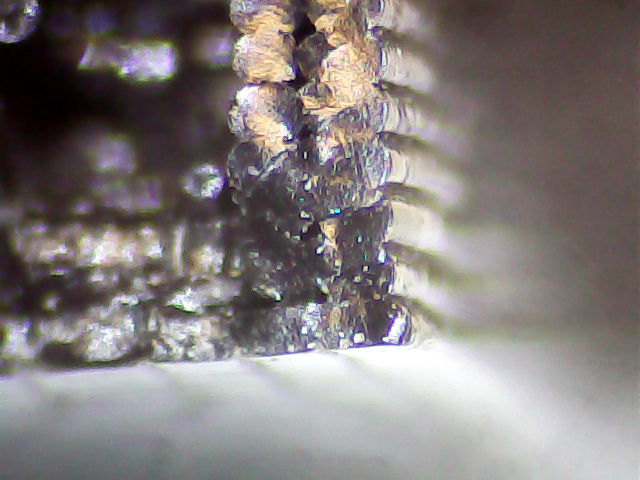
    A closer look at the top surface (facing you in the picture above) shows the threads didn’t fuse into a solid mass across the entire object:

    Sienna Hood Pivot - PLA fracture - top
    Sienna Hood Pivot – PLA fracture – top

    The darker region in the middle comes from the infill pattern, which should have air gaps.

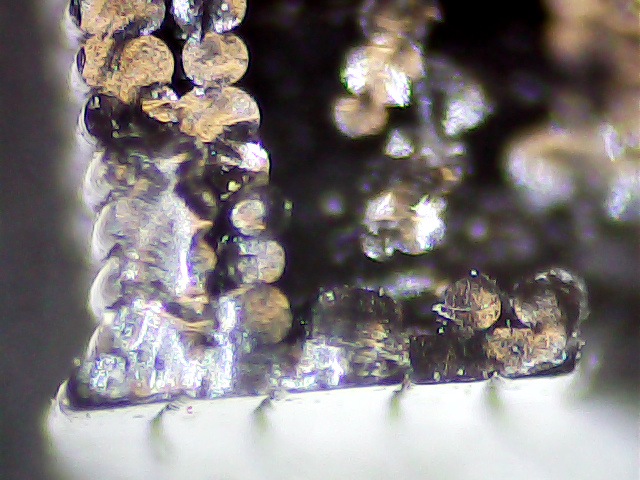
    The bottom surface (on the platform during printing) shows how the threads spread out when the nozzle is closer to the platform than the layer thickness:

    Sienna Hood Pivot - PLA fracture - bottom right
    Sienna Hood Pivot – PLA fracture – bottom right

    That’s more pronounced on the other side of the pivot:

    Sienna Hood Pivot - PLA fracture - bottom left 1
    Sienna Hood Pivot – PLA fracture – bottom left 1

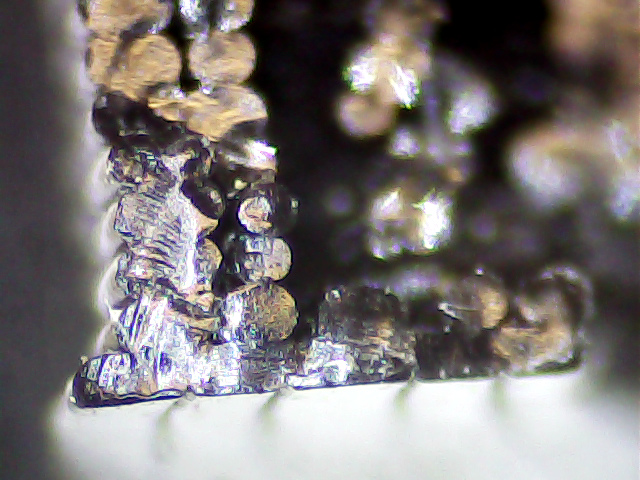
    The infill looks like a separate wall inside the two perimeter threads. That’s pretty much what you get in the space between two close-set walls: there’s not enough room for the full infill pattern.

    A slightly different focus plane shows the mashed bottom layer, infill sitting atop the bottom layer, and fused perimeter threads:

    Sienna Hood Pivot - PLA fracture - bottom left 2
    Sienna Hood Pivot – PLA fracture – bottom left 2

    Because 3D printing doesn’t (and really can’t) produce a solid block of plastic, the object will fail much more readily than an injection-molded part. The threads in the most highly stressed section fail first, after which the remainder will just rip apart. In this case, the hood rod provides a huge lever that easily overstresses the plastic; I’m surprised the original part lasted as long as it did.

    We all knew PLA wasn’t the right material for the job, right from the start, so we’ll see how the enlarged PETG version works in the field.

  • Chip-on-board LED Desk Lamp Retrofit

    After the 5 mm white LEDs failed on the original desk lamp rebuild, I picked up some chip-on-board LED lamps from the usual eBay supplier:

    COB LED Desk Lamp - bottom
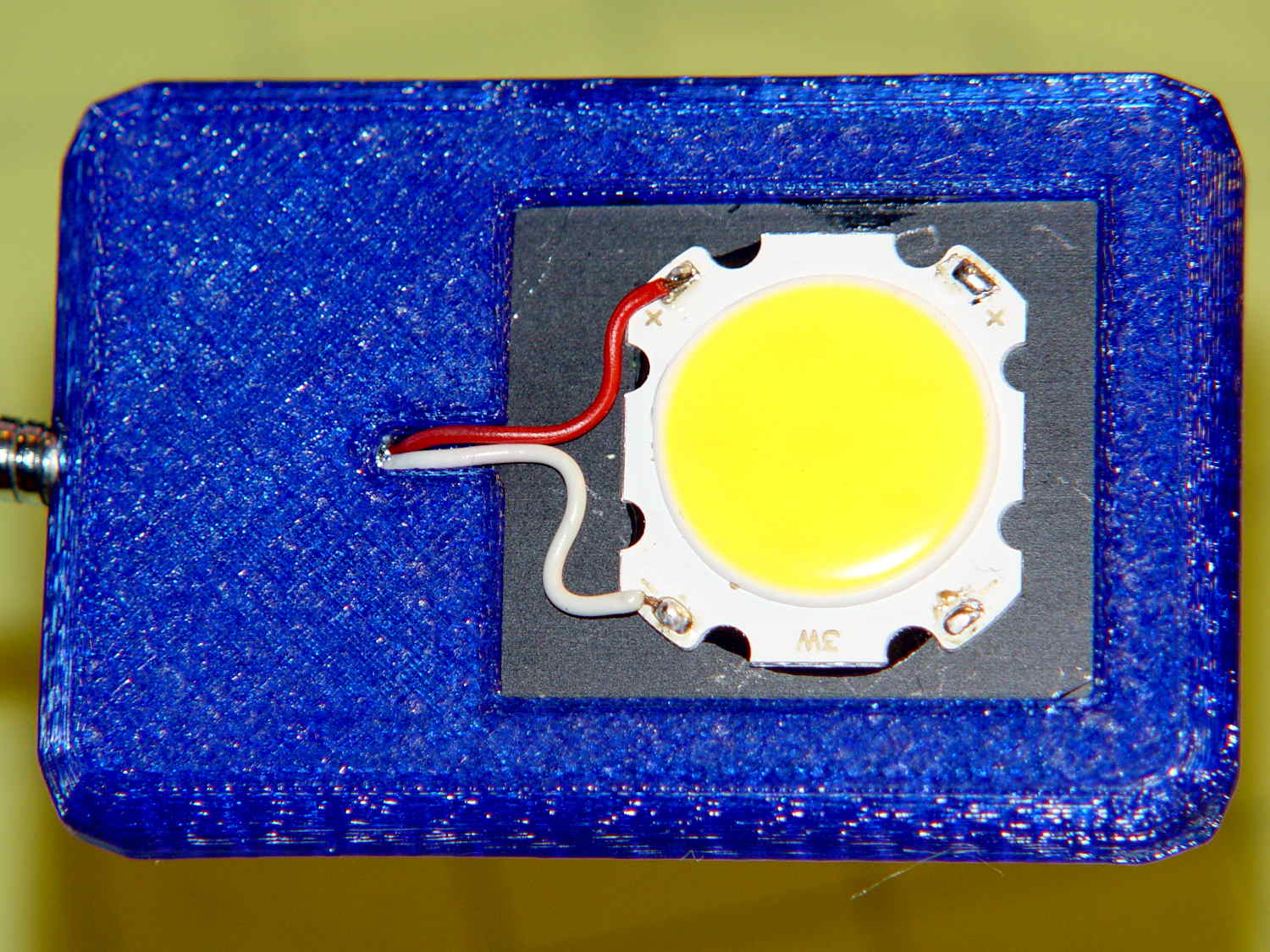
    COB LED Desk Lamp – bottom

    The LED’s aluminum baseplate (perhaps there’s an actual “board” inside the yellow silicone fill) is firmly epoxied to a small heatsink from the Big Box o’ Heatsinks, chosen on the basis of being the right size and not being too battered.

    The rather limited specs say the LED supply voltage can range from 9 to 12 V, suggesting a bit of slack, with a maximum dissipation of 3 W, which definitely requires a heatsink.

    The First Light test looked promising:

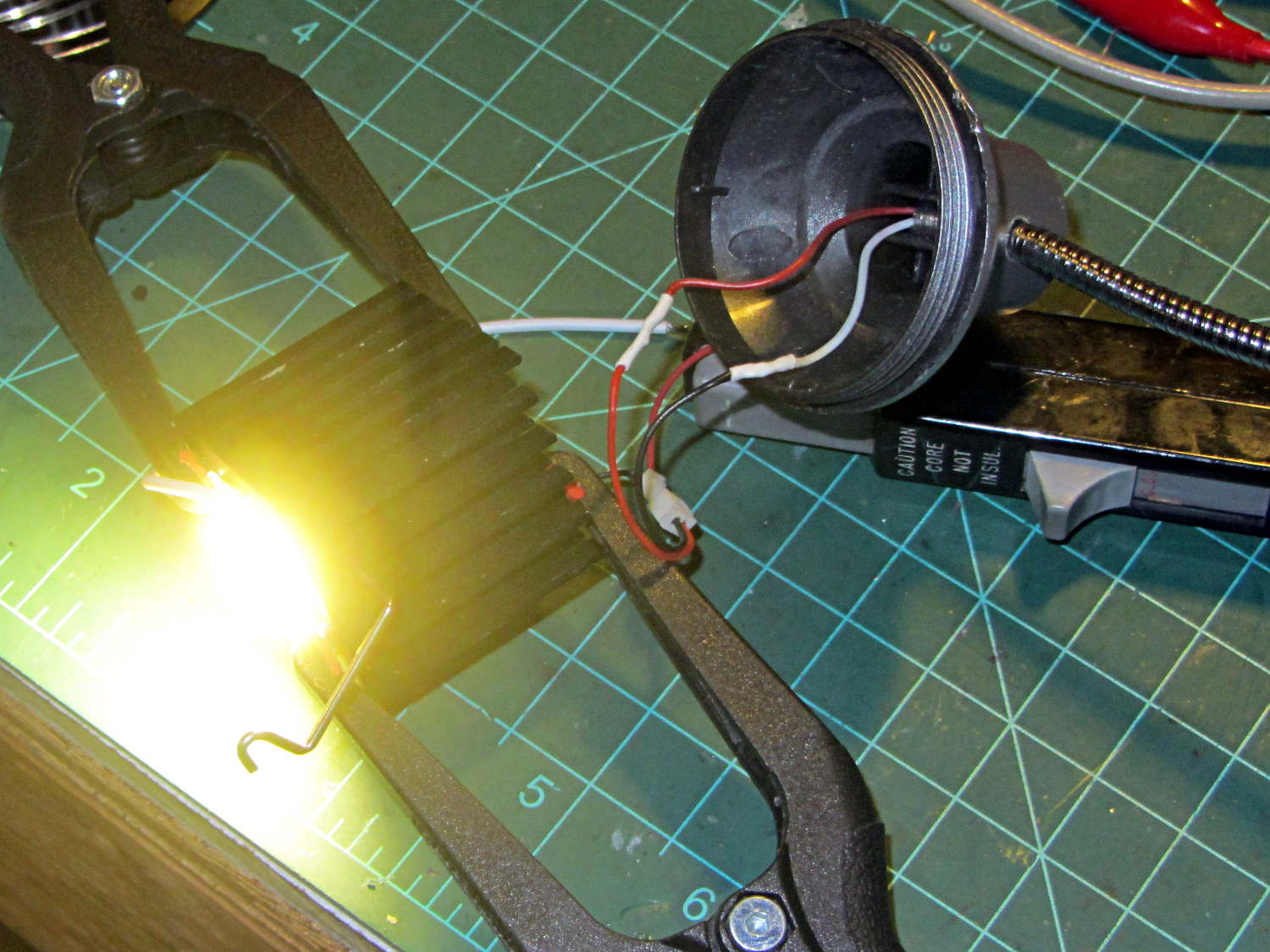
     COB LED Desk Lamp - first light
    COB LED Desk Lamp – first light

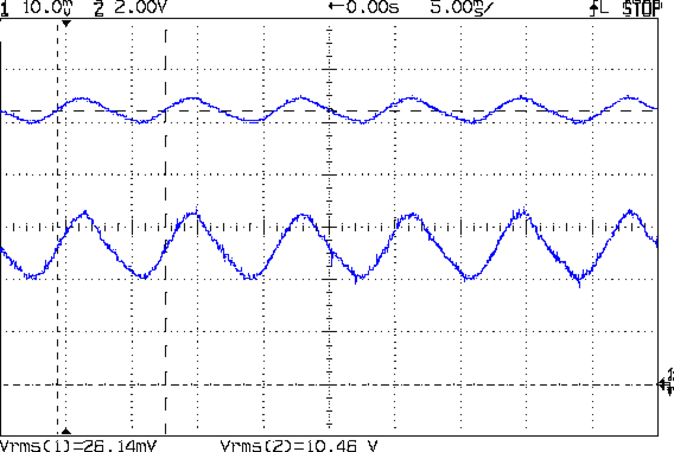
    That’s driven from the same 12 VDC 200 mA wall wart that I used for the failed ring light version. Measuring the results shows that the supply now runs at the ragged edge of its current rating, with the output voltage around 10.5 V with plenty of ripple:

    COB LED V I 100ma div
    COB LED V I 100ma div

    The 260 mA current (bottom, trace 1 at 100 mA/div) varies from 200 to 300 mA as the voltage (top, trace 2 at 2 V/div) varies between 10 V and a bit under 11 V. If you believe the RMS values, it’s dissipating 2.7 W and the heatsink runs at a pleasant 105 °F in an ordinary room. The wall wart gets about as warm as you’d expect; it contains an old heavy-iron transformer and rectifier, not a trendy switcher.

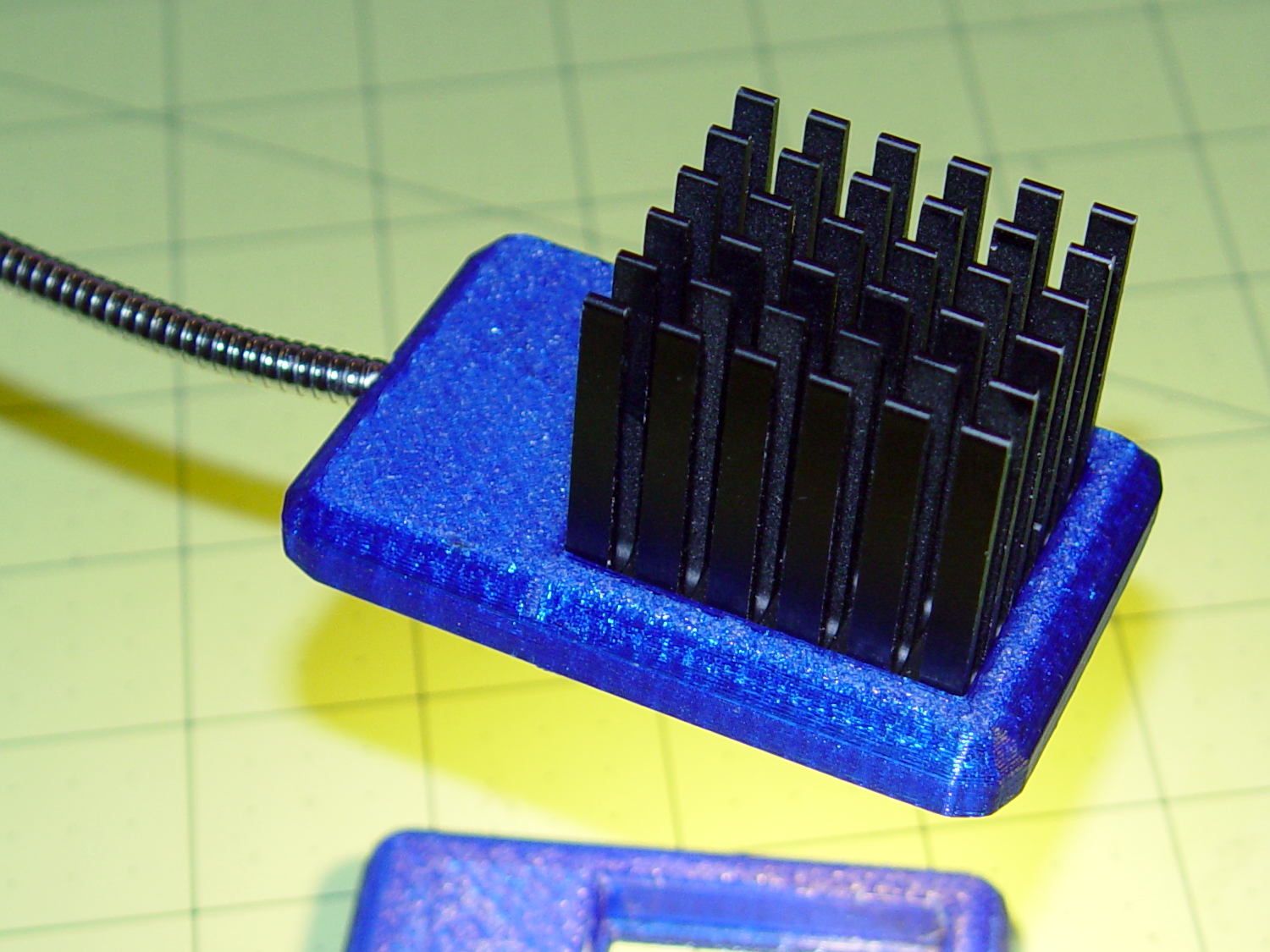
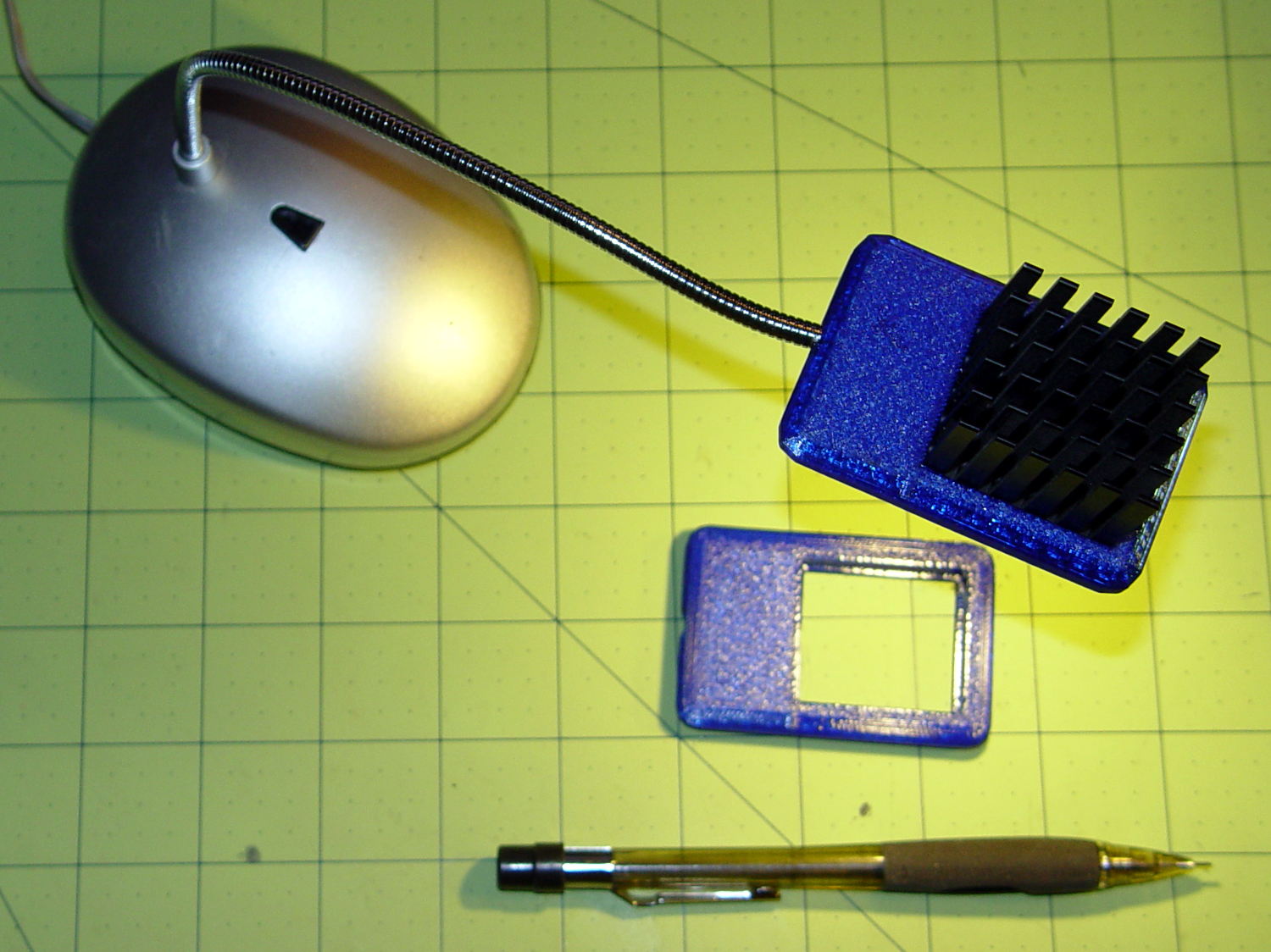
    The heatsink mount looks nice, in a geeky way:

    COB LED Desk Lamp - side detail
    COB LED Desk Lamp – side detail

    The left side must be that long to anchor the gooseneck; I thought about tapering the slab a bit, but, really, it’s OK the way it is. Dabs of epoxy hold the gooseneck and heatsink in place.

    The heatsink rests on a small ledge at the bottom of the slab that’s as tall as the COB LED is thick, with a wire channel from the gooseneck socket:

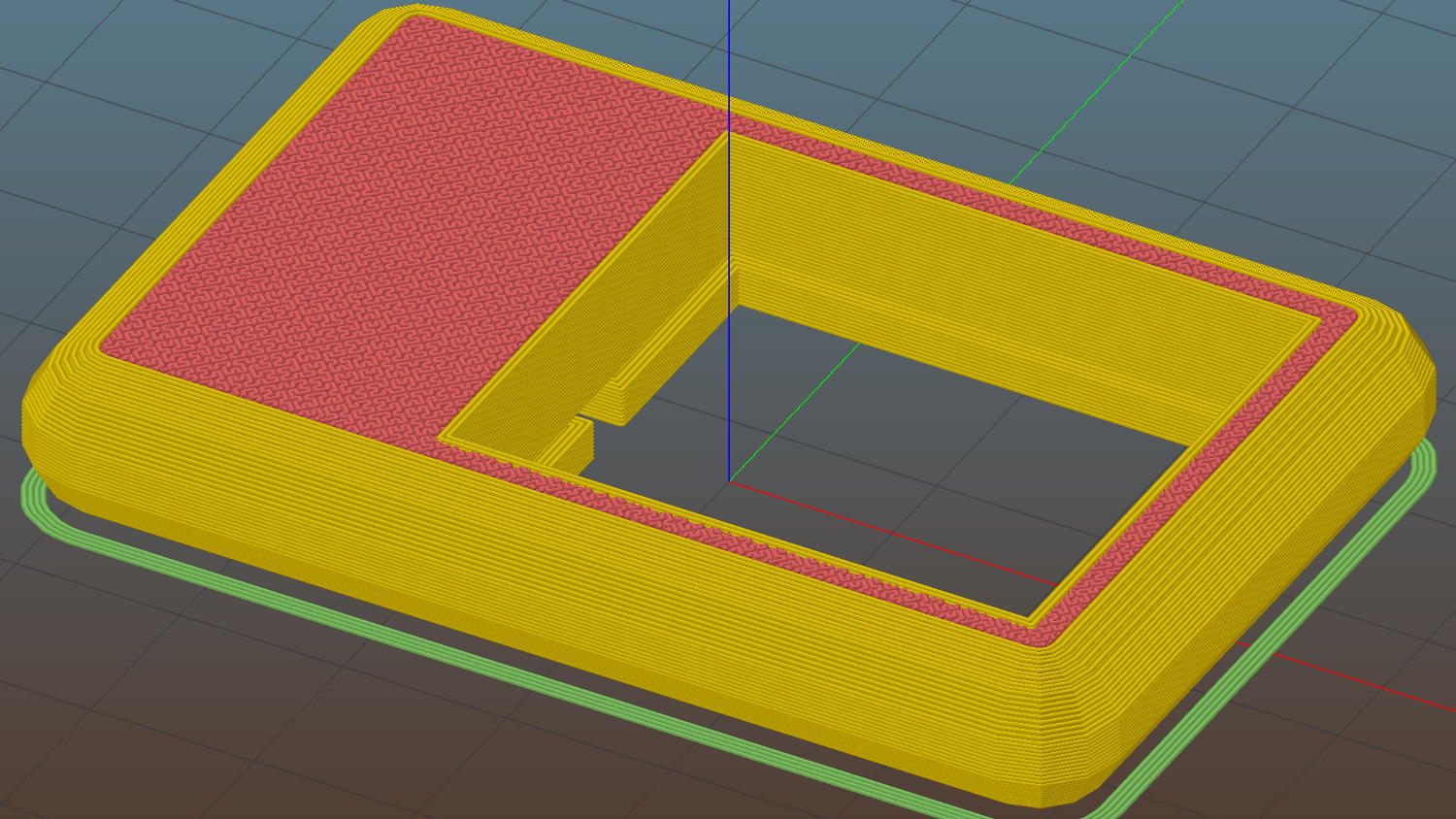
    COB LED Heatsink mount - Slic3r
    COB LED Heatsink mount – Slic3r

    The Hilbert Curve infill on the top produces a textured finish; I’m a sucker for that pattern.

    The old lamp base isn’t particularly stylin’, but the new head lights up my desk below the big monitors without any glare:

    COB LED Desk Lamp - overview
    COB LED Desk Lamp – overview

    Now, let’s see how long this one lasts…

    The OpenSCAD source code as a Github gist:

    // Chip-on-board LED light heatsink mount for desk lamp
    // Ed Nisley KE4ZNU December 2015
    Layout = "Show"; // Show Build
    //- Extrusion parameters must match reality!
    ThreadThick = 0.25;
    ThreadWidth = 0.40;
    HoleWindage = 0.2;
    Protrusion = 0.1; // make holes end cleanly
    inch = 25.4;
    function IntegerMultiple(Size,Unit) = Unit * ceil(Size / Unit);
    //———————-
    // Dimensions
    ID = 0; // for round things
    OD = 1;
    LENGTH = 2;
    Gooseneck = [3.0,5.0,15.0]; // anchor for end of gooseneck
    COB = [25.0,23.0,2.5]; // Chip-on-board LED module
    Heatsink = [35.5,31.5,4.0]; // height is solid base bottom
    HSWire = [23.0,28.0,53.3]; // anchor width OC, width OAL, length OC
    HSWireDia = 1.4;
    HSLip = 1.0; // width of lip under heatsink
    BaseMargin = 2*2*ThreadWidth;
    BaseRadius = Gooseneck[OD]; // 2 x gooseneck = enough anchor, sets slab thickness
    BaseSides = 2*4;
    Base = [(Gooseneck[LENGTH] + Gooseneck[OD] + Heatsink[0] + 2*BaseRadius + BaseMargin),
    (Heatsink[1] + 2*BaseRadius + 2*BaseMargin),
    2*BaseRadius];
    //———————-
    // Useful routines
    module PolyCyl(Dia,Height,ForceSides=0) { // based on nophead's polyholes
    Sides = (ForceSides != 0) ? ForceSides : (ceil(Dia) + 2);
    FixDia = Dia / cos(180/Sides);
    cylinder(r=(FixDia + HoleWindage)/2,
    h=Height,
    $fn=Sides);
    }
    //– Lamp heatsink mount
    module Lamp() {
    difference() {
    translate([(Base[0]/2 – BaseRadius – Gooseneck[LENGTH]),0,0])
    hull()
    for (i=[-1,1], j=[-1,1])
    translate([i*(Base[0]/2 – BaseRadius),j*(Base[1]/2 – BaseRadius),Base[2]/2])
    sphere(r=BaseRadius/cos(180/BaseSides),$fn=BaseSides);
    translate([(Heatsink[0]/2 + Gooseneck[OD]),0,Heatsink[2] + COB[2]]) // main heatsink recess
    scale([1,1,2])
    cube((Heatsink + [HoleWindage,HoleWindage,0.0]),center=true);
    translate([(Heatsink[0]/2 + Gooseneck[OD]),0,Heatsink[2] – Protrusion]) // lower lip to shade lamp module
    scale([1,1,2])
    cube(Heatsink – [2*HSLip,2*HSLip,0],center=true);
    translate([0,0,Base[2]/2]) // goooseneck insertion
    rotate([0,-90,0]) rotate(180/8)
    PolyCyl(Gooseneck[OD],Base[0],8);
    translate([0,0,Base[2]/2 + Gooseneck[ID]/2]) // wire exit
    rotate([180,0,0])
    PolyCyl(Gooseneck[ID],Base[2],6);
    translate([Gooseneck[OD],0,(COB[2] – Protrusion)/2]) // wire slot
    rotate([180,0,0])
    cube([2*Gooseneck[OD],Gooseneck[ID],(COB[2] + Protrusion)],center=true);
    }
    }
    //———————-
    // Build it
    if (Layout == "Show") {
    Lamp();
    }
    if (Layout == "Build") {
    }